Beta software is traditionally unstable. However, when an Android Beta hits platform stability, most of the bugs with third-party apps have been exterminated by developers and no changes are expected with these apps making them less likely to malfunction. But other things can go wrong. With Android 14 Beta 3, many Pixel users lost the ability to access the share sheet to share content with other devices. This has left those affected frustrated especially when Android 14 Beta 3.1 didn’t fix this problem.
But there is a third-party app available for free from the Google Play Store that will give you the ability to share content. Called Sharedr, it will allow those subscribed to the Android 14 Beta program to access a share sheet once again. Since I’ve been unable to do much sharing on my Pixel 6 Pro ever since installing Android 14 Beta 3 (and after installing Beta 3.1), I installed the app and found it to be exactly what the doctor ordered. Every time I tapped on the share icon, the app’s share sheet was made available.
The app doesn’t collect any personal data and there are no in-app payments required or ads to view. So far, it remains a secret with only more than 50,000 installs although I suspect that this number might rise in the days ahead. After all, this isn’t an Android app that most people running a stable version of the operating system would normally install. After over 1,000 reviews, the app has a 4.3 rating out of a possible 5.
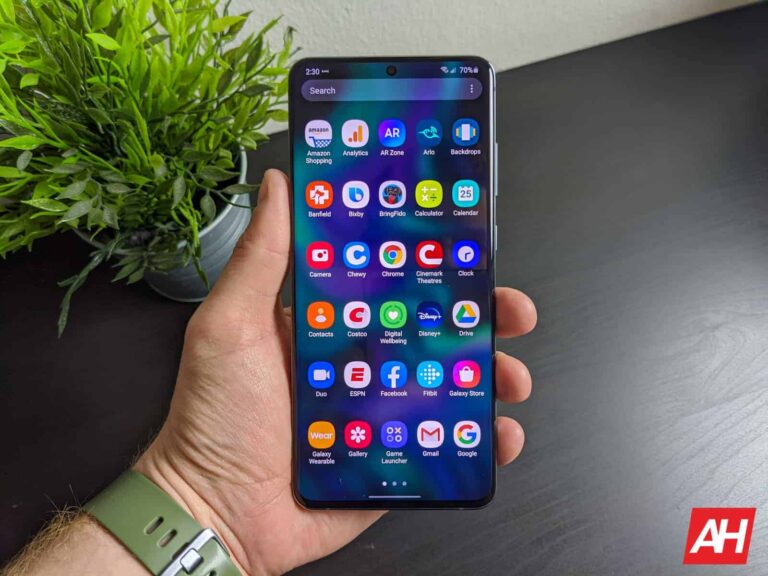
The share sheet from the Sharedr app
Keep in mind that not every Pixel model and Pixel user running the Android 14 Beta has had issues with the share sheet. And some have found that performing a factory reset (backing up their data first) has not only eliminated the problem with sharing content, but it has also made their phone run better. Still, if you want to avoid having to wipe your phone, and the share sheet is the main problem you have with Android 14 Beta 3.1, installing the Sharedr app is the easiest thing you can do to fix the problem.
To install Sharedr, tap on this link which will take you to the Google Play Store. Do not pass Go, and do not collect $200; simply install the app. The share sheet that comes with the app is in alphabetical order and you will have to slide your finger up on the sheet to see all of the options that you have.
After the review of the original Pulsefire Haste back in 2021 we were very pleased with the build quality and its simplistic feature set, and we’re back with a review of its follow-up, the Pulsefire Haste 2.
With the original mouse, one of its strongest features was that it was a lightweight mouse with not a lot of extras. It wasn’t trying to be a jack of all trades. It was simply focused on doing a couple of things really well. For the most part, that was giving the user a gaming mouse that can easily be dragged across the mat at higher speeds because it wasn’t a weighty piece of plastic.
The Pulsefire Haste 2 takes what made the original such a good option and improves upon it. So much so that I feel comfortable saying this is the best FPS mouse out there. It doesn’t cost an arm and a leg, it’s well-built, and you get all you need if all you want is to play games and dominate. Now I’m not saying this is going to make you a better gamer. I am however saying that this is the right tool for the job, and that job is gaming.
The Pulsefire Haste 2 gets a makeover for the better
The design of the original mouse from 2021 is just fine. But I’ve never personally been crazy about the open slotted pattern. It just feels like a dust magnet and I want less things to clean not more. That being said, I was excited to see that HyperX was changing that about the Pulsefire Haste 2.
It’s a no frills design that isn’t trying to rope you in with flashy looks. And that sleeper style is precisely the kind of change I was hoping for. Just a great gaming mouse that doesn’t need to look over the top.
And the best part is the Pulsefire Haste 2 still looks good. The design is simple, sure. But it’s also elegant. And surprisingly more comfortable to use than the original Pulsefire. I will admit, it’s tough for me to move to any new mouse that isn’t in the Razer Naga line. I’ve just been using a Naga as my main gaming mouse for so long that almost everything else feels a little foreign. I play a lot of MMOs, so it’s always been the right fit. Despite there being lots of other good gaming mice out there. But the Pulsefire Haste 2 has been really comfortable and easy to get used to for FPS titles.
Delivering long-lasting comfort that didn’t dwindle away even after gripping it for hours. And with just six buttons, there’s not a lot for you to worry about stretching your fingers to press.
It’s a mouse you can use to play games all day and not get tired of it. Now it should be said that I don’t have exceptionally large hands. They’re not tiny, but they’re not massive either. If you have big hands, this might not work as well for you, and you may want to go for something with a wider profile. Unless you’re comfortable with holding a mouse using claw grip in which case it should be fine.
The specs
The most important spec is undeniably the weight. At just 53g, the Pulsefire Haste 2 hones in on moving as fast as possible across the mat. Quick flicks feel effortless when you have a mouse that doesn’t feel like you’re dragging a rock from side to side. It also helps that the mouse comes with skates on the bottom that are incredibly low friction. And should you need them, there’s replacement PTFE feet in the box along with some grip tape for extra grippyness. I didn’t use the grip tape but it’s there if you like it on your mice.
Though it’s just as important to have a mouse mat that doesn’t increase friction. Aside from the weight, the mouse features a cable that’s 5.9 feet long which is more than enough for most setups. It’s also made of a paracord material that is supposed to cut down on potential cable snags and so far it feels like it lives up to that claim.
Of course, the mouse is really only as good as the buttons on it that you’ll need to use for all your gaming needs, and those are only as good as the switches underneath. HyperX rates these at 100 million clicks. While I don’t think I’ll ever reach that limit, they do feel durable and they have a nice satisfying tactile feedback.
Additionally, the mouse has a maximum dpi of 26,000 paired with an 8,000Hz polling rate. So it’s wired (get it? ha.) for super fast inputs which might just be that clutch moment for you in a game. It’s definitely something that’s tailored to more competitive gamers and professional esports players. But it’s nice to know it’s there if you ever decide you want to try and compete at a higher level with some practice.
No onboard profile storage is a shame
It’s not the end of the world, but it would be nice to see the capability to store personal profiles for games on the mouse. That way if you ever take it with you somewhere and you don’t have your rig with you, you’ve still got the capability to play with your preferred settings without having to reconfigure stuff on a new rig.
I do get it though. HyperX may have not included this because doing so might have required components that would add to the weight. And if HyperX was going for a lighter weight here, then adding features that add to it just seems counterproductive.
It’s also worth considering that this doesn’t impact me particularly heavily. I normally game on PC from my own desktop and if I do play away from home, I have a laptop for that. On rare occasions though, neither of those are an option and I have to use someone’s spare rig. And this is where the onboard storage for profiles would be useful. And I imagine there are many more people who play games that are in this exact situation much more often than myself.
So it’s just something to think about if you play games on rigs that aren’t your own a lot. I wouldn’t say it’s a deal breaker. At least not for me. But it might be for you. And if that’s the case there are plenty of options for a gaming mouse. But if this matters very little to you, then don’t let the lack of onboard profile storage deter you from the Pulsefire Haste 2. Because it’s excellent for FPS games.
Wired vs wireless
HyperX sent us the wired version in White which is probably the best possible option for anyone looking at a gaming mouse that’s ultra lightweight. The wireless mice are great for having less clutter. But they do weigh more and that could be bad for your performance.
I’m not saying it will be, but it can be. Personally, I prefer a wireless gaming mouse. I like the cleaner look of my PC setup and I don’t play at a high enough level often enough to care about shaving off the extra weight.
But I do see the appeal here and I did notice that in my time using the Pulsefire Haste 2 wired model, I was able to flick the mouse around faster and more effortlessly. That being said, HyperX does offer a wireless model of this mouse. I think which one you go with depends on what you’re really after. Do you want something that’s cable free and offers less clutter? Well you can have that at the expense of the weight.
But if you don’t mind another cable sitting around, the wired model is the better option. And I think this is likely to be the case for most people that want a mouse specifically for more competitive play. There’s also the fact that you don’t have to worry about as much latency. Because the mouse is plugged directly into your PC.
The Ngenuity software is easy to use
Part of this comes down to the basic setup. The software, like the mouse itself, isn’t packed with unnecessary stuff. When you plug the mouse in and load up the software, you have a segment for your connected products to the left. Once you click on the mouse, you’ve got three different sections you can adjust.
The lights, the buttons, and the sensor. Let’s start with the lights. This mouse has one single RGB center. The scroll wheel. With that being the case, there’s not a whole lot to change here. There’s the color, opacity, and speed. There is also an effect option with just a few choices, including cycle, breathing, and static. However, you can expand on those lighting effects with the Lightsync menu in the software to get effects like confetti, sun, and twilight. Worth noting though is that these aren’t specific to the mouse and should be applicable to other HyperX devices with RGB.
Outside of lighting, the software lets you remap the buttons if you don’t like what the default settings are. I didn’t find the need to change any of this but reassigning the keys with the software looks simple enough. Lastly you can adjust the dpi of the sensor. There are two ways to do this. You can either type in the number you want or use a slider bar and drag it to the desired value. Both are easy to use. There’s also four different levels you can set which makes it easy to swap between them at a moment’s notice using the dedicated button that sits behind the scroll wheel.
And you can even add a specified color to each dpi level so you know which one you’re on if you happen to accidentally swap it. All-in-all the software is perfectly fine. User-friendly, simple, and straight to the point. So no complaints here. Plus, Ngenuity isn’t constantly bugging you with new updates. A big plus in my book.
Should you buy the HyperX Pulsefire Haste 2 wired?
There’s a lot of reasons to get this mouse and some reasons not to. But before we get into all of that let’s recap. HyperX already made a great quality mouse with the original Pulsefire Haste. It wasn’t perfect but it was an excellent option for anyone wanting a gaming mouse that was easy to move around and provided fast flicks thanks to the weight.
HyperX improved on all the best features with its successor. From weight, to cable, to design and comfort. And it managed to do so while keeping the price reasonably low. While it’s unlikely to be my personal go-to for day-to-day gaming, simply because of the types of games I play, it’s an easy recommendation to anyone who primarily plays first-person or third-person shooters.
If you need more buttons, this isn’t the mouse for you. But luckily most shooters don’t have that many different abilities or actions you need to worry about. Making the Pulsefire Haste 2 more than viable. Is it the only option for a competitive gaming mouse? No. But I believe it’s the best option. You can pick up your own for $59.99 at Best Buy and other retailers.
Buy the HyperX Pulsefire Haste 2 wired if:
You want a lightweight gaming mouse
You need something that works with fast, high-level play
Hackers Attacks on Websites, the websites developed by a certain Korean company, have been the subject of assaults and have been used to spread malware.
A wide range of businesses, including those in the manufacturing, trade, electrical, electronics, education, construction, medical, and tourism industries, have websites made by this particular website creation company.
The compromised websites were used to communicate information taken using web shells and to propagate malware, among other functions.
According to AhnLab Security Emergency Response Centre (ASEC), the first spread occurred via an email attachment.
Specifics of the Attack
According to reports, the compromised system is linked to the task scheduler, enabling the breach to occur continually.
If infected, the threat actor connects to a web shell that resembles the command listed in the task scheduler using the regular process mshta to take remote control of the victim’s PC.
Task Scheduler Registration Script
Users may not be aware that they have been infected since the web shell URL used for remote control also utilizes the URL of a legitimate website that has already been compromised.
All domains used in this assault approach were verified to have been developed by the mentioned Korean website creation company.
“The web shell URL required for remote control also uses the URL of the normal website that had already been breached, so it is difficult for users to realize that they have been infected,” researchers explain.
The domains also had an admin page that was reachable from the outside on the same path.
It is believed that the threat actor used this page to upload their malware.
“The findings from this recent incident reveal that a vulnerable website development company was the primary target of this attack,” researchers said.
“It shows that the websites created by this company are susceptible to exploitation by the RedEyes (APT37) threat group’s targeted attack”.
Earlier, the malware had been spread through scripts that were added to the websites of organizations and companies and placed in banner advertisements.
Due to its security being less robust than the websites of organizations and businesses, the advertising firm was targeted in that event.
A possible danger of malware infection exists on websites developed by vulnerably sourced firms. For these reasons, it is essential to strengthen security precautions and carry out internal system audits.
Samsung is expecting foldable sales to jump significantly this year. The company has reportedly set an internal target to sell 1.3 times more foldable smartphones in 2023 than it did in 2022, which would be a 30% annual growth. The Korean behemoth discussed this target during the ongoing global strategy meetings of its senior executives. It is gearing up to launch the Galaxy Z Fold 5 and Galaxy Z Flip 5 next month.
“We have set the sales target for foldable devices this year at approximately 1.3 times higher than last year,” Twitter tipster @Tech_Reve quoted an unnamed person who participated in the meeting. The tipster added that Samsung’s internal assessment of the Galaxy Z Flip 5 has returned a “significant amount” of positive feedback. The improvements this year’s clamshell foldable brings over its predecessor should help in driving sales. Flip models have always sold in higher numbers than the Fold.
Samsung is eyeing big growth in foldable sales in 2023
Samsung has been the undisputed king of the foldable market so far. But that’s largely because it never faced stiff competition globally. Apart from China, the Korean firm has had a near-monopoly in this niche pretty much everywhere. That may not be the case this year, though. Most Chinese vendors are going global with their foldable phones in 2023, while Google is also entering this market.
However, Samsung is still eyeing big growth this year. In February, the company’s mobile chief said that its foldable sales will grow double digits in 2023, with total shipments crossing 15 million units. According to research firm Canalys, the Korean behemoth sold 12 million foldable devices in 2022. So that would mean about a 30% growth in foldable shipments this year. It has stuck to the target despite the economic uncertainties.
Samsung won’t be the only company selling more foldable phones this year, though. The market itself is estimated to double in 2023, reaching 30 million shipments globally. If the Korean company manages to achieve its target, then it would capture about 50% of the company. As many as nine brands are expected to compete for the remaining 50%, including Huawei, Honor, OPPO, Vivo, Tecno, Google, OnePlus, Motorola, and Xiaomi.
Notably, Samsung’s foldable market share would drop from 80% in 2022 to 50% in 2023. But that isn’t because of weaker demand for its products but because of growing competition. The upcoming Galaxy Z Fold 5 and Galaxy Z Flip 5 will bring a handful of upgrades over their respective predecessors, including a redesigned hinge. Time will tell whether they help Samsung hit its foldable sales target for 2023.
JMGO has just announced its latest addition to the N series, the N1. This is a new entry-level portable projector, which has a price of $999.99. That’s cheaper than the N1 Pro and N1 Ultra, as you’d expect.
This projector is a 1080p projector with a triple-color laser engine that is going to give you a really incredible picture. It is also pretty bright, at about 1200 ANSI Lumens. Which should make it good to use in a room with a significant amount of light.
The other, rather unique feature of this projector is the built-in Gimbal. This gimbal provides 127-degree vertical and 360-degree horizontal flexible adjustment of the projection angle. This projector will work on screen sizes from 60 to 150-inches, and with the gimbal included, you’ll get instant screen correction.
Powered by Android TV
Much like JMGO’s other projectors, they are using Android TV here for the software. That’s both good and bad news. The good news is that it is going to provide you with a ton of great apps, out of the box. The bad news is, no Netflix. Technically, you can sideload Netflix on this one, but it’s going to be the smartphone version, which is a real pain to use. So we would recommend plugging in your own streaming device – like a Chromecast with Google TV, Apple TV, Fire TV, etc – and that will solve the problem.
Finally, let’s talk about the audio. The N1 has Dynaudio HiFi Audio Experience, which is going to give you a really immersive HiFi sound, created by Dynaudio. So in this tiny little, portable projector, you’re actually going to get a pretty good sound experience.
Instagram introduced Reels in 2020, and since then, this feature’s popularity has grown, reaching over 2.35 billion monthly active users. Now, Instagram is rolling out a new feature for its users in the US.
As reported by TechCrunch, Adam Mosseri, CEO of Instagram, announced on his broadcast channel that the company will allow users to download Reels to their camera roll. The process is simple: just tap the share button and select the download option.
It’s important to note that only Reels from public accounts can be downloaded, and even if you have a public account, you can choose to turn off the Reel download option.
Mosseri did not mention whether the downloaded Reels would have watermarks, but based on the picture he uploaded, it is safe to assume that downloaded Reels will indeed bear watermarks, much like they do right now.
Image Credit– Adam Mosseri/Instagram
Currently, every Instagram user can download and share their own Reels on different platforms. However, with this new feature, users will also be able to share other people’s Reels on platforms like TikTok, for example.
TikTok has had this feature for years, and videos with the TikTok logo are now prevalent on various social platforms, contributing to the Chinese video-sharing app’s increasing popularity.
It’s worth noting that although videos with TikTok’s logo are no longer promoted by Instagram’s algorithms, their number on the platform remains substantial. With this new update, there is a chance for Instagram’s logo to appear frequently on its rival platforms as well.
While it is likely that this feature will eventually be available for users worldwide, the exact timeline for its global release remains unknown. We will have to wait and see when that happens.
Stealthy SMS Side-Channel Attack Exposed. When you send an SMS, delivery reports let you know if your message reached the recipient.
But here the most interesting thing is that they also have the potential to provide the location of the receiver.
Researchers have revealed that when you receive a silent SMS message, the sender can easily figure out where you are and it’s possible by looking at when you receive the messages.
The development of this covert SMS side-channel attack involved researchers from multiple colleges working together.
Here below we have mentioned the name researchers along with their colleges:-
Evangelos Bitsikas from Northeastern University
Theodor Schnitzler from Research Center Trustworthy Data Science and Security
Christina Pöpper from New York University Abu Dhabi
Aanjhan Ranganathan from Northeastern University
SMS Side-Channel Attack
By analyzing the message timing, a sender can guess the receiver’s location in multiple countries with around 96% accuracy.
This attack primarily focuses on exploiting the main vulnerabilities of the GSMA network, which powers SMS technology. Since this side-channel attack targets GSMA, so, most of the cell phone networks worldwide get covered.
Although there are other communication options like 3G and 4G, the researchers selected to study SMS, as it is widely used by the general public for 2G communication.
The researchers noticed that receiving SMS Delivery Reports after getting an SMS message activates a timing attack vulnerability.
The SMS Delivery Reports feature operates in a way that the recipient cannot prevent its misuse because they have no control over it.
The attacker’s ML model will give more accurate location predictions during the attack if they have precise information about their targets’ whereabouts.
By sending multiple SMS messages to the target, the attacker can collect the data.
To make them discreet, they can present them as marketing messages that the target would likely dismiss or deploy silent SMS messages.
When a silent SMS is sent, it appears as an empty message on the target device without triggering any notifications, but it is still acknowledged as received by the device’s SMSC.
The researchers sent sets of 20 silent SMS messages every hour using ADB for three days to various test devices located in:-
The United States
The United Arab Emirates
Seven European nations
Ten different operators were included in this experiment, which aimed to analyze a wide collection of communication technologies and variations based on different generations.
Network Delay Factors
Here below we have mentioned all the network delay factors:-
UE Processing
Propagation Delay
Routing Delay
Processing Delay
To perform this attack, the attacker only needs to know the victim’s cell phone number.
Although it takes time, an attacker can uncover a new or unknown location of their target by collecting and analyzing the timing patterns of the user.
While in this case, the time interval between sending and receiving an SMS message can be beneficial significantly.
Today, Amazon has its stunning Omni QLED Series 65-inch TV back on sale, and it’s down to its lowest price ever. Which we last saw in December of last year. So today, you can pick it up for just $599. That’s going to save you $200 off of its regular price, and there’s no promo codes, or coupons you need to clip to get this pice either.
If you want a larger size, the 75-inch Omni QLED TV is also on sale for $899, that’s going to save you $200 as well, ahead of Prime Day in July.
This QLED TV is running on Fire TV. So that means, inside this TV, you’re going to get access to all of your favorite apps. That includes Amazon Prime Video, Hulu, Netflix, YouTube TV and much more. There’s also Alexa support here, and that includes hands-free Alexa.
This TV comes with a few ports as well. There’s an ethernet port, a cable/antenna, USB, IR emitter, headphone, optical, two HDMI 2.0 ports and a HDMI 2.1 port available. So those with a PlayStation 5 or Xbox Series X, you’ll be able to use 4K120 with this TV. That’s definitely good news.
So this is a QLED TV from Amazon. Which is going to provide you with some really fantastic viewing angles and color reproduction. You won’t see a lot of grays where it should be black, since QLED is not backlit like an LED TV would be. While we’re talking about the display here, Amazon has also included Dolby Vision IQ. Which is going to look amazing on this large TV. There’s also support for HLG and HDR10 standards.
You can pick up the new Amazon 65-inch Omni QLED Fire TV today by clicking the link down below. This is likely a very limited stock sale, so you’ll want to be quick.
During the MWC 2023 event held early this year, the ZTE nubia Neovision Glass found its way to the stage. This pair of intelligent AR glasses took the internet by storm and also got lots of attention from netizens. After months of waiting, this product is now available for purchase as the company makes known its price and the regions where it will retail.
Unlike other smart glasses currently available for purchase, this option coming from nubia stands out. It is not only stylish, but also the first of its kind to grace the world of smart wearable devices. ZTE’s nubia division also boasts that this product can also be used during everyday activity thanks to its build and design style.
By simplifying the bulky design of most smart glasses out there, nubia achieved an easy-to-use product. From its specifications to its design, the new ZTE nubia Neovision Glass is unique. Let’s now have a look at what this pair of smart glasses from ZTE have to offer.
Details and pricing of the new ZTE nubia Neovision Glass
If you aren’t aware, nubia is a subdivision of ZTE’s business and they also produce smart devices. Most netizens might remember the brand because of its gaming smartphone line-up, the RedMagic series. Asides from manufacturing gaming smartphones and monitors, they also recently stepped into the smart AR glasses industry.
At MWC 2023 the brand launched its first pair of smart glasses, the Neovision and they became a hit. But, this product didn’t go on sale immediately after its launch. Some impressive features of this product include a 120-inch Micro-OLED screen for projection.
This projection is only visible to the one wearing smart AR glasses. It has a PPI of 3500, an HD resolution of 1080P on both lenses, 1800 nits of brightness, and a 43-degree viewing angle. The ZTE nubia Neovision Glass are also the world’s first smart AR glasses to launch with Hi-Res Audio Quality certification and TÜV Rheinlan certification.
These features ensure a great visual and audio experience for the user. Those who purchase this product can enjoy lossless sound quality thanks to the dual omnidirectional speakers. ZTE nubia also offers users a wide range of swappable magnetic lenses to rock this pair of smart AR glasses, and there’s even a privacy lens option.
Weighing in at just 79g, users won’t find it hard to wear this pair of smart AR glasses as they go about their daily activities. For its pricing, nubia is retailing this product at $529, and it is currently available for purchase in Europe, Asia, the Middle East, and South Africa. The ZTE nubia Neovision Glass is compatible with devices from ZTE, nubia, Xiaomi, Honor, Vivo, Huawei, Samsung, and Apple, just to mention a few. It’s also compatible with gaming consoles like the PS4, PS5, Xbox Series S/X, and the Nintendo Switch.
The development of cryptocurrency technology has resulted in a proliferation of cryptocurrency apps. Alongside the legitimate ones, there has been a troubling surge in fake apps designed to deceive users and unlawfully obtain their money, and one of those was able to bypass the App Store safety checks. Rafael Yakobi, a member of The Crypto Lawyers, a team of lawyers dedicated to helping developers, investors, and organizations with legal representation related to cryptocurrency technology, took to Twitter to warn users about a fake version of Trezor Suite Lite that managed to climb to the top of the App Store search results.
The fraudulent app goes by the name Trezor Wallet Suite, and Yakobi revealed that it had been available for weeks. This means that thousands of people might have unknowingly installed it and become victims of the scam.If you have recently installed a Trezor Wallet app, verifying whether it is legitimate Trezor Suite Lite or the fake Trezor Wallet Suite is crucial. The fake app has already been removed from the App Store.
In his tweet, Yakobi cautioned that the fake app prompts users to provide their seed phrases, granting the app’s operators access to all the victim’s cryptocurrency holdings. And as we can see from some comments on the tweet, this has already happened to at least one user.
Seed words or a seed phrase is a set of words necessary to recover Bitcoin funds “on-chain.” If someone knows these words, they can take control of the user’s Bitcoins. Therefore, Trezor advises users to never enter their seed words on a website and emphasizes the need to safeguard them.
The authentic, open-source wallet developed by Trezor appears in mobile app stores as Trezor Suite Lite. You should know that Trezor is a legitimate cryptocurrency wallet.However, how and why Apple failed to detect this scam remains unclear. Let’s hope that not many individuals have fallen victim to this scheme and lost their money, as in a case two years ago with a similar scam involving the Trezor name.