Reddit has been in the news a ton this week, literally a ton. And it’s all due to them deciding to charge for their API. Because of that, many of the biggest and most popular subreddits decided to go dark for 48 hours earlier this week. And a number of others decided to continue, indefinitely.
Initially, Reddit’s CEO had stated that this would pass. But now, it looks like they have another plan. Replacing the moderators on these more popular subreddits.
Here’s the full note from Reddit, that was sent to moderators:
If there are mods here who are willing to work towards reopening this community, we are willing to work with you to process a Top Mod Removal request or reorder the mod team to achieve this goal if mods higher up the list are hindering reopening. We would handle this request and any retaliation attempts here in this modmail chain immediately.
Our goal is to work with the existing mod team to find a path forward and make sure your subreddit is made available for the community which makes its home here. If you are not able or willing to reopen and maintain the community, please let us know.
More than 4,000 subreddits remain closed
Earlier this week, more than 8,000 subreddits went dark, to protest the changes that Reddit is making to third-party apps. And it’s not so much the changes, but the pricing for the API as well as how quickly developers need to implement these changes. Currently, more than 4,000 subreddits remain dark.
Apparently, moderators of subreddits going dark to protest the upcoming API price changes could be in violation of the Mod Code of Conduct that Reddit has. But keeping these subreddits dark is a big deal for Reddit. As r/Funny and r/Aww are still closed and these are the second and fifth most-subscribed to subreddits on Reddit. So losing all that traffic is not good for Reddit, and wanting to be profitable.
Generative AIs like ChatGPT and Google Bard have truly transformed the workflow in many industries. However, their impact on coding has been the most profound, with reportedly 92% of programmers incorporating various AI tools into their daily tasks and over 70% expressing that the integration of AI tools has significantly enhanced their work efficiency.
The study, conducted by GitHub, focused on American companies with over 1,000 employees and surveyed 500 enterprise developers, shedding light on the significant role AI tools play within the programming community. According to the findings, many employees stated that integrating AI coding tools into their workflow not only helped them adhere to performance standards but also allowed them to enhance code quality, accelerate output generation, and minimize production-level incidents.
“By boosting developer productivity, increasing their satisfaction, and empowering them to be their best every day, we can truly achieve innovation at scale,” said Inbal Shani, the Chief Product Officer at GitHub.
Removing repetitive tasks
It’s no secret that for anyone who has coded, having to do repetitive tasks is one of the most frustrating things ever. And this is where AIs shine, as by automating repetitive and mundane aspects of coding, developers can redirect their efforts towards tackling more complex challenges, resulting in improved efficiency and output. Moreover, these tools also help coders debug their programs efficiently, thus saving time and company resources.
While the benefits of using AIs in programming are evident, one potential concern that stems from the increased reliance on AI-generated code is the potential devaluation of human expertise. When discussing this issue, Mark Collier, the COO of OpenInfra Foundation, stated, “The Python community is grappling with code reviews of AI-generated code, often because it’s crap, and the person ‘contributing’ it can’t explain it because they didn’t write it.” Therefore, programmers will need to set boundaries when it comes to the usage of AI tools.
It has been discovered that threat actors might take over expired Amazon S3 buckets to serve rogue binaries without changing the actual modules.
Malicious binaries exfiltrate the stolen data to the hacked bucket after stealing the user names, passwords, local machine environment variables, and local hostname.
The attack was initially noticed when an npm package called bignum, which, until version 0.13.0, relied on an Amazon S3 bucket to download pre-built binary editions of an addon called node-pre-gyp during installation, was subjected to it.
According to reports shared by Checkmarx, attackers injected malicious binaries into the S3 bucket that served the binaries needed for the NPM package “bignum” without changing a single line of code.
“These binaries were published on a now-expired S3 bucket which has since been claimed by a malicious third party which is now serving binaries containing malware that exfiltrates data from the user’s computer”, according to a GitHub advisory posted on May 24, 2023.
What are “S3 Buckets”?
Large volumes of data may be stored and retrieved online using an S3 bucket, a storage capability offered by Amazon Web Services (AWS).
It is a scalable, secure object storage service that can store any kind of digital content, including files, documents, photos, and videos.
S3 buckets are frequently used for various purposes, including hosting websites, data backup and archiving, content distribution, and application data storage since they can be accessed using specific URLs.
Taking Control of an Abandoned S3 Bucket
An unknown attacker observed the abrupt abandonment of a previously operational AWS bucket. The attacker grabbed the abandoned bucket after spotting an opening.
As a result, each time Bignum was downloaded or reinstalled, users unintentionally downloaded the malicious binary file that the attacker had put in.
Every AWS S3 bucket needs a globally distinct name. The name becomes accessible after the bucket is removed. If a package used a bucket as its source, the bucket’s deletion would not affect the pointer.
Due to this anomaly, The attacker could reroute the pointer to the hijacked bucket.
“If a package pointed to a bucket as its source, the pointer would continue to exist even after the bucket’s deletion,” researchers said.
“This abnormality allowed the attacker to reroute the pointer toward the taken-over bucket.”
The bucket is hijacked by the attack
The malware sample’s ability to steal user credentials and environment information and transfer it to the same hijacked bucket was discovered through reverse engineering.
According to Checkmarx, several programs were using abandoned S3 buckets, rendering them vulnerable to the inventive attack vector. The finding shows, if anything, that threat actors are continually looking for new methods to infect the software supply chain.
The cyber security news learned that this new assault vector could have many effects. However, if an attacker gets to use it as soon as this type of alteration takes place, the threat it poses might be quite high.
Organizations or developers that use frozen versions or artifactories run a further danger since they will continue to access the original, now-hijacked bucket.
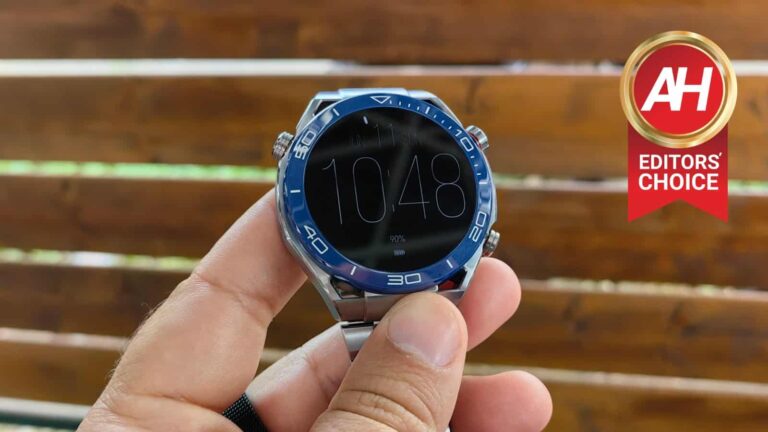
Huawei has been releasing smartwatches for quite some time now, and it has some truly compelling products on the market at the moment. The Huawei Watch GT 3 series and the Watch 4 are probably the best choices for most of you. If you, however, are an adventurer, and love to go diving at the same time, the company actually came up with a product for you. Its name is the Huawei Watch Ultimate, and we’re here to review it.
This device launches earlier this year, and we’ve had the chance to test it out over the last couple of weeks. In all honesty, we were unable to test out its halo feature, the 100m diving aspect. However, we’ll touch upon that a bit, and we’ll talk about many other aspects of this smartwatch. After all, this is a smartwatch that does everything you’d want it to, and it also looks like an interesting watch at the same time.
Table of contents
Huawei Watch Ultimate Review: Hardware / Design
The Huawei Watch Ultimate kicks things up a notch when it comes to build materials. Huawei says that this watch’s frame is made out of zirconium-based liquid metal, which is a first on a smartwatch. The company said that it is “stronger and more wear and corrosion-resistant [compared to stainless steel]”. This material makes the watch 4.5x stronger, 2.5x harder, and 17.4% lighter than it would have been if Huawei used stainless steel. This is not something we can test, of course, but the watch does both look and feel very nice and premium. It help up really well during my usage, and I did bump it against door frames, and car doors a number of times, as I’m immensely clumsy when it comes to watches. The watch is also 10 ATM-rated, in other words, it offers “100-metre water resistance under the ISO 22810:2010 standard”.
As you can see, there are three buttons on the watch, and a round display. Those buttons are quite stiff, actually, more than on other Huawei watches I’ve used in the last couple of years. That means less accidental presses, but truth be said, I prefer the ones on the Huawei Watch GT3, GT Runner, and so on. The variant I got to test is the blue one (a black one is also available), which comes with a metal-clad strap. There is also a rubber strap included in the box, though, so you can easily replace it, if you prefer something a bit more sporty and lighter at the same time. With this strap, the watch is quite bulky.
The Huawei Watch Ultimate measures 48.5 x 48.5 x 13mm, and it weighs 76 grams without a strap. The strap does add quite a bit of weight, though, the metal one. Despite all that, however, the watch is very comfortable to wear. I didn’t have any discomfort or anything of the sort, despite the fact I’m not a huge fan of bulky watches. I did test out the silicone strap too, just to see the difference, and if you want to make the watch lighter, that’s certainly an option. Also, the watch is even more comfortable when you install that strap. It’s also worth noting that the rear case is made out of nanocrystalline ceramic, while the sapphire glass is also a part of the package.
Just to be perfectly clear, the blue model is called the ‘Voyage Blue’, while the black one is officially called ‘Expedition Black’. The former comes with a strap made out of titanium, with a silicone strap in the box. The latter comes with a silicone strap only (pre-installed).
Huawei Watch Ultimate Review: Display
This smartwatch features a round 1.5-inch LTPO AMOLED display. This display has a resolution of 466 x 466, which results in a PPI of 311. There is also sapphire glass protection applied o top of it. This is one of the best displays on the market. I’ve used quite a few smartwatches over the past couple of years, and Huawei usually has really great panels inside its smartwatches. The ‘Ultimate’ is no different, in fact, it’s up there with the best of them.
This display offers very nice, vivid colors, great viewing angles, and great touch response. Touch response is not always great when it comes to smartwatches, but Huawei has been nailing that aspect for a couple of years now. On top of all that, this panel is more than bright enough. At around 1,000 nits, you can see everything on it, even when you’re in direct sunlight. I literally don’t have a single complaint about the quality and use of this display.
Before you ask, yes, the always-on display function is here, and it’s really good. It does not drain the battery nearly as much as you think, we’ll talk more about that in the battery section, though.
Huawei Watch Ultimate Review: Performance
Huawei did not detail the SoC situation inside of this watch, nor the RAM and ROM situation. The point is, the watch works great, and we guess that the Kirin A1 SoC is in use here again. Huawei has been using this processor in its watches for some time, and it’s been performing great. The watch keeps things smooth, no matter what you do. I never had issues with lagging or anything of the sort. In fact, I didn’t really notice any stutters whatsoever. We’ll talk more about the health aspect of its performance in a separate section, of course.
Huawei Watch Ultimate Review: Battery
While most other smartwatches struggle to provide a day or two of battery life, Huawei’s watches do not. The company’s smartwatches are well-known for offering over a week’s worth of battery life, even much more than that if you’re not a heavy user. What about the Huawei Watch Ultimate? Well, first and foremost, Huawei included a 530mAh battery inside it. That’s a good start. In combo with the hardware here, and Huawei’s OS, the battery life is great. Huawei claims you can get 8 days worth of battery life with heavy usage (always-on display was not enabled).
Well, I haven’t really been sparing the watch during my usage, and I was able to pull out about a week’s worth of battery life. I bet it can go for about a week and a half with lighter usage, at least. Do note that I haven’t really tested its diving features, as I’m not a diver, and haven’t really had the opportunity. Do note that enabling an always-on display will result in slightly lower battery life. I’ve used it for days in that version, and I really didn’t notice major differences in battery consumption, which is great, actually.
When it comes to charging, wireless charging is supported here. A charging cradle is included in the box, and it’s the same one that has been shipping with Huawei’s watches for a while now. It supports wireless charging, and it’s quite fast, actually. In an hour, this watch can be fully charged (0-100%).
Huawei Watch Ultimate Review: Software
As per usual when it comes to Huawei watches, HarmonyOS comes pre-installed here. To be more specific, it’s HarmonyOS 3.0. If you’ve used any of Huawei’s more recent devices, you’ll be right at home here. The UI is very, very responsive, and it simply feels good to use. Huawei has been doing a great job in that regard for a while now, and this time is no different.
You get a customizable set of widgets to the left, once per screen. And then you also have access to your weather and music controls to the right. Swiping up on the home screen will show you your notifications, while doing the opposite will call upon quick toggles. It’s a familiar UI, and simply to other watches. The top-right physical button/rotating crown can activate the phone’s main menu for you. In there, you’ll find all the customization options, workout options, diving modes, and so forth. There’s a lot to see here.
Now, regarding the notifications, it’s worth noting that Huawei’s watches do one-way syncing. In other words, if you remove a notification from your watch, it won’t be removed from your phone. That is something some people will prefer, others not so much. I personally do, as I can quickly see what’s going on, ditch that notification without removing it from my phone. That way it’ll wait for me there to take care of it when I have the time, and I won’t forget about it.
You also do get quick replies to messages from your watch. That is something you can set up from the phone’s app. You can basically write whatever you want and have it ready to send as a reply to a message. You cannot, however, type messages from your watch, or anything of the sort. The notifications overall work really well, though.
When it comes to music, you can either control the music on your phone (from the watch), or transfer some music on the watch and play it locally, it’s up to you. There are a ton of options in the software here, and there’s no way we can talk about it all. If you’ve been using HarmonyOS in the past, you’ll have a good idea of what’s available. Chances are you won’t be disappointed. Also, this watch can work with both Android and iOS, though you’ll get a better experience with Android. Do note that you’ll need to install Huawei’s AppGallery app store in order to grab the Huawei Health app from it. It’s not available from the Google Play Store. From that app, you’ll get full control of the watch.
Huawei Watch Ultimate Review: Health/Fitness
Let’s get down to this watch’s bread and butter, health and fitness. This watch serves as both a diving watch and an adventure watch at the same time. As we were unable to properly get into the diving aspect, we did test out the Expedition mode, a brand new addition here. You can activate this feature by tapping the top-left button on the watch. This watch will basically help you find your way back if you get lost, as you can set markers by using it. This is an immensely useful feature if you’re out and about in the wilderness, this watch can keep track of your path in an extremely easy way. That feature is also backed by Dual-Band-System GNSS positioning. We didn’t have any issues using it in our limited testing capacity. It’s worth noting that two layouts are available here, for day and night use, and the compass is just a swipe away too.
Now, there is also a diving aspect here. Unlike most other smartwatches, this watch enables you to go diving up to 100 meters. Most other watches will limit you to 10 meters, if that much. Needless to say, this is a whole new level for smartwatches. One thing to note is that the touchscreen won’t react under water, though. That’s why Huawei designed the functions differently when you’re in diving mode. Each of the three buttons has its purpose in that mode. They can change the screen, mark a timestamp, and the third one brings up advanced settings.
There are also tons of workout modes available on the watch, regardless of whether you like running, walking, cycling, swimming, jumping rope, hiking, or something else entirely. There are even separate modes for indoor and outdoor activities. The watch is equipped with an ECG, and it can monitor your heart rate 24/7. SpO2 tracking is also available here, and arterial stiffness detection is also on offer. This watch is packed with both fitness and health-related features, so you won’t be disappointed in that regard. We’ve tested most of it, and everything worked perfectly fine, which is always good to hear. The GPS was very reliable, the heart rate sensor worked reasonably well, and so on.
Huawei Watch Ultimate: Should you buy it?
So, is the Huawei Watch Ultimate worth it? Well, it all depends on who the buyer is, to be quite honest. This smartwatch is quite pricey. In order to get it, you’ll have to part with €750 or €800, depending on the version. The Expedition Black model is priced at €750, while the variant we used (Voyager Blue) costs €800. Needless to say, that’s a lot of money for a smartwatch. If you’re a specific type of user, however, this could seem appealing to you. If you’re diving frequently, there are not many choices out there. This watch goes above and beyond the vast majority of other offerings in that regard. Also, the Expedition mode can be immensely useful if you like getting lost in the wilderness frequently. For the vast majority of users, there are more affordable options out there, including Huawei’s very own offerings. So… it’s up to you.
You should buy the Huawei Watch Ultimate if:
You simply like diving and do it frequently
You go diving beyond 10 meters of depth
You’re an extremely active person and want a robust smartwatch
You love getting lost in the wilderness
You like using premium-feeling watches
You like more bulky smartwatches
You value great battery life
You enjoy fast wireless charging
You shouldn’t buy the Huawei Watch Ultimate if:
You won’t use its halo features (diving & expedition modes)
Reddit is threatening to remove moderators who have kept their subreddits private indefinitely in protest over the company’s API updates. Citing its Moderator Code of Conduct, Reddit said that moderators have a responsibility to keep communities active. If they don’t fulfill their duties, the company may replace them with new moderators.
“Active communities are relied upon by thousands or even millions of users, and we have a duty to keep these spaces active,” Reddit said. “If a moderator team unanimously decides to stop moderating, we will invite new, active moderators to keep these spaces open and accessible to users. If there is no consensus, but at least one mod who wants to keep the community going, we will respect their decisions and remove those who no longer want to moderate from the mod team.”
Reddit is forcing moderators to open their communities to the public
This comes after more than 8,000 subreddits went private on Monday protesting the company’s decision to levy hefty charges on its APIs. Reddit plans to monetize its data, which tech companies are using to train LLMs (Large Language Models) that form the brains of generative AI tools like ChatGPT and Google Bard. However, prices are too high for indie developers who run third-party Reddit apps, including Apollo and RIF.
These apps don’t make that much money, so they won’t even be able to bear the operating cost. Unsurprisingly, these developers decided to shut down their apps. Perhaps they have been forced to shut down their years-long projects by Reddit, which is unwilling to reduce the API prices. Moreover, the proposed API changes break some moderator tools that are essential to managing subreddits. The Reddit community is understandably not happy about it.
In the meantime, Reddit CEO Steve Huffman has been very critical of the community and developers, publicly lashing at some of them. He labeled the protest as a “noise” that will eventually pass. In an internal memo earlier this week, he urged employees to stay focused and stick to the plan as the blackout doesn’t affect the company’s revenue. The social network has shown no signs of leniency toward developers or made any efforts to keep third-party apps alive.
Unhappy about all of this, the Reddit community decided to extend the protest indefinitely (the original plan was a 48-hour blackout). But the company is now threatening to take action against moderators of subreddits that have gone private in this protest. Many of them have already left the protest and opened their communities to the public. But more than 4,000 subreddits are still private. We will have to wait and see how the situation evolves over the next few days.
Android is filled with all kinds of useful features, but some of them are not so well known. Many of you probably don’t know that you can enable custom notification icons on Android, and we’re here to show you how to do that. This feature was not exactly shown off by Google, at least not in the proper capacity. It’s also a bit hidden, so we can’t really blame you if you didn’t spot it right away.
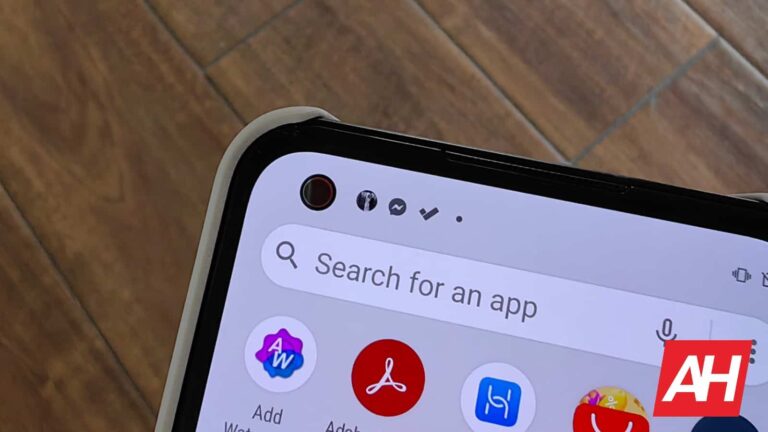
What we’ll do here will basically allow you to change notification icons for any conversation-based notification, and yes, any app for that matter. That way, you can see different notification icons in the status bar. For example, if your brother/sister messages you from Facebook Messenger, you can see their profile pictures in the status bar, instead of just a Messenger icon. That way you’ll know exactly who messaged you without even looking at the notification shade.
So, how can you do that? Well, first of all, please note that this feature is not available on all versions of Android. It’s also a newer feature. In other words, it will be available on stock-ish versions of Android, but don’t expect it to be a part of OxygenOS, ColorOS, or any other similar app. We haven’t checked all Android skins, of course, but we did notice it’s usually available only on stock-ish versions. For example, it’s available on Pixel phones, and on ASUS’ ZenFones running Android 13. That much we can confirm. Having said that, we’ll demonstrate how you can enable it on your Pixel phone. Let’s get to it.
How to enable custom notification icons on Android to spice up your status bar
The first thing you’ll need to do is navigate to your phone’s settings. There are several ways to do that, but we’ll do it the old-fashioned way, by opening up the app drawer by swiping up on the home screen. From there, tap the ‘Settings’ icon.
Once you’re in the phone’s settings, navigate to the ‘Notifications’ menu.
There, you’ll see the ‘Conversation’ menu, which is what we need.
Now, once you’re in the ‘Conversations’ menu, you’ll see a list of your recent conversations. All your conversation-based apps will be listed here, along with your contacts. So, just choose for which contact you’d like to make this change to. Do note that you can make it for any contact within any app, so you’ll need to do it separately for the same person inside Facebook Messenger and Viber, for example.
Once you’ve selected the person for whose convo you’d like to make the change to, simply choose the ‘Priority’ settings. You’re basically done.
Now, every time you get a message from that contact (and the app you set the preference for), his/hers profile image will be shown in the status bar, instead of the general app icon.
Also, when you open up the notification shade, an orange ring will be placed around the app icons. It’s there to highlight the fact this is a ‘Priority’ contact.
Another thing to note is that you can further customize the image that is shown via Google Contacts. You can select any image you want from there, for the contact of your preference. That image will be shown instead of their profile picture. This way you can even edit the image in bulk, if your contacts are sorted properly, of course.
Ever since Elon Musk bought Twitter and started implementing erratic changes, many users have started to look for alternative apps that better suit their needs. Now, in an effort to cater to those users, Post News, a social news platform, has recently released its iOS app, which aims to transform how people access news on social platforms by connecting them with ad-free content from publishers through micropayments.
The company first launched its app in beta just days after Musk’s acquisition, and since then, it has already attracted over 440,000 users, according to a press release. Noam Bardin, the chief executive and founder of Post News, expressed enthusiasm about the recent app launch, stating, “Getting the app live is the next significant stride toward making Post accessible to everyone, regardless of location.”
So, what’s different about Post?
After opening the app, users will have three distinct feeds: following, explore, and news. And although the first two are self-explanatory, it is within the news feed that Post’s unique proposition lies, as the company is introducing a new micropayment system that allows users to access individual articles for a nominal fee, enabling them to consume the content they want without subscribing to a publication.
Additionally, instead of paying for each interesting article separately, users will need to purchase bundles of Post Points, which range from 300 points for $4.20 to 10,000 points for $126.70. Moreover, the company also allows users to tip publishers and creators for their work, enabling them to support the content they appreciate.
However, it is important to note that Twitter is also working on a similar feature that would allow media publishers to charge users on a per-article basis. But, this feature has yet to materialize and, when asked for a comment, Twitter’s media relations email account responded with a poop emoji, leaving users uncertain about its future implementation.
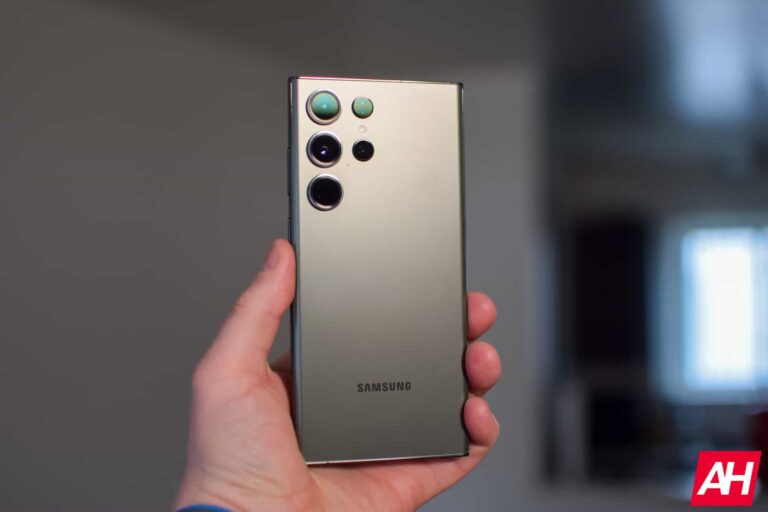
After a slight delay, the long-awaited June update for the Galaxy S23 series is here. Samsung released the promised big update for its latest flagships in some markets today. It brings major camera improvements and a few other changes. A wider rollout should follow in the coming days.
As of this writing, the latest update for the Galaxy S23 series appears to be only available in select Asian countries. We have confirmation of the rollout in Indonesia, Thailand, and the Philippines. Users in these markets are getting the firmware build number S91*BXXU2AWF1. It should just be a matter of time before Samsung pushes the update in other markets.
As usual, the build number may vary in some regions such as the US, but the changelog will mostly remain the same. This update contains plenty of goodies, which you can tell from the OTA (over the air) size of around 2.2GB. A user who has already installed the new release confirmed that Samsung has added the rumored 2x zoom option for Portrait Mode in the Galaxy S23’s stock camera app. Until now, you could only capture 1x and 3x portrait shots.
The Galaxy S23 series is also reportedly getting improvements for Night mode processing. This update fixes the camera autofocus problem as well. Additionally, Samsung has improved the haptics and the One UI experience. The devices should feel a lot smoother to use following the big June update. The company has probably worked on system animations and transitions, which haven’t been the best on One UI lately.
The Galaxy S23 series may be getting more with the June update
These may not be the only changes brought by the June update to the Galaxy S23, Galaxy S23+, and Galaxy S3 Ultra. We expect Samsung to fix the long-existing HDR problem that causes a weird halo effect on photos, particularly on low-light shots. The company is also expected to improve low-light videos.
Unfortunately, Samsung’s official changelog doesn’t specify all of the changes. There have been rumors that the Galaxy S23 series may get multiple updates in June. So if some of the expected changes are missing here, we may get a new update soon. If not in June, certainly in July.
Meanwhile, watch out for notification about this update in the coming days. Along with all the goodies, it also brings the latest security patch to the Galaxy S23 series. Samsung’s June security release contains patches for more than 60 vulnerabilities. We will keep you posted with new Galaxy S23 updates as and when they come.
WhatsApp is bringing its screen sharing feature to the desktop app. The latest version of WhatsApp beta for Windows gives users access to the new feature, which is still in the testing stage. The Meta-owned platform may roll it out publicly a few weeks later.
WhatsApp first added a screen sharing feature to its Android app (beta) a couple of weeks back. It lets users share their screen with the other party during video calls. The app gets a dedicated button for the feature in the bottom bar of the call screen. You’re always in control over sharing your screen, so you can stop it anytime you want. You don’t need permission from the other person on the call.
The same feature is now available in the desktop version of WhatsApp. According to WABetaInfo, which first reported this update, the PC app lets you choose to share a specific window or the entire content of your screen. Whatever you select, everyone in the video call will see it. That’s irrespective of whether they have joined via mobile or PC. Like on mobile, you have full control over sharing your screen.
Screen sharing is currently available to users with version 2.2322.1.0 of WhatsApp beta for Windows (beta version 2.23.11.19 or newer of the Android app). A few Windows users have reportedly confirmed receiving the feature in the stable version as well. However, it appears to be a pre-mature release. As of this writing, a wider rollout is only available in the beta channel.
WhatsApp expands its business-focused features with screen sharing
Screen sharing features are usually found in business communication services like Google Meet, Zoom, and Microsoft Teams. They facilitate more inclusive remote collaboration. WhatsApp adding a similar feature suggests the company is going this route too. It has already expanded the participant limit in group video calls to 32 people and added proper support for multiple devices. It’s also working on the ability to use multiple accounts on the same app.
Perhaps WhatsApp bringing screen sharing to its desktop app so quickly is an indication of its plans to offer more useful tools to businesses. As said before, this feature is currently in the beta stage. Android users can enroll in the beta program here, and then proceed to download the latest beta version of the app from the Google Play Store. Windows users can grab the new beta update for WhatsApp from the Microsoft Store here.
A global cyberattack targeting numerous US federal government institutions has been launched as a result of the recent revelation of vulnerabilities in the MOVEit Transfer and MOVEit Cloud platforms.
According to reports, the claimed responsible ransomware group, Clop, is known to seek multimillion-dollar ransoms. However, no demands for ransom had been made by federal agencies.
The US Cybersecurity and Infrastructure Security Agency is offering assistance to many government agencies whose MOVEit apps have been the target of breaches.
Insights of the Clop In MOVEit Global CyberAttack
The attacks had not had any “significant impacts” on federal civilian agencies; the hackers have been “largely opportunistic” in utilizing the software hole to access networks.
The disclosure increases the number of victims of a massive cyber attack that started two weeks ago and has affected state governments and major US colleges.
The cyber campaign puts more pressure on federal officials who have promised to stop the plague of ransomware assaults that have crippled local governments, hospitals, and schools throughout the US.
According to a report shared by CNN, the Department of Energy is one of the federal agencies that have been hacked.
When the Department of Energy discovered that documents from two department entities had been stolen, it took immediate steps to reduce the consequences of the breach.
Oak Ridge Associated Universities, a non-profit research center, is one of the Department of Energy’s victims. The other victim is a contractor with the department’s Waste Isolation Pilot Plant in New Mexico, which disposes of atomic energy.
The State Department and the Transportation Security Administration claimed they were not hacked.
Progress Software, the company that provides the software, confirmed the discovery of a new vulnerability in the software that a bad actor might exploit.
“We have communicated with customers on the steps they need to take to further secure their environments and we have also taken MOVEit Cloud offline as we urgently work to patch the issue,” the company said.
Johns Hopkins University in Baltimore and the university’s renowned health system said that “sensitive personal and financial information,” including health billing records, may have been stolen in the hack.
Meanwhile, Georgia’s state university system, which includes the 40,000-student University of Georgia as well as more than a dozen other state schools and institutions, acknowledged it was looking into the scope and severity of the attack.
CLOP claimed responsibility for part of the breaches last week, which also impacted workers of the BBC, British Airways, the oil company Shell, and state governments in Minnesota and Illinois, among others.
Although Russian hackers were the first to exploit the MOVEit vulnerability, analysts believe that other parties may now have access to the software code required to carry out assaults.
The ransomware group had given victims until Wednesday to contact them about paying the ransom, after which they began listing more purported victims of the breach on their dark web extortion site.
The dark website did not mention any US federal agencies as of Thursday morning.
Instead, the hackers stated in all caps, “If you are a government, city, or police service do not worry, we erased all your data. You do not need to contact us. We have no interest to expose such information.”
Hence, the identification of these flaws and subsequent intrusions serves as a sobering reminder of the continuous risks to cybersecurity and the necessity for continued attention and preventative actions to defend against possible attacks.
CISA recommends that all affected users and organizations study the MOVEit Transfer advice, implement the suggested countermeasures, and update as soon as patches become available.



.png
)