Here’s a full list of devices that have access to Android 14 beta

0
[ad_1]

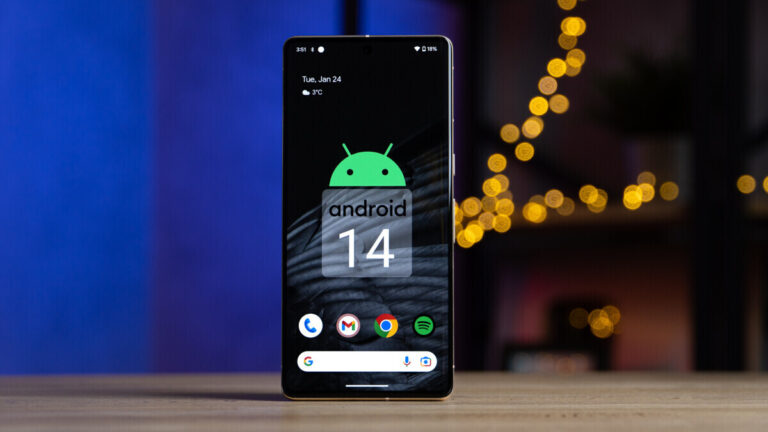
The Google I/O 2023 was full of hardware and software announcements. The company unveiled the Pixel 6a, Pixel Fold, and Pixel Tablet and released Android 14 Beta 2 for eligible Pixels. Coinciding with this, several OEMs also announced Android 14 beta programs for some of their devices. You will find the full list of devices here.

As many as ten smartphone companies are now running Android 14 beta programs, including Google. The other nine brands are iQOO, Lenovo, Nothing, OnePlus, OPPO, Realme, Tecno, Vivo, and Xiaomi. The list of devices from these firms includes the iQOO 11, Lenovo Tab Extreme (Wi-Fi), Nothing Phone 1, OnePlus 11, OPPO Find N2, OPPO Find N2 Flip, Realme GT 2 Pro, Tecno Camon 20 series, Vivo X90 Pro, Xiaomi 12T, Xiaomi 13, Xiaomi 13 Pro, and Xiaomi Pad 6.

Google has provided links to the official announcements from each OEM here. However, as pointed out by Mishaal Rahman, some links appear to be broken or lead to unpublished pages. Android Headlines has already covered the announcements for the OnePlus 11 and the OPPO Find N2 Flip. Stay tuned for information about future Android 14 beta releases from other brands. Samsung, the world’s largest smartphone company, recently started internally testing Android 14 for a few Galaxy models, including the Galaxy S23. It may start public beta soon.

That said, while Samsung’s Android 14 beta will seemingly come complete with its One UI 6 custom skin on top, these early beta builds from other brands are mostly developer previews with little to no customization over the latest AOSP (Android Open Source Project) releases. Considering the release timeline, they probably haven’t included Google’s Android 14 Beta 2 build either. All of them have warned that the first Android 14 beta build is intended for developers only. General users should avoid installing the update. It may brick the phone, rendering it useless forever.

Android 14 beta is available for all recent Pixel devices

Apart from the aforementioned 13 devices, Android 14 beta is also available for all recent Google Pixel models. Well, except for the three new Pixels the company debuted yesterday. If you have a Pixel 4a, Pixel 4a 5G, Pixel 5, Pixel 5a, Pixel 6, Pixel 6 Pro, Pixel 6a, Pixel 7, or Pixel 7 Pro, you can visit this website to sign up for the beta program. Once you have completed the registration, you will receive all new beta releases as long as you don’t exit the beta program or Google doesn’t push the stable update. The stable Android 14 update should arrive in August.


[ad_2]
Source link

Android 14 will automatically make Google Photos pix look brighter, and more realistic

0
[ad_1]
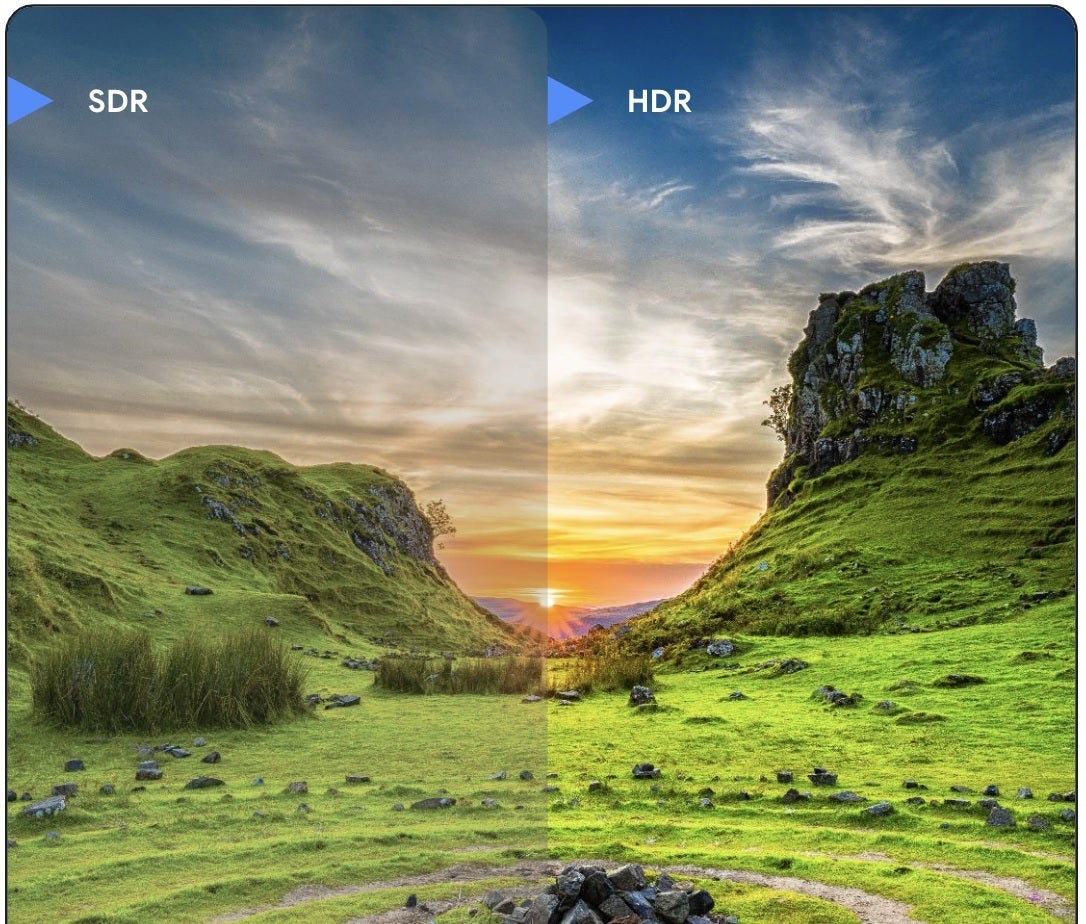
A preview of Android 14 was strikingly absent from last week’s Google I/O developer conference. But what Google did announce was a feature called Ultra HDR. Compatible apps on Android devices running Android 14 will be able to show photographs with a wider range of colors and brightness. And since the supporting technology to run Ultra HDR is already found on flagship Android phones, as long as you update your device to the latest Android build in August, you’ll have this new feature on your phone.

Ultra HDR images are brighter, more realistic, and colorful

According to Forbes, Ultra HDR will be supported by the Google Photos app. Third-party app developers will have to decide for themselves whether to support the technology but since Adobe is making it easy for them to do so, most big-name apps will probably include Ultra HDR support. The technology works by adding an extra layer of information called a Gain Map to a standard jpeg image.
According to Adobe, whose patent explains how to create Gain Maps and how to store them in a standard jpeg file, “Images optimized for High Dynamic Range (HDR) displays have brighter highlights and more detailed shadows, resulting in an increased sense of realism and a greater impact.” Adobe adds that there is an issue as these images can look different on various devices.
Adobe explains why this happens. “There are several reasons, including varying capabilities of HDR displays and the different tone mapping methods implemented across software and platforms. Consequently, HDR content authors can neither control nor predict how their images will appear in other applications.” The Gain Map is the solution to this issue since it “combines both standard dynamic range (SDR) and HDR renditions within a single image and interpolates between the two dynamically at display time.”
The Ultra HDR technology is backward compatible which means that apps that don’t support the technology will be able to show the image in SDR. You can see the difference in the image from Google that is embedded in this article. On the left is a photo in SDR while the brighter, more vivid Ultra HDR image is on the right. Google tells app developers in the Android Developers Blog that “Rendering these images in the UI in HDR is done automatically by the framework when your app opts into using HDR UI for its Activity Window…”

Ultra HDR will soon be rolling out to those Beta testing Android 14

While Google’s Ultra HDR announcement covers only jpeg images, there is nothing that stops Apple from implementing the same technology on the iPhone’s HEIC format. Ultra HDR

will be rolling out soon to Android 14 Beta testers.

While the Android 14 Beta program has been a buggy mess, the recent release of Android 14 Beta 2 has been a huge step forward but next month we expect the Beta program to enter into platform stability. This means that internal and external APIs have been finalized and app-facing behavior has also been finalized. At platform stability, most developers are concentrating on “compatibility testing and quality.”

Still, you shouldn’t install the Android 14 Beta on your daily driver. If you must get an early jump with your Pixel 4a (5G) or later, go to the Android Beta website at  google.com/android/beta, or tap on this link. When you get to the Beta Program website, click on the rectangle that says “View your eligible devices.” You will then see a photo of your Pixel model with an Opt-in button underneath. Tap on it and follow the directions.
After a few minutes, go to Settings > System > System update to update your phone. Keep in mind that you won’t be able to exit the Beta program early without wiping the data from your device. Once the final version of Android 14 is installed on your Pixel, for a limited time you’ll be able to exit the Beta program without any penalty. And before you download any Beta software, back up your data.

[ad_2]
Source link

Android Device Migration Tools Allow Unauthorized App Cloning

0
[ad_1]

Researchers found numerous applications lacking session cookie validation when transferring data between devices. As observed, this vulnerability allows unauthorized app cloning by an adversary from the victim’s device to its own device via Android device migration tools.

Missing Validation In Numerous Apps Enable Unauthorized App Cloning On Android

According to a recent report from CloudSEK, their researchers observed a serious security risk to Android users posed via phone clone-like features.

As explained, the researchers noticed numerous apps lacking session cookie validation when copying app data to other devices.

Cloning apps is a popular feature on Android devices. Numerous vendors, such as Samsung, Realme, and Oppo, come with built-in device migration tools to facilitate users in transferring apps and phone data to new devices.

While convenient, the inherent lack of session cookie validation allows an adversary to clone apps on its own without the victim knowing. It merely requires the attacker to have physical access to the victim’s device. And if the target device lacks any security locks, such as PIN codes or biometric authentication, copying apps to another device will only take seconds.

For instance, the researchers mentioned WhatsApp as an example which, when cloned, even lets the attacker bypass 2FA because WhatsApp’s secret keys get copied to the new device.

At this point, the only way a user can know if someone has sneakily copied WhatsApp is by using WhatsApp Web, which would load messages from both devices. The user can look for any unrecognized messages sent from their account. Though, this method won’t work if the attacker deletes the relevant conversations.

The researchers demonstrated the attack using two Realme phones, RMX2170 and RMX3660, and some Oneplus and Oppo devices, using built-in migration tools, such as Realme’s Clone Phone. However, this experiment didn’t work on Samsung phones, indicating the device’s resistance to such one-click attacks.

List of apps vulnerable to malicious cloning:

The researchers have mentioned the following most-used apps failing to invalidate session cookies.

  • Canva
  • BookMyShow
  • WhatsApp
  • Snapchat
  • KhataBook
  • Telegram
  • Zomato
  • Whatsapp business
  • Strava
  • LinkedIn
  • Highway Drive
  • BlinkIT
  • Future pay – BigBazaar now owned by Reliance
  • Adani One
  • Clash of Clans, Clash Royal (Supercell)
  • Discord
  • Booking.com

Regarding the impact of such attacks, the researchers highlight malicious unauthorized access to victims’ accounts, leading to financial damages and reputational losses, as possible consequences.

Since this attack typically exploits the apps’ lack of a key security feature, keeping devices secured with screen locks is the most viable strategy to prevent it. Likewise, the researchers advise users to enable 2FA on all accounts and ensure never to leave their devices unattended in public places.

Let us know your thoughts in the comments.


[ad_2]
Source link
Official Pixel Fold video presents the phone & its features

0
[ad_1]

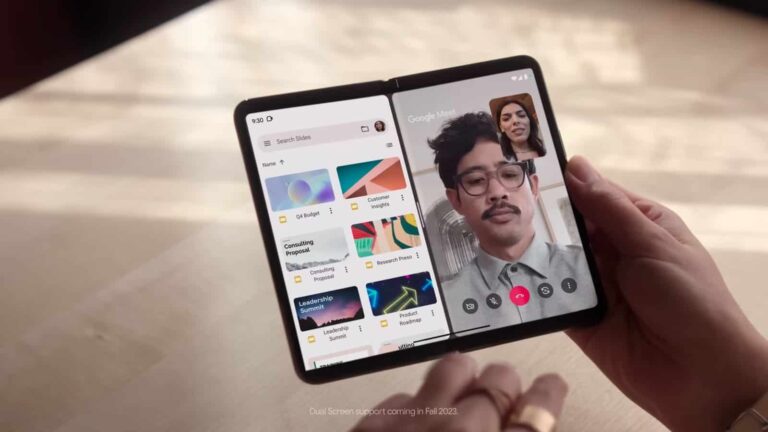
Following its Google I/O 2023 announcement, the Pixel Fold went on pre-order. We’ve already published a ton of content on the site regarding the phone, including our hands-on coverage. In order to share more info on the device, Google shared its first official Pixel Fold video, in which it shows you the device and its features.

First official Pixel Fold video shows us the phone and its features

The video itself is embedded below the article, and it has a duration of around 2 minutes. Google really did manage to cram a lot of information in this video, actually.

The video kicks off by showing you the phone’s design from various angles. Following that, you get a closer look at the phone’s cameras, and some camera features that Google is offering. Google talks about Super Res Zoom, Astrophotography, and more.

You’ll get to check out the split-screen on the Pixel Fold here, along with a new bottom bar for multitasking. You can simply drag and drop files between windows, and more.

Google also shows off its live translate feature that takes full advantage of the two screens on this phone. You can type in your language on one screen, and have it projected in a different language on the second screen.

There’s more info packed in this video, so check it out to get a better understanding of what the Google Pixel Fold has to offer.

The phone comes with Google’s latest SoC, and supports wired & wireless charging

Now, the Pixel Fold is Google’s very first foldable smartphone. It is fueled by the Google Tensor G2 SoC, and packs in 12GB of RAM. You get 21W wired and 21W wireless charging here, along with a number of features exclusive to this foldable.

There are three cameras on the back, while both of the phone’s displays are 120Hz panels. If you’d like to take a closer look at the phone’s spec sheet, click here.


[ad_2]
Source link

Conti Ransomware Group’s $20 Million Threat to Costa Rican Government

0
[ad_1]

In a threatening move, the notorious ransomware group Conti has demanded a $20 million ransom from the Costa Rican government, warning that it will release data it has hijacked if the demand is not met. The group has already begun leaking a portion of the data, comprising sensitive personal details of both citizens and government personnel.

Notorious for its relentless activity, the Conti ransomware group has targeted various entities globally, including corporate businesses, individual internet users, and government agencies. The group is known for releasing compromised data to coerce their victims into paying the demanded ransom.

The assault on the Costa Rican government is notably significant as it marks the first instance of a high-level governmental institution being targeted by a ransomware group. The attack has disrupted governmental services across Costa Rica and ignited concerns about the susceptibility of governments to such cyber threats.

Defying the group’s demands, the Costa Rican government has declared it will not pay the ransom. Efforts are underway to restore the affected systems and safeguard the government’s data against further intrusions.

This attack underscores the escalating risk of sophisticated ransomware attacks. As these threats broaden their victim base, it is imperative for both businesses and governments to amp up their defenses against such cyber onslaughts.

Follow our detailed guide on ransomware protection to safeguard yourself from such threats. Key preventive measures include maintaining updated software, using robust passwords coupled with two-factor authentication, exercising caution when dealing with emails and links, and regularly backing up data. If a ransomware infection is suspected, it is advised to refrain from paying the ransom, as there is no guarantee of data recovery post-payment. Instead, seek assistance from a cybersecurity expert.

In the context of ransomware, it is a malicious software designed to encrypt victims’ files, demanding a ransom for their decryption. Ransomware attacks pose a severe threat to businesses and individuals alike, often resulting in the loss of critical data.

Ransomware typically infiltrates systems via phishing emails or malicious links. Once an unsuspecting victim opens such an email or clicks on a deceptive link, ransomware gets downloaded onto their system, encrypting their files and displaying a ransom demand, often in the form of cryptocurrencies like Bitcoin.

The implications of a ransomware attack are grave, including potential data loss, reputational damage, and legal liabilities. Victims might face significant financial setbacks and operational disruptions. In cases where sensitive data is leaked, it can erode the trust of customers and partners. Sometimes, victims might even be legally accountable for the damage instigated by the attack, as such cyber attacks could be perceived as negligence.

To protect yourself from ransomware, it is crucial to update software regularly, use strong passwords along with two-factor authentication, exercise caution when handling emails and links, and back up data regularly. In case of a suspected ransomware infection, it is advisable not to pay the ransom but to contact a cybersecurity professional such as Aardwolf Security for assistance.


[ad_2]
Source link

ZAGG intros cases & screen protectors for Pixel Fold & Pixel 7a

0
[ad_1]

ZAGG has announced its offerings for the Pixel Fold and Pixel 7a, its cases, and screen protectors. Google announced these two smartphones during Google I/O 2023 yesterday. The Pixel Fold is the company’s very first foldable smartphone, while the Pixel 7a is the company’s new mid-range offering.

Having said that, ZAGG has three products to offer for the Pixel 7a, and two for the Pixel Fold. Let’s kick things off with a screen protector that is available for both devices, shall we.

ZAGG screen protectors for the Pixel 7a & Pixel Fold

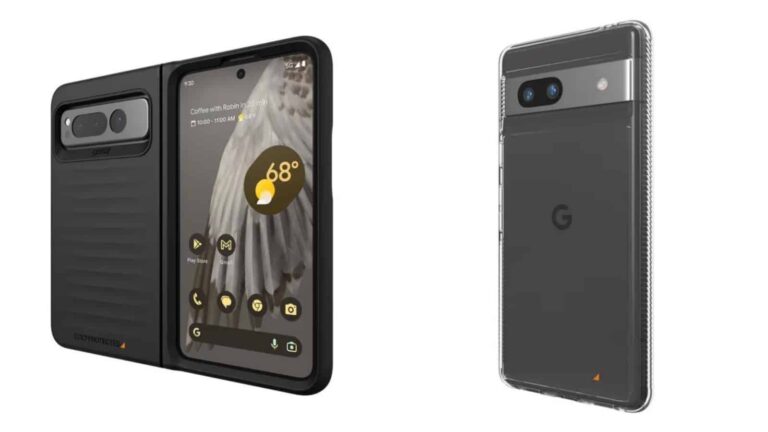
ZAGG offers a screen protector for both devices, the InvisibleShield Glass Elite. This screen protector is built with aluminosilicate glass, and the company claims it’s 5x stronger than a traditional glass screen protector. The company also notes that this screen protector is designed to work with biometric scanners thanks (in part) to ClearPrint surface treatment. That treatment also makes it nearly invisible when the screen is powered on. This screen protector will set you back $49.99 for the Pixel 7a, and $49.99 for the Pixel Fold.

ZAGG InvisibleShield Glass Elite (Pixel 7a)

ZAGG InvisibleShield Glass Elite (Pixel Fold)

ZAGG cases for the Pixel 7a

Now, the company also offers two cases for the Pixel 7a. The first one is the ZAGG Gear4 Crystal Palace. This case is made with D3O Crystalex and protects your phone from drops up to 13 feet (4 meters). It also has “anti-yellowing properties”, says the company. It is also constructed from recycled materials, and should work with most wireless chargers. This case costs $39.99.

ZAGG Gear4 Crystal Palace (Pixel 7a)

The ZAGG Gear4 Denali is the other case on offer for the Pixel 7a. This case has no-slip properties, and a textured finish. It is a hardback case and offers reinforced D3O that surrounds the frame and backplate. This case protects the phone from drops of up to 16 feet (5 meters). It also incorporates Tritan Renew, 50% certified recycled content. This case is also compatible with most chargers, and it comes in black only. It’s priced at $49.99.

ZAGG Gear4 Denali (Pixel 7a)

ZAGG case for the Pixel Fold

ZAGG Gear4 Bridgetown Pixel Fold

The last case on the list is for the Pixel Fold, and it’s called the ZAGG Gear4 Bridgetown. This case is designed to protect the hinge on the device. It is reinforced with D3O Bio, a plant-based protection material. The case is slim and lightweight, and yet it can protect the device from drops up to 10 feet (3 meters). It is compatible with most wireless chargers, and comes in black and blue colors. This case will set you back $79.99.

ZAGG Gear4 Bridgetown (Pixel 7a)

ZAGG says that these accessories will become available on June 27 on ZAGG.com, and at ZAGG franchise locations. They’ll also be available at Verizon, AT&T, T-Mobile, and Best Buy.


[ad_2]
Source link

A Malware Attack Pattern to Infect Devices

0
[ad_1]
DangerousPassword

Recently, it has been observed by JPCERT/CC that threat actors are actively targeting the cryptocurrency exchanges linked to the DangerousPassword attack campaign (aka CryptoMimic or SnatchCrypto), involving the distribution of malware through email shortcuts since June 2019.

Apart from malware distribution through email, various attack patterns are utilized by the attackers to infect targets with malware, with four specific patterns being observed.

Here below we have mentioned those four attack patterns:-

  • Attacks by sending malicious CHM files from LinkedIn
  • Attacks using OneNote files
  • Attacks using virtual hard disk files
  • Attacks targeting macOS

Analysis of Attack Patterns

Here below, we have mentioned the complete analysis of the four attack patterns that are observed:-

Attacks by sending malicious CHM files from LinkedIn

Attackers employ alternative methods of reaching targets by utilizing LinkedIn to send malware, where the compressed RAR file received contains a CHM file that, upon execution, downloads and runs an external MSI file.

DangerousPassword

Upon execution, the MSI file deploys a PowerShell script to download and execute another MSI file (Administrator-a214051.msi) which, in turn, collects and transmits information about infected hosts via HTTP POST request in Base64 encoded format.

Researchers have confirmed that compromised LinkedIn accounts, posing as job providers, are used to send malware to targets, although the method of compromising social networking accounts by the attackers remains unknown.

DangerousPassword

Attacks Using OneNote files

The utilization of OneNote file exploitation for malware infection, observed in Emotet and other malware attacks, is increasingly prevalent in email attachment-based infection campaigns.

In line with other malware attacks, DangerousPassword employs a OneNote file containing embedded malware, and opening the file triggers the infection.

DangerousPassword

The OneNote file contains a malicious MSI file that installs a DLL on the host and executes it, while also possessing the ability to identify AV tools.

Upon detecting specific antivirus software, the malware adjusts its actions by terminating the following things:-

  • It hooks the process to NTDLL to evade monitoring
  • Modifying data in curl commands
  • Altering the method of launching downloaded malware

Here below we have mentioned the AV programs:-

  • Avast
  • Avira
  • Bitdefender
  • Kaspersky
  • Sophos
  • Trend Micro
  • Windows Defender

Attacks using virtual hard disk files

According to the report, Attackers can conceal malware by compressing it in ZIP or RAR formats, incorporating it into an ISO file, or embedding it within a VHD file, which can be mounted on Windows OS by double-clicking and is commonly used for Hyper-V virtualization.

The VHD file includes a decoy PDF, the main malware (DLL), and an executable (EXE) to initiate the DLL. The DLL file operates similarly to the OneNote file’s malware.

Attacks targeting macOS

Attackers are now targeting both Windows and macOS by utilizing an AppleScript that downloads and executes an unauthorized application through the main.scpt file using the curl command.

DangerousPassword

The executed application displays a window and utilizes XOR decoding to read file contents, downloads a file from the decoded command and control (C2) server, and subsequently executes it.

The persistent APT group DangerousPassword targets cryptocurrency exchanges in Japan, utilizing LinkedIn as a potential contact method, necessitating caution when engaging with social media platforms. 

Additionally, macOS users should exercise vigilance as the attackers can exploit the operating system’s vulnerabilities.

Building Your Malware Defense Strategy – Download Free E-Book


[ad_2]
Source link

Android 14 will bring some neat lock screen customizations

0
[ad_1]

Google I/O just happened, and the company unveiled a lot of great stuff surrounding Android. One of its announcements is a breath of fresh air, as it addresses one of the least fun features of the stock Android experience. Google is going to bring some neat and useful lock screen customizations in Android 14.

Along with this news, Google announced some exciting hardware at the event. We got a look at the Pixel 7a, Pixel Tablet, and Pixel Fold. We have a lot of coverage on these devices, so be sure to check out Android Headlines for more information on them.

Android 14 is bringing lock screen customizations

The lock screen on stock Android 13 is rather boring. There’s not much that you can do to customize it. When it comes to shortcuts, you only have the option to quickly access your Google Wallet or your Google Home interface from the lock screen. However, shortcuts and other customizations have been available on different Android skins for years.

Well, it looks like Google wants to change that. During the event, the company unveiled some neat additions that will let you personalize your lock screen. For starters, Google will finally let you add different shortcuts to your home screen to access apps quicker.

We’ve been following rumors that Google was planning on letting you add more shortcuts to your lock screen. If the rumors are true, then you will still lack the customizability of other Android skins, as you will have a limited selection of apps that you can add. However, it’s a step in the right direction.

Next, Google will address the other issue with the lock screens on Stock Android 13: the clock. The clock that you get is only in one font. It looks nice especially when expanded over the middle of the screen. However, Google is adding several new clocks to the interface. These different clocks will be in different fonts and Styles.

Not only will the clock be affected, but so will the date and weather. This would be a great change of pace for people who want to add even more customizations to their phones. You should expect to see this in a later version of Android 14.


[ad_2]
Source link

Google is making a Space Invaders AR game with help from Taito

0
[ad_1]

If you grew up playing Space Invaders, have you ever wondered what it might be like to play the game in an AR format? Well if you have, then it looks like you’ll be able to find out.

At Google I/O this week, Google announced that it has partnered up with Taito to make an AR Space Invaders game. It’s called Space Invaders: World Defense, and it’s launching later this Summer. Which is, perhaps the absolute best time for a game like this to launch. At least in climates where the Summer heat is manageable. With good weather, you’re more likely to take a stroll through your city and check the game out.

And since this is an AR game, that’s exactly what you’ll need to do if you want the full effect. Take a walk outside and imagine yourself as a defender of earth fighting off aliens trying to invade.

The Space Invaders AR game will adapt to your environment

Google doesn’t go into a whole lot of detail here about this aspect of the game. Or rather any aspect of the game for that matter. The details about Space Invaders: World Defense are scarce, but not completely absent.

It’s built using the ARCore Geospatial API to make your real-life world a “digital playground” for the game. Google is also utilizing the Streetscape Geometry API so that the game will adapt to your environment. It’s not clear how the game will adapt. But our guess would be that this simply means aliens can invade in different locations based on the types of structures and landscape in your area.

It seems like there will be high score boards which is fitting given this was a trait of the original game. Not to mention just about every arcade game from the era.


[ad_2]
Source link