Mullvad VPN Received Data Warrant – Had None To Share

0
[ad_1]

The popular VPN service Mullvad said it received a data search warrant from the Swedish Police. However, the company demonstrated its no-logs policy and could not hand over any details to law enforcement.

Mullvad VPN Disclosed Receiving Data Search Warrant

According to a recent post from Mullvad, the VPN provider recently received a search warrant for a customer’s data.

Specifically, they received the warrant on April 18, 2023, from the National Operations Department (NOA) of the Swedish Police when 6 police officers visited the VPN provider’s facility. The officers intended to search the premises – specifically, the computers – for the wanted customer’s data. They even planned to seize the respective computers carrying the desired data.

However, as Mullvad claims in its privacy policy, the firm logs no user data. (Mullvad does not save users’ account names, even for account maintenance purposes. Instead, it generates random identifiers that do not link back to the user’s real information.)

So, in compliance with this policy (and practice), Mullvad tried to convince the officers. As stated in their post,

We argued they had no reason to expect to find what they were looking for and any seizures would therefore be illegal under Swedish law.

The service even demonstrated the sheer existence of zero logs. As a result, the officers didn’t seize any systems. However, even if they did, Mullvad states they could retrieve no customer information.

The firm confirms this as the first incident of receiving data search warrants during the 14 years of Mullvad.

Why Is This Disclosure Important?

For no-logs VPNs, the biggest test of their genuineness is when they are asked (by law) to hand over users’ data, and they fail. (Perhaps the only failure that adds to the credibility of a VPN service.) That’s because any business can only deny handing over something to law enforcement if they literally don’t possess it at all.

Users opt for tools like VPNs to protect their online privacy. They trust the service providers with their data only to avoid intrusive surveillance. So even if a VPN shares a suspected criminal’s data with someone, it still proves that the service does log its customers’ information. Consequently, every customer of the VPN feels their privacy is at stake. And the entire effort of using such tools goes in vain.

With this search warrant, Mullvad has demonstrated the validity of its no-logs policy. And it isn’t the first such entity since Private Internet Access (PIA) also demonstrated the same in the past.

Nonetheless, PureVPN is one such example where its actions contradicted its claims. Despite claiming to log no data, the service handed over a target user’s identifiers to the FBI in 2017. While they intended to help the LEA, this act received backlash from the cybersecurity community. Eventually, PureVPN improved its policies and went through independent audits to validate its no-logs claim.


[ad_2]
Source link

Infinite will officially launch globally in early May

0
[ad_1]

Torchlight: Infinite developers XD Games have announced that the game will launch globally in May alongside its next big patch. Torchlight: Infinite has been available on Android for really a while now, but it has yet to actually move out of a beta state.

It’s been tested in a few closed betas, and then it finally launched in open beta while receiving multiple patches to add new content. Each new patch has also added fixes and fine tuning to prepare for the eventual global launch. That time is just around the corner, and there’s a lot to look forward to whether you’ve been enjoying the open beta or not.

With the launch of the new season, titled Cube of Rapacity, players will be introduced to a suite of new features. Including a new game mechanic of the same name. While out exploring, players may come across enemies called Desire Incarnations. These can drop cubes that will have a chance to contain items called Divinity Slates. Divinity Slates will fit together like a puzzle and players who complete the patterns for them can earn rewards. But XD also issues an ominous warning. Players who “get too greedy will be punished by the Cube of Rapacity.”

Torchlight: Infinite will launch globally on May 9

The official global release (out of open beta) is on May 9. But based on your region the launch timing seems like it’ll change. The game is set to release on May 9 at 1am BST. Which is 4pm PST on May 8.

Though this doesn’t necessarily mean the servers will be live. Games have a tendency to go down for server maintenance for official launches. So players should expect that as a possibility. Aside from the new Cube of Rapacity mechanic, the season will usher in other meaningful changes as well.

XD notes that since the open beta began, it’s been listening to the community feedback. And it wants players to know that feedback is being taken into account. Some of that feedback has led to a slate of upcoming changes. Including an overhaul to crafting where players will be able to start crafting gear sooner and more often than ever before.

XD is also adding a guild feature, the ability to view battle reports after completing a stage, and a new trade house functionality. Among other things. XD says it has much more content and features planned as well. Stating that the game will continue to evolve for some time.

Play on mobile or PC

Torchlight: Infinite initially was meant as a mobile release. But it’s not just for mobile anymore. XD confirms it’ll be available via Steam in its global launch state on May 9. But it gets even better as the gameplay and controls have been further optimized for Steam Deck too. Which means playing the game on Steam Deck should be more enjoyable.

The game is already available on Steam via early access. And of course it’s available in open beta on Android.

Torchlight: Infinite


[ad_2]
Source link

ARM is developing its own chips to expand business

0
[ad_1]

It’s no secret that ARM’s chip designs have become the industry standard for smartphone processors, powering over 95% of the current smartphone market. However, it looks like ARM is not content with being the leader in smartphone chip designs, as the company has reportedly started developing its own chips to showcase the capabilities of its products.

According to the Financial Times, the project began six months ago and is being led by Kevork Kechichian, a former executive and designer of Snapdragon chips at Qualcomm. While ARM has previously worked with TSMC and Samsung to make semiconductors, the new chips will showcase the company’s new designs and help potentially expand its customer base to the Windows laptop and PC market as well.

Why is ARM developing its own chips?

Over the past few years, SoftBank’s push towards growth has led ARM to implement several changes in its business practices, including increasing prices and overhauling its business model by charging royalties to device-makers rather than some of its chipmaker customers. And this new move towards developing its own chips is part of the company’s efforts to diversify its income streams before going public later this year. As it stands, the significant concentration of ARM’s business, with 20 customers accounting for 86% of its revenue, is a major threat and losing even a few key customers could significantly impact the company’s growth.

However, speaking on the concerns that ARM could potentially turn into a rival of Qualcomm and Apple if successful in developing its own chips, the company stated that it currently has no plans to sell or license the designs of the chip to other companies. Instead, ARM will build these prototype chips for smartphones and laptops to improve the performance and security of its designs, which in turn would benefit its consumers.


[ad_2]
Source link

Enterprise-Attacking Malware Toolkit Analyzing 70 Billion DNS

0
[ad_1]

The ‘Decoy Dog’ malware toolkit, aimed at enterprises, was uncovered recently by the security analysts at Infoblox by analyzing 70 billion DNS records and traffic that differs from typical online behavior.

Decoy Dog was discovered in early April 2023, and by using domain aging and DNS query dribbling tactics, the Decoy Dog malware assists threat actors in avoiding traditional detection methods. 

This strategy enables them to build a positive reputation with security vendors before transitioning to supporting cybercrime activities.

Decoy Dog has an exceptionally rare and distinct DNS fingerprint compared to the 370 million active domains on the internet, facilitating its identification and tracking.

Technical Analysis

Numerous C2 domains related to the operation were identified after the inquiry into Decoy Dog’s infrastructure. The majority of these server communications emerged from Russian-based hosts.

Apart from this, a RAT utilized by the Decoy Dog toolkit has been identified while analyzing the DNS tunnels on these domains, and the RAT is dubbed “Pupy RAT.”

State-sponsored threat actors favor Pupy RAT due to its modularity, open-source nature, and stealth capabilities (fileless execution), which enable them to blend in with other users and support encrypted C2 communications.

Time Line

Here below, we have mentioned the domains that were flagged for suspicious activity in early April 2023:-

  • cbox4[.]ignorelist[.]com
  • claudfront[.]net
  • hsdps[.]cc
  • ads-tm-glb[.]click
  • atlas-upd[.]com
  • allowlisted[.]net

In all major operating systems, the Pupy RAT project supports the payloads, and here below, we have mentioned the OS platforms:-

  • Windows
  • macOS
  • Linux
  • Android

Here below, we have mentioned the capabilities of Pupy RAT:-

  • Enables execution of commands remotely
  • Elevate privileges
  • Steal credentials
  • Spread laterally through a network

Less experienced actors do not commonly use Pupy RAT since setting up the appropriate DNS server configuration for C2 communications is complicated and unsuitable for less experienced actors.

The DNS signature spanning multiple parts provided a high level of certainty that the correlated domains were part of the Decoy Dog toolkit, which distinctly utilizes Pupy RAT on non-consumer devices, such as those found in large enterprises or organizations.

Characteristics of Decoy Dog’s Toolkit

Here below, we have mentioned the characteristics of Decoy Dog’s toolkit:-

  • Pupy RAT
  • Unique DNS Signature
  • DNS Beaconing
  • Outlier Behavior
  • Shared Hosting
  • Registration Similarities
  • Enterprise Focus

Analysts also detected a unique DNS beaconing pattern on all Decoy Dog domains that conforms to the infrequent but regular generation of DNS requests at set intervals.

DNS Graph

Decoy Dog has operated secretly since April 2022, unnoticed for over a year despite analytics detecting unusual activity in its toolkit domains.

Detecting anomalous activity in the massiveness of the internet is made possible by using large-scale data analytics, and the discovery of Decoy Dog is a perfect example.

Building Your Malware Defense Strategy – Download Free E-Book


[ad_2]
Source link

Galaxy Z Fold 5 and Flip 5 charging speeds have surprises

0
[ad_1]

Unlike some of its Chinese rivals, Samsung has been uninterested in the charging speed game. None of its recent smartphones charge at a faster speed than 45W, with the majority of them topping out at 25W. It will be no different with the Galaxy Z Fold 5 and Galaxy Z Flip 5. The upcoming foldable duo will seemingly offer a maximum charging speed of 25W.

Certification reveals Galaxy Z Fold 5 and Galaxy Z Flip 5 charging speeds

Samsung’s 2023 foldable smartphones recently picked up a CCC (China Compulsory Certificate) regulatory certification. The official listing shows the Galaxy Z Fold 5 and Galaxy Z Flip 5 with model numbers SM-F9460 and SM-F7310, respectively. These are the Chinese versions of the foldable duo. The certification reveals that both models charge at a maximum speed of 25W (9V/2.77A or 11V/2.25A).

While 25W of charging speed may seem paltry for a phone costing north of $1,500, it isn’t surprising. As said earlier, Samsung has been playing it safe when it comes to smartphone charging tech.

At a time when Chinese brands like Oppo, Vivo, Xiaomi, Realme, and iQOO are pushing things to 200W and beyond, the Korean behemoth has been able to attract consumers with just 25W and 45W speeds.

Unsurprisingly, Samsung has no interest in trying to fix something that isn’t broken. The Galaxy Z Fold 5 and Galaxy Z Flip 5 will arrive with 25W of fast charging. The Chinese regulatory body tested the devices using the company’s standard 25W charger (model number EP-TA800).

Of course, the company won’t provide the charging brick in the retail box. Those days are long gone. You have to buy the charger separately if you don’t have a spare one in your home.

The new Samsung foldables will bring other upgrades

The CCC certification doesn’t reveal anything else about the Galaxy Z Fold 5 and Galaxy Z Flip 5. However, there have been plenty of leaks and rumors about the two foldables in recent weeks. Based on those reports, we are in for substantial upgrades this year.

For starters, the 2023 foldable duo will feature a new type of hinge that reduces the thickness of the devices. It also reduces the display crease and helps bring the weight down. The Flip model gets a much bigger 3.4-inch cover display while both models will be powered by the Snapdragon 8 Gen 2 for Galaxy. That’s the same chipset that powers the Galaxy S23 series globally.

Rumors are that Samsung could unveil the Galaxy Z Fold 5 and Galaxy Z Flip 5 at the end of July or in early August this year. We should hear more about the two foldables in the coming months.


[ad_2]
Source link

Matter support for Nest Thermostat is finally here thanks to an update

0
[ad_1]

For a long time, there has been no Matter support for the Nest Thermostat, but all of that is coming to an end. Google’s Nest smart home devices have been at the back seat regarding the Matter smart home connectivity feature. Sometime last year, Google started rolling out Matter support to some Nest devices like smart displays, speakers, and others.

This rollout process has been one step at a time, or one product at a time. Now the Nest Thermostat smart device is getting Matter support with smart home connectivity features. Users of Google’s thermostat smart device will now be able to benefit from the connectivity benefits that Matter brings.

The announcement that Nest Thermostat devices are getting Matter compatibility came a few days ago. This fulfilled Google’s promise that their Thermostat devices will gain support for Matter this year. But, what exactly would this Matter support bring for Google Nest Thermostat users around the world?

What is in store for users with the rollout of Matter support for the Nest Thermostat?

Matter is simply the new standard for connectivity between smart home devices. This standard is recognized by a ton of smart home gadget manufacturing companies. Most new smart home appliances launch with support for this feature, and the old devices are getting support for it.

Matter uses Internet Protocol (IP) such as Bluetooth LE, Wi-Fi, and Thread to connect smart devices. This is the standard for compatibility between most smart devices today for seamless connectivity. So, regardless of the new smart home device you purchase, it will work perfectly with the devices you already own as long as they are Matter compatible.

So, with the new Matter support for Nest Thermostat, users will be able to do more with their heat regulation smart device. Previously, users needed to rely on Google Assistant to control their Nest Thermostat device. But, with Matter support, they can do this via Amazon Alexa, Apple Home, Samsung SmartThings, etc. depending on their preference.

This is also ideal if the user’s household smart devices use a voice assistant other than Google Assistant. So if you make use of the Apple Home, Amazon Alexa, or Samsung SmartThings ecosystem, you can now get a Nest Thermostat. It will effortlessly sync with your smart home appliance and exist in your ecosystem without requiring you to make a switch.

Google says that this update bringing Matter support for the Nest Thermostat is currently rolling out to users. If you own a Nest Thermostat device, you will get this feature soon. Over the coming months, this update will make its way to users in various regions, one Thermostat at a time.


[ad_2]
Source link

Samsung brings its AI-powered image editing app to the Galaxy S23 series

0
[ad_1]

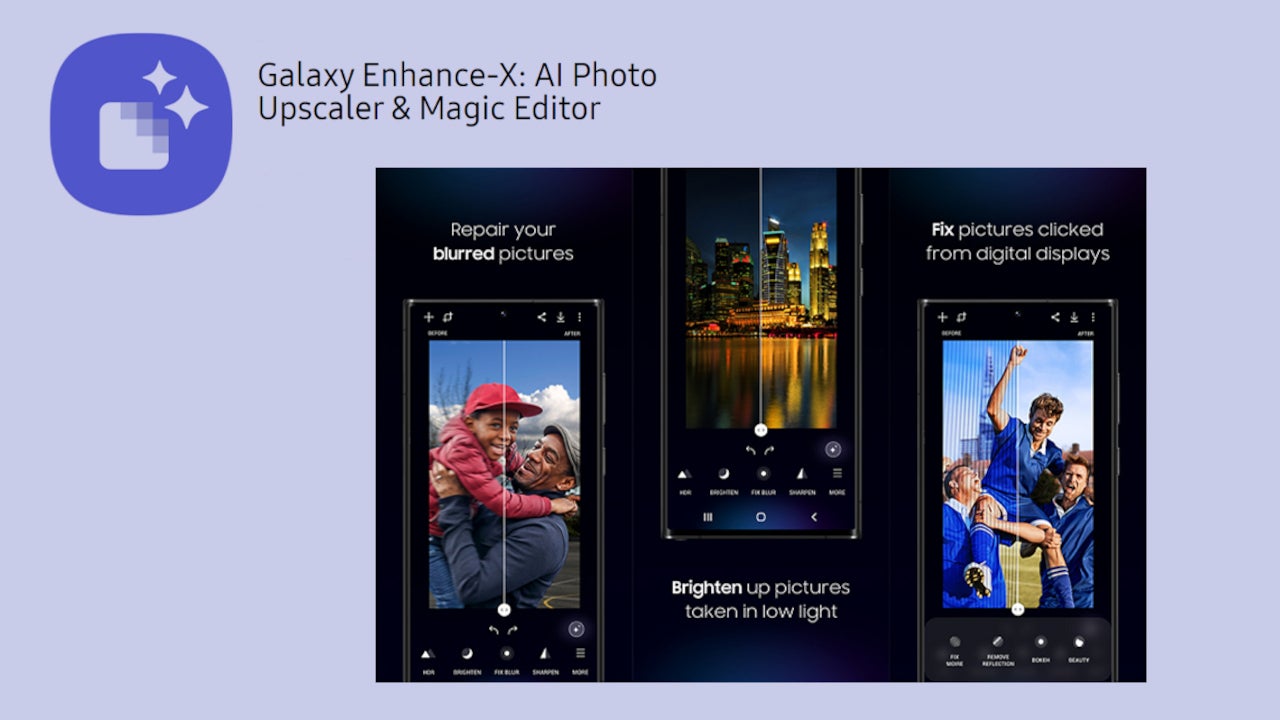
Samsung launched a pretty sophisticated photo editor app powered by AI back in July. The Galaxy Enhance-X app was compatible with a very limited range of Galaxy devices, but the new version of the app has been specifically designed to take advantage of the powerful processors inside the Galaxy S23 series.Released earlier today, Samsung Galaxy Enhance-X v1.0.55 beta only supports the company’s latest Galaxy S23 flagship because image processing through AI requires complex processing, which is why it needs high-end hardware like that packed inside the Galaxy S23 series. (via SamMobile)

However, Samsung confirmed that Galaxy S22 users will soon get access to the new version of the photo editor very soon. Additionally, the South Korean handset maker revealed that the Galaxy Enhance-X app will be supported by some of the Galaxy A series devices, although not all features might be available for these non-flagship phones.

Right now, the Galaxy Enhance-X app for S23 series supports photo remaster, image enhancement, and remove artifact functions. If you own one of Samsung’s newest flagships, you’ll be able to use features like Magic, HDR, Brightness, Focus Improvement, Lens Distortion Correction, Upscale (4x resolution improvement), and Sharpen.

Also, you’ll be able to apply various enhancement features like beauty and light effect in portrait mode. In the Remove Artifact menu, the app provides users with the ability to remove shadows from their pictures, as well as reflective objects.

With the Galaxy Enhance-X app, users can start modifying their pictures as soon as they are captured. Most of the functions available in the app can be applied with just one tap, so it doesn’t really require too in-depth knowledge about photography.

The latest version of Galaxy Enhance-X app is available for download for free via the Galaxy Store. It’s an 85MB download, so it’s not going to take too much of your precious storage space.


[ad_2]
Source link

Evil Extractor Infostealer Targets Windows In Phishing Campaign

0
[ad_1]

Researchers observed malicious use of a self-claimed educational tool, “Evil Extractor,” for stealing data. They found the threat actors abusing Evil Extractor as an infostealer against Windows systems to extract stored information from web browsers.

Evil Extractor Insoftealer Targets Windows

According to a recent report from Fortinet’s FortiGuard Labs, an active phishing campaign targets Windows users with Evil Extractor infostealer.

Although Kodex – the Evil Extractor developer – claims the tool to be solely educational, the researchers discovered its malicious use in recent attacks.

As explained on its website, Evil Extractor is a Windows hacking software, possessing a wide range of intrusive functionalities.

The tool offers two operation modes: Single Bullet and RAT. The “Single Bullet” mode provides six attack types that execute via FTP. Whereas the “RAT” mode gives unrestricted access to the target device. Using the RAT mode allows the attacker to access the device camera, upload, download, or delete files, take screenshots, and more.

It also exhibits keylogging, credential stealing, and information theft capabilities and can bypass Windows Defender. Moreover, it leaves no traces on the victim’s machine, hence gaining persistent access to the device without alerts.

The researchers detected its active malicious use after noticing a high traffic flow to the tool’s website. Regarding the malicious campaign, FortiGuard explained that the attack begins via phishing emails containing maliciously crafted files. While the file first looks legit, it leverages PowerShell activities following download. Besides, it evades security checks via its anti-VM and environment-checking functions.

When cleared, the malware starts stealing stored information from web browsers, which it then transmits to the attacker’s FTP server. The stolen data includes login credentials, browsing history, and other data, and the target browsers include Google Chrome, Mozilla Firefox, Opera, and Microsoft Edge.

Besides, the tool also extracts sensitive device information, including the system specifications, hardware components, and device identifiers.

The researchers also highlighted Evil Extractor’s ransomware capabilities, which can be devastating if exploited in the wild.

Presently, the attacks seemed focused on users in Europe and USA. Nonetheless, it isn’t impossible for this technique to gain more negative attention and spread to other countries.

Vigilance Is The Key To Prevent Such Attacks

While Evil Extractor possesses advanced malicious and stealth capabilities, it isn’t impossible to prevent since it still requires user input to reach a target device.

For instance, in the phishing scenario that FortiGuard explained, the victim losses their machine to the attacker right after clicking or downloading the maliciously crafted document in the phishing email.

Therefore, a crucial protective measure remains for the users to stay vigilant. Users must avoid interacting with unsolicited emails, messages, and audio files, and clicking on web links, regardless of the apparent urgency. In case of ambiguity, users must contact the supposed sender via another source to validate the email or message’s legitimacy.

Let us know your thoughts in the comments.


[ad_2]
Source link

Pixel 8 Pro may get a new main camera sensor, Samsung’s biggest one

0
[ad_1]

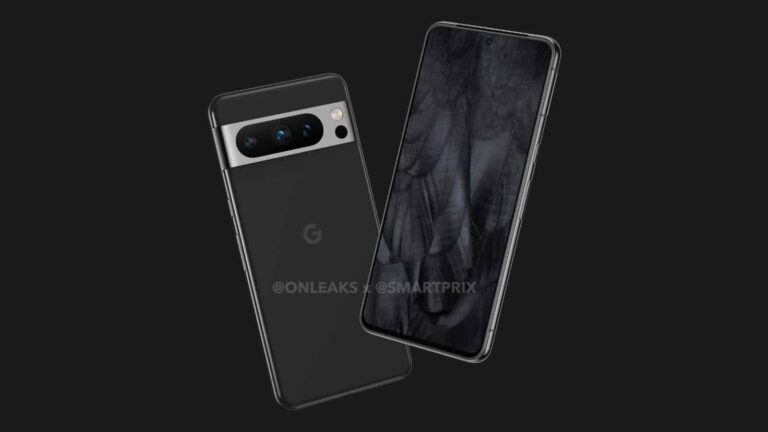
It seems like the Pixel 8 Pro may ship with a new main camera sensor, once again coming from Samsung. This information comes from Ice Universe, a well-known tipster, who claims that the ISOCELL GN2 will be used by Google.

The Pixel 8 Pro may include a new main camera sensor, the ISOCELL GN2

This is Samsung’s biggest sensor to date, it’s a 1/1.12-inch camera sensor with a 50-megapixel resolution. It was announced over two years ago. Do note that the Pixel 7 and Pixel 7 Pro include the ISOCELL GN1 sensor as their main camera sensor. The same goes for the Pixel 6 and Pixel 6 Pro.

The ISOCELL GN2 boasts 1.4um pixels, and utilizes 4-in-1 pixel binning. So, after the binning, you end up with a 2.8um pixel size. This sensor can also record in 8K up to 30 fps, and provide 4K video at 120 fps. It offers Staggered HDR, Dual Pixel Pro autofocus, and more.

Will the Pixel 8 make the jump to ISOCELL GN2 as well?

Having said that, some of you will notice that the tipster mentioned the Pixel 8 Pro only not the regular Pixel 8. Does this mean the two phones will have different main sensors? Will the Pixel 8 stick to the ISOCELL GN1?

Well, that is a possibility, though it’s not likely. Google has been using the same main camera on its flagship phones, so chances are the same thing will happen this time around. If the Pixel 8 Pro moves to the ISOCELL GN2, chances are the Pixel 8 will too.

They will not have identical cameras overall, though. The Pixel 8 is once again expected to have two cameras on the back, compared to three of them on the back of the Pixel 8 Pro.

Google’s new flagship smartphones will almost certainly launch in October

The Google Pixel 8 and Pixel 8 Pro will become official in October this year, quite probably. That’s usually when Google announces its new flagship smartphones, though late September is also an option.

Google will announce a lot of new hardware at this year’s Google I/O, but these two phones won’t be included. Two new phones are coming, though, as Google is expected to show off both the Pixel 7a and Pixel Fold, along with some other devices.


[ad_2]
Source link

Samsung Internet beta update brings important improvements for tablet users

0
[ad_1]

Samsung’s Internet app is a work in progress, as the company is adding new features and improvements all the time. However, many of the updates released didn’t take into account people using tablets, as many of the improvements were only available on smartphones.

The latest Samsung Internet update is a nice change of pace for the development of the app since it brings something for tablet users too. Granted, these improvements are only being added to the beta version of Samsung Internet, it won’t take long until they will be made available to everyone.

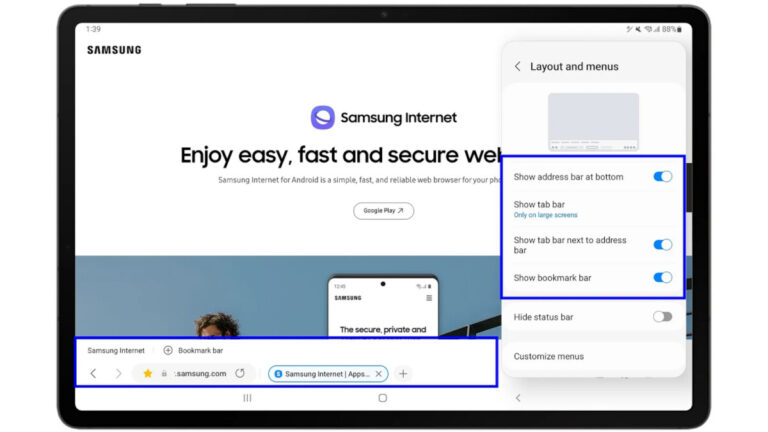
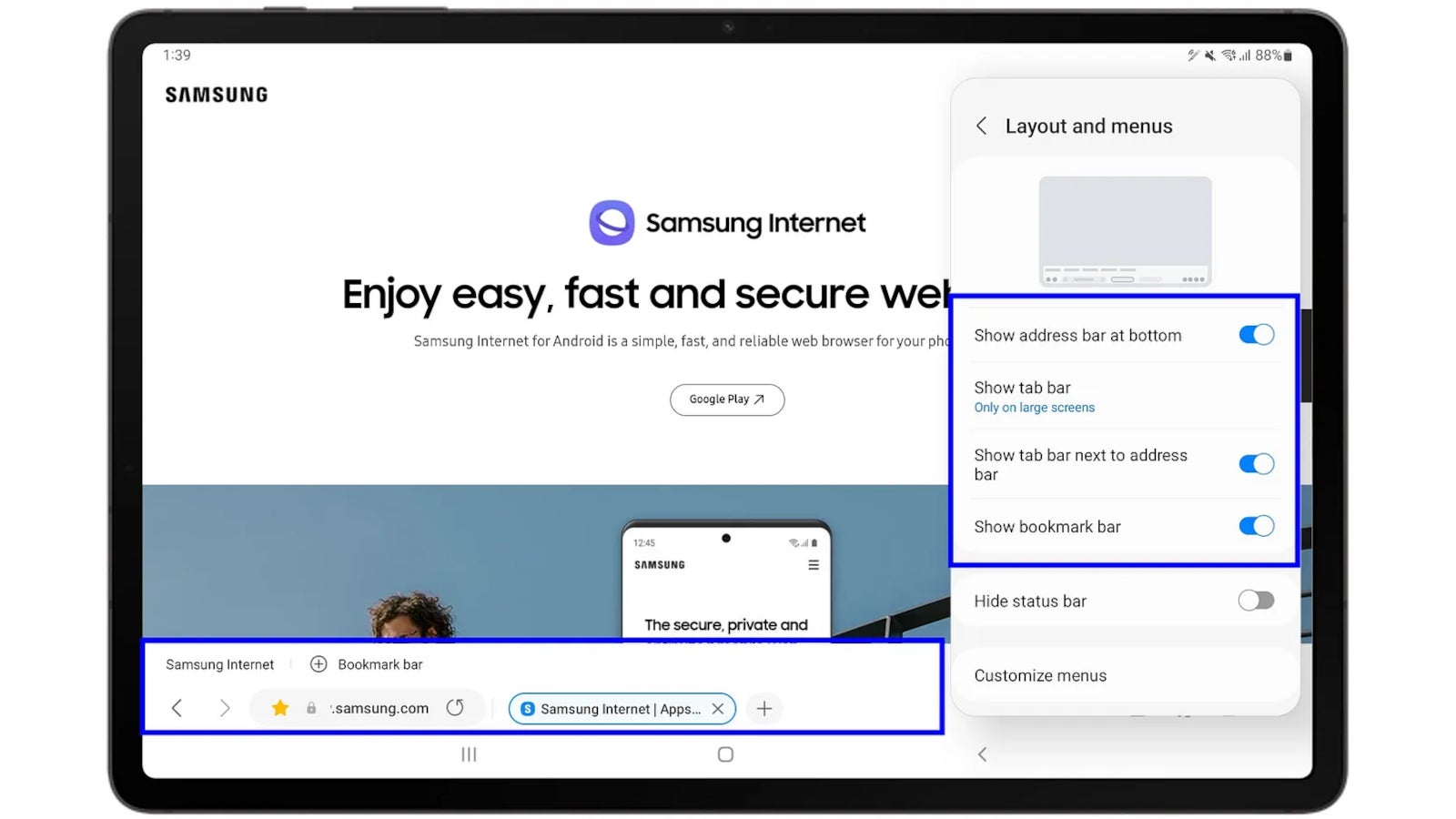
First off, one of the features that’s been available on smartphones since Samsung Internet v16.0.2 is finally coming to tablets. The ability to move the URL bar to the bottom of the browser for better mobile usability is supported on tablets starting with Samsung Internet beta 21.0.

Thanks to the new addition, the app now supports the relocation of bookmark bar and tab bar, which can also be repositioned to the bottom with the URL bar on both mobile and tablet devices.

Another interesting new feature included in this update is aimed at users who love keeping all their tabs open. Samsung Internet supports a maximum of 99 tabs opened in the background, which is quite a lot. When a user opens the 100th tab, the oldest tab would be automatically closed.

However, with the latest version of Samsung Internet, users have the option to reopen the tab that was closed, and they will receive a warning when the number of tabs is approaching the limit. It’s a nifty feature to have if you’re too lazy to close the browser’s tabs and don’t want to lose something important.

Those who want to try out the new tablet features can download Samsung Internet Beta v21.0 via the Galaxy Store or Play Store for free.


[ad_2]
Source link