The cybersecurity researchers at Sucuri recently discovered a critical backdoor that has managed to infiltrate thousands of websites over the past few months.
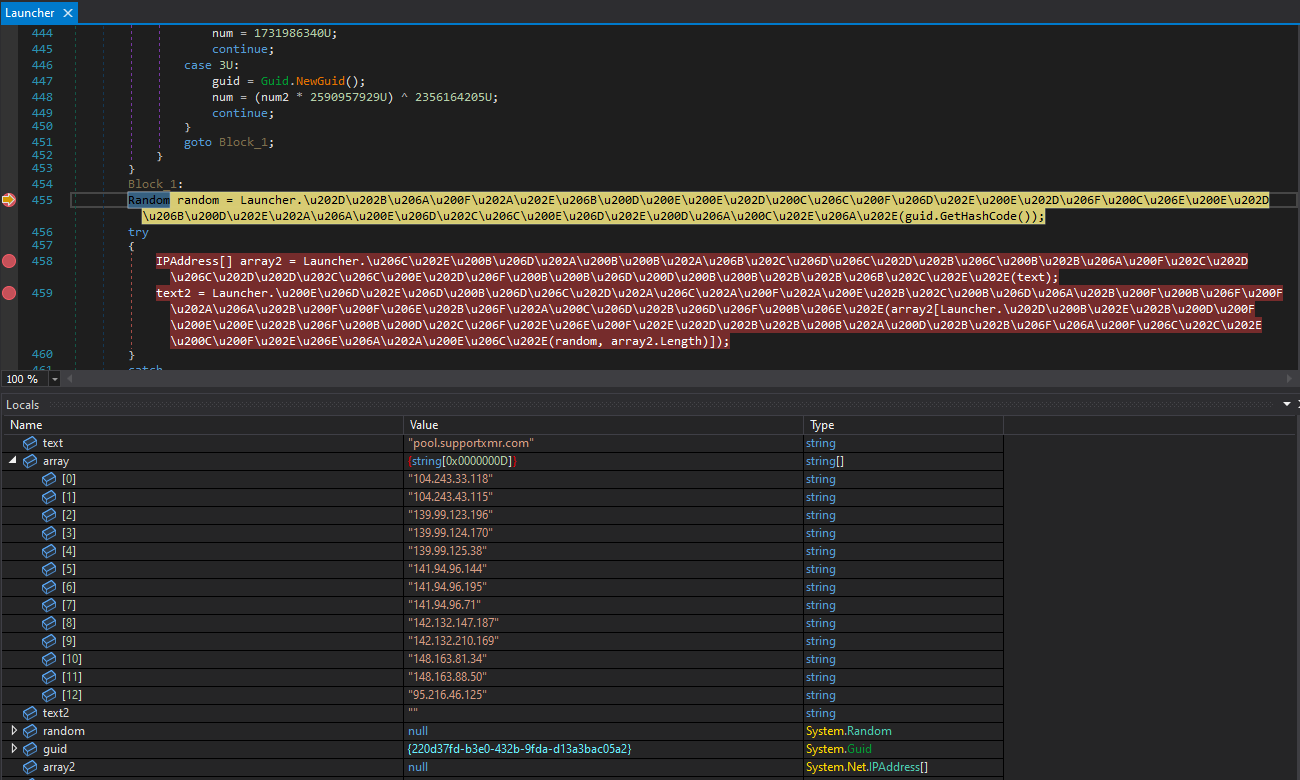
A group of threat actors who are responsible for a malware campaign called “black hat redirect” has increased the scope of their operation by incorporating more than 70 fake domains that imitate URL shortening services.
The attackers have managed to infect a significant number of websites with this malware, with the current count surpassing 10,890.
Visitors are Being Directed to Hacked Sites
The primary goal of the operation remains ad fraud, which involves the use of illicit techniques to artificially boost the volume of traffic to web pages featuring AdSense IDs and Google ads. This activity is carried out with the intent of generating revenue through fraudulent means.
Recently, various Google products such as Google Ads, Google Home, and Google Drive have been used to disseminate malware and other harmful components. This has been confirmed as a factual occurrence and has raised concerns about the security and safety of these products.
GoDaddy’s subsidiary company first revealed the malicious activity in November 2022, after the company was acquired by the GoDaddy corporation.
This campaign began in September last year and is redirecting visitors to compromised WordPress sites to fake question-and-answer portals. This is a potential threat to the security and privacy of individuals who may unknowingly disclose sensitive information.
Apparently, this aims to increase the authority of spammy sites in search engines so that they will appear higher in search results.
Similar to the previous malware attack, it has been observed that the latest wave of malware is also attempting to redirect internet traffic through Google searches. By doing so, the attackers aim to make the redirected traffic occur legit.
Abusing URL Shorteners
Sucuri detected that all of the infected websites were using the WordPress content management system. As a result of this, legitimate files on the websites had been corrupted with an obfuscated PHP script.
The latest campaign has a significant feature that sets it apart from previous ones. In their redirects, it makes use of Bing search result links, Twitter’s link shortener service, and Google as well.
The campaign’s utilization of these services suggests a strategic move to evade detection by security measures. This indicates an expansion of the threat actor’s footprint.
Attack Analysis
Sucuri researchers have recently discovered more than 75 pseudo-short URL domains that are associated with redirected traffic. This discovery has been made over the course of the last two months.
It is important to highlight that the majority of malicious URLs discovered are linked to a single URL-shortening service. All the low-quality Question2Answer websites are completely related to cryptocurrency or blockchain technology.
It has been suggested that these advertisements may be part of an intentional pump-and-dump ICO fraud where new cryptocurrencies are advertised.
Despite the lack of conclusive evidence, researchers are confident that the main aim of ad fraud is to artificially boost website traffic in order to display Google ads and generate revenue through AdSense ID.
These malicious websites have been known to inject obfuscated code into critical files, such as wp-blog-header.php. This code can cause harm by manipulating the behavior of the affected website and potentially compromising the security of its users.
In order to ensure that the malware is not detected and disinfected, this code acts as a backdoor. In an effort to conceal itself, the malware adopts the strategy of pausing redirections for a period of 2 to 6 hours whenever an administrator logs in or a user visits an infected site.
This makes it difficult for website administrators to detect the presence of the malware, as its activity is temporarily suspended during these instances. In order to hide the malicious code, Base64 encoding is used.
AdSense IDs Used
Here below we have mentioned all the AdSense IDs that are used on the websites that are infected:-
Microsoft has released updates to patch three zero-days and lots of other vulnerabilities and so have several other vendors
The Patch Tuesday roundup from Microsoft for February 2023 includes three zero-days. Not exactly what we had in mind for Valentine’s Day.
Microsoft classifies a vulnerability as a zero-day if it is publicly disclosed or actively exploited with no official fix available. As far as we can tell, only two of the vulnerabilities were actually exploited in the wild.
The zero-days patched in these updates are:
Graphics component
CVE-2023-21823: A Windows Graphics Component remote code execution (RCE) vulnerability. An attacker who successfully exploited this vulnerability could execute commands with SYSTEM privileges.
Important to note here that this update comes from the Microsoft Store. So users that have disabled automatic updates for the Microsoft Store have to get the update through the Microsoft Store by following the guide titled Get updates for apps and games in Microsoft Store. Be sure to select the tab for the operating system installed on your device to search for updates.
The Microsoft update guide for this vulnerability specifically mentions OneNote for Android. At Malwarebytes, we’ve recently seen ASyncRAT campaigns using malicious OneNote (.one) attachments, so we hope to see that this update puts an end to that method of infection.
Microsoft Publisher
CVE-2023-21715: A Microsoft Publisher security features bypass vulnerability. An attacker who successfully exploited this vulnerability could bypass Office macro policies in Microsoft Publisher which are used to block untrusted or malicious files. The attack itself has to be carried out locally by a user with authentication to the targeted system. An authenticated attacker could exploit the vulnerability by convincing a victim, through social engineering, to download and open a specially crafted file from a website which could lead to a local attack on the victim computer.
Although that makes it sound hard to abuse, Microsoft says it has detected exploitation of this vulnerability.
Windows Common Log File System Driver
CVE-2023-23376: A Windows Common Log File System Driver elevation of privilege (EoP) vulnerability. An attacker who successfully exploited this vulnerability could gain SYSTEM privileges. This means it can be very useful in a chain of vulnerabilities, but Microsoft gives no clues about any other vulnerabilities this EoP has been used in combination with.
Other patched vulnerabilities
Exchange Server: included are patches for three remote code execution flaws that are labelled as likely to be exploited. These vulnerabilities listed as CVE-2023-21706, CVE-2023-21707, and CVE-2023-21529 all require authentication.
Microsoft Word: an RCE vulnerability listed as CVE-2023-21716 with a CVSS score of 9.8 out of 10. An unauthenticated attacker could send a malicious email containing a Rich Text Format (RTF) payload that would allow them to gain access to execute commands within the application used to open the malicious file.
Unpatched
Microsoft has also disclosed a vulnerability listed as CVE-2023-23378 in the end-of-life (EOL) application Print 3D. EOL is an expression commonly used by software vendors to indicate that a product or version of a product has reached the end of usefulness in the eyes of the vendor. Print 3D was deprecated along with Windows 10 version 1903.
Microsoft has confirmed that it will not release a patch to fix the vulnerability and that customers should update to the 3D Builder app.
Other vendors
Other vendors have synchronized their periodic updates with Microsoft. Here are few major ones that you may find in your environment.
While Google Lens hasn’t been the talk of the town for several years, Google has been keeping up with it by delivering updates to it. Also, the company has been integrating the service into several of its other products such as Google Photos and the Chrome browser for desktops. So, in case you want to know the best uses for Google Lens, here’s a useful guide. It’ll be full of the basics and it might involve some stuff you didn’t know.
What is Google Len?
On the off chance that you’re unaware of what this is, here’s a little refresher. Google Lens is Google’s AI-powered camera application. It is separate from Google’s primary camera that centers around taking photos and videos. Google Lens is an application that’s meant to scan and ascertain what you see through the viewfinder and give you search results and additional context based on it.
You can point your phone at a cat, and Lens will tell you what type of cat it is. It was introduced during Google I/O 2017, and the company has been finding more ways to squeeze it into other Google products.
If you own a Pixel device, then you should have it integrated into your Google Search bar. Just tap on the camera icon in the bar. If you don’t have it integrated, you can download the standalone app from the Google Play Store. You can also use Lens on iOS by downloading the Google app on your iPhone or iPad and using the Len integration.
You can use Google Lens to do a lot of stuff, and most don’t really realize that. When you open the app, you’ll see a bit of an overview of the things that you can do.
Basic Google search
So, the core function of Google Lens is to search. It’s like putting a Google Search bar in the real world. When you open the Google Lens app, it will open right to the search function. Just tap on the Search with your camera button on the top half of the screen, and you’ll see the viewfinder expand to fill the screen.
You’ll then point your camera at what you want to search. When Lens scans the object, it will do a Google search on what it sees. You’ll get better results with more generic objects, animals, public figures, etc. So, if you see a certain flower, car, etc., you’ll be able to do a search.
Copy text from the real world
Say, you see a bit of text in the real world that you want to copy to your phone’s clipboard. Well, Google Lens will scan the text that’s in the viewfinder and allow you to copy it. The app will highlight all of the text that it sees. All you have to do is take a picture and pick which text you want to copy.
Instantly go to link
This functionality also lets you go straight to links that you see printed in the real world. Say, you see a business card with a person’s website printed on it. Well, if you scan it with Google Lens, you’ll be able to navigate right to that site on your phone. That saves you the trouble of typing it in yourself.
Real-time translation
One of the most impressive features of Lens is the ability to point the camera at any text that you want to translate. You can take a picture of the text, but the app will also translate the text right in the viewfinder in real-time. You’ll see the translation floating above the original text.
Find prices and where to products you see in the real world
Say, you see a dress or a phone out in the world, and you want to know where you can buy one, Lens makes that process easier. Using the Shopping tab, all you have to do is take a picture. At that point, Google will give you a ton of results showing you prices and how to buy the product.
Now, things get pretty hairy when you’re talking about products. When looking up products, Google will give you a bunch of results that look similar to what’s in your viewfinder, but there’s no guarantee that you’ll see the exact products you’re looking for. For exact results, the product will need to be something extremely distinctive.
Search for landmarks
If you need to know the name of a statue, building, mountain, or other notable landmarks, you can do so with Lens. Just point the camera at it, and you’ll see a little pin pop up over the landmark. It will tell you what it’s called. If you want more information, tap on the pin, and it will show you a Google search for it.
Identify food
That dish on TV looks delicious, but what is it? We often ask that question. All you have to do is point your phone at the food, and the app should be able to tell you what dish it is. As always, Google Lens will offer you extra context via search results.
This is neat if you want to know more about the dish like its origins. Also, you’ll be able to quickly look up recipes for it.
Help with homework
If you’re doing an assignment, and you need some assistance, you can scan the problem that you’re working on. Google will then give you search results on what it scans, and you should be able to find some helpful material. If it’s a math problem, Google will actually teach you how to do the problem. You’ll see the process of how to do the problem along with the answer at the bottom.
Scan QR codes
This one’s pretty self-explanatory. All you have to do is point your phone at the QR code that you want to go to. It will show the link for you to follow over the code.
Search for visual matches
If you take a picture of something, there’s a chance that someone else in the world has taken a picture that looks similar to yours. Whether it has a similar object in it, a similar color aesthetic, etc. When you take a pic, you’ll get results of other pictures posted to the internet that resembles yours.
Scan your pictures
You can do a lot with Google Lens through the viewfinder, and you can do all of the same stuff with pictures that you’ve already taken. When you open the app, you’ll see a grid with pictures you’ve taken on your phone. Just tap on the photo that you want to scan and the app will do it for you.
Hopefully, with this guide, you’ll be more inspiration for you to use Google Lens. It’s really a useful tool that might help improve your smartphone experience.
Microsoft’s new Bing chat powered by ChatGPT, has a browser compatibility requirement. You need to be using Microsoft Edge. It’s not a surprising move, as Microsoft wants more people to switch from Google’s beloved Chrome to Edge. And the AI-powered Bing chat is how it plans (or hopes) to convince people to make the switch.
At least, that’s the deal for now. There is of course another caveat or two to contend with. Right now Bing chat isn’t available to everyone. Not even people who use Edge. Microsoft officially announced the new tool last week and has since begun allowing users to sign up for access via a waitlist. Noting that multiple millions have already signed up. You currently need an invite to use the tool. So if you haven’t signed up yet, that should be your next course of action.
Though there’s no telling how long the wait may be. Microsoft says more than a million people signed up within the first 48 hours of access. And invites just started rolling out on February 14.
Bing chat browser compatibility will eventually open up
For now, you’ll need to use Edge if you want to access and converse with the new AI Bing chat. But it won’t be that way forever. Microsoft has confirmed that it will eventually open up the compatibility to other browsers. Which likely means Chrome, Opera, Firefox and others.
However, there is still a question of timing. Microsoft hasn’t said when it would make the new Bing chat available to other browsers. Just that it would. Some things to keep in mind though. Outside of Edge, you may need to set Bing as your default search. Currently, you can speed up your wait time in the signup queue by doing two things. One of which is setting Bing as your default search.
Although it isn’t required to set Bing as your default, Microsoft is clearly using it as a way to convince users. The signup queue is in the millions. Bypass that by setting Microsoft tools as your defaults. Seems pretty straightforward. With that in mind, when Bing powered by ChatGPT finally makes it to other browsers, it’s not too hard to believe that Microsoft would require those users to set Bing as a default if it wants access to the tool.
The recently concluded holiday shopping season may not have been as auspicious for the global smartphone market as we’ve come to expect over the years, but for some reason, the music streaming industry doesn’t appear to be suffering any consequences of a tough economic climate around the world.
Not yet, at least, and not as far as said industry’s heavyweight champion is concerned, with some of Spotify’s key success indicators actually surging higher than originally anticipated during the final quarter of 2022 compared to both the same period of 2021 and last year’s third calendar quarter.
There are now 205 million people worldwide paying for Spotify’s “Premium” service tier, up no less than 10 million from Q3 2022 and a cool 25 million versus Q4 2021. How does the new milestone compare to the competition? Unfortunately, there’s no way to know… for sure.
That’s because Apple effectively stopped making those kinds of figures public back in 2019, when around 60 million people were subscribed to the company’s paid Music platform. Of course, many unofficial guesses and estimates followed, with one from 2021 boosting that number to 78 million and one from last year circling 88 million.
What’s crystal clear is that Apple Music still has a loooooong way to go before hoping to catch up to Spotify’s usage digits, which also include 295 million ad-supported monthly active users (up from 273 million in Q3 2022) and a grand total of 489 (!!!) million Q4 2022 MAUs, representing a massive increase from 456 million the previous quarter and 406 million in Q4 2021.
It’s equally true that Apple is very clearly prioritizing the profitability of its “Services” division as a whole over the subscriber growth of each individual platform, while Spotify continues to bleed money as it brings in more and more listeners.
We’re talking a €231 million ($250 million) operating loss for the Sweden-based company behind the world’s most popular audio streaming product between October and December 2022 alone, and although things like “higher personnel costs” and “higher advertising costs” are blamed for this latest financial deficit, the truth is Spotify last posted a quarterly profit all the way back in 2019.
Looking ahead to the near future, Spotify doesn’t expect its financials to bounce back all of a sudden despite predicting another boost to 207 million premium subscribers and, yes, half a billion total monthly active users. Now that’s a number for the ages!
The ransomware encrypts all files on the infected system, including those in the trash bin and virtual machine files. It corrupts Windows Explorer, deletes folders and files from the start-up menu, and disables the Run Command.
Cisco’s Talos cybersecurity team has been tracking an unidentified threat actor behind a ransomware campaign that uses a variant of the Xorist commodity ransomware MortalKombat, as well as a GO variant of the Laplas Clipper malware.
The detailed advisory by Talos states that, once a computer is infected, it displays a Mortal Kombat 11 wallpaper along with a note instructing the victim to contact the attackers using qTox. For your information, qTox is an instant messaging app that is available for download via GitHub.
The email claims that the user’s payment has timed out and carries an attachment, which contains the malicious payload in a zipped file with a name that appears to be a CoinPayments transaction number.
Upon opening the attachment, a multi-stage attack chain is initiated, during which the actor delivers either malware or ransomware. The ransomware encrypts all files on the infected system, including those in the trash bin and virtual machine files. It corrupts Windows Explorer, deletes folders and files from the start-up menu, and disables the Run Command.
In case the email attachment drops Laplas Clipper alternatively, the victim’s cryptocurrency wallet is targeted. The malware monitors the computer’s clipboard for cryptocurrency wallet addresses.
If one is found, it is sent to the attacker’s server, where a Clipper bot creates a lookalike address owned by the hacker and then replaces the clipboard entry. This, according to Cisco Talos’ blog post, allows the threat actors to receive the funds that the user attempts to transfer into their own wallet.
“The loader script will run the dropped payload as a process in the victim’s machine, then delete the downloaded and dropped malicious files to clean up the infection markers.”
The campaign has reportedly been targeting individuals, small businesses, and large corporations alike in the United States, England, Turkey, and the Philippines.
The best way to protect yourself from being affected by similar ransomware campaigns is to be wary of suspicious emails from services you use. Until you ensure that the email you received is from a legitimate entity, it is highly advised that you do not click on any attachments.
Keeping the nature of this ransomware campaign in mind, Cisco Talos also encouraged companies to remain vigilant when performing cryptocurrency transactions.
Google Pay is getting a redesign, bringing a new look to the online payment app. This redesign is rolling out to users via an app update for Android devices. Along with this update comes a few tweaks to the Material You design on Google Pay to improve its interface.
Instead of rather subtle changes, the redesign brings very obvious changes to its user interface. These changes will affect how users interact with the app on a day-to-day basis. If you make use of Google Pay, then this redesign might require some work on your part.
There are changes in the positioning of buttons, icons, and tabs. Also, there is a new design layout that stands out from what users are familiar with. Here are all the new design changes to the Google Pay app.
Everything new with the Google Pay redesign
With the latest Google Pay app update, there comes some design tweaks. This update also brings Material You integration to the payment app. Major changes to the app modify the bottom bar and the overall layout.
For the new bottom bar, there is now a wave effect to indicate the menu that the user is currently on. Also, the current menu also gets the Material You theme to match the device’s wallpaper. This helps to improve the app’s user interface at a glance.
Other aspects of the redesign repositioning various buttons around the Google Pay app. The insight page also comes with redesigned tiles, all coming with Material You theming. Some buttons in the app are also slightly bigger than they were before this update.
Users of this payment app would be able to access this design improvement once they install the update. Sadly, the Google Pay app is only available to users in just three countries. In the future, more redesigns will be made to this app and will roll out to the public via the Google Play Store.
The new TuneIn Explorer map-based interface is bringing lots of radio channels to users. This update will be beneficial to users in various parts of the world. TuneIn now brings together thousands of radio stations from around the world on its website for easy access.
Users can also listen to music, news, sports, and podcasts via the new Explorer page. These features have been available for some time. But the radio station feature is new and will catch the attention of certain users.
If you love to get your news over the radio while commuting to and from work, then this feature is perfect for you. With just a stable internet connection and your smartphone, TuneIn will provide you with different stations over the web. Here is how you can make effective use of this new feature.
Get access to thousands of radio stations with the new TuneIn Explorer feature
The new map-based interface on TuneIn Explorer reinvents how you can listen to your favorite radio channel. To make use of the new radio feature on TuneIn you’d need to head over to their website. The next step is to sign in if you already have an account or sign up to create an account.
Now head over to the radio feature on the left-hand side of the interface, or hit the “start exploring button.” The new radio feature comes with a map interface that shows the location of various radio channels. You can search for your channel of choice or explore other channels available on the map.
Using the zoom button at button on the left-hand side of the screen will show more channels in various locations. To tune into these channels, simply tap on their icon and the media player will pop up at the bottom of the interface. With this player, you can pause the channel, mute it, share it with friends, and even add it to your favorite channels.
But, users can only tune into radio stations that operate in their country. With the map, you can discover more channels in and out of your locality. The new TuneIn Explorer radio feature is a great tool for commuters and those that enjoy listening to various radio channels.
WhatsApp has been hard at work lately adding features in order to compete with the likes of Signal and Telegram. However, there are a few new features already making their way to the Android app, including one that is still in the beta testing phase.
According to WABetaInfo (via Techradar), the new features are in addition to the status update ones that were announced last week, which were meant for both iOS and Android. These additional new features target the Android app specifically and were spotted when they appeared in the release notes of the latest version available via the Google Play Store.
The version in question is 2.23.3.77, which has an update date of February 13th, and lists the below new features:
You can now add captions when sending documents
Added support for longer group subjects and descriptions to better describe your group
You can now send up to 100 photos / videos at once (vs. 30 previously)
You can now create personalized avatars and use them as stickers and profile photos. Go to Settings > Avatar to get started.
The most prominent and useful one of all the aforementioned features, at least to me, happens to be the increase in the number of photos and videos that can be sent all at once within a conversation. Going from 30 to 100 is quite the leap and hopefully enough for even the most active photographers.
However, there is one rumored upcoming feature that has not yet made it out of beta: Disappearing Messages. The ephemeral message feature, made popular initially by Snapchat, is currently only available in the beta version of the app. Additionally, the beta version also includes a “Kept Messages” folder, which is meant to store the disappearing messages you prefer to keep indefinitely. Sadly, the beta version of WhatsApp for Android is currently full and not accepting new registrations.
All of these changes come at a time when Will Cathcart, Head of WhatsApp at Meta, is launching an all-out war against Telegram by urging his Twitter followers not to use that app, going as far as to label it as “Russian spyware.” So far, this battle has been beneficial for WhatsApp users in that it has sparked some innovation and new features to be launched. It will be interesting to see how far this goes and how much we as users can get out of it.
Huawei launched some truly compelling laptops over the years, and it’s not easy to constantly improve upon that formula. Well, the company managed to do it again. The Huawei MateBook X Pro 2022 is the best-feeling laptop I’ve ever used, it simply screams premium, as you’ll see in this review. Huawei opted to use magnesium to make this laptop, and it just feels… stunning. We’ll talk more about that in the design section, though, of course.
The design in general is excellent, but that’s not the only thing that makes this laptop great. Huawei didn’t really miss in the screen department either, and the same goes for the battery and the keyboard. It’s an all-around great product, which is to be expected at this price, but still… it managed to surprise me. That being said, let’s see what this laptop has to offer, and if it’s the right choice for you.
The Huawei MateBook X Pro 2022 both looks and feels ultra premium
I already kind of spoiled the design section of this review in the intro. The design is what stood out to me the most here. To the touch, this laptop feels like metal, but with a paper texture. That’s the first thing that came to mind when I pulled it out of the box, and it still holds true to this day. It feels like touching paper, but also metal at the same time. I have to say I love the feeling, but I’ve also noticed some smudges early on, which I managed to remove. Still, those smudges probably wouldn’t be there if the matt texture wasn’t on it, as it wasn’t the case in previous laptops from the company. That’s not much of a problem for me, though, because as I said, I managed to clean it, and I’d much rather have this texture and material than the extremely slipper, polished aluminum.
It is quite light, and compact overall
Don’t get me wrong, this texture is not overly grippy or anything, but it’s grippier than what you’d usually get. The Huawei MateBook X Pro 2022 also has a lot of curves on it. It’s curvier than its predecessors, and I love that look. It seems considerably slimmer because of it, even though it’s not really, at least at its thickest point. It is, however, quite thin, quite compact, and quite light as well. The device weighs 1.38kg, in case you’re wondering, which is not bad at all for a 14-inch laptop, quite the contrary. It is one of the lightest laptops I’ve ever reviewed in this category.
The situation with ports is… a bit odd
Now, when it comes to ports, some of you may be disappointed. This laptop does have five ports on it, but four of them are USB Type-C ports. You’re not getting a single USB-A port here. You also won’t find an HDMI port, an SD card reader, or anything of the sort. There are two Type-C ports on the right, two on the left, and a 3.5mm headphone jack on the left as well. That’s it. Granted, you can use those Type-C ports for a lot of things, depending on your workflow. Some of you may opt for a dongle, or to get some extra cables. As I said, it all depends on your workflow. I, personally, only need Type-C ports, as that’s how my gear is organized, so this was not a problem for me whatsoever.
This laptop has a huge solid-state touchpad
What about the touchpad? Well, it’s excellent, though, to some of you, it may be a weird experience at first. The touchpad is huge, and it leaps over the edge of this laptop. Huawei calls it the ‘Free Touch’ touchpad, and it’s actually a solid-state touchpad. What does that mean? Well, it doesn’t exactly move, you’re getting the feedback in form of vibrations. That’s why it may be a bit odd of an experience when you let go of it, and it doesn’t exactly raise back into position. It may take you some time to get used to that. After around two weeks, I did get used to it to a certain degree, but it’s still a bit odd. I’m getting there, though. Accidental presses did occur from time to time, but then I realized I can lower the sensitivity of it. You can do that via the Huawei Control Panel, simply put it to ‘Low’ setting, and you’ll get a much more “normal” feeling and avoid accidental presses.
There are a ton of touchpad gestures that you can take advantage of
You can increase or decrease the sensitivity of the touchpad, along with some other options in the settings. It will never feel the same as a regular touchpad, though, for better or worse. There are also all kinds of gestures available here, and even knuckle gestures. You can, for example, knock twice on the touchpad to take a screenshot, with your knuckle. This actually works really well, as it did on Huawei phones. All in all, I loved my experience with this touchpad, and it’s really well-positioned. I often have to disable touchpads when typing, as I accidentally trigger actions with them. That was not really a big problem here, I did move the cursor by accident, but that’s about it. In fact, the vast majority of this review has been typed up on this laptop. Speaking of which, let’s talk about the keyboard.
The keyboard is excellent, and even had good key travel
The keyboard is another aspect of the MateBook X Pro that Huawei did well. The keys have a 1.5mm of travel, and a “soft landing design”. That basically means that they’re not too loud, and that’s true. I thoroughly enjoyed typing on this keyboard.
One thing to note, is that the arrow keys are now squished together, due to the size of the keyboard. There is no numpad on the sides, or anything of the sort. Huawei did have to squeeze in the speakers on the sides, to make them up-facing, which is why it had to squish the arrow keys. I don’t mind this at all, as we are getting a great set of speakers, and they’re not bottom-facing. A somewhat odd arrow keys setup is a small price to pay, in my humble opinion, and I did get used to it rather fast. The left and right arrow keys are still quite large, while the up and bottom ones are placed in between them.
You can open this laptop with one hand, easy
I’m sure there are those of you who are wondering if you can open the Huawei MateBook X Pro 2022 with one hand. The answer is, yes, you can. The bottom part will not start raising up or anything of the sort, and that’s another sign of a job well done. That’s my pet peeve as well, in a way. The build quality here is outstanding as is Huawei’s attention to detail, I have no complaints, really.
The display on the Huawei MateBook X Pro 2022 is outstanding
Spoiler alert, the display on the Huawei MateBook X Pro 2022 is outstanding. This is one of the best displays I’ve ever seen on a laptop, in fact, and that’s saying a lot. Huawei opted for a 14.2-inch 3120 x 2080 LTPS panel (3:2 aspect ratio). We’re looking at a 264 PPI here, and this panel offers a 90Hz refresh rate. It gets up to 500 nits of brightness, which is not bad for a laptop at all, it gets quite bright, actually. Unless you’re working in direct sunlight, you’ll be good to go. The P3 color gamut is a part of the package, and the display can project 1.07 billion colors. It has a 1500:1 contrast ratio, and excellent viewing angles (up to 178 degrees). On top of all that, this is a touch-sensitive display.
It is truly immersive, and extremely sharp
On top of everything I’ve mentioned, do note that you’re getting a 92.5-percent screen-to-body ratio here. That means that you’ll also get a truly immersive experience, as the bezels around the display are really thin. All of that sounds great on paper, but is the display any good in use? Oh yes, very much so. It’s extremely sharp, which is easily noticeable, and thanks to its brightness, I didn’t really have nearly as many issues with glaring, as I did with some other panels. It is also touch sensitive to a normal degree, you can use it as a touchscreen, but I didn’t really do that all that often. The colors are vivid, and it is quite color-accurate.
I did disable automatic brightness, though
No major complaints on my end, this panel is excellent. There is only one thing I’d like to flag, and that is automatic brightness. I noticed quite a lot of change in that department while working, which can be quite annoying. The weather was not the best, so that could be the reason, as the sun did come and go constantly. In any case, I ended up disabling automatic contrast adjustment, and just used the manual triggers on the keyboard. I do that on every laptop, though, so… there you go.
The 12th-gen Intel Core i7 CPU keeps everything running smoothly
The Huawei MateBook X Pro 2022 comes in two versions, one with the Core i5-1240P, and the other with the Core i7-1260P CPU. We have the second one here, the more powerful and expensive one. It comes with 4 performance cores, 8 efficiency cores, and 16 threads. In comparison to last year’s model, this is quite an improvement. In fact, if you benchmark it, you’ll get around 50% better performance in multi-core performance. The single-core performance improvement is more modest, but it’s still there.
That’s not something you’ll notice under normal load, not at all. Both last year’s and this year’s MateBook X Pro laptops are overkill for the vast majority of tasks. These are quite powerful SoCs, and even though these laptops are not made for gaming, they can handle a lot of other things, and non-demanding games as well. This variant comes with L3 cache – 18MP, which is also an improvement over 12MP cache in last year’s model. You’re also getting the Intel Iris Xe G7 GPU here.
This laptop is not made for gaming, though
This combo can handle image editing, to a normal degree, while gaming is not preferred, of course. The GPU comes to light when it comes to gaming, and this one is definitely not made for it. You’re also getting plenty of RAM here, our model includes 16GB of LPDDR4X RAM. So, technically, it’s mobile RAM, but still, it’s plenty for this thing. What’s weird, though, is that the phone I’m currently using, the ZenFone 9, has 16GB of LPDDR5 RAM. We’ve come to that point apparently, it dawned on me while I was typing this review.
It never got too hot, not even when it was under heavier load
Another thing to note is that the laptop never got too hot. Not even under heavy load was I able to feel excessive heat or anything of the sort, nor did the laptop slow down in the process. The device includes the so-called Shark Fin Fan system, and it does a good job. It also has a smart temperature control system, and some other goodies to cool down the CPU. All in all, the performance has been excellent, and Windows 11 also behaved. You’re also getting the Huawei PC app, which is great at giving you some extra tools, and allowing you to choose between Balanced and Performance modes.
The battery life is good, and 90W charging is also included
The Huawei MateBook X Pro 2022 includes a 60Wh battery on the inside. Its predecessor had a 56Wh battery, in case you were wondering. This tablet also offers faster charging than last year’s model. This model came with a 90W charger, but the Core i5 version comes with a 65W charger. So that’s another advantage of getting the higher-end model. You can charge the device by using any of the four Type-C ports. I didn’t really measure how long it takes to charge it, but it didn’t take that long at all. I usually charge it while I’m working in an office, so that it’s good to go later on.
You battery life may vary
Now, in regards to the battery life. This model offers slightly less battery life than the previous one, despite the fact it has a bigger battery. The previous one had a less powerful SoC, and a dimmer display, which is why. I was able to get around 5 and a half to 6 hours of use, sometimes a bit more, on a single charge. My brightness was manually set to around 40-50-percent, as I used it mostly indoors. I noticed that lowering the brightness can noticeably improve battery life. Do note that I also disabled automatic color adjustments, along with automatic brightness. If I left that on, it’s possible the battery life would be better. Also, I did not play any games on it. I used it for typing articles, browsing the web, streaming music, image editing, and so on. I did not edit videos nor play games, other than one day when I was testing both.
The camera is more than good for video calls
IMAGE
What about the camera? Well, it’s actually quite good… for a laptop camera. It is an HD+ unit, and it does the job very well for video calls. Huawei does offer some virtual backgrounds for you to use with it as well, and it works really well. I don’t really have high expectations for cameras on laptops, and this one is actually really good in the grand scheme of things.
Both fingerprint & face scanning solutions work great
With the Huawei MateBook X Pro 2022, you’re actually getting two different biometric security options. You’re getting a fingerprint scanner above the keyboard, in the top-left corner, and infrared face scanning. Sensors for the latter sit above the display, in the bezel itself. Both options are truly excellent. They’re accurate, fast, and you simply don’t think about either when you’re using the laptop. Face scanning is more seamless, I’d say, as you don’t really have to press a button to log in. Considering that we’re talking about a second’s worth of work to put your finger on the power key, it really doesn’t make any difference. The point is, you have two great options, both of which work flawlessly, it’s up to you.
The sound output is sublime
Huawei managed to stuff 6 speakers inside the Huawei Matebook X Pro 2022. They are not only loud, but they also sound very rich. In fact, I’d go right out and say it, these are the best-sounding speakers I’ve ever used on a laptop. The mids are very crisp, and the sound in general is very rich and sharp. You can simply leave everything as it is and enjoy yourself. If you do need more control, though, the company includes the so-called Huawei Sound program. It offers three different settings to choose from: Smart Optimization, Ultra-bass, and Sound Turbo. The Smart Optimization setting will balance sound details and bass, the Ultra-bass doesn’t need any further explanation, and the Sound Turbo basically aims to replicate spacial audio. It’s up to you, but the sound these speakers can provide is sublime. You’ll also get great voice pickup thanks to the included microphones.
The Huawei MateBook X Pro 2022 is really expensive, but…
The bottom line is… the Huawei MateBook X Pro 2022 is a truly excellent laptop. It is extremely pricey, though, a lot more expensive than its predecessor. So, from that point of view, it may be best for you to get last year’s model, as you’ll save a ton of cash (depending on the variant). However, if you’re looking to get the latest and greatest, we really don’t have any major complaints about this laptop. Huawei did an amazing job with the MateBook X Pro 2022. It pulled all the stops and created a great-looking, and great-feeling laptop that can handle a lot. The sound output is sublime, the screen is truly excellent, and the keyboard is a joy to type on. Even the touchpad is excellent. If you have the cash, and you want the best, get the Huawei MateBook X Pro 2022, it’s certainly one of the best offerings in this price range.