U.S. House Bans Staff from Using Microsoft’s Copilot Amid Data Security Concerns – The AI coding assistant, recently released to the public, is deemed a risk due to potential data leakage – Learn more about the controversy and the future of AI in government workplaces.
In a move highlighting growing anxieties around data security, the U.S. House of Representatives has reportedly banned congressional staffers from using Microsoft’s AI coding assistant, Copilot. This comes just weeks after Microsoft announced the official public release of AI Copilot on March 14th, 2024.
The ban, implemented by the House’s Chief Administrative Officer Catherine Szpindor, reportedly stems from concerns about potential data leakage. According to a report from Axios, Szpindor’s office believes AI Copilot “poses a risk to users due to the threat of leaking House data to non-House approved cloud services.”
Concerns Over Data Security
Copilot, an AI tool integrated within Microsoft’s development environment, analyzes a programmer’s code and suggests completions or entire lines of code. This can significantly boost productivity for developers. However, the tool relies on a massive dataset of publicly available code, raising concerns about potential security vulnerabilities.
The House’s Office of Cybersecurity reportedly fears that sensitive congressional data could be inadvertently incorporated into this vast codebase, potentially exposing it to unauthorized access.
Microsoft Responds
Microsoft has acknowledged the concerns raised by the House and emphasized its commitment to government user security. A Microsoft spokesperson, speaking to Reuters, stated, “We recognize that government users have higher security requirements for data. That’s why we announced a roadmap of Microsoft AI tools, like Copilot, that meet federal government security and compliance requirements that we intend to deliver later this year.”
Wider Implications
The House’s decision to ban AI Copilot reflects a broader trend of increased scrutiny surrounding AI tools that access user data. While AI offers immense potential for efficiency and innovation, concerns about data privacy and security remain significant.
Commenting on this, Callie Guenther, Senior Manager, Cyber Threat Research at Critical Start argued that the US government is cautious about regulating AI due to concerns like data security and bias.
“The ban on congressional staffers’ use of Microsoft AI Copilot highlights the government’s careful approach to AI while trying to regulate it. The risks include data security, potential bias, dependence on external platforms, and opaque AI processes,“ Callie pointed out.
“The industry must enhance security, improve transparency, develop government-specific solutions, and support ongoing evaluation to address these concerns. Congress might reconsider its stance if these issues are effectively addressed, especially with government-tailored AI versions demonstrating high security and ethical standards,” she advised.
Uncertain Future
The House’s ban is a strict one, targeting all commercially available versions of AI Copilot. However, Szpindor’s office did indicate they would “be evaluating the government version when it becomes available and deciding at that time.” This suggests a potential path forward if Microsoft can address the House’s security concerns.
It remains to be seen if other government agencies or private companies will follow suit and implement similar restrictions on AI Copilot. However, this incident indicates the need for data security practices in a world increasingly reliant on AI tools.
Researchers at HUMAN’s Satori Threat Intelligence have discovered a disturbing number of VPN apps that turn users’ devices into proxies for cybercriminals without their knowledge, as part of a camapign called PROXYLIB.
Cybercriminals and state actors like to send their traffic through other people’s devices, known as proxies. This allows them to use somebody else’s resources to get their work done, it masks the origin of their attacks so they are less likely to get blocked, and it makes it easy for them to keep operating if one of their proxies is blocked.
An entire underground market of proxy networks exists to service this desire, offering cybercriminals flexible, scalable platfroms from which to launch activities like advertising fraud, password spraying, and credential stuffing attacks.
The researchers at HUMAN found 28 apps on Google Play that turned unsuspecting Android devices into proxies for criminals. 17 of the apps were free VPNs. All of them have now been removed from Google Play.
The operation was dubbed PROXYLIB after a code library shared by all the apps that was responsible for enrolling devices into the ciminal network.
HUMAN also found hundreds of apps in third-party repositories that appeared to use the LumiApps toolkit, a Software Development Kit (SDK) which can be used to load PROXYLIB. They also tied PROXYLIB to another platform that specializes in selling access to proxy nodes, called Asocks.
Protection and removal
Android users are now automatically protected from the PROXYLIB attack by Google Play Protect, which is on by default on Android devices with Google Play Services.
The affected apps can be uninstalled using a mobile device’s uninstall functionality. However, apps like these may be made available under different names in future, which is where apps like Malwarebytes for Android can help.
Recommendations to stay clear of PROXYLIB are:
Victims of novel attacks like PROXYLIB might notice slow traffic, because their bandwidth is in use for other purposes. And at some point their IP address may be blocked by websites and other services.
The researchers included a list of applications they uncovered as part of PROXYLIB. If you installed any of the apps on the list before they were removed from Google Play you will need to uninstall them.
We don’t just report on privacy—we offer you the option to use it.
Privacy risks should never spread beyond a headline. Keep your online privacy yours by using Malwarebytes Privacy VPN.
X (formerly Twitter) is about to roll out some big updates to its platform, especially in its “Communities” section, which is akin to a subreddit-style grouping. These adjustments coincide with rumors that Elon Musk, who now owns the business, is trying to enable NSFW (Not Safe For Work) groups.
Dong Wook Chung, an engineer at X, verified the information in a recent article. According to Chung, the app’s Communities function would soon automatically filter out offensive information. Furthermore, administrators will soon be able to circumvent the automatic screening procedure by designating places as containing “adult content” using the settings.
Hello, friends! Check out the latest updates and improvements for X Communities.👇
Updates (With the latest version of the app): – [All] Admins can now add topics to their Communities, and you can see topics linked to Communities on all devices. – [All] Soon, NSFW content will…
Researchers have noticed indications before this confirmation that X intended to provide options for “adult-sensitive” material. Although X presently permits users to publish explicit content and nudity, several areas of the app—like profile pictures and cover images for Communities—prohibit such content.
Twitter experimented with a similar feature in 2021
It’s interesting to note that Elon Musk wasn’t involved with the firm before the Communities function. Twitter was experimenting with a similar idea in 2021 to make its site a more personal place for talks. Twitter stands out for allowing pornographic content but has not publicly considered adding NSFW features for Communities.
Furthermore, rumors circulated that Twitter has contemplated creating a rival to OnlyFans via its creator membership service in 2022. The newsletter mentioned concerns about worsening illicit child exploitation content causing the concept’s abandonment.
It’s unclear where X’s leadership stands on these issues at the moment. Chung restated in another article that new filters aim to automatically remove adult content to enhance safety in Communities. Chung said only those who declare their age can visit NSFW content in Communities.
Upcoming adjustments show X’s commitment to providing a safer and more personalized user experience in Communities as the platform evolves. X seeks to empower admins while maintaining a secure environment for all users, with the primary goal being user safety.
If you were curious about what ChatGPT is and what it has to offer your life, you would need to sign up for an account. However, according to the company, that has changed. You can now use ChatGPT without an account.
There was never really a high barrier to entry for ChatGPT. While you needed an account, it was completely free to use. If you want to preserve your chats or access them across the app and the web, then having an account is a good idea. You can either set up your account the old-fashioned way by entering your email address and a password or you can use your Google or Microsoft account.
You don’t need an account to access ChatGPT
There are many people who detest making accounts for every service out there. If you’re one of those people, and you’re just looking to try ChatGPT out to see what the hype is about, then you are not likely to use the service. Even though setting up an account is painless, it’s still another account to keep track of.
However, OpenAI just announced that you can use ChatGPT without an account. When you go to the website, you will be able to freely use it for your questions without being bothered to sign in.
As you can guess, using ChatGPT with an account offers certain benefits. As mentioned above, using an account will allow you to preserve your conversation history and access it using the mobile app. Also, you will need an account if you want to speak to ChatGPT.
Millions of AT&T customers are questioning the company’s transparency, after the telecom giant finally confirmed a massive data breach impacting a staggering 73 million current and former customers.
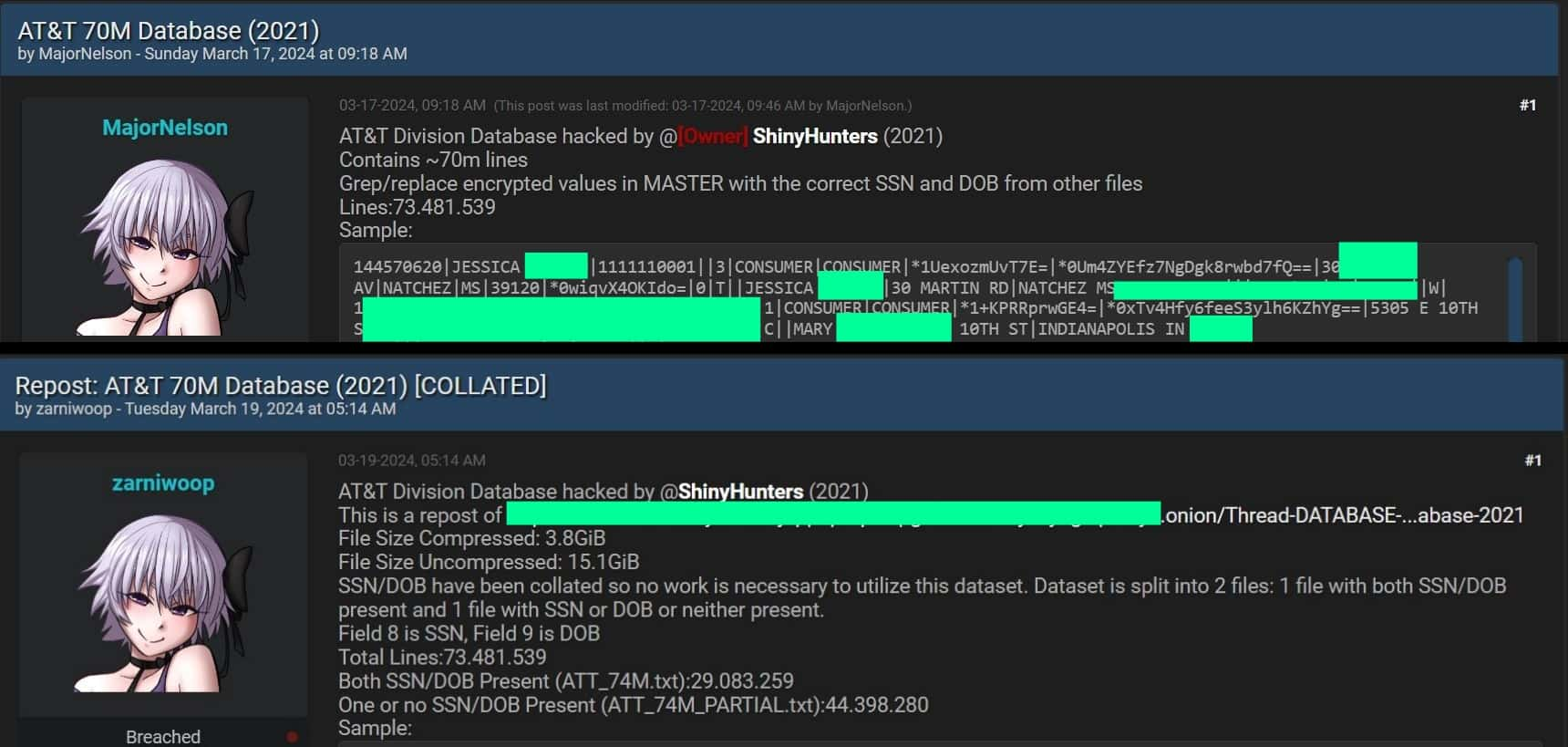
AT&T has finally confirmed a massive data breach impacting a whopping 73 million (73,481,539) current and former customers. This comes after weeks of speculation and accusations of a cover-up following the discovery of the leaked data on the the notorious hacking and cyber crime platform BreachForums.
The data breach, which involved Social Security numbers, passcodes, and potentially other personal information, was first discovered in mid-March. Cybersecurity researchers immediately noted similarities to a possible breach from 2021 that AT&T never acknowledged.
AT&T database on BreachForums (Screenshot: Hackread.com)
Initial Denial and Mounting Pressure
The data was leaked on Sunday March 17, 2024. However, AT&T initially denied any data breaches, despite reports from security researchers like Troy Hunt, founder of Have I Been Pwned. Hunt pointed out that the leaked data closely resembled a breach from 2021 that was attempted to be sold online by a hacker known as “Shiny Hunters.”
This denial raised concerns about AT&T’s transparency and potential legal ramifications. Experts pointed out that failing to disclose a data breach promptly could violate consumer protection laws.
Confirmation and Investigation
Under mounting pressure, AT&T finally confirmed the data breach on March 30th. The company stated they were unaware of the source of the breach, suggesting it could have originated from AT&T’s systems or a vendor.
They also announced that they had already reset passcodes for current users and would be reaching out to impacted individuals. Additionally, AT&T will be offering complimentary identity theft and credit monitoring services.
Lingering Questions
While AT&T has confirmed the breach, questions remain.
Why did it take so long for AT&T to acknowledge the breach, especially considering the potential similarities to the 2021 incident?
What specific data was compromised, and how will it impact affected customers?
Is AT&T conducting a thorough investigation to identify the source of the breach and prevent future incidents?
AT&T has yet to address these questions publicly. It’s likely that the company will face lawsuits and regulatory scrutiny in the coming months.
This data breach goes onto show the importance of cybersecurity and data protection. Consumers should remain vigilant and take steps to protect their personal information, such as monitoring credit reports and using strong, unique passwords.
Google has come a long way in making tab groups on the mobile version of Chrome not so annoying. When this feature first came out, it was met with a very lukewarm response. However, according to a new report, Chrome for Android will let you customize your tab groups.
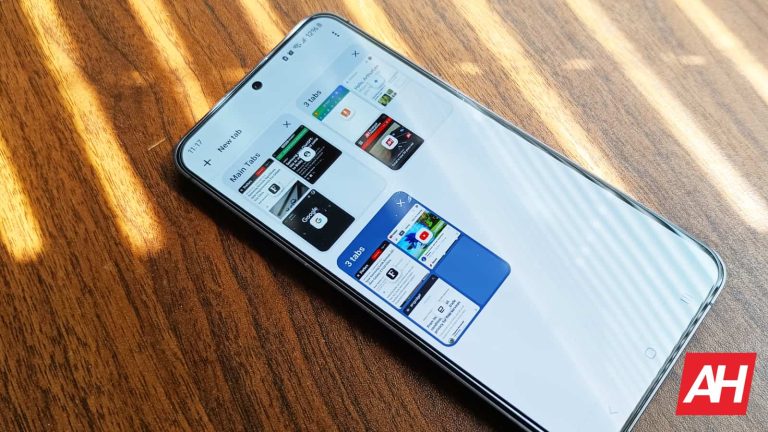
Google introduced tab groups to Chrome quite some time ago. They allow you to join tabs together in neat groups so that they don’t take up so much space. Using the mobile version of Chrome, you will see your tabs grouped into grid-style folders. However, there was no real way to customize the tab groups.
Google Chrome for Android will allow you to customize your tab groups
Right now, this feature is still in testing. So, you are going to have to wait for it to reach your phone if you are not a beta tester. As spotted by @Leopeva64 on X, Chrome for Android will show a new dialog box when you create a new tab. When you see the new dialog, you will have some customization options to edit the tab group. These options allow you to rename it and choose a color. One of the main benefits of tab groups on Chrome for desktop is the ability to change the color of the tab. That allows you to better differentiate between groups rather than having to give it a name. This saves space; instead of having a name spelled out, you will have a colored dot.
Google has added a new dialog that appears when creating a tab group in Chrome for Android (Canary), in this dialog you can change the name and color of the group:https://t.co/sPt4vW4PDjpic.twitter.com/sMQKuwcGUd
In the dialog, you will see a text field to enter a name. Also, you will have the option to choose between one of Google’s several pastel colors. When you choose a color, you will see a little colored dot at the top left-hand corner of the tab group. You will then see the name of the group right next to the dot.
This will better allow you to customize groups on Android. It might actually convince more people to use them. Being able to change up your tab groups makes the feature much more convenient to use. One issue that many users had was not being able to tell which groups were which.
Once a company is big and has a strong foothold in a market, you can bet that regulators are going to be peeking in. A while back, Microsoft was compelled to spin off Teams from Office 365 into its own service in the EU. This was partially due to a complaint from Slack that bundling Teams into such a widely used application platform constitutes anti-competitive practices. Well, Microsoft is spinning off Teams from Office 365 globally.
Microsoft Office 365 is the company’s equivalent to Google Workspace. It is a suite of applications and services that companies and users can use for business. Office 365 includes services such as Microsoft Word, Microsoft PowerPoint, Microsoft Excel, Microsoft Teams, Microsoft Outlook, Etc. Rather than paying a lump sum for the service like in the old days, Microsoft 365 costs a monthly fee.
Teams is the company’s primary communications platform. It’s the equivalent of Slack in that you’re able to communicate and collaborate with your colleagues.
Microsoft is spinning off Teams from Office 365
Microsoft Office is and has been an industry standard for businesses around the world. This means that Office 365 is used by a metric ton of people. However, Slack did not take too kindly to this. Since Office is so ubiquitous, it felt that users are basically forced into using the Office communications platform. This, ostensibly, means that it’s much harder for other communication platforms to make it to other users. That is Slack’s complaint.
Right now, since Microsoft is in the midst of an ongoing anti-competition lawsuit in the EU, it seems necessary that the company should spin off Teams into its own service. This seems to be a move to take some of the heat off of the company while the EU is digging into it.
So, people signing up for a new Office 365 plan will not have access to Teams. Rather, they will have to buy a separate subscription service for it. Buying a separate plan for Teams will cost the user $5.25/month. With the diminished selection of services, Office 365 will then cost $7.75/month.
However, if you already have a Microsoft 365 plan, and you’ve been using Teams, you can still access it using your account. This new plan only applies to new signups. However, at this point, we don’t know how long Microsoft will provide Teams for existing customers.
Samsung‘s Galaxy S20 series may not get feature updates anymore but the devices are still picking up security patches regularly. The entire lineup, including the Galaxy S20 FE, received the March 2024 security update last month. Following an international rollout, the update is available widely in the US. The Galaxy Tab Active 3 is also getting the March SMR (Security Maintenance Release) stateside.
The Galaxy S20 series gets Samsung’s March 2024 update in the US
The March 2024 update is available widely for carrier-locked and unlocked variants of the Galaxy S20, Galaxy S20+, and Galaxy S20 Ultra in the US. The new firmware build numbers for the phones are G98*USQS8HXC1 (locked) and G98*U1UES8HXC1 (unlocked). The update for the FE model is also rolling out widely. The device is getting the build numbers G781USQSEHXC1 and G781U1UESEGXC1, respectively.
The latest updates for these phones don’t bring anything more than last month’s security fixes from Google and Samsung. The former patched more than 30 vulnerabilities across various Android components, including two critical vulnerabilities. The Korean firm, on the other hand, patched nine security issues exclusive to the Galaxy family. These issues don’t exist on other Android devices.
The March SMR is also available for the Galaxy Tab Active 3 in the US. The rugged mid-range Android tablet from 2020 is picking up the update with the build number T577UUES8EXC1. It is a similar changelog for the device. Samsung is pushing nothing more than the 40-odd vulnerability patches discussed above. This isn’t surprising as the Galaxy Tab Active 3 is also done getting feature updates from Samsung.
Like the Galaxy S20 lineup, it debuted with Android 10. While the 2020 flagship smartphones, including the FE model, received three major Android OS updates (Android 11, Android 12, and Android 13), the rugged tablet only picked up two of those. Samsung promises four major updates for most Galaxy devices launched since 2021. Some newer models get security updates for as many as eight years.
The April update is on the way for eligible Galaxy devices
We may have just stepped into April but Samsung has already started pushing the April update to eligible Galaxy devices. The Galaxy S24 series picked it up last week. The company will soon roll out the latest security patch to other models, including the Galaxy S23 and recent foldables. The Korean firm has yet to detail the content of the patch, though. Like before, the April SMR should fix several dozen vulnerabilities across the Galaxy family.
We all know the feeling – group chats can get crazy. That constant stream of messages can be distracting, especially when you’re juggling multiple projects. Well, it looks like Google Chat is taking on the chaos with a rumored new feature called “Announcements”.
This sounds a lot like what we’ve seen on WhatsApp Channels and those X/Twitter Spaces. If you haven’t tried them, these features let a select few send messages to a big audience, kind of like a one-way megaphone.
What are Google Chat “Announcements”?
Thanks to the efforts of Android code expert @AssembleDebug (via Android Central), we have our first peek at how “Announcements” might work in Google Chat. Sure, we’re still missing some details, but the idea is clear. Looks like Google Chat spaces may soon have two flavors: the classic collaborative kind, and the new broadcast-focused “Announcements” style.
It looks like it will work this way: regular spaces are for brainstorming and teamwork, whereas the “Announcements” option is all about delivering updates without getting lost in a storm of replies.The big question now is who gets to hold that ‘megaphone’ in an Announcement space? Will it be just the creator of the space, or maybe a few designated announcers? To really compete with all the broadcast messaging tools out there, Google Chat will probably need to offer some flexibility on this.
When it comes to this feature, Google’s got some serious contenders to think about. WhatsApp, Discord, Telegram – they’ve all got this broadcast thing down. Then there’s the workplace side: heavyweights like Slack and Microsoft Teams could be in Google’s crosshairs. However, it does make sense for Google to implement this into Google Chat as it would have everything under one roof, especially with their business-focused Workspace tools.
It sounds promising, but we’ll have to wait for the official launch to see if this “Announcements” idea really takes off. Will it be the tool that adds a bit of order to Google Chat messaging? And will it be enough to sway users to use Chat instead of other solutions already available? Only time will tell.
The Google Messages app is Google’s texting application, in its essence. In the past, it was mainly an app to send out SMS and MMS messages, but things have changed a lot over the years. It now serves as a full-fledged instant messaging application, more on that soon. This application/service also had different names in the past, which we’ll talk about in this article as well. You’ll find a bunch of information below, so read on if you’d like to know more about Google’s messaging app.
What are Google Messages?
Google Messages is known both as an app and a service provided by the Mountain View giant. It kicked off as a regular SMS/MMS app, but these days it utilizes the power of RCS in order to be a full-fledged instant messaging app. Using this app, you can not only send SMS/MMS messages but also instant messages via the Internet thanks to RCS. That means you can also send out images, videos, and GIFs to other contacts that are using RCS. They do not necessarily need to use Google Messages, but they need to have access to RCS. Samsung’s default SMS app allows for RCS, use, for example.
This is not the original name Google used
Google initially went with a different name for Google Messages. This app/service launched back in 2014, so basically 10 years ago. It had three different names in the past, Messenger, Android Messages, and Messages by Google. Google decided to ditch the last name in December 2023 and went with a simpler name, Google Messages. Some of you are probably wondering why didn’t we mention ‘Hangouts’. Well, this is not the same service. Hangouts were active before Google Messages and were basically replaced by this app/service, directly.
What platforms are Google Messages available on?
You can use Google Messages on several platforms. The vast majority of people use the app for Android, as it comes pre-installed on a ton of Android smartphones as the default SMS application. Those who do not have it pre-installed can easily download it from the Google Play Store, and you can then set it as your default SMS app. That way you can have both your SMS messages and instant messages (via RCS) in one place. Do note that your phone does need to support Google Services in order to install and use this application. In other words, those of you who are using Huawei smartphones, for example, won’t be able to use it.
In addition to an app available for Android, there’s also support for Wear OS, and you can access your messages via the web too. All you need to do is navigate to messages.google.com/web, and follow the instructions so that you can start using the app. That way you can access your messages via your desktop PC, regardless of what device you’re using.
_cuva
What are Google Messages’ competitors/alternatives?
If you’re looking at Google Messages as a whole, there are really no direct alternatives to it. If you’re looking at it as an SMS app only, there are plenty of third-party SMS apps. We have to look at both its SMS/MMS and RCS features as a whole, though, and there’s no replacement for it as of now, basically. As I mentioned earlier, Samsung Messages do support RCS, but they only have basic support for RCS. You can still communicate with users who use Google Messages, but you won’t have many of the features that Google is offering via Google Messages.
Can I use Google Messages to chat with iOS users?
The answer to this question is both yes and no. Yes, it can be both at the same time. On one hand, you can message iOS users in the SMS format. For that, you don’t have to be online. If you’d like to chat via the Internet, send images, videos, and so on, well, then you can’t… not yet. Apple will bring RCS support to iOS later this year. The EU kind of forced Apple’s hand, though it remains to be seen what will the implementation look like exactly. These are good news, though, as it will push RCS forward, and kind of bring a universal way of communication between platforms. RCS will be supported by iMessage, Apple’s default texting app on iOS.
Can I use Google Messages if I’m not connected to the Internet?
Yes, but only partially. If you’re offline, you’ll only be able to use the app’s SMS/MMS functionality. If you’re connected to the Internet, RCS becomes fair game. In other words, if you’re online, you’ll be able to use Google Messages as a proper instant messaging app, with contacts that use an app that supports RCS as well. Think of it as a replacement for WhatsApp, Viber, and so on, in a way. An app that keeps both your SMS/MMS and instant messages in the same list. I repeat, though, if the other side doesn’t use a device/app that supports RCS, you’ll still be sending regular texts only. You need to pay attention to that in the conversation itself, as it’ll tell you if you’re sending an RCS message or a regular message.
What are the first things you should do in Google Messages before you start using it?
The very first thing you should do after you install Google Messages is set it as your default SMS app. This is a step you can ignore if the app already comes pre-installed on your device. If that’s the case, it’s already set as the default SMS app.
The second thing we always do is check whether RCS messaging is activated. Google Messages do come with RCS activated out of the box, now. That was not the case before. Do note that if you disabled RCS in a previous installation, the app will remember that, so you need to check, just in case. Simply tap your profile icon in the top-right corner, go to Messages settings, and then navigate to RCS chats. Once you’re there, the first option will tell you whether RCS is activated or not.
Once you’ve done that, there’s really nothing else you should be doing. There are no extra settings you need to think about or anything of the sort. You can start using the app and messaging your contacts.
Is the Google Messages app free to use?
The Google Messages app/service is free to use, yes. You also won’t find any ads inside the app or anything of the sort. Google also intends to keep it that way, we doubt that will change moving forward, though you never know. You can grab the app for free from the Google Play Store in case it doesn’t come pre-installed on your device. Simply install it, and you’re good to go.
What are the best features of Google Messages?
The Google Messages app is filled with interesting features at this point. Google has been adding new ones since launch, basically, and it’s now a very compelling messaging app. Below, we’ll highlight some of the best features of Google Messages. Generally some of the most popular ones, and some that are our favorites. A mix of the two, if you will.
RCS chats
The first feature that comes to mind is RCS chats. Google has been pushing RCS strongly, trying to create SMS 2.0, basically. That dream has never been closer as Apple aims to provide RCS support in iMessage. You can easily use Google Messages as a general instant messaging app. You can send out images or videos, send out voice messages, or chat with your friends via a video call. All the features that you’re used to and love in other instant messaging apps are now here… well, most of them.
Scheduling messages
Scheduling messages is one feature that iOS users are still crying out for, at least they were at the time of writing this article. It’s a rather important feature for some, and it’s available in Google Messages. Regardless of whether you’d like to schedule an SMS message to go out or an RCS instant message, the Google Messages app has your back. How can you do it? It’s simple, once you write your message, press and hold on the send icon, and you’ll get the ‘Schedule send’ menu. From there you’ll either be able to use one of the predetermined times or schedule your own.
Voice message transcriptions
Voice Message Transcriptions are one of those outstanding features that you don’t think of first when it comes to instant messaging. However, it can come in really handy. Many people out there prefer to send out audio messages, as they’re either too lazy to type, or it’s more convenient to them because of their job, or whatever else. The problem with audio messages is that you’re not always in a position to listen to them. Well, thanks to the Voice Message Transcription feature, Google Messages can transcribe such messages to you… in plain text. That way you can know what they’re about without actually needing the audio side of things.
Reminders
I never thought I’d need reminders inside an instant messaging app, but I stand corrected. I got used to using reminders from Google Messages, even though it’s not exactly a feature you’d think of when it comes to messaging. You can easily remind yourself to do basically anything from the Google Messages app. This is a feature you may start using if you’re using Google Messages a lot. Be warned, though, once you start, it’s really hard to stop.
Video calling
If text and audio messages don’t do the trick, there’s always video calling. Google has one of the best video chat services out there, Google Meet. Well, it decided to integrate everything nicely and offer Google Messages users to video-chat with their loved ones. You can easily open up a contact you’d like to video chat with and tap the video icon at the top. Right next to it there’s also the audio call icon, if that’s what you prefer. The point is, you have plenty of options here.
Chat bubble customizations
If you don’t like the default Google Messages setup, in terms of design, you can change that a bit. Google is offering you a chance to customize each of your conversations. You can change up the background of your conversations, and the same goes for chat bubbles themselves. You can make each of the conversations completely unique so that you know exactly who you’re talking to just by the design. At the time of writing this article, however, this feature was available for select users only, it’s still rolling out.