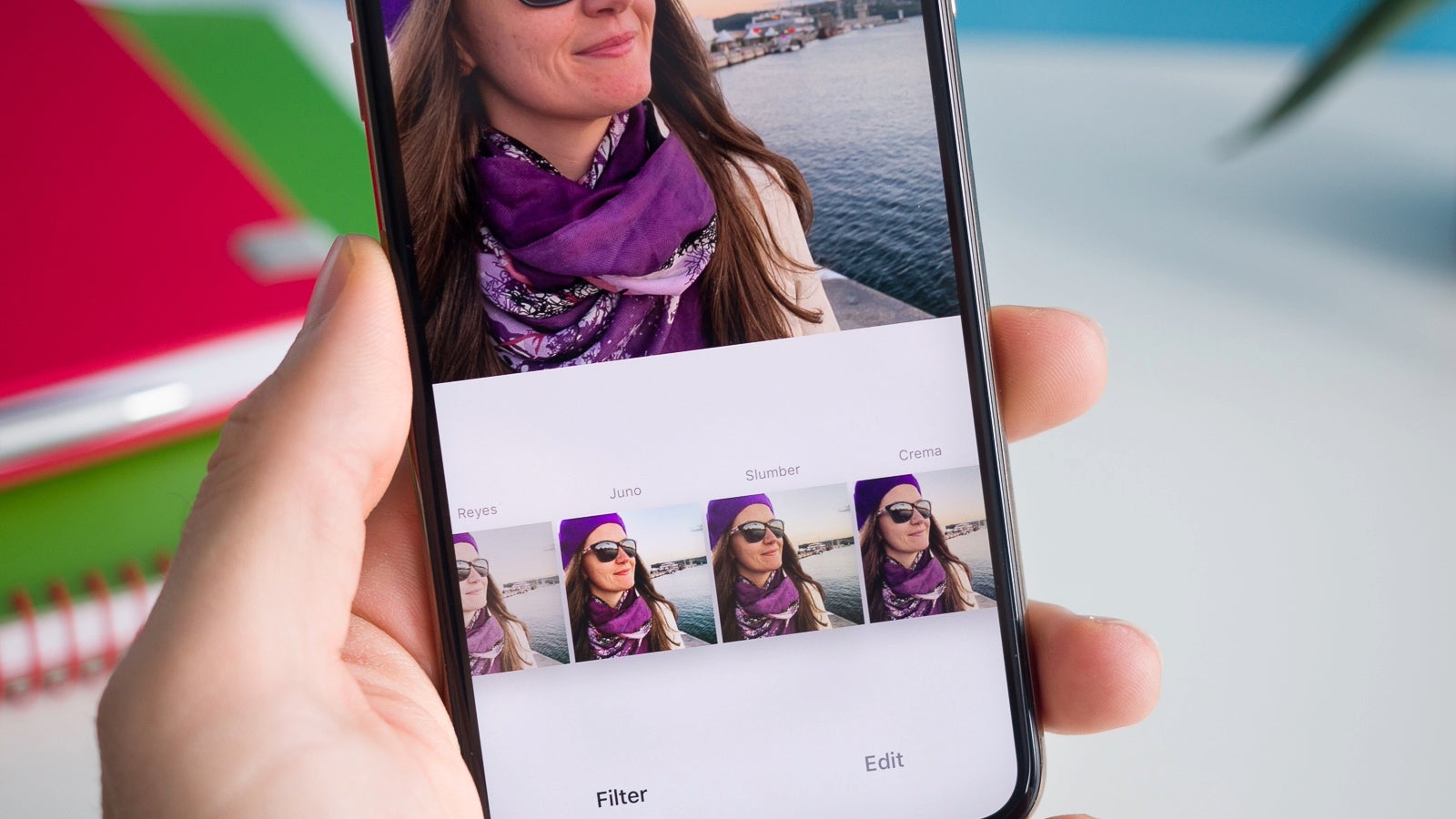
According to tipster Mishaal Rahman on X (via Android Authority), Google is in the process of integrating HDR image capture support into the CameraX API. This enhancement will enable apps using the CameraX API to produce images in the new JPEG_R format tailored for Ultra HDR on devices running Android 14.
Google is preparing to add Ultra HDR image capture support to the CameraX API.
This will allow apps that utilize the CameraX API to output images in the new JPEG_R format used for Ultra HDR, on devices running Android 14.
JPEG_R is a new JPEG file format featuring a gain map in its metadata. This innovation allows the rendering of HDR versions on HDR displays and SDR versions on SDR displays.This upcoming change opens up opportunities for social media platforms like Instagram, Snapchat, and TikTok, as well as third-party camera apps, to incorporate HDR support. Users will have the ability to upload content with higher quality and improved visual appeal.
SDR (Standard Dynamic Range) and HDR (High Dynamic Range) are different technologies for displaying image content. SDR is the older and more common standard, while HDR is a newer technology that is becoming increasingly popular.
HDR overcomes the limitations of SDR by providing a wider range of colors and brightness. This allows HDR images to appear more realistic and immersive, with more details visible in both dark and bright areas.
While it remains uncertain if this functionality will be universally supported across all smartphones with HDR screens, it signifies a promising step toward widespread availability.
Trustifi’s Advanced threat protection prevents the widest spectrum of sophisticated attacks before they reach a user’s mailbox. Try Trustifi Free Threat Scan with Sophisticated AI-Powered Email Protection .
What Versions are Affected?
GitLab Community Edition (CE) and Enterprise Edition (EE) versions 16.0 to 16.8 are affected by at least one vulnerability.
Specific vulnerabilities affect different version ranges within this broader scope.
Refer to the detailed table in the official GitLab release notes for a complete breakdown.
How to Update:
GitLab.com and GitLab Dedicated environments are already patched.
For self-hosted instances, upgrade to the latest version (16.8.1, 16.7.4,16.6.6, or 16.5.8, depending on the version) as soon as possible.
Additional Points to Remember:
Upgrading to 16.5.8 only includes the critical file write vulnerability fix and no other changes.
The fix for the critical vulnerability has been backported to older versions (16.5.8, 16.6.6, 16.7.4).
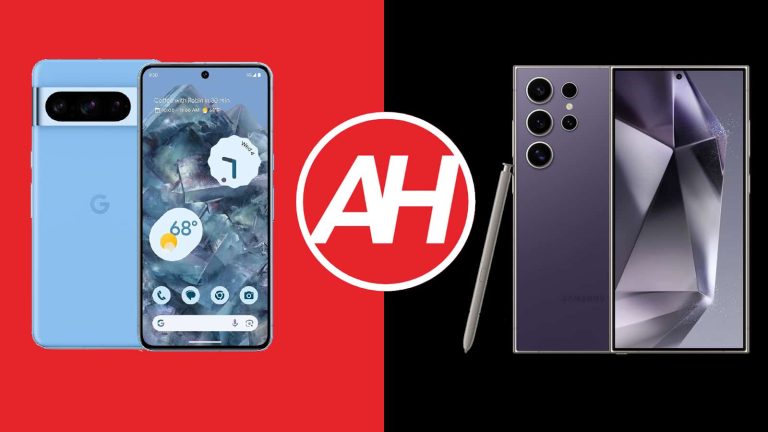
Both Google and Samsung have truly compelling flagship smartphones to offer to their consumers. Samsung’s new flagship arrived earlier this month (January), while Google’s launched back in October. In this article, we’ll compare the Google Pixel 8 Pro vs Samsung Galaxy S24 Ultra. These two phones do look considerably different, while their specs are also not all that similar.
It’s interesting that both of them have a ton of camera AI features to offer. We’ll first list their specifications, as we usually do when it comes to comparison, and then we’ll move to a number of other sections. You’ll see a comparison between their designs, display, performance, battery life, cameras, and audio performance. With that being said, let’s get started, shall we?
Specs
Google Pixel 8 Pro vs Samsung Galaxy S24 Ultra, respectively
Google Pixel 8 Pro vs Samsung Galaxy S24 Ultra: Design
These two smartphones do look quite different, and that’s immediately apparent. The Pixel 8 Pro is a lot more curvy. Its edges are rounded, and the same goes for its display corners. The phone has a flat display and a centered display camera hole. The Galaxy S24 Ultra, on the other hand, has sharp edges, and its display corners are also sharp, while it also has a flat display and a centered display camera hole.
The Galaxy S24 Ultra does have flat top and bottom sides, unlike the Pixel 8 Pro. Their backsides are also quite different. The Pixel 8 Pro includes a camera visor back there. There are three cameras placed inside, and that visor connects to the frame on the left and right sides. The Galaxy S24 Ultra has four cameras on the back, though each of those cameras is its own camera island. Each of them protrudes directly from the phone’s backside.
The Pixel 8 Pro is made out of aluminum and glass, while the Galaxy S24 Ultra utilizes titanium and glass. This is Samsung’s first smartphone with a titanium frame. Samsung’s flagship has a slightly larger display, while it’s about the same height as the Pixel 8 Pro. It is noticeably wider, however, and about the same thickness as Google’s offering. The Galaxy S24 Ultra also has an S Pen stylus tucked in it, it’s accessible from the bottom.
Both smartphones offer an IP68 certification for water and dust resistance. They both feel quite premium in the hand, but do note that the in-hand feel is immensely different, though. Also, you’ll be handling a large phone no matter which one you choose, that’s also something to consider, just in case you prefer more compact devices.
Google Pixel 8 Pro vs Samsung Galaxy S24 Ultra: Display
The Google Pixel 8 Pro includes a 6.7-inch QHD+ (2992 x 1344) LTPO OLED display. That display is flat, and it supports HDR10+ content. It has an adaptive refresh rate which goes up to 120Hz. The max brightness of this panel is 2,400 nits, in theory. The display aspect ratio is 20:9, while the panel is covered by the Gorilla Glass Victus 2. There is also a centered display camera hole at the top.
Samsung Galaxy S24 Ultra
The Galaxy S24 Ultra, on the flip side, includes a 6.8-inch QHD+ (3120 x 1440) Dynamic LTPO AMOLED 2X panel. That display is also flat, and it supports a 120Hz refresh rate. That refresh rate is adaptive, it goes down to 1Hz. This panel also supports HDR10+ content, and it has a theoretical peak brightness of 2,600 nits. A centered display camera hole is included, while the display aspect ratio is 19.5:9. Corning’s Gorilla Armor protection is included on top of the panel.
What is there to know here? Well, first of all, do note that both of these displays look outstanding. They’re vivid, have great viewing angles, and the blacks are as deep as you’d expect them to be. The touch response is great, and both panels are also more than bright enough. With that being said, the Galaxy S24 Ultra does have one advantage… its resistance to reflections. That’s all due to the Gorilla Armor, as it battles reflections like a champ. The difference is easily visible.
Google Pixel 8 Pro vs Samsung Galaxy S24 Ultra: Performance
Google’s flagship is fueled by the Google Tensor G3 processor. Google also included 12GB of LPDDR5X RAM here, along with UFS 3.1 flash storage. Qualcomm’s Snapdragon 8 Gen 3 for Galaxy chip fuels the Galaxy S24 Ultra. Samsung included 12GB of LPDDR5X RAM inside of its flagship, while UFS 4.0 flash storage is used. Do note that the storage cannot be expanded on either device, though.
When it comes to sheer performance, both smartphones are really good. The Galaxy S24 Ultra does have an edge when it comes to gaming, as the Snapdragon 8 Gen 3 for Galaxy is easily a more powerful processor. Still, when it comes to basically anything else, both phones offer great performance. They both launch apps really quickly, while multitasking is not an issue for either one. They do great when it comes to browsing, consuming multimedia, processing images and video, and so on. The Galaxy S24 Ultra may be a hair faster in specific tasks, but that’s not something you’ll really pay all that much attention to. Both do a great job in the performance department.
Now, when gaming is concerned, well, things are a bit different. The Pixel 8 Pro can play any game out there, but it doesn’t perform as well as the Galaxy S24 Ultra when it comes to the most demanding titles like Genshin Impact. It also does get quite a bit warmer than the Galaxy S24 Ultra. As long as the game is not very demanding, however, the Pixel 8 Pro does a very good job. That phone is not made for gaming either way. So, the bottom line is, if you don’t have a habit of playing the most demanding games from the Play Store, both of these phones are a good choice from a performance standpoint.
Google Pixel 8 Pro vs Samsung Galaxy S24 Ultra: Battery
Google’s flagship smartphone features a 5,050mAh battery on the inside. A 5,000mAh unit is included inside the Galaxy S24 Ultra. The Pixel 8 Pro offers good battery life, but it cannot match the Galaxy S24 Ultra. Much like the Galaxy S23 Ultra, the Galaxy S24 Ultra supports outstanding battery life, to say the least. At the time of writing this article, it’s the best-performing smartphone in our battery drain test, actually.
We’re not here to talk about benchmarks, however. Let’s just say that we’ve managed to cross the 7-hour screen-on-time with the Pixel 8 Pro rather regularly, after the initial couple of weeks passed, and the phone’s battery settled. The Galaxy S24 Ultra offered great performance from the get-go. Crossing 9 or even 10 hours of screen-on-time with this phone is possible, and you don’t even have to baby it while you’re doing it.
It’s worth noting that we don’t usually play games during our regular days, but we do a lot of other things on our phones. The Galaxy S24 Ultra can handle truly demanding days with ease, with plenty of camera use, image processing, multimedia consumption, and so on. For many people out there the Galaxy S24 Ultra will be a two-day phone in terms of battery life, that’s not a problem for me to say.
Now, in terms of charging. The Pixel 8 Pro supports 30W wired, 23W wireless, and 5W reverse wireless charging. The Galaxy S24 Ultra comes with 45W wired charging support, in addition to 15W wireless charging, and 4.5W reverse wireless charging. One thing to note is that neither phone comes with a charger in the box.
Google Pixel 8 Pro vs Samsung Galaxy S24 Ultra: Cameras
On the back of the Pixel 8 Pro, you’ll find a 50-megapixel main camera, a 48-megapixel ultrawide unit (126-degree FoV), and a 48-megapixel telephoto camera (5x optical zoom). The Galaxy S24 Ultra features a 200-megapixel main camera, a 12-megapixel ultrawide camera (120-degree FoV), a 10-megapixel telephoto unit (3x optical zoom), and a 50-megapixel periscope telephoto camera (5x optical zoom). These two phones do offer rather different camera hardware.
Google Pixel 8 Pro
Before we get down to actual performance, do note that Samsung toned down on the saturation with the Galaxy S24 Ultra a bit. That is something you will notice if you’ve used the Galaxy S23 Ultra. During the day, both smartphones do an amazing job. The Pixel 8 Pro has that unique look that makes the image pop more, though the Galaxy S24 Ultra shots are usually close to real life. Both phones offer plenty of details and handle HDR situations really well. They both also do a great job in low light, but the Pixel 8 Pro tends to brighten up the scenes quite a bit more. We did prefer shots from the Galaxy S24 Ultra most of the time, but only after pixel peeping. Shots from both devices look great otherwise (in low light).
Both ultrawide cameras do a great job both during the day and at nighttime. However, if you do pixel peep, you’ll see that the Pixel 8 Pro’s ultrawide camera can capture more details. That probably has something to do with its sensor size. These two smartphones also have great periscope telephoto shooters. Both phones offer 5x optical zoom, and both do an outstanding job at 5x. The same goes up to 10x as well, as the images mostly look great at 10x, though they do look different. The Galaxy S24 Ultra also has a 3x telephoto camera, which helps the phone do great at 3x and 4x zoom ranges. The Pixel 8 Pro still prefers to leave things a bit colder overall, while the images from the Galaxy S24 Ultra tend to look warmer.
Audio
There is a set of stereo speakers on both of these smartphones. Those speakers do perform really well on both sides, though the ones on the Galaxy S24 Ultra are a bit louder. The difference is not all that noticeable, though, and both sets of speakers perform great when you turn the volume up, there’s no distortion.
What you will not find on either phone is a 3.5mm headphone jack. You can either use their Type-C ports for the same purpose, with the help of a dongle, or you can opt to utilize Bluetooth 5.3 which they both offer.
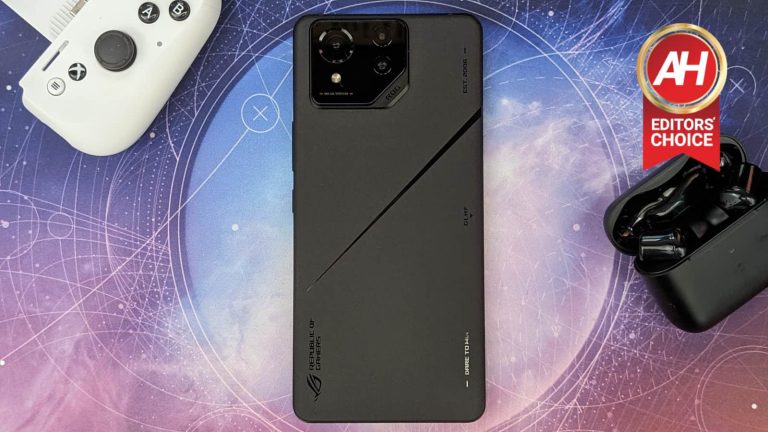
ASUS comes out every year putting its best foot forward and unleashes a gaming phone so powerful and packed with gaming-focused features, that you wonder how it will ever top itself the next time around. Enter the ROG Phone 8 Pro Edition. A gaming phone that isn’t just a gaming phone. For the first time ever, ASUS is thinking about more than just hardcore gamers. It’s thinking about the wider audience of consumers that might also like playing games but would prefer a phone that doesn’t scream, “I’m a gamer” so loudly.
The ROG Phone 8, ROG Phone 8 Pro, and ROG Phone 8 Pro Edition are still gaming phones at their core. And that comes through with the gaming features that the ROG Phone series has come to be known for. However, you can no longer really tell that these are gaming phones. Sure, if you stare at the back long enough you can spot the ROG logo or the “good luck have fun” and “dare to win” mottos. But even these details have been scaled back and are less noticeable.
Especially on the Pro models with their matte black colorway. The ROG Phone series has “grown up” in the sense that it still retains the essence of the ROG Phone brand. Only now it comes in a more discreet package. I’ve been reviewing this phone for the last couple of weeks and so far, it’s clear that ASUS has done a lot of things right here. It’s not perfect, but it never will be. There will always be something that could be improved. That being said, ASUS has made a ton of improvements. Let’s take a closer look at how the phone stacks up.
ROG Phone 8 Pro Edition Review: Hardware and Design
If there’s one thing ASUS has always nailed with every ROG phone, it’s the build quality. No gaming phone has ever felt as premium as what ASUS puts in your hands. That hasn’t changed, but the overall design has. As mentioned above, I like to think of the ROG Phone 8 Pro design as having “grown up” because ASUS finally made a gaming phone that looks like nothing more than a normal premium phone. The standard model has this quality too, but the Pro models most certainly have the biggest change when it comes to looks.
The matte black backing hides just about every detail that tells you this is a gaming phone. Starting with ASUS’s ROG branding. The ROG Eye logo, as well as the GLHF and Dare to Win mottos, are all stamped in a glossy black finish. So you can see them, but the black on black makes it very subtle and unless you hold the phone at the right angle, you can’t even really tell what they say. Now, I have never minded the design of the previous ROG Phones. In fact I quite like them. I think they look cool. But I’d be lying to myself and to others if I said I wasn’t craving a more subtle design.
ASUS has finally given that to us and I think for the most part, it’s for the better. The dramatic shift from a “gaming” design to something more mainstream is perhaps not going to be to everyone’s tastes. But I think the majority of people who would buy a ROG Phone, or any gaming phone for that matter, are going to appreciate the change. Especially since you aren’t really losing any of the core gaming functions or features. They’re all (mostly) still here. And ultimately, ASUS is still delivering the same great ROG Phone experience. Which is what matters the most.
Another more subtle change is the flatter top, bottom, and sides of the frame. In past models, the frame had more rounded sides with slightly beveled edges. The ROG Phone 8 series flattens these out. All the same ports are still here with the main charging port and a 3.5mm headphone port on the bottom, as well as a side charging port that acts as both the port for the AeroActive Cooler X attachment and an alternative charging port so you can keep the phone plugged in while gaming with the phone in landscape.
ASUS has also moved the SIM card tray to the bottom instead of on the left side. It’s slimmed down the bezels on the display too, which resulted in the front-facing camera now using a hole punch design. ASUS also had to remove the bottom front-facing speaker. You still have stereo speakers tuned by Dirac, but the bottom front-facing speaker was moved to the bottom of the device because there simply wasn’t room for it after slimming the bezels down.
AniMe Vision Display
One of the design details ASUS has done away with is the ROG Vision display that could be found on the back of its Pro or Ultimate models on previous phones. These started with the ROG Phone 5 series and they stuck around for a few years. They’ve always been a neat way to enhance the gamer style of these devices, but they can also be a little too flashy and my biggest issue with them is that you could never get rid of them. You can always see that they’re there.
This year, ASUS has swapped out the ROG Vision display for the new AniMe Vision display on the ROG Phone 8 Pro and ROG Phone 8 Pro Edition models. The AniMe Vision display is a lot like the AniMe Matrix displays that ASUS uses on the back of the lid for some of its ROG Zephyrus laptops. Instead of an LCD screen that displays animations, the AniMe Vision uses a series of micro LEDs for the same purpose.
What’s cool about this is that you can’t see it unless it’s turned on. If you go into the Armoury Crate app and enable it, you’ll see the micro LEDs light up on the back and play whatever animation you choose. But once you disable it, the back of the phone looks normal. All you see is the matte black finish. I love this change because it gives you the option to choose when or if you want to add a little more flashiness to the device. It’s just a very clean look that I hope ASUS sticks with for future ROG Phone releases. Not to mention, the change to this type of display opened the door for another feature that users have been begging for — wireless charging.
Aside from the type of display changing, you can still use the AniMe Vision display for turning on pre-installed animations or you can upload your own. It will also support both GIF and PNG formats ASUS said. There’s even an option for a custom animation where you can draw or type what you want. In short, it works just like the ROG Vision display did. It just looks a little different now. Overall, the design changes ASUS made with the ROG Phone 8 series and in particular with the ROG Phone 8 Pro models are a nice shift that makes ASUS gaming phones more mainstream.
ASUS ROG Phone 8 Pro Edition Review: Display
I’ll start out by saying that ASUS ROG phones have never had bad displays. That isn’t the same thing as the best smartphone displays on the market. But by no means has ASUS ever included a bad display on any of the past ROG Phone models. They’ve all been pretty good. This year though, ASUS has taken measures to improve the display on the ROG Phone 8 and ROG Phone 8 Pro. These improvements have made for an overall better experience when using the phone both for everyday stuff and for gaming.
But they’ve also led to some unfortunate changes that I see as downgrades. First, let’s talk about the stuff that feels like a step back. There is now more usable screen real estate because ASUS slimmed down the bezels. It’s still a 6.78-inch display, but because the bezels are now slimmer, more of that is interactive. Compared to last year’s ROG Phone 7, ASUS has shaved off quite a lot. The upper bezel is now just 1.65mm or about 71% slimmer than the bezels on the previous model.
The side bezels are 14% slimmer. This is all good stuff. Because who doesn’t enjoy a more borderless look for their media consumption? Here’s the unfortunate side effect. The bottom bezels are now slimmer too, and because of this ASUS had to remove the bottom front-facing speaker. I think this is a downgrade for the audio as the speakers for games, music, and video all sounded better with last year’s phone. But we’ll get into more of that later on. I just wanted to point out that the display changes have directly impacted other parts of the device. So although the display is better this year, some things had to take a hit to get there.
Now for the good stuff. The display has a peak brightness of 2,500 nits and this is super bright when turned all the way up. I normally like to keep the brightness pretty high because it lessens the amount of glare I might see. And having it go this high brings out the contrast of colors for everything I’ve been using the phone for. It also serves as a halfway decent flashlight when I saunter over to the kitchen late at night for snacks.
You still get the 165Hz refresh rate here which is awesome for games but better for just zipping around the menus and anywhere else. Not many games support the really high refresh rates so in most cases, the 165Hz is just going to be used for general use. But oh my word does it make scrolling or swiping so incredibly smooth. It’s just so enjoyable to see on a mobile phone. Plus, you can easily switch between different refresh rates with the tap of a button in the Quick Settings menu. This can help increase battery life so you can turn it down when the higher refresh rates aren’t really needed or useful.
Now ASUS is using a different kind of AMOLED display this year. It’s still an AMOLED panel but it’s what’s called a Flexible AMOLED, which ASUS says helped with the peak brightness as well as better overall color contrasts. And I’m inclined to agree. It’s subtle, but games with lots of vivid colors like Genshin Impact and Honkai Star Rail do appear (to me at least) to look slightly better on the new ROG Phone 8 Pro Edition screen compared to the ROG Phone 7 Ultimate. Most people might not notice the difference since it’s not drastic, but if you spend a lot of your time looking at displays you should appreciate the improved colors.
All-in-all, the display is a nice upgrade from last year even if it does come with some changes I don’t particularly care for. But, that’s life, and sometimes compromises have to be made for the greater good. Which in this case, means the slimmer bezels to appeal to a more mainstream audience.
ASUS ROG Phone 8 Pro Edition Review: Performance
There was no doubt in mind that the ASUS ROG Phone 8 Pro Edition was going to perform well. It’s powered by the Snapdragon 8 Gen 3 mobile platform and it has 24GB of RAM. Which is an astounding amount for any mobile device. In short, you can bet it runs games smoothly and likely outperforms any other phone for gaming. Not only does it have better specs, but ASUS has consistently had some of if not the best cooling of any mobile device. The ROG Phones are gaming phones after all so the cooling is extremely important.
With the ROG Phone 8 Pro ASUS is still using a large vapor chamber to help dissipate heat, which helps to keep the phone cool over sustained periods. This will change, however, depending on what you’re doing with the phone. In my time playing games like Genshin Impact and Honkai Star Rail, two of the most demanding games on Android, the phone got noticeably warm after about 30 minutes or so of gameplay with either title. But not to the point that they were uncomfortable to hold.
There wasn’t much change with the timing up to an hour either. However, I would recommend that if you’re going to play longer than that with a game like these two, use the AeroActive Cooler X attachment. It was designed specifically for this phone and for situations where you’re playing a demanding game for longer than 30 minutes to an hour. Of course, gaming isn’t the only thing you’re going to be doing with your phone. So we’ve also run the ROG Phone 8 Pro Edition through a series of benchmarks to see how it performs in various situations with different factors. We’re also comparing these results to a number of other similar devices. In this case, the Red Magic 9 Pro, the ASUS ROG Phone 7 Ultimate, and the iPhone 15 Pro Max.
The tests we’ll be using are Geekbench 6, 3D Mark, and a test we created called the CapCut Test. We’re using Geekbench 6 to test the raw CPU and GPU performance. This will be more representative of everyday use cases. For 3D Mark, we’re doing the Wildlife Extreme Stress Test to see how it performs over a sustained period. This test runs a 1-minute segment of high graphics footage in a loop over 20 minutes. Finally, with the CapCut Test, we decided to create this one here at Android Headlines as a way to sort of prevent manufacturers from being able to “cheat” on a benchmark. The test consists of editing and exporting a 1-minute video to see how quickly the phone can complete this process. We use the same video for every phone to get the most accurate results.
Geekbench 6
Let’s kick things off with the Geekbench 6 benchmarks. As you can see from the graph, we have everything labeled to make things easy to read. Single-core CPU scores are in blue, multi-core CPU scores are in red, and the GPU score is in yellow. Surprisingly, the ROG Phone 8 Pro Edition gets slightly lower scores than the RedMagic 9 Pro, which is quite impressive considering they’re both running with the same exact mobile platform – a Qualcomm Snapdragon 8 Gen 3. The ROG Phone 8 Pro Edition ends up with a single-core CPU score of 2,200, a multi-core CPU score of 6,878, and a GPU score of 14,414.
We compared this to RedMagic 9 Pro and OnePlus 12 which are both running on the Snapdragon 8 Gen 3 as well, and then our fourth phone was the obvious option with the ROG Phone 7 Ultimate which is running on the Snapdragon 8 Gen 2.
3D Mark Wildlife Extreme Stress Test
Now we also wanted to test how well the ROG Phone 8 Pro Edition could handle sustained performance. While I normally would just play something like Genshin Impact for an hour or two and call it good, we also wanted to show a more data-related approach which is why we used the 3D Mark Wildlife Extreme Stress Test. As mentioned above, this runs a one-minute graphically intensive loop for 20 minutes.
So it runs the same 1-minute segment over and over for this time period. This gives you a good idea of how warm the phone is going to get by the end of the test while also giving you some hard data to look at. For the ROG Phone 8 Pro Edition, its best loop had a score of 5,211 and its lowest loop was 3,971. Meanwhile, its stability was at 76.2% which is not bad. Again though, it was beaten out by the RedMagic 9 Pro with the lowest loop score and the stability, which were 4,897 and 94% respectively.
Worth noting though is that at the end of this test, while the ROG Phone 8 Pro Edition ended with slightly lower scores than the RedMagic 9 Pro, it was noticeably cooler by the end of the test. I was able to pick up and handle the ROG Phone 8 Pro Edition while the RedMagic 9 Pro was too hot to hold for longer than a couple of seconds. What this tells me is that the ROG Phone 8 Pro Edition simply has better cooling. And in the end that is going to matter more than a higher score in 3D Mark.
CapCut Test
Finally, for the CapCut test, the ROG Phone 8 Pro Edition performed rather well. It does once again come in just below the RedMagic 9 Pro here though. So it’s quite clear that the RedMagic 9 Pro is capable of performing better in certain situations even with the same hardware. In our testing, the ROG Phone 8 Pro Edition was able to edit and export the one-minute video we used in 6.6 seconds compared to the RedMagic 9 Pro’s 5.2 seconds. But it was noticeably faster than the OnePlus 12 at 9.31 seconds, and last year’s ROG Phone 7 Ultimate at 12.9 seconds.
Overall, the ROG Phone 8 Pro Edition delivers high performance across the board in all these tests. It outshines most phones on the market in this regard. And outside of benchmarks, it’ll have essentially zero issues with playing games or doing any task you throw at it. ASUS built this to be a performance beast and it lived up to my expectations.
ROG Phone 8 Pro Edition Review: Battery Life and Charging
The ROG Phone series has always had excellent battery life. And a big part of that is because the phones have always had large capacity batteries. This year ASUS has toned down the battery capacity a bit, moving down from a 6,000mAh to a 5,500mAh battery inside the ROG Phone 8 and ROG Phone 8 Pro. That being said, ASUS had to move to a smaller battery because it made the phone slimmer. You would think that a smaller battery would significantly alter the battery life experience but honestly, it hasn’t.
It’s still a phone that will last for close to a day and a half even while using it consistently throughout that time. Best of all is that it takes just over 40 minutes to fully charge this device from 1% to 100%. In my testing, I was able to plug the device in and get to 100% in 40 minutes and 22 seconds. That’s pretty good. It’s not the fastest, but far from slow and it means that if you end up killing the battery in the middle of the second day, you can easily plug the phone in and be back to a full charge in under an hour.
Now, this was with the 65W charger that comes in the box with the phone. Your charging results may vary if you’re not using the same charger or if use wireless charging, which the ROG Phone 8 Pro Edition can do. Speaking of wireless charging, ASUS added it for the first time to the ROG Phone series this year. However, it only works with Qi 1.3 and neither of the two wireless charging pads that I have would work with the ROG Phone 8 Pro Edition. So unfortunately I haven’t been able to test it.
Now to test how long the battery lasts before it dies, we’ve been running a test where we play a 24-hour 4K video on YouTube and let it run until the phone shuts off. The ROG Phone 8 Pro Edition lasted 17 hours, 39 minutes, and 44 seconds. Without getting exceedingly hot to the touch I might add. Not bad at all. I also ran this video with the screen at 100% brightness and the volume up halfway. So you’ll likely get more battery life out of the phone if you tweak these things and adjust both of those down a bit.
I compared this to the ROG Phone 7 Ultimate which lasted for 21 hours and 27 minutes, the OnePlus 12 which lasted for 19 hours and 7 minutes, and the RedMagic 9 Pro which lasted for 25 hours and 3 minutes, making the RedMagic 9 Pro our first phone since we’ve been doing this video test to make it past the length of the video. All things considered, the ROG Phone 8 Pro Edition, and the other ROG Phone 8 series models, will do just fine with battery life even if they don’t last as long as some of these other devices. Especially if you don’t use it as heavily as I did during these tests.
The best charging speeds of any ROG Phone so far
Now, I want to make it clear that we’re not talking about a massive difference. However, the ROG Phone Pro Edition (and the other two models) are the fastest-charging ROG Phones so far. The reason for that of course, is mostly because of the smaller battery. But what’s cool about that is because of the optimizations ASUS made to the system, the device lasts nearly as long and it charges faster. So you get basically the same user experience in terms of battery life with the charging speed improvement. That’s a win any way you slice it.
ROG Phone 8 Pro Edition Review: Software
A lot of the magic from the ROG Phone 8 Pro Edition comes from the software. While it has some gaming features that are hardware-based, a lot of what sets it apart from other devices also comes from the software features. Now this device is running on Android 14 out of the box. So you get all the stuff that Android 14 offers. On the ASUS side of things, some of the unique additions include AI-powered features that were designed to enhance gaming. ASUS calls this ‘X Sense’ and it can augment the way you play certain games.
For now, it only works with a handful of titles but ASUS is working with game studios to bake it into more games. One of the games it does work with is Genshin Impact. With X Sense enabled, you can toggle on a few different features that will use AI to take care of certain actions for you. One will automatically pick up item drops and materials from chests you open, enemies you kill, and parts of the environment you harvest.
This is a nifty feature that I almost always had turned on when playing because sometimes trying to pick up those items is a pain. Not that it’s overly difficult to grab them, but it takes an extra few seconds to run around and pick everything up so this just saves you some time. X Sense can also auto-skip dialogue for you in cutscenes or general gameplay. This works as intended but I disabled it pretty quickly as I like to read and listen to the dialogue in my games. If you don’t enjoy the story too much or you simply want to speed run through stuff to maximize your time, turning this on will help.
Lastly, X Sense also offers an auto-run feature in Genshin Impact and this is useful too. If you enable this toggle, a button pops up on-screen that when tapped will automatically turn on the running mode. This doesn’t work in every single situation. For instance, some domains or missions in the game won’t allow it. But in most cases, you should be able to use it as you please. Also worth noting is that this makes your character run automatically, but this is not the sprint feature. If you want to sprint to run faster you still have to press that dedicated button and that will still use up your stamina.
While I did enjoy using this, I did find it to be a little clunky because when the auto-run is enabled, you can’t use the left virtual joystick to move your character like you normally would. Instead, you have to use the right virtual joystick to move the camera if you want your character to turn. And this just didn’t feel as natural.
Another really neat feature is the Display Mode. For some, one of the downfalls of the hole punch camera this year is that it breaks up the game UI. But you can change that by changing the Display Mode. You do this in the Armoury Crate app. What it does is shift the game UI to the left so it stops before the hole punch camera. You can also center it which shifts the right side of the game UI in as well. Both of these options are great if you want the game to feel more immersive. And you can change it for each game individually.
ASUS Optimized UI
Outside of gaming settings using things like the Game Genie, the software on the ROG Phone 8 Pro Edition is much like the past few ROG Phones. You can choose to use a more stock Android experience for the UI or you can use the UI ASUS built which adds a few extras. You’ll also find a few new designs for the fingerprint unlock styles and animations. This is something that ASUS has been putting in the ROG Phone for a few years now. It’s not too impactful on the user experience but it is kind of cool you can change these things and I have always enjoyed the variety.
The ASUS Optimized UI, which you can select at startup when setting up the phone for the first time or later on if you wish, has some really neat optimizations for all the stuff you would use on the phone on a daily basis. What’s more, is that you can customize which of the optimizations you want to keep enabled. So you can essentially create a hybrid of ASUS Optimized UI features and stock Android to suit your preferences.
Things like the incoming call display will take up the full screen on the ASUS Optimized UI or just the heads-up notification with stock Android. I prefer the heads-up notification. But I love the ASUS Optimized Quick Settings, volume adjustment mode, and small clock on the lock screen. So I can mix and match these things to get a personalized UI of sorts. Which is great. And you can always change things back or change them up again if you want to.
The volume adjustment mode in particular is great because you can link different audio items together into one slider bar for a little more convenience. All-in-all the software is super clean even with the ASUS Optimized UI and it doesn’t feel bloated like it does with some manufacturers.
ASUS ROG Phone 8 Pro Edition Review: Accessories
Normally I wouldn’t include something like this in the review for the phone, but the accessories for the ROG Phone 8 Pro Edition that ASUS sent out are an integral part of the phone experience. I’m talking specifically about the AeroActive Cooler X, which I highly recommend getting if you get this phone, and the DevilCase ‘Guardian Gaming’ case which is designed to work with the AeroActive Cooler X so you don’t have to take the case off.
The neat thing about the case is that it has this little hard plastic shell panel that can slot into it on the back. So the phone back is covered when you’re not using the cooler. The moment you want to slap the cooler on and start gaming, however, you can pop that panel off and the attachment will fit. I prefer this to taking off the case because the phone is still somewhat protected if it were to slip out of my hands.
AeroActive Cooler X
As for the AeroActive Cooler X, it’s what you’d expect from this accessory based on the previous ones ASUS has released. It provides the same function of helping keep the phone cooler during longer gaming sessions. And if you’re going play more demanding games like Honkai Star Rail for more than I’d say, an hour, you should slap the attachment on. It’ll help the phone have sustained high performance because the temperatures will stay lower. Now I wasn’t able to read the temps as I don’t have a thermal imaging tool to do that just yet. But the phone did stay noticeably cooler with the fan compared to without.
That being said, I never felt the phone get too warm to hold during longer gameplay sessions. So unlike past devices like the ROG Phone 5 Ultimate, you don’t need the cooler to make the phone manageable to hold. You simply want it so that performance stays optimal. ASUS made the AeroActive Cooler X smaller than past versions too so it more easily fits in your bag. It’s now 29% smaller than before and it weighs 10% less.
Unfortunately, that also means you can’t use it on older ROG Phones, and the older AeroActive Cooler attachments won’t work on the ROG Phone 8 series. ASUS also got rid of the “built-in sub-woofer” that the last AeroActive Cooler attachment had. Which is a shame. Because although it didn’t cause a drastic improvement to the audio, it did improve it. And that could have made the audio better overall since ASUS had to remove the bottom front-facing speaker.
But I digress. The AeroActive Cooler X is a must-have accessory for this device. It still has two of the four back buttons as well if you want some extra control mapping for games. At $99, I don’t think it’s too much and is a good value add if you don’t get the ROG Phone 8 Pro Edition model which comes bundled with it.
ASUS ROG Phone 8 Pro Edition Review: Sound
The sound quality on the ROG Phones has been one of the best parts about each and every model since ASUS started working with DIRAC to tune the speakers. That said, this is the first ROG Phone that doesn’t have two front-facing stereo speakers. The sound experience is still stereo. But, because ASUS slimmed the bezels down, that meant it didn’t have room for the front-facing speaker on the bottom of the display. So it had to move that speaker to the bottom of the frame next to the 3.5mm audio port.
The speakers are still tuned by DIRAC as well. However, the audio is simply not as good as it is on the ROG Phone 7 Ultimate or older ROG Phones. While I would love to say that it has gotten better, the sound quality has degraded a little bit for certain things. If you’re holding the phone in landscape mode for watching video or, in the more likely scenario, playing games, you will most certainly cover up that bottom speaker.
At least partially if not most of the way. In my experience, this was always the case when playing anything on this phone. So the sound ended up muffled a little bit. This resulted in me having to shift the way I hold the phone with my right hand placement and ultimately this was less comfortable because my hand couldn’t sit as naturally as before.
Now I want to be clear. The audio experience is not horrible. It’s not even bad really. It’s still pretty good all things considered but the audio was definitely better on last year’s device because both speakers were front-facing. Still, games and video can be fairly enjoyable in landscape using the speakers. And if you really want a more immersive experience you can always connect a pair of earbuds or headphones. It’s a bit of a shame that ASUS had to move the bottom speaker but this isn’t a deal-breaker.
ASUS ROG Phone 8 Pro Edition Review: Camera
ROG Phones, or any gaming phone for that matter, have never been known for the camera. As a matter of fact, I have left the camera out of past ROG Phone reviews because it was never the focal point. This year, ASUS is trying something different and has tried to make the ROG Phone more mainstream. One of the ways it did this is by trying to appeal to users who want a better smartphone camera.
ASUS also said this was one of the things fans were asking for. So, it set out to improve the camera over past devices. I definitely think it’s done that but I want to be clear that this camera still isn’t going to outshine devices like the Pixel 8 series, OnePlus 12, or the Galaxy S24 series. The pictures are good, however.
ASUS is using updated sensors here and has included a new 32MP telephoto lens with 3x optical zoom. The main camera is a 50MP IMX890 sensor with an updated gimbal stabilizer to help with shakiness, and there’s a 13MP Ultra Wide lens too for helping to capture more in a single shot.
The new telephoto lens is really where things feel the most upgraded. The 3x optical zoom lets you get surprisingly close to subjects that are quite far away. Nowhere near as close as the Pixel 8 Pro or Galaxy S24 Ultra. But this was never a feature on past ROG Phones. So having it all is a big step up. Because of this sensor, you also get up to 30x digital zoom and that’s what allows for getting super close-up shots of far-away subjects.
Results from this can vary though. Depending on what you’re taking a photo of and what the lighting conditions are like. It’s quite rainy here in the Northwest right now so outside lighting isn’t great even at mid-day. This makes getting good optical and digital zoom shots pretty hard as it’s either always raining or it’s overcast with gray skies and poor lighting. But even then I was able to see decent quality resolution of certain things. So I imagine it would be a lot better with bright sunny skies.
I feel like the camera shines more, at least in my experience, with the new super night mode shots and with close-up macro images. In a few instances, I was able to get some really well-lit images when it was dark out and beyond 7 p.m. PT. The pictures also come out with decent color contrast and don’t lose too much detail in post-processing.
Although I would still use the Pixel 8 if I was really looking to use my phone for photos, it’s nice to know that the ROG Phone 8 Pro Edition would deliver some decent-quality images with the improvements ASUS has made to the camera. Especially since this is going to be my main device for the foreseeable future. Overall, the camera is a step up from past ROG Phones. And that’s the most important thing here. ASUS still has a little ways to go if it wants to compete with other flagships, but it’s headed in the right direction now.
Should you buy the ROG Phone 8 Pro Edition?
Now for the question that you’re likely asking yourself if you’ve read this monster of a review. Should buy the ROG Phone 8 Pro Edition? Or Any of the ROG Phone 8 Series models? I think that depends on what you want out of a smartphone. As with every other ROG Phone in the past, one of the main factors of betting into these devices is if you want something that’s geared more towards mobile gaming, then you should definitely get this device.
And because of the improvements ASUS has made to it this year, it’s easier to recommend to more mainstream consumers. The style has been toned down and things like the camera have been improved to where they could absolutely work for someone who isn’t a hardcore gamer. And that seems like what ASUS was trying to do here. As always, the ROG Phone 8 Pro Edition and its counterparts are powerhouse phones with performance and battery life.
And if those are two other important things to you, then those are two more reasons to buy this device. But, the ROG Phone 8 series isn’t going to be a right fit for everyone. Maybe one day though. Not to mention, the ROG Phone 8 series devices aren’t cheap. They start at $1,099.99 for the base model. Then the Pro model is $1,199.99. And the model I reviewed, the Pro Edition, is $1,499.99 because of the 24GB of RAM and 1TB of storage in addition to the bundled AeroActive Cooler X. Compared to other flagships, the ROG Phone 8 series remains expensive. And that has to be something you take into account.
You should buy it if:
You want a performance-heavy device for gaming
You want excellent battery life
You want a super bright display
You want a gaming phone that actually takes decent pictures
You shouldn’t buy it if:
You want the tes camera experience smartphones have to offer
The drug lord utilized the notorious, infamous, and now-seized dark web marketplaces such as Silk Road, Hansa, and Alpha Bay to operate his global drug empire.
In a significant blow to the clandestine world of dark web drug trafficking, an Indian national, Banmeet Singh, pleaded guilty to orchestrating a large-scale operation that spanned continents, marketing a range of controlled substances.
The U.S. Department of Justice (DOJ) announced Singh’s admission of guilt today, revealing shocking details of a lucrative enterprise that fueled addiction and crime across the globe.
Singh, a 40-year-old from Haldwani, India, emerged as a key figure in the dark web underworld, leveraging platforms like Silk Road, Hansa and Alpha Bay to market and distribute a cocktail of drugs, including fentanyl, LSD, ecstasy, and others. Customers looking for drugs used cryptocurrency to buy them from Singh’s online shops.
The Justice Department’s Acting Assistant Attorney General, Nicole M. Argentieri, emphasized the significance of Singh’s guilty plea, which includes the forfeiture of an eye-popping $150 million in cryptocurrency. “Today’s guilty plea… demonstrates that the Justice Department will hold criminals who violate U.S. law accountable no matter how they conceal their activity,” Argentieri stated in a press release.
Banmeet Singh
According to court documents, Singh’s operation spanned from at least mid-2012 to July 2017, with distribution cells peppered throughout the United States and beyond. From Ohio to Florida, Maryland to North Dakota, the tentacles of Singh’s network reached far and wide, shipping drugs to locations in all 50 states, Canada, Europe, and the Caribbean.
Administrator Anne Milgram of the Drug Enforcement Administration (DEA) hailed the collaborative effort that dismantled Singh’s empire, highlighting the cooperation between U.S. and U.K. law enforcement agencies. “DEA is proud to have worked with its law enforcement partners… to protect the American people and bring Singh to justice,” Milgram remarked.
Singh’s arrest in London, England on 26 April 2019 by the National Crime Agency (NCA), marked a crucial turning point in the investigation, leading to his extradition to the United States on 19 March 2023.
With Singh’s admission of guilt, the dance of deception orchestrated by his organization has come to a halt, signalling a victory for justice and a stark warning to would-be traffickers lurking in the shadows of the dark web. As the sentencing date looms, authorities remain vigilant, determined to safeguard communities against the scourge of drug trafficking.
This case, led by groups like the DEA and IRS, shows how important it is for countries to work together to stop crime that crosses borders. Whether it’s in Ohio or London, cops are fighting to stop dark web drug dealers and keep everyone safe.
Apple began the new year 2024 with a zero-day patch that it simultaneously released for its numerous products. The tech giant confirmed active exploitation of the zero-day vulnerability that affected Apple TVs, Macs, and iOS devices.
Apple Zero-Day Riddled Macs, iPhones, And Apple TV Alike
The tech giant Apple released a serious zero-day vulnerability affecting multiple devices. Exploiting the vulnerability could allow an attacker to deploy malware on the target devices.
Apple didn’t explain details about the exact issue. However, the advisories it released for different products do state the vulnerability, alongside acknowledging its active exploitation.
Specifically, the vulnerability, CVE-2024-23222, is a type confusion vulnerability in the Safari WebKit. An attacker could exploit this flaw by tricking the user into opening maliciously crafted web pages. Once done, the attacker could execute arbitrary codes on the target device.
According to the advisory, Apple is aware of reports regarding active exploitation of this vulnerability. Besides, this issue, Apple also patched three other vulnerabilities affecting the browser. These include,
CVE-2024-23211: Apple patched an issue with browser Settings that could expose users’ private browsing activity.
CVE-2024-23206: Due to improper access restrictions, it became possible for an adversary to fingerprint a target user via a maliciously crafted webpage.
CVE-2024-23213: Another code execution vulnerability that an adversary could trigger via a maliciously crafted webpage.
Since this vulnerability affected Apple’s very own Safari browser, it consequently impacted all Apple products running the browser. Apple patched
Hence now, all Apple users must ensure updating their devices with the latest OS updates. This security fix is especially important given that Apple has admitted its active exploitation in the wild. Apple devices’ zero-day exploits often lead to severe security risks, such as the recently reported fiasco that involved zero-day exploitation to deploy Predator spyware.
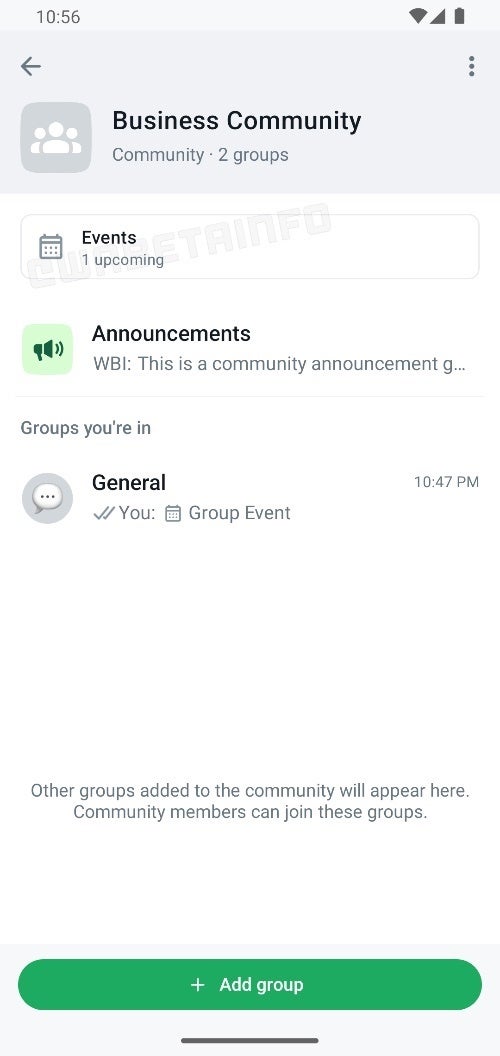
A new feature is currently being tested by WhatsApp in its Community group chats that has the potential to simplify event planning. This feature automatically prioritizes upcoming community events by displaying them prominently on the community info screen.
Currently, individuals or group administrators have to manually pin important messages, like details about upcoming events. However, in the latest beta version of the WhatsApp Android app (v2.24.3.20). this manual step might not be necessary at all anymore.
This was effectively spotted by the site WABetaInfo, spotting that now whenever a community member organizes an event, it is conveniently displayed at the top of the community info page. This feature serves as a helpful reminder and central hub for information for all those involved in said community.
Image Source: WABetaInfo
This new functionality builds upon a previously discovered feature that allows users to schedule events within group chats by tapping the attachment icon. Combining these features creates a streamlined process for organizing and staying informed about community happenings.
Since it is only available in Beta for now, only a select group of users are currently testing this feature. However, based on WABetaInfo’s reporting, it seems that the feature is very close to being released to the public. It is worth noting that the WhatsApp Beta is available via the Google Play Store, but requires signing up for the beta program, which has for the past few years proven to be very difficult as it is always full to capacity.This automated pinning feature can be a great asset for busy WhatsApp Communities that usually have several events going on. Removing the human element of having to manually pin the event every time, can be a reprieve for admins, since they will no longer have to worry about events being buried in the calendar or getting overlooked.
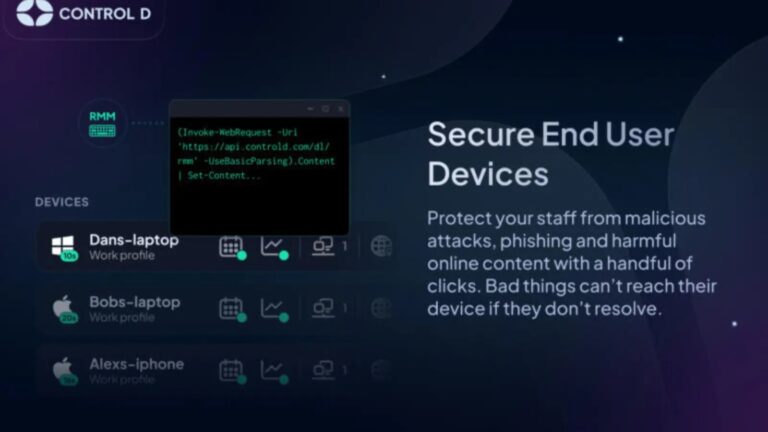
This cutting-edge DNS service brings cybersecurity within reach for businesses of all sizes, from emerging start-ups to established SMBs and MSPs.
Leveraging the strength of the world’s largest physical VPN network, Control D is bringing unmatched expertise in navigating cybersecurity challenges and global surveillance into the hands of businesses that traditionally lacked these advanced protections.
Control D for Organizations is designed to cater to the needs of companies, schools, and NGOs of all sizes. It provides a user-friendly experience for smaller teams, while also offering more intricate and advanced controls for larger organizations. Control D offers a wide range of tools that are specifically designed to enhance the security and productivity of diverse teams.
1. Malware Blocking: Protecting business continuity against malicious threats with state-of-the-art detection techniques, all built in-house. Protect individual devices or entire networks in just a few minutes.
2. **Multi-Tenancy: Addresses the complexity of managing access and filtering policies across different departments, subsidiaries, or customer accounts within a large enterprise or service provider setting.
3. Modern Protocols: Security cannot be assured using standard DNS protocols. That’s why Control D supports all modern (and encrypted) protocols like DNS-over-HTTPS/3 and DNS-over-TLS.
4. Custom Filtering: Highly granular web filters provide power users with ultimate control, while more general curated lists allow DNS security newcomers to gain maximum security benefits with minimal effort.
5. Actionable Insights: Detailed network activity analytics empowers businesses to improve their security posture and make strategic decisions.
Control D for Organizations is more than a security tool—it’s a declaration that first-rate cybersecurity is no longer a luxury. It embodies a new era where organizations, irrespective of their size or financial prowess, can confidently protect their operations and data.
‘Control D for Organizations ‘, Empowering Every Business with Advanced Cybersecurity
Control D is a pioneer in software security, devoted to offering next-level, user-centric solutions. Backed by the years of security expertise of Windscribe VPN which protects over 68 million people, Control D leverages the largest physical VPN network and one of the fastest anycast DNS networks to deliver unparalleled security and freedom from surveillance on a global scale.
Join the DNS security revolution and equip your business with Control D.
Visit controld.com for more information and take your first step towards comprehensive digital protection. Additional assistance for onboarding channel partners available. Free no-payment-details required trial is available.
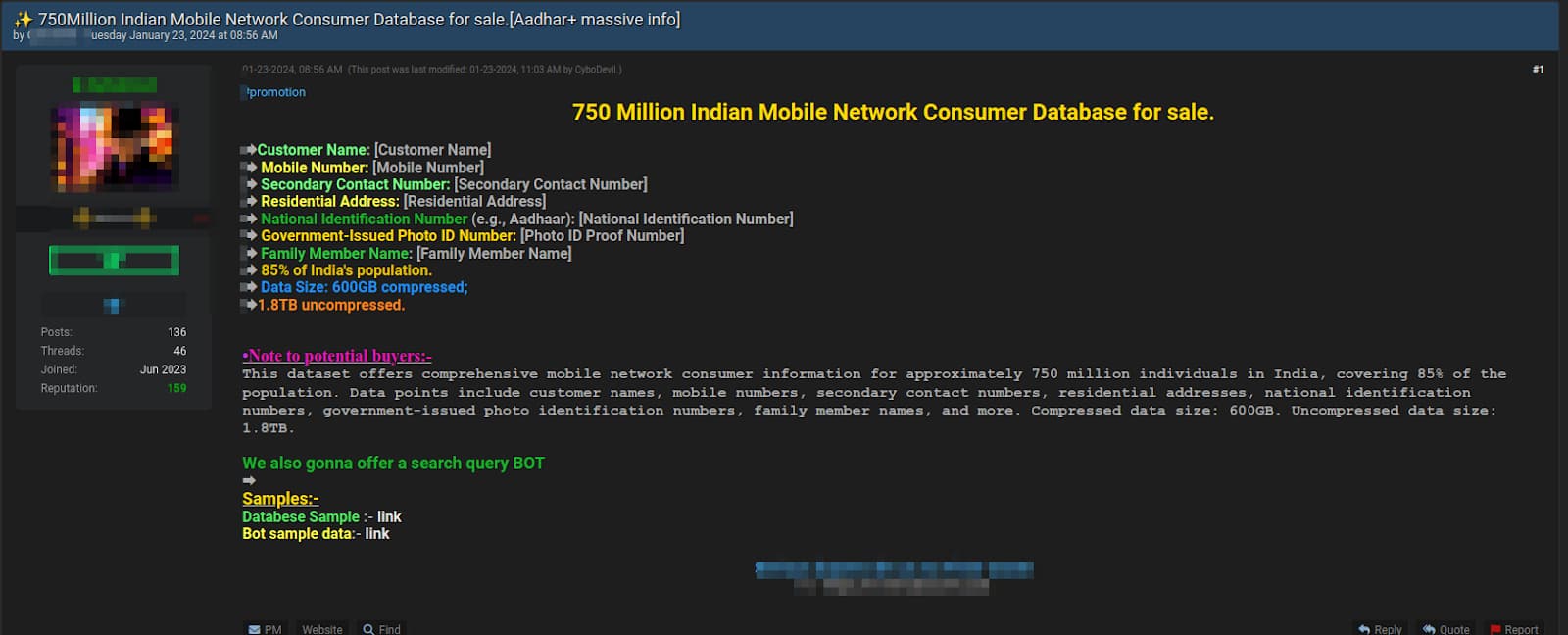
The database holds personal records of over 750 million Indian citizens, accounting for nearly half of the country’s 1.4 billion population.
A massive yet alleged data breach has reportedly exposed the personal information of millions worldwide, encompassing 85% of the Indian population, marking it as the largest-ever breach of its kind.
Indian cybersecurity firm CloudSEK has reported a staggering data leak exposing personal information, including names, mobile numbers, addresses, and the unique 12-digit Aadhaar card numbers, of 750 million Indians, roughly half of the country’s population of 1.4 billion.
The breach affects mobile network subscribers across multiple countries, posing significant privacy and data security concerns. This compromised database contains security-sensitive information, claim CloudSEK researchers, and has been compressed to 600GB from 1.8TB when uncompressed.
CloudSEK’s investigation of a trove of personally identifiable information (PII) in the database revealed the breach has impacted all major telecom providers but Indian users are at a higher risk, due to the exposure of their unique Aadhaar identification number, raising concerns about identity theft, financial fraud, and cybercrime.
The database is being sold on Telegram and Breach Forums, a well-known platform for hackers and cybercrime activities. Interestingly, this forum recently saw another threat actor leaking a database from Hathway, which contained information from 4 million users.
In fact, two different cybercrime groups, including CYBO CREW-affiliated CyboDevil and UNIT8200 are offering the data for sale for $3,000.
CloudSEK reports that the threat actor selling the data has denied involvement in this data breach and claims to have obtained it through law enforcement channels’ undisclosed asset work, however, the source remains unclear.
Screenshot shows details of what the group is selling (Credit: CloudSEK)
For your information, CYBOCREW is an emerging new threat group, first discovered in July 2023. The group has so far targeted organizations in the automobile, jewellery, insurance, and apparel sectors, conducting major breaches. CyboDevil and UNIT8200 are amongst its most active affiliates.
CloudSEK’s Sparsh Kulshrestha highlighted that the “magnitude” of this data breach is unprecedented, emphasizing the importance of telecom service providers and the government to devise measures for identifying potential security vulnerabilities beforehand to prevent such attacks.
Users are advised to change passwords, be cautious of phishing, monitor accounts, and report suspicious activity after a breach, especially those linked to mobile numbers or Aadhaar, to protect their information. CloudSEK has responsibly notified impacted parties and relevant authorities regarding the data breach.
The Huawei P70 series is coming, and while we’re waiting for more official info, some details just surfaced. A well-known tipster just detailed the camera hardware of the Huawei P70 Art.
This information comes from Digital Chat Station, one of China’s most prominent tipsters. He claims that Huawei plans to use three 50-megapixel cameras on the back of the Huawei P70 Art, and things are looking interesting.
The Huawei P70 Art camera hardware gets detailed, and it looks very promising
Huawei will seemingly reach for the Sony IMX989 sensor for the main camera. That is Sony’s 1-inch camera sensor, and that will be the first time Huawei is using a 1-inch camera sensor in one of its phones… presuming this info is accurate.
In addition to that camera, a 50-megapixel ultrawide unit is also tipped. We don’t know what sensor will Huawei use just yet, though. The third camera on the back will be a 50-megapixel periscope telephoto camera.
Now, that periscope telephoto camera will offer a 4x optical zoom and will serve as a telephoto macro camera too. Also, the cropped format is mentioned in the leak too. So it will be a rather versatile camera.
The Huawei P70 Art will likely be the most powerful smartphone in the series
Do note that the Huawei P70 Art will be the most powerful model in the series, judging by the Huawei P60 series models. The Huawei P70 and Huawei P70 Pro are also expected to arrive.
With that in mind, the Huawei P60 Pro and P60 Art were very similar. The Huawei P60 Art did have a better ultrawide camera, but the rest of its cameras were identical to the Huawei P60 Pro setup.
We could see a similar difference with the Huawei P70 Pro and Huawei P70 Art. That’s just one of the possibilities. Huawei may make the cameras identical across those two devices, we’ll see.
The Huawei P70 could utilize a main camera provided by OmniVision
Some of you probably remember that the OmniVision OV50H 1/1.3-inch sensor was tipped for the Huawei P70 series not long ago. Well, that camera will likely be used by the Huawei P70 model. The vanilla model will offer an inferior camera setup, that’s not surprising.
The Huawei P60 series launched in China at the end of March, while the global models arrived later on. It remains to be seen if Huawei will stick to that release cycle or not.