A Guide to Crafting a Dynamic App Using Weather APIs

0
[ad_1]

Weather applications have become an integral part of our daily lives. These apps, which provide us with real-time climatic conditions, are crucial in influencing our choices about travel, get-togethers, and other activities.

Their importance goes beyond individual use to vital industries like agriculture and transportation, where accurate weather data is essential for operational planning and preventing weather-related disturbances.

Follow these steps to create a feature-rich app that provides accurate weather data: 

1. Define Your App’s Purpose and Features

Before diving into development, clearly define the purpose of your weather app and outline the features you want to include. Consider features like current weather, forecasts, interactive maps, and location-based services.

2. Choose a Weather API

Selecting a reliable Weather API is crucial for accurate and timely data. We recommend Tomorrow.io as it’s user-friendly and offers extensive functionality for various use cases. Check the API documentation to understand the available endpoints, data format, and any usage restrictions.

3. Set Up Your Development Environment

Ensure you have the necessary tools installed for app development. If you’re using a specific framework or language, make sure it supports API integrations. Common choices include React Native, Flutter, or native development for iOS and Android.

4. Obtain API Key

Most Weather APIs require an API key for authentication. Sign up on the chosen Weather API platform and generate an API key. Keep this key secure and never expose it publicly.

5. Implement API Requests

Use your preferred programming language or framework to make HTTP requests to the Weather API. Fetch essential data such as current conditions, forecasts, and additional information based on your app’s features. Handle errors and edge cases gracefully.

Example using JavaScript and Fetch API:
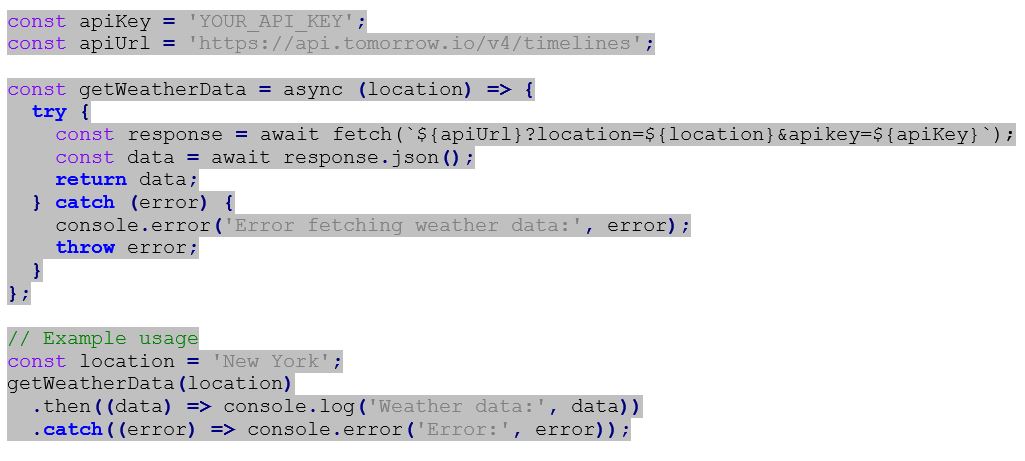
Weather Wonders: A Guide to Crafting a Dynamic App Using Weather APIs

6. Design User Interface

Create an intuitive and visually appealing user interface to display the weather information. Consider incorporating icons, charts, and maps for a more engaging user experience. Ensure that your app is responsive to different screen sizes.

7. Implement Location Services

Integrate location services to automatically fetch weather data based on the user’s current location. This enhances user convenience and provides hyper-localized weather information.

Assuming you have the Tomorrow.io API key (replace ‘YOUR_TOMORROW_IO_API_KEY’ with your actual API key), here’s how you can implement location services:

Weather Wonders: A Guide to Crafting a Dynamic App Using Weather APIs

In this example, the getUserLocation function returns a value that resolves to an object containing the user’s latitude and longitude. The obtained location is then used to make a request to the Tomorrow.io API using the getWeatherData function.

8. Update Data in Real-time

Implement a mechanism to periodically update weather data in real-time. Consider background tasks or push notifications to keep users informed about changing weather conditions.

9. Handle Edge Cases

Anticipate and handle edge cases, such as network errors, invalid locations, or unexpected API responses. Provide informative error messages to guide users when issues arise.

The following are some common edge cases that you can consider: 

9.1 Network Errors

Network issues are inevitable, and your app should gracefully handle them. Implement proper error handling for network-related problems, such as timeouts, no internet connection, or server unavailability. Provide informative error messages to guide users and suggest actions like checking their internet connection.
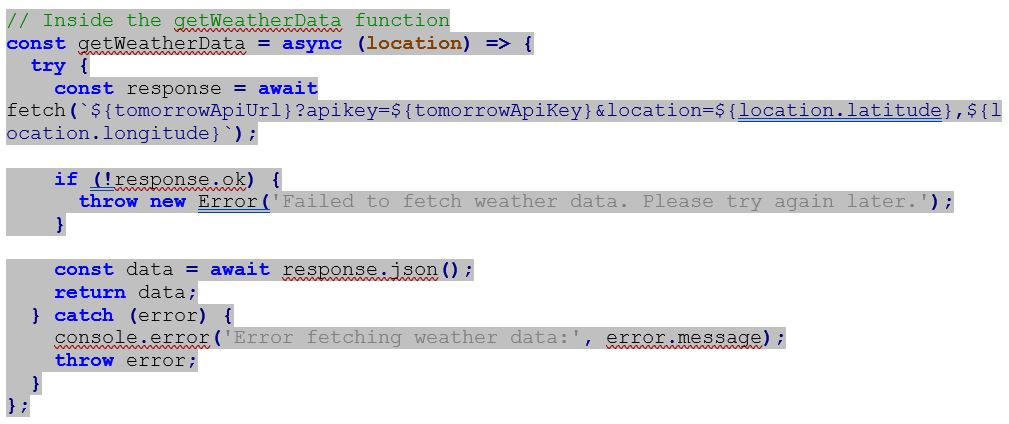
Weather Wonders: A Guide to Crafting a Dynamic App Using Weather APIs

9.2 Invalid Locations

Handle situations where users input invalid locations or the geolocation service returns inaccurate coordinates. Validate user inputs and provide feedback if the location is not found. Consider using additional services or algorithms to improve location accuracy.
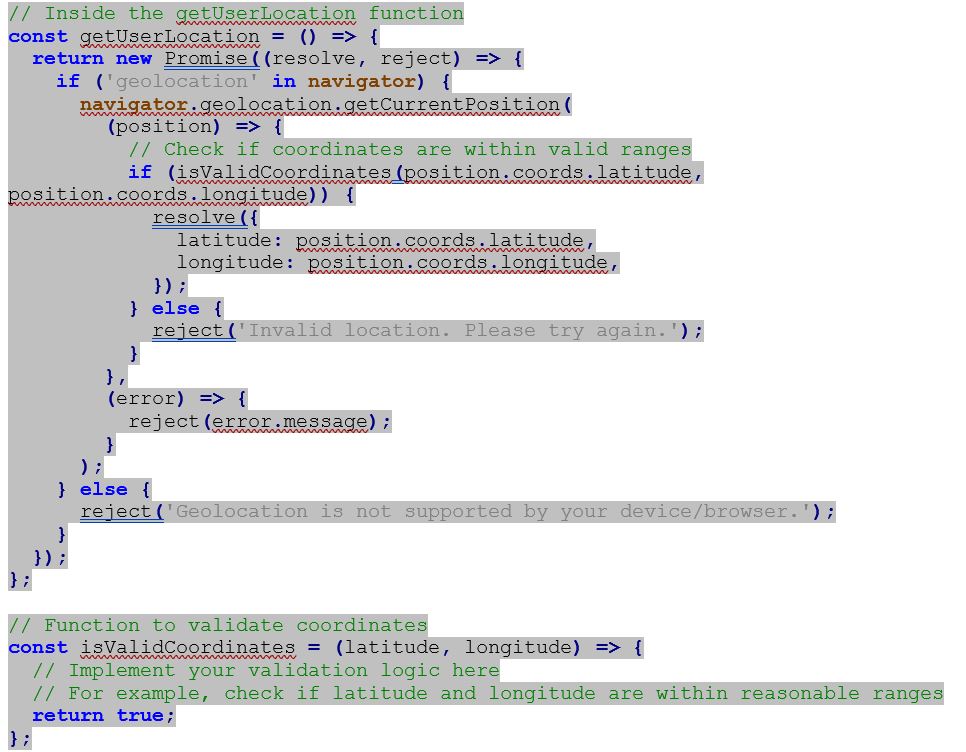
Weather Wonders: A Guide to Crafting a Dynamic App Using Weather APIs

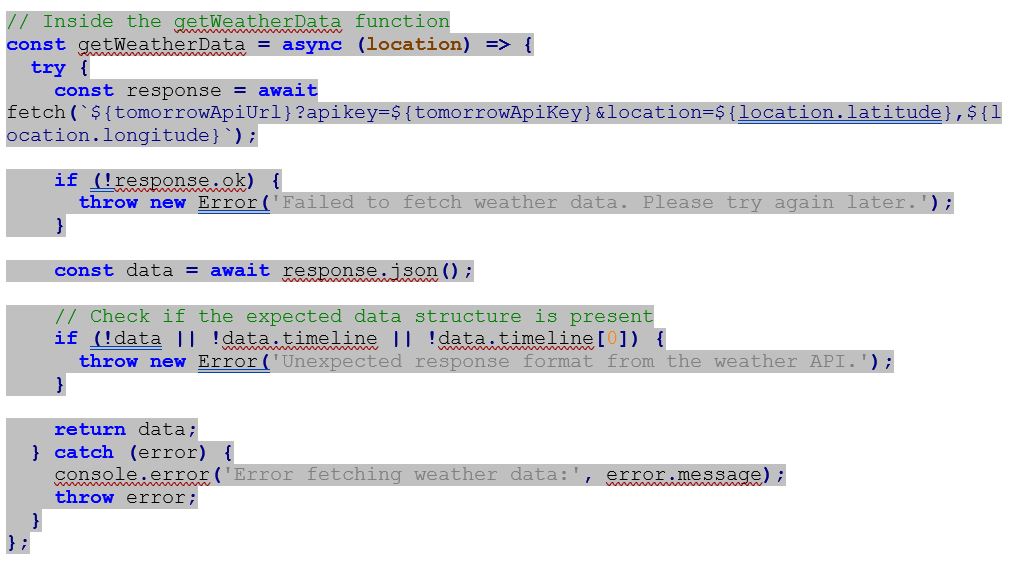
9.3 Unexpected API Responses

APIs may change or return unexpected responses. Implement error handling to detect and respond to changes in the API structure or data format. Log relevant information for debugging and inform users if there’s an issue with the weather data.
Weather Wonders: A Guide to Crafting a Dynamic App Using Weather APIs

Perform extensive testing on various devices and network conditions to ensure your app functions seamlessly. Test edge cases, user interactions, and the app’s performance to deliver a reliable experience.

11. Optimize for Performance

Optimize your app for performance by minimizing API requests, caching data, and optimizing assets. This ensures a smooth experience for users, even in areas with slower internet connections.

12. Stay Informed about API Changes

Weather APIs may update their endpoints or data formats. Stay informed about any changes and update your app accordingly to maintain compatibility.

By following these steps, you can create a dynamic weather app that provides users with accurate and up-to-date information. Continuously monitor your app’s performance, and be ready to adapt to changes in Weather API services. Crafting a dynamic weather app is an ongoing process that requires a balance between functionality, usability, and reliability.

  1. The Most Common API Vulnerabilities
  2. How To Make Drupal Migration Successful: 6 Useful Tips
  3. How to Install Microsoft Exchange Updates with Reliability
  4. Recent Mobile Payment Trends – How They’re Shaping The Future
  5. OpenAI Releases Developer APIs for ChatGPT and Whisper Models

[ad_2]
Source link

Beeper’s Next Route for iMessage on Android involves Renting Jailbroken iPhones

0
[ad_1]

When Beeper Mini launched earlier this month, it was a pretty big deal. The company was able to reverse-engineer a way to get iMessage working on Android without the need for an old Mac or other Apple device nor needing to login to your Apple ID. Of course, that didn’t last long.

Now, after a few different methods have been blocked by Apple, Beeper has detailed its latest route for getting iMessage to work on Android. The blog post actually went live yesterday but was quickly removed. Today, the blog post is back up.

According to Beeper, the catch here is that you will need access to an old iPhone or Mac or someone who has access to a Mac. Basically, Beeper wants you to get an old iPhone (preferably an iPhone X or earlier – one that is not getting new iOS updates). Beeper then details how you can jailbreak the iPhone to install a Beeper tool that will generate an iMessage registration code. Then you’ll be able to set up Beeper Mini and enter your code. That will allow phone number registration to work. You’ll need to keep the iPhone plugged into power at home, connected to WiFi.

The other option is going to be to set up Beeper Desktop on a Mac. Use your iMessage registration code to set up Beeper Mini, and you’ll be on your way.

But it gets even crazier, Beeper will rent jailbroken iPhones to you

If you don’t have an old iPhone, which many of us don’t, then Beeper has a resolution for that too. There’s a form that you can fill out to rent (for a few dollars per month) or buy an old iPhone with the app pre-loaded, which Beeper will sell you for $30 to $50 per month. Beeper says that this service will be available in the new year.

Why is Beeper doing this? Well, previously, it was using its own fleet of Mac servers to provide identification information called ‘registration data’ from a real Mac for iMessage registration. But as we’ve seen earlier this week, Apple has figured that out and started to block those Macs.

So now, with Beeper Cloud (Mac version) and old iPhones, they can generate unique registration data just for you. Beeper says that in their testing, this has made the connection very reliable. And if you use Beeper Mini, you can use your Mac registration data with it as well, and Beeper Mini will start to work again. Unfortunately, Beeper does need to periodically regenerate this data after you’ve connected, roughly once per week or month, which is why the Mac or iPhone needs to be switched on regularly.

It’s not perfect, but it does work. It likely won’t be long before Apple blocks this method as well, however.


[ad_2]
Source link

Google really went all out with AI tech in 2023!

0
[ad_1]

Every company accomplishes a lot of things over the course of a year. Google, one of the largest companies in the world, has accomplished a ton this year, and it’s not shy about letting us know. In a new blog post, Google lets us know its achievements in 2023, and most of them are centered around AI.

Google has been working on artificial intelligence for years. It’s on the mission to push humanity forward with powerful and innovative technology. Well, that was its mission until November 20th, 2022, the date that ChatGPTfirst launched. Since then, it feels like the company has just been trying to keep up to keep OpenAI from stealing Google’s primary source of income. So, it should be no surprise that the company is really going ham on the AI.

2023 was the year of Google AI

The company listed 23 achievements to celebrate the end of 2023. Dotting the list, there are some achievements that weren’t all about AI. For instance, #4 was welcoming Android 14 (Oh Google, that one should have been #14). #5 was the welcoming of the Pixel 8, Pixel 8 Pro, Pixel 7a, and Pixel Fold while #6 was the company welcoming the Pixel Tablet and the Pixel Buds Pro.

The list goes on with the company talking about other achievements like the Pixel Watch 2, Immersive View for Maps, RCS, passkeys, Chromebook Plus, and a few more. These are all notable achievements and some of them filled the headlines.

However, Google’s AI achievements tipped the scale in this regard. The blog post notes the company’s AI releases, and there are a lot of them. This year has been long, so it’s early to forget about some of the things that the company did.

To no one’s surprise, welcoming Gemini was #1, and releasing Bard was #2. These are two of the company’s biggest generative AI products, and they showed just how powerful Google’s AI is. We can’t forget about the Generative AI in Search (#3), AI tools added to Workspace (#14, #15) Duet AI in Google Cloud (#16), and more. All in all

All in all, 11 of the 23 items involved AI in some way shape, or form. It shows that 2023 was the year for Google AI, and the company is excited about expanding the list in 2024.


[ad_2]
Source link

Leak confirms Galaxy S24 launch date and AI integration

0
[ad_1]

There is no end to Galaxy S24 leaks. Shortly after we exclusively revealed the official renders of the base Galaxy S24, renders of the Plus and Ultra models leaked too. A fresh leak has confirmed the launch date for the new phones. As rumored before, Samsung will host the Galaxy Unpacked event on January 17, 2024 (January 18 in some countries due to the time difference).

Leak reveals the Galaxy S24 launch date

Noted X leakster Evan Blass recently shared a GIF that appears to be a short screen recording from a page on Samsung’s official website. The said page shows a countdown to the live stream of the next Galaxy Unpacked event.  It has a button to add the event to your calendar. The time and date for the event are mentioned too. It kicks off at 3 AM KST (Korea Standard Time) on Thursday, January 18, 2024.

That’s 10 AM PT/1 PM EST/6 PM GMT/ 11:30 PM IST on Wednesday, January 17, 2024. Since the event is rumored to take place in San Jose, California, USA, the local start time of the upcoming Galaxy Unpacked event will be 10 AM on January 17. While the leaked official countdown doesn’t mention the Galaxy S24, we all know that Samsung will launch the new flagship lineup at the event.

Leaks have revealed that the Galaxy S24 phones will have artificial intelligence (AI) built into the system. Samsung has baked AI into the One UI software for a seamless user experience. You will find AI in almost every system app and function, from calling and voice recorder to camera, galley, Samsung Notes, Settings, and more. The new flagships will offer AI features and functional enhancements everywhere.

Samsung Galaxy S24 launch event date leak

Unsurprisingly, Samsung’s official launch invite for the Galaxy Unpacked event will prominently feature AI. “Galaxy AI is coming,” an animation next to the leaked countdown states. The “sparkle” animation shows an icon identical to the Google Bard logo. It appears Galaxy S24’s on-device AI will be heavily influenced by Google’s AI chatbot. Samsung has also launched its generative AI model called Samsung Gauss.

Samsung will open pre-orders for new flagships immediately after launch

While this leak doesn’t give us the market release date for the Galaxy S24 trio, earlier leaks have revealed that too. As usual, Samsung will open pre-orders for the new flagships immediately after the launch event on January 17. General sales of the phones are expected to begin on January 30. AT&T has already certified the unannounced Samsung flagships—carrier-locked and unlocked variants. Stay tuned for the official announcement.

Samsung Galaxy S24 AT T certified early


[ad_2]
Source link

How Human Elements Impact Email Security

0
[ad_1]

Human factors heavily influence email security, with individuals’ vulnerability to phishing and social engineering playing a crucial role in compromising email systems.

Cybersecurity has been a hot topic in 2023 due to the rising number of cyber events and the high price tag that comes with them for companies. In October of 2023 alone, there were over 867,072,300 breached data records, accounting for millions of dollars in lost data and an irreparable impact on the reputation of all companies involved.

In the face of this rising cyber threat, most companies are focusing on the different technologies that they can employ to decrease the impact of cyber events. Of course, effective data compliance, management, and backup strategy is a vital step in keeping businesses safe. Yet, other factors can lead to data breaches that most companies overlook.

Human factors account for around 82% of all breaches that occur in business environments. From an employee clicking on a spam link to accidentally giving out their username and password without realizing it, there are numerous ways that human error can quickly become the weak link in cybersecurity.

In this article, we’ll dive into the various human elements that impact cyber security, detailing why they can be so drastic, and exploring how your business can put in place methods to reduce the frequency of human error negatively impacting your business.

Let’s dive right in.

What Human Actions Can Impact Email Security?

Businesses hold a huge amount of important data, spanning across financial records, private proprietary software, and client information. Due to this, they are routinely a target for malicious actors who want to extract that information for their good or to sell it to other buyers at a high price.

Knowing that most businesses will have a comprehensive network of cybersecurity defenses, many hackers instead turn to employees. Phishing and malware are two common practices that malicious actors will use to engage with businesses and fool their employees. The hope is that an employee will click on a spam link and give away their details or download malware to their work computer.

One known factor that hackers use to inspire employees to click on their links is action bias. Action bias is a trait of human psychology that inspires people to want to instantly react to any potential threat. When a hacker emails an employee and says that they need to reset their password because someone is on their bank account right now, they’ll be scared into instantly taking action. Of course, this is when they log into a false page and give away their user details.

While action bias is innate, we can train people to recognize these impulses and take a second before responding to them. Through education, you can teach the vast majority of users to be more aware of potential threats and to avoid the most common scams and phishing emails.

How Can My Business Reduce the Impact of Human Error?

The first step toward reducing the impact of human error is to understand exactly where the threat comes from. Most of the time, businesses will already have a range of cybersecurity tools to keep their employees safe. Only a select few will slip through the cracks and arrive in an employee’s inbox.

With that in mind, there are numerous ways that businesses can reduce the impact of human error with preemptive steps and methods:

  • Create Backups of all Data – One of the most effective ways of reducing the impact of any human error that can occur in your business is to make sure you have backups to fall back on. If an employee downloads ransomware that freezes your system, a backup will allow you to carry on working without much of an impact. Without this backup, you’ll have no other choice than to engage with your hackers.
  • Avoid Email Signature Vulnerabilities – When employees generate their signatures from unknown sources, they could be introducing vulnerabilities into their emails that hackers could take advantage of. Be sure to use an email signature manager for Office 365 and other email platforms you work with to monitor where people are getting their email signatures from and to cut out any potentially dangerous links.
  • Access Control – Access control programs are designed to limit the total amount of files that certain users can access from their accounts. An admin of your system would be able to configure who can access what files and create limitations. With these limits actively constraining users, even if a person gave away access to their account, the hacker wouldn’t have complete control over all of your files.

While not an exhaustive list, these steps will point your business in the right direction and make sure that you don’t lose too much control in the face of a human-inspired security event.

How To Improve Employee Cybersecurity Awareness

At the end of the day, the only way that your business can assuredly reduce the total amount of cybersecurity events that humans cause is to focus on educating your teams as much as possible. You could have the best security system in the world, but if your employees don’t know the first thing about managing their online accounts, it could all be for nothing.

When creating a more robust security posture, you should start by engaging with different employees and teaching them the basics of cybersecurity. You don’t need to go through anything particularly complex in these lessons. On the contrary, you can simply teach them about what certain threats look like, how to respond to a threat, and how to report any malicious content to their security admin.

While it may seem overly simple, education is the most powerful tool that businesses have at their disposal when it comes to improving employee cybersecurity awareness and, in consequence, the entire security system of your company.

Final Thoughts

While human elements are one of the leading factors in cybersecurity weaknesses, they don’t have to be. Creating educational programs that teach your employees about the various potential dangers of clicking on links or engaging with content from unknown senders will help to raise awareness and decrease the chance of security events inspired by human error.

Tackling the propensity of employees to create security vulnerabilities is one of the most effective ways of building up a complete and comprehensive security posture. Not only will this improve your overall cybersecurity, but it will mean that all the other service tools you employ to bolster your defences will perform to a much higher standard.

Once your security isn’t being undermined by a few wrong clicks by employees, you’ll be in for a much less dramatic 2024.


[ad_2]
Source link

Google Discover now shows you all the articles you’ve liked

0
[ad_1]

If you’re using Google Discover frequently, chances are you’re also liking stories as you go along. That way you’re not only showing appreciation for the ones you like, but you also help Google adjust to your interests. Well, Google Discover now has a new capability, it now shows you all the articles you’ve liked, which was not the case thus far.

You can now see your liked articles in Google Discover

When I say liked, I mean ‘hearted’, as there’s a heart next to an article, not a like button, technically. In any case, this feature is now accessible both via the Google app, and a specific URL.

If you want to access it via the Google app, fire it up. Once you do, tap the ‘Saved’ option in the bottom-right corner. There are three tabs down there, you want to tap the most-right one. Once a new page opens, you’ll see three tabs at the top of the page, including the ‘Liked’ one.

The ‘Liked’ tab is the middle one, as it sits in between the ‘Saved’ and ‘Followed’ tabs. In that liked tab, you’ll see all your liked stories, chronologically.

There are two ways to access this new section

If you don’t want to use the Google app, you can also access the same feature through google.com/interests/liked URL. Do note that once you do, the UI won’t look as nice as it does in the Google app, though.

Now, the other two tabs, the ‘Saved’ and ‘Followed’ ones, also show info based on your interests. If you’ve bookmarked any Discover articles, they’ll pop up in the ‘Saved’ tab. The ‘Followed’ tab shows “searches you’re following”.

There you go. If you do bookmark or like articles in Discover frequently, these new additions may prove to be useful for you. You can simply access all that content now, and it’s only a tap or two away.

Google Discover liked articles screenshot


[ad_2]
Source link

Google AI Support Assistant chatbot goes live to help with some products

0
[ad_1]

Google AI Support Assistant chatbot has been quietly released on Google Help pages. The search titan’s new artificial intelligence-powered assistant currently offers help with select Google products. The company’s latest AI-powered feature arrived soon after it introduced Gemini, its next-generation foundation model, earlier this month.

Google AI Support Assistant currently offers help with select products like Maps & Play Store

It appears that Google has released the AI support chatbot on its help pages in the beta version. At the time of writing this post, this feature seems to be only available for select Google Products. These products include the Google Play Store, Google Maps, Messages, and Account. Whenever a user visits the support page for these products, a new “Need help?” icon appears towards the bottom-right corner.

Google Maps Need Help

Taking Google Maps as an example, you can hit the “Need help?” icon to get additional help from AI Support Assistant. The assistant will show you some automatically generated queries to help you around the navigation, offline maps, and more. When you click on one of these questions, the AI support assistant will show you the best possible solution. It will also show you a link to the blog post dedicated to that particular query.

The users can also type their own questions after clicking the “Something else” option from the available suggestions. After hitting the enter button, the AI support assistant will search for the best possible resolution to your query. The same functionality is provided for the other Google products including Account, Play Store, and Messages, at least for now.

Google Maps Help page

AI Support Assistant for Google products is still learning

The support pages for Google products note that the “AI is still learning”, and it may show inaccurate results. “human reviewers may process your help guide conversations for quality purposes”, mention the support pages.

Also, the responses to queries from the new feature aren’t instantaneous and could take a few seconds to compile the results. Google is expected to release the full fledged AI Support Assistant for all of its products in the near future.


[ad_2]
Source link

Initial OnePlus 12R launch date revealed by trusted source

0
[ad_1]

OnePlus has already confirmed the global launch date for the OnePlus 12 and OnePlus 12R. The OnePlus 12 already launched in China, but the OnePlus 12R did not. Well, now we know when will the initial OnePlus 12R launch take place, as the date has surfaced.

The initial OnePlus 12R launch date has just been revealed

This information has been shared by Max Jambor, one of the most well-known tipsters out there. When it comes to OnePlus, he’s usually spot on. He was the first that revealed two OnePlus 12 phones are coming, for example.

That being said, the OnePlus 12R will launch on January 4, in China. The thing is, it won’t be called the OnePlus 12R in China. It will be called the OnePlus Ace 3, but that is the same phone as the OnePlus 12R.

OnePlus has been rebranding the ‘Ace’ series into ‘R’ series phones for years now. The thing is, the ‘R’ series phone were exclusive to India thus far. This is the first time we’ll see a OnePlus R phone outside of China.

The device will launch in both the US and Europe

The OnePlus 12R is coming to both the US and Europe, in case you were wondering. It will be inferior to the OnePlus 12, as expected. It will, however, offer plenty of power, and hopefully have a truly appealing price tag.

The Snapdragon 8 Gen 2 is expected to fuel the device, while a large 120Hz AMOLED display will be used. The phone will utilize plenty of RAM and storage, and have a rather beefy battery with 100W charging support. Yes, a charger will be included in the package.

Android 14 is expected to come out of the box, with OnePlus’ OxygenOS skin on top of it. A 50-megapixel main camera will be backed by an 8-megapixel ultrawide camera, and a 2-megapixel macro camera.


[ad_2]
Source link

iPhone X saved Israeli soldier’s life by blocking a bullet

0
[ad_1]

Nokia feature phones have long been celebrated for their durability, with numerous stories highlighting their resilience. Additionally, there have been cases of Apple Watches and iPhones playing major roles in life-saving situations. This time around, the iPhone X is the start of the show, as it saved an Israeli soldier’s life by dodging a bullet in the warzone. Israeli Prime Minister Benjamin Netanyahu and Rabi Shai Graucher presented the soldier and his unit with brand-new iPhones as a token of appreciation and recognition for their service.

iPhone X saves soldier’s life by blocking a bullet

According to a post shared on X (formerly, Twitter), an iPhone X dodged a bullet and saved an Israeli soldier’s life. Apple Insider saw the post and noted that it could be an iPhone X, due to its vertical camera bump.

The video featured an iPhone with a sturdy case and a clear back. A bullet pierced the phone and case but lost its force, sparing its user from serious injury. Apple products have saved lives before, but it remains uncertain if Apple will discuss the iPhone’s bullet resistance.

Apple rates iPhones against dust, water, and extreme temperatures. However, the company has never publicly confirmed that iPhones are bulletproof.

Israeli PM & Rabbi Shai Graucher gifted new iPhones to soldiers

Subsequently, Israeli PM Benjamin Netanyahu and Rabbi Shai Graucher paid a visit to soldiers and the unit in the hospital. That’s when they also presented the latest iPhone 15 models to them.

It’s worth noting that such tales of phones acting as protective shields in critical situations aren’t entirely unprecedented. Phone Arena recalls past occurrences, including instances where a Moto G5 housed in an Incredible Hulk case proved to be a lifesaver, as well as another involving the HTC EVO 3D. Now, the iPhone X has etched its name onto this list of devices that have unexpectedly shielded individuals from harm.


[ad_2]
Source link

8220 Gang Targets Telecom and Healthcare in Global Cryptojacking Attack

0
[ad_1]

The 8220 Gang is exploiting multiple vulnerabilities, including the Oracle WebLogic Server vulnerability, to propagate cryptojacking malware in the Americas, Europe, and Africa.

Imperva Threat Research has discovered undocumented activity from a hacker group known as the 8220 gang. This group is known for mass malware deployment using an ever-evolving arsenal of TTPs. The 8220 gang mainly targets Windows and Linux web servers with cryptojacking malware.

The 8220 gang, believed to be of Chinese origins, was first identified in 2017 by Cisco Talos when it targeted Drupal, Hadoop YARN, and Apache Struts2 applications for propagating cryptojacking malware. the group exploited Confluence and Log4j vulnerabilities, and recently, Trend Micro found them leveraging Oracle WebLogic vulnerability (CVE-2017-3506) to infect systems.

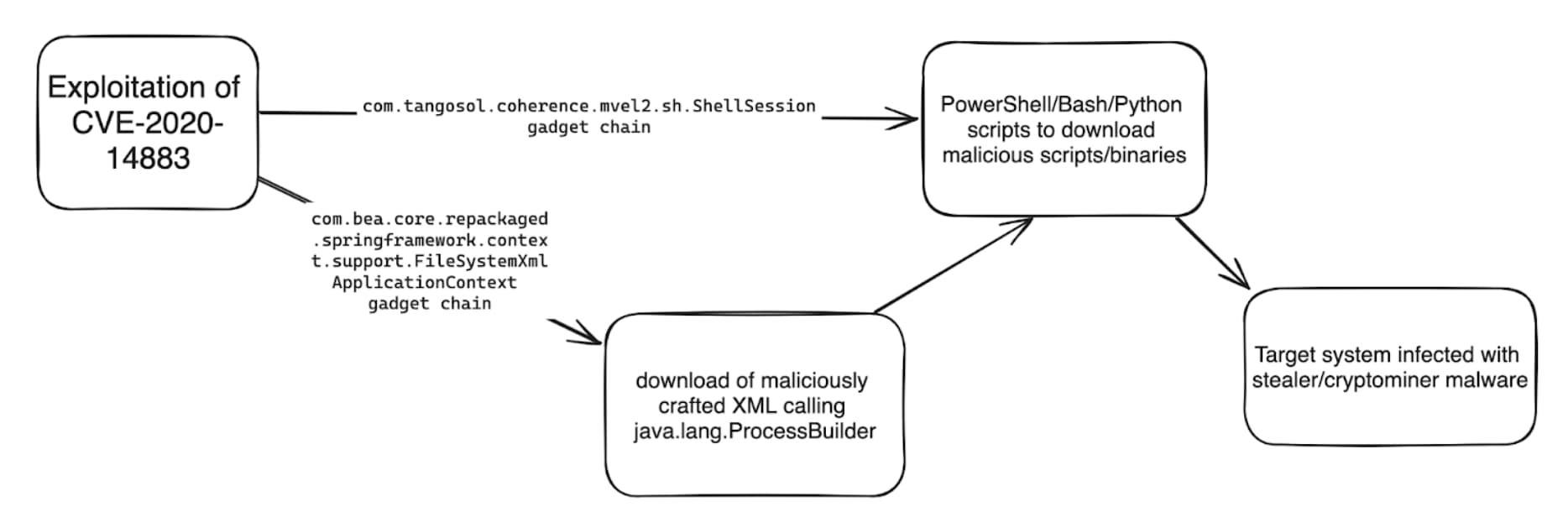
According to Imperva’s blog post, the 8220 gang is also exploiting CVE-2020-14883, a Remote Code Execution vulnerability in the Oracle WebLogic Server, to spread malware. This vulnerability allows remote attackers to execute code using a gadget chain. It is often chained with CVE-2020-14882 (authentication bypass vulnerability) or leaked/weak/stolen credentials. The gang uses two gadget chains; one loads an XML file, and the other executes commands on the OS.

8220 Gang Targets Telecom and Healthcare in Global Cryptojacking Attack
Credit: Imperva

Driven by financial motives, this gang uses simple exploits to target vulnerabilities and exploit easy targets. Despite their unsophisticated nature, they constantly evolve their tactics to evade detection. Attributing attacks to this group is straightforward due to their use of traceable IoCs and TTPs, frequently reusing the same IP addresses, web servers, payloads, and attack tools.

The 8220 gang uses various methods to target Linux hosts, including cURL, wget, lwp-download, python urllib, and a custom bash function. They also use a PowerShell WebClient command on Windows to execute a downloaded script.

In another variation, they use a gadget chain to run Java code without an externally hosted XML file. The injected Java code evaluates whether the OS is Windows or Linux and executes the appropriate command strings. The downloaded files are executed, infecting the exploited hosts with known AgentTesla, rhajk, and nasqa malware variants.

According to Imperva researchers, the 8220 gang appears to be an opportunistic group because of its target selection, which includes healthcare, telecommunications, and financial services.

It mainly targets organizations in the United States, South Africa, Spain, Columbia, and Mexico. Moreover, the gang prefers using custom tools written in Python in their attack campaigns, and the attacking IPs are associated with known hosting companies.

Imperva Cloud WAF and on-prem WAF have identified and mitigated web vulnerabilities used by the 8220 gang for malicious activities. These vulnerabilities include CVE-2017-3506, CVE-2019-2725, CVE-2020-14883, CVE-2021-26084, CVE-2021-44228, Apache Log4j JNDI, and CVE-2022-26134.

Imperva is urging organizations to maintain security. Enterprises should patch their applications and implement multiple security measures to protect against falling victim to such groups.

RELATED ARTICLE

  1. Patched OpenSSH Exploited for IoT, Linux Cryptomining
  2. Hackers mining Monero on Microsoft SQL databases for last 2 years
  3. Malicious Chrome extensions stealing data with cryptomining malware
  4. Cryptomining, Malware Flourish on Misconfigured Kubernetes Clusters
  5. New JaskaGO Malware Targets Mac and Windows for Crypto, Browser Data

[ad_2]
Source link