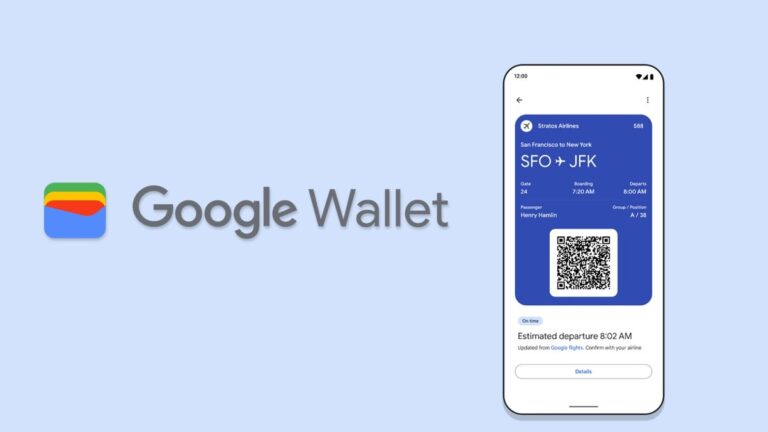
Google is reportedly working on a new feature that could make adding boarding passes to Google Wallet on Android easier. The feature is currently in the experimental stage and is hidden within the Chrome Canary app.
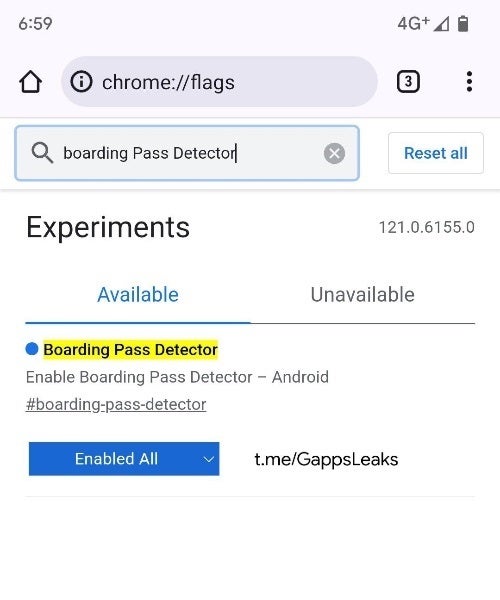
The new flag, discovered by AssembleDebug from the GApps Flags & Leaks community on Telegram, scans open tabs in Chrome Canary to identify boarding pass information. It specifically looks for URLs that match those of airlines listed by Google and checks for boarding pass data, such as QR codes and barcodes.
Once boarding pass information is detected, the Boarding Pass Detector flag prompts the user to add the pass to their Google Wallet. This could potentially streamline the process of adding boarding passes to Google Wallet, eliminating the need for manual entry or screenshots.
Image Credit: GApps Flags & Leaks
While the Boarding Pass Detector flag (#boarding-pass-detector) is currently inactive and only present in the Canary build of Chrome for Android (version 121.0.6145.0), it’s a clear indication that Google is exploring ways to enhance boarding pass management within Google Wallet. The feature could be particularly useful for frequent travelers who frequently receive boarding passes electronically.
For those not familiar, Chrome Canary for Android is an unstable and experimental version of the Chrome browser for Android devices. It is designed for developers and early adopters who want to try out the latest features and bug fixes before they are released to the stable version of Chrome. Chrome Canary is updated multiple times per week, and it may contain bugs that can cause the browser to crash or behave unexpectedly. It is not recommended for everyday use.
The exact timeline for the Boarding Pass Detector’s rollout remains unclear. However, the presence of the flag suggests that Google is actively working on the feature and could introduce it in a future Chrome for Android update.
Microsoft Phone Link is about to get even more powerful. It will soon let users connect the phone’s camera to a webcam on a computer. The Redmond-based tech giant has been building a Phone Link tool to ease the process of connecting Windows and Android. The new webcam feature like seems a logical next step for Phone Link. Moreover, it brings Microsoft one step closer to the seamless ecosystem that Apple has built with its Continuity Camera feature.
Microsoft could let users use Android phones as a webcam
Folks at Android Authority performed an APK teardown of Microsoft’s Phone Link app (v1.23102.190.0). The code inspection reveals clues about upcoming features that hint at using the phone’s camera as a webcam on Windows. This also aligns with Android 14’s ability to use the phone as a webcam. While this information was gleaned from the code itself, it’s crucial to note that it might not make it to the final release. However, we hope that it does land.
That’s not all, it may have a bunch of video effects too
New code strings discovered within Phone Link hint at exciting potential features. These include a range of video effects like HDR, filters, and stabilization, suggesting the app could soon offer built-in video calling capabilities. The presence of “auto-framing” as a camera effect further boosts this speculation. It could potentially offer a feature similar to Apple’s Centre Stage, where the camera automatically adjusts to keep the user in focus even when moving.
Furthermore, new error messages related to overheating and camera service failures add fuel to the fire. These indicate Phone Link might be prepping up for more intensive tasks like video calls. Currently, the app primarily focuses on mirroring phone apps on the computer. However, the latest updates could position it as a direct competitor to Apple’s Continuity Camera, which enables iPhone users to use their devices as cameras and microphones for FaceTime and more.
Apple has pushed iOS 17.1.2, iPadOS 17.1.2 and macOS Sonoma 14.1.2 updates to eligible iPhones, iPads and Mac devices. Ever since the release of iOS 17, the Cupertino company has been releasing micro-updates. These updates mainly focus on addressing bugs and fixing security vulnerabilities, and this update is no different. Therefore, no new features. Moreover, the much-anticipated Journal app for iPhone is still missing in the update. It is expected to come with the iOS 17.2 update.
These iPhones, iPads are eligible for iOS 17.1.2 / iPadOS 17.1.2 update
Apple notes that iPhone XS and later, including the latest iPhone 15 line, are eligible for the update. As for iPadOS 17.1.2, Apple announced the iPad Pro 12.9-inch 2nd generation and later, the iPad Pro 10.5-inch, the iPad Pro 11-inch 1st generation and later, the iPad Air 3rd generation and later, the iPad 6th generation and later, and iPad mini 5th generation and later are eligible.
These Mac devices are eligible for macOS Sonoma 14.1.2 devices
The latest macOS Sonoma 14.1.2 update is available for Mac Studio (2022 and later), iMac (2019 and later), Mac Pro (2019 and later), Mac Mini (2018 and later), MacBook Air (2018 and later), MacBook Pro (2018 and later), and iMac Pro (2017) models.
Most importantly, the new update also includes an update to Safari browser on Mac devices. The latest Safari 17.1.2 update attempts to fix security vulnerabilities.
How to update to iOS 17.1.2 / iPadOS 17.1.2 / MacOS Sonoma 14.1.2
To update your compatible iPhone, iPad or Mac to iOS 17.1.2, iPadOS 17.1.2 or macOS Sonoma 14.1.2, follow these steps: Open the Settings app, navigate to the General section, and access the Software Updates section. Allow the page to refresh, and when the new version is visible, select Download and Install. Your Apple device will then download and prepare the update.
After the preparation is complete, the device will automatically reboot multiple times for installation. Ensure your iPhone or Mac remains connected to a power source throughout the installation process. Once finished, your device will be running the updated operating system.
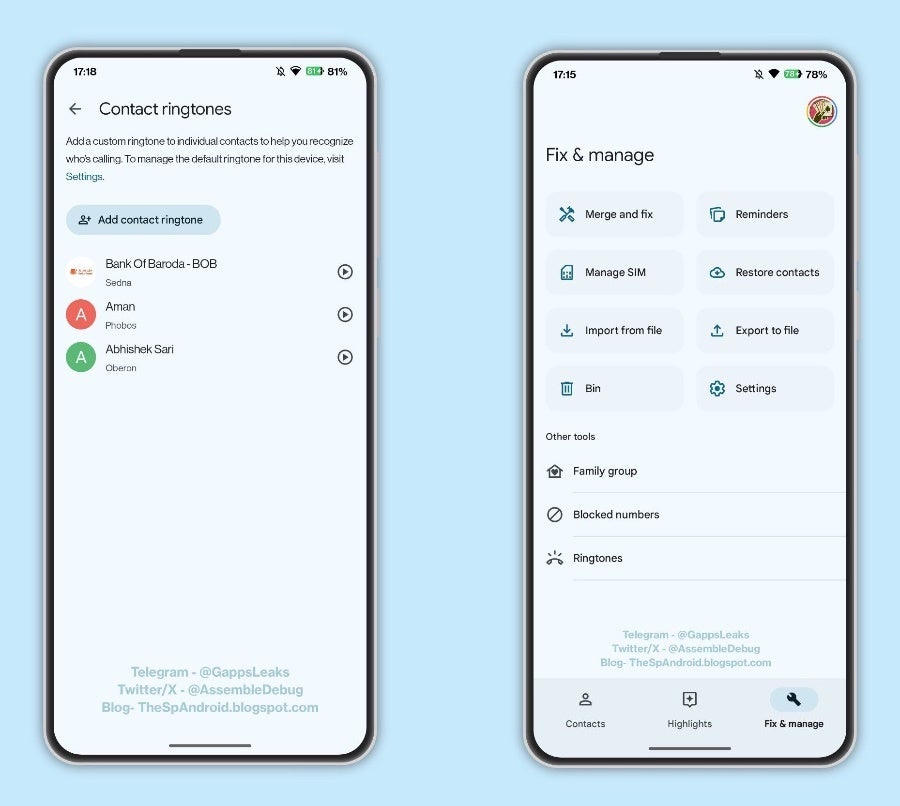
Google Contacts is testing a new feature that will make it easier than ever to manage your contact ringtones. Instead of hunting through menus, you’ll soon have a dedicated section where you can set and preview ringtones for all your contacts.
As spotted by the team at GApps Flags and Leaks channel on Telegram, version 4.22.37.586680692 of the Google Contacts app has a new ringtone section that consolidates everything into a single, user-friendly interface. Simply select a contact, browse the available ringtones, and preview your chosen ringtone with a quick tap. This new section also integrates your existing custom ringtones, ensuring your notification sounds continue to reflect your preferences.
Source: @GappsLeaks
This feature is still a work in progress though and not yet active unless some flags are changed in the app. The public version of Google Contacts still requires you to open an individual contact and set a specified ringtone for that person or company. Once this feature is finalized though, you will be able to manage all contact ringtones from the “Fix & manage > Ringtones” menu within the app and have all contacts you have set a personalized ringtone for listed in one handy place.
This change comes at exactly the right time, as Google is putting a lot of work on making RCS just as feature-rich as iMessage with a slew of new updates announced yesterday. These new RCS features are rolling out in celebration of RCS reaching one billion active monthly users worldwide, so it makes total sense that its accompanying Contacts app receive some improvements as well.
Part of the improvements announced yesterday included the introduction of “Profiles” that tie into the Contacts app and allows users to personalize the profile name and picture associated with their phone number. This will help users set up an identity across Google services that can be saved within the Contacts application and be tied to your phone number in those group chats.
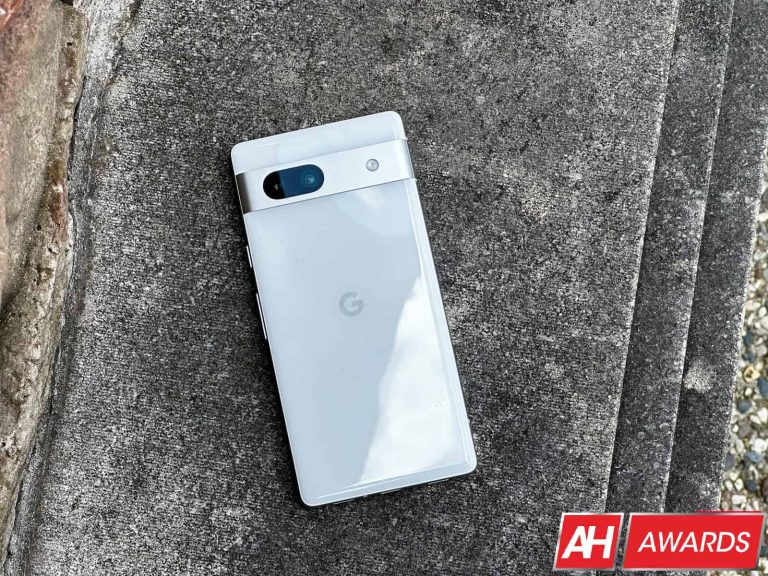
The Google Pixel 7a managed to beat out all of the phones you can get under $500
When you think of an affordable phone, you’re likely to envision a phone that’s low-quality. However, Google is looking to change that. The company has its line of premium Pixel phones, but it also has its more affordable Pixel “a” series phones. Well, the company’s Pixel Pixel 7a is the latest affordable phone from the company, and it’s been able to deliver the best experience in its price bracket.
Google’s Pixel “a” series phones typically wind up being the best in their price because the company focuses on creating a smooth and powerful experience. When you use this phone, you know that you’re using a device that’s a part of the Pixel ecosystem of devices. This means that it can connect seamlessly with other Pixel devices like the Pixel Buds.
The thing that makes this device so great is the fact that it does not feel like you’re using an affordable phone. From the moment you pick up the phone, you know that you’re holding a well-built device. It feels almost as premium as any premium Pixel phone. It’s not flimsy or thin like most other affordable phones.
Moving onto the screen, Google gave this phone a screen just as beautiful as the screen on its premium Pixel 7 phones. So, movies, TV shows, and other types of video content will look amazing on it. Google has been refining its display calibration over the years to deliver a truly great experience with well-balanced colors and great brightness. So, go ahead and binge-watch all of your favorite content.
The Pixel 7a is one of the most powerful phones in this price range.
A beautiful screen doesn’t mean anything if the performance is bad. The Pixel 7a is just as powerful as the $899 Pixel 7 Pro! It’s using the same hardware. Google delivered a truly flagship-grade experience in a package that’s substantially cheaper. Handling daily tasks and business are all as smooth as butter. You won’t find any stutters or lag throughout the software.
You’re more than able to use this phone for both work and play. If you need it to contact clients, organize your life, take pictures, play games, or do any other task. You can expect a smooth experience.
Speaking of taking pictures, there’s no doubt that this has the best camera of any phone in this price range. Google’s phones deliver some of the best results that you can get from a phone. The Pixel 7a is using pretty good hardware, but the main driving force behind it is the image processing. Pixel phones have the power of Google’s superior AI image processing that helps create some amazing images.
The Pixel 7a checks so many boxes when it comes to its build quality, display, performance, and camera. This is why it earned the Android Headlines’ award for best budget phone.
For the past couple of years, I’ve been reviewing Ultra Short Throw Projectors and have come around to how great they indeed are. I always thought they were not very bright, and the resolution wasn’t good. But as I’ve used and reviewed more and more, that’s proven not to be the case. And the AWOL Vision LTV-3500 Pro fixes one of the last grievances I’ve had with UST projectors – that’s the brightness.
With the LTV-3500 Pro, AWOL is touting about 3500 lumens (3300 ANSI), which makes this one of the brightest UST laser projectors on the market today. That should, in theory, anyway, make it perfect for use in a room with plenty of ambient lighting.
On top of all of that, AWOL is packed in 4K resolution and Dolby Vision, as well as 3D, like it’s 2010 all over again. But is that enough to make this $5,999 projector worth the money?
AWOL Vision LTV-3500 Pro Review: Unboxing
The Unboxing experience with the AWOL Vision LTV-3500 Pro is pretty much what you would expect. You get the projector, of course. As well as the remote, a few cables, and the 3D glasses. That’s right; this projector does have 3D included, but more on that later.
When DHL dropped off the LTV-3500 Pro, I got right into setting it up in my bedroom – where I test all of the projectors I review. It was around 4 PM in late October. So not quite pitch black yet, but the sun was definitely getting ready to go down in another hour or so. That means there wasn’t as much ambient lighting in that room as there could have been.
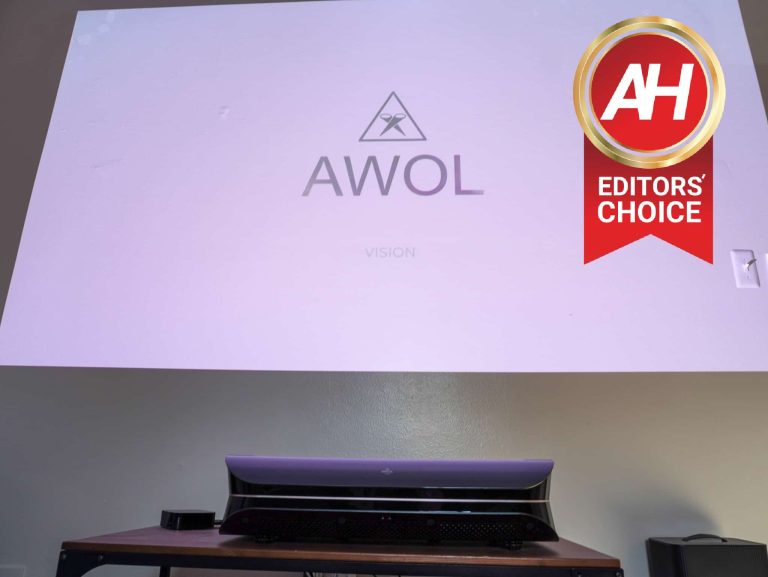
But the moment that I turned on the LTV-3500 Pro, I was amazed at how bright it was. Just to give you a bit of backstory, when you turn on the projector, it jumps to a white screen, with the AWOL logo front and center. So you can immediately see how bright it is. So, in a room without an ALR screen and ambient lighting, along with a lamp turned on, I was able to see the picture as well as I would have with an actual TV. From that moment on, I had big expectations for this projector.
Setting up the LTV-3500 Pro is pretty simple. The operating system is not very well built. Instead, AWOL is relying on you having a streaming device in your home that you can plug in. Even if you don’t, AWOL does include a Fire TV Stick 4K Max. Honestly, I did not even use it, since I had just finished reviewing the new Fire TV Stick 4K Max, and this was the older model. Instead, I plugged my Apple TV into the projector.
Credit where credit is due. Good on AWOL for including a Fire TV Stick 4K Max with their projector. Sure, it’s a $60 streaming stick being included with a projector that costs 100 times as much. But that’s still a good look for the company.
AWOL Vision LTV-3500 Pro Review: Design and Build Quality
With the design on the LTV-3500 Pro, AWOL isn’t doing anything spectacular. It’s a plastic shell that really looks like a big Xbox lying on its side. And that’s fine. The design isn’t that big of a deal on a projector. Honestly, you do want it to really blend into the rest of your home instead of standing out. I have definitely seen better-looking projectors, but I never once thought, “This is an ugly projector.” in fact, the way it looked never really crossed my mind.
Along the back of the LTV-3500 Pro, you’ll find all of the ports, and there’s plenty of them, too. On the back right side, you’ll find the power outlet. Above that are two HDMI ports, including one that does e-ARC, as well as an AV in, LAN, USB-A, an Optical port, and a service port. Now, to the left of that array of ports is a door that can pop off. Inside that door, you’ll find the third HDMI port, as well as a USB port for plugging in a streaming device – like the Fire TV Stick 4K Max that I mentioned earlier. Not only can you plug it in, but it can get power right there in that little compartment.
I know it’s a pretty minor thing, but that is by far my favorite design feature on AWOL’s projectors. I loved it on the LTV-3500 and am glad they’ve decided to keep it for the Pro model. If you’re like me and are only plugging in a single streaming device, that means far fewer wires, and it makes for a much better-looking setup.
Let’s talk about the specs for a little bit here. The LTV-3500 Pro runs at 4K resolution. This is being done with a Texas Instruments 4K DMD chip. It’s not a native 4K resolution, but the 1080p image is being shifted around so fast that it is able to produce 4K pixels. As mentioned, this runs at a maximum brightness of 3300 ANSI. That comes out to about 1,000 nits of brightness. Which is fairly similar to many high-end TVs. Like Samsung’s QD-OLED TV is right around 1,000 nits. So that is rather impressive, to say the least.
The LTV-3500 Pro uses a tri-chroma laser here, which means that there are individual lasers for red, green, and blue. This is different from cheaper UST projectors that would use a phosphor wheel to produce the colors. And that results in a much more vibrant, distinct, and accurate color gamut. AWOL Vision claims that it can cover 107% of the REC.2020 color space and 149% of the DCI-P3 color space. Meaning that these colors are very impressive for a laser projector.
Like with most projectors, AWOL does not offer HDMI 2.1 for gaming at 4K120. So you’d have to be happy with 4K60 here; really, it’s more like 1080p60. And where I’m only playing my Nintendo Switch OLED on this projector, that’s not a big deal for me.
AWOL Vision LTV-3500 Pro Review: Picture quality
In my bedroom, I have a chalk-painted wall, which gives me a relatively similar experience to using an ALR (Ambient Light Reflecting) screen for a projector. This is the best case for someone like me who lives in an apartment and can’t hang up an ALR Screen, and the floor-rise screens are also pretty expensive. It does result in the picture being a tiny bit darker, but it’s not a huge problem.
AWOL did offer to send their own screen, which I declined because I wanted to put this projector in the same space as the last few I’ve reviewed. That way, the testing was as similar as possible. And I have to say, this is by far the brightest projector available, by a large margin too. As I mentioned already, I knew it would be bright right away when the screen turned on and nearly blinded me.
I watch TV quite a bit in my bedroom over the weekend with plenty of ambient light in my room, and sometimes it can be a tough experience, depending on if the show or movie I’m watching is pretty dark. Like Ruthless or Manifest. But, with the LTV-3500 Pro, that has not been an issue at all. Even with the ceiling light on in my bedroom, I could still see the picture almost perfectly. It really is pretty impressive, to say the least.
Basically, if you’ve been holding out on getting a UST projector because of the brightness, that hold-out is over. This projector is brighter than my Amazon Omni QLED TV that’s in the living room.
When it comes to the actual picture here, AWOL does give you quick access to make adjustments to the images. Whether that’s adjusting the hue, saturation, or brightness of each color or any other aspect of the picture. You can do this all without going back to the home screen. This is clutch, especially if you’re an image snob and want the best possible picture on each video you watch.
Unlike regular projectors, UST projectors don’t usually have keystone correction included. And that’s because it’s sitting right in front of the wall or the screen. Instead, it has four feet that can be adjusted to get the straightest picture possible. This can take some time to set up, but it does work. And you shouldn’t need to adjust it again unless you move it somewhere. But you are able to adjust the focus in case things seem to be out of focus. It can happen, but will be pretty rare. It’ll only really happen if you move the projector at all.
This projector is able to output up to a 120-inch picture. In order to do that, you’d need to put the projector on the floor unless you have really high ceilings. And it needs to be about 13.6 inches away from the wall. This is an ultra-short throw, but it does still need a bit of space. Honestly, unless you have a huge space for this, you don’t need to go to the full 120-inches. Keep in mind that the smaller the picture, the better the details are in the picture.
Dolby Vision is included, along with HDR, which helps to give you a great experience with this projector. To really take advantage of this, I watched a few titles on MAX that were shot in Dolby Vision. I watched The Dark Knight, which if you’ve seen that movie, you’ll know that it is very dark, but more importantly, it is shot in Dolby Vision. On this projector, it looks truly amazing. It’s dark; however, thanks to the extra brightness here, it is not hard to see at all. I never had issues seeing the movie, and that was with some ambient lighting going on in the room.
AWOL Vision LTV-3500 Pro Review: 3D Viewing
3D, in my experience, has always been a bit of a gimmick. Especially in movie theaters, it’s just a reason to get you to pay more to watch a movie. But with the LTV-3500 Pro, it’s a bit more than just a gimmick. It actually works really well. In the box, AWOL does include a pair of 3D glasses. Now, these aren’t those flimsy ones that you’d find at a movie theater. These are pretty good quality and, in fact, need to be charged. Sadly, these do use a micro USB charger. Maybe we need to get the European Union going on that, too. But you turn them on with a power button right above the lenses and play some 3D content on the projector, and that’s it. Pretty easy to set up.
Now, how well does it look? Honestly, I didn’t notice a huge difference with the sample 3D videos that AWOL included on a USB stick. I am someone who wears glasses, so I was trying them over my glasses and also without my glasses. I did notice a bit more of a difference with them over my glasses, as I could actually see what was going on, obviously. But it’s not something I’d use all that often, unfortunately. It’s a cool feature, but not something I’d buy this projector specifically for.
I still think that for most people, 3D video is going to remain on virtual reality headsets and not a 100-inch projector.
AWOL Vision LTV-3500 Pro Review: Gaming
So, as mentioned before, this is not going to be a “gaming projector.” It doesn’t have HDMI 2.1; it doesn’t even have a native 4K resolution. So if you’re thinking of buying this for the ultimate gaming screen for the PlayStation 5 or Xbox Series X, you might want to think again. There’s no 4K120 here. There is 4K60, but it’s really more like 1080p60. And, to be honest, it did not matter to me. I plugged in my Nintendo Switch OLED to the projector, and worked like a charm. Played some Splatoon on this massive screen, which was pretty hilarious to me.
I also used it to play some Apple Arcade games on my Apple TV 4K, which also performed quite well. Of course, the majority of those are not super graphic intensive. So they should still look pretty good. This isn’t a projector that should be centered around gaming, but it can do some gaming. So you’d want to buy it for your living room or home theater and then play some games like Cyberpunk 2077 when you want on it.
AWOL Vision LTV-3500 Pro Review: Sound quality
Typically, in TVs, the TV is so thin that there’s not much space for a speaker. So the sound quality sounds pretty bad. Even on the more premium TVs, you’d get a better experience with a cheap soundbar. That’s not always the case with projectors since there is more space available. However, with the LTV-3500 Pro, it’s still not perfect. It sounds decent enough, but I’d still plug in a good soundbar to it. I’ve been using it with the Sonos Beam Gen 2.
The bass is decent. It’s not quite underwhelming, but it’s not going to be shaking your home either. Which, if you’d prefer that, then this is a good thing for you. The mids and highs are pretty crisp and clear. All around, the sound is not bad by any means. But those audiophiles out there will definitely not like this one. You can still plug in a soundbar to it, thanks to the HDMI e-ARC port and the optical port available on the back.
AWOL does have Dolby Atmos included in the LTV-3500 Pro, so as mentioned, you will get some good audio here. But I still believe that a soundbar is going to be better. It won’t look as great in the setup, however. So that is something else to keep in mind. If you’re putting this in a bedroom, then it might not need a soundbar. However, if you are putting this in a home theater or a living room, where you’re going to spend a lot of time watching content, then you will want a soundbar.
Should you buy the AWOL Vision LTV-3500 Pro or stick with an actual TV?
If money wasn’t an issue, I’d definitely use this to replace my Amazon Omni QLED TV in the living room. However, this projector is not mine to keep, and it’ll be going back to AWOL in a couple of days. So I’ll be sticking with my TV. But I will definitely miss this projector. I’ve absolutely loved using this projector over the past month and a half. It’s such a great experience, and even though it is $5,999, I still think this is a really great value. You could definitely spend more here on a UST projector and get a far worse experience. Currently, you can get an AWOL ALR Screen included with your purchase, which is a $1,400 value, making this an even sweeter deal.
Obviously, a TV at this price is likely going to be just as bright and just as large. It’ll also likely have HDMI 2.1 for 4K120 gaming as well as VRR and ALLM, making it a much better gaming experience. But for those who are just couch potatoes and watching Netflix or Hulu all day, this is a really good value.
The first day of December marks the launch of an important update for Skype, which brings a few useful new features. The ability to add a secondary camera feed and the new Stacked Media Albums for photos and videos are the main highlights of Skype’s latest update.
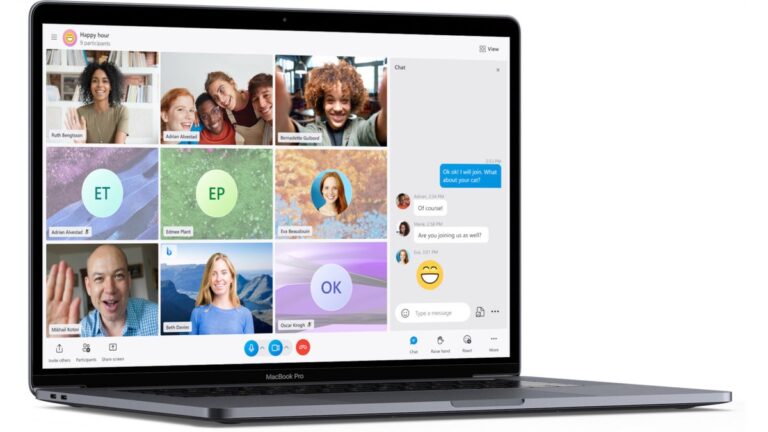
The new Skype 8.110.76.102 update is only available to Insider users at the moment. If you’re enrolled in the beta program, the update will allow you to use your mobile camera to add a dynamic secondary view.
It makes it much easier to show multiple activities on a single screen by combining your desktop and mobile camera views. The new feature is called TwinCam and can be activated with a simple QR scan from your phone during any Skype call on your desktop.
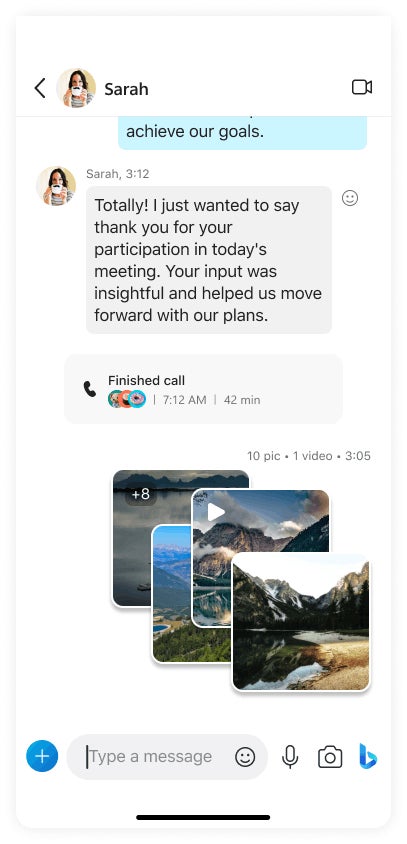
In addition to TwinCam, Skype’s chats received an upgrade with Stacked Media Albums for photos and videos. Thanks to the latest update, Skype users will be able to share multiple visuals, which will be displayed in a stack, each framed to match the theme.
Basically, you can combine multiple images and videos into a single album stack within your chat. The photos will have a white border in light mode or a black edge in dark mode. Obviously, you need to share at least two photos or videos in chat for them to be combined in an album stack.
Last but not least, the latest Skype update address an issue with the app randomly signing users out when sending an audio or video message on Mac.
Keep in mind that these new features will be rolled out gradually over the next couple of days, so if you don’t see them immediately, be patient.
OnePlus’ first foldable smartphone solved all of the issues other foldables have been plagued with
This year, OnePlus launched its first foldable smartphone with quite a bit of fanfare and hype. And it has definitely lived up to the hype. In fact, in my review of the OnePlus Open back in October, I said that it was the best smartphone OnePlus has ever made, and it just so happens to be foldable. When it came time to decide on our annual awards, the staff at AndroidHeadlines agreed, as the OnePlus Open ran away with the votes for the Best Foldable Smartphone of 2023.
Your big question is, what exactly did OnePlus do to make this a great foldable? Well, it all starts with the hardware. The OnePlus Open is one of the lightest book-style foldables on the market. With that, OnePlus also gave the phone a standard smartphone screen on the front. It is not a super skinny screen or a wider screen like some of its competitors in North America. And finally, on the hardware front, OnePlus was able to get rid of the crease virtually. I have been using the OnePlus Open since early September, and I have not noticed the crease at all. That’s not something I can say about many other foldables on the market today.
OnePlus also started early on a trend that we’re starting to see emerge with smartphones, and that is using super bright displays. Both of the displays on the OnePlus Open are rated at 2,800 nits of peak brightness. That’s far above most other foldables, even regular smartphones. It’s a trend we’re likely to see continue in 2024. After all, the OnePlus 12 is rumored to get up to 4,500 nits of peak brightness.
OnePlus didn’t stop at the hardware. Oxygen OS is what really makes this the best foldable.
While I’ve been in love with the hardware on the OnePlus Open, that’s not the whole story with this phone. As OnePlus did some rather interesting things with software here. One of those is Open Canvas. This is a pretty neat idea, and if I’m honest, I did not think it would be all that big of a deal during the briefing. But after using the phone for a few weeks, I was sold.
So what Open Canvas does, is it basically allows you to use more screen real estate than you have. That sounds weird to say, but it is true. You can open up to three apps side-by-side-by-side at a regular 18:9 aspect ratio. And slide one over to the side. You can also push apps off-screen, but they are still open, allowing you to bring them back pretty easily. It’s a much better implementation of multi-window than I’ve seen and used on virtually any other phone so far.
Lastly, we cannot forget about the camera. When I say OnePlus brought its A-game to the camera on the Open, I’m not exaggerating. Don’t let the large camera module and bump on the back scare you off. This camera is incredible. I’ve taken some really incredible pictures with this phone, and sometimes I can’t believe they were taken with the OnePlus Open, let alone a smartphone in general.
So, this is why we’ve decided to award the Best Foldable Smartphone of 2023 to the OnePlus Open. It comes down to the design, display, camera and software.
According to Google, once your Gmail account is deleted, it will not be possible to recover photos, files, emails, contact information, or purchases such as music, apps, movies, or books that you may have acquired using your Google account.
Google has officially released its inactive account policy according to which it will delete free Google accounts that have not been signed into for two years and do not have any active subscriptions. This policy applies to personal Google Accounts, not those not set up through school, work, or other organizations.
However, this policy doesn’t apply to paid Google Workspace accounts or accounts with an active subscription. For instance, if you have subscribed to Google One, your account will remain active even without regular sign-ins. If you maintain any paid subscriptions within an app via Google Play, this will also be considered an activity.
A Google Account is necessary to access the different Google products, including Gmail, YouTube, and Google Ads, with a single username and password. The updated policies were announced in May 2023 and will be implemented starting 1st December 2023.
So, if it’s been two years since you used your free Google account, Google may delete it. Per the policies, if deleted, it won’t be possible to recover photos, files, emails, contact information, or purchases such as music, apps, movies, or books you may have acquired using your Google account. If you want to keep your Google account active, sign into it at least once every two years and perform any activity.
For your information, Google considers a Google account active that is regularly used. This is indicated by several activities, such as watching a YouTube video, Google search, downloading apps, using Google Drive, or checking Gmail.
The account tracks Google account activity, and not the device, so any actions taken on a device while being signed into a Google Account will be an activity. You must also sign in to Photos at least once every two years to maintain access to Google Photos and any photos uploaded from your free account. To sign in, you can use Google Photos web or mobile version.
It is possible to maintain access to your Google account and its content because Google lets you choose people who can access your account if you cannot do so yourself. Before deleting the account, Google will notify the account owner via emails sent to the Google Account and to the recovery email (if applicable).
If you don’t want or need a Google account, you can allow it to be deleted after a period of inactivity or delete it yourself. However, make sure to export any stored data using Google Takeout.
To delete a Google account, sign in with the account you want to delete, go to the Data & Privacy page, scroll to the bottom, and select Delete Your Google Account. Follow the prompts to authenticate and confirm that you want to delete the account.
Keeper Security’s VP of Security and Compliance, Patrick Tiquet, shared the following comment on this newly implemented policy with Hackread.com.
“Inactive accounts can present significant cybersecurity risks, as these accounts may retain weak or unchanged passwords, creating vulnerabilities for unauthorized access and potential misuse by cybercriminals for phishing attacks or data exposure. When you combine the personal information stored in these accounts and potential interconnections to other services, there is a heightened risk of identity theft and unauthorized access to linked accounts. Additionally, the lack of monitoring for inactive accounts increases the likelihood of users being unaware of suspicious activities, allowing bad actors more time to exploit the compromised accounts.”
Synopsys Software Integrity Group’s associate principal security consultant, Ben Hutchison, also shared his thoughts on this development.
“Continuing to maintain a large number of inactive accounts is a little bit like not replacing those old, cracked windows on your property and in essence the potential attack surface of the system. Inactive accounts provide a means of potential ingress or compromise for attackers to take advantage of, and since they have by definition gone unused for long periods of time, they may be protected by weak locks (passwords) and their owners (users) are unlikely to notice signs of compromise or unauthorized activity.”
“Compromising one account may lead to a cascade if the account compromised enables access to other platform services, the user reuses their password for other accounts or in the specific case of email compromise, providing attackers with the opportunity to abuse account reset workflows for other systems/services in combination with compromised credentials in the hope that the compromised account is linked to one of these, leading to further eventual takeovers,” Hutchison added.
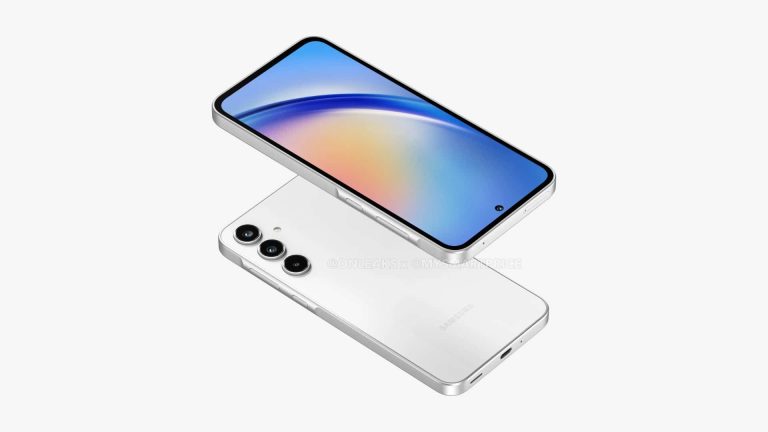
Samsung‘s Galaxy A35 and Galaxy A55, which will lead its mid-range smartphone lineup next year, may feature a more premium build than their predecessors. A rumor passed through X says both models will upgrade from a plastic frame to metal. The devices may arrive in the first quarter of 2024.
Galaxy A35 and Galaxy A55 switching to a metallic frame
Since the big overhaul in 2019, Samsung has produced some of the best “value smartphones” in its A5x lineup. This year’s Galaxy A54 kept the tradition going, offering an appealing set of specifications—including a 120Hz Super AMOLED display, HDR10+, 5nm SoC, 50MP camera with PDAF and OIS, 4K video recording with front and rear cameras, stereo speakers, and under-display fingerprint scanner—without breaking the bank.
However, to keep the price low, Samsung has always resorted to a plastic frame for these phones (the Galaxy A51 5G had an aluminum frame). The handsets don’t necessarily feel cheap but not premium either. It appears the company is preparing to give the lineup a much-needed quality enhancement next year. X tipster Revegnus claims the Galaxy A55 will feature a metallic frame, likely aluminum.
The source adds the Galaxy A35 will get the same upgrade too. This is a pleasant surprise as no model in this lineup has ever featured a metallic frame. Earlier leaks have revealed that the next-gen A3x model will get a major camera upgrade and a punch-hole display design. If all of these rumors turn out to be accurate, Samsung’s 2024 premium mid-range lineup could be more appealing than before.
While we have little hope, Samsung could make the Galaxy A55 and Galaxy A35 stronger propositions in the sub-$500 and sub-$400 segments with glass back panels. It hasn’t happened before, but nor a metallic frame. Maybe the company plans to offer a stripped-down version of Galaxy AI on these phones too. The Korean behemoth is said to be readying powerful AI features for the Galaxy S24 flagships.
The new A-series phones will arrive after the Galaxy S24
Samsung will launch the Galaxy S24 flagship lineup in January 2024. The company may not bring new phones to the market in February but the Galaxy A35 and Galaxy A55 may debut the following month, i.e. in March. History indicates we will see more leaks and rumors about the phones in the coming months. Samsung may officially announce the Galaxy S24 launch date in a few weeks.