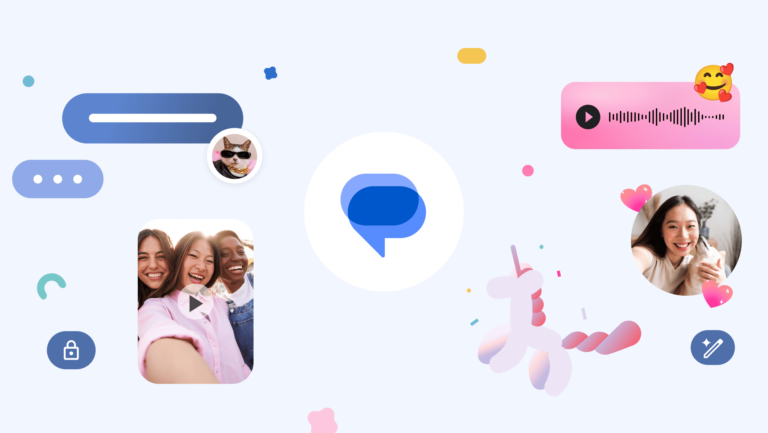
Google Messages is one of the most-used SMS/RCS messaging platforms on the market. The fact that it comes pre-installed on a ton of devices played a major role in this. Well, this app just crossed a very impressive milestone. Google Messages has surpassed a billion monthly users, and the company released some new features to commemorate that.
1. Photomoji
There are hundreds of emojis that you can use to react to a message, but what if you want some more options? Well, with Photomoji, the possibilities, are endless. What this feature does is let you choose a photo from your gallery to use as a reaction. When you choose the photo to add, the phone will use AI to crop the subject in the photo.
Then you’ll be able to use that cropped image as the reaction to the message. The capabilities might vary depending on your hardware. This feature uses on-device AI to perform this. In any case, you can use this feature to give you more ways to express yourself.
2. Voice Moods and improved audio quality
When you send a voice message, you’re obviously expressing your mood through your voice. However, what if you could give an additional visual pop to your messages? With Voice Moods, you can. When you record a voice message, you’ll be able to apply one of nine different themes you can add to the bubble it’ll sit in.
Along with this feature, Google also improved the audio quality of the messages. This is a nice quality of life improvement.
3. Screen effects
This will give your messages some serious flair. When you type different types of messages, you’ll see our screen light up with a full-screen animation. For instance, if you type “I love you”, you’ll see the screen come to life with a large heart animation. If you type “It’s snowing”, then you’ll see an animation to reflect that. Right now, there are 15 different effects that you can discover.
4. Custom bubbles
Now, you can customize the overall aesthetic of your chats to give them a different look and feel. You’re able to change the colors of the bubbles and the backgrounds. You’re able to do this for each chat as well. So, you can give your chats with your mother a different color from your chat with your partner.
5. Reaction effects
Sending a reaction already has a pleasing effect, but Google Messages is making them better for crossing a billion users. When you use one of the 10 designated emojis, you’ll see additional animations for the reactions.
6. Animated emojis
Emojis are great, but what if they could be more animated? When you send an emoji in a bubble by itself, you’ll see a neat animation along with it.
7. Profiles
Last, but not least, we have profiles. This is something we covered before. Basically, you can customize your appearance on Google Messages. You can set up a profile picture and profile name. This will make things better, especially if you’re receiving messages from numbers not saved in your contacts.
Currently, the FjordPhantom malware appears to be active in Southeast Asia, covering countries including Malaysia, Thailand, Indonesia, Singapore, and Vietnam.
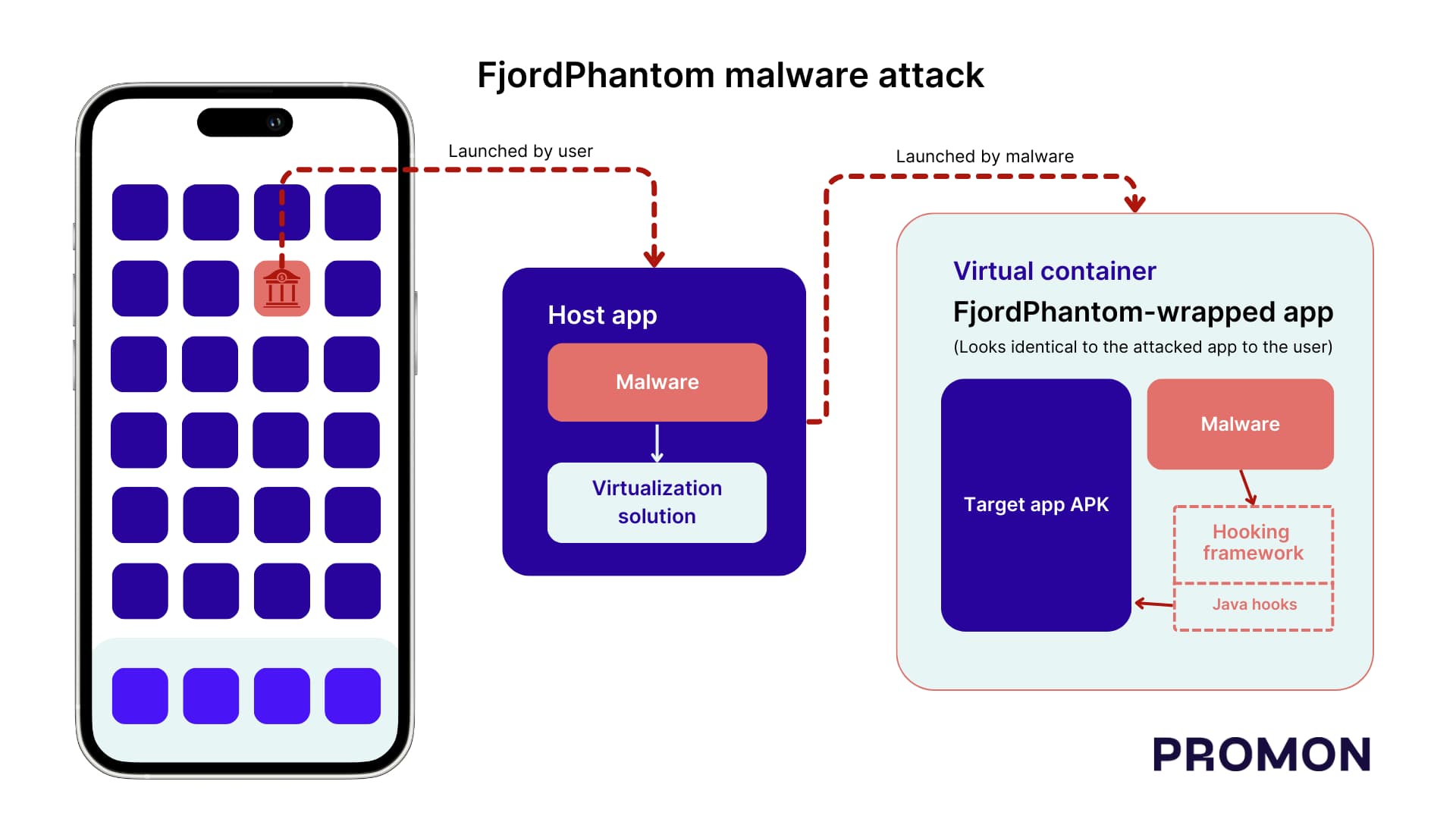
Cybersecurity firm Promon has identified a novel Android malware named FjordPhantom that employs virtualization to target applications. This technique has not been observed in any malware previously. FjordPhantom propagates through messaging services and combines app-based malware with social engineering to deceive banking customers.
Promon indicated in its report published on November 30, 2023, that only one sample of FjordPhantom has been obtained. However, researchers suspect that the malware is operational in Southeast Asia, encompassing countries such as Malaysia, Thailand, Indonesia, Singapore, and Vietnam.
“In discussions with banks in the region, Promon has learned that one customer was defrauded out of 10 million Thai Baht (approximately $280,000 – £225,000) at the time of writing,” noted the report author Benjamin Adolphi and shared with Hackread.com ahead of publication on Thursday.
Further probing revealed that the malware is distributed through emails, SMS messages, and messaging apps. Users are tricked into downloading a bogus banking app, which contains FjordPhantom.
When this app gets installed, the attackers, posing as customer service representatives, guide the users about the steps to run the app. The malware uses virtualization to create a virtual container to run this app and attackers can monitor the user’s actions and steal their credentials.
The malware integrates various open-source/free projects from GitHub, incorporating a virtualization solution and a hooking framework. FjordPhantom utilizes virtualization solutions to circumvent the Android sandbox, enabling different apps to operate within the same sandbox.
This facilitates attackers in gaining access to files and memory, conducting debugging, and injecting code into other apps. The approach involves virtualization solutions loading their own code into a new process before loading the hosted app’s code. Consequently, the malware can evade traditional code injection detection methods, as it doesn’t modify the original application.
The malware leverages the hooking framework to evade SafetyNet rooting detection, screenreader detection, and dismiss dialog boxes warning the user of ongoing malicious activity on the system. Additionally, the malware logs various actions performed by the targeted applications, signifying active development and suggesting potential targeting of other apps in the future.
Screenshot credit: Promon
Researchers believe that FjordPhantom is a sophisticated Android malware used to commit real-world fraud. Here are 5 tips for Android users to protect themselves from malware, especially banking trojan:
Download apps only from trusted sources: The safest way to get apps for your Android device is to download them from the official Google Play Store. Apps in the Play Store have been reviewed by Google and are less likely to be malicious. If you need to download an app from a third-party source, make sure to do your research and only download apps from reputable websites.
Be careful about the permissions you give apps: When you install an app, it will ask you for permission to access certain data or features on your device. Only give apps the permissions they need to function. For example, if you’re installing a banking app, it will need permission to access your contacts and call history. However, there’s no reason for it to need permission to access your photos or location.
Keep your device up to date: Google regularly releases updates for Android that fix security vulnerabilities. Make sure to install these updates as soon as they become available. You can enable automatic updates in your device’s settings.
Install a mobile security app: A mobile security app can help to protect your device from malware by scanning apps and files for threats. It can also block malicious websites and phishing attempts. There are many different mobile security apps available, so do some research to find one that’s right for you.
Be cautious about what you click on: Be careful about clicking on links in emails or text messages, even if they appear to be from someone you know. These links could take you to malicious websites that could install malware on your device.
Meta, the owner of Facebook, Instagram, and WhatsApp, will launch Threads in Europe this December. Threads, available in most markets since July, has faced delays in Europe due to concerns over compliance with EU regulations. Notably, many see it as a formidable competitor to Elon Musk’s Twitter / X.
Threads is coming to Europe, but there’ll be conditions involved
According to a report by WSJ (via Macrumors) citing people in the know, Threads will be available in Europe in December. However, Meta will face challenges in ensuring that it complies with EU data privacy rules. One of the key concerns is the requirement for users to have a choice to use Threads without creating a separate profile. This means that users should be able to access Threads content without having to link it to their Facebook or Instagram accounts.
Meta is reportedly working on a technical solution to address this requirement, but it is unclear whether the company will be able to comply with EU regulations by December. If Meta fails to meet the regulatory requirements, it could face fines or even be forced to delay the launch of Threads in Europe. Notably, Threads became the app with the fastest 100 million sign-ups in merely 5 days.
There are several challenges involved in the process
Although, Meta is all-moody to launch Threads in Europe. But there could be hurdles in the way. It sees Europe as a key market for the app. Meta believes that it will be a popular way for Europeans to stay connected with each other. Meta has recently complied with EU privacy laws and pushed an ad-free tier for Facebook and Instagram in Europe. However, that also seems to face a setback.
TechCrunch points out that the app’s iOS privacy labels suggest extensive data collection. Large platforms, such as Meta’s social media platforms, must obtain user consent before collecting data for personalized ads. This is due to the Digital Services Act (DSA) and Digital Markets Act (DMA).
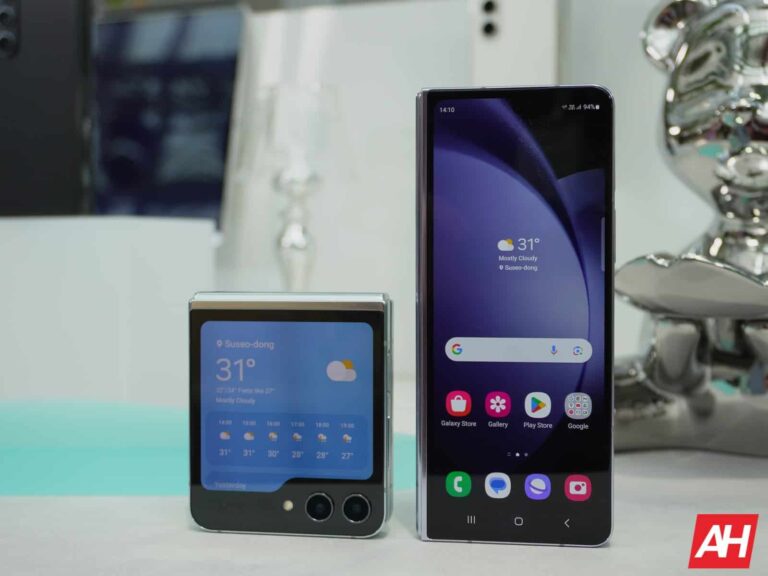
Samsung made two major design changes to its foldable smartphones this year. Both Galaxy Z Fold 5 and Galaxy Z Flip 5 feature a new hinge that allows the phones to fold shut, leaving no gap. The Flip model also featured a much bigger cover display. Next year, the company is reportedly going to equip the Galaxy Z Fold 6 and Galaxy Z Flip 6 with bigger and wider displays, both on the inside and outside. The Fold model will get thinner too.
Galaxy Z Fold 6 could be the thinnest book-style Samsung foldable yet
According to reliable tipster Ross Young, who has over 25 years of experience in the display industry and is the CEO of Display Supply Chain Consultants (DSCC), Samsung’s 2024 foldables will have bigger displays than their respective predecessors. The source didn’t share the exact sizes but suggested that the Galaxy Z Fold 6 and Galaxy Z Flip 6 will be wider than before.
A narrow cover screen has been one of the biggest limitations of Samsung’s Fold phones. The aspect ratio has hardly gone wider across the five generations of the foldable lineup. Despite supporting all apps and functions, the foldables don’t give you a full-fledged smartphone experience on the outside. Unsurprisingly, the company has faced backlash for not listening to its customers and making slow progress.
There have been reports that the Korean firm is finally listening to the feedback and is preparing to make the cover display wider on the Galaxy Z Fold 6. This rumor has now been backed by a reliable source. Since there’s hardly any room for shrinking the bezels, Samsung may have pulled this off by making the whole phone wider. Unfortunately, we don’t have the dimensions to share with you yet.
Speaking of the dimensions, the Galaxy Z Fold 6 will reportedly be thinner too. This piece of information comes from another noted X tipster @Revegnus. They quoted Young’s post to add that the 2024 Fold model will be the thinnest yet. Coupled with a wider display, it could look a lot different than the current Fold. “It’s something to look forward to, unlike the minor refreshes we’ve seen in previous Fold models,” the source stated.
The Galaxy Z Flip 6 will sport a bigger cover screen too
This year’s Flip model jumped from a 1.9-inch rectangular cover screen to a 3.4-inch squarish panel. It is already quite big and lets you do a lot of things without unfolding the phone. It appears Samsung will further improve things next year. The Galaxy Z Flip 6’s cover display will reportedly measure close to 3.9 inches diagonally. The Korean firm may be taking foldables more seriously now that competition is growing. The 2024 lineup should arrive in July or August.
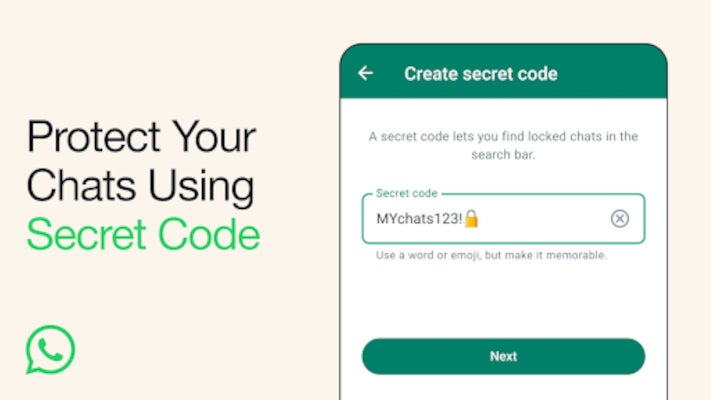
WhatsApp has just announced a small, yet important update that further improves the app’s privacy and security aspects. Secret code is a new feature that allows users to secure locked chats and add an extra layer of security.
Thanks to the new feature, WhatsApp users can now set a unique password different from what they use to unlock their phones to protect locked chats. In addition, the new feature introduces the ability to hide the Locked Chats folder from the chatlist, which means that they can only be discovered by typing the secret code in the search bar.
This is an optional feature, so you can still choose to have all your locked chats (or some of them) still appear in the chatlist. Another nifty quality-of-life change is the way you can lock chats after the update.
Previously, in order to lock a chat, you had to visit the chat’s settings. However, with the latest version of WhatsApp, you can simply long press to lock a chat, no need for extra taps.
According to WhatsApp, the new secret code feature is already rolling out, but it will take months to be available globally, so be patient if you don’t see it on your phone yet.
The conclusion was reached after researchers evaluated over 9,500 of the largest transactional websites in terms of traffic, encompassing sectors such as banking, e-commerce, and ticketing businesses.
Bad bots are plaguing the internet, making up over 30% of internet traffic today. Cybercriminals can use them to target online businesses with fraud and other types of attacks, according to the latest research from online fraud and mitigation company DataDome.
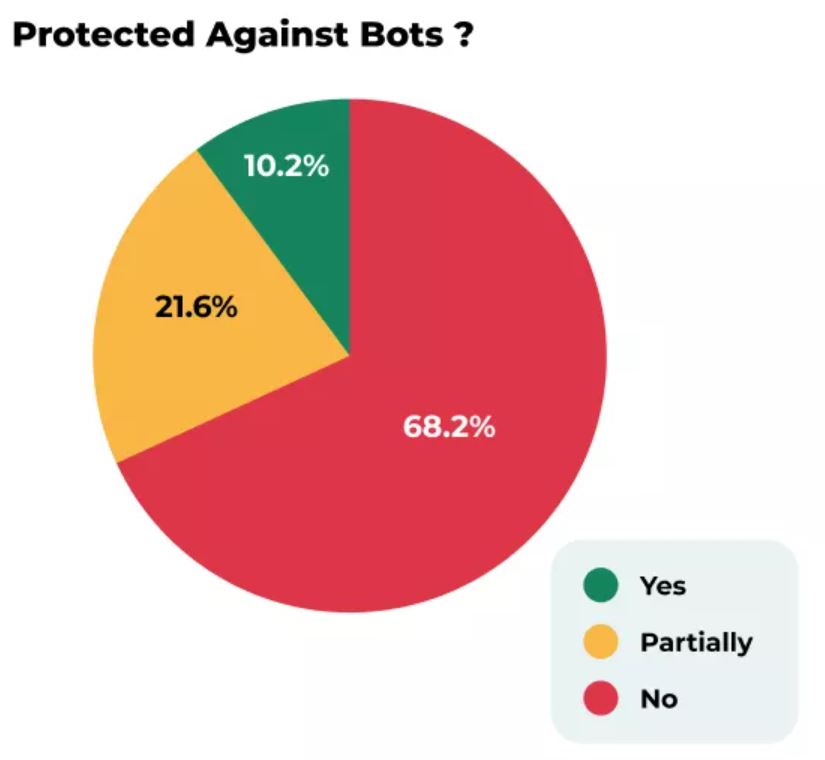
According to a report from DataDome, a company specializing in bot and online fraud protection, released on November 28, 68% of US websites lack adequate protection against simple bot attacks, highlighting how vulnerable US businesses could be to automated cyberattacks.
The researchers assessed more than 9,500 of the largest transactional websites in terms of traffic, including banking, e-commerce, and ticketing businesses. They found that the US websites face significant risks ahead of the busy holiday shopping season. The findings also highlighted that traditional CAPTCHAs aren’t effective in preventing automated attacks.
As per DataDome’s report shared with Hackread.com ahead of publication on Tuesday, 72.3% of e-commerce websites and 65.2% of classified ad websites failed the bot tests, whereas 85% of DataDome’s fake Chrome bots remained undetected.
Among the 2,587 websites featuring one CAPTCHA tool, less than 5% could detect/block all bots. Interestingly, gambling sites were the most well-protected against bot attacks, with 31% blocking all the test bots. Only 10.2% successfully blocked all malicious bot requests.
DataDome’s Head of Research, Antoine Vastel, referred to bots as “silent assassins”, adding that bots are becoming sophisticated day-by-day and US businesses are unprepared for the “financial and reputational damage” bot attacks can cause.
This, as per Vastel, includes threats like ticket scalping, inventory hoarding, and account fraud. Vastel explained that bad bots can wreak havoc on businesses and consumers, exposing them to “unnecessary risk.”
These findings highlight the urgent need for US businesses to enhance their bot protection measures. Here are 5 key points on how owners and administrators can protect their wbsites against bot attacks:
Implement CAPTCHA and reCAPTCHA: CAPTCHAs and reCAPTCHAs are effective tools for distinguishing between humans and bots. They can be used to prevent bots from submitting forms, signing up for accounts, or accessing restricted areas of your website.
Use IP blacklisting: IP blacklisting involves identifying and blocking IP addresses that are known to be associated with malicious activity. This can help to prevent bots from accessing your website altogether.
Monitor website traffic: By monitoring website traffic, you can identify patterns that may be indicative of bot activity. For example, if you see a sudden surge in traffic from a single IP address, this could be a sign that your website is under attack from a botnet.
Implement rate limiting: Rate limiting is a technique that can be used to limit the number of requests that a user can make to your website in a given period of time. This can help to prevent bots from overwhelming your website with requests.
Use web application firewalls (WAFs): WAFs are designed to protect websites from a variety of attacks, including bot attacks. They can be used to block malicious traffic and prevent bots from exploiting vulnerabilities in your website’s code.
Just when you think that Android couldn’t get more feature-packed, Google goes and does this. The company just unveiled 11 new features across the Android ecosystem that will boost your experience. These features are coming to Android, Wear OS, and Google TV.
As with any feature drop like this, there’s no guarantee that they’ll all come out at once for your device. So, if you don’t see all of the new features, then you’ll want to wait just a bit. If you do have to wait, it won’t be too long. Google didn’t refer to a gradual rollout period.
1. New Emoji Kitchen combinations
If you don’t know what Android’s Emoji Kitchen is, then you might want to. This is a feature in Gboard where it will take different emojis and combine them to make fresh new emojis for you to post. If you want to send a star with a smiley face or a ghost cat emoji, you can do so.
To kick off December, Gboard is bringing some new emoji combinations that you can use to express yourself. If you want to combine the face sticking its tongue out with the camera app, (whatever emotion that this is supposed to convey) you can do it. There are hundreds of combinations you can enjoy. When you’re using Gboard, just tap on the Emoji button and type in the emojis that you want to combine. The keyboard will post it as a sticker.
2. Google Message voice memo backgrounds
When you’re listening to voice memos on Google Messages, why stick with a boring old background? If you’re excited, enamored, or upset, why not express that visually? Google Messages has a new feature that will add more flair to your voice memos.
When you record a new voice memo, you’ll be able to add a colorful background to it. The voice memo will pop up in a bubble, and that bubble could have a fun color theme. Each color scheme will have an emoji associated with it. When you make your recording, you’ll be able to choose the theme thanks to a popup on the bottom.
3. Enhanced emoji reactions in Google Messages
Right now, you’re able to add reactions to messages in Google Messages. These will be emojis added to messages to express how you feel about a message without needing to type it in. Just hold your finger down on a message bubble and choose from the list of emoji reactions that pop up.
Well, with this new feature drop, you’ll be able to add more of a visual pop to your reactions. Google is bringing new enhanced emoji reactions. When you add a reaction, you’ll see larger animations take up the screen. It’s a nice addition that people will like to see.
4. More free TV channels
Not all of these new 11 new Android features are for your phone. These next will involve other devices. Nowadays, everything costs money. Watching your favorite TV shows and movies always involves some sort of subscription service. Well, on Google TV, there are free TV channels that you can access. Google just introduced 10 additional TV channels that you can watch for free.
These channels join over 100 other channels that you can watch. Sports, action, comedy, drama, reality TV, etc, you have a massive collection of content to watch.
5. More smart home device groups
Your smart home is going great, but you want just a bit more control over certain groups of devices. Well, Google is now adding more smart home device groups. You can control activate and dock devices like your smart vacuum and mops right from your Wear OS device.
If your smart lights just aren’t giving you the right vibe, you can change that. You can change the color and brightness of your smart light groups using your Wear OS device.
6. Set home status
When it comes to smart home devices, there are things you need them to do when you’re home. However, those things don’t always transfer to when you’re not home. This is why Google released a feature that will let you set your presence. You can set your status as either Home or Away.
When you’re status is set as Away, you can make it so that lights and other devices are turned off and your locks are locked. It’s a great feature to have if you need to rush out of the door without shutting everything off. You can simply set your status from your phone or smartwatch.
7. Assistant Routines on Wear OS
You’ve had the ability to create routines using Google Assistant for a while, but Wear OS was missing out on this feature. Assistant Routines are successions of tasks that you assign for Assistant to perform at certain times. Well, if you want to access a Routine using Google Assistant from your smartwatch, you can now.
When you make your routine, you just need to access Assistant on your smartwatch and say the name of the routine you want to summon. You’ll then see it appear on your screen.
8. Security key PIN
Of these 11 new Android features, this is the most crucial to your security. Security keys are the new way to secure your accounts. They aim to make passwords obsolete and they’re a more secure way of accessing your accounts. You can secure your accounts using keys now, but Google just made using them even safer. Now, you can add a PIN to your security key.
So, if anyone happens to get their hands on your key, they will need to get past yet another security measure to access your stuff.
9. At a Glance on Wear OS
The At a Glance widget is extremely useful on Android, but its uses could extend to other platforms. Wear OS is one of them. Google is rolling out the At a Glance functionality to your Wear OS watch faces. You’ll be able to get important updates and alerts right on your wrist.
10. AI image descriptions
People who are blind and low-vision rely on text descriptions of images to know what’s going on. Not all images on the internet come with proper descriptions, so Google is stepping in with its new TalkBack feature.
This will use generative AI to describe images and read them out loud. It will read descriptions of images from social media and other sources.
11. Live captions updates
These are the only features that the company says are rolling out over the next couple of weeks. The first update will bring the on-device live captions to more languages so that more people can enjoy the feature.
Next, when you’re taking a call, you’ll see live captions appear. Not only that but you’ll be able to type text that the phone will read aloud to the other end. So, you’ll be able to conduct a call where you don’t have to speak or hear the other person.
All 11 of these new Android features are going to help improve your experience that much more. Don’t forget to try them all out.
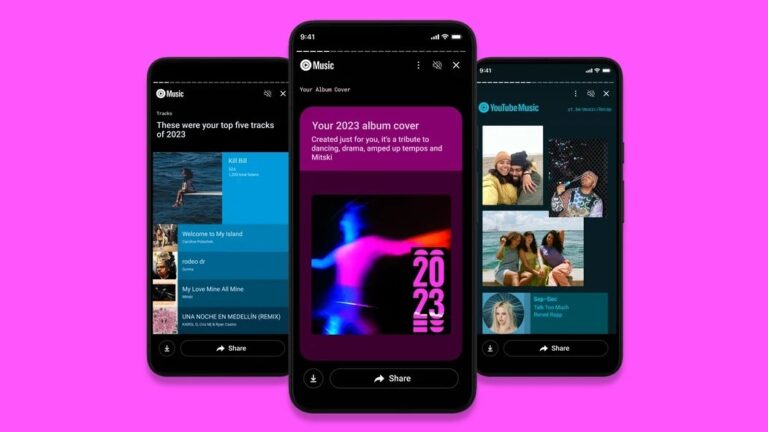
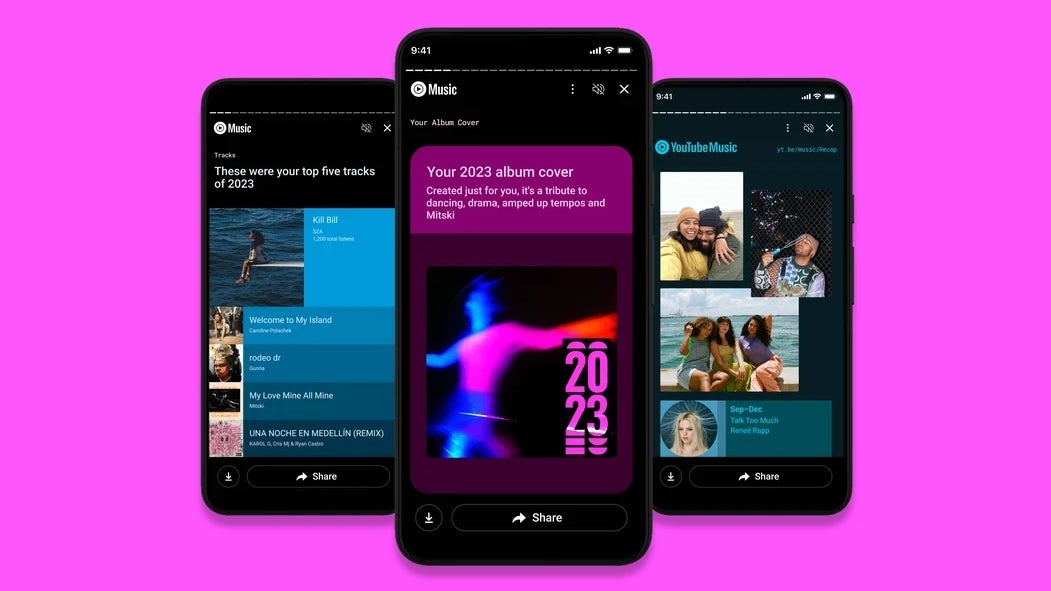
YouTube Music is joining the party — along with Spotify and Apple Music — with its own 2023 Recap, offering users a personalized look back at their music listening habits over the past year. Just like Apple Music and Spotify, YouTube Music’s Recap takes users on a journey through their listening history, highlighting their top artists, songs, genres, and moods.To find your Recap, just open the YouTube Music app and tap on your profile picture. From there, you can either click on “Get Your Recap” to view the whole story or use the carousel to jump to a specific section.
The Recap starts off by showing you how much music you’ve listened to in 2023 and how many different artists you’ve checked out. Then, it reveals your top five musicians, along with some extra details like how many hours you’ve spent listening to them, how many of their songs you’ve played, your longest listening streak, and whether you’re one of their top fans.
YouTube Music Recap | Source – Google
New this year is “Your Album Cover,” a personalized visual representation of your listening habits. YouTube Music picks out colors from your top tracks and combines them with a matching font and image to create a unique album cover that reflects your musical taste.Next, the Recap dives into your song listening habits, showing you the total number of songs you’ve listened to in 2023, along with your top five songs, playlists, and albums. It also checks out your music moods, identifying the emotional themes that resonated with you throughout the year. These moods are categorized into three periods: beginning, middle, and end, with a top five list for each.
YouTube Music Recap personalized results
To wrap up the Recap, there’s a genre breakdown, showing you the genres that dominated your listening experience, along with a final summary that sums up your overall musical journey in 2023. Throughout the Recap, you’ll find buttons that let you quickly download or share your personalized story, but you can always just screenshot it if you prefer.
The YouTube Music 2023 Recap has been slowly rolling out over the past day, so if you haven’t gotten yours yet, don’t worry. It’s worth the wait to take a nostalgic trip through your music listening habits and discover the artists, songs, and genres that defined your year.
Hackers use weaponized invoices to exploit trust in financial transactions, embedding malware or malicious links within seemingly legitimate payment requests.
This tactic aims to deceive recipients into opening the invoice, leading to:-
Potential data breaches
Financial fraud
Unauthorized access to sensitive information
Cybersecurity researchers at Perception Point recently discovered and analyzed a sophisticated malware dubbed “LUMMA” malware.
Perception Point’s cutting-edge sandboxing technology was able to identify and isolate malicious software with precision and accuracy, thereby protecting the system from potentially harmful malware.
DocumentProtect Your Storage With SafeGuard
StorageGuard scans, detects, and fixes security misconfigurations and vulnerabilities across hundreds of storage and backup devices.
Invoice to Deliver LUMMA Malware
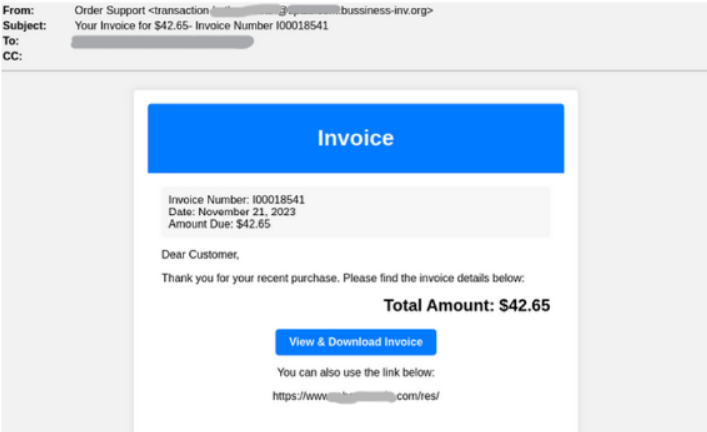
Cybersecurity analysts identified that the attacker, posing as a financial services company in this campaign, tricks the target with a fake invoice email.
Fake Invoice (Source – Perception Point)
The user is urged to click “View & Download Invoice,” but the provided website is unavailable. To maintain legitimacy, a valid website link is included that redirects users after the failed button click.
The attacker dodges detection using a fake page and a real link. Security scans miss malicious payload hidden behind error pages and innocent URLs.
Clicking the link redirects to harmful URLs triggering automatic download of malicious files. The attacker breached a legitimate site to host a redirect.
Besides this, the website code reveals multiple redirects to dangerous URLs, like hxxps://robertoscaia[.]com/eco, downloading malware through the “.exe” file generator.
Website code (Source – Perception Point)
LUMMA is an InfoStealer malware that is written in C language and spreads through Malware-as-a-Service.
The attack features three processes, and here below, we have mentioned those processes: –
1741[.]exe
RegSvcs[.]exe
wmpnscfg[.]exe
Notably, the “1741[.]exe” process runs from the user’s temp folder, raising suspicions due to legitimate programs not using this location.
Processes ‘RegSvcs[.]exe’ and ‘wmpnscfg.exe’ from unusual folders suggest suspicious behavior linked to malware.
Parent processes with PIDs 1388, 3428, and 1388 add complexity, aiming to hide malicious activities.
Increasingly sophisticated threats demand constant security system evaluation.
This incident highlights the need for advanced prevention, continuous monitoring, and a multi-layered approach to detecting and countering evolving cyber threats.
ScamClub is a threat actor who’s been involved in malvertising activities since 2018. Chances are you probably ran into one of their online scams on your mobile device.
Confiant, the firm that has tracked ScamClub for years, released a comprehensive report in September while also disrupting their activities. However, ScamClub has been back for several weeks, and more recently they were behind some very high profile malicious redirects.
The list of affected publishers includes the Associated Press, ESPN and CBS, where unsuspecting readers are automatically redirected to a fake security alert connected to a malicious McAfee affiliate.
ScamClub is resourceful and continues to have a deep impact on the ad ecosystem. While we could not identify precisely which entity served the ad, we have reported the website used to run the fake scanner to Cloudflare which immediately took action and flagged it as phishing.
Forced redirects
Mastodon user Blair Strater (@r000t@fosstodon.org) was simply browsing the Associated Press website on his phone when he was suddenly redirected to a fake security scan page:
Malicious redirect from APnews.com (credit Blair Strater)
This fake scanner is not run by McAfee, but the domain name systemmeasures[.]life that we see in the address bar is the landing page that redirects to one of its affiliates. That affiliate was previously reported but continues unabated.
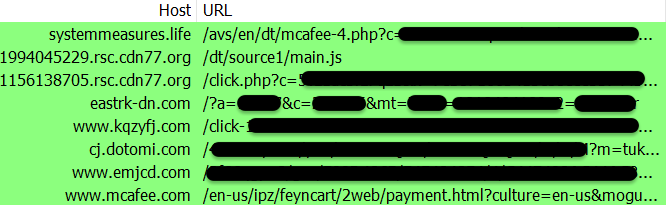
Web traffic between malicious page and McAfee site
Based on public data, several ad exchanges were abused to deliver this fake antivirus campaign via real-time bidding (RTB) in the past few weeks Most of the telemetry we saw from our Malwarebytes user base was related to smaller websites with ‘risky’ advertisers. However, a different campaign was targeting mobile users with malicious ads slipping by on top publishers (note: this data comes from VirusTotal):
Most of the public reports ([1], [2], [3]) indicate this campaign was at its peak around November 19. To be clear, AP, ESPN, CBS and other sites were not hacked, but rather showed malicious ads. It appears that this high profile campaign stopped shortly after, as we haven’t seen new telemetry data coming from these publishers. However, the other campaign we are also monitoring that is affecting smaller sites is still ongoing (via eu[.]vulnerabilityassessments.life and us.vulnerabilityassessments[.]life).
Connection with ScamClub
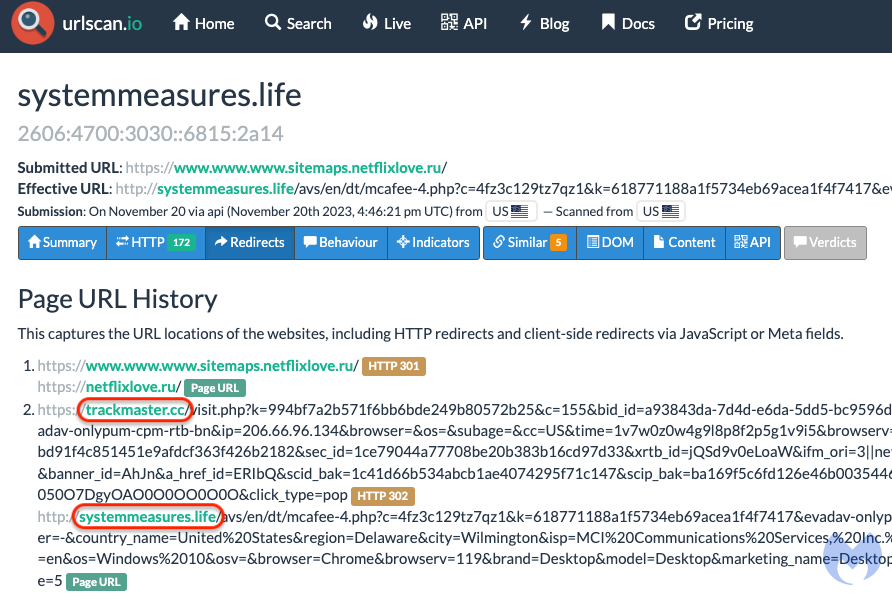
We were able to connect this campaign to the ScamClub infrastructure because of another domain (trackmaster[.]cc) that was previously mentioned as belonging to the threat actor. We can see the relationship between systemmeasures[.]life (the landing page) and trackmaster[.]cc (the intermediary domain) in the urlscanio submission below:
urlscanio scan showing the relationship between two domains
Fingerprinting
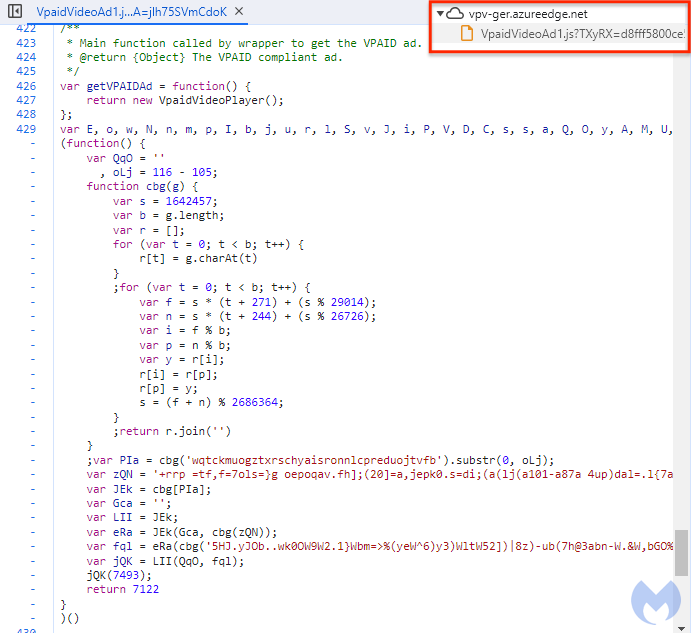
Like other malvertising threat actors, ScamClub dabbles in obfuscation and evasion techniques. However, as previously detailed by Confiant, they are using much more advanced tricks. Their JavaScript uses obfuscation with changing variable names, making identification harder.
Previously, the malicious JavaScripts were hosted on Google’s cloud but they have now moved to Azure’s CDN.
ScamClub’s malicious JavaScript
Malvertising and mobile users
On this blog, we have covered a number of malvertising campaigns targeting Desktop, both consumer and enterprise. This is in part because we hunt for Windows malware and the occasional Mac ones too.
ScamClub is a good example of targeting a big market segment, Mobile Web, where security software is often an afterthought, in particular on iOS, in part due to restrictions imposed by Apple. Clearly, malvertising is flourishing on Mobile and users are just as likely, if not more, to get tricked into downloading malware or get scammed.