In a bid to make calls less frustrating, WhatsApp is rolling out the Voice Chat feature to groups on the platform. This is a very interesting feature that has been in beta testing for quite a while now, some users have even been able to try it out. But the voice chat feature is now making its way to group chats of 33 to 128 people to make calling friends more intriguing.
The group voice chat feature will help to eradicate certain problems that were the case with group calls. This new feature is also replacing group calls for good and it is bringing improvements within group chats. One of the major issues this new feature is fixing is the annoying rings from group calls.
Most WhatsApp users find this very annoying, especially when they have no interest in joining the call. But with group voice chats, users don’t get that annoying ring, but instead, just a simple notification that a member of the group started a voice chat. The user can then choose to join the voice chat or ignore it all without getting a ring on their device.
WhatsApp borrows a thing or two from Discord with the new group Voice Chat feature
Discord currently offers users within servers a chat room where they can talk to each other. WhatsApp seems to be borrowing this idea from Discord as they do away with group voice calls and introduce voice chats. The Meta-owned social media platform did well to improve upon a thing or two with its new voice chat feature to make it stand out.
Unlike Discord’s chat room, the new WhatsApp Group Voice Chat does not send rings on members’ devices. Instead, it gives off a silent push notification within the group chat and the calls interface. Members of the group chat can then tap on the notification to join the call.
The tap will pull up the option to join the voice chat or see those who are on the chat. Some design changes stand this feature out from the regular WhatsApp voice calls users are familiar with. The major change is in the group voice chat icon, which is now a waveform and replaces the previous telephone icon.
Any member of a group chat can start up a group voice chat and anyone in the group can join. WhatsApp also limited access to this feature to the user’s main device and not other linked devices. This might be a security measure to protect the user and others on the group chat.
Currently, this feature is rolling out to more users, as it was already available to some users. The recent updates to WhatsApp on Android and iOS devices are bringing this feature to users. If you are yet to get the group voice chat feature, you can check for the available upgrade on your device.
A few days back, Samsung published an Android 14 update calendar for Galaxy devices. Shared by a Community Manager, it was a detailed roadmap with exact One UI 6.0 release dates for all eligible models. Unsurprisingly, it got everyone excited, but the excitement was short-lived. The company has now removed that post, suggesting that the dates were inaccurate.
Samsung pulls back its seemingly inaccurate Android 14 update calendar
Samsung always releases a roadmap when pushing major Android OS updates to its devices. The roadmap usually comes after it begins the rollout. It was no different this time, with the Android 14 update calendar showing up on its community forums shortly after the Galaxy S23 series received the update. However, the calendar was unusual as it had precise release dates. It seemed a little inaccurate too.
According to the roadmap, the Galaxy A54 5G and Galaxy A34 5G should have received the Android 14-based One UI 6.0 update on November 13, alongside the Galaxy Z Fold 5 and Galaxy Z Flip 5. The Galaxy S22 series should have followed them yesterday, November 15. Of course, none of these phones have received the big update yet. The Galaxy S23 series remains the only lineup to make the jump.
We know that Samsung has delayed the Android 14 stable release for the latest flagships in some markets. Even if the same delay affected the release for other models, the roadmap appeared too good to be true. It suggested that the company would update all eligible models to the new Android version by the first week of December. On November 20, Samsung was supposed to push the update to nine models.
The Galaxy S23 FE, Galaxy S21 series, Galaxy Z Fold 4, Galaxy Z Flip 4, Galaxy A53 5G, Galaxy A33 5G, and Galaxy A13 5G were all listed to receive One UI 6.0 next Monday. That’s too ambitious, to say the least. It turned out that way eventually, as Samsung has pulled back the calendar (via SamMobile). It will now have a relook at it and should come up with an updated and more accurate roadmap soon.
Samsung will share the roadmap on the Samsung Members app
Samsung’s Android roadmap will vary according to the region. That’s because it doesn’t sell all Galaxy models in every country. There are other factors too. If you are waiting for the Android 14 update on your Samsung device, watch out for your regional roadmap on the Samsung Members app. We will also keep you posted with all the latest information.
Threads is experimenting with a new tagging system that resembles hashtags. However, functions differently. Instead of appearing as a hashtagged (#) word, these tags transform into blue-text hyperlinks when used to initiate or contribute to a topic’s discussion.
Threads is testing hashtags…err tags
Meta CEO Mark Zuckerberg first revealed this via a post on Threads. He wrote, “Testing a way to categorize your posts with a tag.” He adds that the feature first rolls out in Australia and other regions will follow soon after. But how does this work?
When you type a “#” into the post text field, a card will pop up with the topic you’re tagging or other similar ones. Beneath that, each of the topics will have a count of the number of posts about it, just like Instagram. For example, if you type #Sky, it will pop up a part with Sky, Sky gazing, and more. That’s pretty much it.
It looks identical to X, but it isn’t exactly
Meanwhile, Threads’ main rival X (formerly, Twitter) has had this feature since 2007. The platform is even credited with introducing the concept of hashtags in social media. Notably, the motive behind Threads’ and Twitter’s remain the same: to categorize the posts. Mark Zuckerberg confirmed via a post.
Another difference is Threads’ tagging only allows users to add one topic to a post at a time. This might limit the reach of people trying to spam. However, it could also be a good thing for those who prefer the clean look of Threads or dislike inline hashtags.
Meta plans to continue improving the feature over time, so this initial version is likely not the final one. Lately, the platform has been on a roll. It recently unveiled many firsts to the platform including the ability to delete the account separately from Instagram, and the option to say no to Facebook and Instagram cross-posting.
Sony is giving PS5 owners up to a 6-month free trial of Apple Music so you can stream your favorite tunes, new releases, and more directly from your console. This is similar to Sony’s PS5 partnership with Apple for a free 6-month trial to Apple TV+. New users were able to redeem the offer and if done so by a certain time period, they’d be able to stream Apple TV+ content on the console and on other platforms. All for free until the trial period was over.
It’s essentially the same deal here. Although there are some differences and caveats. And these are details you’ll want to pay attention to. Most notably is that once the trial ends, you’ll need to pay for the service going forward which is $10.99 per month. Not a bad deal if you don’t already subscribe to something else or you prefer Apple Music to other streaming music options. You also have to claim the offer by November 15 of 2024.
Now that’s a whole year away so you might think there’s no reason to worry. But you’d be surprised how easy it is to forget. So you might as well redeem the offer while the thought is fresh in your mind. Lastly is that the Apple Music trial is good for qualified returning users too. Whereas the Apple TV+ trial offer was only for new members.
Returning Apple Music subscribers on PS5 only get 5 months free
There’s a little extra incentive here to bring in brand spanking new Apple Music subscribers. And to do that Apple and Sony are giving those who have never subscribed to Apple Music before one extra month of free access. That means if you’ve used Apple Music before in the past, you won’t get the full 6-month free trial. But it’s not like you’re leaving empty-handed. Qualified returning subscribers will still get a 5-month free trial to the service which is really quite generous and plenty of time to decide if you want to keep it once the trial is over.
And keep in mind that once you set this up, you can use Apple Music for those five months completely free on all your other devices. That includes on your PC, on your mobile device, your tablet, your smart TV, and anywhere else the app or service is available. Setup is pretty easy and just requires a few minutes of time and signing in with your Apple ID once you get the app downloaded. From there it’s happy listening.
Amazon Games is undergoing a significant overhaul, marking the second major shift in strategy within a year with layoffs across its Prime Gaming, Crown Twitch channel, and Game Growth businesses. Following the initial restructuring in April, which resulted in the elimination of 100 jobs, the latest move involves cutting around 180 positions. This time, the focus is on reshaping the gaming landscape by shutting down its Twitch channel and game creator marketplace. Prime Gaming is redirecting a small portion of its efforts toward bringing in more Free games with Prime.
In an email obtained by The Verge, Christoph Hartmann, the vice president of Amazon Games, emphasized the need to concentrate resources on areas with the highest potential for business growth. Hartmann stated, “After our initial restructuring in April, it became clear that we needed to focus our resources even more on the areas that are growing with the highest potential to drive our business forward.”
Prime Gaming, which provides various gaming services, is undergoing significant transformations. As part of Prime Gaming, Amazon offered a platform that assisted game creators in global marketing efforts called Game Growth platform. Amazon’s Crown channel, a source of gaming content on Twitch, and the Game Growth platform are shutting down, as reiterated by Hartmann.
Amid layoffs, Amazon Games is actively recruiting to fill essential positions for the development of new games
Despite these closures, he expressed pride in the team’s work, acknowledging their efforts to explore new avenues with weekly content on the Crown Channel and supporting publishers in reaching broader audiences with Game Growth. Hartmann clarified, “it became clear that we need focus our resources and efforts to deliver great games to players now and in the future.”
As part of the restructuring, Amazon is refining its Prime Gaming benefit. The $139 annual Prime membership, known for free shipping and streaming video services, will now place a heightened focus on delivering free games monthly, aligning with customer preferences. Hartmann stated, “we’ve listened to our customers and we know delivering free games every month is what they want most, so we are refining our Prime benefit to increase our focus there.”
Looking ahead, Hartmann shared exciting news about upcoming releases. He writes, “We are focused on our upcoming publishing launches for Throne and Liberty and Blue Protocol, as well as future projects like our TombRaider and The Lord of the Rings games, and our projects with Glowmade and Disruptive Games. Our internal studios are actively recruiting and hiring to fill critical roles as they develop new IP, while Prime Gaming continues to secure deals and deliver compelling content for members every month.”
Qualcomm’s Snapdragon 8 Gen 4 mobile platform could feature considerable performance and efficiency gains, according to a cryptic post by known leaker Revegnus on X (formerly Twitter). The post claims that Snapdragon 8 Gen 4 chips can achieve a multi-core score of 10,000 in Geekbench 6 benchmarks. Additionally, Revegnus says that the chips only draw 8 watts of power, which is extremely low for that level of performance. For reference, Apple’s A17 Pro chip — the gold standard of mobile processors — reaches about 7,200 in Geekbench 6 multi-core tests.
However, the post from Revegnus does not include any evidence of this claim. It’s hard to put too much stock into this rumor until we learn more about Snapdragon 8 Gen 4.
Though this rumor may be unsubstantiated at the moment, there is reason to believe that Snapdragon 8 Gen 4 could bring a performance breakthrough. Qualcomm recently announced the Snapdragon X Elite chipset at its Snapdragon Summit event, which brings laptop-class performance that can rival Apple Silicon. These performance gains are made possible by custom Oryon cores, which are designed by Qualcomm in-house.
Previously, Qualcomm used stock core designs from Arm to make its processors. Designing custom cores was the key to Apple’s leap with M-series chips back in 2020. And it’s possible Qualcomm could find similar success with Oryon cores.
Qualcomm also announced at the event that the custom Oryon cores would come to mobile processors in 2024. That should line up with the Snapdragon 8 Gen 4 platform. Early tests of Snapdragon X Elite, which feature the custom cores, show that it can match or beat Apple’s M2 chipset in some cases. With the Snapdragon 8 Gen 4 platform set to feature these same Oryon cores, the benchmark claims from Revegnus don’t seem too farfetched.
Snapdragon 8 Gen 4 could also bring improved efficiency
With multi-core scores potentially being in five-digit numbers, it’s fair to wonder how much power the chipset would draw. However, if the tip from Revegnus is to be believed, that shouldn’t be too much of a problem. The post states that the Snapdragon 8 Gen 4 platform records these benchmarks at an 8W power draw. That’s nearly half of the power consumption of the Snapdragon 8 Gen 3 platform, which draws around 14W.
The 8W power consumption would still put Qualcomm behind Apple, though. The company’s latest A17 Pro chip in the iPhone 15 Pro and Pro Max only draws a handful of watts, typically around 3W or 4W. This is part of the reason why iPhones provide all-day battery life despite having smaller battery cells than most Android phones. By all accounts, Snapdragon 8 Gen 4 definitely looks like a step in the right direction. Keep in mind that the platform’s release is still pretty far out. And these rumors will likely get refined over the coming months.
Microsoft just announced the introduction of its Copilot AI to Windows 10. This move comes as Microsoft aims to bring its AI to more users, and there are way more users of Windows 10 when compared to Windows 11 to this date. Referring to data, Microsoft’s latest version of Windows, Windows 11 is used by only 26 percent of the total Windows users, while the previous version, Windows 10, holds 69 percent of the share, says GlobalStats.
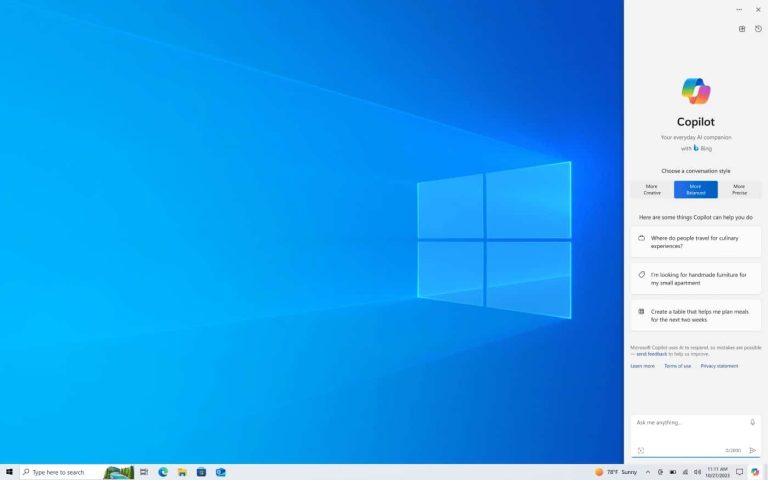
Upon installation, Microsoft’s Copilot AI will make its presence on the right side of the Task Bar. Once selected, the familiar Copilot interface will appear on the right side of the desktop. It will provide users with a versatile tool to ask questions, manage Windows features, and interact with documents. A notable aspect is that the Copilot window is designed not to overlap with desktop content or obstruct open windows, ensuring a seamless and uninterrupted user experience.
A strategic rollout of Copilot AI to Windows 10
Microsoft is strategically introducing Copilot AI in Windows 10 to a select audience initially. Users on Windows 10, version 22H2 Home and Pro editions, who are part of the Windows Insider program, will be the first to access Microsoft’s innovative AI feature.
To get an early taste of Copilot, Windows Insiders can follow a simple process. After installing the November 2023 non-security preview update (KB5032278), users can navigate to Settings > Update & Security > Windows Update. Enable “Get the latest updates as soon as they’re available” and check for updates. It will initiate the phased rollout, giving you an early hands-on experience.
The Copilot preview will extend to more regions over the next few months. It will reportedly include North America, as well as parts of Asia and South America. Microsoft plans to publish a follow-up blog post once the rollout gains momentum. It will keep interested users informed about updates and new developments.
This strategic move by Microsoft showcases its commitment to making the fruits of its AI research available to the masses.
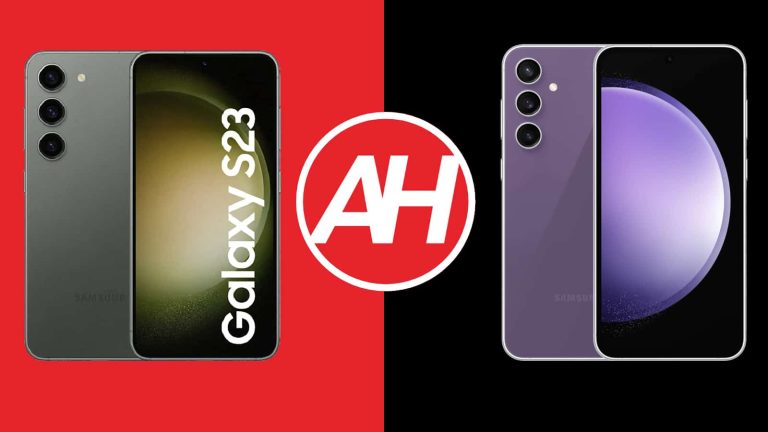
The Galaxy S23 is officially Samsung’s smallest flagship-grade phone. The Galaxy S23 FE did arrive as the company’s budget flagship, kind of. The thing is, the difference in price tags between these two devices may not be what you expect, especially considering frequent Galaxy S23 discounts. In this article, we’ll compare the two phones, the Samsung Galaxy S23 vs Galaxy S23 FE. Let’s see if the Galaxy S23 FE is worth getting over the Galaxy S23.
Granted, the Galaxy S23 FE is larger than the Galaxy S23, but the difference is not huge. They do have some similarities between them, of course, but also quite a few differences. We’ll first list their specifications, and will then move to compare them across a range of different categories. We’ll compare their designs, displays, performance, battery life, cameras, and audio performance.
Specs
Samsung Galaxy S23 vs Samsung Galaxy S23 FE, respectively
Samsung Galaxy S23 vs Samsung Galaxy S23 FE: Design
When the design is concerned, they’re very similar. They have a similar shape, and even look very similar, size difference aside. How can you tell them apart? Well, the Galaxy S23 is not only noticeably smaller, but it also has thinner bezels. On top of that, the bezels are balanced, while the bottom bezel on the Galaxy S23 FE is more pronounced. Other than that, they definitely look like siblings.
They both sport rounded corners, and are made out of metal and glass. A display camera hole is included on both smartphones, and it’s centered at the top of the display. There are three cameras included on the back of each phone, and they’re even in the same spot. You’ll notice them in the top-left corner, and they’re vertically aligned. Both camera setups protrude directly from the backplate, they’re not a part of a camera island or anything of the sort.
The Samsung Galaxy S23 and Galaxy S23 FE have flat displays, and their backplates are also flat. The buttons are in the same place on the right-hand side, while the LED flash is placed in a slightly different spot, which is also how you can differentiate them. You’re getting IP68 certification for water and dust resistance with both smartphones, for the piece of mind. Both devices do feel nice in the hand, while the Galaxy S23 FE is considerably heavier, 41 grams heavier. It’s also taller, wider, and thicker.
Samsung Galaxy S23 vs Samsung Galaxy S23 FE: Display
The Samsung Galaxy S23 features a 6.1-inch fullHD+ (2340 x 1080) Dynamic AMOLED 2X display. That panel is flat, and it supports HDR10+ content. Its peak brightness is at 1,750 nits, and we’re looking at a 19.5:9 display aspect ratio here. The Gorilla Glass Victus 2 protects this phone’s display.
The Galaxy S23 FE, on the flip side, has a 6.4-inch panel. This is also a Dynamic AMOLED 2X panel, and it also supports HDR10+ content. The thing is, it has a slightly lower brightness at 1,450 nits at its peak. The display aspect ratio is the same as on the Galaxy S23, while this panel is also flat. The Gorilla Glass 5 protects this display, so that area is inferior to the Galaxy S23 too.
These two panels provide basically the same output, as they are basically the same displays. The difference in brightness is there, but it’s not all that big, and both smartphones are perfectly usable outdoors. Neither one of them has a near 3,000-nits peak brightness, but this is more than enough. You will get more peace of mind with the display protection on the Galaxy S23, though, of course.
Samsung Galaxy S23 vs Samsung Galaxy S23 FE: Performance
The Galaxy S23 is fueled by the Snapdragon 8 Gen 2 processor. It is technically no longer the best Qualcomm has to offer, but it was at the time of launch. It’s a great SoC, paired with 8GB of LPDDR5X RAM and UFS 4.0 flash storage. Do note that only the 128GB storage model includes UFS 3.1 flash storage. The Galaxy S23 FE, on the other hand, is fueled by the Snapdragon 8 Gen 1 processor. That chip is paired with 8GB of LPDDR5 RAM, and UFS 3.1 storage.
The Galaxy S23 does have the edge on paper, across the board. It simply has a more powerful processor, and better internals. Now, based on our experience with the Galaxy S23 FE, you’ll likely want to get the Galaxy S23, especially if you’re gaming. The Galaxy S23 FE does get hot fast, even with not-too-demanding games. That’s not the case with the Galaxy S23, as the Snapdragon 8 Gen 2 runs much cooler than the Snapdragon 8 Gen 1. The difference between these two processors is quite notable. Both smartphones do perform well in terms of regular, everyday tasks.
Having said that, the Galaxy S23 does have a considerable performance advantage over its sibling, and that alone may be worth going for over the ‘FE’ model.
Samsung Galaxy S23 vs Samsung Galaxy S23 FE: Battery
The Galaxy S23 includes a 3,900mAh battery, while the Galaxy S23 FE has a 4,500mAh battery on the inside. The battery difference is not surprising considering that the Galaxy S23 FE is a larger phone. Does it make a difference, though? Well, based on the battery life results, it sure does, or at least plays a part in the equation. We’ve managed to get a lot more juice out of the Galaxy S23 FE, actually.
The Samsung Galaxy S23 can provide around 5.5-6 hours of screen-on-time, sometimes over 6 hours of SoT, at least with our usage. The Galaxy S23 FE flies above and beyond that, as crossing the 8-hour screen-on-time mark is not a problem. In fact, we were able to cross the 9-hour mark too. That managed to surprise us considering the chip used here, but there you have it. Your mileage may vary, of course, as you will be using your phone differently, with different apps, and different signal strengths.
When it comes to charging, they’re rather similar as far as wired charging is concerned. Both smartphones support 25W wired charging. The Galaxy S23 does support PD3.0, though, while its sibling supports PD2.0, but the charging speed is the same. Now, the Galaxy S23 also offers support for 15W wireless charging, and 4.5W reverse wireless charging, which the ‘FE’ model does not have. Also, neither phone comes with a charger in the box.
Samsung Galaxy S23 vs Samsung Galaxy S23 FE: Cameras
The Samsung Galaxy S23 features a 50-megapixel main camera, a 12-megapixel ultrawide unit (120-degree FoV), and a 10-megapixel telephoto shooter (3x optical zoom). The Galaxy S23 FE, on the flip side, has a 50-megapixel main camera, a 12-megapixel ultrawide unit (123-degree FoV), and an 8-megapixel telephoto camera (3x optical zoom). They’re rather similar when it comes to the overall camera setup, but not identical, not at all.
Some of these cameras may seem to be identical, but they’re not. The Galaxy S23 has a newer main camera sensor, a different ultrawide camera, and a different telephoto unit. What are the differences? Well, the images from the Galaxy S23’s main camera do end up looking brighter, that’s basically always the case. The ultrawide camera is able to pull in more light, which results in better low-light images. The Galaxy S23 is also able to capture slightly better-looking telephoto images, they do end up looking a bit sharper.
Samsung basically cut corners on all three of the cameras on the ‘FE’ model. Now, don’t get me wrong, the cameras perform fine, but they’re not at the same level as the Galaxy S23 offers. If you take into account that the Galaxy S23 is not exactly the best camera smartphone out there to begin with, you’ll get a clear image here Both smartphones do still tend to oversaturate in some shots, but Samsung tuned that down by a lot over the years.
Audio
You will find a set of stereo speakers on both of these phones. Both setups are really good, actually. To be quite honest, they’re very similar in terms of overall sound quality, but the Galaxy S23 FE speakers are louder. That’s not surprising considering the size difference.
Neither phone has a 3.5mm headphone jack. So, if you’d like to connect your headphones via a cable, you’ll need to utilize the Type-C ports on these two phones. If you prefer to go wireless, Bluetooth 5.3 is included on both devices.
Child online safety is a major concern and various social media platforms have been found lacking in this area. As a result of this, these platforms from the likes of Meta, ByteDance, Alphabet, and Snap are facing child safety lawsuits. The platforms provided by these companies have proven to be not only addictive to children but also damaging to their mental health.
This issue has brought these companies before the court repeatedly, with the most recent ruling against them. On Tuesday, a federal court ruled against these companies, rejecting their request to dismiss cases filed against them. Most of these cases are coming from school districts around the country that have the responsibility to teach and train these children to help them become assets to society.
Some cases against these social media platforms come from various states within the country. All have a similar voice as they cry out for regulation of these platforms that are damaging children who have access to them. Here are the details on this case and how companies that own these social media platforms are reacting to the ruling.
The court strikes at social media platforms for putting children at risk with the services they offer
From the court ruling, US District Judge Yvonne Gonzalez Rogers stands with the plaintiffs. Social media platforms exert a lot of influence on those using their services. Over the past few months, lots of cases have come before the court on the damages of these platforms to young users.
With the type of content accessible to children on these platforms, their young minds are constantly changing. The ruling also points out that the First Amendment and Section 230 of the Communications Decency Act don’t protect these companies from the effects of the content their platforms produce. These laws point out that social media platforms shouldn’t be treated as publishers of third-party content.
The issue on the ground isn’t about content, but the measures put in place to protect certain people from content not meant for them. In this area, all the platforms on this case are lacking, but they still sought to get a break from the case. Some measures these platforms can put in place to protect children are age verification, parental control and so much more.
Already, all of these platforms offer these protective services, but even children can bypass them. This shows how lax these companies are when it comes to protecting minors on their platforms. The court stresses the need for changes that’ll help strengthen these protective measures.
Companies like Meta, ByteDance, Alphabet, and Snap need to closely watch minors on their platforms. Parents can also play a vital role in keeping an eye on the type of content their children have access to on social media. With this, parents and guardians can expect tighter regulations from social media platforms that will help protect users.
YouTube is on a roll lately. It has introduced a handful of new features to the app. The additions include high-quality streaming on Android devices and Smart TVs, a virtual badge for regular watchers, as well as an AI summarizer of videos and comments, and more. Notably, it also hiked the fee for its premium subscription.
You can now stream videos with enhanced bitrate on Android and smart TVs
YouTube Premium brings an ad-free experience, we all know. However, the cherry on the cake is higher-quality 1080p video streaming on Android and smart TVs. The same 1080p resolution videos now play with less video compression. It was initially launched for iPhone, but now the feature expands to Android phones and tablets.
YouTube Premium gets a video continuity feature
YouTube Premium subscribers can seamlessly switch between devices to continue watching videos without interruption. For instance, you can start watching a video on your smartphone and then effortlessly pick up from the same point on your smart TV.
Simply open the YouTube app on your TV, and the video you were watching on your phone will appear with the “Continue Watching” label, ready to be resumed. This cross-device continuity feature ensures that your viewing experience remains uninterrupted, regardless of the device you’re using.
YouTube onboards gen AI for content recommendation, comment summarization
YouTube is introducing generative AI to the platform. You can interact with Conversation AI to receive personalized video recommendations based on your current viewing session. You can also engage this AI chatbot with questions about the video like a summary of the video, and more.
With conversation AI, one could also summarize lengthy comments into concise statements in key points. It is currently available to select Android users in the United States. However, it will gradually be available to all.
Additionally, YouTube is rewarding its loyal premium subscribers with virtual badges. This is similar to virtual badges available on other apps like Artifact, where the more you browse; the more you level up.