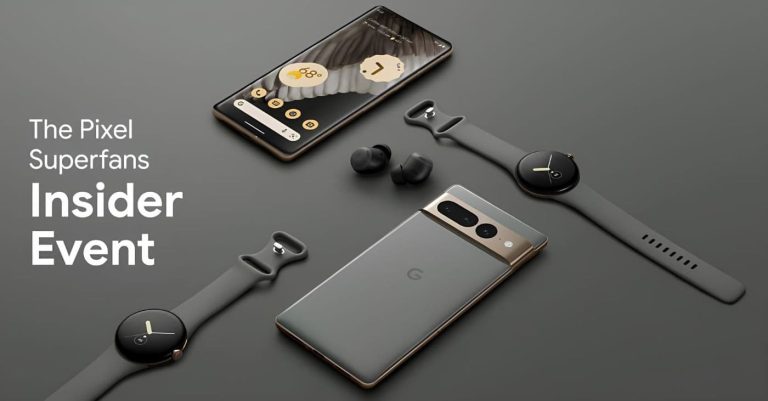
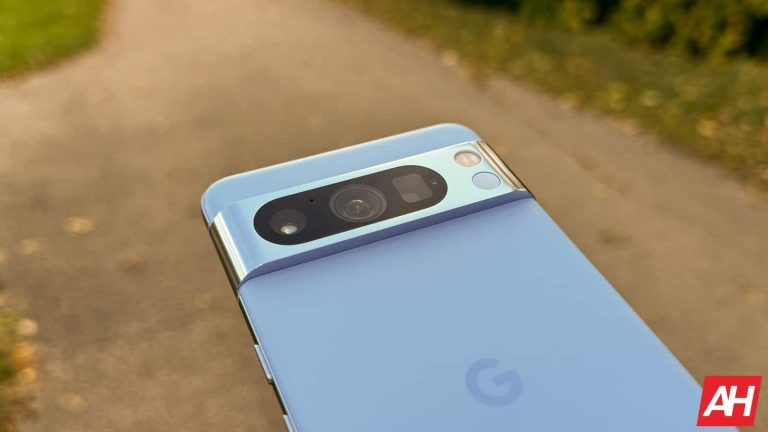
Google is offering an exclusive opportunity to its dedicated Pixel Superfans, allowing them to step behind the scenes and explore Google’s Kings Cross location. The event, known as the Pixel Superfans Insider Event, promises an exciting experience for 40 lucky members. This unique chance includes tours, live interviews, hands-on demonstrations of Google devices, and much more.
“Pixel Superfans is a program for people who love Pixel products. We were inspired to create this program because we know many of you love Pixel as much as we do, and we wanted to create a space where fellow Superfans could connect. There is no cost to join and you can be involved as much or as little as you want. We hope that you’ll want to join our Superfan community.” – Google
To join, all it takes is completing a Google survey and signing up for free. Superfans receive early access to the latest Pixel news, exclusive Q&A sessions with product and engineering leads, and invitations to special events. Now, Google is raising the bar by inviting 40 Pixel Superfans to the heart of its operations in Kings Cross, London, on December 5.
Google is asking Superfans to submit a photo taken with their Pixel device, along with some background context to participate in this remarkable opportunity, reports Android Police. While the existing Pixel Superfans get the offer via an email announcement, there appears to be an entry form to the Pixel Superfan community inside the Google store. However, you should note that government officials, press members, and Google/Alphabet employees aren’t eligible to apply.
Additional benefits of being a Pixel Superfan
The Pixel Superfan community offers more than just exclusive events and early news. Google occasionally provides referral codes to its devoted members, which can result in cost savings when purchasing new devices.
The Pixel Superfan community, though not a well-kept secret, has gained significant popularity. However, applications for new Pixel Superfan memberships in the UK were unexpectedly halted. Google promised to reopen the opportunity in the “near future.” and here we are. The UK was only the second region to gain access to the program.
One intriguing aspect of the Pixel Superfan community is that it’s not exclusive to Pixel enthusiasts alone. Google fans, in general, can find several perks of interest. Everyone won’t necessarily participate in the Kings Cross tour or enter contests. But the referral codes offered by the community can be quite handy, particularly if you’re on a budget. It’s yet another way Google is strengthening its connection with its dedicated users, making them feel like a part of the Google family.
If you are a core Fortnite player and follow updates on the game, you should be aware of the dance moves copyright case. Last year, this case hit the court, but the case was thrown under the bus and didn’t bother Epic Games. Now months after its debut to the court, the case is reopening with a new approach to things.
The major reason why this court case didn’t hold water in court a year and a few months ago is because the evidence wasn’t enough. According to the court, the Fortnite dance and that of the plaintiff “do not share enough creative elements” or similarities. For this reason, the court judged that the evidence and dance moves can’t constitute a copyright infringement.
Kyle Hanagami is the plaintiff in this case and he is also a popular professional dance choreographer. After about a year of having his case dismissed from court, the professional dancer is taking his case back to court. This time around he is fighting not only for the ‘infringement’ of his moves but also for the rights of choreographers, and other creatives.
The reopening of the Fortnite dance moves copyright case might not only be about Kyle Hanagami
While Kyle is still fighting for the copyright infringement on his dance moves by Fortnite, the case might go beyond that. Last year, when this case first got to the court, Kyle uploaded a video of the similarities between his moves and those of Fortnite characters. From the video, it’s clear that if Fortnite did copy anything from him, it was a set of moves.
These moves are from the Kyle Hanagami dance for Charlie Puth’s song ‘How Long.’ However, last year the court didn’t see a copyright case there, but Kyle Hanagami and his lawyers aren’t giving up. This year they are reopening the case and liking it to the case of music copyrights.
In a 31-page document to the court, Kyle Hanagami’s lawyer draws a nice similarity with the music industry. According to the lawyer, Judge Richard Paez, calling choreography moves “poses” is like calling music “notes.” There is a lot of work that goes into making those moves, and their usage on large audiences can give some accolade to the one responsible for making the move.
In this case, Kyle Hanagami is responsible for making some dance moves Fortnight characters show off after battles. By reopening this case, not only Kyle Hanagami but also other choreographers and creatives might have their voices heard. The success of this case might determine whether these will be able to seek acknowledgement for the use of their works. More information on this reopened case will become available in the coming days.
If you’re using Discord to host files, we’ve some bad news for you. The company announced it is switching to temporary file links to combat malware distribution. Discord file links will expire after a day, meaning users should look for another hosting service. The transition takes effect by the end of the year.
Discord worries that bad actors use its CDN (content delivery network) to distribute malware. To address this, the service is limiting the validity of its links to 24 hours to create a “safer and more secure experience for users.” Discord added that this approach would help them “restrict access to flagged content” and reduce malware distribution through CDN.
The change only affects users who use Discord to host files, as the links now expire after a day. The company recommends affected users to look for a suitable service. As Discord noted, “There is no impact for Discord users that share content within the Discord client. Any links within the client will be auto refreshed.”
Discord links will expire after a day by the end of 2023
If you’re an affected user, you still have time to complete the transition to a new service, as the change will roll out later this year. Discord added that developers might see a “minimal impact,” and the company will release more information to developers in the coming weeks.
According to the Discord development team, CDN URLs will get ex, is, and hm parameters to improve the CDN’s security. These parameters could add expiration timestamps and unique signatures to links and remain valid until the links expire. “Once authentication enforcement begins later this year, links with a given signature (hm) will remain valid until the expiration timestamp (ex).” the company stated.
Discord has been a primary venue for bad actors to distribute malware, and the change could put a ban on that. The cybersecurity company Trellix already reported that around 10,000 malware are being found at Discord CDN. Trellix added some well-known malware families like Agent Tesla, UmbralStealer, and Stealerium have previously relied on Discord webhooks to exploit users.
Elon Musk’s new AI venture, xAI, is set to make waves in the world of artificial intelligence with an exciting opportunity for X Premium+ subscribers. The company recently announced that its AI chatbot, Grok, will be made available exclusively to X’s $16 per month Premium+ plan subscribers once it exits the beta phase.
Grok is set to be a great competitor to OpenAI’s ChatGPT. It has already started rolling out (via Engadget) to a select group of users on November 4. Elon Musk himself shared some screenshots (below) of this conversational AI on X. It was a humorous confirmation that Grok’s responses will carry his distinctive sense of humor. Moreover, Musk emphasized Grok’s advantages over the competition, stating, “Grok has real-time access to info via the X platform, which is a massive advantage over other models.”
There’s no public timeline for when Grok will exit the beta phase. However, the humorous guy assures that it “will be available to all X Premium+ subscribers” once it does. This exclusive offer brings an exciting opportunity for X Premium+ subscribers to explore the capabilities of Grok and experience AI-driven conversations with a touch of Musk’s humor.
Musk’s xAI Chatbot Grok adds value to the X Premium+ subscription plan
The timing of this announcement coincides with the upcoming developer conference hosted by rival company OpenAI. Although Musk himself had been a co-founder of the company for a while but later he distanced himself. OpenAI’s ChatGPT is available at a monthly fee of $20, and the competition in the AI space is fierce. Musk’s claims that Grok is “the best that currently exists” suggest that xAI is ready to make a significant impact.
The ambitious mission of xAI, aims “to understand the true nature of the universe.” This is what sets it apart from many other AI ventures like Bard or OpenAI’s model. You can see it in the conversations with Grok he shared on X.
With the AI landscape rapidly evolving, the decision to make Grok available exclusively to Premium+ subscribers is a notable move. It not only adds value to the Premium+ plan but also positions xAI as a player to watch in the AI industry. X Premium+ subscribers will soon have the privilege of experiencing Grok’s capabilities and Musk’s unique touch in the world of AI-driven conversations.
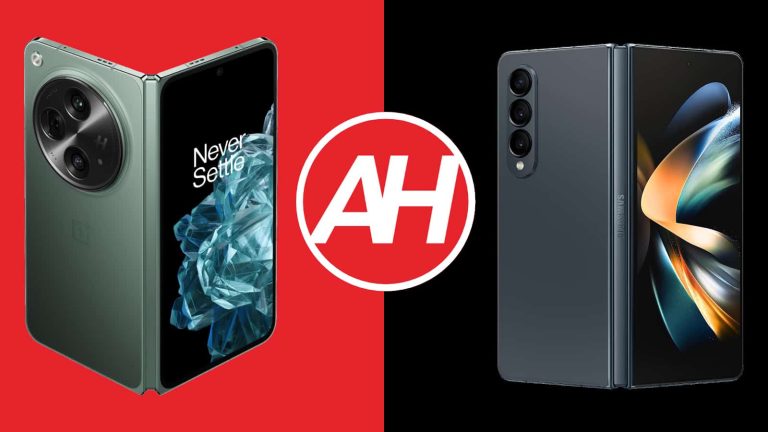
We’ve compared the OnePlus Open to the very best foldable smartphone from Samsung, the Galaxy Z Fold 5, quite recently. That was surely an interesting comparison to make. Many of you are probably holding onto the Galaxy Z Fold 4, though, and trying to decide whether to upgrade or not. So, in this article, we’ll compare the OnePlus Open vs Samsung Galaxy Z Fold 4.
The Galaxy Z Fold 5 is not all that different from the Galaxy Z Fold 4. Samsung did not reinvent the wheel, the company only made some adjustments between generations. The OnePlus Open does bring a lot to the table, so it may be worth upgrading for some of you. We’ll first list their specifications, and will then move to compare them in other ways. We’ll compare their designs, displays, performance, battery life, cameras, and audio performance.
Specs
OnePlus Open & Samsung Galaxy Z Fold 4, respectively
– Screen size (main): 7.82-inch LTPO 3 AMOLED display (120Hz, Dolby Vision, 2,800 nits) 7.6-inch Foldable Dynamic AMOLED 2X display (120Hz, HDR10+, 1,200 nits) – Screen Size (cover): 6.31-inch OLED (120Hz, 2,800 nits) 6.2-inch Dynamic AMOLED 2X (120Hz) – Display resolution (main): 2268 x 2440 1812 x 2176 – Display resolution (cover): 2484 x 1116 2316 x 904 – SoC: Qualcomm Snapdragon 8 Gen 2 Qualcomm Snapdragon 8+ Gen 1 – RAM: 16GB (LPDDR5X) 12GB (LPDDR5) – Storage: 512GB (UFS 4.0) 256GB/512GB/1TB – Rear cameras: 48MP (wide, f/1.7 aperture, multi-directional PDAF, OIS), 48MP (ultrawide, 114-degree FoV), 64MP (periscope telephoto, 3x optical zoom, 6x “in-sensor” zoom, macro) 50MP (wide, f/1.8 aperture, OIS), 12MP (ultrawide, 123-degree FoV), 10MP (telephoto, 3x optical zoom) – Front cameras: 20MP (main display, f/2.2 aperture), 32MP (cover display, f/2.4 aperture) 4MP (under display, main display, f/1.8 aperture), 10MP (cover display, f/2.2 aperture) – Battery: 4,805mAh 4,400mAh – Charging: 67W wired (charger included) 25W wired, 15W wireless, 4.5W reverse wireless (no charger) – Dimensions (unfolded): 153.4 x 143.1 x 5.8mm 155.1 x 130.1 x 6.3mm – Dimensions (folded): 153.4 x 73.3 x 11.7mm 155.1 x 67.1 x 14.2-15.8mm – Weight: 239/245 grams 263 grams – Connectivity: 5G, LTE, NFC, Wi-Fi, USB Type-C, Bluetooth 5.3/5.2 – Security: Side-facing fingerprint scanner – OS: Android 13 with ColorOS Android with One UI – Price: $1,699 $1,799 – Buy: Best Buy Samsung
OnePlus Open vs Samsung Galaxy Z Fold 4: Design
Both of these phones are book-style foldables, but they are quite different in terms of the design. They also feel completely different to hold and use. The Galaxy Z Fold 4 is quite narrow in the hand, and it has a very narrow cover display aspect ratio. The OnePlus Open has a regular display aspect ratio on its outer display. The OnePlus Open is slightly shorter, and wider than the Galaxy Z Fold 4. It is also thinner in both folded and unfolded states. You’ll definitely feel that difference when the phone is folded, as it’s huge, actually. The Galaxy Z Fold 4 is quite thick.
That being said, the Galaxy Z Fold 4 also doesn’t fold flat. It has a gap when folded, which is something you won’t see on the OnePlus Open. OnePlus’ handset also has a much less noticeable crease that you’ll barely feel under your finger. There is a huge camera oreo included on the back of the OnePlus Open. The Galaxy Z Fold 4 has a much smaller camera island. It has three vertically-aligned cameras in the top-left corner.
The OnePlus Open comes in glass and vegan leather models, while the Galaxy Z Fold 4 includes glass on the back. Both phones have a display camera hole on the outer display. The OnePlus Open also has one on the main display, while the Galaxy Z Fold 4’s is hidden under that main panel. The OnePlus Open is considerably lighter than the Galaxy Z Fold 4, 239 grams vs 263 grams. It includes an IPX4 rating for splash resistance, while the Galaxy Z Fold 4 is IPX8 rated for water resistance. Both phones feel like premium offerings, and are also quite slippery. The vegan leather variant of the OnePlus Open is the least slippery one.
OnePlus Open vs Samsung Galaxy Z Fold 4: Display
OnePlus’ handset includes a 7.82-inch 2268 x 2240 Foldable LTPO3 Flexi-fluid AMOLED display. That panel can project up to 1 billion colors, and supports Dolby Vision. It has a 120Hz refresh rate, and goes up to 2,800 nits of brightness at its peak. The second display on the phone measures 6.31 inches, and it offers a resolution of 2484 x 1116. That is an LTPO3 Super Fluid OLED display. It also has Dolby Vision support, and can project up to 1 billion colors. It has a 120Hz refresh rate too, and the same peak brightness as the main panel. This display is protected by the Ceramic Guard.
Samsung Galaxy Z Fold 4
A 7.6-inch main display is included on the Galaxy Z Fold 4. That panel has a resolution of 1812 x 2176, and it’s a Foldable Dynamic AMOLED 2X display. It has a 120Hz refresh rate, and supports HDR10+ content. That panel goes up to 1,200 nits. The cover display on the phone measures 6.2 inches, and has a resolution of 2316 x 904. That is a Dynamic AMOLED 2X display with a 120Hz refresh rate. It’s protected by the Gorilla Glass Victus+. The display aspect ratio here is 23.1:9.
Now, all four displays here are good, but the OnePlus Open’s have some glaring advantages. First and foremost, its displays are much brighter. They go all the way up to 2,800 nits, compared to 1,200 nits on the Galaxy Z Fold 4. On top of that, the OnePlus Open’s main display has a much less visible crease that you won’t even be able to feel under your fingers most of the time. The Galaxy Z Fold 4’s is not only easily visible, but you’ll feel it under your finger, easily. All displays are vivid, and have good viewing angles.
OnePlus Open vs Samsung Galaxy Z Fold 4: Performance
The Snapdragon 8 Gen 2 fuels the OnePlus Open. The company also included 16GB of LPDDR5X RAM inside of this phone, and 512GB of UFS 4.0 flash storage. The Galaxy Z Fold 4 is fueled by the Snapdragon 8+ Gen 1 processor, while it comes with 12GB of LPDDR5 RAM and 256GB, 512GB, or 1TB of UFS 3.1 flash storage. The OnePlus Open obviously has the edge in terms of spec power.
OnePlus’ handset comes with a newer and more powerful processor, while it also has the superior RAM and storage. On top of that, it comes with more RAM and storage by default. Both smartphones perform really well day-to-day, but the OnePlus Open did feel snappier to us, which is not surprising. They can handle pretty much any game you’ll find on the Google Play Store, though, so no worries there, even though the OnePlus Open is more future-proof in that regard.
Both smartphones have great software too, though quite different. Both software builds cater well to the foldable form factor, though we do believe that the OnePlus Open’s new multitasking is superior. The Galaxy Z Fold 4 has some other software advantages, including a ton of customizability options.
OnePlus Open vs Samsung Galaxy Z Fold 4: Battery
There is a 4,805mAh battery included inside the OnePlus Open. The Galaxy Z Fold 4 has a 4,400mAh battery on the inside. The Galaxy Z Fold 4 offers good battery life at 6-6.5 hours of screen-on-time. At least that was the case for us. The OnePlus Open provided us with considerably more in that regard. It managed to cross the 8-hour screen-on-time mark almost every time we needed it to.
That is to be expected due to the larger battery and more power-efficient SoC. Still, if you’re a heavy user, this difference will likely mean a lot to you. Do note that we did not play a lot of games on either phone, only for testing purposes. We did push them both rather hard, though, with various other tasks, and plenty of multitasking. Your mileage may vary, of course, due to different usage, apps, signal strength, and the fact there are two displays here, so it all depends on which you end up using more.
Now, even if you run out of juice ahead of time on the OnePlus Open, you can rely on fast 67W wired charging. It can fully replenish the battery in just a little bit over 40 minutes. The Galaxy Z Fold 4 is much slower when it comes to charging. It, thanks to its 25W charging. The Fold 4 does support 15W wireless, and 4.5W reverse wireless charging, though, which you won’t find on the OnePlus Open. What Samsung’s phone doesn’t have is a charging brick in the box.
OnePlus Open vs Samsung Galaxy Z Fold 4: Cameras
The OnePlus Open has a 48-megapixel main camera, a 48-megapixel ultrawide unit (114-degree FoV), and a 64-megapixel telephoto camera (3x optical zoom, 6x hybrid zoom). The Galaxy Z Fold 4, on the other hand, is equipped with a 50-megapixel main camera, a 12-megapixel ultrawide unit (123-degree FoV), and a 10-megapixel telephoto camera (3x optical zoom).
OnePlus Open
OnePlus actually uses Sony’s LYTIA camera sensor, which does make a difference in low light. The Galaxy Z Fold 4’s main camera is a bit dated in comparison. It does take good pictures, though. It tends to tune up the saturation, and can oversharpen images at times, but the results are good. We do prefer the images coming from the OnePlus Open, though. They’re a bit closer to real-life, and the phone does a great job across the board.
In low light, the OnePlus Open does keep things a bit darker, but the images end up looking great, and the colors too. The Galaxy Z Fold 4 tends to make low light shots look a bit unrealistic, but they look good at the same time. The Galaxy Z Fold 4 has a wider FoV on the ultrawide camera, but we prefer the results from the OnePlus Open’s ultrawide shooter. The same goes for its telephoto camera.
Audio
Neither of these two phones includes a 3.5mm headphone jack. You’ll need to rely on their Type-C ports if you’d like to connect your wired headphones. Bluetooth 5.3 is included on the OnePlus Open, while the Galaxy Z Fold 4 has Bluetooth 5.2 support for wireless audio.
They both include stereo speakers, though the ones on the Galaxy Z Fold 4 are louder. Both sets of speakers are good, though, as they provide good sound quality, and are well-balanced too.
At the launch of the new M3 iMac and MacBook Pro, Apple also rolled out new wallpapers. The new wallpapers are now available for download by netizens, even those who don’t have the new Mac products.
For the new iMac there are seven new wallpapers and for the MacBook Pro there is just one wallpaper. The design of the wallpaper on the MacBook Pro hit the internet a few days ahead of the new laptop launch. If you are a bit observant, you’ll notice that these new wallpapers have a bearing on the device that Apple intends for them to be on.
When it comes to the new MacBook Pros, the wallpaper here is a cryptically written Pro that looks like bubbles. The iMacs are just snapshots of the hello write-up that displays when you turn on your Apple device, but it comes in various color variations. If these wallpapers appeal to you, here is how you can get them on your older Mac device or laptop.
Download the new M3 iMac and MacBook Pro wallpapers with these easy steps
All the new wallpapers will be available on the M3 iMac and MacBook Pro. However, those looking to download these for usage on their device will need to follow the steps in this article. After the launch of the new M3 iMac and MacBook Pro, the folks at 9to5Mac were quick to provide the new wallpapers for download.
All seven new wallpapers are available for download now and you can use them on any device. So you don’t need to purchase the new Mac products if you are just interested in their wallpapers. Particularly, the wallpaper option on the new Apple M3 MacBook Pro is going to appeal more to a lot of netizens.
At the end of this article, you’ll find the seven wallpapers of the new Macs. You can download these images and use them on your Mac product or any other laptop that you own. To download and use these wallpapers, follow the steps below closely.
The first step to downloading these wallpapers is to right-click on the image you intend to save. From the drop-down select the save options from your browser, this will save the image to your device’s download folder. You can repeat this step for as many wallpapers as you wish to save.
To access the saved wallpapers, you need to head over to your device’s files. Here you will find all the saved wallpapers and can use any to replace your current wallpaper. By doing this you can make your older Mac product look like the new M3 iMac and MacBook Pro.
YouTube is testing two new AI-powered features that could make the video platform more engaging and informative for users. These features are currently only available to a limited amount of YouTube Premium subscribers.
As reported by 9to5Google, the first feature, called “Ask,” is a conversational AI that lets users ask questions about the videos they’re watching and get answers generated by large language models (LLMs). Users can also ask the AI to recommend related content.
The “Ask” button will appear on select English videos, and is currently only available to US English (18+) YouTube Premium subscribers on the Android app. YouTube plans to roll it out to more users in the coming weeks.
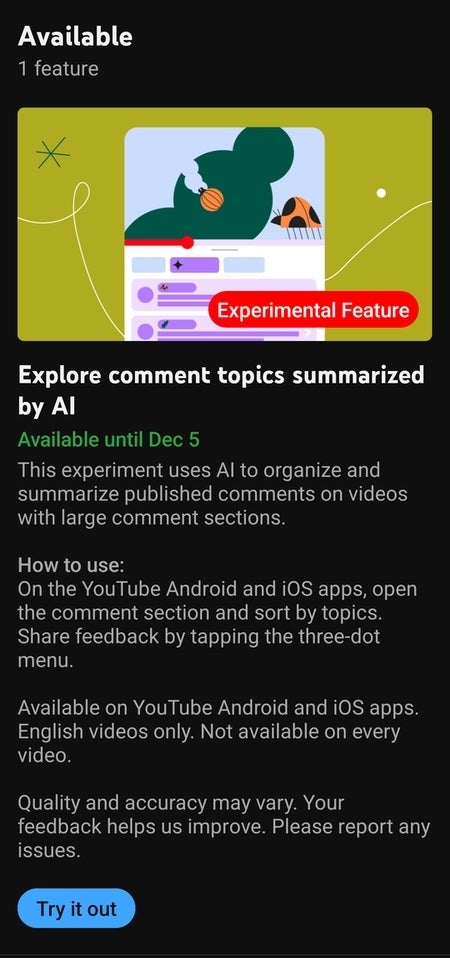
The second feature is an AI-powered tool that organizes large comment sections of long-form videos into easily digestible themes. This will help users find the comments they’re most interested in, and make it easier for creators to moderate their comment sections.
The “Topics” section will appear alongside the “Top” and “Newest” sort options on select videos with large comment sections. Creators will be able to remove any comment topics they don’t want, and delete individual comments that show up under specific topics.
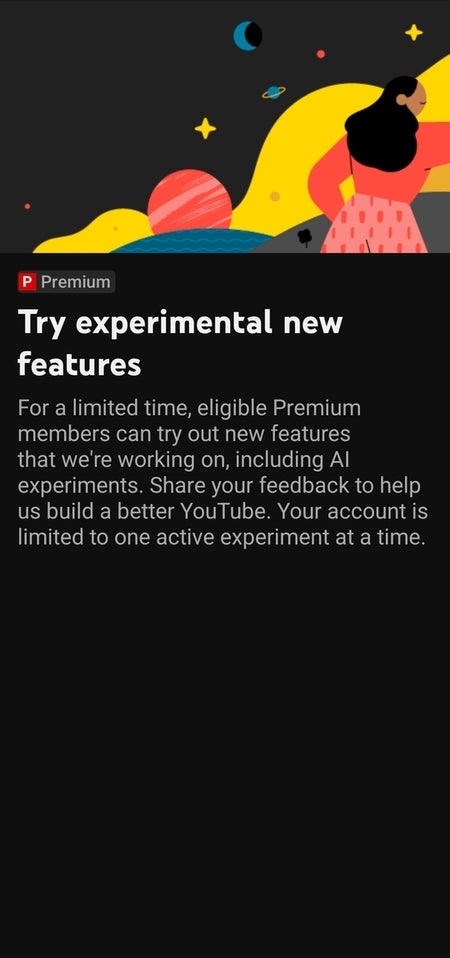
Meanwhile, both of these features YouTube features are experimental and will be available via the You’Tube Premium “Try experimental new features” page on both the web and the app. Currently, I am only seeing the “Explore comment topics summarized by AI” feature available to me and the experiment will only be available through December 5th.
Last month, a report surfaced claiming that the Pixel 8 Pro features the ISOCELL GNV sensor. The same sensor that is used in the Vivo X80 Pro handset. Well, it turns out that’s not true. The Pixel 8 Pro sensor has just been revealed, and the ISOCELL GNV assumption was wrong.
The Google Pixel 8 Pro main camera sensor has been revealed
Truth be said, it’s an easy mistake to make, as a similar sensor is used in the phone. The Pixel 8 Pro utilizes the ISOCELL GNK sensor. That is basically a successor to the ISOCELL GN1, and was announced recently. This info comes from Maeil Business Newspaper.
We’re looking at a 50-megapixel camera sensor that brings both improved autofocus and better HDR support compared to its predecessor. The phone was expected to utilize the ISOCELL GN2, but Google opted for an even newer sensor.
The ISOCELL GNK is a 1/1.3-inch sensor with 1.2um pixels. It has Dual Pixel Pro autofocus, and can record 8K video at 30 fps. It can also provide 4K recording at 120 fps. Staggered HDR is supported, as is Smart ISO Pro.
The ISOCELL GNK can capture up to 14-bit RAW image files, while it can also capture full-resolution 50MP frames at 24 fps and 12.5MP pixel-binned frames at 90 fps.
It is a bit surprising Google went for this sensor, but these are good news
It’s somewhat surprising Google went with a sensor this new, but it’s good news, of course. It gives Google a lot more space to improve upon what it offered at launch, and it gives the company’s AI features more of a chance to shine.
Now, the Pixel 8 was not mentioned here, but chances are it runs the exact same setup when the main camera is concerned. Based on what we can see regarding its camera specs, it’s the exact same sensor.
Lots of Samsung devices are already getting the One UI 6 and Android 14 update. Working together, these updates are bringing a ton of personalization features to users. Among these personalization options is the ability to dismiss the charging notification when one plugs their Samsung device in to charge.
This will be a very important feature addition for most users who get tired of seeing notifications on their devices. These types of users find it soothing to have a clear notification tab, hence constantly clearing out all notifications. However, before this update that is now rolling out, users were not able to clear their device’s charging notification.
This is the notification that pops up when a user plugs in their phone to charge (wired or wirelessly). The ability to clear notifications such as this became an official feature with the roll-out of the Android 14 update. For Samsung devices, the release of the One UI 6 update brought this feature to eligible Galaxy devices.
Eligible Galaxy devices running on One UI 6 for Android 14 can now dismiss their device’s charging notification
The One UI 6 update became available a few days ago, with most Galaxy devices getting this update. However, not all Galaxy devices can get the Android 14 update, so the ability to dismiss charging notifications is limited. This is because this feature is native to Android 14 devices, and not all Galaxy devices will get this software update.
Its function is very simple and straightforward and can help users declutter their notifications tab. As you already know, plugging in your Android device triggers a notification most of the time. This notification can become pesky as it can’t be removed along with other notifications.
Most times, this notification pops up under the silent notification section on the shade. Being in the silent notification tab means that it doesn’t disturb the users by pinging the device once it pops up. However, the mere sight of it on the notification shade can be a source of pain to some users.
With a simple swipe to either side of the screen, Samsung fans can now remove charging notifications on their devices. This will help declutter the notification shade on the user’s device, and this is preferable for most users.
There are a lot of other changes and improvements that are here thanks to the One UI 6 update. Working together with Android 14, this update to Galaxy devices is smoother with more refinement. If you use a Samsung Galaxy device you can head over to your system settings to install the One UI 6 update if you haven’t already done so.
After announcing the upgradation of the CVSS 3.0 scoring system in June, this week, FIRST officially released the CVSS 4.0. This new standard will facilitate better severity scoring of vulnerabilities discovered henceforth.
CVSS 4.0 Is Officially Released
According to the recent press release from FIRST (Forum of Incident Response and Security Teams) the 4th iteration of the CVSS scoring standard is now public.
Identified as CVSS 4.0, this iteration of the CVSS standard will “provide the highest fidelity of vulnerability assessment for both industry and the public,” according to FIRST.
Specifically, the new release has simplified threat metrics, offers an effective environment-specific assessment of vulnerabilities, compensates controls, and removes downstream scoring ambiguity.
Moreover, it also includes other scoring metrics according to the prevalent threat trends, such as Automable (wormability), Recovery, Value Density, Vulnerability Response Effort, and Provider Urgency. With these improvements, CVSS 4.0 also becomes applicable to the OT/ICS/IoT vulnerabilities.
This new iteration also comes with the following nomenclature.
CVSS-B: CVSS Base Score
CVSS-BT: CVSS Base + Threat Score
CVSS-BE: CVSS Base + Environmental Score
CVSS-BTE: CVSS Base + Threat + Environmental Score
What Is CVSS? Quick Overview
CVSS (Common Vulnerability Scoring System) is a free, open security standard for scoring the severity of security vulnerabilities. With an easy scoring system, this standard helps the security community quickly identify and prioritize vulnerabilities based on the threat severity.
While low-severity vulnerabilities are seldom considered a serious issue, vulnerabilities with high scores (like 9.0 and higher) are usually deemed critical severity and need immediate attention.
The first CVSS version came out in 2005, and since then, it has gone through several improvements according to the rising threats. The last release in use, CVSS 3.0, surfaced online in 2015. And now, after eight years, CVSS 4.0 has arrived with further improvements to cater to the contemporary security demands.