Samsung unveils new Lacoste cases for Galaxy Z Fold 5, Flip 5

0
[ad_1]

Samsung has launched new protective cases for the Galaxy Z Fold 5 and Galaxy Z Flip 5 in partnership with the French clothing and fashion brand Lacoste. The company has made one case each for the two foldables, both featuring the same monogram pattern. It represents the Lacoste 2023 collection.

Galaxy Z Fold 5 and Flip 5 get new Lacoste-branded cases

Samsung has long collaborated with Lacoste to make exclusive accessories for its mobile devices. Most recently, it released a case for the Galaxy Z Flip 4 in November 2022. Before that, the duo gave us unique cases for the Galaxy S22 series and Galaxy S21 FE. They are now offering covers for the latest foldables.

The Galaxy Z Flip 4’s cover came in a unicolor design with the same four color options as the device: Rose Gold, Blue, Graphite, and Lavender. It featured Lacoste’s iconic green crocodile logo at the bottom. This year, Samsung is doing things slightly differently. While the crocodile isn’t going anywhere, it’s no longer green. The firm has made it black to blend well with the case’s black body.

The new Lacoste cases for the Galaxy Z Flip 5 and Galaxy Z Fold 5 also look distinct thanks to the white monogram pattern. The repetitive pattern appears to show skyscrapers in a rhombus-shaped box. Samsung says this design is “emblematic” of the Troyes-based French brand’s latest luxury collection.

Samsung Lacoste cases Galaxy Z Flip 5 Fold 5 2

“These two designer protectors perfectly match the lines of the Galaxy Z Flip 5 and Galaxy Z Fold 5 while protecting them from scratches and shocks,” Samsung said in a press release [machine-translated from French]. “Much more than a shell, these two creations marked with the famous crocodile are real fashion accessories to perfect your sporty chic style.”

As of this writing, Samsung hasn’t revealed the pricing and availability details for these cases. If history is any indication, they should soon be on sale through the company’s official website in France. The cases might cost around €50. Samsung may not bring the Lacoste-banded back covers for the Galaxy Z Flip 5 and Galaxy Z Fold 5 to other markets.

Fashion influencer Sally is the new ambassador for the Galaxy Z Flip 5 in France

Alongside collaborating with Lacoste for new cases, Samsung has also roped in social media influencer Sally as the new ambassador for the Galaxy Z Flip 5 in France. Sally makes videos on fashion and beauty tips for hair care. Samsung says she is a “natural choice” for this promotional campaign because of her “assertive personality and audacity” that perfectly reflects the spirit of the campaign: asserting your style.

Samsung Lacoste cases Galaxy Z Flip 5 Fold 5 3


[ad_2]
Source link

Google CEO Sundar Pichai faces DOJ grilling in antitrust battle

0
[ad_1]

Google is fighting a massive court battle against the United States Department of Justice (DOJ). The company is accused of violating antitrust law by abusing its power in the online search market to stifle competition. We are looking at the biggest antitrust case in the past 25 years. Google’s senior vice president responsible for search and ads, Prabhakar Raghavan, was the first to testify in the case on Thursday. CEO Sundar Pichai will follow on Monday.

Google CEO Sundar Pichai to testify in the DOJ antitrust case

The trial for the DOJ’s antitrust case against Google began last month. After prosecutors presented their case, Google began its defense on Thursday. In his testimony, Raghavan claimed that Google hasn’t stifled competition or done anything at all. Users pick it over rivals because it’s better. It has spent a lot of amount on research and development to improve its product and offer better services to users. All of this is the fruit of its years of innovation.

The internet giant’s CEO Sundar Pichai will reportedly be the next big name on the hot seat. He will testify in Washington, DC, on Monday. The prosecutors will reportedly question him for “encouraging employees to keep their messages private,” the NYPost reports. The Google boss allegedly told employees to “change the setting of this group to history off.” This happened in at least one recorded chat from 2021.

According to the new report, Pichai made this request to discuss “a substantive topic” related to company business. Soon after posting the message (nine seconds later) in the group chat, he unsuccessfully attempted to “delete this incriminating message.” Court filings don’t go into detail about the “substantive topic” that Pichai wanted to discuss with Google employees. It’s also unclear if he made similar requests in other chats.

However, the plaintiffs argue that “the newly produced chats reveal a companywide culture of concealment coming from the very top, including CEO Sundar Pichai.” It will be interesting to see how the Google boss responds to the allegations. The company is expected to present its defense in the case over the next month. The court may not announce its ruling until early next year.

Google’s ties with Apple are one of the DOJ’s major targets

Google pays Apple as much as $18 billion every year to make its search engine the default option on iPhones, iPads, and Macs. The DOJ is targeting this partnership in this case. It argues that Google is stifling competition by not allowing others a chance.

The Justice Department even highlighted the complicated process of changing the default search engine on iPhones. It involves four taps and one swipe. Time will tell what comes out of this court battle.


[ad_2]
Source link

Google Clock version 7.6 now lets you sync your phone and Pixel Watch

0
[ad_1]

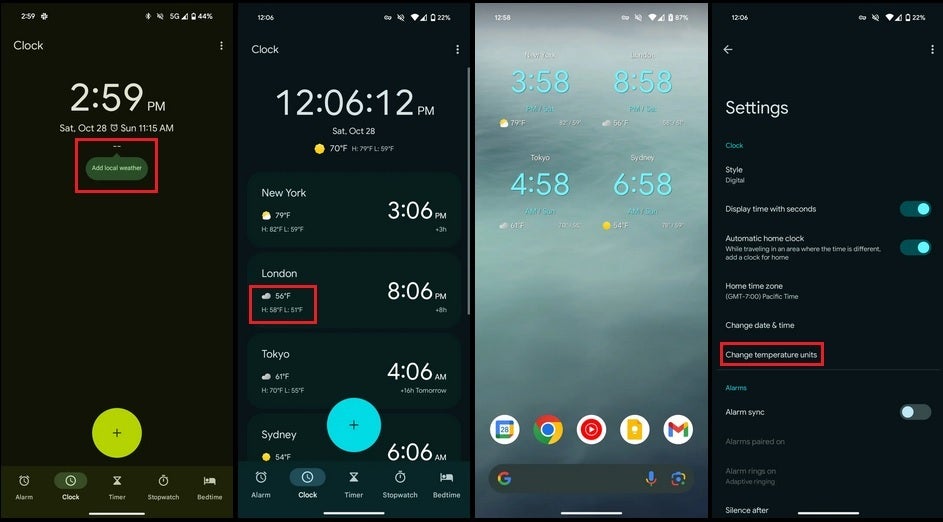
The updated Google Clock version 7.6 for Android devices is now rolling out to users. This update gives users the ability to sync alarms on their phone and their Pixel Watch together. Additionally, there are some design changes on the updated Watch app that users are noticing.

A major design upgrade is the centering of the clock interface across the app. Previously, the clock interface was left-oriented across the app, but now it sits at the center of the interface. There are also some changes to the settings app that weren’t available in the previous app version.

Some of the new features that are now visible on the settings page are Alarm sync and Adaptive ringing. The latter is on by default once the users sync their alarms across their smartphone and Pixel Watch. Well, these are not the only changes that are available in the recent update to the Google Clock app.

All improvements that come with the Google Clock version 7.6 update that is now rolling out

Aside from the ability to sync alarms between the users’ Pixel Watch and phone, there are other improvements to the Google Clock app. But for now, let’s focus on how users can activate this syncing feature on the updated app. After you install the Google Clock version 7.6 on your device you’ll get a prompt to sync your alarms on your watch and your smartphone.

By clicking sync alarms on the interface, all alarms you set on either device will become visible on the other. The alarms will then go off on the device you are using whenever it is time. This will be possible thanks to a feature known as adaptive ringing and it is turned on by default.

For users who want the alarm to go off on both their smartphone and their watch, they can turn off adaptive ringing from the Google Clock app. Also, if you don’t want this alarm sync feature, you can toggle it off from the settings page as well. This update doesn’t enable the weather on the Clock tab like with previous versions.

Users will also notice the position of the clock across various interfaces on the app. Now, the clock sits in the center of the top portion of the app’s interface. This is an improvement from the left-hand orientation of the clock that was available on other versions.

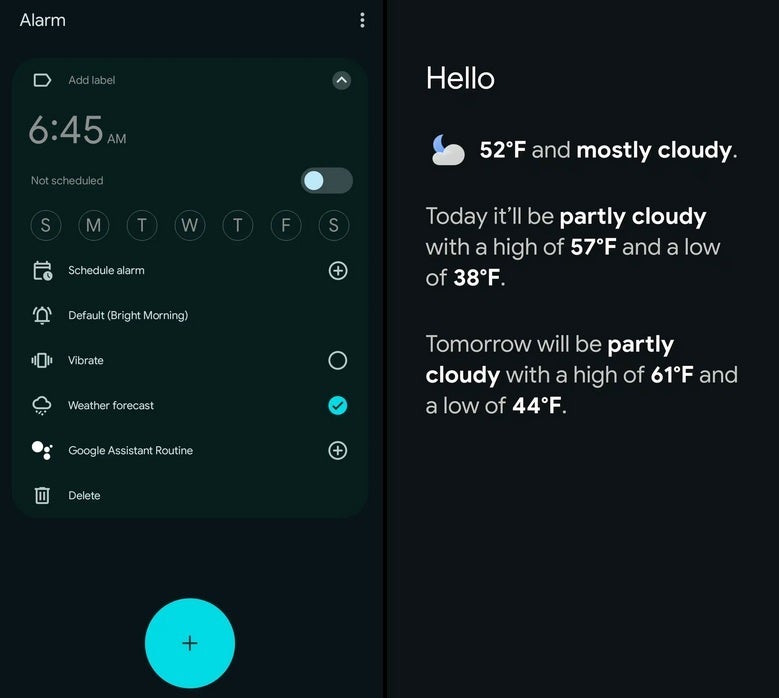
Lastly, users will get the weather update whenever their alarms go off. These changes will affect how users will interact with the app in their everyday usage. If you are still waiting on the update bringing the Google Clock version 7.6 you can head over to the Play Store and check if the update is available for your device.


[ad_2]
Source link

Google’s new “About this image tool” will help identify fake images

0
[ad_1]

Google recently announced a new feature to combat misinformation on its image search engine. “About this image” provides helpful context to help you determine if the image or its source is authentic. With AI-generated imaging getting wider adoption, the problem of online misinformation has only gotten worse, and the feature will specifically identify AI images.

How “About this image” works

According to the official press release, the new tool will roll out to users in the U.S. in the coming months. At least initially, it will only be available in English. The feature provides information about when the image first appeared online, where Google first saw it, and which other sites have published it since.

With that context, you can better understand an image’s authenticity. For example, if news or fact-checking outlets have already debunked an image, those articles will appear when you tap “About this image .” It basically lets you research and fact-check an image with minimal effort.

ATI Main Flow Gif
Credits: Google

You can access “About this image” from the three-dot menu on the image result. It works on Google Lens and the Google app. Later this year, it will also roll out for mobile and desktop versions of Chrome. On Chrome, it will pop up on a right-click or long-press.

AI images will include disclaimer labels

Google also announced that moving forward, it will make it easy to identify images generated using its AI platform. The AI-generated images will feature visible labels describing them as such. Each image will have a markup in its original file containing all relevant context you can easily access. The labels will show up even if you view the generation outside Google’s platform. The marking will read “AI-generated with Google” right under the image.

In the coming months, image creators and platforms like Midjourney and Shutterstock have also volunteered to self-label their AI-generated images in a similar way. “Image self-labeled as AI generated” will sit under the image title when it’s searched on Google. More creators will apparently join the self-labeling project in the coming months. The move should make the generative image technology more transparent on the whole.

With the proposed self-labeling and the “About this image” tool, Google is expanding its ongoing media literacy project with more visual elements. Both features will help people filter out unreliable images in an increasingly confusing online world. The added summary of where the image originated, its timeline, and what others have said about it will help people verify sources and make more informed judgments about what they’re reading.


[ad_2]
Source link

Google Wallet adds important new features for commuters

0
[ad_1]
Google Wallet already offers a set of nifty features that makes paying for transportation while commuting. Starting today, Google Wallet users in select cities will benefit from even more perks that will help them keep track of their expenditures every time they’re commuting.

According to Google, 9 out of 10 public transit riders say they expect transit agencies to offer contactless options as a form of payment. To respond to this increasing request from commuters, transit agencies are adopting an “open-loop payment system,” which basically means that people can use any payment card in their physical or digital wallet to pay for transit fare.

This open-loop payment system is already available for commuters in cities like London, New York and Sydney. In addition to that, Google is now adding a new feature that will show commuters their ride history and how much they’ve saved from time-based fare caps.

Thanks to the new feature, commuters will be able to receive updates from their transit agency. Google will be rolling out this feature later this year, but it will only be available with Brighton and Hove buses in the UK initially.


Another new feature announced by Google will make it possible for riders in some cities to purchase and store their transit pass directly on their phone via the Wallet app. This feature is now rolling out for commuters in Madrid, while transit riders in Seattle and the Puget Sound Region will be able to add their ORCA transit cards to Google Wallet.Since some transit agencies ask riders to carry their ticket on them so that they present it to the driver while boarding the bus, commuters can now save the following tickets to Google Wallet: SNCF in France, Hamburg HVV in Germany, and Italo in Italy.

Finally, Google announced that it has expanded the capability to support multi-leg journeys and increased the ticketing options available to users. For example, you’ll now be able to buy all tickets via Maps whenever you’re commuting to another city and then use the local transit system like subways and buses.


[ad_2]
Source link

Polls and GIFs now are on Threads. Here’s how to add them

0
[ad_1]

After months of waiting, Threads now lets us add polls and GIFs to our posts thanks to a post from Mark Zuckerberg himself. There were some of the things we were searching for when the app officially launched. Now, you can add these things to your posts, and here’s how to add them.

Before we start, you’re only able to add polls and GIFs to Threads on the app. You currently can’t if you’re on the desktop version. We’re waiting for the company to bring this functionality. Also if you want to use this function, you’ll need to make sure that your app is fully updated. Find Threads on the Play Store or the Apple App Store and tap on the Update button.

How to add polls and GIFs to Threads

Adding these things to your posts is pretty easy. When you’re making a post, you’ll see a few symbols under the “Start a thread” placeholder text. The first one will let you add an image, the second one lets you add a GIF, the third lets you add an audio recording, and the last one lets you add a poll.

Adding a GIF

When you tap on the GIF one, you’ll see a grid of GIFs already populated. These GIFs are all offered through GIPHY. The grid will constantly update according to the day. As you can see in the screenshot, several of the GIFs show Friday, as it was taken on a Friday.

You can scroll through those GIFs to see if there’s one that you like. If you have something in mind, then you can tap on the search bar at the top of the screen. The grid of GIFs will change as you type. After that, just tap on the GIF you want to insert.

Adding a Poll

Tap on the last symbol to get started making your poll. When you do that, you’ll be able to type the contents of your poll. You’ll type your question in the same spot that you’d type a regular Threads Post.

Under that, you’ll see two text fields. Type in your choices. Under the text fields, you’ll see the Add another option button. Tap on it to add more text fields. You can only add an additional two fields for a total of four choices.

This feature is a step behind what you get with X (formerly Twitter), as on that platform, you can choose the duration of your poll. In the case of Threads, your poll will expire in 24 hours with no other options.

If you change your mind and don’t want to make the poll, you can tap on the Remove Poll button on the right of the screen.

And, with that, you can go and start making your Threads more exciting!


[ad_2]
Source link

Google Keep Magic Lists may let you create lists with AI

0
[ad_1]

A teardown of Google Keep revealed that Google is testing generative AI in the popular note-taking app. The new Magic Lists feature will allow users to create entire lists on Google Keep with a quick prompt. If rolled out to the public, Google Keep will join the many Google apps that have adopted built-in gen AI recently.

How Google Keep Magic Lists works

Folks over at 9to5Google decompiled the latest version of the Google Keep APK (the package installer for the app). They found strings of code hinting at the upcoming feature “Magic Lists”. Also, they found disclaimers pointing out the possible inaccuracies Google Keep may generate. But, since this is an APK breakdown, you will want to take this with a grain of salt.

The feature works much like the “Help Me Write” button in Google Docs or Gmail. A similar button will likely show up when you create a new note. You enter a prompt, tweak it, and then insert it into your note. Reportedly, it takes at least three words in a prompt to work.

In a way, it’s similar to “List It” included in Google’s AI Test Kitchen — an app that lets the public test emerging AI tech and provide feedback. It works by breaking down topics or objectives into a detailed list of subtasks. You could type “I want to eat healthily,” and it could give you subtasks like “Create a meal plan” or “Take supplements”.

Magic Lists isn’t rolling out yet — in beta or public. However, the following text appears in the code for Google Keep version 5.23.422.03.90:<string name=”magic_lists_insert”>Insert</string>”.

What ‘Magic Lists’ can do

The feature may or may not make it to the public, considering its potential for bogging down the app. At the same time, Google Keep has always been about capturing ideas quickly, and gen AI will speed things up. You could ask the note-taking app to instantly generate a grocery list with a simple prompt like “groceries for the week”. Magic Lists could also help with daily to-do lists and checklists.

As powerful as Google’s gen AI is, it’s still in its early stages. So, you can expect some prompts to not return any results whatsoever. 9to5Google found this message buried inside the APK file: “<string name=”magic_list_blanket_error_body”>”We are still learning, and can’t help with that.”</string>”.

Secondly, the information and ideas Google Keep produces come with the caveat of inaccuracy and bias. That’s why Google intends to market the feature as a “creative aid” instead of a rigorous assistant or research tool. At any rate, Magic Lists has the potential to automate a lot of boring, repetitive tasks.


[ad_2]
Source link

Watch out! These harmless-looking apps with 2 million installs are up to no good

0
[ad_1]

When installing apps from the Google Play Store, we operate with the feeling that the Mountain View giant only hosts secure, vetted apps on its official apps marketplace, but often times, the company doesn’t realize until after an app has been downloaded several times that it’s actually malicious and needs to be removed. 
IT security solutions provider Dr.Web as published a list of apps that are not what they appear to be and have been downloaded by more than 2 million Android users (via Bleeping Computer).

Four of the apps, which are mentioned below, are actually HiddenAds malware. On the surface, they look like games, but once you download them, they try to become invisible either by using Google Chrome’s icon or using a transparent icon image. They silently run in the background and launch ads on your phone’s browser to generate revenue for their developers. Here are their names:

  • Super Skibydi Killer – 1,000,000 downloads
  • Agent Shooter – 500,000 downloads
  • Rainbow Stretch – 50,000 downloads
  • Rubber Punch 3D – 500,000 downloads

The next group of apps are a part of the FakeApp family and their aim is to make users go to investment scam websites. Here are some of them: 

  • Eternal Maze (Yana Pospyelova) – 50,000 downloads
  • Jungle Jewels (Vaibhav Wable) – 10,000 downloads
  • Stellar Secrets (Pepperstocks) – 10,000 downloads
  • Fire Fruits (Sandr Sevill) – 10,000 downloads
  • Cowboy’s Frontier (Precipice Game Studios) – 10,000 downloads
  • Enchanted Elixir (Acomadyi) – 10,000 downloads

Many apps belonging to the notorious Joker family also made it to Google Play. The main motive of these apps is to make victims sign up for premium paid services. Following are some of the Joker family apps that were found on the app store: 

  • Love Emoji Messenger (Korsinka Vimoipan) – 50,000 downloads
  • Beauty Wallpaper HD (fm0989184) – 1,000 downloads

Thankfully, all the apps mentioned above have been removed by Google Play but if you have already downloaded them, you’ll need to remove them from your phone. As a precaution, you might consider scanning your phone using Play Protect or a smartphone antivirus.

This is not the first and – much against our wishes –  probably not the last time that harmful apps were approved by Google Play. While it’s a good first step to download apps from a trusted source, you must never let your guard down and inspect an app yourself before downloading it by going through user reviews and ensuring the developer is trustworthy.

[ad_2]
Source link

VMware Tools Flaw Let Attackers Escalate Privileges

0
[ad_1]

Two high vulnerabilities have been discovered in VMware Tools, which were assigned with CVE-2023-34057 and CVE-2023-34058. These vulnerabilities were associated with Local Privilege Escalation and SAML Token Signature Bypass.

The severities of these vulnerabilities are 7.5 (High) and 7.8 (High), respectively. One of these vulnerabilities existed in macOS. However,  VMware has released patches and security advisories for fixing these vulnerabilities.

CVE-2023-34057: Local Privilege Escalation Vulnerability

A threat actor with local user privilege to a guest virtual machine can exploit this vulnerability and gain elevated privileges within the virtual machine. The severity of this vulnerability is given as 7.8 (High). 

CVE-2023-34058: SAML Token Signature Bypass

As a prerequisite, a threat actor requires “guest operations privilege” to exploit this vulnerability. This privilege controls the ability to interact with files and applications inside a virtual machine’s guest operating system for exploiting this vulnerability. 

A threat actor with this privilege can exploit this vulnerability on a target virtual machine and elevate their privileges if that target virtual machine has been assigned with a more privileged Guest Alias. The severity for this vulnerability has been given as 7.5 (High).

Affected Products

ProductVersionRunning OnCVE IdentifierCVSSv3SeverityFixed VersionWorkaroundsAdditional Documentation
VMware Tools12.x.x, 11.x.x, 10.3.xmacOSCVE-2023-340577.8Important12.1.1NoneNone
VMware Tools12.x.x, 11.x.x, 10.3.xWindowsCVE-2023-34057N/AN/AUnaffectedN/AN/A
VMware Tools12.x.x, 11.x.x, 10.3.xmacOSCVE-2023-34058N/AN/AUnaffectedN/AN/A
VMware Tools12.x.x, 11.x.x, 10.3.xWindowsCVE-2023-340587.5Important12.3.5NoneNone

Users of these products are recommended to upgrade to the latest version in order to prevent these vulnerabilities from getting exploited.

Protect yourself from vulnerabilities using Patch Manager Plus to patch over 850 third-party applications quickly. Try a free trial to ensure 100% security.


[ad_2]
Source link

Patch…later? Safari iLeakage bug not fixed

0
[ad_1]

Apple has fixed a bunch of security flaws, but not iLeakage, a side-channel vulnerability in Safari.

Apple has released updates for its phones, Macs, iPads, watches, and TV streaming devices, fixing a bunch of security problems. But amid all that activity, one fix is notably absent—there is nothing to address the vulnerability dubbed iLeakage.

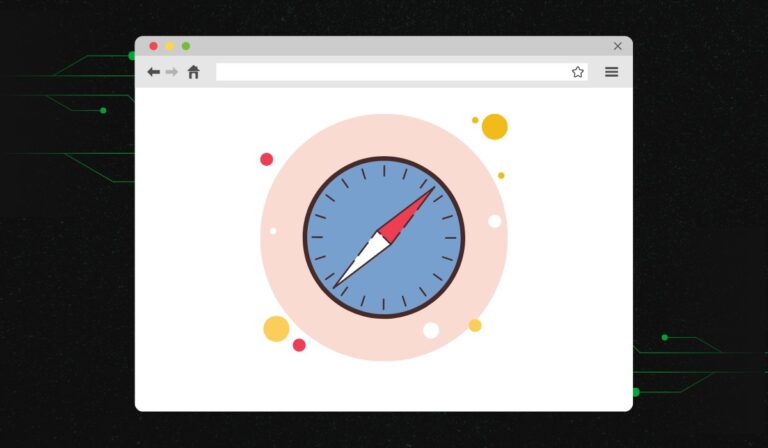
iLeakage is a side-channel attack that can force the Safari browser to divulge secrets like passwords and Gmail messages.

A side-channel attack looks at the indirect effects of a computer program, or computer hardware, which can reveal things about what’s happening under the hood. It’s like a thief looking at your house and concluding from the fact that there are no lights on and the car isn’t in the driveway that you aren’t home. The lights and the empty driveway are side channels.

In the case of iLeakage, the side channel is speculative execution, a performance enhancement feature found in modern CPUs. iLeakage is just the latest in a whole family of speculative execution bugs, known as Spectre, dating back to 2017.

Virtually every modern CPU uses some kind of performance optimization where it attempts to predict what a program will do next. Once a prediction is made, the CPU will execute instructions ahead of time, so that the answer is there immediately should you need it. If the CPU realizes its prediction was wrong it has to revert all the changes it made, but sometimes speculative execution leaves traces in the CPU’s microarchitectural state, and especially the cache.

A group of cybersecurity researchers used these traces to show how an attacker can make Safari reveal sensitive information. The attacks use a malicious web page that exploits iLeakage. The page can be used to open Instagram, Gmail, YouTube, or any other website in a new tab. Behind the scenes, the same Safari computer process renders both the malicious page and the target web page, allowing the malicious page to pull information from the target, such as auto-filled passwords, using iLeakage.

Although there are no fixes for iLeakage yet, there are mitigations. Unfortunately, all of them come with significant caveats. According to the researchers, the super-secure Lock Down mode that’s available on Apple’s Macs, phones, and tablets will disable iLeakage, but Lock Down mode can impact performance and, as Apple points out, “When Lockdown Mode is enabled, your device won’t function like it typically does.”

You can also stop iLeakage by disabling JavaScript execution in your browser, but this will likely impact the behavior of every website you visit, making many of them unusable.

There is another mitigation that specifically targets iLeakage, but it’s macOS only and it’s not enabled by default. On top of that, the mitigation is considered unstable, and it requires users to open a computer terminal window, which will be beyond many users’ comfort zones. If you really want to go there, you can read the instructions on the iLeakage site, under “How can I defend against iLeakage.” We suggest that unless you’re a high value target you probably don’t need to bother, and if you are a high value target you should enable Lock Down mode anyway.

There is no evidence that iLeakage has been abused in the wild, and figuring out how the researchers did it will be a significant undertaking for cybercriminals.


We don’t just report on vulnerabilities—we identify them, and prioritize action.

Cybersecurity risks should never spread beyond a headline. Keep vulnerabilities in tow by using Malwarebytes Vulnerability and Patch Management.


[ad_2]
Source link