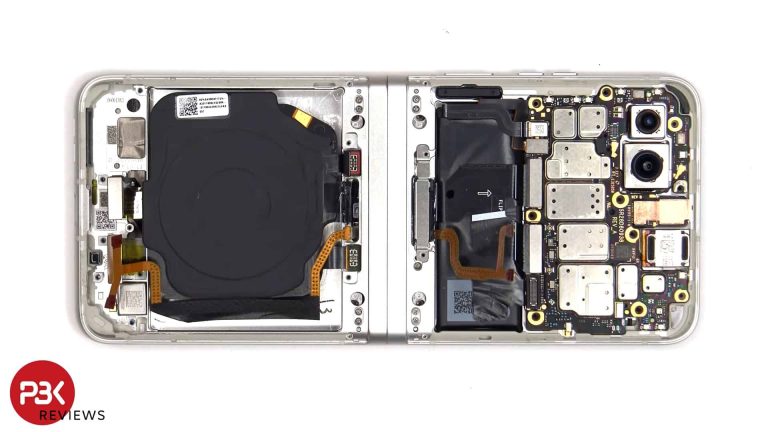
Motorola‘s Razr 2023 foldable, also known as the Razr 40, is the latest phone to go through a teardown at PBKReviews, the YouTube channel known for tearing apart new smartphones to show their internals. This follows a teardown of the Samsung Galaxy S23 FE where we saw the device’s impressive cooling system.
Razr 2023 battery replacements aren’t easy
The Razr 2023 is one of the two clamshell foldables Motorola launched this year. The Razr+, aka Razr 40 Ultra, is the other, with a bigger cover screen on the latter being a key difference. PBKReviews tore apart the former to show it inside out. As usual, the teardown begins with removing the SIM tray and peeling off the back panels. Heat is applied to soften the adhesive so that a pry tool can easily cut through it.
Motorola has applied a graphite film on the underside of the back panels to help transfer the heat from the phone’s body. The internals of the phone are held together with 14 screws. The YouTuber notes that the screws aren’t of the same size, so people dissecting the phone at home should be wary of it. The battery, wireless charging, and NFC cables have a metal bracket on top.
Once the cables are disconnected, we can lift off the sub-board of the Razr 2023. The board comes with the phone’s USB-C charging port attached to it. This paves the way for removing the bigger battery.
However, Motorola hasn’t provided pull tabs here. That means you must use isopropyl alcohol to dissolve the adhesive and use a pry tool to carefully detach the battery from its housing. The same applies to the smaller battery at the top.
The cover display comes off fairly easily with a pry tool. The main board, meanwhile, has a cover on top of it with seven additional screws holding it in place. The cover also has a cable attached to it. Once it goes off, we can see another layer of graphite film on top of the main board. It extends over to the secondary battery. The board now comes off with a graphite film under it.
The new Motorola foldable is quite difficult to repair
Removing the Razr 2023 display involves a similar process as the back panels. Overall, the new Motorola foldable is quite difficult to tear apart and repair. A soldered charging port, the lack of battery pull taps, and a complicated internal structure mean PBKReviews awarded it a repairability score of just 6 out of 10. You can watch the full teardown and re-assembly of the phone below.
The numbers are in for Q3 2023, guess how much Google spent on AI that quarter; $8 billion! Now, guess how much money it made off of AI that quarter. Well, it certainly wasn’t $8 billion. Now, investors and analysts are wondering how Google plans to monetize its AI products, according to a new report.
This might not be a huge deal for the average Joe, but if you’ve invested in the company, then you might be keeping an eye on the company. As per the company’s earnings report, Google’s cloud business saw a decline that quarter. This, coupled with the fact that Google spent so much money on AI last quarter has people wondering what the company is going to do to make AI more lucrative.
We all know that Google more than recuperated the cost with its ad business. However, that doesn’t do anything for investor confidence.
Investors and analysts want to know how Google plans to monetize
During the company’s latest earnings call, Google executives were presented with some heavy questions. These were about its plans for AI questions revolved around how the company plans to gain some income from AI. As we previously reported, Brian Nowak, managing director for Morgan Stanley, asked the company if there was any tangible sign that the company’s investments were generating a return. This question was centered around the Google Search Generative Experience (SGE).
Pichai responded that it will show “a wider range of sources on the results page, creating new opportunities for content to be discovered.” By this, we’re sure that he means more opportunities to show people ads. Ostensibly, that could lead to more income, but that remains to be seen. The issue with this is that the SGE gives you an AI-generated response to your search query. This eliminates the need to click on search results. That could lead to a decrease in the number of ad clicks.
Right now, we’re still in the early days of this AI age. It seems that Google is optimistic about it. However, the company is going to need to focus on monetizing its AI products. these services are rolling out now, so we’ll have a better idea of how this is going to go in the near future.
Yesterday, Samsung announced that it is ending the One UI 6.0 beta program for the Galaxy S23 series this week. However, the company said it might release one more beta update before that. It was doing a final inspection of the beta software and planned to roll out an update if it discovered major issues. The Korean firm seems to have found something, as it’s now pushing the ninth beta build to the phones.
The Galaxy S23 series is getting its ninth One UI 6.0 beta update
The latest Android 14-based One UI 6.0 beta update for the Galaxy S23, Galaxy S23+, and Galaxy S23 Ultra is currently available in Germany, the UK, and the US. Samsung will soon roll it out in other markets, including China, India, Poland, and South Korea. The new firmware build number is ZWJM (last four characters). The over-the-air (OTA) package weighs around 420MB depending on the region and device model.
Like the previous release, the ninth beta build for the Galaxy S23 trio doesn’t have a lengthy changelog. Well, the update size already reveals that it’s a minor release. Samsung is fixing bugs before the stable rollout, which is expected to begin at the end of this month. If you have enrolled your phone in the One UI 6.0 beta program, watch out for new updates in the coming days.
Samsung is also simultaneously running One UI 6.0 beta programs for several other Galaxy devices, including the Galaxy S22, Galaxy S21, Galaxy Z Fold 5, Galaxy Z Fold 4, Galaxy Z Flip 5, Galaxy Z Flip 4, and more. The update is available for a handful of Galaxy A, Galaxy M, and Galaxy F series phones as well. The company will gradually roll out the stable build to these phones over the next few months.
This update brings plenty of new features
One UI 6.0 is a major update for Galaxy devices. It brings new features that Google introduced with Android 14. On top of those, Samsung is offering some customizations and tweaks from its side. It has revamped the quick panel layout for a more pleasing visual design and more intuitive user experience.
The big new update also brings new camera features, gallery improvements, improved multitasking, content sharing, accessibility, and a host of other improvements. In short, One UI 6.0 will change the look and feel of your Galaxy device. Stay tuned for Samsung’s official update roadmap detailing the rollout plan for all eligible Galaxy smartphones and tablets.
Alongside iOS 17.1 today, Apple has also released watchOS 10.1. This is also the first .1 update to watchOS 10 since it came out last month, and it actually brings two main features.
The first new feature is one that Apple debuted on the Watch Series 9 and Ultra 2 last month. Which is Double Tap. It was odd that this was not available at launch, since it was the only real reason to upgrade from last year’s Apple Watches. But it’s here now in watchOS 10.1. This feature lets you double tap your fingers together to navigate through your Apple Watch. Now it’s not perfect, but it is pretty cool, especially if your other hand is full of groceries. Early beta testers have found that the feature doesn’t work in every single app, unfortunately.
The other feature is NameDrop. This actually came to the iPhone in iOS 17 last month, but now it’s here in watchOS 10.1. Basically, you can tap your watch to someone’s iPhone (or Apple Watch) to transfer your contact information. Just tap on the Contacts app, and then select your profile and tap on “share” from there you can bring the other person’s Apple Watch or iPhone close to initiate the transfer. It’s a really cool feature and kills the need for business cards.
When will watchOS 10.2 beta start?
Now that the beta for watchOS 10.1 is over, many might be wondering when the beta for watchOS 10.2 might start? It’ll likely start either tomorrow, or Apple might wait until next week to roll out the first beta.
As to what is coming in watchOS 10.2? We don’t have a clue yet, but should know pretty soon. And that’s because all of the features that Apple touted with watchOS 10 and even the new Apple Watch Series 9 and Watch Ultra 2 have already been released. So this could be a pretty small update. Even though we are expecting that iOS 17.2 will be a bigger update versus iOS 17.1.
Pwn2Own is a highly significant and influential annual hacking competition in the cybersecurity community. It serves as a platform for top researchers and hackers to demonstrate vulnerabilities in popular software and operating systems.
The event plays a crucial role in identifying and addressing security weaknesses, benefiting both the security industry and end-users. Pwn2Own’s impact extends to enhancing the overall security of technology platforms and promoting responsible disclosure of vulnerabilities.
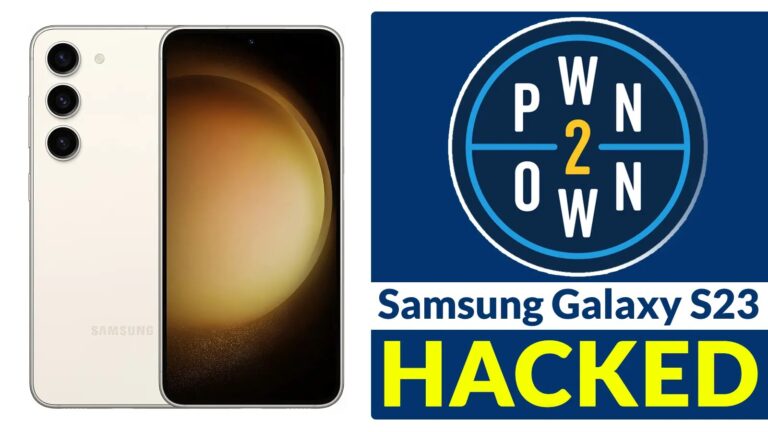
Recently, on day one of Pwn2Own 2023 in Toronto, cybersecurity researchers successfully hacked the Samsung Galaxy S23 twice, and not only that, but they also showcased exploits for zero days on other devices as well.
Here below, we have mentioned those devices:-
Xiaomi’s 13 Pro smartphone
Apple iPhone 14
Google Pixel 7
Printers
Smart speakers
Network Attached Storage (NAS) devices
Surveillance cameras from Western Digital
QNAP
Synology
Canon
Lexmark
Sonos
Google’s Pixel Watch
Chromecast devices
Pwn2Own Toronto
This year, in 2023, Trend Micro’s Zero Day Initiative (ZDI) hosted the Pwn2Own Toronto hacking event.
ZDI (Zero Day Initiative) is a program run by Trend Micro that focuses on the responsible disclosure of software vulnerabilities.
It’s crucial because it provides a structured and secure platform for security researchers to report and address zero-day vulnerabilities.
Pwn2Own Toronto 2023 is a significant event for the cybersecurity community. It gives security experts a chance to showcase their expertise and discover brand-new flaws in widely used software and devices.
The occasion also contributes to increasing awareness of the significance of cybersecurity and the requirement to fix vulnerabilities promptly.
Samsung Galaxy S23 Hacked
Pentest Limited earned $50,000 and scored 5 Master of Pwn points for being the first to demonstrate a zero-day on the Samsung Galaxy S23 through improper input validation.
The STAR Labs SG team secured $25,000 and 5 Master of Pwn points for hacking a Samsung Galaxy S23 in the second round by exploiting a permissive list of allowed inputs.
While in the mobile phone category, the Samsung Galaxy S23 was targeted by the following teams:-
Pentest Limited on Tuesday, October 24
STAR Labs SG on Tuesday, October 24
Interrupt Labs on Wednesday, October 25
ToChim on Wednesday, October 25
Team Orca of Sea Security on Thursday, October 26
Over $1 Million in Rewards
Here below, we have mentioned all the top payouts:-
For iPhone 14 hack $300,000
For Pixel 7 hack $250,000
As Google/Apple bonus, $50,000 for a kernel-level exploit
In this security event, a total prize pool of over $1,000,000 in cash is available for the participants.
Protect yourself from vulnerabilities using Patch Manager Plus to quickly patch over 850 third-party applications. Try a free trial to ensure 100% security.
Microsoft Edge Canary on Android adds Microsoft’s AI-powered Copilot feature to the bottom navigation bar. This means that you can now obtain a summary of long-form text with a single tap.
Have you ever come across information on the web that you’d like to consume in a summarized form? Until recently, you could achieve this by copying and pasting the text into an LLM like ChatGPT and asking it to provide a summary. However, this process requires some effort. Now, the integration of these LLMs into browsers, with their thoughtful implementations, is enabling unprecedented ways of doing so.
Microsoft has been pushing the boundaries with AI by integrating ChatGPT into Edge and Bing. This integration makes it much easier and more convenient to find and use information from the web.
Microsoft Edge Canary now takes the convenience to the next level with one-tap summaries for web pages
The latest update to Microsoft Edge Canary for Android makes the Copilot button available in the bottom navigation bar. It provides you with the gist of the page in a bulleted format without having to go through 1000+ words.
Sometimes, you read the whole article just to find out that the specific information you’re looking for is not even there. Your Copilot now basically brings a one-tap solution to that. Also, if you find the summarized information relevant, and you need more in-depth information about a particular topic, you can skip to the part of the page from a link on the summary.
You can also ask follow-up questions to your Copilot about the topic, and it will keep answering them in a concise form. The best part is that it answers your follow-ups based on the context of the page. So, it only provides information that’s relevant to you. This feature also works for PDFs, as reported by WindowsLatest.
Speaking of convenience, you can also listen to the page or translate it into another language with just one or two taps.
Last year, I reviewed the ECOVACS Deebot X1 Omni and absolutely loved that robot vacuum. The only real downside with that robot vacuum was the price. It did literally everything else you could want from a robot vacuum. This included a dock that could empty the dustbin, refill the water reservoir and even clean the mops (as well as dry them). Fast-forward to this year, and ECOVACS is back with a sequel, the Deebot X2 Omni, which does a lot of the same things, but better.
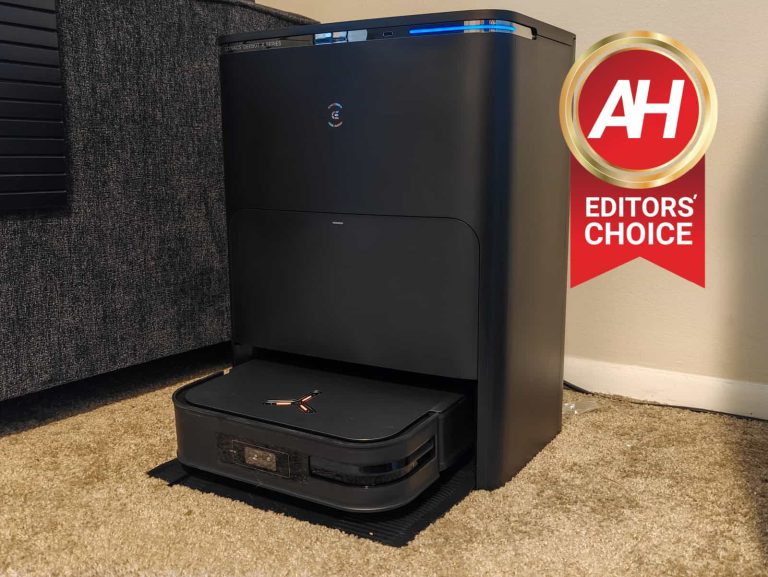
One of the bigger changes this year is that the robot vacuum is actually not a square, reminding me of the vacuums from Neato (which has since ceased operations). Which helps it get into corners better and also get out of the way when you’re not using it.
Now given all of these details, the question about the Deebot X2 Omni is going to be – is it worth the $1,500 asking price? Well, let’s find out in our full review here.
ECOVACS Deebot X2 Omni Review: Design
Let’s start with the design of the robot vacuum itself, and then we’ll move onto the dock. The robot vacuum itself is shaped like a squircle, which looks rather unique, and different from other robot vacuums on the market. Now the reason for this is to allow the vacuum to get into corners better, and edge clean rooms better. Along with this, there is still a rotating brush in the front that will loosen the dirt, with the two rolling brushes that will suck it up. ECOVACS, like most of the competition, has moved onto using a rubber roller system. But interestingly, ECOVACS is not using a dual-roller system here. Instead, the roller is much larger than the competition.
When you combine that larger roller with the 8,000Pa suction, the Deebot X2 Omni is able to do a really good job of cleaning your home. But on more on that in the next section. Towards the back of the bottom of the vacuum, are two mops. These are not the same mopping pads that most other robot vacuums have, these are actual mops. Allowing the Deebot X2 Omni to really scrub and clean your floors with ease. Which also explains why the dock is able to clean and dry these mops – to prevent bacteria of course.
On the sides, you’ll mostly just find different sensors, including the dual-LiDAR setup. Which works really well for navigating around your home. It also has two cameras on the front from AIVI 3D, which allows it to avoid objects in your home, and even pet waste. On the back, there’s a couple of contacts for when the vacuum is charging, and that’s also how it refills the water reservoir. Interestingly, there’s no user-accessible water reservoir on this model. Only a user-accessible dust bin.
On the top, you’ll see a big power button, which is in the shape of a Y, this is likely having to do with their personal assistant called Yiko. But you can easily take off the cover, and this is how you will get access to the dustbin, as well as a power button and the WiFi reset button. Honestly, after setting it up for the first time, I did not have to remove the cover at all. So this is something you’ll really never need to do.
The design of the robot vacuum by itself is quite impressive to say the least. It’s more slim-line than other robot vacuums on the market, while not really removing anything from the vacuum. Keeping the water reservoir inside the vacuum and not able to be removed is an interesting choice, but that might allow ECOVACS to make that reservoir larger than normal. Since I have a smaller place, with fewer non-carpeted rooms, it never really ran out of water for cleaning.
The dock is beautiful and functional
I honestly, never thought I’d say this about a robot vacuum dock, but it’s a pretty beautiful looking dock. Now the reason for spending so much time on the design of a dock, is so that people will want to have it in their living room, kitchen, or wherever they decide to keep it. Companies like ECOVACS are trying to make them look really nice, so they aren’t hidden and are actually used.
ECOVACS does offer the Deebot X2 Omni in both black and white. I do have the black one here, but the white one on their website does look pretty nice. And I definitely wouldn’t mind getting that one either.
The dock hasn’t changed a whole lot from the X1 Omni actually. You have a drawer in the middle that has the all the dirt from the dustbin, in a dustbag. And when you open the top, you’ll find two containers. One is clear and the other is darker. The clear one is for the clean water to clean the mops and also refill the water reservoir. While the other is the dirty water, from after cleaning the mops. It is important to empty the dirty water pretty often, otherwise, it can really start to stink.
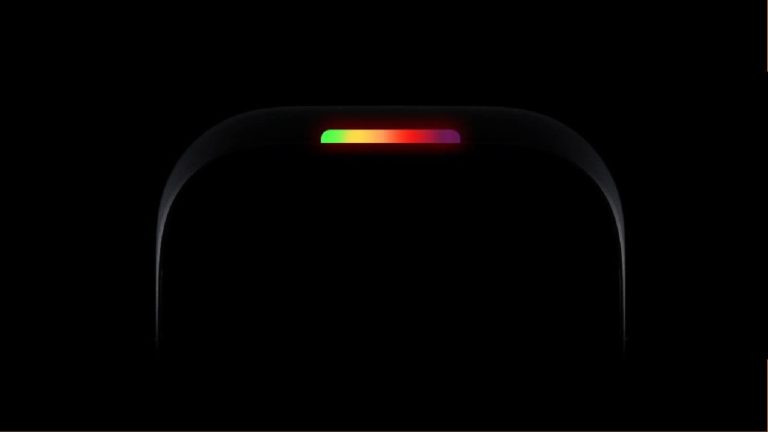
But that’s not all. There’s a metal strip near the top of the dock. Which has a button for the vacuum. This button can be pressed to stop or start cleaning, without needing to bend down and press the button on the vacuum. It’s a small thing, but it really does make a nice difference here. There’s also a LED light that goes along the right side of this strip, and this indicates a few different things, like the Deebot X2 Omni charging, or Yiko listening to you for commands. Yes, this robot vacuum has it’s own personal assistant. Why? I’m not sure. I actually ended up turning it off, because it kept triggering falsely.
ECOVACS Deebot X2 Omni Review: Cleaning experience
These days, most robot vacuums are pretty good at cleaning up your home. Some might have other features that make it work better, but for the most part, they do a great job. Now when you jump up to a $1,500 robot vacuum, you’d expect that it is able to clean well enough that you never need to vacuum yourself, and that might be true. That will depend on your home, people and pets that live there and such.
But for me, and my experience, I have not needed to pull out the actual vacuum at all, since I received the Deebot X2 Omni. Now I did use a regular stick vacuum to clean a mess upstairs because I didn’t feel like carrying the robot vacuum upstairs and then back downstairs when it was finished.
With 8,000Pa suction included, this robot vacuum can really clean very well. Getting up dirt, dust and other debris that might be tracked pretty well into your carpet. Just to give you an idea of how wild that suction is. Roborock’s highest rated suction on a robot vacuum is about 6,000Pa on the S8 Pro Ultra. iRobot maxes out at about 3,000Pa. So this is a huge jump and is currently the best on the market. It’s actually really close to and in some instances exceeds, what a regular stick vacuum or upright vacuum can do. So that’s really impressive.
Mopping is fantastic
Mopping is also quite good here. Like the competition, ECOVACS has made it possible for the Deebot X2 Omni to actually lift the mop, when it gets onto carpet. It is going to intelligently lift the mop, which is actually new to the X2 Omni. Over on the X1 Omni, you’d need to remove the mops to clean the carpet. Which was one of my biggest annoyances. Thankfully, I was using that before I moved and in my old apartment, it was about 85% laminate flooring. So this wasn’t as big of a deal. Now in my current house, it’s flipped, being about 90% carpet.
ECOVACS has included its OZMO Turbo 2.0 rotating mopping system on the X2 Omni, and I’m always quite impressed with how well this does with mopping. It provides consistent pressure on the floor to deep clean. It can also scrub pretty nicely. With AI, ECOVACS is also able to see what needs more scrubbing, automatically. And take care of it. Leaving even less work for the user.
To test this out, I spilled some ketchup on the floor in the kitchen and let it dry. Then let the ECOVACS Deebot X2 Omni loose on it. Surprisingly, it did a really good job on the first pass-through. But it continued to work on it, until it was all gone. It was really impressive. And on top of that, when it went back to the dock to clean the mops, it did a great job of getting them nice and clean. You can’t even tell it cleaned up dried ketchup now.
If you’re like me and don’t have a lot of spaces that need mopping, then the ECOVACS Deebot X2 Omni does seem like overkill, but it is nice to have. I have it running in the basement quite often – which is not carpeted at all. And it’s great to see the basement staying nice and clean. Especially since my home office is down there.
AIVI 3D 2.0 does a great job at avoiding things
A feature that has become quite popular in recent years is the ability to avoid obstacles and also identify them. This used to be the achilles-heel for robot vacuums, as it would run over a charging cord and be stuck. Or it would run over pet waste and smear it all over the home. There are plenty of horror stories about that all over TikTok and Twitter.
With AIVI 3D 2.0, it uses the dual-LiDAR system and dual cameras to identify objects that the robot vacuum might see on the floor in your home, and avoid them. It can also identify furniture. For instance, on the floor plan for my first floor, it does show the couch that’s against the wall. Which is rather neat.
With AI and machine learning work really well with these systems. Some still do have issues and get stuck. But surprisingly, I’ve had zero issues with this new and improved system from ECOVACS. I’ve not had to go rescue it at all. It has been able to avoid shoes, cords, dog toys and more. There is an option in settings to tell ECOVACS that you do have a pet, so it can look out for pet waste. However, it usually labels dog toys as pet waste, and obviously, that’s not true. But it still avoids it, so mission accomplished I guess.
Deebot X2 Omni is noisy, but quiet at the same time
This part is a little hard to explain. The Deebot X2 Omni is a tad on the noisy side. But when you compare it to other robot vacuums, it’s actually about the same level of noise, if not a bit quieter. Before reviewing the Deebot X2 Omni, I was using the Roborock S8 Pro Ultra everyday, and the difference in noise was pretty considerable. However, ECOVACS is also about 25% more powerful on the suction. So it was actually a bit surprising to me.
Obviously, you can somewhat combat the noise here by lowering the vacuum power. Which, if you’re on laminate or tile flooring, it doesn’t need to be at Max+ anyways. But it is something worth considering.
Honestly, the noise should not deter you. It’s really not that much more noisy than any other recent robot vacuum. So if you were thinking about picking up this one, don’t let the noise be the reason why you don’t.
ECOVACS Deebot X2 Omni Review: App experience
Honestly, the app isn’t my favorite for a robot vacuum. I’m much more in favor of how easy-to-use iRobot’s robot vacuum app is to use. It doesn’t give you a ton of options, and just has buttons to clean front-and-center. Then you have Roborock which gives you every option under the sun. ECOVACS is nicely in the middle.
So when you first open the app, you will see your robot vacuum, there’s a down arrow to choose a different one if you do have multiple ones in your home. From there you can see the usual things like whether it is online, what the battery percentage is, and you can also choose to have it start auto-cleaning or go back to the charger. And finally, you can enter to control your robot, or check out the video manager. The cameras on the front do record while it is cleaning, so you can see what your pets do. It’s a pretty cool feature that a lot of robot vacuums have these days actually.
Once you’re into controlling the robot vacuum, it does basically everything that you’d expect from a robot vacuum. This includes showing you a map of the floor it is on. Keep in mind that the Deebot X2 Omni is able to remember multiple floors. And once it is moved to a new floor, it can figure out which floor it is on.
Another cool aspect to these floor plans is that you can customize them. So right now, I have it mapped out for my main floor of my townhouse and my basement. In the basement, I don’t really need it to have the Max+ vacuum suction since it is a concrete floor. So I have it set to standard, which is quieter, and not quite as powerful. You can also change the water level, to low, medium or high for mopping.
ECOVACS will also give you a nice log of how it’s been cleaning. You can see whether it was a whole house cleaning or just an area that was being cleaned. As well as how much it cleaned and how long it took. I’ve noticed that the more it cleans, the faster it gets. This is likely due to there being less dirt and dust when it cleans everyday, but it’s also learning the floor plan each time it runs.
This is a pretty smart robot vacuum
It wouldn’t be a robot vacuum in 2023, without some smart features, right? And ECOVACS has you covered there. There’s a section in the settings for “Smart Cleaning”. This has a number of features, but one that is really interesting is the “Continuous cleaning”. The app says that “DEEBOT will adjust its charging time based on the remaining workload and resume unfinished cleaning tasks”. This is not something I was able to try out, since each floor is pretty small in a townhouse, so it’s usually finished before it needs to go and recharge. But if you have a larger home, this could be very useful.
The robot vacuum also has Do Not Disturb, which basically lets you set your robot vacuum to do not disturb so that it doesn’t start running in the middle of the night. Whether that be from a scheduled cleaning or continuous cleaning. Now this is not something that’s happened to me in quite a few years, but it is good to see this feature available.
A couple other smart features here include Auto-Boost Suction, which is pretty self-explainable. Basically, the vacuum will automatically activate max vacuum power if it detects that it is on carpet. And finally, AIVI 3D 2.0. I’d recommend everyone turn this on, as it is used to avoid and identify obstacles in your home.
The app experience is pretty good, still easy to use and lots of settings that you can use to get the most out of your robot vacuum.
Should you buy the ECOVACS Deebot X2 Omni?
The Deebot X1 Omni was already one of my favorite robot vacuums of the past two years. Because it does so many things, and does them all quite well. Now with the X2 Omni, ECOVACS has upped the game, pretty significantly The upgrade to 8,000Pa has been huge, especially for someone that has a dog that never stops shedding. There’s always dog hair that needs to be picked up, and the Deebot X2 Omni does a great job with that. As well as mopping.
The only real downside here is the price. It’s pretty steep at $1,500, making it one of the more expensive robot vacuums on the market. Which means that before you decide to buy this robot vacuum, there are a few questions you need to ask yourself. And really weigh if the convenience of not having to vacuum and mop your home are worth having a robot vacuum that costs $1,500. I mean, I have a MacBook Air M2 and that is a few hundred bucks cheaper than this robot vacuum.
Now would I buy this robot vacuum? Yes. The convenience factor alone is worth it. The fact that I can just schedule this robot vacuum to clean everyday and keep my home clean, is a big deal. And it requires me lifting zero fingers.
Password manager 1Password says it’s been affected by a breach at Okta, but it reports no user data has been stolen.
Password manager 1Password says it’s been affected by a breach at Okta, but it reports no user data has been stolen.
In a security incident report, 1Password says that a member of its IT team received an unexpected email suggesting they had initiated an Okta report of a list of admins. They hadn’t requested it so they reported the email to the security department.
An internal investigation showed unsolicited activity in the Okta environment which was traced to a suspicious IP address. Later it was confirmed that an attacker had accessed 1Password’s Okta environment using administrative privileges. 1Password says it took action straight away:
“We immediately terminated the activity, investigated, and found no compromise of user data or other sensitive systems, either employee-facing or user-facing.”
Okta breach
On Friday, Okta said it spotted an attacker using a stolen credential to access Okta’s support case management system. This allowed them to view files uploaded by certain Okta customers as part of recent support cases.
It’s normal for Okta support to ask customers to upload an HTTP Archive (HAR) file, which allows the team to troubleshoot issues by replicating what’s going on in the browser. As such, a HAR file can contain sensitive data, including cookies and session tokens, that cybercriminals can use to impersonate valid users.
A member of 1Password’s IT team was engaged with Okta support, and at their request, created and uploaded such a HAR file to the Okta Support Portal.
In the early morning hours of Friday, September 29, 2023 an unknown actor used the same Okta session that was used to create the HAR file to access the Okta administrative portal.
If the 1Password incident is a consequence of the same Okta breach, this puts the Okta breach which was discovered by BeyondTrust on October 2, 2023 in a new light as regards to the timeline. BeyondTrust says it had to persist with escalations within Okta until October 19, when Okta security leadership notified BeyondTrust that it had indeed experienced a breach and that BeyondTrust were one of the affected customers.
Okta says it has now notified all impacted customers.
“All customers who were impacted by this have been notified. If you’re an Okta customer and you have not been contacted with another message or method, there is no impact to your Okta environment or your support tickets.”
1Password suspects that the attackers were merely looking for information that would allow them to attack on a larger scale. They tried, for example, to access the IT team member’s user dashboard, but that attempt was blocked by Okta. They also requested a report of administrative users, which was the action that triggered the investigation.
A thorough investigation of the circumstances and the device that was used to upload the HAR file, did not reveal any reasons for the information to be captured. It did reveal which vendor 1Password relies on in a crisis though.
“The IT team member’s macOS laptop that was used is currently offline, and was scanned with the free version of Malwarebytes, which reported no findings.”
It wasn’t until after Okta revealed it’d had a security incident, that 1Password realized that the information was stolen during that incident.
Data breach
There are some actions you can take if you are, or suspect you may have been, the victim of a data breach.
Check the vendor’s advice. Every breach is different, so check with the vendor to find out what’s happened, and follow any specific advice they offer.
Change your password. You can make a stolen password useless to thieves by changing it. Choose a strong password that you don’t use for anything else. Better yet, let a password manager choose one for you.
Enable two-factor authentication (2FA). If you can, use a FIDO2-compliant hardware key, laptop or phone as your second factor. Some forms of two-factor authentication (2FA) can be phished just as easily as a password. 2FA that relies on a FIDO2 device can’t be phished.
Watch out for fake vendors. The thieves may contact you posing as the vendor. Check the vendor website to see if they are contacting victims, and verify any contacts using a different communication channel.
Take your time. Phishing attacks often impersonate people or brands you know, and use themes that require urgent attention, such as missed deliveries, account suspensions, and security alerts.
Malwarebytes Managed Detection and Response (MDR) simply and effectively closes your security resources gap, reduces your risk of unknown threats, and increases your security efficiency exponentially. Malwarebytes MDR staffs highly experienced Tier 2 and Tier 3 analysts who are hands-on with customer endpoints, ensuring critical threats are quickly identified and a thorough response is rapidly deployed.
Want to learn more about MDR? Get a free trial below.
Amazon has a great deal for the Galaxy Z Fold 5 right now, especially for those that don’t want to trade anything in. And it’s $300 off, that puts the 256GB model down to just $1,499. While the 512GB is also on sale, for $1,619.
The Samsung Galaxy Z Fold 5 is a foldable smartphone that offers a unique and versatile experience. It has a large, 7.6-inch display that’s great for watching videos, playing games, or multitasking. When you’re done, you can fold it up into a more compact form factor that’s easy to carry around.
Here are some of the reasons why you should buy the Galaxy Z Fold 5:
Large, versatile display: The Galaxy Z Fold 5 has a large, 7.6-inch AMOLED display that’s great for watching videos, playing games, or multitasking. You can also use the display as a digital notepad or to view two apps side-by-side.
Foldable design: The Galaxy Z Fold 5 is a foldable smartphone, which means you can fold it up into a more compact form factor when you’re not using it. This makes it easy to carry around and take with you on the go.
Powerful performance: The Galaxy Z Fold 5 is powered by the Snapdragon 8 Gen 2 processor, which ensures that it can handle even the most demanding tasks. You’ll be able to run multiple apps at once, play graphics-intensive games, and watch videos without any lag.
Long battery life: The Galaxy Z Fold 5 has a large battery that can last up to 24 hours on a single charge. This means you won’t have to worry about running out of power throughout the day.
Premium design: The Galaxy Z Fold 5 has a premium design that’s made from high-quality materials. It’s also water resistant, so you don’t have to worry about it getting damaged in the rain or snow.
Overall, the Galaxy Z Fold 5 is a great choice for anyone who wants a powerful, versatile, and stylish smartphone. It’s the perfect device for people who want the best of both worlds: a large, tablet-like display and a compact, portable form factor.
Right now, powerful AI technology primarily lives on our phones and computers. This could be via the web or installed applications. Well, there are companies that want you to embrace AI in different ways. According to the report, a company called Humane just unveiled the AI Pin, and this is a device that will let you wear your AI.
This device was selected as one of Time Magazine’s best inventions of 2023, and it looks like it will be an interesting device. The company behind it is named Humane. The co-founder and chairman Imran Chaudhri gave a TED talk showcasing the device.
The Humane AI Pin will let you wear your AI
So, this is a wearable device that will employ a proprietary operating system to operate. Most wearable devices require communication with a smartphone or other connected device. In the case of the AI Pin, this device can operate independently. That’s impressive for being a device powered primarily by AI.
Speaking of AI, it’s going to be using some of the most powerful AI out there. According to the company, it will use OpenAI’s GPT-4 LLM. This will give it powerful generative AI capabilities. This only makes us wonder how the company is able to keep this device so small. We doubt that it would need to connect to the internet because people would need to buy a data plan just for the device, which won’t sit well with people.
If everything is being handled on-device, then we can guess that the company is using a stripped-down version of GPT-4 in order to fit on the device. This isn’t something that’s entirely new, as the Google Pixel 8 phones have a stripped-down version of Google’s own foundational model right on their chip.
How will this device work?
It’s a pendant that will clip onto your shirt. In order to interact with the interface, you’ll need a surface for it to project onto. That’s right, this pin uses a tiny projector. In the screenshot, we see the rudimentary calling UI projected on Imran Chaudhri’s hand.
The device also has a scanner that reads incoming light, it appears. So, if you tap on your hand where the buttons are, we’re sure that the scanner will read how the light is reflected off of your finger to know what “button” you pressed.
We saw the scanner used in a different way later in the TED Talk. We saw it scan a candy bar and caution Chaudhri not to eat it. While this is advice we can all use, it showed that the AI Pin was able to scan the bar, recognize it, and give a response. That shows a level of scene recognition on the level of Google, which is impressive.
Right now, details about this device are scarce. The company was going to do an announcement for the product this month, but it moved the announcement to November 9th. When that announcement comes, we’ll learn more about this device.