It took OnePlus a few years to actually put out their first foldable, but it really seems like it might be the best foldable on the market. The OnePlus Open is doing a lot of things that the Samsung Galaxy Z Fold 5 does not do. This includes offering double the storage, more than double the charging speed, a larger battery, much brighter displays, and a usable front-display.
Sure, some might argue that this is not OnePlus’ first foldable, because they are the same company as OPPO, who has released a number of foldables already. Which is fine, since the OPPO Find N3 is literally the same phone as the OnePlus Open. Just with an OPPO logo, and a few more color options. But OnePlus has really hit the foldable out of the park with the Open. Though I’m still not completely sold on the name here. It’s different, seeing as everyone else is using “Fold” in their name. But it still seems a bit odd.
Let’s find out if the OnePlus Open is the right foldable for you, in our full review.

OnePlus Open Review: Hardware and Design
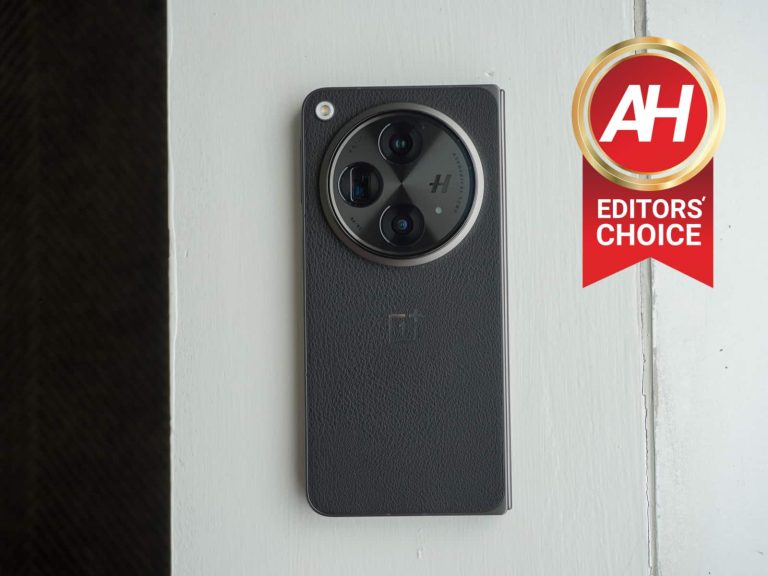
OnePlus and OPPO have always built really well-made smartphones, and with the Open, you can see even more of that OPPO pedigree here in the hardware and design. On the back, OnePlus has included a pretty large camera bump, that looks similar to its other smartphones. So you can see that OnePlus design here on the Open. This camera bump does include three flagship-level cameras, which is quite impressive, and we’ll tough on that more in the camera section of this review.
But the camera bump does serve a nice purpose. And that’s making it easier to hold onto. I sometimes use the camera bump to hold onto the phone when using it in landscape to watch a video or something like that. It does make it pretty easy to hold onto, especially since the bezels on the OnePlus Open are pretty small already. It also makes it easier to hold onto when the phone is closed, since you can rest your finger below the camera, instead of holding the entire phone on your pinky. That poor pinky. It’s a small thing but it’s actually pretty genius in the design of the OnePlus Open.

The back of our unit is a black vegan leather back. Which is really nice to have. It makes it super grippy, and less likely to be dropped. It does come with a case in the box, but I’ve rarely used it, to be honest. It is a decent case, but the vegan leather back means it’s not really needed. At least in my opinion. If I were spending $1,700 on this phone, I’d definitely be using the case, or even buying another case for this phone. Make sure it’s nice and protected.
The frame here feels really high-end too. It’s made of Titanium Alloy, Carbon Fiber and a few other materials that make it strong without making it heavier. In fact, the OnePlus Open is super lightweight. It weighs 239g. That doesn’t sound light for a phone, but here are a few competitors’ weights: iPhone 15 Pro Max at 221g, Samsung Galaxy Z Fold 5 at 253g, and Google Pixel Fold at 283g. That’s rather impressive, and it’s only heavier than the iPhone 15 Pro Max because Apple went with Titanium this year instead of sticking with Stainless Steel.

OnePlus has brought back the Alert Slider, which is always a crowd-favorite for OnePlus and now OPPO fans. It’s on the right side of the phone when opened, with the volume slider above the power button on the left side. So when it is closed, the Alert Slider is above the volume rocker. There’s loads of tactile feedback with the Alert Slider on the OnePlus Open too, making it very satisfying to switch up.
On the front of the phone, there’s a pretty small 6.31-inch 18:9 aspect ratio display. This smaller display makes the Open great for putting into your pocket, without taking up to much space. It does have the rounded corners like most displays, and you can see the frame around it, which I think looks really nice in this Voyager Black color, to be quite honest.
The hardware here reminds me of something Motorola would make. It’s an industrial design that is also stunning. And honestly, since I’ve received the OnePlus Open almost a month ago, it’s been tough to put it down. It’s such a great feeling phone, and it looks incredible too. And I just love everything about it. In fact, I’ve been using it so much that a lot of the pictures in my most recent reviews came from the OnePlus Open, instead of the iPhone 15 Pro Max.
The hinge
The hinge here on the OnePlus Open is really impressive. OnePlus was able to reduce the number of parts required for the hinge from over 100, to about 69 (nice). This means a thinner hinge and a more durable hinge. OnePlus says that the hinge has been certified for reliable folding by an international certification institute for over 1 million folds. That comes out to about 100 folds per day over 10 years. Now, obviously, there’s no way that we could have tested that out, in just a month. But even at 100 folds a day, that seems excessive, so this hinge should definitely last the life of the phone.
Another aspect of the hinge that shocked me is, when you open it, it almost springs open. You can still use it in tent mode, or at a 90-degree angle, but when you go past 90-degrees, it kind of springs open to 180-degrees. And yes, it does open completely flat, unlike the Pixel Fold that opens to about 178 or 179 degrees. That’s something I have to look at now with every foldable, since the Pixel Fold.
OnePlus Open Review: Displays
Both displays on the OnePlus Open are the best displays I’ve ever seen on a foldable. Why is that? Well, for one, they are crazy bright. There was a lot of talk about the Google Pixel 8 Pro sporting a 2400nit peak brightness display. And well, OnePlus has surpassed it – on a foldable. Both of these displays are 2800nit peak brightness. Making them super bright and a joy to use outside in direct sunlight. This is really impressive on a foldable because the folded screen is made of plastic, with an ultra thin layer of glass. And plastic is naturally very reflective. Making it hard to use in direct sunlight – the Pixel Fold was almost unusable outdoors.

The front display is a weird aspect ratio, around 20:9, with a resolution of 2482×1116 pixels. That gives it 431 pixels per inch, and almost a regular smartphone aspect ratio. For example, the recently released Pixel 8 Pro is a 20:9 aspect ratio. So because of this, using the front display becomes very natural, because it’s the same as a non-folding smartphone. Unlike the likes of the Galaxy Z Fold 5, which has a very skinny and tall front display. Making it harder to use.
That display is also a dynamic refresh rate display, able to go from 10Hz to 120Hz. Making it good for using Always-On Display. And conserving battery life as well.
OnePlus Open’s main display is simply stunning
Now let’s talk about that main display. It’s still basically a square display, like most book-style foldables. It has an aspect ratio of 1.0758:1. It also sports a nearly 2K resolution at 2440×2268, that’s giving you 426 pixels per inch. And it also has up to 2800 nits of peak brightness, or 1400 nits typical brightness. This is an LTPO display able to move dynamically from 1Hz to 120Hz.
OnePlus did not outfit the Open with huge bezels like the Pixel Fold (though, I do not really care that those bezels are so large, they make it easy to hold onto). Instead, they are pretty thin, and look really good actually, here. But the main thing with this main display is the crease. You might say “What crease?”. Exactly. OPPO has been working hard on recent foldables to basically get rid of the case. It was still very slightly noticeable on the OPPO Find N3 Flip that I recently reviewed. But on the OnePlus Open, I really only see it when looking for it. It’s more of a feeling than seeing, the crease here. And this is after using the phone for a month, meaning that it has been opened and closed many times, breaking in that crease. It’s honestly very impressive what OnePlus has managed to do here.

This is why this is the best display I’ve seen on a foldable so far. It’s very bright, very little crease, and still able to go from 1Hz to 120Hz. OnePlus really went all out here. And as they told us in our briefing last month, the Open does have “Over-the-top” specs.
The only real complaint I have here is that the longer side is on the y-axis, instead of the x-axis like the Find N2 and Pixel Fold. Which meant that you’d get tablet apps without rotating the phone. But with the Open, to get the tablet version of say Gmail, you do need to rotate the phone. It’s honestly not a big deal, but it is something to think about.
OnePlus Open Review: Performance
This is the part that everyone’s waiting on. The performance of OnePlus’ first foldable. And to keep it short, it’s very good. And exactly what you would expect from OnePlus.
Of course, that is very much expected here, when you look at the spec sheet. That includes the Qualcomm Snapdragon 8 Gen 2 processor, 16GB of RAM and 512GB of storage to boot. That’s more RAM than Samsung’s foldables, double the storage, and it’s the same price. Making me wonder why you would buy the Galaxy Z Fold 5 over the OnePlus Open.
We’ve tested loads of phones running on the Snapdragon 8 Gen 2, so the performance here is not surprising at all. It’s a great chip, with really good battery efficiency. And that continues to be true here on the OnePlus Open. Adding in that extra RAM and storage, makes this a pretty beastly foldable.

As mentioned before, I’ve been using this phone off-and-on for about a month at this point. So that’s plenty of time to test out the performance of the Open, and it’s honestly incredible. I have not once gotten it to get hot at all. It does get a little bit warm when you use the camera for a long time, or do some long gaming sessions, but not uncomfortably hot.
Face Unlock and Fingerprint
Like most newer Android phones, the OnePlus Open does include both Face Unlock as well as a Fingerprint option. The fingerprint sensor is located in the power button, as it is on every foldable – because you don’t want to press down to hard on that main display. And I still believe this is the perfect spot for a fingerprint sensor. It’s fast, and it’s where you’re already pressing to turn on the phone.
Then there’s Face Unlock, which isn’t as strong as a fingerprint, but it does work and it is fast. Honestly, I had it on for a few days and then turned it off, as I was just using the fingerprint option all the time.
Speakers sound magnificent
OnePlus has outfitted the Open with a triple spatial speaker set up, and it also has Dolby Atmos included. So that means it should sound pretty incredible right? Right. OnePlus says that these speakers work in tandem with a proprietary spatial audio algorithm to take Dolby Atmos content to the next level. It also allows for three-dimensional sound that comes to users from all directions.

Basically what this means is that you can use the speakers on the OnePlus Open to watch videos and even listen to music, without your earbuds. I’ve been watching videos from YouTube, Peacock, Prime Video and more on the Open for the past few weeks, and it’s been a really incredible experience, to be quite honest. These are honestly some of the best speakers I’ve heard on a foldable. Which is rather unique since foldables generally use as much space as possible for the battery, while also trying to be super thin. OnePlus was able to add in some pretty powerful speakers, a larger battery and make the Open thinner than most foldables – except for the Honor Magic V2 and VS2.
OnePlus Open Review: Battery life and Charging
OnePlus can’t claim that it has the largest battery in a book-style foldable, unfortunately. Since the Google Pixel Fold is a tiny bit larger. But OnePlus was able to cram a 4,805mAh battery inside this pretty thin foldable. And paired with the Snapdragon 8 Gen 2 processor, this thing sips on battery.
Most of the time, I was unplugging the OnePlus Open around 7am and using it throughout the day before putting it back on the charger around 11PM. And it often times had over 6 hours of screen on time, and about 30% left. On heavy days, I was able to push it to 10 hours of screen on time. Now that is right on-par with the OnePlus 11 when I tested that earlier this year. So in my experience, this also has the best battery life on a foldable, so far. Not night and day better than the Galaxy Z Fold 5, but this is one of those phones that can last me a solid two days, depending on the usage.
Charging is also a bright spot for the Open. And that’s for two reasons. One, the charger is included in the box. Two, it’s 67W SUPERVOOC charging, even though the charger is 80W. This charging means that it can fully charge the OnePlus Open in about 40-ish minutes. You won’t really need to top-up the phone, but when you do need to, the Open is great for it.
The only downside here is that there’s no wireless charging on the OnePlus Open. The company stated that they felt users wanted a bigger battery and faster wired charging, over offering wireless charging. Which I can get, and the faster charging is definitely nice to have here. But wireless charging is just so convenient. OnePlus does tend to flip-flop on their stance on wireless charging. Keeping it in some of its flagships and removing it in others to lower the price. The good thing here, is that the charger is available in the box.
OnePlus Open Review: Software
Before we jump into the software on the OnePlus Open, let’s talk about how many updates this will get. OnePlus is promising 4 years of OS updates and 5 years of security updates. That’s pretty good, and stays with the competition – except for the new Pixel 8 series which offers 7 years. It’s pretty good, and I doubt many will still be using their OnePlus Open after 4 or 5 years. Most people buying this phone are early adopters. So good job OnePlus.
The OnePlus Open is launching with Android 13 and OxygenOS 13.2. It should be getting Android 14 and OxygenOS 14 before the end of the year. So a lot of the main features of this phone are the same as the OnePlus 11. But there are quite a few great features here that help to make that larger display a lot easier to use.
OnePlus claims that the Open is the perfect choice for entertainment, and they aren’t wrong. Why? Because you can run three apps on the main display at the same time. You can have a YouTube video playing across the top or bottom, or even in Picture-in-Picture, with two other apps open. So while you’re watching your favorite YouTuber, you can also be on X/Twitter seeing what’s going on.

This is part of the Open Canvas feature that OnePlus built for the Open. It was built from the ground-up, and about 95% of apps are compatible with the extended display, without putting it into a weird resizing. You can stretch and resize the apps to fit however you want on the screen. You can also push apps off the screen, or use a floating window. It takes multi-tasking to the next level. You can also save these app combos, so you can quickly jump back into these apps. OnePlus lets you save up to nine app combos.

OnePlus also has the desktop-like Taskbar that Google added to foldables with the Android 12L update a couple of years ago. But OnePlus has made it even better. OnePlus has added a button to the left side that will open the app drawer, making it quicker to jump into apps. And there is also a button for the file manager. This file manager has three tabs for images, documents and others. So say you are typing up an email in Gmail, and need to attach a photo, just tap on the file manager and then you can drag-and-drop a photo into that email, or a document to attach to that email. It’s not something I have used a lot, but the few times I have used, it’s been really nice to have.
The Taskbar does also add three of your most recently used apps to the right side of the dock. Which makes for switching apps a whole lot faster. And so you’ll never have to actually go to the home screen.
OnePlus is also allowing users to adjust the display size of apps, on a per-app basis. This is actually a feature that Google just added to the Pixel Fold on the Android 14 QPR 1 Beta. So it’s good to see that OnePlus is ahead of things here. You can choose full screen, 16:9 or 4:3 for the size. This is great for apps like Instagram, however now that Instagram’s foldable layout has rolled out to other foldables, it’s not needed as much. Basically, all it has done is moved the bottom bar to the side. But it is a big change that makes it a lot easier to use.
OxygenOS also runs very smoothly on the OnePlus Open, which is great to see. It should be expected, with the hardware that’s here, but it is good to see. During my time with it, I have not seen the OnePlus Open slow down at all. I have seen some force closing of apps, but I’ve chopped that up to the apps being beta versions – like Instagram and X. Which was actually fixed after a day, so I’m 100% sure that this was an issue in the beta version of Instagram and the beta version of X.
OnePlus Open Review: Camera
This is honestly my favorite part about this phone. The cameras on this phone are incredible. There’s a triple camera setup here on the Open, which includes the new Sony LYT-T808 “Pixel Stacked” sensor as the main sensor. This is a rather unique sensor and it’s fairly new from Sony. But it stacks pixels, so it can bring in more light, in less space, giving what OnePlus says is “almost 1-inch sensor” results. This is a 48-megapixel sensor, with a f/1.7 aperture and the pixels themselves are 1.12um, which is quite large. This is a 24mm equivalent lens.
On the telephoto, OnePlus is using an OmniVision OV64 with 3X optical zoom and 6X in-sensor zoom. This is a 70mm equivalent lens, with 64-megapixels and a f/2.6 aperture. The third camera is the ultrawide, which is a Sony IMX581. This is also a 48-megapixel lens with a f/2.2 aperture and it’s a 14mm equivalent.
These sensors are once again tuned by Hasselblad, and it really seems like this partnership is starting to bear fruits for OnePlus and Hasselblad. Because each sensor is really incredible. Not to mention the fact that OnePlus lets you choose from 24mm, 28mm or 35mm as the default option for the main lens. This is the same as the iPhone 15 Pro Max, and it’s honestly a feature that I hope gets put onto every other phone coming out over the next year. Being able to shoot in 35mm by default on a phone is incredible. Suffice to say that is the default for me here.
35mm is the correct default focal length
OnePlus invited most of the US and Canadian media to New York City in late-September for a one-day summit on the OnePlus Open. Which consisted of a briefing about the device, as well as a cruise down the Hudson River (with Tacos!) to really try out the OnePlus Open. So I got a lot of photos that day with the OnePlus Open, and was able to try out the night mode too. But by far my favorite mode is setting the default focal length at 35mm. You can do this by going into the Camera Settings, then tapping on “Default wide-ange focal length”. Which then gives you 24mm, 28mm and 35mm.
35mm is great because it gives you a really natural bokeh effect, And it’s zoomed in a little bit, but not a ton. You can check out a number of 35mm shots I took with the OnePlus Open in the gallery below.
Here are a bunch of photos taken at the default focal length of 24mm. These still look great, however when you jump to 35mm, you get a bit more depth of field, which can make photos look a lot more dramatic.
This Telephoto lens is unreal
The thing that really shocked me with this camera setup was the telephoto lens. This is a 3X optical lens, but because the lens is so large, OnePlus is able to crop in and give you a 6X optical zoom, and keeping it lossless. Meaning that you can take some incredible 6X zoom shots. It can also go all the way up to 125X (Galaxy S23 Ultra who?), though as you’d expect a lot of those shots are not worth it.
In the gallery below, you’ll see a number of shots using the 6X optical zoom here, and a bunch were taken at night on a boat in choppy water in the Hudson River. Which made it even more impressive in my opinion. A few shots were a bit blurry, and given the conditions, I can forgive it. But most came out really well here. And helped me fall in love with the OnePlus Open.
So why is this all such a big deal? Well, on foldables, typically they get older flagship cameras, or a step down from a flagship camera. They generally aren’t quite as good, but that’s not the case here. The OnePlus Open might have the best cameras on a smartphone this year. Google’s Pixel 8 Pro is doing a good job of competing with it, but a lot of what Google does is fixing stuff in post. Everything I’ve shown you in this camera section was unedited and taken with the default settings. And that makes this even more impressive.
Here are some shots taken with the telephoto lens at 3x and 6x.
Should you buy the OnePlus Open?
Despite my love for the OnePlus Open, it’s still tough to recommend it. Mainly due to the price. This is a $1,699 phone at the end of the day. And while it does a lot of things right, not everyone can afford to, or wants to spend that much on a phone. And I completely understand. Of course, part of what makes this tough for OnePlus is that it is not going to be available on carriers (it does work on all three US carriers though). So customers won’t be able to take advantage of the crazy trade-in deals that some carriers tend to offer.
At the end of the day, the decision is up to you. And if you’ve been thinking about getting a foldable, there’s no better option than the OnePlus Open as your first foldable experience. And that’s because OnePlus was able to sit back and see all the mistakes that other companies did with their early foldable devices, Samsung is on their fifth-generation foldable, and they are pretty far behind the OnePlus Open right now, surprisingly.

You should buy the OnePlus Open if:
You want the best all-around experience from a foldable.
You want flagship-level cameras.
You want a foldable that can charge fast.
You should not buy the OnePlus Open if:
You don’t want to spend over $1,000 on a phone.
You aren’t comfortable with a phone that could break.
[ad_2]
Source link