TikTok is one of the biggest social media platforms in the world, boasting a whopping 1.7 billion monthly active users and anticipating ad revenue to soar beyond $18 billion this year, a notable leap from 2022’s $11 billion. If you’re a TikTok user, you’re likely familiar with those ads that are as persistent as a used car salesman. However, change might be on the horizon.Recent intel from Android Authority unveils potential game-changer news: strings in the latest TikTok app version suggest the platform is testing an ad-free monthly subscription plan. In the testing phase, this ad-free TikTok experience is priced at $4.99 per month.
TikTok did confirm to TechCrunch that the company is indeed testing an ad-free tier but only exclusively in a single English-speaking market outside the US. TikTok also disputes reports suggesting a US launch, emphasizing that small-scale tests don’t guarantee an imminent product launch.
However, if the test turns out to be successful, a launch might be on the map after all. For now, the subscription seems geared towards tackling TikTok’s own ads, excluding influencer marketing or campaigns. This means it won’t necessarily address the issue of TikTok users sidestepping brand sponsorship disclosures.
TikTok makes most of its money from ads and has weathered the storm of a broader online ad spending slowdown. Just recently, the company integrated ads into search results, too. Whether an ad-free subscription can replace any ad revenue (remember that $11 billion for 2022 alone) is still up in the air, but TikTok seems keen on giving it a shot.
Drawing inspiration from platforms like YouTube and X, which already provide premium subscriptions without ads, TikTok’s venture into ad-free alternatives might bring some excitement. Even though a relatively small number of users, such as 80 million out of over 2.7 billion active YouTube users, choose to pay for the ad-free option, having the choice would probably be a welcomed feature.
In the realm of cybersecurity, the battle against threat actors never stops. With its vast cloud infrastructure, Amazon Web Services (AWS) is at the forefront of this ongoing struggle.
AWS employs a global network of sensors and advanced disruption tools daily to detect and thwart hundreds of cyberattacks.
These relentless efforts remain largely unseen but play a pivotal role in safeguarding AWS’s network, infrastructure, and customers.
Beyond protecting its own ecosystem, AWS collaborates with responsible providers to combat threat actors operating within their infrastructure, contributing to a safer internet as a whole.
DocumentFREE Demo
Implementing AI-Powered Email security solutions “Trustifi” can secure your business from today’s most dangerous email threats, such as Email Tracking, Blocking, Modifying, Phishing, Account Take Over, Business Email Compromise, Malware & Ransomware
Global-Scale Threat Intelligence with AWS Cloud:
AWS boasts the largest public network footprint of any cloud provider, granting it unparalleled real-time insight into internet activities.
Leveraging this scale, AWS Principal Security Engineer Nima Sharifi Mehr pioneered innovative approaches to gather threat intelligence.
The result was MadPot, an internal suite of tools designed for two primary purposes: detecting and monitoring threats and disrupting harmful activities when possible.
MadPot has evolved into a sophisticated system of monitoring sensors and automated response capabilities.
MadPot: Mimicking Real Systems at Scale:
MadPot, resembling honeypots, deceives threat actors by appearing as a vast array of plausible innocent targets.
This approach attracts threat actors, whose behavior is then observed and acted upon.
MadPot sensors monitor over 100 million potential threat interactions daily, with around 500,000 classified as malicious.
This wealth of threat intelligence is analyzed to provide actionable insights about potential harmful activity across the internet.
Automated responses protect AWS’s network from identified threats, and relevant information is shared with companies whose infrastructure is used for malicious activities.
Swift Action and Disruption:
Internet probes detect it within approximately 90 seconds of deploying a new MadPot sensor. In just three minutes on average, attempts to penetrate and exploit it occur.
MadPot then analyzes telemetry, code, network connections, and other threat actor behavior data points.
High-confidence findings trigger disruptive actions, such as disconnecting threat actors from AWS networks.
Additionally, threat data is shared with customers through Amazon GuardDuty, allowing their own tooling and automation to respond effectively.
Collaborating with the Security Community:
AWS actively collaborates with the security community, sharing threat intelligence findings. In the first quarter of 2023 alone:
– 5.5 billion signals from internet threat sensors and 1.5 billion signals from active network probes were used in anti-botnet security efforts.
– Over 1.3 million outbound botnet-driven DDoS attacks were stopped.
– Security intelligence findings were shared with hosting providers and domain registrars, including nearly a thousand botnet Command and Control (C2) hosts.
– 230,000 Layer 7/HTTP(S) DDoS attacks were traced back and disrupted.
Effectiveness in Action: Botnets, Sandworm, and Volt Typhoon:
MadPot has proven its effectiveness in identifying and mitigating threats across various infrastructure types. It has successfully disrupted DDoS botnets, aided in identifying and mitigating the Sandworm threat group, and contributed to dismantling state-sponsored threat actor Volt Typhoon.
The relentless efforts of AWS’s MadPot system demonstrate its commitment to securing the cloud and making the internet a safer place for all.
Protect yourself from vulnerabilities using Patch Manager Plus to quickly patch over 850 third-party applications. Take advantage of the free trial to ensure 100% security.
The FBI has warned about new tactics deployed by ransomware gangs, dual attacks and use of wipers.
The Federal Bureau of Investigation (FBI) has released a notification that highlights two trends emerging across the ransomware environment.
The trends the FBI says it’s noticed since July 2023 are:
Multiple ransomware attacks on the same victim in close date proximity.
New data destruction tactics in ransomware attacks.
With multiple, or dual ransomware attacks, the FBI says cybercriminals deployed two different ransomware variants against victim companies, using the following variants: AvosLocker, Diamond, Hive, Karakurt, LockBit, Quantum, and Royal. These variants were deployed in various combinations.
This use of dual ransomware variants resulted in a combination of data encryption, exfiltration, and financial losses from ransom payments. Although some of the same principles apply, these tactics are even worse than experiencing a ransomware reinfection. Second ransomware attacks against an already compromised system could cause significant harm: Besides making it harder to remediate and causing extra delays in getting everything back up and running, it also frustrates and discourages those working on the affected systems.
According to the FBI’s data, the majority of ransomware incidents targeting the same victim take place within a 48-hour timeframe. The FBI report doesn’t say anything about the possible reasons why this is happening, but there are a few we could think off.
The second trend, according to the FBI, is that multiple ransomware groups have increased the use of custom data theft, wiper tools, and malware to pressure victims to negotiate. In some cases, new code was added to known data theft tools to prevent detection. In other cases in 2022, malware containing data wipers remained dormant until a set time, then executed to corrupt data in alternating intervals.
We can safely say that these are indeed tactics that may drive a victim to the negotiation table. Having a ticking time-bomb next to your network that may wipe critical data at a certain time will leave you looking frantically for the trigger and other ways to escape the ordeal.
The FBI wants victims to notify it of an attack. If your organization has experienced a ransomware event, you should provide law enforcement agencies with the most complete reporting possible. A complaint can be filed to the Internet Crime Complaint Center (IC3) here.
Organizations can also contact their local FBI field office, which will ask for the following information:
Prevent intrusions. Stop threats early before they can even infiltrate or infect your endpoints. Use endpoint security software that can prevent exploits and malware used to deliver ransomware.
Detect intrusions. Make it harder for intruders to operate inside your organization by segmenting networks and assigning access rights prudently. Use EDR or MDR to detect unusual activity before an attack occurs.
Stop malicious encryption. Deploy Endpoint Detection and Response software like Malwarebytes EDR that uses multiple different detection techniques to identify ransomware, and ransomware rollback to restore damaged system files.
Create offsite, offline backups. Keep backups offsite and offline, beyond the reach of attackers. Test them regularly to make sure you can restore essential business functions swiftly.
Don’t get attacked twice. Once you’ve isolated the outbreak and stopped the first attack, you must remove every trace of the attackers, their malware, their tools, and their methods of entry, to avoid being attacked again.
Malwarebytes EDR and MDR removes all remnants of ransomware and prevents you from getting reinfected. Want to learn more about how we can help protect your business? Get a free trial below.
Amazon used a secret algorithm called Project Nessie to essentially dupe buyers out of more money. That’s according to a new report from The Wall Street Journal which details the algorithm and Amazon’s use of it. Project Nessie was initially mentioned in the FTC’s lawsuit filing back in September but much of the information surrounding it was redacted.
So there wasn’t a whole lot of detail about what it actually was and what Amazon was doing with it. Turns out, Amazon was using it to get more money out of shoppers. You may as well look at it as Amazon reaching directly into your pocket and taking money straight out of your wallet. Because the end result is the same.
Based on the TWSJ’s findings, Project Nessie was a way for Amazon to artificially inflate pricing on tons of items. These prices increases were happening across all shopping categories for items that were sold by other retailers. It’s not clear when Amazon started using the Project Nessie algorithm. But the company discontinued its use back in 2019 according to people familiar with the matter.
Project Nessie artificially inflated Amazon prices then monitored for changes at other retailers
Inflated prices on Amazon may not be a shock to some as it may have been suspected. But just like with the redacted information in the lawsuit filing, there was never really any way to tell for sure. That may be changing though with this new information coming to light about Amazon’s alleged monopolistic practices.
The Journal states that Nessie was used to inflate prices on all kinds of items. Then it would monitor the prices of those same items at other big retailers like Target for example. If Target followed in Amazon’s footsteps and raised its price on a particular item, Nessie would leave the inflated price up on Amazon. But in cases where retailers didn’t follow up with an increase of their own, Nessie would automatically revert pricing back down. Potentially so consumers wouldn’t notice that Amazon was briefly charging more money for certain goods.
Nessie was reportedly used for other methods too. According to people from the pricing team and those who worked on the algorithm, Amazon would use it to match promotional sale pricing from other retailers. Amazon using Nessie to match sale pricing from one retailer resulted in other retailers lowering their prices as well. With Amazon’s pricing staying at the lower amount even after the initial retailer sale was over.
Project Nessie is one of numerous complaints the FTC is bringing against Amazon. As the regulator alleges the company is using its stocked coffers and sneaky underhanded tactics to remain dominant in the online retailer market. Amazon has openly refuted these claims. Saying the FTC has its facts wrong.
The list of iPhone 15 issues is getting longer by the day. Along with the widely documented overheating issues, there are reports about a speaker problem as well. Durability is a concern too, as the back is found to be shattering under little pressure. Now, another weird issue has popped up, though the new iPhones may not be completely at fault here. The wireless charging pads in BMW cars are breaking NFC chips inside the Apple iPhone 15 lineup.
Avoid wirelessly charging your iPhone 15 in a BMW car
Over the past few days, several iPhone 15 owners have reported that their brand-new phones are having problems with Apple Pay. They are getting errors such as “Could Not Set Up Apple Pay” in the Wallet app, blocking them out of their credit cards, digital car keys, and more. Usual troubleshooting methods don’t help, forcing them to take the device to the Apple Store. It turns out that the NFC chip is broken or non-functional.
All of these users have one thing in common. They charged their new iPhone on a BMW car’s built-in wireless charging pad. As reported by MacRumors, the device goes into a data recovery mode when put on the pad, with the screen turning completely white. Upon reboot, everything seems normal until they try using functions that require NFC. The phone can’t detect the NFC chip.
Reports suggest the problem exists on all four iPhone 15 models. However, it’s unclear what’s causing the issue and whether it’s specific to certain BMW cars. Unfortunately, the damage is permanent and Apple technicians can’t fix it. The only solution is a replacement. But Apple is already running out of iPhone 15 stocks, so finding a replacement unit is tough too. Affected users must wait several weeks for it or take a refund and buy something else.
The replacement unit is vulnerable too
Replacing your damaged iPhone 15 won’t permanently fix the problem. The replacement unit is also vulnerable to the same issue. So if you own a BMW car, you might be better off not taking your new iPhone inside it. You could accidentally put the device on the car’s wireless charging pad and end up breaking the phone’s NFC chip.
As of this writing, Apple hasn’t commented on the matter or responded to inquiries from the media. It remains to be seen whether this is something it can fix with a software update on its own or if BMW needs to act too. We will let you know when we have more information. Hopefully, it won’t be a much longer wait.
In a weird issue, Wireless charging pads in BMW cars are reportedly breaking NFC chips inside the iPhone 15 Pro.
If you have a BMW car with wireless charging, please avoid charging your iPhone 15 on it, or else your phone will have to be replaced if the NFC chip fails. pic.twitter.com/H5JUqoKk09
A update to the Android Fitbit app is currently rolling out (v4.01) that adds a live wallpaper and a redesigned step count progress widget. This update follows the complete redesign of the Fitbit app to match the Material You aesthetic, which rolled out to everyone last month.
Prior to the update, Fitbit’s Android widgets selection left quite a bit to be desired. The limited collection didn’t quite fit with the rest of Android’s “Material You” theme and the matching widgets that Google widely rolled out last year.
As reported by the Google News group (Telegram) and 9to5Google, the redesigned step count progress widget now looks more like the tiles on the Fitbit app for Wear OS. It also has a color palette that is independent of your system’s dynamic colors and dark/light theme.
Image credit: 9to5Google
In addition to the redesigned widget, the app update introduces a brand new live wallpaper, called “Fitbit Steps Wallpaper.” This wallpaper shows your daily step progress in a clockwise-filling oval ring, reminiscent of a fluorescent light tube.
The wallpaper can be found in the “Live Wallpapers” section of the Wallpapers and Style app list and can be applied to be displayed on your device’s home or lock screen. The lock screen version of the wallpaper looks particularly striking when paired with the right clock face and the right color theme.
Images credit: Google News (Telegram) / 9to5Google
Other than the redesigned widget and the new live wallpaper, version 4.01 of the Fitbit app does not appear to include any other changes within the app. Although some users have already reported to have downloaded the update, suggesting the roll out has already begun via the Google Play Store, it is not yet widely available. This means it could take a few days for the update to reach your device.
A critical Zip Slip vulnerability was discovered in the open-source data cleaning and transformation tool ‘OpenRefine’, which allowed attackers to import malicious code and execute arbitrary code.
OpenRefine is a strong Java-based, free, open-source tool for handling messy data. This includes cleaning it, converting it into a different format, and expanding it with web services and external data.
According to SonarCloud, the Zip Slip vulnerability in OpenRefine allows attackers to overwrite existing files or the extraction of contents to unexpected locations. This vulnerability is caused by insufficient path validation while extracting archives.
DocumentFREE Demo
Implementing AI-Powered Email security solutions “Trustifi” can secure your business from today’s most dangerous email threats, such as Email Tracking, Blocking, Modifying, Phishing, Account Take Over, Business Email Compromise, Malware & Ransomware
Details of the OpenRefine Zip Slip Vulnerability
The project import feature of OpenRefine versions 3.7.3 and earlier is vulnerable to a Zip Slip vulnerability (CVE-2023-37476) with a CVSS score of 7.8.
Although OpenRefine is only intended to execute locally on a user’s computer, a user can be tricked into importing a malicious project file. Once this file is imported, the attacker will be able to run arbitrary code on the victim’s computer.
Web Interface of OpenRefine Tool
“The vulnerability gives attackers a strong primitive: writing files with arbitrary content to an arbitrary location on the filesystem. For applications running with root privileges, there are dozens of possibilities to turn this into arbitrary code execution on the operating system: adding a new user to the passwd file, adding an SSH key, creating a cron job, and more”, researchers said.
Fix Available
OpenRefine Version 3.7.4, published on July 17, 2023, has a fix for the issue.
In light of this, Users are recommended to update to OpenRefine 3.7.4 as soon as feasible.
Protect yourself from vulnerabilities using Patch Manager Plus to quickly patch over 850 third-party applications. Take advantage of the free trial to ensure 100% security.
A food delivery service that deploys semi-autonomous robots has worked with the police, handing over camera feeds captured while the robots are out and about.
In what sounds like a new step towards Skynet, footage from a food delivery robot has been used as part of a criminal investigation.
As 404 Media reports, the food delivery robots that are deployed for Uber Eats in Los Angeles are operated by Serve Robotics, which ultimately wants to deploy up to 2,000 robots. These robots are autonomous, although remotely supervised.
In emails obtained by 404 Media, the news outlet learned that Serve Robotics uploaded robot camera footage in a grand larceny case where two men tried to steal one of its robots. Based on the footage, the suspects were arrested and convicted.
“This [trust] principle also means not using robots for surveillance or other purposes that violate the public’s sense of privacy, and upholding strict data policies that do not undermine privacy.”
The first time I read about the case, I must admit I shrugged as well. It seems reasonable that the company would provide evidence in a case where their own property was involved. However, what’s more worrying is that 404 Media has learned that Serve Robotics wants to work more with the LAPD, who are no doubt excited by the opportunity to have additional eyes moving around the city.
In the same blog, Serve Robotics states:
“And when it comes to engaging law enforcement in rare instances of robot vandalism or attempted theft, our policy is to report to police any violent incidents or serious criminal conduct that may put public safety at risk (e.g., organized crime, use of weapons, etc.).”
Serve Robotics handing over video evidence from a single Uber Eats delivery does not represent a widespread surveillance network. In fact, the company’s policy is to routinely delete video captured by robots during their delivery work except when “compelling safety or security concerns” exist.
The privacy policy of the company that operates the robots, unsurprisingly, focuses on its customers. It doesn’t mention the people that might be filmed by a robot they happen to encounter on the streets.
“The sheer amount of visual and other information collected by a fleet of cars traveling down public streets conjures the threat of the possibility for peoples’ movements to be tracked, aggregated, and retained by companies, law enforcement, or bad actors—including vendor employees. The sheer mass of this information poses a potential threat to civil liberties and privacy for pedestrians, commuters, and any other people that rely on public roads and walkways in cities.”
The EFF mentions at least nine warrants served to a self-driving car company and calls for strong privacy laws that address both the personal data that the cars process and police access to that data. Combined with the robots and all the static cameras, that makes for a whole lot of eyes watching us in the streets. And as we learned from our most recent episode of Lock and Code, cars are not just spying on people outside of the car.
This growing fleet of moving eyes combined with already present static ones, are posing a serious threat to our privacy. Basically, we are—justifiably—pointing a finger at totalitarian regimes that are constantly monitoring their population, while at the same time we are allowing commercial parties with privacy policies that are designed to defend themselves in court, to spy on us and hand over the gathered information to law enforcement.
We are not capable of sending someone back to the past to rectify these developments, so we need to act now if we don’t like what on the privacy horizon.
We don’t just report on threats—we remove them
Cybersecurity risks should never spread beyond a headline. Keep threats off your devices by downloading Malwarebytes today.
During a Nintendo Direct announcement earlier this year, the company announced that the Batman: Arkham Trilogy will be landing on the Switch. This is something that piqued fans’ interests, but there’s some bad news. The Batman: Arkham Trilogy for the Switch was just delayed.
If you’ve been on the gaming scene over the past 14 years, then you’d know about the Batman: Arkham series. It was a popular PS3 exclusive that stood out as one of the best-looking games on the console. Since then, several games have come out under that umbrella, making this series a mainstay in modern gaming culture.
Nintendo Switch owners will be able to experience the story starting from when Batman walked into the asylum back in 2009. The Batman: Arkham Trilogy encompasses three games in the series: Batman: Arkham Asylum, Batman: Arkham City, and Batman: Arkham Knight. These games follow a continuing storyline.
The Batman: Arkham Trilogy for Switch has been delayed
This is a pretty big letdown for the players who were excited about this release. The game would have landed in just 10 days. However, according to a tweet from the official Batman: Arkham Twitter account, players will need to wait 59 days instead. The tweet shows a picture with the text “Batman: Arkham Trilogy for Nintendo Switch will now launch on December 1, 2023″.
When giving the reason why, the posts said that “[m]ore time is needed to bring players the best possible experience on Nintendo Switch.” So, it just sounds like the company needs some more time to properly optimize the games to work on the Switch’s hardware.
Optimizing games to work across different systems is hard enough on its own, but the case of the Switch is a bit unique. The first two Batman: Arkham games in the trilogy launched on the PS3, which is more in line with the Switch’s capabilities. However, Arkham Knight originally landed on the PS4 and Xbox One. Those systems are much more powerful than the Switch. The team probably has its hands full optimizing the game to run on the limited hardware of the Switch.
It’s better that the company makes sure that the game can run smoothly on the Switch. If not, then it will be a repeat of Minecraft on the Switch, and that’s a nightmare. In any case, if you’re looking forward to this game, you may just want to hunker down and be patient.
Over the past few months, Samsung has been beta-testing its new Cloud Gaming service. But now the company seems to be ready to make this service available to the public. Reports have it that this gaming service will officially launch on October 5th during the Samsung developer conference.
This won’t be like any other cloud gaming service that you might use or might have heard about. Unlike the greater number of cloud gaming services out there, this option from Samsung will be available on mobile devices. Yes, Samsung intends to launch this gaming service on their Galaxy smartphone and tablets, so users can enjoy games on the go.
By making mobile games available for streaming, Samsung aims to get rid of the traditional process of installing a game before one can play. It’ll encourage users to try out new games on the cloud without having to install them on their devices, and maybe later regret it. Users will also be able to save themselves some storage space by having a ton of games at their disposal whenever they are ready to play.
Details on the Samsung Cloud Gaming service that is preparing to launch
Already Samsung has a Game Launcher on their smartphone and this will serve as a host for the cloud gaming service. Users will be able to stream games online via this Game Launcher app on their smartphones. A few beta testers are already making use of this service as it prepares for a global launch.
The coming cloud gaming service will function similarly to other cloud gaming options out there. Some are even linking it to the Samsung Gaming Hub for the brand’s smart TVs. This cloud gaming service on Samsung smart TVs gives users the ability to pick from a wide array of games to stream on their TVs.
With the coming Samsung Cloud Gaming service for mobile devices, the brand hopes to generate some revenue. Currently, Samsung is running losses on its game-install-ad revenue due to certain restrictions. The Korean tech giant is now betting on its mobile cloud gaming service to generate some revenue via user engagement.
Their approach might appeal to a ton of users who don’t fancy the idea of having to install a game before they can try it out. With streaming, these users can simply play the game on the cloud and save their device storage for other things. Cloud game streaming is becoming more popular in the PC world, and bringing it to mobile devices might just see some success.
How the Samsung Cloud Gaming service for mobile will work is still unclear at this moment. However, in a few days, netizens might get to learn more about it and possibly put it to use. Would you be willing to try out this service on your Samsung Galaxy device once it rolls out?





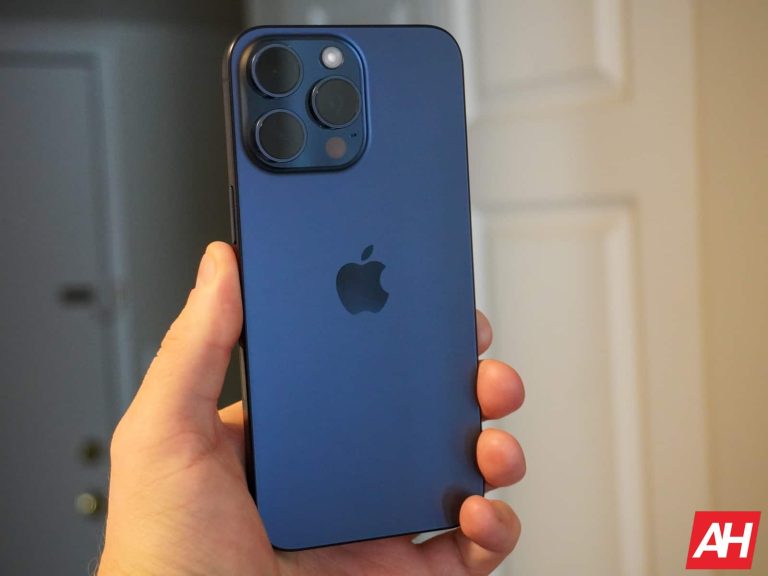
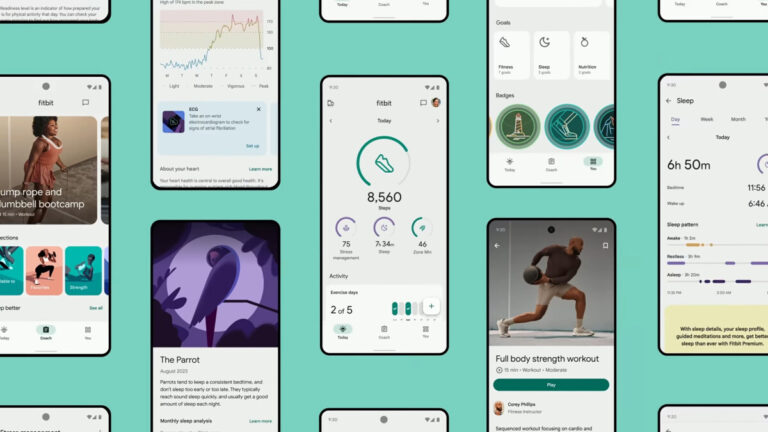
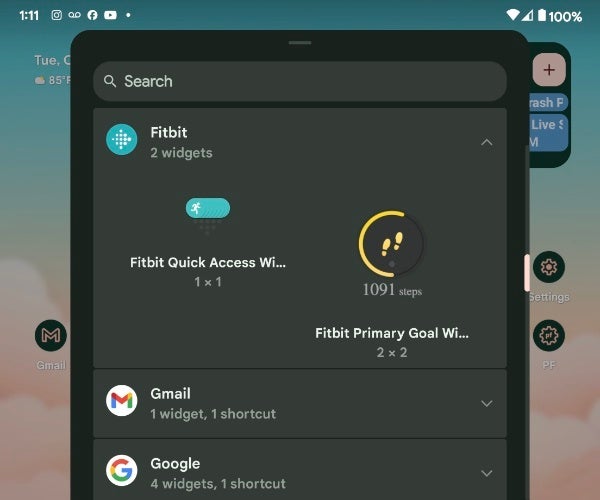
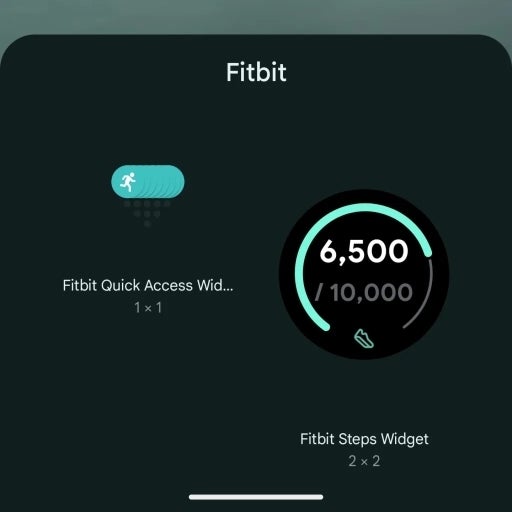


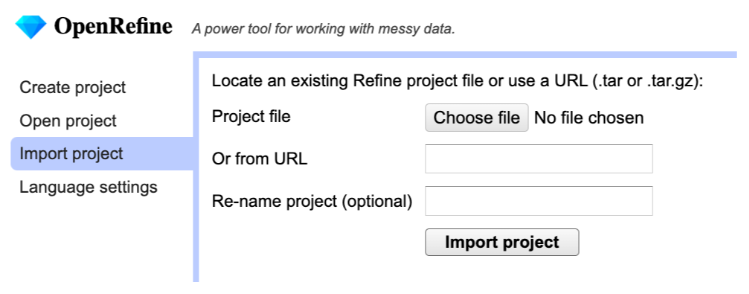

 image courtesy of 404 media