Amazon has started to do a second Prime Day each year now, in October ahead of Black Friday. And this year, it’s back once again. This year, it’s being called Prime Big Deal Days, and it will take place October 10-11.
Prime Big Deal Days will have discounts on all sorts of products, from smartwatches, to smartphones, to headphones and everything in between. In fact, a number of deals have started already. Amazon is once again doing invite-only deals, where you need to request an invite to buy it at a discounted price. This is being done to help keep products in stock longer, when the prices drop.
Currently, Amazon has a number of invite-only deals going on. Including the Blink Outdoor (3rd Gen), Philips 3000 Series Air Fryer, Jabra Elite 7 Active earbuds and much more. You can check out all of the invite-only deals here.
Amazon’s new hardware will likely see discounts
This week, Amazon is announcing new hardware at its annual fall event, on September 20. This is where Amazon likes to announce a ton of new hardware, in recent years they had over 80 announcements at this event. With products going up for pre-order right away and others launching later on in the year. So Prime Big Deal Days could see some nice discounts on these new products.
Not to mention the fact that Microsoft is doing its own Surface event on September 21. As well as Google doing it’s Made by Google event on October 4. There’s also talk of Samsung launching another phone this year, in the FE series. Could these all be discounted for Prime Big Deal Days? Probably not, but who knows. It’s an interesting time to do a big event like this, and it could be moreso about getting rid of stock of the old products. Like the Pixel 7, Apple Watch Series 8 and others.
iOS 17 is launching today, and it surprisingly brings a number of new features to your iPhone. The update is going to be available for a number of iPhones, going all the way back to the iPhone Xs. So plenty of people are going to be getting this update today, and in the coming days. So here are some of the best new features coming in iOS 17.
NameDrop
AirDrop is getting some new changes this year, including NameDrop. This is actually a really cool feature that Apple is adding in iOS 17, where you are able to hold your phone near someone else’s, and you can swap contact info. You will be able to choose the specific number(s) or email address you want to share. And you can also share them along with your Contact Poster (also new in iOS 17).
This is going to be very useful for meeting people at a bar, or maybe at a trade show. Where you can hand out your contact info without needing to write it down, swap phones or even give out business cards.
Live Voicemail
This is sort of like Apple’s answer to Google’s call screening on the Pixel. Basically, Live Voicemail will allow you to send a cal to voicemail and it’ll automatically transcribe the message on your iPhone’s screen. You can then slide to answer if you wish. Making it easier to ditch those spam callers, or those that just want to call and talk, while you’re busy.
StandBy
StandBy is quietly, iOS 17’s best feature this year. Basically, when your iPhone is charging, you can rotate it 90-degrees and get a smart display-like interface here. It uses the same widgets as your home screen, only larger. This looks really great on a MagSafe charging dock too. But you can use widgets like the clock and calendar, or weather, photos and so much more. It really does replace that bedside clock.
Contact Posters
Apple has really been embracing some customization on its phones in the past few years. Having added the App Library, lock screen customization, widgets, and now Contact Posters. This might seem like a silly feature, but now you can customize what people see when you call them. This includes using a picture, or a Memoji. You can also customize your name and the text style.
Interactive Widgets
This was a pretty highly-requested feature, after Apple launched widgets in iOS 14. And now it’s finally here. With iOS 17 (and iPad OS 17) you can now use interactive widgets. A few examples of these include the Apple Music Widget where you can start playing music from the widget instead of opening the app and then pressing play. Or checking off reminders from the widget, and even turning on/off your lights from the Home widget.
Improved autocorrect
Apple has also improved autocorrect this year. A much needed feature update for the iPhone. Apple says that it is actually using an LLM to improve autocorrect, which is rather interesting. It’s not 100% accurate, but it is better than the old system. You can also tap the backspace key and undo the autocorrected word pretty easily.
Apple Maps Offline
Apple Maps is actually getting a pretty big update this time around. And that’s allowing you to download areas on the map to use offline. If you’re heading somewhere that the internet is slow or non-existent, then downloading an area on Apple Maps can make a lot of sense.
Another feature for Apple Maps includes seeing real-time charging station availability. This really only affects EV drivers, but a really nice feature to have added in.
Just “Siri”
Now, in iOS 17, you no longer need to say “Hey Siri” to talk to Siri. Just say her name and then give her the command. Something like “Siri, what’s the weather?” and you will get your response. It’s not a huge change, but it is one less word to use, and that could help with false positives too.
Check In
This feature is really useful. In iOS 17, Apple has added a new feature where you can automatically notify people when you get home, or to your destination. With apps like Life360 being so popular, this feature is a no-brainer. Now instead of having to call people or text them when you get home, just “check in” and they’ll know you got home safely.
New iMessage App redesign
iMessage apps have gotten pretty popular over the last few years, and now there’s more than ever before. So, in iOS 17, Apple decided to simplify it a bit. Now there’s one button in the text field that you can tap on to bring up the app drawer. You’ll find all of your iMessage apps here, including #images, Memoji, Music, and much more.
Create your own Live Stickers
Stickers are pretty popular these days, and now you can create your own live stickers. Just press and hold on an image, and it is able to pull out the subject from the background, which you can then add to your own sticker collection. Now you can send these to others, in messages and other apps.
Facetime Voicemail
Finally, rounding out our list this time around, we have Facetime leave a message, or as we call it – Facetime Voicemail. Now, if you call someone on Facetime and they don’t pick up, you can record a video message, just like regular voicemail. But instead, it’s technically videomail. You can opt to record a video or audio message when someone misses your Facetime call now.
We take a look at a ransomware group’s claims that they were the ones responsible for the MGM Resorts attack.
The recent attack on MGM Resorts generated lots of speculation with regard to what the cause was. Some folks claimed the culprit was ransomware. Well, confirmation is now forthcoming as an affiliate of the BlackCat/ALPHV ransomware group is said to be the one responsible for the attack and subsequent outage.
The statement is quite long, takes a few digs at MGM Resorts, and seeks to correct what the group feels to be inaccurate statements made by security vendors and others with regard to the attack.
It begins:
Statement on MGM Resorts International: Setting the record straight
9/14/2023, 7:46:49 PM
We have made multiple attempts to reach out to MGM Resorts International, “MGM”. As reported, MGM shutdown computers inside their network as a response to us. We intend to set the record straight.
No ransomware was deployed prior to the initial take down of their infrastructure by their internal teams.
MGM made the hasty decision to shut down each and every one of their Okta Sync servers after learning that we had been lurking on their Okta Agent servers sniffing passwords of people whose passwords couldn’t be cracked from their domain controller hash dumps. Resulting in their Okta being completely locked out. Meanwhile we continued having super administrator privileges to their Okta, along with Global Administrator privileges to their Azure tenant. They made an attempt to evict us after discovering that we had access to their Okta environment, but things did not go according to plan.
On Sunday night, MGM implemented conditional restrictions that barred all access to their Okta (MGMResorts.okta.com) environment due to inadequate administrative capabilities and weak incident response playbooks. Their network has been infiltrated since Friday. Due to their network engineers’ lack of understanding of how the network functions, network access was problematic on Saturday. They then made the decision to “take offline” seemingly important components of their infrastructure on Sunday.
As with so many break ins, this begins with a social engineering attack. There have been claims on social media that this was done by finding an employee on LinkedIn, and calling the helpdesk for what would presumably be a password reset attempt. However, the statement is quite light with regard to the specifics:
We are unable to reveal if PII information has been exfiltrated at this time. If we are unable to reach an agreement with MGM and we are able to establish that there is PII information contained in the exfiltrated data, we will take the first steps of notifying Troy Hunt from HaveIBeenPwned.com. He is free to disclose it in a responsible manner if he so chooses.
The rumors about teenagers from the US and UK breaking into this organization are still just that—rumors. We are waiting for these ostensibly respected cybersecurity firms who continue to make this claim to start providing solid evidence to support it. Starting to the actors’ identities as they are so well-versed in them.
There are also claims that the attackers still have access to the MGM Resorts network, despite the shutdown and clean up operation taking place:
The ALPHV ransomware group has not before privately or publicly claimed responsibility for an attack before this point. Rumors were leaked from MGM Resorts International by unhappy employees or outside cybersecurity experts prior to this disclosure. Based on unverified disclosures, news outlets made the decision to falsely claim that we had claimed responsibility for the attack before we had.
We still continue to have access to some of MGM’s infrastructure. If a deal is not reached, we shall carry out additional attacks. We continue to wait for MGM to grow a pair and reach out as they have clearly demonstrated that they know where to contact us.
In this specific case, Bleeping Computer describes the alleged group behind the chaos as “Scattered Spider”. This particular group has a fondness for social engineering tactics used to slip into corporate networks. They don’t just use password reset impersonation, but also phishing, SIM swapping (hijacking someone’s mobile number), and even MFA fatigue where your mission is to annoy an employee with so many alerts that they eventually say “yes”.
An interesting development, then. Even so, with so much speculation and claim/counterclaim flying around it’s probably best to keep an open mind on these latest developments. The truth will out one way or another, but the biggest concern has to remain potential data theft and leakage of those making use of MGM Resort facilities.
Detect intrusions. Make it harder for intruders to operate inside your organization by segmenting networks and assigning access rights prudently. Use EDR or MDR to detect unusual activity before an attack occurs.
Stop malicious encryption. Deploy Endpoint Detection and Response software like Malwarebytes EDR that uses multiple different detection techniques to identify ransomware, and ransomware rollback to restore damaged system files.
Create offsite, offline backups. Keep backups offsite and offline, beyond the reach of attackers. Test them regularly to make sure you can restore essential business functions swiftly.
Don’t get attacked twice. Once you’ve isolated the outbreak and stopped the first attack, you must remove every trace of the attackers, their malware, their tools, and their methods of entry, to avoid being attacked again.
Malwarebytes EDR and MDR removes all remnants of ransomware and prevents you from getting reinfected. Want to learn more about how we can help protect your business? Get a free trial below.
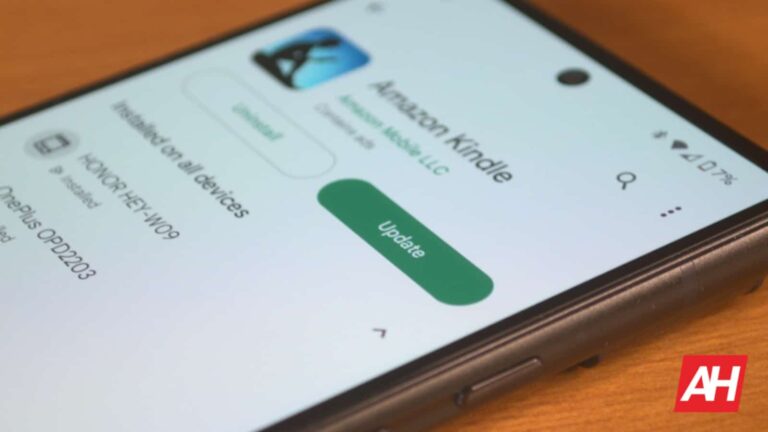
The Google Play Store is the main hub for Android users to download apps and games. The company is always coming up with features to enhance the experience. Well, according to The SpAndroid (via Android Police), code for a mysterious Cubes feature was spotted in the Google Play Store.
This feature was spotted in the app along with some more features coming to the app. So, there are several additions to be excited about. However, since we’re talking about code hidden within the app, you’ll want to take this news with a grain of salt. At any point, Google can take out or change these features at a moment’s notice.
There’s a mysterious Cubes feature hidden in the Google Play Store
The Cubes feature is nowhere near complete, but The SpAndroid was able to get the UI up and running. It’s extremely barebones, and it doesn’t tell us too much about what the feature will be for. We see a stack of carousels, and each one has a line of rectangles. On the bottom of the screen, we see several tabs on a bottom bar. These tabs are called Cube 0, Cube 1, and Cube 2. The current cube in the screenshot is Cube 0.
The first screenshot doesn’t tell us too much about the feature, but the second screenshot and the code tell us more. In the code, we see the lines:
So, each cube will correspond with one of these app categories, and we can guess that each rectangle will represent an app. With that, we can guess that this feature will help showcase different apps for people to discover.
These app categories correspond to the icons in the widget in the second screenshot. So, the widget might give you easy access to one of the cubes, and each cube will show you a list of some recommended apps in that category. This is only speculation at this point.
There are other features coming to the Play Store
Aside from the Cubes feature, Google is also giving us some more features. First up, there’s the Download Buddy. When you tap on the Install button, you’ll see a little bubble appear on the side of the screen. This bubble will show you the download progress of the app. It’s a great way of keeping up with the download process without having to return to the app’s page.
Lastly, the Play Store will make it easier to find apps that are compatible with your device. There will be chips on the top of the screen that will point to a different type of device. You’ll see a Phone chip, Tablet chip, Chromebook chip, and Car chip. When you tap on one of those chips, it will filter the results so that you’ll be able to only search for apps that are compatible with those devices.
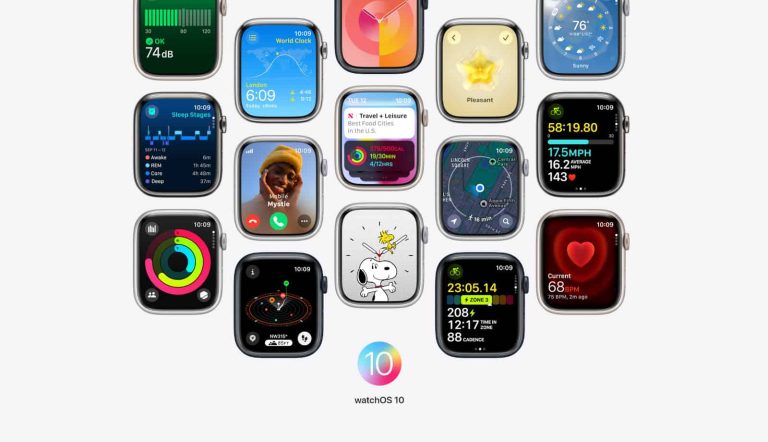
The release of WatchOS 10 is here bringing with it loads of new features for Apple Watch users, including the new all-new Smart Stack. Apple initially announced WatchOS 10 back in June just before the Summer officially started.
The public beta release of WatchOS 10 followed a month later, and starting today users can finally update their watch to the new software as a full stable release. A big part of the changes with this update is a new navigation system for the UI. WatchOS 10 is designed to be more glanceable so you aren’t spending as much time looking for quick information. This is where the Smart Stack comes in.
Allowing you to turn the digital Crown to scroll through these little tiles with information like weather, calories burned, currently playing music and more. You can also use the double tap gesture if you’re on the new Apple Watch Series 9 or Apple Watch Ultra 2. As both of these watches feature the new S9 chip.
The WatchOS 10 release rethinks app design
The Smart Stack is a great new way to get the information you’re seeking quickly. But Apple has also rethought the design of almost all its apps too. They now take up more space on the screen so you can see as much detail as possible. Apple says this new design allows for faster access to information and just like the Smart Stack, makes that information more glanceable.
Basically, there’s less friction between you and information you’re opening that app to get to.
New watch faces are available with this software update too. Both are also interactive and change based on certain details. The Palette watch face for example will display variations of colors based on the time of day. And the new Snoopy watch face has animated drawings of Snoopy and Woodstock, who will react to weather conditions and even get active when users start to exercise.
There’s also new mental health and wellness features, new cycling and hiking features, plus a lot more. WatchOS 10 gets its official release today so there’s a good chance you already have it available to install.
An exploit has been released for a vulnerability in .themes that was patched in the September 2023 Patch Tuesday update.
Included in the September 2023 Patch Tuesday updates was a fix for a vulnerability which has been dubbed ThemeBleed. A Proof-of-Concept (PoC) exploit has been released by Gabe Kirkpatrick, one of the researchers acknowledged for reporting the vulnerability.
The Common Vulnerabilities and Exposures (CVE) database lists publicly disclosed computer security flaws. The ThemeBleed vulnerability was listed as CVE-2023-38146: a Windows Themes Remote Code Execution (RCE) vulnerability.
Microsoft assigned a CVSS score of 8.8 (out of 10) and gave it a severity rating “Important”, saying:
“An attacker would need to convince a targeted user to load a Windows Themes file on a vulnerable system with access to an attacker-controlled SMB share.”
A .theme file is a configuration (.ini) text file that is divided into sections, which specify visual elements that appear on a Windows desktop. Section names are wrapped in brackets ([]) inside the .ini file. A .theme file enables you to change the appearance of certain desktop elements.
A related file format, .themepack, was introduced with Windows 7 to help users share themes. A .themepack must include your .theme file, as well as the background picture, screen saver, and icons files.
Themes can be selected in the Personalization Control Panel only in Windows 7 Home Premium or higher, or only on Windows Server 2008 R2 when the Desktop component is installed.
The ThemeBleed exploit is based on a race condition that can be triggered by opening a specially crafted .theme file. A race condition, or race hazard, is the behavior of a system where the output depends on the sequence or timing of other uncontrollable events. It becomes a bug when events do not happen in the order the programmer intended.
The .theme files contain references to .msstyles files, which should contain no code, only graphical resources that are loaded when the theme file invoking them is opened. When the .theme file is opened, the .msstyles file will also be loaded.
The researcher found that invoking a check of the theme version calls the ReviseVersionIfNecessary function and does not safely load a signed DLL (_vrf.dll), because the DLL is closed after verifying the signature, and then re-opened when the DLL is loaded via a call to LoadLibrary. During that interval the file could be replaced by a malicious version.
Another problem lies in the fact that if a user were to download a theme from the web, this triggers the ‘mark-of-the-web’ (MOTW) warning. MOTW was originally an Internet Explorer security feature. It broadened out into a way for your Windows devices to raise a warning when interacting with files downloaded from who-knows-where. Over time, it even contributed to preventing certain types of files from running. However, this could be bypassed if the attacker wrapped the theme into a .themepack file. When using the .themepack file, the contained .theme opens automatically without serving the MOTW warning.
While Microsoft’s fix has removed the functionality that triggers the theme version check to avoid the race condition, it has not fixed the more fundamental problem in the verification procedure of .msstyles files. Nor has it added MOTW warnings to .themepack files.
The researcher notes that the vulnerability appears to be only present in Windows 11.
We don’t just report on vulnerabilities—we identify them, and prioritize action.
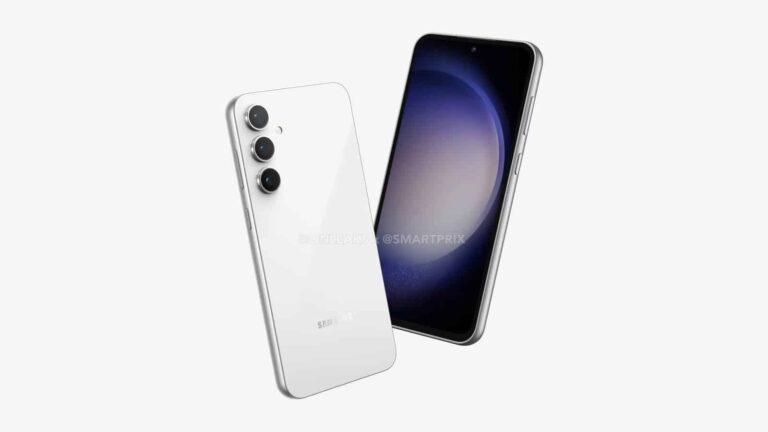
Samsung is gearing up to launch the Galaxy S23 FE with its in-house Exynos 2200 chipset, at least in some markets. It’s the same processor that powered the Galaxy S22 series flagships in Europe and a few other regions last year. However, it appears the Korean firm has optimized the chip to give it a new lease on life. The Exynos 2200-powered Galaxy S23 FE is massively outperforming the Galaxy S22 in benchmark runs.
While the Galaxy S23 FE is not yet official, the popular benchmarking platform Geekbench already has countless entries from the phone. The folks over at GalaxyClub compiled those entries to observe its performance. They found that the Exynos version of the upcoming handset (model number SM-S711B) has consistently achieved single-core scores above 1600 on the platform. Its multi-core scores on Geekbench regularly exceed 4100.
On the other hand, the Galaxy S22 powered by the same Exynos processor (SM-S901B) struggled to reach a single-core score of 1500. It has only one score above that, with some tests yielding scores as low as 900. The phone’s multi-score Geekbench tests also didn’t return scores above 3500. That’s a huge consistent performance gap between two devices featuring the same chipset.
This is despite no change in the CPU or GPU clock speeds. Moreover, both models were tested with 8GB of RAM and Android 13-based software. So how is this happening? If we’re to take a guess, this should mean a more optimized Exynos 2200 inside the Galaxy S23 FE than the Galaxy S22. Since Samsung didn’t launch a new flagship Exynos processor last year, it may have spent time improving the older chip.
Software optimizations may be helping the Galaxy S23 FE
It’s worth noting that the US versions of the Galaxy S23 FE (SM-F711U) and the Galaxy S22 (SM-S901U), both powered by the Snapdragon 8 Gen 1, also showed similar performance gaps in benchmark runs on Geekbench. So there may be more to the story. The upcoming Fan Edition (FE) phone may have a better cooling mechanism, allowing the chipset to run at its full potential without overheating.
Thermal management has been one of the biggest issues with Exynos processors in recent years, leading to poor performance and higher power consumption than competing Snapdragon solutions. Samsung was heavily criticized for this. This is why it shipped the Galaxy S23 series with the Snapdragon 8 Gen 2 globally. However, Exynos chips are now making a return to Galaxy flagships. After the Galaxy S23 FE, the Galaxy S24 series will also use the Snapdragon 8 Gen 3 and Exynos 2400 SoCs in different markets. Time will tell whether this decision backfires for Samsung.
Apple announced four new iPhones as part of its iPhone 15 series. Two vanilla models were announced next to the ‘Pro’ models. We’ve already compared the two ‘Pro’ models, and now it’s time to do the same with vanilla models. In this article, we’ll compare the Apple iPhone 15 vs iPhone 15 Plus.
Both of those models got a noticeable bump compared to last year’s models, so chances are that some of you are considering getting one. Well, they are very similar in many ways, but are different when it comes to size, mainly. So, be careful when making a purchase decision. We do hope that this article will help. We’ll first list their specifications, and then compare the two phones across a number of categories, as per usual.
Specs
Apple iPhone 15 vs iPhone 15 Plus, respectively
– Screen size: 6.1-inch Super Retina XDR display (60Hz, HDR, 2,000 nits) 6.7-inch Super Retina XDR display (60Hz, HDR, 2,000 nits) – Display resolution: 2556 x 1179 2796 x 1290 – SoC: Apple A16 Bionic – RAM: 6GB – Storage: 128GB/256GB/512GB – Rear cameras: 48MP (f/1.6 aperture, sensor-shift OIS), 12MP (ultrawide, f/2.4 aperture) – Front cameras: 12MP (f/1.9 aperture) + TrueDepth – Battery: 3,349mAh 4,383mAh – Charging: 20W wired, 15W wireless (charger not included) – Dimensions (unfolded): 147.6 x 71.6 x 7.8mm 160.9 x 77.8 x 7.8mm – Weight: 171 grams 201 grams – Connectivity: 5G, LTE, NFC, Wi-Fi, USB Type-C, Bluetooth 5.3 – Security: Advanced facial scanning – OS: iOS 17 – Price: $799 $899 – Buy: Apple
Apple iPhone 15 vs Apple iPhone 15 Plus: Design
The two phones look exactly the same, but are different in terms of size. They’re both made out of aluminum and glass. They do feature a Dynamic Island cutout on the front, unlike their predecessors. Apple made the jump this time around. They also come with a Type-C USB port at the bottom, which is the case with all iPhones this year. Both models retain a mute switch, but they are more comfortable to use this time around. Apple reworked the frame, so that the edges are more curved, which makes for a more comfortable experience overall.
Having said that, both the front and the back sides of both phones are flat still. The bezels are quite thin and uniform, but not as thin as on the iPhone 15 Pro and Pro Max. You’ll notice two cameras on the back, and while they may look the same as last year, they’ve been improved this time around. More on that later, in the camera section.
Now, their size is probably the main factor you’ll consider, well, size and weight. That’s the main difference between the two phones. The iPhone 15 Plus has a lot larger display, and it’s a lot larger in general. It’s a lot taller, and wider than the iPhone 15, while the two phones have the same thickness. The ‘Plus’ model is also a lot heavier, 30 grams heavier, to be precise, which is a difference you’ll feel in the hand. Both devices are IP68 certified for water and dust resistance, by the way.
Apple iPhone 15 vs Apple iPhone 15 Plus: Display
The iPhone 15 Pro comes with a 6.1-inch 2556 x 1179 Super Retina XDR OLED display. That panel supports HDR content, and has a 60Hz refresh rate. It also goes up to 2,000 nits of peak brightness, in case you were wondering. The display is also flat. The iPhone 15 Plus’ display is actually quite similar, with two differences worth noting. It is a bit sharper at 2796 x 1290 resolution, and it’s also larger at 6.7 inches. Other than that, the two panels are identical, they even have the same peak brightness. That has also been improved compared to the iPhone 14 and iPhone 14 Plus.
Having said that, both of these displays are really good. They are only 60Hz panels, though, so if you’re to higher refresh rates, you may miss that here. Other than that, there’s not much to complain about, to be quite honest. Both displays are plenty sharp, they have good viewing angles, and vivid colors, with deep blacks. The touch response is also quite good, and they do get immensely bright. The refresh rate is basically the only complaint here, especially considering the price tags of these two phones.
Apple iPhone 15 vs Apple iPhone 15 Plus: Performance
These two smartphones are fueled by the same processor that fueled the iPhone 14 Pro series. The Apple A16 Bionic is included here, a 4nm processor. That chip has proven to be excellent when it comes to performance, so chances are both devices will be on the same level as the iPhone 14 Pro and Pro Max. What will be more interesting to see is how will the battery life fare with this new chip.
Both of these phones come with 6GB of RAM and NVMe flash storage. That processor has 5-core graphics included, in case you were wondering, and it’s a hexa-core processor. Chances are you’ll be able to play any game on the App Store without a problem, even the most graphically-intensive ones. The Apple A16 Bionic is still one of the most powerful mobile chips on the market, even with the Apple A17 Pro in the picture now. Performance is not something you should worry about. It should also be exactly the same on these two phones.
Apple iPhone 15 vs Apple iPhone 15 Plus: Battery
Apple did not reveal the battery capacities of these two phones, but a Chinese regulatory agency did. The iPhone 15 includes a 3,349mAh battery, while the iPhone 15 Plus comes with a 4,383mAh unit. These battery capacities are ever so slightly larger than on the iPhone 14 and iPhone 14 Plus. That’s a good thing, of course, even though it would be nice to see an even bigger bump.
We’ll hold our judgment on the battery life until we get our hands on the phones, and properly test them. The iPhone 14 and iPhone 14 Plus had good battery life, but we’re expecting some improvements this time around.
The charging, on the other hand, remains unchanged. You’re still getting 20W wired, and 15W wireless charging here. Qi2 charging will be supported when the time comes, in case you were wondering. Also, do note that there is no charger in the box, only a Type-C cable, so you’ll need to get that separately. The phone goes up to 50% in half an hour, but getting from 50 to 100% charge will take a lot longer. All in all, neither phone supports particularly fast charging, especially considering the competition.
Apple iPhone 15 vs Apple iPhone 15 Plus: Cameras
Both the iPhone 15 and iPhone 15 Plus got a camera upgrade compared to last year. In fact, they both have the exact same camera setup. Both phones now have a 48-megapixel main camera taken from the iPhone 14 Pro and Pro Max. The iPhone 15 Pro models have an upgraded 48-megapixel camera, with a larger sensor. In any case, this is one of the most notable upgrades for the iPhone 15 series.
We presume that the images will be similar to what the iPhone 14 Pro series was able to produce. Those are good news, though we do hope that Apple managed to fix some white balance problems that were still present. We won’t be able to tell until we get a chance to test them, of course. Regardless, a 48-megapixel camera is a nice upgrade. The ultrawide camera basically remained the same as on the iPhone 14 and iPhone 14 Plus.
That 48-megapixel main camera should also enable better video recording, as it will be able to provide more details. Both phones also have the same portrait photo ability as the iPhone 15 Pro series. You can change the focus point after you take a picture, and also adjust the blur level. That’s a nice addition too.
Audio
Both of these smartphones have a set of stereo speakers. They both support Spatial Audio playback, and Dolby Atmos. They also enable an audio zoom feature, and stereo recording. The two speakers included here should offer similar performance to the ones on the iPhone 14 series. In other words, the sound output will be good, as long as you’re not expecting too much, of course.
Neither phone has an audio jack, so you’ll either have to use the Type-C port at the bottom, or use Bluetooth. Both smartphones are equipped with Bluetooth 5.3, by the way, which is a good thing.
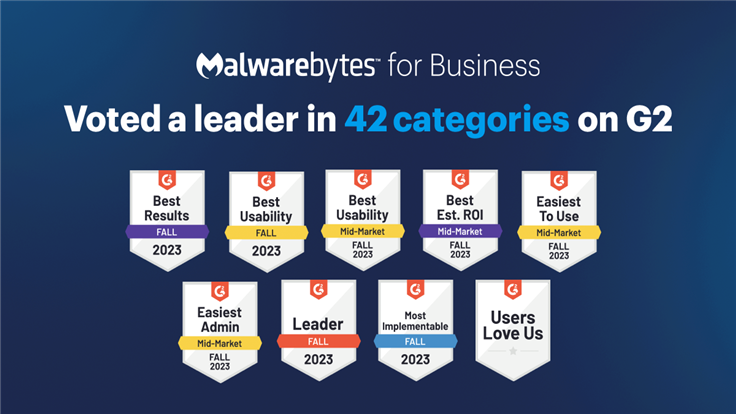
Malwarebytes is the only vendor recognized as “Easiest to Use” with the “Easiest Admin” for its EDR and MDR solutions in the recent G2 Fall 2023 results.
The peer-to-peer review source G2 has released their Fall 2023 reports, ranking Malwarebytes as a leader across a number of endpoint protection categories. In the most recent results, Malwarebytes is the only vendor to earn the “Easiest to Use” and “Easiest Admin” recognition for its Endpoint Detection and Response (EDR) and Managed Detection and Response (MDR).
Based on verified customer reviews, Malwarebytes has been ranked #1 over top EDR vendors for endpoint malware and antivirus protection, detection and remediation of web-based threats, product usability, and more. These results continue Malwarebytes’ top ranking by G2, reinforcing Malwarebytes’ leadership in the endpoint security platform market.
Badges are awarded to products that receive the highest overall ratings among certain categories including most satisfied customers. For example, the Best Usability badge goes to the single product with the highest overall usability score. Also of note is G2’s “Grid” reports, which represent which vendors have the most satisfied customers, largest presence in the market, and other factors.
How did Malwarebytes perform in G2 Fall 2023?
Malwarebytes EDR is a Leader in the “EDR Grid” overall, and for mid-market.
Real-users ranked Malwarebytes as the most usable EDR solution (#1 in the Mid-market usability Grid)
Badges: Easiest to Use, Best Usability, Easiest Admin
In the Endpoint Protection Suites category, Malwarebytes is a Leader in overall and mid-market Grid reports.
#1 overall Usability index, underscoring Malwarebytes’ commitment to building effective solutions that are easy to deploy, use, and manage
Badges: Most Implementable, Easiest Setup, Best Results, Easiest to Use, Easiest Admin, Best Usability
In the Managed Detection and Response (MDR) category:
The Malwarebytes MDR solution provides 24×7 threat monitoring and investigations without the expense of building and running a SOC in-house.
Real users awarded Malwarebytes MDR with the Best ROI, Easiest to Use, and Easiest Admin badges
EDR that’s Easy to Use
Feedback from real users placed Malwarebytes EDR as the most user-friendly EDR solution available in the Mid-market Usability Index, with a Usability Score that surpasses the average across all vendors by almost 10 percent.
“If you are purchasing Malwarebytes, then you have made the correct choice. You will quickly see how easy it is to implement, and how great their support is.”
“Easy to use and implement, along with great support and support tools at your disposal, along with courses to help you become more familiar with the inner workings.”
Doug C.
#1 Endpoint Protection that’s Easy to Use and Effective
Malwarebytes Endpoint Protection proudly holds the #1 spot in the overall Usability index. Our Ease of Use, Ease of Admin, and Meets Requirements subscores for this category outpace the industry average by multiple percentage points.
“The Nebula console is one of the most user-friendly interfaces we’ve come across. We can’t recommend it enough.”
“Malwarebytes makes it simple to deploy. Additionally, the user interface has minimal impact on the end-user, so its win-win. Support are happy to help when you do hit the occasional bump and the portal is easy to use and very responsive.”
Malwarebytes MDR placed on 12 reports for G2 Fall 2023 reports, winning badges for “Easiest to do Business With”, “Best Est. ROI” , “Easiest to Use”, and “Easiest Admin”.
“Malwarebytes MDR is simple to deploy and manage. They increase our security posture, meet cyber security insurance requirements, and make a great partner to augment my small IT team.”
“We wanted to extend our SOC team with MDR services, and that has always been our vision with Malwarebytes since we look at the company as a partner, rather than a vendor. Malwarebytes MDR enables us to meet the need for 24 x7 coverage with professional security experts who work in the industry every day.”
“Cyber threats are 24/7, and my team needs to sleep. The MDR team watching our network around-the-clock gives us a chance to sleep without worry. With Malwarebytes MDR backing us up, I also finally got to step away and take a two-week vacation. I’m just glad to know that we have a security team watching over our shoulder and making sure it’s all clear.”
Experience Malwarebytes for Business: Award-winning ROI, user-friendly, and effective threat defense
Malwarebytes provides IT staff with award-winning business solutions, offering unmatched threat protection, a lightning-fast return on investment, and a smooth, speedy implementation.
Try Malwarebytes EDR today and join the ranks of those who have already discovered the amazing results, support, ROI, and more of our exceptional endpoint security solutions.
Malwarebytes EDR and MDR are recognized as leaders in endpoint security by real, reputable customers. Want to learn more about how we can help protect your business? Get a free trial below.
According to 9to5google, Google has completed transferring its domain business to site builder Squarespace. Google Domains was launched in 2014 as a domain name registrar and domain management service.
Back in June, Google unexpectedly announced that it would sell its domain business to Squarespace. The service hosted over 10 million domains and had millions of customers. Following the takeover, Squarespace said it “entered into a definitive asset purchase agreement with Google, whereby Squarespace will acquire the assets associated with the Google Domains business.”
Google Domains is transferred to Squarespace
At the time, Google argued that selling domain business was to “sharpen our focus.” The service officially stopped selling new domains on September 7 but left no announcement on its website and didn’t notify users through email. Instead, it directs customers to the Squarespace website by an affiliate link for registering a new one.
The company further notified users that “Google no longer offers new domain registrations, but try Squarespace. On September 7, 2023, Squarespace acquired all domain registrations and related customer accounts from Google Domains. Customers and domains will be transitioned over the next few months.”
Of course, the Google Domains website remains active for users who already bought a domain from Google. However, the website no longer sells new domains, and any new purchase must be done through Squarespace. The tech giant assured its customers that it would manage their domains during the transition.
Some users who have already completed domain migrations to Google Domains are worried about the decision, arguing that the transition might hurt the experience and make them pay a higher price. In terms of price, Squarespace domains’ fee starts at $12/year, which is the same price as Google “average” domains.
WordPress also has an offer for Google Domains customers. The first one million Google Domains users who transfer their domain will pay no transfer fee. Additionally, WordPress extends your registration for an additional year if you take this offer. The plan is open to “existing WordPress.com customers across most domains.”