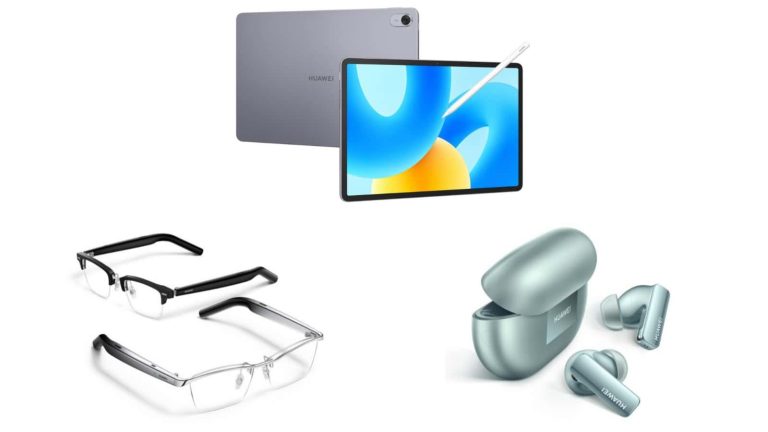
Huawei announced its new smartwatch, the Watch GT 4, in two sizes. We’ve already talked about those two devices. That’s not the only thing the company introduced during its press event in Barcelona, however. Huawei also announced a new tablet with an innovative screen, new flagship earbuds, and some eyewear.
The Huawei MatePad 11.5 PaperMatte Edition is the company’s new tablet with innovative screen
Let’s kick things off with a tablet. The Huawei MatePad 11.5 PaperMatte Edition is its name. This is basically a special edition variant of the MatePad 11.5. What makes it so special? Well, its display.
This tablet comes with a PaperMatte screen, which has a nano-etched screen coating. That makes the display feel like a piece of paper, kind of, and it also reduces glare considerably. On top of that, it reduces eye strain, and brings a more natural writing experience with the second-gen M-Pencil stylus.
It shares the same specs as the MatePad 11.5. That means we’re getting an 11.5-inch TFT LCD display here, with a 2200 x 1440 resolution. That display also has a 120Hz refresh rate. The Snapdragon 7 Gen 1 SoC fuels the device, but it supports 4G connectivity only.
The device ships with 8GB of RAM and 256GB of storage. A 13-megapixel main camera sits on the back, while an 8-megapixel shooter is included on the front. The device also includes a 7,700mAh battery, and supports 22.5W charging.
Huawei’s MatePad 11.5 PaperMatte Edition is priced at €500, and comes in a Space Gray color.
The Huawei FreeBuds Pro 3 also got announced during the event
The Huawei FreeBuds Pro 3 are the company’s new earbuds. These are the company’s flagship truly wireless earbuds, basically. They come with a dual driver system, which should offer clearer treble and “booming base”.
You’re also getting a Triple Adaptive EQ, and support for the LDAC and L2HC 2.0 Hi-Res audio codecs. An updated Intelligent Dynamic ANC 3.0 system is also a part of the package, as is a Pure Voice 2.0 mic system.
The company says you can get up to 31 hours of battery, including the charging case. These earbuds can also pair with two devices at the same time, and they basically look like the FreeBuds Pro 2. They’re priced at €200, and will go on sale on October 11 across Europe.
Huawei also introduced a new version of its smart glasses
The Huawei Eyewear 2 is also something the company announced. These are basically Huawei’s smart glasses. They come with built-in speakers, which can last for 11 hours of playtime.
Interchangeable Zeiss prescription lenses are also a part of the offer. Huawei used a titanium frame to make these, to make them more durable, and to decrease the weight. You’ll find touch controls on the sides.
These smart glasses will go on sale in Europe from October 18, and they’re priced at €300.
The HuaweiMate 60 series launch managed to rock the boat in the US. That smartphone comes with a 7nm processor, and the US doesn’t believe Huawei managed to avoid the sanctions. Republicans are actually demanding even stricter sanctions on Huawei and SMIC, the company that made the chip for Huawei.
The US could impose even stricter sanctions on Huawei & SMIC
Digitimes’ Research senior analyst, Luke Lin, believes the US could issue even stricter sanctions on Huawei. The company actually launched this device during the US Secretary of Commerce Gina Raimondo’s visit to China. Was that planned, we don’t know, but the timing is impeccable.
Some see this as Huawei’s statement on self-sufficiency, actually. Lin actually says that the US issued its sanctions “too late and made them too lenient”, which is why Huawei managed to do what it did.
Luke Lin actually went on to explain the situation. SMIC purchased the immersive DUV equipment capable of processes under 14nm between 2018 and 2020. The US issued a ban on SMIC regarding sub-10nm process equipment in 2020, but that was too late, it seems.
Since 2020, China actually continued to import more immersive DUV equipment, and that equipment is one of the key reasons Huawei was able to produce 5G chips with the 7nm process. Qualcomm and other US companies lobbied with the US to be more lenient with its sanctions, as they didn’t want to lose Huawei as a customer, so that played a role in everything too.
Huawei was on the path to become world’s number one smartphone OEM, prior to sanctions
This story is far from over, of course. Huawei was hurt by the US sanctions quite a bit. It was on the path to becoming the world’s number 1 smartphone manufacturer, but things drastically changed after the ban. Huawei is doing its best to return to its former glory in the smartphone market, but it hasn’t been easy. It’s not only limited from the hardware standpoint, but the software too, as it can’t use Google services.
Huawei created its own ecosystem based on Android, and it actually did a really good job with it. Still, it’s not the same. The company is constantly making progress on both hardware and software fronts, so it remains to be seen what will happen going forward.
If Huawei chips manage to achieve a good enough yield rate to be exported overseas, they’ll manage to hurt the US companies even more in the long term.
Huawei is allegedly getting $30 billion in state funding to build a secret network of wafer fabs across China. This is based on a previous report by Bloomberg, as DigiTimes notes.
Lin notes that, in order to prevent a production scale-up, the US sanctions “will need to target chip-making equipment and consumable materials”. Lin also notes that, in order for sanctions to be truly effective, the US should prohibit equipment from entering China at all, and not just restrict sales to Huawei. It remains to be seen what will happen from this point on.
Multiple memory corruption vulnerabilities have been discovered in the ncurses library, which various programs use on multiple operating systems like Portable Operating System Interface (POSIX) OS, Linux OS, macOS, and FreeBSD.
Threat actors can chain these vulnerabilities with environment variable poisoning attacks to gain escalated privileges and run codes under the name of the target program or perform other malicious actions.
Memory corruption is one of the common vulnerabilities found in modern programs that could allow threat actors to gain unauthorized access by modifying a program’s memory. The impact of this vulnerability ranges from leaking sensitive information to executing arbitrary code with escalated privileges.
However, Microsoft has disclosed these vulnerabilities with the ncurses maintainers, which have now been successfully patched.
DocumentGet a Demo
With DoControl, you can keep your SaaS applications and data safe and secure by creating workflows tailored to your needs. It’s an easy and efficient way to identify and manage risks. You can mitigate the risk and exposure of your organization’s SaaS applications in just a few simple steps.
CVE-2023-29491: Memory Corruption via malformed data
This vulnerability exists in the ncurses library before 6.4 20230408, which could allow threat actors with local privileges to trigger security-based memory corruption. This can be done with the help of malformed data in the terminfo database file, which is found in $HOME/.terminfo, or with environment variables like TERMINFO or TERM.
This particular vulnerability is associated with several internal things, such as Heap out-of-bounds during terminfo database file parsing, parameterized string type confusion, stack information leak, and denial of service with canceled strings.
Terminfo database file consists of optional extended entries like Boolean, numeric, and strings. These entries are user-defined entries and are parsed by the _nc_read_termtype function, which was found to be capable of writing beyond the boundaries of a heap-allocated chunk.
The ncurses source code looks for CANCELLED_STRING and converts them to ABSENT_STRING, which is done only for ordinary strings, whereas extended strings do not get converted. Additionally, strings beginning with “k” are treated as keypad functionality, which can allow a threat actor to specify an extended string, resulting in ncurses dereference eventually causing a denial of service.
Microsoft has published a complete report about these vulnerabilities, providing detailed information about variable poisoning, exploitation, and other information.
Users are recommended to upgrade to the latest version of the ncurses library in order to prevent this vulnerability from getting exploited.
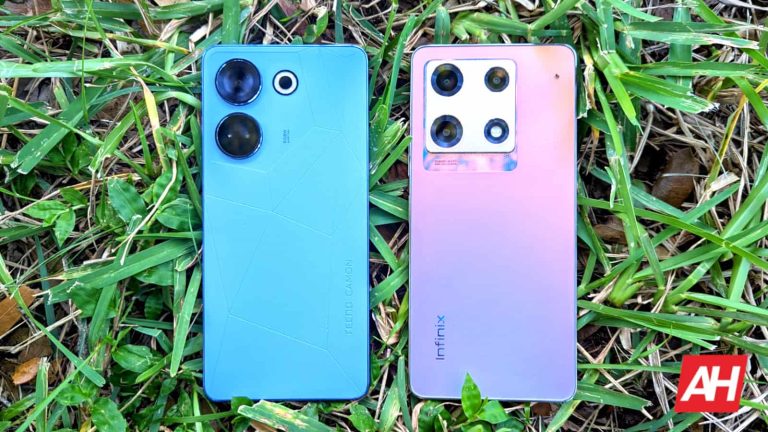
Companies like Tecno and Infinix go under the radar most of the time, but they make phones that punch way above their weight class. This year, the company released some extraordinary sub-$300 phones, and they share some similarities while sporting differences. Here’s a comparison between the Tecno Camon 20 Pro and the Infinix Note 30 Pro.
The mid-range smartphone market can be as competitive as the premium market. We all know about the war between Samsung and Apple, but a ton of people aren’t buying phones from those companies. A lot of the time, people are buying phones that are under $500. The two phones in this comparison fall well below that mark, and they have other similarities.
In this comparison, we’ll compare these phones in different essential departments like their build, cameras, display, speakers, performance, and more. Also, we reviewed both of these phones, so you can access the reviews right here. Here’s the Camon 20 Pro review and here’s the Infinix Note 30 Pro review.
Tecno Camon 20 Pro vs. Infinix Note 30 Pro: Build quality
When it comes to the build quality, both companies had to cut some corners to keep the price down, but there’s a noticeable difference between the two. The Camon 20 feels unapologetically mid-range. It’s rather light, and it has a soft-touch plastic on the back. Also, the frame is plastic, which is something that you won’t feel on a more expensive device.
Regardless, the phone still feels solidly built. It seems like it can take a tumble without taking any damage, and the side-mounted buttons are rather clicky.
On the other hand, the Infinix Note 30 Pro is playing a different game. This phone feels notably more premium than the Camon 20. For starters, there’s much more heft to the phone, giving it a more significant feeling in the hand. Aside from that, the phone’s back plate is made from glass, which also gives it a more premium feeling in the hand. Lastly, there’s a large metal camera island on the back.
All of these factors contribute to the more premium feeling of the Note 30 Pro. That’s impressive, as the Note 30 Pro also has a plastic frame.
Tecno Camon 20 Pro vs. Infinix Note 30 Pro: Display
When it comes to the display, it becomes clear that both phones are basically using the same OLED panel running at 120Hz. The thing is, in case you didn’t know, Tecno and Infinix\ are both owned by the same company, Transsion. This means that it’s possible that these phones will share some components; the display is one of them.
Both displays are absolutely gorgeous. When the color style is set to Original, the colors are dulled down to what you’d see on a mid-tier LCD display. However, if you change it to Bright, then they pop. While the colors are more saturated, they avoid getting too punchy. In fact, they strike an amazing balance between dead and too lively.
One thing I will say is that some of the warmer colors like red and orange tend to be a bit much sometimes. If the scene is of an evening, you’ll see some of the colors sizzle a bit. But, it’s not too much.
In terms of brightness, both phones have pleasantly bright screens. They’re definitely a few steps behind the brightness of the Galaxy S23 and the ASUS Zenfone 10, but they’re still plenty bright. These are 900-nit displays, so they’re more than readable in the bright sun. Watching videos or reading content in the sun isn’t an issue.
If you’re looking for a phone with an incredible display, then you won’t go wrong with any of these phones.
Tecno Camon 20 Pro vs. Infinix Note 30 Pro: Speakers
The speaker department is another one where these phones are practically identical. Both phones come with a pair of rather unimpressive speakers. Out of the box, these speakers lack a lot of depth. Also, it seems that they favor the higher tones. Depending on your listening tastes, that might not be and issue. Out of the box, they’re not great for listening to music, but they’re rather pleasant when listening to ASMR content.
However, in the software of both phones, you have the same tools to calibrate the speakers. You have your choice between Smart, Music, Video, and Game speaker modes that will adjust the sound to fit those types of content. The Smart mode will automatically adjust the sound based on what content you’re consuming.
When you choose a mode, you’ll have additional options that you can adjust. You can choose to boost the treble, voices, bass, or any combination of the three. Also, you can adjust the stereo setting of the sound. This gives you the ability to choose between a wide, traditional, or in-front sound.
Lastly, both phones have an EQ that you can use to further fine-tune the sound. It’s a 5-band EQ, and each band can adjust between -5dB and +5dB.
After adjusting the EQ settings, there was a noticeable difference in the sound. The EQ and settings were able to add some more depth to the sound to make it pop just a bit more. However, even after adjusting the settings, the speakers still fell a bit short of what you’d call great; they’re just good.
Tecno Camon 20 Pro vs. Infinix Note 30 Pro: PerformanceBoth phones share some similar internals. They’re both using the MediaTek Helio G99 SoC with 8GB of RAM (expandable to 16GB), and 256GB of storage. People tend to assume that the performance is going to be sub-par based on the MediaTek processor. However, that’s not the case.
Both of these phones just fly through their software. Tecno and Infinix optimized their software to work with these chips, and it shows. Both phones are fast and responsive, and they don’t have any trouble running apps. It was pretty surprising when using both phones.
When it comes to lag and stutter, the story is the same with both phones; instances of slow-down were so few and far apart that they’re negligible. You can use these phones without worrying about them getting laggy on you.
While using both phones, neither of them became particularly hot. The Infinix Note 30 Pro uses a liquid cooling system and the Camon 20 Pro’s is a bit different. However, both phones remain cool while under a heavy load.
Tecno Camon 20 Pro vs. Infinix Note 30 Pro: Gaming
The story with gaming is the same with both phones, and it’s not the happiest story. Both phones are decent when it comes to gaming. They tackle basic 2D games with no issue whatsoever. Games like Fishing Paradiso, Sweet Sins 2, Dream Hopper, Survivor.io, and others like them run perfectly smoothly.
Moving onto lower-end 3D gaming, it’s pretty much the same. Games like Dragon Ball Legends and Sky: Children of The Light don’t slow the phones down at all. They’re perfectly playable.
Moving on to more intense gaming, we see where these phones struggle. We’re talking about games like Genshin Impact and Honkai Star Rail. These games are some of the prettiest games that you can get on a mobile phone. Thus, they bog down both of these phones to the point where you might not want to use them.
At its highest graphical setting, Genshin Impact knocks the frame rate down to the single digits at times. The rest of the time, it’s still extremely choppy. If you want to smooth out the gameplay, you’ll need to knock the graphical settings down to at most Low (one level above the lowest). Even then, it’s not particularly smooth; this just makes it playable.
Basically, if you’re looking for a gaming beast, you won’t find it in any of these phones.
Tecno Camon 20 Pro vs. Infinix Note 30 Pro: Camera
With all of these similarities, the camera department is where we see the biggest difference between these phones. The camera on the Infinix Note 30 Pro is miles ahead of the camera on the Camon 20 Pro. The Camon’s camera produces pictures that lack in the brightness, color, and contrast departments. Pictures taken in the bright sun look like they were taken in overcast weather. The images just look like someone tossed them into an image editor and turned down the contrast and saturation.
The story is the same when it comes to videos taken with this phone. Also, videos lacked sharpness. In our review of the Camon 20 Pro, the camera was noted to be the worst aspect of the phone, and it’s true.
The Infinix Note 30 Pro, on the other hand, produced images that were much more pleasing to the eyes. They picked up where the Camon 20 slacked on the brightness, color, and contrast. One thing that seemed to bring the images down was the camera’s tendency to make the images unnaturally warm compared to the scene. Also, and this is an issue with most digital sensors, red tones tend to sizzle. Lastly, when it comes to exposure, the camera tends to lean on the brighter side, which overexposes the images just a bit.
Overall, the clear winner in the camera department is the Infinix Note 30 Pro.
Tecno Camon 20 Pro vs. Infinix Note 30 Pro: Battery
When it comes to the battery life, both phones perform admirably. With light to moderate usage, you’re able to easily get a day and a half of life on a single charge. On a heavier day with a bunch of gameplay, video-watching, etc, you might have to grab a charger at the end of the day.
The battery life is comparable between both of the phones, but when it comes to charging, the Note 30 Pro steals a slight victory. The Camon 20 Pro has 33W charging, which is pretty fast. However, the Note 30 Pro comes with much faster 68W charging.
While the wattage is more than double that of the Camon’s the charging time doesn’t see a significant boost. The higher wattage helps it charge a bit faster at the higher capacity. So, while the Infinix Note 30 Pro has faster charging, the difference isn’t huge.
Tecno Camon 20 Pro vs. Infinix Note 30 Pro: Software
Back to the similarities, the software on these phones is as similar as the displays. Again, Tecno and Infinix are both owned by the same company; thus, the software on both of these phones is identical. The only differences are some of the aesthetics and some of the terminology. The Camon 20 Pro is running HIOS 13and the Infinix Note 30 Pro uses XOS 13. Both of them are based on Android 13.
The infrastructure of the software is the same for both, so buttons, menus, settings, and other components are all in the same spots across both phones.
The software is very different from what you get with stock Android. UI components are less rounded with more subtle curves. Also, the icons are large and square. It’s very different from most phones you get in the States, and it’s definitely angled toward the Chinese market.
One of the more notable details about the interface is the notification shade. Unlike most Android skins, the notification shade is split. When you swipe down from the top left of the screen, you’ll see your notifications; however, you won’t see your quick settings. You’ll have to swipe down from the top right.
You can also swipe left or right on the notification shade to switch between the pages. That’ll take some getting used to.
Another nice software feature is the ability to enlarge folders. This isn’t new, but it’s still nice to have. Also, if you swipe to the left or right when a folder is open, you’ll swipe to another folder you have on your home screen.
All in all, the software on these phones is the same, and it’s a very strong software experience.
Final verdict: Which one should you buy?
When it comes to the price, both of these phones orbit around the $250-$270 price range. The price is MUCH MORE mid-range than the actual phones are. But, the question is, which one should you buy?
In terms of software, display, speaker quality, performance, and battery life, both of these phones are pretty much identical. However, the Infinix pulls ahead with its much more premium feel and exponentially better camera.
Since the overall experience is so similar on both of these phones, these victories won by the Infinix Note 30 Pro do well to crown it the winner of this comparison.
Casetify has joined the fold and announced its iPhone 15 cases, and Apple Watch accessories. Quite a few iPhone 15 series cases are on offer from Casetify, as expected, but the company put great focus on one particular case.
Casetify has plenty of iPhone 15 cases to offer, and new Apple Watch bands too
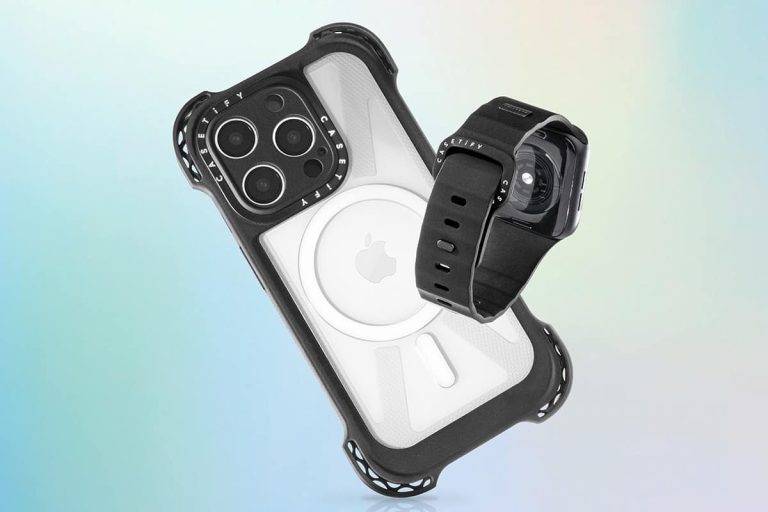
The ‘Ultra Bounce Case’ was most talked about by Casetify. That case won 7 ‘Best of IFA’ awards this year, and it offers great protection. On top of that, it’s also customizable.
This case comes with a ‘6-Layered Rugged Protection System’. You will immediately notice four ‘Ultra Bounce Corners’ on the case, which contain compression ribs with air cavities. Those add “structural support and rigidity when the device drops”, says Casetify.
This case also has a 1.2mm raised camera ring, and an in-built 2.2 raised Lens Cover. On top of that, 3 layers of Ecoshock material on the 2 inner sides are also included. Casetify says this case can survive drops up to 32ft (10m).
The Casetify Ultra Bounce Case has some serious drop protection
This case also has 10X Military Grade Standard (STD-810G), and has been tested to withstand drops from all possible angles. The ‘Ultra Bounce Case’ is customizable with names, colors, and fonts. Its price ranges from $90 to $110, depending on the iPhone 15 model.
Casetify also announced its Impact Ring Stand Case. This is a 3X Military Grade Standard case and can withstand drops from at least 6.6ft (2m). It’s MagSafe-compatible too, just like the ‘Ultra Bounce Case’.
This case also comes with a camera ring which can be lifted up and act as a stand for extra protection. The Ring Stand Case is priced at $80.
The well-known Casetify Impact Case is also on offer for the iPhone 15 series. This one is also customizable, and offers protection for drops from 8.2ft (2.4m), along with 4x Military Grade Standard (STD-810G). This case is priced at $65.
Two Apple Watch Series 9 and Ultra 2 bands are on offer
When it comes to the Apple Watch Series 9 and Ultra 2, Casetify is launching two new types of bands. The ‘Bounce Band’ is priced at $69, and it’s made out of FKM fluoroelastomer rubber. It comes with a pin-and-tuck closure, and will be available in black, sand, and orange color options.
The other band is called the ‘Impact Band’, and is priced at $50. This one is “manufactured with a sturdy hardware”, and a “slim, sleek strap, favoring water resistance”. This ban comes with a ton of options for designs, prints, and various other customizations.
More iPhone 15 cases are available on Casetify’s official website, so if you’d like to check the entire lineup, feel free to do so.
Ransomware is a universal threat to enterprises, targeting anyone handling sensitive data when profit potential is high.
A new ransomware named 3AM has surfaced and is used in a limited manner. Symantec’s Threat Hunter Team witnessed it in a single attack, replacing LockBit when blocked.
3AM is a Rust-written ransomware that is completely unexplored that ceases services, encrypts files and tries to delete VSS copies. However, besides this, its connections to cybercrime groups remain uncertain.
Attack overview
The threat actor’s initial actions included running ‘gpresult’ to extract policy settings, deploying Cobalt Strike components, and attempting privilege escalation with PsExec.
The attackers conducted reconnaissance with the following commands for lateral movement opportunities:-
They established persistence by adding a new user and exfiltrated files using Wput to their FTP server. The attackers initially tried LockBit, but after it was blocked, they turned to 3AM.
Their use of 3AM was partially successful, as it only infected three out of the organization’s machines, with two of them successfully blocking it.
DocumentFREE Demo
Implementing AI-Powered Email security solutions “Trustifi” can secure your business from today’s most dangerous email threats, such as Email Tracking, Blocking, Modifying, Phishing, Account Take Over, Business Email Compromise, Malware & Ransomware
Ransom note
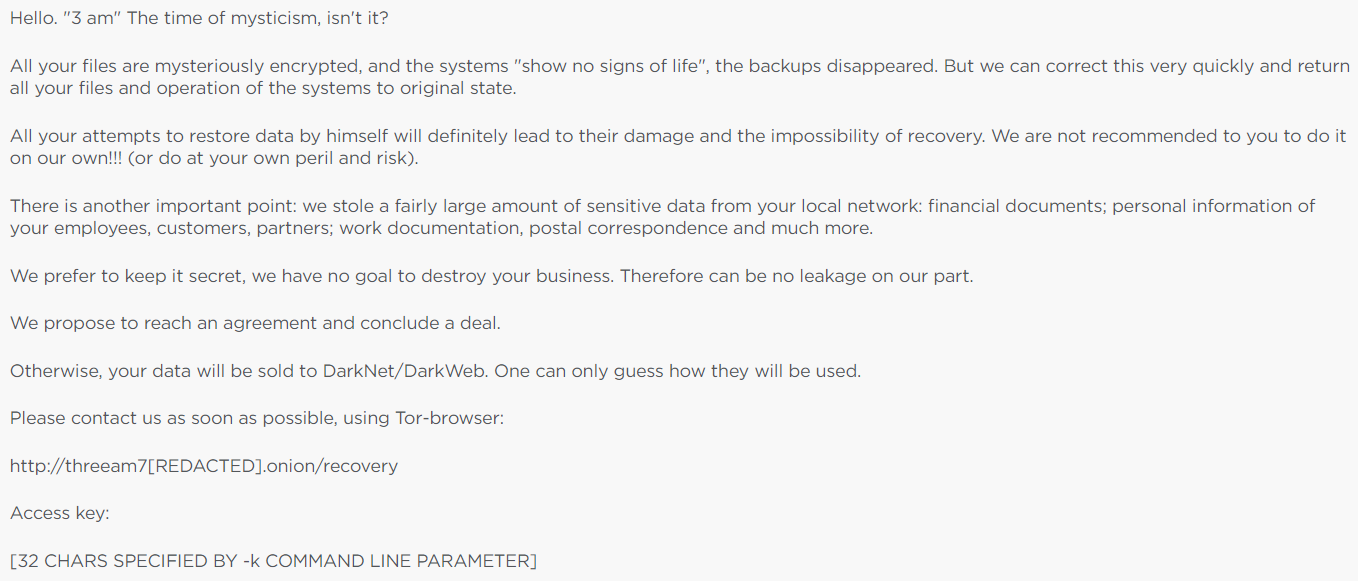
3AM gets its name from the ‘.threeamtime’ file extension it adds to encrypted files, as referenced in the ransom note.
3AM Ransom Note (Source – Symantec)
Threat researcher Ygor Maximo has recently identified a leaked website belonging to the 3AM ransomware group. The website currently lists six victims who have fallen prey to the group’s notorious activities. This discovery highlights the ever-increasing threat posed by ransomware attacks and serves as a reminder of the importance of robust cybersecurity measures to protect businesses and individuals alike.
This Rust-based ransomware recognizes the following command-line parameters since it’s a 64-bit executable:-
“-k”
“-p”
“-h”
“-m”
“-s”
The malware tries to run the following commands after its execution, and it mainly targets the security and backup software:-
“netsh.exe” advfirewall firewall set rule “group=”Network Discovery”” new enable=Yes
The ransomware scans encrypts matching files, deletes originals, and drops a ‘RECOVER-FILES.txt’ ransom note in each folder. Besides this, the encrypted files have a ‘0x666’ marker followed by ransomware data.
Ransomware affiliates act more independently, with some deploying multiple ransomware strains in one attack. While many new ransomware families fade quickly, 3 AM’s use as a LockBit affiliate fallback hints at potential future relevance for attackers.
Since 2017, Google Play Protect has been keeping Android app users safe from tons of mobile malware. It’s true that several bad apps slip through, but the company has stopped an immense and growing number of bad apps from affecting users. According to Mishaal Rahman (via Android Police), Google Play Protect will start scanning sideloaded apps right when they’re installed.
When you sideload an Android app, you’re getting an app that’s not from the Google Play Store. The Play Store has an ocean of apps, but sideloading apps gives you the chance to download apps that are not available on the Play Store anymore. These could be apps that were taken down or older versions of apps that you enjoyed more.
However, since these apps aren’t on the Play Store, they’re not protected under Play Protect. They could have any sort of malware that could negatively affect your system. This is why, if you really must sideload, you do so from trusted sources.
Play Protect could scan sideloaded apps once you install them
Google Play Protect covers the apps that are on the Play Store. Before you tap on the Install button, you know that the app has been scanned for malware. However, that coverage doesn’t really extend to sideloaded apps. you’re able to manually trigger a scan of your sideloaded app, but it’s just not an automatic process.
However, Rahman discovered that Play Protect will have some new options. One option will have Play Protect automatically scan side-loaded apps as soon as they’re installed. This is a useful feature to have, as you never know if the app you sideloaded is trustworthy.
There’s another feature coming. When you sideload an app, Google will ask you to submit that app for testing. It will allow the company to gather more data to help it better detect malicious apps. This, and the other feature are both optional.
You should be able to find them by going to your settings, and going to Security & privacy then going to App security. You’ll see a gear icon on the top right of the screen. This is where you’ll see the options. However, this is not visible just yet.
Going in no-network areas and worried about how would you pass your time? The first thing that might come to your mind hit your mind will be carrying some good books with you. However, we often browse content rather than read paper books in our digital world. We need faster and more convenient solutions for a fast generation like ours.
If you love to consume offline video content on your phone and want to know about a go-to solution for these purposes. Snaptube video downloader is a user-friendly app for downloading content from different websites, social media platforms, and video streaming websites.
So let’s delve into the world of Snaptube and begin consuming the content in the right way.
Snaptube: Your All-in-One Video Downloader App
Snaptube app has been developed by some tech enthusiasts as a go-to solution for mobile users. It has gained a reputation as the best MP3 MP4 downloader since its launch.
The main features of the Snaptube Youtube video download app are as follows:
Multiple Platform Support
Using Snaptube as your video downloader for mobile means getting free and unlimited access to all video platforms. Whether you want to download a video from YouTube, Dailymotion, Vimeo, or any social media platform, from a movie website or Instagram, Snaptube has the capabilities to allow convenient and fast download support for all platforms.
Variety of Formats and Resolutions
You have the freedom to choose the video quality when downloading content with Snaptube video downloader. Whether you want a low-quality video for space optimization or want to extract audio from a video, Snaptube does it flawlessly.
In-app Browser
The Snaptube app is more than just a video or audio downloader. It wouldn’t be wrong to say that the app has its own environment and world. From in-app browsing over websites or using social media platforms, Snaptube is capable of doing it.
Bookmarking
You can bookmark your favorite websites or videos within the Snaptube. The bookmarking feature allows you to navigate your favorite content or websites on the go.
Trending Videos
Snaptube also has a section that displays trending videos, helping users discover popular content.
Floating Player
The floating player is another enticing feature of the Snaptube video downloader. Users can play videos in a floating window to use other apps simultaneously.
Night Mode
This feature adjusts the app’s color scheme to reduce eye strain in low-light conditions.
Security
The official version of Snaptube claims to be free of malware and viruses. However, you should always be cautious and download the app only from the official website or trusted sources.
In-app Video and Music Player
When choosing Snaptube to download videos or audio files, you get an in-built music and video player. The in-build player allows users to preview or play downloaded content directly within the app.
Easy User Interface:
Snaptube’s interface is user-friendly, making it straightforward for users to search for, play, and download content.
Batch Downloading
Users can download multiple videos at once, saving time and effort.
How to Download Videos for Free using Snaptube On Your Mobile?
Now you must be wondering how to download Snaptube and install the app on your device for faster video downloads. We will walk you through the step-by-step guide on using the Snaptube video and music downloader for free.
1. First things first, you will have to download Snaptube apk on your Android device. We highly emphasize downloading the app from the official website only. You can directly access the download page here with the provided link. 2. Once you have downloaded the app on your device, it is time for installation. Click on the Snaptube video downloader apk and follow the on-screen instructions to complete the installation. If you encounter a message asking you whether to allow installation from unknown sources, simply click on Settings and grant installation permission. 3. Ready, set, go! You have installed the app on your mobile device, and now you can download any video conveniently. 4. Launch the Snaptube app. Use the built-in search bar to find videos by entering relevant keywords. Once you’ve found the video you want, tap on it to open the video details page. Alternatively, you can copy the video link you want to download for offline watching and paste the link in the search bar. 5. On the video page, you will see a yellow download icon. Tap on it, and you will see download options. You will then be given various resolution and format options to save data, including MP4, MP3, or lower-quality versions. 6. Choose the desired format and resolution, and the download will begin.
FAQs
Can Snaptube download YouTube videos?
Yes. Snaptube doesn’t only download YouTube videos; you can also browse and download content from thousands of websites and platforms integrated with the Snaptube app.
Is Snaptube an Indian app?
Unlike popular belief, Snaptube is not an Indian app. Instead, it has been developed and owned by a team of Chinese developers.
Why is Snaptube not on Play Store?
Snaptube being unavailable on the Play Store is not due to malware, virus, or suspicious activity. Instead, the download policy of the Snaptube is what clashes with Play Store. All content available to download has some copyrights, and Snaptube allows you to download such content. Therefore, Google doesn’t allow the app to be downloaded from Play Store. Until and unless you have installed Snaptube from the official website, there is nothing to be worried about.
Twitter alternative Bluesky garnered endorsement from former Twitter CEO Jack Dorsey. Though Jack Dorsey funded Bluesky and sits on the company’s board, he is not involved in day-to-day development. The CEO of Bluesky is Jay Graber, who previously worked as a software engineer for the cryptocurrency Zcash. Bluesky is a decentralized social app and developed in parallel with Twitter. The social network has a Twitter-like user interface with algorithmic choice, a federated design and community-specific moderation.
After its closed Beta launch, Bluesky introduced several features: – Users can personalize timelines using their preferred algorithms. – It maintains an ad-free environment through a paid domain service for identity verification.
Furthermore, reports have indicated invite codes selling on eBay for hundreds of dollars.
Announcement of Twitter Alternative Bluesky on X
A member of the Bluesky team, Rose Wang, enthusiastically shared the news on X, announcing that the app received one million downloads in July. The most significant update is Bluesky’s transformation from an exclusive social media platform with invite codes to an inclusive one accessible to a broader audience.
Bluesky, the Twitter alternative, has achieved a major milestone, accumulating 1 million users. Initially, it required invite codes for registration, limiting access. Bluesky recently celebrated this accomplishment, marking an impressive milestone for an app that was once restricted from the general public.
Doing things in another way, Meta took a different approach with Threads. Unlike Bluesky, Threads was accessible to everyone right from the start, despite lacking critical features. Threads attracted 100 million users within just a week of its July release and introduced keyword search functionality, enhancing its overall utility. With few other features like : – Users can now easily see all the Threads posts they’ve liked by accessing a specific option in settings. – Added support for image alt-text and rel=me links for verifying accounts on platforms like Mastodon.
In summary, Bluesky’s achievement of one million users and its transition to public accessibility signify significant milestones in the realm of social networking. Meanwhile, despite its initial feature limitations, Meta’s Threads rapidly amassed a substantial user base, illustrating the dynamic and competitive nature of social media, offering users a diverse array of choices.
During the past few years, the topic of AI has been on the rise. The AI hashtag, which stands for artificial intelligence, was trending in the digital spaces. AI is actually rising from the field of Computer Science to solve cognitive or related problems about human intelligence, i.e. problem-solving, and pattern recognition, that is controlled by a robot or computer-controlled system.
Nowadays, AI has collaborated with various technologies like machine learning, deep learning, natural language processing, expert systems, robotics, and fuzzy logic to solve many problems. As a result, AI chatbot is one of the AI technologies that has gone viral and has been used by many people recently.
In this industry, ChatGPT is what people mostly know. This AI chat was launched by OpenAI, which has now upgraded to the fourth version. However, only a few people know that other than ChatGPT, there are actually many other AI chatbots, one of which is AI Chatting.
To give you an idea, we will delve into how AI Chatting works and how it can assist you in your daily life.
What is AI Chatting
AI Chatting claims to be an AI language model developed by OpenAI. It was first launched in 2020 with the latest version was upgraded in early 2021. Its software allows us to ask questions using natural, easy-to-understand language in conversation, and then respond to it in any way that mimics human conversation, making interactions more natural and engaging.
Additionally, AI Chatting can generate text in a variety of styles and formats as it is trained with various characters like Socrates, Groot, Morty, Elon Musk, Loki, Mario, Billie Eilish, etc. In total, it is equipped with 8 categories of characters, i.e. Famous People, Education, Assistants, Marketing, Film & TV, Companion, Anime, and Game. Therefore, this AI character can generate text like news articles, emails, and poetry, making it versatile and useful technology for a wide variety of applications. It always tries its best to provide appropriate answers even though there are some vocabulary errors.
This chatbot online not only makes it easier for many business people to grow their businesses by assisting them to plan but also for students, to help with their assignments; artists, to assist them in seeking inspiration; or simply curious people simply seeking insights.
With that said, AI Chatting can be used by everyone without any hidden subscriptions. It provides two versions, which are the online website version, as well as application. We can get the application from Google Play or App Store for free.
How to Utilize AI Chatting
Unlike other AI chatbots that require you to sign in prior to using it, AI Chatting offers you the best experience without signing it as well as a friendly user interface.
Step 2: Select the characters you want to chat with
As mentioned previously, AI Chatting is equipped with various characters. Tap on “All characters” and simply select one that suits your needs.
Step 3: Enter your inquiries
Now, this AI chatbot is ready to serve you. Type in any of your inquiries and it will respond to you promptly.
For Mobile Device:
Step 1: Install the application
Go to Google Play or App Store and search for “AI Chatting – AI Character”, then install it.
Step 2: Select the characters
On the homepage, before you start chatting, select the characters by simply selecting from one of the choices on the top, or tap on the “+” button to see the comprehensive list.
Step 3: Start chatting
Now, all you need to do is to type in any of your inquiries and start chatting.
*If you’re not satisfied with the answer, simply switch the characters and retype your inquiries, then it will regenerate a new answer.
The Future of AI Chatting
As technology continues to advance, the future of conversational AI like AI Chatting looks quite promising. AI Chatting serves as a testament to the incredible possibilities this field holds. It represents a significant step forward in the world of conversational AI.
Its advanced features, personalized interactions, and potential applications make it a valuable asset for individuals and businesses alike.







 Both phones share some similar internals. They’re both using the MediaTek Helio G99 SoC with 8GB of RAM (expandable to 16GB), and 256GB of storage. People tend to assume that the performance is going to be sub-par based on the MediaTek processor. However, that’s not the case.