Multiple vulnerabilities have been discovered on Junos OS, which can be combined to execute a preAuth remote code execution vulnerability on Junos OS on SRX and EX Series. An unauthenticated network-based attacker can exploit these vulnerabilities by chaining them.
Junos OS SRX is a firewall that is used to protect remote offices, branches, campuses, or data centers by extending to every point. EX series is a high-performance access and distribution/core-layer device for enterprise branches.
Juniper Networks has released a security advisory for fixing these vulnerabilities.
This vulnerability allows an unauthenticated network-based attacker to control some important environment variables by utilizing a crafted request and modifying the PHP environment variable, leading to integrity loss. The severity for these vulnerabilities is given as 5.3 (Medium).
An unauthenticated network-based attacker can cause a limited file system integrity impact, requiring authentication to upload arbitrary files through J-Web, leading to integrity loss on some parts of the file system. The severity for these vulnerabilities is given as 5.3 (Medium)
Affected Products
Product
Affected Version
Fixed in Version
Junos OS on SRX Series
All versions prior to 20.4R3-S8;21.2 versions prior to 21.2R3-S6;21.3 versions prior to 21.3R3-S5;21.4 versions prior to 21.4R3-S5;22.1 versions prior to 22.1R3-S3;22.2 versions prior to 22.2R3-S2;22.3 versions prior to 22.3R2-S2, 22.3R3;22.4 versions prior to 22.4R2-S1, 22.4R3;
20.4R3-S8, 21.2R3-S6, 21.3R3-S5*, 21.4R3-S5*, 22.1R3-S3, 22.2R3-S2*, 22.3R2-S2, 22.3R3, 22.4R2-S1, 22.4R3*, 23.2R1, and all subsequent releases.
Junos OS on EX Series
All versions prior to 20.4R3-S8;21.2 versions prior to 21.2R3-S6;21.3 versions prior to 21.3R3-S5;21.4 versions prior to 21.4R3-S4;22.1 versions prior to 22.1R3-S3;22.2 versions prior to 22.2R3-S1;22.3 versions prior to 22.3R2-S2, 22.3R3;22.4 versions prior to 22.4R2-S1, 22.4R3.
20.4R3-S8, 21.2R3-S6, 21.3R3-S5*, 21.4R3-S4, 22.1R3-S3, 22.2R3-S1, 22.3R2-S2, 22.3R3, 22.4R2-S1, 22.4R3*, 23.2R1, and all subsequent releases.
Users of these products are recommended to upgrade to the latest version as per the security advisory released by Juniper Networks in order to prevent these vulnerabilities from getting exploited.
If you’re not a YouTube Premium subscriber, then you’re used to waiting with bated breath for the Skip Ads button to pop up. We’re all used to seeing the rather large rectangle on the bottom right of our video feed. However, according to SearchEngineLand (via 9To5Google), YouTube will shrink the Skip Ads button.
This might seem like an odd visual change, but YouTube has been changing its UI over the past couple of months. It’s moving to be more in line with Material You. While this is the case, the Skip Ads button has remained the same over the years.
YouTube will shrink the Skip Ads button
YouTube told SearchEngineLand that “[its] goal is to provide a more consistent user experience in line with the updated look and feel on YouTube [it] announced last year.” With this new change, the Skip Ads button will still be on the right side of the screen.
However, looking at the screenshot, the button will be significantly smaller. In fact, it’s pretty hard to see. Along with being smaller, the button is now a pill rather than a box. With Google’s products, everything is either a rounded rectangle or a pill shape, so this is no surprise.
From SearchEngineLand
Right now, YouTube is testing this out, so you won’t see it for some time. It’s hard to say when YouTube will make this change live. The company has been working on changing up its look since last year, and the Skip Ads button means that no stone will go unturned.
In other YouTube news: YouTube Music got a TikTok-style feed
In this day and age, just about every social media or video-sharing platform has copied off of TikTok. Now, YouTube Music is getting a TikTok-style feed. Called Samples, you’ll be able to scroll through short clips of music videos on the platform. It’s a vertically-scrolling feed, so you’re able to flip through clips.
Since these are only samples, you won’t see the full video. However, the Play button on the bottom of the screen will take you to the full video.
The iPhone 15 Pro Max is getting its dose of bad news on this Tuesday. According to an equity analyst, that shared the information with 9to5Mac, it looks like the iPhone 15 Pro Max (or potentially the iPhone 15 Ultra) could be getting delayed 3-4 weeks.
The delay should not be a big surprise. Recently, when Apple makes some big changes to hardware, those particular models are delayed. Like in 2020 with the iPhone 12 Pro Max and iPhone 12 Mini, they were shipping about a month later. The Pro Max had brand new cameras, and the Mini was brand new itself. Last year, the iPhone 14 Plus was delayed about a month, since it was also basically brand new. So seeing the iPhone 15 Pro Max or Ultra being delayed should not be a huge deal.
Apple is slated to give the iPhone 15 Pro Max the biggest update, of the iPhone 15 lineup
The iPhone 15 and 15 Pro aren’t set to see major updates. Other than USB-C and the regular iPhone 15 getting Dynamic Island. But the Pro Max, is getting plenty of upgrades. Rumors has it that it is getting a new primary sensor, in the Sony IMX903. Which would be the largest camera sensor ever used on an iPhone. It’s also set to get a periscope lens, which would allow for better zooming, rumors are pointing to 3x and up to 6x for optical zoom.
On top of that, it is also rumored to be getting a titanium build, similar to the Apple Watch Ultra. As well as a significantly larger battery and a larger screen. Now the display is only getting larger because the bezels will be so incredibly thin. Rumors are pointing to it featuring a 6.8-inch display, up from the 6.7-inch it currently has.
While the iPhone 15 Pro Max could be delayed, it definitely sounds like it’s going to be worth the wait. Remember, the iPhone 15 Pro Max is set to get a price bump to, jumping up to $1,299. But it is also rumored to be bumping up the base storage to 256GB.
An unauthenticated critical API access vulnerability was found in the Ivanti Sentry interface, which could allow a threat actor to gain access to sensitive APIs that can be used to access the Ivanti administrator portal and configure Ivanti Sentry.
This vulnerability can also be used to execute OS commands on the
If an attacker succeeds in exploitation, the attacker will be able to configure Ivnati Sentry, execute system commands, or write files onto the system.
However, since this administrator portal uses port 8443, users who do not have their Ivanti administrator portal exposed over the internet have a low ratio of exploitation.
This vulnerability exists due to insufficient restrictive Apache HTTPD configuration that allows a threat actor to bypass authentication controls on the administrator portal of Ivanti.
The CVSS score for this vulnerability is yet to be confirmed. Nonetheless, Ivanti Sentry has provided a CVSS score of 9.8 (Critical).
“Exploitation is only possible through the System Manager Portal, hosted on port 8443 by default.” reads the Knowledge Base (KB) article of Ivanti.
Ivanti Sentry, which was formerly known as MobileIron Sentry, is a Unified Endpoint Management product that can be used by organizations to encrypt, manage, decrypt, and protect mobile devices and backend systems traffic.
Ivanti confirmed in their security advisory that this vulnerability does not affect other Ivanti products like Ivanti EPMM or Ivanti Neurons for MDM. Ivanti Sentry products with versions 9.18, 9.17, 9.16, and older versions are affected by this vulnerability.
For fixing this vulnerability, Ivanti has provided a resolution involving steps to remediate this vulnerability. Ivanti also recommended users restrict external access to the administrator portal at 8443, which can only be accessed by IT administrators or an internal management network.
Different apps and services serve us a ton of useful information, but we often wonder where that information comes from. That’s especially true now with so much of our data being scraped 24/7. Well, the At a Glance widget in the Google Pixel Launcher will start giving us more information about the content it shares.
The At a Glance widget is an incredibly useful feature in the Pixel launcher. As its name suggests, it shows you information that you can access at a glance. You can check out the weather forecast, upcoming alarms, upcoming calendar events, air quality, etc. It sits right at the top of the Pixel Launcher and on the lock screen.
The At a Glance widget is going to show information about where it got its content
As useful as the At a Glance widget is, it still falls under the category of services that need to swipe data from its users. This is something that a lot of people don’t really think about. However, Google wants to make it clear where it’s getting its information.
According to 9To5Google, when you hold your finger down on the widget, you’ll see an About this content button appear above the Customize button. When you tap on it, you’ll see a panel pop up from the bottom of the screen showing you where Google obtained the information.
It will show you what apps and services the widget needs to tap in order to show you the information. For example, it lets you know that it gathered its weather data from Weather.com and it also uses your location data.
From 9To5Google
You’re able to tap on the links to be taken to different sites. The Learn More button will explain how your location data is being used.
This is still rolling out, so you might not see it just yet. We’ve yet to see it on one of our phones. The new addition was first spotted in version U.6.playstore.pixel7.551778374 of Android System Intelligence.
As part of the Biden administration’s commitment to bridging the digital divide in rural America through the ReConnect program, the US Department of Agriculture (USDA) has announced substantial funding of $667 million, which aims to revolutionize broadband accessibility in 22 states, alongside the Marshall Islands.
The USDA funding, consisting of grants, loans, and their combinations, will empower companies to address broadband inadequacies in areas struggling with speeds below the 100 megabits per second (Mbps) download and 20 Mbps upload threshold, therefore exceeding the benchmarks established by the Federal Communications Commission (FCC), which mandates minimum speeds of 25 Mbps down and 3 Mbps up.
Among the funding beneficiaries, the Scott County Telephone Cooperative, headquartered in Virginia, will receive an impressive grant of $25 million to enable them to connect an astounding 17,000 residents, over a thousand businesses, 37 farms, and nearly 50 educational facilities. Additionally, even smaller-scale projects will yield significant impacts. For instance, Wave Wireless in Iowa will receive nearly $500,000 in funding, enhancing connectivity for 228 residents, six commercial entities, and approximately 40 agricultural operations.
“The reality is, we have faced some challenging times in rural places, and this is a president who believes strongly in ensuring that investments are made in all parts of the country from the most-populated urban centres to the most remote rural places,” Tom Vilsack, USDA Agriculture Secretary.
Broader efforts to connect rural America
The financing for the ReConnect program comes from the Biden administration’s 2021 Bipartisan Infrastructure Law, which allocated a staggering $65 billion to expand access to affordable, high-speed broadband nationwide. Additionally, the newly established Broadband Equity, Access, and Deployment (BEAD) Program has designated $42 billion to states, empowering them to lead high-speed broadband projects, thus underlining the government’s commitment to bridging the digital divide.
Furthermore, to ensure the affordability of internet packages, the government has also approved the $14.2 billion Affordable Connectivity Program, which facilitates the extension of a subsidy initially designed to reduce internet package costs by $30 per month, with an even more substantial reduction of $75 for residents on tribal lands.
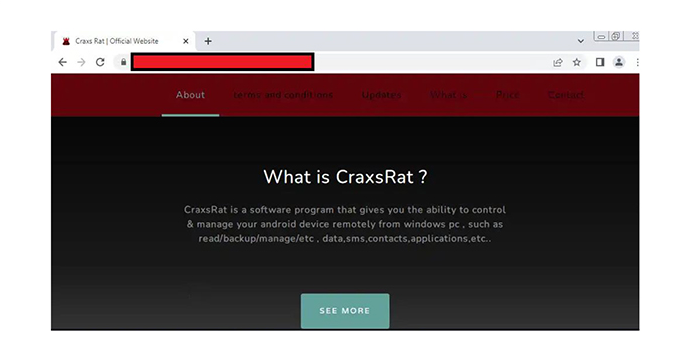
Researchers have identified a new Malware-as-a-Service (MaaS) operator called ‘EVLF DEV’ as being behind the creation of CypherRAT and CraxsRAT.
EVLF has been selling CraxsRAT, one of the most extremely dangerous Android RATs accessible today, for the past three years, with at least 100 lifetime licenses sold to date.
The CYFIRMA research team reports that “RATs can be used by attackers to remotely control a victim’s camera, location, and microphone”.
Particularly, the code in the Android package created by the CraxsRAT builder is highly obfuscated, available in a variety of builds, and provides threat actors with choices for deploying malicious apps based on the type of attack.
“It can be ascertained with high confidence that EVLF is being operated by a man from Syria,” Cyfirma researchers said.
Malware Developer Uncovered
EVLF has developed an online shop for CraxsRAT on the surface web to prove its reliability to interested threat actors.
Web Shop Running Since September 2022
According to the information shared with Cyber Security News, after acquiring software from EVLF, certain threat actors eventually began giving away cracked (and, in some cases, backdoored) versions of the RATs to the black hat community.
This dramatically increased the reachability of these RATs and the number of active users. To guarantee anonymity, all transactions for purchases are, of course, made in Cryptocurrency.
“We can confirm that CraxsRAT only targets Android devices. We believe that cracked versions of CraxsRAT builders (that are meant to run on Windows machines) are being distributed in forums with pre-existing backdoors of other malware/ransomware”, researchers said.
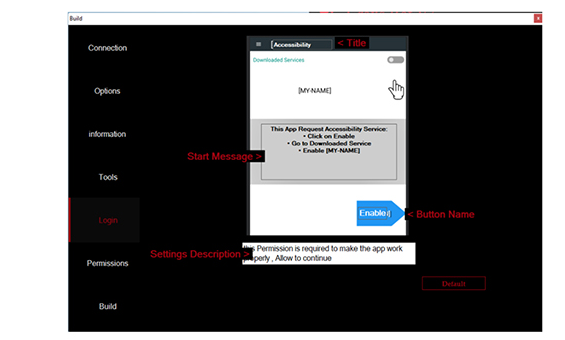
To obtain access to the device’s screen and keystrokes, the app must activate accessibility in settings. As a result, when the app installation is complete, the builder gives the threat actor access to alter the page that appears.
Customize page that takes the victim to the accessibility setting
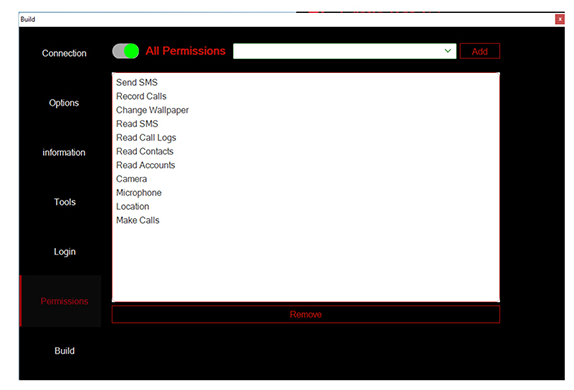
Threat actors utilize the quick install function to install software quickly and easily without requiring much user engagement, such as turning on accessibility. Threat actors then ask for the necessary authorization to carry out malicious actions.
Option to select permissions
Hence, users should take caution while installing apps, avoid clicking on dubious links or attachments, and only install apps from legitimate app stores to protect them from such threat actor efforts.
Reels, TikToks, Shorts, spotlights, whatever you want to call them, these short vertically scrolling videos are all the rage nowadays. What makes them stand out is the random and chaotic nature of them. However, Meta just announced that Instagram is going to bring a chronological feed for Reels, but it’s only in Europe.
When you’re scrolling through your feed of videos, you never know what you’re going to see next. You’ll be presented with a random feed of videos catered to your likes and interests. While this is true, you’ll still find some videos off the beaten path.
Instagram is bringing a chronological feed to Reels in Europe
The vertical-scrolling video feed is pretty much like most other social media or video feeds; they feed you content curated for you via an algorithm. This algorithm is tuned based on the stuff that you watch. However, Instagram is making a change in Europe.
Instead of being served content based on your habits, the app will give you a chronological feed. This means that you’ll see the Reels as they’re being posted to the app. You won’t only see the chronological feed on Instagram, but you’ll also see it on Facebook.
Instagram will also let you see Reels only from people who you follow. That’s something that many people will appreciate. Sometimes, you only want to browse videos from people who you follow and cut out the noise.
Why is this only happening in Europe?
Sorry to break the news to you, but Meta isn’t doing this out of the kindness of its heart; it had to. Europe introduced a new act called the Digital Services Act. This act compels companies to let people opt out of their personalized algorithms. In order for a company to give you recommended content, it needs to take data from you like your location. Also, companies need to keep an eye on what kind of content they watch.
When the user opts out of the service, then Meta can’t curate content for you. so, it’s left with giving us less personalized (but much better) feeds.
Just as Wi-Fi 6 and Wi-Fi 6E become more prevalent, there’s already a new Wi-Fi standard on the horizon. The final Wi-Fi 7 standard should be official in early 2024. In fact, devices with Wi-Fi 7 have already started hitting the market. You can buy a few routers with the latest Wi-Fi version today, and your options will grow exponentially next year.
This puts many in a dilemma: whether to grab a router with Wi-Fi 6/6E or wait for Wi-Fi 7. It’s a genuine concern for anyone looking to buy a new router over the next few months. Like all previous major version upgrades, Wi-Fi 7 also brings faster data rates, lower latency, higher bandwidth for more simultaneous connections, improved security, and many more improvements.
However, all of this comes at a price. Routers with Wi-Fi 7 will naturally cost more than those with older standards. The latter group of routers is likely to see a price drop as well. So is Wi-Fi 7 worth the extra money? How big of a difference does Wi-Fi 7 bring to your home internet experience compared to Wi-Fi 6 and Wi-Fi 6E? Let’s have a detailed look at the specifications, features, speeds, and other technical tidbits of the three Wi-Fi standards and find out.
Wi-Fi 6, Wi-Fi 6E, and Wi-Fi 7 specifications
You might be aware that Wi-Fi standards have historically had somewhat confusing and complex technical names. While the industry has now settled on these more straightforward names, the classic technobabble is still around. Wi-Fi 6 and Wi-Fi 6E share the same name (802.11ax), while Wi-Fi 7 is 802.11be.
Some of you might be wondering why Wi-Fi 6 and Wi-Fi 6E have the same technical name/ Well, that’s because there aren’t many differences between the two standards. Below is a quick comparison of Wi-Fi 6, Wi-Fi 6E, and Wi-Fi 7 specifications.
As you can see in the table above, the only difference between Wi-Fi 6 and Wi-Fi 6E is the addition of a third 6GHz frequency band. The latter offers all the features of the former over this third band as well, along with the existing 2.4GHz and 5GHz frequencies. This extension into a higher-frequency band gives more space for data transmission, reducing congestion in crowded networks. It also improves the speed of short-range connections. However, everything else remains unchanged between the two 6th-gen Wi-Fi standards.
Wi-Fi 7, on the other hand, upgrades pretty much every aspect of the decades-old wireless connectivity standard. While there isn’t a new frequency band here (higher frequencies have shorter ranges), the 7th-gen Wi-Fi standard doubles the maximum channel bandwidth and spatial streams. It also quadruples QAM (quadrature amplitude modulation) and adds more access points (Multi-Link Operation, or MLO).
These upgrades are expected to bring more than four times faster speeds than Wi-Fi 6 and Wi-Fi 6E (the final standard is not yet official, so the precise peak speed is unknown). Moreover, Wi-Fi 7 is also expected to introduce a new security standard, making your wireless internet connection more secure than ever. But how does all of this happen? Let’s dive into the technical side of Wi-Fi specifications.
Wi-Fi frequency bands
Wi-Fi signals have long operated in two major frequencies, 2.4GHz and 5GHz. To be precise, Wi-Fi 5 (802.11ac) only used the 5GHz frequency, while Wi-Fi 4 used both. The previous Wi-Fi standards also either used 2.4GHz or 5GHz frequency. When Wi-Fi 6 was launched in 2019, it supported both frequencies.
Wi-Fi 6 was the first new Wi-Fi standard in five years and expectedly brought several notable improvements. The introduction of OFDMA (orthogonal frequency-division multiple access) and bi-directional MU-MIMO (multi-user, multiple input, multiple output) greatly improved throughput speed. It also improved power consumption and efficiency.
However, with the rapid rise in the number of connected devices around us, these frequencies got congested and the devices couldn’t take full advantage of the improvements brought by Wi-Fi 6. This is when Wi-Fi 6E came onto the scene. It arrived in 2020 with an additional 6GHz frequency band. This allowed all the new features of Wi-Fi 6 to operate in three frequencies simultaneously.
This addition improved the throughput area, reducing network congestion and interference. Less congestion means devices in crowded networks get better Wi-Fi speeds and low latency even though Wi-Fi 6E doesn’t improve the peak speed over Wi-Fi 6. More devices can now be connected to the same network without affecting the data rate.
Wi-Fi 7 also operates in 2.4GHz, 5GHz, and 6GHz frequencies. Combined with improvements in other aspects, which we will go into detail shortly, the new Wi-Fi standard opens up whole new possibilities for wireless internet. But before that, let’s find out what OFDMA and bi-directional MU-MIMO are and how the introduction of these technologies with Wi-Fi 6 improved the throughput speed.
What is OFDMA?
OFDMA is an upgrade over the order OFDM (orthogonal frequency-division multiplexing) technology employed by previous Wi-Fi standards. It helps improve wireless network performance by allowing simultaneous data transmissions to and from multiple client devices. By comparison, OFDM can only transmit one data request at a time.
Since internet usage continues to grow exponentially, the older tech now struggles to efficiently transmit data requests without causing network congestion or latency. OFDMA solves this problem by accommodating requests from multiple users at the same time, even those with varying data loads and use patterns. It helps allocate channel bandwidth more efficiently.
OFDMA is also used in 5G cellular networks, while 3G and 4G networks rely on OFDM. So all recent network standards benefit from the tech, which enables high throughput and low latency. IoT (Internet of Things) devices benefit from a more proportionate allocation of network resources by OFDMA. It helps in reducing power consumption as well.
What is bi-directional MU-MIMO?
MU-MIMO was first introduced to the Wi-Fi world with Wi-Fi 5 in 2015. It allows an access point to simultaneously communicate with multiple devices. The technology helps increase the speed of the data transfer and reduces latency when multiple users are connected to the same access point or router.
However, Wi-Fi 5 only supports MU-MIMO in downlink transmissions, i.e. when transmitting data from an access point to a connected device. It doesn’t work the other way around (uplink). This wasn’t a major limitation until a few years back when we weren’t uploading as much content online as we do today. With the rise in content creation and remote collaboration, uplink data demand has gone up and MU-MIMO in uplink transmissions has become a necessity.
Wi-Fi 6 brought this much-needed bi-directional MU-MIMO, i.e. for both downlink and uplink data transmissions. It allows multiple users connected to the same access point to send data from their devices simultaneously without congestion or a drop in network speed. OFDMA and bi-directional MU-MIMO are essentially complementary technologies to improve the performance and efficiency of multi-user Wi-Fi networks.
Wi-Fi channel bandwidth
As we discussed above, the latest Wi-Fi standards support three frequency bands. This gives more space for data transmission without congestion. Each of these bands has multiple channels of different widths. The wider a channel is, the more bandwidth it has. Data is transmitted wirelessly through these channels via streams.
One way to understand this is to use a freeway as an analogy. If a band is a freeway, channels are lanes, and streams (which we will discuss in more detail shortly) are vehicles carrying people (data). Since all vehicles (streams) can’t carry the same number of people (data), allowing vehicles of all sizes to ply on lanes (channels) of the same width is a waste of the freeway (band) space. It’s more efficient to let smaller vehicles such as a bike ply on narrow lanes and larger vehicles such as trucks run on wider lanes.
Hence, frequency bands are divided into multiple channels of different widths. Wi-Fi 6 and Wi-Fi 6E support 20MHz, 40MHz, 80MHz, and 160Mhz channels. Depending on the demand, data is transmitted through the right channel. This ensures efficiency and sustained throughput speed across the network.
Wi-Fi 6E’s additional frequency band already makes room for more simultaneous channels than Wi-Fi 6. Wi-Fi 7 now adds a much wider 320MHz channel to it, double that of Wi-Fi 6 and Wi-Fi 6E. This means the new standard offers double the base speed over the previous standards (from 1.2Gbps per stream to 2.4Gbps per stream), allowing for even more efficient data transmission. Coupled with more spatial streams, higher modulation, and multiple access points, the improvements are much bigger.
Spatial data streams
Wi-Fi spatial streams are a way of transmitting data over a wireless network using multiple antennas. When you’re using Wi-Fi, the data you’re sending and receiving is split into different streams, each called a spatial stream. The higher the spatial streams, the faster data transfer rates and better performance, especially in crowded networks. They enable simultaneous transmission of more data at high speed, making Wi-Fi networks more efficient.
Wi-Fi 5 supports up to 4 spatial streams (4×4 or quad-stream), meaning that transmitted data is split into four streams, enabling quicker transmission through the same access point. Wi-Fi 6 and Wi-Fi 6E doubled the spatial stream to 8, further improving the speed and efficiency. The introduction of OFDMA and bi-directional MU-MIMO also added to the overall performance boost brought by the 6th-gen Wi-Fi standards.
With Wi-Fi 7, the number of spatial streams has gone up to 16. This means more data can be sent and received simultaneously. In other words, the new Wi-Fi standard delivers faster data rates for more devices on the same access point at the same time, making crowded Wi-Fi networks more efficient. This is important because we now have more connected devices around us than ever.
It’s worth noting that the number of spatial streams a device can access also depends on the number of antennas on the device. Smaller devices have fewer antennas, so they can’t leverage the full range of Wi-Fi 7 spatial streams. Like with the previous generations, the latest standard will also support multiple stream broadcasters and clients (dual-stream, quad-stream, etc.).
In fact, Wi-Fi 6 and Wi-Fi 6E still only have dual-stream (2×2) clients. That’s despite theoretical support for up to 8 spatial streams. Likewise, Wi-Fi 7 will also debut with dual-stream clients. Support for quad-stream clients (4×4) is expected later. Note that lesser spatial streams mean a much slower practical data transfer rate than the theoretical peak.
Modulation
QAM or quadrature amplitude modulation determines how data is packed and transmitted over Wi-Fi frequencies. It is a technique to adjust the properties of these radio waves to allow more data to pass through at a time. QAM can change both the amplitude (strength) and the phase (starting point) of the waves to represent digital data. The higher the modulation (variations in amplitude and phase of radio waves), the higher the data rate.
Wi-Fi 5 operates at 256-QAM. It struggles to stream higher-quality content such as 4K videos and AR/VR content, which require quick transmission of a large amount of data. With Wi-Fi 6 and Wi-Fi 6E, the QAM level was quadrupled to 1024-QAM. That means the 6th-gen Wi-Fi standards can transmit four times more data through each radio wave, helping improve the overall throughput speed.
Wi-Fi 7 now increases modulation by four more times. The 7th-gen Wi-Fi standard has the highest modulation level of 4096-QAM. This improves its performance on the same channel width, delivering faster speeds and better efficiency than previous standards. Coupled with Multi-Link Operation, a new technology introduced with Wi-Fi 7, and all other upgrades discussed above, the performance improvement is huge.
Multi-Link Operation
In Wi-Fi 6 and Wi-Fi 6E, and all previous versions, connections take place via a single access point. In other words, a connected device can only use a fixed channel in one frequency band (2.4GHz, 5GHz, or 6GHz) at a time. Some routers offer a smart connect feature that enables devices to automatically switch the connection to the best available frequency band and channel. That improves signal quality and reduces interference.
However, this doesn’t completely address the limitations of having a single access point. Wi-Fi 7 changes the whole game by allowing multiple access points. Multi-Link Operation, or MLO, enables connected devices to simultaneously send and receive data across different bands and channels, avoiding potential interference with other connections on the network. It can combine two frequency bands (5GHz and 6GHz) into a single network for higher bandwidth and sustained throughput speed.
With this change, there’s little to no risk of signal drop in a wireless mesh network. Connection handoff between two access points (roaming) should also be seamless. Moreover, the ability of Wi-Fi connections to automatically pick the best channel means you’ll get the same data transfer rate over longer distances.
But bear in mind that a network that combines 5GHz and 6GHz frequencies will only have the range of the latter band, which is shorter. Devices that don’t support Wi-Fi 7 can’t utilize MLO even if they are connected to a Wi-Fi 7 router. Nonetheless, MLO can significantly improve the performance of a wireless mesh network with several compatible devices connected at the same time. Features like Automated Frequency Coordination (AFC) and Flexible Channel Utilization (FCU) add to those improvements.
What is Automated Frequency Coordination?
Higher frequency bands have shorter ranges. The 6GHz band has a range approximately 25 percent shorter than 5GHz with the same amount of broadcasting power. However, manufacturers can extend that a bit with Automated Frequency Coordination. AFC is an optional feature for the 6GHz band. Its absence doesn’t affect any other functionality of a Wi-Fi 7 router. But if enabled, it can improve a few things.
Radio waves are used by various devices and systems to wirelessly transmit data. A Wi-Fi signal must never interfere with other applications that are already using certain parts of a spectrum, such as fixed satellite services. AFC ensures this compliance by creating an exclusive environment that doesn’t affect any other ongoing application. It checks the registered database in real time to determine the available frequency spectrum and transmits the Wi-Fi signal over it.
This ensures that a signal isn’t under regulatory constraints. But more importantly, routers with AFC support can use more power. They can use up to an estimated 4 watts from the normal power draw of 1 watt. A higher amount of broadcasting power means a longer range for the 6GHz frequency band. AFC helps extend the range of the higher frequency band to a comparable range to the 5GHz band.
However, to enable AFC, manufacturers need to separately obtain a regulatory certification. So not every Wi-Fi 7 router may support this feature. It could also blocked in some geographical regions by the local authorities. If you want a longer range for the 6GHz band, make sure to check whether a router boasts AFC support. Bear in mind that AFC can be turned off remotely via firmware updates.
What is Flexible Channel Utilization?
Up to Wi-Fi 6E, when a suffers signal interference, the whole channel is affected. No matter if it’s the narrowest channel (20MHz) or the widest (160Mhz). This means even if the channel has some width available, it can’t be utilized for data transmission during interference.
Wi-Fi 7 fixes this problem with a new feature called Flexible Channel Utilization or FCU. Instead of taking the entire channel out of commission in the case of interference, FCU intelligently cuts off the portion of the channel with interference. This is done in slices of 20MHz. This ensures that only the occupied part of the channel is cut off and the clean part is usable. Like OFDMA and bi-directional MU-MIMO, FCU also works behind the scenes to improve Wi-Fi 7.
Wi-Fi 7 mandates Multi-Gig ports
Another major change brought by Wi-Fi 7 is mandatory support for Multi-Gig or multi-Gigabit ports. It’s now a minimum requirement. Wi-Fi 7 routers must offer an option for multi-Gigabit wired networking. This ensures that wired networks can take full advantage of Wi-Fi 7’s super-fast speeds. The existing Gigabit standard doesn’t do justice to Wi-Fi 7 speeds.
Note that your Wi-Fi system must deliver a sustained data transfer rate of 2Gbps or faster in a single link to qualify as a multi-Gig system. If it does, you can leverage Wi-Fi 7’s mandatory multi-Gig support to establish a wired networking system. Wired networks are always faster than wireless.
As a crude analogy, you can compare wired networks with phone calls. Data travels both ways simultaneously using the entire cable’s bandwidth. Wireless networks, on the other hand, are like walkie-talkie communication. They can only transmit data in one direction at a time. Moreover, they only use a portion of a frequency band called a channel to transmit data.
Wi-Fi 7 is more than four times faster than Wi-Fi 6 and Wi-Fi 6E
The final Wi-Fi 7 standard is not official yet. It’s expected in early 2024. That’s when we will have a precise number for the peak theoretical speed of the 7th-gen Wi-Fi standard. However, current estimates are that it will bring more than four times faster data transfer rates than Wi-Fi 6 and Wi-Fi 6E.
For the uninitiated, the 6th-gen Wi-Fi standards have a peak theoretical speed of 9.6Gbps (Wi-Fi 5’s peak speed is 6.9Gbps). Wi-Fi 7, on the other hand, can achieve speeds to the north of 40Gbps. This is essentially why Wi-Fi 7 is also called 802.11be EHT, where EHT stands for Extremely High Throughput.
The new Wi-Fi standard will deliver lightning-fast speeds while simultaneously upgrading almost every other aspect of your wireless internet connection. You will get reduced latency and lesser network congestion than before. You’ll also suffer fewer signal drops and enjoy a more reliable internet connection.
As we move to smart homes where everything is connected, these improvements will deliver high-speed connections to all of those devices. Effectively, it will elevate your wireless internet experience to a new level. Whatever might be your need, Wi-Fi 7 will do a better job than Wi-Fi 6 or Wi-Fi 6E.
All of this while improving the security of your connection and connected devices. While not official yet, Wi-Fi 7 is expected to bring WPA4 security. Wi-Fi 6 and Wi-Fi 6E rely on WPA3 security, which is the latest wireless security standard currently.
Practical speeds are usually much lower than theoretical speeds
Wi-Fi 7 can reach a theoretical top speed of more than 40Gbps. Don’t expect to get this speed in real-life, though. Practical speeds are much lower than that. The real-world sustained speeds of Wi-Fi 7 are expected to reach just about 11.5Gbps. That’s with a quad-stream (4×4) 320MHz client device. Wi-Fi 6 and Wi-Fi 6E have had only 2×2 clients (dual-stream) and can reach a peak real-world speed of 2.4Gbps. On Wi-Fi 7, a dual-stream client can deliver a peak speed of 5.8Gbps.
This is because of the way Wi-Fi specs are implemented in real life. Wireless technologies aren’t pushed to the limit. The table below compares the real-world performance of the 6th and 7th-gen Wi-Fi standards along with their respective theoretical limits.
Should you get a Wi-Fi 7 router?
The answer to this question isn’t a simple yes or no. Yes, Wi-Fi 7 is a massive upgrade over Wi-Fi 6 and Wi-Fi 6E. That’s true. However, you might be surprised to learn that most electronic devices in use today are limited to Wi-Fi 5. Some of the latest gadgets boast Wi-Fi 6 or Wi-Fi 6E, while there are very few with Wi-Fi 7. Like before, we should be able to add Wi-Fi 7 support to older devices via an add-on adapter. That’s a different matter, though.
On top of that, more than four years into the public release of Wi-Fi 6, there are still no faster clients than dual-stream (2×2). You can imagine that devices that can take full advantage of Wi-Fi’s capabilities aren’t arriving anytime soon. You will continue to use Wi-Fi 5 and Wi-Fi 6 devices for many years to come.
Of course, Wi-Fi 7 is backward compatible, so your Wi-Fi 5 device will still connect to a Wi-Fi 7 router. However, you won’t get the benefits of the new standard. Wi-Fi 6E is already capable of delivering reliable internet connection to an average household with around 40 devices. That includes smartphones, TVs, watches, smart refrigerators, security cameras, doorbells, and other IoT (Internet of Things) gadgets.
Wi-Fi 7, on the other hand, is best-suitable for commercial spaces and offices. Our never-ending quest for higher-quality content, digitalization, and more smart devices may eventually make Wi-Fi 6E incapable of handling it all. As things stand, however, Wi-Fi 7 is a little overkill for an average household. At the end of the day, you should get a router that is best suitable for your needs today. Because technological advancements never stop, better solutions will keep coming.
If you need to buy a router right now, you can check out these best Wi-Fi routers. Note that we regularly update the article to reflect new launches that improve on some existing solutions.
A blind XPath injection vulnerability was discovered in Apache Software Foundation Apache Ivy, which allows threat actors to exfiltrate data and access sensitive information that is restricted to only the machine that runs Apache Ivy.
This vulnerability exists in the parsing of XML files in versions lesser than 2.5.2 while parsing its own configuration, Maven POMs (Project Object Models), which allows external document downloading and expansion of any entity references.
Threat actors can exploit this Blind XPath injection vulnerability to manipulate or execute the Ivy in different ways or access sensitive information inside the machine. This vulnerability is due to improper restriction of XML External Entity reference.
It is a dependency manager which resolves project dependencies and is a part of the Apache Ant project. It uses an XML file for defining project dependencies to list the necessary resources to build a project.
The CVE ID for this vulnerability has been given as CVE-2022-46751, and the CVSS score is yet to be confirmed.
Apache Ivy 2.5.2 version released
Prior to Apache Ivy version 2.5.2, Apache Ivy has DTD processing by default while parsing Maven POMs and other files.
However, as part of fixing the bug, Apache has released Apache Ivy version 2.5.2, which disables DTD (Document Type Definition) processing for all the files excluding Maven POMs, which allows only a DTD snippet to be included that is used for dealing with existing Maven POMs.
These are not valid XML files but are accepted by Maven POMs. Apache Ivy is a part of the Apache Ant project that specializes in automating software build processes which originated from the Apache Tomcat Project 2000.
Users are recommended to upgrade to the latest version of Apache Ivy 2.5.2 to prevent this vulnerability from getting exploited. As an alternative, Java system properties can be used to restrict the processing of external DTDs.






-1.webp)




-1.webp)