The FBI has issued a warning about two related types of fraud, malicious beta-testing apps and crypto recovery schemes.
The FBI has issued a warning that cybercriminals are embedding malicious code in mobile beta-testing apps in attempts to defraud potential victims. The victims are typically contacted on dating sites and social media, and in some cases they are promised incentives such as large financial payouts.
Beta-testing apps are new versions of software that are undergoing their final tests and aren’t quite ready to be officially released. In the legitimate software ecosystem, beta testing gives users a chance to improve their favorite apps and get early access to new features. For criminals, “beta-testing” apps offer a plausible reason for vicitms to donwload software from unsafe places, away from the usual app stores, without raising their suspicions.
To make the apps look legitimate the criminals use familiar looking names, images, or descriptions that are similar to popular apps. Embedded in the apps is malicious code used to defraud the victim or compromise the device. According to the FBI:
The agency says it’s aware of fraud schemes where the victims are contacted and directed to download mobile beta-testing apps, such as cryptocurrency exchanges, that steal money instead of investing it.
In an earlier warning the FBI focused on scammers that haunt forums and comments sections, looking for victims who have lost cryptocurrency to fraud, scams, and theft. The scammers claim to provide cryptocurrency tracing and promise to recover lost funds.
Example of an (intercepted) attempt to post recovery a advertisement in our blog comments
These recovery scheme fraudsters will charge an up-front fee and either cease communication after receiving the initial deposit, or they will produce an incomplete or inaccurate tracing report and claim they need additional fees to recover the funds.
The fraudsters will even go as far as to claim they are affiliated with law enforcement or legal services to appear legitimate. It is important to realize that private sector recovery companies cannot issue seizure orders to recover cryptocurrency.
Stay safe
Beta-testing can be fun and rewarding, but check that you are testing the app from a legitimate source and trusted developer. For example, Malwarebytes offers their beta downloads on their own forums.
Do not send payment to someone you have only spoken to online, even if you believe you have established a relationship with them. Scammers specialize in making you think that.
Do not provide personal or financial information in email or messages, and do not respond to email or message solicitations, including links.
Do not download or use suspicious looking apps as a tool for investing unless you can verify the legitimacy of the app.
Shy away from advertisements for cryptocurrency recovery services. Research the advertised company and beware if the company uses vague language, has a minimal online presence, and makes promises regarding an ability to recover funds. Do not make things even worse.
Law enforcement does not charge victims a fee for investigating crimes. If someone claims an affiliation with the FBI, contact your local FBI field office to confirm.
As the FBI pointed out:
“Cryptocurrency exchanges only freeze accounts based on internal processes or in response to legal process.”
We don’t just report on Android security—we provide it
Late last month Google teased a new sport band coming for the Pixel Watch, and it looks like some of the Team Pixel influencers are getting their hands on it. Interestingly, the band isn’t yet available to buy. When the band first showed up in Google’s ad spot, it was for a commercial featuring Women’s Soccer star Megan Rapinoe.
And as 9To5Google points out, these bands were sent out to the Team Pixel influencers to celebrate the Women’s World Cup that’s currently going on. Which lines up with the band showing up on the wrist of a women’s soccer player in the ad back in July. The new Pixel Watch sport band is a coral colored band that Google says will be available in the Fall of 2023. That’s only really a little over a month away. So consumers should be able to buy it in the near future.
New Pixel Watch coral sport band closeups
The new sport band isn’t too different from the already available Active Band that Google sells. One key difference is the clasp. For the most part it secures to your wrist the same way. But the clasp pin itself and the holes it fits into are a different shape. On the Active Band they’re more of a pill shape.
But on this new band the clasp pin and the holes are round. And as mentioned in the article from July this band also has more air ventilation. The extra ventilation in fact is likely to draw in more users. Because it wouldn’t be surprising if it was more comfortable to wear during exercise. More than a few of the Team Pixel influencers have taken to X to share closeup photos of the band. Providing a better look at it than what was seen in the commercial.
Of course you can get a better look at it for yourself when it launches later this year.
In this day and age of social media, it’s no secret that content moderation for tech giants like Meta has become one of the most pressing issues. However, as part of the ongoing AI revolution, it looks like OpenAI might have a solution, as the company recently announced that they are working on building a new content moderation system with GPT-4.
How does the system work?
In a recent blog post, OpenAI highlighted its new development and stated that the process first begins by inputting the moderation guidelines into GPT-4, which subsequently undergoes rigorous testing using a small corpus of problematic content. Once the initial results are in, human contributors step in to analyze both the successes and shortcomings of AI, thus enhancing its learning curve. In cases where the system encounters difficulties, evaluators have the privilege of delving into GPT-4 for explanations regarding its decisions.
Lilian Weng, OpenAI’s director of security system, highlighted the transformative potential of the new technology and stated, “We believe this offers a more positive vision of the future of digital platforms, where AI can help moderate online traffic according to platform-specific policy and relieve the mental burden of a large number of human moderators.”
Furthermore, OpenAI emphasized that this new AI-driven content moderation tool will encompass more than just textual content, as it plans to extend its capabilities to encompass images and videos.
Need for the new technology
While some may argue that AIs will never be able to match the consistency of human moderators, it is important to recognize the toll that manual review of distressing and graphic content exacts on the mental well-being of human moderators. Therefore, such a system which takes the burden off of human moderators could mark a significant turning point in content moderation.
Furthermore, for corporations like Meta, such a system could yield substantial financial savings. According to a study conducted by the University of Zurich, utilizing AI for content regulation proved to be up to 20 times more cost-effective than traditional human moderation.
Although the advantages of an AI system are evident, it’s important to note that human involvement will remain crucial. This is because human moderators, for the time being, would still retain control over the final outcome, as AI systems are not yet completely foolproof. “We can’t build a system that is 100% bulletproof from the ground up… But I’m pretty sure it will be good,” said Weng.
Malicious ads via search engine results page are getting harder to identify thanks to advanced fingerprinting techniques
Threat actors constantly take notice of the work and takedown efforts initiated by security researchers. In this constant game of cat and mouse chasing, tactics and techniques keep evolving from simple to more complex, and more covert.
This is a trend we have observed time and time again, no matter the playing field, from exploit kits to credit card skimmers. As defenders, we may have mixed reactions: on the one hand, as technical people we naturally appreciate a well-written exploit or piece of code and the challenge it creates. There is something about it that sparks our interest and curiosity. On the other hand, we know that the people behind it have bad intentions and intend on doing harm.
In today’s blog post, we look at a recent malvertising chain that started using a more advanced cloaking technique to remain under the radar. Based on our tracking, it is a new trend for these malvertising campaigns dropping infostealers and other malware used by initial access brokers in ransomware operations.
Malicious ad and cloaking
Threat actors continue to target certain IT programs such as remote access programs and scanners by creating ads that are displayed on popular search engines such as Google. The ad below is for the Advanced IP scanner tool and was found when performing a Google search from a US IP address.
Figure 1: Malicious ad on Google for Advanced IP Scanner
The domain name advnced-lp-scanner[.]com may look legitimate but it is not. It was registered on Jul 30 2023 and is hosted on a server in Russia at 185.11.61[.]65.
If you were to investigate this ad, you would likely open it up in a virtual machine and see what it leads to. One of the most common checks that is done by threat actors is a simple server-side IP check to determine whether you are running a VPN or proxy or have visited the site before. That means that as researchers we need to constantly find new IP addresses that look legitimate and then revisit the page again.
Interestingly, even with a fresh IP address the landing page looked innocent. This can happen for different reasons, for example if the threat actor is in the process of setting up the site and hasn’t finished swapping it to the malicious version. Or it could also be that the time of day is not in line with when the attacker is making the switch.
Figure 2: Decoy page without any malware to download
Advanced fingerprinting
Looking closer at the network requests from the ad to the web server we saw new code that looked suspicious. This is Base64 encoded JavaScript that is loaded before anything else on the page.
In fact, this client-side request was performed after a server-side IP check to determine if your IP address was clean. In other words, this is another layer that needs to be processed before we get to see what we are looking for.
Figure 3: Suspicious Base64-encoded code
We can deobfuscate this code using CyberChef and further beautify it to see what it does. Here are some of those checks:
browser properties such as window and screen size
time zone (difference between UTC and local time)
browser rendering capabilities related to video card driver
MIME type for MP4 file format
Figure 4: Decoded fingerprinting script
Many tools used by researchers are scripted in Python and will fail the test. Same goes for virtual machines, the WEBGL_debug_renderer_info API can help to detect if you are using virtualization such as VMware or VirtualBox.
The data that is collected from visitors is then sent back to the attacker’s website via a POST request for further parsing and to determine what action to take next.
Figure 5: POST request sending victim’s details to attacker
Below is the web traffic view of a successful redirection to the malicious page where the victim can download the malware payload.
Figure 6: Web traffic from malicious ad to payload page
And this is the malware landing page:
Figure 7: Malware landing page after successfully passing the fingerprinting checks
We can now collect the payload and make sure that it is detected.
Conclusion
By using better filtering before redirecting potential victims to malware, threat actors ensure that their malicious ads and infrastructure remain online longer. Not only does it make it more difficult for defenders to identify and report such events, it also likely has an impact on takedown actions. In the majority of cases where we have reported malvertising incidents, the abused platform needs to validate the information before taking action against the advertiser.
This makes sense as reports could be erroneous and lead to advertising accounts being suspended unjustly. However, it also means that while an incident is being investigated and reproduced (which could take hours), people will click on those ads and download malware.
As we continue to report malvertising campaigns, we improve our understanding of the threat actors’ TTPs and adjust our toolsets accordingly. Any intelligence gathered is shared within our products and ultimately delivered to Malwarebytes customers via web and malware protection updates to ensure they remain protected.
The long-awaited YouTube Music Sample feature is now available for usage in certain parts of the world. This new feature is a TikTok rival entry that will specifically serve users of Google’s streaming platform. With the help of this feature, streamers will be able to discover new and trending music that might suit their taste.
You might be already wondering why this feature exists if streamers can already find new music with the Discover feature. Well, unlike the already available Discover feature this new entry helps users find new music differently. Instead of just showing streamers what songs are new, the Sample feature will add some style by showing off these new entries as short-form videos.
After watching the videos that will be present on a new tab dedicated to the Sample feature, streamers can then proceed to stream the song. YouTube promises users that this feature will always bring something new to their doorstep, so they don’t run out of vibes. This is a new approach to music streaming, and a ton of YouTube Music users will find it interesting.
YouTube Music Sample tab is bringing short-form video streaming to your doorstep
Streamers on the YouTube Music platform will soon benefit from a very important feature. This feature is known as Sample, and it gives streamers a video sample of the music before they get to stream it. YouTube is advertising this new feature as a more convenient way to find songs before they stream.
The video on display with this feature will be a part of the official music video of the song. Artists on YouTube Music will be able to select the part of the video they wish to display in short-form via the Sample tab. To access these videos, YouTube provides a Sample button which sits at the bottom of the screen.
This button is in between the Home and Explore buttons on the navigation tab. Tapping on this Sample button will pull up an interface similar to YouTube Shorts, where users can scroll through videos. The video-playing interface also gives streamers a ton of options that they can take.
There is the option to like the video, add the song to your playing list, and create a remix using the sound on Shorts (which is very handy for curators). Streamers can also share the video across various platforms for others to access the Sample video. By tapping on the sound name on the bottom left-hand side of the screen, streamers can access the album the song is from.
With this new feature, users of the YouTube Music app will be able to find new songs via short-form videos. The Sample feature is already rolling out globally and will be available to all users of Google’s streaming service. Will you put this new feature to use while searching for new songs on the YouTube Music app?
A major company can be struggling financially even though it doesn’t show it. This is the case with AI empire OpenAI. This is the company that gave us DALL-E and ChatGPT. Well, OpenAI is burning through money, and it might be looking at bankruptcy if things don’t change.
OpenAI has enjoyed a ton of attention as the company that broke the internet twice (first with DALL-E then with ChatGPT). With the $10 billion investment from Microsoft plus investments from other companies, you’d think that OpenAI has enough funds to make its ambitions come true. Honestly, it might.
However, the issue stems from the money going out. While the company has massive financial backing, it’s still burning through a ton of money just operating. It costs the company about $700,000 a day to run! That number might not be substantial to other major companies, but the issue is that there’s no major way to monetize its services.
There’s the $20/month subscription plan to get additional features. Also, companies pay OpenAI to use its API. This is why so many chatbots are popping up all of a sudden. They pay OpenAI to use its LLM.
However, that doesn’t seem to be enough to turn a profit. The company doesn’t display ads on its website, which would probably be another decent revenue stream.
OpenAI is actually close to bankruptcy
This is a scary time for OpenAI, as the company just isn’t bringing in as much money as it needs to please the investors. Microsoft seemed to take a liking to the company, but at the end of the day, money is money. So far, since ChatGPT hit the internet, OpenAI has burned through more than $540 million.
OpenAI is going to need to find some serious ways to monetize its company and cut costs. If things continue like this, then OpenAI will turn into just about every other tech company nowadays. We’re going to see it raise its prices, laying off people en masse, or both.
Discord.io has confirmed that personally identifiable information of 760,000 members was stolen in a data breach. The third-party Discord service has been shut down for the time being
Discord.io was/is a third party service that enables owners of Discord servers to create customized, personal Discord invites. After a preview of Discord.io’s users database was posted on BreachForums, the owners have decided to shut down all Discord.io services “for the foreseeable future.” Existing premium subscriptions have been canceled and discord.io promised to reach out as soon as possible on an individual basis.
The site confirms that there has been a data breach
The stolen information could include your discord.io username and your Discord ID, your email-address, your billing address, and a salted and hashed password if you signed up in 2018 or earlier. (In 2018 discord.io started to exclusively offer Discord as a login option.)
Payment details are said to be safe because those are stored safely by the payment partners, Stripe and PayPal. Discord.io has confirmed the authenticity of the breach, by an entity acting under the name Akhirah.
It is important to know that Discord is not affiliated with discord.io, a spokesperson from Discord told Stackdiary:
“Discord is not affiliated with Discord.io. We do not share any user information with Discord.io directly and we do not have access to or control of information in Discord.io’s custody.”
Discord has revoked the oauth authentication tokens for any Discord user that has used Discord.io, so that app can no longer perform actions on behalf of those users until they re-authenticate. Affected Discord users should change their passwords and enable multi-factor authentication (MFA).
Open the Discord desktop app or go to discord.com/login and enter your credentials to log in.
Go to the second vertical tab, and then click the gear icon beside the Mute and Deafen options to open user settings.
In the My Account tab, scroll down and click Enable Two-Factor Auth.
Enter your Discord password and open the authenticator app of your choice on your device.
Scan the QR code and enter the six-digit code to enable 2FA. You may want to write down the key and store it in a secure space, in case you should somehow lose access to your account.
Click Enable SMS Authentication to enable 2FA on Discord via SMS.
Data breach
There are some actions you can take if you are, or suspect you may have been, the victim of a data breach.
Check the vendor’s advice. Every breach is different, so check with the vendor to find out what’s happened, and follow any specific advice they offer.
Change your password. You can make a stolen password useless to thieves by changing it. Choose a strong password that you don’t use for anything else. Better yet, let a password manager choose one for you.
Enable two-factor authentication (2FA). If you can, use a FIDO2-compliant hardware key, laptop or phone as your second factor. Some forms of two-factor authentication (2FA) can be phished just as easily as a password. 2FA that relies on a FIDO2 device can’t be phished.
Watch out for fake vendors. The thieves may contact you posing as the vendor. Check the vendor website to see if they are contacting victims, and verify any contacts using a different communication channel.
Take your time. Phishing attacks often impersonate people or brands you know, and use themes that require urgent attention, such as missed deliveries, account suspensions, and security alerts.
We don’t just report on threats—we remove them
Cybersecurity risks should never spread beyond a headline. Keep threats off your devices by downloading Malwarebytes today.
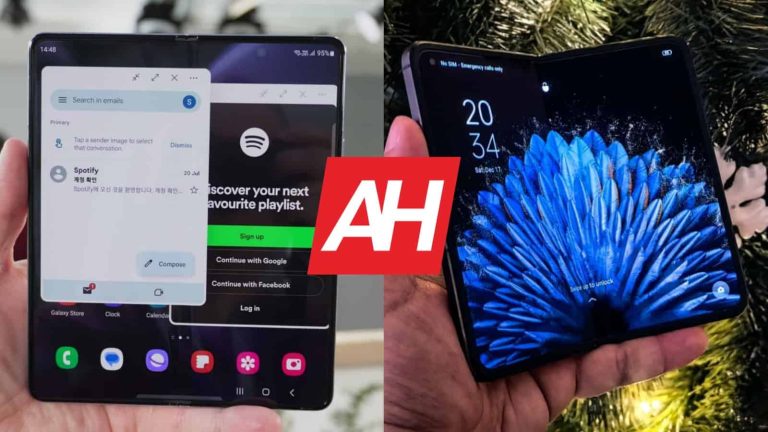
The Galaxy Z Fold 5 launched last month, while the OPPO Find N2 has been around since late last year. The OPPO Find N3 is actually right around the corner, it would seem, as it’s expected to launch earlier this year. In any case, until that happens, we’re left with these two phones. The OPPO Find N2 is still immensely compelling. It is quite different than the Galaxy Z Fold 5, though. That’s why we’ll compare the Samsung Galaxy Z Fold 5 vs OPPO Find N2 in this article.
We’ll first list their specifications, and will then move to compare their designs, displays, performance, battery life, cameras, and audio. There’s a lot to talk about, as they really are different in many ways. So, without further ado, let’s get started.
Specs
Samsung Galaxy Z Fold 5 & OPPO Find N2, respectively
– Screen size (main): 7.6-inch Foldable Dynamic AMOLED 2X display (120Hz, HDR10+, 1,750 nits) 7.1-inch Foldable LTPO AMOLED (120Hz, HDR10+, 1,550 nits) – Screen Size (cover): 6.2-inch Dynamic AMOLED 2X (120Hz) 5.54-inch AMOLED (120Hz) – Display resolution (main): 1812 x 2176 1792 x 1920 – Display resolution (cover): 2316 x 904 2120 x 1080 – SoC: Qualcomm Snapdragon 8 Gen 2 for Galaxy Qualcomm Snapdragon 8+ Gen 1 – RAM: 12GB (LPDDR5X) 12GB/16GB (LPDDR5) – Storage: 256GB/512GB/1TB (UFS 4.0) 256GB/512GB (UFS 3.1) – Rear cameras: 50MP (wide, f/1.8 aperture, Dual Pixel PDAF OIS), 12MP (ultrawide, 123-degree FoV), 10MP (telephoto, 3x optical zoom) 50MP (wide, f/1.8 aperture, PDAF, OIS), 48MP (ultrawide, 115-degree FoV), 32MP (telephoto, 2x optical zoom) – Front cameras: 4MP (under display, main display, f/1.8 aperture), 10MP (cover display, f/2.2 aperture) 32MP (main and cover display, f/2.4 aperture) – Battery: 4,400mAh 4,520mAh – Charging: 25W wired, 15W wireless, 4.5W reverse wireless (no charger) 67W wired, 10W reverse wired (charger included) – Dimensions (unfolded): 154.9 x 129.9 x 6.1mm 132.2 x 140.5 x 7.4mm – Dimensions (folded): 154.9 x 67.1 x 13.4mm 132.2 x 72.6 x 14.6mm – Weight: 253 grams 233/237 grams – Connectivity: 5G, LTE, NFC, Wi-Fi, USB Type-C, Bluetooth 5.3 5G, LTE, NFC, Wi-Fi, USB Type-C, Bluetooth 5.3 – Security: Side-facing fingerprint scanner – OS: Android 13 with One UI Android with ColorOS 13 – Price: $1,799 CNY7,999 ($1,152) – Buy: Samsung OPPO (China only)
Samsung Galaxy Z Fold 5 vs OPPO Find N2: Design
Both of these phones are book-style foldables, that’s true. They are taking different approaches to that form factor, though. The Galaxy Z Fold 5 is considerably taller, and narrower. When folded, its cover display is really narrower, many would say too narrow. When unfolded, it almost has a square aspect ratio. The OPPO Find N2 has smaller displays in comparison., but its cover display has a more regular aspect ratio, it’s easier to type on, despite the size. When unfolded, the OPPO Find N2 leans towards a horizontal layout.
The two phones do feel considerably different to hold and use. They both do fold flat, while the OPPO Find N2’s crease is considerably less noticeable. The Galaxy Z Fold 5’s is not only more visible, but you’ll also feel it a lot easier (under your finger) than the Find N2’s display crease. The Galaxy Z Fold 5 is taller and narrower than the Find N2. It is thinner than the Find N2, though, while being around 20 grams heavier.
Both devices have a centered display camera hole on the cover display. The bezels around that display are quite thin. On the inner display, the Find N2 does have a display camera hole too, in the top-left corner, while the Galaxy Z Fold 5 hides its camera under the display. Both have three cameras on the back, though their designs are different. The devices are made out of metal and glass.
The Galaxy Z Fold 5 is IPX8 certified for water resistance, while the Find N2 is not. Both do offer stylus support, and both feel great to fold and unfold. They’re also very easy to unfold due to their designs, and that’s something we appreciate, as it’s not something we can say for all book-style foldables.
Samsung Galaxy Z Fold 5 vs OPPO Find N2: Display
The Galaxy Z Fold 5 includes a 7.6-inch 1812 x 2176 main display. That is a Foldable Dynamic AMOLED 2X panel with a 120Hz refresh rate. It supports HDR10+ content. It has a peak brightness of 1,750 nits. The cover display on the phone measures 6.2 inches, and it offers a resolution of 2316 x 904. That is also a Dynamic AMOLED 2X panel, but it’s not foldable, of course. It has a 120Hz refresh rate, and it’s protected by the Gorilla Glass Victus 2.
The OPPO Find N2, on the other hand, features a 7.1-inch main display. That is a Foldable LTPO AMOLED panel with a resolution of 1782 x 1920. It has a 120Hz refresh rate, and a peak brightness of 1,550 nits. The cover display on the phone measures 5.54 inches, and it’s an AMOLED panel. That display offers a 120Hz refresh rate, and it has a resolution of 2120 x 1080. It has a peak brightness of 1,350 nits, and it’s protected by the Gorilla Glass Victus.
All displays here are great, and each of the two phones has its advantages. The Find N2 has a much less noticeable crease on the main panel, and some people will prefer the more horizontal aspect ratio here. It also has a better aspect ratio on the cover panel. The main display on the Galaxy Z Fold 5 does get a bit brighter, and some people will prefer the under-display camera on that panel, for aesthetic purposes. All displays offer nice, vivid colors, and deep blacks. They also have good viewing angles, and good touch response.
Samsung Galaxy Z Fold 5 vs OPPO Find N2: Performance
Samsung’s foldable is fueled by the Snapdragon 8 Gen 2 for Galaxy SoC. That is basically an overclocked Snapdragon 8 Gen 2 chip. The phone includes 12GB of LPDDR5X RAM, and UFS 4.0 flash storage. The OPPO Find N2, on the flip side, is fueled by the Snapdragon 8+ Gen 1 chip. It also includes up to 16GB of LPDDR5 RAM, and UFS 3.1 flash storage. Neither phone offers storage expansion, by the way.
The Galaxy Z Fold 5 does have the advantage of having more powerful hardware, but not many people will notice that. The OPPO Find N2 is also quite powerful, and it’s really well optimized. You may notice that the Galaxy Z Fold 5 opens some apps slightly faster, though the difference is negligible. They both can run the most demanding games out there, but that’s where you may see the advantage of the Galaxy Z Fold 5’s hardware.
During day-to-day use, for regular tasks, the differences are basically not noticeable. The Galaxy Z Fold 5 still doesn’t have the most fluid animations out there, but it does run very smoothly, as does the OPPO Find N2. If you’re looking for something more future-proof, the Galaxy Z Fold 5 is the better choice. Not only does it have better hardware, but it will also get software updates for longer.
Samsung Galaxy Z Fold 5 vs OPPO Find N2: Battery
A 4,400mAh battery sits on the inside of the Galaxy Z Fold 5, while a 4,520mAh unit can be found inside the OPPO Find N2. Not only does the Find N2 has a larger battery, but it also has smaller displays. That has to mean it has better battery life too, right? Well, in this case, it does. The OPPO Find N2 did offer better battery life for us. Your mileage may vary, though, of course, as there are two displays here to think of, in addition to different usage scenarios, different apps that will be in use, different usage habits, and so on.
We managed to get around 7.5 hours of screen-on-time on the OPPO Find N2, at times even 8 hours of screen-on-time. The Galaxy Z Fold 5 did fly under the 7-hour screen-on-time mark most of the time. Based on our experience, the Find N2 does offer better battery life. Do note that we played games only for testing purposes, not during regular days. The two phones were used for pretty much everything else, though.
When it comes to charging, the OPPO Find N2 shames the Galaxy Z Fold 5 when it comes to charging speed. It does not support wireless charging, though. The Galaxy Z Fold 5 supports 25W wired, 15W wireless, and 4.5W reverse wireless charging. The OPPO Find N2 offers support for 67W wired, and 10W reverse wired charging. The Find N2 can be fully charged in around 40 minutes, while it takes the Galaxy Z Fold 5 half an hour to reach 50%. It can reach a full charge in almost an hour and a half. Another thing worth noting is that the Find N2 includes a charger in the box, while the Galaxy Z Fold 5 does not.
Samsung Galaxy Z Fold 5 vs OPPO Find N2: Cameras
Both of these phones have three cameras on the back, and one on each of its displays. A 50-megapixel main camera sits on the Galaxy Z Fold 5, in addition to a 10-megapixel telephoto shooter (3x optical zoom), and a 12-megapixel ultrawide camera (123-degree FoV). The OPPO Find N2, on the other hand, has a 50-megapixel main camera, a 48-megapixel ultrawide unit (115-degree FoV), and a 32-megapixel telephoto camera (2x optical zoom).
Having said that, the shots these two phones provide are somewhat different. The Galaxy Z Fold 5 does a really good job during the day, with detailed and sharp images. They do tend to be a bit oversaturated at times, though, and in general, are not really closer to real life. The OPPO Find N2 is a bit closer to that mark, while it also manages to keep the images sharp and detailed. It also provides moodier images in low light.
In low light, both phones do a good job. The Galaxy Z Fold 5 does provide brighter low light shots, and both phones can fire up night mode on their own. Ultrawide cameras are good on both, though we prefer the OPPO Find N2’s, despite its narrower FoV. The Galaxy Z Fold 5 easily wins in the telephoto camera department.
Audio
Both of these smartphones have stereo speakers, and those speakers are good on both. They’re loud enough, and also detailed enough. On top of that, they’re well-balanced. The Galaxy Z Fold 5’s speakers are a bit louder, though, if that’s something you care about.
Neither phone has a 3.5mm headphone jack. So, if you’d like to connect your wired headphones, you’ll need to use a Type-C port that is present on both phones. Bluetooth 5.3 is also supported on both, by the way.
Qualcomm might be considering ditching TSMC and having Samsung manufacture all of its Snapdragon 8 Gen 4 chips next year. There have been reports of the company dual-sourcing the production of the chip to the two foundries, but some suggest Samsung will get the whole contract. This change is reportedly because of TSMC’s poor 3nm yield rates. The Snapdragon 8 Gen 4 will be Qualcomm’s first 3nm solution.
The Snapdragon 8 Gen 4 may not be dual-sourced, after all
TSMC and Samsung are the world’s two largest semiconductor foundries, in that order. They manufacture chips for the likes of MediaTek and Qualcomm, which are fabless companies (don’t own manufacturing units). Qualcomm has historically switched back and forth between the two foundries to manufacture its flagship Snapdragon chips.
Most recently, it switched from Samsung to TSMC in 2022. The Taiwanese firm produced the Snapdragon 8+ Gen 1 and Snapdragon 8 Gen 2 (both 4nm chips) last year. It will also manufacture the Snapdragon 8 Gen 3 (4nm) this year. However, rumors are that Qualcomm plans to dual-source the production of the Snapdragon 8 Gen 4 (3nm) next year to TSMC and Samsung.
According to previous leaks, TSMC will produce the standard solution, while the Korean firm will get orders for the “for Galaxy” version exclusive to its phones. This seems a fair split considering that Samsung will be able to better optimize the chip for its devices. However, a fresh rumor passed along X/Twitter says Samsung will get the entire manufacturing order for the Snapdragon 8 Gen 4, including the standard version.
The source claims that TSMC has worse 3nm yield rates (the percentage of usable chips out of the total produced) than Samsung. Moreover, most of its 3nm capacity is reserved for Apple. Qualcomm can only get about 15 percent of the total capacity. This means a potential last-minute supply shortage if TSMC can’t improve its yield rates, which is a big challenge. Qualcomm can’t risk that and is planning to ditch TSMC and move entirely to Samsung. The Snapdragon 8 Gen 4 will debut in late 2024 and will power flagship phones in 2025.
All this said, let us tell you that this information comes from an X/Twitter user who claims to be a “semiconductor research student” studying semiconductor technologies from Taiwan and South Korea, the home countries of TSMC and Samsung, respectively. The source has been sharing insider information about the semiconductor industry for a while now. It remains to be seen how much of this is true, if at all.
An ongoing campaign has resulted in the compromise of multiple LinkedIn accounts. However, the motive behind this campaign remains unclear at this time.
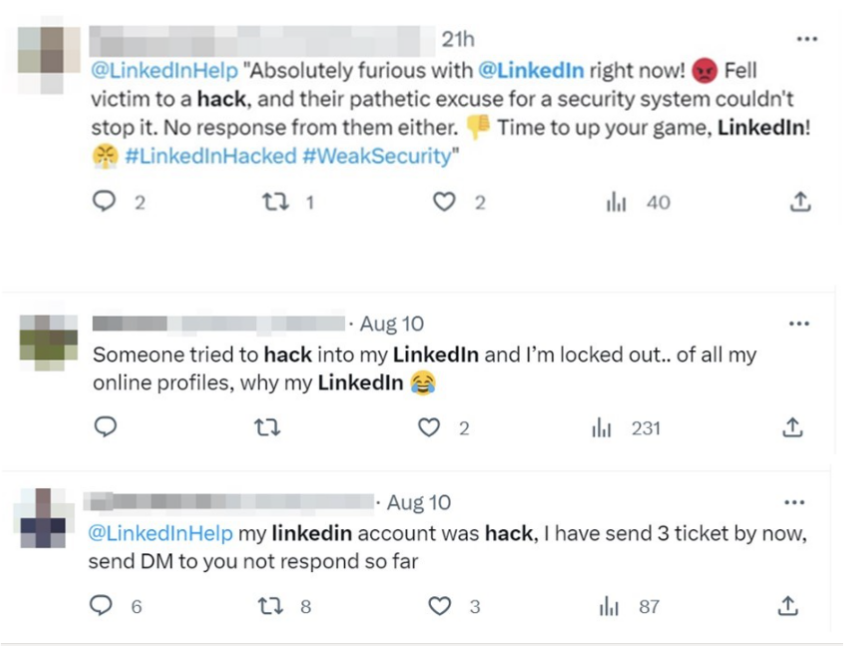
Numerous users have reported instances of their LinkedIn accounts being temporarily locked, hacked, or permanently deleted.
LinkedIn account compromise issue discussed on Social network (Source: Cybrint)
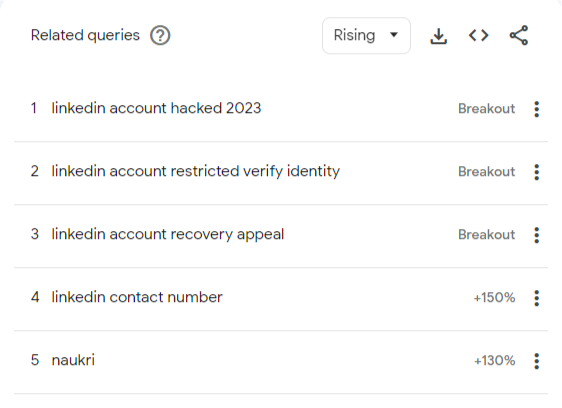
In certain cases, there were also ransom payments requested by threat actors to recover user accounts. As per the Google Trends report, this LinkedIn account compromise has seen a sudden surge in the past 90 days. It also shows several searches for “LinkedIn account hacked” or “LinkedIn account recovery.”
Google Trends Report (Source: Cybrint)
It is suspected that threat actors have gathered data from a LinkedIn Breach and used the data to pick accounts. Threat actors identify accounts without 2FA or use Brute force to hack into accounts having short passwords.
A complete picture of this LinkedIn attack campaign is yet to be revealed. However, Two scenarios have been discovered while attacking user accounts. One of the scenarios is a Temporary account Lock, and the other is a Full Account compromise.
Temporary Account Lock
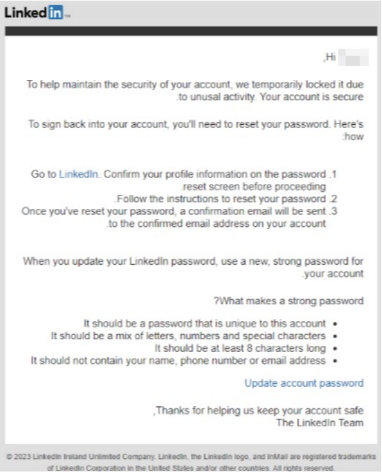
In this scenario, threat actors attempt to compromise a LinkedIn account that has two-factor authentication enabled with brute force attacks. This results in LinkedIn sending suspicious activity followed by a temporary account lock for a user.
As a method for recovery, Users are requested to verify their accounts, update their passwords for security reasons and regain access to their accounts.
Temporary account lock notification from LinkedIn (Source: Cybrint)
Full Account Compromise
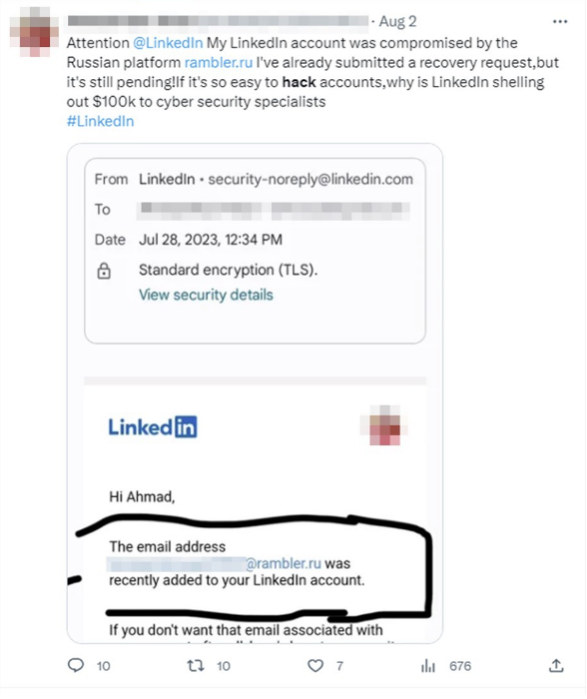
In this scenario, threat actors completely take over victims’ accounts and change their email addresses in order to ensure that victims don’t recover their accounts. The email addresses used for replacing the original email address of these accounts were generated from the rambler[.]ru mail system.
Furthermore, for this type of scenario, there have been reports of demanding ransom as a financial gain ranging between tens of dollars.
Full account compromise with replaced rambler.ru email ID (Source: Cybrint)
Once threat actors gain access to these professional LinkedIn accounts of users, they have several attack vectors, which involve social engineering, manipulation of people, baiting to a malicious link, blackmail, reputational damage, spreading malicious content, and many more.
Cybrint has released a complete report on this LinkedIn attack campaign which provides additional details on this issue.
Mitigation
Users of LinkedIn are recommended to check their account access to see whether they are able to log in to their account and make sure all their information, like email, phone numbers, and others, are genuine and legit.
Changing and deploying a strong password in the LinkedIn account, which is unique and not reused, is recommended. Additionally, 2-step verification can also be implemented to prevent brute force attacks.

![Glad I was able to recover my funds from these fake brokers. I would have had to file for bankruptcy, thanks to [redacted] I was able to get a hold of these scam brokers and take back my money. I would gladly refer anyone.](https://www.malwarebytes.com/blog/news/2023/08/easset_upload_file51285_276026_e.jpg)
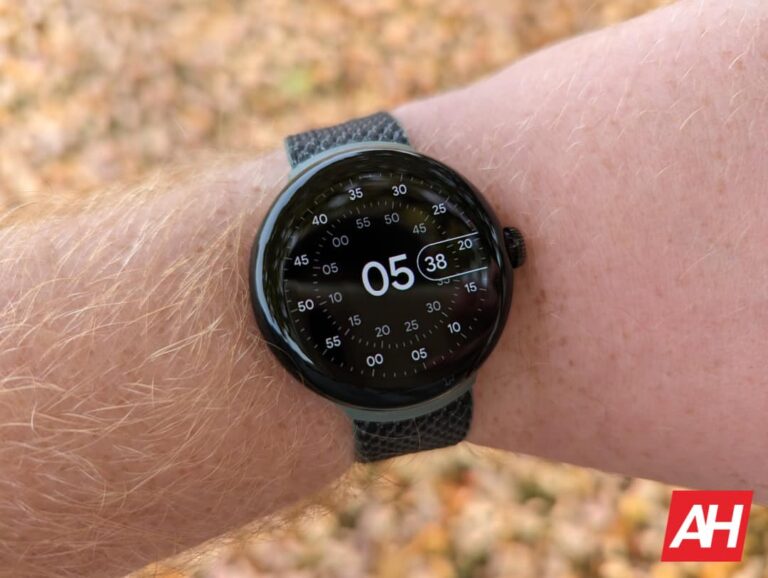

 Figure 1: Malicious ad on Google for Advanced IP Scanner
 Figure 2: Decoy page without any malware to download
 Figure 3: Suspicious Base64-encoded code
 Figure 4: Decoded fingerprinting script
 Figure 6: Web traffic from malicious ad to payload page
 Figure 7: Malware landing page after successfully passing the fingerprinting checks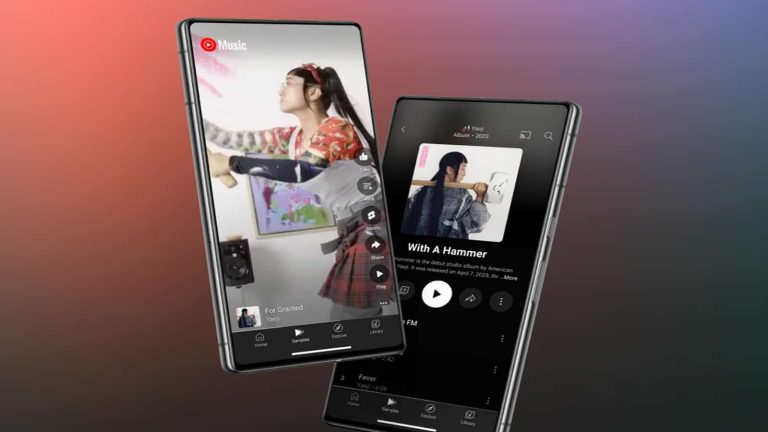

 The site confirms that there has been a data breach