Analysis of the Zoom Terms of Service caused users to believe their video conferences were being used to train an AI
Changes in the terms of service (TOS) of the Zoom video-conferencing software have caused some turmoil. Since the pandemic, Zoom (Video Conferencing) has become a household name. Zoom came up as the big winner in the video conferencing struggle that enabled us to work from home. Now that things are more or less returning to a new normal, this has also had an impact on their success. But the recent uproar about their TOS could turn out to be a bigger blow.
The strange thing should be that the offending bits of the changes were effectuated in March of 2023. But nobody noticed until August when people started posting and discussing a portion of Zoom’s TOS. They found that Zoom claimed the right to access, use, collect, create, modify, distribute, process, share, maintain, and store Service Generated Data, including for the purpose of product and service development, marketing, analytics, quality assurance, machine learning or artificial intelligence (AI).
For a better understanding, you will want to know that in May, Zoom announced a collaboration with Anthropic, an artificial intelligence company that conducts research into AI safety and develops tools based on that work. The AI called Claude is intended to be integrated into the Zoom platform.
After all the uproar about it, Zoom changed its Terms of Service to reflect that Zoom will require user consent to use content for training artificial intelligence.
“Notwithstanding the above, Zoom will not use audio, video, or chat Customer Content to train our artificial intelligence models without your consent.”
In a blogpost, Zoom explains that they updated the TOS (in section 10.4) to confirm that they will not use audio, video, or chat customer content to train the AI models without your consent. And that the section about training artificial intelligence only concerned certain information about how customers in the aggregate use their product. They claimed to only do this to improve the product—not to spy on users.
The explanation makes a lot of sense, but wouldn’t it have been easier if they’d said that in the first place? From the way the TOS was worded, I would have guessed that that’s what they wanted us to think and not what they actually meant.
Unfortunately, they are not alone. Many software companies have their legal documents and agreements drawn up by professionals, that do not care whether their products can be read by ordinary people. As long as the legal content is correct and covers all angles, it’s all good in their point of view.
For that reason, it happens a lot that TOS, EULA’s (End User License Agreements), Privacy Policies, and privacy agreements do not get read in full. And even if we do, some of them look like they are designed not to be understood even if we take the trouble of reading through all of it.
If you don’t believe me, have a look at the Zoom TOS. If you have no trouble understanding what it says there, you are probably a lawyer specialized in corporate law. Even now that we have summarized it for you, it still looks like a major case of letter soup designed to make your eyes roll.
What most of these pieces of text have in common is:
You are supposed to have read them once you use the software, be it by putting a checkmark at the bottom of an endless text, or by simply proceeding to use the software
They protect the rights of the issuer
They restrict your usage
They explain what the issuer can do with your information and content
They are written by and for lawyers
They often favor length and complexity
But most of the time we view them as something that stands in the way of our goal, which is to play the game, use the software, or start working. This has been a known problem for many years, even so much so that a friendly programmer set out to work on a solution. If you’re interested in what a EULA has to say, but no time or inclination to read through all of it to find the important parts, give Eulalyzer a try. It’s free for personal use.
Malwarebytes EDR and MDR removes all remnants of ransomware and prevents you from getting reinfected. Want to learn more about how we can help protect your business? Get a free trial below.
We’re here to compare two book-style foldables, which have a similar form factor, but are quite different at the same time. We’ll compare the Samsung Galaxy Z Fold 5 vs Huawei Mate X3. Samsung announced its latest foldables during an event last month, one of which was the Fold 5. The Huawei Mate X3 arrived earlier this year, but it’s still quite compelling. Hardware-wise, many would say it’s more compelling than the Galaxy Z Fold 5.
We will compare these two phones across a number of areas, but we’ll first list their specs. Following that, we’ll compare their designs, displays, performance, battery life, cameras, and audio performance. Let’s see how Samsung’s best foldable compares to Huawei’s, shall we?
Specs
Samsung Galaxy Z Fold 5 & Huawei Mate X3, respectively
– Screen size (main): 7.6-inch Foldable Dynamic AMOLED 2X display (120Hz, HDR10+, 1,750 nits) 7.85-inch Foldable OLED (120Hz, 1 billion colors) – Screen Size (cover): 6.2-inch Dynamic AMOLED 2X (120Hz) 6.4-inch OLED (120Hz) – Display resolution (main): 1812 x 2176 2224 x 2496 – Display resolution (cover): 2316 x 904 2504 x 1080 – SoC: Qualcomm Snapdragon 8 Gen 2 for Galaxy Snapdragon 8+ Gen 1 – RAM: 12GB (LPDDR5X) 12GB – Storage: 256GB/512GB/1TB (UFS 4.0) 256GB/512GB/1TB – Rear cameras: 50MP (wide, f/1.8 aperture, Dual Pixel PDAF OIS), 12MP (ultrawide, 123-degree FoV), 10MP (telephoto, 3x optical zoom) 50MP (wide, f/1.8 aperture, PDAF, OIS), 13MP (ultrawide), 12MP (periscope telephoto, 5x optical zoom) – Front cameras: 4MP (under display, main display, f/1.8 aperture), 10MP (cover display, f/2.2 aperture) 8MP (main and cover display, f/2.4 aperture) – Battery: 4,400mAh 4,800mAh – Charging: 25W wired, 15W wireless, 4.5W reverse wireless (no charger) 66W wired, 50W wireless, 7.5W reverse wireless (charger included) – Dimensions (unfolded): 154.9 x 129.9 x 6.1mm 156.9 x 141.5 x 5.3mm – Dimensions (folded): 154.9 x 67.1 x 13.4mm 156.9 x 72.4 x 11.8mm – Weight: 253 grams 239/241 grams – Connectivity: 5G, LTE, NFC, Wi-Fi, USB Type-C, Bluetooth 5.3 4G, LTE, NFC, Wi-Fi, USB Type-C, Bluetooth 5.2 – Security: Side-facing fingerprint scanner – OS: Android 13 with One UI Android with EMUI 13.1, no Google Play Services – Price: $1,799 €2,199 – Buy: Samsung Huawei
Samsung Galaxy Z Fold 5 vs Huawei Mate X3: Design
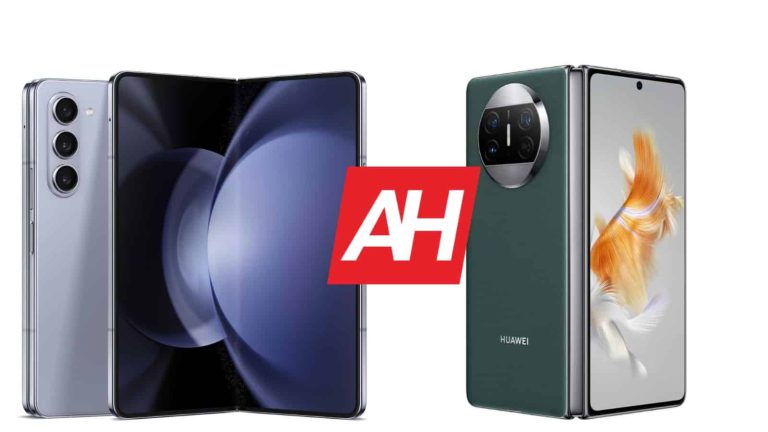
Both the Galaxy Z Fold 5 and Huawei Mate X3 are made out of metal and glass. It is worth noting that the Mate X3 also comes in an eco leather variant, though. They do have a similar form factor, they’re quite tall when folded, and almost square-shaped when not. The thing is, the Mate X3 does have a more regular aspect ratio on its cover display, the Galaxy Z Fold 5’s is quite narrow.
Both devices include a display camera hole on their cover display, a centered one. The Mate X3 also has one on the main display, in the top-right corner. Samsung hides the selfie camera under the main display of this phone. Both phones have rather thin bezels around both displays. The Galaxy Z Fold 5 has three vertically-aligned cameras on the back. Those cameras are located in the top-left corner, and are a part of the same camera island. The Huawei Mate X3 has a circular camera island on the back, which is centered at the top, and hosts three cameras.
The thing is, the Huawei Mate X3 has larger displays than the Galaxy Z Fold 5, and despite that, it’s considerably lighter. It weighs 239 grams or 241 grams, depending on the model. The Galaxy Z Fold 5 weighs 253 grams. They’re similar in terms of height, while the Mate X3 is wider in both states (folded and unfolded). The Mate X3 is noticeably thinner than the Galaxy Z Fold 5, however, in both folded and unfolded states. Both devices do fold flat, without a gap, and both are IPX8 certified for water resistance.
Samsung Galaxy Z Fold 5 vs Huawei Mate X3: Display
A 7.6-inch main display is included on the Galaxy Z Fold 5. That is a Foldable Dynamic AMOLED 2X display with a 120Hz refresh rate. It has a resolution of 1812 x 2176 pixels, and supports HDR10+ content. The cover display on the phone measures 6.2 inches, and has a resolution of 2316 x 904 pixels (23.1:9 aspect ratio). This is also a Dynamic AMOLED 2X panel, with a 120Hz refresh rate. It is protected by the Gorilla Glass Victus 2.
The Huawei Mate X3, on the other hand, includes a 7.85-inch main display. That is a Foldable OLED panel with a 120Hz refresh rate, which can project up to 1 billion colors. The resolution here is 2224 x 2496. The cover display on the phone measures 6.4 inches. That is an OLED panel with a 120Hz refresh rate. It has a resolution of 2504 x 1080, and it’s protected by Huawei’s Kunlun glass.
All four displays are really good, actually. They offer good, vivid colors, deep blacks, and good viewing angles. They’re more than sharp enough, and also bright enough. The Galaxy Z Fold 5 does have a brighter main panel, though, with a limit of 1,750 nits. The cover displays are well-protected on both phones, and seeing a 120Hz refresh rate on all panels is always good. The cover display on the Mate X3 is more useful, though, as it’s not as narrow as on the Galaxy Z Fold 5.
Samsung Galaxy Z Fold 5 vs Huawei Mate X3: Performance
The Snapdragon 8 Gen 2 for Galaxy fuels the Galaxy Z Fold 5. Samsung also included 12GB of LPDDR5X RAM on the phone, and UFS 4.0 flash storage too. The Huawei Mate X3, on the other hand, utilizes the Snapdragon 8+ Gen 1 SoC, a variant that is limited to 4G connectivity. We’re not sure about what LPDDR and UFS modules Huawei used exactly, but it’s most likely LPDDR5 and UFS 3.1 or 4.0.
When it comes to general performance, the two phones are on par. Day-to-day performance is extremely snappy on both, and that goes for multitasking as well. If you delve into gaming, you’ll also get great performance from both phones. The Galaxy Z Fold 5 could handle the most demanding games a bit better, but both are quite capable from what we’ve seen. They do get warm, but not overly hot or anything of the sort. The Galaxy Z Fold 5 is more future-proof, though, and the Mate X3 doesn’t include Google services, which is worth noting.
Samsung Galaxy Z Fold 5 vs Huawei Mate X3: Battery
A 4,400mAh battery sits inside the Galaxy Z Fold 5, while a 4,800mAh one is included inside the Huawei Mate X3. The Mate X3 does have larger displays, so it makes sense it has a larger battery too. What’s the battery life like, though? Well, it’s really good on both phones. Getting to 7 hours of screen-on-time is easily possible on both phones, though your mileage may vary. Truth be said, we did fly under the 7-hour mark on the Galaxy Z Fold 5 sometimes, but usually it was able to cross that mark. The Mate X3 does seem to offer a bit better battery life, though.
Your mileage may vary, though, of course. There are two screens to consider here, on both phones, while your usage will be different, as will your signal strengths, and installed apps. Also, if you’re planning to play games, that will considerably impact battery life on both phones, which may mess things up even further. We only played games for testing purposes, on regular days, we did not.
When it comes to charging, the Mate X3 shames the Galaxy Z Fold 5. It supports 66W wired, 50W wireless, and 7.5W reverse wireless charging. The Galaxy Z Fold 5 supports 25W wired, 15W wireless, and 4.5W reverse wireless charging. Needless to say, the Huawei Mate X3 will charge up a lot faster, both via a wire, and wirelessly. It also includes a charger in the box, unlike the Galaxy Z Fold 5.
Samsung Galaxy Z Fold 5 vs Huawei Mate X3: Cameras
A 50-megapixel main camera is included on the Galaxy Z Fold 5. In addition to that, there is also a 12-megapixel ultrawide camera (123-degree FoV), and a 10-megapixel telephoto unit (3x optical zoom). The Huawei Mate X3, on the other hand, also has three cameras on the back. A 50-megapixel main camera is backed by a 13-megapixel ultrawide camera, and a 12-megapixel periscope telephoto camera (5x optical zoom).
The images from the Galaxy Z Fold 5 do end up looking more processed. The Huawei Mate X3 keeps things a bit closer to real life, but the images from the phone are far from plain. We prefer the Huawei Mate X3 here. Both phones do end up offering sharp images, and both phones handle HDR conditions really well. Even in low light, both devices are very capable, and manage to keep around plenty of details. The Mate X3 does handle street flares a bit better, though.
When it comes to ultrawide cameras, they’re following the main camera’s colors really well, but are a step below what the main cameras can do. They do a solid job in low light, though. When it comes to telephoto cameras, we definitely prefer the Mate X3’s, as it can zoom further without losing a lot of details. The telephoto camera on the Galaxy Z Fold 5 is also quite useful, though.
Audio
Both phones feature stereo speakers, and both sets of speakers are loud enough. They’re not the best out there, but they’re loud. They’re also quite detailed, and there’s no distortion you should worry about. The sound is also well-balanced.
Neither device has a 3.5mm headphone jack, so you’ll have to rely on their Type-C ports for wired audio connections. If you opt for a wireless connection, do note that the Galaxy Z Fold 5 supports Bluetooth 5.3, while the Huawei Mate X3 offers Bluetooth 5.2.
NVIDIA CEO Jensen Huang believes AI-powered chips can reinvent computers, and AI platforms are the future of computing, The Street reports.
AI is pegging itself as an integral part of everyday life, and its scope is remarkably growing. It is changing the meaning and nature of every device we already know, and computers won’t be an exception. As a leading brand in the semiconductor industry, NVIDIA is now preparing for the next-generation computers that are totally powered by AI.
NVIDIA CEO lays out visions for computers with AI-powered chips
CEO Jensen Huang said on August 8 that an AI technology powered by Nvidia’s chips will “reinvent the computer itself.” Additionally, powerful new AI platforms are on the way to replace the computing platforms we currently know.
“Large language model is a new computing platform because now the programming language is human,” Huang said. “For the very first time, after 15 years or so, a new computing platform has emerged. The computer itself will, of course, process information in a very different way.”
NVIDIA CEO added that his company’s accelerated computing will work to align computers and computing platforms with large language models. Of course, Huang mentioned that the upcoming environment that generative AI fuels requires a tremendous amount of cloud.
To support this growing demand in the cloud environment, Huang said NVIDIA is giving a “boost” to its Grace Hopper Superchip processor. The new chip will be called “GH200” and is combined with the world’s fastest memory chip, HBM3.
“The chips are in production. This processor is designed to scale out of the world’s data centers. It basically turns these two super chips into a super-sized super chip,” Huang noted.
The NVIDIA CEO also said companies will be able to put any large language model they like into this chip, and “it will infer like crazy.” Additionally, the inference cost of large language models will drop significantly.
The growing demands in the semiconductors industry caused NVIDIA to surpass over $1 trillion in valuation. The financial reports are also painting a rosy picture of the company’s situation. Beyond that, AI-powered chips can give an unbeatable competitive advantage to NVIDIA and reinvent the meaning of computers for users.
The Galaxy S21 series is the latest entrant to Samsung‘s August 2023 security update party. The Korean firm has released the latest security patch for its 2021 flagships in Latin America. A wider rollout covering the phones in more markets, including the US, should follow soon.
The August SMR (Security Maintenance Release) for the Galaxy S21, Galaxy S21+, and Galaxy S21 Ultra comes with the firmware build number G99*BXXS9EWH1 in Latin America. As of this writing, we can confirm the availability of the update in Guatemala and Trinidad and Tobago. Samsung will gradually expand the rollout to more countries in the region as well as the rest of the world.
Don’t expect anything big here, though. The update doesn’t bring any new features or improvements to your Galaxy S21 handset. As confirmed by Samsung’s official changelog, this update is all about the latest security patch. The company has already revealed that the August SMR patches as many as 86 vulnerabilities. At least three of those were “critical” flaws, while the vast majority of the remaining patches were classified as “high-severity” issues by Samsung and Google.
If you’re using a Galaxy S21 phone, these security fixes will be available to you shortly. Samsung has also released the August SMR for the Galaxy S23, Galaxy S22, Galaxy S20, Galaxy Note 20, all recent foldables, and a few Galaxy A series mid-range smartphones. As you’d expect, the rollout for most of these phones is limited to select markets at the moment. However, it’s just a matter of time before the updates reach eligible units globally.
As usual, you will get a notification once the OTA (over the air) rollout hits your Galaxy smartphone. Simply tap on the notification and follow the on-screen instructions to update your phone to the latest security patch. Alternatively, you can go to the Settings app, tap on Software update, and then on Download and install to manually check for new updates. Note that updates are released in batches and may not show up for everyone at the same time.
The Galaxy S21 series will get the Android 14-based One UI 6.0 update
Samsung launched the Galaxy S21 trio in early 2021 with Android 11 onboard. The company has since pushed Android 12 and Android 13 to the devices. The phones will get Android 14 as well. The Korean firm recently released the One UI 6.0 beta update for the Galaxy S23 series, with its One UI 6.0 custom software. It will push the stable version later this year. The Galaxy S21 series should also get the One UI 6.0 update before the end of 2023.
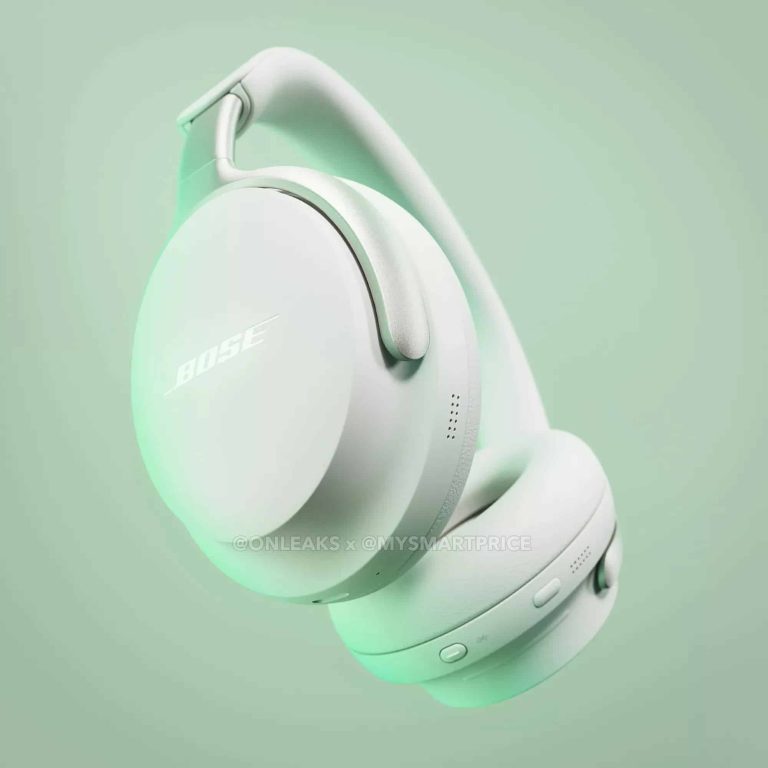
This might be your first real look at the upcoming flagship noise-cancelling headphones from Bose, the QuietComfort Ultra, thanks to a partnership leak from Onleaks and MySmartPrice (via Android Police).
The QuietComfort Ultra should be the replacement for the Bose Noise-Cancelling Headphones 700 according to the leak. Which would probably put them in the price range of $379. However it’s worth mentioning that there is no confirmed information about the price of the headphones yet. Bose also hasn’t announced these officially yet. But going off of the price of the Bose Noise-Cancelling 700, which are $379, it seems like a reasonable assumption for the cost. As Bose generally hasn’t changed pricing too much on headphones when it releases a new pair. The QuietComfort 35 II for example were around $349 when they initially launched back in 2017.
The QuietComfort 45, their replacement, launched at the same price. Although they have been discounted to $329 before and you can currently find them for around $279. Again though, this doesn’t mean Bose will price the QuietComfort Ultra the same as the Noise-Cancelling 700. The leak for example mentions pricing around €499.95 in France. Which might mean a higher price tag of $499 in the US. That would also put them well above the price range of Sony’s XM5 headphones. Which are typically their competitor. This is all speculative of course.
Based on the image renders, the QuietComfort Ultra will look pretty similar to the QuietComfort 45 and QuietComfort 35 II. An interesting choice if these are to be a follow-up for the Bose Noise-Cancelling 700.
The leak also includes the Bose QuietComfort Ultra earbuds
The leak shows off the design of the new headphones, but it also includes images of the earbuds. So it looks like Bose is finally ready to replace both products. According to the leaked images for both products, Bose will offer two colors for each. The standard black and then a lighter beige color.
Bose doesn’t have a launch date for these yet nor is there any indication of availability. But expect both to be available globally as most or all of Bose’s flagship stuff is. Just like with the headphones Bose’s upcoming true wireless earbuds will come in black and what appears to be a beige color option. With match charging cases.
In this day and age, integration is the name of the game. It’s not only important that our devices work, it’s also important that they work well with other devices. Google is working on a new Link Your Devices feature for Android that will help your devices better communicate with one another.
Tech users are liable to own more than one device nowadays. They’ll have a tablet for media consumption and a phone for phone calls and games. Well, companies put a lot of effort into making these devices communicate seamlessly with one another. Apple is still the pioneer in this department and other companies are playing catch-up. Well, Google, the owner of Android, has the power to bring some strong integration to the platform.
Google’s bringing the Link Your Devices feature to Android
Android is pretty integrated, but it could still use some improvements. Thanks to a new report from 9To5Google, it looks like Google is looking to bring those improvements. As spotted by @Nail_Sadykov on Twitter, Android is preparing to bring a new Link Your Devices menu. This will be a hub showing different ways that you can share functionality between devices.
This is buried in the code at the moment, so you can’t access it. Right now, the menu only shows one thing that you’ll be able to do. The Call Switching feature will allow you to seamlessly switch ongoing calls between different devices. This is a neat feature to have, and we’ve seen it implemented by other companies before.
Other than that, we don’t know about any other features that the company is going to bring. Mishaal Rahman noted that Google could come out with an Internet Sharing feature, but we don’t see that functionality in the screenshot.
Only time will tell what Google has planned for this feature. Also, we’re not sure when the company is going to launch this hub. Since there was only one feature visible, we don’t know if the company is still working on more features to populate the menu. Android 14 is soon to hit the stable channel, this might be an included feature.
DeFi, or Decentralized Finance, is revolutionizing the blockchain ecosystem. This article explores the growing importance of DeFi in the blockchain ecosystem, key drivers of DeFi in the blockchain revolution, challenges and opportunities in DeFi. Discover the potential of automated trading through Immediate Alpha App, the premier platform that enhances your profit opportunities within the realm of cryptocurrency.
The Growing Importance of DeFi in the Blockchain Ecosystem
The importance of DeFi in the blockchain ecosystem has seen exponential growth in recent years, and several case studies highlight this impact. For instance, platforms like MakerDAO and Compound have created decentralized lending markets where users can earn interest on their crypto assets or take out loans against their crypto holdings. These platforms, running on DeFi principles, have collectively attracted billions of dollars’ worth of assets, demonstrating the significant role DeFi is playing in the blockchain ecosystem.
The rapid growth and adoption of DeFi platforms underscore their importance in the blockchain ecosystem. In just a few short years, the total value locked (TVL) in DeFi contracts has grown from virtually nothing to billions of dollars. This rapid growth is testament to the growing trust in DeFi platforms and the increasing recognition of their benefits compared to traditional financial systems, such as accessibility, transparency, and the potential for high returns.
Moreover, the future prospects of DeFi further underline its growing importance in the blockchain ecosystem. Analysts and enthusiasts project that DeFi will continue to grow and disrupt the traditional finance sector, providing financial services to the unbanked and democratizing access to financial opportunities. With the advent of more sophisticated DeFi platforms and the promise of regulatory clarity, the DeFi sector is poised for even greater expansion.
In essence, the impact of DeFi in the blockchain space, its rapid growth and adoption, and its promising future prospects illustrate the increasingly important role that DeFi is playing in shaping the blockchain ecosystem. It’s not just a peripheral trend, but a central driver of innovation and growth in blockchain technology.
Key Drivers of DeFi in the Blockchain Revolution
DeFi’s revolutionary role in the blockchain ecosystem is largely driven by its potential to increase transparency and accessibility in finance. DeFi’s decentralized nature guarantees transparency as all transactions are publicly visible on the blockchain. Additionally, DeFi’s ability to provide financial services without the need for a central authority or intermediary opens access to individuals globally, even to those in underbanked regions, thereby democratizing finance.
The elimination of intermediaries is another significant driver of DeFi’s influence in the blockchain revolution. Traditional financial systems are heavily dependent on intermediaries like banks, brokers, and insurance companies. However, DeFi employs smart contracts on the blockchain, effectively replacing these middlemen.
Furthermore, DeFi is fostering significant innovation in the blockchain space. It is the foundation for new financial products and services that can be built and launched by anyone with a novel idea. DeFi’s open-source protocols inspire a wealth of innovations such as lending platforms, prediction markets, and decentralized exchanges that are creating a more inclusive, efficient, and secure financial system.
Challenges and Opportunities in DeFi
Despite the transformative potential of DeFi in the blockchain ecosystem, it does face a few significant challenges. The most prominent one is scalability. Currently, DeFi platforms are constrained by the throughput limitations of their underlying blockchains. This leads to high transaction costs and slow processing times, particularly during periods of peak demand. Furthermore, user experience on DeFi platforms is still far from being user-friendly.
Alongside the challenges are the cybersecurity risks. Smart contracts that power DeFi applications are prone to bugs and vulnerabilities, which can lead to substantial financial losses. DeFi platforms have been targets of several high-profile hacks in the recent past, highlighting the critical need for robust security measures.
On the other hand, the DeFi landscape presents numerous opportunities for growth and development. Despite its current limitations, the technology is constantly evolving, with developers around the world working towards scalable and secure solutions. The rapid growth of the DeFi space indicates a hunger for alternatives to the traditional financial system, suggesting a vast potential market for new and innovative DeFi services.
The regulatory landscape surrounding DeFi is also undergoing significant changes. While regulatory uncertainty poses a challenge, it also presents an opportunity. Clear, supportive regulation could legitimize DeFi in the eyes of skeptics and potentially open up new markets, while also providing consumers with more confidence and protection.
While DeFi faces several challenges in terms of scalability, user experience, and regulatory uncertainty, the significant opportunities it presents for financial innovation, growth, and inclusion cannot be understated. It’s a space ripe for exploration and development in the coming years.
Conclusion
The rise of DeFi signifies a pivotal moment for the blockchain ecosystem. Despite its challenges, its potential to democratize finance and foster innovation is undeniably game-changing, making it an essential area of exploration.
Cybercriminals are adopting advanced phishing tactics, using legitimate services like Amazon Web Services (AWS) to launch convincing attacks that bypass traditional security measures.
The Check Point report highlights the emergence of Business Email Compromise 3.0 (BEC 3.0), where attackers host phishing sites on AWS S3 Buckets to send seemingly genuine emails with phishing links.
Hackers manipulate users with social engineering and credential harvesting, often posing as password reset requests, leading victims to click on AWS S3 Bucket URLs that redirect to fake login pages.
Phishing attempts rely on exploiting human behaviour and urgency associated with password resets, making it crucial for users to scrutinize email URLs and remain cautious.
To counter this threat, cybersecurity experts recommend implementing multi-indicator phishing detection systems, and comprehensive security measures including document scanning, and URL protection mechanisms.
Cybercriminals are now leveraging legitimate services to launch highly convincing phishing attacks that evade traditional security measures. A recent report from cybersecurity firm Check Point’s subsidiary Avanan has revealed that hackers are now utilizing Amazon Web Services (AWS) as a platform for sending out phishing links, adding a new layer of sophistication to their deceptive campaigns.
Phishing attacks have long been a menace in the digital landscape, but the latest trend involves hackers exploiting reputable services to slip through the cracks of cybersecurity defences. This tactic has been previously witnessed with services such as Google, QuickBooks, and PayPal, where attackers create accounts and send out seemingly genuine emails directly from these platforms, making them difficult to identify and block.
The Check Point Harmony Email researchers shed light on how hackers are now using AWS to facilitate their phishing endeavours. In this novel attack variant, cybercriminals are hosting phishing sites on AWS S3 Buckets, which are legitimate storage containers within AWS. This approach allows the attackers to send emails containing phishing links that appear convincingly genuine, as they originate from AWS S3 Buckets.
The attack method, known as Business Email Compromise 3.0 (BEC 3.0), relies heavily on social engineering and credential harvesting techniques to manipulate users into divulging their sensitive information.
The phishing email typically mimics a password reset request, a familiar scenario that prompts users to take action. While some users might be cautious and recognize the email as suspicious due to sender address discrepancies, the attackers cunningly employ AWS S3 Bucket URLs to redirect victims to seemingly legitimate login pages.
Upon clicking the link, victims are led to a webpage that bears the hallmarks of a Microsoft login page, complete with pre-populated email addresses and password fields. While this technique requires a slightly more advanced skill set from the attackers, it remains accessible enough for the average cybercriminal to execute.
The phishing email and phishing login page aim at the login credentials of Microsoft users. (Screenshot: Avanan)
The ultimate goal is to obtain victims’ login credentials, granting the attackers unauthorized access to sensitive accounts and potentially confidential information. According to a blog post published by Jeremy Fuchs of Avanan, users can protect themselves against these increasingly sophisticated attacks by paying close attention to the URLs presented in the emails.
However, the attackers’ well-crafted scenarios and the common urgency associated with password resets can often lead users to disregard this caution. This reliance on human behaviour is precisely what the hackers are banking on, as it offers them a higher chance of success.
In response to this emerging threat, Check Point researchers promptly alerted Amazon about the campaign on July 25th. To mitigate the risks associated with such attacks, cybersecurity professionals are advised to adopt multi-indicator phishing detection systems, implement comprehensive security measures that extend to document scanning and incorporate URL protection mechanisms.
For the first time in the short history of Samsung‘s Fan Edition (FE) series, the company is preparing to launch two FE-branded tablets together this year. We are expecting the Galaxy Tab S9 FE and Galaxy Tab S9 FE+ to go official soon. They are supposed to bring flagship-grade specs at an affordable point. However, the leaked prices of the tablets are anything but affordable.
A few days back, reputed tipster Roland Quandt claimed that Samsung will price the 6GB+128GB variant of the Galaxy Tab S9 FE (Wi-Fi) at ₹63,000 in India. That’s the equivalent of $760 at the current exchange rate. And it’s a quite high price for an FE-series tablet. For comparison, the 128GB variant of the flagship Galaxy Tab S9 costs ₹73,000 (roughly $880) in the country.
This made us wonder whether the rumored entry price of the Galaxy Tab S9 FE was correct. Unfortunately, that appears to be the case. Sources have quoted the same price for the tablet to MySmartPrice as well. The publication has also got the pricing structure of the 5G version. The same tablet with 5G connectivity will reportedly cost ₹65,000 (roughly $785) in India.
At these prices, the Galaxy Tab S9 FE will be quite expensive. The flagship series looks like a better deal. That’s unless the quoted prices are the MRPs (maximum retail prices). The 128GB Galaxy Tab S9 (Wi-Fi) has an MRP of ₹82,000 but Samsung is selling it for ₹73,000. But if the reported prices for the Galaxy Tab S9 FE+ are the final selling prices, the Korean firm might find it tough to move the tablet off its store shelves.
The Galaxy Tab S9 FE will be available in an 8GB RAM version as well
If rumors are anything to go by, Samsung will offer the Galaxy Tab S9 FE in multiple memory configurations. Along with the aforementioned base variant (6GB+128GB), the tablet will also be available with 8GB of RAM and 256GB of storage, Quandt has confirmed. Its pricing structure is not known.
The Galaxy Tab S9 FE+, on the other hand, is said to come in 8GB+128GB and 12GB+256GB memory configurations. The pricing structure of the Plus model is also missing. Silver, Light Green and Grey are among the rumored color options for the tablets. We should get to know more about the duo in the coming weeks as Samsung gears up for the launch. The company also has the Galaxy S23 FE in the works.
At the end of last month, a tipster suggested that X (aka Twitter) is set to get video calls. Even a screenshot was shared as proof. It turns out that info was accurate, as the company’s CEO just confirmed that video calls are coming to X.
Video calls are coming to X, CEO confirms
The information comes from Linda Yaccarino, the company’s CEO. She revealed the info during an interview with CNBC’s Sara Eisen. She said the following: “Soon you’ll be able to make video chat calls without having to give your phone number to anyone on the platform”, thus flat out confirming the info.
Needless to say, this is all a part of Elon Musk’ vision for X. The company’s owner wants X to come an “everything app”, as he’s inspired by WeChat. That’s something he spoke of several times thus far.
Many platforms out there offer video calling, so X will have plenty of competition. It does have a ton of users as it is, and some of them may find it more convenient to conduct video calls directly from X, though. That’s what Elon Musk is counting on.
Job listings, and banking & payment features could be on the way too
What else is expected to arrive to X in the near future? Well, there’s been talk about job listings, and also banking and payment features. Linda Yaccarino did talk about payments during an interview, which suggests we can expect that to arrive too.
Twitter is definitely changing. Elon Musk has an entirely different vision for the app, as it wants it to do a lot of things. That is probably why he decided to rebrand it altogether, to get people to think of it differently.
Needless to say, that was a risky move, as Twitter is a name people know and love. On the flip side, he did pay $44 billion for Twitter, which was a huge risk on its own, so… there you go.