Slack is one of the most popular communications platforms on the market, especially for those who are running a business. The platform has an intuitive user interface now, but it has some news. Slack is going to get a new look, and the company believes that it will help the whole experience.
Slack will have a new look, and it will bring some new functionality
This redesign is going to bring some notable visual changes. For starters, the interface as a whole will have a rounder aesthetic. You’ll see slightly more rounded corners on UI elements. This could give it a more modern look.
Your profile picture will no longer live on the top right of the interface. Instead, Slack will move it to the bottom left. Right above it is where we see a substantial change. Above your profile button, you’ll see a + button. This will be like a universal create button. Tapping on the button will give you the ability to create a new conversation, send a message, create a channel, collaborate on a document, create a Huddle video, or start an audio chat. It’s a one-stop shop to start communicating with someone.
When you’re looking through your direct messages, you’ll be able to get a bit of a preview of what people sent you. There will be a designated space where all of your DMs are held. There, you’ll see short previews of the contents of the messages. This will help you get an idea of what was sent to you before you open the message.
Next, there will be a new Activity hub. This hub will show you all of your mentions and threads across the organization. You’ll see a feed of everything that you can scroll through. This eliminates you having to go through each channel to see all of your mentions.
Lastly, Slack will bring a new search feature that will allow people to search for information quickly and easily. This revamp is going to be rolling out over the next couple of months.
We take a look at reports that the UK’s electoral commission has been breached, and what it means for registered voters in the UK.
The UK’s Electoral Commission has revealed it suffered a compromise which has the potential to expose aspects of registered voters’ data. While much of this data may already be public, there are some privacy and safety concerns to consider.
First of all, let’s take a look at what’s been affected. The UK has something called an Electoral Roll (or Register). This is a list of all eligible registered voters residing in the UK. This list is divided into three types: the full, public register; the edited version; and the “opt-out” version.
The full register is published once a year and is updated every month. It is used by electoral registration officers and returning officers across the country for purposes related to elections and referendums. Political parties, MPs and public libraries may also have the full register.
Regular folks going about their business can’t access the full version. The edited version of the register works as follows:
The open register, also called the edited register, contains the same information as the full register but is not used for elections or referendums. It is updated and published every month and can be sold to any person, organisation or company for a wide range of purposes. It is used by businesses and charities for checking names and address details; users of the register include direct marketing firms and also online directory firms.
This is one way that people end up on marketing lists, or “find a phone number/person” type websites. It’s the kind of data you’d occasionally find up for grabs on CD-ROMs.
The “opt-out” version of the register omits your details from this list. You used to have to manually opt out every time you updated your details, but these days your selection stays the same unless you specifically decide to alter it.
What has been compromised?
The Electoral Commision has this to say regarding the attack:
The Electoral Commission has been the subject of a complex cyber-attack, it has announced today, highlighting that the UK’s democratic process and its institutions remain a target for hostile actors online.
The incident was identified in October 2022 after suspicious activity was detected on the regulator’s systems. It became clear that hostile actors had first accessed the systems in August 2021. The Commission has since worked with external security experts and the National Cyber Security Centre (NCSC) to investigate and secure its systems.
As part of the attack, hostile actors were able to access reference copies of the electoral registers, held by the Commission for research purposes and to enable permissibility checks on political donations. The registers held at the time of the cyber-attack include the name and address of anyone in the UK who was registered to vote between 2014 and 2022, as well as the names of those registered as overseas voters. The registers did not include the details of those registered anonymously. The Commission’s email system was also accessible during the attack.
How serious is this breach?
A full FAQ is available, but I would draw attention to this comment from the Electoral Commission:
“While the data contained in the electoral registers is limited, and much of it is already in the public domain, we understand the concern that may have been caused by the registers potentially being accessed and apologise to those affected.”
People on the opt-out version of the register may be unsure if this actually means their data is included in that which was available to the attackers. From the FAQ:
Please note, the addresses of those on the open register are already publicly available. The addresses of those who opt out of the open register, are not made publicly available, but were accessible during this cyber-attack.
While using the opt-out is by no means a magic solution to the perils of real world unpleasantness, it does help. Many at-risk or vulnerable people use it as a quick and easy way to prevent (for example) abusive ex-partners from tracking them down.
Knowing that their data is included in the pile is likely to be somewhat unsettling.
There is a way to be fully anonymous where voting registration is concerned. However, the process can be complex and off-putting. It requires items like court documents or attestations from authorised individuals to support the application. In other words, you may need to request that police officers come to your home and then explain your situation with evidence to back up your claims.
If the application is granted, you’ll be fully anonymous. The Electoral Commission does point out that anonymised individuals are not impacted by this breach, but this will be scant consolation to those who didn’t receive approval, or did not know the option existed.
For now, no additional details are forthcoming. There’s not much anyone can do with regard to the data exposure at this point. We just have to hope that those responsible aren’t in the mood for throwing everything online. So far, there’s no evidence that anyone has made use of the data in this way specifically. As for anything else, we’ll have to wait and see.
We don’t just report on threats—we remove them
Cybersecurity risks should never spread beyond a headline. Keep threats off your devices by downloading Malwarebytes today.
A couple of days back, Samsung released the August 2023 security update for the Galaxy Z Fold 4, Galaxy Z Flip 4, and Galaxy Z Flip 3 in the US. It has now expanded the rollout to cover more foldable smartphones. The Galaxy Z Fold 3, Galaxy Z Fold 2, and Galaxy Z Flip 5G are also now receiving the latest security patch stateside.
Like the previous three models, Samsung is initially only covering factory-unlocked units of these foldables with the August SMR (Security Maintenance Release). The update for the Galaxy Z Fold 3 comes with the firmware build number F926U1UES4FWG7. The official changelog supplied by the company confirms that the latest firmware release doesn’t bring anything more than this month’s security fixes (more on that later).
It’s the same story for the Galaxy Z Fold 2 and Galaxy Z Flip 5G as well. Unlocked variants of these 2020 foldables are receiving the August update with build numbers F916U1UES4JWG6 and F707U1UES6HWG7, respectively. Once again, the official changelog has only one pointer. The devices are picking up the security fixes that are part of this month’s SMR from Samsung.
It’s a fairly big security release, though. The Korean firm’s updated monthly bulletin reveals that Galaxy devices are getting fixes for more than 80 vulnerabilities this month. As usual, the majority (over 50) of those are Android OS patches coming from Google and partner vendors, with Google confirming two critical fixes. The remaining 30-odd patches (at least one critical fix) are Galaxy-specific and come directly from Samsung.
The Galaxy Z Fold 3 is also getting the August update in other markets
With the latest expansion, Samsung has pushed the August SMR to all of its eligible foldables in the US, except for the newly launched Galaxy Z Fold 5 and Galaxy Z Flip 5. However, only one of them has received the update in international markets. The Galaxy Z Fold 3 is picking up the new security patch in Latin America, where the new build number is F926BXXS5EWG7. The changelog remains unchanged, though.
Samsung will gradually push the August SMR to its foldable smartphones in more markets in the coming days. It will also expand the release to cover other phones and tablets. The company has already updated the Galaxy S23, Galaxy S22, Galaxy Note 20, Galaxy A54 5G, and a few others to the August security patch in some regions, but the likes of Galaxy S21 and Galaxy S20 are still waiting for it. We will let you know when the rollout begins for these phones.
Spotify is the most recent company that is starting to offer financial incentives to content creators. The music streaming service announced this week that it has added Patreon integration to allow creators to monetize their content via exclusive podcasts.
Patreon, a membership platform that offers the business tools for content creators to run a subscription service, was in the middle of a controversy early this month when major technical issues led to paused payouts and canceled subscriptions.
Thankfully for the millions of creators using the platform, these issues have been solved (at least for many of them), so the company can now go live with the announcement.
Starting today, it’s possible to connect Spotify and Patreon accounts to access patron-exclusive podcasts direction from the music streaming service’s app. This is a follow-up of Spotify’s March announcement that it’s teaming up with Patreon to allow creators to publish their subscriber feeds to Spotify via its API.
“Many podcasters use Patreon to connect with their fans, and for the first time ever, they can link their accounts so fans can access and listen to these shows on Spotify. This partnership gives podcasters a new opportunity to reach Spotify’s global audience, over 551M users, to increase their income and grow their show,” said Gustav Söderström, Co-President and Chief Product and Technology Officer at Spotify.
Patreon integration has been in testing for months at Spotify, as select creators have been enrolled in a beta program that helped them promote and gain new members to their Patreon through Spotify.
Thanks to the new feature, Spotify users will be able to listen to all their favorite content in one place, while Patreon podcasters tap into new audiences on Spotify. The new partnership feels like a win-win situation, at least on paper.
Researchers have found that cybercriminals are shifting to Cloudflare Tunnel to hide and anonymize their nefarious activities.
Cloudflare Tunnel provides you with a secure way to connect your resources to Cloudflare without a publicly routable IP address. Cybercriminals are increasingly using this service to keep their activities from being detected.
Cloudflare Tunnel, also known by its executable name, Cloudflared, reaches out to the Cloudflare Edge Servers by creating an outbound connection over HTTPS(HTTP2/QUIC), where the tunnel’s controller makes services or private networks accessible via Cloudflare console configuration changes. It’s used to allow external sources to directly access important services, including SSH (Secure Shell), RDP (Remote Desktop Protocol), SMB (server Message Block), and others.
Researchers have found that cybercriminals are shifting from using ngrok to Cloudflare Tunnel probably because it provides a lot more usability for free. It allows an attacker to execute a single command from a victim machine to establish a foothold and conduct further operations once they have achieved a foothold.
Once the tunnel is established, Cloudflared obtains the configuration and keeps it in the running process. All the victim will be able to find when the discreet communication channel is discovered is a unique tunnel token which will make them none the wiser. The attacker however is able to easily modify the tunnel configuration on the fly.
Since this tool is a legitimate binary which is supported on every major operating system, and the initial connection is initiated through an outbound HTTPS connection to Cloudflare-owned infrastructure, this method might prove to become even more popular among cybercriminals. It provides them with a tool to establish persistence when they need it, and to then turn it off when they don’t, in order to avoid being found out.
Because of the HTTPS connection and the port the data exchange takes place on (QUIC on port 7844), it is unlikely to be picked up by protection software like firewalls unless specifically instructed to do so.
As if that wasn’t worrying enough, the researchers found that they could abuse Cloudflare’s ‘Private Networks’ feature to access an entire range of internal IP addresses remotely once they established a tunnel to a single client (victim).
Mitigation
The researchers note that on the victim machine, RDP and SMB need to be enabled before attempting to connect. So, if you don’t need those, this is another good reason to disable them.
To detect unauthorized use of Cloudflare Tunnels, the researchers recommend that organizations monitor for specific DNS queries (as shared in the report) and use non-standard ports like 7844.
Prevent intrusions. Stop threats early before they can even infiltrate or infect your endpoints. Use endpoint security software that can prevent exploits and malware used to deliver ransomware.
Detect intrusions. Make it harder for intruders to operate inside your organization by segmenting networks and assigning access rights prudently. Use EDR or MDR to detect unusual activity before an attack occurs.
Stop malicious encryption. Deploy Endpoint Detection and Response software like Malwarebytes EDR that uses multiple different detection techniques to identify ransomware, and ransomware rollback to restore damaged system files.
Create offsite, offline backups. Keep backups offsite and offline, beyond the reach of attackers. Test them regularly to make sure you can restore essential business functions swiftly.
Don’t get attacked twice. Once you’ve isolated the outbreak and stopped the first attack, you must remove every trace of the attackers, their malware, their tools, and their methods of entry, to avoid being attacked again.
Malwarebytes EDR and MDR remove all remnants of ransomware and prevents you from getting reinfected. Want to learn more about how we can help protect your business? Get a free trial below.
Apple has just seeded the third public beta for iOS 17, and this comes a day after the fifth developer beta was released by the company. So right on time. After this update, we should start to see weekly updates, until the Release Candidate or RC is released about a week ahead of the iPhone event. Basically, we’re in the home stretch now.
There’s a few changes here with this beta, likely the same changes we saw with the developer beta that was released yesterday. But nothing major. Most of the changes are going to be under-the-hood changes, and optimizations to help get this ready for the public release next month.
What’s new with iOS 17?
iOS 17 isn’t a huge update this year, but there are still a number of new features available. This includes StandBy. This is a new mode for your iPhone when it is plugged in or on a MagSafe dock and in landscape mode. It will show you the time, as well as other options for picture galleries, shortcuts to Home toggles and more.
The update also brings interactive widgets to the home screen and lock screen in iOS 17. Something that users have wanted for quite some time.
AirDrop is also bringing in some new features for iOS 17, which includes NameDrop. Now when you tap your phone with someone else’s, you can instantly provide your contact information. No more needing to hand out business cards, nor write down someone’s phone number. Speaking of phone numbers, iOS 17 also brings in Contact Posters. This is a customizable poster that others will see when you call them. This can include just text, or a memoji, or even a portrait of yourself.
iOS 17 should be launching for everyone on the week of September 18, so just a little over a month before it’s available for everyone.
Some big changes are coming to Disney’s streaming services as the price for ad-free Disney+ and Hulu are getting hiked. At the same time, Disney says that it wants to start “actively exploring” how it can better police password sharing just as Netflix is now doing. The company might feel some pressure since the number of global Disney+ subscribers declined for just the second time during the second quarter to 157.8 million, a 4 million decline from the first quarter figure.
Disney is keeping the ad-supported versions of Disney+ and Hulu priced at $7.99 per month. The price for Disney+ ad-free will rise to $13.99 per month from $10.99 per month, a 27,3% rise. The price for ad-free Hulu is rising 20% from $14.99 per month to $17.99 per month. However, an ad-free Disney+/Hulu bundle will cost $19.99 per month, just $2 per month more than ad-free Hulu. This bundle will be available in the U.S. starting on September 6th.
Meanwhile, the Hulu+ Live TV offerings will see a price hike of $7 a month taking the ad-supported plan to $76.99, a 10% increase. The ad-free Live TV plan will be $89.99 following the price hike, an 8.4% increase. And ESPN+ pricing is going up 10% or $1 to $10.99 per month.
Disney has announced price hikes for Disney+, Hulu, and ESPN+
As for ways to combat password sharing, the other day during Disney’s quarterly conference call, CEO Bob Iger said, “We are actively exploring ways to address account sharing and the best options for paying subscribers to share their accounts with friends and family. Later this year, we will begin to update our subscriber agreements with additional terms and our sharing policies. And we will roll out tactics to drive monetization sometime in 2024.”
Iger added, “We already have the technical capability to monitor much of this, and I’m not gonna give you a specific number except to say it’s significant. We certainly have established this as a real priority, and we actually think that there’s an opportunity here to help us grow our business.”
If Iger is right about the timing, those Disney+ users viewing the platform thanks to a shared password have at least until the end of this year to continue this behavior.
We take a look at another case of facial recognition technology getting it wrong in the land of law enforcement.
Detroit law enforcement wrongly arrested a 32 year old woman for a robbery and carjacking she did not commit. She was detained for 11 hours and had her phone taken as evidence before finally being allowed to leave. The reason for the false arrest is down to a facial recognition error, the kind that privacy and civil liberty organisations have been warning about for some time now.
What makes this one particularly galling is that the surveillance footage used in this case did not show a pregnant woman. Meanwhile, Porsche Woodruff was eight months pregnant at the time of the arrest.
How did this all begin? A Detroit police officer made a facial recognition request on a woman returning the carjacking victim’s phone to a gas station. The facial recognition tool flagged Woodruff via a 2015 mug shot on file from a previous unrelated arrest. Despite being aware that the individual in the footage was not visibly pregnant, the victim was shown a line up which included the old photo. The robbery victim wrongly identified Woodruff as the culprit.
Shortly after, she was arrested for the alleged crime of carjacking and robbery.
Ars Technica reports that law enforcement used something called DataWorks Plus to match surveillance footage against a criminal mug shot database. DataWorks Plus bills itself as a “facial recognition and case management” technology. It provides “accurate, reliable facial candidates with advanced comparison…tools for investigations”. It also offers up similar services with regard to fingerprints, iris, and tattoo recognition.
Unfortunately for Woodruff, accuracy was on vacation the day her 2015 mug shot was wrongly identified as a match for the robbery in question.
She was charged in court with robbery and carjacking, with all charges dismissed about a month later. She has now filed a lawsuit for wrongful arrest against the city of Detroit which seems quite reasonable given the circumstances.
The New York Times claims that this is the sixth recently reported example of an individual being wrongly accused due to facial recognition technology not working as expected. This is the third such example to have taken place in Detroit, and all 6 wrongly accused individuals are black. A long running concern regarding these technologies is that they tend to perform very badly when dealing with women and people with dark skin. The Ars post has multiple links to various reports and studies highlighting some of these consistent flaws.
Indeed, multiple cities in the US have banned the use of facial recognition technology, though this may be something which may change in the future due to lobbying and “a surge in crime”.
One would think that “you look like this person even though you’re 8 months pregnant and they’re not” would keep this person out of a cell. Is the trust in the supposed accuracy of this technology so great that Detroit police trusted it over the evidence of their own eyes?
They took Woodruff away at her front door, and even used her older photo despite having access to her current driver’s licence photo which was issued in 2021. It does seem very strange that nobody appears to have intervened at the point the technology side of the workflow was going off the rails. From the complaint, via CNN:
When first confronted with the arrest warrant, Woodruff was “baffled and assuming it was a joke, given her visibly pregnant state,” the suit says. She and her fiancé “urged the officers to check the warrant to confirm the female who committed the robbery and carjacking was pregnant, but the officers refused to do so,” the complaint says.
You can go as far back as 2018 to find Detroit law enforcement getting it wrong with facial recognition technology. There, a man was wrongly flagged as a watch thief. In 2019, another individual was briefly accused of stealing a phone until his attorney was able to prove they’d once again accused the wrong individual.
American Civil Liberties Union (ACLU) Michigan is now taking an interest, and the outcome of the lawsuit remains to be seen. While it’s impossible to predict the outcome, Woodruff would appear to have a fairly strong case. The question is, will this result in any meaningful change to how law enforcement incorporates decision making into their technology workflow? Or will we be seeing yet another of these cases six months down the line?
We don’t just report on threats—we remove them
Cybersecurity risks should never spread beyond a headline. Keep threats off your devices by downloading Malwarebytes today.
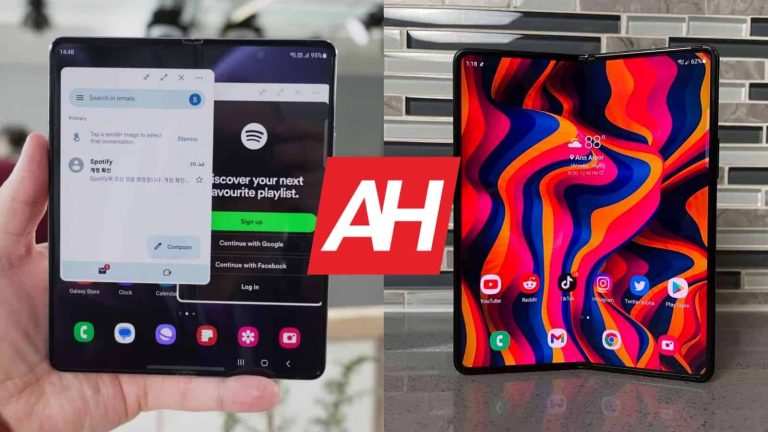
Samsung introduced its new foldable smartphones not long ago, and one of them is the Galaxy Z Fold 5. That is the company’s new book-style foldable. In this article, we’ll compare it to one of its predecessors, the Galaxy Z Fold 3. The Galaxy Z Fold 3 launched back in mid-2021, so it will be interesting to see what changed over two years. So, we’re looking at a comparison between the Samsung Galaxy Z Fold 5 vs Samsung Galaxy Z Fold 3 here.
You may be surprised how similar these two smartphones look, actually. We’ll talk more about that in the design section of the comparison. Having said that, we’ll first list their specifications, and will then move to compare them across a number of other sections. We’ll check out their designs, displays, performance, battery life, cameras, and audio performance. Having said that, let’s get started, shall we?
Specs
Galaxy Z Fold 5 & Galaxy Z Fold 3, respectively
– Screen size (main): 7.6-inch Foldable Dynamic AMOLED 2X display (120Hz, HDR10+, 1,750 nits 7.6-inch Foldable Dynamic AMOLED 2X display (120Hz, HDR10+, 1,200 nits) – Screen Size (cover): 6.2-inch Dynamic AMOLED 2X (120Hz) 6.2-inch Dynamic AMOLED 2X (120Hz) – Display resolution (main): 1812 x 2176 1768 x 2208 – Display resolution (cover): 2316 x 904 2268 x 832 – SoC: Qualcomm Snapdragon 8 Gen 2 for Galaxy Qualcomm Snapdragon 888 – RAM: 12GB (LPDDR5X) 12GB (LPDDR5) – Storage: 256GB/512GB/1TB (UFS 4.0) 256GB/512GB (UFS 3.1) – Rear cameras: 50MP (wide, f/1.8 aperture, Dual Pixel PDAF OIS), 12MP (ultrawide, 123-degree FoV), 10MP (telephoto, 3x optical zoom) 12MP (wide, f/1.8 aperture, OIS, Dual Pixel PDAF), 12MP (ultrawide, 123-degree FoV), 12MP (telephoto, 2x optical zoom) – Front cameras: 4MP (under display, main display, f/1.8 aperture), 10MP (cover display, f/2.2 aperture) 4MP (under display, main display, f/1.8 aperture), 10MP (cover display, f/2.2 aperture) – Battery: 4,400mAh 4,400mAh – Dimensions (unfolded): 154.9 x 129.9 x 6.1mm 158.2 x 128.1 x 6.4mm – Dimensions (folded): 154.9 x 67.1 x 13.4mm 158.2 x 67.1 x 14.4-16mm – Weight: 253 grams 271 grams – Connectivity: 5G, LTE, NFC, Wi-Fi, USB Type-C, Bluetooth 5.3 5G, LTE, NFC, Wi-Fi, USB Type-C, Bluetooth 5.2 – Security: Side-facing fingerprint scanner – OS: Android 13 with One UI – Price: $1,799 No longer available – Buy: Samsung No longer available
Samsung Galaxy Z Fold 5 vs Samsung Galaxy Z Fold 3: Design
The Galaxy Z Fold 5 and Galaxy Z Fold 3 actually look very similar, down to their camera islands on the back. Both smartphones are made out of metal and glass, and have similar curvatures around their body. You’ll notice a centered display camera hole on their cover displays. There is also a display camera hole on the Fold 3’s main display, while Samsung hid it under the display on the Galaxy Z Fold 5.
Both smartphones have three vertically-aligned cameras on the back. Those cameras are placed in the top-left corner, and each setup has its dedicated camera island of sorts. The Galaxy Z Fold 5 is a bit taller than its predecessor, while they’re equally wide. The Fold 5 is also a bit thinner when folded, mainly due to the fact it folds flat. The Galaxy Z Fold 3 does not, it leaves a gap in between two displays. That’s one of the main differences between the two phones, design-wise.
The Galaxy Z Fold 5 is also heavier than the Galaxy Z Fold 3. It weighs 271 grams, compared to 253 grams of the Fold 3. Both smartphones do offer an IPX8 certification for water resistance. They both feel good in the hand, though the Fold 5 is considerably heavier. They’re both slippery too.
Samsung Galaxy Z Fold 5 vs Samsung Galaxy Z Fold 3: Display
Both smartphones include 7.6-inch and 6.2-inch displays, but they’re not the same. The Galaxy Z Fold 5 has a 7.6-inch Foldable Dynamic AMOLED 2X display with a resolution of 1812 x 2176 pixels. That display supports a 120hz refresh rate, and HDR10+ content. This display has a peak brightness of 1,750 nits. The cover display on the phone measures 6.2 inches, and has a resolution of 2316 x 904 pixels. The aspect ratio here is 23.1:9, and that is a Dynamic AMOLED 2X panel with a 120Hz refresh rate. That cover display is protected by the Gorilla Glass Victus 2.
The Galaxy Z Fold 3, on the flip side, has a 7.6-inch Foldable Dynamic AMOLED 2X main display too, but a different one. That panel does support a 120Hz refresh rate, and HDR10+ content. This panel goes up to 1,200 nits of brightness at its peak, so it’s dimmer than the Fold 5’s panel. It has a resolution of 1768 x 2208. The cover display measures 6.2 inches, and has a resolution of 2268 x 832. That is a Dynamic AMOLED 2X panel with a 120Hz refresh rate. It’s protected by the Gorilla Glass Victus, and has an aspect ratio of 25:9.
All of these displays are good, but the Galaxy Z Fold 5’s does have an advantage, especially the main one. It does get noticeably brighter, which is something you’ll especially notice outdoors. On top of that, it feels sturdier than the Fold 3’s during use. It’s difficult to explain, you have to try it yourself. It feels less plasticky. The cover display offers better protection on the Fold 5, but the difference is not that big between them. All displays offer good viewing angles, and vivid colors, on top of those deep blacks that we’re used to with OLED panels.
Samsung Galaxy Z Fold 5 vs Samsung Galaxy Z Fold 3: Performance
The Snapdragon 8 Gen 2 for Galaxy SoC fuels the Galaxy Z Fold 5. Samsung also included 12GB of LPDDR5X RAM here, along with UFS 4.0 flash storage. The Galaxy Z Fold 3, on the other hand, is fueled by the Snapdragon 888 SoC. It is also equipped with 12GB of LPDDR5 RAM and UFS 3.1 flash storage. Needless to say, the Galaxy Z Fold 5 does have an edge spec-wise, across the board.
Is that a difference you’ll notice during actual usage? Well, yes, kind of. The Galaxy Z Fold 5 does feel a bit snappier. That comes for launching apps, multitasking, and while gaming too. The difference is not that big, though, as the Fold 3 still offers good performance, that’s for sure. If you’d like the best of the best, however, the Galaxy Z Fold 5 is the way to go. It’s simply a newer product with better hardware.
Samsung Galaxy Z Fold 5 vs Samsung Galaxy Z Fold 3: Battery
There is a 4,400mAh battery included inside both of these smartphones. If battery life is important to you, however, the Galaxy Z Fold 5 is the way to go. Despite the fact they have the same battery capacity, the Fold 5 offers considerably better battery life. It’s probably a mix of a more power-efficient SoC, combined with other components that bring power efficiency, like newer storage, for example.
With the Galaxy Z Fold 3, we always lingered around 6 hours of screen-on time. Sometimes a bit more, sometimes a bit less. With the Galaxy Z Fold 5, getting to 7 and a half hours of screen-on-time is not a problem at all. Do note that this is based on our usage, though, and your mileage may vary. There are a lot of variables to consider here, ranging from using different apps, on different signal strengths, to different display preferences. You may use the main display more than us, and so on. Overall, though, the Galaxy Z Fold 5 does have better battery life than the Fold 3. Its battery life is not bad at all. Another thing to note is that you should expect worse battery life if you plan on playing games on the two devices. We did that just for testing purposes.
When it comes to charging, they both offer 25W wired charging. The Fold 5 also offers 15W wireless and 4.5W reverse wireless charging. The Galaxy Z Fold 3 supports 11W wireless, and 4.5W reverse wireless charging. Neither phone includes a charger in the box, though.
Samsung Galaxy Z Fold 5 vs Samsung Galaxy Z Fold 3: Cameras
The Galaxy Z Fold 5 includes a 50-megapixel main camera, alongside a 12-megapixel ultrawide unit (123-degree FoV), and a 10-megapixel telephoto camera (3x optical zoom). The Galaxy Z Fold 3, on the other hand, has a 12-megapixel main camera, a 12-megapixel ultrawide camera (123-degree FoV), and a 12-megapixel telephoto unit (2x optical zoom).
Now, the Galaxy Z Fold 3 is still a decent camera smartphone, but it cannot measure up to the Galaxy Z Fold 5. The Fold 5 provides sharper images that offer better colors at the same time. Oversharpening is no longer an issue. Both phones do a good job in low light, but that’s also an area where the Galaxy Z Fold 5 is better.
Their ultrawide cameras provide somewhat similar results, while telephoto shots are better from the Galaxy Z Fold 5. That is not surprising considering that it has more zoom prowess. For low light shots, however, it would be best if you used the main camera on both phones. Neither of these two devices is a pinnacle of smartphone photography, but both do the job well.
Audio
You will find a set of stereo speakers on both of these phones. Both sets are tuned by AKG, and both provide good, clear sound. There’s also no noticeable distortion in sight, not to mention they’re loud enough. There’s no notable difference between them.
There is no audio jack on either of these two smartphones. They both do include Type-C ports, so you can use that to connect your wired headphones. If you’d prefer to go wireless, do note that the Galaxy Z Fold 5 offers Bluetooth 5.3, while the Galaxy Z Fold 3 comes with Bluetooth 5.2 support.
It’s no secret that Arm’s announcement to go public this September has garnered widespread attention from other major tech giants. Now, in a recent development, Apple, Samsung, Nvidia, and Intel are reportedly looking towards acquiring stakes in Arm.
Why is Arm this important?
Although at first glance, it may seem like Arm is just another tech company, the company’s role is pivotal as it specializes in licensing chip designs to a range of businesses. This approach not only relieves companies like Apple and Samsung from the burden of chip design but also enables customized solutions such as the M1 chip. Globally, Arm’s chips power over a staggering 250 billion devices and also constitute over 90% of the smartphone chip market.
When it comes to finances, the company achieved sales of $2.8 billion in fiscal 2022, reflecting an astonishing 70% surge compared to figures from its fiscal year 2016 when the acquisition by SoftBank Group concluded.
Arm’s strategic approach
In an effort to stable stock performance upon listing, Arm plans to allocate “a few percent each” in stakes to select companies like Apple and Samsung. This strategy aims to mitigate potential early trading volatility and pave the way for sustained growth in the company’s market value.
“We have diversified our business by not only developing different products but also by addressing it through different parts of the business model strategy. We knew our business was going to be okay. All of the financial results you are seeing now, which are terrific and the team has done a fantastic job on, really come from work that was done a few years ago,” said Arm CEO Rene Haas.
However, Arm’s path will not be without challenges as other companies, including Qualcomm and NXP Semiconductors, embark on their own ventures to develop a competing chip architecture called RISC-V. Additionally, Arm could encounter difficulties within the current economic landscape, where IPO values experienced a significant two-thirds drop in 2022.