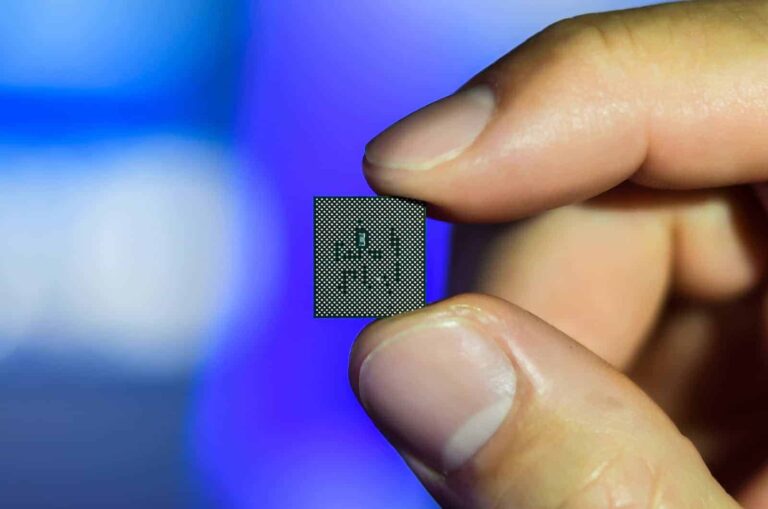
Development of the coming Qualcomm 3nm chip might bring a partnership between three tech giants. While the launch of this chip is still a year away, its development process, which involves design and assembling, will kick off early. To facilitate this process reports claim that Qualcomm will partner with TSMC and Samsung.
This is quite intriguing because Qualcomm is currently working with TSMC alone. However, the chip designing and manufacturing firm previously had a business relationship with Samsung, which it severed. But the firm’s coming 3nm chip might bring its previous and current business partners on board.
While this might seem like a shocking move, it’s not uncommon in the tech industry for manufacturers to source materials from various providers. There are a few reasons that might warrant Qualcomm working with both TSMC and Samsung for the production of its coming chip. The reasons revolve around a possible improvement in the performance of one party’s 3nm fab, as well as saving production costs.
Reasons behind the possible involvement of both TSMC and Samsung in the coming Qualcomm 3nm chip
A recent analysis on this issue from Ming-Chi Kuo throws light on why double sourcing might be a thing for Qualcomm’s coming chip. Other reports also point out that Qualcomm is testing new chips with Samsung 3nm GAA technology. These chips have greatly improved in comparison with what was attainable with the Samsung 4nm entries.
Since Samsung’s 4nm fabrication process didn’t meet Qualcomm’s requirements, the company turned its attention elsewhere. This gave birth to the usage of the TSMC 4nm process for the Snapdragon 8 Gen 1 and 2 processors. But with Samsung’s improvement in its 4nm process, Qualcomm might consider working with them again.
Additionally, there is the need to cut down on the production cost of 3nm chips. The development cost of chips with the new 3nm process will affect the coming Qualcomm processor. This coming processor, the Snapdragon 8 Gen 3 will stick to using the 4nm process.
To cut down on the cost of developing the coming Snapdragon 8 Gen 4 processor, Qualcomm might need to look out of the box. This will mean sourcing chips from not only TSMC but also Samsung. Despite rumours that the next-gen TSMC N3E 3nm process will be cheaper, Qualcomm might need to further reduce production costs.
By doing this, the chip design and manufacturing firm will be able to cope with declining smartphone demands. There is no official statement concerning Qualcomm working with both TSMC and Samsung, but Ming-Chi Kuo’s analysis might be true. In the coming months, more details on this matter will be made available to the public.
Verizon subscribers on one of the carriers’ legacy unlimited plans will need to be prepared for a price increase in the near future. According to The Mobile Report (via The Verge), Verizon is looking to increase the price of three of its legacy unlimited plans. Specifically the Go Unlimited, Beyond Unlimited, and Above Unlimited plans.
The increase will be fairly minor at $3 more per month. But that isn’t really the point. Customers who have been using these plans since they were made available in 2018 have likely held onto them through other changes. As these are legacy plans, Verizon already has new ones. But they could cost more and may not offer the same thing. And now customers are going to have to pay a little extra to keep these older plans. This probably won’t bother most. But there will no doubt be a few who won’t be happy about the change.
Also worth mentioning is that some people may be on a fixed budget. And may not have accounted for an extra $3 more a month. Which over the course of a year is an addition $36. It doesn’t seem like a lot. But it could be to some.
Verizon will introduce the price increase for these unlimited plans on August 29
So, when we will these price changes come into play? This month, as it turns out. Verizon has confirmed that the increases are happening on August 29, so there’s only a couple more weeks before that happens. If your billing cycle ends before that point, then you should have one more bill coming with the current monthly price. But then going forward, it’ll reflect the additional $3 per month.
Verizon continues to shake things up with its plan offerings and these $3 increases are just the latest effort. Back in May the carrier revealed and launched its new myPlan offerings that were an attempt to simplify things for customers. It’s also not the only carrier adding prices onto your bill or sliding in some extra fees here and there. Just last month, T-Mobile announced it would begin charging customers $5 to pay their bill in stores.
A new ransomware group known as ‘Rhysida’ has been operating since May 2023, posing a huge danger to the healthcare industry.
Rhysida ransomware gang has been connected to several significant attacks, including an assault on the Chilean Army.
Recently, the organization was also implicated in an attack on Prospect Medical Holdings that had an impact on 166 clinics and 17 hospitals around the country.
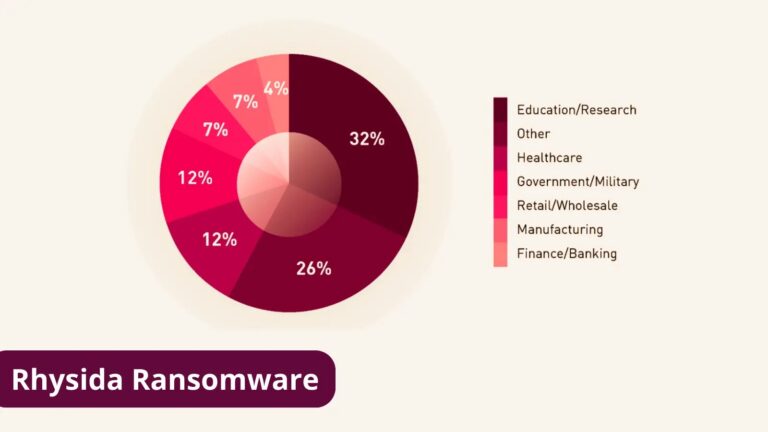
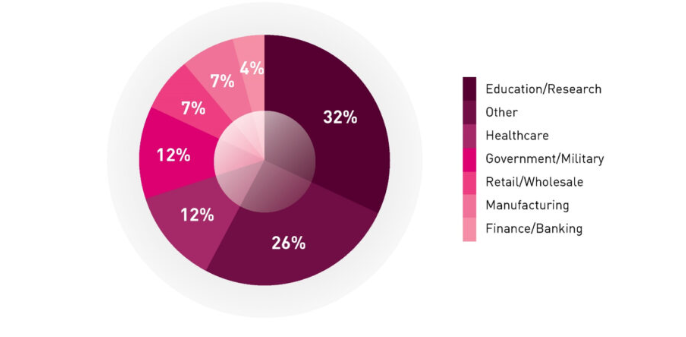
Distribution of Rhysida victims per industry sector
“This threat is delivered through a variety of mechanisms which can include phishing and being dropped as secondary payloads from command and control (C2) frameworks like Cobalt Strike”, Cisco Talos.
“These frameworks are commonly delivered as part of traditional commodity malware, so infection chains can vary widely”.
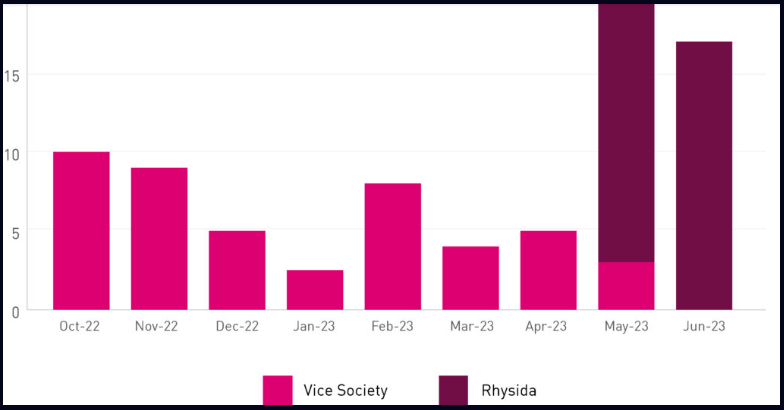
Check Point Incident Response Team (CPIRT) report says this ransomware was found to have a lot in common with Vice Society’s TTPs, another ransomware group. Since 2021, Vice Society has been one of the most active and aggressive ransomware gangs, primarily focusing on the healthcare and education industries.
The two groups focused on the education and healthcare industries, which are distinctive in the ransomware ecosystem.
Distribution of Rhysida and Vice Society victims over time
The research focused on the TTPs that led to its deployment, specifically Lateral Movement, Credential Access, Defence Evasion, Command and Control, and Impact.
To conduct lateral movement, the attackers employed a range of techniques, including:
Remote Desktop Protocol (RDP) – Throughout the intrusion, the threat actor initiated RDP connections and took further steps to erase related logs and registry items to harden detection and analysis attempts (as mentioned in the Defence Evasion section).
Remote PowerShell Sessions (WinRM) – The threat actor was spotted starting remote PowerShell connections to systems inside the environment while connecting remotely through RDP.
PsExec – The ransomware payload was distributed from a server within the environment using PsExec.
Notably, for accessing credentials, the threat actor utilized ntdsutil.exe to build a backup of NTDS.dit under the temp_l0gs folder.
Researchers say this path was used by the actor several times. In addition, the threat actor identified Domain Administrator accounts and attempted to log in using some of them.
For persistence, threat actors have used a variety of backdoors and technologies, including SystemBC and AnyDesk.
Threat actors deleted logs and forensic artifacts regularly, including deleting the history of recently used files and directories, the list of recently executed programs, the recent path history in File Explorer, the PowerShell console history file, and all files and folders in the current user’s temporary folder.
Wrap Up
There has been significant development in the ransomware and extortion market, which might be attributed to the number of leaked builders and source codes associated with numerous ransomware cartels.
Along with its Galaxy Tab S series of tablets, Samsung also launches a series of FE tablets that offer a more mid-range experience. They’re for people who want a powerful tablet experience for a lower price. Well, the company is going to be selling the Galaxy Tab S9 FE tablets, and here’s a preview of these devices.
In this article, we’re going to go over the expected details for these tablets. We’ll go over the price, specs, release date, etc. As we get close to the official release, more information will flood in about these devices, so the article will be updated accordingly. Be sure to check back periodically to see what new information has been added.
How many models will there be?
So far, it’s strongly believed that there will be two models. We’re sure that both of these tablets will have mostly the same specs. The difference between the two models will mainly be the size. The smaller model is expected to be 10.9 inches and the other one could be 12.4 inches. The second model is the same size as the Galaxy Tab S9+.
As for the names, the names are expected to be the Galaxy Tab S9 FE and the Galaxy Tab S9 FE+.
How will these tablets look?
So far, it looks like both models of the tablets will have a similar look to what we got with the Galaxy Tab S9 tablets (you can pre-order them here). Based on some leaked images of these tablets, it looks like they will be made from matte metal that’s relatively reflective. On the back, we see a singular camera in the upper left corner. The antenna lines could sit on the top and bottom of the body and curve with the corners.
Looking at the front, there’s not much to see. We expect there to be one front-facing camera for video calls. Other than that, we see that the bezels are pretty sizable. They give the tablets a less premium look, but they’ll make it easier to grab them.
Will these tablets have a powerful processor?
The FE devices have had a history of using the previous year’s flagship processors, but that might not be the case this time around. When these tablets hit the FCC’s desk, we found out that Samsung might use the Exynos 1380 SoC.
That seems to be the Samsung equivalent of the Snapdragon 778. That’s an upper-mid-range processor. This means that you should expect really good performance, but you should also expect the occasional stutter or dropped frame while using it.
How much RAM will these tablets have?
We’re sure that there will be different RAM configurations, but that remains to be seen. However, rumors point to them starting at 6GB of RAM. That’s not bad for a mid-range tablet.
How much storage will these tablets have?
As for the storage, we believe that these tablets will start with 128GB of storage. We’re not sure if they will go up from there. If they do, then we don’t expect them to go higher than 256GB.
Will these tablets have the same screen found with the Galaxy Tab S9?
No. The Galaxy Tab S9 uses some very eye-catching Dynamic AMOLED 2X displays. The FE versions will use your run-of-the-mill LCD displays. We’re sure that it will still be a nice-looking panel.
What software will these tablets have?
Rumors point to the Galaxy Tab S9 FE running Android 13 out of the box with Samsung’s One UI 5. This could mean that they will launch within the next couple of months; sometime before the launch of Android 14 with One UI 6.
Will the Galaxy Tab S9 FE come with an S Pen included?
We don’t know 100%, but it seems possible. We, at least, know that they will be compatible with the Samsung-made stylus. In the leaked renders of the chassis, we see a magnetic strip on the back of the tablet. This is meant to hold and charge the S Pen. So, if the company doesn’t drop one in the box, you’ll be able to pick one up separately.
What battery capacities do these tablets have?
Right now, we don’t know the battery capacity for both models of the tablet. Rumor has it that the smaller model will come with an 8,400mAh battery. It makes sense that the 10.9-inch version has this capacity because the 11-inch variant of the Galaxy Tab S9 also has this capacity.
If that’s the case, then we should expect the 12.4-inch variant to have a capacity similar to the Galaxy Tab S9+’s. This tablet’s battery is 10,090mAh.
As for charging speeds, it looks like these tablets will cap out at 25W. That speed wouldn’t be too bad if the batteries were smaller. However, given how large the batteries are, charging them will take quite a while.
Will these tablets have microSD card expansion/headphone jack?
Based on the images, it doesn’t appear so. We will need to wait for further images to be sure. If these tablets do have these features, then they just don’t show up in the renders.
Will they have an IP rating?
Since the Galaxy Tab S9 series are all IP68 water and dust resistant, it’s tempting to think that Samsung trickled this technology into its FE models. At the moment, it doesn’t seem like the company did.
How much will these tablets cost?
The price of these tablets is expected to be pretty problematic. Rumor has it that the base Galaxy Tab S9 FE will start at ₹63,000 for the Indian price (about $760) for the 6GB/128GB variant. That’s a pretty bad price seeing as the base Galaxy Tab S9, which costs ₹73,000 ($880), starts with 8GB of RAM and 128GB of storage. It also has a much more powerful processor and a better display among other benefits.
When will these tablets launch?
Right now, we’re still in the dark about the release date. Previous rumors pointed to these tablets being unveiled along with the other Galaxy Tab S9 tablets, but that didn’t happen. However, rumor points to these tablets launching sometime within the next couple of months.
The Supreme Court today ruled in favor of Apple and against Fortnite developer Epic Games by preventing an injunction ordered by a federal judge from taking effect. Back in September 2021, Judge Yvonne Rogers Gonzalez issued her decision on a court case that was heard after Apple tossed Fortnite out of the App Store for trying to offer iPhone owners an alternate method of paying for in-app purchases including currency used within the game. This would deny Apple from taking its 15% to 30% cut of such transactions.
The judge ordered Apple to allow developers to include in-app links to third-party payment platforms to get around the so-called “Apple Tax.” Earlier this year, the 9th Circuit Court of Appeals ruled that Apple had violated California’s Unfair Competition Law by denying developers the opportunity to inform consumers about alternative payment platforms which included transactions made via the Epic Games Store. But the court put its ruling on hold to give Apple time to file with the Supreme Court for its case to be heard.
Apple threw Fortnite out of its App Store for trying to bypass Apple’s in-app payment platform
But today, Justice Elena Kagan ruled against Epic by saying that she would not allow the decision by the 9th Circuit Court of Appeals to immediately take effect. According to Bloomberg, Kagan is the justice who handles emergency matters coming from the 9th Circuit Court of Appeals which is based in San Francisco. If the Supreme Court decides not to hear the case, the reprieve Apple received today would be temporary and the previous ruling by the 9th Circuit Court of Appeals, which would force Apple to allow developers to promote alternative payment methods, would take effect.
The so-called Apple Tax generates billions of dollars for Apple each year and because Apple does not allow the use of third-party app stores with its devices, lawmakers and app developers in the U.S. and overseas have called Apple a monopolist.
INTERPOL Dismantles ’16shop’: Global effort leads to arrests in Indonesia and Japan, targeting notorious phishing platform.
Successful Intelligence Sharing: Cooperation between INTERPOL, law enforcement, and private partners demonstrates effective global cybercrime fighting.
Wide-reaching Phishing Impact: ’16shop’ exploited victims worldwide with phishing kits, showcasing the pervasive threat of such attacks.
Phishing Dominance: Phishing responsible for up to 90% of data breaches, necessitating urgent countermeasures.
Collective Defense: Collaboration among law enforcement and industry remains crucial in battling evolving cyber threats.
In a remarkable feat of international collaboration, INTERPOL has successfully dismantled the nefarious ’16shop’ phishing-as-a-service (PaaS) platform, culminating in the arrest of its operator and two facilitators.
The joint effort between law enforcement agencies and private sector partners demonstrates the power of shared intelligence in combating cybercrime on a global scale. This comes days after INTERPOL managed to shut down a decade-old child abuse network during Operation Narsil.
Targeting the Heart of Phishing Operations
The ’16shop’ platform offered so-called ‘phishing kits’ to hackers eager to exploit unsuspecting Internet users through email scams. Victims were tricked into sharing sensitive information, including credit card details, by clicking on malicious pdf files or links. These ill-gotten gains were then used to defraud victims of their hard-earned money.
Phishing attacks remain the most prevalent cyber threat worldwide, responsible for up to 90 percent of data breaches. The success of such attacks highlights the urgency of tackling this pervasive issue.
C2 server of 16shop and an Amazon phishing page available on the site
International Partnerships at Work
According to INTERPOL’s press release, the successful takedown of ’16shop’ was the result of a comprehensive operation involving INTERPOL, Indonesian authorities, and counterparts in Japan and the United States. Private sector entities such as Cyber Defense Institute, Group-IB, Palo Alto Networks Unit 42, Trend Micro, and Cybertoolbelt also played instrumental roles.
“Borderless Cyber Impact”
Bernardo Pillot, Assistant Director of Cybercrime Operations at INTERPOL, emphasized the tangible impact of cyberattacks on victims. He stated, “Cyberattacks such as phishing may be borderless and virtual in nature, but their impact on victims is real and devastating.”
Unravelling the Web of Cybercrime
The investigation began with the identification of ’16shop’ by INTERPOL’s cybercrime analysts during a project focusing on cyber threats in the ASEAN region. Collaboration with private sector partners allowed the team to pinpoint the platform’s administrator based in Indonesia.
Leveraging connections with the United States, INTERPOL coordinated with US law enforcement agencies to provide crucial information to Indonesian investigators. This joint effort led to the arrest of the platform’s 21-year-old administrator and the confiscation of electronic devices and luxury vehicles.
Unmasking Facilitators and Future Prevention
The successful capture of the administrator in Indonesia catalyzed further cooperation between Japanese and Indonesian authorities, leading to the arrest of two facilitators. This meticulous unravelling of the criminal network highlights the collective determination to curtail cybercrime.
Brigadier General Adi Vivid Agustiadi Bachtiar, Director of the Indonesian National Police’s Cyber Crime Investigation, underscored the significance of the operation. “This operation is only successful as we work closely with various stakeholders… to stop the crime-ware being offered as a service and also stopping more people from falling victim to phishing attacks,” he stated.
Coherent Intelligence for a Safer Cyberspace
INTERPOL’s cybercrime directorate serves as a critical hub for experts from law enforcement and industry to analyze and disseminate actionable intelligence on cyber threats. This united approach underscores the need for ongoing collaboration to combat the ever-evolving landscape of cybercrime.
Researchers have devised a new attack strategy that steals data by recording keyboard stroke sounds. Using a trained deep learning model, the acoustic side-channel attack risks most existing laptops, keyboards, and other devices that involve data typing, as it deciphers keystrokes with over 90% accuracy.
Acoustic Attack Logging Keystrokes Risks Most Devices
A team of researchers has demonstrated a new way to steal data from target computers simply by logging keystrokes. Using a trained deep-learning model, the researchers analyzed the recorded keystrokes to determine the actual data.
Specifically, executing the “fully-automated acoustic side-channel attack (ASCA)” requires recording the target device’s keystrokes with a nearby microphone. For this, an attacker may infect a nearby smartphone with malware and control its microphone for recording the target device’s keystrokes. Or, the attack may even execute via a Zoom video call.
Next, using trained deep-learning models, an adversary can
The researchers demonstrated both attack scenarios in their study. They trained the DL model by pressing 36 keys of a MacBook Pro, 25 times each, with varying pressures, recording all the sounds. Next, they produced waveforms and mel-spectrograms for the sounds to visualize the differences. They then used the spectrograms to train the CoAtNet image classifier model for data prediction.
After completing the DL training, the researchers then performed the attack on a MacBook Pro 16-inch (2021), first recording its keystrokes via an iPhone 13 mini placed 17cm away from the device and then, with a Zoom video call using the target device’s microphone.
They achieved a 95% accuracy in the information deciphered from the keystrokes data when recorded with a smartphone’s microphone and a 93% accuracy with Zoom call recordings. The team has shared the details about this attack strategy in its research paper.
Attack Limitations And Mitigations
Since this acoustic side-channel attack solely relies on sounds produced from the keystrokes, the researchers suggest that changing typing styles can sufficiently prevent the attack. Likewise, switching to the touch-typing mode can also help avoid such attacks.
In addition, adding random keystrokes in the middle of typing important stuff, such as passwords, can prevent an adversary from predicting the data. Whereas, implementing keystrokes acoustics suppression or removal from VoIP apps can also help prevent such attacks in the long run.
There are a ton of different email clients out there, but there’s a new one on the scene that has an interesting (and familiar) hook to it. It’s called Shortwave, and it’s a platform that could transform how you think about emails. Here’s a useful guide on how to use Shortwave and what it’s all about.
What is Shortwave?
Back in 2014, Google brought an app called Inbox, and this app had an interesting take on email. Inbox took emails and bundled them into groups, which created a much cleaner interface. It was a popular platform, but this is a Google product we’re talking about. It was bound to be discontinued prematurely, and that’s what happened. About five years after it came, the company brought down the ax.
Well, an ex-Google employee started working on the platform’s spiritual successor. Shortwave is an application that takes the core functionality brought by Inbox and brings it back. Just like Inbox, emails from the same source are automatically grouped into bundles.
Say, if you get several emails from Reddit about posts and comments. Normally, you’ll see these emails scattered throughout your inbox. With Shortwave, all of those emails will be grouped into a bundle. The bundle takes up as much space as a single email. When you tap on the bundle, it’ll expand so that you can access each of the emails individually.
Getting the program
So, if you’re tired of the chronological email feed, then you should give this app a try. It’s been in beta testing for a year and a half, but it’s out to be used by the public.
Get the app
Ok, so Shortwave is now available on the Google Play Store, iOS App Store, and on your computer. Choose the link below to download the app on your preferred platform.
Getting it on Desktop
There’s no official desktop application for Shortwave. So, if you want to use it on the computer, you’ll have to use the website. However, if you want to install it on your desktop, it’s easy to do so. Just know that this is only supported on Chromium-based browsers. These include Google Chrome, Microsoft Edge, Opera, and more.
So, you will not be able to install it if you use Firefox or Apple’s Safari. First, follow the link below:
This will take you to the desktop website. Sign in with your Gmail account. When you do that, you’ll be taken to your inbox. Look up at the address bar near the right side of the browser. you’ll see the option to install the app onto your desktop. On Chrome, it will look like a little computer monitor with a downward-pointing arrow. In Edge, it will look like a square with a “+” symbol.
When you click on it, the browser will ask you to confirm this information. After that, you’ll see the Shortwave icon on your desktop. Clicking on it will open a mini browser that will display only the Shortwave website.
How to use Shortwave
When you open the app, you’ll be greeted with your main inbox. By default, all emails from the same source will be grouped into bundles. You’ll see how many emails are in a bundle right next to the sender’s name. Tapping on the bundle will open a new page with all of the emails displayed.
Using bundles
The bundles are a pretty big part of the whole experience. They help make the interface less cluttered and easier to navigate. As stated before, the emails come bundled automatically.
The name of the bundle will be set to the name of the source. If you want to rename the bundle, it’s easy to do. Unfortunately, you’re not able to change the name using the mobile app. You’ll need to use the desktop version.
Tap on the bundle and tap on the three-dot menu on the top of the screen. In the resulting menu, tap on the Add Note button. When you look at the Bundle’s name, it will be replaced with the text “Add Note”. Go back to your inbox and click on that text. It will be a text field that will allow you to type in your own name.
If Shortwave bundled emails that you don’t want to be bundled, you can unbundle them. Go back to the three-dot menu and tap on the Unbundle button. This will ungroup these emails and each one will go to their chronological spot in your feed.
If you change your mind, or you unbundle the emails by accident, you can re-bundle them by tapping on the Undo button in the popup that appears at the bottom of the screen.
Pinning emails/bundles
If there’s a bundle or conversation that you want to display above the rest, you can simply pin it. Tap on the email conversation or bundle you want to pin. At the top right of the UI, you’ll see different actions that you can do for the email. You’ll see a thumbtack icon; tap on it.
This will pin the bundle or email conversation to the top of your feed. The emails will stay at the top of the feed even if you get new emails. You can pin multiple emails to the top of your feed, and they’ll occupy their own section above the feed.
For an even quicker way, simply swipe left on the email or bundle you want to pin. You’ll see a blue pin icon appear. Let go to pin the conversation, just be sure not to pull too far because you’ll eventually, you’ll snooze the email.
To unpin a conversation, just swipe left on it to reverse. If you’re in the conversation, tap on the pin icon on the top right of the UI.
Snoozing conversations
If there’s an email that you want to get to later, but you don’t want to forget about it, you can snooze it. This will hide the email until a designated time and then resend a notification when the time comes.
To snooze a conversation, tap on it. On the top right of the UI, right next to the Pin icon, you’ll see a clock icon. Tapping on that icon will bring up a little popup window with some options for how long to snooze your email. If one of them appeals to you, just tap on it. If not, then tap on the Pick a time option. This option will let you choose the date and time that you want to snooze the email until.
A quick way to snooze an email is to swipe left on a conversation until your finger reaches the edge of the screen. You’ll see the pin icon first then you’ll see the clock icon.
Sending and replying to emails
Shortwave offers an easy and straightforward interface for sending and replying to emails. On the mobile version, you’ll see the Compose button on the bottom bar right next to the search button. The screen will turn into the composer where you’ll be able to enter the recipient, subject, and the contents of your message.
On the desktop version, you’ll see the Compose button on the top left of the interface. It’s the pencil icon right under your profile picture. You’ll see a message composer open up on the bottom left of the screen.
When it comes to replying to messages, Shortwave almost resembles a messaging app more than an email app. Tap on the email that you want to reply to and, on the bottom of the screen, you’ll see the text field. tap on it and you’ll see a simple reply UI pop up.
Settings
In Shortwave, there are a ton of settings that you can use to customize your experience. To access your settings, tap on your profile picture on the bottom left of the screen. On the resulting screen, you’ll see the Settings button on the bottom. On the resulting page, you’ll see all of the categories that you can search through. We’ll go through the more notable settings. You can look through the settings to see the full list.
You’re able to change the system of the app. This will let you choose between light mode and dark mode.
A setting will let you reverse the inbox swipe gestures. You swipe left to pin emails and snooze them; you swipe right to mark them as done and delete them. This option will reverse this.
Remember the popup you get when you’re trying to snooze a conversation? The popup has preset options for how long you want to snooze your emails. Well, there’s a setting that will let you customize those presets.
If there are people sending you too many emails, you can block different senders. Lastly, you can choose which inboxes you want to be displayed.
With that, you know what you need to know about this new and useful email client.
PSNI Data Breach: The Police Service of Northern Ireland inadvertently exposed personal details of its workforce, raising security concerns in a historically sensitive region.
Accidental FOI Leak: Responding to a FOI request, the PSNI published sensitive information online, potentially endangering over 10,000 personnel.
Safety at Risk: The breach, potentially the UK’s worst, puts officers at risk, as roles of intelligence and security are exposed.
Tense Climate: Amid ongoing security threats, like the New IRA, the breach ignites fears for officers’ safety in an already delicate environment.
Calls for Investigation: The breach prompts demands for investigation, improved data protection, and measures to ensure officer safety.
In a grave breach of security, the Police Service of Northern Ireland (PSNI) accidentally exposed the personal details of its entire workforce, comprising both officers and civilian staff.
The data leak occurred in response to a Freedom of Information (FOI) request and was subsequently published online, leaving more than 10,000 individuals vulnerable to potential physical threats.
The breach, which experts have described as potentially the worst data breach in UK history, has raised serious concerns about the safety of police officers and staff in a region with a history of violence.
The exposed information included names, initials, ranks, work locations, and departments of all PSNI personnel. While private addresses were not compromised, sensitive roles such as members of the organized crime unit, intelligence officers stationed at ports and airports, and officers at MI5’s headquarters were revealed.
However, this should not come as a surprise, as the United Kingdom has been facing data security issues for a while. Just yesterday, the UK Electoral Commission released information about a year-long data breach, in which an unknown attacker stole the personal data of millions of Brits.
This incident comes at a time when the security situation in Northern Ireland remains tense. Dissident Republican groups, such as the New IRA, continue to pose a threat to officers’ safety. Over 300 police officers lost their lives during the Troubles, and recent attacks on police personnel have heightened concerns about their security.
The accidental data leak has sparked outrage and fear within the PSNI and the wider community. A serving police constable, who spoke anonymously, emphasized the impact on officers and their families, stating, “This breach has highlighted the fear and concern that my family have about me doing this job.”
Northern Ireland’s Alliance Party leader, Naomi Long, called for a thorough investigation into the breach, questioning why such sensitive data was available in unencrypted form and how a junior staff member had access to it. The breach has prompted calls for greater protection for police officers, who often take measures to conceal their identities to safeguard their families.
Liam Kelly, chair of the Police Federation for Northern Ireland, expressed dismay and anger over the breach, stressing the importance of rebuilding trust between the PSNI and its officers. The breach has cast doubts on the PSNI’s security measures and its ability to safeguard its personnel.
Commenting on the breach, Pieter Arntz, a Malware Intelligence Researcher from Malwarebytes, told Hackead.com, “As we sometimes see in data breaches, there was no mal intent, but it was a case of human error. Human errors, however, are always enabled by some oversights in security measures or protocols that are designed to depend on everyone knowing exactly what to do and what not to do.”
“You could compare it to the way many services depend on passwords. We expect people to keep track of hundreds of passwords that need to be so complex that they are impossible to remember. But at the same time, we blame these people if they write it down on a Post-it or re-use the password for several sites,” said Pieter.
“Educating people has its boundaries, sometimes the underlying technology is just not right for the problem we are trying to solve,” Pieter added.
According to Sky News, the Information Commissioner’s Office has been informed of the incident and is assessing the situation. The PSNI has taken steps to rectify the breach and prevent similar errors from occurring in the future. Chief Constable Simon Byrne has interrupted his holiday to address the situation and provide reassurance to the police force.
As Northern Ireland grapples with the aftermath of this significant data breach, concerns persist about the potential consequences for officers’ safety and the region’s security landscape. The incident highlights the urgent need for enhanced data protection measures and renewed efforts to ensure the safety of those who risk their lives to maintain public order and security in a historically sensitive environment.
Samsung has released the August 2023 security update for the Galaxy S22 series and Galaxy A54 5G. The rollout began recently and is currently available to users in Latin America. The latest security patch should soon reach these phones in other markets.
The August SMR (Security Maintenance Release) for the Galaxy S22, Galaxy S22+, and Galaxy S22 Ultra comes with two different firmware build numbers in Latin America. In some countries, it’s S90*EXXS6CWG9. In others, it’s S90*EXXS6CWGA. As of this writing, we can confirm the availability of the update in Argentina, Brazil, Chile, Colombia, Guatemala, Mexico, Panama, Paraguay, Peru, Trinidad and Tobago, and Uruguay.
Regardless of the build number, the changelog remains the same. And there’s nothing notable here. Samsung is only pushing the latest security fixes to the phones. It has already been revealed that the August SMR patches more than 80 vulnerabilities, at least three of which are critical issues. Some of those could pave the way for remote code execution with user interaction or additional privileges.
These security fixes are also rolling out to the Galaxy A54 5G. Once again, Samsung has begun the rollout in Latin America, where users are getting the update with firmware version A546EXXS4AWG4. The rollout is widely available in the region, SamMobile confirms. The new premium mid-range smartphone is also only picking up the latest security patches and nothing more with the August update.
More Galaxy devices will get the August 2023 update soon
Samsung started rolling out the August security update to Galaxy devices last week. It has already pushed the latest SMR to about a dozen models, including the Galaxy S23 series, Galaxy Z Fold 4, Galaxy Z Flip 4, Galaxy Z Fold 3, Galaxy Z Flip 3, Galaxy Note 20 series, and the Galaxy S20 FE. As usual, the initial rollout only covers the devices in select markets, but the company will soon expand the update globally.
At the same time, Samsung will also push the August SMR to more Galaxy devices. The likes of the Galaxy S21 series, Galaxy S20 series, and a bunch of mid-range models are still awaiting the new security release. If you’re using a Galaxy device, you can check for updates from the Settings app. Go to the the Software update menu and tap on Download and install to see if an OTA (over the air) update is available. If you don’t see any updates, wait a few days and check again.