Qualcomm seems to have finalized deals with TSMC and Samsung for the manufacturing of the Snapdragon 8 Gen 4, which will be its first 3nm chip. Noted TF International analyst Ming-Chi Kuo suggested this in a recent Medium post. Kuo said that the American chip firm has “already cooperated” with the two foundry giants for the production of its 2024 flagship processor.
After having its flagship chips manufactured by Samsung for a few years, Qualcomm switched to TSMC last year because of the former’s poor yield rates. The Taiwanese firm manufactured the Snapdragon 8 Gen 2 and Snapdragon 8+ Gen 1 in 2022. It will also produce this year’s Snapdragon 8 Gen 3. While TSMC is ready with its 3nm process node, Qualcomm is sticking to 4nm to keep manufacturing costs down.
Meanwhile, Samsung has improved its advanced semiconductor yield rates in recent months. It is reportedly now on par with TSMC, if not better. As such, Qualcomm is going back to the Korean firm next year. It isn’t giving Samsung the entire manufacturing contract for the Snapdragon 8 Gen 2, though. If rumors are anything to go by, TSMC will manufacture the standard version while Samsung will manufacture the “for Galaxy” version for its smartphones.
It’s worth noting that dual sourcing requires more resources working on the same chip for two different foundries. In the case of the Snapdragon 8 Gen 2, things get even more difficult. While TSMC is sticking to the old-school FinFET transistor architecture for its 3nm solutions, Samsung is switching to the more advanced GAA architecture. So Qualcomm, which recently laid off over 400 employees, will need to efficiently manage its resources.
The company has freed up some resources by stopping chip development for Intel’s 20A node, which is reportedly equivalent to TSMC’s 3nm node. So that might help. Meanwhile, Qualcomm’s decision has put Intel’s plans for 18A R&D and mass production in jeopardy. The analyst said these plans are now “a higher level of uncertainty and risk.”
The Snapdragon 8 Gen 4 will power Samsung’s Galaxy S25 flagships
The Snapdragon 8 Gen 4 will debut at the end of 2024. It will power flagship Android smartphones in 2025, including Samsung’s Galaxy S25 series. The Korean firm will use the “for Galaxy” version manufactured in-house. It may not ship the phones with the Snapdragon chip globally though. Some markets may get an Exynos processor.
Samsung is rumored to bring back Exynos as early as next year. The Galaxy S24 series will ship with the Exynos 2400 in Europe, select parts of Asia, and a few other regions. Hopefully, the recent improvements may have addressed all the problems Samsung Foundry has had in the past. Otherwise, the company might have a hard time convincing people to buy Exynos-powered Galaxy flagships.
CODESYS, a widely-used integrated environment for controller programming, holds a strong presence in Operational Technology across diverse industries, such as:-
Factory automation
Energy
Mobile
Building
Embedded
Process
Backed by more than 500 manufacturers (including Schnieder Electric, Beckhoff, Wago, Eaton, ABB, Festo, etc.) and spanning various architectures that we have mentioned below, CODESYS powers millions of global devices:-
MIPS
Renesas
ARM
PowerPC
TriCore
Cybersecurity Researcher at Microsoft, Vladimir Eliezer Tokarev, recently identified several high-severity vulnerabilities and 16 zero-day vulnerabilities in CODESYS (CODESYS V3 SDK).
Microsoft’s cyberphysical system researchers identified high-severity vulnerabilities in CODESYS V3 SDK that could lead to security risks for OT infrastructure. If you’re at #BHUSA, you can attend this session on August 10 to learn more: https://t.co/p9cxHUCD2L
— Microsoft Threat Intelligence (@MsftSecIntel) August 8, 2023
Besides this, Vladimir Eliezer Tokarev dubbed the 16 zero-day vulnerabilities that he found in CODESYS as “CoDe16,” a code name for this complete set of CODESYS zero-day vulnerabilities.
While the OT infrastructure could be affected severely by successfully exploiting all these high-severity vulnerabilities discovered in CODESYS V3 SDK.
Moreover, the Microsoft Threat Intelligence team also prompted and recommended that users at the BHUSA event (Black Hat USA 2023) attend their official session related to this vulnerability profile on August 10.
BHUSA Event Session
Cybersecurity researchers will detail the following key things during this event session:-
Exciting findings
Share technical insights into vulnerability discovery
Firmware extraction
Analysis
Apart from this, all the challenges, like proprietary network protocols and debugger-free analysis, will also be explored.
Security analysts will also unveil the root-cause for key flaws, and demonstrate the remote code execution chain to implant malicious payload, gaining full PLC control and factory floor manipulation.
Closing remarks will include the mitigation strategies, an open-source validation tool for CODESYS devices, and a live demo of successful RCE on an exposed system.
Rust Injector Emergence: A novel Rust-based injector has emerged, facilitating the deployment of the XWorm malware and Remcos RAT.
Multi-Stage Attack: The attack follows a sophisticated multi-stage process involving phishing emails, redirection to malicious files, and the execution of PowerShell scripts.
Innovative Tool Adoption: Cybercriminals leverage the Red Team tool “Freeze.rs” and SYK Crypter to bypass security controls and deliver malicious payloads.
Global Impact: The C2 server traffic analysis reveals that the attack primarily targets Europe and North America, showcasing its global reach.
Threat Evolution: The findings underscore the evolving nature of cyber threats, highlighting the need for enhanced vigilance against advanced attack techniques.
In a recent cybersecurity revelation, FortiGuard Labs has detected a surge in cyberattacks utilizing a new injector written in Rust, one of the fastest-growing programming languages.
Rust, while uncommon in malware development, has been increasingly adopted by malicious actors since 2019. This discovery sheds light on the evolving tactics of cybercriminals and their ability to innovate with new tools and techniques.
Rust Injector Emergence
The newly discovered Rust injector has been identified as a platform to introduce the XWorm malware into victims’ systems. FortiGuard Labs’ analysis reveals an unprecedented spike in injector activity during May 2023, suggesting a significant shift in cybercriminal strategy. This Rust-based injector is designed to inject shellcode and deploy XWorm, a remote access Trojan (RAT) known for its comprehensive control and monitoring capabilities.
Sophisticated Attack Chain
The attack begins with a phishing email campaign that purports to be an urgent order supplement request sent to various companies. This clever social engineering technique is accompanied by a malicious PDF file that redirects victims to an HTML file, leveraging the “search-ms” protocol to access an LNK file on a remote server.
Once the LNK file is executed, a PowerShell script initiates the deployment of the Rust injector “Freeze.rs” and the SYK Crypter, a tool used to deliver various malware families. The ultimate goal is to load the XWorm RAT and establish communication with a command and control (C2) server.
The phishing email (FortiGuard Labs)
Freeze.rs and SYK Crypter Nexus
FortiGuard Labs’ detailed analysis traced the origin of the new injector to the Red Team tool “Freeze.rs.” This tool is designed to create payloads capable of bypassing Endpoint Detection and Response (EDR) security controls, highlighting the increasingly sophisticated methods employed by cybercriminals.
Furthermore, the involvement of SYK Crypter, a tool commonly used to deliver malware families via the Discord chat platform, further exemplifies the collaborative and evolving nature of cybercriminal operations.
Multi-Stage Infection Process
The attack’s multi-stage infection process involves a series of intricate manoeuvres to evade detection and establish control. The malicious code employs various encryption algorithms, such as AES, RC4, or LZMA, to obfuscate its intent and evade antivirus detection. This flexibility in encryption methods adds a layer of complexity to the malicious payload.
XWorm and Remcos Collaboration
Once successfully injected, the XWorm RAT, a commodity tool traded on underground forums, collaborates with Remcos RAT, a sophisticated remote access Trojan. Together, they create a formidable threat with capabilities ranging from gathering device information and capturing screenshots to logging keystrokes and gaining comprehensive control over compromised systems.
The attack chain (FortiGuard Labs)
Global Implications
FortiGuard Labs’ analysis of the C2 server’s traffic reveals Europe and North America as primary targets of this malicious campaign. The attackers’ utilization of sophisticated techniques, such as the “search-ms” feature and the Rust injector “Freeze.rs,” underscores the need for heightened vigilance in handling suspicious emails and files.
In conclusion, the cyber threat landscape continues to evolve, with cyber criminals adopting innovative tactics and tools to infiltrate and compromise systems. FortiGuard Labs’ recent findings shed light on the emergence of Rust-based injectors and their role in deploying sophisticated malware payloads like XWorm and Remcos.
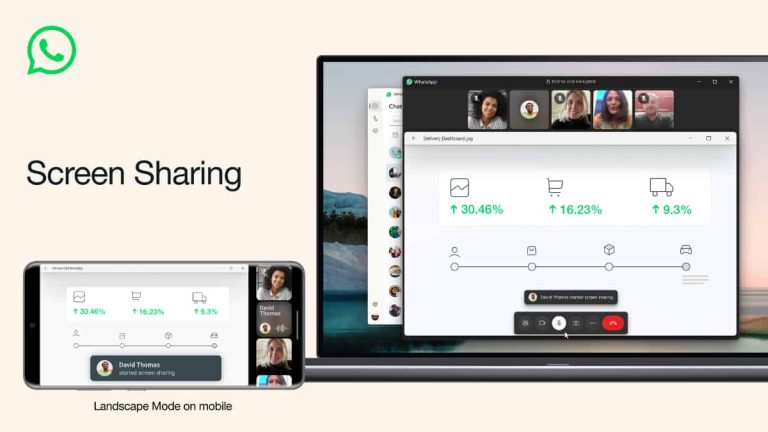
WhatsApp is rolling out its screen sharing feature for video calls to everyone. It lets you share the content of your screen with the other people on the call as you talk with them. You can share documents, photos, videos, and pretty much everything else.
WhatsApp has been working on this feature for a few months now. Some beta users on Android got early access to it in late May. A couple of weeks later, the company rolled out screen sharing to the desktop beta version of the popular messaging app.
Now, Meta CEO Mark Zuckerberg has announced that “the ability to share your screen during a video call on WhatsApp” is rolling out to everyone. WhatsApp separately confirmed to TechCrunch that the rollout has begun on Android, iOS, and the desktop in a phased manner.
You can share your screen by tapping the “Share” icon in the bottom toolbar during an ongoing video call. A confirmation pop-up warns you about the potential risks of sharing your screen. It tells you that the other person can see everything on your screen, including passwords and payment information.
Once you confirm, your screen’s content will be immediately available to the other party. Everything you do on your phone or computer hereafter will be visible to them. Your call screen will feature a big, red “Stop sharing” button at the center to immediately stop sharing your screen.
If all of this sounds familiar to you, it’s because screen sharing works similarly on business communication tools like Google Meet, Microsoft Teams, and Zoom. WhatsApp is seemingly entering this space with these kinds of new additions. It already lets you make large group video calls and offers multi-device support.
To ensure that the new feature serves the desired purpose effectively, WhatsApp has also added landscape mode support for video calls. This can be helpful when sharing documents or videos. You can also make video calls in landscape mode without sharing your screen.
Download the latest WhatsApp update and start sharing your screen
WhatsApp’s screen sharing feature started rolling out recently. As said earlier, the company will push the new tool to users in a phased manner. So if it isn’t available for you today, it will be shortly. Meanwhile, you might want to check if the app has an update available on the Play Store. You can click the button below to install the latest version of WhatsApp on your Android device.
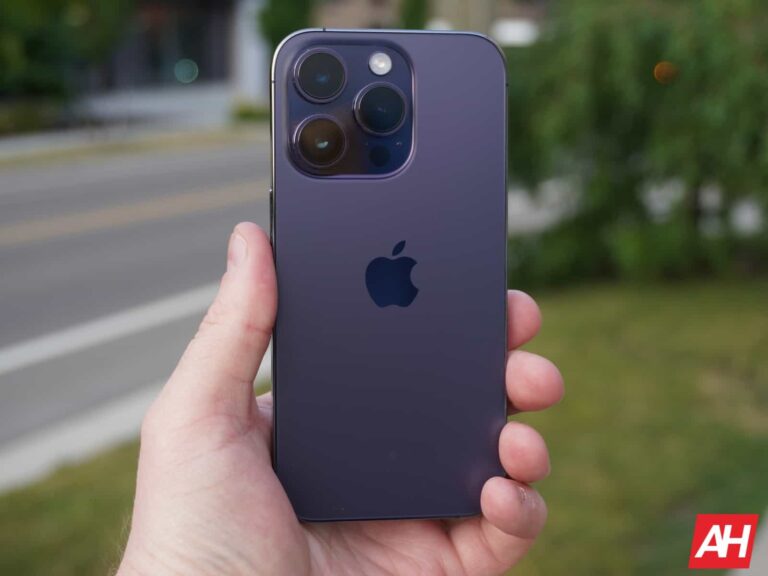
Lately, we’ve seen a good number of reports and rumors about when the iPhone 15 announcement and launch would happen. Now we’re hearing from Bloomberg’s Mark Gurman that the event is likely happening on September 12. This is building upon his earlier post on X about the iPhone 15 being on sale starting September 22. And the dates do tend to make sense for Apple’s schedule.
This would make the announcement about a week later than it was last year. In 2022, the iPhone event was the week of Labor Day, and this year it looks to be the week after – which is when the iPhone 13, and earlier models were announced.
The ‘Pro’ models could be delayed until October
There have been some leaks and rumors pointing to the “Pro” models being delayed until October. That means that if the iPhone 15 and 15 Plus go on sale September 22, then the Pro models would be delayed about two weeks. That’s not too bad, we’ve seen bigger delays before, like with the iPhone 14 Plus last year, or the iPhone 12 Pro Max and 12 Mini, back in 2020.
Why would they be delayed? Well, it could be due to the new manufacturing process needed for the ultra-thin bezels on the Pro models. Or it could be that there’s just not enough manufacturing capacity to get all four done at the same time.
This year, the iPhone 15 series is set to get some pretty big updates. And what many analysts are calling a “super cycle”. This is where more users than usual upgrade their phone. The last super cycle was with the iPhone 12, so Apple is due for another one.
With the iPhone 15 series, all four models are slated to get the Dynamic Island as well as USB-C. Which would be the start of Apple killing off Lightning. Of course, there’s some new cameras coming to the iPhone’s this year, most likely sticking to the Pro models though. One thing that won’t be coming is, 120Hz on the non-Pro models. That’s because it is called “ProMotion” so it won’t be available on any non-Pro device.
This year, Samsung spent a lot of time talking about the Galaxy Z Flip 5 during Unpacked. In fact, Samsung spent 13 minutes of the keynote on the Galaxy Z Flip 5, versus 9 on the Galaxy Z Fold 5. And even less time on the Galaxy Watch 6 and Galaxy Tab S9 series. So it’s clear that Samsung thinks the Galaxy Z Flip 5 is going to be the bigger seller this year. And it’s not hard to see why. Samsung outfitted the Galaxy Z Flip 5 with a much larger display this year, it has a new hinge that allows it to fold flat, and storage has doubled, while remaining at the same $999 MSRP.
The flip-style foldable is such a good option, especially for those that tend to have smaller pockets (like a lot of women) but still want a fairly large phone. It’s also the more affordable option for foldables, at least for now. It’s the same price as any other flagship phone these days.
But the real question here is, whether that is enough to make it worth upgrading to this year. Let’s find out in our full review here.
Samsung Galaxy Z Flip 5 Review: Hardware & Design
Even though the two biggest changes with the Galaxy Z Flip 5 this year, are design changes, the design of the phone hasn’t changed a lot compared to the Flip 4 from last year. Let’s first talk about that new hinge. This hinge is smaller, and has fewer moving parts. So it is less likely to break, but it being smaller means that it can now fold completely flat. Previously, Samsung had a gap for the hinge, so it looked more like a V when it was folded.
The new hinge also is easier to open, and can stay in more positions, more easily. It’s a lot easier to open and close compared to something like the Pixel Fold. Now, unlike the Galaxy Z Fold 5, this new hinge does not allow the Galaxy Z Flip 5 to shed some weight. Which isn’t a problem, as it is lighter than the Galaxy S23+ which is about the same size. So weight isn’t as much of a problem here as it is on the Fold 5.
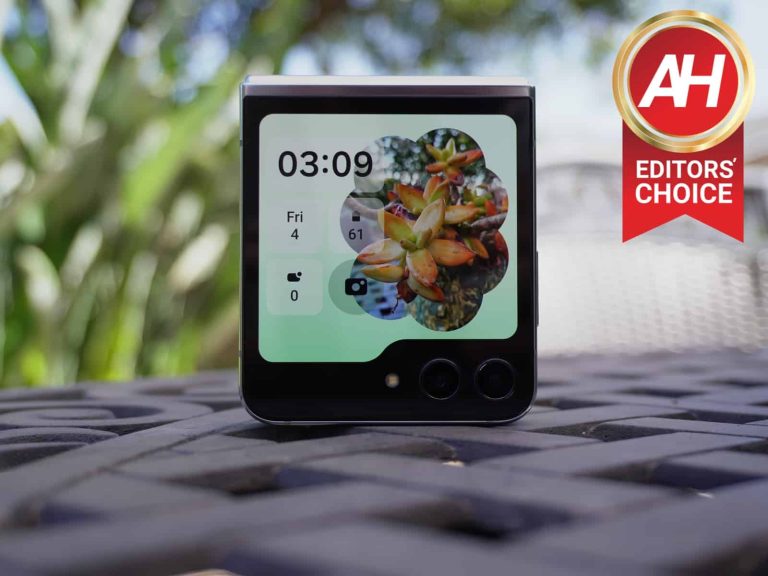
The other big change is the Flex Window, no longer is Samsung calling it the Cover Screen. It’s now a 3.4-inch display on the front, that kinda looks like an upside-down folder. Samsung did not include the cameras in the Flex Window, and when I asked Samsung reps about this in Korea, they told me that it looks more unique to them. Basically, this is to help their phone stand out versus others like the Motorola Razr+ which does have punch holes for the cameras in its front-display.
The Flex Window is a really nice change here, as it does allow you to get things done without opening the phone. With the Flip 4 last year, that was a big complaint of mine. In order to really do anything, I had to open the phone every single time, which got pretty annoying after a few weeks. But now, I can really deal with notifications on the Flex Window, I can check the weather, control Spotify and even look at my calendar without opening the phone.
Flex Window does allow apps to work. However, by default, only a handful of apps are compatible. That includes Google Maps, Messages, YouTube and Netflix. But with Good Lock, there is a setting that allows all apps to be compatible. I’d recommend keeping it to Samsung’s default options however. Since this is not set up the same way as Motorola’s Razr+. So some apps really don’t work well on the Flex Window. Samsung will be adding more, however.
As for the rest of the design, it’s basically what you’d expect. The sides are a bit more flat this year, compared to the Flip 4, but the volume rocker and power button are still on the upper left side of the phone. The power button is recessed because it is also a fingerprint reader. The front of the phone is all black, even with the screen off, and then the sides and back are the color you’ve chosen. With my review unit here, it’s all in mint.
Shallower crease, but it’s still there
So, with the new hinge, it allows the Galaxy Z Flip 5 to have a shallower crease. But it’s still very noticeable, unfortunately. And I want to saw it’s even more noticeable now than it was on previous models. It’s hard not to see it, and even harder not to feel it. Especially since it’s across the middle on the Flip 5. On the Galaxy Z Fold 5, it’s down the center, so your finger doesn’t scroll across it as much.
If you look closely at the image above, you can see the light hitting the area around the crease and see how big and noticeable it really is.
While Samsung says that you can take the screen protector off on the Galaxy Z Flip 5, it’s basically impossible to do so. So I’d recommend not doing so. Even though it will get fairly ugly after a few months of use.
Let’s talk about that plastic screen in direct sunlight however. That was a big issue with the Google Pixel Fold, but on the Galaxy Z Flip 5, it’s less of a problem. Why? Because it gets super bright. Much like the Galaxy Z Fold 5, the Flip 5 also hits 1750 nits peak brightness. That’s the same brightness as the Galaxy S23 Ultra. I used the Galaxy Z Flip 5 in direct sunlight quite often, and never had an issue seeing the display, unless it was in dark mode. But that’s an easy flip of a toggle.
Samsung Galaxy Z Flip 5 Review: Performance
If I’m being honest here, performance was not a surprise on the Galaxy Z Flip 5. It basically performs the same as the Galaxy S23+ and Galaxy S23 Ultra that I reviewed earlier in the year. And that’s because it does run the same processor – Snapdragon 8 Gen 2 for Galaxy. This is a slightly overclocked processor, compared to the Snapdragon 8 Gen 2 in other phones like the OnePlus 11. So you’re getting an even faster phone here.
During day-to-day tasks, I really did not notice any issues with it getting warm or slowing down. Now when playing games like Genshin Impact, it would start to get warm, but not overheating. Which is definitely great to see. This would also happen when using the camera a lot, get warm, but not overheat.
If you’re worried about performance on the Galaxy Z Flip 5, don’t. It performs quite well with the Snapdragon 8 Gen 2 for Galaxy, the 8GB of RAM and 256GB of storage inside.
Samsung Galaxy Z Flip 5 Review: Battery life & Charging
Let’s start with the bad news first. The Galaxy Z Flip 5’s charging is still pretty shameful. It’s 25W wired charging and 15W wireless charging. Even the Galaxy S23+ charges faster. However, the Galaxy Z Flip 5 does have a 3700mAh capacity battery, so it’s not quite as bad as it might sound. Samsung does claim that it can charge about 50% in 30 minutes. And we’ve seen it fully charge in a little over an hour. So it’s really not as bad as the 25W on the spec sheet sounds.
Now, let’s talk about battery life. It’s good. Not great, but good. Keep in mind that this is a 3700mAh capacity battery. Likely the smallest capacity battery you would see on a 6.7-inch phone. But thanks to the Snapdragon 8 Gen 2 for Galaxy being so efficient, it’s actually pretty decent.
On the Galaxy Z Flip 5, I was able to get to 7 hours of screen on time, a couple of times. Of course, your mileage may vary, as people use their phones differently. Some like to stream music from it all day, I don’t. Which is why I did not during this review. So do keep that in mind here. You can see my battery life in the screenshots below.
Now, is this the best battery life on a phone? No, far from it. The best was the Galaxy S23 Ultra, OnePlus 11 or Zenfone 10. All of which surpassed 10 hours of screen on time for me. But will it get you through a full day of usage? Yes. And that’s what we really want, right? Samsung does also offer some different modes for your battery, so you can conserve more battery if you really need to stretch it until you get home. So battery life is not an issue on the Galaxy Z Flip 5, but if you are a heavy user and aren’t near an outlet very often, you may still want to carry a nice battery pack in your bag or purse. As it doesn’t have the battery endurance of some other phones.
Samsung Galaxy Z Flip 5 Review: Software
A lot of the software changes this year, come from the Flex Window on the Galaxy Z Flip 5. Which is a really nice addition. While I didn’t use it quite as much as I did on the Razr+, it was still used a lot more than on the Galaxy Z Flip 4 last year. And that’s due to it being a whole lot larger this year.
While you can play YouTube on the Flex Window, it’s not something you’d probably do all that often. Primarily because it is so tiny. But it is possible. Now the app that I did use a lot on the Flex Window? Google Maps. Being able to see where you’re going, when you’re in an unfamiliar city or area, without opening the entire phone, is a big deal. The other app would be Google Messages, though I rarely get text messages these days, so it’s not something I’d personally use all that often.
The Flex Window also comes with some customization. If you go to Settings > Cover Screen, you’ll see some options for the main cover screen, as well as the widgets. There are a bunch of pre-made designs for the Cover Screen, and you can also throw in your own background image. The one that you see throughout this review, is my favorite, and that’s because it gives you some nice info without doing any swiping. It allows you to see the time, date, battery percentage, notifications and even a camera shortcut.
It’s worth mentioning that the notifications doesn’t update all that often there. Often times, it’d say I had three notifications, then I swipe over to see them, and there was only one. I’m guessing that’s to conserve battery life. Hopefully, Samsung figures out a way to make this more accurate over time, however.
You can also choose from a number of full-page widgets for the Galaxy Z Flip 5 cover screen. These include the Calendar, Weather, Recent Calls, Direct Dial, Alarm, Stopwatch, Timer, Steps, SmartThings Scenes, Apps, Finance Watchlist, Daily activity, launcher and game. Samsung does allow you to re-order these by hitting the button at the top of the page. And there doesn’t seem to be a limit to how many you can enable. You can enable all of them, if you wish. On the Flex Window, you can pinch in to see them all and jump to a specific page quicker, if you want.
Samsung tends to offer a ton of options, and things that you might never actually use. They seemed to get away from that in recent releases. But as you can see with the Flex Window, there’s still plenty of options to really make the Galaxy Z Flip 5 your own. Despite not allowing every single Android app run on the Cover Screen.
Spectacular software support
If you’re thinking about buying this phone and are worried about software support, don’t. Samsung has really stepped up in recent years with software support, and with the Galaxy Z Flip 5, they are promising four Android OS upgrades. That means it will get Android 14, 15, 16 and 17. It is also getting five years of security updates. So you’ll be good for quite some time.
Samsung has also been very fast at rolling out these updates in recent years. Sometimes rolling out the updates ahead of Google themselves. So software support is not really an issue when it comes to Samsung, these days.
Samsung Galaxy Z Flip 5 Review: Cameras
When it comes to the cameras on the Galaxy Z Flip 5, it’s really more of the same. Samsung is still using dual 12-megapixel sensors on the outside of the phone. That’s a 12-megapixel wide and a 12-megapixel ultrawide. It’s a pretty mediocre camera setup for a phone that costs $999. But it will get the job done.
The cameras have a lot of the same issues that you’d expect to see on a Samsung phone, primarily over-saturation. This is especially noticeable outdoors when taking photos of plants or grass. And you’ll see that the grass is a whole lot greener than it is in real life. Some people love this, while others want their photos to look more true to life. But that’s something to keep in mind.
Portrait mode on this camera, however, is actually quite good. I took quite a few portrait mode shots with this camera over the last couple of weeks and almost all of them were really impressive. Samsung has gotten a lot better about cutting out my glasses and not blurring the edge of them into the background, like many other phones tend to do.
Here are some portrait mode shots with the Galaxy Z Flip 5:
But what the camera is really missing is, a macro mode. On Samsung’s foldables, they tend to do this on the telephoto sensor, which is great. Except for the fact that the Galaxy Z Flip 5 does not have a telephoto lens. Which means, no macro. And if you get to close to an object, you can really see that there’s no macro mode. As it will either be blurry, or really noisey. I really wish Samsung would ditch the ultrawide and go with a telephoto here. I’d use a telephoto a lot more than ultrawide. And obviously, adding a third camera lens would make that Flex Window a lot smaller, so they likely don’t want to do a triple camera setup here.
The camera does also have a few other nifty tricks on the Galaxy Z Flip 5. This includes the ability to use it while it’s closed. From the Flex window, you can easily open the camera app and take a selfie with the better cameras, and even with an ultrawide camera. Additionally, you can turn on the viewfinder on the front display, so those that you are taking a photo of, can see the shot while you take it.
Finally, the last trick that’s really cool is if you put the Galaxy Z Flip 5 in a 90-degree angle, you can use it like an old school camcorder. Which might be easier to use for vlogging and such. But again, the cameras aren’t the best here, so you might not want to do that.
With good lighting and some editing, you can get some stunning photos with this phone. But if you’re not great with editing, then you might want to look elsewhere for a good camera.
Should you buy the Galaxy Z Flip 5?
The Samsung Galaxy Z Flip 5 is a really great foldable smartphone, and really the only reason why it did not get a full 5-star rating on this review, is because of the cameras. If you can get away with not having the best or even really good cameras on your phone, then the Galaxy Z Flip 5 is a really great phone to pick up. Particularly if you have smaller pockets. There’s been quite a few times where I didn’t even realize it was in my pocket, even though it is a 6.7-inch smartphone. But folded in half, I sometimes don’t notice it’s there.
So it’s a good phone, but it’s ultimately up to you whether you should buy it or not.
You should buy the Galaxy Z Flip 5 if:
– You have a Galaxy Z Flip 3 or older.
– You don’t have a foldable, and want to jump on the foldable bandwagon.
– You want a phone with a smaller footprint in your pocket.
You should not buy the Galaxy Z Flip 5 if:
– You have a Galaxy Z Flip 4 or any foldable from last year or this year.
– You want/need better cameras
– You need better battery life than what the Galaxy Z Flip 5 provides.
RedHotel (TAG-22), a Chinese-state-sponsored threat group, is well-known for its persistence, prominence, operational intensity, and global reach. RedHotel is reported to have acted upon over 17 countries in North America Asia and between 2021 and 2023.
This threat group poses a threat specifically to organizations in Southeast Asia’s government and specified sectors of private companies.
Their operational infrastructure is traced to be linked with China’s Ministry of State Security (MSS) contractor groups. The main focus of RedHotel is intelligence gathering and cyber-espionage.
RedHotel Infrastructure
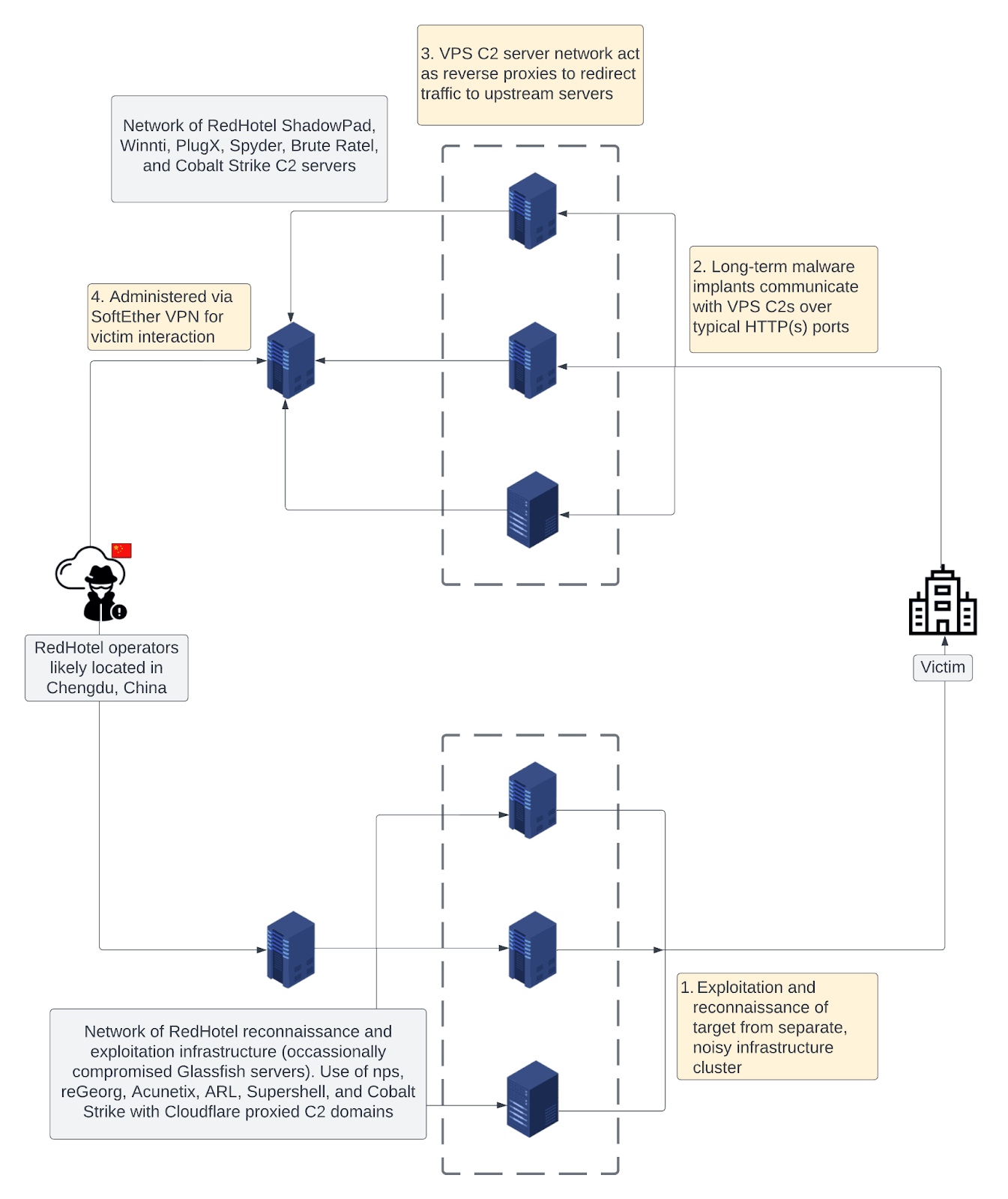
RedHotel is found to be employing multi-tiered infrastructure with a narrow focus on reconnaissance and long-term network access through command and control servers. These malware C2 servers were found to be administered from Chengdu, China.
RedHotel C2 infrastructure (Source: Insikt)
In addition to this, the threat group was also involved in the exploitation of Shadowpad and Winnti malware along with other Chinese-state-sponsored actors.
RedHotel uses large quantities of Virtual Private Servers (VPS) as reverse proxies for C2 servers which are configured with ports 80, 443, 8443, and 8080.
Their tooling includes Spyder, Cobalt Strike, ShadowPad, and PlugX. RedHotel also used Brute Ratel, an advanced red team simulation and adversarial tool.
These threat actors were also responsible for the US State legislature compromise in June 2022 which was discovered by the organization’s communication being routed to RedHotel attributed C2 servers ShadowPad and Cobalt Strike.
Furthermore, the threat group was also part of the Zimbra Collaboration Suite exploitation which targeted several government organisations. This attack was linked with several RedHotel subdomains like
bwlgrafana.itcom888[.]live
8wz3l0m58f.symantecupd[.]com
qbxlwr4nkq.itcom666[.]live
Fyalluw0.sibersystems[.]xyz
A complete report has been published by Recorded Future which mentions their techniques, tactics, and other detailed information about this threat group.
Google makes Android; Google makes Chrome. So, you’d think that Chrome on Android would be a smooth experience. However, it’s better on iOS, and that goes for the scrolling. While that’s the case, Google is working to make the scrolling better on Chrome for Android.
It can be a bit of a shock, but some Google-made apps run better on iOS. Also, oftentimes, the iOS versions of apps often get updates and features before the Android version. When it comes to Chrome, the scrolling on iOS is smoother than it is on Android.
It comes down to the fact that Chrome for Android is meant to be compatible with multiple models of devices. This means that optimization and performance take a hit. Scrolling using Chrome for Android is noticeably more stuttery than on iOS.
A new API could make scrolling on Chrome for Android smoother
Depending on your phone, your scrolling experience will vary, but it’s usually pretty janky. Since it’s meant to work on multiple models of phones, Google can’t be as flexible as it wants to be. However, according to Android Police, Google is going to introduce the new nanosecond API.
Normally, Chrome samples your inputs on a millisecond scale. This worked for years, but the introduction of higher refresh rate screens caused some trouble for this method. So, instead of doing that, Chrome will sample touches in nanosecond intervals. This should help with the higher refresh rate and hopefully make the scrolling smoother. In fact, Google’s blog post says that the scrolling should be twice as smooth.
This API could be making it to the public pretty soon. Google plans on releasing this new API with Chrome version 116. Since Chrome gets monthly updates, we expect this addition to land sometime in September if not late August. This might make Chrome even better to use on Android.
In some regions, Google’s 25th-anniversary celebration is already on the way. This silver jubilee celebration brings lots of goodies for fans in these parts of the world. In countries like Japan, Google offers shoppers up to a 25% discount on purchases from their official stores.
For now, this discount offer in celebration of Google’s 25th anniversary is not available in all regions. However, the company has little way to help fans engage in the celebration while waiting on the discount offer. Those in other regions can join this celebration by using the new wallpapers that Google has made available for fans.
These wallpapers are available to all and not just Google fans in Japan, so all can make use of them. While the wallpapers are Google Pixel-themed entries, they are still applicable on any device. 25 years is a long time in existence, and you might want to join in on the celebration, here’s how you can get the wallpapers.
Celebrate Google’s 25th anniversary with themed wallpapers and lots more
There are two wallpapers available for the celebration of Google’s Silver Jubilee. Both wallpapers have the same design but differ in terms of colours. This will appeal to fans with different tastes, with some appreciating the more subtle look and others going for the bold wallpaper option.
While sticking to the same design on the two wallpapers, Google uses a bold outline on one and a more subtle appearance for the other. The first wallpaper comes with bold black outlines around all the drawings. All the drawings on the first wallpaper lack individual colours, however, in the background lies the four Google colours.
As for the second wallpaper, it comes with a more subtle outline for all drawings. In place of the black outlines, Google uses four colours, one for each drawing. The majority of the artwork stays the same, but Google adds some elements to the second wallpaper and removes some found on the first.
To get these wallpapers, you can head over to the Made By Google Japanese official website. By scrolling towards the end of the page, fans will be able to find these wallpapers available for download. In the coming days, Google might also extend its discount offers to other regions in celebration of its 25th anniversary.
This is 25 years of creating and innovating technology for consumer benefit. Part of the achievements during this time frame includes Google Search, Pixel, various smart home products, and AI advancements just to mention a few. This Silver Jubilee is worth celebrating, and Google might be cooking something special.
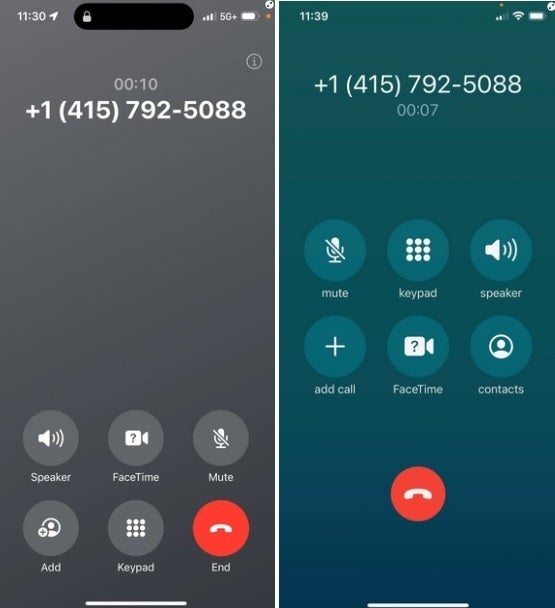
Per CNBC, Apple is making a major change to the iPhone’s phone app in iOS 17. The “End Call” button, which is currently found at the lower center of the screen, is moving to the lower right corner of the display. Where the “End Call” button is now in iOS 16, you’ll find the button that turns a voice call into a FaceTime video call and another button that brings up the dial pad. Some iPhone users have already said on social media that it might take them some time to learn where the new button placement is.
A new feature on the Phone app allows users getting a voicemail to see a transcript on their iPhone screen of the message being left in real time; if the user concludes that he needs to take the call, he can interrupt the caller while he is leaving the message and engage with him in a phone call. And in iOS 17, you can customize your Contact Poster which is the full-screen image that appears on another person’s iPhone whenever you call them.
At left, the new screen in iOS 17 and at right, the current screen
Apple is currently running the iOS 17 beta program. But beta software is notoriously unstable and the apps that you use every day might not be working right in the beta. And battery life is usually reduced. Considering that the final version of iOS 17 should be released by Apple next month, there really is no need for you to go ahead and install it, especially if you are thinking about downloading the iOS 17 beta on your daily driver.
If you feel compelled to join the iOS 17 beta program using an older iPhone, or you still want to go ahead and load it on your current iOS-powered handset, go to www.beta.apple.com or tap on this link. Before installing the beta, make sure that you have your iPhone backed up just in case you want to return to iOS 16 before the new build is released.