Rust Infostealer Malware Attacks macOS Sonoma

0
[ad_1]

Based on recent reports, it was discovered that there has been info stealer malware that affects both Windows and macOS platforms. The malware can steal crypto wallets, passwords, and browser data.

This new variant of malware is found to be written in Rust programming language, which was named “realst.”

The analysis stated that this malware is capable of targeting Apple’s upcoming macOS version “Sonoma.”

Realst Distribution

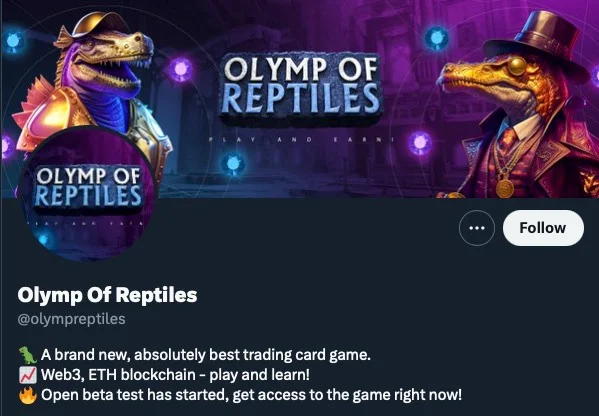
The initial distribution of this malware involves fake advertising of blockchain games like Brawl Earth, WildWorld, Dawnland, Destruction, Evolion, etc.

Every blockchain game version was hosted on its own website along with the Twitter and Discord accounts.

Blockchain game and its Twitter account (Source: SentinelOne)

Malicious Installers of Realst

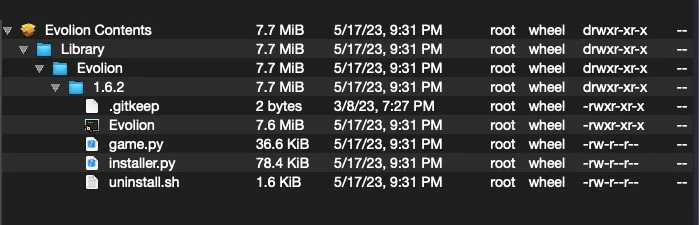
The .pkg installer in some of the distributed malware consisted of a malicious Mach-O and related scripts, including game.py, installer.py, and uninstall. sh. The game.py is a cross-platform Firefox infostealer.

The installer.py is a copy of the chain breaker project that is capable of extracting passwords, keys, and certificates from the macOS keychain database. The uninstall. sh did not have any malicious behavior.

Contents of Evolion.pkg installer (Source: SentinelOne)

Static Analysis & Dynamic Analysis

These malware are similar to the other cross-variant malware and are easily detectable. In some cases, this malware uses different API calls and some dependencies.

However, all of these malware have the same goal of exfiltrating the browser data, crypto wallets, and keychain databases.

Static analysis showed that some variants make an attempt to grab the user’s password through osascript and AppleScript Spoofing.

Researchers have analyzed over 16 variants of this malware across 59 samples and have divided them into four families as A, B, C and D.

Variant Family A – Uses AppleScript Spoofing to steal user’s admin password in clear text.

Variant Family B – These samples break up the strings to evade static detection.

Variant Family C – Attempts to hide strings for AppleScript spoofing and have references to chain breaker

Variant Family D – No static artifacts for osascript spoofing, and password scraping is handled by the Terminal window via the get_keys_with_access function, which is passed immediately to sym.realst::utils::get_kc_keys for attempting to dump passwords from keychains.

SentinelOne has published a complete report including IOCs about these malware variants and their methods.

Users are recommended to be vigilant towards these blockchain games and verify each game’s legitimacy before downloading them.

Stay up-to-date with the latest Cyber Security News; follow us on GoogleNews, Linkedin, Twitter, and Facebook.


[ad_2]
Source link

How to pre-order the Samsung Galaxy Z Fold 5

0
[ad_1]

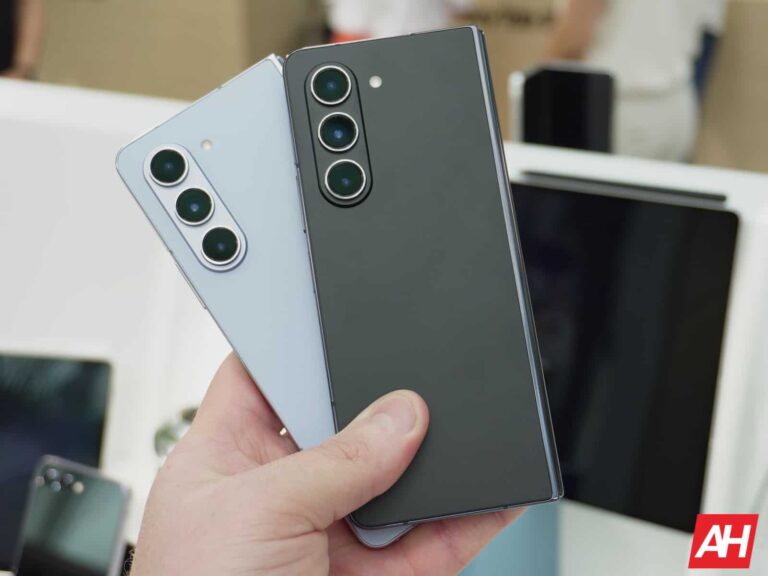
Samsung just announced the Galaxy Z Fold 5, and now pre-orders have opened. So you’ll be able to get your order in now and have it arrive by August 11. Remember the retail pricing for the Galaxy Z Fold 5 starts at $1,799 for the 256GB model. Of course, there will be deals available to get it for less.

As always, Samsung is selling the Galaxy Z Fold 5 on its website, as well as through the carriers. That includes AT&T, T-Mobile and Verizon. It will also be available from Best Buy and Amazon.

AT&T

AT&T is selling the Galaxy Z Fold 5 in the usual colors – Icy Blue, Graphite, and Cream. And it’ll start at $1,799 as you’d expect. However, AT&T does have a few great deals for the Galaxy Fold 5 here.

With the Galaxy Watch 5, you can get up to $1,000 off, when you trade in your Galaxy phone. AT&T is also offering to double your storage if you pre-order before August 10.

Pre-order from AT&T

Best Buy

Best Buy will be selling the Galaxy Z Fold 5 for all three carriers, as well as an unlocked model. It’s going to come in all three colors – Phantom Black, Cream and Icy Blue. Though there won’t be any promos here, unfortunately.

Pre-order from Best Buy

Samsung

Samsung is selling the Galaxy Z Fold 5 in the 256GB, 512GB and 1TB models. Remember it starts at $1,799. One of the main advantages to buying it from Samsung is going to be the fact that you can get it in a few exclusive colors. So in addition to the same Icy Blue, Phantom Black and Cream colors that everyone else has. Samsung’s website also has the Galaxy Z Fold 5 in Gray and Blue.

Once again, Samsung is offering a free storage upgrade for pre-orders. So you can purchase the 256GB model and get the upgrade to 512GB for free. And the same goes for the 512GB and 1TB models.

On top of that, Samsung is offering up to $1,000 off the Galaxy Z Fold 5 when you trade in your current device.

Pre-order from Samsung

T-Mobile

T-Mobile will sell the Galaxy Z Fold 5 in all four colors – Phantom Black, Cream and Icy Blue. It will also having a starting price of $1,799, with some sweet promo offers for pre-orders too. You can even get up to $1,000 off the Galaxy Z Fold 5 when getting the phone from T-Mobile, if you add a new line, or with an eligible trade-in.

Pre-order from T-Mobile

Verizon

Verizon is also selling the Galaxy Fold 5, and it’ll be available in Icy Blue, Cream and Phantom Black for $49.99/month for 36 months. That comes out to $1,799, which is the regular price. So no real discount here, but Verizon does have a ton of offers available for those looking to grab a new Galaxy Z Fold 5.

Those looking to switch, Verizon will let you trade in your old phone and get a Galaxy Z Flip 5 on “us” or $1,000 towards the new Galaxy Z Fold 5. You do need to add. A new line on the Unlimited Plus plan for this. If you’re upgrading, you can trade-in select phones on qualified 5G Unlimited plans to get $1,000 off either new phone.

During pre-orders, Verizon will also bump up your storage. So you can get the 512GB model for the price of the 256GB. And if you are a NFL Sunday Ticket fan, well, those on the Unlimited Plus plan will get NFL Sunday Ticket “on us”, with the purchase of a new Galaxy Z Flip 5 or Fold 5.

Finally, for accessories, you can get 15% off the Galaxy Z Flip 5 and Fold 5 cases and screen protectors. As well as 25% off of Samsung Galaxy chargers, and 50% off of the Galaxy Buds2 when you buy select Samsung smartphones.

Pre-order from Verizon


[ad_2]
Source link

Carl Pei reacts to Nothing Phone (2) reviews: Video

0
[ad_1]

Folks over at Nothing have released another video on YouTube. This time around, Carl Pei, the company’s CEO, is reacting to the Nothing Phone (2) reviews. The video has a duration of almost 10 minutes, and it’s embedded below the article.

Carl Pei reacts to the Nothing Phone (2) reviews in the company’s latest video

In this video, Carl Pei reacts to seven reviews of the device. Well, most of them are reviews, as JerryRigEverything’s disassembly video is also included here. In any case, he reacts to reviews from various YouTubers/YouTube outlets here, including: MKBHD, MrWhoseTheBoss, JerryRigEverything, The Verge, Short Circuit, The Tech Chap, and Flossy Carter.

In the video, he reacts to both positive and negative remarks in those videos. Reacting to MKBHD’s video, Carl Pei explained that Nothing didn’t want to overwhelm users, and that it’s taking things one step at a time. He said that Nothing has started adding its own “flavor” to the software.

MrWhoseTheBoss focused on the similarities between the iPhone 14 Pro Max and Nothing Phone (2) designs. Carl Pei didn’t really share his sentiment, though, as you can see in the provided video.

Nothing’s CEO was not pleased with The Verge’s final score

The Verge pointed out that the Pixel 7 Pro still does a better job in low light, and Carl Pei accepted that. He pointed out that Google is a company that has been around for a long time, and that it has vast resources. He also said that he’s proud of how the Nothing Phone (2) has handled itself in that comparison, and that Nothing will be making further tweaks to the camera performance.

He also referred to The Verge’s score, as the company gave the Nothing Phone (2) a 6 out of 10 score. Carl Pei thought that it doesn’t really line up with the review The Verge gave the phone, and also the comments were strongly against that score, it seems. There’s more to it, though, as you can see in the video provided below.


[ad_2]
Source link

How to pre-order the Galaxy Tab S9

0
[ad_1]

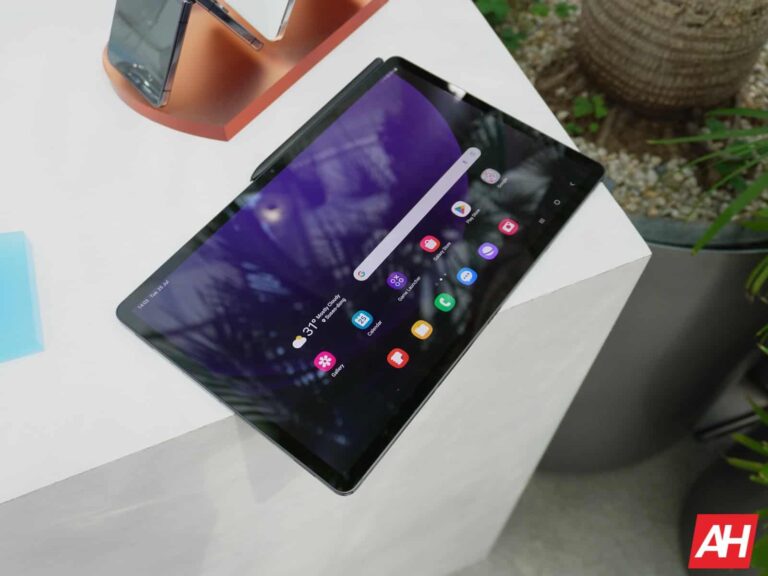
Samsung just announced its latest line of high-end tablets, the Galaxy Tab S9 series. They bring some serious power and potential for productivity. If you want to pick up one of these tablets you can put your order in before they officially launch. Here’s how to pre-order the Galaxy Tab S9.

Samsung didn’t only announce the Galaxy Tab S9 series. The company also introduced us to its new foldable phones. These are the Galaxy Z Fold 5 and Galaxy Flip 5. Also, for you smartwatch lovers, the company announced the new Galaxy Watch 6. You can check more information on these devices on Android Headlines. You might find your new favorite device.

How to pre-order the Galaxy Tab S9

Before you put your order, you’ll want to know what variant you want to pick up. Samsung announced three versions of the tablet, and their prices and internals vary.

Pick your dream tablet

The base Galaxy Tab S9 ($799) has an 11-inch AMOLED display, 8GB of RAM (up to 12GB) and 128GB of storage (up to 256GB), and an 8,400mAh battery. The Galaxy Tab S9+ ($999) has a 12.4-inch display, 12GB of RAM with 256GB of storage (up to 512GB), and a 10,090mAh battery. The Galaxy Tab S9 Ultra ($1,199) has 12GB of RAM (up to 16GB) with 256GB of storage (up to 1TB), and an 11,200mAh battery.

If you want more information on these tablets, you can read here.

Customizing your order

You’ll see the Galaxy Tab S9 section on the Samsung.com home page. If you don’t see it, click here. When you see the order screen, don’t take the price you see as the final price you’ll pay. We’ll get to that a little later. The first thing you see on the screen might be a recommendation from Samsung. If you’re interested in it, feel free to click it.

If not, then turn your attention to the next section. Here, you can choose which model you want. Choose whether you want the Galaxy Tab 9, Tab 9+, or the Tab 9 Ultra. Be careful to choose the one that you want because Samsung will select the most expensive model by default.

Next, you’ll choose the carrier you want. These tablets come with 5G so you won’t be tethered to Wi-Fi. However, if you don’t want to pick one up, then you can simply select the Wi-Fi option.

Under that, choose the RAM/storage configuration. This section will be followed by the choice of colors. The choice of colors may vary depending on the region you’re in. The Galaxy Tabs don’t really have that many color options, so you might not spend too much time on this section.

Trading in

Remember how you weren’t supposed to take the first price you saw at face value? Well, here’s the reason; you’re able to lower the price of your purchase by trading in an older device. Well, when you open the page, the first price you see is the price you get if you have a valid device to trade in.

If you don’t have a device to trade in, select the No Trade-in option. Once you do, you’ll see the price jump up to the full price.

However, if you do have a device that you’re looking to trade in, scroll down a bit to select the type of device you’re trading in; phone, tablet, or smartwatch. Under that, make sure you read the information about the required condition of the device. Your devices should be able to power on and function properly. Also, it shouldn’t be carrier-locked or on a banned list.

When it comes to the required condition, you’ll want to make sure that it’s in good condition. Make sure that the front and back are free of cracks and substantial scratches. On the left of the screen, you’ll see some options. The first option says that your device is in good condition. The second one says that your device is in good condition, but it’s cracked. The last option will say that it’s not eligible.

Under that, you’ll choose the device that you’re trading in. Start by selecting the brand. Samsung is only accepting devices from Samsung, Apple, and Google. After you select the brand, you’ll choose the device model. Next the names of the models, you’ll see the estimated trade-in credit. This is how much of the price will be taken off if your trade-in is accepted.

Other stuff to know about trading in

If you choose to trade in your device, you’ll need to follow the instructions provided by Samsung. The company will send you a pre-paid label to ship your device. However, you must ship your device within 15 days. If you don’t, then the company will charge you the full amount.

Also, if the company receives the device, and it’s not up to the company’s standards, then the company retains the right to remotely lock your tablet. Upon returning your rejected device, the company will charge you the full amount.

Adding on extras

You have the ability to add on some extra goodies that will make your experience better. There’s a chance that Samsung will offer you a free accessory, but that depends on whether it has a promotion going on.

When you scroll down, you’ll see the Samsung Care+ section. This is an insurance policy for your tablet. For $10/month ($189 for two years), this plan will protect you if your phone is damaged, lost, or stolen. You can read more about the benefits on the page.

Finishing up

By this point, you should have a pretty good idea of how much you’re going to be paying. Scroll down to see some payment options.

Let’s not mince words; you’re going to be paying a pretty penny for your tablet. This is why the company has a few payment options that will have you pay over time.

The first option will have you pay a certain amount of money every month. just know that you’ll be paying this over a period of 24 months. The other option will have you pay off the tablet in four installments. Each installment will be paid every two weeks.

Just know that you will be subject to a credit check for these options. If your credit isn’t the best, then you will be rejected. In that case, you’ll need to do the one-time payment.

When you scroll down, you’ll see a rundown of the final price. It will show you all of the things on your order and how much you saved. Look over this screen to make sure that you didn’t select anything that you didn’t want. After that, you’ll press the blue button on the bottom to check out. You’ll put in your address and payment information, and place your order.

If Best Buy is your jam, then Click here to pre-order from BestBuy (this one comes with a trade-in deal).


[ad_2]
Source link

Google might be thinking of launching a foldable tablet

0
[ad_1]

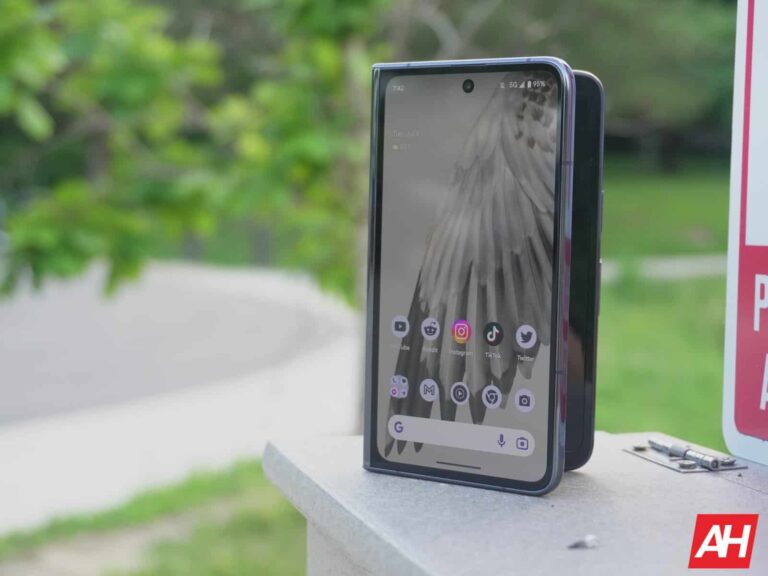
Google said that it was creating a Pixel ecosystem, and it was not lying! You have your choice of a phone, foldable phone, tablet, smartwatch, and earbuds. Well, according to Digitimes (via Android Authority), Google could be considering a foldable tablet for the near future.

Now, this is a leak based on very little information. Thus, you should take it with a grain of salt. We’ll keep you updated on this story as more developments come to light.

A Google foldable tablet might be announced next year

Google has been playing catch-up with the likes of Samsung and Apple. Both companies have fully-developed ecosystems. As for Google, the company’s missing a Pixel computer/laptop platform.

While we’re waiting on a new Pixel Chromebook, we might have a Pixel foldable tablet to look forward to. Digitimes cites upstream supply chain resources for this news. Right now, details are scarce, so there’s not much that we can say about this mystery device.

One thing we do know is that, if Google does plan on releasing this device, it could be in our mitts rather soon. If Google launches this foldable tablet, it might reveal it as early as Google I/O 2024. If the company holds it in May of next year, then that’s 10 months away.

10 months seems like a while away, but it’s rather soon after just launching its first foldable and its first tablet. We would have expected Google to wait a few generations before making a product as ambitious as this. The Pixel Fold is a well-made device, but it’s not quite up to the standards of Samsung, Oppo, Vivo, etc.

When making a foldable tablet, the screen size multiplies but so do the durability hurdles. 7-inch foldables had their issues back in the day; now imagine an 11-inch foldable.

In any case, it will still be exciting to see. If Google pulls this off, then it could be at the forefront of a new technological frontier. The Pixel line of products isn’t known for exploring new ground in terms of hardware. They leverage Google software prowess and help preview new features that will be distributed for other Android OEMs. Maybe the company is looking to change that.


[ad_2]
Source link

Ransomware groups claim responsibility for double-attack on Yamaha

0
[ad_1]

We take a look at claims that Yamaha has been compromised by two unrelated ransomware groups.

Music giant Yamaha’s Canadian division has experienced a compromise on two different fronts, both related to ransomware. In an attack which has worrying echoes of the recent Estée Lauder attack, multiple attackers have claimed to breach the organisation.

Yamaha Canada Music had the following to say in a statement:

Yamaha Canada Music Ltd. recently encountered a cyberattack that led to unauthorized access and data theft. In response, we swiftly implemented measures to contain the attack and collaborated with external specialists and our IT team to prevent significant damage or malware infiltration into our network.

Yamaha Canada has been notifying affected individuals, and we are offering credit monitoring services to those at risk of potential harm. Additionally, we have taken decisive actions to reinforce our network defenses and ensure enhanced security measures moving forward.

Note that, as with the Estée Lauder incident(s), no specific ransomware group is cited as having been responsible for the attack in question. Despite this, we have two groups claiming to have been involved in data exfiltration.

This time around, the groups claiming responsibility are Black Byte and Akira ransomware. The BlackByte claim was noticed by researcher Dominic Alvieri on June 14, with a follow up post to confirm Akira’s claim July 21.

The Record article notes that several “double-hitter” attacks have been made public recently, and the question of whether or not this is by accident or design is raised once more. One proposed theory is that it could be down to affiliates working on behalf of several groups. Another is that groups are simply working together to reap the rewards, and perhaps make the attacks even more visible to the public.

Whatever the reason, it just means more work and more potential headaches for the organisations being targeted.

Akira has appeared in a few of our Ransomware Reviews, beginning in May of this year, and is typically found in the top half of our most active gang chart. From our post:

Akira is a fresh ransomware hitting enterprises globally since March 2023, having already published in April the data of nine companies across different sectors like education, finance, and manufacturing. When executed, the ransomware deletes Windows Shadow Volume Copies, encrypts files with specific extensions, and appends the .akira extension to the encrypted files.

Like most ransomware gangs these days, the Akira gang steals corporate data before encrypting files for the purposes of double-extortion. So far, the leaked info published on their leak site—which looks retro and lets you navigate with typed commands—ranges from 5.9 GB to a whopping 259 GB.

Akira demands ransoms from $200,000 to millions of dollars, and it seems they are willing to lower ransom demands for companies that only want to prevent the leaking of stolen data without needing a decryptor.

BlackByte, a ransomware as a service (RaaS) tool, is another frequent appearance in our top ransomware gang lists. BlackByte has scored some notable attacks, with one of the biggest being the compromise of the San Francisco 49ers shortly before the 2022 Super Bowl.

As with all of these attacks, it remains to be seen whether any data will be leaked or sold on. For now, organisations large and small will have to try and weather the storm of simultaneous single, double, or even triple threat attacks.

How to avoid ransomware

  • Block common forms of entry. Create a plan for patching vulnerabilities in internet-facing systems quickly; disable or harden remote access like RDP and VPNs; use endpoint security software that can detect exploits and malware used to deliver ransomware.
  • Detect intrusions. Make it harder for intruders to operate inside your organization by segmenting networks and assigning access rights prudently. Use EDR or MDR to detect unusual activity before an attack occurs.
  • Stop malicious encryption. Deploy Endpoint Detection and Response software like Malwarebytes EDR that uses multiple different detection techniques to identify ransomware, and ransomware rollback to restore damaged system files.
  • Create offsite, offline backups. Keep backups offsite and offline, beyond the reach of attackers. Test them regularly to make sure you can restore essential business functions swiftly.
  • Don’t get attacked twice. Once you’ve isolated the outbreak and stopped the first attack, you must remove every trace of the attackers, their malware, their tools, and their methods of entry, to avoid being attacked again.

Malwarebytes EDR and MDR remove all remnants of ransomware and prevents you from getting reinfected. Want to learn more about how we can help protect your business? Get a free trial below.

TRY NOW


[ad_2]
Source link

ZAGG is ready to protect your new Galaxy Z Flip 5 or Fold 5

0
[ad_1]

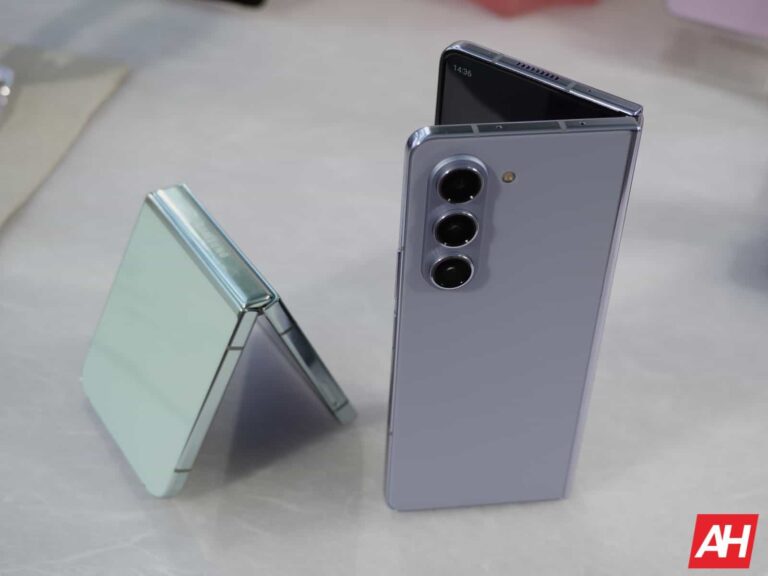
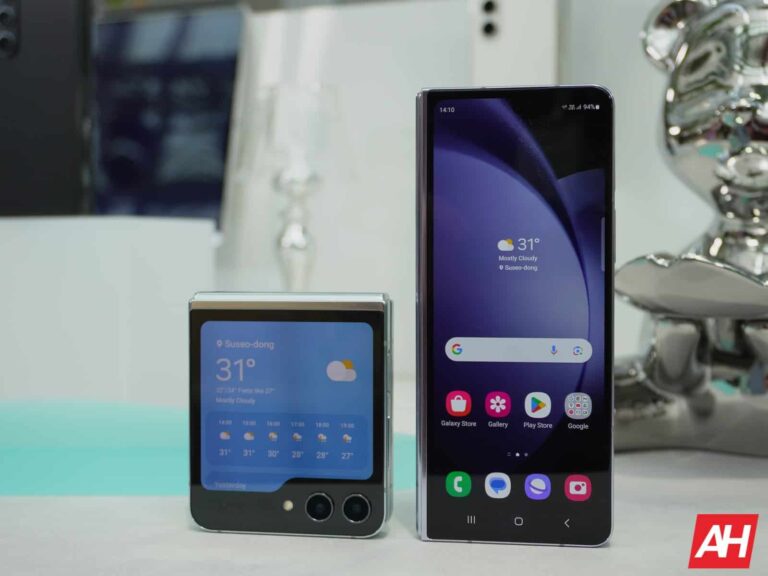
With Samsung having just announced the Galaxy Z Flip 5 and Galaxy Z Fold 5 this morning, ZAGG is announcing its latest range of accessories to help protect both devices. This includes cases as well as screen protectors for each new phone. Which means a mostly full range of coverage for protecting the phone’s front, back, and outside display. But ZAGG didn’t just come out with screen protectors for the two new phones. It’s also launching screen protectors for the Galaxy Watch 6 series, and the Galaxy Tab S9 series.

All of the accessories are available as of today directly through ZAGG’s website. However, some of the accessories are going to be out of stock it looks like. Mainly the Glass Elite products for all devices and the Fusion Eco screen protector for the Galaxy Watch 6 Classic.

ZAGG cases for the Galaxy Z Fold 5 and Flip 5 are available today

Since you’re only able to pre-order the new phones today and not buy them, it’ll be a little while before you get them. As they aren’t officially launching until next month. That gives you a head start on grabbing a case to protect the phone you pick, as they are available today from ZAGG and will almost certainly show up before the phone. At the very least they’ll show up at the same time. And the reason this is a good thing is that it means your phone won’t be unprotected at all once you take it out of the box. Instead you can toss the case on it immediately before setting it up.

For the Galaxy Z Fold 5 and Galaxy Z Flip 5, ZAGG is offering the Bridgetown case. It’s $59.99 for both phones, but the Fold 5 model also appears out of stock at the moment. There’s a few great things about this case that we love. But one thing that stands out aside from the drop protection is that on the Fold 5 model, there’s a holder for the S Pen.

The case is also strengthened with graphene, which is harder than diamond but also stronger much stronger than steel and more elastic than rubber. Basically, it makes for a great material to use in phone cases. Each case is also treated with an antimicrobial material. And that’s never a bad thing.

In addition to the Bridgetown case for both phones, you can pick up the Glass XTR2 screen protectors for the outside displays. These go for $49.99 for each phone. You can also snag the Ultra Eco screen protectors for the Galaxy Watch 6 and 6 Classic at $19.99. As well as the Fusion screen protector for the Galaxy Watch 6 for $29.99. As for the Galaxy Tab S9 protectors, these range in price from $49.99 to $89.99, but are all out of stock.

Flip 5

Fold 5

Watch 6

Watch 6 Classic


[ad_2]
Source link

60,000 Androids have stalkerware-type app Spyhide installed

0
[ad_1]

A hacktivist was able to grab all the data from a stalkerware operator and shared the method and the findings.

Stalkerware-type app Spyhide is coded so badly that it’s possible to gain access to the back-end databases and retrieve data about everyone that has the app on their device. And it’s not a small number. Hacktivist maia arson crimew told TechCrunch she’d found 60,000 compromised Android devices, dating back to 2016.

Spyhide, like many other stalkerware-type apps “silently and continually uploads the phone’s contacts, messages, photos, call logs and recordings, and granular location in real time.”

By definition, stalkerware are tools – software programs, apps and devices – that enable someone to secretly spy on another person’s private life via their mobile device. Many stalkerware applications market themselves as parental monitoring tools, but they can be and often are used to stalk and spy on a person. The most common users of stalkerware are domestic violence abusers, who load these programs onto their partner’s computer or mobile device without their knowledge.

In fact, crimew recently was a guest on Malwarebytes podcast Lock & Code, revealing how easy many of these apps can be compromised due to bad coding and a careless security posture.

Writing about the SpyHide hack, crimew describes how it was possible to download the full source code and git history for the account panel of SpyHide. From there she figured out how data uploads from victim devices worked and managed to upload a web shell that helped download around 230GB of stalkerware data. The data showed that between 2016 and the server takeover, around 60k devices had been compromised.

TechCrunch’s analysis of the data shows Spyhide’s surveillance network spans every continent, with clusters of thousands of victims in Europe and Brazil. The US has more than 3,100 compromised devices, a fraction of the total number worldwide, yet the US victims are still some of the most surveilled victims on the network by the quantity of location data alone.

If you are thinking about installing such an app, and you are reading this:

  1. Don’t!
  2. It definitely is illegal in almost every country, unless it’s done with consent of the government itself.
  3. We have never heard of anyone who was able to solve a problem by using stalkerware. Usually resorting to stalkerware only makes it worse.
  4. Consider the consequences of someone finding out what you did and remember that is a distinct possibility.
  5. Listen to this podcast.

Malwarebytes, as one of the founding members of the Coalition Against Stalkerware makes it a priority to detect and remove stalkerware from your device. It is good to keep in mind however that by removing the stalkerware you will alert the person spying on you that you know the app is there. But should you require help removing it, Malwarebytes for Android detects Spyhide as Android/Monitor.Spyhide. 


We don’t just report on Android security—we provide it

Cybersecurity risks should never spread beyond a headline. Keep threats off your Android devices by downloading Malwarebytes for Android today.


[ad_2]
Source link

Pre-order Samsung’s latest Galaxy devices

0
[ad_1]

Samsung has finally announced all of its new products for the fall. That includes the Galaxy Z Flip 5, Galaxy Z Fold 5, Galaxy Tab S9 series and the Galaxy Watch 6 series. These devices are also all up for pre-order right now, through Samsung and its partners. In this article, we’re going to bring you the best deals on these devices, so you can pre-order them right now and save some cash too.

Samsung has a number of promos available right now for these new devices, beginning with the free storage upgrade. So you can purchase the 256GB model and get 512GB, or purchase 128GB and get 256GB (Galaxy Tab S9 only).

Now let’s talk about trade-ins. Samsung is offering up to $1,00 in trade-in credits for the Galaxy Z Fold 5. It’s $900 for the Galaxy Z Flip 5, while the Galaxy Tab S9 series gets up to $650 in trade-in credit and the Galaxy Watch 6 series gets up to $250.

There’s also some pretty sweet bundles right now. With your purchase of the Galaxy Z Flip 5 or Galaxy Z Fold 5, you can get the Galaxy Watch 6 Series for up to $240 off. That makes the Galaxy Watch 6 just $149, or the Galaxy Watch 6 Classic just $199. You can bundle with the Galaxy Buds 2 Pro and get $180 off, dropping the earbuds down to just $49.99. And finally, you can bundle with the Galaxy Tab S9 and get up to $300 off. That brings the Galaxy Tab S9 down to $599, the Tab S9 Plus to $699 and the Tab S9 Ultra to $899.

Finally, Student discounts. Samsung is offering a 15% discount on the Galaxy Z Fold 5, and a 10% discount on the Galaxy Z Flip 5.

Get your pre-orders in now

These promos are only good during the pre-order period, which will end on August 10. With all of these devices shipping out for delivery on August 11. That means that you won’t be waiting long to get your hands on your new devices.

You can pre-order these new devices from Samsung right now by hitting the links below.

Pre-Order Galaxy Z Flip 5

Pre-order Galaxy Z Fold 5

Pre-Order Galaxy Tab S9 series

Pre-order Galaxy Watch 6 Series


[ad_2]
Source link

ChatGPT founder says AI tech will take some jobs away

0
[ad_1]

The founder of ChatGPT is aware of some significant issues that AI will pose to industries around the world. He is also knowledgeable of the fact that AI is not all negative, as it has its good sides. With a broad and clear understanding of AI and how it’d affect lives, he addresses some fanatic conceptions regarding AI and its implementation.

At the moment, there are a lot of takes regarding AI, with some being positive and others negative. Funnily enough, a good amount of netizens today tend to tilt to either side of this matter. Only a few people out there have a balanced view of things regarding AI and how it will influence lives.

With this issue on the ground, people need to have a well-balanced understanding of how AI will affect their future. One can say that people need the hard-hitting truth about AI and how its implementations will influence various industries. Sam Altman, the founder of OpenAI, in a recent interview, gave the internet the truth about the effects of AI’s implementation.

The founder of ChatGPT, Sam Altman, points out that AI is not the savior most people think it is

In a recent interview with the Atlantic, Sam Altman gives a very clear statement regarding AI. During the interview, he spoke about the constant debate about whether AI will take jobs away from people. His response to this topic will help give people a balanced view of what to expect from AI’s integrations into working industries.

While AI will help drive innovations in various sectors, Sam points out that it’s necessary to be a bit concerned. As these various AI models keep learning how to complete certain crucial tasks in various injuries, a problem arises. These machines might phase out the need for humans that currently fill certain positions that AI models are learning to occupy.

In the words of Sam Altman, “Jobs are going to go away, full stop.” Therefore, while the advancement of AI is impressive and brings industrial developments, it puts certain jobs at risk. Note that the ChatGPT founder didn’t say that every single humane manned job will go away.

This means that despite the rise of various AI models, humans will still occupy certain roles. But there will be some areas in industries where AI is being introduced where machines will take over human jobs. Already some media publishers fear this fate and are planning to drag generative AI training companies to court.

With this change, the new line of work will attract humans that know how to make use of AI to get tasks done. Those without the know-how on using these AI tools will lose their jobs to machines or others that can use the said tools. So, therefore, the big question is whether there should be restrictions on AI or whether people should adapt to the use of these tools while working.


[ad_2]
Source link