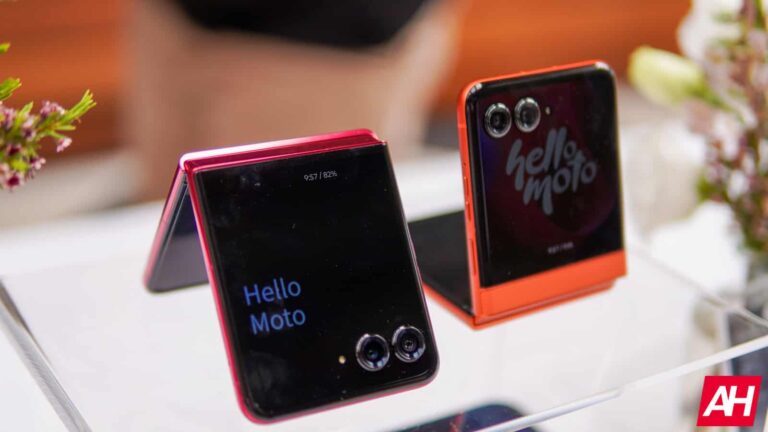
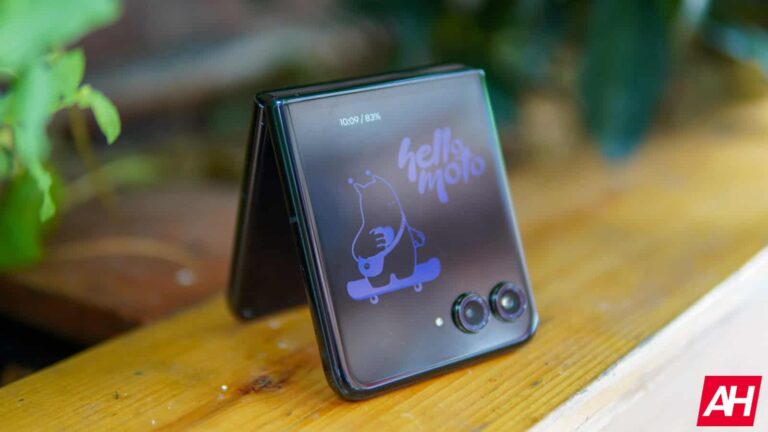
Motorola has announced its newest set of Razr flip phones – the Razr and Razr+. This year, Motorola is touting that it has the largest external display on any flip phone, with a massive 4-inch display on the Razr+ and a 3.6-inch external display on the Razr. That’s pretty incredible, and it also means you’ll almost never need to actually open the phone since Android apps work on the external display. Something that Samsung’s Galaxy Z Flip 5 still can’t do.
On top of the massive external display, Motorola has also upgraded the cameras. Both Razr phones sport the exact same primary camera, which is now a 50-megapixel camera with a larger sensor compared to last year’s 64-megapixel. The Razr also sports a 13-megapixel ultrawide and macro sensor, while the Razr+ sports a 50-megapixel telephoto sensor that is capable of doing 2x optical zoom. On the front, both phones sport a 32-megapixel front-facing camera.
The other major change that Motorola made this year was a larger battery on the Razr+. The Razr+ goes from a 3,800mAh capacity battery to a 4,000mAh capacity battery. That is not a huge change – only about 5% more capacity. But that does bring the Razr+ above that 4,000mAh capacity threshold that even Samsung hasn’t been able to cross on the flip phone side yet.
Motorola Razr+ is the first flip phone with Snapdragon 8s Gen 3
During our briefing ahead of today’s announcement, Motorola made a point to claim that the Razr+ is going to be the first flip to launch with the Snapdragon 8s Gen 3. Only a handful of phones have launched with this new processor so far, and we expect that the Galaxy Z Flip 6 will use it next month. However, that is actually a pretty big upgrade for the Razr+ this year, considering last year’s model used the older Snapdragon 8+ Gen 1, all for the same price.
Motorola is offering the Razr in 8GB with 256GB of storage, starting at $699, while the Razr+ is being offered with 12GB of RAM and 256GB of storage for $999. With Samsung’s reported price increase, the Razr and Razr+ are even more impressive. Considering Galaxy Z Flip 5 does use 8GB of RAM and not 12GB. Though, that could all change in a couple of weeks.
For those of us in the US, it is great to see Motorola bringing some really good competition to the Samsung Galaxy Z Flip 5 (and soon the Flip 6), which is sorely needed. I’ve had the Motorola Razr+ (and Razr) for only a few hours, but so far, it looks to be way better than what Samsung is offering.
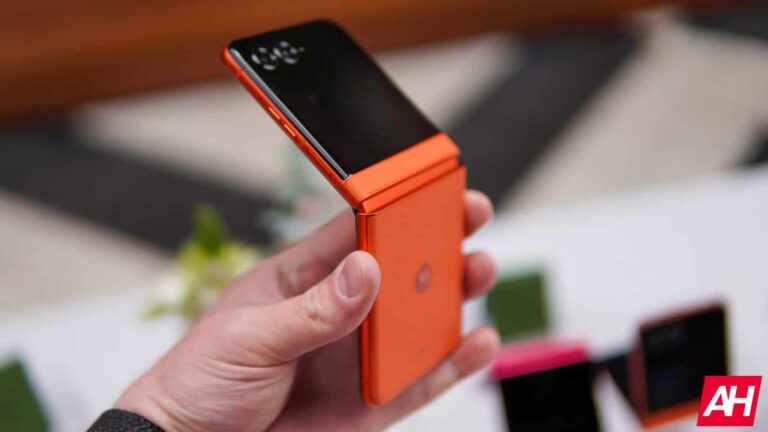
Motorola will be selling the Razr for $699 here in the US in three colors: Beach Sand, Coala Gray, and Spritz Orange. The Razr+ is going to be priced at $999 and available in four colors: Midnight Blue, Spring Green, Peach Fuzz, and the iconic Razr Pink color is back. These are the same prices as last year’s Razr and Razr+.
An MS-DOS emulator is probably not the main desire of users of iOS devices. However, if you ever want to experience this classic OS on your iPhone, Apple won’t make things easy for you. Apparently, the policy that allows retro game emulators in the App Store does not contemplate operating system emulators.
For a few months now, Apple has allowed retro game emulators on the App Store. However, the measure mainly aims to bring retro gaming to the company’s mobile devices. For example, users can enjoy PS1 games through the Gamma emulator. You can also access classic Nintendo console games thanks to the Delta emulator.
Apple rejected an MS-DOS and a Windows emulator for iOS
That said, there are developers who have worked on emulators of MS-DOS, the classic operating system. Although technically, MS-DOS does not count as a classic console, running it allows you to enjoy games that were developed for it. However, this argument does not convince Apple, which is not allowing iDOS 3 (an MS-DOS emulator) in the iOS App Store.
According to the developer of iDOS 3, Apple spent up to two months evaluating their app, only to reject it in the end. The company adhered to Section 4.7 of its App Review Guidelines to do so. This section of the guidelines says that Apple will not approve MS-DOS emulators or Windows OS emulators. This not only affects iDOS 3 but also UTM SE or any other of the same nature.
Only game emulators are allowed
According to the iDOS 3 developer, Apple’s response said that “only emulators of retro game consoles are compatible per guideline 4.7.” On the other hand, the UTM SE developer received a “PC is not a console” response. So, although operating system emulators also allow you to run games developed for them, Apple does not consider them to qualify as retro gaming emulators. It seems that this potential “loophole” is closed for the moment.
Although Apple establishes these conditions, it remains to be seen if the EU says anything about them. The Cupertino giant has been constantly struggling with the DMA regulation. For instance, the company claims that the DMA caused a delay in the Apple Intelligence rollout in the EU. Meanwhile, OS emulators for iOS are available in AltStore.
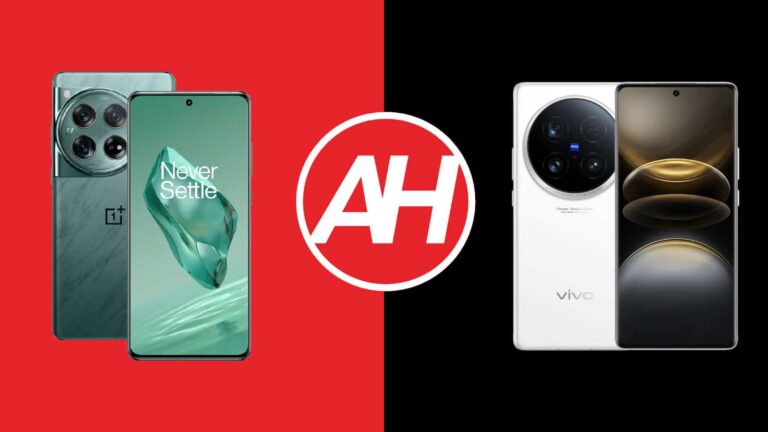
This time around we’re comparing two sister flagships, the OnePlus 12 vs Vivo X100 Ultra. Why do we say sister flagships? Well, these two phones come from sister companies, both of which are under the BBK Electronics umbrella. These two devices do look similar from the front, but there are a number of differences here that we’ll talk about. There are some similarities, but also a lot of differences.
As per usual, we will kick things off by listing the specifications of both devices. Following that, we’ll compare their designs, display, performance, battery life, cameras, and audio output. Both of these devices are large flagship offerings, and both of them are compelling in their own regard. With that being said, let’s get down to it.
If you look at these two phones from the front, you’ll notice how similar they are. Both phones offer the so-called ‘glass sandwich’ designs. Their front and back sides are curved towards the sides, into the frame. The side frame is thin on both phones due to that fact, it’s not flat. Both phones are made out of aluminum and glass, by the way. You will notice a curved display on the front, with a centered display camera hole.
The bezels around the two displays are very thin, while physical buttons sit on the right-hand side of both devices. The OnePlus 12 also has the alert slider switch on the left-hand side. The OnePlus 12 includes a circular camera island in the top-left corner. The Vivo X100 Ultra has an even larger camera oreo which is centered in the upper portion of the phone’s backplate. Both devices do offer three rear-facing cameras.
The two devices are almost identical in terms of height and width, the difference is less than 1mm. They are exactly the same when it comes to thickness. The Vivo X100 Ultra is 9 grams heavier than the OnePlus 12. Both devices do offer water and dust resistance, but the Vivo X100 Ultra is a bit better in that regard. It offers an IP68 certification, compared to an IP65 rating on the OnePlus 12. Both devices are very slippery, which is not surprising considering their glass + metal design. Using a case is recommended. The build quality is really good on both sides, though.
OnePlus 12 vs Vivo X100 Ultra: Display
The OnePlus 12 includes a 6.82-inch QHD+ (3168 x 1440) LTPO AMOLED display. That panel is curved, and it has an adaptive refresh rate. It can project up to 1 billion colors and supports Dolby Vision too. HDR10+ content is supported here, while the peak brightness is 4,500 nits, in theory. The screen-to-body ratio of the OnePlus 12 is around 90%, while the display is protected by the Gorilla Glass Victus 2.
The Vivo X100 Ultra, on the flip side, has a 6.78-inch 3200 x 1440 LTPO AMOLED display. That panel is also curved, and it has an adaptive refresh rate of up to 120Hz. It can project up to 1 billion colors, and it also supports Dolby Vision. HDR content is supported too, while the peak brightness of this panel is 3,000 nits. The display aspect ratio is 20:9, while the screen-to-body ratio is set at around 89%. The display protection is unknown.
Both of these panels are outstanding. They’re not only vivid and bright but have great viewing angles too. The blacks are deep as you’d expect them to be, while the touch response is also very good. Both displays do get more than bright enough, even in direct sunlight. We don’t really know what sort of display protection the Vivo X100 Ultra offers, so you may want to keep the screen protector on. The OnePlus 12 is well-equipped in that regard.
OnePlus 12 vs Vivo X100 Ultra: Performance
The Snapdragon 8 Gen 3 SoC fuels both of these smartphones. That is Qualcomm’s most powerful processor, it is a 4nm chip. Both devices also offer up to 16GB of LPDDR5X RAM and utilize UFS 4.0 flash storage. Neither company skimped out on the performance-related components, which is always good to see. Great hardware only gets you so far, though. The question is, do both of these devices offer good performance?
The answer is yes, they do, very much so. Do note that the Vivo X100 Ultra does not come with Google Play Services out of the box, though. You’ll need to install the Google Play Store manually if you decide to import this phone, as it’s not sold outside of China. Both phones do offer great performance, across the board. They do great in terms of regular, everyday tasks, such as opening apps, consuming multimedia, image editing, browsing, etc. The same can be said for the gaming aspect, though.
With less demanding games, they do a fantastic job, but very demanding games are not a problem either. Both of these phones can easily run Genshin Impact and other truly graphically-demanding titles. They will get quite warm after a while, but that won’t affect the gameplay. The OnePlus 12 in particular has a great cooling system, so that’s always a good thing. The bottom line is, don’t worry about the performance here, both of these phones are up to the task.
OnePlus 12 vs Vivo X100 Ultra: Battery
There is a 5,400mAh battery included inside the OnePlus 12. The Vivo X100 Ultra, on the flip side, has a 5,500mAh battery on the inside. You’ll be glad to know that both of these devices offer great battery life. They offer some of the best battery life numbers out of any flagship from this generation, actually. Getting over 7 hours of screen-on-time is not a problem, and some of you could even go over the 8-hour mark. Gaming and other demanding processes could affect that, though, of course.
Even if you’re a demanding user, these two phones will do the trick. The battery life is that good. Yes, those large battery packs do help the matter, but both phones are also well-optimized. Even if you end up draining them sooner than you’d hope, however, you’ll be able to easily amend that as they both offer fast charging. Speaking of which, let’s see what exactly do they offer in that regard.
The OnePlus 12 supports 100W wired (80W in the US), 80W wireless, and 10W reverse wireless charging. The Vivo X100 Ultra, on the flip side, supports 80W wired, 30W wireless, and reverse wired charging. It is worth noting that both devices ship with chargers in the box too. So you’ll be ready to go. In regards to wired charging, they’re both blazing fast, while the OnePlus 12 has the advantage in terms of wireless charging, if that’s what you prefer.
OnePlus 12 vs Vivo X100 Ultra: Cameras
The OnePlus 12 has a 50-megapixel main camera, a 48-megapixel ultrawide unit (114-degree FoV), and a 64-megapixel periscope telephoto camera (3x optical zoom). The Vivo X100 Ultra, on the flip side, includes a 50-megapixel main camera (1-inch type sensor, gimbal OIS), a 50-megapixel ultrawide camera (116-degree FoV), and a 200-megapixel periscope telephoto camera (3.7x optical zoom, macro). OnePlus’ handset is backed by Hasselblad, while the Vivo X100 Ultra has ZEISS support.
Technically speaking, the Vivo X100 Ultra has a more powerful camera setup. It has a 1-inch main camera sensor, not to mention an immensely capable periscope telephoto camera. They both do a great job, though. They both provide great-looking photos during the day, though the ones from the OnePlus 12 are a bit more contrasty. Images from the Vivo X100 Ultra tend to look more processed at times, not in a bad way, though. Secondary cameras do a good job of keeping up with the color profile of the two main cameras here
The Vivo X100 Ultra takes the cake when it comes to high-zoom images. It also does a better job with portrait shots, and macro photography as well. That periscope telephoto camera is immensely powerful. Both ultrawide cameras are great during the day. When the light goes away, both main cameras do a great job. The images from the OnePlus 12 do end up looking more contrasty in such conditions too, though. The Vivo X100 Ultra does a better job of fighting light flares in low light. Both of these smartphones do a great job when it comes to photography.
Audio
You’ll find a set of stereo speakers on both of these smartphones. They are actually very similar in terms of loudness too. They’re not the loudest speakers we’ve used, not even close. They are, however, well-balanced and offer good sound output.
Neither phone includes an audio jack, unfortunately. You can, however, use their Type-C ports if you’d like to connect your wired headphones. If you prefer wireless connectivity, you’ll realize that Bluetooth 5.4 is available on both devices.
In the ever-evolving realm of high-fidelity audio, where the pursuit of sonic perfection often comes with a hefty price tag, Schiit Audio stands as a beacon of defiance. This California-based company, known for its irreverent attitude and commitment to delivering exceptional value, has consistently challenged the conventions of the audiophile world. Their latest creation, the Schiit Jotunheim 2, named after the mythical land of giants in Norse mythology, embodies this philosophy, and we’re here to review it. It’s a versatile amp/DAC combo that promises to deliver a sonic punch worthy of its namesake, all without breaking the bank.
In this comprehensive review, we’ll delve deep into the heart of the Jotunheim 2, exploring its design, features, and most importantly, its sound quality. We’ll leave no stone unturned in our quest to uncover whether this device truly lives up to the hype and whether it’s the right tool to unlock the full potential of your headphone listening experience. Prepare to be immersed in a symphony of power, precision, and sonic excellence.
Table of contents
Schiit Jotunheim 2 Review: Hardware and Design
Opening the box of a Schiit Audio product is an experience unlike most others in the high-end audio realm. Eschewing extravagant packaging and superfluous accessories, Schiit focuses on what truly matters: the product itself. The Jotunheim 2 arrives in a simple, unassuming cardboard box adorned with the company’s minimalist logo. Inside, you’ll find the amp/DAC unit, a power cable, and a concise manual. It’s a refreshing change of pace from the over-the-top presentations that often accompany high-priced audio gear, serving as a subtle reminder that the true value lies in the product’s performance, not its presentation.
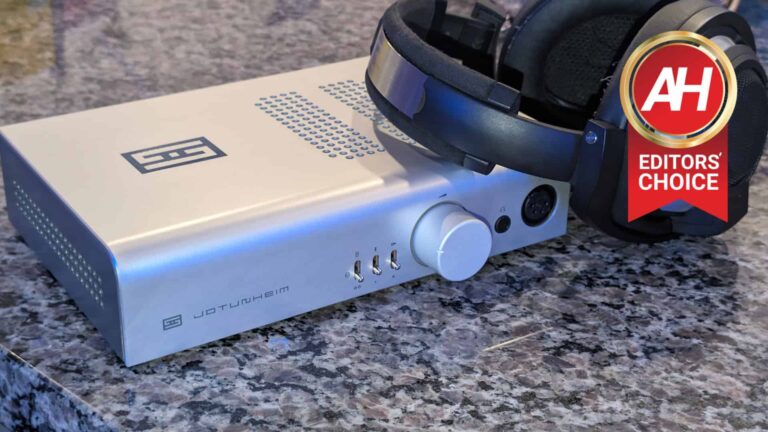
Upon first glance, the Jotunheim 2 exudes an understated elegance that’s characteristic of Schiit’s design philosophy. The chassis is constructed from silver or black aluminum, a material that not only offers durability but also serves a functional purpose by effectively dissipating heat generated during operation. This thoughtful design choice ensures optimal performance and longevity, even during extended listening sessions. The amp/DAC’s dimensions, measuring 9 inches wide, 6 inches deep, and 2 inches tall, make it a perfect fit for most desktop setups. Its weight, a substantial 6 pounds, further reinforces the notion of a robust build quality that can withstand the rigors of daily use.
Design and first Impressions: A marriage of form and function
The Jotunheim 2’s design language follows Schitt’s well-established aesthetic: clean lines, sturdy construction, and an air of minimalist sophistication. While some may yearn for a more visually striking exterior, the Jotunheim 2’s unassuming appearance is a deliberate choice that allows the focus to shift towards its exceptional functionality and sonic prowess. The silver aluminum chassis, while understated, possesses an undeniable elegance that grows on you over time. It’s a device that doesn’t scream for attention, but rather subtly commands respect with its solid presence.
The front panel is refreshingly uncluttered, allowing for intuitive operation. A large, centrally located volume knob beckons you to take control of your listening experience. Its smooth rotation and precise feel offer a tactile satisfaction that’s often lacking in digital controls. Flanking the volume knob are two smaller switches, one for selecting the input source and another for adjusting the gain. These switches are clearly labeled and click into place with reassuring tactile feedback, further enhancing the overall user experience.
Schiit Jotunheim 2 Review: Connectivity
The rear panel of the Jotunheim 2 reveals a comprehensive array of inputs and outputs, catering to a wide range of setups and configurations. Balanced XLR and single-ended RCA inputs provide flexibility for connecting various sources, while balanced and single-ended headphone outputs ensure compatibility with different types of headphones. The switchable balanced/single-ended line-level output further expands the Jotunheim 2’s functionality, allowing it to serve as a preamplifier in a larger audio system.
One of the most intriguing aspects of the Jotunheim 2’s design is its modularity. The amp can be configured with an optional ESS Sabre DAC module or a passive phono stage, adding another layer of versatility to an already impressive feature set. The DAC module, while not the latest model on the market, offers a substantial improvement. It delivers a cleaner, more detailed sound that allows you to fully appreciate the nuances of your music.
The passive phono stage, meanwhile, caters to vinyl enthusiasts, providing a convenient way to connect a turntable directly to the Jotunheim 2. While not as feature-rich as a dedicated phono preamp, it’s a surprisingly capable performer that delivers respectable sound quality for its price. It’s worth noting that the passive phono stage requires a high-output moving magnet (MM) cartridge for optimal performance, so keep that in mind if you’re considering adding this module to your setup.
Schiit Jotunheim 2 Review: Sound
While the Jotunheim 2’s sonic prowess speaks for itself, understanding its technical underpinnings can deepen our appreciation for its capabilities and performance. Schiit Audio, known for its transparency, provides a wealth of technical specifications and measurements, allowing us to peek behind the curtain and see what makes this amp/DAC tick.
Amplifier: Power and precision
The Jotunheim 2’s amplifier section is a marvel of engineering, delivering ample power to drive even the most demanding headphones with ease. In balanced mode, it boasts an impressive output of 7.5W RMS per channel into 16 ohms, which gradually decreases to 600mW RMS per channel into 600 ohms. In single-ended mode, the output is slightly lower, ranging from 2.4mW RMS per channel into 16 ohms to 165mW RMS per channel into 600 ohms. This wide range of power output ensures that the Jotunheim 2 can handle virtually any headphone on the market, from sensitive in-ear monitors to power-hungry planar magnetics like the HiFiMan Susvara’s.
But power isn’t everything; control is equally important. The Jotunheim 2’s low output impedance, measuring less than 0.1 ohms at either gain setting, ensures a tight grip on your headphones, resulting in a clean, detailed sound with minimal distortion. This is particularly crucial when driving low-impedance headphones, which can be prone to distortion if not properly controlled.
The amp’s performance measurements are impressive
The amp’s performance measurements are equally impressive. Total harmonic distortion (THD) is vanishingly low, measuring less than 0.00015% in balanced mode and less than 0.006% in single-ended mode, both at 1kHz. This means that the Jotunheim 2 introduces virtually no distortion of its own, allowing the music to shine through with pristine clarity.
Intermodulation distortion (IMD), another measure of amplifier linearity, is also exceptionally low, measuring less than 0.0002% in balanced mode and less than 0.007% in single-ended mode. This ensures that the Jotunheim 2 faithfully reproduces complex musical passages without introducing any unwanted artifacts or coloration. Now that’s what an amp should do, not interfere with the sound, Rather it should amplify not alter.
The amp‘s signal-to-noise ratio (SNR) is another area where it excels. In balanced mode, the SNR exceeds 123dB, while in single-ended mode, it’s still a very respectable 102dB. This high SNR ensures that the music signal remains clean and free from noise, even at low listening levels.
The Jotunheim 2 also features a unique current-feedback topology called Nexus™. This topology is designed to provide a wide bandwidth and fast transient response, resulting in a sound that’s both detailed and dynamic. It’s also inherently differential, meaning it works equally well with both balanced and single-ended sources.
DAC: Digital delights
The optional ESS Sabre ES9028Q2M DAC module is a popular choice among audiophiles, and for good reason. It’s known for its exceptional detail retrieval, low noise floor, and natural sound signature. When combined with the Jotunheim 2’s powerful amplifier section, the DAC module elevates the amp’s performance to new heights, delivering a digital audio experience that’s truly captivating.
The DAC module supports a wide range of sample rates and bit depths, ensuring compatibility with high-resolution audio files. It also features Schiit’s proprietary Unison USB™ input, which is designed to provide a jitter-free signal for optimal sound quality.
In our tests, the DAC module delivered a clean, detailed sound with excellent imaging and soundstage. It was particularly impressive with well-recorded acoustic music, where the natural timbre of instruments and voices shone through. The DAC module also excelled at revealing subtle details in the music, such as the reverb tails in a concert hall recording or the subtle nuances of a vocal performance.
Phono stage: A vinyl lover’s dream
The Jotunheim 2’s optional passive phono stage is a surprising and welcome feature for vinyl enthusiasts. While not as feature-rich as a dedicated phono preamp, it’s surprisingly capable, delivering respectable sound quality that belies its modest price. The phono stage boasts a gain of 42dB, which is sufficient for most moving magnet (MM) cartridges. It also features a fully passive RIAA network with AD8599 gain stages and PET film capacitors, ensuring accurate equalization and low distortion. In our tests, the phono stage delivered a warm, detailed sound that captured the essence of our vinyl collection. It was particularly impressive with jazz and classical recordings, where the natural timbre of instruments and voices shone through.
The Nexus gain stage: Schiit’s secret sauce
At the heart of the Jotunheim 2 lies Schiit’s proprietary Nexus gain stage, a technological marvel that sets this amplifier apart from the competition. This fully discrete differential current-feedback topology might sound like a mouthful, but it essentially translates to a cleaner, more dynamic sound with minimal distortion. In simpler terms, the Nexus gain stage ensures that your music is amplified with exceptional fidelity, preserving every nuance and detail of the original recording.
The Nexus gain stage is a testament to Schiit’s commitment to engineering excellence. It’s a complex circuit that requires careful design and meticulous implementation. The result is an amplifier that delivers a powerful and nuanced sound that’s both engaging and transparent.
Continuity S output stage: Smooth and effortless power delivery
Complementing the Nexus gain stage is the Continuity S output stage, another proprietary Schiit technology. This output stage is designed to deliver power to your headphones in a smooth, effortless manner, regardless of their impedance. We were particularly impressed with the Jotunheim 2’s ability to control the low frequencies even when driving demanding planar magnetic headphones. The bass remained tight and punchy, with no signs of distortion or muddiness, even at high volumes. This is a testament to the amp’s robust power supply and carefully tuned output stage.
Relay-switched input, gain, and output: A commitment to signal integrity
Schiit Audio takes signal integrity very seriously, and the Jotunheim 2 is a prime example of this commitment. The amp features relay-switched input, gain, and output sections, which minimize signal degradation and ensure that the music you hear is as pure and unadulterated as possible. This attention to detail might seem excessive to some, but for audiophiles who value the utmost fidelity, it’s a crucial aspect that sets the Jotunheim 2 apart from many of its competitors.
The relay-switched input allows you to seamlessly switch between different sources without any pops or clicks, ensuring a smooth and uninterrupted listening experience. The relay-switched gain provides two distinct gain settings – low and high – allowing you to tailor the amp’s output to match the sensitivity of your headphones. Additionally, the relay-switched output also ensures that the signal path to your headphones is as clean and direct as possible.
Versatility & Customization: Tailor the Jotunheim 2 to your needs
The Jotunheim 2’s versatility extends beyond its wide array of inputs and outputs. It’s also incredibly flexible when it comes to customization. The amp’s gain can be adjusted to match the sensitivity of your headphones, ensuring optimal performance for a wide range of models. The DAC module can be bypassed if you prefer to use an external DAC, and the phono stage can be added or removed as needed.
This modularity allows you to tailor the Jotunheim 2 to your specific needs and preferences, ensuring that it fits seamlessly into your existing audio setup. Whether you’re a headphone enthusiast with a diverse collection or a vinyl lover looking for a convenient all-in-one solution, the Jotunheim 2 can adapt to your needs.
A symphony of sound: The Jotunheim 2’s sonic performance
The true magic of the Jotunheim 2 lies not in its sleek design or impressive technical specifications, but in the symphony of sound it conjures. Prepare to embark on a sonic journey that will leave you enthralled, as we delve into the nuances of the Jotunheim 2’s sonic performance.
The soundstage: A grand hall of sonic immersion
One of the most striking aspects of the Jotunheim 2’s sonic prowess is its ability to create an expansive and immersive soundstage. It’s as if you’ve stepped into a grand concert hall, where each instrument occupies its own distinct space, and the music unfolds with breathtaking realism. The soundstage is both wide and deep, allowing you to pinpoint the precise location of each instrument and vocalist within the mix.
This expansive soundstage is particularly evident when listening to orchestral music. The Jotunheim 2 paints a vivid sonic picture, with strings soaring to the left, brass instruments blaring from the right, and percussion reverberating from the back of the stage. It’s a truly captivating experience that draws you into the heart of the performance. But the Jotunheim 2’s soundstage isn’t limited to classical music. It shines equally brightly with other genres, from rock and jazz to electronic and hip-hop. The amp’s ability to create a sense of space and depth adds a new dimension to your music, making it feel more alive and engaging.
Detail retrieval: A sonic microscope
The Jotunheim 2 is not just about creating a vast soundstage; it’s also about revealing the subtle details that often go unnoticed with lesser equipment. I was consistently impressed with the amp’s ability to uncover nuances in familiar recordings as if I were hearing them for the first time. The gentle decay of a cymbal, the delicate vibrato of a violin string, the subtle breath of a vocalist – these are the details that bring music to life, and the Jotunheim 2 presents them with remarkable clarity and precision.
This detail retrieval is particularly evident in the midrange, where vocals and instruments are rendered with exceptional clarity and definition. Each note is distinct and well-defined, allowing you to appreciate the subtle nuances of the performance. Whether it’s the growl of a saxophone or the rasp of a distorted guitar, the Jotunheim 2 captures it all with stunning realism.
The amp’s ability to handle complex musical passages is equally impressive. Even with dense orchestral arrangements or intricate jazz compositions, the Jotunheim 2 never feels congested or overwhelmed. Instead, it maintains a remarkable sense of composure, allowing each instrument to shine through with clarity and definition.
Dynamics & Impact: A sonic rollercoaster
The Jotunheim 2’s power and control translate into a dynamic and impactful listening experience. The music feels alive, with a sense of energy and immediacy that draws you in and keeps you engaged. Whether you’re listening to the delicate plucking of a harp or the thundering roar of a drum kit, the Jotunheim 2 faithfully reproduces every nuance with remarkable precision.
The amp’s low output impedance ensures that it can drive a wide range of headphones with authority and control. Even demanding planar magnetic headphones, which are notorious for requiring ample power to reach their full potential, are no match for the Jotunheim 2’s muscular output except the Mod House Tungsten’s. The result is a sound that’s both powerful and controlled, with deep, impactful bass, lush midrange, and sparkling highs.
The Jotunheim 2’s dynamic range is also impressive. It can effortlessly handle the quietest passages and the loudest crescendos without any signs of strain or distortion. This makes for a thrilling listening experience, where you can feel the full emotional impact of the music.
Genre versatility: A sonic chameleon
One of the most remarkable aspects of the Jotunheim 2 is its versatility across different musical genres. Thanks to its neutral sound signature, it doesn’t favor any particular genre over another. Whether you’re a fan of rock, jazz, classical, electronic, hip hop, alternative or anything in between, the Jotunheim 2 will faithfully reproduce your music with remarkable accuracy and detail.
I found that the Jotunheim 2 particularly shines with genres that benefit from a wide soundstage and precise imaging, such as classical music and jazz. However, it’s equally adept at handling the raw energy of classic rock music or the intricate textures of electronic house music. The amp’s ability to adapt to different musical styles is a testament to its well-balanced design and technical prowess.
Schiit Jotunheim 2: Should you buy it?
After months of rigorous testing and countless hours of listening, the Schiit Jotunheim 2 has left an indelible mark on my ears. It’s a testament to Schiit Audio’s unwavering commitment to delivering exceptional value and performance without the exorbitant price tags that often plague the high-end audio world.
The Jotunheim 2 is not just an amp and DAC; it’s a versatile powerhouse that punches well above its weight class. It’s a sonic chameleon that effortlessly adapts to different music genres, a detail-retrieving machine that unveils hidden nuances in your music, and a powerhouse that can drive even the most demanding headphones with authority and finesse!
But is the Jotunheim 2 the right amp/DAC for you? Let’s break down its strengths, weaknesses, and who it might be the perfect fit for.
The Value Proposition: A Giant-Killer Indeed
In the world of high-fidelity audio, the phrase “you get what you pay for” is often thrown around. However, the Jotunheim 2 defies this convention. It delivers a level of performance that rivals or even surpasses amplifiers and DACs costing several times its price. This exceptional value proposition is one of the Jotunheim 2’s most compelling features, making it an attractive option for both budget-minded audiophiles and those who simply want high-quality audio equipment.
We were consistently impressed with the Jotunheim 2’s ability to reveal subtle details in our music, breathing new life into familiar tracks and uncovering sounds we had never noticed before. The amp’s power and versatility are equally remarkable, allowing us to effortlessly drive a wide range of high-end headphones and connect to various sources without compromising on sound quality.
The modular design of the Jotunheim 2 is another aspect that adds to its value proposition, it looks classy and beautiful while contemporary. The ability to add an ESS Sabre DAC or a passive phono stage provides users with the flexibility to customize the Jotunheim 2 to their specific needs and preferences. While the stock Jotunheim 2 is already a capable performer, the addition of these modules opens up even more possibilities for sonic exploration.
Reasons to consider the Schiit Jotunheim 2:
…the Jotunheim 2 offers audiophile-grade performance at a fraction of the cost of many competitors, making it an excellent choice for those who are looking for exceptional value without sacrificing quality. …the Jotunheim 2’s flexibility and power make it an ideal choice for those with a variety of headphones, from sensitive in-ear monitors to power-hungry planar magnetics. …its optional passive phono stage adds a welcome layer of convenience for vinyl enthusiasts, allowing them to connect their turntable directly to the Jotunheim 2. …the Jotunheim 2’s clean lines and compact size make it a perfect addition to any desktop setup. …its powerful headphone output and clean sound signature are well-suited for gaming and content creation.
Reasons to look elsewhere:
…the Jotunheim 2’s minimalist design might not appeal to those who prioritize flashy aesthetics over functionality. …while the ES9028Q2M DAC is a solid performer, there are newer and more advanced DACs on the market. If you’re a hardcore audiophile who demands the absolute latest tech in digital-to-analog conversion, you might want to explore other options.
Wrap-up
The Schiit Jotunheim 2 is a remarkable piece of audio equipment that embodies Schiit Audio’s commitment to delivering exceptional performance and value. It’s a versatile, powerful, and easy-to-use device that will undoubtedly elevate your headphone listening experience.
Despite its minor shortcomings, the Jotunheim 2 is a testament to Schiit Audio’s ability to innovate and deliver high-quality audio gear at accessible prices. It’s a modern classic that deserves a place on any audio enthusiast’s desk. Whether you’re a seasoned audiophile or a newcomer to the world of high-fidelity audio, the Jotunheim 2 is a worthy investment that will bring your music to life with clarity, detail, and power.
In conclusion, the Schiit Jotunheim 2 is a triumph of engineering and a testament to Schiit’s unwavering commitment to delivering exceptional value in the high-fidelity audio space. Its super-sonic performance, versatility, and price point make it a compelling choice for anyone looking to take their headphone listening experience to the next level. It’s a true giant killer that punches well above its weight class, delivering an exceptional audio experience that’s as powerful and majestic as its namesake.
Samsung‘s next-gen Galaxy devices, the Galaxy Z Fold 6 and Galaxy Z Flip 6 are nearing arrival with Galaxy Unpacked around the corner, and now Samsung is setting the stage for all the incoming deals and savings by tossing $50 your way if you reserve one of the new “upcoming Galaxy devices.” Samsung hasn’t confirmed yet that the new Galaxy Z Fold 6 and Galaxy Z Flip 6 are launching, but there have been plenty of leaks and some teasers here and there. So it’s pretty obvious at this point what Samsung is unveiling at the Unpacked event coming up.
Speaking of Unpacked, Samsung has confirmed that the event will take place in Paris on July 10. It’ll start at 6am Pacific Standard Time on the day. So the event will be pretty early. It will also be streamed live on Samsung’s YouTube channel as well as Samsung.com and the Samsung Newsroom. If you’re eager to get your hands on Samsung’s newest devices, the company has offers coming to sweeten the pot.
Samsung’s foldables tend to be a little expensive. So it’s always a good idea to take any money that the company wants to give back to you for doing something so simple as reserving the new devices. Of course, this is hardly the first time Samsung has done this. It offers credits every year when it launches new devices. Granted, just reserving won’t get you the money. Here’s how the whole thing works.
You’ll need to reserve a Galaxy Z Fold 6 or Galaxy Z Flip 6 by Unpacked
As you may have expected, reserving a device will net you $50 in Samsung credits. These credits can be used for purchases at Samsung’s website and in the Samsung Shop app. The $50 credit will also be applied to the purchase of an eligible device (like the Galaxy Z Fold 6 or Galaxy Z Flip 6). So you do have to pre-order and buy an eligible device for this to work. Samsung also states that if you ever return the device the $50 credit is forfeited. The pre-order part is key. If you reserve the device but don’t pre-order, then the credit is also not applied.
Additionally, Samsung says you can save up to $1,500 during the pre-order and purchase of one of the new phones. This likely refers to a trade-in program. Again, nothing new here as Samsung offers trade-in discounts every time a new device launches. How much you might get back depends on the device and its condition, however.
Another key component is the timing. You only have so long to place the reservation. In this case, from June 25 to July 10. That’s about two weeks so plenty of time to make the reservation.
You could also win $5,000 in Samsung credit
If you thought the savings and gifts were done with, you’d be wrong. By reserving, pre-ordering, and purchasing an eligible device you can enter to win $5,000 in Samsung credit, which can be spent on anything Samsung sells on its website. This includes TVs, monitors, appliances, and even more mobile devices.
If you’re looking to be an audiophile, then you’re going to need to know about a little something called the DAC (digital to analog converter). Ifi just announced a DAC that almost sounds like a contradiction. The Ifi Zen Blue 3 is a DAC that boasts lossless Bluetooth audio.
The DAC is the device that takes the digital signal stored and processed by your phone and converts it into an analog (raw electrical) signal. The driver in your headphones/speakers converts that raw electrical data into sound waves.
As such, the quality of the DAC dictates the quality of the final audio you hear. Technically, all of your devices have a DAC in them if they have a speaker. If your phone has a headphone jack, there’s a DAC that converts the signal before it heads to your headphones.
However, those are typically your run-of-the-mill DACs. You can purchase premium external DACs to handle converting the signal for you. This is where companies like Ifi come in.
Ifi unveiled the Zen Blue 3 high-quality DAC
So, you understand how a DAC works; digital signal goes in, science happens… and an analog signal comes out. What makes the Ifi Zen Blue 3 special is that it has a focus on Bluetooth audio. Most DACs focus on direct input through a wire.
However, Bluetooth is another story altogether. It’s not the ideal tech to use if you like lossless audio. The Bluetooth signal transmitted from the player to the headphones/speaker is intrinsically compressed due to the limited bandwidth. This is why Bluetooth audio isn’t as high-quality compared to wired tech. It’s also why all audiophiles hiss when they hear the word “Bluetooth.”
The Ifi Zen Blue 3 is a DAC that aims to solve the Bluetooth dilemma. The company says that it can transmit a lossless Bluetooth signal to your device. So, you’ll use your phone or other device to send a Bluetooth signal to the DAC. Then, it will convert that signal to an analog signal and send it through the wired output.
It’s all in the codec
The Zen Blue can achieve this by using the best codecs on the market. The codec is the technology that compresses and transmits the Bluetooth signal. More typical codecs will heavily compress the audio. However, as Bluetooth audio has gotten better, it’s become possible to send higher-quality and less compressed signals.
Along with being compatible with several typical codecs, it’s also compatible with Qualcomm’s aptX Lossless. This is the technology that Qualcomm claims can deliver a bit-perfect signal to your headphones/speaker. It boasts the ability to send a CD-quality signal at 16-bits/44.1kHz or 1411.2kbps. It’s also compatible with three other codecs: AAC, SBC, and aptX.
Outputs
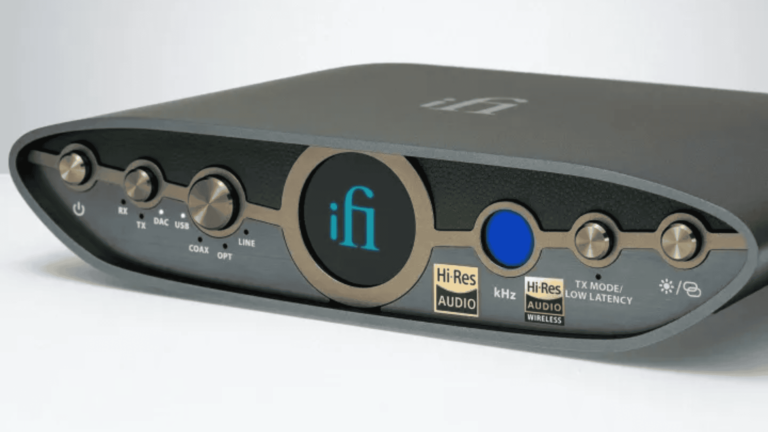
You have several options for audio output. You can use your typical wired headphones with a 4.4mm headphone cord. Along with that, you can output through the RCA ports. These are the red and white ports for the left and right channels. There’s also the option to output to USB-C and SPDIF.
Working in reverse
The Zen Blue 3 isn’t only a DAC, but it’s also an ADC (analog to digital converter). This means that you can use it in reverse. You’re able to send a wired signal into it and output a Bluetooth signal. Maybe, you have a device that doesn’t support Bluetooth, and you want to use it with your Bluetooth device, that’s an option.
This DAC can transmit a 24-bit/96kHz (4608 kbps) signal through USB-C and up to 24-bit/192kHz (9216 kbps) through SPDIF. Also, it uses the Bluetooth 5.4 standard. Powering the device, there’s the Qualcomm QCC518x Bluetooth audio chip.
It supports RCA, Bluetooth, 4.4mm headphone, SPDF and USB-C input. It also outputs through RCA and Bluetooth.
There are knobs on the front of the device that let you select the different modes and outputs.
This is a fantastic device to get if you’re looking for an affordable solution for your audio setup. It costs $299, which is a good price for what you’re getting.
Luxury retail chain Neiman Marcus has begun to inform customers about a cyberattack it discovered in May. The attacker compromised a database platform storing customers’ personal information.
An investigation showed that the data contained information such as name, contact data, date of birth, and Neiman Marcus or Bergdorf Goodman gift card numbers. According to Neiman Marcus, the exposed data does not include gift card PINs. Shortly after the data breach disclosure, a cybercriminal going by the name “Sp1d3r” posted on BreachForums that they were willing to sell the data.
Image courtesy of Daily Dark Web
“Neiman Marcus not interested in paying to secure data. We give them opportunity to pay and they decline. Now we sell. Enjoy!”
According to Sp1d3r, the data includes name, address, phone, dates of birth, email, last four digits of Social Security Numbers, and much more in 6 billion rows of customer shopping records, employee data, and store information.
Neiman Marcus is reportedly one of the many victims of the Snowflake incident, in which the third-party platform used by many big brands was targeted by cybercriminals. The name Sp1d3r has been associated with the selling of information belonging to other Snowflake customers.
Oddly enough, Sp1d3r’s post seems to have since disappeared.
Later screenshot
Sp1d3r’s post count went down back to 19 instead of the 20 displayed in the screenshot above.
So, the post has either been removed, withdrawn, or hidden for reasons which are currently unknown. As usual, we will keep an eye on how this develops.
Protecting yourself after a data breach
There are some actions you can take if you are, or suspect you may have been, the victim of a data breach.
Check the vendor’s advice. Every breach is different, so check with the vendor to find out what’s happened, and follow any specific advice they offer.
Change your password. You can make a stolen password useless to thieves by changing it. Choose a strong password that you don’t use for anything else. Better yet, let a password manager choose one for you.
Enable two-factor authentication (2FA). If you can, use a FIDO2-compliant hardware key, laptop or phone as your second factor. Some forms of two-factor authentication (2FA) can be phished just as easily as a password. 2FA that relies on a FIDO2 device can’t be phished.
Watch out for fake vendors. The thieves may contact you posing as the vendor. Check the vendor website to see if they are contacting victims, and verify the identity of anyone who contacts you using a different communication channel.
Take your time. Phishing attacks often impersonate people or brands you know, and use themes that require urgent attention, such as missed deliveries, account suspensions, and security alerts.
Consider not storing your card details. It’s definitely more convenient to get sites to remember your card details for you, but we highly recommend not storing that information on websites.
Set up identity monitoring.Identity monitoring alerts you if your personal information is found being traded illegally online, and helps you recover after.
Check your exposure
While matters are still unclear on how much information was involved in the Neiman Marcus breach, it’s likely you’ve had other personal information exposed online in previous data breaches. You can check what personal information of yours has been exposed with our Digital Footprint portal. Just enter your email address (it’s best to submit the one you most frequently use) to our free Digital Footprint scan and we’ll give you a report.
We don’t just report on threats – we help safeguard your entire digital identity
Cybersecurity risks should never spread beyond a headline. Protect your—and your family’s—personal information by using identity protection.
With the launch of the new Motorola Razr and Razr+ (or Razr 50 and Razr 50 Ultra outside of the US), one of the biggest questions has been, how many updates will it get? Well, Motorola has the answer: it’s three OS upgrades – meaning it’ll get Android 15, Android 16, and Android 17 along with four years of security updates, which will still arrive every other month.
It’s okay to get three years of OS upgrades and four years of security updates, but that does put Motorola far behind the competition. With Google and Samsung now promising seven years of updates (both OS and security) and Apple even promising six years of updates, Motorola sticking to three years of OS updates is not a good look. But then again, Motorola is still very slow at rolling out updates. Here we are in June 2024, and the Motorola Razr 2023 still doesn’t have Android 14 – Motorola said it will be rolling out this summer.
If Motorola wants to challenge Samsung, it has to do better with updates
One of the biggest complaints of Motorola users lately has been the lack of updates. While it is rolling out updates bi-monthly, which is perfectly fine, the OS updates are the problem. For example, the Android 14 launched last October, but Motorola has not yet pushed it out to a single one of their smartphones. That’s a full eight months after Android 14 launched. That’s just unacceptable in 2024.
Now, Motorola has said that the update will start to roll out this summer, but Android 15 is set to launch in either August or September, which means Motorola will still be behind on an entire OS. In my review last year of the Razr, my main complaint was about the phone. Is the fact that updates aren’t going to come anytime soon, at least on the OS front.
With the AI race heating up, more and more companies are integrating AI features into their products. Microsoft offers Copilot in Edge, and Google offers Gemini in Chrome. Now, Mozilla is also entering the fray by adding its own AI chatbot to Firefox.
An AI chatbot is coming to Firefox
Nowadays, almost all major browsers have their own AI chatbot. Whether you’re talking about Microsoft Edge, Google Chrome, or Opera, every big player in the browser market is offering AI chatbots. Now, it seems like Mozilla is also planning to jump on the bandwagon, as they’ve begun experimenting with an AI chatbot in Firefox Nightly.
You’ll be able to access this chatbot starting this week, and it will be available in the browser’s sidebar. To try out the chatbot, first download the latest version of Firefox Nightly. Then, click the three vertical dots in the top-right corner and choose Settings.
In the Settings menu, select Nightly Experiments in the left sidebar and check the box for AI Chatbot Integration on the right. After that, you need to pick a chatbot that you want to use in Firefox. You can choose between Google Gemini, ChatGPT, HuggingChat, and Le Chat Mistral.
Once you’ve selected your chatbot, you’re ready to use it. You can use it to summarize information, test your knowledge and memory of an excerpt, or simplify the language of the text. You simply need to select the text you want the chatbot to work on, hover your mouse cursor over an option that’s relevant to the chatbot, and then choose the action you want to perform.
These AI models are still under development
In their blog post, Mozilla discussed why they’re giving users a choice of AI services. They want users to decide which service works best for them, not be limited to a single option. The blog also mentioned that these AI models are still under development, and none of them are perfect.
Some AI models excel in particular areas, while others excel in completely different ones. With multiple AI services available, you’ll have the option to choose different services for different tasks, depending on their area of expertise.
As mentioned above, the Firefox AI chatbot is still under testing and far from being released in the stable version. It will be interesting to see what other changes Mozilla will make to its chatbot before it’s available in the stable browser version.
The brand new Motorola Razr and Razr+ won’t be sold by Verizon once again. Last year, when this news surfaced, we thought it was weird, seeing as Verizon and Motorola have had such a tight relationship over the years. But that decision has happened once again. Both the Razr and Razr+ will be available at AT&T and T-Mobile but not Verizon.
The most likely reason Verizon is left off is that there’s no mmWave 5G support. Verizon is pretty well-known for only selling phones that support mmWave 5G support, and with the Razr and Razr+ not supporting mmWave 5G, that means Verizon is not interested, unfortunately.
The good news, however, is that the Razr and Razr+ both do support Verizon’s Sub-6 5G bands – that’s bands 2, 5, and 77. So you will be able to use the new devices on Verizon, but only if you buy it unlocked. Motorola sells Razr, and Razr+ unlocked through its website, as well as Best Buy and Amazon.
Motorola is missing out by skipping Verizon again
Motorola is really bringing the fight to Samsung with the Razr and Razr+ again this year, but the company is really missing out by not making the phones available at Verizon. Obviously, this is likely due to Motorola wanting to keep the price down. You see, mmWave is quite expensive to add to a phone. Take the Pixel 8a, for example; it costs $499; however, at Verizon, for the mmWave model, it is $549. For the Pixel 7, and Pixel 8 there is a $100 difference for mmWave.
So it’s fairly likely that Motorola wanted to keep the price down on the Razr models by skipping mmWave. However, by doing this, Motorola is also skipping the largest US wireless carrier. That’s a lot of customers who won’t be able to buy the Razr or Razr+ and get Verizon’s full 5G experience.
Motorola does offer financing, so you can still finance your unlocked Razr or Razr+, and there are also trade-in promos available.