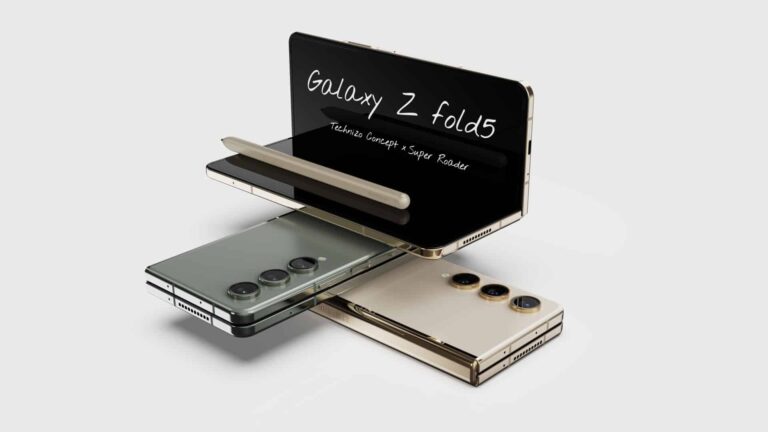
With less than a month to go before its next Galaxy Unpacked event, Samsung is busy gathering necessary regulatory certifications for its new products. The company has recently picked up multiple regulatory approvals for the Galaxy Z Fold 5, Galaxy Z Flip 5, and the Galaxy Tab S9 series. The two foldables have been certified by the FCC in the US, while the Fold model has also received the NBTC certification in Thailand. The new tablets have also popped up on the NBTC certification website.
The FCC has certified both the US and global versions of the Galaxy Z Flip 5, with model numbers SM-F731U and SM-F731B, respectively. But as of this writing, only the global version of the Galaxy Z Fold 5 has surfaced on the FCC website. It carries the model number SM-F946B. As usual, these certifications don’t reveal much about the devices. Some standard stuff like support for mmWave 5G, Wi-Fi 6E, NFC, 45W wired charging, wireless charging, and reverse wireless charging. Nothing surprising or unexpected here.
It’s a similar story with the Galaxy Z Fold 5’s NBTC certification as well. It doesn’t tell us any specifics about the device apart from its model number SM-F946B/DS (via). The “DS” at the end confirms dual-SIM support in the country. FCC documents also mentioned dual-SIM support for the phone in other markets. The listing on the Thai regulatory body’s website also goes on to name the product, i.e., Galaxy Z Fold 5. Likewise, it names the Galaxy Tab S9 (SM-X716B) and Galaxy Tab S9 Ultra (SM-X916) as well.
Samsung will launch these Galaxy devices in late July
As of this writing, the NBTC doesn’t appear to have certified the Galaxy Tab S9+ and the Galaxy Z Flip 5. But those should follow soon. Samsung would be looking to wrap up the certification work as quickly as possible. It has already obtained FCC certifications for the Galaxy Tab S9 series and the Galaxy Watch 6 series. Some of these products have received regulatory approvals in other markets as well. The Korean firm will unveil them all during its Galaxy Unpacked event at the end of July. On July 27, to be precise.
This year’s Galaxy Unpacked is happening in Samsung’s home country South Korea, as opposed to the US location of the previous major events. Although not officially confirmed, we should at least get two foldables, three tablets, and two smartwatches from the company this time. A new pair of TWS earbuds doesn’t seem to be coming next month. Stay tuned for more information.
Overseas scrutiny of the App Store and Google Play Store has focused on the monopoly that Apple and Google have over apps downloaded on iOS and Android, respectively. Apple cites security as the reason why it doesn’t allow the sideloading of apps on the App Store. While Google does allow Android users to sideload apps, the huge majority of installs come from the Play Store. Sideloading is the practice of downloading an app from a third-party app storefront.
While Apple says that it must look at every app offered to iPhone users to make sure that it doesn’t contain malware, EU lawmakers feel that Apple wants this total control in order to take a cut of up to 30% of in-app purchases which has become known as the “Apple Tax.” Google also takes up to 30% of in-app purchases made on the Play Store.
Per The Verge, to release Apple and Google’s grip on smartphone app distribution, Facebook’s parent company Meta is going to run a pilot program in the EU that will allow Facebook subscribers to download apps directly from ads on the platform. No longer will iPhone users have to install an app from the App Store and Android users will have another option when downloading apps. At first, Facebook will not take a cut of the value of an in-app purchase like Apple and Google do. App developers will be able to use whatever billing system they want.
Facebook users will be able to install apps on iPhone and Android devices thanks to a pilot program in the EU
Currently, Facebook users who press on an app being advertised on the social media site are sent to the App Store or Play Store to install the app. Once the program gets underway with some Android apps later this year, and iOS next year, tapping on such an ad will allow an Android or iOS user to install the app directly from Facebook. Apple will be forced to allow sideloading on the iPhone in the EU next spring when the Digital Markets ACT (DMA) is expected to go into effect.
Meta told The Verge that it has “always been interested in helping developers distribute their apps, and new options would add more competition in this space.” And this is how Facebook gets its feet in the water when it comes to app distribution. Let’s hope that this doesn’t end up like the fable about the fox guarding the hen house. Remember though, this pilot program is taking place only in the EU.
Microsoft has been on a perpetual buying spree, as the company is still fighting to buy Activision-Blizzard. Amid this purchase, rumors spread that it was going to swoop up SEGA. However, according to a new report from Bloomberg (via Engadget), Microsoft is not buying SEGA.
News like this might surprise some folks. We’ve known about SEGA’s close partnership with Microsoft for several years. The two companies have been close with several games making Xbox consoles their home. We can’t deny that having a partner as powerful as Microsoft is a good call.
With such a close partnership, we all wondered if SEGA and Microsoft were going to take their relationship to the next level. Given Microsoft’s track record, that’s not an absurd assumption.
However, Microsoft is not buying SEGA
Instead of saddling up with Microsoft, SEGA has decided to maintain its independence. Shuji Utsumi, the company’s COO, spoke to Bloomberg. He confirmed that the company isn’t open to being acquired. This is despite the rumors that Microsoft had SEGA in its sights for future purchases.
The company is, in fact, looking to keep its independence. In all honesty, we feel that this decision was inspired by the success of Sonic Frontiers. There was a lot of hype leading up to this game’s release (rightfully so, as it’s A LOT OF FUN), and it was able to sell very well. If the game has bombed, we’re certain that the company would be singing a different tune.
Speaking as a SEGA fan
Honestly, it’s good to see SEGA sticking it out. We’re seeing a lot of companies being bought out by larger companies, but SEGA is one of the last OG gaming empires. Sure, it’s definitely fallen from grace, but it was one of the dominant forces in video games in the 90s with its great 1st-party games and amazing systems.
It had an identity that was purely “SEGA”, and that was a refreshing change of pace from Nintendo. While the company’s not as big as it was back then, we’re still rooting for the company to pull itself out of its slump.
Honestly, with titles like Sonic Frontiers (again, really fun!), and the upcoming Sonic Superstars, it looks like the company is still going strong. Also, we can’t forget about Yakuza, Persona, Bayonetta, and other franchises under SEGA’s belt.
Akira ransomware appeared in 2017 when it encrypted video folders without leaving any ransom notes. The file encrypted by Akira ransomware has an extension of .akira.
Researchers have been working on decrypting the files affected by the ransomware and finally got a breakthrough.
Researchers at Avast have found a way to decrypt the files affected by the Akira ransomware. Avast has also released the 64-bit as well as 32-bit versions of the decryptor tool for users.
Technical Analysis of Akira Ransomware
The ransomware has affected education, finance, real estate, and many other organizations.
Akira ransomware is specifically built for Windows Platforms as it uses 64-bit Windows binary for encrypting the files. It is written in C++ and uses a lot of C++ libraries.
Akira uses symmetric encryption, which has an encryption key generated by the CryptGenRandom() function by Windows CryptAPI, and uses ChaCha 2008 for encrypting the files on the affected systems.
However, the ransomware has also affected Linux operating systems and uses the Crypto++ library as a replacement for Windows CryptAPI.
By default, the ransomware excludes certain folders and file extensions from encrypting, which includes,
Files
.exe
.dll
.lnk
.sys
.msi
Akira_readme.txt
Folders
winnt (default installation folder of Windows 2000)
temp
thumb
$Recycle.bin
$RECYCLE.BIN
System Volume Information
Boot
Windows
Trend Micro
Akira Ransomware Vs Conti Ransomware
There seem to be a lot of similarities between the Conti V2 Ransomware and the Akira ransomware. This can be due to the authors’ inspiration from the Conti.
The list of excluded files and folders, the structure of the file tail, the use of ChaCha 2008, and the use of CryptGenRandom and CryptEncrypt appears to be much similar to Conti Ransomware.
Avast is currently working on the decryptor tool for its Linux Version.
Just like any other ransomware, the ransom notes provide two tor websites: the payment site and the list of victims site (shows the list of Akira ransomware victims).
Avast has provided a complete report and instructions on how to use this tool. Users have to download the decryptor tool (32-bit or 64-bit) from the Avast website and run it as an administrator, which will fire up the Wizard for decryption.
Users must submit two identical files, one of which must be an original file and the other the same file affected by Akira ransomware with the extension (.akira).
The tool takes some time to get the password for decrypting the files. In the end, the tool also asks for backing up the decrypted files using the wizard.
The ransomware was using a symmetric RSA-4096 cipher encryption key that was appended at the end of the file while the public key was hardcoded inside the ransomware binary.
“AI-based email security measures Protect your business From Email Threats!” – Request a Free Demo.
A couple of days back, we got our first look at Samsung’s upcoming Fan Edition phone Galaxy S23 FE. The device’s design may have already put off a few prospective buyers, and its reported charging speed likely won’t help change their minds. The new FE phone won’t charge faster than 25W. Worse yet, the retail box will come sans the charging adapter, a practice that Samsung has expanded to budget phones as well.
The Galaxy S23 FE recently popped up on a Chinese certification website (3C). The listing doesn’t explicitly name the phone, but the mentioned model number SM-S7110 is long associated with the upcoming FE phone. The certification reveals that the device boasts 5G cellular connectivity and has a maximum power input rating of 9V and 2.77A (via). In simpler terms, that’s 25W of maximum charging speed. The documents also add that the phone is sold without the power adapter.
We never expected Samsung to ship the Galaxy S23 FE with a charger, nor did we hope for faster charging speed. The Korean firm has shown no interest in the numbers game as far as the charging speed is concerned (we’ll talk about cameras later).
But, an upgrade in this department could make a few people look past its design. If the leaked renders are accurate, the Galaxy S23 FE won’t look any better than the Galaxy A54 5G. No phone in this price segment should feature such thick and uneven bezels.
Galaxy S23 FE rumored specs
Rumors about the Galaxy S23 FE have been coming for a while now. Samsung is expected to equip the phone with a 6.4-inch Super AMOLED display with a 120Hz refresh rate. The Exynos 2200 will reportedly power the phone globally, paired with the AMD-powered Xclipse 920 GPU. That’s the same CPU and GPU pair used on the Galaxy S22 series last year. The device will get 8GB of LPDDR5 RAM and 256GB of UFS 3.1 storage.
Coming to cameras, the Galaxy S23 FE won’t give you the bonkers 200MP shooter found on the Galaxy S23 Ultra. Instead, Samsung will offer the 50MP sensor that the base Galaxy S23 and Galaxy S23+ use. We are expecting a 12MP ultrawide camera, an 8MP 3x zoom lens, and a 12MP selfie camera to go with the primary shooter. Other highlights include a 4,500 mAh battery, an under-display fingerprint scanner, Wi-Fi 6, and NFC. Stay tuned for more details about the Galaxy S23 FE, including its price and launch date.
Innovation is essential for business success. Approximately 75% of global companies are highly likely to adopt big data analytics, cloud computing, e-commerce and digital trade, and AI technologies by 2027 – and that’s justified. To stay ahead of the competition, companies must continually explore new ideas and embrace disruptive technologies.
Design, a powerful but often overlooked tool, can drive innovation. It goes beyond aesthetics, encompassing strategic thinking, problem-solving, and user-centric approaches. In this article, we will explore six impactful ways in which design fosters innovation, helping businesses grow and stand out from the competition.
Human-centered design. Placing the user at the core of innovation efforts leads to higher customer satisfaction and improved market positioning.
Design thinking. Encouraging interdisciplinary collaboration and creative problem-solving generates breakthrough ideas and solutions.
Minimalism. Streamlining experiences enhances user satisfaction, improves efficiency, and fosters customer loyalty.
Prototyping and iteration. Rapid experimentation and iteration based on user feedback reduce risks and drive incremental improvements.
Design-led culture. Promoting collaboration and empathy across teams cultivates an environment conducive to innovation.
Design strategy. Aligning business objectives with user needs enables companies to differentiate themselves and deliver superior experiences.
Let’s zoom in to understand them in detail and measure the impact they are having on businesses.
Design places the end user at the heart of innovation efforts, employing human-centered thinking. By empathizing with users, identifying their problems, brainstorming potential solutions, prototyping, and continuously testing and refining ideas based on user feedback, businesses gain valuable insights into customer needs and desires.
The impact. Embracing human-centered design principles enables companies to create products and services that truly resonate with their target audience. This approach ensures that innovation efforts focus on addressing real pain points, resulting in higher customer satisfaction, increased loyalty, and improved market positioning.
Design Thinking: Empowering Creative Problem Solving
Design thinking, a problem-solving methodology, combines analytical and intuitive thinking. It fosters interdisciplinary collaboration and empowers businesses to tackle complex challenges with an open mind. The design thinking process typically involves five stages: empathize, define, ideate, prototype, and test.
The impact. Design thinking nurtures a culture of innovation by encouraging teams to think creatively and approach problems from diverse perspectives. It promotes risk-taking, experimentation, and rapid iteration, leading to breakthrough ideas and solutions that might otherwise be overlooked.
Minimalism: Streamlining Experiences and Enhancing Efficiency
In a world that craves simplicity, minimalist design principles focus on eliminating unnecessary complexity and clutter, enabling businesses to streamline their products and services. By reducing cognitive load and enhancing usability, minimalist design greatly improves the user experience.
The impact. Minimalist design not only enhances user satisfaction but also boosts efficiency within organizations. By removing unnecessary features or steps, businesses optimize their processes, reduce costs, and improve overall productivity. Additionally, streamlined experiences foster increased customer engagement and loyalty.
Prototyping and Iteration: Fueling Rapid Experimentation
Design empowers businesses to prototype and iterate on ideas quickly. Prototyping involves creating simplified versions of products or services for testing and gathering feedback, while iteration entails refining and improving upon these prototypes based on user insights.
The impact. Prototyping and iteration provide valuable learning opportunities from failures and drive incremental improvements. Adopting an iterative design approach allows companies to reduce risks associated with launching new products or services. This agile mindset enables rapid experimentation, ensuring that innovation efforts are data-driven and influenced by real user feedback.
Design-Led Culture: Inspiring Collaboration and Creativity
Establishing a design-led culture is crucial for fostering innovation within organizations. When design is embraced at all levels, it becomes a mindset that encourages collaboration, empathy, and creativity across departments and teams.
The impact. A design-led culture promotes cross-functional collaboration, breaking down silos and facilitating the exchange of ideas. This collaborative environment fuels innovation, as diverse perspectives converge to solve complex challenges. Moreover, a culture that values design attracts and retains top talent, offering space for creativity and personal growth.
Design Strategy: Aligning Business Objectives with User Needs
Design strategy involves aligning business objectives with user needs and aspirations. It goes beyond individual projects and encompasses a holistic approach to design across the entire organization. A well-defined design strategy guides decision-making and ensures that design efforts are focused on creating value for both the business and its customers.
The impact. By adopting a comprehensive design strategy, businesses can differentiate themselves in the market by delivering superior experiences. It enables companies to identify new opportunities, optimize existing products or services, and drive innovation at a strategic level. Design strategy also fosters agility and adaptability, allowing businesses to respond effectively to evolving market demands.
Final Thoughts
Design plays a pivotal role in driving digital business innovation. By embracing human-centered design, design thinking, minimalist principles, prototyping and iteration, a design-led culture, and a comprehensive design strategy, companies can unlock their innovation potential.
Design empowers businesses to create products and services that truly meet customer needs. It streamlines process efficiency, fuels rapid experimentation, inspires collaboration and creativity, and aligns business objectives with user aspirations. By leveraging design as a strategic tool, businesses can foster innovation, achieve growth, and establish themselves as industry leaders.
The cybersecurity researchers at Morphisec Labs have been tracking the GuLoader campaign since April of this year and found that it has been actively targeting the law firms that are based in the US along with several other sectors like:-
Healthcare
Investment firms
Targeted sectors (Source – Morphisec)
For more than three years, GuLoader (aka ‘Cloudeye’) has been active, still keeps evolving, and employs diverse anti-analysis methods, posing challenges to security analysts to analyze it.
GuLoader, infamous for distributing multiple malware families, such as:-
NetWire
Lokibot
Xloader
Remcos
The GuLoader downloads the payload by using trusted platforms like:-
Google Drive
OneDrive
GCloud
In this campaign, the operators of GuLoader used ‘github.io’ as the download source to deliver the Remcos RAT (remote access trojan).
GuLoader MalwareInfection Chain
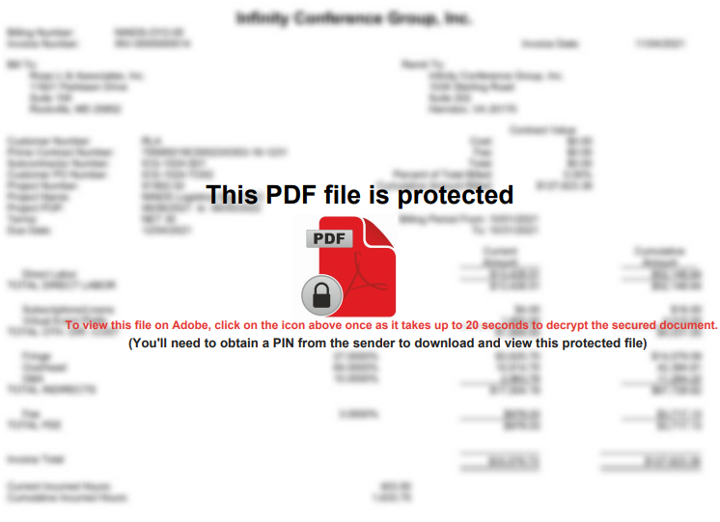
Encrypted PDF attachment comes with a PIN provided in the email for decryption, luring the victim to click on an embedded icon and initiate the process.
Encrypted PDF (Source – Morphisec)
Once the icon is clicked, it redirects users to the final URL through Google’s popular adclick service, DoubleClick, extensively utilized in online ads for tracking and gathering statistics and metadata on user clicks.
Download page for GuLoader VBScript secured with password (Source – Morphisec)
The threat actors likely use it to assess their malicious campaign’s effectiveness. The user is prompted to enter the previously sent PIN in the redirected URL, and upon providing the PIN, a GuLoader VBScript is downloaded to proceed further.
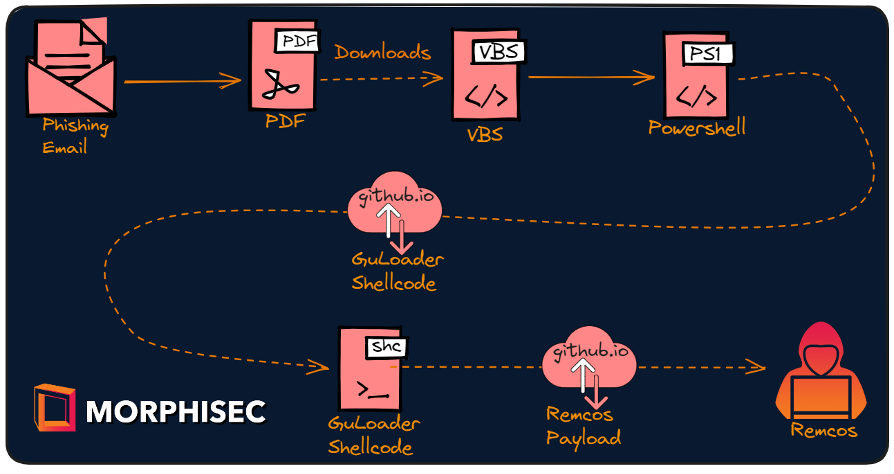
The GuLoader VBScript contains obfuscation, random comments, and redundant lines omitted. Here, the resulting code decodes and a Powershell script is executed.
Infection chain (Source – Morphisec)
Using the 32-bit version of Powershell, the Powershell script decodes and runs a 2nd stage Powershell script. This 2nd stage script contains XOR-encoded strings, which are responsible for downloading the GuLoader shellcode due to the presence of logical code.
Here the GuLoader shellcode is split into two parts which are fetched from ‘github.io’ and here they are mentioned below:-
Decrypting shellcode
Encrypted shellcode
Later it’s invoked with encrypted shellcode and ‘NtProtectVirtualMemory’ as arguments by passing it as a callback function to ‘CallWindowProcA’. The core role of the shellcode is to inject the final payload into ‘ieinstal.exe’ process by downloading and decrypting it.
Moreover, it also fetches and opens a malicious PDF that triggers and runs the Remcos RAT in the background and presents a “404 Page not found” error.
Page not found error (Source – Morphisec)
In phishing campaigns, GuLoader frequently emerges as a malware loader. Among the most advanced downloaders, it fetches payloads from cloud hosting platforms, and surprisingly, this campaign used a regular URL.
“AI-based email security measures Protect your business From Email Threats!” – Request a Free Demo.
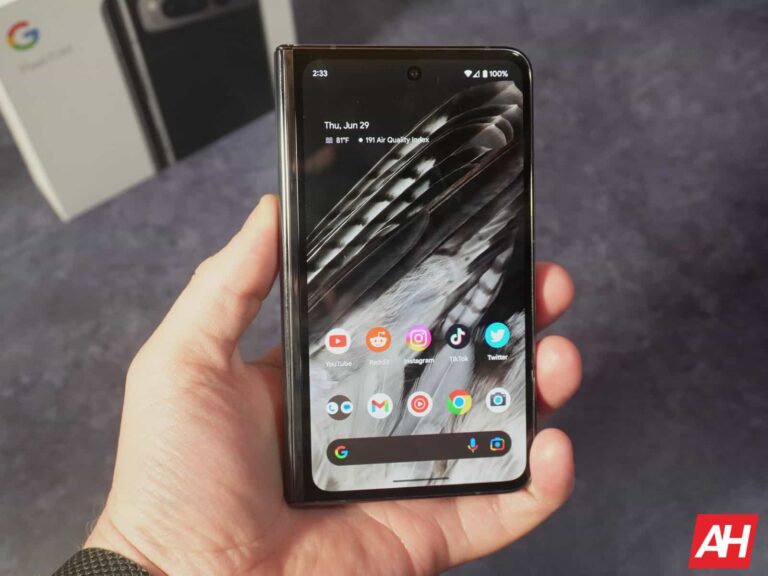
We were a bit late in getting our Google Pixel Fold review unit, which happens, but this allows me to be able to actually talk about my experience while I’m working on reviewing it. Whereas those that got it earlier, were under embargo and could not.
As of writing this, I’ve had the Google Pixel Fold for about 24 hours (give or take a couple of hours) and I absolutely love this phone.
Pixel has always been my go-to phone, since basically the Pixel 2 XL. So it’s not a big surprise that I really like this phone, but foldables, have not been my cup of tea so far. However, the Pixel Fold might be the foldable to buy.
Pixel Fold fixes two of my biggest complaints with the Galaxy Z Fold 4
While the Motorola Razr+ fixed my complaints with the Galaxy Z Flip 4, the Pixel Fold fixes two of my biggest complaints with the Galaxy Z Fold 4. My two big problems were the displays. The external display is tall and skinny. It’s easy to type with one hand, but apps are so cramped in that space. On the main display, it’s almost a square. With a resolution ox 1812 x 2176, it’s not quite 1:1 but pretty close. Which means that if you use two apps side-by-side, they are going to be tall and skinny, like on the cover display. And then if you use a single app, most apps are going to be stretched out because it’s not a phone-sized display and more like a tablet display.
That’s why I never really used the Galaxy Z Fold for much longer than my review period. Now, the Pixel Fold does fix that. On the Pixel Fold, the front display is wider. We’re talking about a 17.4:9 aspect ratio display, which is actually pretty odd for a smartphone, to begin with. And I wasn’t sure how I’d like that wider display, but it’s actually really good.
The wider front display also means that the internal display is wider. And that fixes, for the most part, my other problem with the Galaxy Z Fold 4. You can use two apps side-by-side in split screen on the Pixel Fold, and have a similar experience to what you’d get on a regular candy-bar phone. Now, it is still fairly close to a square, coming in with a 6:5 aspect ratio. Which makes multiple apps great to use at the same time on the Pixel Fold.
I rarely open the Pixel Fold
Because the Pixel Fold’s main display is slightly wider than most smartphones at 17.4:9, I find myself rarely actually opening the phone to do anything. Basically, I use it closed most of the time, and then open it when I need more space. Say for instance, I’m searching for something on Google Maps, I’ll then open up the Pixel Fold and use that full 7.6-inch display for Google Maps. Or when I want to use two apps at the same time.
For the usual Twitter browsing, Instagram stalking, and watching TikTok’s, you really don’t need to use the main display. As the cover display works really well for all of that.
Now, that does mean that battery life isn’t going to be comparable to the Galaxy Z Fold 4 (and soon 5), since you need to open it to really use it for most things. The Pixel Fold, it’s the opposite. So it’s powering that front display more than the main display.
However, it’s still too early to talk about battery life, since I have had this for only 24 hours. And the Pixel Fold is still learning how I use the phone (and so am I!). But so far it actually looks pretty decent and similar to the Galaxy Z Fold 4 from last year.
Possibly the best camera on a foldable?
One of the areas that an OEM is able to stand out from the many competitors, is with the camera. Now while Google did follow every other OEM’s footsteps in putting lesser cameras in the Pixel Fold, it does still have the Pixel Computational Photography behind it. I’ve taken a few photos with the Pixel Fold so far, and well it’s basically what I expected from a Pixel phone. It’s not quite on the level of the Pixel 7 Pro, but a bit better than the Pixel 7a.
Of course, we’ll have way more in our full review in about a week or so. Make sure you stay tuned for that.
Lighter but also heavier
The Pixel Fold is technically heavier than the Galaxy Z Fold 4, but it feels lighter. The Galaxy Z Fold 4 weighs in at about 263g, while the Pixel Fold comes in at 283g. That’s roughly 8% heavier than Samsung’s competitor, but somehow the Pixel Fold feels lighter.
The only way I can explain this is because the Galaxy Z Fold 4 has that big and thick hinge. So the weight isn’t as spread out as the Pixel Fold’s weight is. The Pixel Fold is larger, so it makes sense that it is heavier. But the real thing here is that the Pixel Fold isn’t a nuissance to have in your pocket versus the Galaxy Z Fold 4.
I keep comparing to the Galaxy Z Fold 4, because that’s the only other book-style foldable that I’ve used. The options from OPPO, Huawei, Honor and others never came to the US, so I never spent time with them.
Full Review coming soon
It’s too soon to answer a lot of questions about the Pixel Fold, nor write a full review yet. That will come in due time. Likely end of next week. So if you’re interested in hearing more about the Pixel Fold, be sure to stay tuned.
Midway through 2023, mass layoffs in the tech industry haven’t stopped. The latest to join the long list of companies laying off employees is Niantic. The San Francisco-based software firm, which is best known for the popular augmented reality game Pokémon Go, has announced that it would let go of 230 employees to reduce operational costs amid an economic downturn. The company laid off around 90 employees in June 2022.
Like last year, Niantic’s latest mass layoff will be accompanied by the cancelation of some projects. The company is pulling the plug on the basketball game NBA All-World just about five months after its release on app stores. It has also stopped the production of the Marvel-based game Marvel: World of Heroes. Niantic canceled four projects last year, including a Transformers game called Heavy Metal.
These aren’t the only cost-cutting measures from Niantic, though. With fewer employees and fewer projects to work on, the company will also shut down its Los Angeles studio. Going forward, it plans to focus on mobile game investments and prioritize first-party games. “We also want to increase our focus on building for the emerging class of MR devices and future AR glasses,” CEO John Hanke said in an email to employees on Thursday. The company later posted the email publicly on its website.
Niantic says its expenses grew faster than revenue post-COVID
An economic slowdown may be forcing these mass layoffs in the tech sector, but the companies led themselves to such situations because of an unprecedented surge during the pandemic era. Amazon, Meta, and many others went on a hiring spree a few years back as the e-commerce and gaming industries grew exponentially. Niantic did the same.
“We grew our headcount and related expenses in order to pursue growth more aggressively,” said Hanke. “Post Covid, our revenue returned to pre-Covid levels, and new projects in games and platforms have not delivered revenues commensurate with those investments.” As a result, “we have allowed our expenses to grow faster than revenue.” The latest layoffs and project cancelations will bring things back to level.
Hanke added that Pokémon Go remains the company’s top priority. Niantic wants to make it “a forever game.” The Niantic CEO is also confident about the prospects for Pikmin Bloom, Peridot, and Monster Hunter Now but admits that there’s a lot of work to do. The firm is committed to building new AR experiences for the gaming industry.
The sudden surge in the activity of 8base ransomware in June 2023 shows it is a well-established organization to execute attacks that alarms security professionals and industries.
The group utilizes encryption paired with “name-and-shame” techniques to compel their victims to pay their ransoms in Bitcoin.
They target small business services, manufacturing, and construction sectors and append the “.8base” extension on encrypted files.
The type of ransomware used by this group remains unknown, but the technique and ransom note used resembles other ransom groups.
Heavy-Hitting 8Base Ransomware
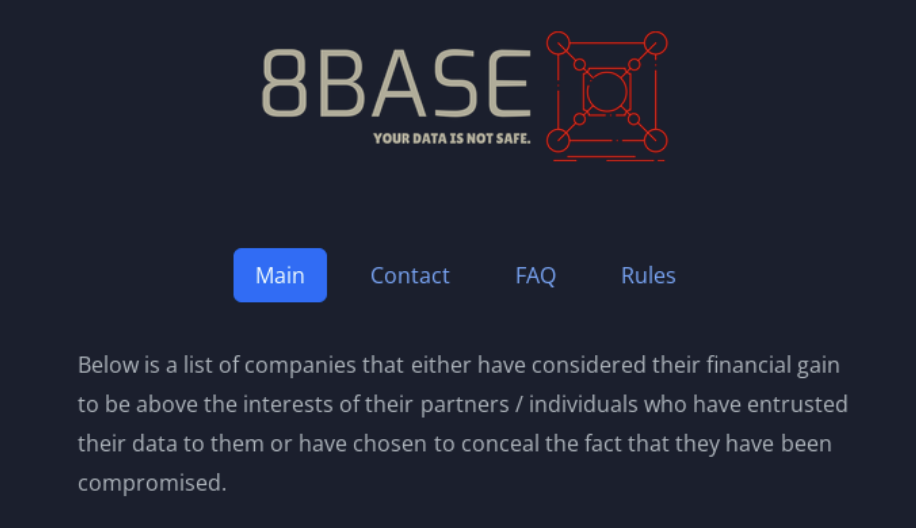
8base ransomware group, climbing themselves as “honest and simple pentester” has been active since March 2022.
Victims can uncover information on the attack by visiting a page dedicated to victims and its downloads.
Figure : Screenshot of 8Base Ransom Group Leak Site
It includes a set of rules for negotiations, as well as several methods to contact 8Base.
8Base ransomware group became one of the top two performing ransomware groups, right behind Lockbit.
Analysis conducted by VMware Carbon Black’s TAU and MDR-POC teams revealed some of its statistics similar to RansomHouse and Phobos.
Similarities Between 8Base and Ransomhouse
While analyzed through Doc2Vec,they have found both groups use similar ransom notes.
Doc2Vec is an unsupervised machine-learning algorithm that converts documents to vectors and can be used to identify similarities in documents.
Secondly,The language used in both the groups’ leak sites are nearly identical.
Additionally,The verbiage is copied word for word from RansomHouse’s welcome page to 8 Base’s welcome page.
Ransom notes
Furthermore, their Terms of Service pages and FAQ pages are also similar.
The major difference between these two groups is that RansomHouse advertises its partnerships and is openly recruiting for partnerships, whereas 8Base is not.
The second major difference between the two threat actor groups is their leak pages.
RansomHouse is known for using a wide variety of ransomware that is available on dark markets and doesn’t have its own signature ransomware as a basis for comparison.
Similarities between 8Base and Phobos Ransomware
When comparing Phobos with 8base ransomware, both appends the encrypted files with the”.8base” extension.
Another similarity between Phobos and the 8Base sample revealed that 8Base was using Phobos ransomware version 2.9.1 with SmokeLoader for initial obfuscation on ingress, unpacking, and loading of the ransomware.
Although their ransom notes were similar, key differences included Jabber instructions and “phobos” in the top and bottom corners of the Phobos ransomware.
While 8Base has “cartilage” in the top corner, a purple background, and no Jabber instructions.
The format of the entire appended portion of 8base was the same as Phobos, which included an ID section, an email address, and then the file extension.
Additional analysis shows the 8Base sample had been downloaded from the domain admlogs25[.]xyz – which appears to be associated with SystemBC, a proxy and remote administration tool.
SystemBC has been used by other ransomware groups as a way to encrypt and conceal the destination of the attackers’ Command and Control traffic.
From the analysis,it is clear that the 8base ransom group adopts other ransom group codes and TTP’s standards to establish their group,but it remains uncertain whether it stems from Phobos or RansomHouse.
“AI-based email security measures Protect your business From Email Threats!” – Request a Free Demo.



.png
)