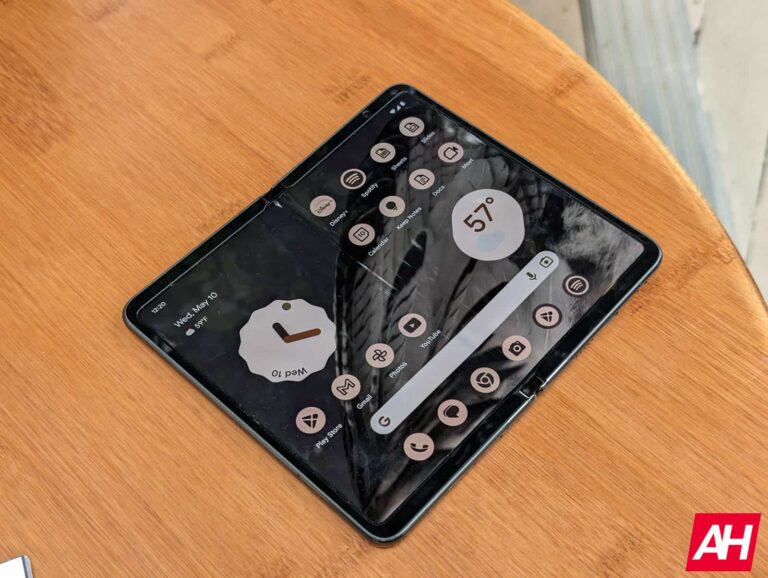
Some Pixel Fold owners are already reporting broken screens on the device, and the phone has only been out for few days for those that got the earliest pre-orders.
Users on Reddit who have received their fold devices this week are posting about issues with the display. And while the phone hasn’t technically fully launched, this isn’t a good thing for potential buyers. The Pixel Fold is still available for pre-order on the Google Store and current ship dates are set as early as August 2. That’s if you go for the 256GB Obsidian model. Dates are even further out for the other two variants.
The point being that the phone still hasn’t technically launched in full. And won’t have until the pre-order button changes to “add to cart.” Either way, early adopters of the Pixel Fold dealing with broken screens is a bad look. Especially after just a few days.
Broken screens aren’t popping up on all Pixel Fold devices
It’s not clear how widespread the issue is. CNET reports having two devices in for review and neither of those have a problem with the display. We also have one Pixel Fold in for review and so far there haven’t been any issues. Although it’s only been a day so I suppose, there’s still time for something to pop up? Ars Technica’s Ron Amadeo notes he had issues with his device after just four days.
Over on Reddit, one user who goes by u/floatingOnTheFourth reports a broken inner screen after just one day. The issue also happened to another user who mentions in the comments that it looks exactly like the problem they had with their phone. According to both users, cracks are starting from the middle of the display where the hinge is and then spreading outward horizontally.
It’s a shame to see these kinds of things happen to such an expensive device. But it wouldn’t be the first time this has happened with a foldable. And it might serve as caution to others thinking about buying the phone, to potentially wait and see how things play out with these issues before spending the money. Or simply wait for the next Pixel Fold.
Google is not shy when it comes to axing its projects, and the AR glasses project is going down. This was popularly known as Project Iris and it got lots of attention after it went public. Google was already shaping its future in the world of augmented reality with this project, and fans couldn’t wait to try the result of this project out.
Well if you are part of those fans with high hopes for Project Iris, then you’d need to cut your expectations. Just like a ton of other Google projects, this particular one is now getting a taste of the company’s axe. This is just another promising project that our friendly neighborhood Google is bringing to a sad end.
But, killing Project Iris doesn’t mean that the company is also killing its dreams and aspirations of the augmented reality industry. Google might be late to catch up with the competition that is already evolving, but it still has plans in motion. The reason behind the sad end of this project might just be a result of leadership and not Google losing interest in augmented reality.
The possible future for the Google AR glasses project after the company brings its progress to a halt
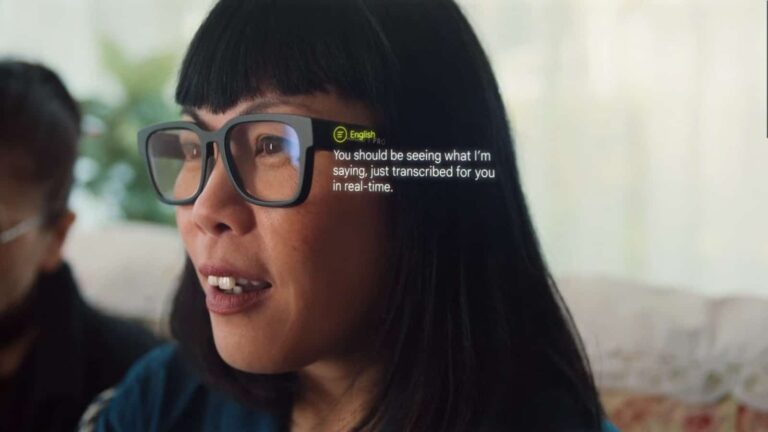
A few years ago, Google demoed its AR glasses in use to the world. This demo showed how people will be able to put this pair of glasses to use while communicating with someone of another language. Of major concern was the ability of this pair of glasses to transcribe what the user is hearing into written form.
Users with hearing impairments or language barriers will be able to benefit from the Google AR glasses. But, sadly, after that heartfelt demo, this product might not be seeing the light in the coming years. According to sources, this is a result of a series of changes in the leadership of the team in charge of making this product a reality.
Google is now bringing the project to a halt and shifting its attention to another aspect of augmented reality. This shift will also help it to better build its arsenal and be more prepared for its comeback to the augmented reality industry. You might be wondering what area Google is now shifting its attention to already.
For now, Google is working hard to build what it calls the Android XR platform. This will make its way to Samsung AR headsets once ready, hence introducing the Android community to the world of augmented reality. This will also serve as a stepping stone for Google in the years to come as it returns to develop its own AR glasses for usage.
If you have been following Google for the past few years, you’d agree that this is not a new thing to it. Evidence of this lies with products like the Pixel Fold and Pixel Tablet, which have finally made their way to the public. So in a few years, netizens might welcome Google AR glasses that run on the Android XR platform.
#1 in Endpoint Protection, #1 ROI for Endpoint Management, #1 for EDR implementation.
Navigating the world of endpoint security is challenging, with numerous vendors stoking “Fear, Uncertainty, and Doubt” (FUD) and making bold claims that are difficult to verify. In times like these, the honest opinions of real users are invaluable for busy IT teams.
Enter G2, an industry-leading peer-to-peer review site. Each quarter, G2 releases reports highlighting the products with the highest customer satisfaction and strongest market presence.
In the G2 Summer 2023 Grid Reports, Malwarebytes earned 19 “Leader” badges across five endpoint security categories (Antivirus, EDR, Endpoint Management, Endpoint protection platforms, Endpoint protection suites). We also received awards for the #1 spot in Endpoint Protection and the Easiest Setup for EDR, among many others.
Let’s take a closer look at how organizations evaluated solutions and what they said about using Malwarebytes.
#1 Endpoint Protection: Highest Rated for Results, Relationship, and More
Malwarebytes Endpoint Protection (EP), the essential foundation of our EDR and MDR offerings, won dozens of awards based on receiving the highest customer satisfaction score across a range of areas, including “Best Results,” “Best Support,” “Most Implementable,” and more.
Dashboard for Nebula, the cloud-hosted security platform for EP and EDR
For example, Malwarebytes EP won the “Best Results” badge (highest overall Results score) by having the highest combination of estimated ROI, meets requirements, and likelihood to recommend scores. What some of our customers had to say:
“Malwarebytes is easy to install and configure. It integrates with Windows 10 and runs silently in the background. Infection rate of Malware has dropped dramatically. If I run across a machine that has Malware, installing it cleans it up almost 100% of the time.”
“I consider myself faithful to this software because Malwarebytes has taken me out of problems that other antivirus programs have not been able to solve. It is not a very heavy software and can run in the background without even noticing it thanks to the updates.”
Customers also praised Malwarebytes for its friendly staff and exceptional support, for which we won the “Best Relationship” badge by having the highest combination of “Likely to Recommend,” “Ease of business,” and “Quality of Support” ratings.
Here’s what some of our customers had to say:
“The support team started us off on the right track by getting us up and running in no time. Any questions I had before and after setup were answered quickly and thoroughly.”
Our EDR solution, paired with our Vulnerability and Patch Management (VPM) modules, delivers an impressive return on investment by quickly enhancing your organization’s security posture. Malwarebytes EDR is designed to be both efficient and cost-effective, allowing your team to see the benefits of your investment immediately.
By focusing on ease of use, quick implementation, and powerful security features without requiring an IT security army, Malwarebytes ensures that your organization is maximizing resources and receiving the best ROI in the industry.
Malwarebytes had the best estimated ROI (payback period in months) in the enterprise Endpoint Management category, which evaluate products that help users keep track of devices in a system and ensure their software is secure and up to date.
“The best part about Malwarebytes is the set it and forget it. It has saved us so much time on deployment and remediation that it pays for itself in no time at all.”
“It keeps our working environment much more secure than our previous solution. Much easier to manage in real time. This thing is a money saver and pays for itself.”
Most Implementable EDR: Seamless Setup and User-Friendly Experience
On the Enterprise Implementation Index for Endpoint Detection & Response (EDR) Malwarebytes EDR clutched the #1 spot. With a seamless setup process, your team can spend more time focusing on what matters most: protecting your organization from cyber threats. Here’s how we won:
Malwarebytes EDR has an Implementation Score several points higher than the industry average.
Ease of Setup: Malwarebytes EDR scores several points higher than the industry average in ease of setup.
Average User Adoption: Malwarebytes EDR scores several points higher than the industry average in user adoption rate.
“The Nebula console is one of the most user-friendly interfaces we’ve come across. We can’t recommend it enough.”
“Malwarebytes makes it simple to deploy. Additionally, the user interface has minimal impact on the end-user, so its win-win. Support are happy to help when you do hit the occasional bump and the portal is easy to use and very responsive.”
“If you are purchasing Malwarebytes, then you have made the correct choice. You will quickly see how easy it is to implement, and how great their support is.”
“Easy to use and implement, along with great support and support tools at your disposal, along with courses to help you become more familiar with the inner workings.”
Two options to easily begin deployment with your endpoint users in Nebula
Experience Malwarebytes for Business: Award-winning ROI, user-friendly, and effective threat defense
Malwarebytes provides IT staff with award-winning business solutions, offering unmatched threat protection, a lightning-fast return on investment, and a smooth, speedy implementation.
Try Malwarebytes EDR today and join the ranks of those who have already discovered the amazing results, support, ROI, and more of our exceptional endpoint security solutions.
The Motorola Razr+ is the company’s latest and greatest clamshell foldable. That device is known as the Motorola Razr 40 Ultra outside of the US, by the way. Having said that, we’ve already compared it to a number of clamshell foldables, including the Galaxy Z Flip 4. As we’re waiting for the Flip 5 to launch, let’s compare Motorola’s latest offering with an older device from Samsung. In this article, we’ll compare the Motorola Razr+ vs Samsung Galaxy Z Flip 3.
Some of you may still own the Galaxy Z Flip 3, and could consider upgrading, as we’re almost at a two-year mark since it launched. Well, if you’re thinking of jumping to the Motorola Razr+, this comparison could prove to be useful. We’ll first list their specifications, and will then move to compare their designs, displays, performance, battery life, cameras, and audio performance.
Both the Motorola Razr+ and Galaxy Z Flip 3 are made out of metal and glass. Do note that the Razr+ also comes in a variant with a vegan leather backplate, though. The Motorola Razr+ is a bit taller and wider than the Galaxy Z Flip 3. They’re about the same thickness when unfolded, but when folded, the Razr+ is thinner. Do note that the Motorola Razr+ has a larger main display, so the larger footprint overall is not surprising at all.
The devices are about the same weight, the difference lies in a couple of grams. Both phones have a centered display camera hole on the main display. The bezels around that panel are rather thin on both devices. When we flip them over, however, you’ll notice considerable differences. The Motorola Razr+ has a much larger 3.6-inch display back there, while the Galaxy Z Flip 3 includes a 1.9-inch panel.
Both phones have two cameras on the back, though they feature different orientations. The hinge is well hidden by both phones when they’re unfolded. Both devices are quite slippery in the hand, with the exception of the vegan leather variant of the Motorola Razr+. That one offers a bit more grip. The Motorola Razr+ also offers water-repellent coating, while the Galaxy Z Flip 3 comes with IPX8 certification for water resistance. They both feel like quality phones (in the hand), but the Motorola Razr+ does look more modern, that’s hard to deny.
Motorola Razr+ vs Samsung Galaxy Z Flip 3: Display
The Motorola Razr+ includes a 6.9-inch fullHD+ (2640 x 1080) Foldable LTPO AMOLED display. That panel can project 1 billion colors, and has a 165Hz refresh rate. HDR10+ content is supported here, and we’re looking at 1,400 nits of peak brightness. The second panel on the phone measures 3.6 inches, and offers a resolution of 1056 x 1066. That is an AMOLED panel with a 144Hz refresh rate, and it can project 1 billion colors, while it also has support for HDR10+ content. This panel goes up to 1,100 nits of peak brightness. It is covered by the Gorilla Glass Victus.
Motorola Razr+
There is a 6.7-inch fullHD+ (2640 x 1080) Foldable Dynamic AMOLED 2X display on the Galaxy Z Flip 3. That display has a 120Hz refresh rate, and supports HDR10+ content. It can also get up to 1,200 nits of brightness at its peak. The cover display, on the other hand, is a Super AMOLED panel that measures 1.9 inches. It has a resolution of 260 x 512 pixels. That is a 60Hz display.
The main displays are really good on both smartphones. The one on the Motorola Razr+ does have a higher refresh rate, but it only activates during gaming and media consumption, in some cases. Both main displays have good viewing angles, and are pleasantly vivid, while they also offer deep blacks. The touch response is good on both.
The Motorola Razr+’s cover display does dwarf the one on the Galaxy Z Flip 3, though. Not only is it much larger, but it also offers higher resolution, and a higher refresh rate. On top of all that, you can run any app on that display, which is not possible on the Galaxy Z Flip 3’s cover panel, not even close.
Motorola Razr+ vs Samsung Galaxy Z Flip 3: Performance
There is a Snapdragon 8+ Gen 1 SoC included inside the Motorola Razr+. On the other hand, the Galaxy Z Flip 3 includes the Snapdragon 888 processor, an older chip. The former is a 4nm processor, while the latter is a 5nm one. Both have been Qualcomm’s flagship processors at some point. You will find up to 12GB of LPDDR5 RAM inside the Motorola Razr+, while the Galaxy Z Flip 3 offers 8GB of LPDDR5 RAM. Both phones support UFS 3.1 storage.
So, what’s the performance like? Well, the performance on the Galaxy Z Flip 3 is not bad at all, but the Motorola Razr+ has more to offer in that regard. In comparison, the Motorola Razr+ does feel more fluid during usage, and launches apps a bit quicker. The Galaxy Z Flip 3 still performs well in that regard, however. You can play games on both phones, but if you’re looking to jump on some more graphically-intensive titles, the Motorola Razr+ is a safer bet.
Motorola Razr+ vs Samsung Galaxy Z Flip 3: Battery
A 3,800mAh battery is included inside the Motorola Razr+. On the flip side, the Galaxy Z Flip 3, includes a 3,300mAh battery. The Motorola Razr+ does have a considerably larger battery, but it also has a considerably larger cover display. Does it offer a better battery life, though? Well, yes, it does, at least that was the case for us. The Galaxy Z Flip 3 battery life did improve a bit via updates, but it’s nowhere near what the Motorola Razr+ has to offer.
We’ve been able to get around 7.5-8 hours of screen-on-time with the Motorola Razr+. In the case of the Galaxy Z Flip 3, that was closer to around 4.5-5 hours with somewhat similar usage. The thing is, you’ll be unfolding the Galaxy Z Flip 3 a lot more often, as its outer display is tiny, and it doesn’t allow you to do much. The cover display on the Motorola Razr+ is an entirely different story then. Also, do note that your mileage may vary due to a number of factors. You may be able to get better battery life numbers than we did.
When it comes to charging, the Motorola Razr+ supports 30W wired, and 5W wireless charging. The Galaxy Z Flip 3 comes with support for 15W wired, 10W wireless, and 4.5W reverse wireless charging. The Motorola Razr+ does come with a charger in some markets, but not in the US. The Galaxy Z Flip 3, on the other hand, doesn’t have a charger included in any market.
Motorola Razr+ vs Samsung Galaxy Z Flip 3: Cameras
The Motorola Razr+ has a 12-megapixel main camera, and a 13-megapixel ultrawide unit (108-degree FoV). The Galaxy Z Flip 3 features a 12-megapixel main camera, and a 12-megapixel ultrawide camera (123-degree FoV). Before we get into it, do note that the Galaxy Z Flip 3 is nearly two years old at this point.
Samsung Galaxy Z Flip 3
Having said that, the Galaxy Z Flip 3 didn’t exactly wow us with its camera prowess when it launched. So, one would think it won’t beat the Motorola Razr+, and that is the case. The Motorola Razr+ actually has solid cameras, even though it’s far from being one of the best camera phones. The Galaxy Z Flip 3 does tend to crank up the saturation a bit too much, and in some cases, the photos do look really odd because of it. On top of that, the sharpening can be a bit too aggressive.
The Motorola Razr+ photos could be a bit more vivid, they tend to look a bit muted at times. Still, in comparison to the Galaxy Z Flip 3, they do look better overall. The Motorola Razr+ also does a better job in low light, as it balanced images a bit better, and it has a better handle on street lights and neon signs. The Galaxy Z Flip 3 does have a noticeably wider FoV on the ultrawide camera, but the performance is not up to par with the main shooter.
Audio
You will find a set of stereo speakers on both smartphones. In fact, the loudness those speakers provide are quite similar. The quality of the sound is also not that different, to be quite honest. Both are good enough.
What you will not find on either phone is an audio jack. You will be forced to use Type-C ports for wired audio connections. In case you decide to go wireless, the Motorola Razr+ supports Bluetooth 5.3, while the Galaxy Z Flip 3 offers Bluetooth 5.1 support.
If you love recording videos as you go about your daily activities, the new Insta360 GO 3 might just catch your fancy. This tiny device is made to satisfy the need to record videos in a whole new way. Instead of holding your smartphone or digital camera up and recording, Insta360 is introducing you to a new style of things.
With this new product from the company, they are taking things a step further by being a bit more innovative. Insta360 simply had a look at their previous action camera and thought of a way to make it even better. The product of this thinking process is the new Insta360 GO 3, and it is already available for purchase.
Users of this new product can record high-quality hands-free videos from a tiny, lightweight device. The design of the camera unit is quite similar to the previous model, but it comes with a few improvements. Here is everything you need to know about this new action camera from Insta360 and how much it costs.
Details on the new Insta360 GO 3 action camera from its specifications to its price
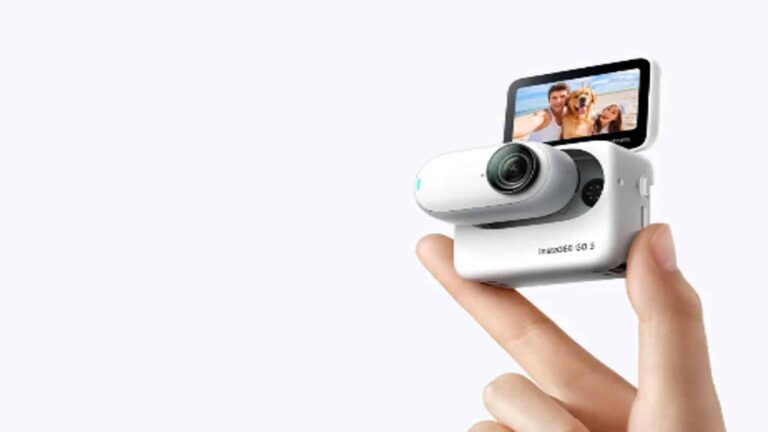
Those familiar with the Insta360 GO 2 will be able to tell how it differs from the new entry at a glance. The new entry, the GO 3, comes with a flip touchscreen casing where the action camera sits. With this Action Pod as the brand calls it, users can record videos longer than they could with the predecessor.
The Action Pod charges the GO 3 and provides remote control and a live preview of what the camera is recording. As for the camera, when away from the Action Pod, it weighs 35g, making it very compact and easy to carry. This camera is capable of recording 2.7K videos in a POV style (just like what the user is seeing).
Insta360 was sure to make this camera durable with a rugged and waterproof design featuring IPX8 and IPX4 ratings. The rear end of the camera unit is magnetic, meaning that it can attach to metal surfaces for a hands-free recording. For this hands-free recording, Insta360 makes a neckband with a metallic plate available for purchase, so users could strap the camera to their chest while recording.
Once users are done recording videos and need to edit them, they can use the Insta360 app AI editing tools. The camera supports FlowState stabilization, 360-degree horizon lock, and voice control. On a single charge, the camera can last users only 45 minutes. But pairing it with the Action Pod brings the time up to 170 minutes.
You can purchase this device in different bundles starting from the standalone kit retailing at $479. In case you need more accessories, you can go for the creator kit, that’d set you back $563. The highest storage capacity is 128GB and there are a ton of custom skins you can pick from for just $14.
Last month, YouTube started testing a new 1080p video quality that’s exclusive to premium subscribers. The company is still testing it out, and it appears to be expanding it. The new premium 1080p quality was discovered on the desktop version of YouTube.
A while back, YouTube tested making 4K resolution a perk for YouTube premium users. The YouTube community did not take kindly to that, and it was quickly axed. Later, the company changed direction and brought a new 1080p resolution.
Free users can still watch content in 1080p and higher. However, the premium quality has a higher bitrate which will make the video appear better than with regular 1080p. This change didn’t gather as much negativity, and the company is moving forward with it.
The premium 1080p quality was spotted on desktop
At this point, this is a limited test. Only a select pool of users can access this feature. Those people could only access the feature on the mobile YouTube app. However, according to Windows Latest’s Mayank Parmar, the test has made its way over to Windows 11.
Parmer saw the 1080p premium quality while using YouTube on a computer. One odd thing is that it prompted him to subscribe to YouTube Premium… he was already subscribed. This might show that it’s still in early testing and prone to bugs.
That being said, there are some screenshots that reveal one thing about this feature. It’s going to be pretty limited. You’ll only see this quality on videos that cap out at 1080p. So, if there’s a video that goes up to 140p and 4K, you won’t see the option.
We’re not sure if that’s going to change at some point. In any case, it’s still in testing at this point, so we’ll need to wait for it to release it to the public for more information.
As of the writing of this article, OpenAI is in the midst of a pretty big legal battle. A firm in California is claiming that OpenAI violated the privacy of its users while training its chatbot ChatGPT. Because of this claim, and how much data the company gathered for its chatbot, this could have some major implications for OpenAI and other AI companies. The question is: Is OpenAI in the wrong in this situation?
What’s the case about?
Once you look at what this case is about, it’s easy to get a grasp of the gravity of the situation. Now, AI is like a human brain; it needs to be trained. It needs to be taught. Companies feed tons of data into their LLMs (Large Language Models) so that they can learn. The more the LLMs know, the more helpful they can be. Google is one of the leading AI companies because it has access to a billion tons worth of data through Google search, Android, etc.
In the case of ChatGPT, it also uses an LLM that needs to be trained; and the company trained it using a ton of data. The issue lies in some of the places where it got this information. The company used a plethora of data from the internet. This includes a bunch of data that people uploaded without giving consent to be used by an AI chatbot.
We’re talking about articles, blog posts, short stories, screenplays, poems, social media posts, etc. The list goes on and on. Since ChatGPT’s knowledge goes so far back, there’s no telling how much of people’s data has been used to train ChatGPT. The lawsuit says that this information was obtained without the consent of the original poster.
This is why OpenAI is in hot water. The sheer scale of information that OpenAI fed into ChatGPT is gigantic. If the court finds that the company is at fault, then it could mean bad news for AI in general.
So, is OpenAI in the wrong?
It’s the wild west out there for AI, as lawmakers are still figuring out how to regulate it. While they’re battling with the legality of AI, the average Joes are dealing with the morality of it. Is OpenAI in the wrong for using so much data to train ChatGPT?
One could argue yes.
A big part of this argument comes from the controversy with AI-generated art. There’s an ongoing protest against this technology because it gives people the ability to instantly create images with nothing but words. Just like with ChatGPT, AI image generators need to be fed images of art from human artists. Many human artists don’t want their art to be used to train these image bots.
Well, think about people having their written content used to train ChatGPT. Just like how image generators can put artists out of business, chatbots can put writers out of business as well. Chatbots can generate articles, short stories, scripts, blog posts, etc. in a matter of seconds. Why hire and pay a human writer when you can just have your content generated? Understandably, human writers who spent years developing their craft would not want their content used to train the very machine that could put them out of their job.
These are people who need to put their work out there to make a living. Journalists post their articles on public websites, writers make blog posts for companies’ public websites, etc. They do this to share their craft with the readers and hopefully inspire other writers. They didn’t sign on to have their work scraped and used to train AI chatbots.
Others can argue no
There are two sides to this argument. When artists, writers, and musicians post their work online, they run the risk of having it used for other purposes. It’s not much different from having your content stolen and plagiarized. Creators put their content out with the understanding that it could be lifted and used for some other purposes.
The conversation gets even more hairy if the content is not protected by copyright. If your content is freely available on the internet for anyone to grab, then OpenAI could be within its right to use it to train ChatGPT.
If OpenAI loses the case, it might be a good thing
Those of you using ChatGPT to write your essays and such are most likely rooting for OpenAI to win the case. However, if the company loses the case, it might not be the worst thing. Sure, OpenAI will face a financial loss, which isn’t great for the company. However, if the court wins this case, it could help push AI regulation forward.
As stated before, it’s the wild west out there for AI regulation. Lawmakers are scrambling to rein in AI development and make sure that it won’t have any negative effects. People’s right to their content has never been more in jeopardy as AI image generators and AI chatbots are popping up all over the place. Content from all over the internet is being swooped up and used for these LLMs, and there’s no way to put a halt to it.
If OpenAI loses this case, then it will bring this issue to the forefront. It will get people talking about how these LLMs are getting their information. People are crying to have AI regulated at this point. It’s causing people to lose their jobs. Independent creators are being 1-upped by talentless folks who generate content and market it. Someone can easily whip up an AI-generated “song” and market it on Spotify. Imagine pumping out an entire album in one day or a week and gathering income from it.
The same thing goes for AI “artists” and AI “authors”. It might already be too late for most people. We’re still just learning the potential of generative AI technology; this includes the potential for bad.
Only time will tell
At this point, we’re still waiting on the results of the case, so it’s hard to tell what’s going to happen. We’ll need to wait and see how this case develops to know the future of the technology. A case like this could definitely have some major ramifications for AI.
Cybersecurity researchers at FortiGuard Labs recently found an unseen infostealer dubbed “ThirdEye” that is mainly crafted to steal several information from the systems that are compromised.
While the stolen data and information that are gathered by this infostealer are used to conduct future cyber-attacks.
FortiGuard clarified that ThirdEye, though not technically advanced, gathers the following data from the compromised systems:-
BIOS data
Hardware data
Scans files
Scans folders
Detects processes
Collects network info
File list of the user’s desktop
List of usernames registered to the infected computer
The zip contains two suspicious files with double extensions, including an executable disguised as a document titled:-
[CMK Правила оформления больничных листов.pdf.exe]
CMK file (Source – Fortinet)
ThirdEye, is a relatively basic info stealer that collects basic system data, and when activated, it sends the data to its C2 server at hxxp://shlalala[.]ru/general/ch3ckState.
Besides this, it lacks additional functionalities and features that are common in other malware.
The ThirdEye infostealer decrypts and utilizes the unique string “3rd_eye” to self-identify to the C2 and another hash value.
Apart from this, “Табель учета рабочего времени.xls.exe” is the name of the second file in the archive that matches the file name of the parent file exactly.
The second file (Source – Fortinet)
The earliest variant was detected in April 2023, and upon analyzing the samples, it was found that the earliest variant gathered fewer data compared to recent samples, but the info stealer has since evolved with several other capabilities.
ThirdEye Profile
Affected platforms: Windows
Impacted parties: Windows Users
Impact: The information collected can be used for future attacks
Severity level: Medium
At the moment there is no proof of ThirdEye info stealer usage in attacks, but it gathers valuable data from hacked machines, aiding target selection.
Though it’s crafted to gather data, it could serve as a valuable tool for launching cyberattacks by threat actors.
Moreover, most ThirdEye variants were submitted to a Russian public scanning service, with the latest variant possessing a Russian file name, indicating a potential priority for organizations that speak Russian.
Google Workspace is a great suite of services for you if you want to get some serious work done. While it’s so easy to keep in contact with your colleagues across your Workspace account, there are times when you want to block them out. Google Calendar will let you mute messages from Google Chat, according to Android Police.
Starting late last year, Google officially killed off Hangouts in lieu of Google Chat. It basically provides the same functionality. You’re allowed to message other people through their Google accounts. It’s basically Google’s answer to platforms like WhatsApp and Telegram. If you have a Google account, then you have access to Google Chats. In fact, most people found that their chats on Hangouts were automatically transferred over.
Google Calendar will let you mute Chat notifications
If Google Workspace is your primary business platform, then you’re most likely using Google Chat for your primary communication. Larger businesses are more likely to have a torrent of messages passing between users. That can be a bit annoying if you’re trying to get work done.
Thankfully, Google has a solution to this. Google Calendar has a feature called Focus Time. This feature is like Do Not Disturb mode. It will mute notifications coming in so that you will avoid distractions. If you’re bent on getting work done without any bothersome messaging coming through, you’ll want to also mute messages from Google Chat.
Thanks to a new update, you’re now allowed to do that. In Google Calendar, when you’re setting up the Focus Time duration, you’ll see a checkbox that will mute Google Chat notifications.
Muting Google Chat notifications is something that you can do from the Google Chat app, but why not set that up all on one screen? Adding Google Chat to your focus time when you’re setting it up just makes the experience quicker and more streamlined.
Since this is a Google Workspace feature, you know that it’s not coming out to everyone. So far, it’s only available for paid Workspace tiers.
OpenAI has been making some large leaps into the public mindset ever since it unveiled ChatGPT. Since it’s a big company doing big things, it was only a matter of time before it got caught up in some big trouble. According to The Washington Post, OpenAI is in the midst of a lawsuit over how it obtained data to train its LLM (Large Language Model).
AI Chatbots (and let’s rope image generators into this also) are like human brains; they have to learn. Companies scrape millions of words and feed them into the LLM so that it could learn the elements of speech, facts, etc. It’s like being an infant and learning how to speak just by growing up around your family.
But, OpenAi is in a lawsuit because of how it obtained its data
It was a matter of time before someone looked at what ChatGPT is and how it learns. A law firm in California claims that OpenAI violated the rights of millions of people around the world by using their written content to train ChatGPT.
This is a controversy we saw not too long ago with image generators using the art from artists to learn. The thing is that ChatGPT used all sorts of content from people including reports, articles, social media posts, etc. When they posted these to the internet, they didn’t consent to having it scraped to train an LLM. This means that OpenAI could have violated their right to privacy.
For all we know, if you use ChatGPT to generate a poem, it could generate it using information scraped from a poem that you wrote. This goes for any story, article, or social media post you made.
Sure, some people might not care but think back to the whole controversy with artists. If you’re an artist who opposes AI art, you wouldn’t want a company using your art to train its image generator. So, if you’re an author, poet, journalist, or another type of writer, you might not want ChatGPT using your content to train its LLM.
Since this is a lawsuit on a large scale, you should expect it to go on for a while. At this point, we don’t know too much about the case like the damages. We’ll have to wait on more information about this subject.









.png
)