ASUS has carved out a place for itself in the smartphone landscape by providing niche smartphones. These days, they offer two smartphones. A gaming smartphone in the ROG Phone, and a small compact smartphone in the Zenfone. Both are fan favorites among those, albeit small, groups of consumers.
With the Zenfone 10, ASUS kept most of what made the Zenfone 9 such a popular phone among those that want a smaller phone. But made a few changes, like the backside. Which now has a new material that should be less likely to stain. So is it enough to upgrade? Let’s find out in our full review.

Table of Contents
ASUS Zenfone 10 Review: Hardware
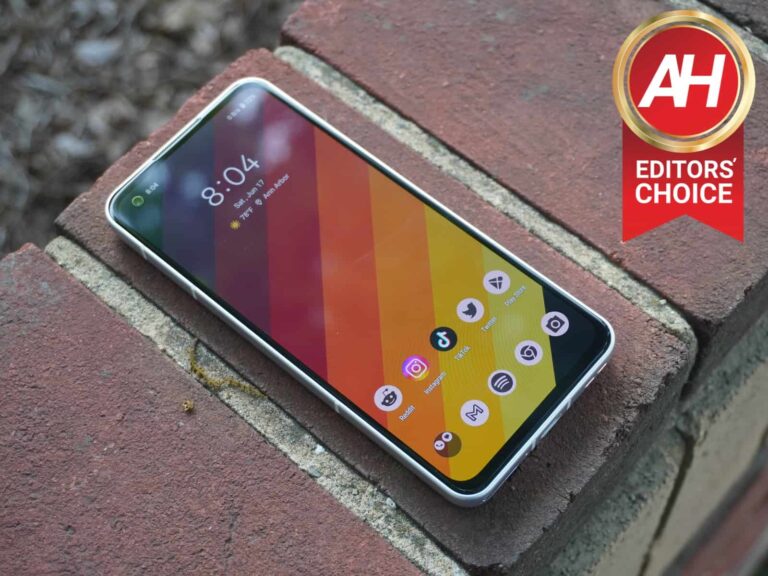
No matter the product, ASUS builds a high-quality product. Whether it’s a laptop, desktop, smartphone, monitor, or something else, they are built very well. And that’s the case here with the Zenfone 10. It has a metal enclosure, with a textured back, which is quite the difference from the other smartphones on the market.
The back is textured, and on this white model, it does feel cheaper versus the Zenfone 9. The back did change, and that’s because the Zenfone 9 was staining pretty easily. In fact, just after using it for a month for the review last year, the back got pretty stained. So far, the back of the Zenfone 10 is performing pretty well, but it’s only been a month since I received the phone. Only time will tell if this keeps up or not.
The sides are metal, which makes for a premium feel, which is funny since the back feels somewhat cheap. The left side of the phone has the volume rocker with an inset power button. The power button is inset because it is a fingerprint reader as well. ASUS is one of the only ones using a fingerprint reader in the power button, besides the foldables that are on the market. And honestly, it’s a great decision. The fingerprint reader is basically perfect. I’ve never had it not recognize my finger, as long as I put the right finger on the sensor.
On the top of the phone, you’ll find the headphone jack. That’s something you don’t see to often on smartphones these days. It’s basically just ASUS and Sony, the two companies making niche smartphones. Also on the top is an antenna band and a microphone hole. The right side has a few more antenna bands, and the bottom is where you’ll find a speaker, USB-C port and the SIM card slot. There’s no micro SD card slot available on this phone, which is a bummer, but expected.
The front of the phone is almost all screen, with some pretty small bezels, and a slightly thicker chin. It also has a front-facing camera in the left corner. But more on the display in the Display section.
The hardware feels very premium on this ASUS smartphone, and I’d expect nothing less from ASUS. Even going back to the time when they made the Transformer tablets, ASUS has always made high-quality products, in terms of their hardware and build. And it’s something I hope they never lose. It’s really only ASUS and Motorola that has this kind of design and build identity.
ASUS Zenfone 10 Review: Performance
Inside the Zenfone 10, ASUS has the Qualcomm Snapdragon 8 Gen 2 processor powering the show, with 16GB of RAM and 512GB of storage on our unit. It does start with 8GB of RAM and 256GB of storage. So we have the higher-end model here. And when it comes to performance, not a single complaint.
As mentioned in the disclaimer above, we’ve been using this phone for a solid month, and the phone has never really gotten hot nor slowed down. The only time it got hot was in extended game playing sessions, and when I was using it outside in 90-degree heat for quite some time. Those instances, it’s expected that the phone will get hot. But it wasn’t so hot that the phone was unable to hold, nor did it slow down at all. So that’s good to see.

With the 16GB of RAM inside this one, apps did stay in memory for quite some time. With a lot of other Android smartphones, they tend to be pretty aggressive with closing apps in the background, to help preserve battery life. ASUS doesn’t do that, thankfully. I’ve had apps left in memory for hours, and even days. When I go back to them, they open up like normal, without redrawing them. So that’s definitely good news.
Performance on the ASUS Zenfone 10 is basically what you’d expect from the hardware it has. That’s not a surprise, even though this is a small and compact phone, ASUS does a good job with heat dissipation with the Snapdragon 8 Gen 2. And it has even improved over the Zenfone 9 last year, which did a really good job with it.
US Cellular connectivity
The Zenfone 10 won’t be sold on carriers in the US. It’s going to be unlocked once again. So this means you really need to pay attention to the bands it supports. I used this on T-Mobile and it was pretty good. It worked on 5G in most areas that the Galaxy S23 Ultra did.
However, it will not work on Verizon at all. On AT&T, it should work, but not fully. Some bands are supported, but not all. That means that if you’re in an area where AT&T has 4G LTE or 5G on a band that this phone doesn’t support, no service for you. Which is pretty important, so definitely check the bands for the model you’re buying before you buy it. Especially if you’re buying from Amazon, as some European and Asian variants are likely there, and those definitely won’t support US bands.
ASUS Zenfone 10 Review: Display
Usually on smartphones that are in this price range, the display is something that might take a hit. But, ASUS used one of the best panels on the market. It’s the latest Samsung AMOLED panel here, which is a 2400×1080 resolution display at 5.9-inches. It also has a pretty good refresh rate at 144Hz. And covers 112% of the DCI-P3 spectrum. Meaning that the color reproduction on this panel is really good.

The reason why Zenfone fans love the Zenfone 8, 9 and will love the 10, is because of the size. It’s one of my favorite features of this phone as well. It’s really nice to be able to use a smaller phone, without sacrificing really anything. It’s got top-notch performance that can rival the Galaxy S23 Ultra, it has the display to rival the Galaxy S23 series, and more, which we’ll touch on later in this review. This is one of the few phones that I can use comfortably with one hand, for literally everything. That includes browsing, typing, and more.
This display panel gets pretty bright, and is plenty usable in direct sunlight, even moreso than some other smartphones that have recently come out. It also just looks stunning. I’ve found myself often times just looking at the phone on my homescreen, because it just looks so good.
ASUS Zenfone 10 Review: Battery life
Since Qualcomm moved to TSMC for manufacturing its Snapdragon 8 chipsets, with the Snapdragon 8+ Gen 1 last year, battery life has been pretty incredible. That’s the case for Snapdragon 8+ Gen 1 and 8 Gen 2-powered smartphones. And that trend continues here with the ASUS Zenfone 10.
This is no doubt a two-day phone. And if you’re really not a power user, it could last you even longer. Standby is pretty incredible too. I set this phone aside for a few days to use the Razr+ and then switched between them for a few weeks while working on both reviews. And after four days, the Zenfone 10 lost just 30%. Now that might sound like a lot, but that means in standby, it could last about 10 days. And overnight, it’ll lost about 1-2%. Which is almost unheard of.
Now let’s talk about actually using the phone. It’s still a beast. On multiple days, I got double-digit hours of screen on time. That’s not something I see very often. And i’ve reviewed a lot of the flagship phones to launch over the past decade. In fact, one day, I got 11 hours and 44 minutes on a full charge. I likely could have gotten past the 12-hour mark, but I put it on the charger instead.
So if you’re worried about battery life on this small phone, don’t. It’s incredibly good.
Now the charging, does leave a bit to be desired. It does have 30W wired charging, which for a 4300mAh capacity battery, that’s going to be pretty fine. It’s not the fastest, but it’s decently fast, and will protect that battery longer. Wireless charging is where the problems come in. Its only 15W, and on a lot of wireless chargers I’ve tried, it’s even slower. Meaning that it’s going to take a couple of hours to charge. If you’re charging it wirelessly overnight, it’s fine. It’ll be fully charged when you wake up. But for topping off, you’ll want to plug it in.
ASUS Zenfone 10 Review: Software
Those that love the ASUS Zenfone 10 for its size, are also typically those that love stock Android. And well, ASUS is sticking with stock Android here. There are a few changes to the software. For instance, you can choose between ASUS and Google’s own implementation of Quick Settings. ASUS opts for the old-school circular toggles as opposed to Google’s long oval ones. Which allows you to have more toggles in less space. And I actually prefer ASUS’ method here.
Otherwise, most of this is stock Android. And in some ways, it’s better. For instance, the battery life screen. It’s not the Pixel version, it’s the AOSP version. So it updates in real-time and has a graph that actually shows you how the phone’s been used, instead of useless mountains.

ASUS is like the Hyundai of smartphones, in terms of software. They allow you to change everything, a lot like Hyundai does with its vehicles. For instance, in the Display settings, you can change the animation speed. This is typically hidden in the developer settings. But ASUS said that a lot of people were changing the animation speed on the Zenfone 9, so they broke it out of the developer settings, to make it easier to find.
There’s also other options within the Display settings, like the status bar icon manager. So you can add or remove icons from the status bar, and make it look as clean as possible. This is also available on OnePlus’ OxygenOS, but many others don’t have this option. You also get options for the always-on display, and so much more. Just about every aspect of the display can be changed here.
ASUS added software features to make this phone easier to use
ASUS, despite making a smaller phone, still have a number of features that make the phone easier to use. For instance, there’s the Edge Tool. Which you can swipe from the right side of the screen to open up. This will give you a few app shortcuts, plus quick settings, available at your fingertips. It supports a max of eight apps, but not every app is available to use with this feature. You can choose what apps you want though. You also have the ability to edit the system shortcuts that are shown in the Edge Tool, which is also a limit of eight.

Another cool feature is the Smart Key. By default, a double-press will open the voice input, but you’ll likely want to change that to Google Assistant, or maybe the camera. You can choose from specific apps for this shortcut too. ASUS also lets you swipe on the power button to open the notification shade. Like the way rear-mounted fingerprint sensors used to work. It’s a cool feature, but I found I was often opening the notification shade unintentionally, so I turned it off.
Like any other phone released in 2023, the Zenfone 10 also has a slew of gestures. Some of which I remember from the Zenfone 2 way back in the day. So there’s the usual stuff like flip down to mute, double tap to turn off the screen, and to turn it on. You can also draw a “W” on the screen to open the weather app, or an “S” to open the camera onto the front-facing camera, among others. To be honest, I didn’t keep a lot of these on. Other than the flip down to mute, and double tap to turn the screen off.

ASUS does also make it easy to manage your phone, with the built-in Mobile Manager feature. From here, you can quickly see your data usage, clean up the background apps, and storage, as well as scan for privacy and security threats. This is much better than relying on an app from the Play Store, that likely is going to bring some malware onto your device.
These are just some of the very, very many features that ASUS has added to make the Zenfone 10 even easier to use. The software as a whole, however, has been a breeze to use. ASUS is also guaranteeing three years of OS updates and four years of security updates on the Zenfone 10, which is a big upgrade over the Zenfone 9.
ASUS Zenfone 10 Review: Camera
Now, let’s talk about one of the best features of any phone, and that’s the camera. ASUS has a dual-camera setup here. Utilizing a 50-megapixel Sony IMX766 sensor as the main camera, and then a 13-megapixel ultrawide, with a 120-degree field of view. The front-facing camera is a 32-megapixel RGBW camera, that is pixel binned.

So, as you can tell, it’s not going to be the best camera on the planet. But it should be pretty decent. And it is. Most of the pictures I’ve taken with the Zenfone 10 have been good. But none have been impressive, to me. The Zenfone 10 misses out on the “Wow” factor with the camera, and its features. It’s a pretty boring camera setup. No real special features at all. That’s going to be fine for most people, but I do wish that ASUS had done more to differentiate the camera on the Zenfone 10.
Let’s start with the main sensor. It’s pretty good. Color reproduction is very good, sometimes a tad bit on the saturated side, but usually it’s accurate to what your eyes see. Every once in a while it won’t be as sharp as it should be. But that is pretty rare. It’s a good camera for those that don’t want to mess with any settings. Those that just want to open the camera app and take a photo.
Portrait mode is surprisingly impressive
Portrait mode is probably the most impressive part of this phone’s camera. I was pretty impressed with some of the portrait mode shots that you can get on the Zenfone 10. Now, ASUS does allow you to adjust the aperture. You can bring it all the way up to f/0.95. That’s going to give you a very shallow depth of field, and provide quite a bit of bokeh.
For the most part, portrait mode was really good at separating the foreground from the background. But every once in a while, it would struggle. In the gallery below, there’s a picture of a “Little Free Library” which has a black top. The camera did a good job of separating it and the tree from the background. But randomly in the middle of the top of the library, it blurred it. So it wasn’t perfect, but pretty close. There’s also a corner that’s not blurred for some reason.
A few photos of different flowers also caused problems for the Zenfone 10. Where it blurred part of the same flower, and didn’t blur other parts. It’s quite easy to see that this is all being done with AI, which is fine, we knew that. But would definitely like to see a more natural bokeh effect here.
I’d say this is probably the best portrait mode I’ve seen, behind the Pixel. Most portrait modes only work on humans, but this works on everything. Like a macro mode, which is good, since there isn’t one.
What’s missing
So what’s missing from this camera? Two things, for me. I do wish ASUS added a telephoto sensor here. While they do allow you to punch in at 2x, a nice 3x or 5x telephoto sensor would be great. Seeing as I rarely use a ultrawide, that would have been a lot more useful.
But since they did add an ultrawide here, why not add a macro mode? Literally every other phone uses either the ultrawide or telephoto sensor for macro. But ASUS did not. Obviously, these are pretty minor things, but still a big deal. And a good way to differentiate your phone from the many other Android phones on the market.
The camera system on the ASUS Zenfone 10 is good, but it could have been great. And yes, I’m guessing the size is a reason for it having ultrawide over a telephoto sensor. I’d settle for just adding a macro mode to that ultrawide sensor.

Should you buy the ASUS Zenfone 10?
I started out this review talking about how ASUS makes niche smartphones, and you really can’t get much more niche than a compact phone. The Zenfone 10 is great, however, it’s size is going to make sure it is not a best-seller. Most want a larger screen, not a smaller one. But for those of us that want a smaller phone, this is going to be perfect, since it does not sacrifice anything.
You should buy the ASUS Zenfone 10 if:
- You desire a small and compact phone.
- You want the best battery life on a smartphone (so far).
- You don’t care to much about the camera, and just want a good software experience.
You should not but the ASUS Zenfone 10 if:
- You want a larger screen.
- You want the best camera on a phone.
- You want to buy your phone from carriers.
- You want to use it on Verizon or AT&T.
[ad_2]
Source link


.png
)