In recent times, it was pretty difficult to stay away from all of the things surrounding Musk’s takeover of Twitter. The social platform has always been very impactful to internet culture. So it is pretty neat that after all, Twitter and its community survived the turbulent period.
So if you happen to be rocking Twitter on one of the best smartphones around, you’ll probably want to know that Linda Yaccarino is Twitter’s CEO. She has a background in advertising so the plan is to have her expertise help Twitter completely recover from all of the… happenings and then become a stable social platform again.
That being said, the general plan hasn’t changed: Twitter should be capable of presenting the thoughts of people from all sorts of backgrounds. So now that Linda’s role has been officialized, she detailed her ideas on how that is going to become a reality.
Hello Twitter. People keep asking me: Why Twitter? So, I’ll tell you.
As you start reading the thread of tweets, you’ll notice that Linda mentions Elon a lot. That seems to indicate that the pair is working together closely and maybe even that she runs all ideas through him, before they are set in motion.
Linda describes their goals regarding Twitter as making the platform “the world’s most accurate real-time information source”. She seems to be confident that this is a possible reality, which is great, because on paper, Linda has the needed skills to make that happen.
From what she has shared thus far, it seems that Linda isn’t planning any major changes to the platform. In fact, it sounds like the aim here is to build upon what has proven to be steady and continue promoting freedom of speech.
All in all, Twitter 2.0 is still happening. But then again, this was never something that could’ve been achieved in a day — takeover or not. It’s great to see that Linda shares Musk’s passion for the platform, so saying that Twitter is in good hands seems less like a bet and more like a reality.
After pushing the June 2023 Android security patch to all recent foldables, Samsung is now rolling out the update to a couple of mid-range smartphones in the US. The latest security update is available for the Galaxy A52 5G and Galaxy A13 today. The former has already received the new SMR (Security Maintenance Release) in some international markets but it’s the inaugural rollout for the latter.
The June SMR for the Galaxy A52 5G is initially rolling out to factory-unlocked units in the US. The update comes with the firmware build number A526U1UES9EWE1 and is already available for users on most carrier networks, including AT&T, Verizon, T-Mobile, Sprint, Xfinity Mobile, Cellular South, MetroPCS, US Cellular, Comcast, Dish, and Cricket Wireless. The rollout for the carrier-rollout units should begin in the coming days.
Samsung isn’t pushing any new features or improvements to the Galaxy A52 5G with this update. It’s all about the security fixes for this month, which are plenty in number. The June SMR for Galaxy devices patches more than 60 vulnerabilities, 11 of which are issues affecting Samsung devices only. Others affect Android products from other brands as well. Three vulnerabilities patched this month were labeled critical by Google.
Samsung is also pushing the June update to the Galaxy A13
These security fixes are also rolling out to the Galaxy A13 in the US. For a change, the rollout has begun with carrier-locked units, bringing the build number A135USQU5CWE8. Moreover, this phone is getting additional changes to go with the latest SMR. Samsung’s official changelog states that this update “includes revised Terms & Conditions for your device, including the Dispute Resolution Agreement with arbitration terms.”
Samsung may soon push this update to the unlocked Galaxy A13 units and also expand the release to international markets. Note that the company also sold a 5G version of this phone in the US and some other regions. It hasn’t yet picked up the June security patch anywhere. But you can always check for new updates from the Settings app. Go to the Software update menu and tap on Downloadand Install.
If an update is available, you will be prompted to download it straightaway. But if you don’t see any updates today, repeat the steps a few days later. Note that new updates are rolled out in batches and may not be available to everyone at the same time. Rest assured, your Galaxy phone will get new security patches periodically for four/five years depending on the model and release date.
In today’s digital era, launching a startup often involves developing a mobile app to reach a wider audience. However, deciding which platform to target, Android or iOS, can be a crucial decision that impacts the success and growth of your startup. This article aims to analyze the differences between launching a startup on Android versus iOS, considering factors such as market share, demographics, user behavior, and profitability. Additionally, we will explore how a professional business plan can assist in effectively launching your business.
Market Share:
When considering the platform for your startup, market share plays a significant role. Android holds the largest global market share, accounting for around 74% of the smartphone market, while iOS holds approximately 25%. The dominance of Android in terms of market share implies that targeting this platform may potentially offer access to a larger user base as TechCrunch writes.
Demographics:
Understanding the demographics of Android and iOS users is essential for targeting the right audience. Android users tend to have a more diverse demographic, including a wider range of age groups and income levels. On the other hand, iOS users generally have higher income levels and spending power, making them an attractive target for startups aiming to monetize their apps.
Profitability:
When it comes to profitability, iOS tends to have an edge over Android. Despite Android’s larger market share, iOS generates higher revenue for developers. This can be attributed to the willingness of iOS users to spend on apps, as well as the App Store’s rigorous approval process that ensures higher quality and more monetization opportunities for developers.
How a Professional Business Plan Helps Launch Your Startup:
A professional business plan extensively help you in launching your business in successful way. A business plan is very necessary for startup, and below we have mentioned main benefits of the business plan in the startup. Of course for the business plan for mobile app you need a best business plans provider.
1 – Market Research:
A business plan allows you to conduct thorough market research, helping you understand your target audience and the competitive landscape. This knowledge is crucial for deciding whether to focus on Android or iOS, considering their respective market shares and user demographics.
2 – Financial Planning:
A business plan helps you create a financial roadmap for your startup. By analyzing potential revenue streams, costs, and profit projections, you can make informed decisions about which platform aligns better with your revenue goals. Understanding the profitability differences between Android and iOS can guide your financial planning.
3 – Marketing Strategy:
A business plan helps you formulate a comprehensive marketing strategy, which includes reaching and acquiring users on your chosen platform. By understanding the user behavior and preferences of Android and iOS users, you can tailor your marketing efforts to effectively engage and retain your target audience.
Conclusion:
Choosing the right platform, whether Android or iOS, is a critical decision when launching a startup. Understanding the differences in market share, demographics, user behavior, and profitability can guide your decision-making process. While Android offers a larger user base, iOS provides a more lucrative revenue potential. By utilizing a professional business plan, you can effectively analyze these factors and make an informed choice for your startup’s success. Remember, a well-informed decision about the platform is the first step toward reaching your target audience and achieving your business goals.
Writing emails is a sort of an art form. Depending on the person you are sending it to, you have to adjust to strike the right tone and word yourself appropriately for that particular conversation. In comes Google’s new ‘Help me write’ Gmail feature that utilizes artificial intelligence (AI) to help you with this often challenging task.Until now, ‘Help me write’ in Gmail was only available on desktop, but now it is also available for Android and iOS. The feature gives users a hand in creating an email based on the instructions they have typed in the text box that pops up after tapping a dedicated button in the bottom right of the screen.
Once the AI is done working its magic and you have inserted the text in the compose section, you then have the option to refine your message by either making it more formal, elaborate, or short. There is also the option to tell the AI to write a draft, or you can tap on the ‘I’m Feeling Lucky’ button to see what else it can come up with based on the information you have provided.Judging by the example from the folks at 9to5Google, it seems that the tool is doing a great job of sounding natural and authentic. To be able to use it, however, you would have to enroll in Google’s Workspace Labs program on Android or iOS, which you can do by going to the dedicated Labs page and joining the waitlist.
Keep in mind that — as Google will let you know once you tap the ‘Help me write’ button — there might be people reading, annotating, and processing your Workspace Labs interactions data. For that reason, people using the feature are advised to refrain from typing in any personal and sensitive information. This is also true for other experimental features related to Workspace Labs.
A shocking discovery has been made by researchers, unveiling an innovative method for extracting covert encryption keys from smart cards and smartphones.
Utilizing the integrated cameras of iPhones or surveillance systems, they record videos of power LEDs, serving as indicators for device activation.
These attacks unveil a new method to take advantage of existing flaws by exploiting two side channels that were already identified.
Hackers Exploit Side-Channel Attacks
In the context of security breaches, side channels represent a particular attack category, exploiting the accidental disclosure of physical signals emitted by a device while engaged in cryptographic calculations.
Attackers can stealthily collect valuable intelligence by closely monitoring variables like power consumption, sound patterns, electromagnetic emissions, and operation durations.
Successful exploitation of such information could reveal the secret keys and make the cryptographic algorithm.
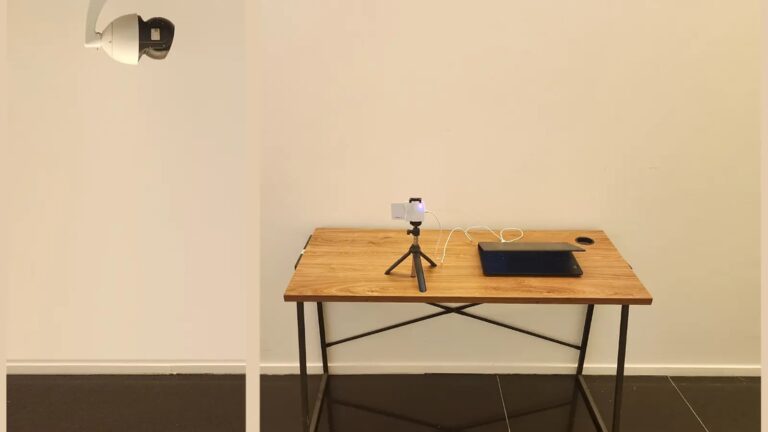
While performing cryptographic operations, in the first instance of an attack, a surveillance camera with internet connectivity captures a swift video of the power LED indicator on a smart card reader.
The researchers managed to extract a 256-bit ECDSA key from the Minerva-utilized smart card that had received government approval by utilizing this new approach.
During a separate attack, the researchers retrieved the private SIKE key belonging to a Samsung Galaxy S8 phone.
By directing the camera of an iPhone 13 towards the power LED of a USB speaker connected to the device, they successfully achieved this goal.
Power LEDs are specifically crafted to offer a visual indication, showing the activation or powering of a device. The complete research paper can be found here.
Limitationof Attacks
It is important to highlight the limitations of both attacks, which prevent their possibility in many real-world scenarios, although exceptions do exist.
Moreover, the significance of the published research lies in its breakthrough nature, presenting a completely innovative means to enable side-channel attacks.
While apart from this, the new method succeeds over the primary challenge that prevents previous approaches from exploiting side channels.
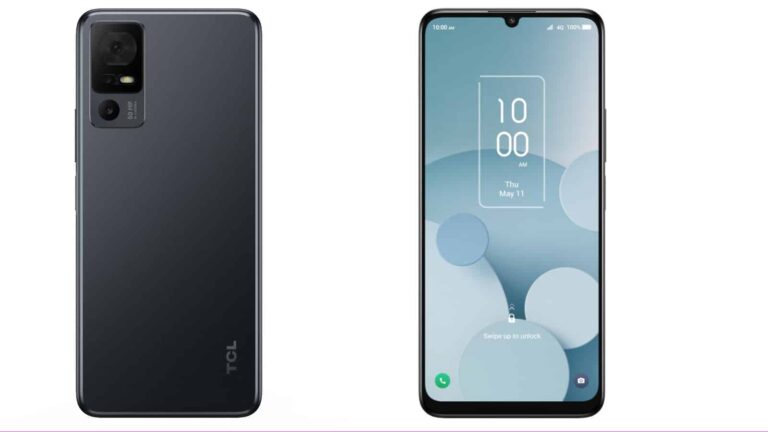
TCL is a major player in the television market, but it’s been working on increasing its foothold in the smartphone market. It’s more present in the budget market of phones, and it has a new offering that will give you a nice experience for the money. The TCL 40 XL was just announced, and it brings a powerful camera experience for under $200.
TCL is no stranger to providing great phones at a low price. Last year, the company launched the TCL Stylus 5G, and we had the opportunity to review it. We gave it four stars for its incredible display, smooth performance, and very handy stylus. You can read our full review here.
TCL announces the tcl40xl
The main focus of the TCL 40 XL is value. It comes with a large 6.75-inch 720p+ display. That doesn’t sound impressive, but the display does use the NXTVISION technology that TCL is known for. This technology essentially upscales SDR content into HDR. It’s a beautiful display that you will love to use to watch media.
Moving over to the internals, this phone uses the MediaTek Helio G37 octa-core processor. This is a very power-efficient processor that gets the job done. This is backed up by 4GB of RAM and 128GB of storage. That’s more than enough to store all types of files such as videos, pictures, Etc. If you need more, you can expand the memory up to 512GB using an SD card.
Now, let’s talk about the cameras. The TCL 40 XL uses a powerful 50-megapixel main camera. This can give you very sharp images if you use all 50 of the megapixels. The main camera is accompanied by a 2-megapixel depth sensor and a 2-megapixel macro camera. Basically, this is a great camera package if you plan on using this phone as your main camera.
There’s no point in having a powerful camera and display if the phone does not last. This is why the TCL 40 XL comes with a large 5000mAh battery. This, coupled with the power-efficient MediaTek processor, means that you can more than get through a full day on a single charge with moderate to light usage.
Other features include the face unlock feature, a side-mounted fingerprint scanner, and dual speakers for a nice audio experience. You can purchase this phone from TCL and other vendors for only $149.99. That’s a great price for a phone with such a beautiful display, great battery life, and powerful camera package.
It’s no secret that Microsoft’s efforts to integrate ChatGPT into its various services was undoubtedly a strategic move that enabled the company to leapfrog its competitors. However, this decision wasn’t without its consequences, as the Bing AI chatbot had several issues, including manipulative language and factually incorrect answers. Now, according to a report from The Wall Street Journal, it looks like OpenAI had warned Microsoft about the risks of incorporating the unreleased GPT-4, but the company still proceeded with the launch.
This report comes after many users started experiencing erratic behavior from the Bing AI chatbot soon after its launch, including incidents of the chatbot making insulting remarks, lying, sulking and even gaslighting users. As a result, Microsoft had to quickly put restrictions in place, which limited the chatbot’s ability to just a few prompts per chat. And while extensive work has been done to restore the chatbot’s stability over several months, occasional instances of misbehavior still occur.
Calls for regulation
Although Microsoft and OpenAI have mostly ironed out the bugs, this incident highlights the importance of careful implementation and rigorous testing before releasing AI-powered services, as Microsoft should have heeded OpenAI’s warnings regarding the premature release. Moreover, the incident also highlights the complexities of the Microsoft-OpenAI partnership, where collaboration and competition coexist.
“I felt OpenAI was going after the same thing as us. So instead of trying to train five different foundational models, I wanted one foundation, making it a basis for a platform effect. So we partnered. They bet on us, we bet on them,” said Microsoft CEO Satya Nadella.
However, this is the exact scenario which has had industry leaders and the government worried. This is because companies in this race to build the most advanced AI systems often overlook the importance of thorough testing before product releases. Therefore, it is now more crucial than ever to establish stringent measures to regulate this rampant AI development.
British television watchdog Ofcom is the latest victim of a supply chain attack against document transfer service MOVEit.
The cyber attack against MOVEit saw Russian ransomware gang Clop exploit a critical zero-day vulnerability in the company’s infrastructure. This vulnerability allowed Clop to access the networks of companies that use MOVEit, meaning they were able to access and steal their data.
During the cyber attack against Ofcom, confidential data on the companies regulated by the organization as well as the personal information of 412 employees was stolen by the Russian ransomware gang. No Ofcom systems were impacted by the attack.
The television watchdog says it takes the “security of commercially confidential and sensitive personal information provided to Ofcom” extremely seriously. Once the cyber attack was discovered, Ofcom said it took “immediate action to prevent further use of the MOVEit service”, as well as implementing appropriate security measures to prevent further breach of its data.
The organization also said it “swiftly alerted” all Ofcom-regulated companies affected by the attack, as well as offering support to employees impacted by the data breach.
Ofcom is the latest in a range of companies impacted by the MOVEit data breach. Others affected include Health Service Ireland (HSE) and Zellis, a payroll provider for companies including health and beauty retailer Boots and the British Broadcasting Company.
Following the cyber attack on Zellis on June 5, Clop made a post via the dark web that urged all those affected by the breach to contact the gang by June 14 or their private information will be posted online.
Only employees who work for local or national government or the police services may be safe from this threat, with Clop telling these employees to “not worry”. They continued, saying “we erased your data you do not need to contact us. We have no interest to expose [sic] such information”. The legitimacy of this statement has been called into question, however.
A new Edge feature labelled ‘Enhance images in Microsoft Edge’ has raised some privacy concerns because it sends information to Microsoft.
A relatively new service provided by Microsoft’s browser Edge sends images you’ve viewed online back to Microsoft. A new feature labelled Enhance images in Microsoft Edge has raised some privacy concerns. The feature is designed to upscale low resolution images, making them sharper, and improving the lighting and contrast.
Unlike the Video Super Resolution which uses local resources to enhance the quality of video viewed in Microsoft Edge, the pictures submitted to the Enhance images service are sent to Microsoft for processing as Edge loads them. This is enabled by default, so users have to opt out if they don’t want their images to be sent.
Observant Edge Canary users spotted a difference in the description of the feature after an update. Under Enhance images in Microsoft Edge in settings, it now says “Image URLS will be sent to Microsoft to provide super resolution.”
Microsoft offers Edge users different update channels. The Canary Channel ships daily and is the most bleeding edge of all the channels. If you want access to the newest updates, they’ll appear here first. The downside is that it also comes with a certain amount of bugs.
This recent update also came with the option to have a more granular control about images from which sites should be enhanced.
Image courtesy of Neowin
How to disable the service
If you prefer to turn of the Enhance image service, here’s how to do it:
In Edge, open the Settings menu and select Privacy, search, and services (edge://settings/privacy)
Scroll down to the Services section and find the Enhance images in Microsoft Edge entry
Switch the toggle to Off.
And while we have your attention and you are in the Privacy menu anyway, if you scroll up a little bit, you may see the Show Collections and follow content creators in Microsoft Edge. If you are not actively using this feature you may want to disable that as well. The feature was found to track every single URL you visited and send them to Microsoft.
Reportedly, Microsoft is working on resolving this unintentional behavior.
Malwarebytes EDR and MDR removes all remnants of ransomware and prevents you from getting reinfected. Want to learn more about how we can help protect your business? Get a free trial below.
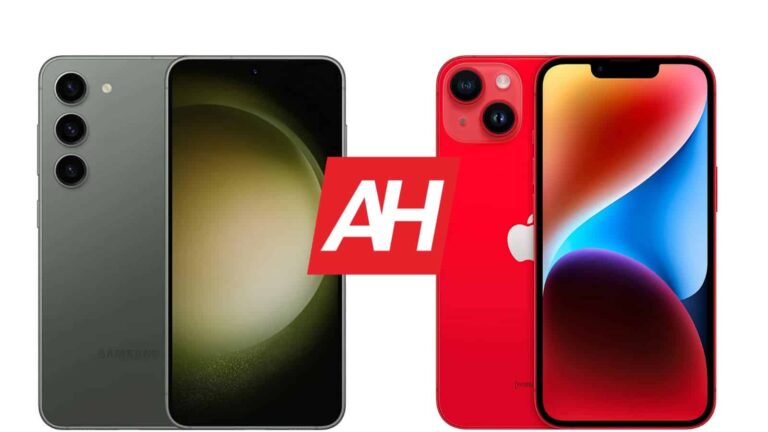
We’ve compared the Galaxy S23 with the iPhone 14 Pro earlier this year, and now we’ll do the same with the vanilla iPhone 14. In other words, in this article, we’ll compare the Samsung Galaxy S23 vs Apple iPhone 14. These two phones are the most affordable representatives of their respective lineups, the Galaxy S23 and iPhone 14 series. Their price tags are also not all that different, so this comparison definitely makes sense.
Having said that, the two phones do have a similar shape, and are similar in terms of size. Their in-hand feel is different, and they differ on a number of other levels. We’ll first list their specifications, and will then move to compare their designs, displays, performance, battery life, cameras, and audio performance. So… let’s get started, shall we?
Both of these smartphones are fairly compact, and have rounded edges. The Galaxy S23 is very slightly curved on the sides, while the iPhone 14 has flat sides all around. A display camera hole is centered at the top of the Galaxy S23’s display, while the phone has thin bezels. The iPhone 14 has a display notch at the top, and rather thin bezels too, though thicker than the Galaxy S23.
Both devices do feature flat displays, and their backplates are also flat. The Galaxy S23 includes three cameras on the back. All three are placed in the top-left corner, and vertically-aligned. The iPhone 14 has two cameras on the back, and they’re both a part of the same camera island. The two phones are almost equally tall and thick, while the iPhone 14 is slightly wider.
They also weigh about the same. The Galaxy S23 is 4 grams lighter at 168 grams. That’s not really a difference you’ll notice, though. Both phones do feel like premium products in the hand, and both are made out of metal and glass. Do note that the Galaxy S23 does feel a bit more comfortable to hold, though. Both are rather easy to use with one hand, due to their size, at least compared to their larger counterparts.
Samsung Galaxy S23 vs Apple iPhone 14: Display
There is a 6.1-inch fullHD+ (2340 x 1080) Dynamic AMOLED 2X display included on the Galaxy S23. That display has a 120Hz refresh rate, and it supports HDR10+ content. It also gets quite bright at 1,750 nits of peak brightness. That panel has a 19.5:9 aspect ratio, and it’s flat. Samsung opted for Corning’s Gorilla Glass Victus 2 protection here.
The iPhone 14, on the other hand, features a 6.1-inch 2532 x 1170 Super Retina XDR OLED display. This panel is also flat, and it supports HDR10 content. Dolby Vision is also supported here, while this panel gets up to 1,200 nits of brightness at its peak. We’re looking at a 19.5:9 display aspect ratio here. The Ceramic Shield glass protection has been used by Apple.
So, as you can see, not only are their display sizes identical, but their aspect ratios too. One major advantage that the Galaxy S23’s display has is the refresh rate. It offers a 120Hz refresh rate, compared to 60Hz only on the iPhone 14. That is definitely a difference that you’ll notice. The Galaxy S23’s panel also gets noticeably brighter. They both offer good viewing angles, and good touch response. The colors are quite vivid on both phones, while the blacks are deep, as you’d expect.
Samsung Galaxy S23 vs Apple iPhone 14: Performance
The Samsung Galaxy S23 is fueled by the Snapdragon 8 Gen 2 SoC. The phone also includes 8GB of LPDDR5X RAM, and UFS 3.1 or 4.0 flash storage. Do note that only its 128GB storage option has UFS 3.1 storage, all other models include faster UFS 4.0 storage. The iPhone 14 is fueled by the Apple A15 Bionic SoC. It also includes 6GB of RAM and NVMe storage, in case you were wondering.
That being said, both of these phones perform admirably. That goes for both regular, day-to-day tasks, and even more demanding tasks, such as gaming. They’re both quite smooth, even though they feel different to use due to differences between Android and iOS, of course. Opening apps, consuming multimedia, browsing, and various other tasks feel great on both phones.
When it comes to gaming, they both shine. You can run basically any game from their respective app stores without a problem, that goes for even the most demanding titles out there. You don’t have to worry about the performance on either phone, at least at the moment.
Samsung Galaxy S23 vs Apple iPhone 14: Battery
Samsung included a 3,900mAh battery inside the Galaxy S23. The iPhone 14, on the flip side, has a 3,279mAh battery. Do note that iPhones need smaller batteries than Android phones, which is why you’re seeing a difference here. In fact, despite the fact it has a smaller battery, the iPhone 14 could easily deliver better battery life. It will, of course, depend on your usage, but we’ve noticed better results from the iPhone 14.
The Galaxy S23 is able to provide around 6 hours of screen-on-time. That was, at least the case for us. That is battery life with regular use, without gaming thrown into the mix. The iPhone 14, on the other hand, did offer better results, crossing the 7-hour screen-on-time mark without a problem. Your mileage may vary, however, of course. It’ll all depend on the apps you have installed, your usage, signal strength, and so on.
When it comes to charging, the Galaxy S23 supports 25W wired, 15W wireless, and 4.5W reverse wireless charging. The iPhone 14, on the other hand, supports 20W wired, 15W MagSafe wireless, and 7.5W Qi wireless charging. One thing to note is that neither phone includes a charger in the box. You’ll need to buy one separately if you don’t already own it.
Samsung Galaxy S23 vs Apple iPhone 14: Cameras
There are three cameras on the back of the Galaxy S23, and two on the back of the iPhone 14. A 50-megapixel main camera sits on the back of the Galaxy S23, in addition to a 12-megapixel ultrawide unit (123-degree FoV), and a 10-megapixel telephoto camera (3x optical zoom). The iPhone 14 includes a 12-megapixel main camera, and a 12-megapixel ultrawide unit (120-degree FoV).
Both of these phones do a good job when it comes to taking images, they’re quite reliable, though they’re not the best around. You’ll get detailed images during the day, with well-balanced colors. The iPhone 14 does have a tendency to mess up the highlights from time to time, but for the most part, both are quite good. In low light, the iPhone 14 does its best to keep the scene realistic, while the Galaxy S23 loves to boost up the brightness of low light shots. Both do a good job, but they look different stylistically.
The Galaxy S23 has a more versatile camera, thanks to its telephoto unit on the back. Ultrawide shots are good on both phones, and both devices do a good job of keeping their ultrawide shots close to main camera shots in terms of colors. The iPhone 14 wins the video recording comparison with ease. It offers more stable video recording, which is also better balanced overall.
Audio
There is a set of stereo speakers included on both of these smartphones. The ones on the Galaxy S23 do sound a bit better though. It seems as if there’s a wider sounder stage in play, while you’ll also get a bit more bass from them.
Neither phone has a 3.5mm headphone jack, so you’ll have to rely on their charging ports for wired audio connections. The Galaxy S23 has a Type-C port, while the iPhone 14 includes a Lightning port at the bottom. For wireless audio, they both offer Bluetooth 5.3.

.png
)