Ransomware gang Clop, who was responsible for a cyber attack on data transfer service MOVEit, has issued a threat to all those affected by the breach.
The attack on MOVEit directly led to a data breach affecting payroll services provider Zellis, as the company uses MOVEit as a third-party provider. This exposed the data for over 100,000 employees from a number of companies including the British Broadcasting Company (BBC), health and beauty retailer Boots and UK airline British Airways. This data includes all data employees will have provided for payroll purposes including their names, home and email addresses, dates of birth, UK National Insurance number, bank details and phone number.
The threat, which was issued via the dark web, tells the companies affected to contact the ransomware group by June 14 or their data will be posted online. According to the BBC, a victim of the cyber attack, the post addressed the others affected by the attack: “This is [sic] announcement to educate companies who use Progress MOVEit product that chance is that we download [sic] a lot of your data as part of [sic] exceptional exploit.” The post went on to urge victims to contact the gang via their darknet portal to begin a negotiation for the release of their or their fellow employee’s data.
Usually, ransomware demands are sent directly to victims rather than requesting victims get in touch. This unusual action has prompted some speculation on why Clop would proceed in this way, with Amir Hadžipasić, CEO of cyber security software company SOS Intelligence, telling the BBC that he predicts that the malicious actors “just have so much data that it is difficult for them to get on top of it all” and that they are “betting” on victims contacting them.
Only employees who work for local or national government or the police services may be safe from the attack, with Clop addressing them directly. The ransomware gang told these employees to “not worry”. They continued, saying “we erased your data you do not need to contact us. We have no interest to expose [sic] such information”. The legitimacy of this statement has been called into question, however.
The cyber attack on MOVEit and Zellis
The cyber attack against MOVEit saw Clop exploit of a critical vulnerability in MOVEit’s infrastructure. This allowed the malicious actors to break into multiple company networks and steal data.
The vulnerability was flagged by security researchers and the US government on June 1. The US Cybersecurity and Infrastructure Security Agency (CISA) urged all MOVEit clients to check for indications that malicious actors had gained unauthorized access to their networks over the past 30 days and to download and install the software patch released by MOVEit to address the issue.
On June 5, a third-party user of MOVEit, Zellis, issued a statement to its users that MOVEit had been the victim of a cyber attack. The payroll services company explained that this had lead to a “small number of [its] customers [were] impacted by this global issue”, meaning their employee data had been breached.
Once Zellis became aware of the attack, the company disconnected its server that utilizes MOVEit software and engaged an external cyber security company to conduct a forensic investigation into the cyber attack and to further monitor its systems. The Information Commissioner’s Office (ICO), the Data Protection Commission (DPC) and the National Cyber Security Center (NCSC) in both the UK and Ireland have also been contacted regarding the cyber security incident.
[TEL AVIV, Israel, June 8, 2023] – Guardz, the cybersecurity company securing and insuring SMEs, today announced a new AI-powered Multilayered Phishing Protection solution to help small and medium-sized enterprises (SMEs) and managed service providers (MSPs) prevent phishing attacks before their security is compromised. The hassle-free and cost effective solution uses AI to provide small businesses and the MSPs that support them with automatic detection and remediation capabilities to protect against phishing attacks – the number one threat they face. By combining email security, web browsing protection, perimeter posture, and awareness culture in one native solution, businesses can now efficiently safeguard against phishing threats, bolstering resilience and future-proofing their systems.
Ninety percent of all cyber attacks are initiated with phishing, which relies on social engineering to prey on human nature. Cybercriminals attempt to obtain sensitive information such as usernames, passwords, and credit card details by tricking recipients clicking on malicious links or providing personal information, which can then be used for identity theft, ransomware attacks, or other malicious activities. These attacks can result in data breaches, financial loss, and reputational damage to small businesses and even compromise the security of a business’s entire network, leading to the exposure of further confidential information.
Guardz’s new Multilayered Phishing Protection: continuously scans for all inbound traffic with its advanced anti-phishing email protection solution; initiates detection through AI-powered anti-phishing and anti-malware engines; removes risky emails from users’ inboxes and automatically sends them to quarantine; monitors internet browsing to detect potential phishing attempts and delivers real-time alerts to system admins to enable timely responses; and provides ongoing, active cyber awareness training and tailored phishing simulations for employees, fostering a culture of caution and vigilance. Perhaps most importantly when dealing with phishing, the Guardz solution empowers every employee to behave in ways that support and strengthen the business’s cybersecurity posture.
“The proliferation of phishing attack as a service (AaaS) tools sold on the dark web is putting the SME ecosystem increasingly at risk. Our new AI-powered phishing protection solution provides SMEs and MSPs with a holistic and accessible solution to prevent the success of phishing attacks,” said Dor Eisner, CEO and Co-Founder of Guardz. “This is a significant addition to Guardz’s holistic cyber security offering for small businesses, ensuring that they can react to cyber risks in real time with swift remediations, but also be protected by cyber insurance for complete peace of mind – a true secure and insure approach.”
The Multilayered Phishing Protection enables MSPs to provide their SME customers complete protection across all potential phishing attack vectors. It does so by automatically scanning the perimeter posture, inbound email traffic and internet browsing, and by providing ongoing, tailored cyber awareness training and simulation for employees. The platform automatically verifies emails for authentication protocols including Domain-based Message Authentication, Reporting and Conformance (DMARC), Sender Policy Framework (SPF) and checks for malicious forwarding rules.
The new Multilayered Phishing Protection solution is available now from Guardz. For further details, please visit Guardz’s website: https://guardz.com/phishing-protection/
About Guardz
Guardz is a holistic cyber security and insurance solution designed for SMEs. Guardz’s solution continuously monitors businesses’ digital landscapes to protect their entire range of assets, enables them to react to cyber risks in real time with swift remediations, and provides cyber insurance for peace of mind. Its all-in-one, affordable platform is on guard 24/7, and is easy to use for both in-house IT personnel and MSPs. With cutting-edge technologies stacked into a robust platform, Guardz was founded in 2022 by Dor Eisner and Alon Lavi along with a team of cyber and insurance experts who combine innovation, experience, and creativity to create a safer digital world for small businesses.
There’s been a lot of hype around Bluesky as of late, and that’s because the platform has been able to get some big names on-board. That includes names like AOC and Chrissy Teigen, among others. Which brought Bluesky a lot of notability as of late. And a lot more interest in people getting invites to the platform. It was smart, but what Bluesky forgot is that these people aren’t going to use it that much. So now there’s over 100,000 people on Bluesky, but it seems pretty dead still.
That should change once more invites are sent out. But here’s how you can sign up for Bluesky.
What is Bluesky?
Bluesky is the latest social media platform aimed at competing with Twitter. It was founded by Twitter’s co-founder, Jack Dorsey, even before Elon Musk had bought Twitter. So you know it has someone behind it that knows what they are doing. So why did Dorsey start Bluesky? Well, he wanted to make a decentralized social media platform.
The idea with Bluesky and its AT Protocol is that you can take your Bluesky profile and account and use it anywhere. Using the same username, posts and profile picture across any other network that uses the Protocol. This might sound similar to what Mastodon is doing with ActivityPub. And that’s because it is, but with a different protocol. This is likely the future of social media.
How to sign up for Bluesky
To sign up for Bluesky, you’ll first need to get an invite code. The service is still invite only, and no one knows for how much longer.
Once you’ve gotten your invite code, head over to Bluesky’s website here. Or open the Bluesky app.
Then click on Sign up.
On this next page, you’ll be asked to enter your email address, and your invite code.
After the invite code has been confirmed, you’ll now be directed to add your username and password.
Then you’re all set. You’re signed up for Bluesky. It’s just that easy.
You probably noticed that there were a few things missing there, like setting your name and bio, picture, etc. You can head over to your profile and edit it from there.
Samsung has announced a new step challenge for Samsung Health users in some countries. The Samsung Health Olympic Day Step Challenge celebrates International Olympic Day 2023, which is observed on June 23 every year since 1948. It commemorates the founding of the International Olympic Committee (IOC) on 23 June 1894.
Samsung’s Olympic Day Step Challenge is available in Australia, Brazil, Canada, France, Germany, India, Italy, Japan, Mexico, New Zealand, Saudi Arabia, Singapore, South Korea, Spain, Switzerland, the UK, the US, and the UAE. It encourages Samsung health users in these countries to “log steps, stay active, and enjoy the significant health benefits of daily movement.”
Interested users can participate in this challenge through a banner under the Together tab of the Samsung Health app. The banner is already live. Simply tap on the “Join now” button in the banner and you’re in. The challenge itself begins on June 10 and runs through June 23. The overall target is 100,000 steps. Anything from a joyful dance or a walk to a revitalizing run and taking the stairs at work will count. Samsung Health will encourage participants with a congratulations message at every 20,000-step milestone.
Once the challenge is live, you can visit the Together tab to access the “Challenge Map”. Here, you can see your total step count and ranking in the global chart. If you complete the challenge (100,000 steps), you’ll get a unique “Olympic Day Badge” on your Samsung Health profile. You can check your badges in the My Page tab of the app. If you want to leave the challenge, you can do that from the ellipsis button (three vertical dots) in the top right corner of the challenge page. Samsung plans to organize more such large-scale events for the 64 million Samsung Health users around the world.
This Samsung Health step challenge is part of the IOC’s Let’s Move initiative
Samsung’s new step challenge is part of the IOC’s Let’s Move initiative launched on the occasion of this year’s Olympic Day. The initiative aims to inspire the world to move more every day. “Movement can make us feel amazing. Daily physical activity has multiple health benefits for our bodies, hearts, and minds. That’s why on Olympic Day on 23rd June, we invite the world to join us and celebrate the joy of moving by building physical activity into our daily lives,” the IOC says. Samsung Health will invite participants in this step challenge to join the initiative with every milestone message.
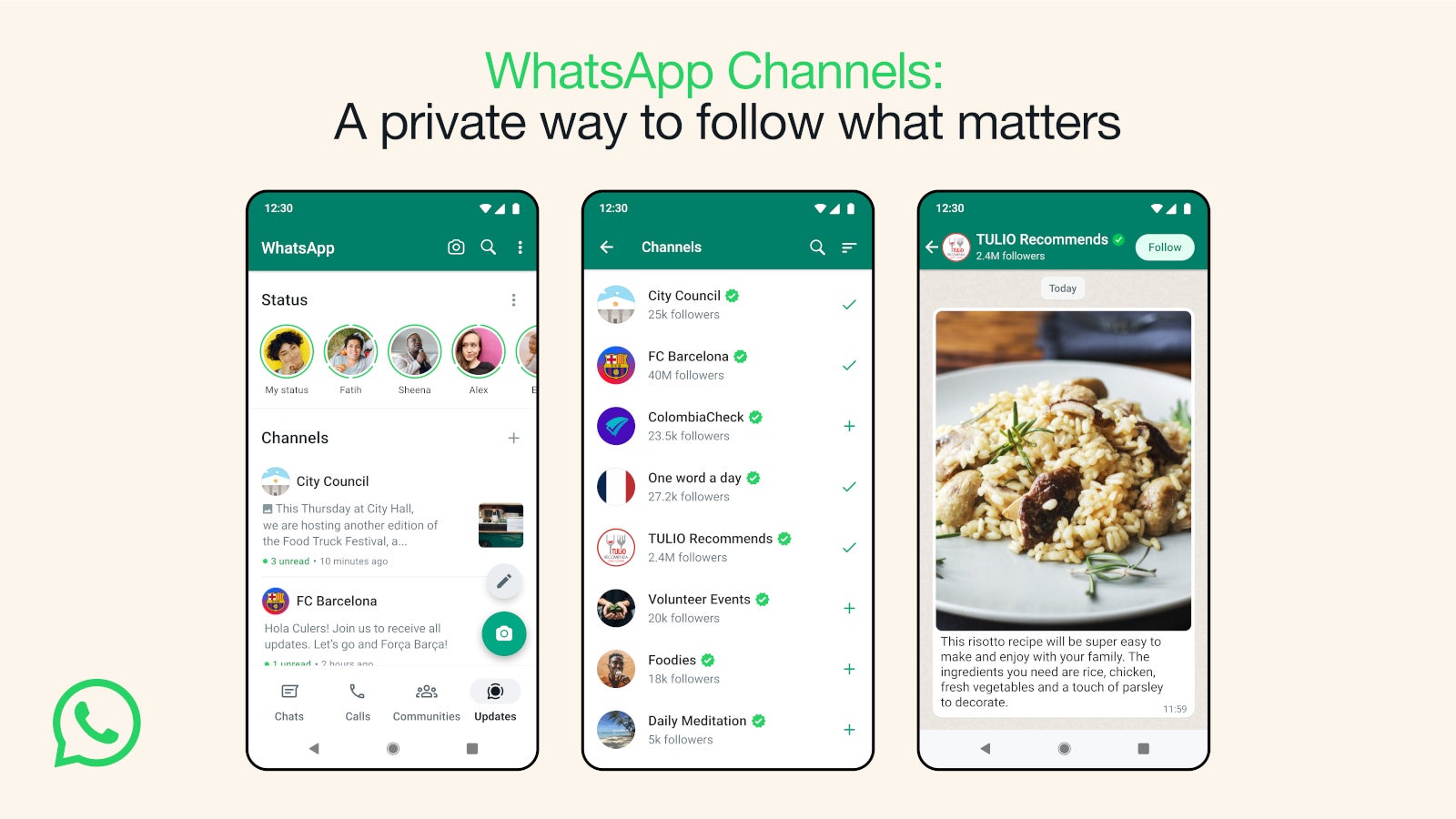
Since Elon Musk took over Twitter, many entrepreneurs and big companies have tried to create a viable alternative for those discontent by the changes imposed by the social network’s new owner. Bluesky and Mastodon feel like the best apps for Twitter users to switch to, although both require some getting used to.WhatsApp couldn’t miss the opportunity and while the app doesn’t pretend to take Twitter’s place, it does borrow one of its major features, the (in)famous feed. Earlier today, WhatsApp announced Channels, a new feature that users can find in a new tab called Updates.
In Channels, WhatsApp users will be able to find Status and channels they choose to follow, separate from their chats. To make it easier for users to find channels to follow and populate their Channels list, WhatsApp has created a searchable directory where they can find their hobbies, sports teams, updates from local officials, and many more.
Additionally, it’s possible to get a channel from invite links sent in chats, email, or even posted online. As an admin of a Channel, your phone number and profile photo won’t be shown to followers, WhatsApp says. Also, if you’re just a channel follower, your phone number will not be revealed to the admin or other followers.
Furthermore, WhatsApp announced that it will only store channel history on its servers for up to 30 days, although it might add ways to make updates disappear faster from follower’s devices. On top of that, admins can block screenshots and forwards from their channel if they think it’s appropriate.
The new Channels feature will first be available in Colombia and Singapore, but they will be rolled out to more countries, along with the ability to create a channel, over the coming months.
The innovative approach, known as “picture in picture,” capitalizes on users’ trust in familiar logos and promotions, making the attacks more convincing and harder to detect.
In a recent phishing campaign, hackers have employed sophisticated obfuscation tactics to deceive unsuspecting users into visiting malicious websites and disclosing sensitive information.
What makes this campaign unique is the technique where threat actors hide malicious links within seemingly innocuous images, particularly targeting customers of renowned brands such as Delta Airlines and Kohl’s.
One such phishing scam (Image credit: Avanan)
The innovative approach, known as “picture in picture,” capitalizes on users’ trust in familiar logos and promotions, making the attacks more convincing and harder to detect.
Avanan, a subsidiary of Check Point Software, has been investigating these attacks, shedding light on the methods used by hackers to manipulate users’ perception of legitimacy. By embedding nefarious URLs within promotional images, cybercriminals exploit the limitations of URL filters, making it challenging for security systems to identify the threats.
When users receive an email containing the image, they are enticed to click on it, assuming they are accessing a legitimate offer or loyalty program. However, upon clicking, they are redirected to fake websites aimed at harvesting their credentials.
Jeremy Fuchs, a cybersecurity researcher and analyst at Avanan, explained, “Often, hackers will happily link a file, image, or QR code to something malicious. You can see the true intention by using OCR to convert the images to text or parsing QR codes and decoding them. But many security services don’t or can’t do this.”
The implications of these attacks extend beyond individual consumers, as airline loyalty program communications often reach corporate inboxes. With the rise of remote work, many employees use personal devices for business purposes or access personal services on business-issued laptops, making businesses vulnerable to these phishing attempts.
Another concerning trend observed in phishing attacks is the use of generative artificial intelligence (AI) to create convincing replicas of legitimate emails and promotional materials. As AI technology advances, the ability to produce realistic images and imitate authentic brand communications becomes easier for threat actors. This poses a significant challenge for end-users, as these AI-enabled attacks leave little room for detection.
Android 14 Beta 3 has started rolling out to Pixel smartphones, and it brought some changes to the table, like a new charging indicator that we’re here to talk about. More new features will come to light as they get discovered.
Android 14 Beta 3 brought a new charging indicator to our attention
In any case, once you install this update, you’ll get a new charging indicator on your Pixel phones. It will appear in the top-right corner of your phone. This charging indicator is using the same style Google uses for phone calls.
This is essentially a status indicator that will appear when you place your phone on a charger. Your phone’s current charge status will also be shown as part of the package. You can see the indicator itself in the image below.
Do note that the percentage will appear in there regardless of whether you have it enabled for the status bar or not. It does go away soon after it pops up, though. This is just a quick notification to let you know that the phone is charging, along with a charging status. It hangs around for a couple of seconds and that’s it.
With Android 14 Beta 3, Android 14 reached the platform stability level
As many of you know, Android 13 Beta 3 brought Android 14 to the platform stability level. This is what Google calls it when the Beta 3 comes around, even though the software itself is still not fully stable, technically.
With this update, the Google Pixel 7a has joined the ranks of phones that get access to Android 14 Beta builds. We’re getting closer and closer to the final release of Android 14, aka its stable release.
So, when can we expect a stable build to come around? Well, most likely in August, unless Google changes things up. The first phones that will ship with Android 14 out of the box, however, will be the Pixel 8 series devices in October.
We know that the headphone jack is pretty much extinct in phones, and you’ve most likely moved on to the Bluetooth headphones life. There are a ton of compelling offers out there from so many different sources, so you definitely know that you have your pick. However, what are the best Bluetooth headphones out there?
This is what we are setting out to answer! We have a list of some of the best Bluetooth headphones that you can get your hands on. These will include budget-friendly options along with more lavish and premium options. If you’re looking for more affordable headphones, you can check out our Best Headphones/Earbuds Under $100.
Best Bluetooth headphones you can buy
Below, we have a short summary of the devices on this list. If you just wanted to have a quick glance at what we’re going to feature, you can see them, look at their price, and go to their page. If you want a more in-depth explanation, you can read below the chart.
Most people in the audio industry are familiar with Raycon, it’s a really big consumer brand that offers some great value for its products. The EVERYDAY HEADPHONES, as the name implies, are headphones for your everyday life. They’re capable of producing Hi-Fi audio, so they also create a high-quality listening experience.
These headphones have a set of powerful 40mm drivers delivering a full and immersive sound. If you’re into headphones that have powerful bass, then these will be right for you. They’re not only powerful, but they produce a well-balanced sound.
These headphones have six microphones that they use for top-notch active noise cancellation. Also, you’re guaranteed to have up to 38 hours of battery life on a single charge. These create an all-around great experience for the cost.
If you’re looking for a more affordable set of headphones with some neat features, then Edifier has a pair for you. Edifier is a company that focuses on high-quality audio equipment, and it doesn’t disappoint with its balance of price and performance.
The Edifier W820NB are a pair of headphones that give you a nice experience for the price. These headphones come with a pair of lightweight comfortable cups that fully encompass the ear. You’ll be able to listen to music for extended amounts of time using these. Also adding to that is the impressive 49-hour battery life you can get on one charge.
What really puts these over the top is the incredible noise cancellation. These may be inexpensive headphones, but the noise cancellation is what you’d find on much more expensive headphones. They really clear out the noise and isolate the sound.
Sony is a major player in the audio space, and the company has a fair amount of headphones. Some of its headphones are very expensive, but the WHC8720N headphones are more affordable. They cost $149.99, but you get a very high-quality experience using these headphones.
These headphones come with a pair of 30mm drivers to deliver the sound, and they have a frequency response between 7Hz and 20kHz. They’re also noise-canceling headphones, and using Sony’s powerful noise-cancellation technology, you’ll be able to shut out the world.
These headphones have an impressive 35-hour battery life on a single charge. This can more than get you through the day, however, if you need a quick top-up, a mere 3-minute charge will get you an hour of playback.
Bose is a big name in the audio space, and the 700 series headphones do well to live up to the brand’s name. These headphones come in either silver or black, and they both look amazing. What’s also neat about them is that you can use these headphones to summon digital assistants like Amazon Alexa, Google Assistant, and Siri.
With a 20-hour battery life, you will be able to use these headphones to get you through the day. Also, they come with very large and comfortable ear cups so that you can listen to them for extended periods of time without getting tired. These are definitely for people who want to take their audio game to the next level.
People were waiting for Apple to bring its own brand of over-the-ear headphones to the market, and the AirPods Max is what we got. The company continues its long line of high-quality devices with these headphones. They come in three different colors: silver, red, and green.
As you can expect from an Apple product, they’re very high quality. You have two large drivers capable of producing a lush and high-quality sound. Also, you’ll find some of the best noise cancellation around with these headphones. As you can guess, they work seamlessly with all of your Apple products, so you don’t have to worry about connectivity issues.
They give you an impressive 20-hour battery life on one charge, and they can be charged using your lightning cable. Also, you’re able to use these headphones with Siri if you need a voice assistant.
No list of the best headphones will be complete without an entry from Sennheiser. While the company is known for making rather lavish and expensive products, those more price-conscious would like to check out the HD 560S. While these are more affordable, they still give you a high-quality audio experience.
These headphones come with a set of high-quality Sennheiser drivers that give you a flawless high-fidelity sound. They’re meant for people in a more professional field, as they are open-back headphones. Since they’re open back, they give you a much more open sound. So, if you are recording in the studio or just relaxing at home, these will be superb to try out. They’re great for use with Bluetooth, however, there’s also the option to use a 3.5mm aux cord.
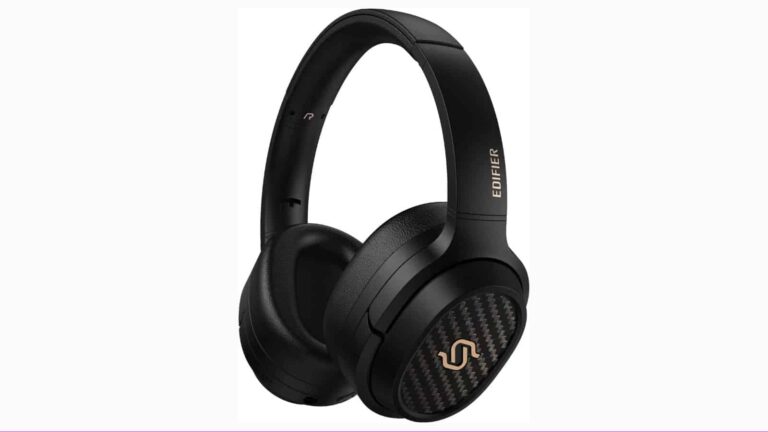
If you’re looking for a more premium pair of Edifier headphones, then you may want to look into the Edifier STAX S3. These are for people who are very serious about their music. They come with a very powerful set of high-quality drivers, and they’re capable of producing 24-bit/96kHz lossless audio. Not only that, but these headphones leverage the powerful Snapdragon sound technology. They can produce a wide range of frequencies from 10Hz to 40kHz.
Using the built-in EQ in the Edifier Connect app, you’re able to tune the audio specifically to your liking. Also, they have Edifier’s top-tier noise-cancellation technology. You would love to listen to these for an extended amount of time because of the audio quality. Also, you have an 80-hour battery life on a single charge. Just a 10-minute charge can get you up to 11 hours of playback Time.
These headphones are for people who really want an audiophile experience. The sleek Sony WH1000XM4 headphones have a beautiful design with accented microphones. They’re also made from high-quality materials, as you can expect from Sony products.
They offer great audio quality and they’re compatible with the LDAC audio codec. These headphones can play audio with a 96kHz sampling rate, so you’ll be able to listen to high-quality audio with these headphones. They have an impressive 30 hours of battery with the noise cancellation on and 38 hours with it off. That’s great if you are planning on using these for a full day of work. These are a great pair of headphones to have if you are a Sony fan and an audiophile.
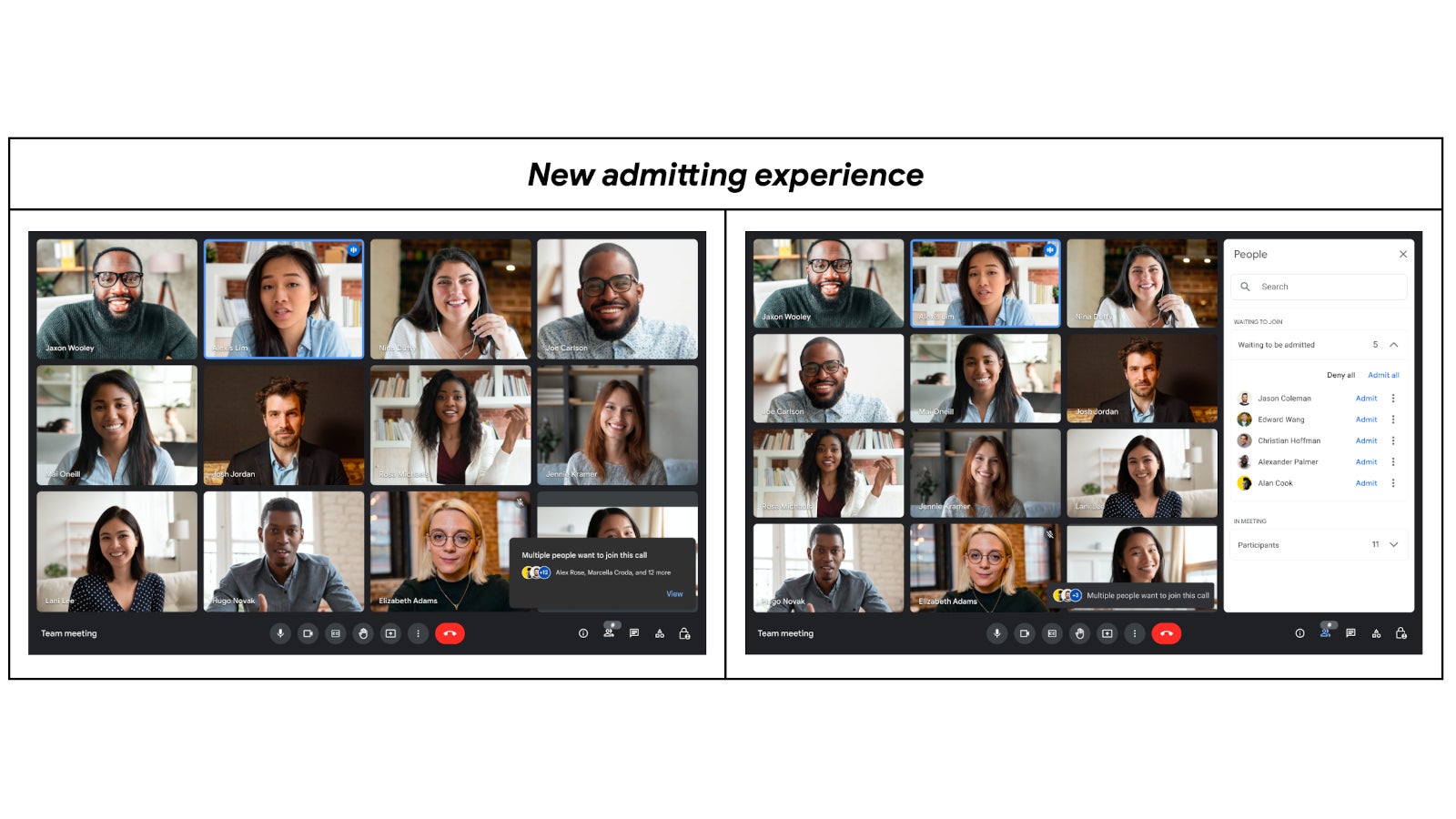
Google Meet is getting a minor update today, but if you’re using the app on a regular basis, it’s probably going to streamline your experience. Basically, the current admitting or denying join requests feature has been replaced with a new one that’s less disruptive.
Up until now, you would get a dialog window when someone wanted to join the meet, and since the box would take up much of the screen space, it would definitely make people feel pressure to accept or deny join requests faster to dismiss the notification window.
Sometimes, people don’t even read who wants to join the meeting and admit or deny join requests just to get rid of the dialog box. Thanks to the new update, the admitting and denying join requests experience has been improved.
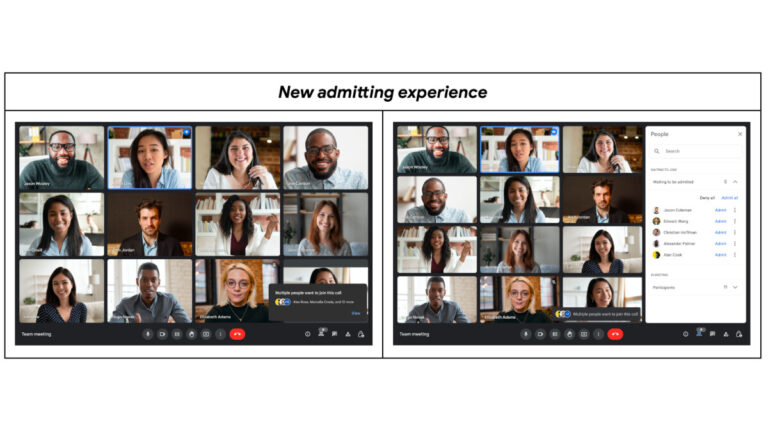
The latest version of Google Meet will allow users to accept or deny join requests from the people panel. It’s a more appropriate place to have the feature positioned since it allows users to take more time to review join requests without disrupting the overall meeting experience. On top of that, since join requests has been moved to the people panel, it will be unlikely that it will block functionality of other meeting features.
According to Google, the new feature is now being rolled out globally and it should take about one week to reach everyone. The latest Google Meet update is available to all Google Workspace customers and users with personal Google Accounts.
PortSwigger released a brand-new version of Burp Suite 2023.6 that is intended for both Professional and Community users.
BChecks, a new type of custom scan check, are introduced in this release. Additionally, it includes GraphQL scan checks, enhancements to Burp Scanner’s live crawl path views, and many other enhancements and bug fixes.
Its tools integrate smoothly to assist the whole testing process, from initial mapping and analysis of an application’s attack surface to detecting and exploiting security vulnerabilities.
Professional / Community 2023.6 release to the Early Adopter channel. Introduces BChecks, which are custom scan checks. Also introduces a number of GraphQL scan checks as well as other improvements and bug fixes.https://t.co/5edC40I8OP
BChecks, which are importable and createable scan checks, are introduced in this release. These checks are performed in addition to the built-in scanning process by Burp Scanner. This enables you to optimize your scans and increase the effectiveness of your testing operation.
Its custom-defining language allows you to quickly create BChecks. Burp comes with many starter templates.
Improvements to Burp Scanner’s live crawl paths view:
From a certain point on the crawl path, you may now see specifics of every navigation step the crawler was able to perform.
Go to the Crawl paths > Outlinks tab of the scan task details window to see these details.
At any crawl location, you may now see a screenshot of Burp’s browser.
Navigate to the Crawl paths tab of the scan task information window and select Show screenshot.
When you reopen a project file, the smallest crawl path tree is now kept.
GraphQL scan checks:
The new scan checks enable you to:
Identify and maintain a list of any GraphQL endpoints discovered during the crawl.
Identify if introspection queries are enabled.
Find out if GraphQL suggestions are enabled.
Test for CSRF vulnerabilities in all discovered GraphQL endpoints
Other Improvements
The Montoya API update from PortSwigger allows users to create extensions that provide expanded functionality.
Using the shortcut Ctrl + Shift + O, you can now easily switch to the Organiser tab.
You may now filter issues by target scope in the Dashboard’s Issue activity table.
The method by which Burp’s browser is launched has been modified.
It now works with accounts for sites that use the DevTools listener to detect their presence, such as Google accounts.
Bug Fixes
The Organiser table functionality has been significantly improved; changing the highlight no longer deselects the current row.
In addition, Burp Suite Community Edition now seamlessly integrates filters with precision as a result of an intruder attack.
Browser Upgrade
The integrated browser in Burp has been updated to version 114.0.5735.110 for Windows and 114.0.5735.106 for Mac and Linux.
“We have upgraded Burp’s built-in browser to 114.0.5735.110 for Windows and 114.0.5735.106 for Mac and Linux. This update contains multiple security fixes”, reads the release notification.









.png
)