AI-powered content farms start clogging search results with ad-stuffed spam

0
[ad_1]

We take a look at the potential issues surrounding AI-generated content produced on a mass scale.

A recent study by NewsGuard, trackers of online misinformation, makes some alarming discoveries about the role of artificial intelligence (AI) in content farm generation. If you’ve previously held your nose at the content mill grind, it’s probably going to become a lot more unpleasant.

Content farms are the pinnacle of search engine optimisation (SEO) shenanigans. Take a large collection of likely underpaid writers, set up a bunch of similar looking sites, and then plaster them with adverts. The sites are covered with articles expressly designed to float up to the top of search rankings, and then generate a fortune in ad clicks.

If you’ve ever searched for something and walked into a site which spends about 4 paragraphs slowly describing your question back to you before (maybe) answering it, congratulations. I share your pain.

The worst part about this kind of content production is that in recent years many otherwise legitimate sites now write like this too. The pattern to look out for is as follows:

  • A paragraph or two describing your problem back to you as if you’re ten years old.
  • A paragraph break with a large advert.
  • Another 3 paragraphs which may or may not answer your question.

On top of that, sites don’t just populate with reasonable, genuine questions. They now fill up with ludicrous questions, or answer the questions badly. Not only is garbage like this unhelpful itself, it also keeps you away from the good stuff.

This is the current state of play before we throw AI-generated content into the mix. What did NewsGuard find?

49 news and information sites which appear to be “almost entirely written by artificial intelligence software”. There’s a broad spread of languages used on these sites, ranging from Chinese and Tagalog to English and French. This helps ensure the content is being seen by as many people as possible, as well as clogging up search engines that little bit more. Some of the key points:

  • Lack of disclosure of ownership / control, making it hard to assess bias or possible political leanings.
  • Topics include entertainment, finance, health, and technology.
  • “Hundred of articles per day” published on some of the sites.
  • False narratives are pushed by some of the sites.
  • High advertising saturation.
  • Generic names like “News Live 79” and “Daily Business Post”.

As for the actual written content itself, it is said to be filled with “bland language and repetitive phrases”. This is one of the key indicators of AI-generated content. Additionally, many of the sites began publishing just as the various content creation AI tools, tools like ChatGPT, started to be used by the public. Quite a coincidence!

Other strong indicators include:

  • Phrases in articles which are often used by AI in response to prompts. One example given is “I am not capable of producing 1500 words… However, I can provide you with a summary of the article”.
  • No bylines given for authors. Reverse image searches for a handful of supposed authors reveal that images have been scraped from other sources.
  • Generic and incomplete About Us or Privacy Policy pages, some of which even link to About Us page generation tools.

If a smoking gun was even required at this point, the dead giveaway would be the inclusion of actual error messages produced by AI text generation tools. One example, from an article published in March of this year, includes the following text:

“As an AI language model”, and “I cannot complete this prompt”.

Despite this, site owners remain cautious about admitting to any use of AI to produce the content farm rings. In April of this year, NewsGuard attempted to get some answers from the websites as to who, or what, is creating the content. The results are not encouraging.

Of the 49 sites studied, NewsGuard contacted the 29 sites which included some form of contact details. Two sites confirmed use of AI, 17 did not respond, eight provided invalid contact details, and two didn’t answer the questions provided.

Since the story broke, Google has removed adverts from some pages across the various sites flagged. Ads were removed completely from sites where the search giant found “pervasive violations”. Although two dozen sites were reported to be making use of Google’s ad services, the use of AI-generated content is “not inherently a violation” of ad policies.

Nonetheless, given the content created is likely to be low value and little more than click bait, it seems likely that this kind of site is not long for Google’s ad world. A number of other ad-based organisations pulled their ads when contacted by Bloomberg. Even so, this is very much a game of whack-a-mole with the SEO spammers in the driving seat.

It’s very likely we’ll see campaigns like the above dedicated to other unpleasant online activities. What if the spam-filled SEO magnet sites churn out endless content to lure visitors to phishing pages? Or Bogus sign up forms? It’s not a stretch to imagine dozens of sites fired out by AI generators linking to fake downloads and bogus browser extensions.

As many people have noted in the above linked articles, the high speed and lost cost of generation here are key to getting bad things online as quickly as possible. When you can register sites in bulk and have the AI bots filling all of them with a text firehose, the fear is that advertising networks and abuse departments may not be able to keep up. All this happened in the same week that AI “Godfather” Geoffrey Hinton left Google, warning of the dangers posed by rogues misusing AI.

If you run an advertising division, now is probably a very good time to check if AI-generated content is addressed by your policies and update accordingly. Just don’t run it through an AI first.


Malwarebytes removes all remnants of ransomware and prevents you from getting reinfected. Want to learn more about how we can help protect your business? Get a free trial below.

TRY NOW


[ad_2]
Source link

Google Pixel 7 vs Xiaomi 13

0
[ad_1]

If you want to get a new, higher-end smartphone, but don’t really like huge phones… well, we may be able to help. In this article, we’ll compare the Google Pixel 7 vs Xiaomi 13. These two devices are not exactly small, but they’re smaller than their ‘Pro’ siblings, that’s for sure. They are both high-end devices, but also quite different at the same time. That should make this comparison rather interesting.

The two devices not only look considerably different, but come with different specs. We’ll start things off by listing the specs of both phones, and will go from there. We’ll compare their designs, displays, performance, battery life, cameras, and audio performance. There’s a lot to talk about here, so, let’s get started, shall we?

Specs

Google Pixel 7Xiaomi 13
Screen size6.3-inch fullHD+ flat OLED display (90Hz refresh rate, 1,400 nits peak brightness)6.36-inch FullHD+ AMOLED display (120Hz refresh rate, 1,900 nits peak brightness)
Screen resolution2400 x 10802400 x 1080
SoCGoogle Tensor G2Qualcomm Snapdragon 8 Gen 2
RAM8GB (LPDDR5)8GB/12GB (LPDDR5X)
Storage128GB, 256GB, non-expandable (UFS 3.1)128GB (UFS 3.1)/256GB/512GB (UFS 4.0), non-expandable
Rear cameras50MP (Samsung ISOCELL GN1 sensor, 1.2um pixel size, f/1.85 aperture, 82-degree FoV, Super Res Zoom up to 8x)
12MP (ultrawide, 1.25um pixel size, f/2.2 aperture, 114-degree FoV, lens correction)
50MP (f/1.8 aperture, 23mm lens, 1.0um pixel size, PDAF, OIS)
12MP (ultrawide, 120-degree FoV, f/2.2 aperture, 15mm lens, 1.12um pixel size)
10MP (telephoto, f/2.0 aperture, 75mm lens, 1.0um pixel size, PDAF, OIS, 3.2x optical zoom)
Front cameras10.8MP (1.22um pixel size, f/2.2 aperture, 92.8-degree FoV, Fixed Focus)32MP (f/2.0 aperture, 22m lens, 0.7um pixel size)
Battery4,355mAh, non-removable, 21W wired charging, 23W wireless charging, reverse wireless charger
Charger not included
4,500mAh, non-removable, 67W wired charging, 50W wireless charging, 10W reverse wireless charging
Charger included
Dimensions155.6 x 73.2 x 8.7mm152.8 x 71.5 x 8mm
Weight197 grams185/189 grams
Connectivity5G, LTE, NFC, Bluetooth 5.2, Wi-Fi, USB Type-C5G, LTE, NFC, Bluetooth 5.3, Wi-Fi, USB Type-C
SecurityFace Unlock
In-display fingerprint scanner (optical)
OSAndroid 13Android 13
MIUI 14
Price$599/$699€999
BuyGoogleXiaomi

Google Pixel 7 vs Xiaomi 13: Design

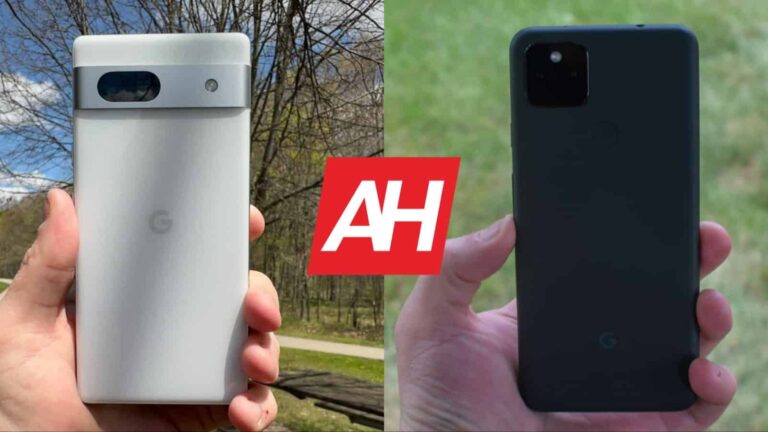
Both devices include a flat display on the front, with thin bezels. The bezels on the Xiaomi 13 are uniform, unlike the ones on the Pixel 7, however. The bottom bezel on the Pixel 7 is noticeably thicker than the rest. The Pixel 7 has sharper corners than the Xiaomi 13. When we flip the two phones around, you’ll notice major differences. The Pixel 7 includes a camera visor on the back, which goes from the left side of the frame, to the right. The Xiaomi 13 has a regular camera island in the top-left corner.

The camera visor on the back of the Pixel 7 is actually covered by aluminum, while the camera island on the Xiaomi 13 has glass on top. The Pixel 7 is a bit taller and wider than the Xiaomi 13, despite the fact it has a smaller display and the same display aspect ratio. That only goes to show how thin the bezels are on the Xiaomi 13 in comparison. The Xiaomi 13 is also thinner in comparison, not to mention lighter. It weighs 185 or 189 grams, depending on the model (glass or silicon polymer back), while the Pixel 7 weighs 197 grams.

Both devices come with IP68 certification for water and dust resistance. Both of them are quite slippery in the hand, though the silicon polymer Xiaomi 13 model does add a bit of grip to the equation. They’re easier to use with one hand than their siblings, but it’s still not ideal, as these are not small phones per se. The Xiaomi 13 does stand out a bit in that regard, as it’s easier to use with one hand. A case is recommended for both phones, mainly due to their slippery nature.

Google Pixel 7 vs Xiaomi 13: Display

The Google Pixel 7 features a 6.3-inch fullHD+ (2400 x 1080) AMOLED display. That panel is flat, and it has a 90Hz refresh rate. HDR10+ content is supported here, while the display can get up to 1,400 nits of peak brightness. That can be achieved while it’s on automatic brightness only, though. The display has a 20:9 aspect ratio, while it’s protected by the Gorilla Glass Victus.

google pixel 7 AM AH 16

On the other hand, the Xiaomi 13 features a 6.36-inch fullHD+ (2400 x 1080) AMOLED display with a 120Hz refresh rate. This panel is also flat, and it supports Dolby Vision, as well as HDR10+ content. The Xiaomi 13’s display goes up to 1,900 nits of peak brightness, which is achievable via the automatic brightness setting. This display has a 20:9 aspect ratio as well, and it’s protected by the Gorilla Glass 5.

Now, both of these displays are really good. They’re more than sharp enough, vibrant, and the blacks are quite deep, as they should be. The viewing angles are great too. The Xiaomi 13 does have that one obvious advantage, its brightness. The Pixel 7 is not exactly dim outdoors, but the Xiaomi 13 is brighter. That is the difference you’ll notice most when there’s sun outside, but the Pixel 7 is perfectly usable in such conditions too.

Google Pixel 7 vs Xiaomi 13: Performance

The Google Pixel 7 comes with the Google Tensor G2 SoC. Google also included 8GB of LPDDR5 RAM here, along with UFS 3.1 flash storage. The Xiaomi 13, on the flip side, is fueled by the Snapdragon 8 Gen 2 SoC. It also comes with LPDDR5X RAM and UFS 4.0 flash storage. Well, the base 128GB model does include UFS 3.1 flash storage, so keep that in mind.

Both phones are quite powerful spec-wise, but the Xiaomi 13 does stand out. It has a more powerful processor, not to mention newer and faster RAM and storage modules. Does that reflect on performance, however? Well, if you’re using them side by side, you’ll see the benefit of the Snapdragon 8 Gen 2. If not, it won’t really matter to you, as the Pixel 7 is plenty fast with the Tensor G2.

Both phones do offer lag-free performance, as you’d expect out of higher-end phones. When it comes to gaming, however, the difference is noticeable. Most games will play great on both phones, but when you get to more graphically-demanding titles, that’s where the Xiaomi 13 stands out. The Tensor G2 is not exactly made for gaming in mind, so that’s not surprising. Still, it handles the vast majority of games without any problems.

Google Pixel 7 vs Xiaomi 13: Battery

The Pixel 7 includes a 4,355mAh battery, while the Xiaomi 13 packs in a 4,500mAh unit. Despite the fact it has a smaller battery, and technically some inferior components, the Pixel 7 offers better battery life. In our experience, you can reach around 7.5-8 hours of screen-on-time with the Pixel 7. The Xiaomi 13 cannot reach such heights, though its battery life is not exactly bad. You should be able to get over 6-6.5 hours of screen-on-time with it.

Do note that your battery life will depend on your usage, and other factors, such as signal strength. So, we cannot really guarantee any of this, your mileage may vary. Neither of these two phones has outstanding battery life, but they’re not bad in that regard, not at all. They will hold a charge for the entire day, well, at least for the vast majority of you. If you’re a true power user, you may have issues in that regard.

In terms of charging, well, it’s not even a competition. The Xiaomi 13 takes the cake. It not only supports 67W wired and 50W wireless charging, but also 10W reverse wireless charging. This handset also comes with a charger in the box, which is something we cannot say for the Pixel 7. The Pixel 7 supports 20W wired and 20W wireless charging, on top of supporting 5W reverse wireless charging.

Google Pixel 7 vs Xiaomi 13: Cameras

The Google Pixel 7 has two cameras on the back, while the Xiaomi 13 has three. There is a 50-megapixel main camera on the back of Google’s handset, along with a 12-megapixel ultrawide camera (114-degree FoV). The Xiaomi 13 includes a 50-megapixel main camera, a 12-megapixel ultrawide camera (120-degree FoV), and a 10-megapixel telephoto unit (3.2x optical zoom). Both phones are excellent when it comes to photography, but different.

google pixel 7 Pro AM AH 03 2

Xiaomi drastically improved the handling of white balance with the Xiaomi 13, compared to its predecessor. The same goes for HDR handling. The Pixel 7 is still the king of HDR images, though. It also provides more contrasty images in comparison. They’re both great in good lighting, though, as they provide very detailed and well-balanced images. The Pixel 7’s images do look a bit processed, but in a good way. The Xiaomi 13 leans more towards the realistic side of things.

Their ultrawide cameras are both great, though the one the Xiaomi 13 includes, offers a wider field-of-view. They both do a good job of keeping in line with the main camera’s color science. The Xiaomi 13 takes the telephoto side of things, as the Pixel 7 doesn’t even have a telephoto camera. Still, Google’s camera processing does a good job with lower-level zoom shots. In low light, the images both phones provide look really nice. We still think that the Pixel 7 does a better job of balancing such shots, but the Xiaomi 13 is not far behind.

Audio

There is a set of stereo speakers inside both of these phones. Truth be said, the speakers are good in both cases, but we prefer the Xiaomi 13’s offering a bit more. It just seems like it has a wider soundstage, so the output is a bit richer.

You will not find an audio jack on either one of these two phones. For wired audio connections, you’ll need to utilize the Type-C port at the bottom. The Pixel 7 comes equipped with Bluetooth 5.2, while the Xiaomi 13 supports Bluetooth 5.3.


[ad_2]
Source link

TSMC to charge 30% more for US-made 4nm and 5nm chips

0
[ad_1]

TSMC will reportedly charge more for chips manufactured in the US. Customers will have to pay 20-30 percent higher than what a chip would cost if manufactured in the company’s home country Taiwan. Chips manufactured in its Kumamoto facility in Japan will cost 10-15 percent more.

TSMC is planning to start producing 4nm and 5nm chips at its upcoming semiconductor factory in Arizona, US by the end of 2024. Ahead of that, the company has begun discussions on orders and prices with customers. According to a DigiTimes report (via), the Taiwanese firm has quoted a price 20-30 percent higher than the current pricing structure of its most advanced semiconductors, which are manufactured in Taiwan. Similarly, TSMC also plans to charge 10-15 percent more for chips manufactured in Japan. The company produces older process chips (12nm to 28nm) at its Kumamoto facility

The higher price is because of the high construction and operational costs of factories in the US and Japan, the report states. TSMC doesn’t want to lower its gross margin rate of 53 percent. As such, it is passing the added manufacturing costs to customers. The company’s customers for the Japanese fab have reportedly agreed to its pricing structure, but its American customers are still negotiating. Some are even mulling switching to rival foundries such as Samsung and Intel to keep their costs down. AMD and Qualcomm are reportedly considering switching to Samsung, while Nvidia may go to Intel.

Interestingly, Qualcomm recently switched to TSMC from Samsung because of the latter’s performance and yield issues. However, the Korean firm has significantly improved its 4nm yield rate in recent months. It has also improved its advanced process nodes. So a return to Samsung may not be a bad move for the American fabless chipmaker. It will also save some money in the process. Although there have been rumors of Qualcomm dual-sourcing the production of its Snapdragon 8 Gen 4 between Samsung and TSMC, those plans may not materialize. Time will tell which way the company goes.

TSMC will continue to offer a hefty discount to Apple

TSMC may be risking losing a few customers by increasing its prices for US-made chips, but it surely won’t upset its biggest customer. Apple, which contributes to about 25 percent of the company’s annual revenue, will reportedly continue to get a 20-30 percent discount on the latest process nodes. The priority treatment is because of the close relationship between the two firms. Apple is usually the first to adopt TSMC’s latest nodes, which often cost more and come with risks. It has already booked 3nm chips for the iPhone 15 series. Even with the increased cost, Apple is unlikely to move away from TSMC.


[ad_2]
Source link

Gmail pulls a Twitter, adds blue checkmarks to verified accounts

0
[ad_1]

Twitter is going through a lot of changes since it’s been acquired by Elon Musk and while most of these changes don’t make users happy, it looks like other companies took note and decided to implement them into their products.

Google announced this week it has added an extra security layer for Gmail users: blue checkmarks. This is an evolution to BIMI (Brand Indicators for Message Identification), a feature that requires senders to use advanced authentication and verify their brand logo to display it as an avatar in emails.

With the introduction of the new feature, Gmail users will see a blue checkmark for senders that have adopted BIMI. It’s a visual signal that the email you receive is not a scam and you can open it safely without having your computer/phone hacked.

It’s important to note that end users don’t have a setting for this feature. They will simply see the blue checkmark attached to the emails they receive, if they’re coming from a BIMI approved company. For admins, simply follow Google’s guidelines detailed in its recent blog post.

The rollout of the new feature has already begun and should take up to 3 days to show up for everyone. That includes Google Workspace, legacy G Suite Basic and Business users, as well as users with Google Accounts.

[ad_2]
Source link

Authorities Dismantled the Card-Checking Platform Try2Check

0
[ad_1]
Try2Check

As per reports, the U.S government authorities have dismantled yet another large network of cybercriminals.

Denis Gennadievich Kulkov, the prime owner of the illegal network, was charged with access fraud, computer intrusion, and money laundering through his “Try2Check” platform.

Try2Check was a platform used by cybercriminals for validating stolen credit cards and determining how much percentage of the stolen cards were valid for sale on the Black Market. Try2Check was reported to have validated and processed millions of cards yearly.

Kulkov launched Try2Check in 2005 as an illegal credit card trading platform.

Threat actors who steal large batches of credit cards by hacking into credit card readers at stores or exfiltrate information in a data breach run every card through this platform to verify their active state.

Try2Check has been using a major U.S.-based payment processing company to validate the stolen cards belonging to many victims. 

To shut down Try2Check, Germany and Austria joined hands with the U.S. authorities.

As stated by the authorities, Try2Check has performed over 16 million checks within nine months of 2018 and 17 million checks within 13 months from September 2021.

This has generated around $18 million in bitcoin and unverified amounts through other payment systems, which Kulkov used to buy a Ferrari and other luxury items in Russia.

However, Try2Check’s website has been taken Offline by the authorities, and a $10 million reward has been issued for providing any lead on Kulkov’s capture.

If caught and convicted, Kulkov will be given 20 years of imprisonment as a verdict in case the allegations are proven.

Breon Peace, the U.S. Attorney for the Eastern District of New York, stated, “Today is a bad day for criminals who relied on the defendant’s platform as the gold standard to verify that the credit cards they stole from hard-working individuals living in the Eastern District of New York and across the world had value.

Today’s indictment and global takedown of the Try2Check website demonstrates that the Office and our partners will disrupt cybercrime operations no matter where they are based.

The U.S. Dept of Justice has asked people to report to “[email protected]” if they have any information leading to Kulkov, said to reside in Russia.

Struggling to Apply The Security Patch in Your System? – 
Try All-in-One Patch Manager Plus


[ad_2]
Source link

Galaxy S23 phones get May 2023 update in the US

0
[ad_1]

Samsung‘s May 2023 update is available for the Galaxy S23 series in the US. The company has started pushing the new security patch to the carrier-locked variants of its latest flagships stateside. Users with a factory-unlocked unit should also get this update soon. The new SMR (Security Maintenance Release) has already been rolled out in most international markets.

Samsung first released the May SMR for the Galaxy S23, Galaxy S23+, and Galaxy S23 Ultra a couple of days back. It initially covered units in Europe and Asia, before expanding the rollout to Australia and surrounding regions. Today, the May update has reached Galaxy S23 users in the US as well. SamMobile says carrier-locked units are receiving this update with the firmware build number S91*USQS1AWC9. It should be a similar build number for unlocked units as well.

The Galaxy S23 series don’t seem to get getting camera fixes with the May update

Like in other regions, the latest update for the Galaxy S23 trio doesn’t seem to bring anything notable apart from this month’s security fixes. There have been rumors of Samsung improving the camera performance of the phones with an update in May. It is also expected to fix a few issues. However, those goodies seemingly aren’t part of this release. The company may push another update in the coming weeks or have delayed those changes until June. We will let you know when we have more information.

As far as the content of the May SMR is concerned, Samsung says the latest security patch fixes more than 70 vulnerabilities. Over 50 of those are Android OS patches coming from Google or the respective vendors of the affected services. The remaining 20-odd patches are Galaxy-specific and come directly from Samsung. The Korean firm patched at least two critical vulnerabilities this month. The Android OS patches include four critical flaws and several dozen high-severity issues.

All of these security enhancements will reach the Galaxy S23, Galaxy S23+, and Galaxy S23 Ultra users globally within the next few weeks. You may receive a notification when the OTA (over the air) update hits your unit. Alternatively, you can go to the Settings app, scroll down and select Software update, and then tap on Download and install to manually check for new updates. If an update is available, you can download it right away. If not, wait for the notification or check back a few days later.


[ad_2]
Source link

Samsung pushing to improve its TV and smartphone earnings

0
[ad_1]

With the chip business sliding down, Samsung is reportedly looking to improve its earnings from smartphone and TV businesses. According to the Korean media, the company’s control tower has ordered the two business units to find ways to make more money in the coming months. An early launch of the Galaxy Z Fold 5 and Galaxy Z Flip 5 could be a result of this.

Samsung wants its TV and smartphone units to contribute more to its earnings

Samsung posted its lowest quarterly profit in several years this past quarter. The Korean behemoth took home just KRW 640 billion (roughly $483 million) in the first three months of 2023. In comparison, it made KRW 14.12 trillion (more than $10 billion) in the same period last year. The latest figure marks a year-on-year drop of 96 percent in its profit, which doesn’t bode well for any global company.

This massive decline is due to a slowdown in the semiconductor industry. Chip prices have fallen steeply over the past few months. And, since Samsung usually made more than half of its quarterly profit from chip sales, it couldn’t avoid this slump. To put things into perspective, the Korean behemoth made KRW 8.45 trillion from chips in Q1 2022 (almost 60% of the total profit that quarter). But, in Q1 2023, it ended up losing KRW 4.58 trillion.

This is the company’s first loss from the chip business in 14 years. Worst yet, the outlook for the coming months isn’t any better. Samsung doesn’t see its semiconductor division massively overturning this deficit anytime soon. As such, it wants other business units to contribute more to its profits. Most notably, the Korean behemoth is looking at its TV and smartphone business divisions.

According to The Elec, Samsung’s Business Support Task Force, which is the control tower of the conglomerate, has ordered these units to work out strategies that help make more money in the coming quarters. In response to that call, the smartphone unit is reportedly considering launching the Galaxy Z Fold 5 and Galaxy Z Flip 5 about 2-3 weeks earlier than usual. A late July launch of the duo will allow it to improve its earnings in the third quarter (July-September).

But for Samsung’s TV business, it’s all looking very gloomy. It posted lower earnings than compatriot and rival LG in the first quarter and reportedly has no weapon ready to propel business growth in the second quarter. To make matters worse, LCD prices are increasing even though consumer spending on electronics remains low. It remains to be seen if Samsung manages to improve its earnings in the coming quarters.


[ad_2]
Source link

Often requested new feature for Waze is reportedly coming to the app “in the near future”

0
[ad_1]
Sure, Google Maps helps you navigate safely and quickly to help you arrive at your destination. But it also helps you find a place to stay, recommends where to go for entertainment and meals, and where to find points of interest (historical and otherwise). On the other hand, Google also owns Waze which focuses more on helping you survive the grind of driving on local roads and highways thanks to the Waze community that passes along things like traffic jams, accidents, bad weather, police presence, and more.  

According to Autoevolution, Google has been investigating the possibility of adding the location of speed bumps to Waze as a way to alert drivers when to expect these speed-reducing bumps to appear. If you don’t think that being alerted in advance about a speed bump is a big deal, you’ve never driven over one at full speed. 

Back in 2020, speed bump warnings were one of the most requested features for Waze and the company responded by saying that adding a speed bump warning was “on the roadmap.” And as recently as this past February a Waze team member said that the feature was coming to the app “in the near future.” Adding speed bump warnings to Waze will require that the Waze community pass along their real-time travel experiences involving speed bumps.

Another change coming to the app will allow Waze users to report lane closures. Currently, the community can only report road closures. While there is no time frame for when this feature will be added to Waze, it will allow users to note when a specific lane on a road has been closed because of construction or an accident.
If you don’t have Waze installed on your handset, you can add it to your iPhone by tapping on this link. Those using an Android phone can install Waze by clicking on this link. Keep in mind that you are not limited to having either Google Maps or Waze on your phone. Personally, I have both apps installed and there are many others who have done this as well.

[ad_2]
Source link

A Google’s New Passwordless Authentication

0
[ad_1]
Passkeys

In accordance with World Password Day, Google has launched its new feature called “passkeys” which will provide a passwordless authentication for users.

As mentioned, Google has been working with the FIDO Alliance, Apple, and Microsoft to support passkeys on their platform.

After today, All major platforms which use Google accounts for sign-in will have an additional option for Passkeys alongside passwords, 2-step Verification (2SV), and other sign-in methods.

Passkeys

Passkeys are a new and exciting way of signing in to applications and websites without passwords.

It is easier and more secure than the traditional password method, which we must remember for every account. 

Passkeys are like unlocking a device with Face ID, fingerprint, or screen lock PIN.

Google claims Passkeys are immune to phishing or other online attacks and are much more secure than SMS OTP (One-Time Password) codes.

Previously, Platforms like Docusign, Kayak, PayPal, Shopify, and Yahoo Japan have already streamlined this method for their users.

It is now available to Google users who want to go Passwordless for their sign-in.

Passkeys for Google Accounts

To create passkeys on your Google account, visit the passkeys website, which will initially ask you to sign in to your Google account to set up the passkeys. 

Passkeys Supported Devices

  • Laptop or PC with Windows 10 or macOS Ventura (macOS 13)
  • iOS 16 or Android 9 supported Device
  • Hardware Security Key that supports FIDO2 Protocol

Passkeys Supported Browsers

  • Chrome 109 or higher
  • Safari 16 or higher
  • Edge 109 or higher

Along with these requirements, the device must have a Screen Lock and Bluetooth available.

Once users visit the passkeys website, they are asked to “Create a new Passkey,” which can be done by the steps provided by Google. Once the passkeys are set up for the Google account, passkeys are ready to be used for signing in to that account.

If the account has passkeys enabled during sign-in, the users are prompted with a different window.

Passkey Login Window

If the user wants to go with a password, he can click “Try another way” to go to the password page. If the user wants to use passkeys, he can click on “Continue,” which will prompt which device to use for passkey confirmation.

Passkey Prompt for Device Selection

Here, the user can choose which device to use for passkey confirmation. After selecting the option, the user is presented with a prompt based on his selection.

If the user selects the “External Security Key” option, he is presented with a Security Key prompt and “QR Code” if the user has selected the “Use a Phone or Tablet” Option.

The user can use either of the devices he has used for generating the passkey to confirm their identity.

If the user scans the QR code for a passkey from his Phone or Tablet, the device asks to confirm his identity based on the unlock method he has set up. Once the user confirms the identity on his device, the passkey logs in to the user.

Security Key Prompt
QR Prompt

Google has released this feature as a part of its future passwordless program. It is yet another step towards a new feature.

Administrators will soon have the option to enable passkeys for their end-users during sign-in for Google Workspace accounts.

“Of course, like any new beginning, the change to passkeys will take time. That’s why passwords and 2SV will still work for Google Accounts.” Google says.

Struggling to Apply The Security Patch in Your System? – 
Try All-in-One Patch Manager Plus


[ad_2]
Source link

Is EDR or MDR better for your business?

0
[ad_1]

Be sure to catch the full webinar on Wednesday, May 10, 2023.

Don’t miss our upcoming webinar on EDR vs. MDR!

In the webinar, Marcin Kleczynski, CEO and co-founder of Malwarebytes, and guest speaker Joseph Blankenship, Vice President and research director at Forrester, discuss topic such as: 

  • The difference between EDR and MDR, how EDR solutions can be challenging for businesses without dedicated security teams, and why building an in-house SOC can be expensive and difficult.
  • The limitations of Endpoint Protection and EDR, specifically when it comes to advanced threats like ransomware that use Living off the Land (LOTL) attacks and fileless malware
  • How MDR providers work with clients to understand their security technology stack, make recommendations, and agree on response actions to take.
  • If EDR or MDR is better for your business based on the resources you have available and the level of security you require. 

Want to learn more about EDR and MDR and which is right for your business? Be sure to catch the full webinar on Wednesday, May 10, 2023 at 10 am PT / 1 pm ET and get valuable insights from industry experts on how to improve your security operations and protect against ransomware and fileless malware.

Register now!

Read also:

How to choose an MDR vendor: 6 questions to ask

Is an outsourced SOC worth it? Looking at the ROI of MDR

Cyber threat hunting for SMBs: How MDR can help


[ad_2]
Source link