According to software firm Dr.Web (via BleepingComputer) a new category of activity-tracking apps has appeared on the Google Play Store generating over 20 million downloads. What makes these three tracking apps so appealing to Android users? They bill themselves as health trackers and pedometers that give you incentive to get into shape by promising to pay out cash rewards to those who reach certain goals.
Do not install these three apps; they are still listed in the Google Play Store
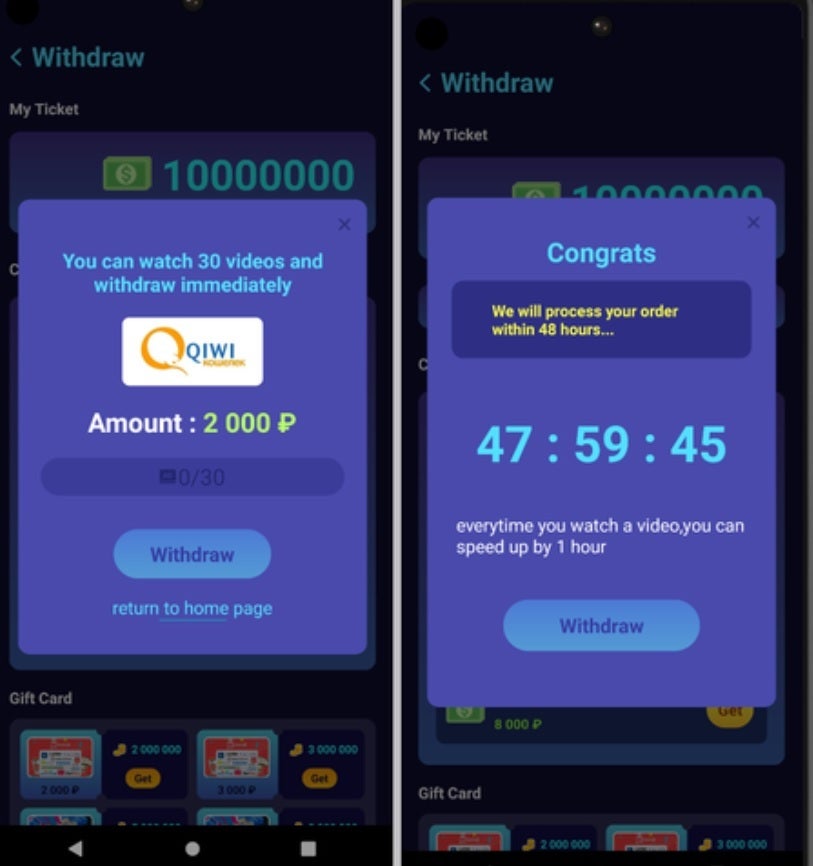
The report from Dr.Web points out that these rewards are often impossible to receive as users must accumulate a large number of rewards before being forced to watch dozens of commercials in order to cash out. After watching all of those ads, users were advised to watch even more to “speed up” the rewards process. The report states that even after all that “the apps did not verify any of the payment-related data provided by users, so the chances of receiving any of the money promised from these apps are extremely small.”
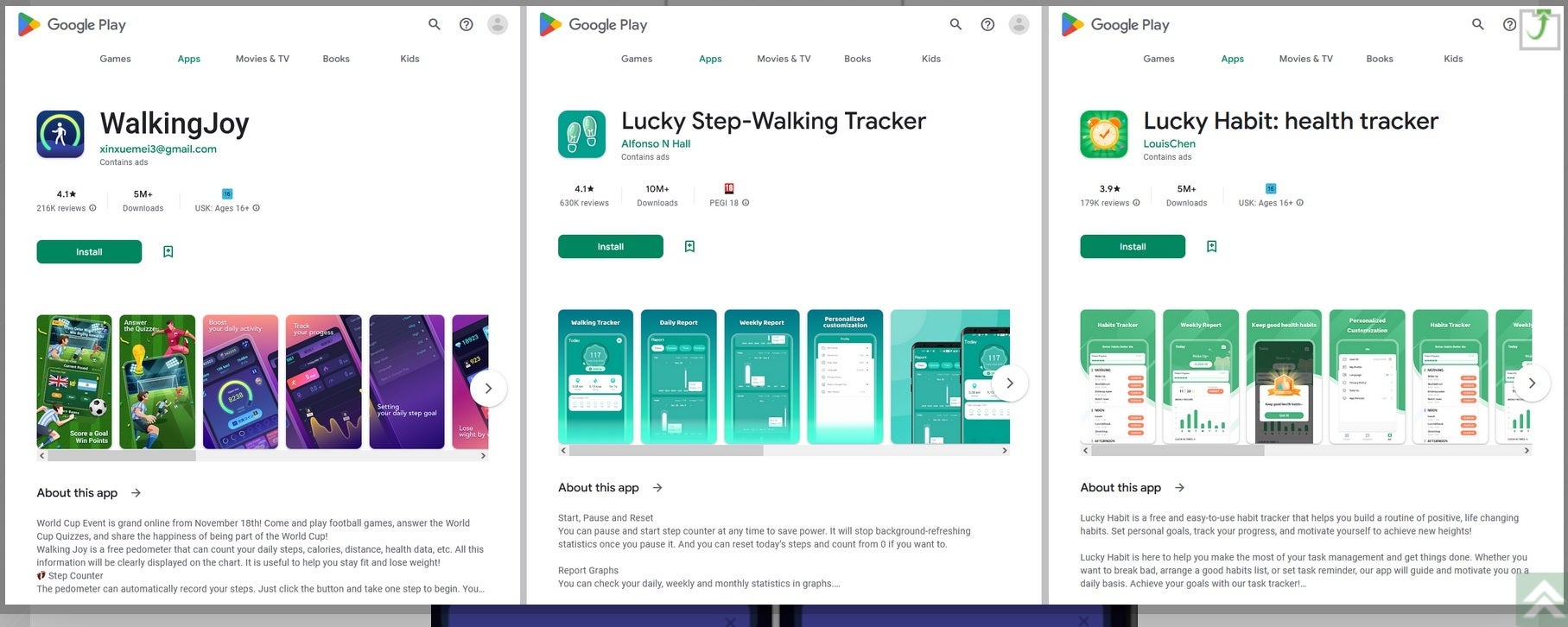
Three apps mentioned in the report remain in the Google Play Store. They are:
Lucky Step – Walking Tracker with 10 million downloads.
WalkingJoy with 5 million downloads.
Lucky Habit: health tracker with 5 million downloads.
All three apps connect with the same command & control server. Such servers are usually used by attackers to send directions to systems infected by malware. With all three apps communicating with the same remote server, it is apparent that they have the same developer. It is also pointed out that earlier versions of the Lucky Step-Walking Tracker falsely said that users had the option of converting their rewards into gift cards for various online stores.
Remember, these crooked developers make money when you view their ads. The more ads you watch, the more money they make.
Do not install these three apps on your Android device
The Lucky Step-Walking Tracker app was eventually updated and the functionality that would convert rewards into cash was removed and the interface elements that would be tapped to make this conversion disappeared. All previously accumulated rewards instantly became worthless.
The one thing you can do to protect yourself from installing malicious apps
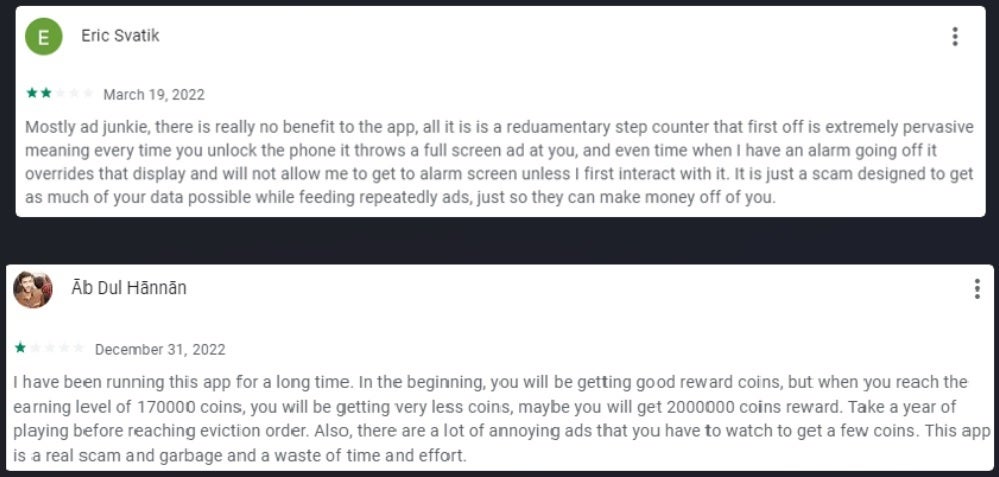
If you’re a long-time PhoneArena reader, you know that we tell you to read the comments section before installing an app from a developer that you’re not familiar with-even if the app is listed in the Play Store. That is where you will find red flags that can warn you to stay away from a certain app. For example, two comments written by a pair of unlucky Android device users who installed the Lucky Step – Walking Tracker app contained plenty of red flags.
These two comments from the listing for the Lucky Star app contain enough red flags to keep you from installing it
One comment came from a user who gave the app two stars (!!??!!) while stating that it is “Mostly ad junkie, there is really no benefit to the app…every time you unlock the phone it throws a full-screen ad at you…when I have an alarm going off it overrides that display and will not allow me to get to [the] alarm screen unless I first interact with it. It is just a scam designed to get as much of your data possible while feeding repeatedly ads just so they can make money off of you.”
This is how these three apps trick you into watching dozens and dozens of ads
A second comment gives the app one star and says, “Also, there are a lot of annoying ads that you have to watch to get a few coins. This app is a real scam and garbage and a waste of time and effort.”
We just punched up these apps in the Google Play Store so if you see them, do not install any of the three on your Android devices. Also, if you’ve already installed any of the three, uninstall them immediately.
Here’s one more malicious app that you need to avoid
Dr.Web’s report also mentioned a fitness app called FitStar that creates a customized weight-loss plan for 29 rubles (equivalent to 41 U.S. cents). However, what those subscribing didn’t know was that the program they were signing up for was good for only one day. At the end of the trial, subscribers were automatically signed up for four days of service for an additional 980 rubles (equivalent to $13.86). Full access to the program cost 7,000 rubles ($98.98) and the app continued to automatically extend users’ subscriptions every four days.
This app is also still listed in the Google Play Store. Comments for this app note that if you install it, the icon doesn’t show up on your phone’s list of installed apps making it hard to uninstall. The same review also notes that “The app is trying from the start to get into either Facebook or Google data…”
Don’t put your phone or your wallet at risk. Stay away from all of the apps mentioned in Dr.Web’s report.
Cutout, a popular AI image editing tool, suffered a data breach that exposed user images, usernames, and email addresses. The incident underscores the risks of using cloud-based AI tools for sensitive data.
Cutout.pro, a web-based AI image editing tool, was caught leaking 9GB worth of user data, which included usernames and images requested by using specific queries.
The discovery was made by Cybernews, who found an open ElasticSearch instance containing 22 million log entries referencing usernames, including individual users and business accounts.
However, since log entries contained duplicates, the total number of users affected is unclear. The instance also had information on the number of user credits, a virtual in-game currency, and links to Amazon S3 buckets, where generated images were stored.
This should not come as surprise since the use of AI-powered tools have skyrocketed. This is precisely due to the massive success of ChatGPT. So much so that Google was forced to release its own AI tool called Bard AI.
The exposed Elasticsearch cluster (Image: CyberNews)
The Hong Kong-based visual design platform allows users to manipulate photos or generate images using an AI-based application programming interface (API). This functionality enables the integration of the company’s services into third-party apps.
As noted by researchers, Cutout.pro has self-reported statistics of over 300 million API requests, 4,000 requests per second from over 5,000 applications and websites, and partnerships with over 25,000 businesses.
Therefore, the consequent impact of the leak is likely to be devastating for the customers whose data was exposed in the leak. According to the Cybernews report, their team also found two image editing apps in the open database: Vivid and AYAYA.
“If Cutout.pro’s developers previously didn’t back up the data, the open instance could have led not only to the temporary denial of service but a permanent data loss that was stored on the open instance. Attackers could have wiped it out.”
Cyber News
Due to not being properly configured, the open instance could have been exploited by threat actors in multiple ways. The Cybernews team surmised that anyone could have performed CRUD (Create, Read, Update, and Delete) operations.
Attackers could have used the initial access point to enter the database, take control of the data, and pass it through Cutout.pro’s API, thus carrying out a dangerous supply chain attack on the company’s customers.
Misconfigured Databases – Threat to Privacy
As we know, misconfigured or unsecured databases have become a major privacy threat to companies and unsuspecting users. In 2020, researchers identified over 10,000 unsecured databases that exposed more than 10 billion (10,463,315,645) records to public access without any security authentication.
In 2021, the number of exposed databases increased to 399,200. The top 10 countries with the most database leaks due to misconfiguration in 2021 included the following:
The Interim City Administrator of the City of Oakland declared a state of emergency.after a ransomware attack crippled the city’s services a week ago
The ransomware attack that hit Oakland on Wednesday February 8, 2023 is still crippling many of the city’s services a week later. In fact, the situation is so bad that the Interim City Administrator has now declared a state of emergency.
Tweet announcing the state of emergency
The ransomware attack initially forced the City’s Information Technology Department (ITD) to take all systems offline while it coordinated with law enforcement to investigate the attack.
The impact of the outage is far-reaching and ongoing. The network outage has impacted many non-emergency systems including the ability to collect payments and process reports, permits, and licenses. As a result, some of the city buildings are closed and the public is under advice to email ahead of any planned visit to one of the impacted departments.
Interim City Administrator G. Harold Duffey declared the state of emergency due to the ongoing impact of the network outages as a result of the ransomware attack. According to a spokesperson for the City:
“The declaration of a local emergency allows the City to Oakland to expedite the procurement of equipment and materials, activate emergency workers if needed, and issue orders on an expedited basis, while we work to safely restore systems and bring our services back online.”
Fortunately, the attack has not affected crucial infrastructure like the 911 dispatch and fire and emergency resources, but the Oakland Police Department (OPD) did say that response time has been delayed and asked the public:
If you don’t have an emergency or do not need an immediate emergency response, please consider the following means to report incidents:
So far the City has not provided an indication of when the situation will be back to normal.
Attackers
At this point it’s not clear which ransomware group is behind the attack on the City of Oakland. None of them has claimed the attack and the leak sites of the major groups we checked don’t mention Oakland. This could be because the ransom negotiations have not been broken off yet.
With the investigation apparently ongoing there is no indication of which infection method was used. We’ll update this story if we learn more.
Detect intrusions. Make it harder for intruders to operate inside your organization by segmenting networks and assigning access rights prudently. Use EDR or MDR to detect unusual activity before an attack occurs.
Stop malicious encryption. Deploy Endpoint Detection and Response software like Malwarebytes EDR that uses multiple different detection techniques to identify ransomware.
Create offsite, offline backups. Keep backups offsite and offline, beyond the reach of attackers. Test them regularly to make sure you can restore essential business functions swiftly.
Write an incident response plan. The period after a ransomware attack can be chaotic. Make a plan that outlines how you’ll isolate an outbreak, communicate with stakeholders, and restore your systems.
We don’t just report on threats—we remove them
Cybersecurity risks should never spread beyond a headline. Keep threats off your devices by downloading Malwarebytes today.
The U.S. Patent and Trademark Office has approved a recent Apple patent for a foldable device with a clamshell design and virtual buttons on the side.
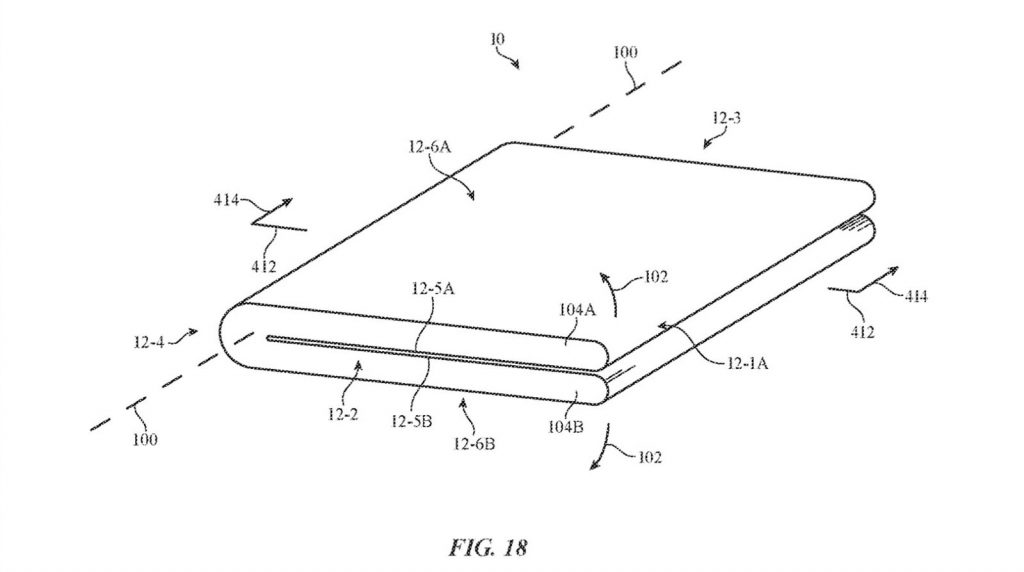
Earlier this week, Apple got approval for a new foldable design patent that explores the idea of “Electronic Devices With Display and Touch Sensor Structures.”
The patent includes drawings of a foldable phone or tablet with a wraparound screen. However, the display and touch sensor layers overlap, allowing users to touch multiple parts of the device to perform specific tasks.
For example, a touch-sensitive side, which Apple described as a “virtual shutter button,” could allow users to control the device’s camera. Users can also slide a finger up and down the device’s side to regulate its volume.
But does it mean Apple will finally announce a foldable iPhone?
New Apple Patent Suggests a Foldable iPhone Design?
Unlike competitors such as Samsung, Motorola, Xiaomi, and Oppo, Apple hasn’t released a foldable device. However, several analysts have hinted that the tech giant could announce a foldable device soon.
Whatever the case, the newly-approved patent adds to the anticipation of a foldable Apple design.
According to CNBC, the analysts at UBS say the patent “could indicate a foldable device is a possibility but not this year.” They further note that a foldable Apple smartphone “could be an incremental opportunity for future generation iPhone models.”
However, Ben Wood, the chief of research at Market research firm CCS Insight believes it’s too soon to expect a foldable iPhone.
“Right now it doesn’t make sense for Apple to make a foldable iPhone. We think they will shun that trend and probably dip a toe in the water with a foldable iPad,” Wood told CNBC.
So the patent is more likely for a foldable iPad, which aligns with Kuo’s claim.
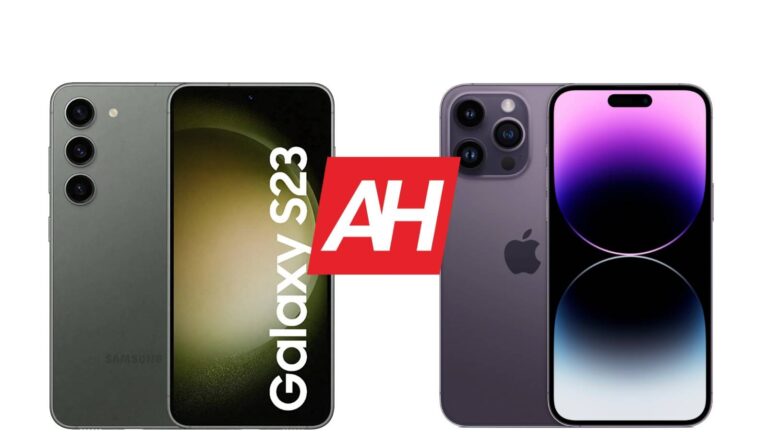
The Samsung Galaxy S23 launched earlier this month, and it’s a natural competitor to the iPhone 14 Pro. That’s why we’ll compare these two phones here, the Samsung Galaxy S23 vs Apple iPhone 14 Pro. These two phones have the same display sizes, but both look different, and feel different in the hand. There’s plenty to talk about here, actually, as they’re both very compelling, but different in general.
As per usual, we’ll first list the specifications of both devices, and will then move to compare them across a bunch of categories. We’ll compare their designs, displays, performance, battery life, cameras, and audio performance. That being said, let’s get this show on the road, shall we?
Both phones are made out of metal and glass, but not the same materials. The Galaxy S23 combines an aluminum frame with a Gorilla Glass Victus 2 backplate. The iPhone 14 Pro has a stainless steel frame, and “Corning-made glass” on the back. The iPhone 14 Pro is slightly taller, wider, and thicker than the Galaxy S23. It is considerably heavier, though, at 206 grams, compared to 168 grams of the Galaxy S23. The main reason is the stainless steel frame. Truth be said, it does feel a bit too heavy for its size, but some people like that.
The Galaxy S23 has a centered display camera hole on the front, while the iPhone 14 Pro includes a pill-shaped cutout on the front. Both phones have uniform bezels, and both feature curved corners. You’ll notice flat displays on both of these devices, while their buttons are in different spots. The Galaxy S23 has both its power/lock and volume rocker buttons on the right side, while the iPhone 14 Pro’s power button is on the right, while the volume up and down buttons are on the left.
If we flip them around, you’ll see considerably different-looking camera modules. The Galaxy S23 has three vertically-aligned cameras in the top-left corner. Each of those cameras protrudes directly from the backplate. The iPhone 14 Pro has three cameras with standard Apple alignment, all of which are included inside the same camera module. Both smartphones do feel quite premium, and are quite slippery. Do note that the iPhone 14 Pro is a lot heavier than the Galaxy S23, it’s not even close. Both are one-hand friendly, at least compared to most other phones out there.
Samsung Galaxy S23 vs Apple iPhone 14 Pro: Display
When it comes to displays, they do include the same display sizes, but different panels. The Galaxy S23 features a 6.1-inch fullHD+ (2340 x 1080) flat Dynamic AMOLED 2X display with a 120Hz refresh rate. It does support HDR10+ content, and gets up to 1,750 nits of peak brightness. The display aspect ratio is 19.5:9, and this display is protected by the Gorilla Glass Victus 2. The panel has a hole punch at the top.
The iPhone 14 Pro, on the flip side, includes a 6.1-inch 2556 x 1179 LTPO Super Retina XDR OLED display. This display is also flat, and has a 120Hz refresh rate. It supports HDR10 content, and also Dolby Vision. The max brightness is 2,000 nits, and the display aspect ratio is 19.5:9. The Ceramic Shield Glass protects this display, by the way, and there’s a pill-shaped cutout at the top.
When it comes to actual use, both are fantastic. We can nitpick all we want, but the point is they both offer nice, vivid colors, deep blacks, good viewing angles, and good touch response. The iPhone 14 Pro’s display can technically get brighter, so in direct sunlight that may help, but the Galaxy S23 is not far behind in that regard. Truth be said, both panels are fantastic, and also quite smooth, and well protected, so you really can’t go wrong here.
Samsung Galaxy S23 vs Apple iPhone 14 Pro: Performance
The Snapdragon 8 Gen 2 for Galaxy fuels the Galaxy S23. The Galaxy S23 is also equipped with 8GB of LPDDR5X RAM (only the 128GB storage model comes with LPPDR5 RAM) and UFS 4.0 flash storage. The iPhone 14 Pro includes the Apple A16 Bionic processor, along with 6GB of RAM, and NVMe storage. These two SoCs are amongst the best in the market, if not the best mobile SoCs at the moment. Both phones are really well-equipped hardware-wise, and the same goes for performance-related hardware.
Both of these phones fly through anything you throw at them, basically. They handle multitasking with grace, and the same goes for consuming multimedia, launching the camera and taking pictures, processing images, browsing, and so on. Even when it comes to gaming, they both do an excellent job without getting too hot. They can handle the most demanding games available in their respective app stores, without a problem. We didn’t notice any performance-related problems on either phone.
Samsung Galaxy S23 vs Apple iPhone 14 Pro: Battery
The Galaxy S23 includes a 3,900mAh battery pack. The iPhone 14 Pro, on the flip side, has a 3,200mAh battery. Apple’s iPhones usually need less battery juice than Android phones, so keep that in mind, don’t compare them directly. In fact, the iPhone 14 Pro is the device that offers better battery life in this comparison. The Galaxy S23 is much improved in that regard compared to its predecessor, but it’s still not great.
The Galaxy S22’s battery life was truly bad, and the Galaxy S23 does bring an improvement of around 25% in comparison. Getting over 5 hours of screen-on-time is easily doable. For some of you, you may even be able to get considerably more, depending on your usage. The iPhone 14 Pro can reach the 7-hour screen-on-time mark, at least in our experience. Your mileage may vary, of course, as your usage habits are different, as are the apps you use, plus there’s the signal factor, and so on.
Both devices support wired and wireless charging. The Galaxy S23 offers support for 25W wired, 15W wireless, and 4.5W reverse wireless charging. The iPhone 14 Pro supports 20W wired, 15W MagSafe wireless, and 7.5W Qi wireless charging. Unlike the iPhone 14 Pro, the Galaxy S23 also supports reverse wireless charging. One thing to note is that neither phone includes a charger in the box.
Samsung Galaxy S23 vs Apple iPhone 14 Pro: Cameras
The Samsung Galaxy S23 includes a 50-megapixel main camera, a 12-megapixel ultrawide unit, and a 10-megapixel telephoto camera. The iPhone 14 Pro is equipped with a 48-megapixel main camera, a 12-megapixel ultrawide camera, and a 12-megapixel telephoto camera. There’s also a LiDAR scanner on its back. Both of these devices do a really good job in the camera department, actually.
The camera performance improved on the Galaxy S23 compared to its predecessor. The device tends to provide warmer-looking images, compared to the iPhone 14 Pro. Apple’s handset tends to go for closer-to-real-life shots. Both offer plenty of detail during the day, and have really good dynamic range. The iPhone 14 Pro does struggle with highlights sometimes, in extreme HDR conditions.
At nighttime, both do a fairly good job. The iPhone 14 Pro images do turn up a bit darker, just so they feel closer to real life. They look great, though. The Galaxy S23 tends to brighten things up a bit more, but at times, the images do look a bit too warm in low light. Ultrawide cameras are great on both devices, though the iPhone 14 Pro keeps a better balance between main and ultrawide cameras, in terms of colors, first and foremost. The video recording is better on the iPhone 14 Pro, but the Galaxy S23 did improve considerably compared to its predecessor.
Audio
When it comes to audio, you’ll be glad to hear that both phones have stereo speakers. The sound is loud enough from both, and also detailed enough, but neither set of speakers are the best out there. Truth be said, the sound does sound a bit deeper from the Galaxy S23, and there’s also more bass here
You will not find a 3.5mm headphone jack on either device. You can, however, use their charging ports (Type-C and Lightning port, respectively) to connect your headphones. If you prefer to do that wirelessly, both phones are equipped with Bluetooth 5.3.
According to a recent news update, the TikTok Trivia challenge puts a $500,000 prize up for grabs. This trivia will soon start, and it will be accessible to only a select group of users. Also, the trivia is region-restricted, meaning that only TikTok users in a particular region can participate.
Some details on this coming trivia are available, helping users know exactly what to expect. This article will guide you on how you can join this trivia and possibly win yourself some amazing prizes. Also, the kick-off date and time are available to help users prepare beforehand.
Details on the coming TikTok Trivia challenge
Just like every other trivia contest, participants are most interested in the prize to be won. For its coming trivia contest, TikTok is offering a $500,000 prize pool for participants. The total prize money will be split among players that make it to the end of the entire contest.
This trivia is only open to TikTok users in the United States who are 18 years of age or older. TikTok’s users in other regions wishing to participate would have to hope that something similar is made available for their regions. The challenge will run from the 22nd to the 26th of February, a total of five days.
From the 22nd to the 24th of February, a total of two sessions will take place on the video-sharing platform. Each session will come with its own set of questions based on different topics, basically general knowledge. Some questions will be based on the John Wick movie franchise (this trivia is in collaboration with Lionsgate media)
If you are not familiar with the movie character John Wick, then you need to do some research. Also, participants should expect some tough questions as the challenge progresses. But how do you take part in the TikTok Trivia challenge?
There is a trivia widget in your TikTok For You feed, which participants can use to access the challenge page. Searching for the tag #TikTokTrivia and heading over to the TikTok account are other ways to participate in this trivia. Some of your favourite creators will also be part of a live stream after the trivia session.
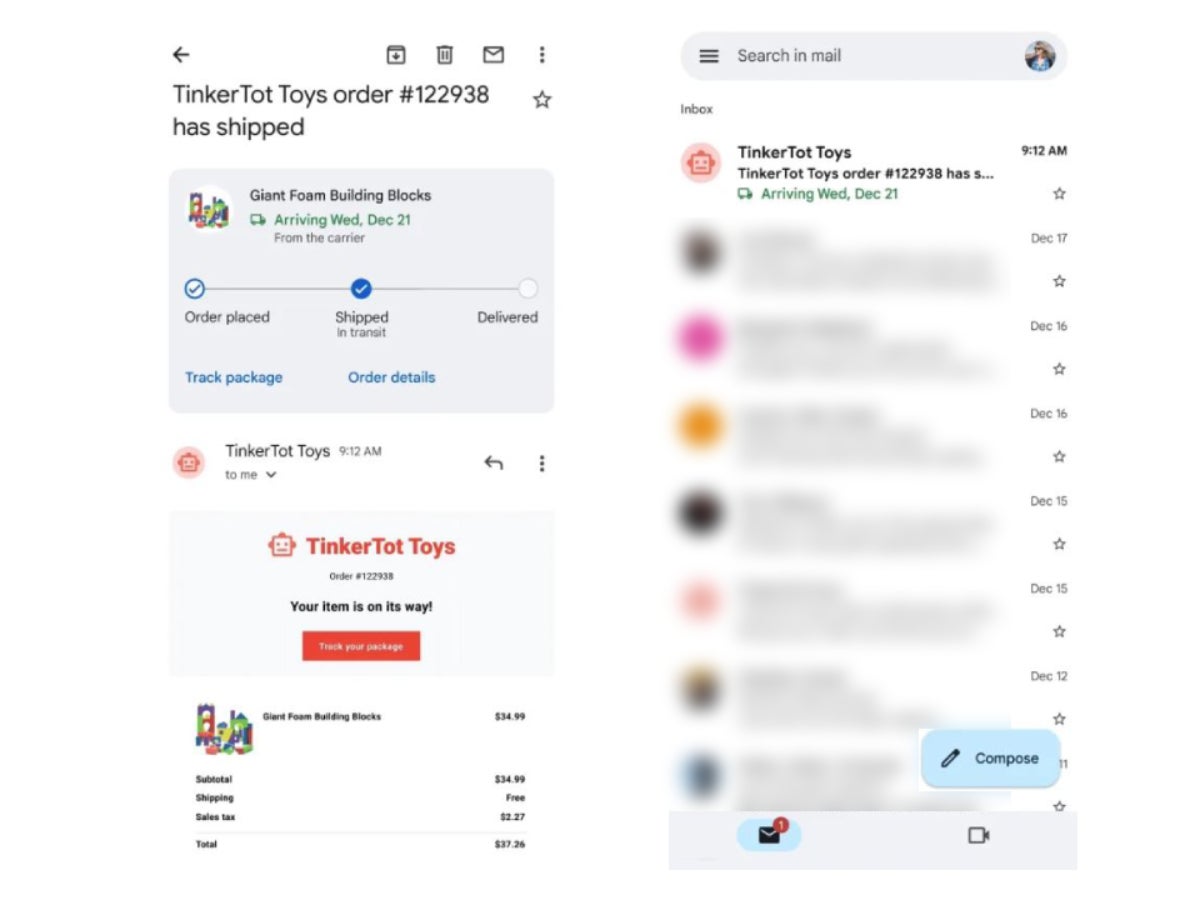
Last November, we reported that Google is teasing a feature that lets Gmail track your shipments for you. It would allow users to quickly get info about their awaited parcels at a glance, while at the Inbox section of the Gmail app.
While a lot of time has passed since November, many users might have missed the memo which lets them know that the feature is live. Usually, that would come in the style of a card that shows up at the top of your Gmail app, as soon as it detects that you’ve gotten an email about tracking.
Well, here is your reminder, folks: Gmail is now able to track your shipments, and it has even gotten a refreshed look. The feature is available on both iOS and Android, as 9to5Google reported, and once you turn it on, you will start seeing tracking info in your inbox and more detailed views when you open up an email.
How to enable package tracking in Gmail?
Some example snaps, courtesy of 9to5 Google.
That’s great and all, but how do you enable the feature if you’ve missed the prompt? No worries, it’s pretty simple to do. Let’s start with Android:
Open up the Gmail settings from within the app
Tap on your email
Navigate to General -> Package Tracking
Presto! You are done.
And here’s what you do if you are more into iPhones:
Open Settings in the Gmail app
Scroll down to Data Privacy
For some reason, the Toggle is there
Now that you’ve enabled the feature, you’ll be able to see:
Delivery Date, as submitted by the courier
Order Number with tap-to-copy capabilities, but it doesn’t work with all orders
A quick “Track” button that leads you to the online, presumably more detailed tracking
Order status in three stages: Order placed, Shipped, meaning in transit, and delivered.
If you are just looking to quickly check what your delivery status is, you won’t need to open the email, as the expected delivery date will be visible from the inbox. If you open the email though, all of the above will be displayed in a dynamic card at the top of the app.
We have new functionality to look forward to as well. At an unspecified time in the future, users will be able to get an overview of all of their tracked shipments at the top of the app, and labels for delayed shipments will also be introduced. Isn’t it just swell when advancements like this make your day a bit easier?
Car manufacturers Kia and Hyundai have recently taken measures to address concerns over vehicle security following the viral popularity of TikTok videos demonstrating how to easily steal their cars.
In response, the companies are now offering car owners the option to install steering wheel locks and obtain a software upgrade to enhance the security features of their vehicles.
Last year, a trend known as “Kia Boyz” gained popularity on social media, making popular videos of car thieves taking fun rides in Kia vehicles after breaking into the vehicles.
It has been reported that the video clips showing thieves stealing cars have received over 70 million views on TikTok.
New Anti-theft Upgrade Offered
This trend brought attention to the issue of vehicle theft and the potential vulnerabilities of certain car models. A new technology upgrade will soon be available for almost 4 million vehicles as part of a service campaign, with the rollout set to begin on February 14th.
In order to ensure timely delivery of the software upgrade to the remaining vehicles affected, the software upgrade is scheduled to be available until June 2023.
This upgrade will be completely free and Hyundai dealers will perform the free upgrade and the installation is expected to take less than an hour.
After the upgrade process is complete, a window decal will be attached to each vehicle to inform potential thieves that the vehicle is now rigged with an advanced anti-theft system.
This measure is designed to deter thieves from attempting to steal the upgraded vehicles, as they will be aware that the new security measures will make it much more difficult to do so.
Here’s what the CEO of Hyundai Motor America, Randy Parker stated:-
“Hyundai is committed to ensuring the quality and integrity of our products through continuous improvement and is pleased to provide affected customers with an additional theft deterrent through this software upgrade.”
“We have prioritized the upgrade’s availability for owners and lessees of our highest-selling vehicles and those most targeted by thieves in order for dealers to service them first.”
Software Upgrade Details
The engine immobilizer is one of the standard safety features installed on all Hyundai vehicles manufactured since November 2021.
However, the upgrade software cannot be installed on some 2011-2022 model-year vehicles that do not have engine immobilizers.
The software upgrade that has been developed for Hyundai and Kia vehicles features standard “turn-key-to-start” ignition systems. So, the upgrade is designed to modify specific vehicle control modules to improve the functionality of the vehicles.
By using the key fob to lock the doors of the vehicle, the factory alarm will be set, and an “ignition kill” feature will be activated. If the vehicle is subjected to the popularized theft mode, then this feature will prevent the vehicle from being started.
In order to deactivate the “ignition kill” feature on the vehicle, customers need to unlock their vehicle with their key fob.
Rollout schedule for the Service Campaign
Here below we have mentioned the complete schedule:-
Phase 1 will start on February 14, 2023, for the following vehicles:
2017-2020 Elantra
2015-2019 Sonata
2020-2021 Venue
Phase 2 will start on June 2023, for the following vehicles:
Find out how Google Ads have been spreading FatalRAT malware recently in fake utility, messenger and browser apps. Learn more about this alarming security issue and how to protect yourself.
Researchers from the Slovak cybersecurity firm ESET have discovered a new malware campaign targeting Chinese-speaking users in East and Southeast Asia.
According to a report published by ESET researchers, hackers are delivering remote access Trojans hidden inside malicious Google ads. These misleading ads appear in Google search results and download Trojans installers.
This should not come as a surprise, as Google Ads and Google Adsense have been abused lately to deliver malware around the world.
Researchers at ESET noted that the attackers remain unidentified. However, it is confirmed that they are targeting Chinese-speaking individuals. They have designed fake websites that look identical to popular apps like WhatsApp, Firefox, or Telegram.
Through these websites, the attackers deliver remote access Trojans, such as FatalRAT, first detected by AT&T researchers in 2021, to hijack the infected device. Some of the spoofed apps include:
LINE
Signal
Skype
Youdao
Electrum
Telegram
WhatsApp
WPS Office
Mozilla Firefox
Google Chrome
Sogou Pinyin Method
Researchers discovered the attacks between August 2022 and January 2023. The attack starts by purchasing an ad slot appearing in Google search results.
“The attackers purchased advertisements to position their malicious websites in the “sponsored” section of Google search results. We reported these ads to Google, and they were promptly removed,” researchers explained.
Users who search for popular apps are directed to rogue websites with typosquatting domains that host trojanized installers. These installers install the actual app as the user requires, to avoid raising suspicion.
Fake Google Chrome and Telegram websites spreading fake installers infected with FatalRat malware
The FatalRAT malware used in this campaign contains numerous commands to manipulate data from various browsers.
“The websites and installers downloaded from them are mostly in Chinese and in some cases falsely offer Chinese language versions of software that is not available in China,” researchers wrote in their technical report published today.
The downloaded installers aren’t hosted on the same server as the sites, but in Alibaba Cloud Object Storage Service, and are digitally signed MSI files. The installers were uploaded to the cloud storage on 6th January 2023.
After the malware is deployed, the attacker gains full control of the device and can execute arbitrary shell commands, run executables, steal data from web browsers, and log keystrokes.
This campaign has no specific targets, as the attackers want to steal exclusive user data, such as web credentials, to sell them on underground hacker forums or launch additional cybercrime campaigns. However, in their report, ESET researchers noted that most victims were located in the following countries:
China
Taiwan
Japan
Malaysia
Thailand
Indonesia
Myanmar
Philippines
Hong Kong
Detection and protection from fake malicious installers
Fake, malicious installers can be a significant threat to your computer and personal data. To detect and protect against them, here are some steps you can take:
First and foremost, use common sense when downloading files. Never download software, or anything else, from a third-party site. Download software only from trusted sources: Download software only from reputable websites, and avoid downloading from unverified sources.
Verify the authenticity of the website: Check the website’s URL for spelling errors, and look for security badges and trust seals on the site. For example, it’s Google.com, not ɢoogle.com.
Use reliable anti-virus software: Use reliable anti-virus software and keep it updated to protect your computer from malicious software.
Read reviews and comments: Read reviews and comments about the software before downloading it; this will give you an idea of the software’s authenticity.
Scan downloaded files: Use anti-virus software to scan the downloaded file before installing it. You should also use VirusTotal to check whether the file is malicious or if the URL you are about to visit is safe.
Use sandboxing software: Use sandboxing software that can run the installer in a virtual environment, keeping your system safe from any potential harm.
Enable security features: Enable security features on your computer, such as a firewall, to prevent unauthorized access to your system.
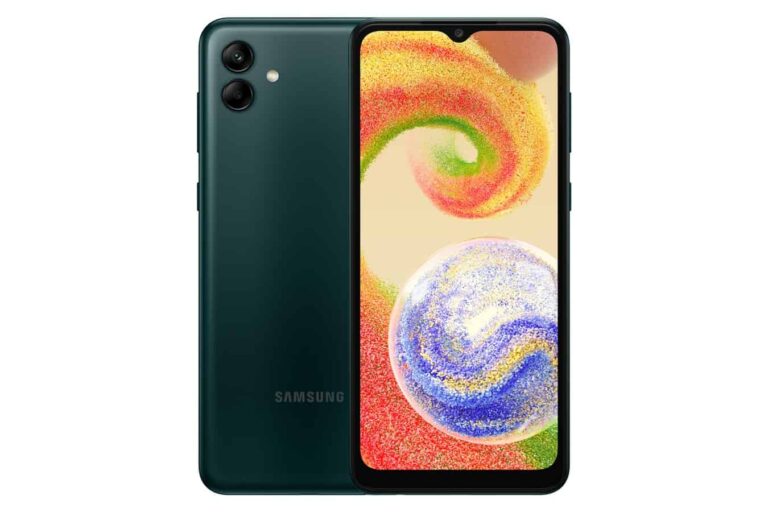
Samsung has released the Android 13 update for the Galaxy A04. The budget handset is getting One UI Core 5.0 along with the new Android version. This update has already been rolled out to the Galaxy A04s and Galaxy A04e, the other two models in the company’s entry-level lineup last year.
As of this writing, the Android 13-based One UI Core 5.0 update for the Galaxy A04 is rolling out in Asia. To be precise, the update is available for users in Kazakhstan. The new firmware version for the phone is A045FXXU1BWB1. Samsung should expand the release to more markets in the coming days. The budget handset wasn’t sold in the US, but it arrived in Africa, Europe, and a few other regions.
Along with Android 13 and One UI Core 5.0, the Galaxy A04 is also getting the December 2022 Android security patch. It’s a fairly old SMR (Security Maintenance Release) now, given that the February 2023 patch has also been around for about two weeks.
The Galaxy A04s received the Android 13 update in December last year with the November 2022 SMR. It recently picked up the February patch as well. The Galaxy A04e, on the other hand, received the January patch with Android 13 a few weeks back.
The Galaxy A04 may not be getting a recent security patch, but there are plenty of other things to be excited about here. Launching with Android 12, this is the first major Android OS update for the phone. It brings a minor visual refresh and a host of new features and improvements.
Samsung has made system animations smoother to enable a more fluid navigation experience. You’re also getting new lock screen customizations that allow you to give your phone a unique look. You can refer to the official changelog here for more.
Galaxy A04, A04e, and A04s will not get One UI 5.1, but Android 14 will arrive
Samsung launched the Galaxy A04, Galaxy A04e, and Galaxy A04s in the second half of last year. All three models debuted with Android 12 out of the box. Android 13 is the first major Android OS upgrade for them. They will also get Android 14. However, Samsung’s One UI 5.1, which recently rolled out to dozens of Galaxy devices, will not reach the budget trio. The new One UI version is reserved for flagships and premium mid-rangers. Nonetheless, if you’re using the Galaxy A04, the latest update for your phone contains tons of goodies. Go to Settings > Software update > Download and install to check for updates manually.