CISA has added a Ruckus vulnerability being abused by the AndoryuBot botnet to its catalog.
Along with six older vulnerabilities, the Cybersecurity and Infrastructure Agency (CISA) has added a vulnerability in multiple Ruckus wireless products to the Known Exploited Vulnerabilities Catalog. This means that Federal Civilian Executive Branch (FCEB) agencies need to remediate these vulnerabilities by June 2, 2023.
The Common Vulnerabilities and Exposures (CVE) database lists publicly disclosed computer security flaws. The Ruckus vulnerability is listed under CVE-2023-25717, which indicates that Ruckus Wireless Access Point software contains a vulnerability in its web services component. If the component is enabled on the access point, an attacker can perform cross-site request forgery (CSRF) or remote code execution (RCE). This vulnerability reportedly impacts Ruckus ZoneDirector, SmartZone, and Solo Aps with Ruckus Wireless Admin panels version 10.4 and older.
The Ruckus security bulletin about the vulnerability, issued on February 8, 2023 and edited on May 11, 2023, displays a long list of affected devices. Several of these devices have reached end-of-life (EoL) which means they may not get patched against this vulnerability. Users of supported devices can find download links and install instructions by following the links behind their specific product.
One malware operator that has been found to exploit vulnerable Ruckus devices is the relatively new botnet, AndoryuBot. Infected devices are used to propagate the botnet malware to other devices and are used in DDoS attacks. To avoid detection and to bypass firewalls, the botnet uses the SOCKS proxying protocol. SOCKS is an Internet protocol that exchanges network packets between a client and server through a proxy server. This protocol is often used because it allows traffic to bypass Internet filtering to access content which would otherwise be blocked, but it can also be used to circumvent blocklists and firewall rules.
Protection
To protect your devices against the AndoryuBot botnet which seems to thrive on this vulnerability, you should install the available patches and replace the legacy devices that have reached EoL.
Other measures to protect your devices from falling prey to botnets are:
Do not make your admin panels accessible from the internet if you can avoid it. If you can’t completely disable remote access, use very strict access policies.
Segregate your network so critical components are separated from vulnerable assets.
Apply active protection software and monitor network traffic.
The Malwarebytes web protection module blocks the download of the botnet malware:
Malwarebytes blocks 163.123.142.146
We don’t just report on vulnerabilities—we identify them, and prioritize action.
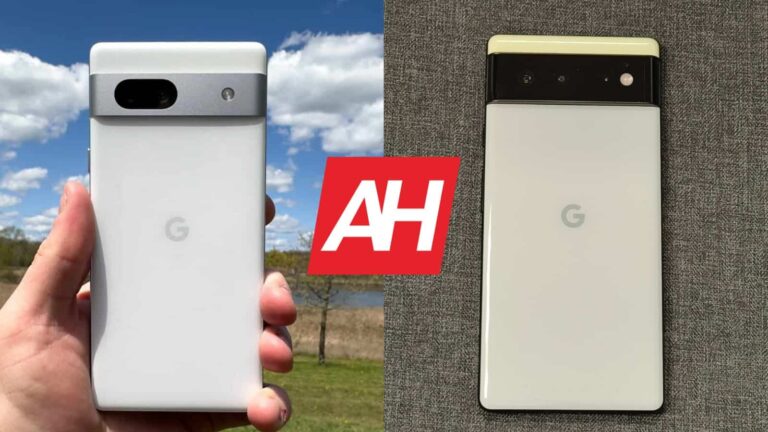
The Google Pixel 7a is the company’s latest smartphone. It got announced earlier this month, during Google I/O. We’ve already compared the Pixel 7a to several Pixel phones, and it’s time to do the same with yet another one. In this article, you’ll see the Google Pixel 7a vs Google Pixel 6comparison. Some of you may be thinking of switching from Google’s 2021 flagship to the Pixel 7a, or getting it instead of the Pixel 6. Is that a good idea? Well, let’s try to find out, shall we?
We’ll first list the spec sheets of both of these phones, before we get down to various different sections. We’ll compare their designs, displays, performance, battery life, cameras, and audio performance. There’s a lot to talk about here, they’re both similar and different at the same time, so… let’s get to it.
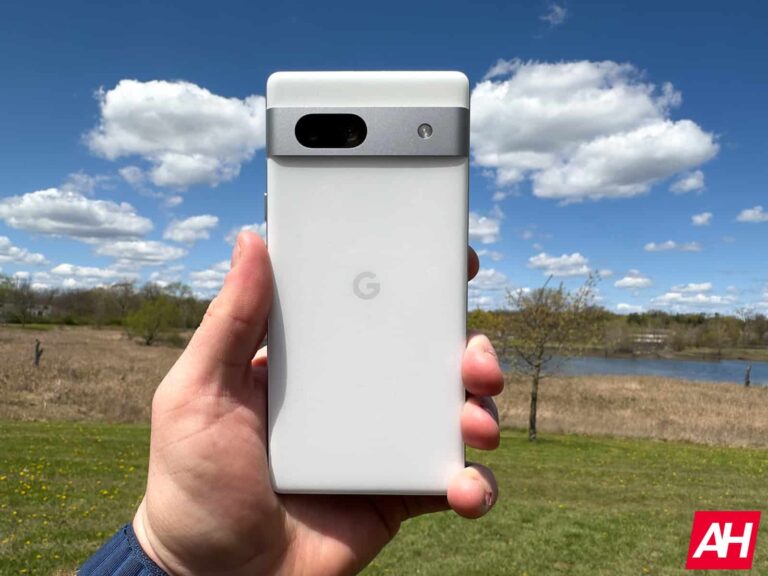
From the front, these two devices are quite similar. They both have that square-ish design that we’re used to by now, rather thin bezels, and a centered display camera hole. The bottom bezel is thicker than the rest on both phones. They do include flat displays, and a camera visor on the back. That camera visor is different in comparison, though. The Pixel 7a, it’s covered by metal, while Google used glass on the Pixel 6. That sure does make them look different enough.
Unlike on the Pixel 7, the Pixel 7a’s camera visor doesn’t physically connect to the side frame. One major difference on the back is the backplate. On the Pixel 7a, it’s made out of plastic, while glass covers the Pixel 6 backplate (Gorilla Glass Victus). Physical buttons sit on the right-hand side of both of these phones. Both phones are water and dust resistant, but the Pixel 6 offers a better rating. It’s IP68 certified, compared to IP67 certification on the Pixel 7a.
The Pixel 6 has a larger display than the Pixel 7a, and it’s larger overall. It’s taller, wider, and about the same thickness as the Pixel 7a. It does weigh a bit more, mainly due to the glass backplate, probably It weighs 207 grams, compared to 193.5 grams on the Pixel 7a. The in-hand feel is very similar between the two, though the Pixel 7a is smaller, and is definitely easier to use with one hand.
Google Pixel 7a vs Google Pixel 6: Display
The Pixel 7a features a 6.1-inch fullHD+ (2400 x 1080) OLED display. That display is flat, and it has a 90Hz refresh rate. We’re looking at a 20:9 display aspect ratio here, and that panel is protected by the Gorilla Glass 3. The Pixel 7a’s display has a PPI of 429. This display is noticeably smaller than the one on the Pixel 6.
Google Pixel 6 display
The Google Pixel 6 has a 6.4-inch fullHD+ (2400 x 1080) AMOLED display. This panel has a 90Hz refresh rate too, and it supports HDR10+ content. It’s flat, and has a 20:9 aspect ratio. We’re looking at a 411 PPI, while the Gorilla Glass Victus covers the display to protect it. The Pixel 6 has a slightly higher screen-to-body ratio.
Neither phone has immensely thin display bezels, but they’re still thin. The two displays are quite similar, actually. Neither gets up to the brightness levels of today’s top-of-the-line flagships, but most people will be happy with them. Both displays are vivid, have good viewing angles, and deep blacks. The touch response is also quite good on both displays. We don’t have a major complaint on either panel.
Google Pixel 7a vs Google Pixel 6: Performance
The Google Tensor G2 fuels the Pixel 7a, Google’s latest processor. The company also packed in 8GB of LPDDR5 RAM and UFS 3.1 flash storage. The Pixel 6, on the flip side, comes with the Google Tensor chip, along with 8GB of LPDDR5 RAM and UFS 3.1 flash storage. The Pixel 7a does have a more powerful SoC in comparison, while they’re on the same playing field when it comes to RAM and storage prowess.
Truth be said, both smartphones are more than fast enough for regular, everyday performance. They open apps quite fast, are great for jumping between them, and can also do more demanding tasks with ease. Well, everything except intensive gaming, that is. Graphically-intensive games are not running that great here, Qualcomm’s flagship SoCs are better equipped for such usage.
8GB of RAM is enough for both phones to run quite smoothly, though don’t expect them to keep many apps in the background for long. That won’t really affect the overall performance speed, but it’s worth noting nonetheless. We did not notice a notable difference in performance speed between the two, to be quite honest, they seem to be on the same playing field in that regard.
Google Pixel 7a vs Google Pixel 6: Battery
The Pixel 7a has a 4,385mAh battery on the inside. The Pixel 6, on the other hand, includes a 4,614mAh battery. That difference is not surprising considering that the Pixel 6 also has a notably larger display. The Pixel 7a battery life was questionable for us at first, lasting around 6 hours of screen-on-time, but it improved since then. We can now comfortably cross 7 hours of screen-on time, on average.
Something similar can be said for the Pixel 6, actually. Well, unless you’re driving around a lot, and using mobile data. In that case, the battery life is noticeably worse. It could be due to the modem included in the phone, or simply Google’s optimization, but it has been going on for quite some time for us with this device. For months. It’s definitely something worth noting if you’re spending most of your day on mobile data, and moving around a lot
When it comes to charging, well, the two devices are quite similar. You’ll get around 21W wired charging here, and the same goes for wireless charging. Do note that the charging slows down immensely once you cross the 50-percent mark, though. It’s definitely not as fast as many competing smartphones offer, and also, the charger is not included in the box. That goes for both smartphones.
Google Pixel 7a vs Google Pixel 6: Cameras
The Pixel 7a includes a 64-megapixel main camera, and a 13-megapixel ultrawide camera. Google decided to change both rear-facing cameras compared to the Pixel 6a and Pixel 7. The Pixel 6, on the other hand, features a 50-megapixel main camera, and a 12-megapixel ultrawide camera, which is a far more familiar setup when it comes to Pixel phones. So, how do they compare?
Google Pixel 7a cameras
Well, both smartphones do a great job, first and foremost. There are some notable differences, though, which are mainly visible in low light. You’ll notice that the Pixel 7a has a tendency to provide warmer images during nighttime, compared to the Pixel 6 (and other Pixel phones), which tends to lean towards cooler tones. The Pixel 6 also handles intense dynamic range situations better than the Pixel 7a, as the white balance ends up being better, and it manages to pull more details from the shadows.
Other than that, they’re basically on par when it comes to stills. They’re detailed and well-balanced both during the day and during nighttime. The Pixel 6 does a better job with video recording, though, as the stabilization tends to be better on the Pixel 6. Other than that, both do a good job overall.
Audio
You will find a set of stereo speakers on both of these phones. Those speakers are not that different in comparison, and they do a good job. They’re both loud and detailed enough, without being too sharp. They’re not amongst the best speakers we’ve tested, though, not at all.
Neither of the two phones has a 3.5mm headphone jack, however. You’ll either need to use the Type-C port at the bottom, or rely on a wireless Bluetooth connection in order to hook up your headphones.
Over the past few years, TikTok has been hard at work trying to introduce new features in an attempt to not only maintain its dominant position in the short-form video market but also to gain some market share in the search industry. Now, in line with these efforts, TikTok has introduced a new search widget for iPhone and Android users, making it easy to access the platform’s search functionalities.
This move aligns with a marketing campaign earlier this year in the UK, where the company advertised itself as a search engine aimed at catering to the changing patterns in online content discovery. This is because immersive experiences offered by platforms like TikTok and Instagram are now gaining more importance over traditional keyword-based searches.
Speaking on this shift, Google’s Senior Vice President, Prabhakar Raghavan, stated, “We keep learning, over and over again, that new internet users don’t have the expectations and the mindset that we have become accustomed to. These users don’t tend to type in keywords but rather look to discover content in new, more immersive ways. In our studies, almost 40% of young people, when looking for a place for lunch, don’t go to Google Maps or Search. They go to TikTok or Instagram.”
Therefore, to add the search widget, iOS users can long-press on the home screen, tap the “+” icon, search for TikTok, find the “Search” widget, and tap “Add Widget.” On the other hand, Android users can find the new widget by long-pressing on the home screen, tapping on Widgets, and searching for TikTok.
The increasing influence of TikTok
While the new search widget is a step in the right direction for TikTok to grow as a search platform, experts and lawmakers have raised their concerns about the company’s influence, especially in the UK, where many young adults are now considering TikTok as a news source. Moreover, recent reports of a former ByteDance employee claiming that the Chinese Communist Party keeps a watchful eye on the platform and uses it as a propaganda machine and the ongoing FBI investigation on TikTok spying on US journalists have added to the concerns of UK lawmakers.
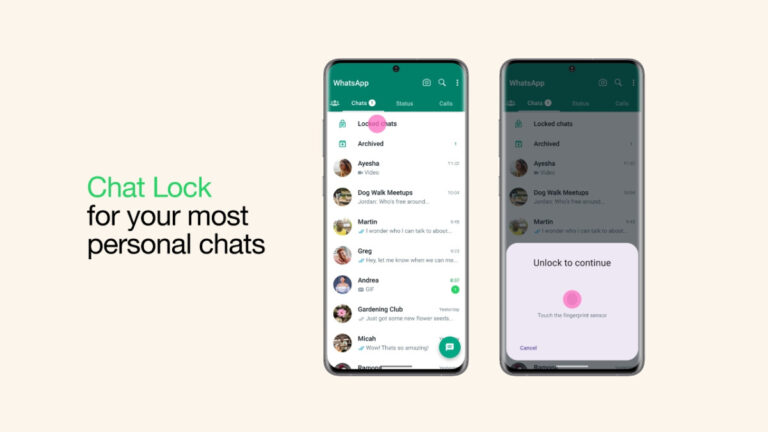
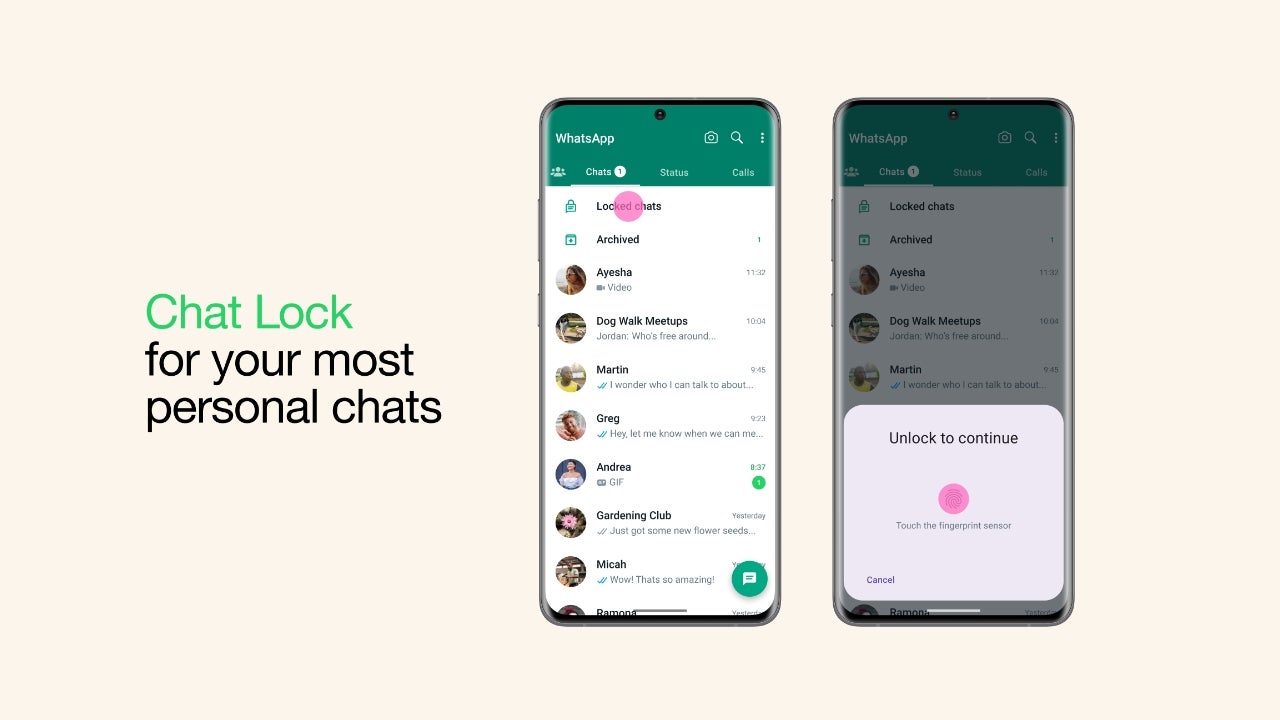
WhatsApp has announced a new feature called “Chat Lock” that adds an extra layer of privacy to its users’ most private chats. This feature allows users to lock a chat thread so that it can only be viewed after once again entering the device’s password or fingerprint.
WhatsApp touts this feature as a tool to make sure its users are able to keep their private talks private, even if the smartphone in question is passed around or someone is able to get into it without permission. This also works with notifications, making sure that any notifications from a locked chat does not show a preview of what is being said.
With WhatsApp Chat Lock, you can make sure that your private talks stay private even if someone gets into your device without your permission. Whether you share sensitive information, talk about personal things, or have private conversations, this new tool gives you the power to keep your privacy at its highest level.The announcement is accompanied by a video highlighting how the feature works and how it can be convenient in family settings where the phone could be borrowed several times by others to either take a photo or participate in a video chat. In it, you see the main character escape several scenarios where his private conversation could have been made public, only to be saved by the existence of this feature.
Locked chats can be accessed via the “Locked chats” folder, which can only be accessed by authenticating via the same method you use to unlock your phone. Locked chats will also be expanded in the coming months with new features such as extending the lock to companion devices and the ability to apply a different password to your locked chat folder than the one being used to unlock the device.
The latter helps in cases where you do want to give access to your phone to someone else by sharing your device pin, but still want to keep specific WhatsApp chats private. Currently, you are able to lock the entire WhatsApp application with your chosen authentication method, but this takes it one step further by targeting specific conversations. The feature is rolling out in the latest version of the app.
Based on the recent report from char49, it appears that there was a critical flaw in Ferrari’s subdomain, which led to an arbitrary file read vulnerability.
The vulnerability existed in the media.ferrari.com subdomain using a vulnerable WordPress plugin (W3 Total Cache) that could allow threat actors to read sensitive files on the server.
The W3 Total Cache plugin is used by millions of WordPress websites, increasing website performance. However, Ferrari had an outdated version of this plugin which threat actors could’ve exploited.
Technical Analysis
Ferrari was running on WordPress CMS(Content Management System), discovered by Inspecting elements with the Developer Tools offered by some browsers.
Hence, initial reconnaissance started with WPScan which revealed some interesting information like installed plugins on the website. This enumeration showed the W3 Total Cache version as 0.9.3, which was outdated. The latest version of this plugin was found to be v2.3.1.
Further research by the research team and some Google Dorking led to the discovery of CVE-2019-6715, in which W3 Total Cache Versions before v0.9.4 were vulnerable to unauthenticated arbitrary file read vulnerability.
The wp-config.php file must be located on the server to exploit this vulnerability. The path to this file depends on the operating system and the HTTP server type used.
The operating system was found and confirmed as Ubuntu 14.04.5 LTS by reading the /etc/issue file.
cURL request to /etc/issue file
The response shows the operating system used
The HTTP server was guessed as Apache and was confirmed by sending the request to the /etc/apache2/apache.conf which loaded the Apache configuration file.
Now, the virtual-host configuration file must be found, which is consistently named by the site owners. After several guessing, the virtual-host configuration file was guessed to be media.ferrari.com which was located at /etc/apache2/sites-enabled/media.ferrari.com
For finding the DocumentRoot path that servers the WordPress files, a cURL request is sent to the virtual-host configuration file.
cURL request to /etc/apache2/sites-enabled/media.ferrari.com
The response to this request revealed the DocumentRoot path.
With this gathered information, the wp-config.php file location is found as /home/web/mediaferrari/wp-config.php, which contains the database details and keys.
This extracted sensitive data, including DB name, DB password, DB host and other information.
DB details are revealed through unauthenticated arbitrary file read
It is recommended that all website owners be aware of securing their websites. They must be aware of vulnerable versions of WordPress plugins on their websites frequently and upgrade them to the latest versions to prevent malicious actors from exploiting them.
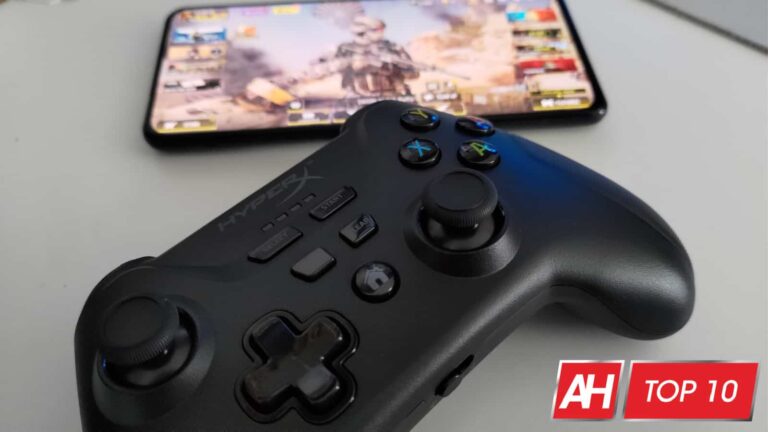
Even if you play games on PC, sometimes you just want to use gaming controllers instead of the trusty old keyboard and mouse combo, as they can provide the best experience. Sure, it might depend on the type of game you’re playing, or the game specifically.
But, chances are many players out there will have at least one game on PC that is simply better suited for gaming controllers. And if you’re playing on console, well then that’s almost always your best option. For mobile, it’s either a controller or touch controls. We’ve put together this list of some of the best gaming controllers out there. So you can do less digging and get to playing your favorite games. With that new controller no less.
There are a lot of options out there for this type of peripheral. So by narrowing things down to what we think are the best gaming controllers, it should save you some time.
Best Gaming Controllers
Below you’ll find a summary of all the controllers on this list. Along with the cost of each one and links that take you to the retailer.
Sony PS5 DualSense
Sony really knocked it out of the park with the DualSense controller. You’ll naturally get most of the benefits when using this with the PS5 itself. But it is also compatible with PC and mobile. So you can use it there too.
At the moment, there aren’t really any official third-party DualSense options like there are with the DualShock 4 for the PS4. So for PS5 purposes, this is really your only controller if you want the DualSense features.
As a controller for PC and mobile, it just feels great in the hands. And should have longer battery life than that of the DualShock 4. Even if only by a little bit. For use with PS5, it has the adaptive triggers, and the improved haptics. You just can’t beat it.
The new wireless controller for Xbox from Microsoft is essentially the same controller as before. But with a few minor upgrades. First, it feels lighter than the older ones. But it also comes with textured surfaces on the backs of the controller grips. So it should help prevent slipping from sweaty hands.
It also now has a share button for easy screenshot captures. It’s compatible with Windows 10 PCs, Xbox One, Xbox Series X|S, and mobile devices. And it comes in tons of colors. So you can more or less personalize it.
Razer’s new Wolverine V2 Pro is the ultimate controller from Razer for your PS5. It features the mecha-tactile action buttons, programmable buttons on the back and top, and HyperTriggers for that fast, mouse click feel when pulling triggers in games. Which are perfect for titles like Modern Warfare II.
There’s also an 8-way microswitch d-pad and removable thumbstick caps. And of course, it has Chroma lighting that you can control using the Chroma mobile app. This is designed for PS5 but it can also be used with PS4 and PC, as well as with mobile devices.
One of the big boys of the controller world is the Elite Series 2. Which gives you, the player, nearly full customization of the controller. Right down to the height of the thumbsticks and the weight of the controller itself. You can also swap the thumbsticks out, adjust trigger height, and it comes with textured grips for less slippage, as well as paddle buttons on the back for extra controls in your favorite high-stakes games.
There’s a lot of features on this one. So it’s naturally a little more expensive. But most people that have used it will tell you it’s worth it for the advantage you’ll have in games.
If you can’t comfortably use a traditional gamepad, then look to Microsoft’s Xbox Adaptive Controller to help you continue to play the games you love. The coolest thing about this controller is that it allows you to configure your game controls in a way that might work better for you layout-wise.
Basically you can use this controller to set something up that works for you. As it takes every single input and deconstructs them and gives them their own port on the back. So you can plug things and get a setup that’s more accessible.
This is another tournament-grade competitive controller that comes with a lot of extras. It comes from Nacon, who specializes in making these kinds of controllers that are focused on Esports. In fact we reviewed Nacon’s RIG Compact Pro for Xbox and PC, which we found to be a great option.
With the Revolution Unlimited Pro V3, you get extra buttons on both controller grips, as well as customizable thumbsticks, wireless and wired connection options, and more. The D-Pad can even be used as a 4-way or 8-way D-Pad depending on what you like.
The Razer Kishi V2 improves on everything that was great about the original controller. Though it does have to give some things up. For starters, the Kishi V2 now has a more rigid and sturdy bridge that your phone sits against. But this means that Razer had to give up the collapsible design of the original Kishi.
Still, the Kishi V2 gains much more than it loses. It now has an open design where parts of the controller that touch your phone are flat instead of enclosed. Which means it can be used with phones that have an off-center USB-C port, like the ROG Phone 6 Pro.
The Kishi V2 also now adds micro switches for some of the buttons which gives them more of a clicky tactile feel. And it offers two new programmable macro buttons which the original Kishi didn’t have. All around this a refined design of one of the best mobile controllers to ever hit the market.
When it comes to custom controller for the PS5, there are not that many options out there. But out of the ones that are, the HexGaming Rival is one worth checking out. It has a range of customizations you can make that will personalize the controller to your liking.
This includes mappable paddles, interchangeable thumbsticks, and my favorite part, the option for FastShot digital buttons on the L1/R1 and L2/R2 triggers. With these in place, the trigger press on the controller will feel more like a mouse click thanks to there being less travel time. Which is ideal for first-person and third-person shooters.
This option isn’t ideal for those that want the full press with the triggers. Especially if you want the adaptive trigger features that the DualSense was designed with. The HexGaming Rival is also quite spendy. That being said, we’ve used it in games like Call Of Duty: Vanguard, Battlefield 2042, and Outriders and have loved it. So if you’re ok with the price, there’s lots of customization to be done here. From functional adjustments to a personalized design. Making this one of the best game controllers.
Continuing with SCUF, if you also play on PC and Xbox, then you probably want to at least consider the Instinct Pro. It offers a lot of what you’ll get from other SCUF controllers, but with quite a few improvements. For example, it can store up to three different profiles on the onboard memory for a customized control setup for different games. And you can swap between them on the fly with a button right on the front.
It also has the customizable, adjustable triggers, back paddle buttons, a wide array of customization options for the design, wireless and wired connectivity options, plus instant triggers. The instant triggers are a real game changer as they can go from feeling like a regular trigger press to the quick and precise click of a mouse.
There’s also a high-performance grip on the back. SCUF isn’t playing around when it comes to its controllers. And you shouldn’t be either. Unless it’s when you’re actually playing games.
The SCUF Reflex is SCUF’s version of a customized DualSense controller. Like the HexGaming Rival, and like SCUF’s Instinct Pro for the Xbox and Windows, the SCUF Reflex has multiple paddle buttons on the back. The advantage you get with the Reflex over something like the Rival from HexGaming, is that the paddle buttons can be removed. So you can have them there when you want them. Or take them off when you don’t.
The Reflex also comes in three models. The Reflex, Reflex Pro, and Reflex FPS. The Reflex and Reflex Pro are mostly the same. They have the removable and mappable paddles, the adaptive triggers are still intact as is the advanced haptics. The difference is that the Pro model comes with the high performance grip.
The Reflex FPS on the other hand comes with SCUF’s famous instant triggers. The downside there is that they replace the adaptive triggers. So you don’t get that feature or the haptics as those have been completely removed as well.
While these are also fairly expensive controllers, they really do wonders for your gaming if you like having a more customized set of controls. The only issue right now is that they’re kind of hard to get as SCUF has to replenish stock.
This is definitely one of the best gaming controllers out there. If you can get a hold of one.
There’s a new kind of TV in town and it’s called the Telly, and it’s made by a company of the same name. Helmed by the co-creator of Pluto TV Ilya Pozin. It comes with a number of features you’d find on other smart TVs from bigger brands like Samsung, LG, and others. But it differentiates itself in one major way.
It doesn’t cost you one single cent. The Telly, is completely free. At least from a monetary cost standpoint. See instead of paying for the TV with money, you watch ads and agree to share data on the stuff you watch. In turn, this is essentially paying for the TV.
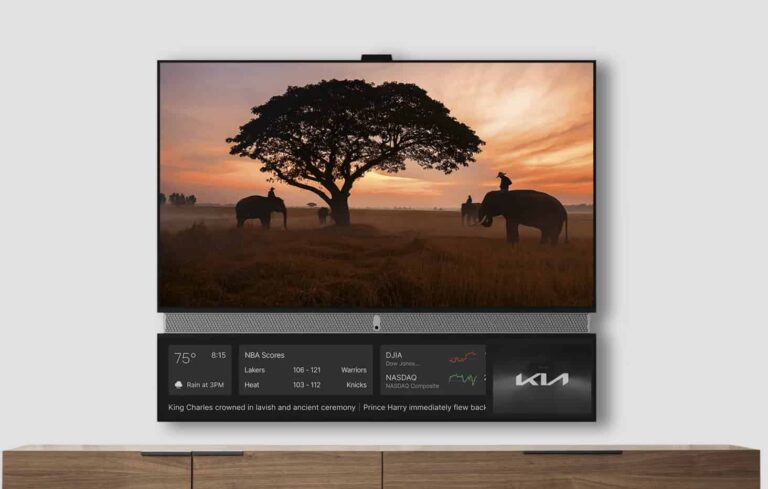
The concept of things being free at the cost of ads is nothing new of course. You see it every day in everything from your email to the streaming services you may watch. But this is pretty uncharted territory for actual hardware. The TV is comprised of two displays. The main panel which Pozin calls the ‘Theater Display,’ and a smaller ‘Smart Display’ that sits below the main panel. A soundbar connects the two.
The Telly TV constantly shows ads on the smaller smart display
If you’re worried about the ads interrupting your viewing experience, it seems like you don’t need to be. According to The Verge, the smart display below the main panel is where ads play.
They are up constantly though. The TV also comes with an embedded camera and microphone that can gather data on the video and audio from stuff you watch. Which then presumably plays a role in serving up the ads that pop up on the smaller display. The camera does have a privacy shutter which is enabled by default, but the TV will no doubt pose a privacy concern for some regardless.
The camera can also serve up motion-tracking fitness programs or be used with onboard games. Weirdly enough, the TV does not work with streaming services like Netflix. It does however come with an Android TV dongle you can plug in and access those services from.
If you’re interested in a Telly TV, you can sign up to reserve one of the 500,000 units that are launching within the next few months. Worth noting though, is that if you choose to opt out of the ads and data collection, you have two following options. Send the TV back, or Telly will just end up charging you $500 for the TV.
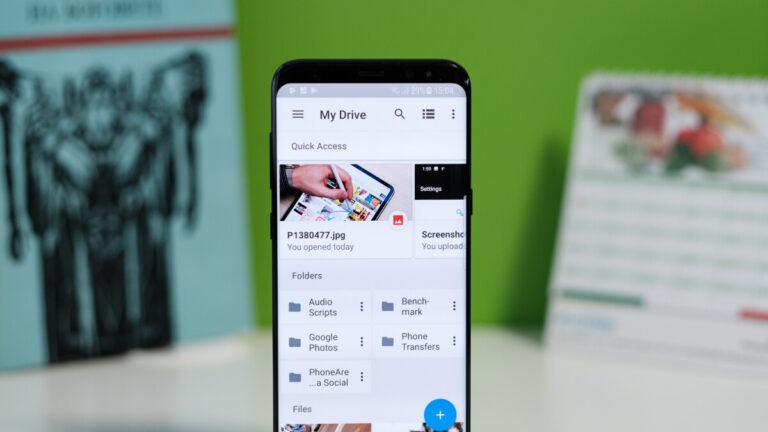
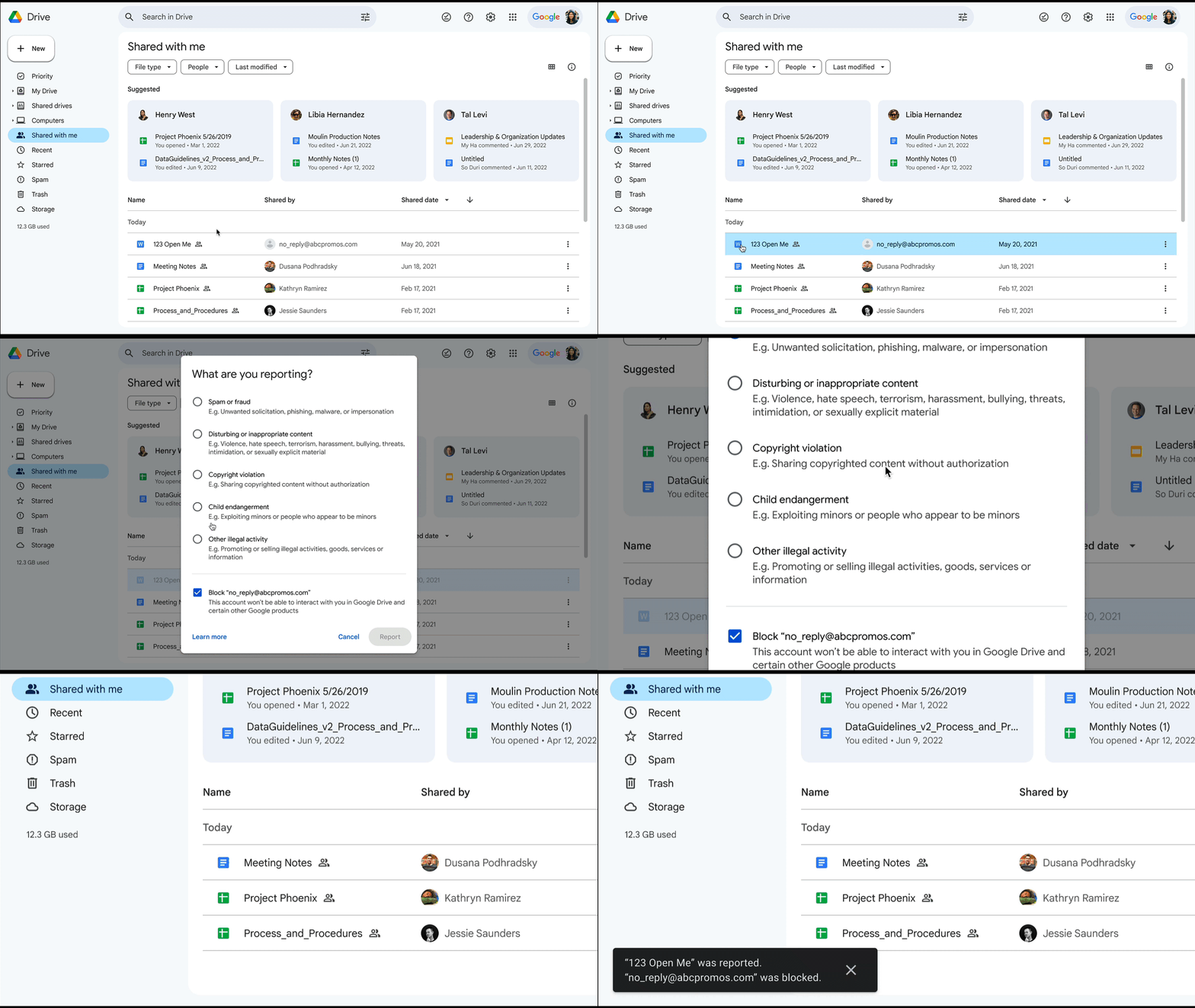
In an effort to enhance user experience and fortify its security measures, Google announced a new update to Google Drive that those that have been plagued by spam will surely appreciate. This update will introduce a new spam folder within Google Drive, which will work similarly to what we have now with Gmail.
Unfortunately, spam and malicious attempts are becoming more common in today’s digital world. In fact, according to Google, it is constantly blocking spam from our email inboxes at a rate of 15 billion unwanted messages daily. Thankfully, these same protections are now being expanded to Google Drive, which has been one of the latest targets spammers and scammers alike have gravitated towards.
To separate legit Google Drive files from potential spam, Google will be adding a new view or folder within the application that will let you sort through and classify them as needed. In the event that an uninvited file finds its way into your spam folder, you’ll be automatically unsubscribed from it, effectively halting any subsequent notifications, such as comments, shares, or mobile push alerts. Once you’ve opted out, the file will be inaccessible from any location in Drive except for the new spam folder, which will live in the left sidebar.
Just like Gmail’s spam folder, Google Drive will automatically scan and reroute files that are highly likely to be unwanted to the spam folder. However, users remain under control and can always manually move files back and forth between their My Drive and Spam folder. Once a file has been sitting in your spam folder for more than 30 days, it will be automatically deleted from your Drive.
This update to Google Drive will be available to all Google google accounts, including personal ones, starting on May 24th, 2023. The new Spam folder will be visible on Android, iOS, Drive for Desktop, and the Drive homepage on the web. Note though, that it will undergo an extended two-week rollout starting on the launch date.
Google‘s latest Pixel smartphone brings a handy new vibration feature. The “Adaptive alert vibration” feature on the Pixel 7a lessens the impact of haptic vibrations in certain scenarios. This feature isn’t available on other Pixel devices, at least not just yet.
The “Vibration and haptics” settings menu in the Pixel 7a (Settings > Sound & Vibration) contains a new option called “Adaptive alert vibration”. The toggle is disabled by default but you can enable it straightaway.
When enabled, this feature “reduces vibration strength while your phone is still and the screen is facing up,” Google explains. Kyle Bradshaw of 9to5Googlefound that turning on the setting makes haptic vibrations for incoming notifications “very faint,” but “distinctly there”. There’s no manual control over the vibration strength, though.
Pixel 7a lets you reduce the strength of vibrations
This feature was first spotted in December last year. Mishaal Rahman found that a Pixel 6a running Android 13 QPR2 Beta 2 has the new vibration setting. However, an official support document on Google’s website only mentions availability on the Pixel 7a.
This suggests the feature will be limited to the “a” series mid-range Pixel devices. As Rahman pointed out, these models have “worse vibration motors” than flagship Pixels. When kept on a hard surface with the screen facing upwards, these phones often produce pretty unpleasant haptics.
Google could now be compensating for that hardware limitation with a software feature to give users a better haptic experience. And if that’s indeed the case, adaptive alert vibration may not reach flagship Pixels models such as the Pixel 7 Pro. It would be nice to have options, though.
So, we hope the company would consider this feature for other devices as well. Those who prefer fainter vibrations would find it pretty useful. Others can keep things unchanged. We will let you know if adaptive alert vibration rolls out to other Pixel devices.
Meanwhile, if you’re looking to buy the Pixel 7a, you might want to check out our review of the phone. It is arguably the best Android phone you can get under $500 today ($549 for the mmWave 5G model).
The device ships with a flagship-grade processor, high-end cameras, Google’s Titan M2 security chip, a 6.1-inch OLED display, an IP67 rating, an under-display fingerprint scanner, long-term Android updates, and many more premium specs. With an eligible trade-in, you may even pick it up for free. Stay tuned for all the latest information about the Pixel 7a.
As expected, the drama behind Microsoft acquiring Activision-Blizzard is still ongoing more than a year after we first got the news. A deal this big needs to be approved by several large governmental bodies, and Microsoft is still locked in the battle with them. However, the deal did strike a victory, as the EU has approved Microsoft taking over Activision-Blizzard, according to BBC.
In case you didn’t know, in February of last year, Microsoft moved to acquire Activision-Blizzard, one of the largest companies in the gaming market. This deal weighs in at a whopping $68.7 billion, and it would be the largest acquisition in video game history.
Activision-Blizzard owns franchises such as Call of Duty, Diablo, Overwatch, World of Warcraft, and several other video game sensations. That’s not to speak of the plethora of smaller video game franchises under the company’s belt. Activision-Blizzard will give Microsoft reigns over a fairly large chunk of the video game market.
As you can tell, organizations wanting a competition-rich video game industry do not like this idea. So Microsoft has been battling this ever since.
The EU has approved Microsoft taking over Activision-Blizzard
While many people do not want the deal to go through, it appears that the EU does. The European Commission (EC), under the EU, notes that Microsoft did address the concerns that people have. The issue is that people don’t like so much power in the video game industry being under one company. Their fear is that Microsoft will make these large video game franchises exclusive to Xbox consoles.
Microsoft promises to offer 10 years of free licensing deals, which means that other consoles and cloud streaming services will have access to the Activision-Blizzard games during that time.
This means that Microsoft will not keep the Activision-Blizzard titles away from Sony console users, Nintendo console users, or people who use other cloud gaming services. From a competition standpoint, this means that, ostensibly, nothing will really change in the video gaming market.
We will have to see how Microsoft’s leadership will influence the games that come out in the future. In any case, the tech giant can mark this as one victory for its case
However, there is still opposition
Microsoft did win the EU’s approval, but that’s not the only opponent in the ring. The US FTC is still battling Microsoft on this deal as is the UK. Recently, the UK rejected the proposal with a shocking veto.
Also, the FTC has been trying to sue Microsoft in order to stop the deal. That case is ongoing, and we may not get a verdict for a while. This means that this case could spill into 2024. So, you shouldn’t expect any major changes to happen this year or even next year.