Authorities Dismantled the Card-Checking Platform Try2Check

0
[ad_1]
Try2Check

As per reports, the U.S government authorities have dismantled yet another large network of cybercriminals.

Denis Gennadievich Kulkov, the prime owner of the illegal network, was charged with access fraud, computer intrusion, and money laundering through his “Try2Check” platform.

Try2Check was a platform used by cybercriminals for validating stolen credit cards and determining how much percentage of the stolen cards were valid for sale on the Black Market. Try2Check was reported to have validated and processed millions of cards yearly.

Kulkov launched Try2Check in 2005 as an illegal credit card trading platform.

Threat actors who steal large batches of credit cards by hacking into credit card readers at stores or exfiltrate information in a data breach run every card through this platform to verify their active state.

Try2Check has been using a major U.S.-based payment processing company to validate the stolen cards belonging to many victims. 

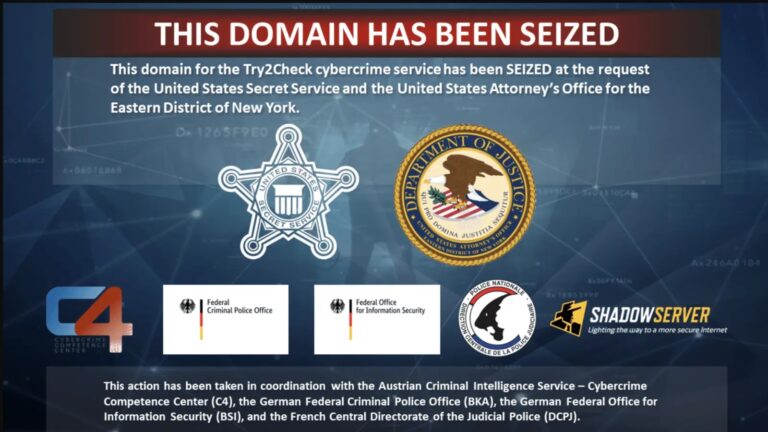
To shut down Try2Check, Germany and Austria joined hands with the U.S. authorities.

As stated by the authorities, Try2Check has performed over 16 million checks within nine months of 2018 and 17 million checks within 13 months from September 2021.

This has generated around $18 million in bitcoin and unverified amounts through other payment systems, which Kulkov used to buy a Ferrari and other luxury items in Russia.

However, Try2Check’s website has been taken Offline by the authorities, and a $10 million reward has been issued for providing any lead on Kulkov’s capture.

If caught and convicted, Kulkov will be given 20 years of imprisonment as a verdict in case the allegations are proven.

Breon Peace, the U.S. Attorney for the Eastern District of New York, stated, “Today is a bad day for criminals who relied on the defendant’s platform as the gold standard to verify that the credit cards they stole from hard-working individuals living in the Eastern District of New York and across the world had value.

Today’s indictment and global takedown of the Try2Check website demonstrates that the Office and our partners will disrupt cybercrime operations no matter where they are based.”

The U.S. Dept of Justice has asked people to report to “[email protected]” if they have any information leading to Kulkov, said to reside in Russia.

Struggling to Apply The Security Patch in Your System? – 
Try All-in-One Patch Manager Plus


[ad_2]
Source link

Galaxy S23 phones get May 2023 update in the US

0
[ad_1]

Samsung‘s May 2023 update is available for the Galaxy S23 series in the US. The company has started pushing the new security patch to the carrier-locked variants of its latest flagships stateside. Users with a factory-unlocked unit should also get this update soon. The new SMR (Security Maintenance Release) has already been rolled out in most international markets.

Samsung first released the May SMR for the Galaxy S23, Galaxy S23+, and Galaxy S23 Ultra a couple of days back. It initially covered units in Europe and Asia, before expanding the rollout to Australia and surrounding regions. Today, the May update has reached Galaxy S23 users in the US as well. SamMobile says carrier-locked units are receiving this update with the firmware build number S91*USQS1AWC9. It should be a similar build number for unlocked units as well.

The Galaxy S23 series don’t seem to get getting camera fixes with the May update

Like in other regions, the latest update for the Galaxy S23 trio doesn’t seem to bring anything notable apart from this month’s security fixes. There have been rumors of Samsung improving the camera performance of the phones with an update in May. It is also expected to fix a few issues. However, those goodies seemingly aren’t part of this release. The company may push another update in the coming weeks or have delayed those changes until June. We will let you know when we have more information.

As far as the content of the May SMR is concerned, Samsung says the latest security patch fixes more than 70 vulnerabilities. Over 50 of those are Android OS patches coming from Google or the respective vendors of the affected services. The remaining 20-odd patches are Galaxy-specific and come directly from Samsung. The Korean firm patched at least two critical vulnerabilities this month. The Android OS patches include four critical flaws and several dozen high-severity issues.

All of these security enhancements will reach the Galaxy S23, Galaxy S23+, and Galaxy S23 Ultra users globally within the next few weeks. You may receive a notification when the OTA (over the air) update hits your unit. Alternatively, you can go to the Settings app, scroll down and select Software update, and then tap on Download and install to manually check for new updates. If an update is available, you can download it right away. If not, wait for the notification or check back a few days later.


[ad_2]
Source link

Samsung pushing to improve its TV and smartphone earnings

0
[ad_1]

With the chip business sliding down, Samsung is reportedly looking to improve its earnings from smartphone and TV businesses. According to the Korean media, the company’s control tower has ordered the two business units to find ways to make more money in the coming months. An early launch of the Galaxy Z Fold 5 and Galaxy Z Flip 5 could be a result of this.

Samsung wants its TV and smartphone units to contribute more to its earnings

Samsung posted its lowest quarterly profit in several years this past quarter. The Korean behemoth took home just KRW 640 billion (roughly $483 million) in the first three months of 2023. In comparison, it made KRW 14.12 trillion (more than $10 billion) in the same period last year. The latest figure marks a year-on-year drop of 96 percent in its profit, which doesn’t bode well for any global company.

This massive decline is due to a slowdown in the semiconductor industry. Chip prices have fallen steeply over the past few months. And, since Samsung usually made more than half of its quarterly profit from chip sales, it couldn’t avoid this slump. To put things into perspective, the Korean behemoth made KRW 8.45 trillion from chips in Q1 2022 (almost 60% of the total profit that quarter). But, in Q1 2023, it ended up losing KRW 4.58 trillion.

This is the company’s first loss from the chip business in 14 years. Worst yet, the outlook for the coming months isn’t any better. Samsung doesn’t see its semiconductor division massively overturning this deficit anytime soon. As such, it wants other business units to contribute more to its profits. Most notably, the Korean behemoth is looking at its TV and smartphone business divisions.

According to The Elec, Samsung’s Business Support Task Force, which is the control tower of the conglomerate, has ordered these units to work out strategies that help make more money in the coming quarters. In response to that call, the smartphone unit is reportedly considering launching the Galaxy Z Fold 5 and Galaxy Z Flip 5 about 2-3 weeks earlier than usual. A late July launch of the duo will allow it to improve its earnings in the third quarter (July-September).

But for Samsung’s TV business, it’s all looking very gloomy. It posted lower earnings than compatriot and rival LG in the first quarter and reportedly has no weapon ready to propel business growth in the second quarter. To make matters worse, LCD prices are increasing even though consumer spending on electronics remains low. It remains to be seen if Samsung manages to improve its earnings in the coming quarters.


[ad_2]
Source link

Often requested new feature for Waze is reportedly coming to the app “in the near future”

0
[ad_1]
Sure, Google Maps helps you navigate safely and quickly to help you arrive at your destination. But it also helps you find a place to stay, recommends where to go for entertainment and meals, and where to find points of interest (historical and otherwise). On the other hand, Google also owns Waze which focuses more on helping you survive the grind of driving on local roads and highways thanks to the Waze community that passes along things like traffic jams, accidents, bad weather, police presence, and more.  

According to Autoevolution, Google has been investigating the possibility of adding the location of speed bumps to Waze as a way to alert drivers when to expect these speed-reducing bumps to appear. If you don’t think that being alerted in advance about a speed bump is a big deal, you’ve never driven over one at full speed. 

Back in 2020, speed bump warnings were one of the most requested features for Waze and the company responded by saying that adding a speed bump warning was “on the roadmap.” And as recently as this past February a Waze team member said that the feature was coming to the app “in the near future.” Adding speed bump warnings to Waze will require that the Waze community pass along their real-time travel experiences involving speed bumps.

Another change coming to the app will allow Waze users to report lane closures. Currently, the community can only report road closures. While there is no time frame for when this feature will be added to Waze, it will allow users to note when a specific lane on a road has been closed because of construction or an accident.
If you don’t have Waze installed on your handset, you can add it to your iPhone by tapping on this link. Those using an Android phone can install Waze by clicking on this link. Keep in mind that you are not limited to having either Google Maps or Waze on your phone. Personally, I have both apps installed and there are many others who have done this as well.

[ad_2]
Source link

A Google’s New Passwordless Authentication

0
[ad_1]
Passkeys

In accordance with World Password Day, Google has launched its new feature called “passkeys” which will provide a passwordless authentication for users.

As mentioned, Google has been working with the FIDO Alliance, Apple, and Microsoft to support passkeys on their platform.

After today, All major platforms which use Google accounts for sign-in will have an additional option for Passkeys alongside passwords, 2-step Verification (2SV), and other sign-in methods.

Passkeys

Passkeys are a new and exciting way of signing in to applications and websites without passwords.

It is easier and more secure than the traditional password method, which we must remember for every account. 

Passkeys are like unlocking a device with Face ID, fingerprint, or screen lock PIN.

Google claims Passkeys are immune to phishing or other online attacks and are much more secure than SMS OTP (One-Time Password) codes.

Previously, Platforms like Docusign, Kayak, PayPal, Shopify, and Yahoo Japan have already streamlined this method for their users.

It is now available to Google users who want to go Passwordless for their sign-in.

Passkeys for Google Accounts

To create passkeys on your Google account, visit the passkeys website, which will initially ask you to sign in to your Google account to set up the passkeys. 

Passkeys Supported Devices

  • Laptop or PC with Windows 10 or macOS Ventura (macOS 13)
  • iOS 16 or Android 9 supported Device
  • Hardware Security Key that supports FIDO2 Protocol

Passkeys Supported Browsers

  • Chrome 109 or higher
  • Safari 16 or higher
  • Edge 109 or higher

Along with these requirements, the device must have a Screen Lock and Bluetooth available.

Once users visit the passkeys website, they are asked to “Create a new Passkey,” which can be done by the steps provided by Google. Once the passkeys are set up for the Google account, passkeys are ready to be used for signing in to that account.

If the account has passkeys enabled during sign-in, the users are prompted with a different window.

Passkey Login Window

If the user wants to go with a password, he can click “Try another way” to go to the password page. If the user wants to use passkeys, he can click on “Continue,” which will prompt which device to use for passkey confirmation.

Passkey Prompt for Device Selection

Here, the user can choose which device to use for passkey confirmation. After selecting the option, the user is presented with a prompt based on his selection.

If the user selects the “External Security Key” option, he is presented with a Security Key prompt and “QR Code” if the user has selected the “Use a Phone or Tablet” Option.

The user can use either of the devices he has used for generating the passkey to confirm their identity.

If the user scans the QR code for a passkey from his Phone or Tablet, the device asks to confirm his identity based on the unlock method he has set up. Once the user confirms the identity on his device, the passkey logs in to the user.

Security Key Prompt
QR Prompt

Google has released this feature as a part of its future passwordless program. It is yet another step towards a new feature.

Administrators will soon have the option to enable passkeys for their end-users during sign-in for Google Workspace accounts.

“Of course, like any new beginning, the change to passkeys will take time. That’s why passwords and 2SV will still work for Google Accounts.” Google says.

Struggling to Apply The Security Patch in Your System? – 
Try All-in-One Patch Manager Plus


[ad_2]
Source link

Is EDR or MDR better for your business?

0
[ad_1]

Be sure to catch the full webinar on Wednesday, May 10, 2023.

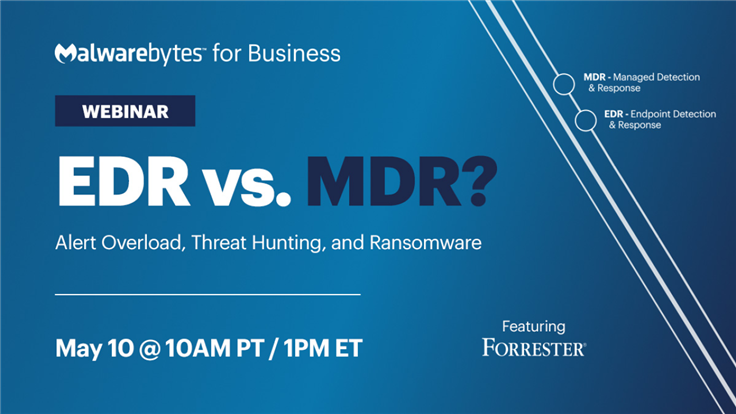
Don’t miss our upcoming webinar on EDR vs. MDR!

In the webinar, Marcin Kleczynski, CEO and co-founder of Malwarebytes, and guest speaker Joseph Blankenship, Vice President and research director at Forrester, discuss topic such as: 

  • The difference between EDR and MDR, how EDR solutions can be challenging for businesses without dedicated security teams, and why building an in-house SOC can be expensive and difficult.
  • The limitations of Endpoint Protection and EDR, specifically when it comes to advanced threats like ransomware that use Living off the Land (LOTL) attacks and fileless malware. 
  • How MDR providers work with clients to understand their security technology stack, make recommendations, and agree on response actions to take.
  • If EDR or MDR is better for your business based on the resources you have available and the level of security you require. 

Want to learn more about EDR and MDR and which is right for your business? Be sure to catch the full webinar on Wednesday, May 10, 2023 at 10 am PT / 1 pm ET and get valuable insights from industry experts on how to improve your security operations and protect against ransomware and fileless malware.

Register now!

Read also:

How to choose an MDR vendor: 6 questions to ask

Is an outsourced SOC worth it? Looking at the ROI of MDR

Cyber threat hunting for SMBs: How MDR can help


[ad_2]
Source link

TikTok launches its new monetization program

0
[ad_1]

Tons of people have made TikTok their primary source of income, and the popular video-sharing app is finding new ways for people to do so. After beta testing it started in February, TikTok has unveiled its new monetization program for creators. The company outlined the qualifications for this new program, and they can be tough to reach for beginners.

Previously, TikTok unveiled its Creator fund. Launching back in 2020, the Creator Fund promised to shell out a total of $200 million in incentives for creators. It eventually upped it to a full billion dollars after it kicked off. However, some creators were not impressed, as they would receive pennies on the dollar for videos that grossed millions of views.

The new TikTok monetization program aims to give better incentives to creators

The company announced this (via Engadget) today. If you are an eager TikTok creator, then this is something you can definitely work toward. In order to be eligible for this new monetization program, you will need to be a TikTok Creator based in the United States at least 18 years or older.

It seems like a bold move for TikTok to unveil this new platform in the States. The company is still fighting with the US government to avoid being banned in the states. In any case, TikTok creators can reap the benefits for as long as they can.

However, not all of the content creators will be able to because of the high barrier to entry for this program. In order to qualify for the program, you must have at least 10,000 followers. Also, you need to have raked in at least 100,000 views in the last 30 days. More established TikTokers have already cleared that no sweat. However, people just getting onto the platform will have a long road ahead of them.

There’s another barrier to entry that may dissuade some TikTokers. The videos that are posted must be of good quality. This means that the videos must be high-quality videos of original content longer than 1 minute.

Now, there’s no hard line that defines a quality video; however, there are a few objective qualifiers. For instance, reuploading someone else’s videos is a no-no. At this point, there’s no telling if this new program will pay creators more than the old Creator fund. Only time will tell.


[ad_2]
Source link

Meta security reports reveals hackers using ChatGPT-related software to disguise malware

0
[ad_1]

It’s no secret that the launch of ChatGPT and other language processing models has ushered in a new era of AI tools aimed at making our lives easier. However, according to security researchers at Meta, this public interest in AI has also led scammers and hackers to find new ways of injecting malware into people’s devices by disguising it as ChatGPT-related software.

In the Q1 security report, Meta says they identified at least 10 types of malware families posing as AI chatbot-related software such as web extensions and toolbars. And although these web extensions performed most of the advertised tasks, they secretly installed malware on devices, making detection even more difficult.

The ultimate goal of these fake web extensions is to run unauthorized ads from compromised business accounts across the internet. However, some of them also run the NodeStealer malware strain, which can steal passwords, loot cookies, and login information.

Meta’s stance

In an effort to counter this malicious activity, Meta says they have blocked over 1,000 links to ChatGPT-related malware on Instagram and WhatsApp. Additionally, since these threat actors upload the fake browser extensions to official stores like the Google Web Store, the company has also informed industry peers, researchers, and governments about these links.

Furthermore, Meta will also provide additional support to help any businesses impacted by the malware from these fake extensions and introduce new work accounts which will support existing single sign-on (SSO) credential services from organizations that are not linked to any personal Facebook accounts.

Cybercriminals are always eyeing the next big trend to take advantage of and craft their next attack, and ChatGPT is no exception. However, the fact that ChatGPT does not have an official app or web extension has made it easier for attackers to deceive unsuspecting people and scam them.

“In the months and years ahead, we’ll continue to highlight how these malicious campaigns operate, share threat indicators with our industry peers and roll out new protections to address new tactics,” says Meta.


[ad_2]
Source link

WhatsApp launches new features for polls and captions

0
[ad_1]

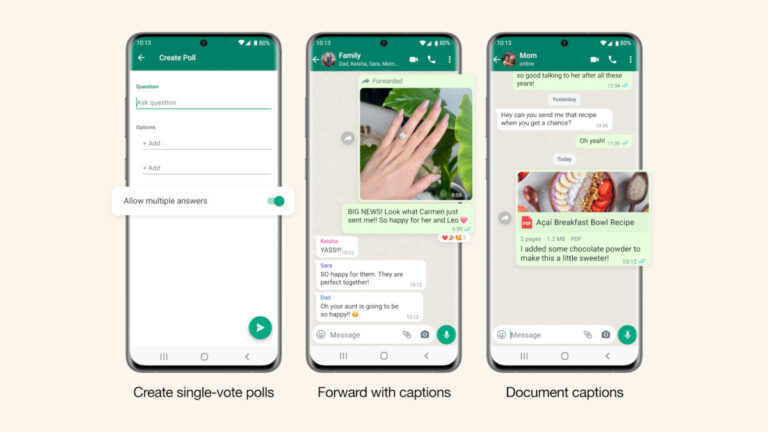
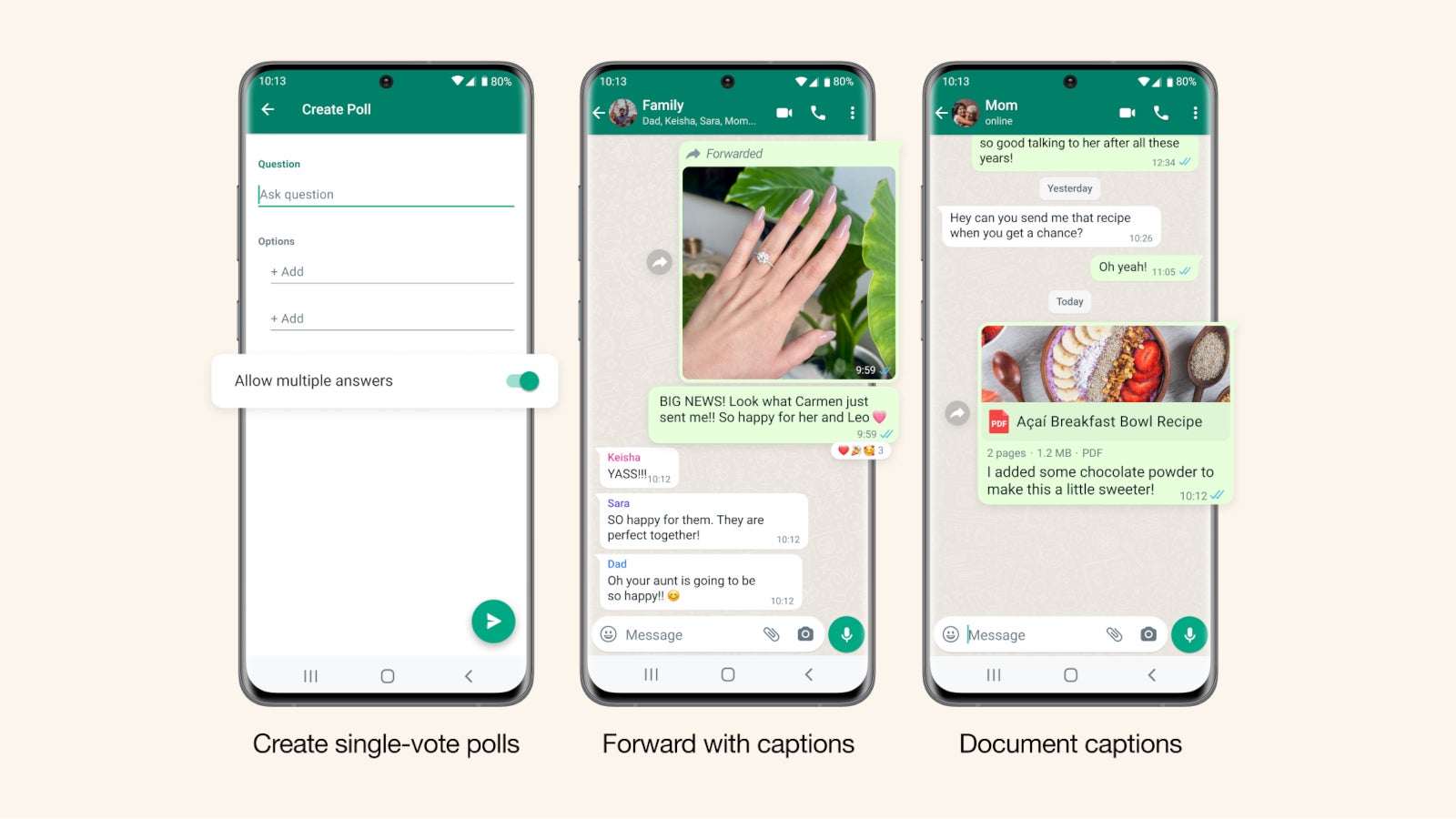
WhatsApp is bringing new features to those using polls and captions on its messaging platform. Three new updates for polls are now available for WhatsApp users, as well as a new option to share with captions. Three new changes have been added to the polls feature, each significantly improving productivity and the fun factor.The first one is the ability to create single-vote polls. This new type of poll allows people to vote only once. Poll creators must turn off the “allow multiple answers” option to prevent people from voting more than once.

Another interesting new feature introduced today is the ability to search for polls in a chat window. It makes it easier to find a poll that you decide to answer later. A new option to filter messages by polls is now available in WhatsApp, which is similar to the one that filters photos, videos or links. The new filter can be found by pressing Search on the Chats screen and then choosing Polls.

The third and last update for polls is aimed at poll creators. Notifications will now be sent to poll creators when people vote. In addition, poll creators will now be able to see how many people have voted in total with every notification they receive.

As far as captions goes, WhatsApp announced that users can now share documents with captions. Also, when forwarding any type of media that has a caption, new options are now available to keep, delete or completely rewrite it to provide more details when sharing photos between chats. WhatsApp users will also be able to add a caption to photos and videos when they forward them.

According to WhatsApp, all the new features announced today will be rolled out to users globally in the coming weeks, so be patient if these don’t show for you immediately.


[ad_2]
Source link

The top 8 password attacks

0
[ad_1]

Did you know that the very first password attack happened in 1962? At that time, MIT’s CTSS (Compatible Time-Sharing System) was the first to utilize passwords for granting individual access. Allen Scherr, a Ph.D. researcher, wanted to use the CTSS beyond his allocated weekly hours. In order to extend his usage time, he decided to borrow passwords from other people. Scherr managed to obtain all the passwords stored in the CTSS system by submitting a request to print the password files using a punched card.

Nowadays, password attacks have become one of the most significant concerns for both companies and civilians. The Verizon Data Breach Investigations Report has stated that more than 80 percent of web application breaches were due to password-related issues.

With the average person juggling around 100 passwords, it is no wonder that individuals often resort to reusing the same passwords for multiple accounts or creating simple passwords that include easily remembered personal details. This situation presents a veritable playground for hackers as passwords are commonly the sole obstacle preventing unauthorized access to confidential data or accounts.

Since password attacks are a persistent problem, below is a list of the most prevalent types of attacks you may encounter and how to guard against them.

Password attack types

1. Simple brute-force attack

A simple brute-force attack is a method employed by attackers to crack passwords by systematically trying every possible combination of characters. This attack can be laborious and resource-intensive, as it involves going through all possible character permutations until the correct password is identified. 

2. Password spraying

A password spraying attack is a technique attackers use to gain unauthorized access to multiple accounts by attempting a limited number of commonly used passwords across a broad range of usernames. Unlike a brute-force attack, which targets a single account with numerous password combinations, password spraying tries popular passwords across many accounts, reducing the likelihood of triggering account lockouts.

3. Keylogger attack

This type of attack can be executed either by installing malicious software on the user’s device or by using a physical keylogging device connected to the computer. As the user types in their username and password, the keylogger secretly captures the keystroke data, which the attacker can later retrieve and exploit to gain unauthorized access to the victim’s accounts.

4. Credential stuffing 

A credential stuffing attack is a technique in which attackers exploit previously leaked or stolen login credentials to attempt unauthorized access to various accounts. This method relies on the assumption that users often reuse the same usernames and passwords across multiple platforms. By utilizing automated scripts or bots, attackers systematically input the compromised credentials across numerous websites and services, seeking a successful match.

5. Rainbow table attack

During a rainbow table attack, hackers try to crack hashed passwords by leveraging precomputed tables of hash values for possible password combinations. Hashing is a cryptographic method that converts plaintext passwords into a fixed-length, unique string of characters, providing a layer of security. A rainbow table attack allows attackers to bypass this by matching the hashed password with its corresponding plaintext password from the precomputed tables.

6. Social engineering

Social engineering is a manipulative tactic cybercriminals employ to deceive individuals into revealing sensitive information, such as passwords. By exploiting human psychology and trust, attackers pose as legitimate entities or authorities, persuading victims to disclose personal data or grant unauthorized access, often through phishing, vishing, baiting, and tailgating.

In most cases, it is far simpler for an attacker to deceive you into revealing your password than to crack it using technical methods.

7. Man-in-the-Middle attack

A Man-in-the-Middle (MitM) traffic interception attack occurs when a hacker intercepts communication between two parties. By positioning themselves between the sender and receiver, the attacker can eavesdrop, manipulate, or steal sensitive data, such as passwords. Hackers can employ various techniques, including ARP spoofing, DNS hijacking and SSL hijacking, to insert themselves into the communication stream, thus gaining access to the transmitted information without the victim’s knowledge. Typically, these attacks find their way through unsecured Wi-Fi networks or connections lacking encryption.

8. Physical password theft

Requiring complex passwords can tempt users to write them down. Thieves may physically steal passwords by rummaging through desks, snapping pictures of notes, or casually observing password reminders in an office environment. This old-fashioned method of password theft remains a threat in the digital age.

How to protect against password attacks

With countless stolen credentials accessible on the dark web and numerous security reports revealing common passwords, cybercriminals do not need to exert much effort to hack you.

Hackers typically seek easy access for the best return on investment. If they do not achieve results quickly, they will shift to alternative attack methods to infiltrate a system. So, not just on World Password Day but every day, commit to securing your accounts by following the advice below:

Asset-level security measures for admins  

  • Provide cybersecurity awareness training to educate employees on safe digital habits. Foster a security culture, encouraging prompt reporting and periodic reinforcement of best practices.
  • Create password rules prohibiting easy-to-guess passwords, such as incremental patterns or previously breached passwords. Require a combination of numbers, special characters, and upper and lowercase letters in passwords. Set a minimum password length of 14 characters or longer for added security. Block users from reusing their previous username and password combinations.
  • Account lockout should happen after a set number of failed login attempts, suspicious activity, prolonged account inactivity, or evidence of a security breach. Consider creating a blocking algorithm based on other metrics like source IP address, user agent, or cookie value. Consider implementing a time delay between login attempts.
  • Provide multi-factor authentication (MFA) as an option for users.
  • Add CAPTCHA to the login process to increase the time it takes for password attacks and verify that login attempts are made by humans, reducing bot access.
  • Consider using multiple secret questions that are not standard. Ensure that the answers to the questions are not easily guessable or publicly available. It is recommended to periodically update the secret questions.
  • Implement secure self-service password reset (SSPR) practices. This includes verifying user identity, using verified contacts, limiting attempts, and encrypting the reset process with SSL/TLS.
  • Implement extended detection and response. XDR provides a centralized platform for monitoring and responding to security threats across multiple endpoints. Using XDR, you can improve visibility and quickly detect potential password-related attacks.
  • Consider switching to passwordless authentication. Here is a list of some common methods:  
    – Biometric authentication: fingerprints, face or voice recognition.
    – Security tokens: hardware – tokens or one-time passwords generated by a mobile app.
    – Public key cryptography: digital certificates/smart cards.
    – Single sign-on (SSO) via social media accounts or other third-party providers.
    – Magic links or URLs: links that grant access to the account without a password.
  • Use a password management solution. Password management solutions offer a centralized platform to store, generate, and organize user credentials securely.
  • Enforce the practice of regularly changing passwords. The longer a password remains the same, the more vulnerable it becomes to hacking attempts. Additionally, it is crucial to mandate password changes after every data breach.
  • Use salting to increase the difficulty for attackers attempting to crack passwords using rainbow tables.
  • Use a digital loss prevention (DLP) solution. DLP tools mitigate data theft by continuously monitoring and securing sensitive information, including passwords. By employing advanced data classification techniques, DLP systems identify and restrict unauthorized access or transmission of passwords.
  • Use a password generator. Password generators produce complex, random passwords.
  • Delete inactive accounts. Getting rid of excess accounts shrinks hacker targets and curbs password attack success rates. 
  • Consider using IDS/IPS systems. IDS detects password attack patterns, alerting security teams. IPS auto-blocks suspicious login attempts, barring system access.

Individual-level security measures for regular users

  • Avoid reusing passwords. If a casual discussion board you have signed up for gets hacked and you use the same password for a corporate account or an online banking app, you could find yourself in serious trouble.
  • Do not share passwords.
  • Use a password manager.
  • Avoid using common passwords consisting of readable words. Instead, create long passwords with a minimum of 14 characters, or consider using passphrases.
  • Enable Multi-Factor Authentication (MFA) on all accounts and platforms when available. 
  • Use up-to-date malware protection and routinely scan your computer. Ensure that antivirus software is installed on all your devices, including smartphones and tablets.
  • Use a virtual private network (VPN). A secure virtual private network helps protect against man-in-the-middle attacks that aim to steal sensitive information, including passwords.
  • Monitor your accounts and utilize free services like haveibeenpwned.com to check if your mailboxes are associated with recent data breaches.
  • Change your passwords regularly. The longer a password remains unchanged, the more likely a hacker finds a way to crack it.
  • Stay informed about cybersecurity trends and learn how to spot phishing attempts. Examine the ‘From’ line in every email to confirm the sender’s identity matches the expected email address. If in doubt, reach out to the supposed sender to verify they sent the message. Be wary of unsolicited requests for personal information, and always verify the identity of anyone asking for your password or sensitive data. Exercise caution when opening links or attachments from unfamiliar sources.
  • If available, enable biometric authentication on your devices.
  • Utilize a password generator for strong, unique passwords.

Stop hackers gaining access to your passwords

While numerous protective measures are available for both home users and administrators, password attacks often continue to succeed. This is primarily because security can be inconvenient and requires ongoing attention.

Striking a balance between security and convenience is challenging, and many people tend to prioritize convenience over security. However, the potential consequences of losing critical data, facing fines, or even having one’s identity stolen serve as strong motivation for both individuals and organizations to prioritize security measures. By taking a few simple and manageable steps, most hackers can be deterred. To enhance protection, consider implementing additional security layers. 

[ad_2]
Source link