WhatsApp has announced via a blog post a new feature that allows users to save disappearing messages before they vanish. The feature will give users a chance to keep important messages that they may want to refer back to later.
Disappearing messages is a feature that WhatsApp introduced back in 2020, which allows users to set their messages to automatically delete after a specified amount of time, ranging from 24 hours to 7 days. While this feature was meant to help users keep their chats private and reduce clutter, it was difficult for users to hold onto messages that they wanted to keep.
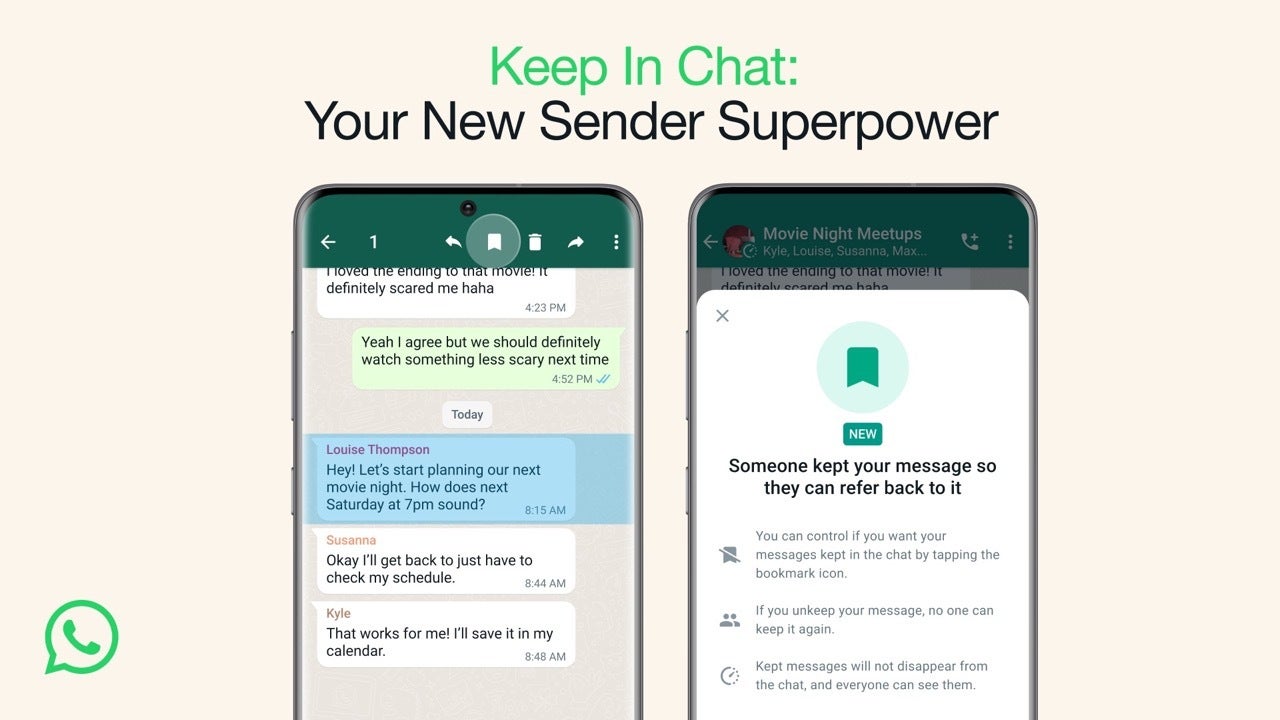
With the new feature, called “Keep In Chat,” users can now select messages in a chat and save them by tapping on the bookmark icon. Once a message has been saved, it will no longer disappear after seven days. Users can also un-save messages by tapping on the bookmark icon again.
Sender notification and consent will be required before proceeding, and without their permission, the message will automatically delete itself after the allotted time has passed. Both the sender and the receiver will be able to see the bookmark icon next to any messages that can be stored in the WhatsApp conversation and the saved messages will be conveniently stored in a designated “Kept Messages” folder.In this approach, WhatsApp’s implementation of its Keep In Chat function does not undermine the security and privacy afforded by disappearing messages and the decision to store a message ultimately rests with the sender. The new feature is currently rolling out to both individual and group chats. However, users can only save messages that have not already disappeared. Once a message has disappeared, it cannot be saved.
This update comes after WhatsApp’s recent controversy over its privacy policy changes, which led many users to switch to other messaging apps such as Signal and Telegram. The addition of the save disappearing messages feature may help to win back some users who were concerned about the privacy and security of their conversations on the platform.
Anime dominates several forms of media like TV shows, comic books, and, unfortunately, movies (we’re all still reeling from DragonBall Evolution). It also dominates the gaming world with all sorts of games based on anime characters across multiple platforms. There’s a healthy number of Anime Android games, and here’s a list of the top 10.
This is a list of games that star some of your favorite anime characters from popular shows. We’re only going to talk about games based on existing franchises rather than games that are anime-inspired; sorry, Genshin Impact. Without further ado, let’s see which apps will get your chakra flowing.
Top 10 Best Anime Android Games – April 2023
Below is a quick rundown of the games that are on this list. It shows the download cost of the game and any in-app purchases.
Game
Download Cost
In-app cost (per item)
EDENS ZERO Pocket Galaxy
✕
$0.99 – $79.99
GUNDAM BREAKER MOBILE
✕
✕
MHA: The Strongest Hero
✕
$0.99 – $99.99
NARUTO X BORUTO NINJA VOLTAGE
✕
$0.99 – $79.99
My Hero Ultimate Impact
✕
$0.99 – $79.99
The Seven Deadly Sins
✕
$0.99 – $79.99
Pokémon Masters EX
✕
$0.99 – $79.99
Pokemon Go
✕
$0.99 – $99.99
One Punch Man – The Strongest
✕
$0.99 – $99.99
Beyblade Burst Rivals
✕
$0.99 – $38.99
Top 10 Best Anime Android Games –
April 2023
Below is a little more information on each app, and a direct link for easy downloading.
All download links go to the app’s Google Play Store listing. Users are always recommended to download apps from Google Play or an authorized app store.
EDENS ZERO Pocket Galaxy
Download Cost: Free
In-App Cost: $0.99 – $79.99
Size: 543MB
Google Play Rating: 4 stars out of 5
EDENS ZERO Pocket Galaxy is based on the popular manga and anime series that premiered in recent years. It’s an action RPG game that takes the series’ core characters and pits them against hordes of enemies.
The gameplay is pretty simple. It’s a fully 3D game so you’re free to roam around as you fight off the baddies. You use the digital joystick on the left side of the screen to move and the buttons on the right to attack. You’ll be able to use different powered attacks to inflict more damage.
This is a pretty straightforward action-packed game for fans of the franchise. It’s free to play, and the in-app purchases don’t get in the way of the gameplay.
This game will be perfect for you if you’re into older anime. Gundam is one of the older anime franchises, and there are a ton of games out for it. GUNDAM BREAKER MOBILE brings the game to your mobile device.
The game is a fun and action-packed game that puts you into the cockpit of a mobile suit. When you start a level, you’ll be put up against waves of enemy robots. You’ll need to fight your way through these using your melee attacks and blasters.
The game is separated into levels, and you’ll have simple cutscenes in between each level to bring a bit of story into the mix. If you’re a Gundam fan, then this game is a must!
There’s no shortage of games centering around My Hero Academia, and this is one of the most ambitious ones. MHA: The Strongest Hero is a major game that was developed by Crunchyroll Games LLC. If you’re looking for an immersive MHA experience, then you should get this game.
It follows the story of Deku, the main character in the series, as he begins his journey to and through the special academy for gifted students. It follows the anime pretty faithfully with the addition of some side stories.
What makes this game interesting is that it has fully-voiced cutscenes complete with sound effects. So, it’s a fun game to play and a treat for the ears.
NARUTO X BORUTO NINJA VOLTAGE takes your favorite characters from both Naruto and Boruto and lets you use them in battle. You’ll run through expansive stages and fight through hordes of ninja enemies en route to the end.
The combat is typical for most mobile beat’em ups. You use the joystick on the left of the screen to move, and the buttons on the right to attack. You have your basic attack button, but you can also the accompanying powered attacks to deal more damage.
One of the main draws to this game is the cast of popular characters from the anime series’. You can draw and collect your favorite characters from the Naruto and Boruto franchises to use in battle.
My Hero Academia fans will love this turn-based RPG about the popular series. As you can imagine, you can use the cast of characters from the show and fight your way through different enemies. You’ll collect these characters as you progress.
This game uses its own aesthetic with stylized character models. They’re more cartoonish than the characters on the show, but they still retain their original charm. It makes for an overall good-looking game.
Seven Deadly Sins is an RPG developed by Netmarble, and it follows the main characters of the show. It uses classic turn-based combat, and you attack with a team of at least three people.
You’ll progress through a cinematic storyline with fully-voiced cutscenes. Also, the visuals are amazing with very well-modeled and expressive characters. It’s a great game to play if you want to feel like you’re watching the actual anime.
There are several Pokemon games on the mobile market, but this one stands out due to its RPG gameplay mechanics. You’ll start the game by customizing your character and picking a name. After that, you’ll meet Misty and Brock and start your journey.
What also makes this game stand out is the three-on-three battle. Each character will spawn a Pokemon, and you’ll embark on turn-based combat. It’s different from other games on the Google Play Store, but it’s still familiar if you play the console games. It’s a great game to play if you love Pokemon games.
Pokemon Go is six years old at this point, but it’s still one of the most popular mobile games on the market. If you’re not familiar with the game, it’s an AR (augmented reality) game that lets you go out into the world and catch Pokemon.
The Pokemon will pop up in your area and you’ll be able to catch it. Just like in the classic games, you’ll be able to collect a ton of different pokemon and use them for battle Also, you can evolve them. Along with that, you can also go to different locations to receive different items.
One Punch Man – The Strongest is a turn-based RPG with the characters from the popular anime. You travel from location to location fighting your way through the enemies and upgrading your characters.
In case you’re wondering, you can’t really play as the titular character. However, he did pop up from time to time. True to his name, he defeats all enemies with only one punch.
This game takes the popular spin top battle game and adds its own spin. It follows characters from the popular anime, and it lets you battle them in Beyblade arenas.
The gameplay is a bit different from what most people would expect. Instead of swiping to launch the tops, this is actually a match-3 game. Animations of the tops will play in the background and your game board will sit in the foreground.
You’ll want to match as many of the tiles as you can before the timer runs out. Different tiles have different effects when they’re matched. Some will increase the attack while others increase stamina. And, we can’t forget about tiles that deliver special attacks.
Acer held its recent device summit today and at the showcase it revealed its collection of new gaming hardware for 2023, which includes four new gaming laptops powered by NVIDIA 40-series GPUs. Ranging from the 4050 all the way up to the 4090.
There seems to be something for everyone here with configurations and components ranging from mid-grade all the way up to the high-end. The new laptops are part of the Predator Triton and Predator Helios series’, and include the Triton 17 X, Helios Neo 16, Triton 14, and Helios 3D 15. Giving consumers a set of options that spans a decent range of sizes depending on what they need or want.
Acer is also beefing up the laptops with new CPUs from Intel’s 13th generation chipsets. The Predator Triton 17 X for instance comes with an Intel Core i9-13900HX CPU and an NVIDIA GeForce RTX 4090 GPU. All four laptops also come with mini-LED displays. Though resolution options will vary based on the laptop model.
Additionally, there will be options for storage up to 4TB and RAM up to 64GB on the Triton 17 X, and up to 2TB of storage and 32GB of RAM on the other models.
Acer GeForce RTX 40-series gaming laptops will launch from May
Acer plans to launch its new 40-series gaming laptops starting in May. At that time, only the Triton 17 X, Helios Neo 16, and Triton 14 will be available for purchase. With prices starting at $3,799, $1,199, and $1,499 respectively. Then in June the company plans to launch the Helios 3D 15 starting at $3,499.
The prices for the Triton 17 X and the Helios 3D 15 are certainly steep. But that’s not too surprising given the features and tech used to build both laptops. You can find out more about each of the four new laptops, including additional specs and features in Acer’s official blog post.
Twitter recently began adding a “government-funded” and “state-affiliated” label to media accounts that it considered as having received either partial or full financial support from a government agency. Although practical for accounts that were clearly 100% funded by a foreign government, the practice drew heavy criticism when it was applied to popular news organizations, such as NPR or PBS, that claimed they were editorially independent.
The backlash was such that it culminated in Twitter deciding to remove the label altogether. Reportedly, as noted by Engadget, Twitter took the step after receiving criticism that the label could be used to manipulate public opinion and the departure from Twitter of some of the affected accounts.
The label was first created in an attempt to curb the spread of misinformation and to ensure that users are not misled. Such has been the case with foreign governments, such as that of China, that have been known to use social media platforms to spread propaganda and promote its own interests. According to a Twitter spokesperson, the decision to remove the government-funded label was made after the company conducted a review of its policies, and added that Twitter remains committed to ensuring that its platform is not used to spread misinformation or propaganda.
The move has been welcomed by many who see it as a positive step in the fight against the spread of false information. However, some critics have raised concerns about the impact that the move could have on freedom of speech. This also follows the removal of several legacy verification checkmarks from notable accounts that have opted not to pay for Twitter Blue, except those that Elon Musk has decided to pay for himself, such as that belonging to Stephen King and Lebron James, among others.
Twitter has been under pressure in recent years to take a more active role in the fight against fake news and misinformation. The new management, helmed by Elon Musk, has in turn rolled out a number of measures to address this issue, however, they almost always feel like a trial just to see what “sticks”. Hopefully, Twitter can come out of this transition unscathed and can finalize a set of rules and regulations that everyone can abide by without worrying about volatile last minute changes.
Two new critical flaws have been found in Alibaba Cloud’s popular services, ApsaraDB and AnalyticDB.
Both of them were in support of PostgreSQL. Wiz security research team has termed this vulnerability as #BrokenSesame.
One of these vulnerabilities performs Supply-Chain attacks on the database services leading to an RCE.
Another was potential unauthorized access to Alibaba’s Cloud customers’ PostgreSQL databases.
Critical Flaws
The critical flaws in Alibaba Cloud services existed in the Kubernetes Clusters (K8s).
K8s node compromised – Researchers found that K8s applications were not appropriately isolated, leading to a few insecure behaviors.
They performed a privilege escalation with a cronjob task which elevated their privileges inside the container to root.
As a root user, they tried to do a lateral move to another container on their pod by exploiting a shared PID namespace which led to escaping to the K8s node.
Once they went to the node, they used Kubelet credentials to access secrets, service accounts, and pods.
Supply chain due to write permissions on container image registry – When accessing the pods on the nodes, Wiz’s research team found that it was a shared node with pods belonging to other tenants on the node.
They also found a private image registry and tested some credentials which led to the discovery of write permissions on the container images.
This write permission can be used for supply-chain attacks due to a compromised k8s node.
These attacks were possible on ApsaraDB and AnalyticDB for PostgreSQL on Alibaba Cloud.
Handling multiple containers can be a tedious job. Hence, having better security implications in place is recommended.
These critical flaws show that the isolation of containers needs to be much more securely configured without letting these kinds of escapes to the k8s.
Researchers demonstrated vulnerability exploitation in AnalyticDB for PostgreSQL and ApsaraDB RDS for PostgreSQL could result in unauthorized cross-tenant access to customers’ PostgreSQL databases and a supply-chain attack.
You can read a complete technical analysis here at Wiz.
Users of Chrome should ensure they’re running the latest version to patch an integer overflow in the Skia graphics library.
Google has announced an important update for Chrome to help fend off a zero-day. The update fixes several issues, and readers are advised to ensure they’re using the latest version of the browser.
Mitigation
If you’re using Chrome on Mac, Windows, or Linux, you need to update as soon as you possibly can. If you’re using a standard Chrome setup then updates should be applied automatically. However, this won’t happen if you never close your browser, or if the update is blocked by something like a fault in an installed extension.
It’s always good to check, especially when something bad is floating around potentially helping to compromise devices. One easy way to do this is navigate to chrome://settings/help or clicking Settings > About Chrome.
Chrome will notify you of the version you’re on and if there’s an update available. Once you’ve downloaded the update, reload the browser and everything should be good to go. If everything has worked as it should, your version should in theory be running the latest version. At the time of writing the most recent update being offered is now 112.0.5615.138.
This will fix eight vulnerabilities, although the update is only currently available for both Mac and Windows. The Linux version is still being worked on.
Vulnerability
The exploit page for CVE-2023-2136 has few details available, as is the usual pattern followed by Google when something like this happens. Details are generally held back to give people time to patch, without offering any clues to cybercriminals about how they might exploit the vulnerability. So far, the only information we have is:
Integer overflow in Skia in Google Chrome prior to 112.0.5615.137 allowed a remote attacker who had compromised the renderer process to potentially perform a sandbox escape via a crafted HTML page. (Chromium security severity: High)
An integer overflow is a programming error that allows an attacker to manipulate a number the program uses in a way that might be harmful. If the number is used to set the length of a data buffer (an area of memory used to hold data), an integer overflow can lead to a buffer overflow, a vulnerability that allows an attacker to overloaded a buffer with more data than it’s expecting, which creates a route for the attacker to manipulate the program.
Skia is a graphics library (a set of reusable code) used by Google Chrome. In this case the error allows an attacker to escape the shackles of Chrome’s “sandbox”, a security feature that should prevent malicious code from affecting the system that Chrome is running on.
Malwarebytes removes all remnants of ransomware and prevents you from getting reinfected. Want to learn more about how we can help protect your business? Get a free trial below.
The Pixel Tablet is due to make an appearance at Google I/O in May, but prior to that, a new leak is showing off what the device looks like in a previously unknown color – Coral. Earlier this month it was rumored that the Pixel Tablet would have four color options.
At the time of that report though, only two of the colors were known. This included a green color and a beige color. These were at the time, the two colors of the tablet that had been seen in official marketing materials. Now though, it looks like Google has shown off the Coral model at Milan Design Week. Spotted by 9To5Google, user saori_vj on Instagram has shared video footage of the event. Where tables of Google hardware products lay strewn about next to each other, matched up by color.
The coral color for the Pixel Tablet is fairly subtle
As you can see in the images, the Coral (it’s unclear if this is the official color name) color of the Pixel Tablet has a much more subtle, muted hue than some of the other products in that colorway. Google’s Coral Pixel Buds for example, are very bright with a darker, more vibrant hue.
Whereas the tablet is lighter and less pronounced. With the coral/pink tablet now shown off, that leaves just one color that hasn’t made an appearance. Which should show up at Google’s developer conference next month. Though judging by the other products on the table which are grouped up by similar colors, the fourth Pixel Tablet could come in a sort of yellow hue.
It seems pretty clear that Google is looking to keep a certain color theme here. With the design of its current products matching up with what has already been displayed. So although it hasn’t been confirmed yet, the fourth Pixel Tablet color seems likely to match the colors of something Google already sells.
It’s no secret that the US government’s ban on conducting business with Huawei prompted many companies to cancel their deals and withdraw their operations. However, Seagate has recently found itself in trouble with the US Department of Commerce for allegedly selling over 7 million hard drives to Huawei, thus violating the US sanctions. As a result, the department has ordered Seagate to pay a fine of $300 million.
According to the Commerce Department, Seagate continued selling hard drives to Huawei between August 2020 and September 2021, despite Western Digital and Toshiba, its primary competitors, stopping their dealings with Huawei in response to the foreign direct product rule. Moreover, the company further violated regulations by signing a three-year strategic agreement with Huawei, becoming its sole source of hard drives.
“Today’s action is the consequence: the largest standalone administrative resolution in our agency’s history,” said Assistant Secretary for Export Enforcement Matthew S. Axelrod.
In addition to the $300 million fine, which Seagate will pay in $15 million increments over five years, the company will also undergo three audits of its compliance program and have its export privileges suspended for five years.
Seagate’s response
In a statement, Seagate CEO Dave Mosley acknowledged the settlement and stated that they settled because they felt it was the best course of action, despite believing they had complied with all relevant export control laws at the time of the sales.
“We believe entering this agreement with BIS and resolving this matter is in the best interest of Seagate, our customers and our shareholders,” said CEO Dave Mosley.
This penalty serves as a reminder of complying with export control laws and regulations, especially when dealing with the US and China and their respective trade blacklist companies. Organizations must ensure they are aware of and adhere to all relevant export control laws to avoid hefty fines or potential export bans.
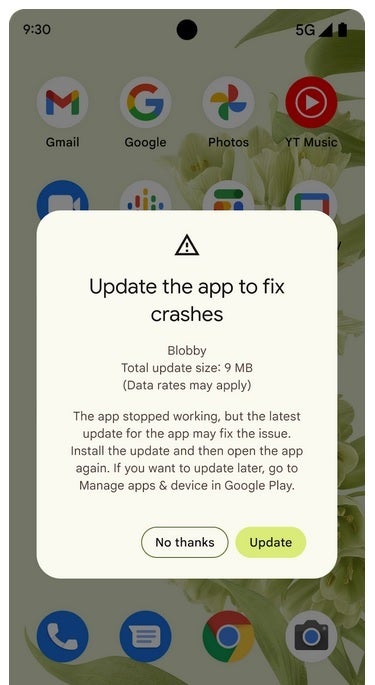
Google’s Android Developers Blog announced yesterday (via AndroidPolice) an interesting new feature for Android users with a device running Android 7.0 or later. If an app they are using crashes in the foreground (as opposed to when it is running in the background) and a more stable version of the app is available, the Play Store will prompt them to update the app. Google notes that from a developer’s point of view, this will reduce the app’s “user-perceived crash rate.”
Developers and users don’t have to do anything to enable the prompt as it is enabled automatically when Google Play determines that a newer version of an app that has crashed has a lower crash rate based on valid stats. You might ask, how will the app send a prompt if it has crashed? The answer is simple. Since the notice is coming from the Play Store and not the app, the prompt will appear even if the app crashes on startup.
The notification shows the name of the app and the size of the update. The message states, “The app stopped working, but the latest update for the app may fix the issue. Install the update and then open the app again. If you want to update later, go to Manage apps & device in Google Play.” There are two buttons that can be pressed. The white one on the left says “No thanks,” while the green one on the right says “Update.”
Android users with an app that crashes in the foreground will receive a prompt to update the app to the latest stable version
Google says that it takes three things into account which it adjusts over time in order to help developers make sure that their apps are delivering the best possible experience to its users. Those three thresholds include:
User activity level of an app version according to Vitals to ensure we have statistical relevance.
Foreground crash rate of an app version and of its newer version.
Number of times a prompt can be shown for each version of your app on a device, if the user doesn’t choose to update.
That last threshold would seem to indicate that it will be up a developer to determine how often a user of one of his/her apps will be prompted to update to the latest version of said app. Most Android users, we would surmise, might need to be told just once to update and it will be done right away. Apparently, not all users are determined to be running the most recent, stable, and usually the best version of the apps they employ and enjoy.
A new hacking tool, AuKill, disables Endpoint Detection & Response (EDR) software for threat actors to launch BYOD attacks by deploying backdoors and ransomware on targeted systems.
Sophos researchers witnessed the usage of AuKill in two incidents where an adversary first deployed Medusa Locker ransomware and another instance where the attacker installed LockBit ransomware after using the EDR killer on an already compromised system.
While the threat actors use validly signed drivers with kernel privileges to disable security solutions and seize control of victims’ devices in these attacks.
Technical Analysis
AuKill malware deploys a malicious variant of Windows driver (procexp[.]sys) next to Microsoft’s Process Explorer v16.32, a widely-used tool for gathering data on active Windows processes.
To gain privileges, it verifies if it is already operating with SYSTEM privileges. If not, it emulates the TrustedInstaller Windows Modules Installer service to elevate to the SYSTEM level.
AuKill starts multiple threads to repeatedly scan and terminate security processes and services to deactivate security software.
AuKill relies on a Process Explorer driver on compromised devices and systems to disable security solutions like Backstab.
So, they both have many similarities; the only difference is that AuKill is not an open-source tool, unlike Backstab.
Sophos X-Ops identified the LockBit gang using Backstab in at least one attack during their investigation of LockBit 3.0 (LockBit Black).
The malware uses a simple arithmetic calculation to validate the password or key.
It calculates the decimal value of each character’s ASCII code, doubles it, adds it to the next character’s value, and repeats the process.
Moreover, to disable EDR components, the following functions are used:-
Terminate Via Procexp
Terminate Forcefully
Disable Services
Unload Drivers
AuKill Timeline
Since the start of 2023, the tool has been used in three ransomware incidents to disable target protection and execute the ransomware.
After using the tool, attackers deployed the Medusa Locker ransomware in January and February. Similarly, in February, an attacker deployed Lockbit ransomware immediately after using AuKill.
Sophos researchers gathered six distinct versions and monitored their functional alterations over three months.
For easy identification, cybersecurity researchers at Sophos have labeled the earliest iteration of the malware as AuKill V1, while the latest version is AuKill V6.
They have a function that regularly inspects EDR processes and services to prevent revived processes from running.
Recommendations
Here below we have mentioned all the recommendations below:-
Make sure your endpoint security product has tamper protection implemented.
Ensure that your Windows security roles are correctly configured.
Make sure your system is always up-to-date.
Besides your OS, regularly verify for updates to your computer’s applications and tools.
Consider removing outdated tools that are no longer necessary or used.
Having a vulnerable driver on the system may also allow legitimate driver abuse.
Ensure an effective vulnerability management program to prevent legitimate driver abuse.