For better or worse, an Exynos-powered Galaxy S24 may be happening. Samsung‘s mobile division has reportedly approved the unannounced Exynos 2400 chipset for use in its 2024 flagships, at least in select markets. It shipped the Galaxy S23 series with a Snapdragon processor globally.
After skipping the Exynos 2300, Samsung is now working on a new flagship chipset. The Exynos 2400 was initially expected to power phones from Chinese vendors like Vivo and Xiaomi starting in early 2024. The Korean firm signed a multi-year partnership with Qualcomm last year, so it was expected to continue exclusively using Snapdragon processors in its flagship smartphones. At least for one more year.
But it appears, the company has changed its mind. It is now considering going back to Exynos in 2024. While it isn’t final just yet, the Exynos 2400 could end up powering the Galaxy S24 series in some markets, probably Europe. Hopefully, the new Exynos chipset will leave behind the performance nemesis that led to Samsung going all-in with Snapdragon this year.
Otherwise, the company may find it difficult to sell its next-gen flagship smartphones. Fans haven’t forgotten how Exynos processors have underperformed compared to competing Snapdragon solutions for years.
Early Exynos 2400 rumors would please Galaxy fans
Samsung going back to Exynos next year reportedly has to do with the dropping market share of its Exynos processors. However, the company’s mobile division won’t risk the sales of its latest flagship models if the Exynos 2400 isn’t as good as the unannounced Snapdragon 8 Gen 3, if not better. But if early rumors are anything to go by, things are looking quite promising.
The Exynos 2400 is said to be a deca-core chipset built on a 4nm low power performance (LPP) node. This will reportedly address the power efficiency and thermal management issues Exynos processors have had for years. The LPP node also has a better yield rate, something Samsung has struggled with lately. In other words, the Exynos 2400 could address two of the major complaints with Exynos chipsets.
It’s also rumored the new processor may feature a bonkers GPU. Rumors have it that Samsung will integrate AMD’s RDNA2-based graphics with 6WGP (Workgroup Processor). One WGP consists of two compute units (CUs), so the Exynos 2400 GPU will have 12 CUs. The Exynos 2200’s Xclipse 920 GPU has three CUs, so the new chipset has four times more compute units. These early rumors suggest the Exynos 2400 will be a massive leap forward from Samsung’s last Exynos processor. Whether it will be enough to win back fans’ confidence, only time will tell.
In today’s fast-paced world, managing personal finances has become more critical than ever. For Android users, there’s good news! You can now access personalized loan recommendations based on your spending habits, making it easier to make informed decisions about borrowing money. This article will explore the concept of personalized loan recommendations, how analyzing spending habits can lead to better loan decisions, and the role of AI and machine learning in this process.
The rise of personalized loan recommendations
How personalization works
Personalized loan recommendations work by analyzing your financial data, such as income, expenses, credit score, and spending habits. This information is then used to match you with loan products that best suit your financial situation and goals. By tailoring loan recommendations to your individual needs, you can avoid costly mistakes and find the most suitable borrowing options.
Benefits of personalized loan recommendations
There are several advantages to using personalized loan recommendations. First, they save time and effort by narrowing down your search for suitable loans. Second, they can help you avoid loans with high-interest rates or unfavorable terms that may not be suitable for your financial situation. Finally, personalized recommendations can increase the likelihood of approval, as you’ll only be applying for loans that match your credit profile.
Analyzing spending habits for better loan decisions
Breaking down your spending habits
To access personalized loan recommendations, it’s essential to have a clear understanding of your spending habits. Categorize your expenses into different areas, such as housing, utilities, groceries, entertainment, and savings. This will provide a clear picture of where your money goes and help identify areas where you can cut back to improve your financial health.
Importance of understanding your financial behavior
Understanding your financial behavior is crucial for making better loan decisions. By analyzing your spending habits, you can identify trends and patterns that may affect your ability to repay a loan. This insight can help you make more informed decisions about the type of loan and repayment terms that best suit your financial situation.
How AI and machine learning drive personalized loan recommendations
The role of AI in financial services
Artificial intelligence (AI) has revolutionized the financial services industry by enabling more accurate and efficient data analysis. In the context of personalized loan recommendations, AI can process vast amounts of financial data to generate highly customized recommendations. By leveraging AI, lenders can better understand individual borrower needs and offer more suitable loan products.
Machine learning algorithms for better predictions
Machine learning, a subset of AI, plays a crucial role in developing personalized loan recommendations. These algorithms analyze past financial data and spending patterns to predict future behavior. As a result, they can determine an individual’s creditworthiness and provide loan recommendations that match their unique financial profile.
SoFi: Overview and features
SoFi is a popular Android app that offers personalized loan recommendations based on your financial data. Key features include:
Comprehensive financial analysis to assess your creditworthiness
A wide range of loan products to choose from, including personal loans, home loans, and student loan refinancing
Seamless application process with quick approval times
Access to exclusive member benefits such as career coaching and financial planning resources
Branch: Overview and features
Branch is another excellent Android app for personalized loan recommendations. Its standout features include:
In-depth spending habit analysis to better understand your financial needs
AI-driven loan recommendations tailored to your unique financial situation
Access to a vast network of reputable lenders to find competitive loan offers
Fast and flexible loan options, including payday advances and installment loans
Even: Overview and features
Even is a user-friendly Android app that provides customized loan recommendations by analyzing your financial data. Key features include:
Easy-to-understand breakdown of your spending habits to identify potential savings opportunities
Machine learning algorithms that generate highly accurate loan recommendations
Secure and efficient loan application process with fast approval times
Integrated financial tools, such as automatic savings and bill tracking, to help you improve your financial health
Preparing to take a personalized loan
Evaluating your credit score
Before applying for a personalized loan, it’s essential to evaluate your credit score. A higher credit score indicates a lower risk to lenders, resulting in better loan terms and lower interest rates. Make sure to check your credit report for errors and take steps to improve your score before applying for a loan.
Ensuring a stable income
Lenders will assess your ability to repay a loan based on your income. Ensure you have a stable income source and can demonstrate consistent earnings to increase your chances of loan approval.
Considering the loan term and interest rate
When taking out a loan, consider the term and interest rate carefully. A shorter loan term, such as those offered by payday loans, may result in higher monthly payments but lower overall interest costs. Conversely, a longer loan term may have lower monthly payments but higher total interest costs. Keep in mind that payday loans often have higher interest rates than other loan types, so it’s important to carefully assess your options. Choose a loan term and interest rate that best align with your financial goals and repayment capabilities.
In conclusion, personalized loan recommendations for Android users offer a valuable tool for making informed borrowing decisions. By analyzing your spending habits and leveraging AI and machine learning, these apps can provide tailored loan recommendations that match your unique financial situation. By taking the time to understand your financial behavior and considering key factors such as credit score, income, and loan terms, you can find the best loan options to meet your needs.
Using a false call to deploy emergency services to the address of a victim or a school has been turned into Swatting-as-a-Service
One Telegram channel has been found to be behind a great deal of swatting incidents in the US. Using the anonymity provided by Telegram, caller ID spoofing, and voices generated by Artificial Intelligence (AI), a person or group of persons calling themselves Torswats is suspected to be behind dozens, if not hundreds of swatting incidents.
Swatting is where someone makes a hoax emergency call to law enforcement in order to get armed police (hence the SWAT reference) to target a particular address. Swatting is a crime that has evolved from a dangerous type of prank to a cybercrime that can be ordered as a service.
NPR reported that in October 2022, 182 schools in 28 states received fake threat calls with a familiar pattern behind this wave of false calls. A voice-over-internet-protocol (VOIP) number in Ethiopia which was tied to a call about a “suspicious backpack” in a classroom call had logged calls to 79 other places across Louisiana, Arizona, and New Mexico.
Even in the stage when swatting was a prank popular among gamers, it was dangerous because of the potential consequences. Not only does it take emergency services away from their actual tasks, there have been swatting incidents that had fatal consequences. Police officers are placed in danger as victims may try to defend themselves against an unsuspected raid.
Swatting is a criminal offense in many jurisdictions, often punishable by fine or imprisonment. So swatters want to keep their identity hidden. And Torswats seems to do a good job at that. Some of the people paying Torswats for their services have been arrested, but the Telegram channel remains open for business.
Telegram is an anonymous chat platform that uses encrypted communication and does not require users to reveal their true identity. While not intended for that purpose, it is popular among criminals of all kinds and trades because they have a natural desire to stay anonymous.
Caller ID spoofing is the practice of causing the telephone network to indicate to the receiver of a call that the origin of the call is different from the true origin. Swatters use this to make the caller ID display show a phone number different from that of the origin.
Text to speech conversion software has evolved to a point where it is almost impossible for a human to discern the generated speech patterns from a real human. AI can be used to instill “voice acting” into the spoken text so the message sounds panicky, threatening, or whatever emotion is needed to make the message sound more realistic.
Torswats carries out these alarming calls as part of a paid service they offer. Payments are made in cryptocurrency to maintain anonymity. For $75, Torswats says they will close down a school. For $50, customers can buy more extreme swatting services, in which authorities can be expected to handcuff the victim and search their house.
Counter actions
If you are afraid of swatters targeting you for your online actions, you can use a VPN to hide your IP address. That gives them one less opportunity to find your physical address.
Just like there are tools and programs to generate fake voices, there are initiatives that aim to fight this increasingly widespread practice. But many of them are based on biometrics which allows the program to determine whether the text was spoken by the person or the deepfake version trying to impersonate them.
The future probably lies in deep-learning algorithms that analyze a caller’s voice and recognize unique characteristics that are tied to deepfakes. These programs will be used to assist emergency services dispatchers in recognizing AI generated voices.
Let’s hope Torswats and other operations like theirs will soon learn what it feels like to get—legitimately–arrested.
We don’t just report on encryption—we offer you the option to use it.
Privacy risks should never spread beyond a headline. Keep your online privacy by using Malwarebytes Privacy VPN.
The Pixel Fold price is once again being talked about in the leadup to Google’s annual I/O conference in May, where the device is suspected to be officially unveiled.
In a recent rumor the price was said to be $1,799. A new report from CNBC (spotted by 9To5Google), says the Pixel Fold price will be upwards of $1,700. Google will also reportedly offer trade-in discounts, plus a free Pixel Watch to buyers. This likely means the price rumored from yesterday is either close to the launch cost, or right on the money. For comparison, the Samsung Galaxy Z Fold 4 launched at $1,799 without any trade-in offers. So it sounds like Google is going to price its foldable around the same amount.
Alongside the price, the report (which cites internal communications), mention several other key details about Google’s foldable phone. It’s said to have the “most durable hinge of any foldable.” The device will also offer some level of water resistance, likely similar to what Samsung offers on the Galaxy Z Fold 4.
Battery life will apparently last for up to 24 hours with regular use. Though a low-power mode could push that out to 72 hours if needed. The device is also said to be powered by the Tensor G2 and weigh about 283 grams.
The Pixel Fold price seems to be comparable to similar offerings
Google of course hasn’t confirmed any details of this phone yet. But price is surely going to be one of the key details consumers are interested in. Given the price tags of foldables aren’t cheap.
With yesterday’s rumor noting a specific price of $1,799 and today’s leak suggesting over $1,700, it seems quite likely Google is pricing the Pixel Fold to match Samsung. Hoping to perhaps capitalize on the fact that it may offer a more durable hinge than competitors.
In addition to the Pixel Fold, Google is also expected to unveil its much more budget-friendly phone, the Pixel 7a, as well as the Pixel Tablet at Google I/O next month.
Amazon purchased Ring back in 2012, and helped make it a huge name in the smart home industry. Today, Ring has a ton of different products from video doorbells, to DIY security systems, to smart lighting and so much more. But which products are the best to put in your home? That’s what we’re here to help you with.
So here are the best Ring products that you can buy for your smart home.
Best Ring Products
Ring’s products are very competitively priced, and often times Amazon will discount them or bundle them with other products. For instance, you may see a Ring Video Doorbell bundled with another Stick-Up Cam or an Echo Show.
The Ring Floodlight Cam Wired Pro is a really great floodlight to get for your home. It has 1080p HDR video available, with nightvision. Of course, the two floodlights on either side are very bright, so you don’t really need the nightvision.
It has 3D Motion Detection and Bird’s Eye View, so you can see what’s going on everywhere in your backyard or sideyard at your home.
The Ring Floodlight Cam Wired Plus is very similar to the Pro, but it is $50 less. It doesn’t do HDR video, instead it’s just 1080p. It does have slightly different shape for the floodlight, so it won’t light up as big of an area.
Despite missing those features, the Floodlight Cam Wired Plus is still a really great option to keep your entire home protected.
The Ring Chime is more of an accessory than an actual product. Basically, you pair this with a Ring Video Doorbell, and you’ll hear a chime when the doorbell rings. So you don’t need to be near your phone or an Echo Show or Fire TV to hear that someone is at the door.
The Ring Spotlight Cam Battery HD is a good camera to put outside your home, if you don’t have the wiring needed for a floodlight. Since there are no battery-powered floodlights yet. The Spotlight Cam runs on battery, and can last a few weeks or months, depending on your settings.
There are 8 LED lights on either side of the camera that light up when it detects motion. Nowhere near as bright as a floodlight, but it does work. And there is nightvision available too.
This is the default Ring Video Doorbell basically. It does all of the necessities, at a lower price. This is the cheapest option for those that need to use it without existing doorbell wiring. Now there is a wired version for about a third of the price, but you need existing doorbell wiring for it to work.
This doorbell from Ring can record in 1080p video, it also has motion detection and Ring makes it super simple to set up. You’ll get notifications when something is seen outside of your home, as well as when packages are delivered.
Now this camera is one that you can put up in your home and see what your pets are doing when you’re at work. Or see what your kids are up to after school, before you get home. This is not meant to be used outside, since it does not have a battery and is not weather-proof.
It can be used in different angles and mounted. It’ll show you video in 1080p, and it has two-way talk. So you are able to talk with whoever is in your home.
This is a do-it-yourself security system from Ring. It’s available in a 5-piece, 8-piece and 14-piece kit, and you can buy these parts individually if you need more. This here is the 8-piece kit, which we feel is perfect for everyone. It includes the base station, keypad, four contact sensors, one motion detector and a range extender.
This will give you piece of mind when you’re not at home. Now this doesn’t require any monthly subscription, but you can get professional monitoring for a monthly subscription. And it works in the Ring app that you already use.
You’re probably wondering why you should get this over the Ring Video Doorbell 3? Well, for one, this has a wider-angle camera. So you can see from head to toe, who is at your door. This is important as some packages are dropped off so close to the door that they can’t be seen. Well they can with the Ring Video Doorbell Pro 2.
This one does need existing wiring to work, as there is no battery inside. So do keep that in mind.
The Ring Solar Panel is made specifically for the Ring Spotlight Cam Battery and the Stick Up Cam Battery. You’ll mount it close to the camera, and plug it into the camera. Now you won’t need to worry about recharging your camera. As the sun can do that for you, for free even.
Ring says that you’ll need about 3-4 hours of direct sunlight, and that will depend on your usage.
Ring has its own pathlights that you can purchase and put in your front yard. It’s a cool way to light up your path from the car to the front door. These are solar pathlights, so there are small solar panels on the top and grab sunlight during the day. Then brighten up your yard at night.
You can buy the Ring Solar Pathlight in a single, two, four or six pack. Depending on your home.
With plans to offer more ransomware, LockBit has just created a variant for macOS. But, as experts have pointed out, it’s hardly ready for anything.
News broke over the weekend that ransomware gang LockBit had begun targeting Mac users, triggering some concern in the Apple community. But have no fear: Apple security experts have dissected the ransomware, taking a deep dive into what it can and cannot do, and concluded that it is, actually, toothless.
“Yes, it can indeed run on Apple Silicon. That is basically the extent of its impact,” said Patrick Wardle (@patrickwardle), known macOS cybersecurity expert and founder of the non-profit, Objective-See. “macOS users have nothing to worry about.”
Here’s why.
The signature is invalid
Using a utility called codesign, Wardle saw that the payload’s signature value is “ad-hoc” compared to an Apple Developer ID. Because the signature is invalid, macOS won’t execute it.
If you’re brave enough to run the payload on your macOS, you’ll be met with this message, says Wardle. (Source: Objective-See)
The encryptor is likely a test file
Azim Khodjibaev (@AShukuhi), a security researcher at Cisco Talos, floated the theory to BleepingComputer that the encryptors designed for macOS were “meant as a test and were never intended for development in live cyberattacks.”
Wardle further confirmed this theory, stating the malware is far from complete. Indicators in the malware’s code suggest it’s Linux-based but compiled for macOS with basic configuration settings included. The code also shows its developers have yet to consider macOS’s TCC (Transparency, Consent, and Control) and SIP (System Integrity Protection), two security features meant to protect user files and folders.
With TCC and SIP present, the ransomware will only be able to encrypt a little, if at all.
The code is buggy and will crash
Laying further credence to the test file theory, Wardle found the macOS payload contains a buffer overflow, which will cause it to crash when executed.
No worries for now!
Apple users can rest easy knowing that this macOS ransomware, as it is now, will hardly impact anyone. However, as Wardle quickly pointed out, this may be different in future releases.
“The fact that a large ransomware gang has apparently set its sights on macOS should give us pause for concern and also catalyze conversations about detecting and preventing this (and future) samples in the first place,” he says in his blog.
With LockBit operating as a ransomware-as-a-service (RaaS) outfit, its ambition is to offer a range of ransomware. Currently, we have at least two available offerings: LockBit Black (based on BlackMatter’s code) and LockBit Green (based on Conti’s code). So expanding to target systems outside its repertoire is not only a logical move but also strategic.
“For most organizations, the main takeaway is Macs are probably safe, for now, but your Windows servers were always the prime target anyway,” says Malwarebytes Security Evangelist Mark Stockley. However, Mark warned:
“You’re only safe until you’re not, and there’s no timeline on getting this working. We won’t get a warning in advance, we’ll just hear (probably from LockBit itself) that an organization with lots of Macs has been turned over. So…what are you going to do if you have lots of Macs in your organization? Wait for the horse to bolt and then shut the door, or shut the door now?”
In an interview with BleepingComputer, LockBit’s public-facing representative LockBitSupp says the Mac encryptor is “actively being developed.”
Detect intrusions. Make it harder for intruders to operate inside your organization by segmenting networks and assigning access rights prudently. Use EDR or MDR to detect unusual activity before an attack occurs.
Stop malicious encryption. Deploy Endpoint Detection and Response software like Malwarebytes EDR that uses multiple different detection techniques to identify ransomware, and ransomware rollback to restore damaged system files.
Create offsite, offline backups. Keep backups offsite and offline, beyond the reach of attackers. Test them regularly to make sure you can restore essential business functions swiftly.
Don’t get attacked twice. Once you’ve isolated the outbreak and stopped the first attack, you must remove every trace of the attackers, their malware, their tools, and their methods of entry, to avoid being attacked again.
Malwarebytes removes all remnants of ransomware and prevents you from getting reinfected. Want to learn more about how we can help protect your business? Get a free trial below.
During its global launch event today, Xiaomi finally unveiled its much-anticipated Xiaomi Pad 6 series. The event also took the wraps off the Xiaomi 13 Ultra smartphone, the Xiaomi Smart Band 8, and a massive 86-inch Xiaomi Smart TV. The Xiaomi Pad 6 series launched in two variants – the Xiaomi Pad 6 and the Xiaomi Pad 6 Pro.
Both variants offer a high-resolution display with a high refresh rate. While the standard variant comes packed with a Qualcomm Snapdragon 870 processor, the Pro variant draws power from a more efficient chipset. Let’s take a closer look at their specs, pricing, and availability.
Both Xiaomi Pad 6 and Pad 6 Pro come with top-of-the-line specs
The Xiaomi Pad 6 and Pad 6 Pro are reminiscent on various fronts, but the company has offered slightly better innards for the latter. The Xiaomi Pad 6 series launched with a metal body and offer USB-C 3.0 port. The devices are equipped with a fingerprint sensor for added security.
Both variants also share the 11-inch display with a 2800 x 1800 pixel resolution. Xiaomi has used a 2.8K IPS LCD display with a 144Hz refresh rate. The company claims that the display is capable of offering great color accuracy. Besides, users get dual eye protection certification. Moreover, both devices are equipped with quad speakers system powered by Dolby Atmos. The tablets will run Android 13 wrapped under MIUI Pad 14 skin.
However, when it comes to the processor, the Xiaomi Pad 6 Pro has the edge over its sibling. The Pro variant comes packed with a Snapdragon 8 Plus Gen1 processor, while the standard variant runs on Snapdragon 870 SoC. The Xiaomi Pad 6 Pro has a 50MP rear camera and a 20MP front-facing camera. The Xiaomi Pad 6, on the other hand, gets 13MP rear and an 8MP front camera.
The battery is the only area where the standard variant beats the Pro version. The Pro variant comes with an 8,600mAh battery, while the standard variant comes equipped with a bigger 8,840mAh battery. However, the Pro version gets 67W charging, while the standard variant has to settle for 33W charging.
Xiaomi Pad 6, Pad 6 Pro pricing and availability details
The Xiaomi Pad 6 series launched in black, blue, and champagne gold color options. The standard variant will sell for CNY 1,999 (around $291) for the 6GB RAM and 128GB storage model, while the 8GB/128GB model is priced at CNY 2,099 (around $305). The 8GB/256GB model carries a price tag of CNY 2,399 (around $349).
Speaking of the Xiaomi Pad 6 Pro, the 8GB/256GB model will come for CNY 2,699 (around $392), while the 12GB/256GB will sell for CNY 2,999. The top-of-the-line 12GB/512GB version will set users back by CNY 3,299 (around $489). Both tablets are currently available for pre-orders in China, and the sales are expected to kick off by April 21. The company is yet to announce the international pricing and availability for the tablets.
Elon Musk confirmed that he’s working on an AI chatbot called TruthGPT. This chatbot would “create a third option” and wants to challenge OpenAI’s ChatGPT and Google Bard.
Rumors about Musk’s plans for tapping into the AI space have been circulating for months, but the recent moves suggest the billionaire has a well-baked plan for AI development. He recently launched his new company, X.AI, and was spotted buying thousands of GPUs to develop an AI product. Additionally, Musk is reportedly hiring AI engineers from rival companies like Google and OpenAI.
In an interview with Fox News, Musk revealed that his team is developing an AI chatbot to create a “maximum truth-seeking AI that tries to understand the nature of the universe.” Musk added he hopes TruthGPT would do “more good than harm,” as current AI tools are trained to lie.
Elon Musk seeks a healthy AI with TruthGPT
Of course, the billionaire admitted that rivals are ahead and he’s started late. Yet, there are no more details on how TruthGPT compared to ChatGPT and Google Bard. It also remains to be seen whether TruthGPT will be integrated into Twitter and Tesla EVs. Given the current trend of technology, we are more likely to see TruthGPT in Twitter and Tesla cars.
In his interview with Fox, Musk also warned about the potential dangers of AI. As well as its ability to destroy civilization. Musk said this was one of his main incentives to launch TruthGPT. He was one of the signatories of a recent open letter that argued all AI experiments should be halted for six months. Adding that more strict regulations are needed.
The second richest man in the world was one of the co-founders of OpenAI in 2015, which is currently the parent company of ChatGPT. Musk left the company after disagreements with current chief executive Sam Altman. He later said ChatGPT was politically biased.
Whether TruthGPT will be successful in its mission to spread healthy AI and become a rival to ChatGPT remains to be seen. But one thing is clear: with Musk at the helm, the future of technology looks brighter than ever.
CYFIRMA recently detected a cyber-attack on a person living in Kashmir, India, and obtained two malware pieces from the victim’s mobile download folder.
The investigation of these samples links the recent cyber-attack to DoNot APT, which has a long-standing record of activity in the area.
It seems the perpetrator behind the cyber-attack exploited third-party file-sharing websites to distribute malware to the victim’s mobile device.
Due to this, the downloaded files get saved in the main download folder of the victim’s device. It’s might be possible that the attacker created their file-sharing website to deploy the malware.
Interestingly, the malware samples were disguised as chat apps named:-
Ten Messenger.apk
Link Chat QQ.apk
This threat actor has carried out cyber attacks in the South Asian region since 2016 when it was first found to be active.
External threat landscape management
The earlier campaign’s Android samples had encrypted strings that utilized the Base64 algorithm.
Unlike the previous campaign’s samples, the team discovered that the strings in the current sample had two encryption layers with CBC mode and PKCS padding:-
The code was hard to comprehend because it was obfuscated and safeguarded using Pro Guard.
According to the CYFIRMA technical analysis report of the attack shared with GBHackers, it aligns with DoNot APT’s modus operandi, as they have previously targeted entities in this region.
The threat actor has employed spear-phishing tactics against their adversaries in various industries and locations in the past. However, it’s unclear what the motive was behind the recent attack.
The recent attack by DoNot APT on an individual in Kashmir does not surprise the threat intelligence community.
Since this group has repeatedly targeted NGOs and other entities in the following regions in the past:-
Kashmir
India
Bangladesh
Pakistan
It is possible that the threat actor used popular messaging apps such as WhatsApp to initiate a social engineering attack and deliver the malicious app.
In contrast to other messaging apps, WhatsApp does not save attachments to the download folder, instead, they are saved in the WhatsApp media location.
Technical Analysis
The victim will be prompted to open the application as soon as the Android Malware Sample has been installed.
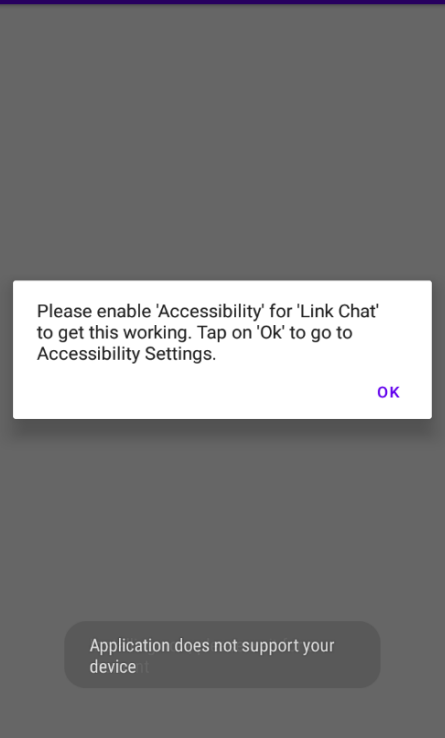
Once the victim opens the app, it prompts them to enable the accessibility service through a repeated alert every time they open the app, until the victim enables it.
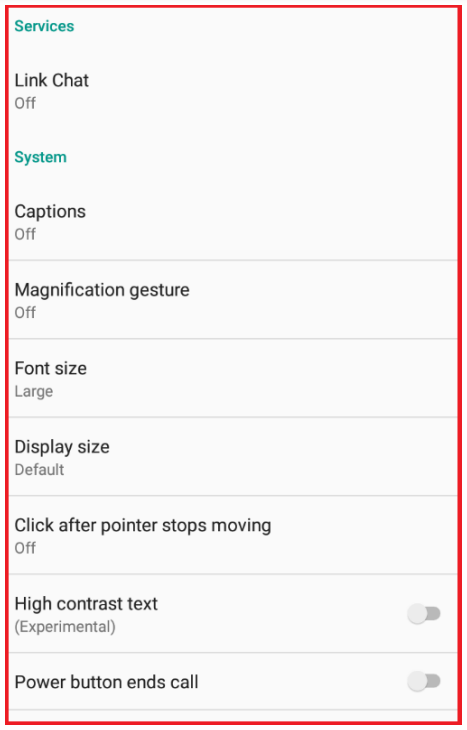
Once the victim clicks on “Ok,” the app directs them to the Accessibility settings page and requests that they enable Accessibility by turning on “Link Chat.”
The app then conceals itself from the main menu and limits the victim’s ability to uninstall it.
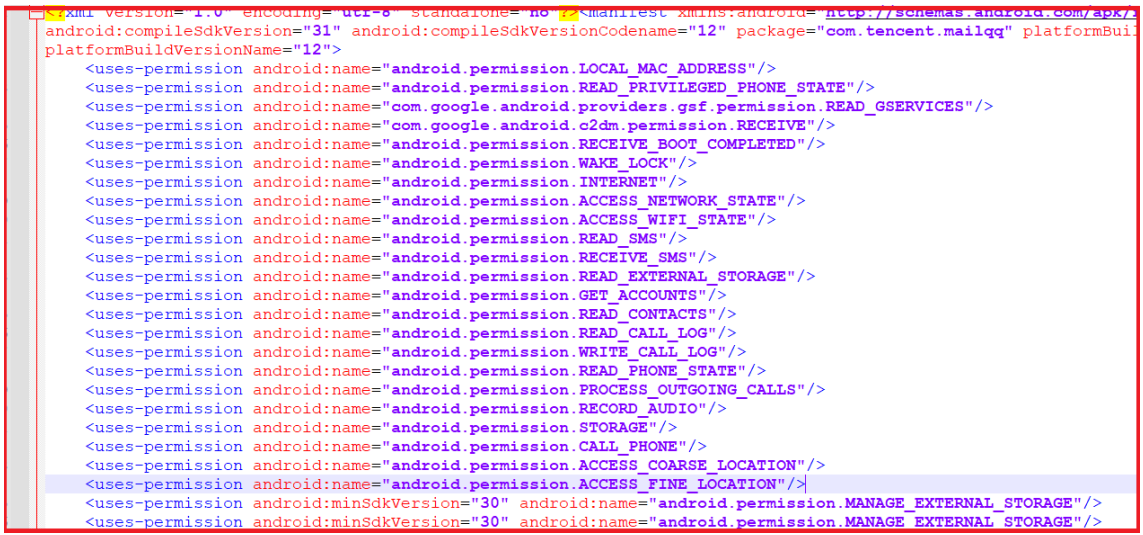
The malicious app’s Android Manifest file contains a snippet revealing its attempt to acquire various permissions.
By doing so, the app could execute malicious activities, harming the victim’s device and privacy.
Here below we have mentioned all the permissions it asks for:-
READ_CALL_LOG: This enables actors to read and fetch call logs.
READ_CONTACTS: This permission allows TA to read and fetch contacts.
READ_SMS: This permission enables the threat actor to read the victim’s received and sent SMSs.
READ_EXTERNAL_STORAGE: This allows threat actors to explore and fetch data from the file manager.
WRITE_EXTERNAL_STORAGE: This allows threat actors to delete and move files.
STORAGE: This gives access to mobile internal storage, to view and access files.
ACCESS_FINE_LOCATION: Allows the threat actor to fetch precise locations and track the live movement of mobile phones.
WRITE_CALL_LOG: This allows the threat actor to delete numbers from call logs.
GET_ACCOUNTS: This allows the threat actor to extract emails and usernames, used for login into various internet platforms.
In order to decrypt the string, it was determined that the playstoree[.]xyz domain is involved.
In addition to being one year old, the suspected IOC is part of the notorious Do Not APT group.
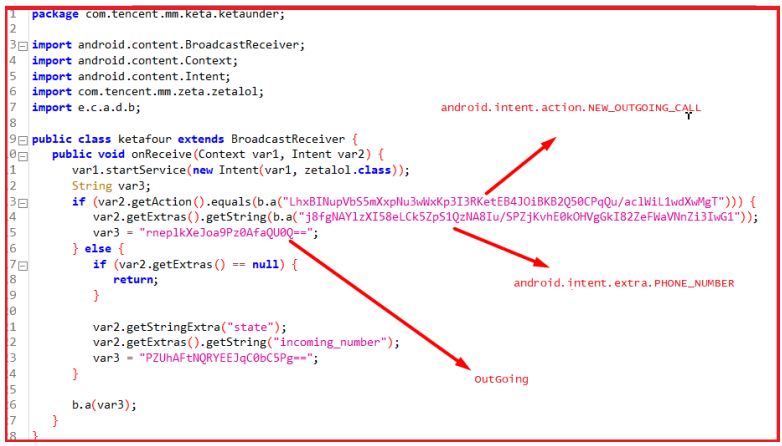
The string is encrypted and decrypted by a class using a secret key. Monitoring of compromised victims’ outgoing and incoming calls is performed using the following permissions:-
android.intent.action.NEW_OUTGOING_CALL
android.intent.extra.PHONE_NUMBER
A new sample with a different name was discovered during the analysis carried out by security experts.
However, except the command and control domain, the code used in the present sample is the same as the code they have previously analyzed.
The attackers continuously focus on individuals in Kashmir, using relatively unsophisticated attack methods.
Apart from this, the threat actors have been observed using the same TTPs for the past two years, and this indicates a lack of innovation in their attacks.
Goldson malware can collect data from apps installed on the device, as well as from Bluetooth- and Wi-Fi-connected devices.
McAfee’s Mobile Research Team researchers discovered at least 60 malicious apps on Google Play Store infected with Android malware Goldoson. Collectively, these apps account for around 100 million installs on the Play Store and 8 million installs on the South Korean ONE Store. South Korean users are most vulnerable to downloading these apps.
Goldoson Infiltrates Legit Apps on Play Store
Researchers found that Goldoson Android malware has infiltrated the official Google Play Store via 60 legitimate apps. The malware component is based on a third-party library that all sixty apps use. Researchers assume that the developers mistakenly added it to the apps.
Which Apps Are Infected with Goldoson?
Some of the infected apps include the following:
Pikicast
GOM Player
LIVE Score
Infinite Slice
Real-Time Score
L.POINT with L.PAY
Swipe Brick Breaker
Bounce Brick Breaker
LOTTE WORLD Magicpass
Compass 9: Smart Compass
Korea Subway Info: Metroid
SomNote - Beautiful note app
GOM Audio - Music, Sync lyrics
Money Manager Expense & Budget
How Does The Device Gets Infected?
The Goldoson Android malware is designed to perform malicious actions on devices that download one of the 60 infected apps. Once the app is downloaded and launched, the malware library registers the app and receives its configuration from a remote server with an obfuscated domain.
This configuration sets the functions that the malware will run on the device, including ad-clicking and data-gathering features. The data collection function is activated every two days, and the collected data, along with the MAC address of connected Bluetooth and Wi-Fi devices, is transferred to a C2 server.
The ad-clicking feature is launched by loading and injecting HTML code into a hidden, customized WebView. This feature generates revenue through multiple URL visits. Overall, the Goldoson malware has been found in 60 different apps and has impacted a large number of downloads.
What is Goldoson Malware Capable of?
Goldson malware can collect data from apps installed on the device, as well as from Bluetooth- and Wi-Fi-connected devices. In addition, it can track users’ location and carry out ad fraud by clicking on ads in the background without alerting the user. Data collection relies on permissions given to an infected app when being installed.
In a blog post, McAfee researchers stated that although Android 11 and above versions are generally considered safe against data theft due to their superior security protections, in 10% of the infected apps, Goldoson could collect sensitive data from devices running these versions.
McAfee responsibly alerted Google and the app developers, who promptly removed the malicious library from the apps. Apps in which they couldn’t remove the library were taken off the Play Store.
It is worth noting that malicious versions of these apps will still be available on third-party Android app stores even though on Play Store these apps will become safe with an update. Therefore, uninstall the app, and reinstall it from Play Store to be safe.