It’s been almost half a year since the revolutionary ChatGPT was released. Amazingly, it reached 100 million users in just two months.
ChatGPT has an unimaginable potential to answer things that need a lot of research. Due to its increasingly demanding usage, securing it from threat actors is also essential.
The Microsoft-backed platform has launched its Bug Bounty Program on BugCrowd. Many Security researchers have already found some vulnerabilities on ChatGPT, and we’re posting them now and then.
However, it is now an excellent opportunity for security professionals to report their bugs and get rewarded for their work.
Their rewards are below as per their Bug bounty program and the VRT (Vulnerability Rating Taxonomy) of Bugcrowd.
P4 – $200 – $500
P3 – $500 – $1000
P2 – $1000 – $2000
P1 – $2000 – $6500
The program also mentioned that the reward can go up to a maximum of $20,000, making it a huge reward for critical bugs. So far, 14 Vulnerabilities have been reported on the program.
Scope of the Program
The following applications are in scope.
ChatGPT, ChatGPT Plus, Logins, Subscriptions, OpenAI-created Plugins created by users, and all other functionalities.
Cloudflare Bypass to send traffic to unprotected endpoints
Running queries on private models that are not available to the Public
Browsing or Code Interpreter Plugins created by OpenAI
SSRF
OAuth Flaws
Credential Security and making plugin calls to unrelated domains
Since OpenAI has access to the entire internet, issues related to Google Workspace, Asana, Trella, Jira, Monday.com, Notion, Hubspot, and many more related issues related to OpenAI can also be reported.
However, there are restrictions to perform additional security testing on these companies.
Subdomains of openai are also included in the scope of the program. The subdomains of OpenAI can be found at
Out-of-Scope Vulnerabilities
Though most bugs are eligible for reporting, some of the bugs listed below are out of the program’s scope.
Issues based on the Model
Brute Forcing API
Fuzzing, password spraying unauthorized attacks
Stolen or Leaked Credentials stemming
Clickjacking
SSL/TLS Cipher security issues with PoC
Server error messages without exploit proof
Old/EoL browser/ plugins related issues and much more
For more information, refer to the Out-of-Scope topic on BugCrowd.
We’re always being taunted by the extremely pricey headphones and earbuds from top companies. They harbor all of the best features like noise cancelation, customizable sound profiles, high-quality audio, and more. The more expensive the headphones, the better they are, it seems.
However, that’s not always the case. There’s a treasure trove of headphones and earbuds that give you some great features at a reasonable price. They bring features that you’d see in more expensive products. Not only that, but they also utilize those features well. If you’re looking for the best headphones for under $100, here’s a list that you’ll find useful.
Best Headphones & earbuds under $100 summary – Updated April 2023
If you’re looking for a quick rundown of the items on this list, you can simply look at this table. It shows you the product, the price, and where you can buy them. It’s useful to get started on your search quickly. If you want a more in-depth explanation of these devices, you can read below the table.
Audio-Technica ATH-M20x
Audio-Technica is one of the more popular brands in the audio world, and its headphones are some of the most recommended. The ATH-M20x is a pair of headphones for people who want to prioritize saving. For $49.99, you get a pair of closed-based headphones that keep the audio in.
They have a set of powerful 40mm Neodymium Magnet Drivers to give you some punchy audio. They come with an embedded 9.8ft aux cord that’s more than long enough for your needs. These headphones are a great offer for the low price.
If you need headphones to listen to in a noisy environment, then you’ll want to look at the Behringer BH470NC. This is a pair of headphones that have active noise cancelation. This will cancel out the ambient noise and help you better hear your music or podcast.
These headphones have a set of 40mm drivers that will give you a nice full sound. Also, these headphones have a set of soft ear cup covers. This means that you’ll be able to listen to them for extended periods of time without them being uncomfortable.
The Soundcore Life Q30 are for people who want to have a little more control over the sound of their music. For starters, these headphones come with a set of 40mm drivers, and they can produce hi-res audio. Along with that, they also come with ANC for those who listen in noisy environments.
If you like to tinker with your audio, then these should appeal to you. The companion app that these headphones come with a built-in EQ. You’re able to adjust the audio to suit your needs.
The Soundcore Life Q30 come with rather massive batteries that promise to deliver excellent life. With the ANC on, you should get up to 40 hours of playback time. That’s impressive on its own, but with the ANC turned off, they’re rated to last up to 60 hours.
These headphones are made for those who are going to be using them for extended periods of time. They come with a dual-layer headband cushion for added comfort. This is especially useful for people who work in audio and need to use headphones for hours at a time.
They’re made with audio quality in mind with their large 50mm neodymium drivers. So, if you’re a composer or audio engineer, you’ll feel right at home with these headphones. Just know that they’re open back. This means that there’s nothing to keep outside noise out, so you’ll ideally use them in the studio.
They come with a detachable cable that’s 1.5 meters long. It’s more than long enough for your needs.
If you’re really looking to save money, then you’ll want to look at these headphones. They’re closer to your standard-quality headphones. They come with an embedded dual aux cord to plug into a 3.5mm headphone jack. Also, these headphones come with a 1/4-inch adaptor.
While these headphones are affordable, they still come with sizable 40mm drivers to provide a powerful sound. They’re closed-backed, so they might not be ideal for professional recording, but they’re great for casual listening. They’re a nice offering for the price.
The Edifier W240TN are a set of pretty simple and straightforward TWS earbuds. You have a nice balance of features with these earbuds that you won’t find with some others. The audio that you get from them is solid, and it’s paired with some excellent ANC. Along with that, you also have ambient mode.
If you’re the type of person who likes to tinker with the audio, then these will be great for you. The Edifier Connect app has a built-in EQ that lets you adjust the frequency range of each of the four bands. Also, you can adjust the Q factor of each band.
Each earbud has a physical button, and you’re able to select which function you want them to perform. You can assign actions for a double-press and a triple-press of each button.
These are perfect for people who want a light pair of earbuds. The JLab Go Air Pop are the company’s smallest and lightest yet. They could be great for those looking to work out while wearing them. Also, the touch controls mean that you can easily control them while on a run.
When it comes to battery power, the JLab Go Air Pop will last you the day. They’re rated to last you about 8 hours on a single charge. If you use the charging case, that number gets a boost to 32 hours. Also, speaking of charging, the case comes with a built-in charging cable.
The Jabra Elite 3 offer some great audio quality for the low price. They’re comparable to the Jabra Elite 4 Active earbuds. Android Headlines did a review on them, and if you want more information on them, you can click right here.
The Jabra Elite 3 give you some powerful sound with a pleasant amount of bass. It’s not overwhelming, so you’ll still have a relatively balanced sound. If you want to tune your sound more, you can use the Jabra+ app has a built-in EQ. You can adjust the EQ to your liking.
The only drawback is the fact that these don’t have ANC. While that’s the case, these earbuds do have ambient mode, and it works just fine. Overall, a great pair of earbuds for the price.
The Tibit BTH92 bring some nice bang for your buck. At $39.99, these are some of the least-expensive earbuds on this list, but they still bring some nice features. For starters, they have touch controls, so you can easily control them with a tap. The charging case gives you a useful battery indicator so you know when to charge them.
As for other features, these earbuds have an IPX8 water resistance rating. This means that they can be submerged under a meter and half of freshwater for 30 minutes. You’ll just want to be careful about salt water and pool water. If you want to prioritize savings, you’ll want to consider getting these earbuds.
The WYZE earbuds are meant for those who are into sports and fitness. They come with IPX5 water resistance for those who like to work out with their earbuds in. This means that you won’t have to worry about your sweat getting into them and messing them up.
As for the other features, each earbud comes with a 10.5mm driver that will give you a powerful sound. Also, each bud comes with two microphones for top-notch ANC. In terms of battery life, you can expect to get about 7 hours of playback on a single charge. With the case included, you’re looking at about 20 hours.
Today, Warner Bros Discovery has announced that its new combined streaming service will launch in the US on May 23. The service, as had been widely reported, will be called simply Max.
Since Warner Media and Discovery merged, there was talk about a combined streaming service, and that day has come. Originally, Warner Bros Discovery planned to merge discovery+ completely within HBO MAX. But it became a better idea to merge the two into a new service instead.
While the company has announced a lot of things today, there’s still a lot that we don’t know about Max. Like, how much it’ll cost. It would be surprising to see it come in cheaper than the current HBO MAX pricing. We’re expecting something around $15-$20 for ad-supported and $20 or more for ad-free. Keep in mind that it will have a ton of content, arguably a lot more than Netflix.
Goodbye, HBO
Surprisingly, WBD is going to be getting rid of HBO. HBO, which stands for Home Box Office, first launched in 1972, as a premium movie channel that was ad-free on cable. It then morphed into a streaming service, and finally after AT&T bought Time Warner, it was rebranded as HBO MAX, and added all of the Warner Bros content onto HBO MAX, as well as adding some licensed content.
Now, HBO is done. It’ll simply be called “Max”. Which is an interesting position for the company to take. As HBO and Discovery are both household names. And either one being used in the name for the new service would have been a good idea. But we’ll have to see how this works out when the service launches next month.
What’s interesting here is that while Max will be the new combined service, WBD is keeping discovery+ around. And that’s because it has a pretty loyal following. And getting customers that prefer reality TV who are paying about $5 per month, to now pay double, triple or even quadruple, is going to be a hard sell. So discovery+ customers, you’ll be able to stick with discovery+.
StormWall projects a 170% increase in DDoS Attacks by the end of 2023 and urges businesses to implement mitigation strategies.
Leading cybersecurity provider, StormWall, has released a comprehensive report on the state of Distributed Denial of Service attacks (DDoS attacks) in Q1 2023. The report, based on an analysis of attacks on StormWall’s clients across various sectors, reveals a significant increase of 47% in DDoS attacks compared to the same period last year.
The findings, shared with Hackread.com, highlight a worrisome trend of botnet usage and a growing practice of smokescreening to conceal multi-vector attacks.
The study reveals that attackers are increasingly targeting critical infrastructure and services, including logistical services, payment processing hubs, and banking systems, in an attempt to impact a larger number of users. The average attack strength reached a peak of 1.4 Tbps, and the longest attack lasted for 4 days.
Among the sectors targeted, the financial industry experienced the highest number of attacks, accounting for 34% of the total and witnessing a staggering 68% increase compared to Q1 2022. E-commerce also faced significant challenges, enduring 22% of the attacks and experiencing a 51% increase from the previous year. Telecommunications remained a popular target, with 16% of the attacks and a 47% year-over-year increase.
The use of botnets in DDoS attacks continues to gain traction, with over 38% of attacks leveraging networks of compromised devices. Additionally, the practice of smokescreening, where DDoS attacks are used as decoys in multi-vector assaults, increased by 28% compared to the previous year.
The report also reveals that more destructive HTTP attacks are becoming increasingly accessible to run. As a result, 82.3% of DDoS attacks targeted the application layer (L7), while 11.7% were directed at the transport (L4) and network (L3) layers of the OSI model. DNS was targeted in 2.3% of the attacks, and the remaining 3.7% were aimed at other targets.
Geographically, the United States (17.6% attack share), India (14.2%), and China (11.7%) remain the most targeted countries. However, the United Arab Emirates saw a notable surge in attacks, with the proportion nearly doubling from 3.8% in Q1 2022 to 6.4% in the current year. Russia and Ukraine, on the other hand, experienced a decline in DDoS activity as hacktivism subsided.
Did you know that in 2021, the United States and China both held the position of being the top countries with the most exposed cloud servers due to misconfiguration? India ranked fifth in this regard. Read more…
Targeted industries and countries
StormWall’s report emphasizes the escalating threat of DDoS attacks, as evidenced by the significant rise in attack volume, strength, and duration. With threat actors constantly adapting their tactics and integrating DDoS attacks within multi-vector incidents, organizations need to address not only outages from overburdened servers but also data breaches, ransomware, and other associated threats.
Based on data analysis from client-targeted attacks, StormWall projects a further 170% increase in DDoS attacks by the end of 2023. In light of these alarming findings, the company strongly recommends that all businesses seek professional DDoS protection to safeguard their online assets in the upcoming year.
The rise of digital ad fraud has been a nightmare for businesses and marketers alike. Sophisticated bots can easily imitate human behavior and generate fake clicks, views, and impressions, costing companies millions of dollars in wasted ad spending. Is your digital ad campaign safe from these malicious bots?
How Sophisticated Bots Kill Your Digital Ad Campaigns?
Makes Brands Susceptible to Ad Fraud
Attackers often make attempts to defraud digital advertising networks by using malicious bots. This is usually done for financial gain. The idea is to make advertising networks think the fake activity is real user behavior.
Advertisers pay for ads so that their products reach wider audiences. But advertising fraud only causes brands to waste precious monetary resources.
Here are some ways in which scammers perform ad fraud.
Illicit traffic sourcing: Traffic sourcing isn’t seen as a malicious activity per se. Brands use it to improve their visibility. However, it does leave them open to the risk of fraud. They cannot be sure if they are sourcing real or bot impressions.
Ad scams: Attackers may orchestrate ad scams instead of clicking on your ads and manipulating your metrics. They may use your ads to lead users to spoofed domains or perform phishing using your ads. In either case, it hurts your brand reputation.
Manipulated Metrics
Companies spend millions of precious dollars every month on digital ads. However, their digital marketing efforts often don’t lead to the intended results. And they waste at least a portion of their investments on ads. Why?
This is because the metrics mislead them. They cannot confidently say if their clicks are coming from legitimate users, good bots, or malicious bots. Data suggests that 20% of ad impressions in 2019 came from fraudulent sources.
Sophisticated bots today can mimic human behavior and clicks. So, these bots end up manipulating data disguised as legitimate traffic. Companies use these manipulated metrics for decision-making, impacting their entire sales funnel.
For instance, you run an ad campaign for your Christmas clothing line. You want to know more about customer preferences this season and personalize their shopping experiences, discounts, etc. 70% of your clicks come from bots, and only 30% come from actual target audiences. Plus, bots don’t have preferences and randomly click on things.
As a result, your lead attribution reports and user analytics are misleading. You will also not have a proper baseline to understand the Customer Lifetime Value (CLV) when your clicks come from bots.
Click Frauds That Drive Up PPC Costs
Competitors often use click fraud bots to drive up PPC costs for your company. These bots click on ads multiple times to drive up what your company pays for search terms. In some cases, website owners/operators may leverage click fraud to increase revenues for their own websites too.
Ad publishers also use click fraud to charge you more for ad space. They deploy bad bots to click on your ads and show these inflated traffic numbers, charging you more. So, you pay higher ad charges for poor-quality traffic. Only 12% of brands’ 267 million ad impressions paid to publishers could be matched/attributed!
These bots can even mess with A/B testing by clicking on everything they are programmed to. So, you will not only waste money on A/B testing but also be unable to optimize your campaigns.
Whether used by competitors, ad publishers, or website operators, click fraud:
• Renders the digital ad campaign useless
• Makes the leads unusable
• Lowers conversion rates
• Skews the performance metrics
• Drives up PPC costs and advertising budgets
The more sophisticated click fraud bots can pace the time spent on the website and even fill out basic forms to mimic human behavior. As a result, it becomes harder to detect this bot traffic.
Hard to Detect Sophisticated Bot Activity
Sophisticated bots used in digital advertising frauds and scams leverage advanced techniques. And they are hard to detect using regular security defenses. Here are some techniques used by attackers:
Pixel Stuffing: Attackers stuff the entire ad into a 1-pixel space but charge the brand for the full ad. They place these crammed ads into other ads. The viewer may not know they see multiple ads, but the brands are shown falsified brand impressions.
Ad Stacking: Like pixel stuffing, scammers place multiple unviewable ads on each other. Only the top ad is visible, but the publisher charges the brand for the impressions.
Geo Masking: Scammers spoof location data to trick advertisers into paying more for low-quality traffic.
Event Spoofing: Attackers use advanced bots to fire fake clicks to capture booking, signup, or registration events. The advertiser believes it to be a legitimate install without any real event occurring.
Click Spamming: Attackers infect user devices with malware when they download an infected app/visit an infected site. The malware will generate clicks for advertisers without the user’s knowledge.
How to Detect Bot Traffic and Secure Your Digital Advertising Campaigns?
Detecting bot traffic, especially sophisticated bots, is challenging but not impossible. Here are some tell-tale signs that bad bots are ruining your ad campaigns:
High click rates but low conversions
High bounce rates
High cart abandonment
Unfamiliar traffic sources
Form filled with fake information
Same cookie returns in regular intervals despite IP rotation
Geo mismatches
Inconsistent browser sessions
A bot management solution can help prevent digital ad fraud by identifying and blocking suspicious traffic. It can also provide real-time analytics and insights to help advertisers optimize their campaigns and reduce the risk of fraud.
When selecting a bot management solution, it is important to choose one that offers advanced features, such as:
Self-learning AI
Deep analytics
Behavioral analysis
Reputation Monitoring
Fingerprinting
Workflow validation
Intelligent automation
Managed by certified security experts
Such intelligent, fully managed bot mitigation solutions will detect and stop bot traffic from wreaking havoc on your digital ads. Even the most complex bots cannot evade such advanced solutions. These solutions only increase the friction for bad bots, not legitimate users, and good bots.
These features can help improve fraud detection accuracy and reduce false positives, saving money and improving your return on investment.
Such a solution will be able to analyze and evaluate traffic and clicks to detect anomalous behaviors. Since such solutions are automated, they can find anomalies in real-time at a much faster pace. Security experts can write custom rules to thwart fraud attempts by sophisticated bots.
With the actionable report, you can transparently classify invalid traffic and receive comprehensive insights about bot traffic on your web applications.
You can monitor automated activities based on user agents, geographies, referrers, and attacked pages. Advanced analytics provide a deep comprehension of the malicious traffic’s specific characteristics.
In addition to using a bot management solution, advertisers should take other steps to prevent digital ad fraud, such as
Monitoring your campaigns regularly
Using secure ad networks
Staying up to date on the latest fraud prevention techniques.
Conclusion
Sophisticated bots are ruining digital ad campaigns across the globe. You must act today to ensure your advertising investments aren’t wasted. Stop the stealthy bots of today with a next-gen bot management solution.
Through April 29, Best Buy is discounting a number of ROCCAT Gaming Peripherals. Some of which are over 50% off. So if you’ve been looking to get your hands on some ROCCAT gaming peripherals like gaming mice, keyboards and more, now is definitely the time to pick a few up.
ROCCAT Gaming Mice
In this sale right now, Best Buy has the ROCCAT Kone Pro ultralight wired gaming mouse, which is now just $40. That’s 50% off of its regular price. This is a really impressive gaming mouse with a 19k DPI.
Also available in this sale is the ROCCAT Burst Pro lightweight wired gaming mouse. It’s now on sale for $33, down from $60. That’s not quite 50% off, but pretty close. This one has a bit lower DPI than the Kone Pro.
For those that are ambidextrous out there, the ROCCAT Kone XP wired optical gaming mouse is also on sale. This one is discounted to $70, for just $20 off. Not a huge discount, but this is a newer mouse.
ROCCAT Gaming Keyboards
There’s not a lot of gaming keyboards from ROCCAT on sale right now, but there are a few. Like the ROCCAT Magma full-size wired gaming keyboard. This one is on sale for $40, down from $60. It is not a mechanical keyboard, in fact it’s a silent membrane. Which explains its pricing here.
Those looking for a smaller keyboard, the ROCCAT Vulcan II Mini 65% wired gaming keyboard is on sale for $110. Saving you $40 off of its regular price.
ROCCAT Gaming Headsets
Finally, when it comes to gaming headsets, there’s quite a few on sale. This includes the ROCCAT Syn Pro Air, which is now on sale for $80. This one offers RGB an 3D audio.
Also on sale, and a bit cheaper, is the ROCCAT Elo X, which is now just $35. This one is a wired headset, and works on all platforms. The ROCCAT Elo Air is also on sale for $70. Which is a 7.1-channel wireless surround sound PC headset.
These are just some of the many ROCCAT gaming peripherals on sale right now over at Best Buy, you can check them all out at the link below.
Samsung has extended its years-long partnership with antivirus software maker McAfee. With this extension, Galaxy devices, including smartphones, tablets, and laptops, will continue to ship with McAfee’s online protection tool built-in. The two firms originally signed this partnership almost a decade ago.
“Today, McAfee Corp., a global leader in online protection, announced the extension of its nine-year partnership with Samsung to protect consumers’ personal data and information from online threats,” the antivirus maker announced in a press release on Tuesday. The company didn’t explicitly mention the tenure of this extension. But it appears McAfee will remain the built-in malware protection tool in Galaxy devices for several years to come.
All Samsung Galaxy devices ship with McAfee antivirus built-in
According to research by McAfee Labs, 537 new and unique online threats are discovered every minute. If you’re not careful enough, or if your device isn’t secure enough, you could be the victim of these threats. To that end, Android OS and other mobile platforms already offer a robust set of security measures to keep your device safe. Samsung wants to give Galaxy users an additional layer of security by shipping its Galaxy devices with McAfee antivirus built-in.
McAfee has powered the built-in anti-malware tool in Samsung Galaxy devices for almost a decade now. After originally signing the partnership nine years back, the two firms extended the deal in early 2018. Five years later, they have now signed another extension to give Galaxy users continued protection against various online threats. The likes of the Galaxy S23 series and Galaxy Book 3 series all come with McAfee-powered antivirus solution pre-installed.
If you haven’t noticed that McAfee is powering the online protection features on your Galaxy device, you can check through the Settings app. Go to the “Device protection” section and you should find “Powered by McAfee” somewhere there. This anti-malware solution regularly scans your Galaxy device in the background to keep it safe from threats while browsing the web or using banking apps. McAfee claims it blocks more than 22,000 threats every minute.
“When purchasing the latest Samsung product, the last thing users want to think about is its security,” said Gagan Singh, COO at McAfee. “Consumers should be able to enjoy what the internet has to offer, from banking to browsing social media, with the benefit of protections against potential risks online. Our almost decade-long partnership with Samsung extends our award-winning online protection to Samsung’s customers and advances our mission to empower consumers to live their lives online with confidence.”
Ah, WhatsApp: a staple of modern online communication! Regardless if you are in need of texting, calling or video conferencing, the Meta-owned messaging app can get it done. This is likely why the app makes its way on most of the best smartphones out there.
But there are other factors that need to be taken into consideration too. For example, end-to-end encryption is appreciated by users. But the constant stream of new features, introduced by regular updates, is also key in keeping WhatsApp in a leading position.
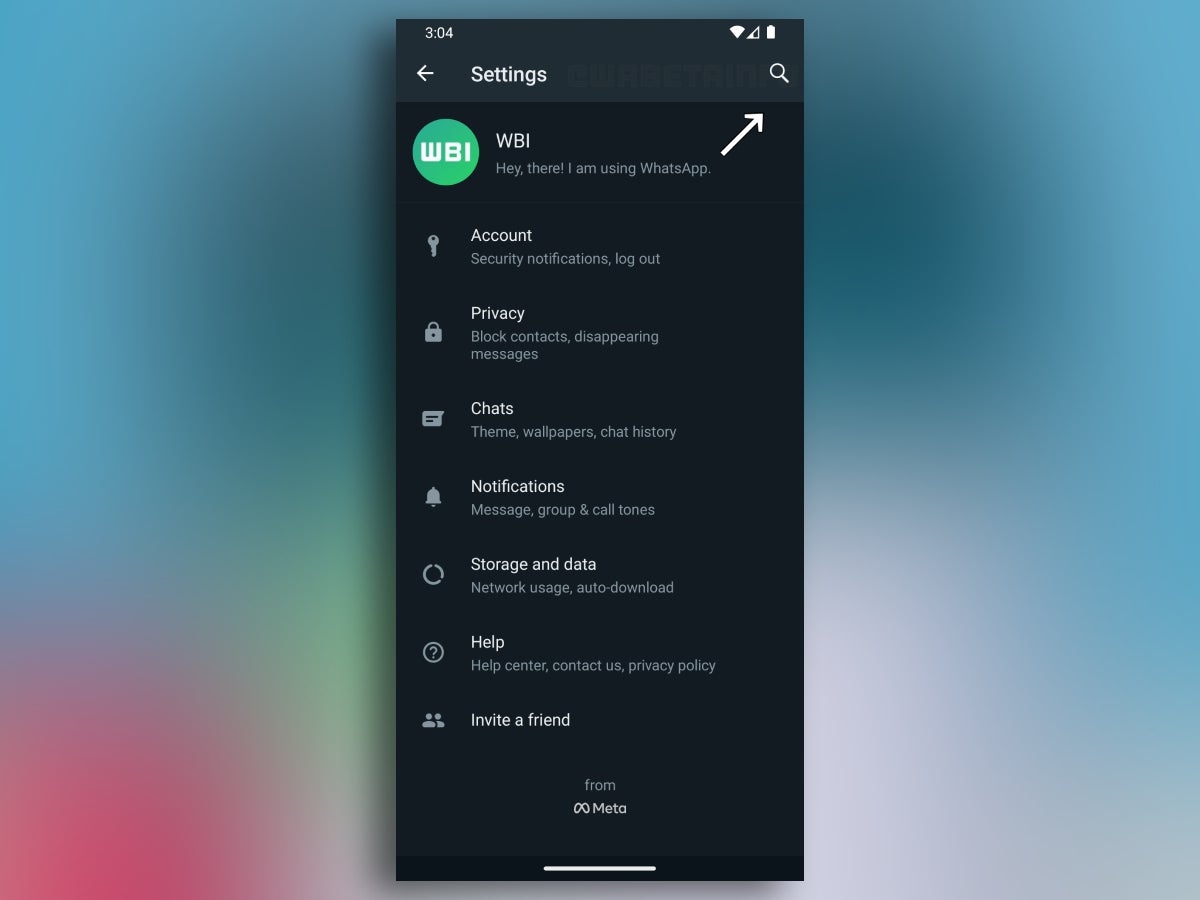
Often enough, though, with new features, new options get introduced too. These ultimately make the WhatsApp Settings menu their home, and as such, it has gotten a tad cluttered over the years. The latest WhatsApp Beta for Android, however, seems to be aiming to fix that issue with the implementation of a search bar.
An example screenshot, where the new search field is visible in the upper right corner of the Settings menu.
The team of WABetaInfo — often responsible for spotting hidden WhatsApp features — has shared a report about the latest Beta update for Android, namely version 2.23.8.20. This version introduces a functional search bar in the Settings menu of the messaging app.
It seems to work pretty similarly to the search bar in Android’s very own Settings app, where users can type in keywords in order to find a specific setting quickly, instead of browsing through everything with the hopes of finding it “manually”.
This addition is great not only because it alleviates the hassle of searching for that one setting you need to get to, but also because it is pretty much future-proof. More features are bound to come to WhatsApp and the search bar is likely to work for them as well, making it more valuable for the user experience.
All that being said, the Settings search bar is currently rolling out for the Beta version of the app. While we don’t know when it will reach the live version of WhatsApp, if you are excited to try it out, you can always enroll in the Beta testing group on Android.
In recent times, it has been observed by the security researchers at Kaspersky’s SecureList that the official Google Play store’s security has become increasingly vulnerable to the schemes of the threat actors.
These shady actors have exploited various loopholes to develop tools that can effectively Trojanize the existing Android applications, making them susceptible to exploitation.
Methodology
While here, the most shocking and alarming thing is that the threat actors are selling all these malicious wares for excessive sums of up to $20,000 on the dark web.
A recent study conducted between 2019 and 2023 revealed a concerning trend in cybersecurity.
The research has uncovered a prosperous marketplace where buyers and sellers engage in the trading of:-
Certain wares, especially those extremely useful, are sometimes going for several thousands of dollars. As far as hiding malware and unwanted programs are concerned, the following categories are the most popular:
Malicious Services Offered
Various products, services, and deals are available on the dark web for customers with different needs and budgets, just like they are on legitimate online marketplaces.
Apart from this, threat actors have been observed buying a range of illicit products on the dark web, with developers’ Google Play accounts and source code for app development tools being among the most popular.
These accounts are often obtained through shady means, such as hacking or the use of stolen identities, enabling the threat actors to upload their malicious innovations to Google Play.
To be listed in Apple’s or Google’s app stores, software must undergo intensive testing before being uploaded.
Below we have mentioned all the major services offered in these marketplaces:-
Google Play loaders
Binding service
Malware obfuscation
Installations
Other illicit services
Average Prices
During the research analysis, the security analysts discovered a wide range of price tags offered on the dark web for Google Play-related services.
For hassle-free trading and proceedings, they also accept payments through various methods. There are also some sellers who hold auctions as a means of selling their goods.
There are several options for providing services, including sharing the final profit, renting services, and selling them for a one-time fee.
Here below, we have mentioned all the average price tags:-
A loader can cost between $2,000 and $20,000.
A binding service usually costs about $50 to $100 or $65 per file.
Obfuscation of 50 files may cost around $440.
The average price tag for installation ranges between $0.25 to $1.
Recommendations
The following steps should be taken to stay protected against mobile threats:-
Installing apps from unknown sources should not be enabled.
Don’t grant an app permissions that it doesn’t need to perform its main functions without checking its permissions.
Protect your device from malicious apps and adware with a reliable security solution.
When an update becomes available for your operating system and important apps, immediately update them.
Researchers analyzed both clear and dark web hacking forums and discovered that Russian language threat actors are particularly interested in buying and selling these exploits.
The Google Play app store’s security mechanisms are being compromised by cybercriminals who are developing tools to trojanize Android apps and sell them on underground cybercrime marketplaces.
A recent blog post from cybersecurity firm Kaspersky, published on April 10th, 2023, revealed findings from an extensive study of Clear Net and Dark Web forums, highlighting the vulnerabilities in app store security – Most of these forums are Russian speaking.
The blog post stated that despite the vetting process for software uploaded to Google or Apple app stores, no security solution can be considered 100% foolproof. Every scanning mechanism has inherent flaws that can be exploited by threat actors, allowing them to upload malware to Google Play.
Researchers at Kaspersky monitored activities between 2019 and 2023 and found a thriving market on the Dark Web for buyers and sellers exchanging access to app developer accounts, infected Android apps, and botnets, with prices ranging from a few hundred to several thousand dollars.
One of the methods used by attackers to infect apps with malware involves uploading a harmless app to the app store to gain approval and attract a large number of users. Once the app is approved, the attackers release an update to the app that contains malicious code.
Another method is compromising legitimate app developers by hijacking their accounts and infecting existing apps with malware. Weak password policies and lack of two-factor authentication (2FA) make these accounts easy targets for cybercriminals.
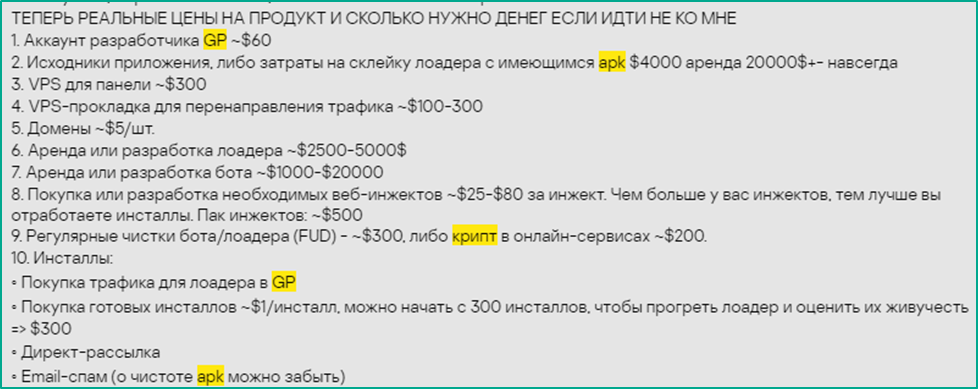
Credential leaks are also used to obtain login details to breach accounts and corporate development systems. Kaspersky researchers found that access to a Google Play account can be purchased for as little as $60, while more lucrative accounts, services, or tools come with a higher price tag.
Loaders, which deploy malicious code into Android apps, are particularly sought-after products on the Dark Web marketplace, with prices ranging from $5,000 to $20,000 depending on their capabilities and complexity.
Sellers often highlight features like user-friendly UI, victim country filters, easy-to-use control panels, and compatibility with the latest Android OS to attract buyers. Some sellers even offer video tutorials for their products.
What cybercriminals are offering (Image: Kaspersky)
The blog post also revealed that cybercriminals may supplement trojanized apps with functionality to detect debuggers or sandbox environments. If a suspicious environment is detected, the loader may stop its operations or notify the cybercriminal, indicating that it has likely been discovered by security investigators.
In addition to loaders, other illegal services offered on Dark Web forums include Virtual Private Servers for redirecting traffic or controlling compromised devices, with prices starting at $300, and web injectors, available for $25 to $80. Cybercriminals can also obfuscate their malware for $440, while the cost of processing a single file is around $30.
Kaspersky emphasized that while Google Play does not allow the selling of malicious applications on its platform, app takeovers and infected applications on official stores are still available due to loopholes in enterprise security and innovative hacking methods.
Therefore, users are advised to avoid installing unknown apps and to check for permissions to ensure that apps only access the required functions.
The increasing trend of cybercriminals exploiting the flaws in Google Play app store security to sell malicious apps on the Dark Web highlights the ongoing “cat and mouse game” between security scanners and attackers.
Despite efforts to patch vulnerabilities, attackers continue to find new flaws, underscoring the need for constant vigilance and strong security measures to protect app stores and users from malware threats.