Apple has recently taken swift action to patch two zero-day vulnerabilities that posed a potential threat of exploitation in cyberattacks.
The vulnerabilities have been successfully fixed in emergency security updates released by Apple to safeguard its devices, such as iPhones, Macs, and iPads, against potential breaches.
One of the most alarming revelations is that Apple may have already known the exploitation of these zero-day vulnerabilities in the wild.
Since we all know that Apple always follows a strict curriculum while handling or making public any technical details regarding zero-day flaws.
Experts from Amnesty International and Google’s Threat Analysis Group (TAG) have identified these two zero-day vulnerabilities:-
Clément Lecigne from TAG
Donncha Ó Cearbhaill from Amnesty International
Apple Zero-day Flaws
The two zero-day vulnerabilities were tracked as follows:-
CVE-2023-28206: It’s an IOSurfaceAccelerator out-of-bounds write, and it could lead to:-
Data corruption
A crash
Code execution
The successful exploitation of CVE-2023-28206 will enable an attacker to gain kernel privileges using a maliciously crafted application and execute arbitrary code on the target’s devices.
CVE-2023-28205: It’s a WebKit used after free weakness, and while reusing freed memory, it could lead to:-
Data corruption
Arbitrary code execution
The successful exploitation of CVE-2023-28205 enables the threat actors to deceive targets into downloading malicious web pages under their control, potentially resulting in the execution of arbitrary code on compromised devices.
While apart from this, it has been confirmed by security analysts that hackers exploiting these two vulnerabilities tend to focus their attacks on human rights workers.
Even these two zero-day vulnerabilities could be chained together with other security flaws in the wild to exploit iOS devices.
Super proud of our team at @AmnestyTech and everyone who helped in this investigation.
Today, Apple published an emergency update for all iPhones to patch an exploit chain which we, together with @_clem1 (Google TAG) discovered in the wild. pic.twitter.com/KLMYjqi3lK
One of the most concerning issues is that several users will remain vulnerable to these zero-day flaws since the threat actors are actively exploiting these zero-day flaws before any patches have been released.
Vulnerable Devices
It appears that Apple has provided quite a comprehensive list of vulnerable devices, and these devices include:-
iPhone 8 and later
iPad Pro (all models)
iPad Air 3rd generation and later
iPad 5th generation and later
iPad mini 5th generation and later
Macs running macOS Ventura
Fix
Apple released several emergency security updates in an attempt to address these two zero-day vulnerabilities, and here below, we have mentioned them:-
iOS 16.4.1
iPadOS 16.4.1
macOS Ventura 13.3.1
Safari 16.4.1
Cybersecurity researchers have urged users to immediately update their devices to prevent any potential breach or exploitation.
Apple has released iOS 16.4.1, iPadOS 16.4.1, and macOS 13.3.1 for the iPhone, iPad, and Mac, respectively, and our advice is to install them as soon as possible.
On Friday April 7, 2023, Apple released iOS 16.4.1, iPadOS 16.4.1, and macOS 13.3.1 for the iPhone, iPad, and Mac, respectively, and our advice is to install them as soon as possible because all three updates include important security fixes.
The Cybersecurity and Infrastructure Security Agency (CISA) has already ordered federal agencies to patch these two security vulnerabilities before May 1st, 2023.
The updates may already have reached you in your regular update routines, but it doesn’t hurt to check if your device is at the latest update level. If a Safari update is available for your device, you can get it by updating or upgrading macOS, iOS, or iPadOS.
The security content of iOS 16.4.1 and iPadOS 16.4.1 contains information about two vulnerabilities that Apple has been made aware of reports that these issue may have been actively exploited.
CVE-2023-28206: an out-of-bounds write issue in IOSurfaceAccelerator was addressed with improved input validation. The issue that could allow an app to execute arbitrary code with kernel privileges is fixed in iOS 15.7.5 and iPadOS 15.7.5, macOS Monterey 12.6.5, iOS 16.4.1 and iPadOS 16.4.1, macOS Big Sur 11.7.6, macOS Ventura 13.3.1.
IOSurfaceAccelerator is an object that manages hardware accelerated transfers/scales between IOSurfaces in the IOSurface framework. The IOSurface framework provides a framebuffer object suitable for sharing across process boundaries. It is commonly used to allow applications to move complex image decompression and draw logic into a separate process to enhance security.
An out-of-bounds write can occur when a program writes outside the bounds of an allocated area of memory, potentially leading to a crash or arbitrary code execution. This can happen when the size of the data written is larger than the size of the allocated memory area, when the data is written to an incorrect location within the memory area, or when the program incorrectly calculates the size or location of the data to be written. In this case an attacker can use it to elevate the privileges of a malicious app. For those interested, a proof-of-concept (PoC) has been published for this vulnerability.
CVE-2023-28205: a use after free (UAF) issue was addressed with improved memory management. This issue is fixed in iOS 15.7.5 and iPadOS 15.7.5, Safari 16.4.1, iOS 16.4.1 and iPadOS 16.4.1, macOS Ventura 13.3.1.
UAF is a type of vulnerability that is the result of the incorrect use of dynamic memory during a program’s operation. If, after freeing a memory location, a program does not clear the pointer to that memory, an attacker can use the error to manipulate the program. Referencing memory after it has been freed can cause a program to crash, use unexpected values, or execute code. In this case, when the vulnerability is exploited, processing maliciously crafted web content may lead to arbitrary code execution.
WebKit is Apple’s web rendering engine. In other words, WebKit is the browser engine that powers Safari and other apps.
The security content of macOS Ventura 13.3.1 covers the same two vulnerabilities and Apple has also released a new Safari 16.4.1 update for macOS Monterey and macOS Big Sur, which likely addresses the WebKit vulnerability.
Malwarebytes removes all remnants of ransomware and prevents you from getting reinfected. Want to learn more about how we can help protect your business? Get a free trial below.
The best monitors for PS5 can make all the difference when playing your favorite games. And just because they’re the best doesn’t mean they have to cost you an arm and a leg. On the same token, it doesn’t mean they’ll be dirt cheap. More than likely, they’ll sit somewhere in the middle of all that.
Many monitors fit for gaming can also be less expensive than a TV. And chances are if you can get a TV for around the same price or less as a dedicated gaming monitor, it’s probably not the best option for gaming. Of course, it all depends on where you plan to keep your PS5. If your setup is in the living room, sitting on a couch, then a TV may be the way to go. Though keep in mind they have big-screen gaming monitors as well. And we even have a few on this list.
If you’re like me and your PS5 is set up on the same desk as your PC, then you definitely want a monitor. Even if it’s one with a bigger screen. Provided your desk space allows a monitor of that size. Not to mention these days, gaming monitors for console have become a lot better than they used to be. As many brands are now catering to both console and PC gamers. With that said, check out our list below for the best monitors for gaming on your PS5.
Sony’s Inzone M9 was launched last year and remains a great option for a PS5 monitor. Coming from Sony, it’s also designed with the PS5 in mind, though it will serve as a great option for PC gamers as well.
It comes with a 4K panel and a 144Hz refresh rate, along with HDMI 2.1 ports to take advantage of the PS5’s capabilities for 4K visuals and a higher 120fps in games that support it. Other features like VRR assure gamers that the monitor will always provide a refresh rate that’s suitable for the activity, and DisplayHDR600 promises vibrant colors with a better-looking HDR contrast for games.
HDR doesn’t look great in all games though so adjust this accordingly. If you want to keep everything in the family, Sony’s first gaming monitor is a safe bet and one of the best monitors for PS5.
Next up we have a very nice large monitor from ASUS. If you have a little extra room on your desk and you like a bigger monitor, the ASUS ROG Strix 43 (XG43UQ) is one of the best monitors for the PS5. There are a few reasons for this. For one it’s a larger display which means more screen real estate for your games. It also comes with a 4K panel, and has a 120Hz refresh rate with multiple HDMI 2.1 ports to take the most advantage of your PS5’s graphics capabilities.
The max refresh rate is also 144Hz if you plan to hook up a PC to this monitor as well. And to help really make the colors of your games come to life, the monitor features DisplayHDR1000. It’s a big beefy boy, but it’s probably one of the best gaming monitors for the PS5 that you’ll find.
LG makes a great gaming monitor and if you don’t really need or want a bigger screen, consider LG’s UltraGear 27GP850-B. It’s a 27-inch panel with a QHD nano IPS display, up to 165Hz refresh rate (for PC), DisplayHDR400, and a quick response time of just 1ms.
Now it doesn’t have HDMI 2.1. But at the price of $399, there has to be some compromises and that was one of them. But if this is right around what your budget is, PS5 games will still look good on this monitor and run at 60fps, which isn’t bad by any means. Especially if many of the games you’ll be playing are single player experiences. Plus the small 27-inch form factor means you should have plenty of room on your desk.
There’s lots to love about this monitor and especially at this price range. For starters, it’s a curved 32-inch monitor but it isn’t ultrawide. Which means no black bars on the sides of your console’s picture. more importantly though it’s 4K, comes with HDMI 2.1 ports and has a 144Hz display. So you can get 4K and 120fps with your PS5 games that support the faster frame rate. Keep in mind you will need an HDMI 2.1 cable though. DisplayHDR400 is also present to really make the colors pop for your games.
Another great option here if you’re looking for something smaller that not only has HDMI 2.1 but also a 4K panel and a fast response time is the TUF Gaming VG28UQL1A from ASUS.
It’s a smaller display than the GIGABYTE one above and costs $20 more. So in most cases we would probably still recommend the GIGABYTE monitor over this one. Due to size and slightly higher cost with similar features. But, if you would prefer a monitor with a screen smaller than 32-inches, this is an excellent choice.
You’ll still get the features you need to make the most of your PS5 and won’t pay much more. This is also a flat panel if you don’t care for the curved displays. At $599 this is one of the best monitors you’ll find for PS5.
Sticking with the smaller monitors, Acer’s Predator XB283K KV is $50 less than the ASUS TUF monitor above and offers many if not all of the same features. It comes with variable refresh rate support, multiple HDMI 2.1 ports, a 1ms response time and a 4K 144Hz panel.
So with an HDMI 2.1 cable connected to your PS5 you can ensure you get the faster 120fps in games that support it with the higher resolution 4K visuals.
Should you need to get in and tweak any of the settings, the menu button is located in the bottom left corner so it’s super easy to reach. Though you shouldn’t have to fumble with much if any settings at all.
There’s a few reasons why we included this monitor. It’s definitely expensive. And because of that we feel there are better options on this list. But that doesn’t mean this isn’t a great option for use with the PS5. Cost aside, here’s what we really like about this one.
It features a 32-inch display with an ultrawide format, which means it’s great for PC games. The downside with that is you’ll end up seeing those black bars on the side when playing PS5 games. But if you can overlook that, then there are tons of other good features. It supports HDMI 2.1, it’s a 4K panel, and it features Quantum HDR2000 which means rich, vibrant colors you won’t get on a lot of other monitors.
It’s pricey but worth it if you want something for PS5 and PC, since it does offer the Ultrawide 21:9 aspect ratio.
A cheaper option from Samsung is the Odyssey Neo G7 43. If you have the space on your desk for a bigger monitor, this model comes in at $100 less than the one above. It still offers HDMI 2.1 and has a 4K panel. But best of all it comes with a 16:9 aspect ratio so your PS5 picture will fill the entire screen.
Just like the model above it also comes with a 1ms response time. This is also a flat panel, and the display is matte so you won’t have to worry about reflections too much. It’s a solid buy if you’re looking for one of the best monitors for PS5 in the 40-inch and up size range.
Rounding out our list is another option from Acer. This time the Acer Nitro XV282K. This is a 28-inch screen with 4K visuals, a 144Hz refresh rate, HDMI 2.1 ports, and a 1ms response time. It’s fairly similar to the Predator model up above but you’ll end up saving some money going with this model. And you won’t really lose much in doing so.
That being said, the Predator model is on sale right now. So at only $60 more, it’s a better value. This monitor however is a great pickup when the Predator monitor goes back up to its full price. Some other things to consider are the MSRP of both Acer monitors when coming directly from Acer. The Predator model normally retails for $629.99. While this Nitro monitor is listed at $899.99. And at those prices, there are better options on this list.
The Chinese tech giant Alibaba wants to jump into the AI bandwagon by launching a rival for ChatGPT, BBC reports.
Despite world tech leaders warning that the AI race has become “out of control,” more and more companies are tapping into this space. Microsoft and Google took the initiative with Bing and Bard, and Alibaba is one of the latest companies that is reportedly developing a ChatGPT-style chatbot.
The outlet reports that Alibaba’s product is called Tongyi Qianwen and would integrate into the company’s businesses. Yet, the release timeline is unknown, but the tech giant says it will come in the “near future” and supports both English and Chinese languages.
Alibaba’s chairman and chief executive, Daniel Zhang, already said that AI and cloud computing drive today’s technological watershed moment.
Alibaba to launch a rival for ChatGPT
It’s not a weird move by Chinese companies to develop a local version of a Western service. This is mainly because of government policies that restrict Western companies from operating in the country. Given that Alibaba is a tech giant in China, it can’t certainly rely on a Western-backed AI product.
Tongyi Qianwen would be first added to Alibaba’s workplace messaging app DingTalk. According to the company’s announcement, the chatbot can turn conversations in meetings into written notes. As well as write emails, draft business proposals, etc. Alibaba also plans to bring Tongyi Qianwen to Tmall Genie, which is a smart speaker that uses AliGenie’s intelligent personal assistant.
Meanwhile, the Cyberspace Administration of China is working on a draft to manage generative AI. The proposal states that companies are responsible for the legitimacy of data used to train the technology.
As AI advances, it’s creating a sense of fear among governments, and they’re looking to enact regulations. Italy has recently banned ChatGPT, which led to a 400% increase in VPN usage in the country. Additionally, Goldman Sachs has reported that over 300 million jobs might be axed by AI.
Google is trying to make it easier for Maps users who love to visit national parks to find and reach their favorite landscapes with ease. To help with that, Google announced four new features will make it to Maps in April, all four meant to make it easier for users to find the information they need when they are going to a national park.One of the most important new features coming to Google Maps this month will allow its users to identify the most popular places in a park, including attractions, campgrounds, visitor centers, and trailheads. To receive all this information, you can search for the park you’re interested in, and then tap on any of the photos you got as results for more details. These details often times consist of videos and reviews from people who have already visited the location.Another major upcoming feature enables Maps users to see popular trails from start to finish. The app will now highlight a trail’s entire route on the map instead of just showing a pin. In addition, Maps will also provide more details on a trail from the community, such as what type of trail it is, its difficulty, and if it’s suitable for running, walking, or cycling.
The next new feature coming later this month is meant to provide more detailed directions in US national parks. Park entrances will be highlighted on the map, so you can request walking or cycling directions to a trail and Maps should pinpoint you in the right direction.
Last but not least, another useful feature coming to Maps in April allows users to bring Maps offline and still be able to check the app. A new way to download an offline map for a park will become available once the app gets updated. Simply tap the “download” button on the park’s Google Maps listing to download it for offline use.
According to Google, the four new features will be coming to all US national parks in April, and they will be rolled out to parks around the world in the coming months. Naturally, the features will be available on iOS and Android devices.
The email hack allowed hacktivists to extract highly sensitive documents, along with the personal details of the APT28 leader and Russian GRU officer, Lieutenant Colonel Sergey Alexandrovich Morgachev.
Ukrainian hacktivist group Cyber Resistance, also known as Ukrainian Cyber Alliance, has claimed to have hacked the email, social media, and personal accounts of Russian GRU officer Lieutenant Colonel Sergey Alexandrovich Morgachev (Sergey Aleksandrovich Morgachev). The information was shared with a volunteer intelligence community called InformNapalm.
Notably, Cyber Resistance, the same group mentioned in a previous report by Hackread.com, was involved in a recent hack of Russian Colonel Sergey Valeriyevich Artoshchenko’s email accounts. The hack was carried out by convincing his wife and several other military wives to participate in a patriotic photoshoot while wearing their husbands’ uniforms.
Morgachev, a Kyiv native, is the leader of APT28, Russia’s most notorious hacking group, and simultaneously worked for Russia’s Main Intelligence Directorate of the General Staff of the Russian Army (GRU).
This unit comprises officers of the GRU’s 85th Main Special Service Center military units #26165 and #74455. Morgachev is wanted by the Federal Bureau of Investigation (FBI) for his involvement in devastating cybercrimes globally.
FBI’s of Sergey Aleksandrovich Morgachev in the list of wanted hackers (Screenshot: FBI)
APT28, also known as Pawn Storm and Fancy Bear, directly reports to the Russian military intelligence agency and has carried out cyberattacks against high-profile entities in various countries including the USA, Italy, Germany, Estonia, The Netherlands, Czech Republic, Norway, Poland, and Ukraine. APT28 made headlines during the 2016 US elections after hacking the servers of the US Democratic Party.
In 2016, APT28 was also involved in phishing attacks against authorities investigating the MH17 crash and was accused of posing as ISIS to send death threats to US army wives in 2018.
The hacking of Morgachev’s accounts was carried out by gaining access to his personal account on the government services portal, where the hackers verified the data they had previously obtained from document scans and his current residence and place of service addresses.
According to InformNapalm, the hackers also accessed Morgachev’s AliExpress account and ordered goods for him, including souvenirs featuring the FBI’s logo and adult toys, using his card for payment. The hacktivists confirmed that one parcel is on its way to the recipient. They also hacked Morgachev’s social media accounts.
The hacktivists shared Morgachev’s private correspondence with InformNapalm volunteers, who then released the data into the public domain. The compromised documents included three scanned copies of Morgachev’s personal documents, including Form 4 and passport, as well as his fresh medical certificate dated 13 December 2022, which is required for security clearance to access classified documents.
The hack allowed the extraction of location, passport, personal photos, AliExpress purchases, and more. (Screenshot: InformNapalm)
This incident highlights the increasing threat posed by Cyber Resistance and other Ukrainian hacktivist groups to Russia’s critical infrastructure, government, and non-government entities.
Government hackers equipped with QuaDream’s exploit used malicious calendar invites with dates in the past to deliver spyware.
A little-known cyber mercenary company, QuaDream, has been identified by researchers at Microsoft and digital rights group Citizen Lab as the creator of malware that was used to hack into the iPhones of journalists, political opposition figures, and an NGO worker.
QuaDream, an Israeli spyware maker, reportedly develops zero-click exploits, which are hacking tools that do not require the target to click on malicious links, for iPhones. The final payload of QuaDream’s malware includes recording phone calls, surreptitiously capturing audio using the phone’s microphone, taking pictures, stealing files, tracking the person’s granular location, and deleting forensic traces of its existence.
Credit: Citizen Lab
Citizen Lab’s report states that its researchers were able to trace QuaDream’s spyware by identifying particular marks left by the malware, which they have referred to as the “Ectoplasm Factor.” However, the researchers have decided not to disclose these marks to ensure their ability to track the malware in the future.
The researchers have identified more than five victims, including an NGO worker, politicians, and journalists, whose iPhones were hacked in Europe, North America, the Middle East, and Southeast Asia. However, the researchers have decided not to disclose the victims’ names, as they do not want to jeopardize their safety.
The fact that the victims are in different countries also makes it harder for them to come forward, according to a senior researcher at Citizen Lab.
Although QuaDream has managed to stay under the radar, Israeli newspaper Haaretz reported in 2021 that it sold its wares to Saudi Arabia. A year later, Reuters reported that QuaDream sold an exploit to hack iPhones, which is comparable to the one provided by NSO Group.
It’s important to note that QuaDream does not run the spyware itself, but rather its government customers operate it, which is a common practice in the surveillance technology sector.
According to internet scans conducted by Citizen Lab, QuaDream’s customers operated servers in several countries worldwide, including the following:
Israel
Ghana
Mexico
Bulgaria
Romania
Hungary
Singapore
Uzbekistan
Czech Republic
United Arab Emirates (UAE)
In a blog post, Microsoft labelled QuaDream as an Israel-based private sector offensive actor (PSOA) who sells REIGN, a suite of exploits to governments. This suite includes malware and infrastructure developed to exfiltrate data from targeted smartphones.
The exploit utilized by QuaDream was created for iOS 14 and was a zero-day vulnerability, meaning it was not yet fixed or known by Apple at the time. Government hackers equipped with QuaDream’s exploit used malicious calendar invites with dates in the past to deliver the malware, which did not trigger a notification on the phone, making them invisible to the target.
QuaDream uses a Cyprus-based company called InReach to sell its products, according to Citizen Lab researchers, and this has been confirmed by a person who has worked in the spyware industry.
The discovery of QuaDream’s malware highlights once again that the spyware industry is not only made up of NSO Group but there are several other companies, most of which are still flying under the radar.
If you find yourself drenched in the Google ecosystem, then you will find the new Cross-Device service app useful. This feature is rolling out, and it helps with cross-collaboration between Android devices and Chromebooks. Google made mention of this feature during the CES 2023 event that took place in January, and it is now available.
With this feature, Chromebook users can easily access the apps on their Android device directly from the laptop screen. So there will be no need to reach out to your smartphone while working or studying whenever you need to make use of an app. You simply pull up the app from your Chromebook and perform whatever actions without touching your smartphone.
This feature joins the long list of other cross-collaboration features that exist between Chromebooks and Android devices. If you make use of a Chromebook and an Android device, you will find this feature intriguing. It might also interest you to know that you can easily activate the Google Cross-Device service app for usage between your devices (Android and ChromeOS).
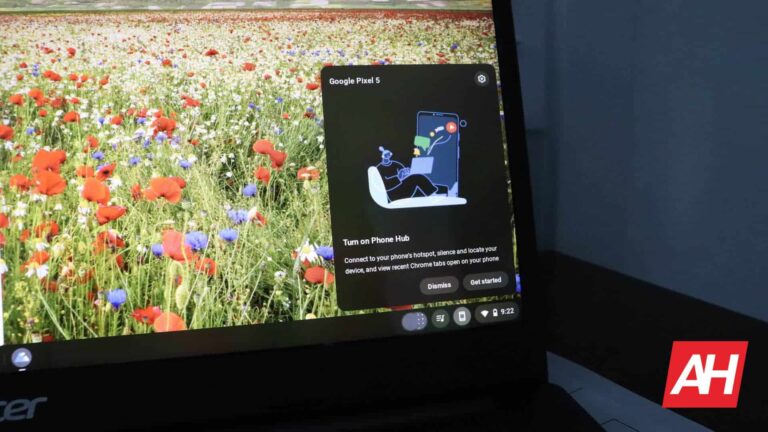
A quick glimpse of what to expect from app streaming as shown by the Google Cross-Device service app
Google is yet to widely roll out this app streaming to Chromebook feature to most Android devices. But some ChromeOS users that have Pixel devices are getting a glimpse of what this feature brings to the table. This is possible through the Cross-Device service app that comes with Google Pixel devices.
Users like Mishaal Rahman have already begun experimenting with this app streaming feature. The Android expert took to his Twitter account to share more information on this feature from his experience so far. Although the Google Cross-Device service app comes bundled with Pixel devices, it isn’t limited to them.
Other devices running Android 13 can access this feature via the Google Play Store. Once you have confirmed that you have this app on your Android device, head over to your Chromebook and open the Phone Hub. This is the little phone icon that sits on the right-hand side of the taskbar.
Ensure that your smartphone with the Cross-Device service app is connected to your Chromebook via the settings icon. If it is, you need to head over to your Android device and enable app streaming. To do this, open settings on your Android device and head over to ‘connected devices.’
Next, open connection preferences and select Chromebook, lastly enable the apps option on the list that pops up. By taking these steps, you will be able to stream your apps to your Chromebook. Any app you open on your Android smartphone will pop up on your Chromebook and you can easily open the app and use it.
All functions and permissions the app comes with will also be available on your Chromebook. This means that you will be able to use your Chromebook’s camera, microphone, speakers, and so on while streaming your Android device’s apps. At the moment, this feature is still rolling out to Chromebooks via a system update. So even if you can’t stream your apps after setting it up, don’t panic, a coming update to your Chromebook will bring this feature.
Okay, so how do you know if the feature is *actually* available for you?
– You must update Cross-Device Services to version 1.0.285.1 from Google Play first. The update is only available on Pixels and the select Android devices I mentioned earlier.
Apple has started to seed the second beta for iOS 16.5 and iPadOS 16.5 to developers. This comes roughly two weeks after the first beta launched. Which is quite common for Apple to do. With subsequent betas having less time in between them.
If you’re a registered developer, you can download iOS 16.5 and iPadOS 16.5 onto your available devices today. Just head over to Settings > General > Software Updates. And then tap on “Beta Updates” option. You’ll want to toggle on the iOS 16/iPadOS 16 Developer Beta option.
Keep in mind that starting with iOS 16.4 that launched last month, only registered developers can get access to the developer betas. So if you are not a registered developer, you’re going to need to sign up. It’ll cost you $99 per year.
What’s new in iOS 16.5?
iOS 16.5 is going to be a rather small update for iOS, especially with iOS 17 being announced in June at WWDC. But there are a few new things coming in iOS 16.5. That includes a new Sports tab within the Apple News app. This will make it easier for users to access sports-focused content. You will be able to choose to follow your favorite teams. So you can get updates on those on a regular basis.
The update to iOS 16.5 also brings in a new Siri option for starting a screen recording with a voice command. And that’s about it, for what’s new in iOS 16.5.
It’s possible that Apple could release some other changes in this second beta, but don’t expect this to be a very large update at all. It’ll likely be mostly a bug fixing update, much like iOS 17 is expected to be. So when could Apple launch iOS 16.5? It’ll likely be in May, possibly around the second or third week of the month. As long as there are no huge bugs that pop up in these betas.
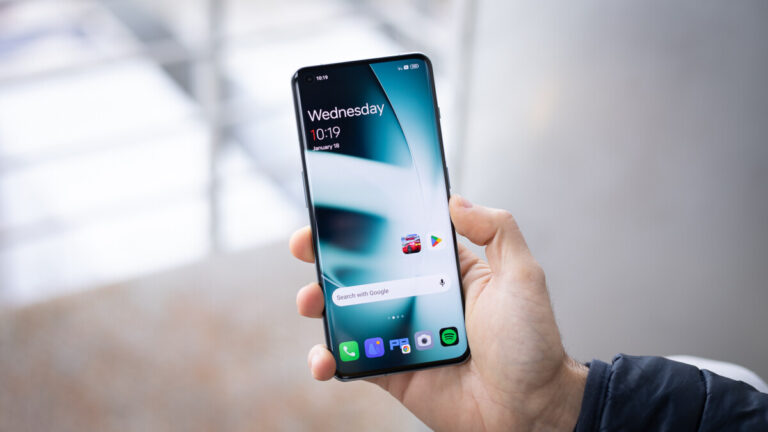
The amount of time we spend on our phones has only continued to increase with each year, which has not gone unnoticed by the manufacturers making them. That is why most phones now have some kind of feature or app that helps users keep track of the hours they spend on their daily drivers and regulate it.OnePlus added its own solution to this issue by launching the Zen Mode app with the OnePlus 7 Pro back in 2019 (one of the best Android phones for its time). Since then, the application is used by many of the company’s fans, and it has now received a significant upgrade, alongside a slight rebranding, as noticed by a member of the OnePlus forum nicknamed Some_Random_Username. (via AndroidAuthority)The app has now changed from Zen Mode to Zen Space, and its icon has been refreshed. The changes are not only visual, though, as OnePlus has added new features and expanded old ones, making the app a more useful tool for those who love using it.
OnePlus Zen Mode/Zen Space app improvements
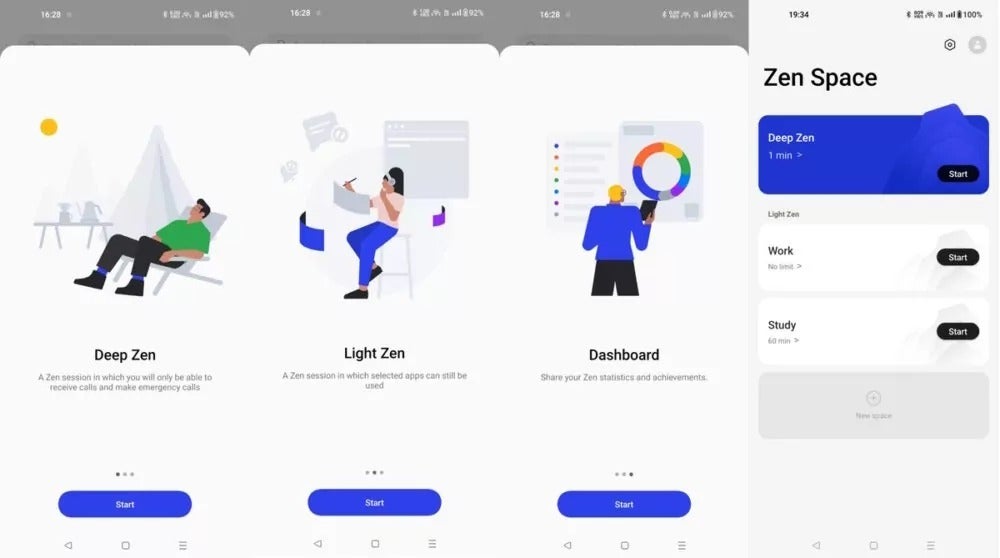
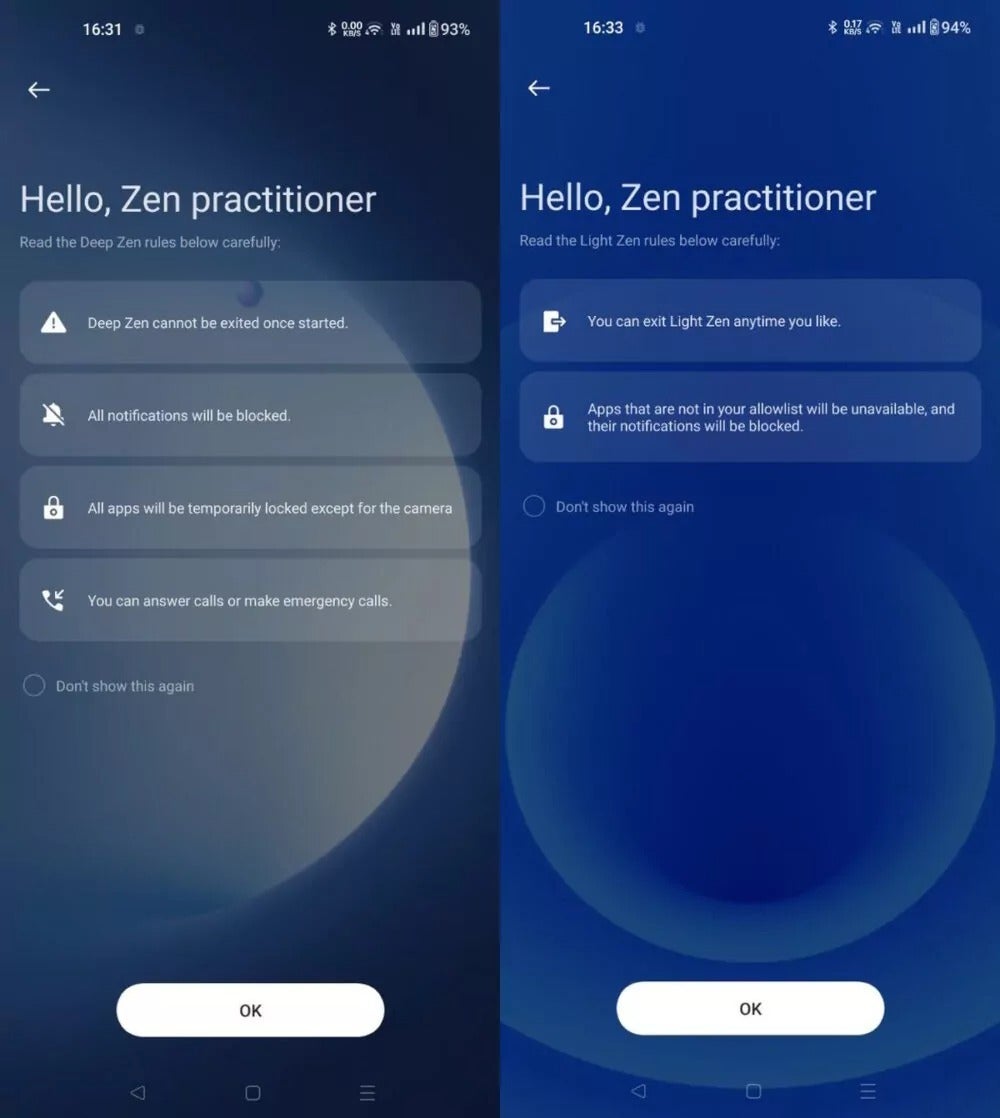
The app now gives users two options when choosing to go “Zen”. Deep Zen mode is used when you want to completely detach yourself from using your OnePlus phone, blocking all functionality besides taking photos and making/taking emergency calls.
Light Zen mode, on the other hand, is less strict with its restrictions. It allows you to pick apps that would not be affected while you are taking a break. Additionally, unlike Deep Zen mode, Light Zen mode gives you the option to exit it completely, and use the phone as you would usually.
There are two presets that come with Light Zen mode — Work and Study. Both make use of the Work Life Balance feature and pick the apps that would make sense to be included. Of course, you can edit that list of apps if you want to add or remove any.
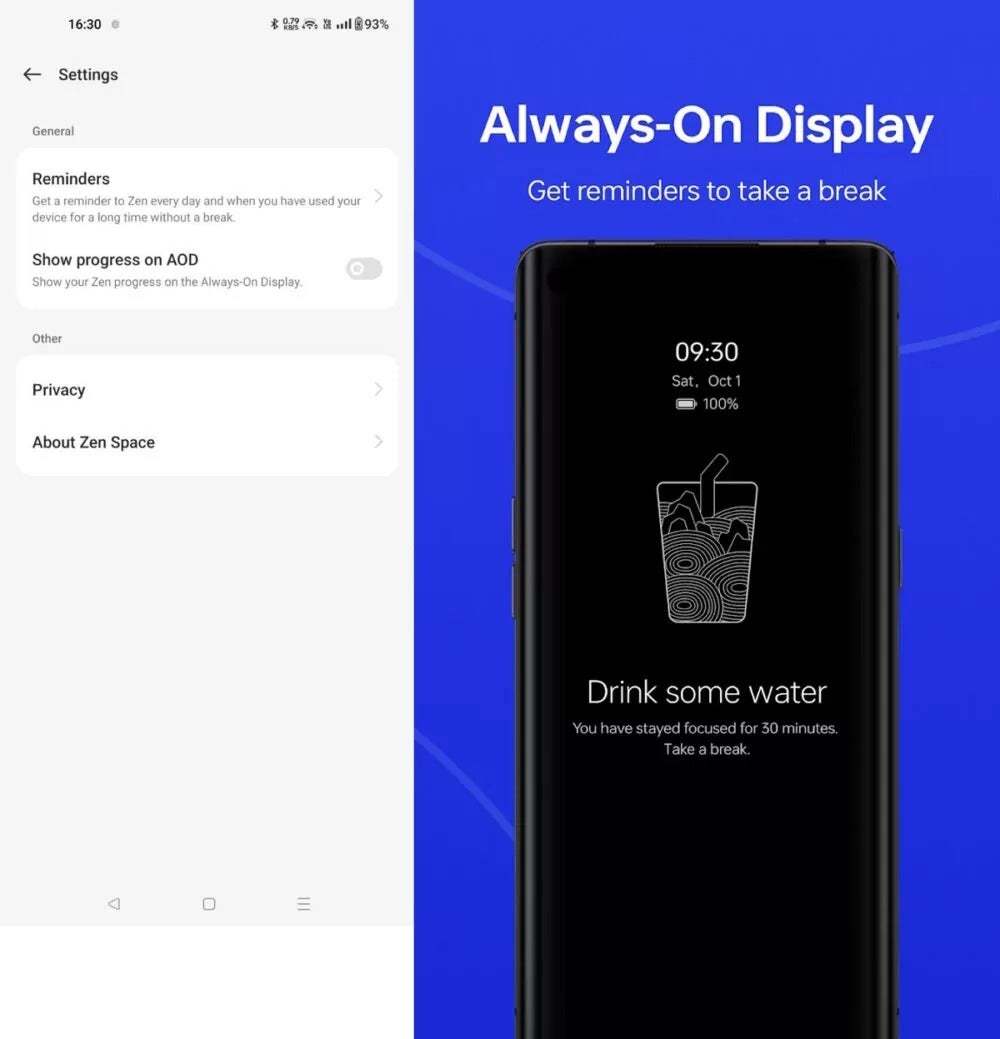
The Zen Space app comes with a redesigned look in the form of new themes, and you can now also track your Zen session via the Always-On Display, where the app will give you reminders and some at-a-glance information about your progress.
On top of everything else, OnePlus has added more time durations, new achievement medals, and a dashboard to check your weekly statistics.