A serious vulnerability existed in the popular WordPress plugin Elementor Pro that could allow website takeovers. Even worse, the vulnerability went under attack soon after gaining traction, requiring WP admins to install the bug fixes quickly.
Elementor Pro Plugin Vulnerability Risked Site Admins
According to the details shared by the discoverer of this vulnerability, Jerome Bruandet, in a post, a high-severity site takeover vulnerability affected the Elementor Pro plugin.
Bruandet observed the vulnerability affecting the premium version only, hence websites using the Elementor (free) version remained safe from the flaw.
Specifically, the researcher observed a lack of validation in the update_option, a function when called by the pro_woocommerce_update_page_option. While this function allows the site admin to update the required WooCommerce options, the lack of user validation allowed unrestricted access to unprivileged authenticated users. Hence, an authenticated adversary could create admin accounts and take over the target website.
Elementor Pro is the premium version of the popular WordPress plugin Elementor, facilitating site admins in building attractive websites effortlessly. The plugin currently boasts over 5 million active installations. That means any vulnerabilities in this plugin may risk millions of websites globally upon exploitation.
That’s what Patchstack highlighted in its advisory, notifying users of active exploitation of the Elementor Pro vulnerability. They observed numerous exploitation attempts from different IP addresses (mostly involving these three IPs: 193.169.194.63, 193.169.195.64, and 194.135.30.6). Also, they noticed the attackers redirecting the users to malicious URLs, which could not only damage the infected website’s credibility but could also threaten the security of site visitors.
The said vulnerability affected Elementor Pro versions version 3.11.6 and below. When notified about the flaw, the plugin developers patched the issue and released the fix with version 3.11.7.
Patchstack urges all site admins using Elementor Pro to update their sites with the latest plugin release (3.11.7 or higher) to receive the fix. The plugin’s official WordPress page lists the current release as 3.12.0.
Riligy malware is disguised as a legitimate Google Drive extension and allows attackers to capture screenshots, monitor users’ browsing history, and inject malicious scripts to steal funds from cryptocurrency wallets.
The cybersecurity researchers at Trustwave SpiderLabs have disclosed alarming details on a new strain of Rilide malware that targets Chromium-based browsers to steal cryptocurrency funds and monitor users browsing activities.
In the newly discovered campaign, SpiderLabs researchers noticed that threat actors have created legitimate-looking Google Drive extension that hides Rilide malware.
SpiderLabs researchers believe Rilide malware is unique because of its capability of generating dialogues to trick users into giving away their 2FA keys. This is a rare feature that helps the attacker withdraw cryptocurrencies discreetly.
In addition to this, the malware also allows attackers to carry out an extensive range of activities, including capturing screenshots, monitoring users’ browsing history, and injecting malicious scripts to steal funds from cryptocurrency wallets.
The researchers have confirmed that Rilide malware targets Chromium-based browsers, including Microsoft Edge, Google Chrome, and Opera to achieve its malicious objectives.
The fact that Google Drive is being used maliciously is not surprising. A study conducted last year found that 50% of all malicious Office document downloads were from Google Drive. Another study revealed that Apple Safari was the safest browser while Google Chrome was the riskiest browser in 2022.
As for Rilide malware, during their investigation, SpiderLabs researchers detected multiple such extensions for sale in March 2022. They also noted that a portion of Rilie malware source code was recently leaked by someone on an underground hacking forum over payment issues.
This leaked code can swap cryptocurrency wallet addresses from the clipboard with the attacker’s address. Moreover, the C2 address embedded in the Rilide code can identify GitHub repositories belonging to a user named gulantin, which contains the extension’s loader.
Attack Chain
Researchers have detected two attack methods to install the malicious extension, Ekipa RAT and Aurora Stealer. Ekipa RAT is distributed through booby-trapped Microsoft Publisher documents, whereas fake Google Ads serve as Aurora Stealer’s distributor.
Their attack chains encourage the execution of a Rust-based loader, which can modify the browsers’ LNK shortcut file and launch the add-on using the “–load-extension” command line switch.
Infection Chains (Trustwave)
Ekipa RAT can carry out targeted attacks. Conversely, Aurora, first spotted in April 2022 on Russian-speaking underground forums, is a Go-based stealer offered as a Malware-as-a-Service (Maas) tool. It can take data from different web browsers, local systems, and cryptocurrency wallets.
“The Rilide stealer is a prime example of the increasing sophistication of malicious browser extensions and the dangers they pose,” the report read.
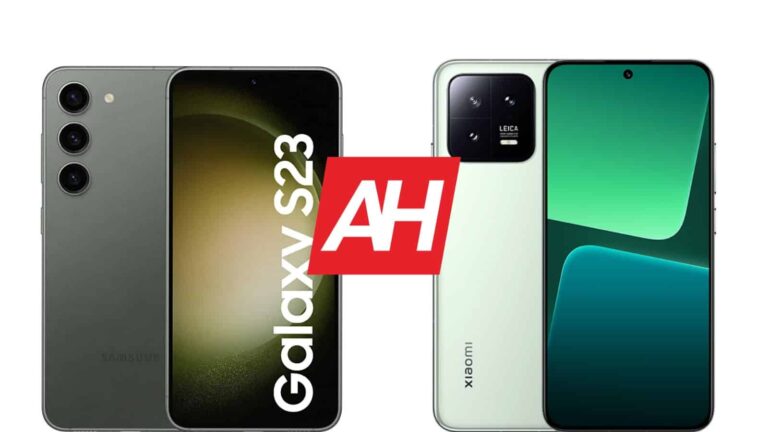
In this article, we’re comparing two relatively compact smartphones, the Samsung Galaxy S23 vs Xiaomi 13. Truth be said, both of them have a display size of over 6 inches, and are not exactly small. Considering how large phones are these days, both of these are considered to be compact. The Galaxy S23 more so than the Xiaomi 13, that’s for sure. Comparing them also makes sense as they’re the most compact flagship-grade phones from the two companies.
That being said, we’ll first list their specifications, and will then move to compare them across a number of categories. We’ll compare their designs, displays, performance, battery life, cameras, and audio performance. Both of them are outstanding phones, but there are quite a few differences worth noting, so… let’s get down to it.
Both phones are made out of metal and glass. The Gorilla Glass Victus 2 is on the back of the Galaxy S23, and the Gorilla Glass 5 is on the back of the Xiaomi 13. There is also a variant of the Xiaomi 13 with a silicon polymer back. From the front, the two phones look very similar. They both have flat displays, extremely thin bezels all around, and a centered display camera hole. On top of that, their corners are rounded, and the same goes for display corners. Even their buttons are on the same side.
When we flip them over, however, you’ll notice the differences. The Galaxy S23 has three vertically-aligned cameras, each of which protrudes directly from the backplate. The Xiaomi 13 includes a camera island in the top-left corner. So that’s one unit that protrudes from the back. The backplates on both phones are fairly flat, they do curve into the frame towards the very edges.
The Xiaomi 13 has flat sides all around, while that’s not the case with the Galaxy S23. They do feel considerably different in the hand. The Xiaomi 13 is considerably heftier, and it feels different to hold due to those flat sides, and the fact it’s a bit bigger. It is not only taller, but wider and thicker too. Both devices are IP68 certified for water and dust resistance, and both do feel premium in the hand. They’re both slippery, but are also great for one-handed use. The Galaxy S23 is easier to use with one hand, though.
Samsung Galaxy S23 vs Xiaomi 13: Display
Samsung’s handset includes a 6.1-inch fullHD+ (2340 x 1080) Dynamic AMOLED 2X display. That display has a 120Hz refresh rate, and supports HDR10+ content. The display gets up to 1,750 nits of brightness at its peak, though only under automatic brightness, of course. This panel has a 19.5:9 aspect ratio, and it’s protected by the Gorilla Glass Victus 2. The Galaxy S23 includes a flat display.
The Xiaomi 13, on the flip side, features a 6.36-inch fullHD+ (2400 x 1080) AMOLED display. This display has a 120Hz refresh rate too, and it’s also flat. It does support HDR10+ content, and has Dolby Vision support too. The Xiaomi 13’s panel gets up to 1,900 nits of peak brightness under the automatic brightness setting. The display aspect ratio is 20:9, and this panel is protected by the Gorilla Glass 5.
Both of these displays are really great. They may not be the sharpest displays out there, but QHD+ displays are overrated. Almost nobody can tell the difference if a good fullHD+ panel is in use, especially when displays are of this size. These are great displays, with great viewing angles, and they’re quite vivid. The blacks are deep, and the touch response is good on both. The Xiaomi 13’s panel does get a bit brighter, but both are more than bright enough to be used in direct sunlight.
Samsung Galaxy S23 vs Xiaomi 13: Performance
The Snapdragon 8 Gen 2 fuels both of these phones. Well, the Galaxy S23 does come with a special version of that chip which has the ‘for Galaxy’ addition at the end. It basically means it has a slightly overclocked version of the Snapdragon 8 Gen 2. Both companies use LPDDR5X RAM and UFS 4.0 flash storage, on almost all models. Variants with 128GB of storage, in both cases, do use UFS 3.1 flash storage, so keep that in mind. The Galaxy S23 comes with 8GB of RAM, while the Xiaomi 13 offers up to 12GB of RAM (market-dependent).
The performance is outstanding on both phones. They do come with different skins on top of Android 13, but both phones deliver in the performance department. It doesn’t really matter if you’re a light or a heavy user, you’ll get smooth performance regardless. They can open and close apps really fast, are great for browsing the web, consuming multimedia, and whatever else you can think of.
Well, even if you’re a gamer, you shouldn’t be worried about the performance. Both devices can handle basically every game available on the Play Store, with relative ease. Even when it comes to immensely demanding games, such as Genshin Impact, these two phones shine. So if you’d like to fire up some games, that’s not a problem. Do note that the Xiaomi 13 does get a bit warmer than the Galaxy S23, but not by much. The performance on neither gets impacted by that, however.
Samsung Galaxy S23 vs Xiaomi 13: Battery
The Galaxy S23 features a 3,900mAh battery on the inside. The Xiaomi 13, on the other hand, comes with a 4,500mAh battery. The Galaxy S23 once again doesn’t have a specifically large battery, not even for its display size, but at least it’s an improvement compared to its predecessor. The Xiaomi 13 battery size seems fitting for its specs, to be quite honest. What does that mean in terms of performance, though?
Well, neither phone offers outstanding battery life, but they’ll be good enough for most people. We’ve managed to get around 5.5-6 hours of screen-on-time with the Galaxy S23, and the Xiaomi 13 is in the same ballpark. Considering that the Galaxy S23 Ultra and OnePlus 11 can cross the 10-hour mark with relative ease with similar usage, that’s not exactly brilliant. Still, it’s should be enough for most people. Your mileage may vary, though, due to different usage, and various other factors. Also, do note that if you’re gaming, you’ll drain the battery more quickly, of course.
Now, as far as charging is concerned, both offer wired and wireless charging. The Xiaomi 13 simply wins in comparison, though. The Galaxy S23 supports 25W wired, 15W wireless, and 4.5W reverse wireless charging. The Xiaomi 13 offers 67W wired, 50W wireless, and 10W reverse wireless charging. It’s faster in every aspect, and it also comes with a charger in the box, unlike the Galaxy S23.
Samsung Galaxy S23 vs Xiaomi 13: Cameras
The Samsung Galaxy S23 features a 50-megapixel main camera, a 12-megapixel ultrawide unit (120-degree FoV), and a 10-megapixel telephoto camera (3x optical zoom). The Xiaomi 13, on the other hand, has a 50-megapixel main camera, a 12-megapixel ultrawide unit (120-degree FoV), and a 10-megapixel telephoto camera (3.2x optical). Xiaomi’s handset also includes Leica lenses. It does not, however, have a 1-inch camera sensor like its ‘Pro’ sibling.
The results these two phones are capable of producing are great. Pretty much every major flagship handset has really good cameras these days, so this is not surprising. They produce balanced shots during the day, which end up looking sharp, and colorful. There are Leica Vibrant and Leica Authentic modes on the Xiaomi 13, depending on how pronounced the colors you want to be. Both handle white balance really well, which is a nice change from the Xiaomi 12, which had issues with that. Difficult HDR shots are also handled really well in general by both phones.
Nighttime shots look slightly moodier on the Xiaomi 13, but both do a good job. They have a good handle on the noise, and tend to pull out more than enough details from the shadows. The ultrawide camera is good enough on both phones, and even does a solid job in low light. The telephoto units try to keep up, but are not as good as the main camera on either phone. The Galaxy S23 does do a better job with portrait shots, though. It also has a more capable front-facing camera.
Both of these phones are really good when it comes to photography. They’re not as good as their larger siblings, but are not that far behind either. Chances are you’ll be happy with either one, unless you’re really specific about your smartphone cameras.
Audio
You will find stereo speakers on both of these phones. The ones on the Galaxy S23 do offer better output, though. They sound a bit clearer, and offer a bit more bass. Both sets of speakers are loud enough, though.
There is no audio jack on either phone. You will need to use their Type-C ports if you’d like to connect your headphones via a wire. If you choose a wireless connection, do note that both devices are equipped with Bluetooth 5.3.
TikTok was fined £12.7 million ($15.8 million) by the UK Information Commissioner’s Office (ICO) for improper handling of children’s data. The regulator found that the ByteDance-owned app did not adequately secure children’s personal information or acquire parental consent.
TikTok’s controversy over data misuse is not limited to the United States. Regulators from all over the globe have been investigating TikTok due to concerns about its privacy practices. The app has drawn flak for gathering videos, phone numbers, and location information on minors without getting permission from their parents.
In 2019, the ICO opened an inquiry into TikTok due to numerous complaints. The same year, TikTok was penalized $5.7 million by the US Federal Trade Commission over claims that it had improperly collected data from minors under the age of 13.
By failing to offer sufficient protection for children’s data, TikTok was also found to have violated the UK’s General Data Protection Regulation (GDPR), according to the UK regulator.
TikTok comes under fire in the UK over misusing children’s data
According to the ICO announcement, TikTok allowed 1.4 million UK kids aged under 13 to use the app, and the app did nothing to identify and remove underage users. Some TikTok senior employees reportedly raised concerns about active underage users in the app.
The regulator discovered that TikTok did not properly secure parental permission before collecting children’s data. The agency further claimed that TikTok did not adequately notify users of how it manages the data at its disposal. The ICO concludes that TikTok did not “lawfully, fairly, and transparently” safeguard the data of UK users.
TikTok told ABC News, “We invest heavily to help keep under-13s off the platform and our 40,000-strong safety team works around the clock to help keep the platform safe for our community.” The app also says it will “continue to review the decision and are considering next steps.”
Since Trump’s administration, TikTok has been labeled a threat to US national security, and things haven’t gotten better since then. The app CEO has recently appeared in Congress to testify about the policies and their ties with the Chinese government. TikTok is now at the edge of getting banned in the US, which greatly affects its 150 million users in the country.
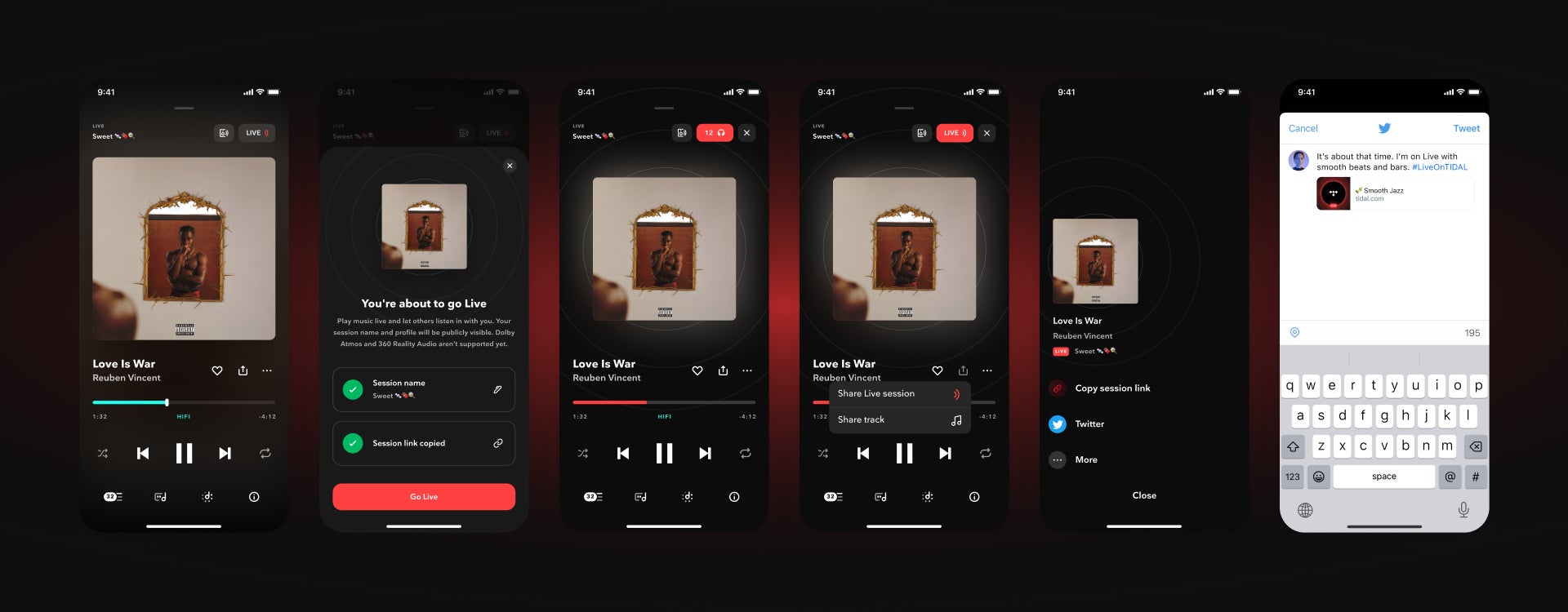
After testing Live for months, TIDAL has finally announced the general availability of the feature. The new in-app feature allows HiFi and HiFi Plus TIDAL subscribers to share music without physically being together.
Live makes it possible to listen to an album in groups of any size, or share the same music while on a road trip or during a special event. Previously known as “DJ,” Live was available during beta testing through an early access program. In addition to allowing TIDAL users to share music with others, the new feature also makes it easier to find and follow music curators.
TIDAL subscribers can start a Live session by choosing a name for what they plan to play and then share the link with other to join. Shareable links to Live sessions let anyone join and they can be sent via text messages, social media, and emails.
To celebrate the launch of the new feature, TIDAL revealed that Live sessions will be happening across United States, United Kingdom, Germany, Poland, and Brazil for fans to join all day long. Depending where you live, you’ll be able to listen to Live sessions from Diplo, Aluna, and Alesso, but many more will be available throughout the day.
Furthermore, TIDAL subscribers can now choose from specially curated sessions by the streaming service’s experts throughout the week in the app. As expected, the in-app Live feature is available on iOS and Android devices and includes access to over 100 million tracks.
Keep in mind that all the tracks shared via Live will play in normal AAC quality until high-resolution or lossless quality becomes available. One other important thing worth mentioning is that subscribers can only start and listen to sessions taking place in the country where their TIDAL account is registered. Also, Live has limited functionality with third-party devices.
Western Digital (WD), a renowned manufacturer of Scandisk drives, has announced a data breach on its network, resulting in unauthorized access to data on multiple systems by attackers.
WD is a company based in the United States that specializes in manufacturing computer drives and data storage devices, providing data center systems, and offering customers cloud storage services.
The incident is ongoing, so the Company has promptly deployed incident responders and collaborated with digital forensic experts to investigate the attack.
“Western Digital identified a network security incident involving Western Digital’s systems. In connection with the ongoing incident, an unauthorized third party gained access to a number of the Company’s systems.” WD said in a Press release.
“The Company is implementing proactive measures to secure its business operations, including taking systems and services offline, and will continue taking additional steps as appropriate.”
Additionally, the Company has stated that they are actively working on restoring the affected systems. They suspect that the unauthorized party obtained detailed data from their systems and are striving to comprehend the nature and extent of that data.
As a result of this incident, several users reported that My Cloud, another cloud operating service, experienced over 12 hours of downtime.
“Our team is working urgently to resolve the issue and restore access as soon as possible. We apologize for any inconvenience this may cause and appreciate your patience.”
According to their incident report, “We are experiencing a service interruption preventing customers from accessing the My Cloud, My Cloud Home, My Cloud Home Duo, My Cloud OS 5, SanDisk ibi, SanDisk Ixpand Wireless Charger service.”
Following the attack, the storage manufacturer has taken further security measures to protect its systems and operations, which may affect some of Western Digital’s services.
Here the following products are impacted by this security incident:
My Cloud My Cloud Home My Cloud Home Duo My Cloud OS5 SanDisk ibi SanDisk Ixp Wireless Charger
We attempted to contact Western Digital for further information on the incident but did not receive a response. We will provide updates to the article as soon as they become available.
Major changes are important for a good software experience, but you can’t forget about the little tweaks. Google just made a small but noticeable change to the messages shortcut in the Pixel launcher, according to 9To5Google.
The Google Pixel launcher has a pretty unified look and feel to it. It’s well integrated with the rest of the phone, so you can find pretty much anything you need to. When you tap on the Google search, you’ll be able to see anything from your messages to settings to apps just by typing them in.
If you type in “Messages” (it should still work even if you only type in “mess”), you’ll see a shortcut to your most recent messages. This is a great way to jump right into your recent conversations.
Update changes the messages shortcut in the Pixel launcher
As said before, this isn’t a major change to the software. It could help make the UI look just a bit cleaner. Previously, when you’d see the messages shortcut in the Pixel launcher, it’d show up as a list of items. You’d see separate lists based on the messaging app. So, you’d see a separate list for Google Messages, one for Facebook Messenger, one for WhatsApp, etc.
With this slight tweak, the users’ profile pictures will be larger, and they will sit in a row rather than a vertical list. This means that this way, the shortcut will take up less space in the UI. This is good if you see messages for multiple apps.
There’s a chance that you won’t see this new change just yet. It was spotted in the Android 13 QPR 2. However, when using our company’s Pixel 6 on the latest version of the Android 13 beta, we didn’t see it. If you don’t see this, then you’ll want to wait just a bit. It will make its way to your device eventually.
Dell is one of the more popular brands of laptops and also desktops, they’ve been around for quite some time with some very popular models. So it makes sense that they have a number of great laptops that you can buy today. Which is what we’ll be covering today. This list is for the best Dell Laptops that you can buy today. These include lower-end Dell Laptops that are pretty cheap, all the way up to some absolute beasts.
Best Dell Laptops in 2023
These laptops can be used for school, work or gaming. Or really all three. Now some of these are not gaming laptops, but they do offer some impressive specs, so you could game on them if you really wanted to. Just don’t expect the very best experience on something that costs just $399.
The Dell Inspiron 15 is a pretty good laptop for the money. It’s nowhere near as powerful as some of the other laptops on this list, but it will get your everyday work done. It’s also a good option for using for work.
As far as specs go, this one sports a 15.6-inch HD display, the Intel Celeron N4020 processor, with 16GB of RAM and a 1TB PCIe SSD inside. It does have a dedicated HDMI port and two USB-A ports, two features that are becoming pretty rare on laptops these days.
This Alienware laptop is perhaps one of the best gaming laptops on the market right now. It’s pretty pricey, but well worth that price.
With the m17 R5, Alienware has outfitted it with a 17.3-inch 360Hz FHD display, an AMD Ryzen 9 processor, 16GB of RAM and a 1TB SSD. There’s also some killer graphics here with the NVIDIA GeForce RTX 3070 Ti. Making this a really impressive laptop, even at a nearly $2K price tag.
Dell also has a pretty powerful Inspiron laptop, that doesn’t look like a gaming laptop. This is a 2-in-1, so that display is indeed a touchscreen, which is definitely great to see.
Specs-wise, this laptop sports a 14-inch FHD touch screen, powered by a 12th Gen Intel Core i7 processor. There’s also 16GB of RAM on-board with a 512GB SSD. It has integrated graphics, so no dedicated graphics card, unfortunately.
If you prefer thinner bezels, and an OLED display, then the Dell XPS 15 OLED is a great option. It’s not cheap, but it is a fantastic laptop.
This laptop sports a stunning 15.6-inch 3.5K OLED touch screen. Which explains why it is nearly $3,000 in its price tag. It does also include a 12th Gen Intel Core i9 processor, 32GB of RAM and a 1TB SSD. This does have dedicated graphics, with the NVIDIA GeForce RTX 3050 Ti included.
The Dell G16 Gaming Laptop is positioned as a cheaper, gaming laptop. But it’s really not that cheap, and it does have some rather impressive specs, to be quite honest. In fact, you may want this over an Alienware laptop.
This one sports a 16-inch QHD 165Hz display. It also has the 12th Generation Intel Core i7 processor inside, with 16GB of RAM, and a 1TB SSD. There’s also the NVIDIA GeForce RTX 3060 inside for dedicated graphics. With this having a starting price of $1,599, this is pretty impressive, specs-wise.
This is one of the best looking laptops in Dell’s lineup right now. It’s not a gaming laptop, but it does have some pretty impressive specs here. So you could use it for gaming, if you really wanted to.
The Dell XPS 9000 15 has a stunning 15.6-inch FHD+ display, with almost no bezels. It does still have a webcam, which is pretty impressive. This also has a 12th Generation Intel Core i7 processor, with 32GB of RAM and a 1TB SSD on-board. It is using integrated graphics, so gaming won’t be the best on this one, but it is possible to do.
Waze is launching two new features at the same time this month, something that it’s a little bit unusual for the navigation app. I know everyone is used to getting a new driving experience almost every month, this time around Waze is bringing more than just a fun way to spend your time while driving. The company announced earlier today plans to bring Waze users more ways to stay entertained on the road with Customize Your Drive and an astrological driving experience. The new ability to personalize drives allows users to choose from a wide selection of driving experiences and access more such content in one place. For example, you’ll be able to select a theme that fits your mood and change it with ease. Whether you’re driving with some of your favorite personalities like Boy George, Christina Aguilera, or Karamo, or looking for something more kid-friendly like PAW Patrol or Fraggle Rock, there’s certainly something for everyone on their journeys.
Now, the bad part is that while “Customize Your Drive” features is rolling out in the United States today, it will be launched globally in the future. So, unless you live in the U.S., you won’t be able to personalize your driving experience yet.
On the bright side, there’s something else available those who don’t have access to “Customize Your Drive,” a new zodiac driving experience! Regardless of what zodiac sign you belong to, Waze’s resident astrologer has the right driving experience for you.
The new zodiac driving experience includes a custom vehicle and Mood for each of the 12 signs. Waze users can start driving with a vehicle and Mood that match their sign today. If you live in the United States, the zodiac driving experience can be found through “Customize Your Drive,” while the rest of the world can find it via the left menu in the Waze app.
Malwarebytes removes all remnants of ransomware and prevents you from getting reinfected. Want to learn more about how we can help protect your business? Get a free trial below.