Google Fi, the company’s MVNO cellular carrier service, has revealed via a tweet that it is extending its 5G coverage to include iPhones. This is a major step forward for the company, as earlier only Google’s Pixel phones could connect to Fi’s 5G network.
iPhone users who are Google Fi subscribers will now be able to utilize the service’s 5G network in 35 cities across the United States as a result of the extension. Google Fi’s use of numerous wireless networks, including T-Mobile, Sprint, and US wireless, enables this.
iPhone users Fi
Get fast 5G coverage on all 5G-compatible phones on Fi – now available for iPhone.
To use Google Fi’s 5G network, iPhone users must have a compatible smartphone and be in a 5G coverage region. The network supports 5G-capable iPhones such as the iPhone 12 or newer.
Google Fi’s 5G network guarantees customers faster bandwidth and reduced latency. This is especially useful for those who watch video or play games on their phones, as well as for companies that require dependable and quick internet connections.
This late, but welcomed, expansion of Google Fi’s 5G network into the iPhone market is part of the company’s continuing attempts to bring its service to a broader variety of devices. While Google Fi was initially only accessible on Google’s Pixel phones, it has since been extended to include a wide range of Android devices and, most recently, iPhones using 4G.
Using 5G on existing iPhones that are already on Google Fi’s network will require a few steps which include navigating to your iPhone’s Settings, then accessing the “Cellular” section. Once there, select “Cellular Data Options,” then “Voice & Data” or “Cellular”. Finally, pick “Voice & Data” and “5G Auto” after tapping your phone number.
Overall, Google Fi’s 5G network extension to iPhones is a major development for both the business and its customers as Google Fi’s 5G network claims to provide a better user experience. Furthermore, the expansion of Google Fi’s service to iPhones is likely to draw new users, cementing the company’s place as a significant participant in the wireless carrier market.
Because backups are the dental floss of cybersecurity—the thing that everyone knows they should do, that everyone intends to do, that nobody actually does.
Happy World Backup Day everyone!
What, you didn’t know it was World Backup Day? Hmmm, perhaps that’s not a surprise. If there was an award for “most overlooked really important thing in computing”, backups would win. Every year.
So let’s put that right this year and spend a minute or two of World Backup Day thinking about backups. Backups are great! Having backups is like having a do-over for your mistakes, and who hasn’t wished for that? And they can keep you safe too. Good computer security means creating layers of protection that overlap and cover each others’ backs. The final layer is your backups. They’re a “get out of jail free” card you can play if any of your files are destroyed, deleted, or corrupted by malware.
To get you off on the right foot we’ve got three tips: A beginner tip, an intermediate tip, and an advanced tip.
1. Make backups
Yes, our first tip really is “make backups”. Why? Because backups are the dental floss of cybersecurity—the thing that everyone knows they should do, that everyone intends to do, that nobody actually does.
You need to floss your computer, every day. We don’t care how you do it: You can use the cloud, put your files on a USB stick, plug in an external hard drive, burn your data to a disk (ask your parents), copy them to an FTP site (ask your grandparents), or print them out and bind them in a book for all we care. All we ask is that you make a copy of your data, and then make making copies of your data a habit.
The only backup you’ll ever regret is the one you didn’t make.
2. Make them automatic
Once you decide that you’re going to make regular copies of your data you are, in all likelihood, going to get bored of doing it and slip up on your rigorous, well-intentioned schedule. Humans just aren’t good at doing the same thing, the same way, every day. But you know what is? A computer.
So, our intermediate tip is to let the computer take the strain of remembering what you want to backup and when. They love that stuff.
Windows and macOS both come with backup software included, each of which is perfectly on-brand for your platform of choice. The Windows backup solution has a boring and sensible name. It’s called Backup and Restore. On Mac you’ll be using a Time Machine, because Apple lets its marketing department in the room when things are being named. As you’d expect, if you’re a Linux user there are a bewildering number of options to choose from. If you’re blinded by overchoice, check out Amanda.
3. Make sure they work
If you’ve followed tip two and automated your backups then you can sit back and relax right? Sure, you can. But if you want to know for sure that your backup solution will be there for when you need it most, you need to test it. After all, a backup is only as useful as the data you can actually restore from it.
Anyone who works with computers knows that assumption is the mother of all f*** ups, so don’t assume your backups work, prove they do. Pick a file you really care about and go get a copy of it from your backups. Better yet, if you have a directory where you keep lots of important files, restore that. Not only will that prove to you that your backups can dig you out of trouble if they ever need to, you’ll get a feel for how slow that process can be if you’re backing up over Wi-Fi. Understanding that restoring a lot of files from a backup can be a lengthy process will help you set your expectations and manage your stress levels if you ever need to.
Pat yourself on the back
Whether you made it all the way to rolling out tip three, or you stopped at one, we applaud you. Your digital life is now more resilient than it was, which means you’ll be better able to weather hardware failures, accidental deletions, and malware outbreaks.
We don’t just report on threats—we remove them
Cybersecurity risks should never spread beyond a headline. Keep threats off your devices by downloading Malwarebytes today.
The OPPO Find X6 Pro is a brand new camera-centric flagship that continues getting praise left and right. How does it compare to the best of Google, though? Well, that’s what we’re here to find out. We’ll compare the Google Pixel 7 Pro vs OPPO Find X6 Pro. Before we begin, however, do note that the Find X6 Pro launched in China only at the moment of writing this review. We’re still not sure if it’s coming to global markets.
That means that, if you do import it, you’ll have to sideload Google services, which is fairly easy. You’ll also have to deal with software made for the Chinese market, which is a bit different than the global build. You can read more about that in our OPPO Find X6 Pro review. That being said, let’s get this comparison started, shall we?
Visually, these two phones do look quite different in comparison. Sure, from the front, they are somewhat similar, but that’s about it. Both devices are made out of metal and glass, though the Find X6 Pro also comes in a vegan leather variant. That model combines vegan leather and glass on the back. You’ll notice a curved display on the front of both phones, and a centered display camera hole too. The bezels are very thin on both devices.
When we flip them around, however, things are fairly different. The Pixel 7 Pro has a camera visor on the back, which is covered by aluminum. That visor connects to the frame on both the left and right sides. Three camera sensors are placed inside it, and it’s fairly different from your regular camera islands. The OPPO Find X6 Pro has a huge, circular camera island on the back, which actually looks quite nice in comparison to some other implementations (from competitors). It also includes three cameras on the inside.
The OPPO Find X6 Pro is slightly taller, while they’re almost the same width, the Pixel 7 Pro is a bit wider. They’re also very similar in terms of thickness, the difference is barely there. The Pixel 7 Pro weighs 212 grams, while the OPPO Find X6 Pro weighs either 216 or 218 grams, depending on the model. The Pixel 7 Pro has the Gorilla Glass Victus on the back, while the OPPO Find X6 Pro includes Gorilla Glass 5. Both phones are fairly slippery, though the vegan leather OPPO Find X6 Pro is noticeably less slippery than the rest. They do feel immensely premium in the hand, and look the part. These are large phones, though, so take that into account.
Google Pixel 7 Pro vs OPPO Find X6 Pro: Display
The Google Pixel 7 Pro features a 6.7-inch QHD+ (3120 x 1440) LTPO AMOLED display. This is a 120Hz display (adaptive refresh rate) which is curved. It supports HDR10+ content, and it goes up to 1,500 nits of brightness at its peak. The display aspect ratio is 19.5:9, and this display is protected by the Gorilla Glass Victus.
The OPPO Find X6 Pro, on the other hand, includes a 6.82-inch QHD+ (3168 x 1440) LTPO3 AMOLED display. This panel is curved, and it can project up to 1 billion colors. It also supports Dolby Vision, and HDR10+ content. It also has an adaptive 120Hz refresh rate, and it gets up to 2,500 nits of brightness at its peak. At the moment of writing this article, this is the brightest display on any phone. This panel is protected by the Gorilla Glass Victus 2. The OPPO Find X6 Pro also has a slightly higher screen-to-body ratio in comparison.
Both displays are great, to be quite honest. They are vivid, have great viewing angles, and are more than sharp enough. The blacks are also quite deep. The OPPO Find X6 Pro does have one major advantage, though, its brightness. If you spend a lot of time under the sun, the Find X6 Pro is definitely the better choice. It’s much easier to see outdoors than the Pixel 7 Pro. It also has better protection, but the difference there is nowhere near as important as the brightness difference is.
Google Pixel 7 Pro vs OPPO Find X6 Pro: Performance
The Pixel 7 Pro is fueled by the Google Tensor G2 SoC, The OPPO Find X6 Pro, on the other hand, comes with the Snapdragon 8 Gen 2 processor. The Snapdragon 8 Gen 2 is a more powerful chip, no doubt about it, but the Tensor G2 is also a flagship chip, and nothing to scoff at. That being said, the Find X6 Pro does have faster RAM (LPDDR5X) and storage (UFS 4.0). The Pixel 7 Pro relies on LPDDR5 RAM and UFS 3.1 flash storage.
Both smartphones are plenty fast during day-to-day usage, though, and not many people will notice the difference. The OPPO Find X6 Pro is snappier, though. When you use them side by side, that’s something you’ll notice. If you don’t, it really won’t make any difference to you, as both are quite fast. Now, when it comes to gaming, the Find X6 Pro is the phone to go for. The Pixel 7 Pro does a good job, unless we’re talking about a truly demanding game, then you’ll notice some problems on the performance side of things. Google never claimed this is a gaming phone, though, so… there you go. It does great with the vast majority of games, though. Keep in mind that the Find X6 Pro does have a software build made for China, and because of that, the Pixel 7 Pro will probably be more appealing to most of you, from the software side of things.
Google Pixel 7 Pro vs OPPO Find X6 Pro: Battery
Both of these phones pack in a 5,000mAh battery on the inside. Both smartphones do offer good battery life, though not to the insane levels of the Galaxy S23 Ultra and OnePlus 11. During our usage, the Pixel 7 Pro provided around 7 hours of screen-on-time. Most often we were able to go up to 7.5 hours, sometimes a bit more. The OPPO Find X6 Pro was able to break that 8-hour mark, though, and it overall offered better battery life.
It will all depend on what you’re doing with your phones, though. We were using both phones intensively during our usage, though without much gaming. Games were played only for testing purposes. If you’re not a heavy user, you may even be able to get better battery life. It will all depend on what apps you use, how often you use processor-intensive tasks, and what’s your signal like throughout the day.
The Pixel 7 Pro supports 23W wired, 23W wireless, and 5W reverse wireless charging. The OPPO Find X6 Pro supports 100W wired, 50W wireless, and 10W reverse wireless charging. On top of that, the Pixel 7 Pro does not include a charger in the box. The OPPO Find X6 Pro does. Needless to say, the OPPO Find X6 Pro simply crushes the Pixel 7 Pro when it comes to charging. It offers much faster wired and wireless charging, and even its reverse wireless charging is noticeably faster.
Google Pixel 7 Pro vs OPPO Find X6 Pro: Cameras
The Google Pixel 7 Pro includes a 50-megapixel main camera, a 12-megapixel ultrawide unit (126-degree FoV), and a 48-megapixel telephoto camera (5x optical zoom). The OPPO Find X6 Pro has a 50-megapixel main camera (1-inch camera sensor), a 50-megapixel ultrawide camera (110-degree FoV), and a 50-megapixel periscope telephoto unit (2.8x optical zoom, 65mm lens). The OPPO Find X6 Pro has possibly the best camera setup out there right now, while Google relies heavily on software. Which of the two is better? Well, that’s impossible to say. They’re both outstanding camera smartphones, but shoot different photos.
_cuva
The Pixel 7 Pro shins when it comes to HDR situations, while that’s the area where the Find X6 Pro needs more optimization. The OPPO Find X6 Pro is outstanding when it comes to portrait photography, macro shots, and provides outstanding images in general. It has that natural bokes when you shoot with the main camera, thanks to a huge camera sensor, and the company did a good job optimizing the phone. Depending on the situation and zoom level, its telephoto camera can provide more details, and the ultrawide camera is outstanding.
Both phones provide contrasty images, but OPPO more so than Google. The Find X6 Pro can provide you with those moody shots in the dark, as it’s not afraid to leave dark areas dark, while it still picks up plenty of details. The Pixel 7 Pro tends to brighten up dark shots, so that they look a bit unreal, but great nonetheless. It’s all about what you prefer, to be quite honest. These two are amongst the top 5 best camera smartphones in the market at the moment, without a doubt, if not in the top 3, especially when it comes to stills.
Audio
You will find a set of stereo speakers on both of these phones. Both sets sound good. They’re loud enough, have some bass, and generally have a wide enough sound stage. We did prefer the sound coming from OPPO’s flagship, though, as the audio was a bit clearer.
Neither phone includes a 3.5mm headphone jack, though. For wired connections, you’ll need to use the Type-C port. When it comes to wireless ones, Bluetooth 5.2 is included with the Pixel 7 Pro, while the OPPO Find X6 Pro offers Bluetooth 5.3.
Google CEO Sundar Pichai confirmed that the company’s AI chatbot Bard would soon get upgrades. The Bard upgrades are probably a part of Google’s plan to catch up with Microsoft Bing, which is now running on OpenAI’s GPT-4
Speaking on The New York Times’ Hard Fork podcast, Pichai said developers are currently busy with upgrading Bard, and users will see improvements in the course of next week. “Pretty soon, perhaps as this [podcast] goes live, we will be upgrading Bard to some of our more capable PaLM models, which will bring more capabilities; be it in reasoning, coding, it can answer maths questions better,” Pichai added.
Google has recently opened up its own AI language model PaLM, which is believed to be more powerful than LaMDA. The tech giant says PaLM can better solve coding problems and common-sense reasoning. The Google Bard, however, is now running on a “lightweight and efficient version of LaMDA.” Pichai says it’s like putting a souped-up Civic against more powerful cars in a race.
Google Bard gets an upgrade to compete with Microsoft Bing
Microsoft’s Bing chatbot could outperform Google Bard in many ways and become the most powerful AI chatbot globally. Meanwhile, Google’s CEO says this is because they tried to be very cautious with Bard’s development. “To me, it was important to not put [out] a more capable model before we can fully make sure we can handle it well,” he said.
The AI race has also caused concerns among the world’s tech leaders and university professors. Recently, Elon Musk and many other executives wrote an open letter to warn about the “out of control” AI race. They argued that AI experiments must be halted for at least six months. And AI labs and experts should apply better safety protocols.
Sundar Pichai also alluded to the letter. Saying the topic needs a lot of debate and it’s important to hear the concerns. But Google CEO does not endorse specific regulations for AI and believes the current privacy and health regulations seem enough.
Regarding the AI capabilities for distorting the truth and spreading misinformation, Pichai said they’re not worried about AI safety because “you have to anticipate this and evolve to meet that moment.”
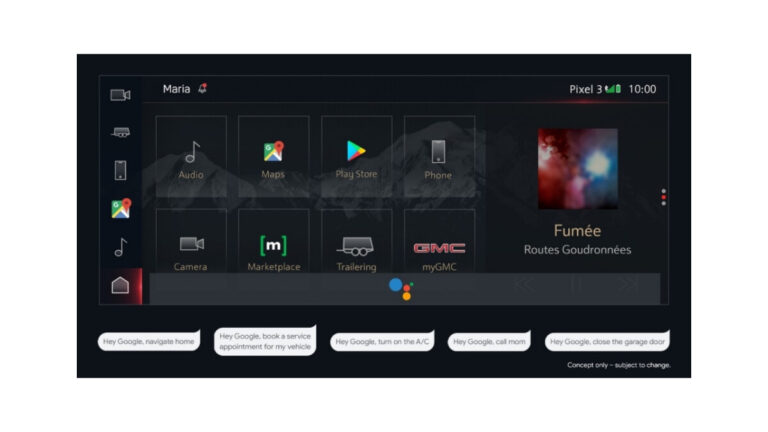
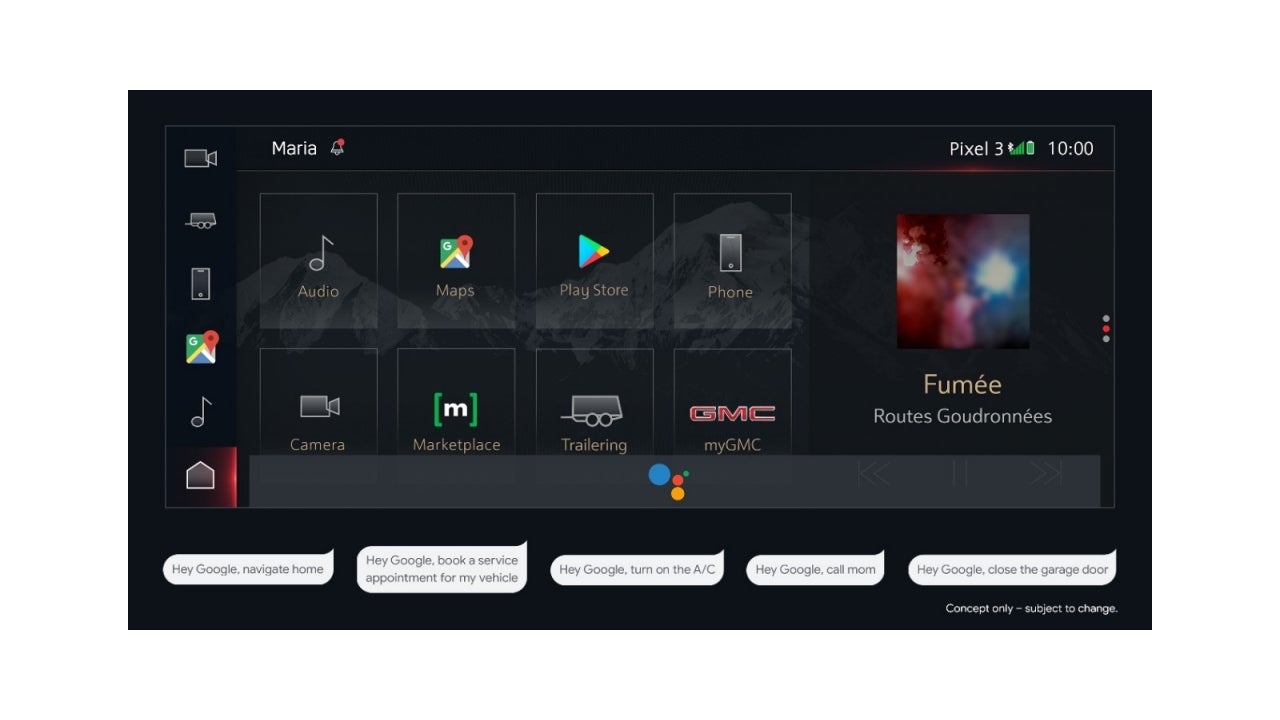
General Motors (GM) has announced that it will phase out support for Apple CarPlay and Android Auto in its electric vehicles (EVs) in the coming months. The decision is part of the automaker’s plan to develop its own proprietary infotainment system for its EVs, all with Google’s help.
While Apple CarPlay and Android Auto have become popular choices for in-car entertainment systems in recent years, GM is looking to offer a more seamless experience that is better integrated with its EVs. According to GM, its new system will be faster and more intuitive, offering better integration with the EV’s battery and charging system.
This move by GM has surprised some industry experts who see it as a risky move, considering the popularity of Apple CarPlay and Android Auto. However, GM is not the only automaker to develop its own infotainment system. Tesla, for example, has had success with its own proprietary system, which is known for its speed and user-friendly interface.
What replaces CarPlay and Android Auto on GM EVs
The company argues that Android Automotive provides more control over the experience and there are plans to develop new driver assistance technologies that are more tightly integrated with navigation features. The endgame here is that ultimately GM does not want the use of a smartphone to be a requirement in order to use these new technologies, or your type of device (Android vs iOS) to dictate what your experience looks like.GM has been working with Google since 2019 to develop the software foundations for infotainment systems that will be more tightly integrated with other vehicle systems such as GM’s Super Cruise driver assistant. The automaker is accelerating a strategy for its EVs to be platforms for digital subscription services, so don’t be surprised if you’ll eventually end up paying a recurring fee for certain features like you already do with some brands.
GM has also said that it will continue to support CarPlay and Android Auto in its existing models, as well as in some upcoming models. However, the focus for new EVs will be on its own system, which will be tailored to the needs of its customers.
New technologies are in development
In addition to its new infotainment system, GM has also announced that it will be introducing a new suite of features for its EVs, including advanced driver assistance systems and more advanced battery technology. The automaker has said that it plans to invest $27 billion in the development of EVs and autonomous vehicles by 2025, as it looks to compete with the likes of Tesla and other EV manufacturers.GM’s decision to phase out support for Apple CarPlay and Android Auto in its EVs is a bold move that reflects the automaker’s commitment to developing its own technology solutions for its customers. However, some initial skepticism from consumers is to be expected, especially with the reality of having to pay for more subscription services on the horizon. It will be interesting to see how GM’s new system performs and whether the experience will best that which is currently offered by the popular CarPlay and Android Auto.
The group set up over 100 fake phishing sites targeting users in France, Spain, Poland, the Czech Republic, Portugal, and other European countries.
The Ukrainian Cyber Police recently announced that they had arrested several members of a criminal group accused of stealing over $4.3 million through phishing scams from more than 1,000 victims across Europe.
The group set up over 100 fake phishing sites targeting users in France, Spain, Poland, the Czech Republic, Portugal, and other European countries. The fraudulent websites advertised goods at prices below the market rate. Victims entered their credit card details to pay for the fake orders, which the criminals used to embezzle money from their accounts.
Two Ukrainian-based suspects were detained, who are believed to be organizers of the criminal gang. Ten other cyber criminals involved in the phishing scams were caught by the authorities in other European countries. The Czech Republic Cyber Police cooperated with law enforcement officials for this arrest.
The attackers created two call centres, located in Vinnytsia and Lviv, to support the fraudulent operation. The call centre operators convinced customers to place orders.
As part of an international police operation, the authorities carried out more than 30 searches at the suspects’ residences, call centers, and vehicles, seizing computer equipment, mobile phones, and SIM cards for analysis.
It is still unknown how the victims arrived at the fraudulent websites. They could have been victims of malvertising, phishing emails, or even direct messages on social media platforms. The stolen information, including credit card details, was used by criminals to buy products online.
Usually, the goods are transferred through a chain of resellers and individuals who assist in hiding the money trail, commonly known as money mules. The police are still investigating the case to identify other members of the group.
According to Cyber Police’s press release, criminal proceedings have been initiated against the perpetrators under Part 4 of Art. 190 (Fraud) and Part 1 of Art. 255 (Creation, management of a criminal community or criminal organization, as well as participation in it) of the Criminal Code of Ukraine. Those found guilty of the crimes could face up to twelve years in prison with confiscation of property.
Android games might not cost as much as console games, but some of them can be a little pricey, which is where free games on Play Pass come in. Many Android games can range from being $.99 to upwards of $15 and more, and that doesn’t quite sit well with some gamers. Also, we’re constantly bombarded with in-app purchases and all sorts of gacha nonsense.
Fortunately, Google has a solution that most gamers should like. It introduced its Play Pass subscription. With this service, you pay $4.99/month and you get no advertisements, free content in-game, and even free games. You’re getting a lot for only $5 every month.
Top 10 Best Free Play Pass Android Games – March 2023
Below is a quick overview of the top 10 best free Play Pass Android games for 2021. Since these are on Play Pass, there are no in-app purchases or download costs.
Game
Download Cost
In-app cost (per item)
Lumino City
Free
X
Doors Origins
Free
X
Drag’n’Boom
Free
X
SimplePlanes
Free
X
Terraria
Free
X
Please Touch The Artwork
Free
X
Monument Valley
Free
X
FRAMED 2
Free
X
Very Little Nightmares
Free
X
Thimbleweed Park
Free
X
Top 10 Best Free Play Pass Games On Android – March 2023
Below is a bit more information on these games including direct links for easy downloading. All download links go to the app’s Google Play Store listing. Users are always recommended to download apps from Google Play or an authorized app store.
Lumino City
Download Cost: Free
In-App Cost: No
Size: 991MB
Google Play Rating: 4.3 stars out of 5
Lumino City is a game that gained a lot of nominations and awards, so you know that you’re in for a good time. This is an aesthetically-pleasing puzzle game that will take you on a journey to find your grandfather. He mysteriously disappeared while you were downstairs.
This is a very well-animated game with great visuals and amazing music. You’re guaranteed to enjoy the overall presentation of this game.
Doors Origins is a visually impressive puzzle game that will really test your brain. At each level, you’re presented with a door with all sorts of objects and mechanisms around it. Each mechanism is a puzzle that needs to be solved. As you solve puzzles, you’ll earn items that you can use to solve even more puzzles.
The point of each stage is to eventually open the door, so it’s like those classic “100 Doors” games. There’s a ton of variety in the puzzles that you’ll solve too. Each door has a certain theme- Davinci, time, the sea, etc.- and most of the puzzles play along with the theme.
This is a very visually appealing game. Each of the doors has its own unique look and aesthetic. Also, the graphics themselves are impressive.
Drag’n’Boom is like a combination of Angry Birds and those tank battle games. Your character, a dragon, starts off the level on the ground. You drag your finger on the left side of the screen to launch him in the air. While in the air, you can drag to make him lunge in any direction that you want.
Also, you have the ability to shoot fireballs at enemies. You do this by dragging on the right side of the screen. This adds an extra level to the gameplay. As you progress, you’ll be able to unlock more dragons to play with. Also, you can upgrade your fireballs to deal more damage.
SimplePlanes is a pretty simple and straightforward simulator that lets you operate planes along with other types of vehicles. You’re allowed to drive cars as well as tanks, but the game revolves around planes.
It’s a sandbox game that allows you to fly planes in different environments. Not only are you allowed to fly them, but you can customize them as well. There’s a workshop that lets you swap out parts and test them out in realtime. If you want to, you can also build your planes from the ground up. It’s a fun game to play if you’re into planes.
Terraria has been a popular survival game for almost a decade, and the company is continuing to support it to this day. There are several comparisons that people make between it and Minecraft, but it managed to maintain its own identity.
You start off in the wild with nothing, and it’s up to you to gather resources to build up your life. You’re able to chop down trees, dig into the ground, mine resources, and more. You’ll use these resources to craft tools and build a shelter.
While you’re building and gathering, you’ll need to be careful about the myriad of enemies that will hunt you down. It’s a great open-world game with infinite possibilities for crafting and discovery.
This is a puzzle game that’s inspired by real works of art. It’s deceptively simple-looking, as you’ll quickly see once you start playing. When you start playing, you’ll see a work of art on the left side of the screen. What you’ll need to do is tap on the canvas on the right in order to mirror that artwork.
As you progress through the game, you’ll see other forms of gameplay as well. There’s a large variety of the styles of gameplay that you’ll experience. This is a very tricky game, so you’ll want to prepare to repeat stages a lot in order to complete them.
Monument Valley has been a popular game on the mobile gaming scene for a while. This is a heavily stylized puzzle game with a pleasing twist. You’ll be moving parts of the land to get them to connect to others. However, this game takes inspiration from classical optical illusions.
The visuals are top-notch, and they’re more than likely to confound your senses. It’s hard to put into words how this works, so you’ll want to look at the trailer to get an idea. It’s well worth the download.
FRAMED 2 is the sequel to the popular title FRAMED that launched back in 2015. The gameplay in this installment is similar to what we say in the original. This is a stylized puzzle game that has you playing a fugitive running from the law.
Each level is presented as a page in a comic, and it’s up to you to rearrange the panels so that the events play out in your favor. This game will take some trial and error to get through the levels, but it’s such a fun game that it’s worth it.
Nokia plans to make communication between earthlings and astronauts visiting the Moon easy. The Finnish telecommunications giant is preparing to launch a 4G network on Earth’s natural satellite later this year. This will not only boost humanity’s efforts to make lunar discoveries but also pave the way for human presence on the lunar surface.
According to a report from CNBC, Nokia announced its plans to deploy 4G networks on the Moon during this year’s Mobile World Congress (MWC), which was held in late February in Barcelona.
SpaceX rocket to ferry Nokia’s equipment to the Moon
If things go as planned, US-based private space company Intuitive Machines will launch its Nova-C lunar lander aboard a SpaceX rocket. The payload will also include Nokia’s antenna-equipped base station. Besides, a solar-powered rover will also accompany the equipment, CNBC cited Nokia principal engineer, Luis Maestro Ruiz De Temino.
Once the hardware reaches the Shackleton crater, an LTE connection will be established between the rover and the lander. While it sounds like the hardware will be used by astronauts for surfing online, in reality, Nokia is aiming to support the next crewed lunar mission, Artemis 1.
The 4G network will enable astronauts to communicate with each other and with mission control. Not just that! The network will also allow them to control the rover remotely and stream and transmit data back to Earth, all in real-time. Nokia believes its technology is capable of lasting through extreme conditions of space.
Nokia claims that the lunar network will “provide critical communication capabilities for many different data transmission applications, including vital command and control functions, remote control of lunar rovers, real-time navigation and streaming of high definition video.”
Finding ice on the Moon with the help of 4G
Using its network, Nokia hopes to help space agencies look for ice on the lunar surface. Much of the Moon’s surface is currently dry, but recent uncrewed missions have discovered ice remnants trapped in craters around the Moon’s poles.
If the mission discovers ice, it can be broken up into hydrogen and oxygen and used as rocket fuel. Moreover, the extracted water can be used for drinking and can also provide breathable oxygen to astronauts who stay on the lunar surface for extended periods. Internet may not be the only thing we’ll need to live on the Moon, it’ll still be a huge leap in humanity’s lunar ambitions.
As the first quarter of 2023 comes to a close, Google released a blog post that points out how it relies on contributions from users to help the more than one billion monthly Google Maps users “navigate and explore the world.” These contributions include videos, ratings, and reviews. But Google says that scammers have been known to post fraudulent content in order to put money in their pockets. The company says it is fighting back using technology that keeps fake content from getting posted on its Maps app.
Google uses machine learning to help it discover patterns that might indicate fraudulent content. Last year, it updated this technology allowing it to find such fake content faster. “For example, our automated systems detected a sudden uptick in Business Profiles with websites that ended in .design or .top — something that would be difficult to spot manually across millions of profiles. Our team of analysts quickly confirmed that these websites were fake — and we were able to remove them and disable the associated accounts quickly,” Google wrote.
Scammers were caught trying to put fake numbers on contributed photos in Google Maps
Google also discovered that scammers were placing fake phone numbers on top of contributed photos in Google Maps. The goal was to get unsuspecting Maps users to call the fake number for a business instead of the legitimate number. You can see how this could lead to fraudulent credit card transactions that might be hard for those duped to challenge.
Google Maps relies on content contributed by consumers
Google fought back by employing a machine learning tool that can analyze visual details to help recognize when a contributed photo contains a fake phone number overlaid on top. Using the machine learning tool, Google “blocked the vast majority of these fraudulent and policy-violating images before they were published.”
Last year Google blocked and removed 115 million reviews that violated company policies
Last year, Google blocked or removed more than 115 million reviews that violated company policies. Thanks to its updated models, that was a 20% increase compared to the number it took down in 2021. Also blocked and removed were 200 million photos and 7 million videos because they were low-quality, blurry, or violated Google’s content policies.
In 2021, scammers tried to post 12 million fake Business Profiles which Google was able to block. The number of fake Business Profiles that Google blocked last year rose to 20 million. Google also spotted suspicious activity surrounding more than 185,000 businesses which led it to put more protections in place.
Google also revealed that it filed a lawsuit that stopped a group of scammers that were impersonating Google by making fake telemarketing calls and attempting to sell fake online reviews. The company added “While we’ve made a lot of progress in this area, we know that scammers continue to evolve — and we will too. Our teams will continue working around the clock and investing in the latest technology to keep contributed content on Google Maps authentic, safe and reliable.”
The Google Maps app, as Google pointed out, is counted on by mobile device users to help take them safely from point “A” to point “B.” It also tells you where to eat, sleep, shop, and catch entertainment when users do get to “B.”
Google Maps is always evolving and has become a versatile and important app that some users rely on several times a day (anot just ride share drivers either). If you have an iPhone, you have the choice to use Apple Maps or Google Maps. If you don’t have the latter on your device, you can install it from the App Store by tapping on this link. For some reason if it is not on your Android phone, install it from the Google Play Store by clicking on this link.
Do not confuse Cylance Ransomware with the Blackberry-owned Cylance cybersecurity company.
The cybersecurity researchers at Palo Alto Networks Unit 42 have discovered a new strain of Cylance Ransomware, which has already claimed several victims. Researchers noticed it early Friday morning, and further probing revealed that it is targeting Linux and Windows devices.
As of now, insufficient information is available about Cylance Ransomware, indicating that it is a relatively recent emergence. The ransom note received by victims was published by Unit 42 which contains the attackers’ email addresses, but surprisingly not the ransom amount. Here is the content of the ransom note:
“All your files are encrypted, and currently unusable, but you need to follow our instructions. Otherwise, you can’t return your data (never. It’s just a business. We absolutely do not care about you and your deals, except getting benefits. If we do not do our work and liabilities – nobody will cooperate with us. It’s not in our interests.”
“To check the ability of returning files, we decrypt one file for free. That is our guarantee. If you will not cooperate with our service – for us, it does not matter. But you will lose time and data, cause just we have the private key. time is more valuable than money.”
It is believed that the amount will be disclosed to the victim when they contact the attacker. The attackers have warned against any attempt to restore or change the files, as it would destroy the private key, which means the data will be lost forever.
Attack Methodology
In a tweet, researchers explained that the modus operandi of the ransomware attack involves encrypting files and appending them with a “.Cylance” extension. In addition, a text file titled “Read Me” is added to all encrypted files’ folders. This file contains the attacker’s ransom note.
Who is Distributing Cylance Ransomware?
For your information, Cylance is actually a cybersecurity company owned by BlackBerry Ltd. The company is known for mitigating and preventing ransomware attacks on enterprise organizations. However, why threat actors named the ransomware after this company is unclear, or it could be that they are looking for extra attention or to negatively impact Cylance in the long run.
Although Cylance ransomware is still in its early stages, it will be crucial to monitor its targets and wait for more information from the infosec community. Currently, samples of the ransomware are available on MalwareBazaar, a project by abuse.ch that shares malware samples with the infosec community, AV vendors, and threat intelligence providers.