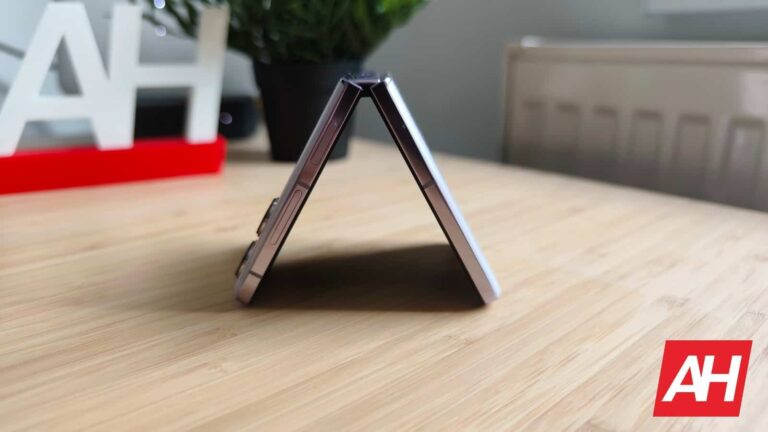
Realme will launch its foldable smartphone as well, we just don’t know when exactly. The company’s VP and President of Realme International, Madhav Sheth, kind of confirmed this via Twitter.
Realme seems to be planning a foldable smartphone launch, its very first one
He went to Twitter to ask his followers if they want the Realme Flip or Realme Fold. In other words, he wants to know if people are more interested in a clamshell foldable, or a book-style foldable smartphone.
What’s interesting is that he didn’t open up a poll or anything like that. He simply wanted to hear back from users, via the comments. This clearly indicates that Realme has some foldable phones in the works.
Truth be said, both a clamshell foldable and a book-style foldable will likely get released from Realme. The company may prioritize one over the other, however, which is why Madhav Sheth did this.
We expect more information about this in the near future, as the company’s VP just let the cat out of the bag. Considering Realme’s track records, these foldable devices could be quite interesting, and not overly expensive.
Realme started off as OPPO’s sub-brand
Realme, as many of you know, started off as OPPO’s sub-brand in 2018, but it eventually became a separate brand. Needless to say, Realme picked up a lot of tech and knowledge from OPPO, and knows what it’s doing.
Its smartphones became quite popular in a number of regions around the globe, and some of them are quite interesting. Realme recently announced the world’s fastest charging smartphone, the Realme GT3.
So, it will certainly be interesting to see what it can offer when it comes to foldables. It’s nice to see more and more companies join the foldable smartphone market. The more of them we see, the faster the tech will progress. Competition is always good for growth.
The Realme GT3 was announced last month, during MWC 2023 in Barcelona. That phone utilizes 240W charging to charge in less than 10 minutes. It’s also worth noting that Realme showed off 300W charging recently, but didn’t announce a device that utilizes it yet.
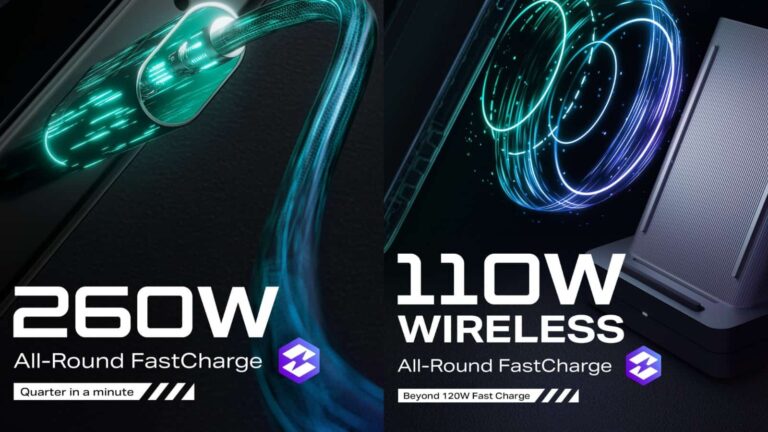
Infinix presented its 260W wired, and 110W wireless charging tech
Now, Infinix’s solution utilizes a 4-Pump Intelligent Circuit Design that intelligently identifies power requirements and uses the suiting number of charge pumps. Infinix also mentioned an upgraded 12C high rate 4,400mAh battery with a multi-electrode lug structure which is used in collaboration with this charging.
That battery offers a high charging conversion efficiency of 98.5%. So, the battery durability should also be higher, which is a good thing. Infinix says that this battery retains over 90% of its energy after 1,000 charging cycles.
The charger for Infinix’s charging uses a charging cable that adapts the Emarker identification chip. It allows for current up to 13A to pass through, which, in combination with Infinix’s charging tech, results in 260W charging.
110W wireless charging can fully charge a 4,400mAh battery in 16 minutes
Now, when it comes to wireless charging, it can charge up a device to 100% in 16 minutes. Do note that we’re still talking about a device with a 4,400mAh battery here, by the way.
This wireless charging uses custom-made small-sensitive coils that have fewer coils than your traditional designs. We’re also talking about wider coils here, which fit into the same space as traditional solutions.
Infinix said that this solution reduces coil internal resistance, and subsequently lowers phone temperature rise. It also increases peak power charging time, and improves wireless charging efficiency.
The company’s custom-made 110W wireless charging has a dual coil design for vertical and horizontal charging. The charging station also has a fan at the back for silent air-cooling. That will improve heat dissipation efficiency, of course.
The company also mentioned reverse charging & bypass charging
Infinix also mentioned reverse charging, bypass charging, and multi-protocol charging, all of which are a part of its new tech. The reverse charging function is compatible with multiple fast charging protocols, and that includes PD 3.0.
And last, but not least, for safety reasons, Infinix included over 140+ protection mechanisms, and 20+ temperature sensors. The company’s All-Round FastCharge will debut with the upcoming Infinix NOTE series, probably the Infinix 13.
It is really important to have a say in the matter when it comes to figuring out what to do in our spare time. Typically, that comes in the form of “making choices”. Great, right! But you know what’s not so great? Having too many choices and not enough time.
Yeah, we’ve all been there. It’s time to eat, but you can’t seem to pick the right movie. It’s time for some high-focus work, but you can’t find the perfect tune to get your vibe on. Well, Spotify — one of the most used music streaming services — is looking to help you out through a redesigned Home page in its app!
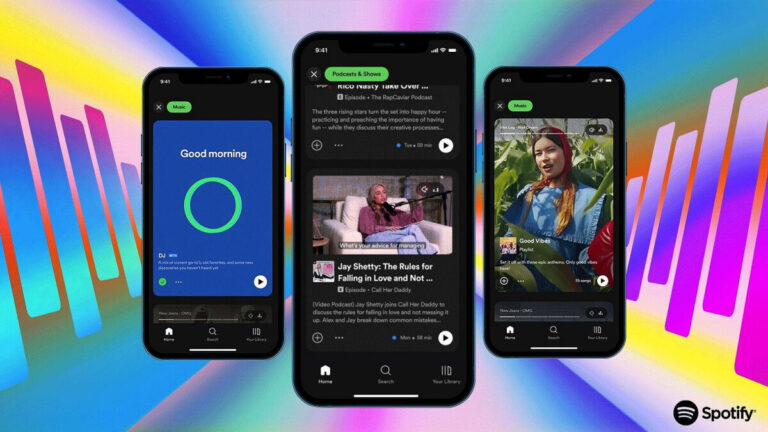
Spotify has always done an admirable job when it comes to recommending new tunes to rock out to, but sometimes the process is time consuming and distracting. That’s why this new design is presented like a scrollable feed of music, audiobooks and podcasts that you can instantly hear snippets of, so that you can instantly save what you like for later.
These new feeds are entirely optional, so you can disregard them if you already know what you are looking for.
This news comes from Spotify’s very own blog, where the company delves into the details of the redesign. The entire thing was sparked through data — from an unspecified source — which allegedly verifies that users are more inclined to dive into something that they’ve gotten a taste of. Hence: a scrollable feed of auto-playing media.
Now, while for some of us this may feel like a nightmare, this should feel right at home for those, prone to using social media like Instagram and TikTok, where short form content on autoplay is the norm. A key difference with Spotify is that it won’t be a single feed to-rule-them-all, but a trinity:
Music Feed
Podcasts & Shows
Audiobooks feed
While scrolling through these, users will have quick access to essential actions such as Saving, Downloading or Sharing the content on display. This is a testament to the aim of bringing seekers closer to findings… and the possible purchase of content after a quick demo.
Spotify is technically the first platform to simplify the process of discovery-and-testing on such a level. And the feature is something that everyone can start using really soon, as it is rolling out for both free and premium users as we speak.
A well-known tipster just shared some interesting information. Ice Universe said that the Xiaomi 13 Ultra will be available globally, but the same cannot be said for the upcoming OPPO Find X6 Pro.
The Xiaomi 13 Ultra will be sold globally, it seems
The Xiaomi 13 Ultra-related info is not surprising, but the OPPO Find X6 Pro part definitely is. Let’s first tackle the first part of this tip, as we’re talking about two different brands and devices.
The Xiaomi 13 Ultra is tipped to launch in April, at least based on the latest rumors. The phone’s real-life image allegedly surfaced as well. Xiaomi launched its 13 and 13 Pro flagships recently, during MWC 2023 last month.
Many people are wondering if the Xiaomi 13 Ultra is necessary at all, but Xiaomi seems to think so. The only part of the Xiaomi 13 Pro that the company can improve, at least spec-wise, is the camera. Don’t get me wrong, the Xiaomi 13 Pro has almost all the bells and whistles, including a 1-inch camera sensor and Leica lenses. What it lacks, however, is a periscope camera.
That is where the ‘Ultra’ may differentiate from the ‘Pro’ model. Other than that, there’s really not much Xiaomi can improve upon. The Xiaomi 13 Pro has the Snapdragon 8 Gen 2 SoC, an excellent high-refresh-rate display, LPDDR5 RAM and UFS 4.0 flash storage, and so much more. It will be interesting to see what will the ‘Ultra’ deliver.
A tipster claims that the OPPO Find X6 Pro won’t be available outside of China
Now, as for the OPPO Find X6 Pro. That device will become the company’s flagship later this month. OPPO is preparing to launch the Find X6 series as we speak.
The OPPO Find X5 Pro launched last year, and it made its way to markets outside of China. We assumed that the same will be the case with the OPPO Find X6 Pro, but Ice Universe doesn’t seem to think so.
I’m a bit skeptical when it comes to this rumor, as it would be really weird not to see the OPPO Find X6 Pro launch outside of China. The OPPO Find N2 Flip did make it to global markets, and OPPO will probably want its first smartphone with a 1-inch sensor (rumored info) to do the same. We’ll have to wait and see.
Artificial Intelligence has been the buzzword since the launch of ChatGPT and its integration into Microsoft’s Bing browser. And as this technology continues to evolve, it’s increasingly evident that AI has the potential to revolutionize the way we work. Now, to discuss how AI technology will influence workplaces and integrate into popular Microsoft apps such as Teams, Word, and Outlook, Microsoft’s CEO Satya Nadella and Office 365 head Jared Spataro are holding a “Future of Work with AI” event on March 16th at 8 AM PT / 11 AM ET.
Although there’s little information about what the event will cover, a report from The Information suggests that Microsoft could integrate AI models like ChatGPT to improve search results, suggest email replies, and improve writing in Word documents.
In an effort to increase productivity, the company also launched new enterprise-oriented AI features for Dynamics 365 and Viva Sales. The AI “Copilot” will help respond to customer chats and emails, summarize Teams meetings, and explore marketing data. While these AI features are running on the existing Azure OpenAI service, the new Office 365 AI features would reportedly use the new Bing Prometheus AI model.
Microsoft investing heavily in AI
Microsoft’s recent $10 billion investment in OpenAI to host its cloud services makes it clear that the company is aiming to establish itself as an AI leader, and with the integration of ChatGPT-like AI in Microsoft’s Office apps, the company intends to bring a new level of productivity and efficiency to the workplace.
Although Microsoft has a significant advantage at the moment, it won’t be the only player in the industry as Google recently launched its own AI system named Bard. However, Google’s answer to ChatGPT has been off to a shaky start, as the launch of the chatbot has made Googlers and investors unhappy with Google, who believe it poses a threat to the company’s core search business.
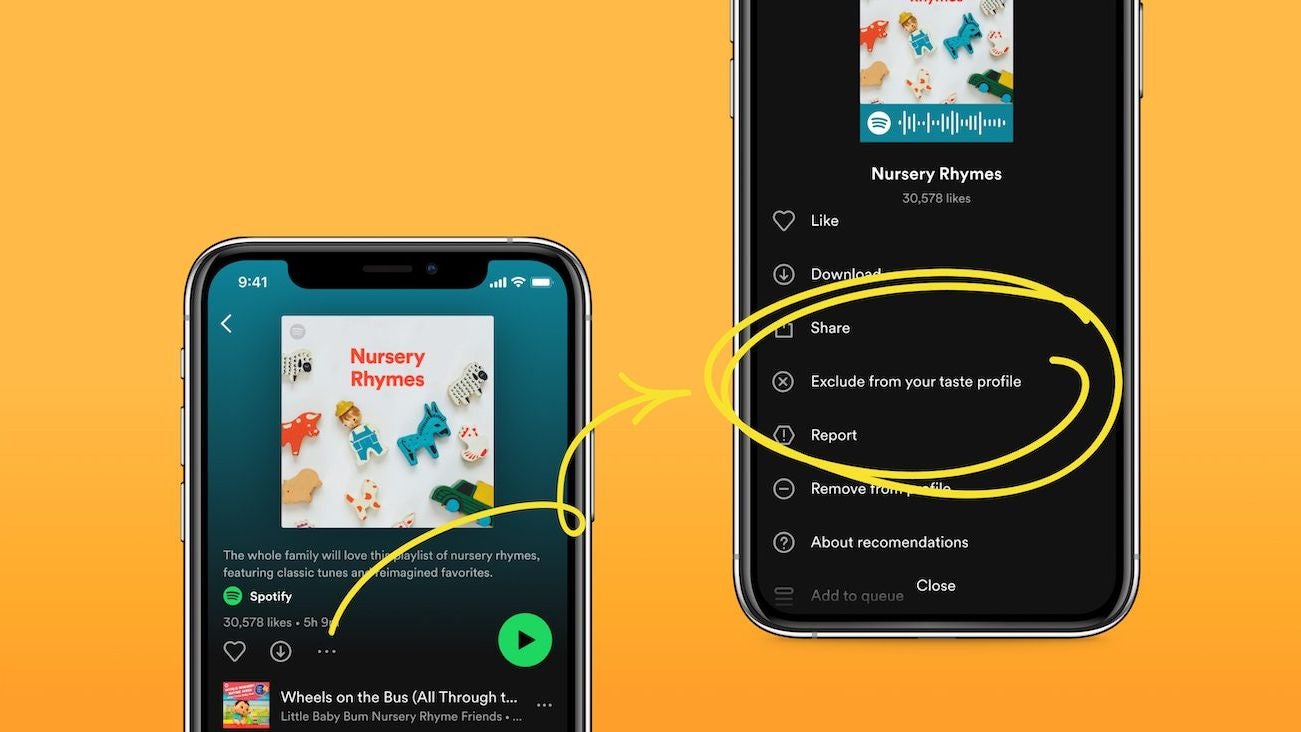
Spotify’s algorithms have brought to my attention many amazing bands over the years, but there are cases when you wouldn’t want impurities introduced into your carefully nurtured taste profile. There are guys in the company who apparently think the same way, because there’s a new feature that will help you keep your pristine profile unsullied.
Exclude From Your Taste Profile is a new feature that’s currently rolling out, and it will allow you to negate the impact of certain playlists on your future recommendations. Assume you’re at a party and want to play something out of your usual repertoire for fun. You can select a playlist and choose to exclude it from your taste profile (it’s pretty self-explanatory, really).There are numerous applications for this; for example, you can still use child-oriented playlists to put your child to bed or make them smile with the 101st rendition of Baby Shark without being bombarded with Sesame Street music recommendations afterwards.
Spotify announced the new feature via a blog post on the official For The Record page (what a great name). There’s also a little How-to, if you need specific instructions on how to use this new feature.
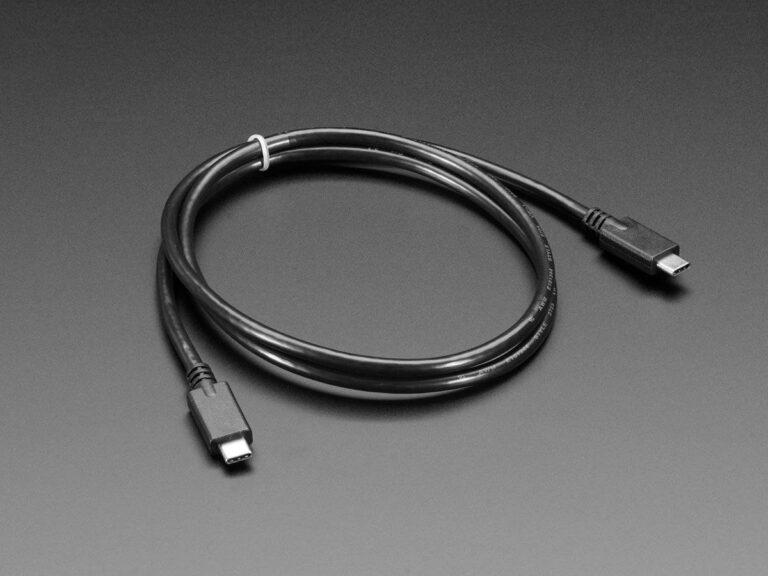
Most phones these days are using USB-C for charging, there are still some exceptions, but very rare. So it’s a good idea to pick up a few spare USB-C cables so that you can charge your phone anytime and anywhere.
It’s a good idea to have one next to your bed, as well as one in your car and one at your desk (either at your home office or the actual office, or both). That way you can charge when your phone gets low and not have to worry about it.
In this list of the best USB-C cables, we have rounded up a number of USB-C to USB-C cables, as well as USB-A to USB-C cables. Now it’s worth mentioning that only the USB-C to USB-C cables on this best of list will work with fast charging. This is because most fast chargers use USB-C PD. So a USB-A to USB-C cable can’t even plug into it.
Best USB-C Cables
When looking for USB-C cables, you’re going to want USB 3.1 Gen 1. As that is currently the latest version of the standard, and it will work for charging your smartphone quickly, as well as your Chromebook or MacBook (or Windows laptop, depending on the laptop). So it is a bit more versatile.
This USB-C cable from Anker does support the latest generation USB spec, that’s USB 3.1 Gen 1. So you’re going to get some fast data transfer out of this one, up to 10Gbps. And it works great for playing 4K video.
It also has support for USB-C PD, which is how most fast charging standards work. Though that does generally depend on the charger it is plugged into. Anker also provides a lifetime warranty on this cable.
This cable from Cable Matters also supports USB 3.1 Gen 1, so you’re going to be able to use this one for a while. It supports up to 10Gbps speeds, which is fast enough for 8K @ 60Hz too. And of course, it works with fast charging over USB-C PD up to 100W.
This is about three feet long, so it’s not super long, but this is the length of the cable that comes in the box with your smartphone. So it’s not too bad.
If you need a spare USB-C cable, AmazonBasics has you covered. This is just a plain old USB-C cable, and it does support fast charging. So you can use it with the faster charging chargers out there like OnePlus’ 100W or more chargers.
What makes this cable special is not the fact that it is a braided cable. That’s nice, but that’s not what is so cool here. It’s the right angle for charging. This makes it easier to plug in your phone and still use it. Or even use it for charging a laptop, and keep the cord out of the way. Which is a really nice feature. This is also a fairly long one, coming in at 6.6-feet long.
This is a rather unique USB-C cable from UGREEN, as it is at an angle. Making it easier to hold onto your phone while you are charging it. Which is always pretty cool. This is a six-foot long cable, so nice and long to use while in bed.
It supports fast charging, but no more than 20W. And that’s due to this using USB-A on the other end. But still a really good option for those that want that right angle for the USB-C charger.
This is the same as the Anker PowerLine+ cable that was listed above, but this is shorter and comes in a single cable. Instead of a three-pack.S o this is a 3-foot long cable, and is still USB-A to USB-C. And it does support fast charging up to around 20W.
It is still braided, so you can buy this one and expect it to last a very long time before you need to replace it. In fact, the nylon will likely start to fray long before you need to replace this one. Like the other Anker USB-C cables on this list, this also comes with Anker’s lifetime warranty. So if anything does go wrong here, you can get in touch with Anker and they’ll replace it for you, free of charge.
This is another USB-C cable that has a right-angle. These are really starting to become pretty popular, and it’s not hard to see why. Especially since USB-C is used for more than just smartphones. This is also a braided cable, so you’ll be able to keep this one for a long time. As it’s a lot less likely to break.
This is the same USB-C cable that Samsung includes in the box with every phone that it sells. So there’s nothing special here, it’s just a spare USB-C cable that will do its job. It’s a one-meter or 6.6-foot long cable, so nice and long for using in bed.
Here’s one final option from UGREEN. This is another braided USB-C cable, but this one is rated for up to 100W of charging speeds. Now, all of the cables on this list can do fast charging at that speed, but this one is actually rated for it, so it’ll likely last longer than the others here.
With the advancements in technology today our lives are becoming easier than ever. One of the most noticible ways it has done this is by providing us with mobile app-based microlearning. Microlearning is an effective way to learn new skills quickly and efficiently as it involves breaking down complex topics into small, more easily-digestible chunks of information. Mobile apps make it even easier to make use of microlearning solutions as you can access them anywhere, anytime. With mobile app-based microlearning students can tailor the content they want to learn and set their own pace for learning. This allows them to focus on what’s important for them and maximize their learning efficiency.
Additionally, these apps often provide interactive elements such as quizzes or games that help reinforce concepts and keep users engaged in the learning process. Finally, mobile app-based microlearning also gives learners the flexibility to study at their own convenience without having to stick to a specific schedule or location. All in all, mobile app-based microlearning is an effective way for learners to maximize their learning efficiency while still getting quality education on a variety of topics.
How does a mobile app for microlearning facilitate the learning process?
Mobile apps for microlearning can be incredibly helpful in facilitating the learning process. By breaking down complex topics into smaller and more manageable chunks, learners are able to focus on one concept at a time and gain a better understanding of the material. Furthermore, with the help of mobile apps a learner can access content anytime and anywhere, making it easier to fit learning into their busy schedules. Mobile apps also provide interactive features such as quizzes and games that help engage learners and make the learning process more enjoyable. Finally, mobile apps offer personalized feedback that helps learners track their progress and identify areas where they need additional support or practice.
Are there any security considerations when using mobile apps for microlearning?
Needless to say, there are definitely a number of security considerations users need to keep in mind when using mobile apps for microlearning. First and foremost, they need to ensure that the app is secure and properly encrypted. By making sure that all data sent between the user and the app is encrypted it leaves little to no room for that data to be accessed by unauthorized parties. Next, users should make sure that their devices are password-protected and have up-to-date antivirus software installed. It is also important to ensure that any third-party services used by the app are secure as well. Finally, users should always read through an app’s privacy policy before downloading or using it to make sure they understand how their data will be used and stored.
What strategies should be employed to ensure effective use of a mobile app for micorlearning?
It is imperative to focus on the user experience in order to ensure the effective use of a mobile app for microlearning. The app should be designed with the user in mind and should be intuitive and easy to navigate. The content of the app also needs to be easily manageable and digestible, so that users can process and comprehend it quickly. Doubtlessly, this will help keep users engaged and motivated to continue learning. It is also important to provide feedback on progress so users can track their progress and stay motivated. Finally, it is important to make sure the app works across multiple devices so users can access it from any device they choose.
How can mobile app-based microlearning be tailored to different learning styles?
Mobile app-based microlearning can be tailored to different learning styles. This can be made possible by providing a variety of content formats. For example, visual learners may benefit from infographics or videos, while auditory learners may prefer podcasts or audio recordings. Additionally, interactive elements such as quizzes and games can help engage kinesthetic learners. By offering a range of content types, mobile app-based microlearning can accommodate different learning styles and ensure that all users are able to access the material in a way that works best for them. Furthermore, personalization features such as adaptive learning paths and personalized recommendations can help tailor the experience even further by allowing users to customize their own learning journey based on their individual needs and preferences.
To maximize learning efficiency with mobile app-based microlearning, it is important to focus on providing engaging content in small chunks, using interactive elements like quizzes and games, and ensuring that the content is tailored for different learners. Additionally, tracking progress and providing feedback are essential components of effective microlearning.
It seems like the developers of the popular dating platform Tinder are looking to equip users with more tools for safety. And with Valentine’s Day fast approaching — which is also your kind reminder to check out our Valentine’s Day deals guide — is it any wonder at all?
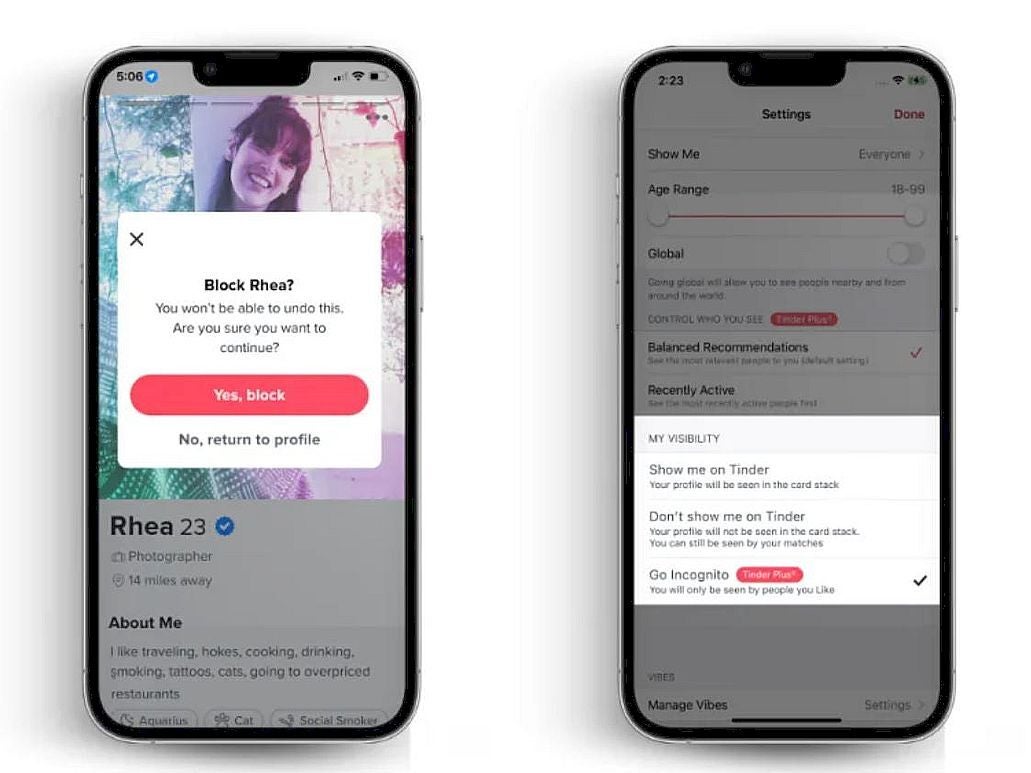
But, come on — how can an app that is all about matching strangers provide more safety? Well, through an Incognito Mode, of course. While it may seem counterintuitive at first, it actually makes sense, as when turned on, only the users that you’ve liked can view your profile.
That may limit your reach, per say, however it also sounds like adding a higher success rate into the mix, as you’ll have a larger say in who gets to mingle with you. But that’s not all: you can outright block users straight from your feed, if you are certain in your abilities to judge a book by its cover photo.
A quick example of some of the new features.
There is more too! Users will get the option to long press a message in order to send a report to Tinder staff regarding the user in question. The company is hoping that this will help them moderate their community in a way, which punishes inappropriate behavior.
The app also received minor tweaks to its “Are You Sure” and “Does This Bother You” features, which basically nudge users into being more considerate when talking to one another. And it seems to be working, as ever since the latter was introduced, the company has been receiving 46% more user reports. Yay?
In case you are becoming stressed about your dating habits, you can always turn to the official Tinder dating online guide, which has been drafted up in an attempt to end sexual harassment. Definite yay! The update is rolling out for the Tinder app right now, so if you haven’t checked recently, it may be high time to do so.
Every music streaming service has something that makes it stand out, and Apple will unveil one that will definitely stick out. According to CNBC, Apple will launch its classical music-only app later this month.
Shocker: people still listen to classical music nowadays (GASP!). We can’t deny that classical music just doesn’t get as much attention as more modern genres of music. Streaming apps usually treat classical music as an afterthought while today’s latest hits overshadow it.
This leads classical music lovers to see incomplete libraries of music. They’ll search only to find sections of larger collections of works. “Looking for that 10-volume collection of Muzio Clementi’s piano sonatas? Well, here are volumes 2, 4, and 7. Enjoy!”
Apple will launch its classical music app later this month
It seems that Apple wants to help those distraught classical music lovers. We first got word about this potential app over a year ago, and the company has now officially announced it.
It bears the Apple Music name (being called Apple Music Classical), but it’s actually its own standalone app. It seems like a good idea for the company to make it its own app. It’s more assuring going to an app dedicated specifically to classical music rather than it being a section in the main app.
Apple says that its classical music app will boast more than 5 million tracks, and that’s quite the collection. Not only that, but the platform will have thousands of exclusive albums at launch. That’s really interesting, as it gives Apple Music Classical something else that other platforms don’t have.
We’re not sure how many classical music tracks platforms like YouTube Music and Spotify have, but we’re not sure they have as many as 5 million. Having exclusive content is just the icing on the cake.
The app will officially launch on March 28th. If you’re excited, you can find the app on the Apple App Store now and pre-order the app. If you’re an Apple Music subscriber, you’ll be able to use the app for no charge. If not then you’ll need to pay a monthly fee. We don’t know what the price is just yet.