Well, the chat app wars are raging, and the latest strike comes from Will Cathcart, Head of WhatsApp at Meta. In a rapid-fire style series of tweets, Cathcart mounts some serious attacks, calling Telegram “Russian spyware,” and urging people not to use it.
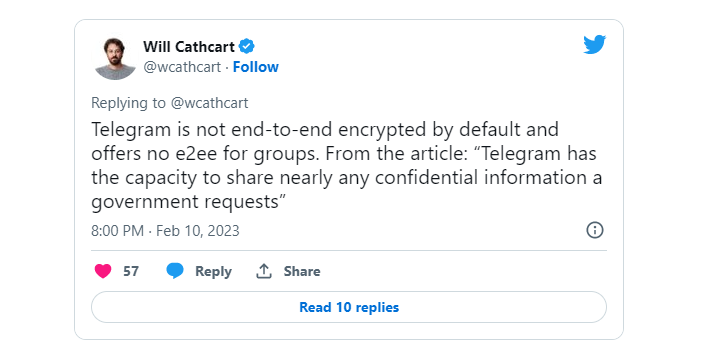
This war is a long-standing one, and it dates way back in time, but the latest point of discussion seems to be end-to-end encryption. Cathcart referred to an article by Wired and his own critique of Telegram’s implementation of end-to-end encryption (E2EE), pointing out that it has not been verified independently. Additionally, Cathcart noted other weaknesses in the E2EE implementation, such as the fact that it is not enabled by default and is not available for group chats.
“Telegram lacks real transparency most technology companies have adopted. “In many cases, it’s impossible to tell what’s really happening…whether spyware or Kremlin informants have been used to break in.”
You can jump to Twitter and “enjoy” the whole show (with or without popcorn), but it’s safe to say that there are always two sides to every story. WhatsApp has been criticized for backing up chats to Google Drive and effectively giving government agencies the means to warrant out any information through Google.
Cathcart rounds up his attack with some “friendly” advice for people who don’t want to use WhatsApp for some reason. “Don’t use Telegram!” WhatsApp’s head doesn’t list any alternatives, but experts in the industry think that Signal is the most secure option at the moment.
February 2023 saw a record number of victims for LockBit, a record high ransom demand, and a devastating assault on the City of Oakland.
This article is based on research by Marcelo Rivero, Malwarebytes’ ransomware specialist, who builds a monthly picture of ransomware activity by monitoring the information published by ransomware gangs on their Dark Web leak sites. This information represents victims who were successfully attacked but opted not to pay a ransom.
It seems like LockBit wasn’t content with having us merely crown them as one of the five most serious cyberthreats facing businesses in 2023. In February, the most widely used ransomware-as-a-service (RaaS) posted a total of 126 victims on its leak site—a record high since we started tracking the leaks in February 2022.
Known ransomware attacks by gang, February 2023Known ransomware attacks by country, February 2023Known ransomware attacks by industry sector, February 2023
Companies attacked along LockBit’s warpath last month include financial software firm ION Group and Pierce Transit, a public transit operator in Washington state. LockBit claimed that ION Group had paid the ransom and demanded $2 million from Pierce Transit.
Speaking of ransom demands, it seems like that’s another area where LockBit broke records last month.
In early February LockBit tried to get $80 million out of the UK’s Royal Mail—the largest demand since asking Continental for $50 million in 2022. Royal Mail rejected the demand, calling it ‘absurd’, and LockBit consequently published the files it stole from the company—but not without also leaking a chat history showing the negotiations between the two parties, which featured the unusual sight of a Royal Mail negotiator giving the feared ransomware gang the runaround.
Lockbit and Royal Mail negotiations
Confirmed attacks by Vice Society, the ransomware gang infamous for wreaking havoc on the education sector, reached their three-month low last month. The apparently Russian-based group tallied just two victims on its leak site in February, but—true to their modus operandi—both of them were educational institutions: Guildford County School, a specialist music academy in London, and Mount Saint Mary College, a liberal arts college in New York. Needless to say, we’re not banking on this persistent education sector threat going away anytime soon.
After LockBit, ALPHV (aka BlackCat) and Royal again topped the list of most known victims last month. But as it turns out, these two groups have more in common than just their high placements: Both are considered big dangers to healthcare organizations. The US Department of Health and Human Services (HHS) even released a detailed report on Royal and ALPHV in mid-January 2023 outlining the dual threat to the US health sector. Last month, however, Royal and ALPHV apparently only attacked one healthcare organization between them—ALPHV’s attack on the Pennsylvania-based Lehigh Valley Health Network. Their combined 48 leaked victims last month were across a range of industries, mainly centered around manufacturing, logistics, and services. It just goes to show that just because ransomware is used to target one sector in one month that doesn’t necessarily mean it won’t be used against a different industry in another month.
Ever since we first reported on it in November 2022, witnessing the emergence of the Play ransomware gang over the months has been one of those “Aw, they grow up so fast (and evil)” type of situations. After their surge in December activity fell by about 76 percent in January, it made something of a comeback last month with 11 known victims, including the City of Oakland, where an attack shutdown many of the city’s services. In fact, the situation was so bad in Oakland that the Interim City Administrator declared a state of emergency shortly afterwards.
New ransomware groups
Medusa
Not since we introduced Royal ransomware in November 2022 have we seen a new gang burst onto the scene with as much activity as Medusa did in February. The group published 20 victims on its leak site, making it the third most active ransomware last month. Among its victims are Tonga Communications Corporation (TCC), a state-owned telecommunications company, and oil and gas regulator company PetroChina Indonesia.
The Medusa leak site
V is Vendetta
V is Vendetta is a newcomer that published three victims in February on a site that follows the not-so-new practice of branding itself with imagery ripped from a particular mid-2000s dystopian action film. The site is noteworthy not only for its awful “teenager’s bedroom” design but also for using a subdomain of the Cuba ransomware dark web site.
The V is Vendetta leak site
DPRK’s ransomware antics
In early February, CISA released an alert highlighting the continuous state-sponsored ransomware activities by the Democratic People’s Republic of Korea (DPRK) against organizations in the US healthcare sector and other vital infrastructure sectors.
The agencies have reason to believe cryptocurrency ransom payments from such operations support DPRK’s “national-level priorities and objectives.” The report states:
The authoring agencies assess that an unspecified amount of revenue from these cryptocurrency operations supports DPRK national-level priorities and objectives, including cyber operations targeting the United States and South Korea governments—specific targets include Department of Defense Information Networks and Defense Industrial Base member networks,
In the last few years, two new ransomware strains from DPRK have surfaced: Maui and H0lyGh0st.
US Marshal Service ransomware attack
It seems ransomware attackers are going after the big fish again.
At least, it’s been a while since a federal agency like the US Marshals Service (USMS) was hit with ransomware. In late February 2023 a threat actor managed to infiltrate the agency and to get hold of sensitive information about staff and fugitives.
It’s far from rare to see a ransomware attack on governments, to be sure. State, Local, Tribal, and Territorial (SLTT) governments were hammered by ransomware throughout 2022. Attacks on the federal government, however, remain few and far between.
If there’s one thing this attack taught us, it’s that no organization is safe from ransomware—but that’s not all. It’s also the most eye-catching attack on the fabric of the US since the Colonial Pipeline attack by the DarkSide ransomware gang. There is no word about who is responsible for the attack or whether or not there has been a ransom demand.
If this is the work of a regular ransomware gang rather than a political statement, it’s a surprise that they’re this bold (or frankly, stupid, for thinking the federal government would ever pay them). Attacking a federal government paints a huge target on their backs.
We know there have been times where affiliates of ransomware gangs go rogue and attack an organization that’s off-limits according to the gangs’ rules—but until more information is released, many details about the USMS breach remain speculative.
Detect intrusions. Make it harder for intruders to operate inside your organization by segmenting networks and assigning access rights prudently. Use EDR or MDR to detect unusual activity before an attack occurs.
Stop malicious encryption. Deploy Endpoint Detection and Response software like Malwarebytes EDR that uses multiple different detection techniques to identify ransomware.
Create offsite, offline backups. Keep backups offsite and offline, beyond the reach of attackers. Test them regularly to make sure you can restore essential business functions swiftly.
Write an incident response plan. The period after a ransomware attack can be chaotic. Make a plan that outlines how you’ll isolate an outbreak, communicate with stakeholders, and restore your systems.
Our Ransomware Emergency Kit contains the information you need to defend against ransomware-as-a-service (RaaS) gangs.
The Xiaomi 13 Pro launched, and it’s ready to compete with the best devices out there. Apple’s crown jewel, the iPhone 14 Pro Max, is considered to be one of those, and one of the most popular high-end phones generally. Therefore, we’re here to compare the Apple iPhone 14 Pro Max vs Xiaomi 13 Pro. These two phones do differ in so many ways, and that should make for an interesting comparison.
We’ll first list their spec sheets, as we usually do when it comes to comparisons. Following that, we’ll compare the two devices across a number of categories, including design, display, performance, battery, cameras, and audio. This will, hopefully, help you make a purchasing decision. So, let’s get started.
The Apple iPhone 14 Pro Max and Xiaomi 13 Pro sure do look different, and also feel different in the hand. The iPhone 14 Pro Max has flat sides, all of them. That includes its display too. The phone is made out of stainless steel and glass. The Xiaomi 13 Pro has a lot of curves, on the other hand. Even its display is slightly curved towards the sides. The device is made out of aluminum and ceramic, at least the global model is.
Apple’s flagship is slightly shorter, but noticeably wider than the Xiaomi 13 Pro. It is also slightly thinner in comparison. It weighs 240 grams, while the Xiaomi 13 Pro weighs 229 grams (ceramic model). We’ll refer to the ceramic model throughout this comparison, as that is the only variant that launched globally. The iPhone 14 Pro Max has uniform bezels, and a pill-shaped cutout on the front. The Xiaomi 13 Pro has extremely thin bezels, and a centered display camera hole.
If we flip the two phones around, you’ll see considerably different designs on the back. Both of them have display camera islands in the top-left corner, but they do look fairly different. Both phones do include three cameras on the back, though. The iPhone 14 Pro Max is a bit more annoying to use with one hand due to its width, and the fact it cuts into your hand due to its flat bottom and weight. The Xiaomi 13 Pro is not easy to use with one hand either, as it’s also quite large. Both phones are quite slippery, so the usage of a case is recommended.
Apple iPhone 14 Pro Max vs Xiaomi 13 Pro: Display
The iPhone 14 Pro Max includes a 6.7-inch 2796 x 1290 LTPO Super Retina XDR OLED display. This panel is flat, and it supports an adaptive refresh rate of up to 120Hz. It supports HDR10 content, and also has Dolby Vision support. It can reach a maximum brightness of 2,000 nits in direct sunlight. The display aspect ratio here is 19.5:9, and the panel is protected by the Ceramic Shield glass.
The Xiaomi 13 Pro, on the other hand, has a 6.73-inch QHD+ (3200 x 1440) LTPO AMOLED display. This display is curved, and it supports up to 1 billion colors. It has an adaptive refresh rate of up to 120Hz, and Dolby Vision support as well. This panel also gets immensely bright at 1,900 nits of peak brightness. The display aspect ratio here is 20:9, and the panel is protected by the Gorilla Glass Victus.
Both of these phones have top-of-the-line displays. They’re immensely sharp, vivid, and have great viewing angles. On top of that, they’re really fluid, and get more than bright enough. Even in direct sunlight, both displays should get bright enough for you to be able to easily see what’s on them. These are some of the brightest offerings out there. They’re both also well-protected. You can’t go wrong here, just note that one is flat, and the other is curved.
Apple iPhone 14 Pro Max vs Xiaomi 13 Pro: Performance
The iPhone 14 Pro Max is fueled by the Apple A16 Bionic SoC. That is Apple’s 4nm flagship processor. The phone is also equipped with 6GB of RAM, and NVMe storage. The Xiaomi 13 Pro comes with the Snapdragon 8 Gen 2 SoC, the best processor Qualcomm has to offer. The phone is equipped with 12GB of LPDDR5X RAM and UFS 4.0 flash storage. Xiaomi’s flagship has more powerful RAM and storage, while both SoCs are outstanding.
What does this mean for regular, day-to-day performance. It means that you’ll get an immensely fluid phone, regardless of what you do, basically. Getting them to slow down is not an easy task. They glide through browsing, consuming multimedia, image editing, messaging, and so much more. Even games are not a problem for either of the two phones, which is to be expected. Even the most powerful games out there run very nicely on both smartphones. They do get warm during intense gaming sessions, but we did not notice a performance drop-off or anything of the sort.
Apple iPhone 14 Pro Max vs Xiaomi 13 Pro: Battery
Apple’s flagship comes with a 4,323mAh battery, while the Xiaomi 13 Pro has a 4,820mAh unit. Do note that iOS devices usually come with smaller batteries, but that doesn’t mean they offer worse battery life. What’s the case here, though? Well, both smartphones offer excellent battery life, but the iPhone 14 Pro Max does have the edge. Apple improved its battery life since its launch, actually.
Getting to an 8-hour screen-on-time mark with both phones is doable, while the iPhone 14 Pro Max usually lasts a bit longer than that. The Xiaomi 13 Pro sometimes fell under that mark for us, though. Your mileage will, of course, differ, maybe even considerably. Your installed apps will be different, and so will your usage and signal where you live. There are simply too many factors. The point is, both phones deliver really good battery life.
When it comes to charging, the Xiaomi 13 Pro dwarfs the iPhone 14 Pro Max. Not only does it come with a 120W charger in the box, but it supports 120W wired charging. It also supports 50W wireless charging, and 10W reverse wireless charging. The iPhone 14 Pro Max doesn’t have a charger in the box, and it supports 20W wired, 15W MagSafe wireless, and 7.5W Qi wireless charging.
Apple iPhone 14 Pro Max vs Xiaomi 13 Pro: Cameras
The iPhone 14 Pro Max has a 48-megapixel main camera, a 12-megapixel ultrawide unit (120-degree FoV), and a 12-megapixel telephoto camera (3x optical zoom). The Xiaomi 13 Pro, on the other hand, comes with a 50.3-megapixel main camera (1-inch sensor), a 50-megapixel ultrawide camera (115-degree FoV), and a 50-megapixel telephoto camera (3.2x optical zoom). Xiaomi’s flagship also has Leica lenses on all three cameras.
So, how do they compare? Well, they both shoot great photos, but completely different ones. The iPhone 14 Pro Max tries to keep things closer to real life in terms of looks. The Xiaomi 13 Pro has that Leica image style and two shooting styles you can choose from. It offers Leica Vibrant and Leica Authentic modes. The Leica Vibrant is what most people will prefer, as the colors get emphasized a bit more.
They both provide really detailed photos, though the ones from the Xiaomi 13 Pro look a bit more moody, in lack of a better word. That especially goes for low light images. They also look more like they were taken with professional cameras due to the natural, creamy bokeh. The dynamic range is good on both, but they both struggle with white balance from time to time. It could end up being fixed soon, though, via an update. They both do a great job with macro photography, while the Xiaomi 13 Pro shines when it comes to portrait images taken with the telephoto camera.
Both phones do a good job when it comes to ultrawide shots, and they keep the color science close to what the main cameras offer. The video recording is better on the iPhone 14 Pro Max, but the Xiaomi 13 Pro does a great job too. It’s all a matter of preference when it comes to these cameras, both phones do a great job.
Audio
There is a pair of stereo speakers on both of these smartphones. Those speakers are very good on both phones. They’re more than loud enough, and they’re also detailed. The distortion is not exactly noticeable.
There is no audio jack on either phone, though. You’ll need to utilize the Type-C port, which is located at the bottom of both phones. If you prefer a wireless connection, however, Bluetooth 5.3 is on offer on both devices.
To step up its growth in the AI industry, Google is improving its Universal Speech Model. Currently, the company is working on adding over 1,000 languages to its AI models. This will help to diversify the usage of these models, making them available globally regardless of the language barrier.
Google has been working on this AI model for quite a while and will soon unveil it to the public. This product will be unveiled during the Google I/O event that will take place in a few months. The Universal Speech Model will aid Google to achieve its goal in the artificial intelligence industry.
Already, some Google products are making use of this AI model. Improvements to this product are ongoing to make it available for use in other apps and services. More information regarding this product is available to the public ahead of its unveiling.
More information on the Google Universal Speech Model
With the growing competition in the AI industry, there is a need for the competition to evolve. Major players like Google and Microsoft are constantly improving their AI models to better serve their customers. The Universal Speech Model is Google’s response to the competition, and it looks to improve its services.
Google recently shared some information on this AI language model. According to the company, this model is a “critical first step” to help them achieve their goals in the AI industry. One remarkable part of this system is that it will support over 1,000 languages spoken around the world.
Through training, this AI system is effective in handling lots of languages. Currently, the Universal Speech Model can operate in over 100 languages. Google is now working to expand its reach to cover more languages.
YouTube is one app that currently puts the Google Universal Speech Model to good use. It does this via automatic speech recognition and translation, which works with different languages. Other core Google apps also make use of this AI language model for speech-related tasks.
The Universal Speech Model is undergoing improvement, some of which will be made public at the Google I/O event. This language model will help reshape how the public relates to artificial intelligence. More information on this AI model will be available after the Google I/O event.
WhatsApp has been hard at work lately adding features in order to compete with the likes of Signal and Telegram. However, there are a few new features already making their way to the Android app, including one that is still in the beta testing phase.
According to WABetaInfo (via Techradar), the new features are in addition to the status update ones that were announced last week, which were meant for both iOS and Android. These additional new features target the Android app specifically and were spotted when they appeared in the release notes of the latest version available via the Google Play Store.
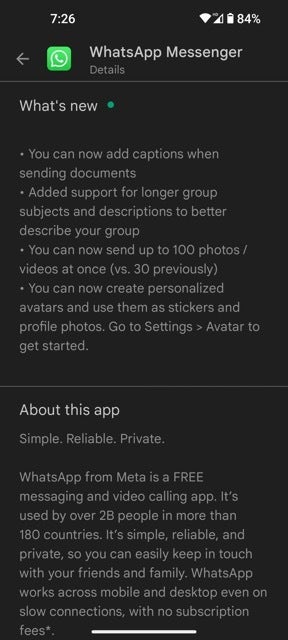
The version in question is 2.23.3.77, which has an update date of February 13th, and lists the below new features:
You can now add captions when sending documents
Added support for longer group subjects and descriptions to better describe your group
You can now send up to 100 photos / videos at once (vs. 30 previously)
You can now create personalized avatars and use them as stickers and profile photos. Go to Settings > Avatar to get started.
The most prominent and useful one of all the aforementioned features, at least to me, happens to be the increase in the number of photos and videos that can be sent all at once within a conversation. Going from 30 to 100 is quite the leap and hopefully enough for even the most active photographers.
However, there is one rumored upcoming feature that has not yet made it out of beta: Disappearing Messages. The ephemeral message feature, made popular initially by Snapchat, is currently only available in the beta version of the app. Additionally, the beta version also includes a “Kept Messages” folder, which is meant to store the disappearing messages you prefer to keep indefinitely. Sadly, the beta version of WhatsApp for Android is currently full and not accepting new registrations.
All of these changes come at a time when Will Cathcart, Head of WhatsApp at Meta, is launching an all-out war against Telegram by urging his Twitter followers not to use that app, going as far as to label it as “Russian spyware.” So far, this battle has been beneficial for WhatsApp users in that it has sparked some innovation and new features to be launched. It will be interesting to see how far this goes and how much we as users can get out of it.
According to the report, 36% of users at Hackforums were likely women, based on their use of language, and 30% of XSS forum users, a Russian language cybercrime forum, were reportedly women.
In recent years, there has been a shift toward increased gender equality in underground cybercriminal forums. This stands in stark contrast to the more male-dominated cybersecurity industry, where women continue to face significant barriers to entry and advancement.
A recently published study by Trend Micro pushes forward a similar finding wherein at least 30%, if not more, of cybercriminal forum users, are women. Although the methodology used makes the results of the study somewhat unreliable, the report itself recognizes this.
Trend Micro inspected five English-language cybercrime forums: Sinister, Cracked, Breached, Hackforums, and (now defunct and seized) Raidforum, as well as five Russian-language sites: XSS, Exploit, Vavilon, BHF, and WWH-Club.
Since these sites are frequented by largely anonymous users, tools such as Semrush and uClassify’s Gender Analyzer V5 were used to estimate the number of female users.
According to the report, 36% of users at Hackforums were likely women, based on their use of language, and 30% of XSS forum users were reportedly women, based on the same analysis. At first glance, these numbers indicate that cybercriminal forums are more meritocratic than the white hat world, but this article will delve deeper to understand the reasons behind this difference.
One reason for the gender diversity in cybercriminal forums is that these groups are often more decentralized and less hierarchical than traditional workplaces. This can make it easier for women to participate and contribute their skills without fear of discrimination or harassment.
It is important to understand that these forums have traditionally been male-dominated spaces where men exchange information, tools, and services related to cybercrime.
However, with the increased diversity in the cybersecurity industry over the years, more women have entered the field. As a result, there are now more women who possess the skills and knowledge necessary to participate in these forums.
But why is gender diversity not growing at an equal rate in the cybersecurity workforce? The reasons for this gender gap are complex and multifaceted. Women face a range of barriers to entry, including unconscious bias, stereotypes, and a lack of female role models and mentors in the industry. Additionally, the highly technical and male-dominated culture of cybersecurity can create a challenging environment for women to thrive.
According to a 2022 report from Cybersecurity Ventures, women make up just 25% of the cybersecurity workforce, with even lower numbers in leadership roles. This gender gap is especially concerning, given the increasing demand for cybersecurity professionals and the potential consequences of a lack of diversity in this field.
One of the most significant reasons for the increase in the number of female users on cybercriminal forums is anonymity, which can be empowering for women who may face discrimination or harassment in the workplace.
In an underground cybercriminal forum, participants are judged solely on their skills and contributions, rather than their gender or other personal characteristics. This creates a level playing field where women can demonstrate their expertise and gain respect from their peers. As a result, women who seek out a gender-anonymous space have been increasingly drawn to these forums.
Lastly, the rise of cryptocurrencies has made it easier for women to participate in these forums. Traditionally, cybercriminals have used traditional payment methods, such as wire transfers or PayPal, to exchange money for tools and services.
Ilya Lichtenstein and his wife, Heather Morgan, were arrested in February 2022 and charged for their involvement in money laundering of funds stolen in the Bitfinex cryptocurrency hack of 2016.
Suzette Kugler, a 59-year-old US woman, was arrested for hacking the internal network of her employer, PenAir.
Valerie Gignac, a 27-year-old Canadian woman, was arrested in April 2015 for spying on people through webcams, harassing victims, and even owning a famous hacking forum with more than 35,000 members.
Eighteen-year-old Michaela Gabriella King carried out crippling DDoS attacks on her school system.
However, these methods are often difficult for women to use, as they may not have access to a bank account or a credit card. Cryptocurrencies, on the other hand, can be easily obtained and used anonymously, making it easier for women to participate in these forums.
What all of this proves is that women are not absent from the cybersecurity industry, but rather likely to be on the wrong side of it. Efforts to address gender inequality in cybersecurity are underway, with initiatives such as Women in Cybersecurity (WiCyS) and the National Cyber Security Centre’s CyberFirst Girls competition aimed at encouraging more women to pursue careers in this field.
However, progress has been slow, and it will likely take a concerted effort from the industry as a whole to truly move the needle on gender diversity. By addressing the underlying barriers to entry and fostering a more inclusive culture, we can create a more equitable and effective cybersecurity workforce where women with a passion for cybersecurity become a valuable part of the industry.
Security firm ESET’s cybersecurity researchers have shared their analysis of the world’s first UEFI bootkit being used in the wild, which can bypass Secure Boot on fully-updated UEFI systems. It can even bypass it on fully-updated Windows 10 and 11 versions.
ESET’s Deep-Dive Analysis of UEFI Bootkit
According to researchers, there is no indication of who created this bootkit or its name, so they concluded that it corresponds to the BlackLotus bootkit. This bootkit has been promoted in underground cybercrime forums since 2022 for $5,000, with an additional $200 for updates.
Understanding BlackLotus Capabilities
BlackLotus is written in assembly and C programming languages, so developers can insert a suite of powerful features into an 80kb file. It not only disables Secure Boot but many other OS security mechanisms, including Hypervisor-protected Code Integrity (HVCI), BitLocker, and Windows Defender.
This bootkit can run on fully-updated systems running Windows 11 with UEFI Secure Boot enabled. It targets the firmware’s low-level chain called the Unified Extensible Firmware Interface (UEFI). This complex chain is responsible for booting modern computers. The UEFI bridges the computer’s firmware with the OS while serving as an OS itself.
Since the UEFI is located in the SPI-connected flash storage chip present on the computer’s motherboard, it is extremely hard to inspect or patch it. The difference between the way BlackLotus targets UEFI and other bootkits like MoonBounce, CosmicStrand, and MosaicRegressor is that these target the UEFI firmware stored in the flash storage chip whereas BlackLotus targets the software in the EFI system partition.
How Does BlackLotus Defeats Secure Boot?
It is achieved by exploiting a vulnerability found in all supported versions of Microsoft Windows and patched in January 2022. It is tracked as CVE-2022-21894. This is a logic flaw, dubbed “Baton Drop” by the researcher who discovered it, which can be exploited for removing Secure Boot functions entirely from the boot sequence when the PC starts.
Threat actors can easily exploit this flaw to obtain keys for BitLocker, which encrypts hard drives. For BlackLotus creators, this flaw has proven immensely useful because, despite being patched, the vulnerable signed binaries haven’t yet been added to the UEFI revocation list, which alerts about untrusted boot files.
According to researchers, hundreds of vulnerable bootloaders are currently in use, and if these signed binaries are revoked, it would render millions of devices useless. That’s why fully updated devices are still vulnerable because threat actors can replace patched software with vulnerable, old software.
Why UEFI Bootkits are a Threat?
UEFI bootkits are powerful threats because the UEFI has complete control over the operating system’s boot process. That is how it can disable various OS security mechanisms and deploy its own kernel-mode and user-mode payloads in early OS startup stages. This lets the attackers stealthily operate and gain high privileges.
How the Bootkit is Deployed?
The way this bootkit is deployed is unclear, but the attack chain involves an installer component that writes files to the EFI system partition and disables HVCI and BitLocker, after which it reboots the host.
BlackLotus disables protection solutions to deploy a kernel driver, which protects against the bootkit file deletion, and an HTTP loader. Conversely, the bootloader establishes communication with the control server and executes the payload.
Samsung’s upcoming Galaxy Z Fold 5 may miss out on one highly requested change from foldable fans. It could feature the same cover display as the 2022 model. We don’t have visuals to confirm that just yet, but tipster Ice Universe says the new Fold will get a 6.2-inch screen on the outside. It is the same size as the one on last year’s Galaxy Z Fold 4.
A 6.2-inch screen is pretty big for a smartphone. Fans weren’t asking for Samsung to make it bigger. But what everyone wants is a wider panel. The Galaxy Z Fold 4’s external display has a tall aspect ratio of 23.1:9. That’s much taller than the 19.5:9 aspect ratio of the Galaxy S23’s 6.1-inch display. The problem with a tall screen is some apps don’t fit perfectly. It also makes typing a little difficult. Long story short, the tall aspect ratio of the external display blocks the Galaxy Z Fold 4 from being a full-fledged smartphone without unfolding.
Fans were hoping that Samsung would fix this shortcoming with the Galaxy Z Fold 5 this year. But chances seem quite low. That’s not to say it’s 100 percent not happening, though. The tipster has only confirmed the size of the screen. They didn’t say anything about the aspect ratio. It’s very much possible that the Galaxy Z Fold 5 will feature a 6.2-inch cover display with a wider aspect ratio. Like, how Samsung brought the aspect ratio down from 25:9 on the Galaxy Z Fold 3 to 23.1:9 on the Galaxy Z Fold 4 without changing the display size.
The Galaxy Z Fold 5 and Flip 5 will bring some notable upgrades
Samsung is hard at work on its fifth-gen foldable smartphones. The company needs to be at its best more than ever because the competition is growing rapidly. Rumors so far have been quite promising too. The Galaxy Z Fold 5 and Galaxy Z Flip 5 are said to be thinner and feature a new type of hinge that reduces the crease on the display. The Flip model is also reportedly getting a bigger external display, which has also been one of the highly requested changes. Improved cameras are expected as well.
A wider cover display would make the Galaxy Z Fold 5 a worthy upgrade over the Galaxy Z Fold 4. Analysts are expecting as many as ten brands to launch a foldable smartphone this year with a total of 20 Fold-like models. Most of them will feature a wider display on the screen. Samsung can’t afford to lag in a market that is getting more competitive by the day. Lack of choices save it in the previous years but likely won’t anymore. We should get a clearer picture of the fifth-gen Galaxy foldables in the coming months.
It’s March, and for fans of College Basketball, that means March Madness. Now, before we get to the big NCAA Tournament and crown a new National Champion, we have the conference tournaments. Including this Big Ten Tournament in Chicago.
The Big Ten is one of the larger conferences in College Basketball, with 14 teams. That means that there’s going to be a handful of teams that will get to skip the first round, and a few more that get to skip the second round as well. Making for an interesting looking bracket. But in the end, there will only be one Big Ten Men’s Basketball Tournament champion. And that might be Purdue. However, in this tournament, we’ve seen lower seeds make it quite far. It is March Madness after all.
Here’s how you can watch the Big Ten Men’s Basketball Tournament this year.
What’s the Big Ten bracket?
The bracket has been announced, and since it does have 14 teams, some teams do get to skip out on the first round. Here’s the full bracket.
In the Big Ten Tournament, the top four seeds get a double bye. While the next four seeds get a single bye. So only the 11, 12, 13 and 14 seeds play on the first day. So in order to go the full distance, from one of the bottom seeds, that’s five games in five days you need to win. However if you’re in the top four seeds, that’s only three games in three days. A much easier task.
Purdue pulled out the regular season championship for the Big Ten this year. While the rest of the field – except Minnesota and Ohio State – mostly had the same record until the last couple of games. So this could end up being a pretty crazy tournament.
When is the Big Ten Tournament?
The Big East Men’s Basketball Tournament will kick off at 5:30PM CT on Wednesday, March 8 with the number 13 seed Ohio State taking on the 12 seed Wisconsin. Then, 25 minutes after that game ends, number 14 Minnesota will take on number 11 Nebraska. There will be four games on Thursday, another four on Friday, then two on Saturday and the Championship on Sunday, March 12.
Where can I watch the Big Ten Tournament?
The 2023 Big Ten Men’s Basketball Tournament will air on the Big Ten Network (BTN) and CBS. Only the semifinals and the championship will air on CBS, the rest of the games will be on BTN. Since these games are all being played in the same arena, the United Center in Chicago, these games won’t overlap. In fact, for a good number of the games, they will start 25 minutes after the previous one finished. So you can watch every single game in the Big Ten Tournament.
YouTube TV
YouTube TV is our best option for watching the Big Ten Men’s Basketball Tournament. That’s because it does have BTN available, as well as CBS. So you’ll be able to watch it all on YouTube TV. And one of the best features here is that there is unlimited cloud DVR. So you can record all the games and go back through and watch them later. You can also catch up with key plays from YouTube TV. Making it easier to watch the game, if you’re late.
YouTube TV does offer a free trial and you can sign up here.
Hulu + Live TV
Hulu + Live TV is a good option, if you don’t like YouTube TV. It’s not that we don’t like Hulu + Live TV, it’s just more expensive and doesn’t offer a whole lot more. For $70 per month, you can get BTN and CBS, along with most of the NCAA Tournament channels, to experience March Madness. It also has unlimited cloud DVR like YouTube TV.
Hulu does offer a free trial for Live TV, which you can sign up for right here.
When is Selection Sunday?
Selection Sunday is happening on March 12. That will be following the conclusion of Sunday’s conference championship games. Typically, CBS airs the Selection Sunday show between 6PM and 8PM ET. Though sometimes it can run a bit late if the 4PM games go into overtime.
During the show, we’ll find out who is in the NCAA Tournament this year, and who is not. While we have “experts” doing bracketology all year long, we kind of have a good idea of who is in and who’s not, the committee can still surprise us. It’ll also be interesting to see who gets to play who.
Keep in mind that conference tournament winners do get an automatic bid into the NCAA Tournament. So 32 teams will already be in the field, and the committee will need to add another 36 teams. As well as seeding them in the correct order. With four regions of 16 teams. Along with the first four games, there’s a total of 68 teams that get into the tournament. And the excitement of March Madness is upon us.
For the NCAA Tournament, the First Four games will take place in Dayton, OH on March 14-15. With the first and second rounds taking place March 16-19. The regionals happening from March 23-26. And the Final Four happening on April 1, with the National Championship on April 3 at NRG Stadium in Houston.
Apple has applied for a new patent that would allow iMessages to be read in the sender’s voice. And no, this is not Siri reading the message or a straight-up voice note. This is your phone reading the written words as it thinks they would sound and be said by the person writing them. (via PatentlyApple)For those of you who have used a VoIP service, this might remind you a bit of the Voicemail transcription some of those apps have, albeit working somewhat backward, as it is words being turned into audio and not the other way around.
As we already established, this would be nothing new practicality-wise, since Siri can already read out loud messages to you whenever you find it convenient. If this feature does end up reaching real implementation in Apple’s devices, it would serve more as a fun extension that would bring personality to iMessages, which might sound superficial, but these little details tend to be quite liked by most users.
How would iMessage to voice note work?
Whenever one side sends a message via the iMessage app to another person who owns an iPhone, the phone would ask if they would like to attach a voice file. What is this voice file you ask? Well, the good news is that you don’t actually have to manually train some kind of voice model because you have already been doing that by talking to Siri.By using all that it has heard you speak, Siri would have already created and stored the file on your phone. Once you send that voice file, on the opposite side the recipient would get to choose whether they want to receive just your message or the file with it as well. If they decide to accept both, then going forward your messages will be read with a simulation of your voice, instead of Siri’s.
Keep in mind that this is a just a patent, so there is no certainty about the feature reaching actual implementation in the future. That said, it is easy to imagine, as it just seems like something Apple wouldn’t skip on.

 Known ransomware attacks by country, February 2023