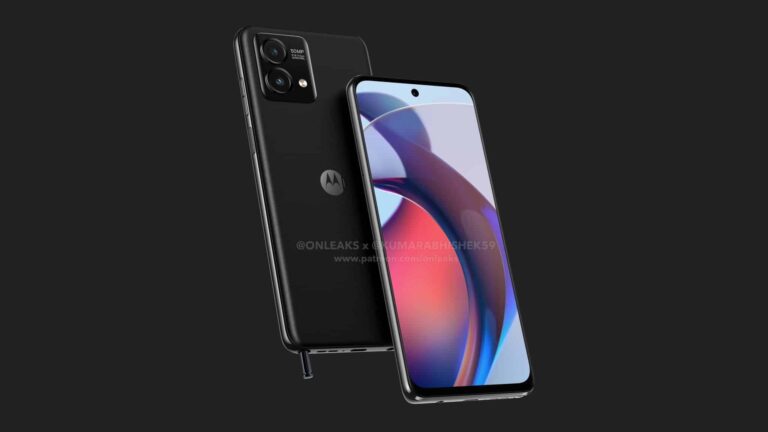
The Moto G Stylus 2023 will be available in a 4G variant, after all. While leaks so far have only talked about the 5G model, which has already picked up the FCC certification, a 4G model has now popped up on the benchmarking platform Geekbench. The listing revealed a few things about the upcoming Motorola smartphone.
Motorola launched the Moto G Stylus 2022 in February last year. The handset disappointingly came with Android 11 onboard when Android 12 had already been around for a good few months. The company isn’t repeating that mistake this year. The 2023 edition of the stylus-equipped phone will run Android 13 out of the box, Geekbench reveals.
The Lenovo-owned smartphone brand isn’t upgrading the processor, though. The Moto G Stylus 2023 seems to be getting the same MediaTek Helio G88 chipset as last year’s model. While the benchmark listing doesn’t explicitly name it, the model number MT6769V/CZ tells the story. This chipset has two ARM Cortex-A75 CPU cores clocked at 2.0GHz and six Cortex-A55 cores clocked at 1.80GHz. It comes with an integrated Mali G52 GPU.
The Geekbench entry further reveals that the Moto G Stylus 2023 will feature 4GB of RAM. But it’s worth noting here that Motorola may release the device in multiple RAM options. We should get up to 6GB of RAM at least, if not 8GB. Storage options may include 64GB and 128GB, with a dedicated microSD card slot letting you add to that externally.
This is the very first notable sighting of this phone anywhere on the internet. However, we should soon hear more about it as Motorola gears up for its launch. Both the 4G and 5G models of the Moto G Stylus 2023 may arrive in April.
The 2023 Moto G Stylus lineup will get a design overhaul
As said earlier, leaks about the Moto G Stylus 5G 2023 have been coming for some time now. We have already seen the handset in unofficial renders. Motorola is making a couple of changes to its design this year.
Firstly, the rounded rectangular vertical camera array is making way for a squircle housing. Also, we have one less camera inside it this year, though the company is retaining a 50MP primary shooter.
While the render may be showing the 5G model, we don’t expect any fundamental design difference between the two cellular variants of the Moto G Stylus 2023. We will keep you posted with all the latest information about these phones.
Samsung‘s semiconductor business division has been having a tough time in the market lately. A decline in demand and prices for memory chips has severely affected its income. The South Korean media has now shared some numbers to put the company’s semiconductor struggles into perspective. According to KoreaJoongAngDaily, Samsung suffered a loss of KRW 3 trillion (approx. $2.3 billion) from its memory chip business in the first two months of 2023.
The new report goes on to add that the Korean tech biggie may not be able to return to profitability in March as well. Industry experts are anticipating its memory chip unit to lose another KRW 1 trillion this month. That would take its total losses for the first quarter of the year to over KRW 4 trillion, or more than $3 billion. The loss is too big for the other semiconductor units to offset it. After all, Samsung has never been the biggest player in the foundry market. Memory chips have always been its crown jewels.
Overall, Samsung’s loss from the semiconductor division in Q1 2023 could be around KRW 2 trillion, the report states. What’s more alarming is that the business hasn’t posted a quarterly loss since the fourth quarter of 2008 when the entire industry suffered from a global economic crisis. The economic environment hasn’t been the best in recent years too, but Samsung’s heady dependency on memory chips may hit its income hard this year. A large chunk of its yearly profits come from memory chips, a market it has led for several years now.
In 2022, Samsung reported an operating profit of KRW 43.4 trillion. Almost 55 percent (KRW 23.8 trillion) of that came from the semiconductor business with memory chips raking in most profits. However, the memory market declined sharply towards the end of the year. After making KRW 8.5 trillion, KRW 9.9 trillion, and KRW 5.12 trillion in the first three quarters of the year, Samsung only made KRW 270 billion from semiconductor sales in the final quarter. That’s because the average price of memory chips dropped by around 75 percent.
Samsung recently borrowed money to fund its investments in the chip business
Market analysts are forecasting a continued decline in memory prices throughout 2023. No wonder Samsung is seeing its semiconductor profits drop by almost 50 percent this year(to around KRW 13 trillion). Samsung Electronics, which houses the semiconductor and smartphone businesses, recently borrowed around $16 billion from its sister firm Samsung Display to fund its semiconductor investments as it braces for a massive profit decline. It plans to maintain the level of investment as part of its long-term business strategy.
Per CNBC, on Tuesday Republicans on the U.S. House Foreign Affairs Committee took short-form video app TikTok closer to its final tick in the U.S. Concerned about reports that TikTok collects personal data from its U.S. subscribers, and might even collect keystrokes from those using TikTok’s in-app browser, legislation that would result in the ban of TikTok on all U.S. mobile devices has advanced.
The legislation would give President Joe Biden the authority to ban the popular app in the U.S. Committee Chairman Michael McCaul (R-Texas) said, “Everybody knows what TikTok is. It’s too dangerous to be on our phones as members of Congress. In my judgment, it’s too dangerous to be on our children’s phones. That’s the whole point of this bill.” The U.S. in December banned TikTok from government-owned phones.
A bill that would ban TikTok in the U.S. advanced out of committee by a party-line vote of 24 to 16
McCaul’s DATA Act (H.R. 1153) advanced out of committee by a vote of 24 to 16. Voting on the proposed bill was split along party lines with the 24 votes in favor of moving the legislation along coming from all of the Republicans on the committee while the 16 dissenting votes came from all of the Democrats on the committee. McCaul said that he hoped the voting isn’t the start of a breakdown in bipartisanship when it comes to Chinese technology.
Legislation to ban TikTok in the states has a long road ahead of it
In 2021, TikTok hit one billion monthly users, and last August, a survey revealed that 67% of teens in the states use TikTok and 16% use it constantly. Insider Intelligence says that TikTok owns 2.3% of the digital ad market behind heavyweights like Google, Facebook, Amazon, and Alibaba. The company is owned by Chinese firm Byte Dance, and while it denies any ties with Beijing’s spying operations, like other Chinese companies it must agree to comply with all requests from the country’s intelligence agency.
In a statement, TikTok says, “A U.S. ban on TikTok is a ban on the export of American culture and values to the billion-plus people who use our service worldwide. We’re disappointed to see this rushed piece of legislation move forward, despite its considerable negative impact on the free speech rights of millions of Americans who use and love TikTok.”
Analyst says TikTok ban could benefit Facebook, Snapchat, and YouTube
The bill has a long road ahead of it. If it gets voted out of the Republican-controlled House, it would still need to be voted on in the Democrat-controlled Senate which could be a problem. And should the bill pass the Senate, it would then require the president to sign the bill, or he could veto it. If Biden does the latter, the veto can be overturned with a two-thirds
vote from members of the House and Senate.
A few years ago, when Donald Trump was president, a deal was reportedly in place that would have seen Oracle and Walmart buy the app’s U.S. operations from TikTok owner ByteDance. But the deal never got done and Trump turned his attention toward more pressing matters such as the upcoming presidential election. But Needham analyst Laura Martin says that this time a deal could be finalized.
While the platform could be weakened, “it wouldn’t just disappear and get shut down,” Martin said. She also said that “Implications are great for anybody that has been losing market share to TikTok.” Martin picked Snapchat, Facebook, and YouTube as platforms that would be big winners if TikTok gets banned in the U.S.
Another analyst, JMP’s Andrew Boone, said that if TikTok is banned in the states, Facebook would be a big winner because of the money that parent company Meta has been throwing at Facebook’s TikTok rival Reels. Boone also noted that “If TikTok were to go away, I think that there would be a lot more consumption of Instagram Reels.” The analyst also says that Snapchat’s Spotlight and YouTube Shorts would both benefit from the disappearance of TikTok.
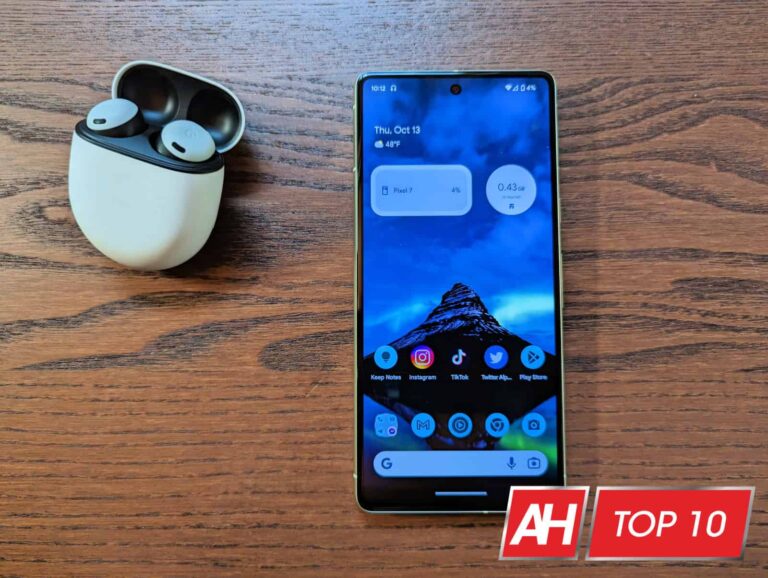
Finally, the Google Pixel 7 is now available, and it’s a really good value at $600. The Google Pixel 7 is actually a bit smaller than the Pixel 6 was last year, so those cases from the Pixel 6 won’t fit. You can check out our round up of the best Pixel 7 cases here.
Now, let’s talk accessories. With your new Google Pixel 7, you likely want to have the best accessories to take full advantage of your new phone. So that’s what we’re going to talk about today. From first-party accessories like the Pixel Watch and Pixel Stand, to third-party options like the Anker 735 Charger – since there’s no charger in the box.
Best Google Pixel 7 Accessories
As always, this list has a variety of different accessories that you might want to get for your Pixel 7. From wireless chargers, to smartwatches, to chargers, and even some battery packs. So let’s get started.
This charger from UGREEN is a 65W GaN charger. Which means it’s pretty small, but also pretty fast. It has a foldable prong, making it great for traveling. There’s also two USB-C ports on-board, along with a USB-A port.
It’s a 65W max, which means the more devices you have plugged in here, the slower each one will charge. But it is fast enough to charge a laptop, which is really nice.
The Google Pixel Watch is the company’s first smartwatch, and while it works with all Android devices, it will work even better with the Pixel 7. It does come in WiFi and LTE variants, with the LTE variant costing $50 more. It uses eSIM and can be added to any carrier.
The Pixel Watch is running on Wear OS 3.5, with Fitbit integration. Remember that Google owns Fitbit, so that should come as no surprise. It’s a fairly small watch, coming in at 41mm. And you can check out our full review here.
The PopGrip from PopSockets is a really good accessory for really any phone. And the reason why this is the best PopSocket you can buy right now is because it does allow you to swap out the top. So if you want to change the color, you can do so.
PopGrip is really great because it allows you to hold onto your phone much easier, especially for larger phones, but even works great on smaller ones like the OnePlus 10 Pro. But it also doubles as a sort of kickstand for your smartphone. Allowing you to use it on long flights to watch a movie or two, without having to hold your phone the whole time. It’s a really genius invention, and it’s something that everyone should have.
You can attach the PopGrip to your case, so that it doesn’t ruin your phone too.
The Google Pixel Stand 2 is an expensive wireless charger, a lot like other first-party accessories. But where it has a leg up over the competition is in the charging speed. The Pixel Stand 2 is the only one that can charge your Pixel at the full 23W.
It also has a few other tricks up its sleeve. Since it does sit at an angle, it’s great for having a Google Meet or Zoom meeting while it’s charging. It can also give you quick access to media controls and smart home controls right there on the screen, while it is charging. Nothing major, but definitely useful.
RAVPower Portable Charger 20000mAh PD 3.0 Power Bank
The RAVPower Portable Charger 20000mAh PD 3.0 Power Bank is a really great option for a battery pack for the OnePlus 10 Pro. It offers fast charging, though you likely won’t need that for the OnePlus 10 Pro, since it does offer some really good battery life.
It also uses two USB-A ports with fast charging, so you can charge other devices at the same time. RAVPower also includes two more USB-C ports for input, which is really nice, when you need to charge this battery up pretty quickly.
These cables from UGREEN are really impressive, and they are pretty cheap too. These are both 3.3-foot long braided cables. They are able to handle up to 100W charging speeds, which is pretty good.
With the Pixel 7, it’s always a good idea to have a few extra USB-C cables laying around, because you never know when you might lose one.
The Pixel Buds Pro are the best pair of earbuds to go along with your new Google Pixel 6a. These are also $199, so they are pretty pricey, but worth the price.
Pixel Buds Pro sport about 11 hours of continuous battery life, which is quite impressive, to say the least. Additionally, you can get about 31 hours of usage with the included charging case. Google has also added active noise cancellation and transparency mode here.
The Fitbit Versa 3 is a great fitness tracker to go along with other accessories for your OnePlus 10 Pro. Especially if you’re looking to get in shape this year.
The Versa 3 is the latest in the Versa line for Fitbit. It offers up all of the fitness tracking that you’d expect from Fitbit. Including the ability to track your steps, your workouts, calories burned and much more. It can also deliver some notifications to your wrist.
This is one of the most interesting looking car mounts out there, and it really doesn’t even look like a car mount.
The Spigen Kuel S40 stealth Car Mount is a minimalist car mount for those that don’t want to use magnets. This is a car mount that folds down when it is not in use. Just open it up and stick your phone in the mount, in landscape mode and you are good to go. It’s a good option, because it is fairly small when it is not in use, so that it is not blocking your view of the road all that much.
Spigen offers the Kuel S40 Stealth car mount in only one color. Which is black and blue, so it can blend in with your car a bit more.
The Google Pixel 6a is only able to charge at up to 30W, so the Google USB-C charger is also a great option to pick up. It will charge other things as well. Though, we’d still recommend one of the other chargers on this list, since you will be able to charge more stuff, and at faster speeds (for other devices).
There’s been a lot of news about Bally Sports facing bankruptcy, and also Warner Bros Discovery’s AT&T SportsNet RSNs not paying their fees to leagues like the MLB, and closing up shop. That leaves the MLB in a touch situation. Since Bally Sports does have the rights to 14 baseball teams, that’s nearly half of the games in the MLB season. So obviously, the MLB needs to do something about it.
The MLB has said that they had a backup plan for when Bally Sports does declare bankruptcy, and now it looks like they are taking the next step. According to a report from the Associated Press, the MLB has set up a local broadcasting group. This includes multiple executives with experience in regional sports broadcasting. This is all in preparation of Bally Sports (and AT&T SportsNet) no longer airing their games.
So what happens next? Well, the MLB is waiting on Bally Sports. If the league is not satisfied with the debt servicing plan that Bally Sports presents at the end of the 30-day grace period, then the league can take back the rights of the teams that Bally Sports currently owns. This grace period began on February 15. So Bally Sports does still have a couple weeks left to get a deal that the MLB will like. But the MLB isn’t just sitting there waiting to see what happens.
The MLB has been planning for this, for quite some time
The MLB always seems to be ahead of the curve when it comes to streaming. They were one of the first to launch their own streaming service in MLB.TV, which also had some of the best software for streaming – in fact, the WWE used it for the WWE Network when it launched in 2014.
The league has confirmed that it would use the MLB Network as well as MLB.TV to air the games if RSNs are unable to do so. Which means that for these teams, you’ll be able to watch games in-market. Versus the current way it works, where if you are in the Boston market, you can’t watch the Red Sox games on MLB.TV.
It really looks like the MLB is ready to cut ties with Bally Sports. Even if they do come up with a good offer for the MLB, they might just go it alone. However, RSNs do pay a pretty penny for sports rights. So that would likely be the only reason why this doesn’t happen.
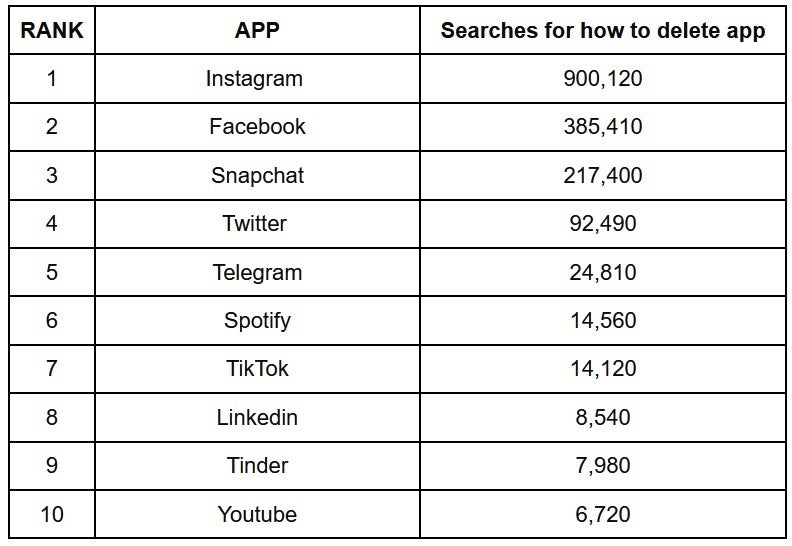
Privacy experts VPNOverview wanted to find out which popular apps Americans wanted to get rid of the most. So for each of the 50 states, it looked up regional search volume for “delete” and “deactivate” apps. With help from web analytics company Similarweb, VPNOverview also analyzed the number of active users and downloads for each Android app over the last year. The result? A list of the 10 most popular apps that Americans want to delete the most.
The app that had the most searches for deletion in the U.S. was Instagram with 900,120 searches coast-to-coast. The app has seen a 25% decline in installs over the last six months. Instagram’s stable-mate Facebook was next with 385,410 search requests related to finding out how one would get rid of the app on a phone or tablet. The number of downloads has decreased by 22% over the last six months.
With search volume of 217,400 queries asking how to 86 the app. Snapchat was third with users in New Mexico and Arizona the most eager to get rid of the app. Twitter was fourth on the list (92,490 deletion search requests). Those in California, Maryland, Nevada, and Washington are most interested in getting rid of the social media app.
With 24,810 searches looking for information on deleting the app, messaging service Telegram was fifth on the list with those in New Jersey especially anxious to get the app off of their devices.
The rest of the top 10 popular apps that America most wants to wipe off their mobile devices include:
6. Spotify (14,560 searches)
7. TikTok (14,120 searches)
8. LinkedIn (8,540 searches)
9. Tinder (7,980 searches)
Number 10 is a surprise as 6,720 searches were discovered by Americans looking to delete video streamer YouTube. With over 10 billion downloads on Android alone, the number of search requests seeking a way to remove YouTube from a phone or tablet is quite a small percentage.
These are the 10 popular apps that Americans most want to delete
Christopher Bluvshtein, a Privacy expert at VPNOverview, said, “Some people are also turning their backs on social media altogether. Whether due to politics, increasing cybersecurity issues, or even insecurity over those in a more fortunate position, there’s clearly been an increasing trend of people leaving these applications behind. People are burning out. Recently, an interesting term came about known as ‘’doom-scrolling’’ Essentially, this refers to spending excess time online reading negative news. There are a lot of problems in the world right now, and this kind of endless negativity can wear you down over time, so this could easily be contributing to the phenomenon.”
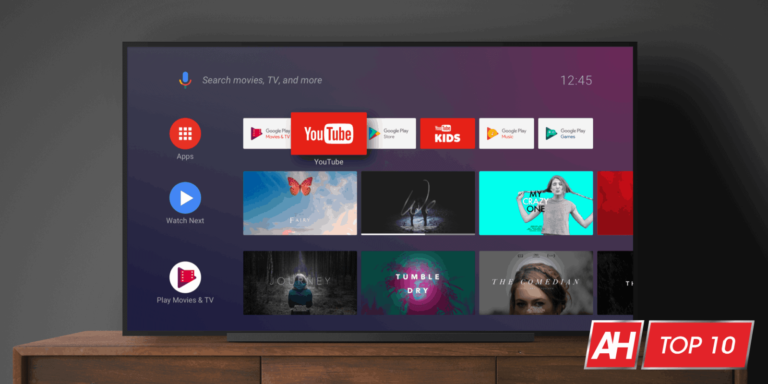
Are you in the market for a new TV and want to get an Android TV for your home? Then you’ve come to the right place. In this article, we will be listing the ten best Android TVs that are currently available. These are TVs that have Android TV built-in. Some on the market just have Chromecast built-in, like those from VIZIO. Those will not be on this list. You’ll find the best Android TVs from brands like Sony, Hisense, and TCL.
Best Android TVs
You’ll find all of the options on this list in the table below, along with the sizes they are available in, starting price and a link to buy. So you can quickly find what you’re looking for.
Without further ado, here are the best Android TVs on the market right now.
The Hisense U8G is a really great Android TV for the gamers out there. That is because it does have an HDMI 2.1 port and supports [email protected] gaming. That’s a big deal for the PlayStation 5 and Xbox Series X consoles.
Additionally, it has the Quantum Dot Wide Color Gamut supported. So you’re going to get over 1 billion true-to-life colors with this TV. It does have HDR, and supports IMAX Enhanced. IMAX Enhanced allows the TV to bring the cinema experience home. As it is able to combine digitally remastered 4K HDR content and DTS audio technologies with the best consumer products and streaming platforms.
The Sony X90J is the company’s high-end smart Android TV for 2021. It features Android TV with Google TV, so you’re getting the latest and greatest from Google here too. Additionally, there is support for Google Assistant and Amazon Alexa, so you can choose to use your favorite smart assistant.
The X90J comes in four sizes, ranging from 50 to 75-inches. So there’s something here for everyone. It also has Dolby Vision HDR, which is going to be great for those that want an incredible looking picture.
For the gamers out there, the Sony X90J also has2.1, allowing you to game in 4K/120Hz on the PlayStation 5 or the Xbox Series X. There is also the new Bravia Game Mode available for increased frame rate and reduced input lag.
This is perhaps the best OLED TV available that runs on Android TV. Though there’s also not a lot of options, since LG does webOS. But this is the A80J model, which came out in Summer 2021. It’s still the latest from Sony, and a really good option for Android TV.
It has HDMI 2.1 and [email protected], so it is going to be great for the PlayStation 5 and Xbox Series X. There’s also support for Chromecast and AirPlay 2.
You might be familiar with TCL for its Roku TVs, but it also makes Android TVs – though that is more recent. And the 4-Series Android TV is a really good option for a second bedroom or even a first apartment. That’s because it doesn’t come in super large sizes – only 43 and 55-inches. And it’s also fairly cheap, at under $500.
This is a 4K HDR TV, with support for most HDR certifications, including HDR10 and HLG. Though there’s no Dolby Vision here, that’s saved for its more expensive Android TVs, it seems.
The Sony Bravia A8H has unmatched processing power, the Picture Processor X1 Ultimate analyzes content to bring out OLEDs intense contrast with pure blacks, peak brightness and natural colors.
There’s also Android TV built-in here. So you can use your voice to access content, services, devices, and more with Android TV and Google Assistant. Google TV is not available on this one, as this is the 2020 model and not the 2021 model yet.
With 4K X-Reality PRO, you can experience a more natural picture with 4K X-Reality PRO & Object-Based Super Resolution. See exactly what the creator intended with the advanced color and gradation of TRILUMINOS Display.
This is one of Sony’s more affordable TVs on the market right now. With a starting price of $599. It’s a 4K HDR TV, powered by the X1 processor, that is going to provide some incredible imagery on the X800H. And it will also upscale the content that is not in 4K.
Like most of these TVs, it has both Google Assistant and Amazon Alexa built-in, so you can choose which assistant you want to use. With Google TV, you are also getting access to a ton of great apps as well.
The Hisense H9F Series is a really good entry for the best Android TVs out there, as it’s an inexpensive TV that is actually really good. So it uses its own proprietary ULED technology, and you’ll notice it’s the only one on this list that uses ULED. But it works similarly to QLED and OLED. Where you’re getting a brighter picture, with better colors, but it doesn’t have the disadvantage of OLED and screen burn-in.
Hisense also uses artificial intelligence to improve the picture quality coming out of this TV. So it is also going to improve over time. There is also support for Dolby Vision and HDR10. This is going to improve ULED even more, giving you a picture with more dynamic range. You will really notice the difference if you watch a TV show or movie that is shot in Dolby Vision – Amazon Prime Video and Netflix have quite a few that are.
The H9F Series is also an Android TV model, which means that it does have support for Google Assistant and Amazon Alexa built-in. This is going to allow you to control your smart TV, find something to watch and ask other questions too. This is a feature that is also found on a few other this Best Smart TVs 2020 list too. Android TV also has thousands of apps like Amazon Prime Video, Netflix, Hulu, YouTube, Google Play Movies & TV and much more.
This is the best Android TV for gamers. And that’s for one big reason. The U7G supports HDMI 2.1. Allowing you to game at 4K 120Hz on the Playstation 5 and the Xbox Series X. It also has Automatic Low Latency Mode and Variable Refresh Rate. So that you’re going to have ultra-smooth gaming.
This is an IMAX Enhanced TV, so you’re going to get a really incredible picture from this TV. And there’s also support for DTS here too. And it has peak brightness of 1500 nits, one of the brightest TVs on this list.
The TCL 5-Series actually runs on Google TV, but underneath that skin is Android TV, so it fits this list perfectly. It’s one of only a couple of QLED TVs on this list that run Android TV. And it’s also one of the cheapest.
This is the 5-Series from TCL, which usually means good, but not the best and not the worst. It’s a good middle-ground. And at $429, we can see why. It does offer Dolby Vision HDR, as well as HDR10 for some really great colors. It’s also QLED, so it’s going to look amazing anyways.
Those that are looking to level up their entertainment space, might be looking to get themselves a nice projector. But then you’ll need to have the projector across the room and mounted on the ceiling. That’s where Ultra Short Throw Projectors come into play. These projectors can be as close as six inches from the wall, and provide up to a 100″ picture. And in some cases, even larger.
These projectors can be pretty pricey though, so we are here to help you find the best ultra short throw projector that you can add to your home.
Best Ultra Short Throw Projectors
In this list, we have ultra short throw projectors from many different brands. Including Samsung, LG, Epson, Optoma and many more. These also range in price from around $899 up to over $5,000. So depending on your budget, there is something here for everyone.
Believe it or not, this is actually BenQ’s first ultra short throw projector, and it’s a pretty impressive one. This is a true 4K projector, with 2500 ANSI Lumens, so it’s going to be pretty bright. Even good for rooms with some direct sunlight. It also has 98% of the DCI-P3 color gamut, and HDR-Pro technology included.
You can get about 100-inches of screen, with just 8.7-inches of clearance from the wall, which is really impressive. BenQ also includes an Android TV dongle with this projector – but still no Netflix available, like most other projectors.
The AWOL VISION LTV-2500 is a really impressive ultra-short throw projector, in fact, it’s the one I’ve been using for almost a year now. And I absolutely love it. Mostly because of how bright it is. It has a peak brightness of 2600 lumens. Which makes it perfect to use in a room that does get some sunlight as well.
This projector is a true 4K projector that can project up to a 150-inch screen, it also has Dolby Atmos and HDR10+ available. Giving you a great home theater experience. AWOL VISION is also including an Amazon Fire TV Stick 4K Max here. There’s a compartment on the back, that it can hide in, which makes it feel like Fire TV is built-in.
The Epson EpiqVision LS300 is probably the best value for your money on this list. It can provide up to a 120″ picture, and is ultra bright at around 3600 Lumens. That is one of the brightest ultra short throw projectors on the market right now.
Epson also uses Yamaha for its sound, so it should offer some really great sound from this small projector. It uses a custom-designed audiophile 2.1 speaker system, that provides some powerful bass. Epson says it can rival some soundbars too.
On the software side, this is running Android TV and Chromecast Built-in. Making it great for really anyone, as all your apps are going to be available here.
This is the cheapest projector on this list, and also the only one under a grand. But that doesn’t mean it’s a bad projector, quite the contrary. It is, however, the only 1080p projector on this list.
The JMGO O1 can offer 80 to 100″ pictures at FHD resolution. And this can be done with the projector just 10.6-inches away from the wall. JMGO also worked with Dynaudio to provide some epic sound with this projector. JMGO claims cinematic stereo sound out of the O1.
Software-wise, this is running a forked version of Android. It works, but most of your apps likely aren’t available. Luckily there are plenty of IO on the back. This includes two USB ports, two HDMI ports, an optical and a LAN. So you can plug in a Chromecast and a PS5.
The Hisense L9G is a rather interesting entry in this list, as it is the only one that comes with the ALR screen. Which also explains why it is so pricey – and the most expensive on this list.
This is another very bright projector, coming in at 3000 Lumens. Typically anything over say 2800 Lumens will be bright enough to use in a room with direct sunlight. It’s also 4K HDR, with Dolby Atmos support. Hisense has included 40W Dolby Atmos sound, so it’s going to give you a really great audio experience. Finally, this projector can offer up to a 120-inch picture.
The WEMAX Nova actually offers the largest picture of any projector on this list, coming in at up to 150 inches. Now that’s a great way to watch The Batman. It isn’t quite as bright as some others on this list though, at 2100 Lumens. It should be bright enough to use in a room with direct sunlight however.
WEMAX has 30W DTS HD speakers with Dolby Audio included. So you’re going to get some really great audio here, though it could be better. Most people will be happy with it though.
This is also running on Android TV, so you’ll have access to over 5,000 apps to watch on the WEMAX Nova.
This is actually the projector that I use in my home and it’s really good. It’s pretty bright at 2400 lumens, though not perfect for a room with direct sunlight. Some darker shows will be tough to see if there’s sunlight in the room. It can create up to a 100-inch picture, at 4K resolution.
JMGO uses Dynaudio here, like with the O1 also on this list. The two tweeters actually are raised on the projector, and provide a really nice audio experience. I have never used this with a soundbar, because it’s just not needed.
This does run a forked version of Android, which means most of your apps won’t be available, however there are plenty of ports available for plugging in a Chromecast, Apple TV, Roku or even a Fire TV Stick. That includes 2 HDMI (including one HDMI ARC), 1 Optical, 1LAN, 1 Service and 2 USB ports.
Optoma is another name that has been in the projector game for quite some time, and the CinemaX P2 is a really good option. It gets super bright with up to 3,000 lumens. That will be bright enough for most rooms with direct sunlight. And that can also do a 120-inch picture.
This is a 4K HDR10 projector, giving you an incredible looking picture, that is also pretty bright. It does also work with Amazon Alexa Skills and Google Actions, allowing you to use your voice to control the projector.
Samsung does make its own projectors, but there’s not as many of them. Their best is The Premiere, which is a really modern looking projector that is a monster. It’s able to throw a 120″ picture on the wall using lasers, and is rated at 2200 Lumens of brightness.
It’s a 4K HDR projector and is able to cover 83% of the DCI-P3 color spectrum too. On top of that, it has cinema-quality sound with 30 watts of 2.2ch built-in. Giving you a great theater-like experience.
Finally, The Premiere is powered by Tizen, as you’d expect. So most of your favorite streaming apps are available on this projector.
New Youtube lead, Neal Mohan, took to the Official Youtube blog a couple of days ago to share the company’s milestones as well as its priorities for 2023, which include ensuring the safety of the YouTube community, ensuring the success of YouTube creators, and building for the YouTube of the future.
Seeing YouTube’s potential
Mohan spoke about his beginnings at YouTube headquarters 15 years ago, when the company was just a small office on a second floor above pizza place, and how even then, he could see the platform’s potential to be great. As he transitioned into his new position as YouTube lead, replacing longtime friend and mentor Susan Wojcicki, he thought more and more about that moment.
In his new position, Mohan explains that he is very excited for the future of the platform and the part he will take in it. As the prior Chief Product Office, Mohan’s old responsibilities within the platform included making ad products that helped pay for people to make content that can be seen all over the internet. This is where his focus will continue to lie…making the platform an even better place for content creators.
When YouTube was just starting out, I saw its potential. Now, I’m very excited to be in charge of its future.
What will be YouTube’s focus?
Mohan reiterated that the focus at YouTube going forward will remain what is most important to both creators and viewers, and that includes helping creators do well, building the platform of the future, and to focus on keeping the community safe. He made sure to highlight that creators and artists are what make YouTube what it is, and that is what will be put first when it comes to building the YouTube of the future.
To support this, Mohan included some interesting statistics regarding the current state of the economy and how that hasn’t stopped the company from offering business opportunities on its platform. According to research by Oxford Economics, YouTube’s creative ecosystem supported more than two million jobs in 2021 in Brazil, Canada, the US, Indonesia, Japan, South Korea, France, Australia, Germany, the UK, India, and Turkey. Here’s what YouTube has planned to do this year to help creators all over the platform do well:
Create more ways for creators to make money by giving them more tools, such as growing the subscriptions business, putting money into shopping, and always making paid digital goods better.
Expanding creator feedback via life help through chat or email to find out what the platform can do to help them. Creator feedback is a big part of how YouTube creates new products.
Expanding accessibility for people who are deaf or hard or hearing by putting money into machine learning over a long period of time. Because of this investment, YouTube can now offer automatic captions in more languages and machine-translated captions for mobile devices that can be changed to 16 different languages.
Growing creator communities by going mobile with gifted memberships, letting viewers remix clips into Shorts, and adding features that will make it easy to put together the best gaming content in a new way.
What’s in store for the YouTube of the future?
YouTube will be putting more money into the features and experiences that will make YouTube a better platform, such as doubling down on the streaming and connected TV experience and releasing the creative potential of YouTube in ways that have never been done before.
Mohan mentioned that more and more, viewers are watching YouTube content on their TVs, which is the biggest screen in most homes. As the fastest-growing screen on the platform, YouTube will be paying special attention to how it can improve this experience and help viewers connect with each other and creators.
We’re bringing the best of YouTube to the living room, including the creators people love, the streaming they want, and the useful features they’ve come to expect from YouTube.
YouTube has also recently added Primetime Channels to allow users to watch videos from their favorite streaming services, and announced that NFL Sunday Ticket will be making its way to the platform as well, in an attempt to make YouTube the best place to watch TV and football. There will also be features from YouTube TV that will be making their way to the main YouTube app, such as being able to watch key plays, along with the added ability to connect with creators and other fans by liking, commenting, etc.
However, the biggest accomplishment in the eyes of many will be the addition of proper podcasting. YouTube is already the second most popular place where people go to listen to podcasts, and this year YouTube will make it even easier for creators and artists to publish their podcasts through YouTube Studio. Youtube will start bringing both audio-first and video-first podcasts to the millions of people in the US who use YouTube Music, with more regions to come. Additionally, later this year, RSS integration will give podcasters another way to upload their shows to YouTube.In regards to shorts, YouTube will also be releasing a tool this year that will let creators record a Short next to other Shorts and YouTube videos. This similar to the Remix feature you can currently find on TikTok and Instagram that allows you to add your own take on a trend or join in with a reaction.
AI will also play a major role in the future of YouTube. Through AI’s generative abilities, creators will be able to add to their stories and improve the quality of their work. For example, YouTube is working on a tool that will allow creators to change characters’ clothes virtually or change the setting for a movie. These features are still not ready for prime time, and YouTube says they’re taking the time to make sure they are safe to use, but we should be hearing more about that over the next few months.
Making sure the YouTube community is safe
As new ideas flourish, protecting the YouTube community remains the company’s most important goal. Tools like YouTube Kids have allowed kids to explore their interests in a safe place and give parents the tools needed to make sure the platform works for their family’s needs. However, there is still work to be done.
YouTube is staying on top of new policies, bills, and laws being introduced all over the world that shape the digital environment. Because of this, YouTube will be having a debate about Section 230 of the Communications Decency Act in the U.S., which has helped creators and given the platform the power to take down harmful content. The company is also involved in similar efforts in Europe and Canada.
“All of these efforts are important, but as a parent, I care most about what we’re doing to keep kids safe on our platform.”
A few weeks ago, it was announced that MLB.TV and MLB Network were leaving YouTube TV. Many thought that it was just an issue with MLB Network and them potentially wanting to sell MLB Network as part of MLB.TV, similar to what Bally Sports has done. But that’s not the case.
YouTube TV has repeatedly said on Twitter that they are still in talks with the MLB about bringing back the MLB Network. Stating in replies to customers that “we understand how frustrating the news was & it wasn’t the outcome we wanted. We’ll continue conversations w/ the MLB Network in the hope of restoring their content on YouTube TV in the future.”
As is always the case here, MLB Network wants more money from YouTube TV. That’s normally what happens when there’s a dispute like this. The MLB raised the price on MLB.TV this year, so it’s not surprising to see MLB Network wanting a larger price as well. Both sides are hopeful that a deal will be reached though.
How can you watch the MLB Network this year?
While we still have a few more weeks before Opening Day, and it’s likely a deal will be made before then, how else can you watch the MLB Network? Well there are a few options available.
You can subscribe to DIRECTV Stream, FuboTV or Sling TV. All of which have the MLB Network. Sling TV would be the best option as it is the cheapest, but you do need to get the MLB Network in the sports add-on.
If YouTube TV is unable to come to terms with the MLB Network, and it does stay dark on the service, that would be another big blow for YouTube TV. A service that was once touted as the streaming service for sports, has now lost almost all of its sports. It has only a handful of RSNs after Bally Sports took their networks off a few years ago. It’s also lost AT&T SportsNet as it has actually folded. And now the MLB Network.