GoDaddy found malicious malware had been installed on servers in its cPanel shared hosting environment by an unauthorized third party. This results in the websites of its clients being intermittently rerouted.
“We investigated and found that the intermittent redirects were happening on seemingly random websites hosted on our cPanel shared hosting servers and were not easily reproducible by GoDaddy, even on the same website”, GoDaddy explains.
One of the biggest domain registrars, GoDaddy also offers to host services to more than 20 million users globally.
Even as the attackers had access to the company’s network for a number of years, GoDaddy only learned about the security breach after receiving customer complaints in early December 2022 that their sites were being exploited to reroute to random domains.
“We are working with multiple law enforcement agencies around the world, in addition to forensics experts, to investigate the issue further”.
“We have evidence, and law enforcement has confirmed, that this incident was carried out by a sophisticated and organized group targeting hosting services like GoDaddy”, says GoDaddy.
GoDaddy added that evidence indicates that their apparent objective is to infect servers and websites with malware to carry out phishing operations, malware distribution, and other nefarious actions.
“Based on our investigation, we believe these incidents are part of a multi-year campaign by a sophisticated threat actor group that, among other things, installed malware on our systems and obtained pieces of code related to some services within GoDaddy,” GoDaddy said in an SEC filing.
This Multi-Year Operation Is Connected To Earlier Breaches
According to the company, this multi-year campaign is also connected to earlier breaches that were revealed in November 2021 and March 2020.
The affected customers’ email addresses, WordPress Admin passwords, sFTP and database login information, and SSL private keys for a subset of active clients were all compromised.
“Once we confirmed the intrusion, we remediated the situation and implemented security measures in an effort to prevent future infections”, GoDaddy
The company said it is actively gathering evidence and information about the attacker’s tactics and procedures to aid law enforcement as they continue to monitor their conduct and thwart attempts from this criminal organization.
WhatsApp is adding a bunch of quality-of-life features to its Android app. The Meta-owned messaging service now lets you send more photos in bulk and caption documents before sharing. The company is also readying more such handy features which should arrive with a future update for the app.
WhatsApp improves user experience with the latest update
The latest additions to WhatsApp arrive with version 2.23.3.77 of the app for Android. The official changelog provided by the company on the Google Play Store mentions four major new features.
Firstly, you can now send up to 100 photos and videos at once. That’s a major jump from the previous limit of just 30. This change makes it more convenient to share photos in bulk. You don’t have to select batches of 30 files and repeat the process multiple times.
WhatsApp now also lets you add captions when sending documents. This feature allows you to give some context to the recipient about what you’re sending, without separately typing a message. It works for all types of documents supported by the messaging service.
The third new feature that WhatsApp added with the latest update is useful for group admins. The app now supports longer group subjects and descriptions, so you can describe your group better. The subject field supports 100 characters, while you can add descriptions longer than 2,000 characters. That should be enough to lay out the group rules and other important communication for members.
WhatsApp’s changelog on the Play Store also mentions the addition of personalized avatars. However, this feature was rolled out a couple of months back with version 2.22.24.73 of the app. Nonetheless, if you didn’t already know, you can go to Settings > Avatar on WhatsApp to create personalized avatars that can be sent as stickers or used as profile photos. WhatsApp lets you choose between various skin tones, hairstyles, hair colors, outfits, body types, eye colors, and various accessories to create an avatar unique to you.
WhatsApp is readying more new features
Apart from these, WhatsApp is also working on a host of other new features. It recently started beta-testing transcriptions for voice messages. The company is also developing a way to let you save selected messages in disappearing chats. We will let you know when these features roll out to the public. In the meantime, you can click the button below to download the latest version of WhatsApp for your Android devices from the Google Play Store.
Major League Baseball has been a leader in streaming for quite some time. In fact, when the WWE launched its streaming service back in 2014, it was using MLB’s tech from MLB.TV. So it’s safe to say that MLB.TV is one of the best streaming services out there, from a quality and feature perspective.
MLB.TV is a great way to watch baseball games this year, after all it is called “America’s pastime”, so it is fairly popular in the US. Though not quite as popular as Football, surprisingly. Anyways, here’s everything you need to know about MLB.TV, and to get ready for the 2023 season.
What is MLB.TV?
Simply put, MLB.TV is a streaming service from Major League Baseball, which allows you to watch all out-of-market games. And that part is key. Basically, if you live in a city, and have cut the cord but can’t watch your local RSN, you won’t be able to watch your local team with MLB.TV. For example, if you live in St Louis, you won’t be able to watch the Cardinals on MLB.TV, unless they are blacked out. Which is rare, but does happen. But if you live in St Louis, and want to watch the Red Sox, you can watch every game.
But MLB.TV is a bit more than just live baseball games. It also includes a number of documentaries, films about the World Series, vintage episodes of This Week in Baseball TV, and old classic games. Among other things. So it is a good service to have if you’re a big Baseball fan.
How much will MLB.TV cost?
For 2023, MLB.TV is seeing a price increase. All annual plans are going up $10. So the full plan is going to cost you $149.99 this season. If you’re only interested in one plan, MLB.TV does have a single team plan available for $129.99 for the season. And finally, there is a monthly plan that comes out to $24.99. However, if you do opt for this monthly plan and subscribe in February to watch Spring Training, it’ll end up costing you almost $200 for the full season. From Spring Training to the World Series.
So what all is included in this price? Well, you do get over 250 Spring Training games, which start in late-February and last through to mid-March. You’ll also get to watch every out-of-market game live and on-demand. Keep in mind that if the team you’re watching is currently playing in your market, those games won’t be available, unless it’s blacked out.
Will Minor League games be included?
For the first time ever, MLB.TV will also include Minor League games. Which makes the price increase a bit easier to swallow. That means there’s going to be more than 7,000 games included in the First Pitch app. MLB.TV has not confirmed if that’s just Triple-A or both Double-A and Triple-A minor league teams.
Are there discounts available?
There are no discounts available for MLB.TV, but if you are a T-Mobile customer, you will likely get it for free.
T-Mobile is the official wireless partner of the MLB, once again in 2023. So it is very likely that it will give all of its customers a year of MLB.TV for free. However, this usually starts right before Opening Day, so you won’t get Spring Training included here. But hey, that’s still a $150 value here. And a big deal for baseball fans out there.
Is there a free trial?
MLB.TV does offer a free trial. It’s a 7-day free trial, but it is only available for the Yearly and Monthly plans. Not the Single Team plan. You can cancel during your free trial at any time, and still have access to MLB.TV before the trial expires. Keep in mind that on the 8th day, you will be charged for your subscription.
How can I sign up for MLB.TV?
You can sign up for MLB.TV by clicking here. That will take you to the page to choose your plan. You can choose from the Yearly, Monthly or Single Team plan. Of course, with the Single Team plan, you will need to choose the team you want to buy it for. Keep in mind that blackout and other restrictions do apply.
What new features are coming in 2023?
In 2023, the MLB is adding a few new features to the streaming service. That includes a new GameDay Mode that allows users with select connected devices, access advanced data and pitch-by-pitch analysis of the game they’re watching.
It is also offering up MLB Big Inning. Which offers a viewing experience similar to what the NFL RedZone offers. This is going to give viewers the chance to look in at different games around the league at their most crucial moments.
Now, MLB.TV has always had local pre-game and post-game shows available. But this year, they’ve added a few more teams to this feature. Here’s the full list:
Arizona Diamondbacks
Atlanta Braves
Boston Red Sox
Chicago Cubs
Cincinnati Reds
Cleveland Guardians
Detroit Tigers
Los Angeles Angels
Los Angeles Dodgers
Milwaukee Brewers
Minnesota Twins
New York Mets
San Diego Padres
Seattle Mariners
St Louis Cardinals
Tampa Bay Rays
Toronto Blue Jays
What features does MLB.TV have?
MLB.TV has plenty of great features that you can use to make your baseball experience even better. This includes Live Game DVR Controls. So you can pause and rewind live games. Unfortunately, you can only fast-forward to the live part of the game, so you can’t jump through all of the commercials.
It also has full game archives of the 2021 and 2022 season. There’s also no local or national blackout restrictions here. You can also set your app to remove spoilers and watch as if the game was live.
MLB.TV also allows you to overlay the home or away team’s radio broadcast over the live video on supported devices.
It offers a Spanish Audio Sync, considering Baseball is very popular in Spanish-speaking countries, and there’s quite a few Spanish-speaking players in the US, this might be one of the most popular features on MLB.TV.
Finally, you can also choose from Home and Away feeds. So you can always get the feed that favors your team. There are also many other features available for MLB.TV, which you can see here.
What devices is MLB.TV available on?
MLB.TV is available on virtually every platform out there. Here’s the full list:
Android
Android TV
Amazon Fire TV
Apple TV
Chromecast
iOS
PlayStation 4
PlayStation 5
Samsung Smart TVs
Xbox One
Xbox Series X|S
However, not every feature is available on every platform. The feature parity actually leaves a lot to be desired. But this does come down to the type of tech included in each platform.
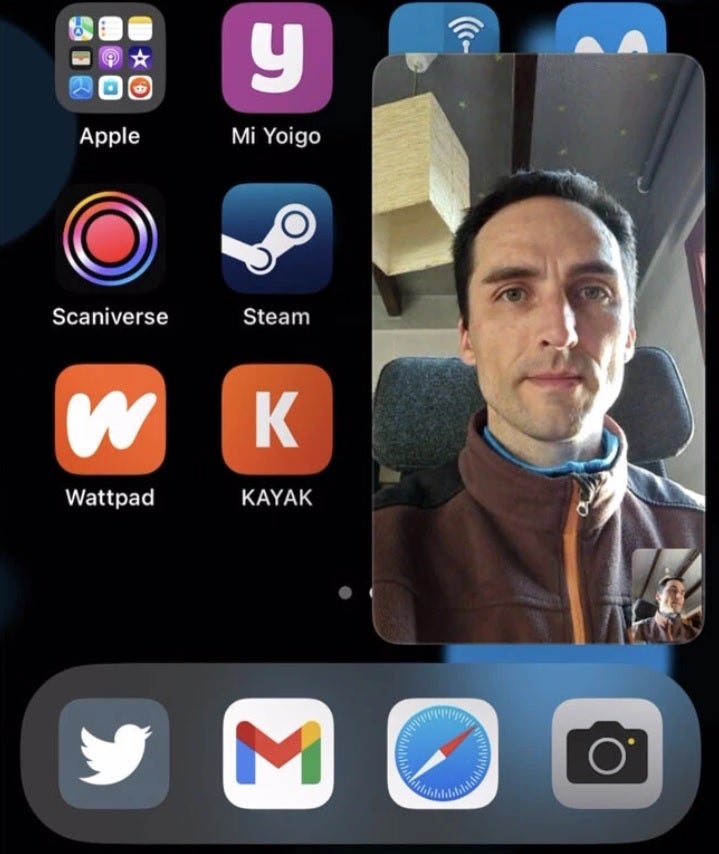
The PiP works like this. When you are engaging in a video call and want to multitask by opening another app, exiting WhatsApp will minimize the video chat and allow it to float above other apps. You can move it around the screen with your finger while the video chat continues and the other app you wanted to open is underneath it. The feature might not work right away and WhatsApp says it will disseminate it over the coming weeks.
WhatsApp adds Picture-in-Picture support for video chat
The update to version 23.3.77 also includes some other new features including the ability to add captions when sending documents to contacts in personal or group chats. You will also be able to use longer group subject names and descriptions when describing a WhatsApp group. Following the update, these names and descriptions can be as long as 2,048 characters which is a huge increase from the prior 512 characters allowed.
Stable-mates Facebook and Instagram allow users to create personalized avatars and now WhatsApp users will be able to do so as well. To create your own avatar, open the WhatsApp app and go to Settings > Avatar > Create Your Avatar. Follow the directions and tap on Done. That’s just the first step. To make your new Avatar the profile picture on WhatsApp, open the app and tap on your profile picture. Then tap on Edit > Edit.
Again, this update is for iOS only since Android users already have Picture-in-Picture capabilities for video chat on WhatsApp. If you want version 23.3.77 of WhatsApp for iOS right away, you can install the version of WhatsApp from the App Store since it already includes the aforementioned features including PiP for video chat.
Among personal information, the RailYatri hack has also exposed the location details of millions of travellers across India.
RailYatri, a popular Indian train ticket booking platform, has suffered a massive data breach that has exposed the personal information of over 31 million (31,062,673) users/travellers. The breach is believed to have occurred in late December 2022, with the database of sensitive information now being leaked online.
The compromised data includes email addresses, full names, genders, phone numbers, and locations, which could put millions of users at risk of identity theft, phishing attacks, and other cyber crimes.
Hackread.com can confirm that the database has been leaked on Breachforums, a hacker and cybercrime forum that surfaced as an alternative to the popular and now-seized Raidforums.
Image credit: Hackread.com
RailYatri and its Data Breach Yatra
RailYatri means train passenger, while Yatra stands for the journey. The RailYatri data breach is not a typical case of hackers exploiting vulnerabilities, stealing, and leaking data. In fact, it began in February 2020 when cybersecurity researcher Anurag Sen identified a misconfigured Elasticsearch server exposed to the public without any password or security authentication.
Sen noted that the server belonged to RailYatri and informed the company about the issue, which initially denied that it belonged to them. Later, the company claimed that it was merely test data. At that time, the server contained over 700,000 logs with over 37 million entries in total including internal production logs.
In 2020, Railyatri managed to secure its data only when Indian Computer Emergency Response Team (CERT-In) got involved; however, two years later, on February 16th, 2023, hackers rattled the company with yet another security breach due to a new leak.
Screenshot from RailYatri’s data exposure in 2020 (Image credit: Anurag Sen)
“Back in 2020, when I reached out to Railyatri, they never replied or reached out to me, but after I contacted Cert-In, the server got closed,” Anurag told Hackread.com. “I have reported various data leaks in India; the most common issue I saw is that these companies are not getting fined due to India not having any GDPR-like law,” added Anurag.
Anurag believes that the latest data breach could have been avoided “if the company had implemented proper cybersecurity measures from the outset.”
Hackread.com advises all users to change their passwords and enable two-factor authentication on their accounts as a precautionary measure. They have also advised users to monitor their bank accounts and credit card statements for any suspicious activity.
This breach serves as a stark reminder of the increasing frequency and severity of cyber attacks, particularly in the wake of the COVID-19 pandemic, which has forced millions of people to rely on online platforms for their daily needs. It highlights the need for companies to prioritize cybersecurity measures and take all necessary steps to protect their customers’ personal information.
Now, that the Galaxy S23 is officially available, Amazon is giving you another deal to help you pick one up from them. That is up to a $100 gift card with the purchase of a Galaxy S23. The Galaxy S23 gets a $50 gift card, while the Galaxy S23 Plus and Ultra both get a $100 gift card. But now that the pre-order period is over, you won’t get that storage upgrade. But hey, this is still free money.
The Galaxy S23 is the latest smartphone from Samsung. It sports all of the high-end specs that you’d expect. That includes the Snapdragon 8 Gen 2 for Galaxy, 8GB of RAM and 128GB of storage (256GB base on the Plus and Ultra).
Now, the small Galaxy S23 does sport a 6.1-inch display, while the Galaxy S23 Plus does have a 6.6-inch display. Both of these are flat FHD+ panels, and use Adaptive 120Hz refresh rate. They also have 3,900mAh and 4,700mAh capacity batteries respectively.
The Galaxy S23 Ultra is the big-boy, with a 6.8-inch QHD+ Adaptive 120Hz display. It also has a larger 5,000mAh capacity battery inside, which is pretty good for the size. Samsung has also included the S Pen in the Ultra, so those Galaxy Note users will absolutely love this phone. Samsung has also added the world’s-first 200-megapixel camera to the Galaxy S23 Ultra. Which early impressions show that it is a pretty impressive camera. So it definitely might be worth the upgrade for some people.
If you’re looking to upgrade your phone to the latest and greatest, this might be the best time to do just that.
You can pick up the Galaxy S23 series from Amazon by clicking the link below. This sale is not going to last long though.
It was bound to happen, but it appears that Paramount Plus will also be getting a price increase. But this isn’t as bad as you might have originally thought.
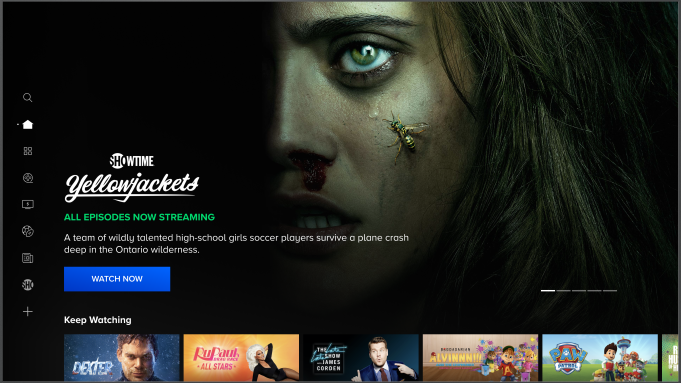
This price increase is tied to Paramount Plus and SHOWTIME merging. So yes, you’re paying more, but you’re also getting more content. Currently, Paramount Plus is $4.99/month for ads and $9.99 per month for the Premium ad-free plan. Those prices will go up to $5.99 and $11.99 respectively. That’s a pretty small bump in price, and actually brings the Premium version up to the original price of SHOWTIME.
So it’s a pretty good deal. Especially if you already subscribe to SHOWTIME, because now you’ll get Paramount Plus included for basically the same price. And if you were paying for ad-free SHOWTIME, then you’ll actually be paying $3 less per month and getting a larger library. Definitely good news. Keep in mind that the ad-supported Paramount Plus plan will not get SHOWTIME.
When does the new price start?
Paramount hasn’t been specific about the new pricing and when it would start, but they are saying Q3 2023. So that would be between July 1 and September 30.
It’s a pretty interesting move for Paramount. But it is something that needed to be done. Currently, the company has three different streaming services – Paramount Plus, BET Plus and SHOWTIME. Now there’s no word on whether BET Plus will merge or not, but it’s likely that will stay separate as it does hit a different audience from the other two services.
We’ve seen a lot of streaming services jumping up in price in recent months, so it was bound to happen to Paramount Plus. But getting it and SHOWTIME included for just $12 per month is not a bad price bump at all. There’s plenty of great content available on both, and now you get them in one app.
Google Dorks List “Google Hacking” is mainly referred to pulling sensitive information from Google using advanced search terms that help users to search the index of a specific website, specific file type and some interesting information from unsecured Websites.
Google Dorks list 2023 can uncover some incredible information such as email addresses and lists, login credentials, sensitive files, website vulnerabilities, and even financial information (e.g. payment card data).
Here could see an example to understand how Google Darkspasswords used by hackers to gain sensitive information from specific websites.
“inurl: domain/” “additional dorks
A hacker would simply use in the desired parameters as follows:
inurl = the URL of a site you want to query
domain = the domain for the site
dorks = the sub-fields and parameters that a hacker wants to scan
The best way to use Google dorks legally is to find vulnerabilities on your own website.
We can also use other search filed than URLs that will help to uncover a lot of information about a site.
info: The query [info:] will present some information that Google has about that web page. For instance, [info:www.google.com] will show information about the Google homepage. Note there can be no space between the “info:” and the web page url.
link: The query [link:] will list webpages that have links to the specified webpage. For instance, [link:www.google.com] will list web pages that have links pointing to the Google homepage. Note there can be no space between the “link:” and the web page url.
site: If you include [site:] in your query, Google will restrict the results to those websites in the given domain.
For instance, [help site:www.google.com] will find pages about help within www.google.com. [help site:com] will find pages about help within .com urls. Note there can be no space between the “site:” and the domain.
inurl: If you include [inurl:] in your query, Google will restrict the results to documents containing that word in the url. For instance, [inurl:google search] will return documents that mention the word “google” in their url, and mention the word “search” anywhere in the document (url or no).
The Google dorks list is a never-ending one and the list keeps on growing based on the new technologies and the vulnerabilities.
Conclusion
Google dorks is also known as Googlehacking. We have tried our best to give you a most relevant Google Dorks list to query for best search results using about search operator and give you most of the information that is difficult to locate through simple search queries.
There are thousand of Google dorks are available online, here we have made a comprehensive list that helps you to test your network and helps to find more vulnerable sites.
Whether it’s with television or on a streaming service, this age-old dilemma persists: There’s a ton of stuff on but nothing to watch. Netflix has a feature that will shuffle content for you named “Surprise Me”. However, that feature has gotten the boot.
It seems weird that Netflix would have a shuffle feature. If you opened the app but didn’t know what you wanted to watch, you could press the Surprise Me button to get a randomly-selected piece of media. You might have gotten a show or a movie.
That sounds scary, but you’d only get content based on your watch history. If you’re big into Disney movies, you wouldn’t get a random hack n’ slash film.
Netflix got rid of its shuffle feature
If you liked using this feature, then there’s bad news. According to The Wall Street Journal (via Android Police), the company discontinued the feature back in January. It’s new now because most people didn’t even know that the feature was nixed. The company admitted that it canceled the feature because people just weren’t using it.
A Netflix spokesperson said that when people log onto the platform, they have a solid idea of what they want to watch. There’s not much point in this feature if people aren’t on the search for content.
As you can imagine, the Surprise Me feature was a way of keeping people on the app. If you open the app and you can’t find what you’re looking for, you’re going to leave the app. That’s a bigger issue now than ever when there are about 1,000 other streaming services you can go to for content.
But, now that the feature is gone, Netflix is going to move forward. It’s still working putting a halt on password-sharing. The company has been getting a ton of flack for its aggressive password sharing. Only one person is allowed to have an account. If that person wants to share their password, they’ll need to pay more each month.
According to The Verge, The Google-owned wearables maker Fitbit is reportedly working to bring a blood pressure technology to its products or the next generation of Pixel Watch. The company has recently filed a patent that enables blood pressure readings on a smartwatch by tapping on the display.
As per the filing details, the technology includes a force-sensitive screen and a photoplethysmography (PPG) sensor to measure blood pressure. Filing the patent means that the Fitbit engineers are working on this technology, but we don’t know when it will find its way toward the company’s products.
Fitbit might be developing blood pressure technology for the next Pixel Watch
Smartwatches are currently offering a plethora of health monitoring features, but blood pressure is a rare feature among them. You can now find blood pressure technology on Samsung Galaxy Watch 5. Likewise, other manufacturers like Apple and Google are also expected to add this technology to their next wearables. That’s why we should take the Fitbit claims with a pinch of salt.
Many believe that the Pixel Watch has become the main focus of Google, and Fitbit products aren’t a priority anymore. Google has recently rebranded the company to “Fitbit by Google.” Additionally, the latest Fitbit smartwatches don’t offer anything extraordinary compared to the Pixel Watch or other rivals.
With the prediction of dire economic conditions for Google, the company might be less likely to invest in multiple similar products at the same time. Another scenario is Google doesn’t want to turn Fitbit smartwatches into a rival to Pixel Watch.
Yet, it needs to be determined if this blood pressure technology will come to a Fitbit-branded product or the next Pixel Watch. Judging based on recent events, Fitbit is more likely to hand over this technology to the Pixel Watch to be used as a competitive advantage. Also, Apple’s 2024 smartwatches are expected to launch with blood pressure checkers (via Bloomberg).