G2 has released their Winter 2023 reports, ranking Malwarebytes as the leader across a number of endpoint protection categories based on customer reviews.
G2 has released their Winter 2023 reports, ranking Malwarebytes as the leader across a number of endpoint protection categories.
Based on verified customer reviews, Malwarebytes has been ranked #1 over top EDR vendors for endpoint malware and antivirus protection, detection and remediation of web-based threats, product usability, and more. These results continue Malwarebytes’ top ranking by G2, reinforcing Malwarebytes leadership in the endpoint security platform market.
Badges are awarded to products that receive the highest overall ratings along certain categories. For example, the Highest Quality of Support badge goes to the product with the highest overall quality of support score.
Summary Report
Malwarebytes has ranked #1 for 5 reports OVERALL across all vendors and market segments
Grid (main report)
Results Index
Relationship index
Implementation Index
Usability Index
Malwarebytes has ranked #1 for 5 Mid-Market reports
Malwarebytes has ranked #1 for 1 Small Business reports
Fastest implementation
Security teams need a solution that is quick to deploy, easy to set-up, and uncomplicated. Malwarebytes is that solution.
Ranked #1 in G2 Crowd’s Winter 2023 Implementation Index report, Malwarebytes’ endpoint protection suite had the shortest go-live time in its category of all competitive solutions in the market today.
Best ROI
Looking for endpoint security that will provide maximum return on your investment? Malwarebytes is the answer.
Ranked #1 in G2 Crowd’s Winter 2023 Results Index report, Malwarebytes provides the best estimated ROI of all endpoint protection suites based on our unique combination of rapid time to go live and time to ROI.
Malwarebytes ranked #1 for 5 reports OVERALL across all vendors and market segments
Grid® Report for Endpoint Protection Suites
Implementation Index for Endpoint Protection Suites
Contributing factors: Ratings for “Ease of setup,” “Implementation time,” and “User adoption.”
Earned badge for highest implementation score.
Relationship Index for Endpoint Protection Suites
Contributing factors: Ratings for “Ease of business,” “Likely to recommend,” and “Quality of support.”
Earned badge for highest overall Results score.
Results Index for Endpoint Protection Suites
Contributing factors: Ratings for “Likely to recommend,” “Meets requirements,” and “Estimated ROI.”
Earned badge for highest overall Results score.
Usability Index for Endpoint Protection Suites
Contributing factors: Ratings for “Ease of admin,” “Ease of use,” “Meets requirements.”
Earned badges for highest overall Usability score and highest ease of use rating.
Malwarebytes ranked #1 for 5 Mid-Market reports
(Reviews from someone who works at a company with 51-1,000 employees.)
Mid-Market Results Index for Endpoint Protection Suites
Contributing factors: Ratings for “Likely to recommend,” “Meets requirements,” and “Estimated ROI.”
Earned badges for highest overall Results score and highest likelihood to recommend score.
Mid-Market Relationship Index for Endpoint Protection Suites
Contributing factors: Ratings for “Ease of business,” “Likely to recommend,” and “Quality of support.”
Earned badge for highest overall best relationship score.
Mid-Market Grid® Report for Endpoint Protection Suites
Mid-Market Implementation Index for Endpoint Protection Suites
Rated for “Ease of setup,” “Implementation time,” and “User adoption.”
Earned badge for highest implementable score.
Mid-Market Usability Index for Endpoint Protection Suites
Contributing factors: Ratings for “Ease of admin,” “Ease of use,” “Meets requirements.”
Earned badges for highest overall Usability score and highest ease of use rating.
Malwarebytes ranked #1 for 1 Small Business report
Small-Business Grid® Report for Endpoint Protection Suites
Quotes from G2 users about Malwarebytes
Easy, effective, and efficient cyber protection validated by real users
Malwarebytes is committed to delivering a stellar experience for our users, and it shows.
Customer reviews are critical to ensuring that endpoint security solutions perform well where it counts, whether that’s ease-of-use, implementation, or overall satisfaction. To read more about what customers have to say about Malwarebytes Endpoint Protection and EDR, check out our case studies page.
Have a burning question or want to learn more about our cyberprotection? Get a free business trial below.
WhatsApp, the popular messaging service, offers a plethora of features to enhance your chatting experience. And one of these features is disappearing messages, which automatically deletes your chats after a set period. However, a downside of this feature is that it applies to the entire chat, so even if you wanted to save the messages for future reference, you could not.
Fortunately, WhatsApp has been working on a solution called “Keep Messages,” which enables users to save their disappearing messages without taking screenshots. The feature has interestingly been in testing for over a year and appears to be now ready for prime time, as spotted by WABetaInfo. During testing, the keep messages feature had two options- “Keep” and “Unkeep” a disappearing message, and WhatsApp also included a fast and convenient way to access these saved messages from the chat window itself.
Quick and easy access to saved messages
The team over at WABetaInfo found that WhatsApp has also added a “Kept Messages” feature to the profile info page in its latest beta. This feature will enable users to access all the disappearing messages they have saved in one convenient location. Moreover, all participants in the chat, including group chats, will be able to view this section and retrieve their saved messages. However, it is also important to note that anyone with access to these saved messages can also delete them.
At present, the Keep Messages feature is exclusively accessible to certain Android users who have installed the latest beta versions of both WhatsApp and WhatsApp Business. Additionally, WhatsApp is only granting access to this feature on a per-account basis. There is no specific timeline as to when this feature will be available to all WhatsApp users. However, users can expect WhatsApp to release the feature soon, considering it has been in testing for almost a year now.
As many of you know, Apple still didn’t release its first foldable device. Some info regarding it did just surface, though. Based on a new patent filing, the first foldable iPhone may feature touch sensitive edges.
A foldable iPhone may end up featuring touch sensitive edges
The title of this patent filing is “Electronic Devices With Display And Touch Sensor Structures”. This patent was spotted and shared by AppleInsider, by the way, and it seems to refer to a foldable phone from Apple.
Now, this is just a patent filing, not a confirmation or anything of the sort. Just because Apple patented something like this doesn’t mean it plans to use it in its first foldable phone, or at all, for that matter.
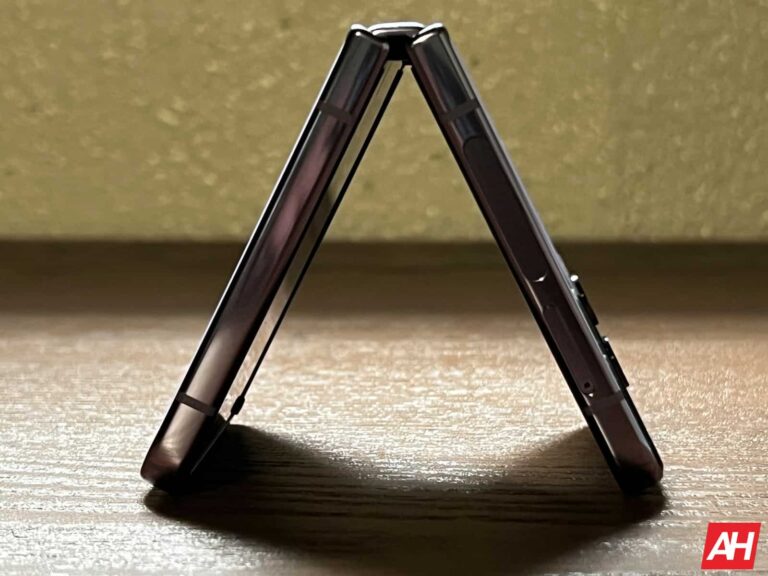
Those edges are supposed to be useful when a phone is in a folded state
So, what’s this exactly about? Well, exactly what you think, touch-sensitive sides. The whole premise of this is to use those sides when the phone is folded, to get more functionality, basically.
The patent says: “Buttons and other input devices may be used to gather input from a user, but this type of input device may not be as convenient and versatile as a touch sensor. Displays are sometimes not visible from certain directions and may be smaller than desired”.
You can check out the included sketch below. This is just a generic sketch, of course, not the actual look at a foldable device, so keep that in mind.
This approach does seem interesting
In the description, Apple also added the following: “The front wall and portions of the sidewalls may be formed from a glass layer or other transparent member. A touch sensor layer and display layer may extend under the front and sidewall portions of the glass layer… [a] touch sensor layer may also extend under the opposing rear wall”.
Now, all of this does sound quite interesting. We do wonder if it’ll work well in actual usage, though. Considering this is Apple we’re talking about, chances are this will get tested thoroughly before it gets implemented. If it doesn’t meet the requirements for ease of use, it’ll likely get scrapped.
Apple is allegedly aiming to ditch physical buttons in the relatively near future, so this move is not all that surprising, actually.
Snapchat ran a commercial during last week’s AFC Championship game between the Kansas City Chiefs and the Cincinnati Bengals. The 30-second ad promotes the app’s AR filters but some viewers felt that the spot was creepy, to say the least. That’s because the ad starts by stating “Our eyes can only see so much. But what if they could see more?”
The HorseHead lens is used to turn co-workers into horses and the spooky wide-eyed look at the end of the ad comes from the Shook lens. To find it on Snapchat, open the app and tap the smiley face icon to the right of the camera shutter button. Tap on the Explore tab on the bottom right and type “Shook” in the search bar and the first filter is the one used in the ad.
Snapchat is the 12th most popular social media app worldwide
There are two versions of the commercial, a 60-second spot and the 30-second spot that was shown during the football game. During the fourth quarter (of the year, not the game), the app had 375 million daily active users. It is the 12th most popular social media app worldwide. If you have an iPhone, you can install the app from the App Store, or if you have an Android device, download it from the Google Play Store. The ad says that with the filters “you can make imaginary friends real or see your real friends in an imaginary way.”
What if our eyes could see more? Scan this spot with your Snapchat camera to start exploring the unseen world around you. pic.twitter.com/CFji0gtJKL
The comments from Twitter users were pretty much along the lines of this response from Van Lathan Jr who wrote that “this Snapchat commercial is demonic af.” Alison Haislip asked, “Nobody was okay with that Snapchat commercial, right?” And Rosa Sparks tweeted this, “Well that Snapchat commercial was unnecessarily terrifying.”
You can’t help but feel bad for Snapchat. After all, it was the app that introduced social media subscribers to “Stories.” Instagram took the idea and ran with it…all the way to the bank. Instagram Stories is one of the most popular features of the Meta-owned app.
Snapchat reported Q4 profits of 14 cents a share, three cents a share above estimates
Snapchat parent SNAP reported its Q4 earnings yesterday and revenue, at $1.30 billion, failed to meet analyst estimates of $1.31 billion. Earnings at 14 cents a share, topped the consensus estimates of 11 cents per share. And the average revenue per user came in at $3.47 per share which was 2 cents a share below the figure that analysts were expecting Snapchat to report.
For all of 2022, revenue rose 12% to $4.6 billion. In a statement, the company said, “On the monetization side, we anticipate that the operating environment will remain challenging, as we expect the headwinds we have faced over the past year to persist throughout Q1.” Now that doesn’t sound so good, does it?
The company’s Snapchat+ subscription service, which offers pre-release and exclusive features for only $3.99 per month, now has over 2 million subscribers after debuting last summer.
Overall, investors are planning to spank SNAP on Wednesday morning as the stock dropped nearly 15% in after-hours trading to $9.83. The 52-week high is $41.97 while the 52-week low is $7.33.
Originally launched for iOS as “Picaboo” in July 2011, the app was rebranded as Snapchat in September of that year. In October 2012, Snapchat became available for Android users. The next year, Snapchat reportedly received a $3 billion offer from Facebook which it turned down. Higher bids were supposedly being bandied about including a $4 billion valuation placed on Snapchat by Chinese e-commerce firm Tencent Holdings. Before SNAP’s decline on Wednesday morning, the company had a valuation of $18.5 billion.
Huawei makes some of the best tablets on the market these days. It’s a shame they don’t come with Google services, but if you don’t need Google apps, these tablets are extremely well equipped. Huawei usually nails the design, and they usually perform really well, and have a lot to offer. The same is the case with the Huawei MatePad Pro 11 (2022), actually, as you’ll be able to find out in our review.
Huawei’s new tablet does come with some improvements in comparison to last year’s model, not to mention a new and improved case. I’m going to ramble on about that case for quite some time, probably, as it’s easily the best tablet case I’ve used to date. In any case, let’s get this party started, shall we? We’ll kick things off with the design, and cover various different aspects of this thing. I’ve used it for about two weeks before typing this review, just to be completely transparent.
Premium-feeling with thin bezels
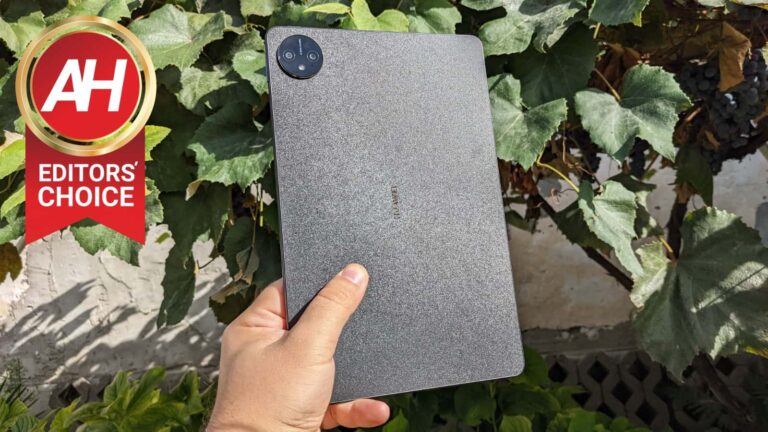
The first thing you’ll notice when you power on this thing is that it has thin bezels. Huawei’s edge detection is really good, luckily, so you can comfortably grip it without a problem. There is also a display camera hole in the top-left corner (looking from a landscape orientation). This tablet is only 5.9mm thick, or should we say thin. It weighs 449 grams, and it’s actually quite comfortable to use. I’ve used noticeably thicker and heavier 11-inch tablets.
One thing to note, is that this weight is made possible by the use of plastic, I’d say. I was unable to find any clear information on what materials Huawei used, and even though the frame feels extremely nice and solid, it doesn’t seem to be cool enough for it to be metal. I could be wrong. The backplate feels like paper, on the other hand. That is great, in a way, as it’s less slippery than glass. I’m not sure what material is this, but it’s matte, and it doesn’t seem to be too prone to collecting fingerprints, at least not yet.
An audio jack is not included, unfortunately
Huawei, unfortunately, decided not to include a 3.5mm headphone jack on this tablet. That is an odd decision in my eyes, for tablets, but there you have it. The buttons are very clicky, and feel really nice to use, no complaints there. There is no IP certification here, or anything of the sort, so you might want to watch out for rain and whatnot.
Two great first-party accessories are on offer
The Huawei MatePad Pro 11 (2022) launched with some interesting accessories. Do note that both of these are sold separately. One is a case that you definitely should get if you’re buying this tablet, and the other is Huawei’s M-Pencil stylus. Let’s talk about the case first, shall we.
The best case + keyboard combo I’ve ever used
This year’s MatePad Pro comes with a redesigned Smart Magnetic Keyboard case. This is the best case I’ve ever used for a tablet. You’re getting this leather-like feel, which is not too slippery. It’s a bit smoother than your regular leather would be, and it feels really nice to the touch. This case is actually a combination of two different parts, which connect one to the other with magnets. One part is the keyboard, and it covers the tablet’s display when connected. You can disconnect it, in which case you end up with a back side of the case, which is magnetically attached to the tablet at all times. There’s also a kickstand on the back.
When the keyboard is connected, you can unfold this case so that it stands on its own, and that the keyboard sits in front of you. The tablet itself remains magnetized to both pieces of the case, and you can type away. The keyboard is actually still really good, as it was on previous iterations of this case. It’s a chiclet-style keyboard, and considering how very little space Huawei had to provide depth for key travel, the company did an amazing job. All in all, it feels like a great case, and a modular one at that. I simply loved using it.
Huawei’s very own stylus is quite useful
You can also buy the second-gen Huawei M-Pencil for this tablet. It’s not as fancy as an S Pen, but it’s far more than your regular stylus. This tablet comes with various features made for this stylus, and it actually feels nice to use. You’re getting two replaceable tips on the inside, and if you’re into sketching, you can really do a lot with this. It has extremely low latency, and 4,096 levels of pressure sensitivity.
Charging it is really easy, as it magnetizes to the side of the tablet, and charges that way. That’s also how it connects to the tablet, so it’s really seamless. Truth be said, I didn’t use it much, except for testing, as I’m not really good at sketching, and I didn’t really find another use for it. That being said, I never really preferred using styluses, so… there you have it. If you do, chances are you’ll like this one.
The Huawei MatePad Pro 11 (2022) has an excellent, color-accurate display
The Huawei MatePad Pro 11 (2022) has a gorgeous display. It is an 11-inch QHD (2560 x 1600) OLED display. It can project up to 1 billion colors, and it is TUV Rheinland certification (display 3.0 certification). This tablet has around a 92-percent screen-to-body ratio, and the display offers a wide P3 color gamut. It is also equipped with 1,440Hz high-frequency PWM dimming, and we’re looking at 274 ppi here.
On paper, it seems to be a great display, and the same goes for real-life use. If you prefer editing your images on a tablet, and you need a truly color-accurate display, this one will do. It also has great viewing angles, it’s quite vivid, and the brightness will be enough for most people, as long as you don’t use it much in direct sunlight. The touch sensitivity is also great, and quite frankly, I don’t have major complaints here.
The performance is great, despite an older SoC
There are two versions of this tablet, one comes with the Snapdragon 888 SoC, and the other with the Snapdragon 870. We tested the latter, so that’s the one we’ll focus on here. There are 8GB and 12GB RAM models, and we tested the former, with 256GB of storage. The tablet worked really well during our usage. For everyday stuff, and even heavier multitasking, we didn’t have any issues. The Snapdragon 870 is still a very powerful processor, and in combination with LPDDR5 RAM and UFS 3.1 flash storage, there were no issues. A hiccup here and there was present, as on almost every device, but nothing worth singling out.
Games ran perfectly fine
I did try out a couple of games during my testing, though do note that Huawei’s AppGallery is still quite limited when it comes to games. I couldn’t test Genshin Impact, Call of Duty, or anything of the sort. Truth be said, I did find some interesting games to check out, though, such as Rise of Kingdoms and Asphalt 9. They both ran fine, and the tablet never got hot, not even too warm, to be quite honest. Too bad more popular games are not available, though. I’m hoping we’ll see more of them in the AppGallery moving forward.
Battery life is not something you will need to worry about
Depending on which variant you get, you’ll get different charging speeds. Both models do include an 8,300mAh battery. The Snapdragon 888 model comes with 66W charging, while the Snapdragon 870 variant supports 40W charging. Both variants do come with a charging brick, by the way.
The battery life on this thing has been great. So, I used it in two different ways, just to get you the most accurate info. The first was with some heavy gaming. I cranked it up over the weekend, and played games quite a bit. The tablet managed to go through over 8 hours of that. In more regular usage, I was able to go over 11 hours on a single charge, over the course of two days. So, yeah, the battery life is not a problem, at all.
The cameras managed to surprise me
I don’t really like talking about tablet cameras, as they’re usually really bad. Well, that’s not really the case here. They’re not great, just to be clear, and they can’t compete with smartphones, but for a tablet, they’re pretty good.
These are some of the best tablet cameras out there
Huawei opted for a 13-megapixel main camera on the back, and even included an 8-megapixel ultrawide unit as well. On the front, you’re getting a 16-megapixel selfie shooter. Let’s start with the front-facing camera. It is actually quite good. Even in dimmer lighting, it ends up providing an image that is brighter than the actual scene. It’s more than passable for video calls, which is what you should be using this for.
The two cameras on the back can actually take some really nice, sharp, and vivid images in good lighting. Things do change when the light goes away, though. In terms of video recording, the footage is quite shaky, due to the lack of EIS, but the image quality is good.
If you plan on using its cameras, this is the tablet to get
So, you can use these cameras and not be completely disappointed, but people really should stay away from taking pictures and videos with tablets. It’s nice to see that OEMs do their best to offer options in that regard, but the vast majority of people probably never fire up rear cameras on tablets. There are always exceptions, of course.
It has some of the best speakers on tablets, period
This is the company’s first tablet to come with ‘Huawei Sound’, which we’ve seen in the company’s laptops. There are six custom speakers included here, and the sound is… excellent. So, even if you’re holding your tablet in a position for gaming, you won’t exactly be able to block the sound. You will, partially, but not nearly enough to make you not enjoy it. If you’re watching a movie, listening to music, or something like that, and you have this thing sitting down or propped up, you’ll be able to truly enjoy it. These are side-facing speakers, and they do offer plenty of bass as well. These are some of the best speakers I’ve ever seen on a tablet, actually, maybe even the best ones. One thing to note, though, sound-wise, is that there is no 3.5mm headphone jack included here. Bluetooth 5.1 is on offer here, and the Snapdragon 888 model comes with Bluetooth 5.2.
The software is really good, but…
The Huawei MatePad Pro 11 (2022) is equipped with Android 12, though it comes without Google services. That is the case with all Huawei devices these days due to the US ban. What you do get is Huawei’s own services, and app store, the so-called AppGallery. Before we get into that, however, do note that HarmonyOS 3 comes pre-installed on top of Android here. That being said, AppGallery grew immensely over the last couple of years. Huawei invested a lot in its development, and the investments do continue.
You may not find all apps & games you’re looking for
There are a lot of apps and games available there, but still, quite a few popular ones are missing. If you’re used to having all the apps readily available in the Google Play Store, you’ll likely miss some here. Also, you cannot use Google apps. Well, you can try sideloading them, and some may work, which is kind of odd, but not all will. Plus you may experience problems with the ones that are working. The selection of games is not that great either, as Genshin Impact is not here, nor is Call of Duty, and so on. Sideloading apps / games is always an option, and Huawei has a solution for that as well, in form of Petal Search.
There are many multitasking features built-in
If you do not need Google apps, however, and you already checked AppGallery for the apps relevant to you, that’s great. Then there’s really nothing that should stop you from buying this tablet, as the software is really good. The animations are buttery smooth, as is the general performance of HarmonyOS 3. That is not surprising at all. You also do get a number of features that take advantage of that large display, such as advanced multitasking. It’s possible to enlarge folders to make them more tablet-friendly, and then launch apps directly from them. You can easily open apps in windows, utilize a split screen feature, and so on. Such features are usually just a swipe away, or a couple of taps. Using the tablet feels really nice, especially in collaboration with its keyboard.
The Huawei MatePad Pro 11 (2022) is not for everyone, but it’s great nonetheless
Starting at €649 the Huawei MatePad Pro 11 (2022) is not cheap by any means. However, Huawei did a great job with it. This tablet runs really smoothly, even during those prolonged gaming sessions, and all that despite the fact it doesn’t have the latest and greatest SoC. It has a great display with excellent touch response, and really fluid software. Even its cameras are serviceable, and if you do choose to get some accessories for it, you won’t be sorry.
However, if you do install tons of obscure apps on your devices, or need some specific ones that are not available in the AppGallery, well, you may have a problem. You can always sideload, but be careful while you do it. Google apps are also out of the question. What I’m trying to say is, the main problem with the tablet is caused by the US ban on Huawei. This product, on its own, is really great, and premium-feeling. It’s up to you to decide whether it’s worth it to you.
Last month, reports indicated that Google was working on a redesign of the shortcut toolbar for its popular Gboard app. Finally, it seems like the wait is almost over, as the beta version of Gboard has received an update showcasing the new design and improved features.
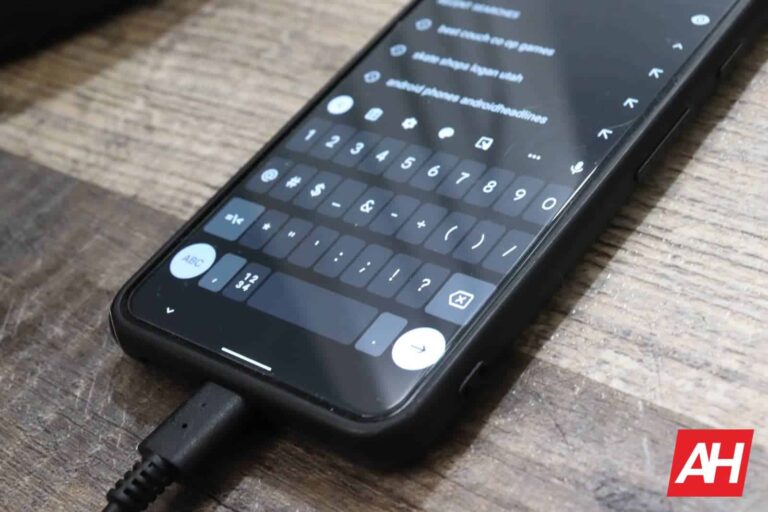
One of the significant changes in the latest Gboard redesign is the relocation of customization options for buttons on the quick-access toolbar. While users had to previously tap on the three-dot menu to customize the buttons, with this new update, Google has moved this option to the left edge of the menu bar and replaced it with a four-square button featuring rounded corners. Moreover, users can also access the emoji option and language switcher through this redesigned menu button.
Changes to the overflow menu
In addition to relocating the customization options for the quick-access toolbar, Gboard’s latest redesign also allows for greater customization options. Previously limited to four, users can now add an unlimited number of shortcuts to the overflow menu, with the ability to drag and rearrange them to suit their preferences. Additionally, users can even replace the voice search button with any other shortcut by simply dragging and dropping it to the overflow menu, making for a more personalized and intuitive experience.
Further, the update also introduces a new Privacy menu to Gboard’s settings, providing a dedicated place for users to monitor Google’s data collection policies. However, this menu does not offer any new settings and contains information that was previously available under the ‘Advanced’ section.
It is also worth noting that the new update numbered 12.6.06.491625702, is currently in beta testing. Therefore, users who want to access the new redesign will have to either join the beta channel by clicking the Join button on Gboard’s Play Store page or download the latest version from a third-party store like APKMirror.
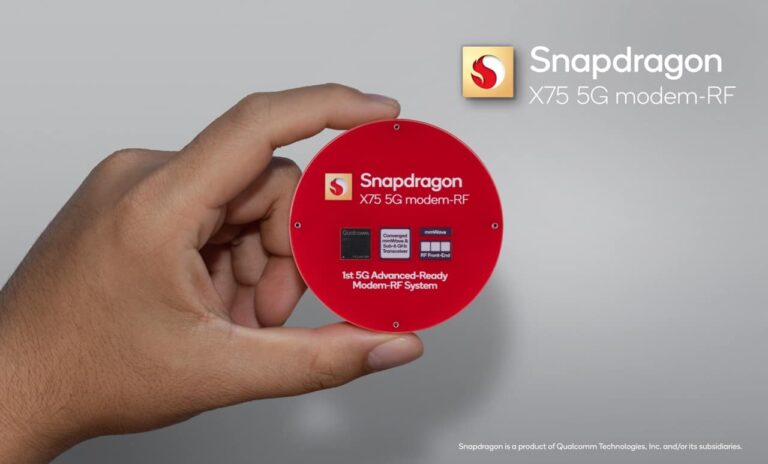
Ahead of MWC later this month, Qualcomm has announced a new 5G modem in the Snapdragon X75. The company claims that this new modem “sets the benchmark for smartphone connectivity with the world’s first 5G Advanced-ready Modem-RF System”.
This is the 6th generation modem-to-antenna solution and it’s the first that is ready to support 5G Advanced. Which is going to be the next phase of 5G. This does introduce new architecture, a new software suite and includes numerous world’s first features to push the boundaries of connectivity. This includes latency, power efficiency, coverage and mobility.
It also uses a dedicated hardware tensor accelerator, the Qualcomm 5G AI Processor Gen 2. Which will enable over 2.5 times better AI performance. This is when compared to Gen 1.
What other features does the Snapdragon X75 have?
Qualcomm is proud to note that this is the first in the world to have 10-carrier aggregation for mmWave, 5x downlink carrier aggregation and FDD uplink MIMO for sub-6 GHz bands. This is going to allow for unparalleled spectrum aggregation and capacity.
It also has converged transceiver for mmWave and Sub-6 paired with new Qualcomm QTM565 fifth generation mmWave antenna modules. This will reduce cost, board complexity, hardware footprint and power consumption.
Qualcomm has also include AI-based sensor-assisted mmWave beam management for superior connectivity reliability and AI-based location accuracy enhancements. Qualcomm 5G PowerSave Gen 3 and Qualcomm RF Power Efficiency Suite is included here for extended battery life, carrying on from the most recent modems and SoCs from the company.
The new Snapdragon X75 5G modem is currently sampling and the company expects that commerical devices will launch in the second half of 2023. While we don’t know for sure, it sounds like this will be part of the Snapdragon 8+ Gen 2 that typically launches for the second half of the year.
The latest apk — this is the file format of Android apps — teardown from 9to5 Google’s team of the YouTube Music app unearthed signs that it may be next to join Google Meet’s ever growing list of group activities.
Wait, you didn’t know that you can do group things in Meet? Well, you could, especially if you are on Android! Google Right now, Meet can sync YouTube videos for a group call, so you can watch them together, and it will even let you play cards and trivia too.
The most recent analysis of the YouTube Music app showcased that the service may be next up to join Meet’s features, as some notable lines of code pointed to this possibility. If and when that comes true, users will be able to use the YouTube Music app to listen to music together, which is something that Meet already allows with Spotify.
How to do group activities in Google Meet?
Google is great at cooking up exciting features for its services.
But how does this work exactly? Well, it’s rather straightforward. Let’s use YouTube as an example:
Join a Meet
Open the More Actions menu at the bottom
Click Activities
Select YouTube
Bam! Now all that’s left is to select a video
After that, all participants will be viewing the same content, at the same time, while still being on the call. It looks like a picture-in-picture (PIP) mode and users can choose if they’d like the call or the activity to take center stage. A warning will prompt you if anyone is falling behind due to a bad connection so don’t worry about checking on everyone. And by the way, these steps are the same for all other supported features like Uno, Kahoot or Spotify, but the designated apps will be required.
These group activities are made possible thanks to Live Sharing. This is a feature of Meet that any Android developer can take advantage of. Most apps can use this to — at the very least — sync and show up in PIP. But interactivity is also an option, so it will certainly be exciting to see what other activities become available in the future.
For everyone else that’s not on Android though, your options are more limited. But hey — putting a video on and sharing the tab in Meet is always an option, albeit if a bit laggy sometimes. Let’s hope that this fun feature becomes available on more devices soon
POCO’s latest M series smartphone, Poco M5 is now available globally. POCO M series consistently offers great performance and bargain basement pricing. Let’s dive in and see how the new POCO M5 stacks up against previous POCO devices and against the competition.
POCO M5 Unboxing
The yellow box reveals a yellow insert with a clear TPU case, screen protector, SIM tool, and paperwork. Underneath is the Black Poco M5 smartphone. Below the smartphone are an 18W charging brick, and a USB-C cable. The retail box has everything to get you going in terms of charging and device protection.
Hardware design is derivative yet eye-catching
First impressions –at first glance the newer M5 looks more like the POCO M3 from 2020. The POCO M4 series didn’t include a base version hence there isn’t a predecessor from 2021 to compare the new POCO M5 against.
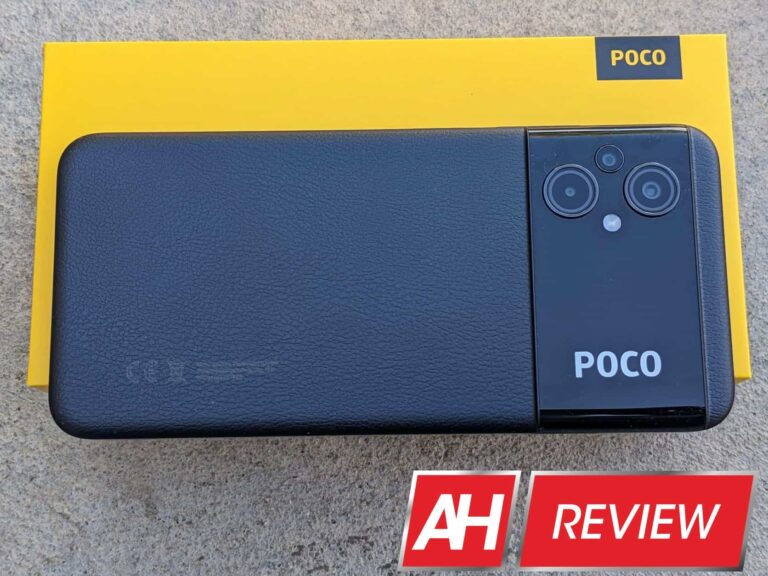
I like the textured plastic back cover that mimics faux leather. It resists fingerprints and smudges quite well and provides a good grip without a case. The rear camera module design is also eye-catching in my opinion. The POCO logo is large enough to be spotted from at least 10 feet away.
The rails on the sides are flat and mimic the look of Redmi Note 11 series. On the top rail is a headphone jack and a microphone. Moving on to the left hand side, there’s a dual-SIM tray which also contains a slot for a micro SD card. Down on the bottom rail there’s a USB-C charging port, microphone, and a single speaker grille. The right-hand side rail has the power button with an integrated fingerprint scanner and above it is the volume rocker.
Display has a teardrop to house the selfie camera
The front display is a 6.58″ FHD+ IPS LCD panel. Refresh rate is 90Hz which is a nice touch for a budget device. Instead of the usual punch hole, the selfie camera is a teardrop and bezels are a bit chunkier than more expensive devices. To give you an idea about the bezels, mid-range devices that are physically the same size tend to sport around 6.8-inch displays.
One thing that I cannot wrap my head around is that the POCO M5 has a smaller 5,000 mAh battery versus the 6,000 mAh in the older POCO M3 and yet for some inexplicable reason is heavier. Both have the vegan leather back, plastic frame and Gorilla Glass 3. So I am not sure what is going on here.
Despite the hefty 201 gram weight, the overall ergonomics are great but this is a large phone. So folks with small hands might want to check out the slightly more petite POCO M5s. The POCO M5 comes in Black, Green, and Yellow. Three versions are offered in terms of storage and RAM: 4GB+64GB, 4GB+128GB, and 6GB+128GB. The Green looks the best of the bunch, unfortunately, we only got the Black color device for review.
The 6.58″ IPS LCD display is quite good
The POCO M5 has a 6.58″ IPS LCD dot display. It has a 90Hz refresh rate and the ability to toggle between 30Hz/60Hz/90Hz depending on scrolling, video, or gaming apps. The resolution is 1080 x 2408 pixels, yielding a pixel density per inch of 401 PPI. The aspect ratio is 20:9 aspect ratio which is what most modern smartphones have. The 83.6% screen-to-body ratio is quite good for a budget smartphone, in my opinion.
POCO kept the same Corning Gorilla Glass 3 to protect the LCD display which isn’t bad. Screen brightness is 500 nits, on an extremely hot and sunny day in Southern California, it still displayed enough information in direct sunlight. Check out the picture and decide for yourself.
POCO M5 performance is excellent for a sub €200 device
POCO M5 is powered by a MediaTek Helio G99 chip based on the 6nm manufacturing node. The choice of a better processor than the slightly more expensive POCO M5s is a bit strange. But I guess POCO/Xiaomi have enough marketing data to justify the hardware choices they made.
Geekbench 5 scores are almost as good as the Snapdragon 7 series. Single-core score is 552 and the multi-core score is 1900. My current daily driver is a Pixel 5, and that device has a single-core score of 590 and a multi-core score of 1616. So you can see that from a performance perspective, the POCO M5 should not struggle with daily tasks including gaming at medium settings.
During my review period, the phone had zero hiccups with Twitter, YouTube, YouTube Music, and some light gaming. POCO sent us the top-end M5 with 128GB storage and 6GB RAM. MIUI 13 allows you to extend the onboard RAM by 2GB if you intend to use the phone extensively for gaming.
MIUI 13 is polished and stable
POCO M5 out of the box came with MIUI 13 and the August 2022 security update. POCO M5 is device number 12 for review in 2022 courtesy of POCO/Xiaomi. So it is safe to say that there isn’t something new to report as far as MIUI13 goes. I wasn’t able to find anything new to report in the POCO launcher as well.
Android as an operating system has matured quite a bit and MIUI is also now making incremental changes versus radical ones from a few years ago. And this is not a bad thing. Operating systems for modern smartphones have plateaued somewhat.
I like that the POCO launcher keeps things fairly close to stock Android or Pixel experience from around late 2020. Another plus with MIUI is all the features you get across the entire range, from a budget smartphone like the M5 to the flagship POCO F4 GT.
Now that we have all the platitudes out of the way, let’s address some of the software downsides. The obvious one is pop-up ads. To keep the price low, POCO/Xioami do bundle ads in the UI experience on their budget offerings. However, you can improve your software experience dramatically by getting rid of the pesky ads. Just follow our step-by-step guide shown below.
Step-by-step guide to turning off Ads
During initial setup, out of the box ensure that you turn off Personalized Recommendations. Once you have the phone set up and arrive at the home screen, then manually go into Themes, File Manager, Security, and Cleaner apps. Once you are in the app, go to Settings and turn off Recommendations/Ads in each of these specific apps.
After performing these steps you will be able to pretty much eliminate ads from showing up during daily use. Five minutes of extra effort is worth having an ad-free user experience.
POCO M5 has solid battery life
POCO M5 has a 5,000 mAh battery which is smaller than the older POCO M3. Losing 1,000 mAh doesn’t really impact the battery life much because the newer Helio G99 is based on a far more efficient 6nm manufacturing process.
On average during my review, I saw battery life hover around 7-hour screen on time. With more outdoor usage it would be slightly less than 7 hours and on Wi-Fi, you can even eke out close to 7.5 hours with this smartphone. If you are upgrading from the POCO M3 though be warned that the older reverse charging feature is no longer available.
For light to moderate users, this is definitely a two-day charge cycle smartphone. Even heavy users should not fear that they will run out of battery as long as they start the day with 100% in the tank.
The recharging speed is still 18W and there’s a charging brick in the box. Charging times are a bit on the slow side. Zero to 50% is about an hour and a full charge takes closer to just over 2 hours. So it’s probably best that you charge this phone overnight.
Camera performance is good for the price
There is a 50MP main camera on the rear of POCO M5. The other two cameras are just 2MP with f/2.4, one is for macro shots and the other helps with depth sensing. In the front, there is a 5MP f/2.0 selfie camera. So on paper, the main camera is a slight upgrade while the selfie camera is a definite downgrade.
The quality of the photos during the daytime is pretty good. Pictures tend to be colorful, and vivid with good detail. Colors are generally accurate although a bit on the cooler side with good dynamic range. Sharpness is good enough for the price. Overall this is a good camera for daytime still photography, especially outdoors.
Once you get into indoor lighting or twilight situations the results are not that great. Pictures tend to get noisy quickly and in nighttime lighting they can get blurry in a jiffy. Overall though, the results are good enough to remain competitive in the budget smartphone market.
Macro shots are definitely underwhelming. I wasn’t able to get one reasonably clear shot to include in the camera sample gallery. Portraits on the other hand in outdoor lighting come out great thanks to the main camera and the 2MP depth sensor. Details are preserved well and there’s good edge detection and background blur.
Selfie camera results tend to suffer from poor white balance and suffer from overexposure, especially in video mode. Portraits with the selfie camera are so-so with a hit-and-miss in terms of edge detection and background blur.
If you like to take videos you might want to invest in a gimbal because while colors, dynamic range, and white balance are good the videos are quite jittery even if you are shooting while walking at a slow pace. Selfie videos are not that great and the microphone recording quality is poor. Take a look at some sample pictures in our Flickr gallery below.
My main gripes are no ultrawide camera and a subpar selfie camera experience. Other than that the POCO M5 does the job in terms of camera performance for being a sub €200 phone.
POCO M5 Audio and Connectivity impressions
I was bummed to see only a single bottom-firing speaker on the POCO M5. And it is very easy to cover it up, especially while gaming. Usually, we see POCO/Xiaomi devices with dual speakers and top and bottom speaker grilles. So it is disappointing that the M5 has only one speaker.
There is one redeeming audio feature and that is the headphone jack. Output from the jack is quite good and the same is true while using wireless earbuds via Bluetooth.
The POCO M5 got LTE or LTE+ signal along with the VoLTE symbol out of the box on the T-Mobile network. I am based in a hilly region here in Southern Californi and so the data speeds aren’t that great. POCO M5 download speeds were around 1-2 Mbps but I blame my network and not the smartphone. My daily driver – Pixel 5 – gets equally poor data download speeds.
POCO M5 does all the regular tasks – calling, texting, updating apps, browsing the web, or watching videos with ease on data and Wi-Fi. MIUI 13 offers you additional connectivity options such as Mi Share, Nearby Share, Screen Cast, and IR blaster. Just like the POCO M5s, this POCO M5 has NFC which works great. And yes, it also has the constant NFC on notification bug. I hope POCO/Xioami fixes this in a future software update.
Is the POCO M5 worthy of your hard-earned money?
The Poco M5 is a great budget smartphone. It has great-looking hardware, excellent benchmark performance, fluid software experience, superb battery life, and a fairly good 90Hz display. There are some nice perks like a headphone jack, micro SD card support, and NFC onboard. And the main camera performance is more than adequate considering the price.
So what are the downsides you ask? Well, the single speaker is quite average, the charging speeds are quite slow, the selfie camera could be better and there’s no ultrawide camera.
For an entry-level smartphone, I believe the POCO M5 checks all the right boxes. If you want a smartphone that has better speakers, faster-charging speeds, and an ultrawide camera, well it’s easy. Just get the slightly more expensive POCO M5s. But keep in mind that the more expensive device has an inferior MediaTek processor. But for just €189 the POCO M5 packs a serious punch for a budget smartphone.